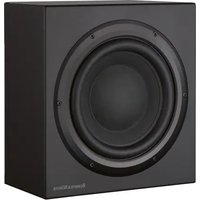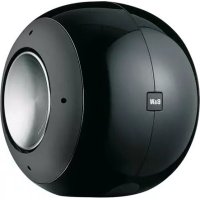
PV1 - Subwoofer BOWERS & WILKINS - Free user manual and instructions
Find the device manual for free PV1 BOWERS & WILKINS in PDF.


| Product type | Active subwoofer |
| Brand | Bowers & Wilkins |
| Model | PV1 |
| Mains power | 230 V or 120 V depending on version (see label on the device) |
| Protection fuse | Value indicated on the device, do not replace with a different model |
| Inputs | Line level (LINE IN), speaker level (SPEAKER IN) |
| Outputs | Line level (LINE OUT for daisy-chain) |
| Controls | Volume, low-pass filter (Hz), phase switch, equalization (EQ), mode selector (On/Auto/Standby) |
| Applications | Home theater (LFE channel) and 2-channel stereo |
| Positioning | Flexible, ideally near satellite speakers; avoid corners to limit resonances |
| Maintenance and cleaning | Dust with a dry, soft cloth; for aerosol, spray onto the cloth only |
| Electrical safety | Do not expose to moisture or rain; unplug before cleaning or prolonged disuse |
| Repairability | Entrust any repair to a qualified technician; spare parts must conform to original parts |
| Warranty | 5 years for cabinet and speaker, 2 years for electronic components |
| Operating environment | Ambient temperature, away from heat sources, proper ventilation, at least 50 cm from devices sensitive to magnetic fields |
Frequently Asked Questions - PV1 BOWERS & WILKINS
User questions about PV1 BOWERS & WILKINS
0 question about this device. Answer the ones you know or ask your own.
Ask a new question about this device
Download the instructions for your Subwoofer in PDF format for free! Find your manual PV1 - BOWERS & WILKINS and take your electronic device back in hand. On this page are published all the documents necessary for the use of your device. PV1 by BOWERS & WILKINS.
USER MANUAL PV1 BOWERS & WILKINS
English Limited Warranty
Dear customer,
Welcome to B&W.
This product has been designed and manufactured to the highest quality standards. However, if something does go wrong with this product, B&W
Loudspeakers and its national distributors warrant free of charge labour (exclusion may apply) and replacement parts in any country served by an official B&W distributor.
This limited warranty is valid for a period of five years from the date of purchase or two years for electronics including amplified loudspeakers.
Terms and Conditions
1 The warranty is limited to the repair of the equipment. Neither transportation, nor any other costs, nor any risk for removal, transportation and installation of products is covered by this warranty.
2 This warranty is only valid for the original owner. It is not transferable.
3 This warranty will not be applicable in cases other than defects in materials and/or workmanship at the time of purchase and will not be applicable:
a. for damages caused by incorrect installation, connection or packing,
b. for damages caused by any use other than correct use described in the user manual, negligence, modifications, or use of parts that are not made or authorised by B&W,
c. for damages caused by faulty or unsuitable ancillary equipment,
d. for damages caused by accidents, lightning, water, fire heat, war, public disturbances or any other cause beyond the reasonable control of B&W and its appointed distributors,
e. for products whose serial number has been altered, deleted, removed or made illegible,
f. if repairs or modifications have been executed by an unauthorised person.
4 This guarantee complements any national/regional law obligations of dealers or national distributors and does not affect your statutory rights as a customer.
How to claim repairs under warranty
Should service be required, please follow the following procedure:
1 If the equipment is being used in the country of purchase, you should contact the B&W authorised dealer from whom the equipment was purchased.
2 If the equipment is being used outside the country of purchase, you should contact the B&W national distributor in the country of residence who will
advise where the equipment can be serviced. You can call B&W in the UK or visit our web site to get the contact details of your local distributor.
To validate your warranty, you will need to produce this warranty booklet completed and stamped by your dealer on the date of purchase. Alternatively, you will need the original sales invoice or other proof of ownership and date of purchase.
Owner's manual
IMPORTANT SAFETY INSTRUCTIONS
CAUTION RISK OF ELECTRIC SHOCK DO NOT OPEN

Caution:
To reduce the risk of electric shock, do not dismantle the apparatus and do not expose the apparatus to rain or moisture. No user-serviceable parts inside. Refer servicing to qualified personnel.
Explanation of Graphical Symbols:
The lightning flash within an equilateral triangle is intended to alert you to the presence of uninsulated "dangerous voltage" within the product's enclosure that may be of sufficient magnitude to constitute an electric shock to persons.

The exclamation point within an equilateral triangle is intended to alert you to the presence of important operating and maintenance (servicing) instructions in the literature accompanying the appliance.
WARNING:
1 Read Instructions - All the safety and operating instructions should be read before the appliance is operated.
2 Retain Instructions - The safety and operating instructions should be retained for future reference.
3 HeedWarnings-All warnings on the appliance and in the operating instructions should be adhered to.
4 Follow Instructions - All operating and use instructions should be followed.
5 Installation - Install in accordance with the manufacturer's instructions.
6 Power Sources - This product should be operated only from the type of power source indicated by the marking adjacent to the power cord entry. If you are not sure of the type of power supply to your home, consult your product dealer or local power company.
7 Grounding or Polarisation - The appliance is not required to be grounded. Ensure the plug is fully inserted into the wall outlet or extension cord receptacle to prevent blade or pin exposure. Some versions of the product are equipped with a power cord fitted with a polarised alternating line plug (a plug having one blade wider than the other). This plug will fit onto the power outlet only one way. This is a safety feature. If you are unable to insert the plug fully into the outlet, try reversing the plug. If the plug should still fail to fit, contact your electrician to replace your obsolete outlet. Do not defeat the safety purpose of the polarised plug. When using an extension power-supply cord or a power-supply cord other than that supplied with the appliance, it should be fitted with the appropriate moulded-on plugs and carry safety approval appropriate to the country of use.
8 Power Cord Protection - Power-supply cords should be routed so that they are not likely to be walked on or pinched by items placed on or against them, paying particular attention to cords at plugs, convenience receptacles and the point where they exit from the appliance.
9 Overloading - Do not overload wall outlets, extension cords or integral convenience receptacles, as this can result in a risk of fire or electric shock.
10 Ventilation - The product must be properly ventilated. Do not place the product on a bed, sofa, or other similar surface. Do not cover the product with any items such as tablecloths, newspapers, etc.
11 Heat - The product should be situated away from heat sources such as radiators, heat registers, stoves, or other products (including amplifiers) that produce heat. No naked flame sources, such as lighted candles, should be placed on the apparatus.
12 Wall or Ceiling Mounting - The product should be mounted to a wall or ceiling only as recommended by the manufacturer.
13 Water and Moisture - To reduce the risk of fire or electric shock, do not expose the product to rain, dripping, splashing or excessive moisture such as in a sauna or bathroom. Do not use this product near water - for example, near a bathtub, washbowl, kitchen sink, laundry tub, in a wet basement, or near a swimming pool and the like.
14 Object and Liquid Entry - Never push objects of any kind into this product through openings, as they may touch dangerous voltage points or short out parts that could result in a fire or electric shock. Never spill liquid of any kind on the product. Do not place any object containing liquid on top of the product.
15 Cleaning - Unplug the product from the wall outlet before cleaning. The cabinet of the subwoofer may be cleaned by dusting with a dry cloth. If you wish to use an aerosol cleaning spray, do not spray directly on the cabinet; spray onto the cloth. Be careful not to disturb the drive units.
16 Attachments - Do not use attachments not recommended by the product manufacturer, as they may cause hazards.
17 Accessories - Do not place this product on an unstable cart, stand, tripod, bracket or table. The product may fall, causing serious injury to a child or adult, and serious damage to the product. Use only with a cart, stand, tripod, bracket or table recommended by the manufacturer or sold with the product. Any mounting of the product should follow the manufacturer's instructions and should use a mounting accessory recommended by the manufacturer.
18 Moving the appliance - A product and cart combination should be moved

with care. Quick stops, excessive force and uneven surfaces may cause the product and cart combination to overturn.
19 Non-use Periods - The power cord of the appliance should be unplugged from the outlet during lightning storms or when the apparatus is left unused for a long period of time.
20 Servicing - Do not attempt to service this product yourself, as opening or removing covers may expose you to dangerous voltage or other hazards. Refer all servicing to qualified service personnel.
21 Damage Requiring Service - Unplug this product from the wall outlet and refer servicing to qualified personnel under the following conditions:
a When the power-supply cord or plug has been damaged.
b If liquid has been spilled or objects have fallen into the appliance.
c If the product has been exposed to rain or water.
d If the product does not operate normally by following the operating instructions. Adjust only those controls that are covered by the operating instructions, as an improper adjustment of other controls may result in damage and will often require extensive work by a qualified technician to restore the product to its normal operation.
e If the product has been dropped, or damaged in any way.
f When the product exhibits a distinct change in performance - this indicates a need for service.
22 Replacement Parts - When replacement parts are required, be sure the service technician has used
replacement parts specified by the manufacturer or have the same characteristics as the original part. Unauthorized substitutions may result in fire, electric shock or other hazards.

23 Mains Fuses - For continued protection against fire hazard, use fuses only of the correct type and rating. The correct fuse specification for each voltage range is marked on the product.
24 Safety Check - Upon completion of any service or repairs to this product, ask the service technician to perform safety checks to determine that the product is in proper operating condition.
25 Magnetic Fields - the product creates a stray static magnetic field. Do not place any object that may be damaged by this magnetic field (eg cathode ray tube televisions or computer monitors, audio and video tapes and swipe cards) within 0.5m (2 feet) of the appliance. The appliance may cause distortion of cathode ray tube images beyond this distance.
26 The only means of completely disconnecting the product from the power supply is by removing the power cord from the wall outlet or the product. Either the wall outlet or the power cord entry to the product must remain freely accessible at all times while the apparatus is in use.
Introduction
Thank you for purchasing a B&W Active Subwoofer.
Since its foundation in 1966, the continuing philosophy of B&W has been the quest for perfect sound reproduction. Inspired by the company's founder, the late John Bowers, this quest has entailed not only high investment in audio technology and innovation but also an abiding appreciation of music and the demands of film sound to ensure that the technology is put to maximum effect.
This subwoofer has been designed for Home Theatre installations and to augment the bass performance of full-range speakers in 2-channel audio use.
Please read through this manual fully before using the subwoofer. All sound installations require some planning and experimentation if you are to get the best out of the products used and this manual will guide you in this process.
As the subwoofer is connected to the electricity power supply, it is important that you familiarise yourself with the safety instructions and heed all warnings.
Keep this manual in a safe place for future reference.
B&W products are distributed to over 60 countries worldwide and we maintain an international network of carefully chosen
and dedicated distributors. If you have a problem, which your dealer cannot resolve, our distributors will be more than willing to assist you.
Unpacking
(figure 1)
The easiest way to unpack the subwoofer and avoid damage is as follows:
- Open the carton flaps right back and invert the carton and contents.
- Lift the carton away from the product.
We recommend that you retain the packaging for future use.
In addition to this manual, the carton should contain:
1 Subwoofer
1 Signal lead
1 Mains lead
Note:
230V models may contain 2 mains leads, one with a plug having two round pins and the other having three rectangular pins.

Warning:
Do not attempt to use a mains
lead having a plug
inappropriate to the outlet
sockets of the mains supply.
Inputs, controls and indicators
Important safety information

For aesthetic reasons the rating label of this device is affixed to the underside, in a position where it is not visible in normal use. For this reason,
facsimiles of four variations of the information label are reproduced in figure 2. There may be small variations to the markings in some markets, but the power supply voltage rating and fuse rating will always be shown in one of these formats.
Only use the product if the marked voltage rating matches that of the power supply.
Do not replace the fuse with any other type than that marked.
The input panel (figure 2)
The control panel (figure 3)
1 LINE IN socket
2 LINK OUT socket
3 SPEAKER IN socket
4 POWER input socket
4a Power supply rating
5 FUSE holder
5a Fuse rating
6 Volume control (
7 Low-pass frequency control (Hz)
8 Phase switch (PHASE)
9 Equalisation switch (EQ)
10 Standby/auto/on switch (MODE)
In addition, there is an LED on top of the subwoofer that shows the operating state.
What the subwoofer does
Application: Home Theatre
The primary function of the subwoofer is to reproduce signals from the Low Frequency Effects (LFE) channel. In addition, the processor may be configured to divert the low bass portion of some or all of the other channels and add it to the LFE information by configuring those speakers to 'small' in the processor set-up procedure.
Application: 2-channel audio
The subwoofer is used to extend the bass response beyond that provided by the satellite speakers. Best results are obtained if the satellite speakers are run full range as normal directly from the power amplifier. The subwoofer low-pass filter is then set so that its output rises as that of the satellite speakers falls naturally.
Positioning the subwoofer
Because the subwoofer produces only low-frequency sounds, positioning is less critical in some respects compared to full-range speakers. Directional information is much less precise and you have more choice where to place the speakers to good effect. This said, best results are obtained if the subwoofer is placed between the satellite speakers or in the vicinity of one of them. If you use two subwoofer, it is best to put one near each satellite speaker.
Placing the subwoofer behind the listeners, even in surround sound installations, generally gives inferior imaging, but may be an acceptable compromise if domestic considerations dictate.
As with all speakers, the proximity of room boundaries affects the sound. Bass is generally increased as more surfaces come into close proximity with the speakers. Unlike full-range speakers, however, you can always restore the correct overall system balance by adjusting the volume level of the subwoofer. The more boost you get from the room, the less hard the speaker has to work; but there is a down side. Corner positions often excite more low-frequency room resonances, making the bass more uneven with frequency.
There is no substitute for experiment as all rooms behave differently, so try the subwoofer in a variety of positions before making a final decision. A piece of music with a bass line ascending or descending the musical scale is useful for assessing the smoothness of the bass response. Listen for exaggerated or quiet notes. Having a separate subwoofer does enable you to optimise for room resonances independently from siting the satellite speakers for best imaging.
If the subwoofer is to be used in a confined space (eg in custom furniture), the space must be ventilated to allow sufficient air to circulate and cool the unit. Ask your dealer for advice.
Electrical connections
Disconnect all sound system equipment from the power supply until the signal connections have been made and checked. This avoids the risk of damage whilst connections are made or broken.
Application: Home Theatre (figure 4)
Connect the subwoofer LINE IN socket (1) to the line-level output of the processor marked LFE or SUBWOOFER, using a suitable coaxial interconnect cable. If using more than one subwoofer, daisy chain them together by connecting the LINK OUT socket (2) of the first to the LINE IN socket (1) of the next.
Application: 2-channel audio
For 2-channel operation, use speaker level rather than line level connections. The subwoofer presents a high impedance load to the stereo power amplifier and takes very little current, so may be connected in parallel with the main speakers with no adverse effects.
Using one subwoofer (figure 5)
The left and right channels are both connected and summed in the subwoofer amplifier.
Using the cable provided with the subwoofer, insert the rectangular RJ11 plug into the SPEAKER LEVEL IN socket (3) on the underside of the subwoofer. Connect the inner cores to the amplifier outputs as follows:
Yellow-Left+
Green - Left -
Red - Right +
Black - Right -
Using two subwooers (figure 6)
If one subwoofer can be placed close to the left speaker and the other close to the right speaker, stereo separation is best maintained by connecting each subwoofer to a separate output channel of the amplifier.
Using the cables provided with the subwoofoers, insert the rectangular RJ11 plug into the SPEAKER IN socket (3) on the underside of each subwoofer. Connect the inner cores to the stereo power amplifier outputs as follows:
Left subwoofer:
Yellow - Left +
Green - Left -
Red-Unconnected
Black - Unconnected
Right subwoofer:
Yellow - Unconnected
Green - Unconnected
Red - Right +
Black - Right -

Warning:
The unconnected inner cores must be properly insulated to prevent short circuits and possible damage to the power amplifiers.
If the subwoofer cannot be placed close to the main speakers, better results may be obtained by feeding the left and right channels to both subwoofer, connecting both subwoofer as shown in figure 5 and described above in the section "Using one subwoofer".
Using more than one subwoofer
Using more than one unit in a single installation can improve performance in the following ways:
- Maintain stereo separation to the lowest frequencies.
- Cope with larger listening rooms.
- Enable greater maximum sound output - often useful for effectively reproducing special effects in Home Theatre applications.
- Smooth out the effects of low-frequency room resonances.
Double-check the connections
Before auditioning the sound quality of your new installation and fine-tuning it, double-check the connections. All too often, users complain that they cannot get a decent sound however they set the controls, only to discover something has been wrongly connected. Make sure that:
- The phasing is correct - there should be no positive to negative connections to any of the speakers. If something is out of phase you may get a fuzzy sound with an imprecise and floating image, a lack of bass or a combination of the two.
- There are no left to right mix-ups - this can result, for example, in the orchestra being the wrong way round or, more disastiously, sounds on your Home Theatre going in the opposite direction to the action on the screen.
Switching on and off
We recommend that you switch the subwoofer on after any equipment feeding signals to it. Similarly, when switching off, switch the subwoofer off first.
The MODE standby/auto/on switch (10) does not isolate the amplifier completely from the power supply. It maintains a low-power input to an auxiliary sensing circuit.
The switch (10) operates as follows:
On:
With the switch in this position, the amplifier remains permanently on, and the light glows green.
Auto:
On first switching the subwoofer to Auto, the amplifier goes into standby mode, and the light glows red. When an input signal is detected, the amplifier automatically becomes fully active and the light glows green. After a period of about 5 minutes without an input signal, the amplifier automatically reverts to standby mode and the light glows red.
Standby:
In this position, the amplifier is in permanent standby, and the light glows red.
If, when set to Auto, the subwoofer should repeatedly go into standby mode when playing programme via the LINE IN socket, try reducing the volume setting on the subwoofer and restoring the balance by increasing the subwoofer output of the processor.
If the subwoofer is to be out of use for an extended period of time, we recommend you isolate it from the power supply by removing the plug from the power socket.
Setting the controls
There are 4 controls to consider:
The volume control (4) (6)
The low-pass frequency control (Hz) (7)
The PHASE switch (8)
The EQ (equalisation) switch (9)
The optimum settings depend on the other equipment used with the subwoofer. If using more than one subwoofer, ensure the controls on each one are set the same.
Use with home theatre decoders
The B&W Active Subwoofer is not a THX® licensed component, but may be used with a THX® controller if desired.
- Set the volume control initially to the 12 o'clock (detent) position.
- Set the EQ switch initially to position i.
- Set the PHASE switch initially to +
- The setting of the low-pass frequency control is irrelevant.
See also the section "Fine tuning".
If you have a THX® controller, ensure that the subwoofer function is enabled. When so configured it incorporates all the filtering and level setting required for the subwoofer in all modes. For level calibration, the internal test noise and channel level controls in the THX® controller should be used. In all cases the levels should be set to obtain 75dB SPL (C-weighted) at the listening position from the controller's internal noise test signal. The detent position of the volume control on the subwoofer corresponds to the THX® standard of 88dB SPL at 1m for an input at the LINE IN socket of 100mV.
With other decoders, configure the front and surround speakers to "large" or "small" as appropriate before setting the levels. Use the internal noise test signal and volume controls of the decoder to set the levels of all the speakers. If there is not enough range in the processor to achieve the correct levels, adjust the volume control on the subwoofer.
Inexpensive sound level meters are readily available from electronics stores and should be used to calibrate the levels. Refer to your decoder manual for further details on how to set the levels.
2-channel audio
- Set the volume control initially to the 12 o'clock (detent) position.
- Set the EQ switch initially to position i.
- Set the PHASE switch initially to -.
- Set the low-pass frequency to the -6dB cut-off frequency of your satellite speakers.
Both -3dB and -6dB figures are to be found in the specification of each B&W speaker model. However, if the manufacturer of the satellite speakers does not quote a -6dB frequency, but only a -3dB frequency, the optimum setting for the low-pass filter frequency control will be between 0.6 and 0.9 times the -3dB frequency, depending on the roll-off
alignment. The more gradual the roll-off rate of the satellite speakers, the lower the frequency should be set.
See also the section "Fine tuning".
Fine-tuning
Home theatre
With home theatre the subwoofer (LFE) signal is a separate channel rather than an extension of the signal to the satellite speakers. The low-pass filter does not operate in the line level input circuit, because the processor provides all the filtering for any speakers set to "small". However, the position of the phase switch must still be assessed. Normally the phase will be set to + , but if the subwoofer is positioned at a distance significantly different from the other speakers, or the power amplifier driving the other speakers happens to invert the signal, the - position may be preferable. Listen with the switch in both positions and choose the one that gives the fullest sound. If there is little difference, leave the switch at + .
Surround sound processors normally have a calibrated noise signal that can be used to set the relative levels of all the speakers, making the task somewhat more straightforward than for 2-channel audio. However, do not be afraid to alter the settings to your personal preference.
2-channel audio
The optimum settings of the PHASE switch and the low-pass filter frequency control are inter-related and also dependent on the low-frequency cut-off characteristic of the satellite speaker. However, the settings recommended above for the low-pass filter frequency and PHASE have been chosen to add well to most bass alignments, whether closed-box or vented-box (reflex), with -6dB frequencies within the adjustment range of the subwoofer.
Set the system up in the preferred position and play some programme with a steady bass content.
Using the initial settings guide, first check the setting of the PHASE switch. Choose the position that gives the fullest sound. Normally the recommended position will be optimum, but may not be in certain circumstances, such as if the power amplifiers feeding the satellite speakers invert the signal, or if the subwoofer are not placed close to the satellite speakers.
Next, set the loudness of the subwoofer relative to the satellite systems to your liking. Use a wide variety of programme material to get an average setting. One that sounds impressive on one piece may sound overpowering on another. Listen at realistic levels as the perception of balance varies with sound level.
Finally, adjust the low-pass filter frequency to give the smoothest transition between the subwoofer and satellite speakers. This is probably the most difficult to optimise.
All applications
The EQ switch alters the bass extension of the subwoofer. The lower the frequency, the more the driver diaphragm must move to
achieve a given loudness level. You can therefore trade off bass extension for a higher average output level. Position i gives the greatest bass extension and position iii the least. We recommend you use position i unless the subwoofer shows signs of distress at the required replay level.
If you get problems with uneven bass - if certain bass notes are exaggerated more than others - then you probably have a room interface problem and it is worth experimenting with the placement of the subwoofer. What may seem like small changes in position - 15cm (6in) or so - can have a profound effect on the sound. The use of multiple subwoofoers can smooth the effects of room resonances, as each subwoofer will tend to excite resonances at different frequencies. If you alter the relative distances from the subwoofer(s) and satellite speakers to the listeners appreciably, reassess the phase switch setting. You should also check the level setting of the subwoofer (using either the processor output levels or the volume control on the subwoofer amplifier as appropriate), but only after setting the phase correctly.
When using more than one subwoofer, ensure that each one has its low-pass filter frequency and PHASE set the same way.
Taking care of the subwoofer
The cabinet of the subwoofer may be cleaned by dusting with a dry cloth. If you wish to use an aerosol cleaning spray, do not spray directly on the cabinet; spray onto the cloth.
If the system is taken out of use for a long period, disconnect the subwoofer from the power supply.
François
Garantie limitee
Cher Client,
Bienvenue à B&W.
Application:Home Cinema (figure 4)
6 Controllo VOLUME (
CBeToIONoHbI INHdNkATOp HabePxy ca6BypepaOtpaKaetero pa6oee coCToHHe.
| Description | Active closed-box subwoofer system |
| Drive units | 2x ø200mm (8 in) mica/aluminium cone long-throw |
| Frequency range | -6dB at 18Hz and 40/140Hz adjustable (EQ at i) |
| Frequency response | ±3dB 21Hz - 31/110Hz adjustable (EQ at i) |
| Amplifier | Power output: 500W continuous Input impedance: 100 kΩ Signal / noise: >90dB Functions: Volume level Low-pass filter frequency Bass roll-off alignment Auto sense on/standby Phase switch Inputs: Line In (RCA Phono) Speaker Level In (RJ11) Outputs: Link Out (RCA Phono) |
| Low-Pass Filter | Active 2nd-order, variable cut-off frequency (applies only to speaker level input) |
| Dimensions | Height: 335.5mm (13.2 in) Width: 289mm (11.4 in) Depth: 347mm (13.7 in) |
| Net Weight | 20.5kg (45 lb) |