TMC2010H - Massage device TOPCOM - Free user manual and instructions
Find the device manual for free TMC2010H TOPCOM in PDF.



User questions about TMC2010H TOPCOM
0 question about this device. Answer the ones you know or ask your own.
Ask a new question about this device
Download the instructions for your Massage device in PDF format for free! Find your manual TMC2010H - TOPCOM and take your electronic device back in hand. On this page are published all the documents necessary for the use of your device. TMC2010H by TOPCOM.
USER MANUAL TMC2010H TOPCOM
UK The features described in this manual are published with reservation to modifications.
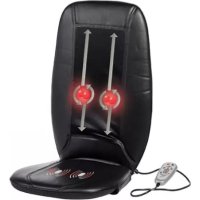
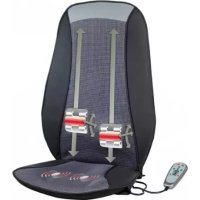
The Thai Massage Cushion 2010H massage cushion contains internal electronic motors and gears designed to massage the person sitting on it.
The full intensity Thai massage function imitates a strong, stimulating massage.
The massage cushion can be fixed on an office chair or any other suitable seating with backrest (chair, sofa, or similar).
With the controller you can vary the type, location, or intensity of massage.
2 What is Thai massage?
Thai Massage was actually developed by Buddhist monks in Thailand
It uses gentle pressure along the body's energy lines to increase flexibility, relieve muscle and joint tension and balance the body's energy systems.
Thai massage is more energizing and rigorous than more classic forms of massage.
The Thai Massage Cushion 2010H has moving massage heads which imitates the pressure and motions of a real Thai back massage.
3 Safety advice
The device is only intended for the purpose described in this user guide. The manufacturer cannot be held liable for personal injuries or damages occurring as a result of inappropriate or careless use.
3.1 General
- Always read the safety instructions carefully and keep this user guide for future reference.
- Follow the basic safety precautions for all electronic equipment when using this product.
- This product is not a toy. Don't let children play with it.
- The device is only for private use and is not intended for medical or commercial purposes. If you have any concern regarding your health, consult your doctor before using this product.
- This unit is not waterproof. Don't expose this product to rain or moisture.
- Do not leave the product unattended when plugged in. Unplug the product immediately from the main power after use.
- Do not place the device on delicate surfaces, as otherwise the zip fastener could potentially damage the surface.
- Make sure that the appliance is not too close to heat sources such as ovens, radiators or direct sunlight.
3.2 Electric shock
- Do not operate this product when the cord or plug is damaged.
- Do not use the product if it is not working properly, dropped or damaged.
- Repairs to electrical appliances must only be carried out by qualified persons. Incorrect repairs can lead to considerable danger for the user. In the event of repairs, please contact our customer service or an authorized dealer.
- Don't disassemble this product. It doesn't contain parts that can be repaired by the user.
- Do not connect other attachments, as the power adapter, than the one supplied with the product.
- Do not drop or insert object into any opening.
- Do not place the basic unit in a damp room and at a distance of less than 1.5m away from a water source.
-
Do not crush and avoid sharp folds.
-
Do not use the product for more than 15 minutes at a time. Extensive use could lead to the product's excessive heating and shorter lifetime.
- The zip fastener on the Thai massage device must not be opened. It is only fitted for reasons relating to the manufacturing of the device.
- Don't disassemble this product. It doesn't contain parts that can be repaired by the user.
- Never use the appliance during a thunderstorm.
- Do not use the massage cushion under a blanket or pillow. Excessive heating can occur and cause fire, electrocution and injuries to person.
3.3 Massage cushion precautions
-
It is not allowed to use the massage cushion:
-
On young children under the age of 16.
- On persons suffering from a herniated disk or from abnormal changes to the vertebra.
- Not in case of cardiovascular diseases and headaches.
- Not in the case of swelling, burns, inflammation, open wounds, fresh wounds, hematomas, bleeding or other injuries to the back or legs.
During pregnancy.
In bed or while sleeping. - After taking medication or consuming alcohol (reduced levels of awareness).
- On a person with insensitive skin or on a person with poor blood circulation.
In a car, while driving.
While operating machinery.
If you are fitted with a cardiac pacemaker, implant or other aid. -
If you suffer from any of the following: common cold accompanied by fever, varicose veins, thrombosis, phlebitis, jaundice, diabetes, nervous system diseases (e.g. sciatica), tuberculosis, tumours, haemorrhoids, bruises or acute inflammation.
Not in case of pains of unclarified origin. -
Close supervision is necessary when the appliance is used by or near invalids or disabled persons.
- Individuals with pacemaker should consult their doctor before use.
- Do not use this product before sleeping. The massage has a stimulating effect and can delay sleep.
- When the unit is working, do not touch the spinning massage mechanism with any other body part except your back.
- Only gentle force should be exerted against the unit in order to eliminate any/all risk of injury.
- If the material or fabric covering the massage mechanism becomes torn or damages, discontinue use.
- Never put any body part (fingers or hands) inside the interior of the unit.
4 Installation
4.1 Strapping system
The massage cushion can be installed to almost any chair.
Slip the straps over the seat or chair and adjust the fastening straps to secure.
The massager won't slip or slide away.
4.2 Connecting to the main power.
Only use the power adapter supplied. Do not use other adapters, as this may damage the device.
The wall outlet for the power supply must be close and accessible.
- Plug one end of the power adaptor into the 230V outlet and the other end into the adapter jack which leads from the massage cushion.
5 Button description
I Power button
- Press the power button to turn the unit on. The corresponding LED light will illuminate.
- Press the power button once again to turn the unit of. The corresponding LED will blink and the massage mechanism will return to its lowest point before switching off.
II Full back massage
- Press this button for a full back 'Thai' massage.
- All massage control LED (VII) will illuminate.
- You will enjoy a full back massage
- Press this button again to switch this massage off.
III Upper back massage
- Press this button for a massage of your upper back only.
- Only the 3 upper massage control LED (VII) will illuminate.
- The massage will skip the lower back during massage.
- Press this button again to switch the massage off.
IV Lower back massage
- Press this button for a massage of your lower back only.
- Only the 3 lower massage control LED (VII) will illuminate.
- The massage will skip the upper back during massage.
- Press this button again to switch the massage off.
V Seat vibration
- Press this button to activate the seat vibration. The vibration will turn On in low-intensity and the corresponding LED (L) will illuminate.
- Press this button repeatedly to switch to medium (M) intensity, high (H) intensity or to deactivate the seat vibration.
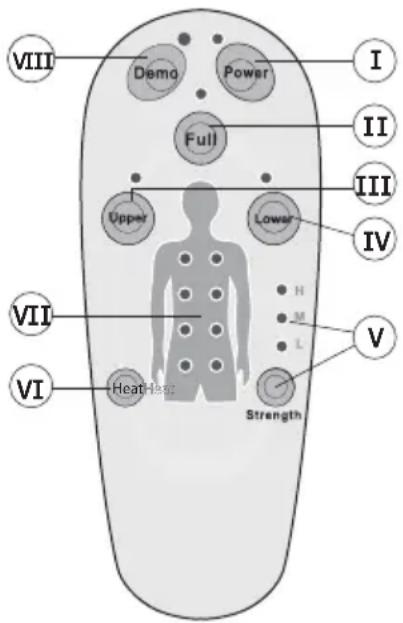
VI Heat function
- Press the heat button to activate a suitable heating function and the corresponding LED light will illuminate.
- Press the button again to turn the heat function off.
The heat function cannot be turned on if no massage program is selected.
VII Massage control LED
These LED's will illuminate depending on the selected back massage.
VIII Demo button
- Press this button to demonstrate the features of the massage cushion.
There is a 15-minute auto shut off on the unit for your safety.
When the massager is switched off, the massage mechanism will always return to its lowest position.
When selecting the seat vibration together with the back massage, there will be a slight decrease of the vibration strength. This adjustment is perfectly normal and should not be interpreted as a defect.
9 Technical data
Dimensions (W/H/D)
Weight
Power supply unit voltage:
- Input:
Output:
670× 143× 460mm
3.86 Kg
100-240 V/AC/50-60 Hz
12V DC 3A
10 Cleaning
- Disconnect the device and allow it to cool down.
- Clean it with a soft cloth or slightly damp sponge.
- Never allow that water or any other liquid enters the device or accessories.
- Never use abrasive cleaners, brushes, gasoline, kerosene, glass polish or paint thinner to clean.
11 Storage
- Do not wrap the power cord around the unit before storing.
- Store the massage cushion in its original box in a safe, dry and cool place. Store it out of the reach of children.
- Avoid contact with sharp edges or pointed objects as this might damage the fabric.
12 Disposal of the device (environment)
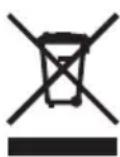
At the end of the product lifecycle, you should not throw this product into the normal household garbage but bring the product to a collection point for the recycling of electrical and electronic equipments. The symbol on the product, user guide and/or box indicate this. Some of the product materials can be re-used if you bring them to a recycling point. By reusing some parts or raw materials from used products you make an important contribution
to the protection of the environment. Please contact your local authorities in case you need more information on the collection points in your area.
13 Topcom warranty
13.1 Warranty period
The Topcom units have a 24-month warranty period. The warranty period starts on the day the new unit is purchased.
Consumables or defects causing a negligible effect on operation or value of the equipment are not covered.
The warranty has to be proven by presentation of the original purchase receipt, on which the date of purchase and the unit-model are indicated.
13.2 Warranty handling
A faulty unit needs to be returned to a Topcom service centre including a valid purchase note.
If the unit develops a fault during the warranty period, Topcom or its officially appointed service centre will repair any defects caused by material or manufacturing faults free of charge.
Topcom will at its discretion fulfill its warranty obligations by either repairing or exchanging the faulty units or parts of the faulty units. In case of replacement, colour and model can be different from the original purchased unit.
The initial purchase date shall determine the start of the warranty period. The warranty period is not extended if the unit is exchanged or repaired by Topcom or its appointed service centres.
13.3 Warranty exclusions
Damage or defects caused by incorrect treatment or operation and damage resulting from use of nonoriginal parts or accessories not recommended by Topcom are not covered by the warranty.
The warranty does not cover damage caused by outside factors, such as lightning, water and fire, nor any damage caused during transportation.
No warranty can be claimed if the serial number on the units has been changed, removed or rendered illegible.
CE
This product is in compliance with the essential requirements and other relevant provisions of the directive 2004/108/EC.
The Declaration of conformity can be found on: http://www.topcom.net/cdeclarations.php
1 Bedoeld gebruik
2 Wat is Thaise massage?
http://www.topcom.net/cdeclarations.php
1 Utilisation
http://www.topcom.net/cdeclarations.php
1 Einsatzbereich
http://www.topcom.net/cdeclarations.php
1 Tiltenkt bruk
http://www.topcom.net/cdeclarations.php
1 Kayttotarkoitus
http://www.topcom.net/cdeclarations.php
http://www.topcom.net/cdeclarations.php
1 Przeznaczenia
http://www.topcom.net/cdeclarations.php
1 Učel použitia
RETURN WITH YOUR DEFECT PRODUCT
(Original Proof of Purchase has to be attached to this return card to be valid for warranty)
visit our website www.topcom.net
MD16400279