DS3200 - Keyboard TRUST - Free user manual and instructions
Find the device manual for free DS3200 TRUST in PDF.

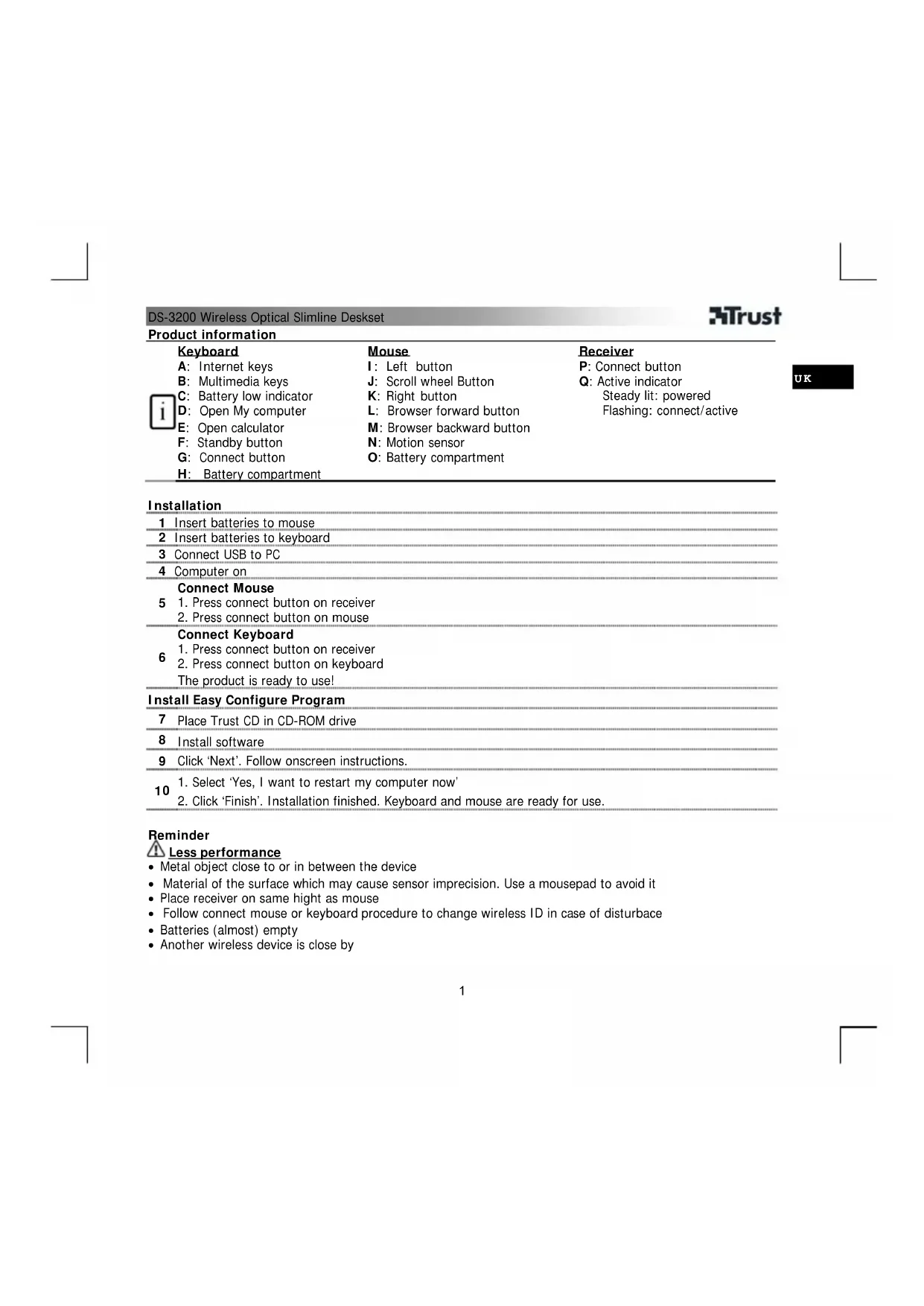


| Product type | Wireless keyboard and mouse (combo set) |
| Brand | Trust |
| Model | DS3200 |
| Operating frequency | 27.145 MHz (keyboard) / 27.045 MHz (mouse) |
| Keyboard power supply | 2 AAA batteries (not included) |
| Mouse power supply | 2 AAA batteries (not included) |
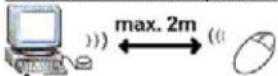
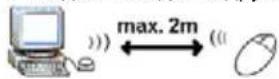
| Wireless range | Approximately 10 meters |
| Special keys | Internet, multimedia, calculator, Workstation, Pause, keyboard lock (Fn+F11) |
| Connection button | On the receiver, keyboard and mouse |
| Included software | Trust Easy Configuration (CD-ROM) |
| Supported operating systems | Windows (all versions) |
| LED indicators | Activity light (solid when powered, flashing when active) |
| Motion sensor | Yes (for mouse) |
| Compatibility | Computer with available USB port |
| Package contents | Keyboard, mouse, USB receiver, CD-ROM, user manual |
| Dimensions (keyboard) | Not specified in the manual |
| Weight (keyboard) | Not specified in the manual |
| Warranty | 2 years (valid from date of purchase) |
| Certifications | European directives (CE), R&TTE 1999/5/EC |
| Authorized countries of use | EU, NO, CH, RU, HR, IS, UA (updated list on trust.com) |
| Maintenance and cleaning | Use a soft, dry cloth; avoid any liquids |
| Safety precautions | Do not open or repair yourself; keep away from liquids |
| Disposal | Recycle at an approved center; do not throw in household waste |
Frequently Asked Questions - DS3200 TRUST
User questions about DS3200 TRUST
0 question about this device. Answer the ones you know or ask your own.
Ask a new question about this device
Download the instructions for your Keyboard in PDF format for free! Find your manual DS3200 - TRUST and take your electronic device back in hand. On this page are published all the documents necessary for the use of your device. DS3200 by TRUST.
USER MANUAL DS3200 TRUST
DS-3200 Wireless Optical Slimline Deskset
User's manual
Version 2.0
UK
DE
FR
IT
ES
PL
NL
PT
GR
DK
SE
HU
CZ
SK
FI
NO
TR
RU
RO
BU
CN
5
6
7
8


Read manual
9
10
| DS-3200 Wireless Optical Slimline Deskset | |||
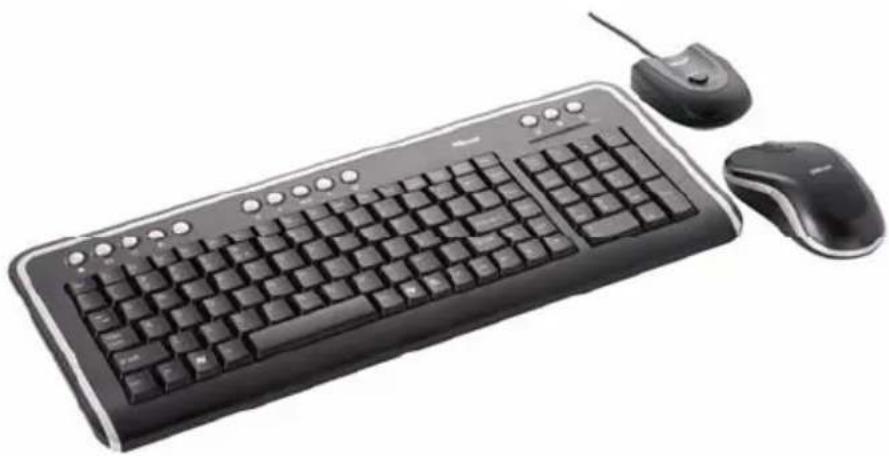
| Product information | |||
| Keyboard | Mouse | Receiver | |
| A: Internet keys | I: Left button | P: Connect button | |
| B: Multimedia keys | J: Scroll wheel Button | Q: Active indicator | |
| C: Battery low indicator | K: Right button | Steady lit: powered | |
| D: Open My computer | L: Browser forward button | Flashing: connect/active | |
| E: Open calculator | M: Browser backward button | ||
| F: Standby button | N: Motion sensor | ||
| G: Connect button | O: Battery compartment | ||
| H: Battery compartment | |||
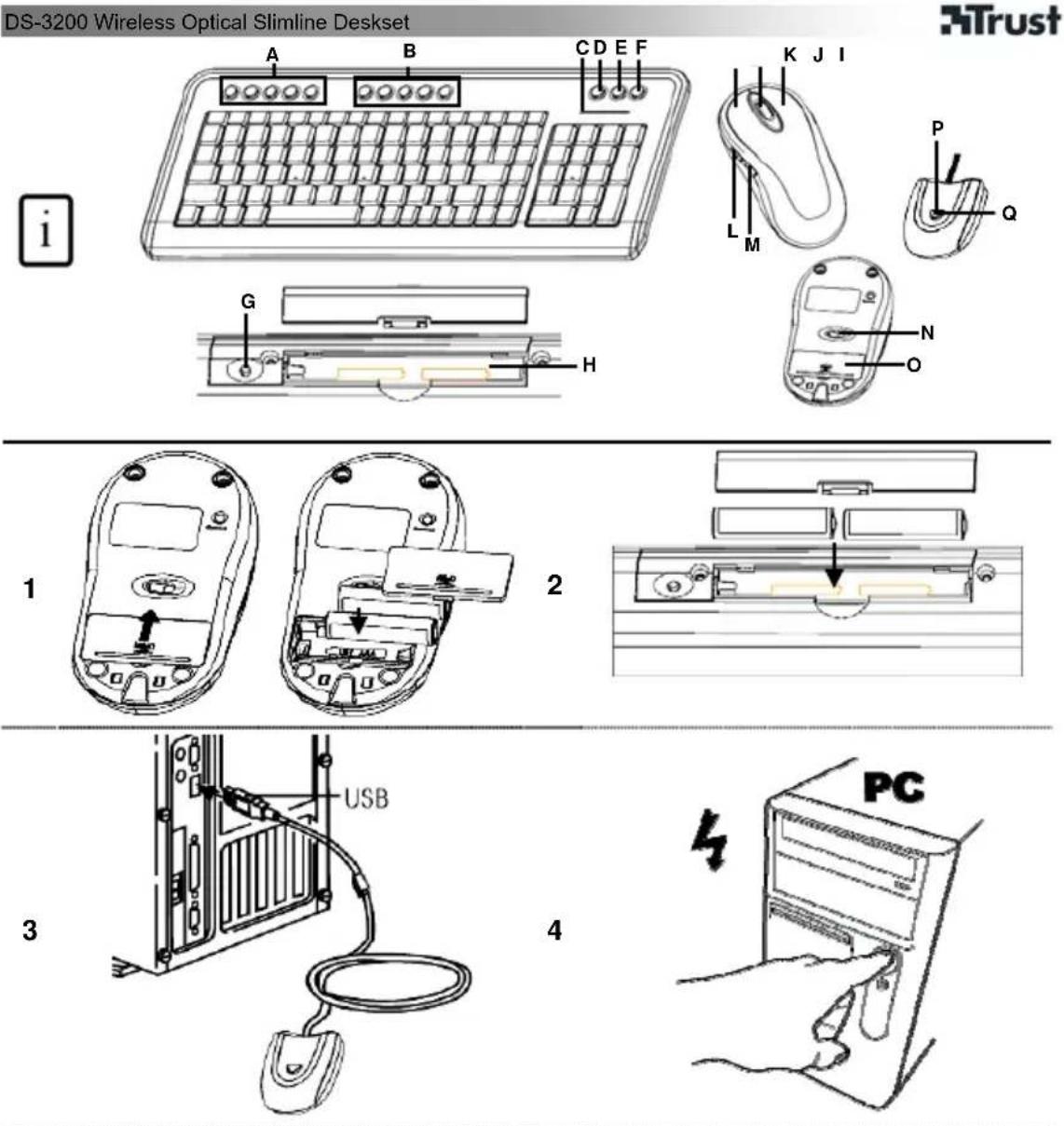
| Installation | |||
| 1 Insert batteries to mouse | |||
| 2 Insert batteries to keyboard | |||
| 3 Connect USB to PC | |||
| 4 Computer on | |||
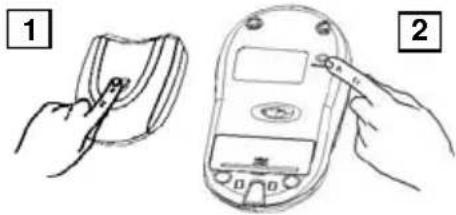
| Connect Mouse | |||
| 5 1. Press connect button on receiver | |||
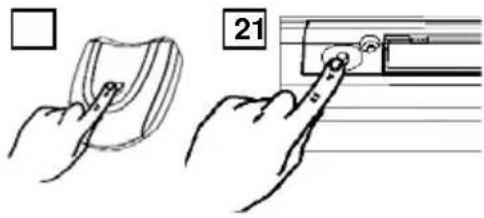
| Connect Keyboard | |||
| 6 1. Press connect button on receiver | |||
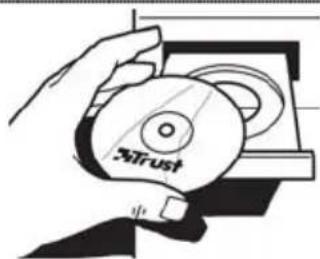
| Install Easy Configure Program | |||
| 7 Place Trust CD in CD-ROM drive | |||
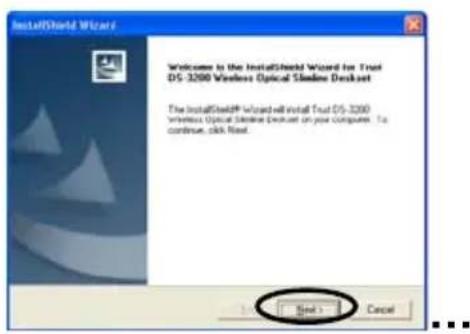
| 8 Install software | |||
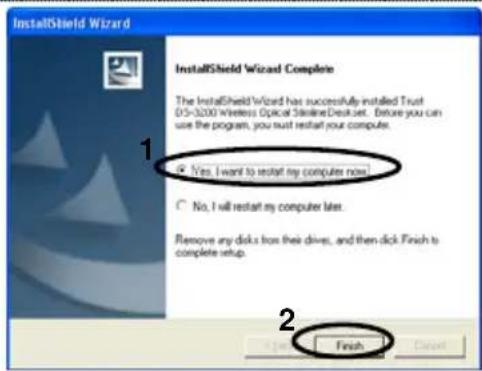
| 9 Click 'Next'. Follow onscreen instructions. | |||
| 10 1. Select 'Yes, I want to restart my computer now' | |||
Reminder
Less performance
Metal object close to or in between the device
- Material of the surface which may cause sensor imprecision. Use a mousepad to avoid it
- Place receiver on same hight as mouse
- Follow connect mouse or keyboard procedure to change wireless ID in case of disturbace
- Batteries (almost) empty
- Another wireless device is close by
General usage
- Adjust the speed of mouse pointer: (1) Open Windows Help (Start → Help). (2) Search "adjust the speed of mouse pointer". (3) Follow instructions
- Read the manual on CD for the use of the configuration program
Num/Scroll/Cap Lock icon is displayed on taskbar once the program is installed - All Windows, Fn+F11: lock keyboard.
- Re-connect mouse or keyboard is required after battery is replaced
Install Trust Easy Configuration software on CD to configure the mouse buttons or hot keys - Do not use old and new batteries at the same time, because the old batteries may deplete the new ones
If you have any problems, go to www.trust.com/14627 for FAQ, software and manuals. This product may have other item no. due to various keyboard layout, but they are basically the same as 14627's. For extensive service register at www.trust.com/register.
Safety
- Do not open or repair this device.
- Keep this device away from liquids, such as water.

This device meets the essential requirements and other relevant conditions of the applicable European directives. The Declaration of Conformity (DoC) is available at www.trust.com/14627/ce
Wireless
- This wireless device works at a frequency of 27MHz . It meets the essential requirements and other relevant conditions of R&TTE Directive 1999/5/EC and can be used in EU countries plus: EU candidates and NO/CH/RU/HR/IS/UA. There are no limitations per channel for the above-mentioned countries. Go to www.trust.com/14627 for an updated list of the countries where the use of this device is permitted.
- There may be restrictions for the use of this device outside of the EU. If this device is used outside of the EU, check whether this device meets local regulations. Frequency: Mouse: 27.045MHz, Keyboard: 27.145MHz; Bandwidth: 6KHz, Power: 0.5mW.
- Nowadays, there are an increasing number of wireless products (video, audio, computer, etc.), which work in the same frequency range as this device. It may, therefore, be possible that the functionality of this product is limited by or is limiting for other wireless products. This can only be avoided by paying attention to the distance between products and, where possible, by changing channels.
- Be careful when using wireless devices if you have a pacemaker or are dependent on other life-saving, sensitive electronic equipment, because this product transmits radio signals.

If possible, dispose of the device at a recycling centre. Do not dispose of the device with the household waste.
DS-3200 Wireless Optical Slimline Deskset
ATrust
Warranty & copyright
This product has a two-year manufacturer's warranty which is effective from the date of purchase. For more information see www.trust.com/warranty
- Reproduction of this manual or any part of it is prohibited without permission from Trust International B.V.
Installation of programmet Easy Configure
7 Placér Trust-cd'en i cd-drevet.
8 Klik pa Installer software (Install software).
9 Klik pa Næste (Next). Følg anvisningerne pa skærmen.
A CHINXHENE 6bICTPOeIcTBNA
PraDM C yCTPOBCTBaMn INI MEXy HIMN HaxOJaTcMaTaNHeCKNe IpeDMeTbI Ha ToHOCb CeHCOPHO DaTHNk BInrae MaTepnaI NOBepxHOCTN. Yka3aHHoe Bo3deJCTBne yCTpaHReTCn PnIMHeHEm KOBrNk DnI MbIIN
Pa3MeaIe npHemHOe ycTPOcTBo Ha OJHOB BbICOTcMbIbIO.
DS-3200 Wireless Optical Slimline Deskset
3Trust
- PnB03HKnHOBeHHN NOMEX CMeHHTe ID 6ecnpoBOdHO Bc83N, BbIOHNB DeIcTBnI NO IIOKIOUeHHIO MbIIN INI KJIaBnATypbl.
- PaedHne 3apra da 6atapei
- Pádom HaxoDITcA pyroe 6ecnpoBOHoe yctpoIcTBo
06uhe yka3aHnno 3Kcnnyataun
- Perynupobka ckopoctn nepemeeheny kyccopa: (1) BoiDnte B cnpaBouHy cncTeMy Windows (Iync [Start] > Cnpabka [Help]). (2) Ipon3BeNTe noNc cnpaBkn no TeMe «perynupobka ckopoctn nepemeuehenny kypcopa» (adjust the speed of mouse pointer). (3) BbInonHnTe yka3aHn.
O3HaKOMbTeCb cpykoBcTBOM,BXoJnIM B COCTaB KOMNaKT-DnCKa,HTo6blN3yUHTb IpOrpaMMy HAcTpoKn
3NaKmKcaunuHcNoBOro perncTpa, npokpykn n pernctpa 3aRnabhbx 6ykb (Num/Scroll/Cap Lock) OTo6paxaOTcB nAHeJn 3aDaay kak TOnbKO nporpamma yCTaHOBeHa
-ДгЯ BCex Windows:нжате Fn+F11 6knkpnyet knabatypy.
Heo6xoDIMO NOBTOpHoe NOkNIOueHne MbIIN INKnAIBaHTpybI nOcNe CMeHbI 6Taapei
-ДгнHAcTpOиK HONOK MbluN mIIN «RopnX» KnaBnU yctaHOBNTe c KomnakT-DnCKa nporpaMMy Trust Easy Configuration. - HeDOnyCTHMO OJHOBpeMeHHoe pImeHeHne cTapbIX HOBbIX 6aTapeN 3-3a BO3MOXHOIpaHnra 3apraHOBbIX 6aTapeN IOB 03DeNCTBnEM cTapbIX.
PnB 03HKnHOBeHN 3aTpPyHeH N O3HaKoMbTecb C OTBeTaMn Ha TINuHbE BONpOcbl No aDpecy www.trust.com/14627, rTe TaKke pa3MeueHb IpaBepb N yKa3aHnN NO 3KcnIpyTaun. Y KnaBnAtypb MoXeT 6byTb Dpyro fapbnuHb Homep B 3aBNCmOCTN OT pACKJaKn, ODAHKO BCE MOneJI N B OCHOBHOM aHaJOrnHb ToN, KOTopra o6o3HaHeHa Homepom 14627.
Mepbl npedeocTopoKHOCTN
He BckpbiaIteH He nbTaTecb peMOHTnpoBaT yCTpOJCTBO.
-ДерхиTe yCtpoiNTONoaIbWe OT BOdBi n npOHyx KnDkoCTe.
C
- DAnHoe yCTpOCTBO OTBeUaET BaxHeIIM Tpe6oBaHnI M yCIOBnM, I3IOKeHHbIM B COOTBeTCTBYUINx ДиpeKtNBax EByPoneiCKoro CoHO3a. C DeKnapauee O COOTBeTCTBnN (DoC) MoXHo O3HaKOMITbcrNo aDpecy: www.trust.com/14627/ce.
BecnpoBoHaNcB3b
3To6ecnpoBODHoe yctpoiCTBO pa6oTaET Ha acCTote 27 MTu. YcTpoiCTBO OTBeuAeTBaXHeIbIM Tpe6oBaHnM n cyueCTBeHHbIM ycNoBnM dIpKeTINBRI R&TTE Directive 1999/5/EC n MoKet IcnoNb30BaTbcra B rOcydapcTBax-ynHehAX EC, a TaKke B cTpaHax-KaHnDaTax Ha BcTynJIeHne B EC, a, Kpome TORo, B HopBerm, WBeuApnN, PocCnn, XOpBaTm, NcnaHmn N YkpanHe. DnY kKa3aHHbx CtpaH NOKaHaJIbHbIe OprAnHneHn OTCyTCTByOT. O6HOBJeHHbI nepeHb CTpaH, B KOTopbix pa3peWaeTcR 3KnPlnyataunr 3TOrO yctpoiCTBa, npedctabNeH no aDpcy: www.trust.com/14627.
Bo3MOXHbOrpApaHHeHnHa npImeHHeHne daHHoro ycTpoNCTBa 3a npedenamn EC. Ecn daHHoe yctpoNCTBO npimeHReTcra npedeIaMn EC, npOBepbTe ero coOTBeTcTBne perHOHaBbHOMy 3aKHOHaTeNbCTBy. Yactota:MbIb-27,045 MfU,Knabnatya-27,145 MfU;noLoCa npOnyckAHn:6 KfU;MoOHeCTb:2,5MBT.
DS-3200 Wireless Optical Slimline Deskset
3Trust
B Hactoee BpmaTcTnIO n3deN, B KOTopbIX npMmHeTc6ecnpoBDHcB3b (BnDeO, ayDIO, KOMNbTepeBnI p.) B TOM Ke YAcToTHOM dnaHAna3OHe, yTO N daHHoe ycTpoCtBO. B CBy3N C 3TNM BEPOrTHO BO3HNKHOBEHne cHTyaU, KOfda FyHKMOHaJIbHbIE BO3MOXHOCTu 3TOr OYCTPOJCTBA ORpaHUNBaOTcA DpyHMn 6ecnpoBOHDHBIMyycTpoICTBaMn, INN Xe DaHHoe ycTpoCtBO CAMO OrpaHUNBaET BO3MOXHOCTn DpyHX NOO6hBx IN3deN. N36ExKaTb TaKIN cHTyaU MOXHO NyTEM yYeTa paCCToHnM MeKdy YcTPOJCTBaMn INN, NO BO3MOXHOCTN, CMeHb KaHAnOB.
CobIIOaIte octopoxHocb npn nOIOb3OBAHm 6ecnpoBOhIx ycTpoCTB, ecn noNb3yeTecb KapIOOCHTMMyIATOPOM INI dpyIM YyBCTBNTeHBiM 3JIeKTOHHbIM MeINuHckIM O6OpYIOBAHHeM, TAK KApaboTa 3TNX yCTPOICTB ppeUcMaTpNBaET pepeauy paINOCIRHaOB.

- YTNIN3aIg OTPa6oTaHHOrO yCTpoIcTBA IPOIN3BOIDITcN IO BO3MOXHOCTNa HApEeINPnTmN BTOpHNOIpepe6oTe. He DOnyckaeTcR yTNIN3aIg yCTpoIcTBA BMecTe C bItOBbIM Mycopom.
TapaHTnHbIe 6o3aTeNbCTBa n aBtOpckne npaba
Ha n3dene paccnpoctpaHReTc DByxNtHra rapaTHna n3rOToBnteJI, KOtOpA neCTbYeTe Co dH npno6peTHe. Bonee noDpObHn HnΦopMaun npnbEdeHa Ha www.trust.com/warranty
3anpeaetcak nonHoe, TaK uacTnHoe Bocnpo3BeEHe daHHoro pykoBoCTBa 6e3 pa3peHnKOMnAHm Trust International B.V.
Mepkn 3a 6e3oNaCHOCT
He OTBapRte HpeMOHTnpaTe TOBa yCTpOCTBO.
- Na3eTe yCTpOHTBOTo O T CbPnKOCHOBeHne C TeuHOCTn, HApnPmep, B0da.

ToBA yCTPOIcTBcOTBcTcBA Ha OCHOBHnTE H3NCKBaHHn IpyrNTe CbOTBeTHn YCIOBnHa npINIOKIMTe ebPoneckn DnpeKTHn. DeKnapaunra 3a cBoTBeTcTBne (DoC) MoKeTe da HaMePnte Ha www.trust.com/14627/ce.
Be3XnHn Bb3MOxHOCTN
ToBa 6e3KNUHO yCTpoIcTBO pa60Tu Ha YecToTA 27MHz.To cBtBeTCTBa HA OCHOBHnTE N3NCKBAHnI n DpyrInTe CbOTBETHn YCIOBnHa R&TTE DnpeKTbBa 1999/5/EC mOKe da 6bJe N3NOJ3BaHO B CTpaHnTe OT Ebponeckn CbIO3,KaKTo n B:CTpaHnTe-KaHnDaTkn HOpBern/KuTa/Pycn/XbPbATcKa/HcAnHn/YkpaHn.3a rOpEn36poeHnTe CTPaHn HMa orpaHnueHne no KaHn.OTndTe Ha www.trust.com/14627 3a o6HOBen Cnncbk Ha CTPaHnTe,B KOnTO e pa3peSeHo N3NoJ3BaHeTo Ha TOBa yCTpoIcTBo.
Be3KmUeH ONTnueH TbHBK HAcToJeh KOMnNeKT DS-3200
ATrust
Bb3MOxH0e da hma orpaHueHn npn n3noI3BaHeTo Ha ToBA yCTPOcTBO n3b6h EC.AKO ToBA yCTPOcTBO ce n3noI3Ba n3b6h EC, npoBepeTe daHn To cBoTBcTBA Ha MeCTHne pa3npoe6n. YecToTA: Mmka: 27,045MHz, KJabNaTypa: 27,145MHz; WInpHa Ha JeHTata: 6KHz, MoUHOcT: 0,5mW.
IIOHACTOJEM CbueCTByBa YBEnuAbaaC se 6poj yctpojCTBa (BnJeO, ayNIO, KOMNIOTbPHN T.H.), KOITOPa60TAT B UcHToTHN DaIana3OH Ha TOBa yCTPOJCTBO. CneIOBATEJIHO e Bb3MOXHO fYHKUHOAHNHTEBb3MOXHOCTNa YcTPOJCTBOTO da 6bDat ORpaHnueHN OT nIN da ORpaHnuaBt pa6oTaHa HpyrN 6e3KuHN npOdyKT.N ToBa MoKe da Ce I36erHe, aKO ce O6bpHe BnHMaHne Ha pa3CTOHHeTO MEXdY yCTPOJCTBaTaN, TAM KbTeO e Bb3MOXHO, CE CmEHrT KaHAnITE.
- 5bnde BHNMaTeJIHn, KOrato n3NoI3BaTe 6e3KuHn YcTpoIcTba, aKO Imate neiCMeKbp IIN CTe 3aBNCIMN OT dpyro XNBOTocnacraBaUO yBCTBntEnHO eNEKTPOHNO oOpdyBaHe, Tb' KaTO TOnI npOdyKT npedaba paNOCrHaII.

Ako e Bb3MOXHO, npdaBaiTe yCTpoiCTBTO 3a yHnOxBaHe B ceHTbp 3a peuNKInpaHe. He n3XbPJIaTe yCTpoiCTBTO 3aeDHO C 6ntOBITE OTnAbu.
Tapaunna n aBtopcko npaBO
ToBa yCtpoMCTBO mMa DByrOIMnHa rapaHcNs O T npOn3BODInTeJ, KOrTO Bm3a B Cnla OT DaTaTa Ha 3akynBaHe. 3a nobee nHOpMaun noCetTe www.trust.com/warranty
Bb3npo13BexkdaHTo Ha ToBa pbkoBocBo nn uact ot Hero 6e3 pa3peuHne ot Trust International B.V. e 3a6paHeno.
产品信息
- DS-3200 Wireless Optical Slimline Deskset
- Reminder
- Less performance
- General usage
- Safety
- Wireless
- Warranty & copyright
- Installation of programmet Easy Configure
- A CHINXHENE 6bICTPOeIcTBNA
- 3Trust
- 06uhe yka3aHnno 3Kcnnyataun
- Mepbl npedeocTopoKHOCTN
- C
- BecnpoBoHaNcB3b
- TapaHTnHbIe 6o3aTeNbCTBa n aBtOpckne npaba
- Mepkn 3a 6e3oNaCHOCT
- Be3XnHn Bb3MOxHOCTN
- Be3KmUeH ONTnueH TbHBK HAcToJeh KOMnNeKT DS-3200
- ATrust
- Tapaunna n aBtopcko npaBO
- 产品信息
Brand : TRUST
Model : DS3200
Category : Keyboard