Vintori 18017 - Loudspeaker TRUST - Free user manual and instructions
Find the device manual for free Vintori 18017 TRUST in PDF.



| Product type | Bluetooth speaker |
| Brand | Trust |
| Model | Vintori 18017 |
| Power supply | 5V DC, 1A (mains adapter included) |
| Wireless connectivity | Bluetooth (range up to 10 m) |
| Audio inputs | 3.5 mm audio input, Bluetooth |
| Audio output | 3.5 mm headphone output |
| Control buttons | Play/Pause, Next/Previous track, Volume, Standby mode, Input selection |
| LED indicator | Blue (Bluetooth), Red (3.5 mm input), Flashing according to status |
| Standby mode | Yes (accessible by long press on Volume) |
| Bluetooth memory | Yes (automatic connection, erasable by long press on Play/Pause) |
| Weight | Approx 500 g |
| Dimensions (WxDxH) | Approx 200 x 100 x 100 mm |
| Color | Black |
Frequently Asked Questions - Vintori 18017 TRUST
User questions about Vintori 18017 TRUST
0 question about this device. Answer the ones you know or ask your own.
Ask a new question about this device
Download the instructions for your Loudspeaker in PDF format for free! Find your manual Vintori 18017 - TRUST and take your electronic device back in hand. On this page are published all the documents necessary for the use of your device. Vintori 18017 by TRUST.
USER MANUAL Vintori 18017 TRUST
www.trust.com/18017/faq
Trust
natural_image
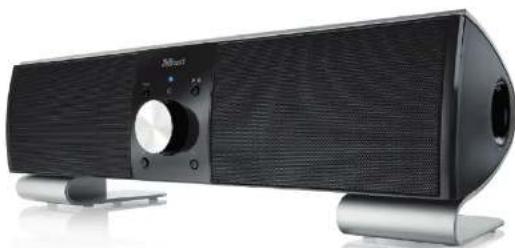
Black MiNext audio amplifier with adjustable speaker grille and control knob (no visible text or symbols)Quick Installation Guide
Vintori Wireless Speaker
18017
Installation
Trust
②
iPad/ iPhone And
3
4

5
6
7
8
9
10

Windows
11
12
1314
O
Bluetooth Wireless Audio - USER'S MANUAL
Trust
| IndexLanguage | page | ||
| Englisch | 2 | ||
| Deutsch | 6 | ||
| Français | 10 | ||
| Italiano | 14 | ||
| Español | 18 | ||
| Português | 22 | ||
| Nederlands | 26 | ||
| Dansk | 30 | ||
| Suomi | 34 | ||
| Norsk | 38 | ||
| Svenska | 42 | ||
| Polski | 46 | ||
| Česky | 50 | ||
| Slovenčina | 54 | ||
| Magyar | 58 | ||
| Română | 62 | ||
| Български | 66 | ||
| Русский | 70 | ||
| Еллэнviká | 74 | ||
| Türkçe | 78 | ||
| Hrvatski | 82 | ||
Bluetooth Audio Speaker - USER'S MANUAL
Trust
Installation
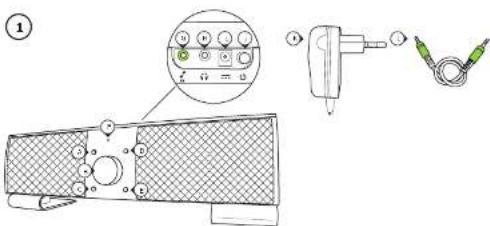
| A | Input | selection |
| B | Volume control/ Mode | |
| C | Previous track* | |
| D | Play/ | Pauze* |
| E | Next | track* |
| F | LED indicator: | Blue 1x every sec. Pairing mode |
| Blue 1x every 2sec. Paired not connected | ||
| Blue 2x every 4sec. Paired & connected | ||
| Red constant 3.5mm input | ||
| Red 1x every sec. Standby mode | ||
| G | 3.5mm Audio input | |
| H | 3.5mm Headphone output | |
| I | Power Adapter input | |
| J | Power button | |
| K | Power Adapter | |
| L | Audio cable | |
| * Function only work when Bluetooth input is used. | ||
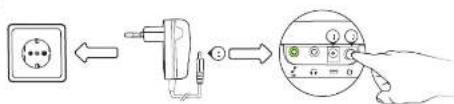
② - Connect the power adapter to the wall socket.
- Connect the power adapter to the power adapter input 'I'.
- Power on the speaker by pressing the power button on the rear of the speaker.
- The LED indicator 'F' will start flashing Blue once every second (paring mode).
▶ If the LED indicator is not flashing blue 1x every sec. press and hold the play/pause button for 5sec.
▶ If a passcode is requested during the configuration of the device Use '0000'.
Bluetooth Audio Speaker - USER'S MANUAL
Trust
Standard Configuration
iPad/ iPhone
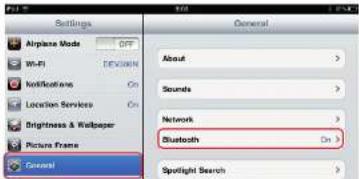
③ - Go to 'Settings'.
- Go to the 'General' settings.
- Go to 'Bluetooth'.
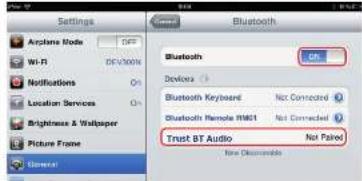
④ - Make sure that Bluetooth is on.
- Select 'Trust BT Audio' in the list of Bluetooth devices. (make sure the speaker is in pairing mode)
When the device status is 'paired', your device is ready to use.
Android
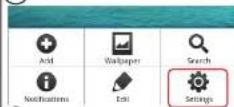
⑤ Go to 'Settings'.
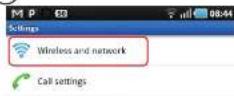
⑥ Go to 'Wireless and network'.
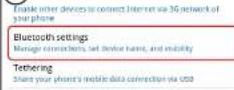
⑦ Go to 'Bluetooth settings' and press 'find nearby devices' if needed.
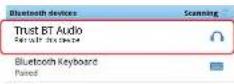
⑧ Select 'Trust BT Audio' in the list of Bluetooth devices (make sure the speaker is in pairing mode).
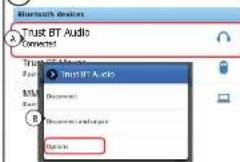
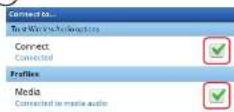
9 Press and hold 'Trust BT Audio' to go to the options menu of the wireless audio device.
⑩ Make sure that the device is 'Connected' and the 'Media' profile is selected.
Your device is ready to use.
Windows
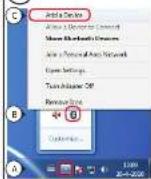
⑪ A. Open the taskbar icons.
B. Click on the Bluetooth icon.
C. Click on 'Add a device'
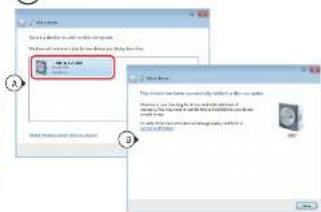
- Select 'Trust BT Audio' in the list of Bluetooth devices (make sure the speaker is in pairing mode).
When the device is successfully added, your device is ready to use.
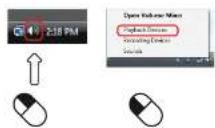
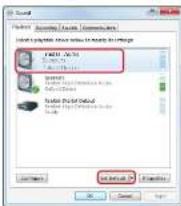
⑬ - Right click the speaker icon in the taskbar.
- Open the 'Playback devices'.
14 - Set the 'Trust BT Audio' device as your default device.
Bluetooth Audio Speaker - USER'S MANUAL
Trust
Configuration on a Mac system
- Click on the Bluetooth icon in the taskbar.
- Make sure Bluetooth is on.
- Go to 'set up Bluetooth device...'.
- Select 'Trust BT Audio' in the list of Bluetooth devices (make sure the device is in pairing mode).
- Click on 'Continue'.
- If the pairing attempt was unsuccessful. Go to 'Passcode options'.
- Select 'Use a specific passcode'.
- The passcode to use is '0000'.
- Click on 'ok'.
- Click on 'Continue'.
Your device is now ready to use.
Advanced Controls
Standby
By pressing and holding the volume control for 4 seconds the speaker goes into standby mode (LED
flashing red 1x every second).
To power the speaker back on, press the volume control for 1 second.
Volume/ Treble/ Bass control
Press the volume control when playing music to switch between volume, treble, and bass.
Speaker memory
The speaker has an build in memory. So that every time you power on the speaker and your music
device they will automatically connect.
To clear the memory of the speaker press and hold the play/pause button for 5 seconds.
Change audio input
The speaker has 2 different audio inputs. Bluetooth and 3.5mm audio.
By pressing the input selection button 'A' you can switch between these inputs.
The LED light indicates the selected input source: - Blue Led: Bluetooth
- Red LED: 3.5mm audio input
Bluetooth Audio Speaker - USER'S MANUAL
Trust
Trouble shooting
| Problem | Solution |
| Can't connect the BT speaker to my device | - Make sure that the BT speaker is in paring mode. Press and hold the play/pause button for 5sec. to activate the pairing mode (blue led flashing every sec.).- Make sure that you have selected the correct input.- If a passcode is requested. Use '0000'.- Move the BT speaker closer to your audio source (maximum distance 10m under ideal circumstances)- Erase the internal memory of the speaker (press and hold the play/pause button for 5sec.). Repeat the standard configuration steps for your device (iPad/iPhone, Android, Windows, Mac).- The speaker can only be paired with one device simultaneously. |
| No SoundDistorted Sound | - Check the LED light. LED light needs to be flashing blue 2x every 4sec.- Make sure that you have selected the correct input.- Repeat the standard configuration steps for your device. (iPad/iPhone, Android, Windows, Mac)- Your BT speaker is too far from your device (maximum distance 10m under ideal circumstances).- If you are using the product around large metal surfaces, remove the metal surface or move you product away from the metal surface.- Walls and Floors drastically reduce the range of the product. Move the BT speaker closer to your audio source.- Move the BT speaker away from other wireless devices (like Wireless network routers, mouse and keyboard). |
| Sound volume is low | - Check the volume setting of your device. (Tablet, Smartphone, PC) |
▶ If your problem is not solved, please contact the helpdesk at www.trust.com/18017/faq
Bluetooth Audio Speaker - USER'S MANUAL
Trust
Installation
①
Configuration standard iPad/iPhone



Brand : TRUST
Model : Vintori 18017
Category : Loudspeaker