
Vigor 2.1 - Loudspeaker TRUST - Free user manual and instructions
Find the device manual for free Vigor 2.1 TRUST in PDF.


Pick your language and provide your email: we'll send you a specifically translated version.
| Product Type | 2.1 Speaker System |
| Brand | Trust |
| Model | Vigor 2.1 |
| Total Power Output (RMS) | 30 W (15 W subwoofer + 2 x 7.5 W satellites) |
| Frequency Response | 50 Hz - 20 kHz |
| Subwoofer Driver | 5.25" (133 mm) down-firing |
| Satellite Drivers | 2" (51 mm) full-range |
| Impedance | 4 ohms (subwoofer), 8 ohms (satellites) |
| Connectivity | 3.5 mm AUX input |
| Power Supply | AC adapter (input 100-240V, 50/60Hz) |
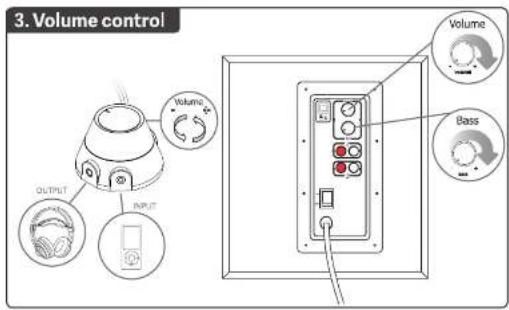
| Controls | Volume knob, bass knob, power button on subwoofer |
| LED Indicator | Blue power LED on subwoofer |
| Subwoofer Dimensions (W x H x D) | 250 x 280 x 250 mm |
| Satellite Dimensions (each) | 100 x 150 x 100 mm |
| Total Weight | 4.5 kg |
| Cable Length (subwoofer to satellites) | 1.5 m |
| Materials | Wood (subwoofer), plastic (satellites) |
| Cleaning Instructions | Wipe with a dry, soft cloth. Do not use liquid or aerosol cleaners. |
| Safety Precautions | Keep away from water and heat sources. Do not open the device. |
| Spare Parts Availability | Contact Trust support for replacement adapters or speakers. |
| Warranty | 2 years |
Frequently Asked Questions - Vigor 2.1 TRUST
How do I connect the Trust Vigor 2.1 to my computer?
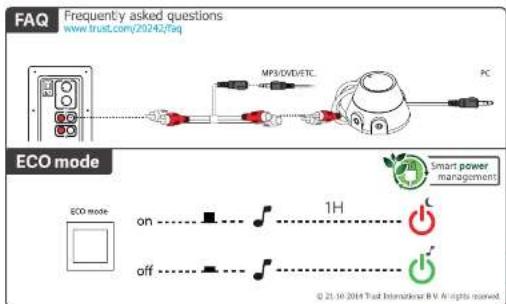
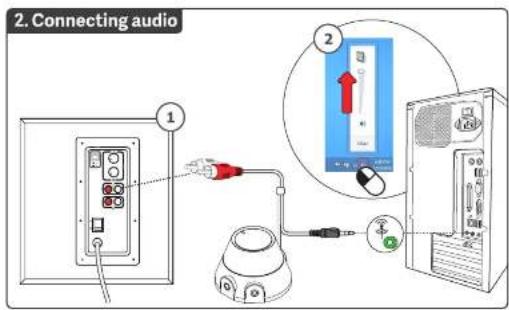
Use the included 3.5 mm AUX cable to connect from your computer's headphone or speaker output to the AUX input on the subwoofer. Ensure the speakers are powered on.
Why is there no sound coming from the speakers?
Check that the power LED on the subwoofer is blue. Verify the AUX cable is fully inserted. Make sure the volume knob is turned up. Test with another audio source.
Can I connect the speakers to a TV?
Yes, if your TV has a 3.5 mm headphone jack or audio output. Use the AUX cable. For TVs with only optical or RCA outputs, you may need an adapter.
How do I clean the speaker system?
Unplug the system. Use a dry, soft cloth to wipe the surfaces. Do not use any liquids or sprays as they may damage the electronics.
What is the power consumption of the Vigor 2.1?
The power consumption is approximately 40 W at full volume. The AC adapter input is 100-240V, 50/60Hz.
Can I adjust the bass level?
Yes, there is a dedicated bass control knob on the back of the subwoofer. Turn it clockwise to increase bass.
What should I do if the speakers produce humming noise?
Ensure the AUX cable is not near power cables. Try a different power outlet. If the hum persists, the audio source may have grounding issues.
Are the satellite speakers magnetically shielded?
Yes, the satellites are magnetically shielded to prevent interference with nearby monitors or TVs.
How long is the warranty?
The Trust Vigor 2.1 comes with a 2-year warranty. Retain your purchase receipt for service.
Where can I find replacement parts?
For replacement AC adapters or speakers, contact Trust customer support. Do not use third-party adapters not specified for this model.
User questions about Vigor 2.1 TRUST
0 question about this device. Answer the ones you know or ask your own.
Ask a new question about this device
No questions yet. Be the first to ask one.
Download the instructions for your Loudspeaker in PDF format for free! Find your manual Vigor 2.1 - TRUST and take your electronic device back in hand. On this page are published all the documents necessary for the use of your device. Vigor 2.1 by TRUST.
USER MANUAL Vigor 2.1 TRUST
VIGOR | high performance sound | elegant design | for pc, smartphone, tablet


Manual assistant
Powered by Anthropic
Waiting for your message
Product information
Brand : TRUST
Model : Vigor 2.1
Category : Loudspeaker