Albergo - Radio TIVOLI AUDIO - Free user manual and instructions
Find the device manual for free Albergo TIVOLI AUDIO in PDF.



User questions about Albergo TIVOLI AUDIO
0 question about this device. Answer the ones you know or ask your own.
Ask a new question about this device
Download the instructions for your Radio in PDF format for free! Find your manual Albergo - TIVOLI AUDIO and take your electronic device back in hand. On this page are published all the documents necessary for the use of your device. Albergo by TIVOLI AUDIO.
USER MANUAL Albergo TIVOLI AUDIO
text_image
Tivoli Audio ALBERGO - TUNG + SLEEP 0 SOURCE ALARM 1 ALARM ALARM 2 SETALBERGO™
AM/FM Clock Radio
MULTI-LANGUAGE MANUAL
English....3
Dansk 19
Deutsch 34
Español....50
Français....66
Italiano 81
Nederlands 96
Norsk....111
Suomi 126
Svenska....141
ALBERGO™
AM/FM Clock Radio
TABLE OF CONTENTS
Safety Instructions....4
Introduction 7
Front Panel Controls....7
Rear Panel Controls 9
Remote Control 10
Menu 11
How to Set Alarm 12
Alarm Options.... 13
Bluetooth Operation....13
AM/FM Reception; RDS; Placement; Cleaning.... 14
Warranty 15
Specifications.... 18
text_image
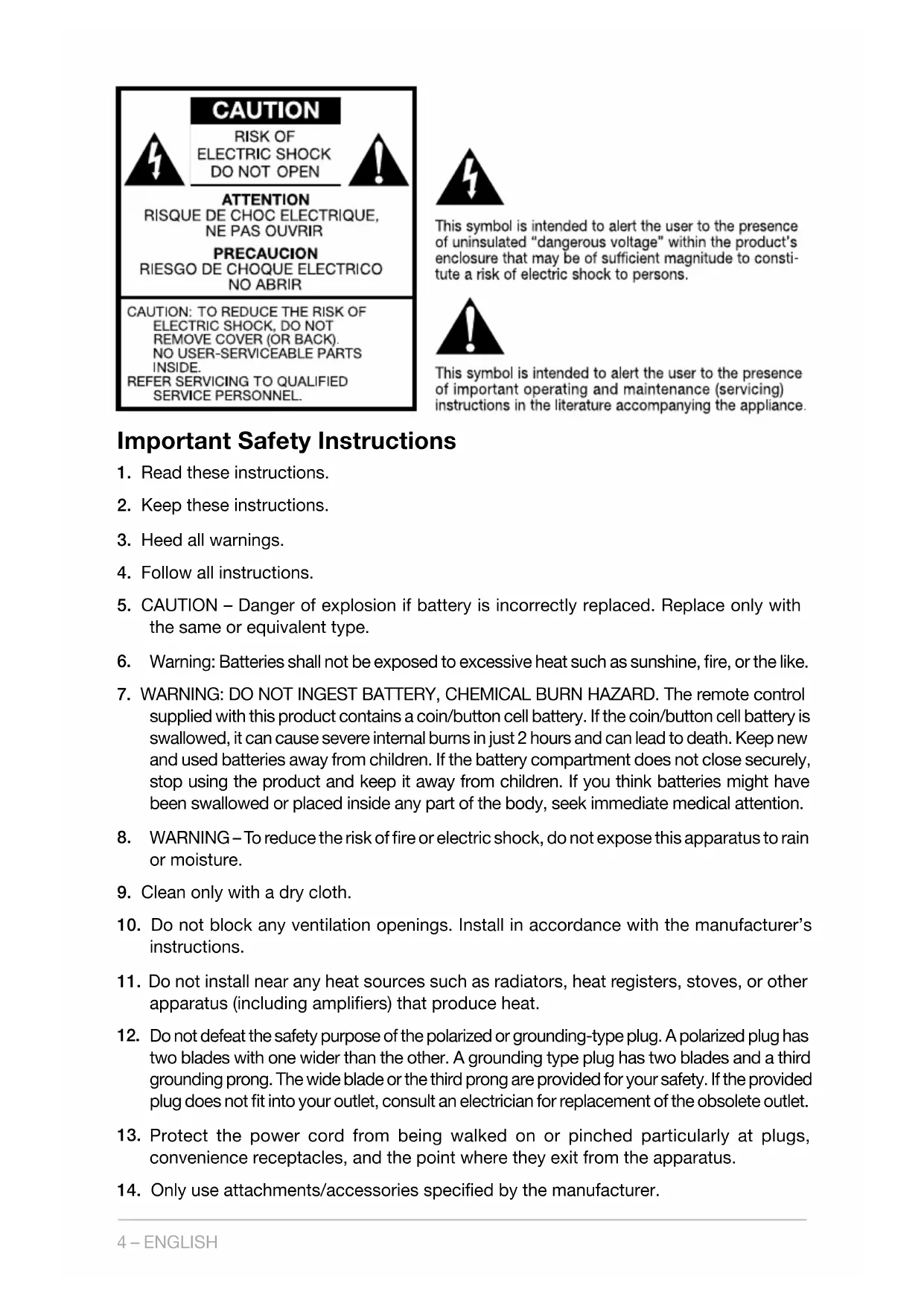
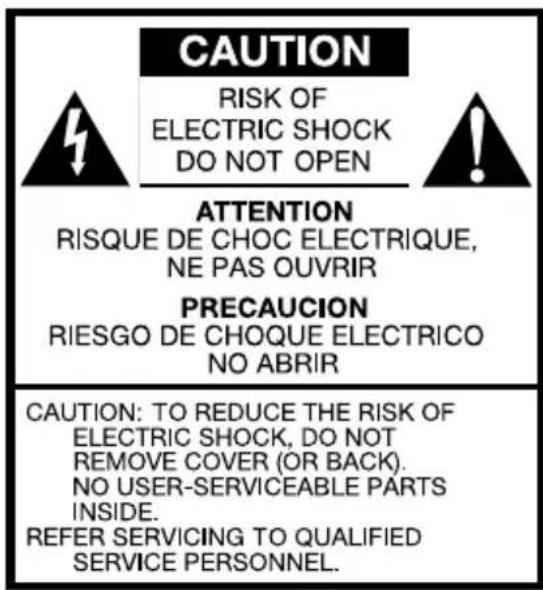
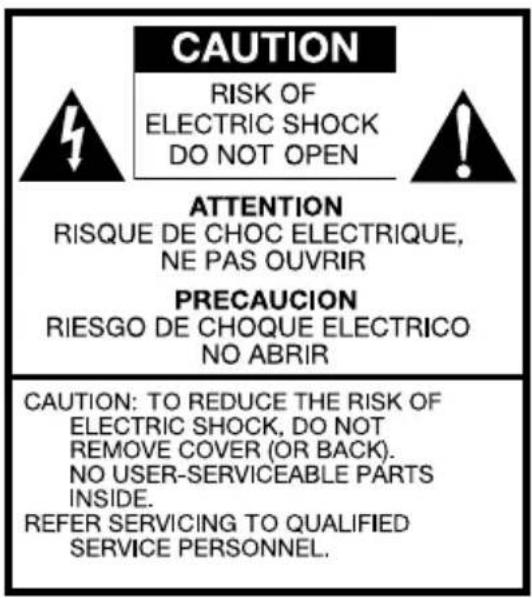
CAUTION RISK OF ELECTRIC SHOCK DO NOT OPEN ATTENTION RISQUE DE CHOC ELECTRIQUE, NE PAS OUVRIR PRECAUCION RIESGO DE CHOQUE ELECTRICO NO ABRIR CAUTION: TO REDUCE THE RISK OF ELECTRIC SHOCK, DO NOT REMOVE COVER (OR BACK). NO USER-SERVICEABLE PARTS INSIDE. REFER SERVICING TO QUALIFIED SERVICE PERSONNEL.
This symbol is intended to alert the user to the presence of uninsulated "dangerous voltage" within the product's enclosure that may be of sufficient magnitude to constitute a risk of electric shock to persons.

This symbol is intended to alert the user to the presence of important operating and maintenance (servicing) instructions in the literature accompanying the appliance.
Important Safety Instructions
- Read these instructions.
- Keep these instructions.
- Heed all warnings.
- Follow all instructions.
- CAUTION – Danger of explosion if battery is incorrectly replaced. Replace only with the same or equivalent type.
- Warning: Batteries shall not be exposed to excessive heat such as sunshine, fire, or the like.
- WARNING: DO NOT INGEST BATTERY, CHEMICAL BURN HAZARD. The remote control supplied with this product contains a coin/button cell battery. If the coin/button cell battery is swallowed, it can cause severe internal burns in just 2 hours and can lead to death. Keep new and used batteries away from children. If the battery compartment does not close securely, stop using the product and keep it away from children. If you think batteries might have been swallowed or placed inside any part of the body, seek immediate medical attention.
- WARNING – To reduce the risk of fire or electric shock, do not expose this apparatus to rain or moisture.
- Clean only with a dry cloth.
- Do not block any ventilation openings. Install in accordance with the manufacturer's instructions.
- Do not install near any heat sources such as radiators, heat registers, stoves, or other apparatus (including amplifiers) that produce heat.
- Do not defeat the safety purpose of the polarized or grounding-type plug. A polarized plug has two blades with one wider than the other. A grounding type plug has two blades and a third grounding prong. The wide blade or the third prong are provided for your safety. If the provided plug does not fit into your outlet, consult an electrician for replacement of the obsolete outlet.
- Protect the power cord from being walked on or pinched particularly at plugs, convenience receptacles, and the point where they exit from the apparatus.
-
Only use attachments/accessories specified by the manufacturer.
-
Use only with the cart, stand, tripod, bracket, or table specified by the manufacturer, or sold with the apparatus. When a cart is used, use caution when moving the cart/apparatus combination to avoid injury from tip-over.
-
Unplug this apparatus during lightning storms or when unused for long periods of time.

natural_image
Symbolic icon of a person climbing a ladder inside a circle with no text or symbols-
Operate this product only from the type of power source indicated on the rear panel. For products using an external power supply, use an exact replacement if lost or damaged. For products operating from battery power, refer to the user manual.
-
This product has been tested and found to comply with the limits for Part 15 of the FCC rules. These limits are designed to provide reasonable protection against harmful interference in a residential installation. This product generates, uses, and can radiate radio frequency energy and, if not installed and used in accordance with the instructions, may cause harmful interference with radio communications. However, there is no guarantee that interference will not occur in a particular installation. If this equipment does cause harmful interference to radio or television reception, which can be determined by turning the product on and off, the user is encouraged to try to correct the interference by one or more of the following measures:
a. Reorient or relocate the receiving antennas.
b. Increase the separation between the equipment and the receiver.
c. Connect the equipment to an outlet on a circuit different from that to which the receiver is connected.
- Unplug this product from the wall outlet and refer servicing to qualified service personnel under the following conditions:
a. When the power supply cord or plug is damaged.
b. If liquid has been spilled or objects have fallen into the product.
c. If the product has been exposed to water or rain.
d. If the product does not operate normally by following the operating instructions.
e. If the product has been dropped or damaged in any way.
f. When the product exhibits a distinctive change in performance.
- When replacement parts are required, be sure your service technician has used replacement parts specified by the manufacturer or have the same characteristics as the original part. Unauthorized substitutions may result in fire, electric shock, or other hazards.
- Upon completion of any service, ask the service technician to perform safety checks to confirm the product is in proper operating condition.
- If the LCD becomes cracked and damaged, do not touch the liquid.
- Keep this product a safe distance away from naked flame, such as a lit candle.
- Do not expose this product to splashing or dripping. Objects containing liquid, such as vases or drinking glasses, should not be placed on top of this product.
- The recommended operating temperature range is 5^ C to 40^ C ( 41^ F to 104^ F).
- WARNING – The mains are not disconnected in the off position, but the circuits are de-powered.
- Complies with the Canadian ICES-003 & RSS-210.
- The external power supply serves as the disconnect device and should remain readily accessible.
WARNING: THE ALBERGO EXTERNAL ANTENNA IS NOT INTENDED TO BE DETACHED.

natural_image
Symbol of a trash bin crossed with two crossed lines, no text or labels presentThis product can be recycled. Products bearing this symbol must NOT be thrown away with normal household waste. At the end of the product's life, take it to a collection point designated for recycling of electrical and electronic devices. Find out more about return and collection points through your local authority.
The European Waste Electrical and Electronic Equipment (WEEE) Directive was implemented to dramatically reduce the amount of waste going to landfills, thereby reducing the environmental impact on the planet and on human health. Please act responsibly by recycling used products. If this product is still useable, consider giving it away or selling it.
Albergo Instructions
Congratulations on your purchase. We believe the Albergo to be one of the finest AM/FM table radios on the market today. And with Bluetooth wireless technology you can stream your music wirelessly to the Albergo.
We know you are eager to begin listening to your new radio, but in order to take full advantage of what your radio is capable of, please take a moment to read this owner's manual and the safety instructions. If you have any questions, please do not hesitate to contact your dealer or Tivoli Audio.
Please save the carton and original packing should you ever need to ship your radio, as shipping damage is not covered by the factory warranty.
On behalf of all of us, thank you for choosing Tivoli Audio, and enjoy your Albergo!
Packed with your Albergo you should find one each:
• 1 External Power Supply
• 1 Remote Control (battery installed)
Please contact your dealer or Tivoli Audio if any of these items are missing.
Guide to Features (Front Panel)
text_image
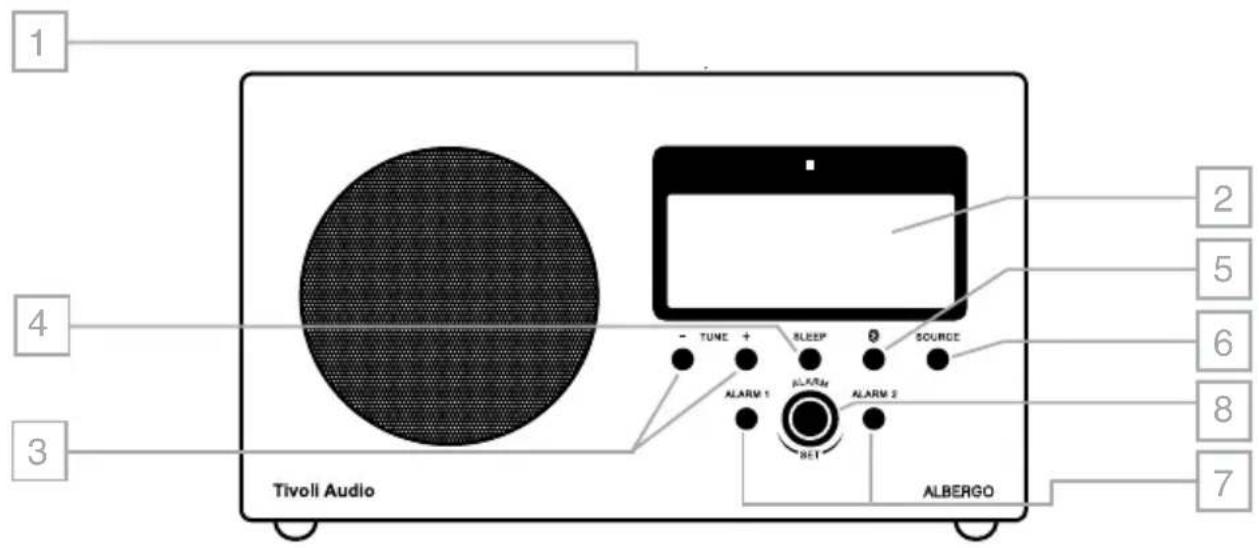
1 2 4 3 Tivoli Audio - TUNE + SLEEP 2 SOURCE ALARM 1 ALARM ALARM 2 RET ALBERGO 7 8 6 5 4 2- MULTI-FUNCTION CONTROL WHEEL (TOP): The control wheel conveniently serves many functions:
a. Power: When the Albergo is off, press to power the unit on. When the Albergo is on in any source, press to power the unit off.
b. Volume: When the Albergo is on in any source, rotate clockwise to increase the volume level and counter-clockwise to decrease the volume level.
c. Snooze: Press to engage Snooze when the alarm sounds. An icon will show on the display when Snooze is active. The Snooze time is fixed at 10 minutes. Pressing the Snooze button again while still in Snooze mode will re-set the Snooze timer back to 10 minutes.
- LCD:
text_image
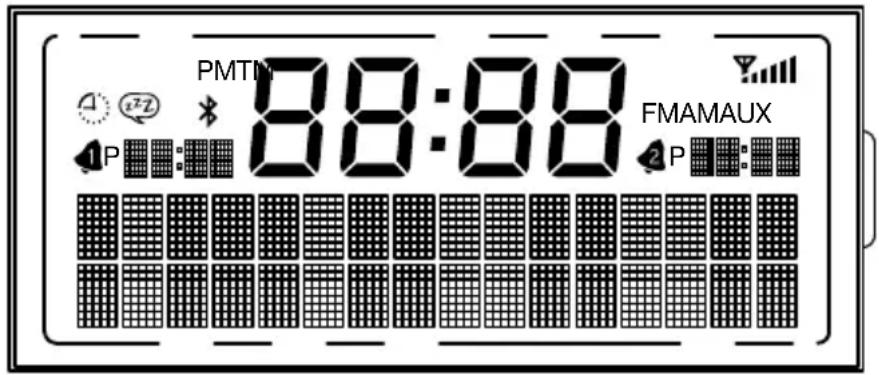
PMTIN 88:88 FMAMAUX 1 P 2 P88:88 : (center digits): Time
AUX: Auxiliary
FM: FM band

: Sleep timer

: Reception level

Bluetooth mode

: Snooze timer
AM: AM band
M: Mono

2: Alarms 1 and 2
PM: When 12 hour clock is selected
T : Manual tuning mode
- TUNE +/-: Press the Tune +/- buttons briefly to auto scan to the next station detected. The display will show "Scanning..." See "Auto Scan" under the section marked "Menu" to disable Auto Scan and tune stations manually.
- SLEEP: Press repeatedly to activate the amount of time the radio will play before it turns off automatically, and press the Select button on the remote control to select that time. A small clock face will show on the display when the Sleep timer is active. To cancel Sleep, press the Sleep button until the display shows "Off".
- BLUETOOTH: Press to enter Bluetooth mode. See "Bluetooth Operation" for more information. Press and hold the Bluetooth button to clear the memory of all paired devices. The display will show "Memory Cleared".
- SOURCE: Press repeatedly to change sources.
- 12 ALARM 1 AND 2: Press to set the desired wake time for either alarm and automatically set the alarm to wake.
- ALARM KNOB: After pressing either Alarm button, rotate this knob to set the hour and push the knob in to Enter, then do the same for the minutes and press the knob in when done, or the alarm time will set automatically after 3 seconds. The alarm will be set to
wake. Each alarm's wake time will be shown in the display. Press the respective Alarm button again to cancel the alarm. Please also see "How to Change Alarm Settings and Set the Alarm Via the Main Menu" for additional very important Alarm settings.
Guide to Features (Rear Panel)
text_image
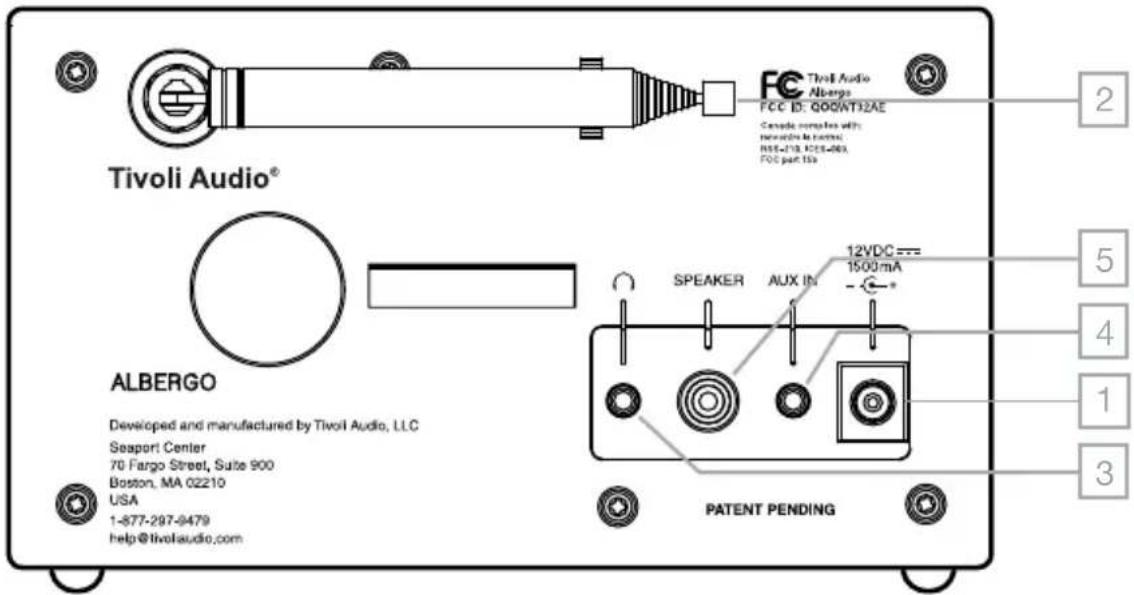
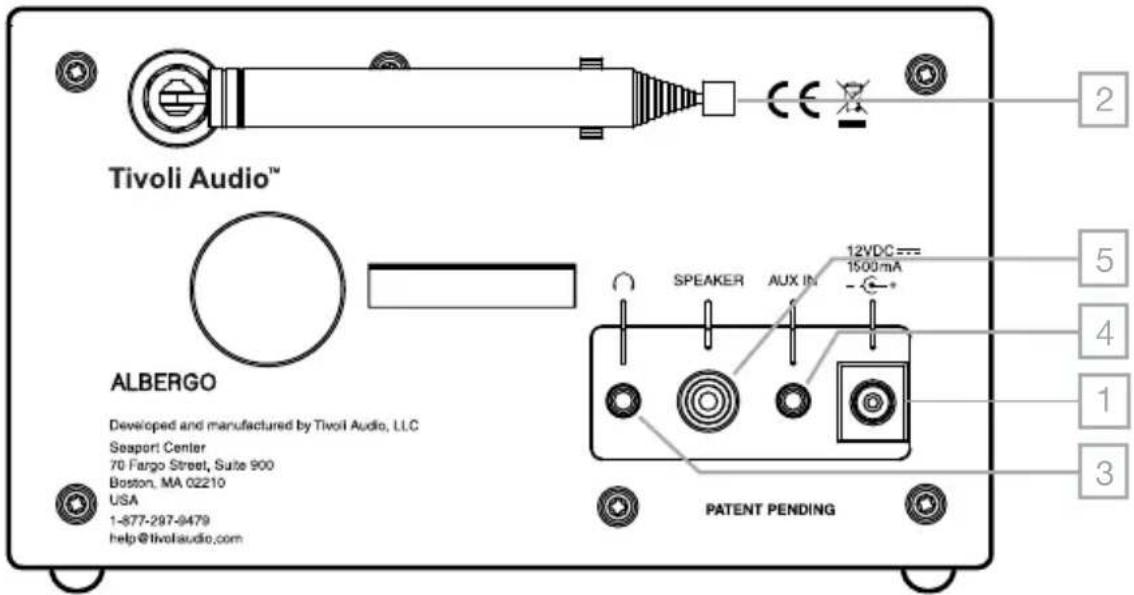
Tivoli Audio® ALBERGO Developed and manufactured by Tivoli Audio, LLC Seaport Center 70 Fargo Street, Suite 900 Boston, MA 02210 USA 1-877-297-9479 help@tivolaudio.com P Patent Pending FC Tivoli Audio Albergo FCC ID: Q00WT32AE Canada companies with Hewkins Inc. RSS-110, RCS-263, FCC part 15s 12VDC === 1500mA SPEAKER AUX IN 2 5 4 1 3- 12VDC/1500mA: Use this input to operate the Albergo using its included external power supply. Use only the power supply provided with this product. Should the power supply become damaged or misplaced, use only a like replacement. Any DC adapter used must be rated at 12VDC 1500mA and 120V 60Hz (depending on your region's power requirements). Use of any DC adapter not recommended by the manufacturer/not meeting this specification may cause a safety hazard. The connector is 5.5 mm/2.1 mm center positive. It is normal for the power supply to become warm during use.
- EXTERNAL ANTENNA: An external telescoping antenna is affixed to this input and is not intended to be detached. Adjust for best reception. For more, see the section marked "AM/FM Reception".
- HEADPHONE OUT: Connect a headset (not included) to this variable stereo output for private listening. The headset will mute the primary speaker. The headset's volume is adjusted using the control wheel or the remote control. The remote's "Mono" button also affects this output. This stereo output accepts a 3.5 mm stereo male mini connector. Avoid using headphones at high volume levels to prevent possible hearing damage.
- AUX IN: To hear audio from another device, such as Tivoli Audio's Model CD, a MP3 player, or TV, connect said device's audio output to this stereo input and change the source to Auxiliary. This stereo input accepts a 3.5 mm stereo male mini connector. Note: you may need to adjust the volume level differently for an auxiliary device than the level used for radio listening.
- SPEAKER: Connect the male RCA cable from the optional Tivoli Audio Albergo Speaker to this female RCA output. Make sure the Stereo/Mono setting is set to Stereo by pressing the Mono button on the remote control and be sure the display doesn't show "M" for mono.
Guide to Features (Remote Control)
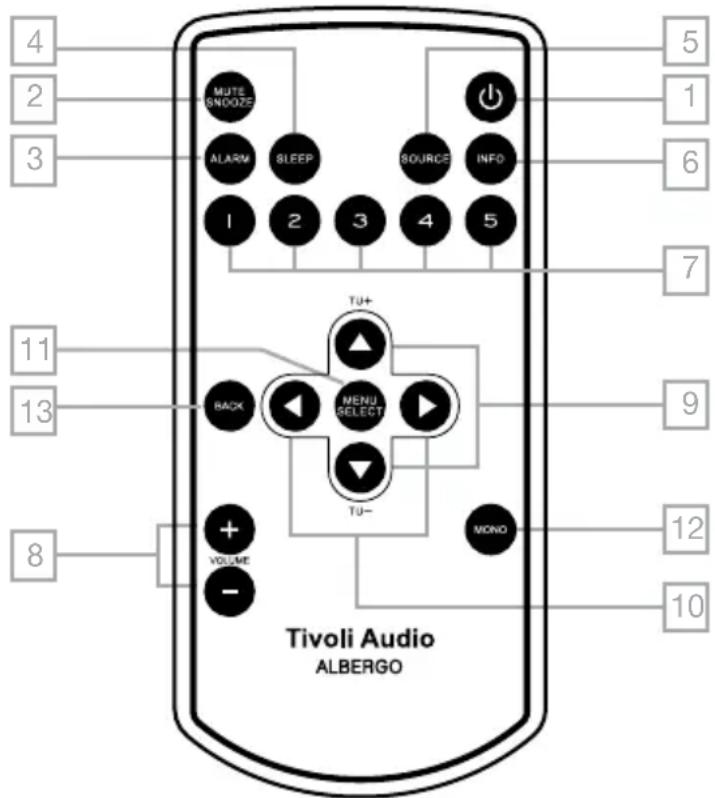
- POWER: Press briefly to power the Albergo off or on. The radio will power on to the last source used.
- MUTE/SNOOZE: Press to mute the audio while the unit is playing; press again or adjust the volume to restore sound. Press to mute the alarm for 10 minutes after the alarm sounds. A icon will show on the display when Snooze is active. The Snooze time is not adjustable. Pressing the Snooze button again while still in Snooze mode will re-set the Snooze timer back to 10 minutes.
- ALARM: With the Albergo powered on, use the ▲▼ and Select buttons to adjust and set the alarms. Please also
see “How to Change Alarm Settings and Set the Alarm Via the Main Menu” for additional very important Alarm settings.
text_image
4 2 3 MUTE SNOOZE ALARM SLEEP SOURCE INFO 1 2 3 4 5 TU+ BACK MENU SELECT TU- VOLUME MONO 8 Tivoli Audio ALBERGO 5 1 6 7 9 12 10- SLEEP: Press repeatedly to activate the amount of time the radio will play before it turns off automatically, and press the Select button on the remote control to select that time. A small clock face will show on the display when the Sleep timer is active. To cancel Sleep, press the Sleep button until the display shows "Off".
- SOURCE: Press repeatedly to change sources.
- INFO: Press repeatedly to cycle through the information available depending on the source mode you are in.
- PRESETS 1-5: Press and hold to store the currently tuned station. Press briefly to recall the station associated with that specific preset. The preset number will be indicated on the display. There are 5 presets for each band.
- VOLUME +/-: Press the Volume + button to raise the volume level or the Volume – button to lower the volume level. If the audio ever sounds distorted, lower the volume level to avoid damaging the speaker. Adjusting the volume while the Albergo is muted will cancel the muting.
- ▲▼/TUNE +/-: Press ▲ or ▼ briefly to auto scan to the next station detected. The display will show “Scanning...” See “Auto Scan” under the section marked “Menu” to disable Auto Scan and tune stations manually.
- ◀▶: The right arrow button duplicates the Select button. The left arrow button moves you to the previous page in certain menu items.
-
MENU/SELECT: Press to enter the main menu within each source mode and press briefly to select items within the menu. For more, see the sections below marked "Menu" for AM, FM, Bluetooth, and Auxiliary Menus.
-
MONO: Press to change the Stereo/Mono setting. The display will show "M" for mono. This setting also affects the headphone output. For more, see the section marked "AM/FM Reception".
- BACK: Press to go back to the previous menu page.
Note: With the radio in standby, briefly press the ▲ arrow button on the remote control twice to turn the display off. While the display is off, briefly press the ▲ arrow button once to turn the display on for 10 seconds. Briefly press the ▲ arrow button on the remote two more times to turn the display back on.
Menu
In any source mode, press the Menu/Select button briefly on the remote. Use the remote's ▲▼ buttons to navigate through the menu pages and the ▲▼ and Select buttons to change the items within the menu. If you make a mistake at any point in the process, press the Back button on the remote and begin again.
An asterisk (*) indicates the shown menu item is currently set.
Note: The Main Menu will time out if no action is taken after 9 seconds.
- RDS (NOT IN AM, AUX, OR BLUETOOTH MENUS): Press the Select button and use the ▲▼ arrow and Select buttons to choose between Enabling or Disabling FM RDS text. For more, see "RDS".
- SETTINGS (A-K):
A. Auto Scan (NOT IN AUX OR BLUETOOTH MENUS): Press the Select button and use the ▲▼ arrow and Select buttons to enable or disable Auto Scan. When enabled, Auto Scan will automatically tune the next station received each time the ▲▼ buttons are pressed. When disabled, the ▲▼ buttons can be used to manually navigate the frequencies.
B. Auto Clock: Press the Select button and use the ▲▼ arrow and Select buttons to choose between On or Off. For the auto update to work, you must have consistent reception of FM RDS with a time/date signal provided. It could take up to a minute or more for the clock to update. Tivoli Audio is not responsible for inaccurate time/date information provided by the auto update signal. To set the clock manually, select "Off", and set the time and date in the "clock set" menu item.
C. Set 12/24 Hour: Press the Select button and use the ▲▼ and Select buttons to choose 12 or 24 hour clock format.
D. Contrast: Press the Select button and use ▲▼ arrow and Select buttons to increase or decrease the display contrast.
E. Backlight: Press the Select button and use the ▲▼ arrow and Select buttons to make the backlight brighter or dimmer.
F. Display: Press the Select button and use the ▲▼ arrow and Select buttons to set the display on or off. Setting the display off will turn the backlight off when the Albergo is turned off. This may be desirable when sleeping. While the display is off, pressing a button on the remote will turn the display on for 10 seconds.
G. Date Set: Press the Select button and use the ▲▼ arrow and Select buttons to set the date.
H. Clock Set: Press the Select button and use the ▲▼ arrow and Select buttons to set/change the hour, then press Select. Repeat this process to set/change the minutes, then press Select.
I. Volume Limit (NOT IN AM OR FM MENUS): If you wish to reduce the maximum volume level so as not to disturb others, press the Select button and use the ▲▼ arrow and Select buttons to choose between Volume limit 26 or 22. Selecting “Off” keeps the maximum volume at the factory default setting of 30. Note: Reducing the overall volume level will also reduce the level of the alarm’s volume when the alarm sounds.
J. Alarm 2 (NOT IN AM OR FM MENUS): If you do not expect to use Alarm 2 or are afraid Alarm 2 may be set in error, press the Select button and use the ▲▼ arrow and Select buttons to Disable Alarm 2.
K. Bluetooth Level: Use the ▲▼ and Select buttons to select "Low" should you wish to reduce the range of the Bluetooth signal. This may be desirable if the Bluetooth feature will only be used when you are in very close proximity to the radio. We recommend this setting remain in the "Normal" position.
3. TIVOLI EQ
A. Bass: Press Select and use the ▲▼ arrow and Select buttons to adjust the bass.
B. EQ: The equalizer acts as a Loudness control at low volume levels. Use the ▲▼ buttons to select between having the EQ on, having the EQ always off, or the EQ off until the Albergo is turned off (when it is turned on again the EQ will be on again).
C. Balance: As the balance control has no effect when the Albergo is set to Mono, this setting should remain in the center position, except when the optional Albergo Speaker is connected and Stereo mode is selected via the remote control's "Mono" button. Though we still recommend the center balance setting in Stereo mode, you may use the ▲▼ buttons to adjust the balance to your liking, and press the Select button.
D. Treble: Press Select and use the up/down arrow and Select buttons to adjust the treble and press the Select button.
How to Change Alarm Settings and Set the Alarm Via the Main Menu
- With the Albergo powered on, access the alarm settings by pressing the Alarm button on the remote.
- Alarm 1 is shown first. Use the ▲▼ and Select buttons to choose between Alarm 1 and Alarm 2.
- Use the ▲▼ and Select buttons to set the alarm on or off.
- Use the ▲▼ buttons to set/change the hour, then press Select. Repeat this process to set/change the minutes, followed by AM/PM (if time is set to 12 hour format), then press Select. Note: At any point you can navigate through the alarm menu by using the back or left arrow buttons, and the Select or right arrow buttons.
-
Use the ▲▼ buttons to set how often the alarm should be set to wake, then press Select.
-
Use the ▲▼ buttons to select the source you wish to wake to, then press Select. If you set the source to AM or FM, use the ▲▼ buttons to select the station preset (if presets have been stored) or last listened, then press Select.
- Lastly, use the ▲▼ buttons to set the volume level of the alarm, then press Select.
- Repeat this process for Alarm 2 if desired.
If you make a mistake at any point in the process, press the Back button on the remote and begin again.
Power Loss: Should power be lost, or the Albergo becomes disconnected, the alarm time will be saved but the Albergo alarm cannot sound if there is no power.
Alarm Options
When the alarm sounds you can activate the Snooze feature or shut the alarm off.
Snooze: To activate Snooze while the alarm is sounding, press the Snooze button on the remote, or briefly press the Multi-Function Control Wheel on top of the unit. The Snooze time is not adjustable. Pressing the Snooze button again while still in Snooze mode will re-set the Snooze timer back to 10 minutes.
Alarm off: To stop the alarm while it is sounding, press the Alarm button on the unit or remote. You can also press the Power button on the remote.
Alarm Quick Set: With the Albergo in Standby, repeatedly press the alarm button on the remote briefly to toggle each alarm on or off.
Bluetooth Operation
Prior to pairing, verify your device supports Bluetooth 2.1+EDR A2DP and your device is not connected to any other Bluetooth product. Devices may pair differently. Below is a general guide.
- Press the Albergo's front panel Bluetooth button or change the source to Bluetooth. This will power on the Bluetooth. Turn the volume up about 14 to start. Also turn up the volume on the source device (the device you are streaming from).
- Turn on the Bluetooth wireless technology on your enabled device.
- Select "Tivoli Bluetooth (Not Paired)" when it appears on your device's screen to initiate searching. Some devices may prompt you for a PIN. If so, enter "0000". "Tivoli Bluetooth" will change from "Not Paired" to "Connected".
- You will hear a ring tone from the Albergo confirming connection and you can begin playing your music files wirelessly. Adjust the volume level on your device. You should not have to pair your device again. Depending on your device, you may need to make multiple attempts at Pairing and/or Connecting to the Albergo, but please give your device adequate time to Pair or Connect before repeating the process.
Pairing A Bluetooth Wireless Technology Enabled iPhone/iPod Touch/iPad
-
Press the Albergo's front panel Bluetooth button or change the source to Bluetooth. This will power on the Bluetooth. Turn the volume up about 14 to start. Also turn up the volume on the source device (the device you are streaming from).
-
Select "Settings" (depending on software version).
- Select "General".
- Select "Bluetooth".
- Switch Bluetooth "On" to initiate searching.
- Select "Tivoli Bluetooth (Not Paired)" when it appears on the display. If you are prompted to enter a PIN, enter "0000". "Tivoli Bluetooth" will change from "Not Paired" to "Connected".
- You will hear a ring tone from the Albergo and you can begin playing your music files wirelessly. Adjust the volume level on your device. You should not have to pair your iPhone/iPod/iPad again.
The volume output level of music files varies. If you prefer an even higher output level, check the settings in your iPhone/iPod touch/iPad: Set the EQ Off, the SoundCheck Off, and the Volume limit Off.
If you encounter a problem Pairing, press the small arrow to the right of “Tivoli Bluetooth” on your iPhone/iPod touch/iPad display and select “Forget this Device”, then repeat the Pairing process. Depending on your device, you may need to make multiple attempts at Pairing and/or Connecting to the Albergo, but please give your device adequate time to Pair or Connect before repeating the process.
When streaming music, you can press the blue arrow to the right of the next track button >>/ on the iPhone/iPod touch/iPad display to alternate between the iPhone/iPod/iPad and Bluetooth.
NOTE:
- The Albergo will remember pairing information for up to 8 devices. Additional devices can be paired, but the least-recently used device will be replaced by the newly paired device.
- If the audio drops out or stops during playback, move your device closer to the Albergo, or check to be sure another wireless device is not interfering with the signal.
- When switching from Bluetooth to AM or FM, you may need to re-adjust (lower) the radio's volume level.
AM/FM Reception
The included external FM antenna will provide good reception. In strong FM signal locations, reducing the antenna's length may provide better reception. This antenna has no effect on AM reception.
If you are using the Albergo together with the optional Albergo Speaker for stereo sound and you are listening to a noisy FM station, press the Mono button on the remote control, as this might make the FM station more listenable. The display will show an “M” when in mono.
For the AM band, since the AM ferrite rod antenna is internal, rotate the Albergo for best reception. An optional external wireless AM antenna may provide improved AM reception.
Buildings made with concrete, steel, or aluminum siding will hinder reception. Household appliances, electric blankets, computers, CD players, and other electronic devices can also adversely affect reception or inject noise. If you experience this, move the Albergo further from the offending device or plug it into an electrical outlet not shared by another device.
RDS (FM Band only)
The Radio Data System (RDS) transmits text data along with the audio broadcast. Not all FM stations utilize this service, thus text may not be present with some stations. For stations broadcasting RDS, the text still might not appear, or might appear scrambled if the signal is too weak. In such cases, experiment with the position of the FM antenna. Note: RDS content is determined by each individual FM station.
Placement
Place the Albergo on a flat, stable surface. For proper bass and ventilation, do not obstruct the rear bass port. The Albergo is not video shielded and should be kept at minimum of 127 mm away from a computer monitor or television set. Placement in a bookcase, cabinet, or close to walls or corners may inflate the bass, creating an unnatural sound.
Cleaning
Never use any harsh cleansers or solvents on your radio.
North American Limited Warranty
Tivoli Audio manufactures its products to very high standards and we are confident our products will perform well. Accordingly, we provide a limited warranty on this product against manufacturing defects in material and workmanship to the original owner, for a period of one year from the original date of purchase. This warranty is non-transferable.
This Limited Warranty covers the functionality of the product for its normal, intended use as specified in this Owner's Manual. It does not cover a malfunction or damage that has resulted from improper or unreasonable use or installation, faulty ancillary equipment, modifications, unauthorized repair, shipping damage or loss, abuse, accidents, use on improper voltage/current, power surges, lightning or other acts of God, excess moisture, normal wear and tear, commercial use, or purchase from unauthorized dealers. Proof of purchase as evidence the unit was purchased from an authorized dealer may be required for warranty service. Please contact the dealer of purchase or local distributor for warranty service or repair.
Returns of any model purchased directly from Tivoli Audio via our website, telephone, mail, or fax: must have a Return Authorization (RA) number clearly indicated on the outside of the package. An RA number can be obtained by phoning Tivoli Audio customer service (1.877.297.9479) with the product's model name, serial number, approximate date of purchase, and detailed description of the problem, or by filling out the RA form on our web site (www.tivoliaudio.com). PRODUCTS RETURNED TO TIVOLI AUDIO WITHOUT A VALID RA # WILL BE RETURNED UNOPENED TO THE SENDER.
Please refrain from opening this product or taking it apart as doing so will void this Limited Warranty. There are no user serviceable parts inside. Tivoli Audio will not pay for costs incurred due to correction of reception problems, elimination of externally generated static/noise, loss of time, inconvenience, loss of use of product, or damage caused by improper use of this product.
In the event the product is returned during the warranty term and is eligible for service under this Limited Warranty, we will repair or replace any defective parts within a reasonable period of time and free of charge.
THIS LIMITED WARRANTY GIVES YOU SPECIFIC LEGAL RIGHTS SUBJECT TO SPECIFIED CONDITIONS. YOU MAY ALSO HAVE OTHER LEGAL RIGHTS WHICH APPLY TO THE PRODUCT YOU HAVE ACQUIRED. SOME PLACES DO NOT ALLOW THE EXCLUSION, RESTRICTION, OR MODIFICATION OF CERTAIN IMPLIED RIGHTS OR THEIR EFFECT. IN THOSE SITUATIONS THIS LIMITED WARRANTY WILL ONLY APPLY TO THE EXTENT THAT THE APPLICABLE LAW ALLOWS.
The provisions of the Limited Warranty are in lieu of any other warranties or conditions, except those provided by law. This Limited Warranty does not affect any legal rights provided to you by law and does not preclude any remedy you may have under law.
In states where liability limits are not precluded by statute, the maximum liability of Tivoli Audio shall not exceed the purchase price paid by you for the product. In states where limitations of liability are precluded by law, Tivoli Audio shall be liable for no more than the direct damages for bodily injury, and/or real or personal property arising from the negligence of Tivoli Audio.
Where not prohibited by law, Tivoli Audio shall not be liable for special, incidental, consequential, or indirect damages. Some places do not allow limitations on the exclusion or limitation of relief, special, incidental, consequential or indirect damages, or the limitation of liability to specified amounts, so the above limitations or exclusions may not apply to you.
This Limited Warranty is void if the label bearing the serial number has been removed or defaced.
For service outside the USA, please contact your local distributor.
If you purchased an extended service contract from your dealer and service is required after the term of this Limited Warranty has expired, please contact your extended service contract provider to obtain service.
For your convenience, you may register your product for warranty service online at our website, www.tivoliaudio.com. There is no legal obligation for you to provide personal information. However, such information allows us to maintain a record of the Tivoli Audio products acquired by you and better understand the purchasers of our products. The information collected will be used for marketing purposes by Tivoli Audio and, where permitted, to contact you in relation to the products you have acquired or other products which might be of interest to you from Tivoli Audio or other companies. The information that you provide may be processed in another country.
EU Limited Warranty
Tivoli Audio manufactures its products to very high standards and we are confident our products will perform well. Accordingly, we provide a limited warranty on this product against manufacturing defects in material and workmanship to the original owner. This warranty is non-transferable.
Products purchased in the European Union and Norway have a minimum warranty term of two years. For countries where minimum warranty terms are determined by statute, the warranty term is the statutory period required. In all other locations, the warranty term is one year.
This Limited Warranty covers the functionality of the product for its normal, intended use as specified in this Owner's Manual. It does not cover a malfunction or damage that has resulted from improper or unreasonable use or installation, using the charger to charge alkaline batteries, faulty ancillary equipment, modifications, unauthorized repair, shipping damage or loss, abuse, accidents, use on improper voltage/current, power surges, lightning or other acts of God, excess moisture, normal wear and tear, commercial use, or purchase from unauthorized dealers. Proof of purchase as evidence the unit was purchased from an authorized dealer may be required for warranty service.
Please contact the dealer of purchase or local distributor for warranty service or repair.
Please refrain from opening this product or taking it apart as doing so will void this Limited Warranty. There are no user serviceable parts inside. Tivoli Audio will not pay for costs incurred due to correction of reception problems, elimination of externally generated static/noise, loss of time, inconvenience, loss of use of product, or damage caused by improper use of this product.
In the event the product is returned during the warranty term and is eligible for service under this Limited Warranty, we will repair or replace any defective parts within a reasonable period of time and free of charge.
THIS LIMITED WARRANTY GIVES YOU SPECIFIC LEGAL RIGHTS SUBJECT TO SPECIFIED CONDITIONS. YOU MAY ALSO HAVE OTHER LEGAL RIGHTS WHICH APPLY TO THE PRODUCT YOU HAVE ACQUIRED. THESE LEGAL RIGHTS VARY FROM COUNTRY TO COUNTRY. SOME PLACES DO NOT ALLOW THE EXCLUSION, RESTRICTION, OR MODIFICATION OF CERTAIN IMPLIED RIGHTS OR THEIR EFFECT. IN THOSE SITUATIONS THIS LIMITED WARRANTY WILL ONLY APPLY TO THE EXTENT THAT THE APPLICABLE LAW ALLOWS.
The laws of your country may provide you with legal claims against the seller or manufacturer of this product. This Limited Warranty does not affect those rights.
The provisions of the Limited Warranty are in lieu of any other warranties or conditions, except those provided by law. This Limited Warranty does not affect any legal rights provided to you by law and does not preclude any remedy you may have under law.
In countries where liability limits are not precluded by statute, the maximum liability of Tivoli Audio shall not exceed the purchase price paid by you for the product. In countries where limitations of liability are precluded by law, Tivoli Audio shall be liable for no more than the direct damages for bodily injury, and/or real or personal property arising from the negligence of Tivoli Audio.
Where not prohibited by law, Tivoli Audio shall not be liable for special, incidental, consequential, or indirect damages. Some places do not allow limitations on the exclusion or limitation of relief, special, incidental, consequential or indirect damages, or the limitation of liability to specified amounts, so the above limitations or exclusions may not apply to you.
This Limited Warranty is void if the label bearing the serial number has been removed or defaced.
If you purchased an extended service contract from your dealer and service is required after the term of this Limited Warranty has expired, please contact your extended service contract provider to obtain service.
For your convenience, you may register your product for warranty service online at our website www.tivoliaudio.com. There is no legal obligation for you to provide personal information. However, such information allows us to maintain a record of the Tivoli Audio products acquired by you and better understand the purchasers of our products. The information collected will be used for marketing purposes by Tivoli Audio and, where permitted, to contact you in relation to the products you have acquired or other products which might be of interest to you from Tivoli Audio or other companies. The information that you provide may be processed in another country.
Specifications
Model: Tivoli Audio Albergo
Type: AM/FM clock radio with Bluetooth wireless technology
Drivers: 76.2 mm (3") full range driver
Receiving bands: FM:87.5-108MHz
AM: 522-1629kHz, 9k step (520-1710kHz, 10k step)
(Receiving ranges vary by region)
Power: 12VDC nominal - 15 VDC maximum, 1500 mA
Power Supply: Tivoli Audio 1.5A CE
FM De-Emphasis: 50uSec or 75uSec (depending upon region)
Dimensions: 110 mm H x 186 mm W x 129 mm D
(4.33"H × 7.32"W × 5.08"D)
Weight: 1.0 kg (2.2 lbs.)
All specifications subject to change without notice. Tivoli Audio reserves the right to make product changes without notice. Tivoli Audio, the Tivoli Audio logo, Albergo, Albergo+, and the Albergo Speaker are trademarks of Tivoli Audio, LLC. The Bluetooth word mark and logos are registered trademarks owned by Bluetooth SIG, Inc. and any use of such marks by Tivoli Audio is under license. iPod, iPod touch, iPhone, and iPad are trademarks of Apple Inc., registered in the U.S. and other countries. Other trademarks and trade names are those of their respective owners.

ALBERGO™
AM/FM Bordradioer
INDHOLDSFORTEGNELSE
natural_image
Symbolic icon of a person climbing a ladder inside a circle (no text or symbols)natural_image
Simple line drawing of a trash bin with crossed lines indicating no waste or plastic (no text or symbols)text_image
1 2 4 3 Tivoli Audio - TUNE + SLEEP 0 SOURCE ALARM 1 N.ARM ALARM 2 SET ALBERGO 5 6 8 7Guide to Features (Rear Panel)
text_image
Tivoli Audio™ ALBERGO Developed and manufactured by Tivoli Audio, LLC Seaport Center 70 Fargo Street, Suite 900 Boston, MA 02210 USA 1-877-297-9479 help@tivolaudio.com SPEAKER AUX IN 12VDC === 1500mA PATENT PENDING 2 5 4 1 3(4,33"H × 7,32"W × 5,08"D)
natural_image
Symbolic icon of a person climbing a ladder inside a circle with no text or symbolsnatural_image
Simple line drawing of a trash bin with crossed lines indicating no waste or plastic discharge (no text or symbols)text_image
1 2 4 3 Tivoli Audio - TUNE + SLEEP SOURCE ALARM 1 ALARM ALARM 2 SET ALBERGO 5 6 8 7text_image
Tivoli Audio™ ALBERGO Developed and manufactured by Tivoli Audio, LLC Seaport Center 70 Fargo Street, Suite 900 Boston, MA 02210 USA 1-877-297-9479 help@tivolaudio.com SPEAKER AUX IN 12VDC 1500mA PATENT PENDING 2 5 4 1 3(4,33"H x 7,32"W x 5,08"D)
Controles Panel Frontal....54
Controles Panel Posterior....56
Control Remoto 57
Menú 58
Cómo Ajustar la Alarma....60
natural_image
Symbolic icon of a person climbing a ladder inside a circle with no text or symbolsnatural_image
Symbol of a trash bin crossed with a diagonal line, no text or labels presenttext_image
1 2 4 3 Tivoli Audio - TUNE + SLEEP 3 SOURCE ALARM 1 ALARM ALARM 2 SET ALBERGO 7 8 6 5 2text_image
Tivoli Audio™ ALBERGO Developed and manufactured by Tivoli Audio, LLC Seaport Center 70 Fargo Street, Suite 900 Boston, MA 02210 USA 1-877-297-9479 help@tivolaudio.com SPEAKER AUX IN 12VDC === 1500mA PATENT PENDING 2 5 4 1 3(4.33"H × 7.32"W × 5.08"D)
Peso: 1.0 kg (2.2 lbs.)
natural_image
Symbolic icon of a person climbing a ladder inside a circle (no text or symbols)natural_image
Simple line drawing of a trash bin with crossed diagonals and a blank bottom bar (no text or symbols)text_image
1 2 4 3 Tivoli Audio SLEEP 0 SOURCE ALARM 1 ALARM ALARM 2 SET ALBERGO 7 8 6 5 2text_image
Tivoli Audio™ ALBERGO Developed and manufactured by Tivoli Audio, LLC Seaport Center 70 Fargo Street, Suite 900 Boston, MA 02210 USA 1-877-297-9479 help@tivolaudio.com SPEAKER AUX IN 12VDC === 1500mA PATENT PENDING 2 5 4 1 3Alimentation: 12VDC nominal – 15VDC maximum, 1500mA
Alimentation: Tivoli Audio 1.5A- CE
natural_image
Symbolic icon of a person climbing a ladder inside a circle with no text or symbolsnatural_image
Simple line drawing of a trash bin with crossed lines indicating no waste or plastic, and a solid black rectangle below (no text or symbols)text_image
1 2 4 3 Tivoli Audio - TUNE + SLEEP 9 SOURCE ALARM 1 ALARM ALARM 2 SET ALBERGO 7 8 6 5 2text_image
Tivoli Audio™ ALBERGO Developed and manufactured by Tivoli Audio, LLC Seaport Center 70 Fargo Street, Suite 900 Boston, MA 02210 USA 1-877-297-9479 help@tivolaudio.com SPEAKER AUX IN 12VDC === 1500mA PATENT PENDING 2 5 4 1 3RDS/RBDS (Solo Banda FM)
(4,33"H x 7,32"W x 5,08"D)
Peso: 1,0 kg (2,2 lbs.)
Specifications....110
text_image
CAUTION RISK OF ELECTRIC SHOCK DO NOT OPEN ATTENTION RISQUE DE CHOC ELECTRIQUE, NE PAS OUVRIR PRECAUCION RIESGO DE CHOQUE ELECTRICO NO ABRIR CAUTION: TO REDUCE THE RISK OF ELECTRIC SHOCK, DO NOT REMOVE COVER (OR BACK). NO USER-SERVICEABLE PARTS INSIDE. REFER SERVICING TO QUALIFIED SERVICE PERSONNEL.
natural_image
Symbolic icon of a person climbing a ladder inside a circle (no text or symbols)natural_image
Simple line drawing of a trash bin with crossed lines indicating no waste or plastic, and a solid black rectangle below (no text or symbols)Albergo Instructions
text_image
1 2 4 3 Tivoli Audio TUNE + SLEEP SOURCE ALARM 1 ALARM ALARM 2 SET ALBERGO 7 8 6 5 2text_image
Tivoli Audio™ ALBERGO Developed and manufactured by Tivoli Audio, LLC Seaport Center 70 Fargo Street, Suite 900 Boston, MA 02210 USA 1-877-297-9479 help@tivolaudio.com SPEAKER AUX IN 12VDC --- 1500mA PATENT PENDING 2 5 4 1 3AM: 522-1629 kHz, in 9 kHz stappen (520-1710 kHz, in 10 kHz stappen)
(4.33"H × 7.32"W × 5.08"D)
natural_image
Symbolic icon of a person climbing a ladder inside a circle (no text or symbols)natural_image
Simple line drawing of a trash bin with no text or symbolstext_image
1 2 4 3 Tivoli Audio - TUNE + SLEEP SOURCE ALARM 1 ALARM ALARM 2 SET ALBERGO 5 6 8 7text_image
Tivoli Audio™ ALBERGO Developed and manufactured by Tivoli Audio, LLC Seaport Center 70 Fargo Street, Suite 900 Boston, MA 02210 USA 1-877-297-9479 help@tivolaudio.com SPEAKER AUX IN 12VDC === 1500mA PATENT PENDING 2 5 4 1 3(4.33"H × 7.32"W × 5.08"D)
Vekt: 1.0 kg (2.2 lbs.)
natural_image
Silhouette of a person climbing a ladder inside a circle (no text or symbols)natural_image
Simple line drawing of a trash bin with no text or symbolstext_image
Tivoli Audio™ ALBERGO Developed and manufactured by Tivoli Audio, LLC Seaport Center 70 Fargo Street, Suite 900 Boston, MA 02210 USA 1-877-297-9479 help@tivolaudio.com SPEAKER AUX IN 12VDC --- 1500mA PATENT PENDING 2 5 4 1 3AM: 522-1629 kHz, 9k askel (520-1710 kHz, 10k askel)
(4.33"H × 7.32"W × 5.08"D)
Paino: 1.0 kg (2.2 lbs.)
natural_image
Silhouette of a person climbing a ladder inside a circle (no text or symbols)natural_image
Simple line drawing of a trash bin with crossed lines indicating no waste or plastic discharge (no text or symbols)text_image
1 2 4 3 Tivoli Audio - TUNE + SLEEP 0 SOURCE ALARM 1 ALARM ALARM 2 SET ALBERGO 7 8 6 5 4 2- MULTI-FUNKTIONS KONTROLLRATT (OVANSIDAN): Kontrollratten har många behändiga funktioner:
text_image
Tivoli Audio™ ALBERGO Developed and manufactured by Tivoli Audio, LLC Seaport Center 70 Fargo Street, Suite 900 Boston, MA 02210 USA 1-877-297-9479 help@tivolaudio.com SPEAKER AUX IN 12VDC === 1500mA PATENT PENDING 2 5 4 1 3(4.33"H x 7.32"W x 5.08"D)
Vikt: 1.0 kg (2.2 lbs.)
This manual was written by Peter Skiera and cannot be reproduced in whole or in part without the permission of Tivoli Audio. The information included within this owner's manual was accurate at the time of printing. Tivoli Audio shall not be held liable for operational, technical, or editorial errors/omissions.
For more information about other exciting products from Tivoli Audio, please visit our website or contact us directly (in English):
Tivoli Audio, LLC Seaport Center 70 Fargo Street, Suite 900 Boston, MA 02210 USA 1.877.297.9479 (US only) 1.617.345.0066 www.tivoliaudio.com help@tivoliaudio.com
ALBU071515