HAVTR800BL - Radio KONIG - Free user manual and instructions
Find the device manual for free HAVTR800BL KONIG in PDF.


User questions about HAVTR800BL KONIG
0 question about this device. Answer the ones you know or ask your own.
Ask a new question about this device
Download the instructions for your Radio in PDF format for free! Find your manual HAVTR800BL - KONIG and take your electronic device back in hand. On this page are published all the documents necessary for the use of your device. HAVTR800BL by KONIG.
USER MANUAL HAVTR800BL KONIG
text_image
KÖNIG ELECTRONICHAV-TR800xx
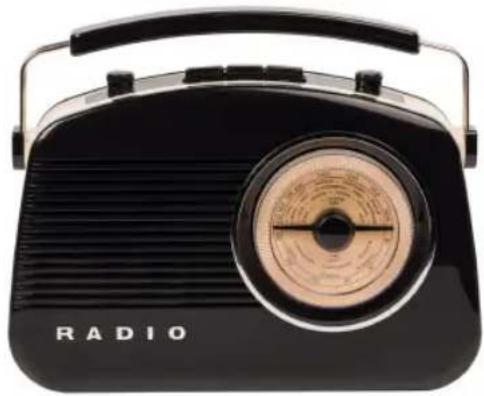
natural_image
Black vintage radio with a circular earpiece and 'RADIO' branding (no additional text or symbols visible)MANUAL (p. 2)
König Retro Bluetooth® Radio
MODE D'EMPLOI (p. 12)
König Radio Bluetooth® Rétro
MANUALE (p. 22)
MANUAL DE USO (p. 27)
 A triangle with a lightning symbol draws the user's attention to “dangerous voltage” without insulation in the cabinet which may be high enough to entail a risk of electric shock. A triangle with a lightning symbol draws the user's attention to “dangerous voltage” without insulation in the cabinet which may be high enough to entail a risk of electric shock. | WARNINGRISK OR ELECTRIC SHOCKDO NOT OPENCAUTION: TO REDUCE THE RISK OF ELECTRIC SHOCK, DO NOT REMOVE COVER (OR BACK). THERE ARE NO USER SERVICEABLE PARTS INSIDE, REFER SERVICING TO QUALLIFIED SERVICE PERSONNEL. |  A triangle with an exclamation mark draws the user's attention to important instructions; for use and maintenance in the accompanying manual, which should be studied. A triangle with an exclamation mark draws the user's attention to important instructions; for use and maintenance in the accompanying manual, which should be studied. |
FURTHER INFORMATION

Beware of small pieces and batteries. Do not swallow them. This may be hazardous to your health and lead to suffocation. Please, Make sure to keep small devices and batteries out of the reach of children.
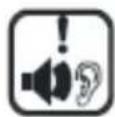
Important advice regarding hearing protection
Caution:
You care for your hearing, and so do we.
Therefore, use caution while using this appliance.
Our recommendation: Avoid high volumes.
Children should be supervised while using headphones; make sure that the appliance is not set to high volume.
Caution!
High volumes may cause irreparable damage to children's ears.

NEVER let allow anyone, especially children, to put objects into the holes, slots or openings on this device. The device must only be opened by a qualified assistant.

Only use the appliance for its intended purpose.
This device may only be used in housings and business premises.

Please keep this instruction manual for further reference.
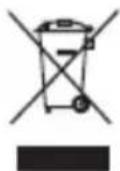
Instructions on environment protection
Do not dispose of this product in the usual household garbage at the end of its life cycle; hand it over at a collection point for the recycling of electrical and electronic appliances.
The symbol on the product, the instructions for use or the packing will inform about the methods for disposal.
The materials are recyclable as mentioned in its marking. By recycling, material recycling or other forms of re-utilisation of old appliances, you are making an important contribution to protect our environment.
Please inquire at the community administration for the authorised disposal location.

Do not obstruct the ventilation of the device. Make sure, that no curtains, newspapers, furniture or any other type of objects are blocking the ventilation system of the apparatus. The ventilation system must be clear of objects at all times! Overheating may lead into serious damage of the device and reduce its performance and lifespan.
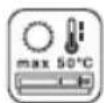
Heat and warmth
Do not expose the appliance to direct sunlight. Make sure that the appliance is not subject to direct heat sources such as heaters or open fire. Make sure that the ventilation slots of the appliance are not covered.
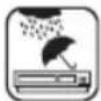
Moisture and cleaning
This appliance is not waterproof! Do not immerse player in water. Do not allow player to come in contact with water. If water gets inside the player it may cause serious damage. Do not use cleaning agents that contain alcohol, ammoniac, benzene or abrasives as these could damage the player. For cleaning, use a soft, moistened cloth.

Professional recycling
Batteries and packaging should not be disposed of in the trash. Batteries must be handed over to a collection centre for used batteries. Separating disposable packaging materials is ecologically friendly.
Saving energy
- During nonuse of the unit it is advisable to turn off the player with the power switch.
• If the unit is not used for a long period of time, it should be unplugged from the AC socket.
Unpacking
• Take out carefully the unit from the packing. Please keep the packing for further use.
- Carefully remove possible protection cardboards and slipcovers.
POWER SUPPLIES
Battery operation
- Open the battery compartment lid by pressing the two brackets (OPEN) at the same time. Remove the lid and insert 6 batteries (C/UM-2). Please observe correct polarities when inserting the batteries.
- Close the battery compartment by pushing the two tabs of the lid into the corresponding recesses and flap it towards the device, until the brackets audibly snap in.
Important
- Important: If the device is operated exclusively with AC power or during non-use of more than one month, please remove the batteries in order to avoid any damage by leaking batteries.
- Replace the batteries if the volume of the device becomes lower or the sound becomes distorted.
Battery safety precautions
- Follow the battery manufacturer's safety, usage and disposal instructions.
- Only use batteries of the same type and size.
- Insert the batteries observing the polarity (+/-). Failure to properly align the battery polarity can cause personal injury and/or property damage.
-
Do not mix battery types (e.g. alkaline, zinc/cartoon, rechargeable batteries) or exhausted and new batteries.
-
To avoid fire and explosion do not recharge normal batteries. Keep batteries away from children and pets.
• We recommend the use of alkaline batteries for a longer lifetime of the batteries.
LOCATION OF CONTROLS AND FUNCTION
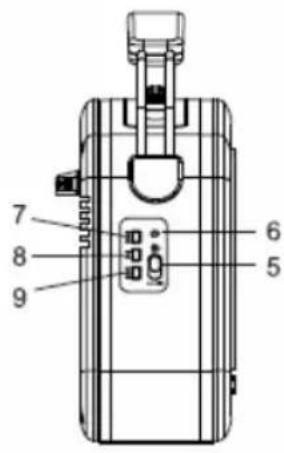
Top view
- On/off switch and volume control
- Telescopic antenna
- Tone control
- FM/AUX/AM Select button
- Radio - Bluetooth Select Switch
- LED - Bluetooth ^® Indicator
- Up button
- Play/stop button
- Down button
- Earphone input
- AUX-in input
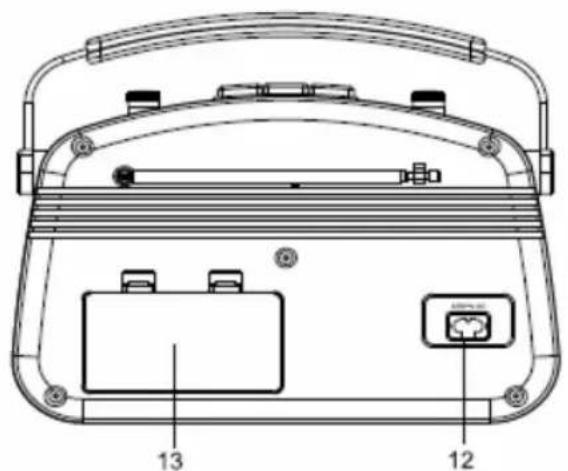
- AC socket for power cord
- Battery compartment
- Frequency dial and tuning knob
text_image
7 8 9 6 5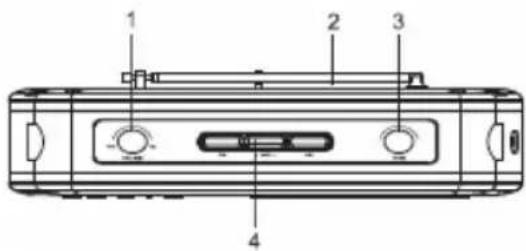
text_image
1 2 3 4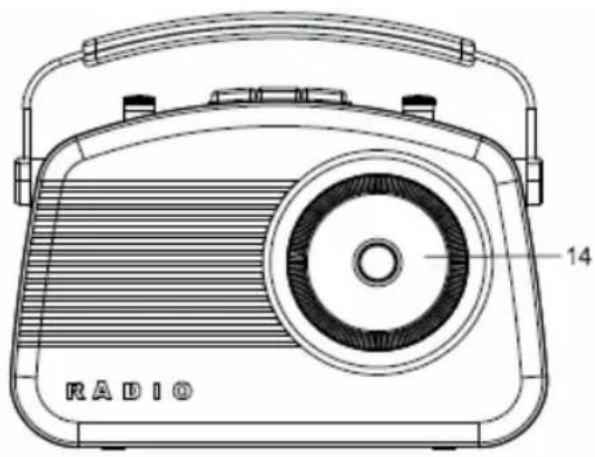
natural_image
Line drawing of a vintage radio with a circular grille and handle (no text or symbols)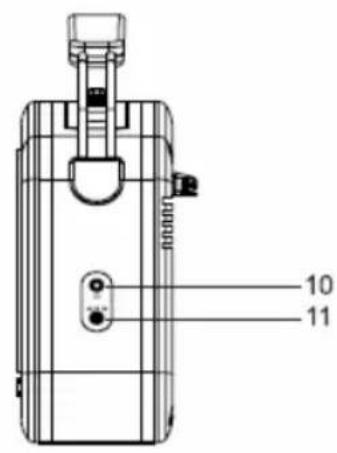
text_image
10 11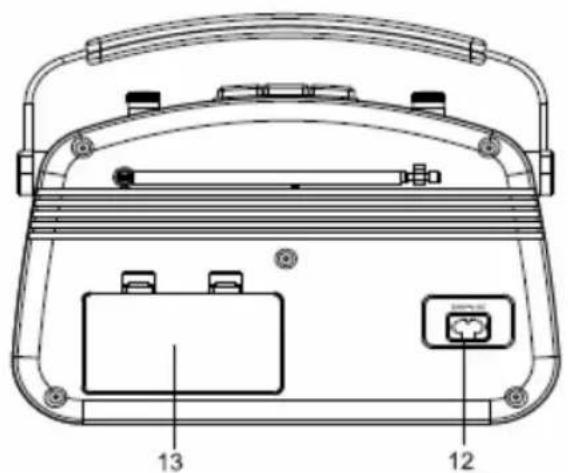
text_image
Technical diagram of a portable electronic device with labeled components 12 and 13Mains operation
The device is designed for mains power supply AC 230 -240 V\~50 Hz. Do not connect the device to any other power supply to avoid damage that is not covered by your warranty.
- Connect the connector to the AC socket at the rear of the device. Make sure that it is completely inserted.
- Insert the mains plug to a wall outlet.
- Disconnect the power cord from the mains when not in use.
GENERAL OPERATING INSTRUCTIONS
Select the function 'Switch of radio' to 'RADIO' position.
On/off
Switch on the device by turning the volume control clockwise, until you overcome the point of resistance. Switch off the device by turning the volume control counter-clockwise, until you overcome the point of resistance.
Volume control
Increase or decrease the volume by rotating the volume control to the left or right.
RADIO OPERATION
Select with the FM, AM or AUX buttons to choose desired frequency band.
Advice for better reception
• FM: Fully extend the telescopic antenna and position it for better reception.
• AM: The device has a built-in antenna. Change the position of the device if reception is poor.
Frequency adjustment
- Tune in the desired station by rotating the frequency scale. Rotating clockwise increases and rotating counter-clockwise decreases the frequency.
• The current adjusted frequency for selected band can be read on the frequency scale.
AUX in function
It can be used for listening music from any kind of audio reader device (MP3...etc.)
Connect a cable (double 3.5 mm jack - not included) between the audio reader and the line-in jack of the radio (on the side of the radio).
Select the desired music. Adjust the volume with the radio volume control.
If you do not use the aux in function, take out the 3.5 mm aux plug from the radio and the unit and enter to power management mode.
Tone control
Adjust the tone by rotating the tone knob. By rotating to the left the bass is intensified, rotating to the right intensifies the treble.
GENERAL OPERATION FOR Bluetooth® WIRELESS TECHNOLOGY
- Place the radio and device where they are no more than 10 meters apart.
- Select the radio Function switch to Bluetooth ^® position.
Select FM or AM with the FM/AUX/AM select button. - Activate the Bluetooth ^® function of the device and set it to search for Bluetooth ^® -enabled devices.
- While searching for the device, the radio LED indicator flashes.
- Wait until 'DR70BT' appears in the list of your Bluetooth ^® device.
- Select 'DR70BT'.
- When Bluetooth connection is made, the radio LED indicator is on.
- Press the play/pause button for playing or pausing the music.
- Press the track buttons to select tracks.
- Adjust the volume & tone control located on the top of the radio for desired volume level and high-low tone level.
CLEANING AND MAINTENANCE
- Please also observe the safety advices.
- Before cleaning always pull the power plug.
- Clean the housing with a soft and moist cloth and a mild detergent.
- Never use abrasive detergents or sharp utensils.
Safety precautions:
text_image
CAUTION RISK OF ELECTRIC SHOCK DO NOT OPENTo reduce risk of electric shock, this product should ONLY be opened by an authorised technician if service is required.
Disconnect the product from mains and other equipment if a problem should occur. Do not expose the product to water or moisture.
Maintenance:
Clean the product only with a dry cloth.
Do not use cleaning solvents or abrasives.
Warranty:
Any changes and/or modifications to the product will void the warranty. We cannot accept any liability for damage caused by incorrect use of this product.
Disclaimer:
Designs and specifications are subject to change without notice. All logos, brands and product names are trademarks or registered trademarks of their respective holders and are hereby recognised as such.
Disposal:
- This product is designated for separate collection at an appropriate collection point. Do not dispose of this product with household waste.
- For more information, contact the retailer or the local authority responsible for waste management.
This product has been manufactured and supplied in compliance with all relevant regulations and directives, valid for all member states of the European Union. It also complies to all applicable specifications and regulations in the country of sales.
Formal documentation is available upon request. This includes, but is not limited to: Declaration of Conformity (and product identity), Material Safety Data Sheet, product test report.
Please contact our customer service desk for support:
via website: http://www.nedis.com/en-us/
via e-mail: service@nedis.com
via telephone: +31 (0)73-5993965 (during office hours)
NEDIS B.V., De Tweeling 28, 5215 MC's-Hertogenbosch, THE NETHERLANDS
DEUTSCH
SICHERHEITSHINWEISE
natural_image
Line drawing of a vintage radio with a circular grille and handle (no text or symbols)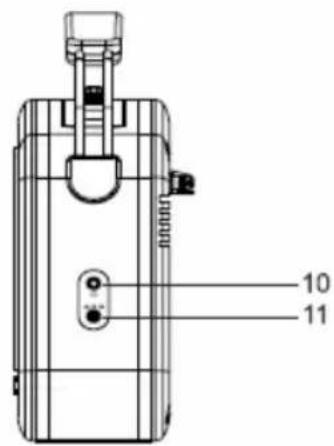
text_image
10 11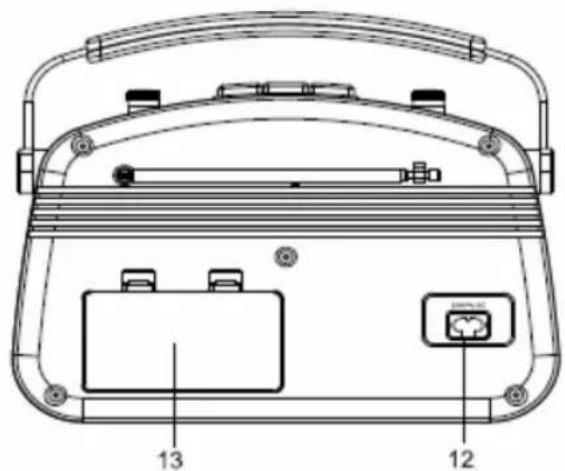
text_image
Technical diagram of a portable electronic device with labeled components 12 and 13Netzbetrieb
natural_image
Black triangular warning symbol with white lightning bolt and downward arrow (no text)RISQUE D'ÉLECTROCUTION NE PAS OUVRIR
ATTENTION : POUR ÉLIMINER LES RISQUES D'ÉLECTROCUTION, NE PAS RETIRER LE CAPOT (OU LE PANNEAU ARRIÈRE). AUCUNE PIÈCE N'EST RÉPARABLE PAR L'UTILISATEUR FAIRE APPEL À UN TECHNICIEN QUALIFIÉ POUR TOUTE RÉPARATION.

natural_image
Black triangular warning symbol with an exclamation mark (no text or numbers)Recyclage responsible
natural_image
Line drawing of a vintage radio with visible grille and antenna (no text or symbols)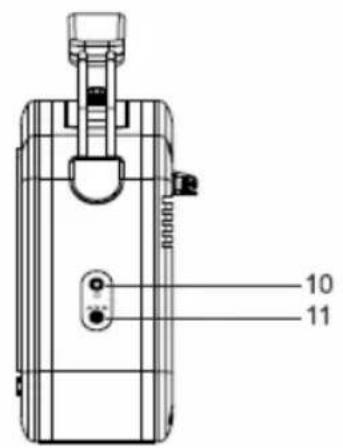
text_image
10 11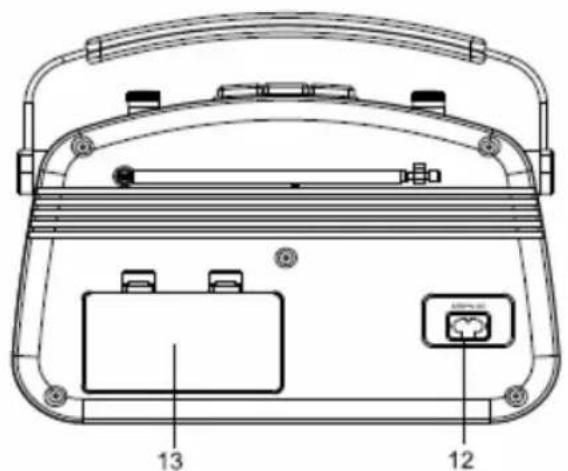
text_image
Technical diagram of a portable electronic device with labeled components 12 and 13natural_image
Black triangular warning symbol with a lightning bolt symbol (no text or numbers)natural_image
Black triangular warning symbol with an exclamation mark (no text or numbers)natural_image
Line drawing of a vintage radio with visible grille and antenna (no text or symbols)
text_image
10 11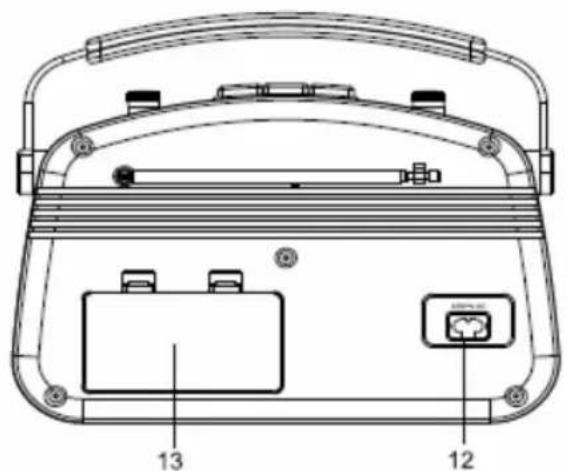
text_image
Technical diagram of a portable electronic device with labeled components 12 and 13Netspanning
ALGEMENE WERKING Bluetooth ^® wireless technology
natural_image
Black triangular warning symbol with lightning bolt symbol (no text)natural_image
Black triangular warning symbol with exclamation mark (no text or numbers)natural_image
Line drawing of a vintage radio with visible grille and antenna (no text or symbols)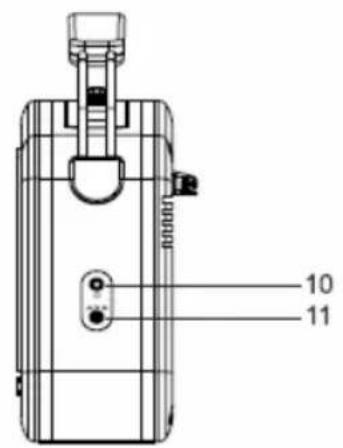
text_image
10 11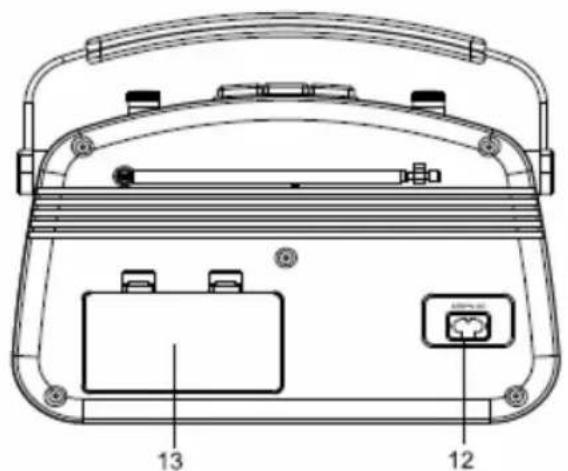
text_image
Technical diagram of a portable electronic device with labeled parts 12 and 13, showing internal components and casing layout.Funzionamento spina
natural_image
Black triangular warning symbol with white lightning bolt and downward arrow (no text)natural_image
Black triangular warning symbol with exclamation mark (no text or numbers)natural_image
Line drawing of a vintage radio with visible grille and antenna (no text or symbols)
text_image
10 11
text_image
Technical diagram of a portable electronic device with labeled parts 12 and 13, showing internal components and casing layout.natural_image
Black triangular warning symbol with white lightning bolt and downward arrow (no text)natural_image
Black triangular warning symbol with exclamation mark (no text or numbers)text_image
Technical diagram of a device rear panel with labeled components including buttons, dials, and indicator lights.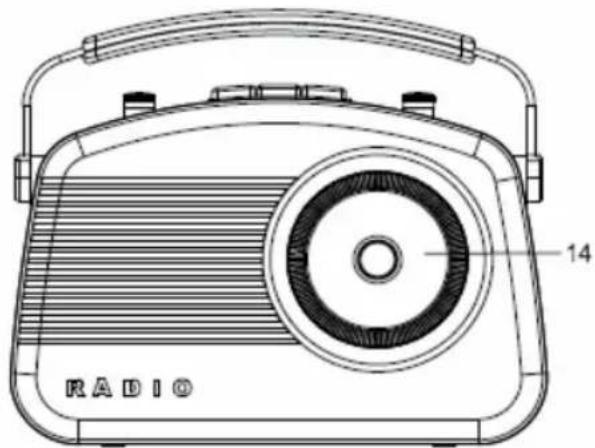
text_image
14 RADIO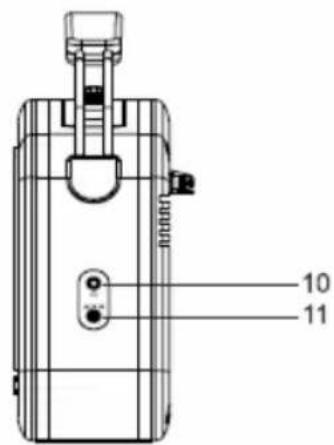
text_image
10 11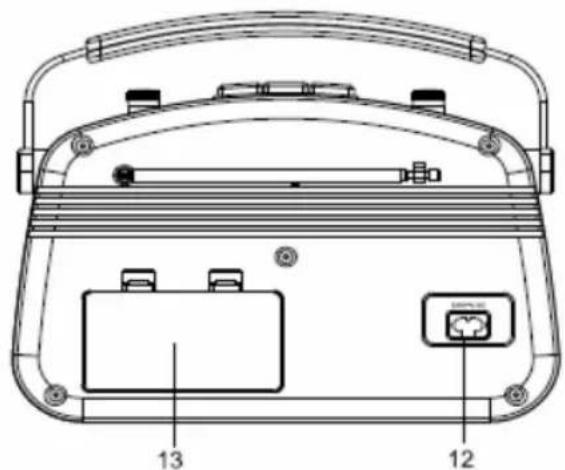
text_image
Technical diagram of a portable electronic device with labeled components including tray, buttons, and power outletnatural_image
Black triangular warning symbol with white lightning bolt and downward arrow (no text)natural_image
Black triangular warning symbol with exclamation mark (no text or numbers)natural_image
Line drawing of a vintage radio with visible grille and antenna (no text or symbols)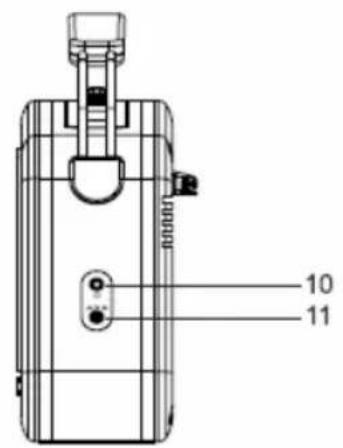
text_image
10 11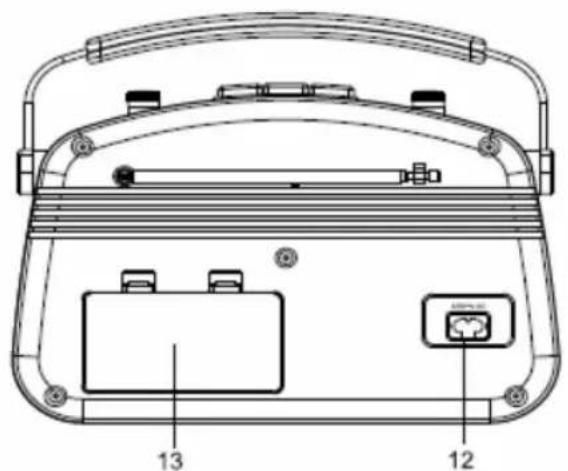
text_image
Technical diagram of a portable electronic device with labeled parts 12 and 13, showing internal components and casing layout.natural_image
Black triangular warning symbol with lightning bolt symbol (no text)natural_image
Black triangular warning symbol with an exclamation mark (no text or numbers)natural_image
Line drawing of a vintage radio with visible grille and antenna (no text or symbols)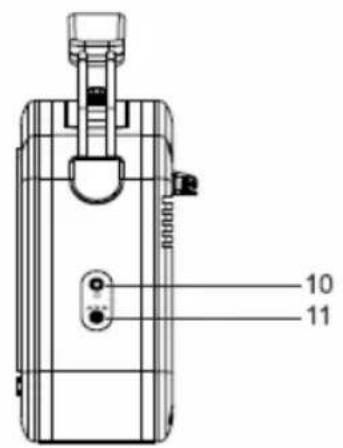
text_image
10 11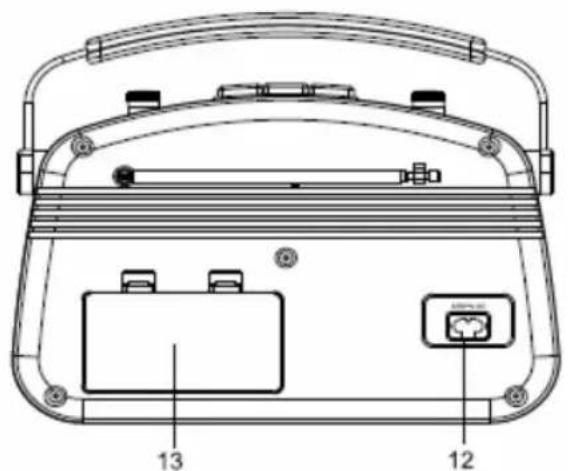
text_image
Technical diagram of a portable electronic device with labeled parts 12 and 13, showing internal components and casing layout.Virtakäyttö
natural_image
Black triangular warning symbol with a lightning bolt symbol (no text or numbers)natural_image
Black triangular warning symbol with an exclamation mark (no text or numbers)natural_image
Line drawing of a vintage radio with visible grille and antenna (no text or symbols)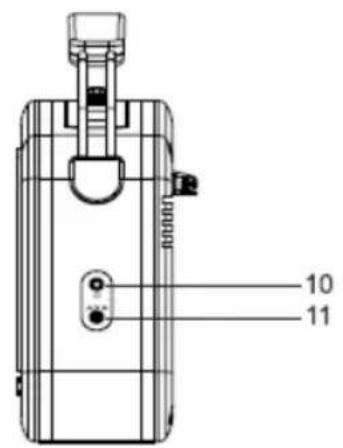
text_image
10 11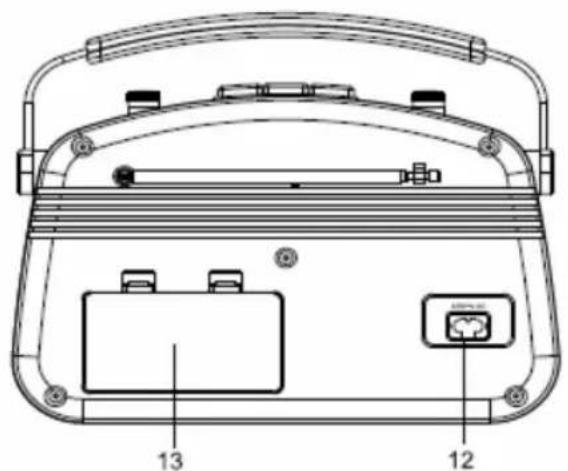
text_image
Technical diagram of a portable electronic device with labeled components 12 and 13Nätdrift
natural_image
Black triangular warning symbol with white lightning bolt and downward arrow (no text)natural_image
Black triangular warning symbol with an exclamation mark (no text or numbers)natural_image
Line drawing of a vintage radio with visible grille and antenna (no text or symbols)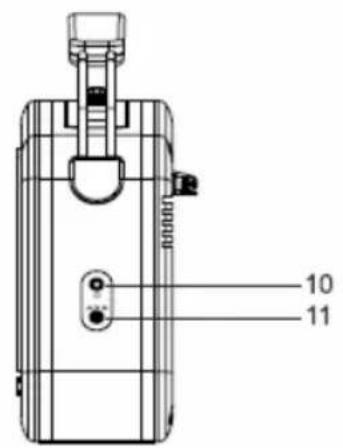
text_image
10 11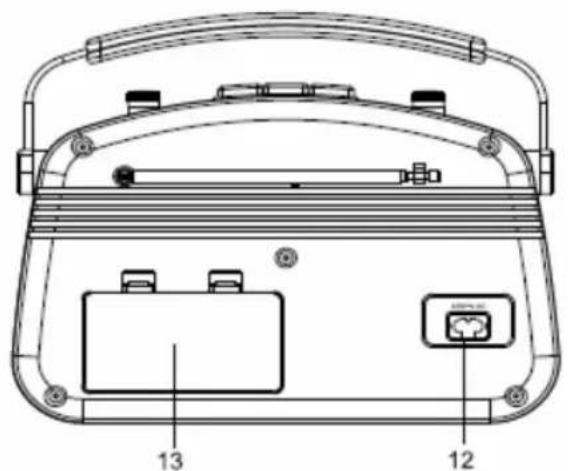
text_image
Technical diagram of a portable electronic device with labeled parts 12 and 13, showing internal components and casing layout.natural_image
Black triangular warning symbol with a lightning bolt and downward arrow (no text)natural_image
Black triangular warning symbol with exclamation mark (no text or numbers)natural_image
Line drawing of a vintage radio with visible grille and antenna (no text or symbols)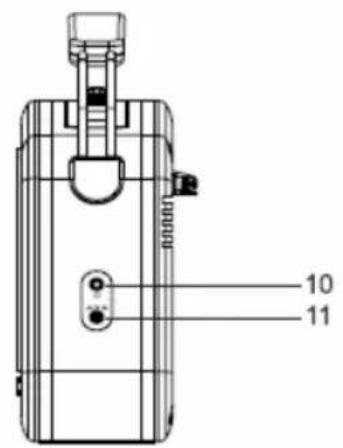
text_image
10 11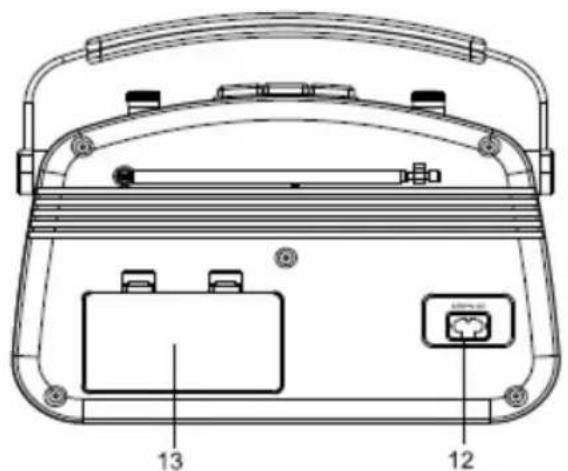
text_image
Technical diagram of a portable electronic device with labeled parts 12 and 13, showing internal components and casing layout.Functionarea cu alimentare de la retea
natural_image
Black triangular warning symbol with white lightning bolt and downward arrow (no text)natural_image
Black triangular warning symbol with exclamation mark (no text or numbers)natural_image
Line drawing of a vintage radio with a circular grille and handle (no text or symbols)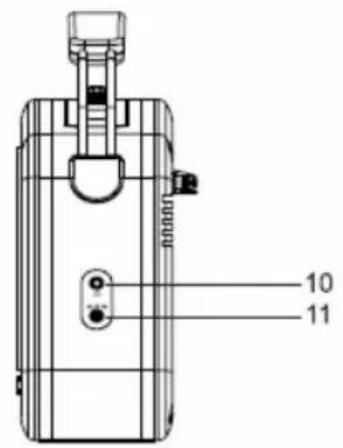
text_image
10 11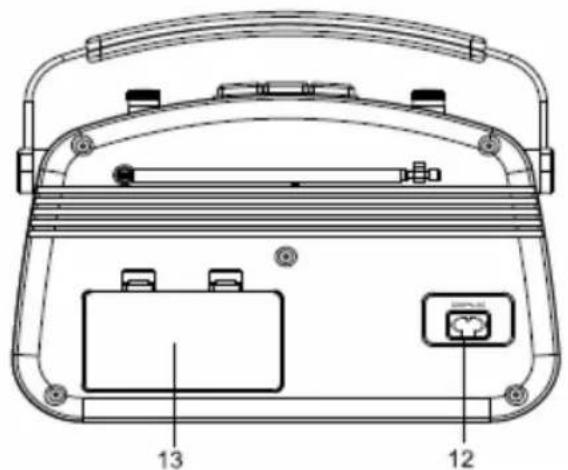
text_image
Technical diagram of a portable electronic device with labeled parts 12 and 13, showing internal components and casing layout.natural_image
Black triangular warning symbol with white lightning bolt and downward arrow (no text)natural_image
Black triangular warning symbol with exclamation mark (no text or numbers)natural_image
Line drawing of a vintage radio with visible grille and antenna (no text or symbols)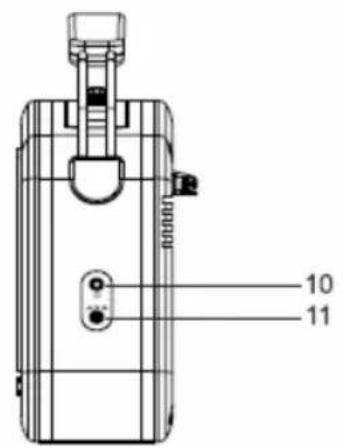
text_image
10 11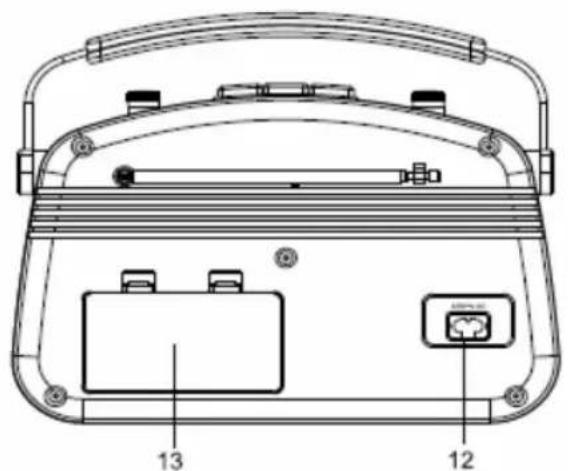
text_image
Technical diagram of a portable electronic device with labeled parts 12 and 13, showing internal components and casing layout.Lysnetdrift
natural_image
Black triangular warning symbol with white lightning bolt and downward arrow (no text)natural_image
Black triangular warning symbol with exclamation mark (no text or numbers)natural_image
Line drawing of a vintage radio with visible grille and antenna (no text or symbols)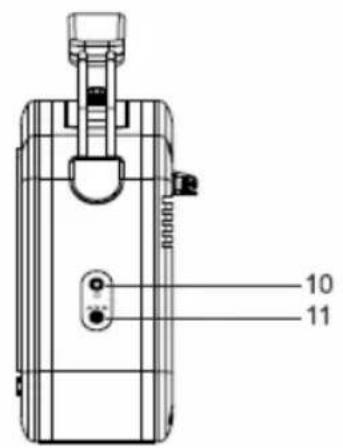
text_image
10 11
text_image
Technical diagram of a portable electronic device with labeled parts 12 and 13, showing internal components and casing layout.Bruk av strøm
natural_image
Black triangular warning symbol with lightning bolt symbol (no text)natural_image
Black triangular warning symbol with exclamation mark (no text or numbers)natural_image
Line drawing of a vintage radio with visible grille and antenna (no text or symbols)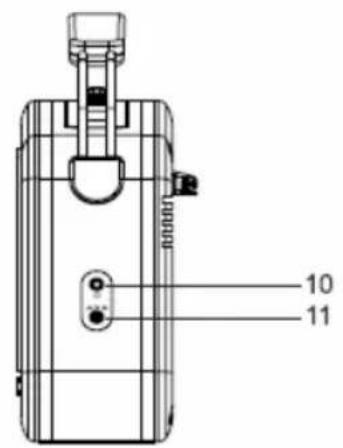
text_image
10 11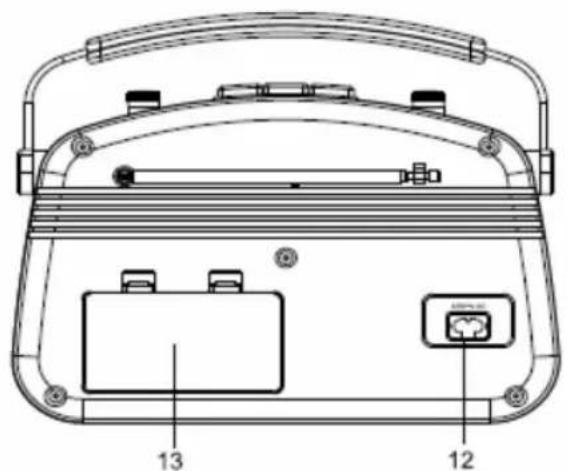
text_image
Technical diagram of a portable electronic device with labeled parts 12 and 13, showing internal components and casing layout.natural_image
Black triangular warning symbol with white lightning bolt and downward arrow (no text)natural_image
Black triangular warning symbol with exclamation mark (no text or numbers)natural_image
Black triangular warning symbol with lightning bolt symbol (no text)natural_image
Black triangular warning symbol with an exclamation mark (no text or numbers)text_image
Technical diagram of a device rear panel with labeled components including buttons, switches, and a central display.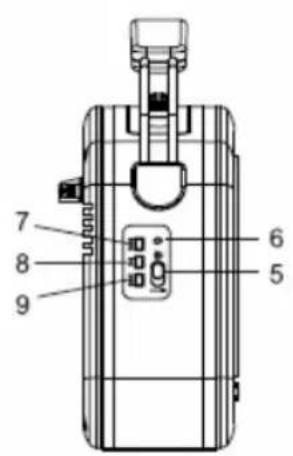
text_image
7 8 9 6 5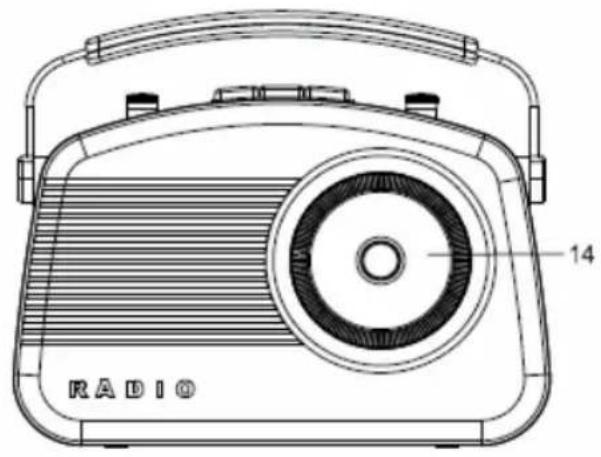
natural_image
Line drawing of a vintage radio with visible grille and antenna (no text or symbols)
text_image
10 11