HAVDR100 - Radio KONIG - Free user manual and instructions
Find the device manual for free HAVDR100 KONIG in PDF.


User questions about HAVDR100 KONIG
0 question about this device. Answer the ones you know or ask your own.
Ask a new question about this device
Download the instructions for your Radio in PDF format for free! Find your manual HAVDR100 - KONIG and take your electronic device back in hand. On this page are published all the documents necessary for the use of your device. HAVDR100 by KONIG.
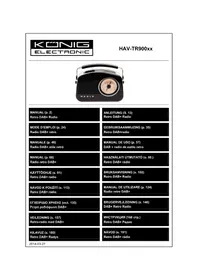
USER MANUAL HAVDR100 KONIG
MANUAL (p. 2)
DAB + radio
MANUALE (p. 23)
DAB + radio
- We recommend that you read this manual before installing/using this product.
- Keep this manual in a safe place for future reference.
Important:
- Carefully remove the parts from the packaging and check whether all parts are available.
Getting Started:
1. Connect power:
Use 220V 50Hz (DC 5V) adapter or 4 x AA Size batteries (not included) and press "ON".the display will show example:

Noted: Only use the adapter supplied:
Using a different adapter may damage your radio. For safety reasons, please do not open the plug when you are tuning manually. See the display below.

Tuning Manually
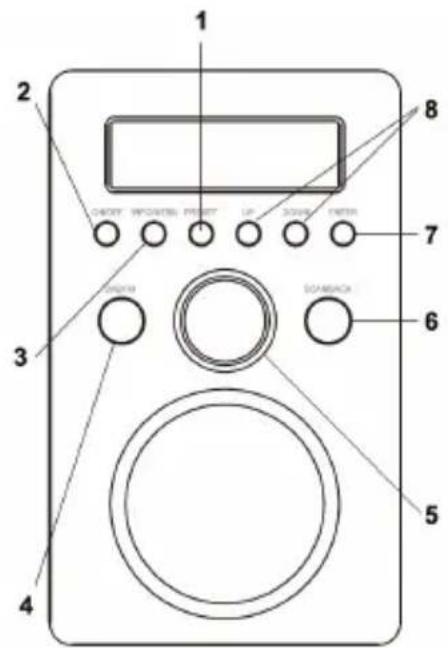
| 1 | 1. Press preset briefly: Preset stations. Choose Up/Down for saving radio channels. Press and hold "Enter" to confirm your choice. When "Saved" appears on the display, the station has been saved successfully. 2. Choose your favourite stations: press Up/Down briefly to choose your favourite radio stations. Press "Enter" briefly to confirm your choice. |
| 2 Switch ON/OFF | |
| 3 Press and hold info/menu EQ settings, Alarm settings Sleep settings, Clock settings System reset SW version Press info/menu briefly DAB mode • Ensemble freq • Time / date • Dynamic Link Segment (DLS) • Signal strength • Programme type • Mono / stereo Fm mode • Auto sound mode switch • Frequency • Radio text N/A • Time / date • Information | |
| 4 1. | Press briefly: Chang DAB stations to FM Stations 2. Press and hold: standby function 3. When the alarm ring, press this button briefly to switch off alarm |
| 5 1. | Press briefly: mute: 2. Volume button: Adjust the volume with "+" or "-" 3. Snooze function: When the alarm rings, briefly press this button to activate the snooze function. |
| 6 1. | BACK to last menu 2. Auto Scan |
| 7 OK button | |
| 8 Order | |
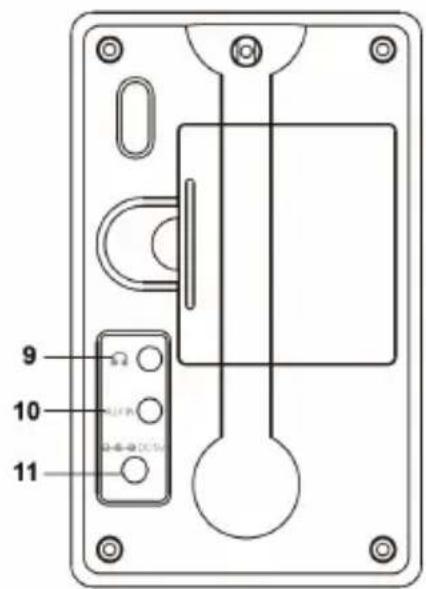
| 9 Phone jack | |
| 10 Aux in jack | |
| 11 DC 5V jack | |
Note:
Pressing briefly: indicates that you should press and release the button to activate the function.
Press and hold: indicates that you should press and hold the button until the function is activated.
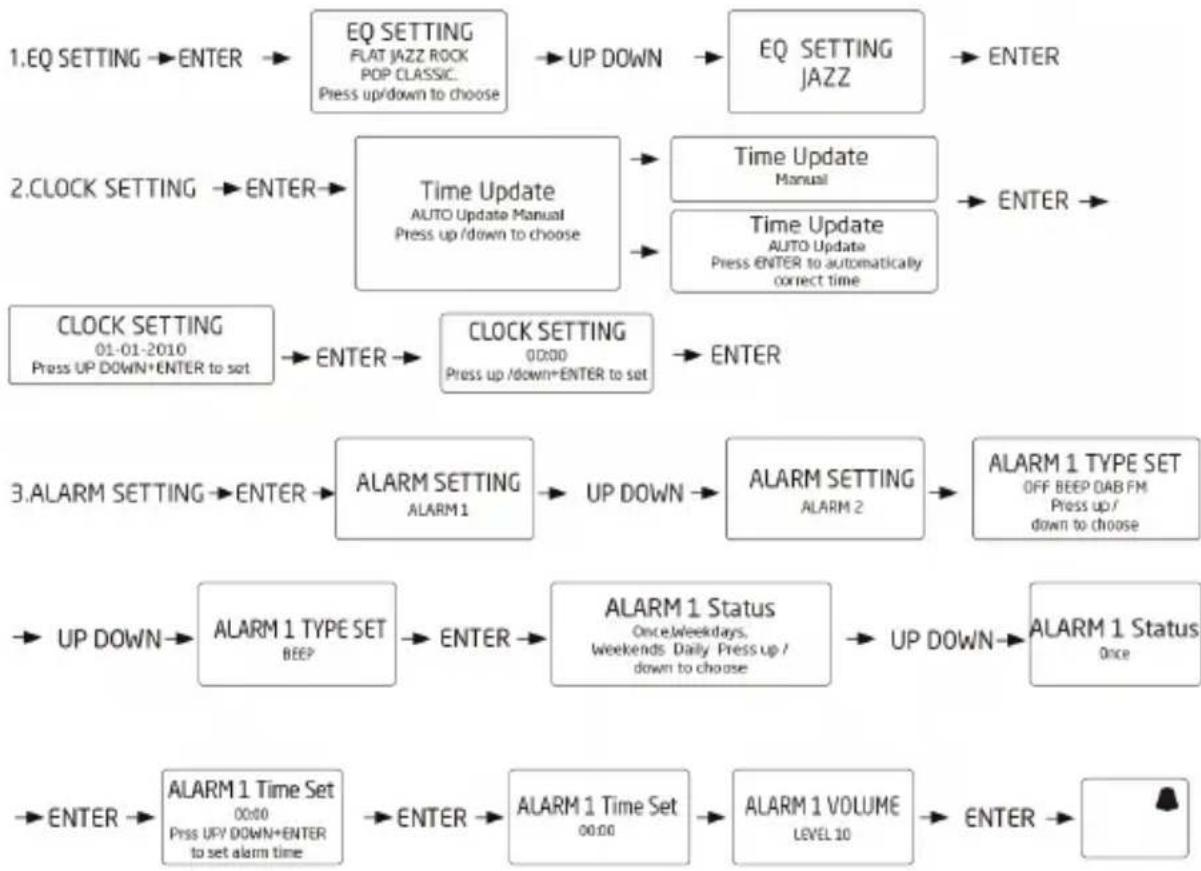
Other functions:
Press up/down to adjust volume. The settings of alarm 2 are the same as alarm 1.

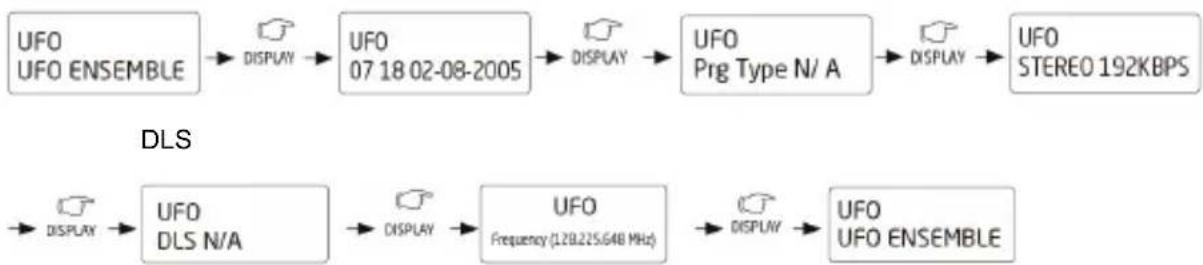
Display
- Display Information is shown as below:
Ensemble / Multiplex Time and Date PTY Mono/Stereo
- SYSTEM RESET
This function will reset the radio to its default factory settings and will start a new DAB station scan.
Press Enter to start.
System Reset

7. Auto Scan

A. Autoscan
Total number of services found is 11

B. Full Scan
8. FM Radio Mode

A. Mono Auto Mono/Stereo

A. Mono B. 1 Auto Mono B. 2 Auto Stereo
9. SW VERSION: Check the version
Cleaning and Maintenance:
- Clean with a soft lint free duster or slightly dampened cloth.
- Do not expose your radio to direct sunlight, high humidity, dust, excessive vibration of extreme temperatures. This can affect the finish, performance and reliability of the radio.
The recommended operating temperature range for the radio is 5 - 40^ - Make sure that liquids, including rain, cannot enter the unit.
Specification:
BANDIII: BANDIII DAB(174.928--239.200MHZ)
FM: 87.5 MHz to 108 MHz
Preset: 20 radio stations (10 DAB/10 FM)
Output power: 1.5 W
Power requirements: 5 V DC 1000 MA
Dimensions: 156 × 95.5 × 108 ~mm
Unit Weight: 400g
Power adapter: 100 V to 240 V AC 50 - 60 HZ
Output power: 5.0 V DC 1000 MA
Troubleshooting
Problem
No power
a: Make sure that the power is switched on or if the batteries need to be replaced.
b: Check if you are using the correct adapter. We suggest that you use our supplied battery (DC 5 V, 1000 MA).
No sound
a: Make sure that the volume is not turned down too low.
b: Make sure that the volume is not muted.
The reception of the radio channel is poor
a: Adjust the antenna location until you get the best signal reception.
b: Tune to correct the radio channel frequency.
Function disturbed
If none of the above solutions work, switch the radio off and unplug it from mains. Wait two minutes and then switch the radio on again.
Safety precautions:



To reduce risk of electric shock, this product should ONLY be opened by an authorized technician when service is required. Disconnect the product from mains and other equipment if a problem should occur. Do not expose the product to water or moisture.
Maintenance:
Clean the product only with a dry cloth.
Do not use cleaning solvents or abrasives.
Warranty:
Any changes and/or modifications to the product will void the warranty. We cannot accept any liability for damage caused by incorrect use of this product.
Disclaimer:
Designs and specifications are subject to change without notice. All logos, brands and product names are trademarks or registered trademarks of their respective holders and are hereby recognized as such.
Disposal:

- This product is designated for separate collection at an appropriate collection point. Do not dispose of this product with household waste.
- For more information, contact the retailer or the local authority responsible for waste management.
DEUTSCH
Einführung:
FM: 87.5 MHz a 108MHz
radio preimpostate (10 DAB/10
FM: 87.5 MHz a 108MHz
Antoteho: 5,0 V DC 1000 mA
Vianmäriritsy
Ongelma
Ei virtaa
FM: 87.5 MHz -108 MHz
Presetare 20 de posturi radio (10 DAB/10 FM)
Putere de cesire: 1.5 W
Cerinte alimentare: 5 V CC 1000 MA
Dimensiuni: 156 (H) x 95.5 (W) x 108 (D) mm
Greutate unitate: 400g
Adaptor alimentare: 100 V -240 V CA 50-60 HZ
Putere de ieire: 5.0 V CC 1000 MA
Rezolvarea problemelor
Problema
Nu este alimentat
a: Verificatu daca este connectat la przy de perete sau daca trebuie s'anlocuiti baterile vechi
b: Verificazioni dacà utilizzati adaptorul corect, va sugerām sautili inclusiv bateria noastrā (CC 5V 1000 MA)