ManualGo.com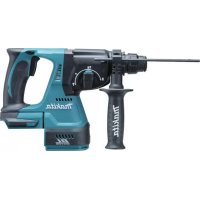
DHR242 - Drill MAKITA - Free user manual and instructions
Find the device manual for free DHR242 MAKITA in PDF.


Download the instructions for your Drill in PDF format for free! Find your manual DHR242 - MAKITA and take your electronic device back in hand. On this page are published all the documents necessary for the use of your device. DHR242 by MAKITA.
USER MANUAL DHR242 MAKITA
ENGLISH (Original instructions)
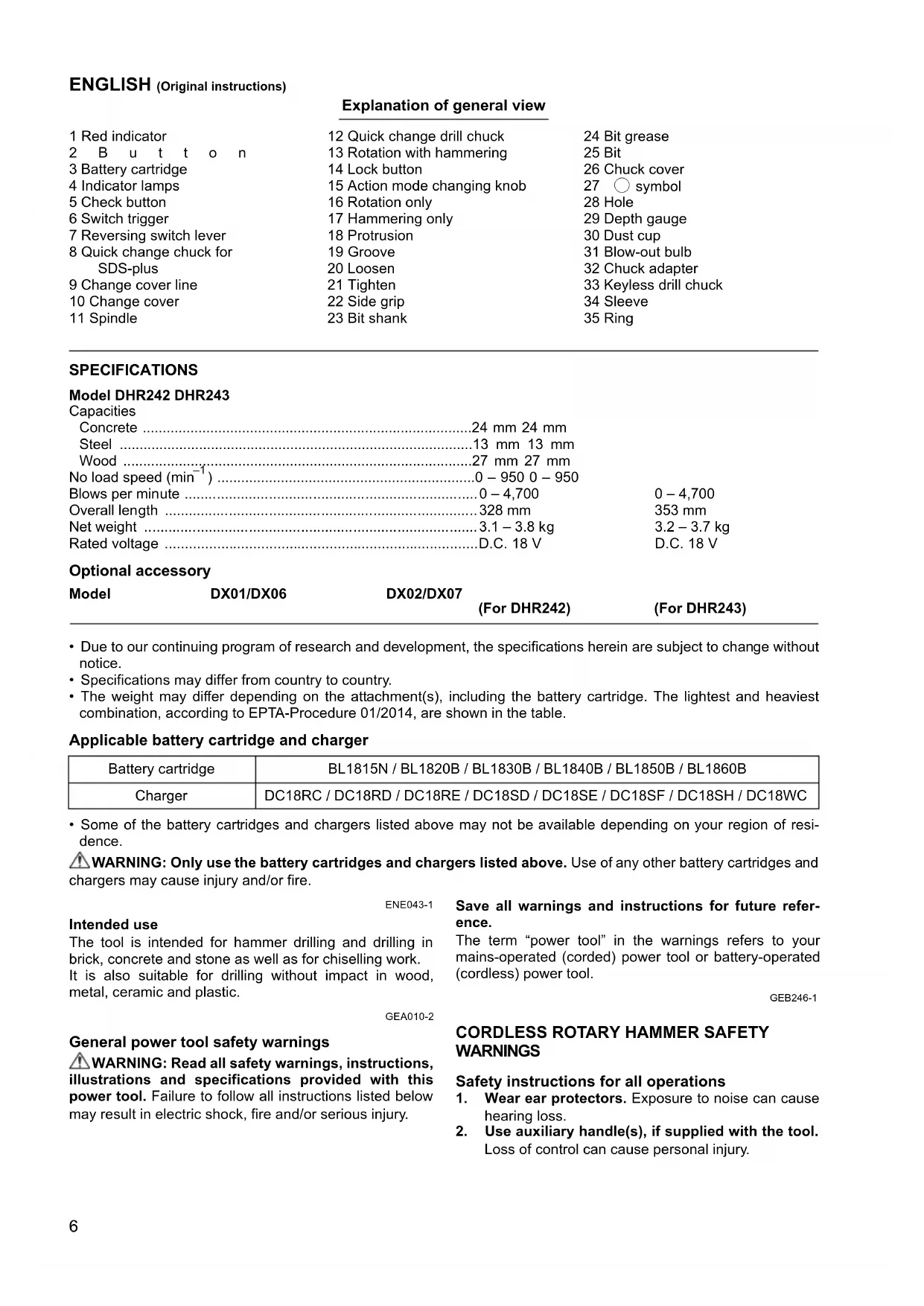
Explanation of general view
8 Quick change chuck for
12 Quick change drill chuck
13 Rotation with hammering
33 Keyless drill chuck
Rated voltage D.C. 18 V D.C. 18 V Optional accessory
Model DX01/DX06 DX02/DX07
(For DHR242) (For DHR243)
• Due to our continuing program of research and development, the specifications herein are subject to change without
• Specifications may differ from country to country.
• The weight may differ depending on the attachment(s), including the battery cartridge. The lightest and heaviest
combination, according to EPTA-Procedure 01/2014, are shown in the table.
Applicable battery cartridge and charger
• Some of the battery cartridges and chargers listed above may not be available depending on your region of resi-
WARNING: Only use the battery cartridges and chargers listed above. Use of any other battery cartridges and
chargers may cause injury and/or fire. ENE043-1 Intended use
The tool is intended for hammer drilling and drilling in
brick, concrete and stone as well as for chiselling work.
It is also suitable for drilling without impact in wood,
metal, ceramic and plastic. GEA010-2 General power tool safety warnings
WARNING: Read all safety warnings, instructions,
illustrations and specifications provided with this
power tool. Failure to follow all instructions listed below
may result in electric shock, fire and/or serious injury.
Save all warnings and instructions for future refer-
The term “power tool” in the warnings refers to your
mains-operated (corded) power tool or battery-operated
(cordless) power tool. GEB246-1
CORDLESS ROTARY HAMMER SAFETY WARNINGS Safety instructions for all operations
1. Wear ear protectors. Exposure to noise can cause
2. Use auxiliary handle(s), if supplied with the tool.
Loss of control can cause personal injury.
Battery cartridge BL1815N / BL1820B / BL1830B / BL1840B / BL1850B / BL1860B Charger DC18RC / DC18RD / DC18RE / DC18SD / DC18SE / DC18SF / DC18SH / DC18WC7
3. Hold the power tool by insulated gripping sur-
faces, when performing an operation where the
cutting accessory may contact hidden wiring.
Cutting accessory contacting a “live” wire may make
exposed metal parts of the power tool “live” and
could give the operator an electric shock.
Safety instructions when using long drill bits with
1. Always start drilling at low speed and with the bit
tip in contact with the workpiece. At higher
speeds, the bit is likely to bend if allowed to rotate
freely without contacting the workpiece, resulting in
2. Apply pressure only in direct line with the bit
and do not apply excessive pressure. Bits can
bend, causing breakage or loss of control, resulting
Additional safety warnings
1. Wear a hard hat (safety helmet), safety glasses
and/or face shield. Ordinary eye or sun glasses
are NOT safety glasses. It is also highly recom-
mended that you wear a dust mask and thickly
2. Be sure the bit is secured in place before opera-
3. Under normal operation, the tool is designed to
produce vibration. The screws can come loose
easily, causing a breakdown or accident. Check
tightness of screws carefully before operation.
4. In cold weather or when the tool has not been
used for a long time, let the tool warm up for a
while by operating it under no load. This will
loosen up the lubrication. Without proper warm-
up, hammering operation is difficult.
5. Always be sure you have a firm footing. Be sure
no one is below when using the tool in high loca-
6. Hold the tool firmly with both hands.
7. Keep hands away from moving parts.
8. Do not leave the tool running. Operate the tool
only when hand-held.
9. Do not point the tool at any one in the area when
operating. The bit could fly out and injure some-
10. Do not touch the bit, parts close to the bit, or
workpiece immediately after operation; they may
be extremely hot and could burn your skin.
11. Some material contains chemicals which may be
toxic. Take caution to prevent dust inhalation
and skin contact. Follow material supplier safety
12. Always be sure that the tool is switched off and
the battery cartridge and the bit are removed
before handing the tool to other person.
13. Before operation, make sure that there is no bur-
ied object such as electric pipe, water pipe or
gas pipe in the working area. Otherwise, the drill
bit/chisel may touch them, resulting an electric
shock, electrical leakage or gas leak.
14. Do not operate the tool at no-load unnecessarily.
SAVE THESE INSTRUCTIONS.
DO NOT let comfort or familiarity with product
(gained from repeated use) replace strict adherence
to safety rules for the subject product. MISUSE or
failure to follow the safety rules stated in this
instruction manual may cause serious personal
IMPORTANT SAFETY INSTRUCTIONS FOR BATTERY CARTRIDGE
1. Before using battery cartridge, read all instruc-
tions and cautionary markings on (1) battery
charger, (2) battery, and (3) product using bat-
2. Do not disassemble or tamper with the battery
cartridge. It may result in a fire, excessive heat, or
3. If operating time has become excessively
shorter, stop operating immediately. It may
result in a risk of overheating, possible burns
and even an explosion.
4. If electrolyte gets into your eyes, rinse them out
with clear water and seek medical attention right
away. It may result in loss of your eyesight.
5. Do not short the battery cartridge:
(1) Do not touch the terminals with any conduc-
(2) Avoid storing battery cartridge in a container
with other metal objects such as nails, coins,
(3) Do not expose battery cartridge to water or
A battery short can cause a large current flow,
overheating, possible burns and even a break-
6. Do not store and use the tool and battery car-
tridge in locations where the temperature may
reach or exceed 50 °C (122 °F).
7. Do not incinerate the battery cartridge even if it
is severely damaged or is completely worn out.
The battery cartridge can explode in a fire.
8. Do not nail, cut, crush, throw, drop the battery
cartridge, or hit against a hard object to the bat-
tery cartridge. Such conduct may result in a fire,
excessive heat, or explosion.
9. Do not use a damaged battery.
10. The contained lithium-ion batteries are subject
to the Dangerous Goods Legislation require-
For commercial transports e.g. by third parties, for-
warding agents, special requirement on packaging
and labeling must be observed.
For preparation of the item being shipped, consult-
ing an expert for hazardous material is required.
Please also observe possibly more detailed national
Tape or mask off open contacts and pack up the bat-
tery in such a manner that it cannot move around in
11. When disposing the battery cartridge, remove it
from the tool and dispose of it in a safe place.
Follow your local regulations relating to disposal
12. Use the batteries only with the products speci-
fied by Makita. Installing the batteries to non-com-
pliant products may result in a fire, excessive heat,
explosion, or leak of electrolyte.
13. If the tool is not used for a long period of time,
the battery must be removed from the tool.
14. During and after use, the battery cartridge may
take on heat which can cause burns or low tem-
perature burns. Pay attention to the handling of
hot battery cartridges.
15. Do not touch the terminal of the tool immediately
after use as it may get hot enough to cause
16. Do not allow chips, dust, or soil stuck into the
terminals, holes, and grooves of the battery car-
tridge. It may cause heating, catching fire, burst and
malfunction of the tool or battery cartridge, resulting
in burns or personal injury.
17. Unless the tool supports the use near high-volt-
age electrical power lines, do not use the battery
cartridge near high-voltage electrical power
lines. It may result in a malfunction or breakdown of
the tool or battery cartridge.
18. Keep the battery away from children.
SAVE THESE INSTRUCTIONS.
Only use genuine Makita batteries. Use of non-
genuine Makita batteries, or batteries that have been
altered, may result in the battery bursting causing fires,
personal injury and damage. It will also void the Makita
warranty for the Makita tool and charger.
Tips for maintaining maximum battery life
1. Charge the battery cartridge before completely
discharged. Always stop tool operation and
charge the battery cartridge when you notice
2. Never recharge a fully charged battery cartridge.
Overcharging shortens the battery service life.
3. Charge the battery cartridge with room tempera-
ture at 10 °C - 40 °C (50 °F - 104 °F). Let a hot bat-
tery cartridge cool down before charging it.
4. When not using the battery cartridge, remove it
from the tool or the charger.
5. Charge the battery cartridge if you do not use it
for a long period (more than six months).
FUNCTIONAL DESCRIPTION CAUTION:
• Always be sure that the tool is switched off and the bat-
tery cartridge is removed before adjusting or checking
function on the tool.
Installing or removing battery cartridge (Fig. 1)
• Hold the tool and the battery cartridge firmly when
installing or removing battery cartridge. Failure to
hold the tool and the battery cartridge firmly may cause
them to slip off your hands and result in damage to the
tool and battery cartridge and a personal injury.
• Always switch off the tool before installing or removing
of the battery cartridge.
• To remove the battery cartridge, slide it from the tool
while sliding the button on the front of the cartridge.
• To install the battery cartridge, align the tongue on the
battery cartridge with the groove in the housing and slip
it into place. Always insert it all the way until it locks in
place with a little click. If you can see the red indicator
on the upper side of the button, it is not locked com-
pletely. Install it fully until the red indicator cannot be
seen. If not, it may accidentally fall out of the tool, caus-
ing injury to you or someone around you.
• Do not use force when installing the battery cartridge. If
the cartridge does not slide in easily, it is not being
Indicating the remaining battery capacity (Fig. 2)
Only for battery cartridges with the indicator
Press the check button on the battery cartridge to indi-
cate the remaining battery capacity. The indicator lamps
light up for a few seconds.
• Depending on the conditions of use and the ambient
temperature, the indication may differ slightly from the
• The first (far left) indicator lamp will blink when the bat-
tery protection system works.
Tool / battery protection system
The tool is equipped with a tool/battery protection sys-
tem. This system automatically cuts off the power to
extend tool and battery life. The tool will automatically
stop during operation if the tool or battery is placed under
one of the following conditions:
This protection works when the tool is operated in a man-
ner that causes it to draw an abnormally high current. In
this situation, turn the tool off and stop the application
that caused the tool to become overloaded. Then turn
the tool on to restart.
This protection works when the tool or battery is over-
heated. In this situation, let the tool and battery cool
before turning the tool on again.
Overdischarge protection
This protection works when the remaining battery capac-
ity gets low. In this situation, remove the battery from the
tool and charge the battery.
Switch action (Fig. 3)
• Before inserting the battery cartridge into the tool,
always check to see that the switch trigger actuates
properly and returns to the “OFF” position when
To start the tool, simply pull the switch trigger. Tool speed
is increased by increasing pressure on the switch trigger.
Release the switch trigger to stop.
Reversing switch action (Fig. 4)
This tool has a reversing switch to change the direction
of rotation. Depress the reversing switch lever from the A
side for clockwise rotation or from the B side for counter-
When the reversing switch lever is in the neutral position,
the switch trigger cannot be pulled.
• Always check the direction of rotation before operation.
• Use the reversing switch only after the tool comes to a
complete stop. Changing the direction of rotation
before the tool stops may damage the tool.
• When not operating the tool, always set the reversing
switch lever to the neutral position.
Changing the quick change chuck for SDS-plus
The quick change chuck for SDS-plus can be easily
exchanged for the quick change drill chuck.
Removing the quick change chuck for SDS-plus
• Before removing the quick change chuck for SDS-plus,
always remove the bit.
Grasp the change cover of the quick change chuck for
SDS-plus and turn in the direction of the arrow until the
change cover line moves from the symbol to the
symbol. Pull forcefully in the direction of the arrow.
Attaching the quick change drill chuck (Fig. 6)
Check the line of the quick change drill chuck shows the
symbol. Grasp the change cover of the quick change
drill chuck and set the line to the symbol.
Place the quick change drill chuck on the spindle of the
Grasp the change cover of the quick change drill chuck
and turn the change cover line to the symbol until a
click can clearly be heard.
Selecting the action mode
Rotation with hammering (Fig. 7)
For drilling in concrete, masonry, etc., depress the lock
button and rotate the action mode changing knob to the
symbol. Use a tungsten-carbide tipped bit.
Rotation only (Fig. 8)
For drilling in wood, metal or plastic materials, depress
the lock button and rotate the action mode changing
knob to the m symbol. Use a twist drill bit or wood bit.
Hammering only (Fig. 9)
For chipping, scaling or demolition operations, depress
the lock button and rotate the action mode changing
knob to the symbol. Use a bull point, cold chisel, scal-
Notice on the action mode changing knob operation
To avoid the damage to the mechanism of the action
mode changing knob, follow the procedures below:
• Do not rotate the action mode changing knob when the
• Make sure that the action mode changing knob is
always positively located in one of the three action
mode positions (m, , or ). (Fig. 10)
• Do not turn the knob forcibly. Forcing the knob may
When turning the action mode changing knob from the
symbol to the m symbol or vise versa, the knob may
no longer move in the symbol position. In this case,
move the knob to the symbol position and run the
tool few seconds. After that, move the knob to the
desired position. (Fig. 11)
The torque limiter will actuate when a certain torque level
is reached. The motor will disengage from the output
shaft. When this happens, the bit will stop turning.
• As soon as the torque limiter actuates, switch off the
tool immediately. This will help prevent premature wear
• Hole saws cannot be used with this tool. They tend to
pinch or catch easily in the hole. This will cause the
torque limiter to actuate too frequently.
• Always be sure that the tool is switched off and the bat-
tery cartridge is removed before carrying out any work
Side grip (auxiliary handle) (Fig. 12)
• Always use the side grip to ensure operating safety.
Install the side grip so that the protrusion on the grip fit in
between the grooves in the tool barrel. Then tighten the
grip by turning clockwise at the desired position. It may
be swung 360° so as to be secured at any position.
Coat the bit shank head beforehand with a small amount
of bit grease (about 0.5 – 1 g). This chuck lubrication
assures smooth action and longer service life.
Installing or removing the bit
Clean the bit shank and apply bit grease before installing
Insert the bit into the tool. Turn the bit and push it in until
If the bit cannot be pushed in, remove the bit. Pull the
chuck cover down a couple of times. Then insert the bit
again. Turn the bit and push it in until it engages.
After installing, always make sure that the bit is securely
held in place by trying to pull it out.
To remove the bit, pull the chuck cover down all the way
and pull the bit out. (Fig. 15)10
Bit angle (when chipping, scaling or demolishing)
The bit can be secured at the desired angle. To change
the bit angle, depress the lock button and rotate the
action mode changing knob to the
bit to the desired angle.
Depress the lock button and rotate the action mode
changing knob to the symbol. Then make sure that
the bit is securely held in place by turning it slightly.
Depth gauge (Fig. 18)
The depth gauge is convenient for drilling holes of uni-
form depth. Loosen the side grip and insert the depth
gauge into the hole in the side grip. Adjust the depth
gauge to the desired depth and tighten the side grip.
• The depth gauge cannot be used at the position where
the depth gauge strikes against the gear housing.
Use the dust cup to prevent dust from falling over the tool
and on yourself when performing overhead drilling oper-
ations. Attach the dust cup to the bit as shown in the fig-
ure. The size of bits which the dust cup can be attached
OPERATION Hammer drilling operation (Fig. 20)
Set the action mode changing knob to the symbol.
Position the bit at the desired location for the hole, then
pull the switch trigger.
Do not force the tool. Light pressure gives best results.
Keep the tool in position and prevent it from slipping
Do not apply more pressure when the hole becomes
clogged with chips or particles. Instead, run the tool at an
idle, then remove the bit partially from the hole. By
repeating this several times, the hole will be cleaned out
and normal drilling may be resumed.
• There is a tremendous and sudden twisting force
exerted on the tool/bit at the time of hole break-
through, when the hole becomes clogged with chips
and particles, or when striking reinforcing rods embed-
ded in the concrete. Always use the side grip (auxiliary
handle) and firmly hold the tool by both side grip and
switch handle during operations. Failure to do so may
result in the loss of control of the tool and potentially
• Eccentricity in the bit rotation may occur while operat-
ing the tool with no load. The tool automatically centers
itself during operation. This does not affect the drilling
Blow-out bulb (optional accessory) (Fig. 21)
After drilling the hole, use the blow-out bulb to clean the
dust out of the hole.
Chipping/Scaling/Demolition (Fig. 22)
Set the action mode changing knob to the symbol.
Hold the tool firmly with both hands. Turn the tool on and
apply slight pressure on the tool so that the tool will not
bounce around, uncontrolled. Pressing very hard on the
tool will not increase the efficiency.
Drilling in wood or metal (Fig. 23 & 24)
Use the optional drill chuck assembly. When installing it,
refer to the section “Installing or removing the bit”.
Set the action mode changing knob so that the pointer
• Never use “Rotation with hammering” when the drill
chuck assembly is installed on the tool. The drill chuck
assembly may be damaged. Also, the drill chuck will
come off when reversing the tool.
Use the quick change drill chuck as standard equipment.
When installing it, refer to the section “Changing the
quick change chuck for SDS-plus”.
Hold the ring and turn the sleeve counterclockwise to
open the chuck jaws. Place the bit in the chuck as far as
it will go. Hold the ring firmly and turn the sleeve clock-
wise to tighten the chuck. To remove the bit, hold the ring
and turn the sleeve counterclockwise.
Set the action mode changing knob to the m symbol.
You can drill up to 13 mm diameter in metal and up to
32 mm diameter in wood.
• Never use “Rotation with hammering” when the quick
change drill chuck is installed on the tool. The quick
change drill chuck may be damaged.
Also, the drill chuck will come off when reversing the
• Pressing excessively on the tool will not speed up the
drilling. In fact, this excessive pressure will only serve
to damage the tip of your bit, decrease the tool perfor-
mance and shorten the service life of the tool.
• There is a tremendous twisting force exerted on the
tool/bit at the time of hole breakthrough. Hold the tool
firmly and exert care when the bit begins to break
through the workpiece.
• A stuck bit can be removed simply by setting the
reversing switch to reverse rotation in order to back
out. However, the tool may back out abruptly if you do
• Always secure small workpieces in a vise or similar
MAINTENANCE CAUTION:
• Always be sure that the tool is switched off and the bat-
tery cartridge is removed before attempting to perform
inspection or maintenance.
• Never use gasoline, benzine, thinner, alcohol or the
like. Discoloration, deformation or cracks may result.
To maintain product SAFETY and RELIABILITY, repairs,
carbon brush inspection and replacement, any other
maintenance or adjustment should be performed by
Makita Authorized Service Centers, always using Makita
OPTIONAL ACCESSORIES CAUTION:
• These accessories or attachments are recommended
for use with your Makita tool specified in this manual.
The use of any other accessories or attachments might
present a risk of injury to persons. Only use accessory
or attachment for its stated purpose.
If you need any assistance for more details regarding
these accessories, ask your local Makita Service Center.
• SDS-Plus Carbide-tipped bits
• Dust extractor attachment
• Plastic carrying case
• Keyless drill chuck
• Various type of Makita genuine batteries and chargers
• Some items in the list may be included in the tool pack-
age as standard accessories. They may differ from
The typical A-weighted noise level determined according
Sound pressure level (L
Sound power level (L WA
Uncertainty (K) : 3 dB (A)
Sound pressure level (L
Sound power level (L WA
Uncertainty (K) : 3 dB (A)
Sound pressure level (L
Sound power level (L WA
Uncertainty (K) : 3 dB (A)
Sound pressure level (L
Sound power level (L WA
Uncertainty (K) : 3 dB (A)
Sound pressure level (L
Sound power level (L WA
Uncertainty (K) : 3 dB (A)
Sound pressure level (L
Sound power level (L WA
• The declared noise emission value(s) has been mea-
sured in accordance with a standard test method and
may be used for comparing one tool with another.
• The declared noise emission value(s) may also be
used in a preliminary assessment of exposure.
• Wear ear protection.
• The noise emission during actual use of the power
tool can differ from the declared value(s) depend-
ing on the ways in which the tool is used especially
what kind of workpiece is processed.
• Be sure to identify safety measures to protect the
operator that are based on an estimation of expo-
sure in the actual conditions of use (taking account
of all parts of the operating cycle such as the times
when the tool is switched off and when it is running
idle in addition to the trigger time).
The following table shows the vibration total value (tri-
axial vector sum) determined according to applicable
• The declared vibration total value(s) has been mea-
sured in accordance with a standard test method and
may be used for comparing one tool with another.
• The declared vibration total value(s) may also be used
in a preliminary assessment of exposure.
• The vibration emission during actual use of the
power tool can differ from the declared value(s)
depending on the ways in which the tool is used
especially what kind of workpiece is processed.
• Be sure to identify safety measures to protect the
operator that are based on an estimation of expo-
sure in the actual conditions of use (taking account
of all parts of the operating cycle such as the times
when the tool is switched off and when it is running
idle in addition to the trigger time).
EC Declaration of Conformity
For European countries only
The EC declaration of conformity is included as Annex A
to this instruction manual.
WAARSCHUWING! Lees alle
• Plastic draagkoffer