MMX 300 - Earphones BEYERDYNAMIC - Free user manual and instructions
Find the device manual for free MMX 300 BEYERDYNAMIC in PDF.



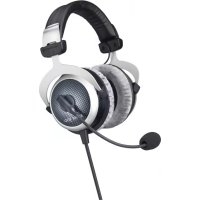
| Product Type | Closed gaming headset with microphone |
| Brand | beyerdynamic |
| Model | MMX 300 |
| Transducers (headphone) | Dynamic |
| Operating Principle | Closed (noise isolating) |
| Frequency Response (headphone) | 5 – 35,000 Hz |
| Frequency Response (microphone) | 30 – 18,000 Hz |
| Nominal Impedance | 32 Ω |
| Sound Pressure Level | 96 dB |
| Total Harmonic Distortion | < 0.2 % |
| Weight (with microphone and cable) | 332 g |
| Microphone Type | Condenser (back-electret), cardioid |
| Microphone Power Supply | Tonader power supply (1.5 – 9 V) |
| Cable Length | 1.2 m with integrated remote control |
| Connector | 3.5 mm jack (4-pole) or 2 × 3.5 mm jack (3-pole) |
| Ear Coupling | Circum-aural |
| Headband Pressure | 3.5 N |
| Included Accessories | 2 detachable cables (console/PC), pop filter |
| Available Spare Parts | Earpads, headband, cables, pop filter |
| Manufacturer Warranty | 2 years (wear parts excluded) |
| Care Instructions | Clean earpads and headband with a damp cloth; pop filter is washable with water |
| Safety Instructions | Avoid prolonged high volume; do not connect microphone to phantom power; be careful with cables |
| Recommended Use | Gaming, multimedia, VoIP |
Frequently Asked Questions - MMX 300 BEYERDYNAMIC
User questions about MMX 300 BEYERDYNAMIC
0 question about this device. Answer the ones you know or ask your own.
Ask a new question about this device
Download the instructions for your Earphones in PDF format for free! Find your manual MMX 300 - BEYERDYNAMIC and take your electronic device back in hand. On this page are published all the documents necessary for the use of your device. MMX 300 by BEYERDYNAMIC.
USER MANUAL MMX 300 BEYERDYNAMIC
Thank you for selecting the MMX 300 headset. Please take some time to read carefully through this quick start guide before using the headset.
Safety Instructions
Warning: When connecting the headphones, make sure that you have turned the volume down to the minimum. Adjust the volume only after the headphones are in place.
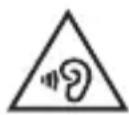
We would like to point out that listening at high volumes over a long period of time may damage your hearing irreversibly.
Make sure that the set volume is not too high. Rule of thumb: The higher the volume, the shorter the time of listening. This also shows an example from working life: According to the Occupational Health and Safety Regulations of German trade associations, noise pollution e.g. in the workplace must not exceed 85 dB (room volume level) during a maximum permissible listening time of 8 hours. If the volume level is increased by 3 dB respectively, the permissible listening time is cut in half, i.e. at 88 dB, the listening time is 4 hours, at 91 dB 2 hours, etc.
Risk of injury!
When wearing wired headphones, avoid any sudden movements. You could seriously injure yourself, especially if you have any piercings or wear earrings or glasses, etc. that can get caught in the wire.
Warning – Microphone
Please make sure that you do not connect the microphone to microphone inputs supplying phantom power (12 - 48 V), as this will damage the microphone.
Applications
The MMX 300 is an ideal headset for all gaming, multimedia and Voice over IP applications. The technology of the MMX 300 is based on the reliable HS 400 aviation headset suitable for hi-fi applications. The noise-cancelling microphone with a crystal-clear sound ensures a clear and precise voice transmission even in noisy surroundings. The closed design guarantees absolute undisturbed enjoyment of game and sound combined with a high comfort due to soft, replaceable ear and headband pads.
Thanks to the cable remote control and supplied adapter cable the MMX 300 headset is suitable for use with a PC and gaming with a notebook or console which have a mini (3.5 mm) combination jack.
Setting up and Use of the Headset
Put the headset on your head. The microphone is on the left side. Position the microphone to the front of the middle of the mouth. In order to avoid pop noise you should use the microphone with a pop shield.
Headband
For best comfort and noise attenuation, the headband can be adjusted to fit your head properly.
Wear the headset so that the headband runs over the top of your head and adjust the headband so that
- your ears are completely enclosed by the ear cushions,
- you feel a gentle pressure around your ears,
- both ends of the headband have the same length to ensure a proper fit
Microphone
natural_image
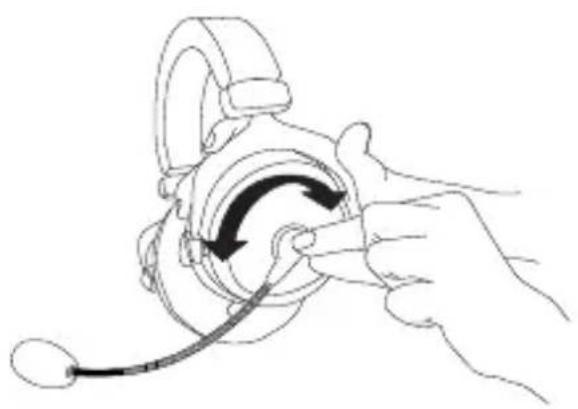
Line drawing of a hand adjusting a headset with a curved arrow indicating rotation (no text or symbols)- Turn the microphone holder (not the gooseneck!) to position the microphone as requested.
- The pop shield should enclose the microphone completely.
- Bend the flexible gooseneck so that the microphone is placed about 2 cm in front of the middle of your mouth.
Important: In order to avoid overstretching and premature wear and tear never bend the gooseneck more than 90°.
Connection
The MMX 300 headset is supplied with two connecting cables.
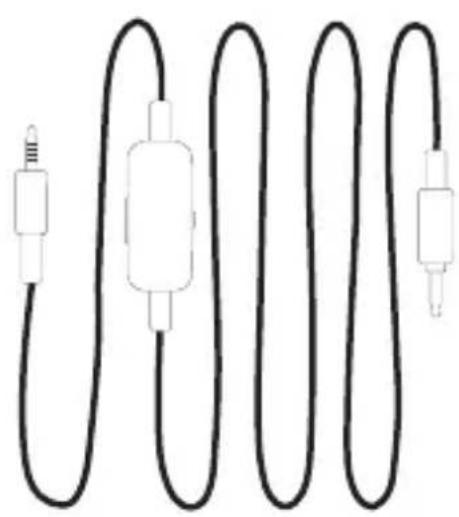
Headset cable with a 4-pole jack connector to connect to tablets, smartphones and laptops.
natural_image
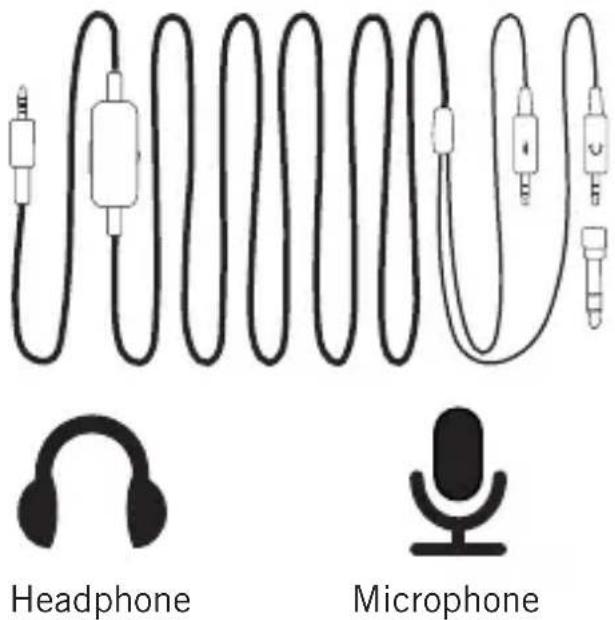
Pure electrical circuit lines without any symbolsHeadset cable for gaming sessions with two 3-pole jack connectors to connect to a headphone output and microphone input of a PC, notebook or console, which have a mini (3.5 mm) combination jack. Due to the screwed-on adapter the headphone can also be connected to devices with a 1/4" jack.
text_image
Headphone MicrophoneNote:
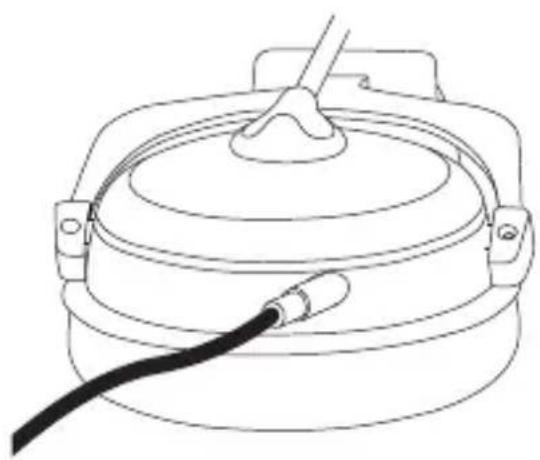
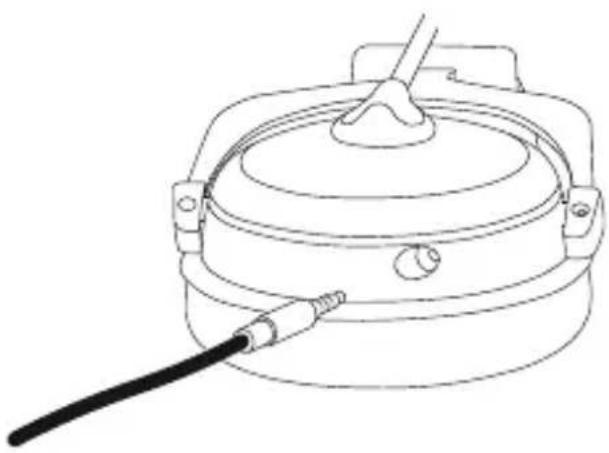
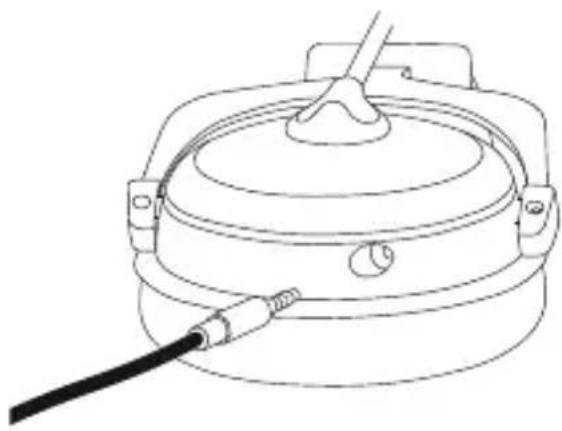
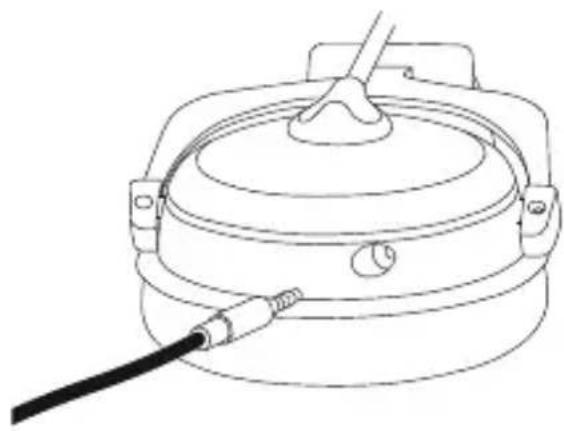
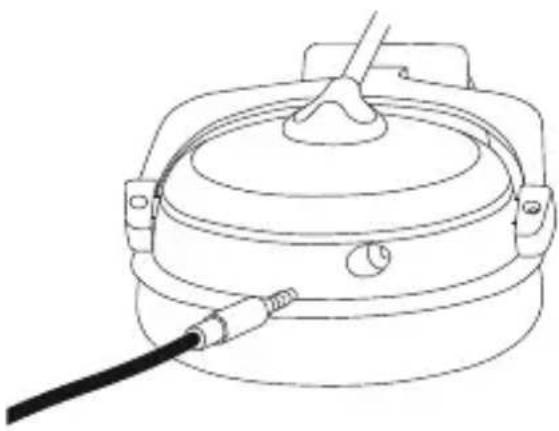
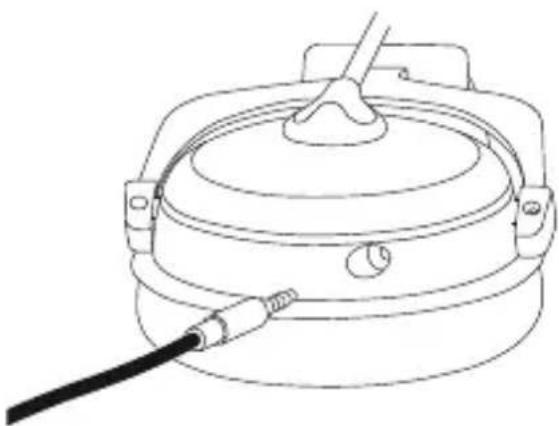
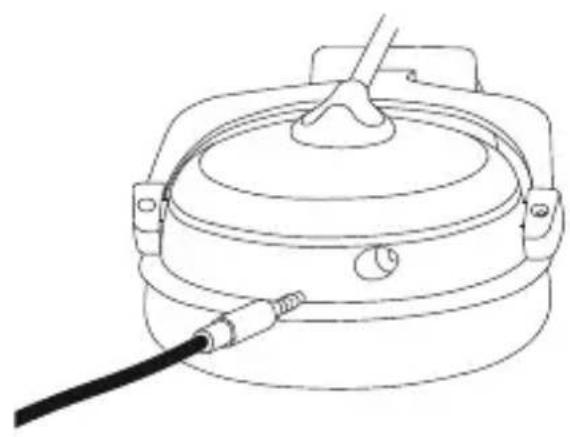
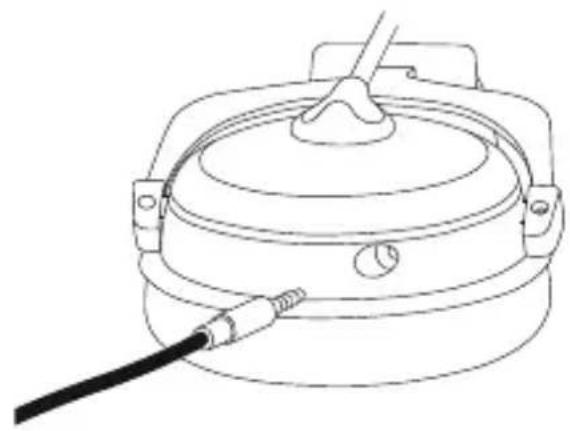
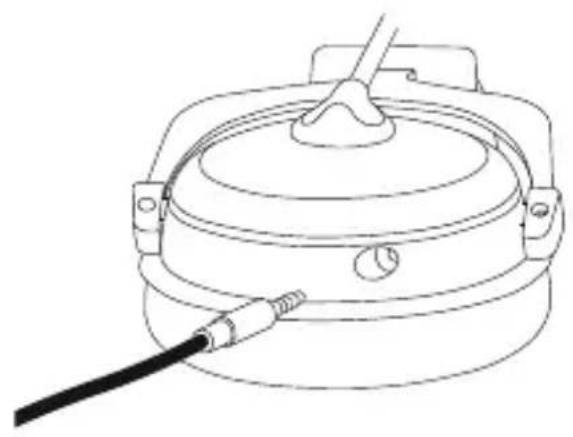
A common source of error is that the 5-pole jack connector is not properly connected to the headset. If the headset does not work, please check first whether the cable is completely plugged into the headphone housing of the MMX 300. Please refer also to fig. 1.
There is a locking protection on the 5-pole jack connector of the connecting cable, which has to lock in place. When a malfunction occurs, simply pull out the plug again and push it firmly into the socket with a slight rotary motion so that all 5 poles of the connector have contact. Please refer also to fig. 2.
natural_image
Line drawing of a cylindrical container with a black cable inserted, no text or symbols presentFig. 1
natural_image
Line drawing of a portable water heater with a cable inserted (no text or symbols)Fig. 2
Remote control
text_image
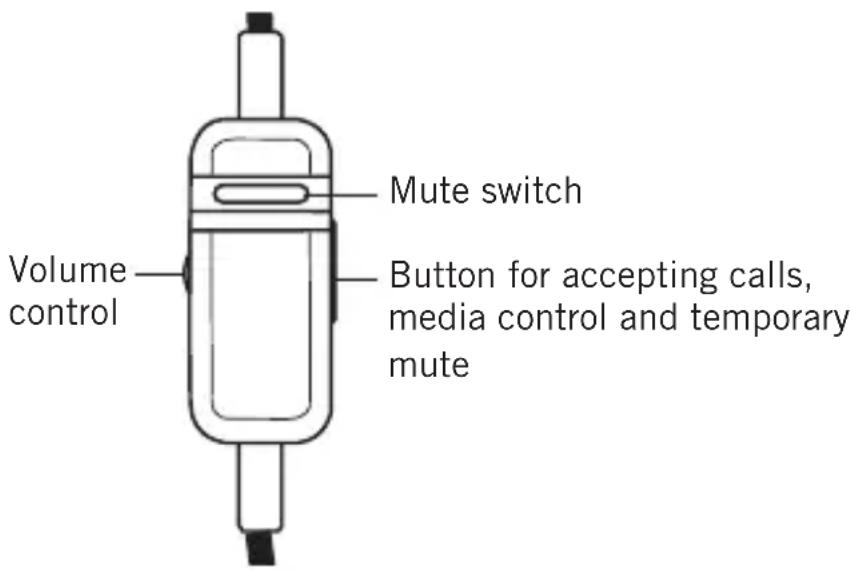
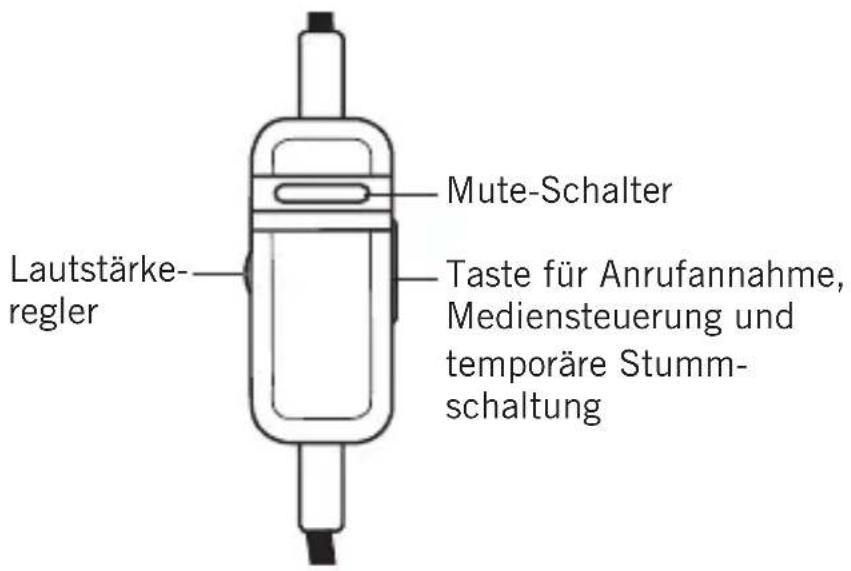
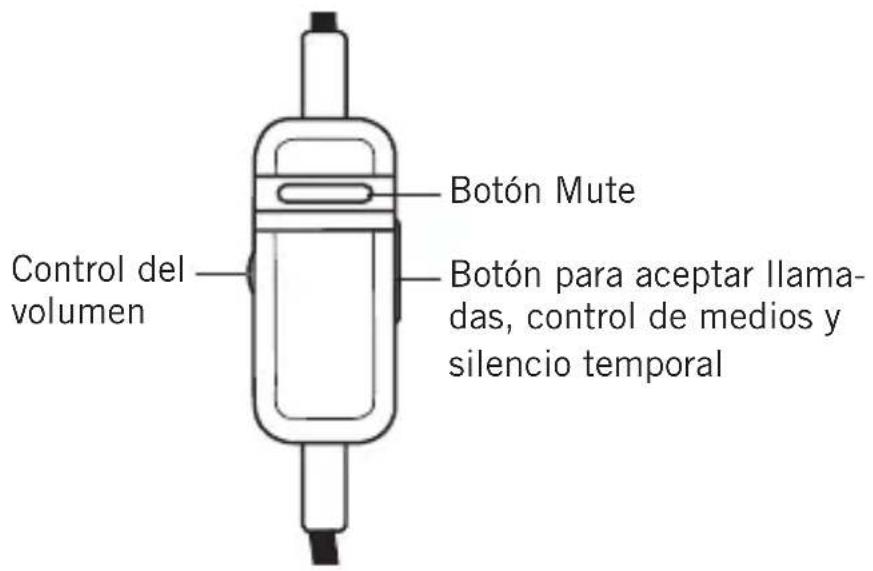
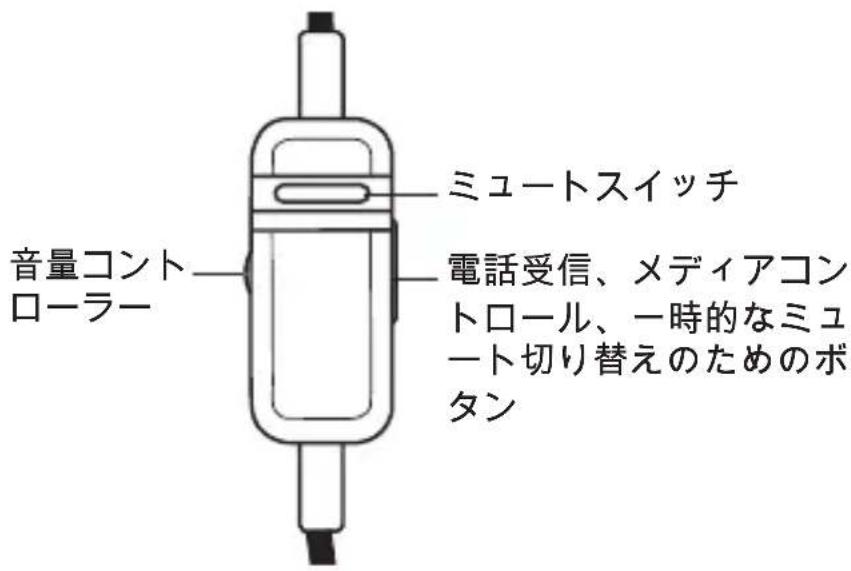
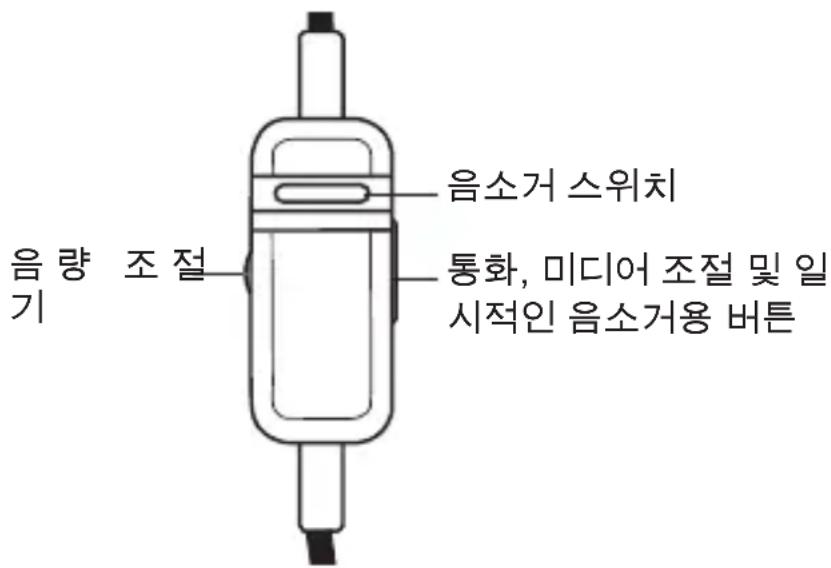
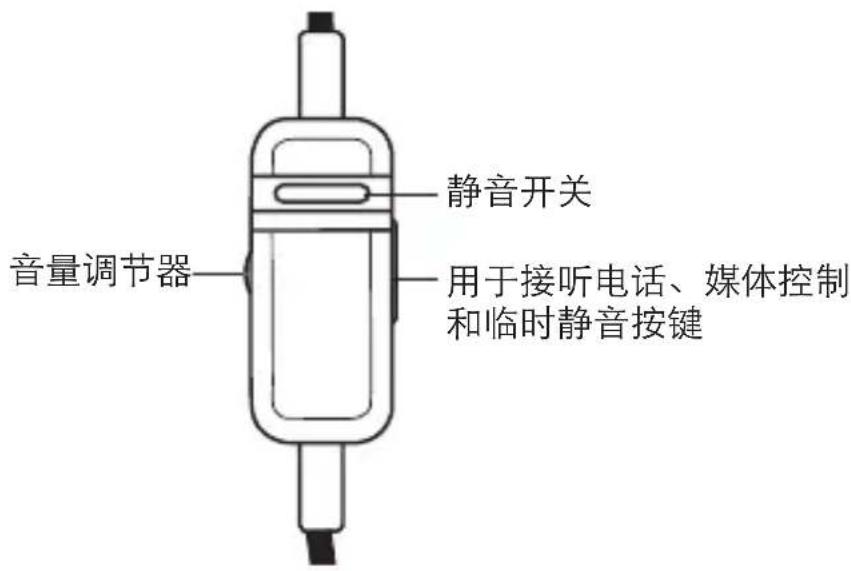
Volume control Mute switch Button for accepting calls, media control and temporary mute- The remote control integrated in the cable is provided with a mute switch to mute the microphone, a volume control and a button for accepting calls, media control and temporary mute.
- Mute disabled: Slide the mute switch upwards (red marking not visible).
- Mute enabled: Slide the mute switch downwards (red marking visible).
Maintenance
- As with any equipment which will be used in close proximity to sensitive areas of the body, it is essential that the ear pads and headband are kept clean. Use a damp cloth for cleaning using warm water only taking care not to allow any water drops into the transducers.
- For cleaning the pop shield remove it from the microphone and wash it under clear running water. If necessary you can use a mild cleansing agent (e.g. washing-up liquid). Make sure that the pop shield is completely dry before you replace it onto the microphone.
Changing the Headband Pad
- Open the Velcro and remove the padding from the headband. Take care not to damage the cable.
- Place the new opened headband pad on the underside of the headband. Make sure to lay the cable in the crease of the pad on the outer edge of the band. Tip: to do this, splay the headphones slightly, over both knees, for example.
- First close the middle Velcro fastening and the two outer ones.
How to replace the Ear Pads
natural_image
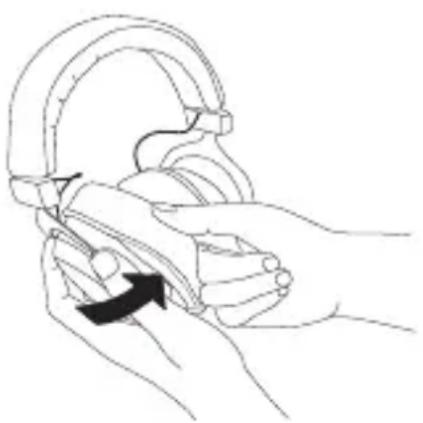
Line drawing of hands holding a mechanical component with an arrow indicating rotation (no text or symbols)- Should it become necessary, replace the ear pads.
- Pull the ear pads up and remove them from the earcups. The new ear pads can be attached easier, if you warm them beforehand.
- If other components have to be replaced, please contact your beyerdynamic dealer.
Service
Servicing must be carried out by qualified service personnel only. Dismantling the headset yourself will invalidate the guarantee.
Spare Parts
Accessories and replacement equipment can be found on the internet at: www.beyerdynamic.com
Technical Specifications
Headphone
Transducer type ..... Dynamic
Operating principle .... Closed
Frequency response. . . . . . . . 5 - 35,000 Hz
Nominal impedance ..... 32 Ω per system
Nominal SPL 96 dB
T.H.D. < 0.2%
Power handling capacity ..... 100 mW
Sound coupling to the ear . . . . Circumaural
Ambient noise attenuation .... approx. 18 dBA
Headband pressure ..... 3.5 N
Weight with microphone /
cable 332 g
Cable length and type ..... 1.2 m [3.9 ft] cable with remote control for the use with consoles
2.5 m [8.2 ft] cable with remote control for the use with a PC
Connection.... 1* 3.5 mm jack for consoles
2* 3.5 mm jack for PC
1* 6.35 mm adapter
Accessories ..... 2 x detachable cables (console & PC)
1 x transport case
Microphone
Transducer type . . . . . . . . . Condenser (back electret)
Operating principle ..... Pressure gradient
Polar Pattern .... Cardioid
Power supply .... AB powering
Supply voltage ..... 1.5 - 9 V
Current consumption .... < 0.5 mA
Nominal impedance ..... approx. 1.5 kΩ
Open circuit voltage
at f = 1 kHz ..... 20 mV / Pa
Frequency response. . . . . . . . 30 - 18,000 Hz
T.H.D. 0.2% at f = 1 kHz
Max. SPL 120 dB
Microphone output ..... unbalanced
Dimensions
Length mic boom ..... approx. 150 mm
Capsule diameter ..... 13 mm
Connection ..... Mini stereo jack plug (3.5 mm)
Warranty
Thank you for selecting a beyerdynamic product.
beyerdynamic GmbH & Co. KG provides a two year warranty to the original purchaser from the date of purchase. Please keep your sales receipt and/or invoice. Without this proof of purchase repairs will be chargeable.
The warranty extends to cover against defects in both materials and workmanship but excludes faults occurring due to; operating errors, improper operation, electric and mechanical damage, as well as repairs carried out by an unauthorised service centre.
Excluded from the warranty claim are batteries and rechargeable batteries (included in the delivery) as well as parts that are subject to natural wear and tear during usage such as connecting cables, ear cushions, headband pads etc.
This warranty is valid in any country in which beyerdynamic is represented by an authorised distributor. The provisions of this warranty do not exclude your rights under local consumer law.
Disposal
This symbol on the product, in the instructions or on the packaging means that your electrical and electronic equipment should be disposed at the end of its life separately from your household waste. There are separate collection systems for recycling in the EU. For more information, please contact the local authority or your retailer where you purchased the product.
natural_image
Line drawing of a hand adjusting a headset with a cable, showing the rotary switch mechanism (no text or symbols)natural_image
Pure electrical circuit lines without any symbolsnatural_image
Line drawing of a cylindrical container with a black cable inserted, no text or symbols presentAbb. 1
natural_image
Line drawing of a portable stove or cooker with a cable inserted (no text or symbols)Abb. 2
Kabelfernbedienung
natural_image
Line drawing of hands holding a mechanical component with an arrow indicating motion (no text or symbols)natural_image
Line drawing of a hand adjusting a headset with a cable, showing rotational motion (no text or symbols)natural_image
Pure electrical circuit lines without any symbolstext_image
Casque MicrophoneRemarque :
natural_image
Line drawing of a cylindrical container with a black cable inserted, no text or symbols presentFig. 1
natural_image
Line drawing of a portable stove or cooker with a black cable inserted (no text or symbols)Fig. 2
natural_image
Line drawing of hands holding a curved mechanical component with an arrow indicating motion (no text or symbols)natural_image
Line drawing of a hand adjusting a headset with a cable, showing the wheel and gear (no text or symbols)natural_image
Pure electrical circuit lines without any symbolsnatural_image
Line drawing of a cylindrical container with a black cable inserted, no text or symbols presentFig. 1
natural_image
Line drawing of a portable electric heater with a cable inserted (no text or symbols)Fig. 2
Control remoto del cable
natural_image
Line drawing of hands holding a device with a curved handle and arrow indicating rotation (no text or symbols)natural_image
Line drawing of a hand holding a headset with a curved arrow indicating rotation (no text or symbols)natural_image
Pure electrical circuit lines without any symbolsnatural_image
Line drawing of a cylindrical container with a black cable inserted, no text or symbols presentРис. 1
natural_image
Line drawing of a portable water heater with a cable inserted (no text or symbols)Рис. 2
natural_image
Line drawing of hands holding a curved mechanical component with an arrow indicating motion (no text or symbols)natural_image
Line drawing of a hand adjusting a headset with a cable, showing rotational motion (no text or symbols)natural_image
Pure electrical circuit lines without any symbolsnatural_image
Line drawing of a cylindrical container with a black cable inserted, no text or symbols present图1
natural_image
Line drawing of a portable water heater with a cable inserted (no text or symbols)图2
コードリモートコントローラー
natural_image
Line drawing of hands holding a device with a curved handle and arrow indicating rotation (no text or symbols)natural_image
Line drawing of a hand holding a headset with a cable, showing a circular dial and directional arrow (no text or symbols)natural_image
Pure electrical circuit lines without any symbolsnatural_image
Line drawing of a cylindrical container with a black cable inserted, no text or symbols present그림 1
natural_image
Line drawing of a mechanical device with a cable inserted, no text or symbols present그림 2
유선 리모컨
natural_image
Line drawing of hands holding a car head with a curved handle, showing a black arrow indicating motion (no text or symbols)natural_image
Line drawing of a hand adjusting a headset with a cable, showing rotational motion (no text or symbols)natural_image
Pure electrical circuit lines without any symbolsnatural_image
Line drawing of a mechanical component with a black cable inserted (no text or symbols)插图 1
natural_image
Line drawing of a portable water heater with a cable inserted (no text or symbols)插图 2
线控操作装置
natural_image
Line drawing of hands holding a curved mechanical component with an arrow indicating motion (no text or symbols)For further distributors worldwide, please go to www.beyerdynamic.com
Non-contractual illustrations. Subject to change without notice.
EN-DE-FR-ES-JP-KO-ZH 2 / MMX 300 / 672.327 (04.19)