
Amiron 300 - Earphones BEYERDYNAMIC - Free user manual and instructions
Find the device manual for free Amiron 300 BEYERDYNAMIC in PDF.


User questions about Amiron 300 BEYERDYNAMIC
0 question about this device. Answer the ones you know or ask your own.
Ask a new question about this device
Download the instructions for your Earphones in PDF format for free! Find your manual Amiron 300 - BEYERDYNAMIC and take your electronic device back in hand. On this page are published all the documents necessary for the use of your device. Amiron 300 by BEYERDYNAMIC.
USER MANUAL Amiron 300 BEYERDYNAMIC
SAFETY INSTRUCTIONS 3
Intended use....3
Adjusting the volume....3
Changed acoustic perception ....3
General maintenance instructions ....3
Risk of swallowing....3
Power and connecting cable....3
Using the batteries....3
Environmental conditions ....3
ABOUT THIS MANUAL 4
BOX CONTENTS 4
USING AND FITTING THE EARTIPS 4
Using silicone eartips 4
How to insert the earphones .... 4
CHARGING THE BATTERY 4
Remarks on the life of Li-ion batteries....5
DOWNLOAD BEYERDYNAMIC APP 5
OPERATION 5
Pairing 6
Delete pairing list 6
Turning on/off 6
Playing media....6
Adjust the volume 7
Making a call....7
Reset to factory settings 7
Overview of operating functions ....8
Overview of the LED displays....8
Cleaning 8
TROUBLESHOOTING 8
HELP WITH PROBLEMS / FAQ....9
PRODUCT REGISTRATION 9
DISPOSAL....9
Battery disposal....9
EU DECLARATION OF CONFORMITY....9
TECHNICAL SPECIFICATIONS 9
WARRANTY CONDITIONS 9
TRADEMARKS 9
THIRD PARTY LICENSES 9
Thank you for purchasing the AMIRON 300 True Wireless earphones from beyerdynamic.
Please take some time to read this information carefully before using the product.
SAFETY INSTRUCTIONS
Read these safety instructions carefully before using the AMIRON 300 earphones.
▶ Heed all instructions given, especially those regarding the safe use of the AMIRON 300 earphones.
▶ Do not use the AMIRON 300 earphones when they are damaged.
Intended use
▶ Only use the AMIRON 300 earphones as described in this manual.
The company beyerdynamic GmbH & Co. KG accepts no liability for damage to the AMIRON 300 earphones or injury to persons caused by careless, improper or incorrect use of the AMIRON 300 earphones, or by use for purposes not specified by the manufacturer.
The company beyerdynamic GmbH & Co. KG is not liable for damage to USB devices that do not comply with the USB specifications.
The company beyerdynamic GmbH & Co. KG is not liable for damage resulting from connection interruptions due to batteries being empty or too old, or due to exceeding the Bluetooth® transmission range.
▶ Please also observe the relevant country-specific regulations before using the product.
Adjusting the volume

High volume levels over longer listening periods can permanently damage your hearing.
Before using the AMIRON 300 earphones, set the volume to minimum.
▶ Only increase the volume after positioning the AMIRON 300 earphones.
Do not use the AMIRON 300 earphones at high volume for a long period. When listening and speaking normally using AMIRON 300 earphones, your own voice should still be perceptible.
In case of tinnitus, reduce the volume. If necessary, consult a doctor.
We would like to point out that consistent high volume levels and longer listening periods can damage your hearing. Damage to hearing is irreversible. Always ensure an adequate volume level. It is advisable to keep listening periods as short as possible at high volume levels.
Reducing perception of ambient noise
The AMIRON 300 earphones drastically reduce the perception of ambient noise. Using the AMIRON 300 earphones in road traffic can be potentially dangerous. The user's hearing must not be impaired to the extent that it causes road safety risks.
Do not use the AMIRON 300 earphones within the action area of potentially dangerous machines and tools.
- Avoid using the AMIRON 300 earphones in situations where hearing must not be impaired – particularly in road traffic, when crossing a level crossing or on a construction site.
Changed acoustic perception
In some cases, wearing the AMIRON 300 earphones takes some time getting used to because the acoustic perception of their own voice and body as well as the inner ear sounds that occur while walking is different from the “normal” situation without the AMIRON 300 earphones. However, this initially “different” sensation usually diminishes after wearing them for a while.
General maintenance instructions
Clean all parts of the AMIRON 300 with a soft cloth moistened with water. Make sure that no liquid gets into the housing or the transducer.
▶ Do not use cleaning agents containing solvents, as these can damage the surface.
Risk of swallowing
Keep small parts, such as product, packaging and accessories, away from children and pets. They constitute a choking hazard if swallowed!
Power and connecting cable
Use only the cable we supply to connect the charging case for both charging and connecting to a laptop.
Using the batteries
Danger from heat, water and mechanical stress
Excessive heat, water and mechanical stress may cause explosion, heat, fire, smoke or fumes. Injuries and irreversible damage to the battery may result.
Do not expose the battery to excessive heat, fires or extremely low air pressure. There is a risk of explosion, fire, smoke or gas.
Do not subject the battery to mechanical stress such as crushing. This may lead to an irreversible damage to the battery, explosion or injuries.
▶ Do not open the housing or disassemble/ replace the battery.
▶ Only use a USB 2.0/3.0 standard compliant 5 V power supply unit to charge the battery via the integrated USB socket type C.
Environmental conditions
Do not expose the AMIRON 300 earphones and charging case to rain, snow, liquids or moisture.
ABOUT THIS MANUAL
These instructions describe the most important functions of the product.
The information provided, refers to the standard settings of the software. A newer version may be available.
Information on the software update can be found in the "beyerdynamic App" chapter.
BOX CONTENTS
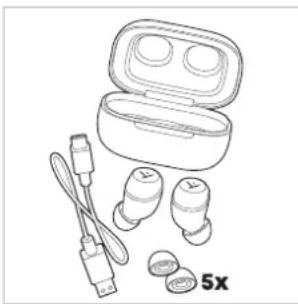
▶ Earphones left and right (L / R)
One pair of size "M" eartips mounted on the earphones
▶ Charging case
▶ 5 pairs of eartips (XS, S, M, L, XL)
USB cable
▶ Quick Start Guide and Compliance Booklet
natural_image
Line drawing of a wireless earbuds with attached earplands and a 5x zoom indicator (no text or symbols on the devices themselves)USING AND FITTING THE EARTIPS
▶ Open the charging case and remove the earphones.
Remove the protective foil for the charging contacts under the earphones.
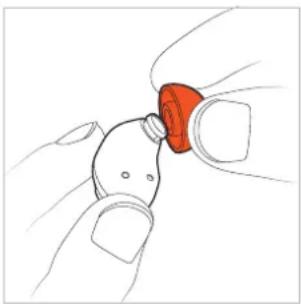
For an optimum fit and sound quality, five pairs of silicone eartips in different sizes are included. The earphones are supplied with size "M" eartips mounted to them.
▶ Choose the eartips to ensure the best fit for your ears. Maybe you require different sizes for both ears. A good sound and effective ANC (Active Noise Cancellation) is only ensured with suitable eartips.
Eartips for the black variant
Size XS S M L XL


Eartips for the cream variant
Size XS S M L XL


Using silicone eartips
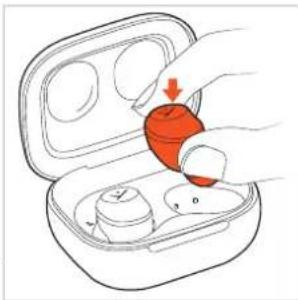
▶ To use the eartips, carefully slip them over the AMIRON 300 nozzle.
natural_image
Illustration of a hand holding a small red object with a circular head (no text or symbols)How to insert the earphones
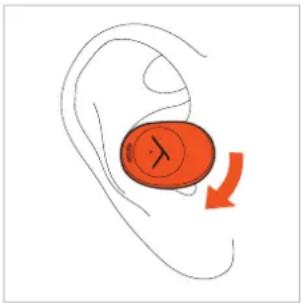
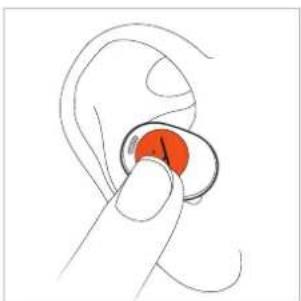
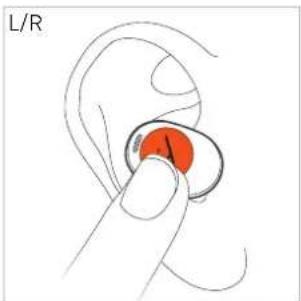
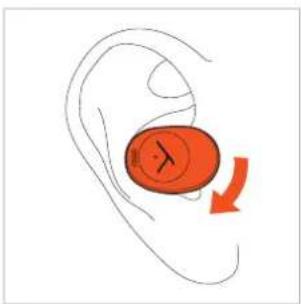
Insert the earphone into your ear with a slight clockwise twisting motion.
natural_image
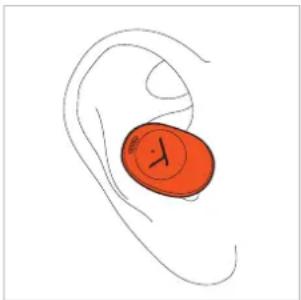
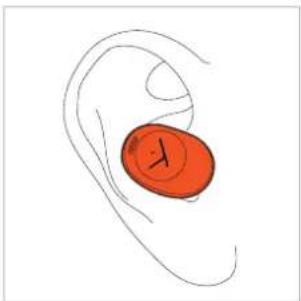
Illustration of a human ear with an orange circular device and a red arrow indicating rotation (no text or symbols)▶ Make sure that the earphone fits as shown.
natural_image
Illustration of a human ear with an orange circular object on the inner ear (no text or symbols)If you are using them regularly, we recommend changing the eartips every three months. Replacement eartips can be ordered from the beyerdynamic replacement parts shop:
www.beyerdynamic.com/service/replacement-parts
CHARGING THE BATTERY
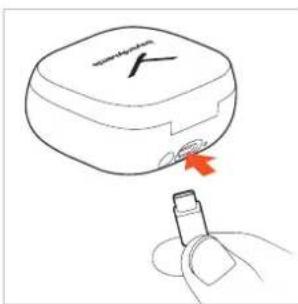
The earphones are charged via the battery of the charging case. We recommend that you only charge the battery with the supplied USB cable. Please fully charge the batteries in the charging case and earphones before using the AMIRON 300 for the first time.
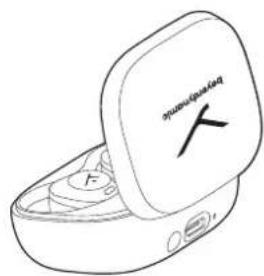
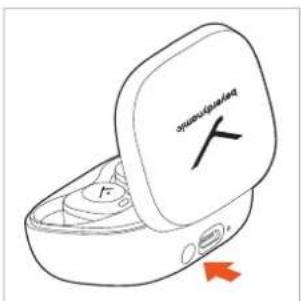
Insert the earphones into the charging case and close the lid.
When the battery of the charging case is fully charged, the LED on the charging case changes from steady white to red for 4 seconds and then turns off. The earphones are charged when closing the lid.
If the battery of the charging case is empty, the LED will flash red for four times when the lid is open or closed. To charge, connect the USB cable to charge.
natural_image
Illustration of a hand inserting a red capsule into an open air tube (no text or symbols)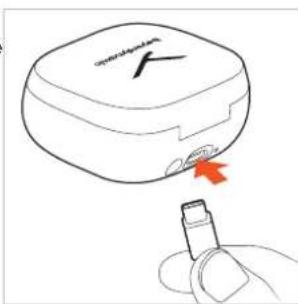
text_image
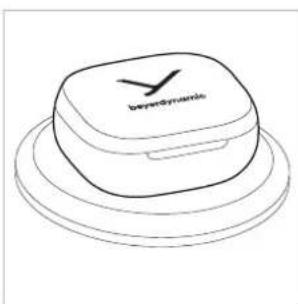
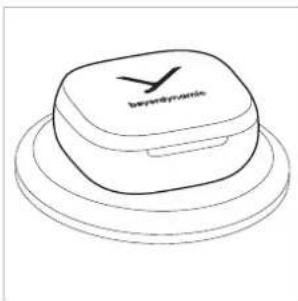
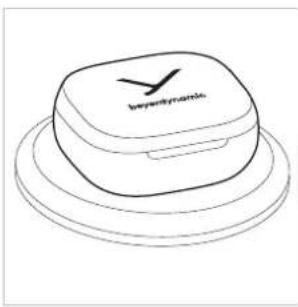
SARV-DAVID®Alternatively, you can place the charging case on a wireless charging station.
natural_image
Line drawing of a layered electronic device with 'beyonddynamic' branding on top (no other text or symbols)Remarks on the life of Li-ion batteries
When fully charged, disconnect the USB cable from the charging case and the product.
CAUTION! High temperatures, especially with a high charge level, can cause irreversible damage.
If the battery is not used or is stored for extended periods of time, it is recommended to charge it to approx. 50 % and store it at no more than 20 °C.
▶ Switch off the battery-powered product after use.
DOWNLOAD BEYERDYNAMIC APP
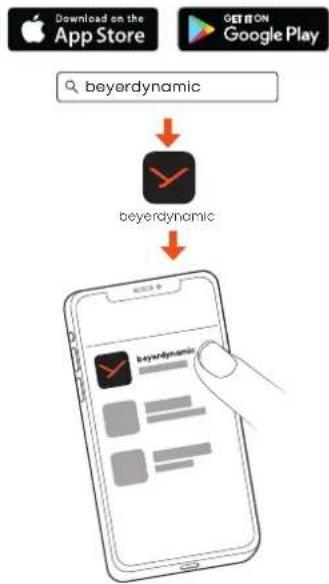
The beyerdynamic app gives you a more customised control of your AMIRON 300.
Download the beyerdynamic app from the App Store (for iOS devices) or Google Play (for Android devices).
flowchart
graph TD
    A["Download on the App Store"] --> B["beyerdynamic"]
    C["GET ON Google Play"] --> D["beyerdynamic"]
    B --> E["Mobile device with checkmark icon"]
    D --> F["Mobile device with checkmark icon"]
With the beyerdynamic app you can tune the sound with EQ, and carry out customised operation settings as well as software updates.
These settings are saved to your AMIRON 300, so you can enjoy with any playback device connected to your AMIRON 300.
OPERATION
AMIRON 300 can be operated by lightly tapping the touch pad which is located directly under the "Y" logo area.
natural_image
Illustration of a hand holding a red circular object, possibly a button or knob (no text or symbols present)Pairing
Before you use AMIRON 300, you must connect it to a mobile phone or other Bluetooth ^® -enabled device. The connection procedure may differ between the various devices.
▶ Please refer to the operating instructions of the device to which you wish to connect the AMIRON 300.
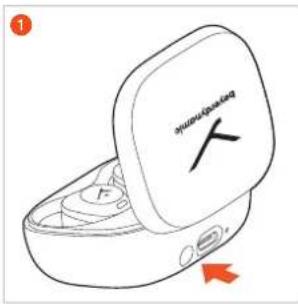
1 AMIRON 300 automatically enters paring mode when the charging case is open. AMIRON 300 can also be put into pairing mode by the following options:
-
Put both earphones into the charging case.
-
Press and hold the pairing button (next to the USB port) for 5 seconds ( ) until the LEDs of the earphones flash red and white alternately.
text_image
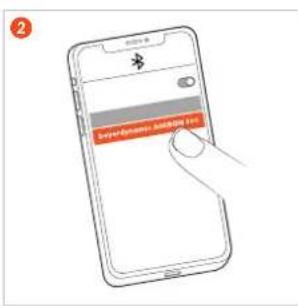
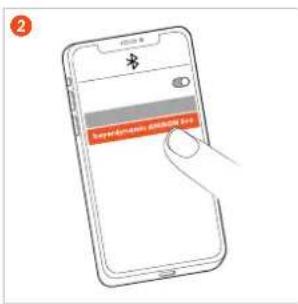
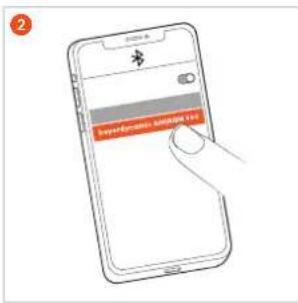
1 A F2 Select "beyerdynamic AMIRON 300" from the pairing list of the playback device.
text_image
2 Sursing the InternetDelete pairing list
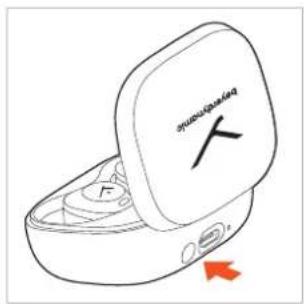
While the earphones are in the charging case, press and hold the button on the charging case for approx. 12 seconds (____).
The earphone LEDs are steady red and white for 2 seconds, then steady red for 1 second.
text_image
peri-remally F 2Turning on/off
▶ AMIRON 300 will automatically power on, when you open the charging case.
text_image
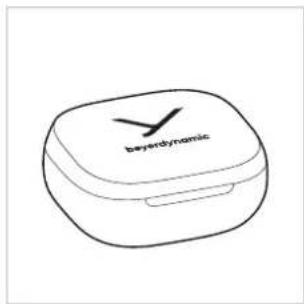
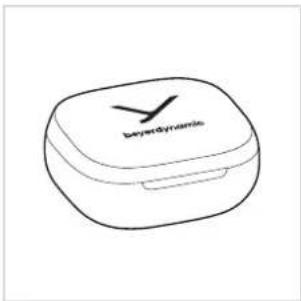
papaya▶ AMIRON 300 will automatically power off, when you place the earphones in the case and close the lid.
text_image
bayerdynamicNotes
When you open the charging case for the first time, AMIRON 300 will be automatically in pairing mode.
When you place the earphones back into the charging case and close the lid, they will disconnect automatically.
The earphones will connect to the last connected device when you open the charging case.
If your earphones are connecting to a device and you want to add a new device, place the earphones into the charging case. Keep the lid open, press and hold the button of the charging case for 5 seconds (—) to put the earphones into the pairing mode. Select "beyerdynamic AMIRON 300" in the pairing list on the new device. The earphones can connect to two devices at the same time.
When the earphones are beyond Bluetooth® pairing distance, they will be disconnected. If they are back in reach within 3 minutes, they will automatically restore the connection, otherwise you have to connect manually.
Playing media Start / pause playback
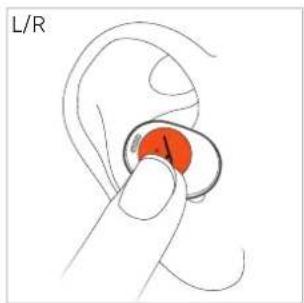
Tap the touch pad once (●) to start or stop playback.
text_image
L/RNext track
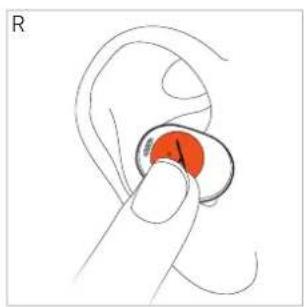
Tap the touch pad of the right (R) earphone three times (●●) to play the next track.*
natural_image
Illustration of a hand holding a circular object with a red circular mark, no text or symbols presentPrevious track
Tap the touch pad of the left (L) earphone three times (●●) to play the previous track.*
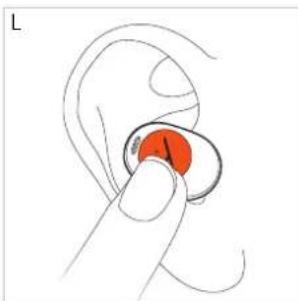
natural_image
Illustration of a hand holding a circular object with a red highlighted area, no text or symbols present*Function depends on the streaming service or media player used
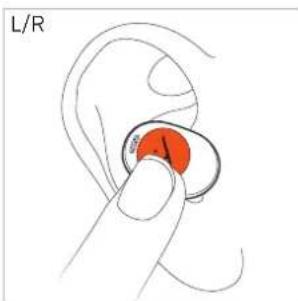
Switch between noise cancellation (ANC) and transparency mode
Tap the touch pad twice (●) to switch between ANC on, Transparency on, ANC off.
text_image
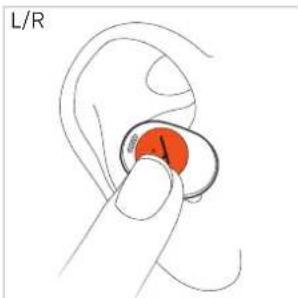
L/RActivate voice assistant
Tap the touch pad twice and hold with the second touch (●) to activate the voice assistant.
text_image
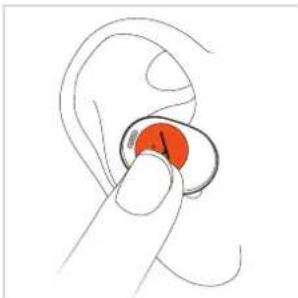
L/RAdjust the volume
Tap and hold the touch pad of the right or left earphone until the desired volume is reached (only works if you are using both earphones).
Increase volume
Right earphone (R): Press and hold the touch pad (—) to increase the volume.
natural_image
Illustration of a hand holding a red circular object with the number 1, inside an ear (no text or symbols)Reduce volume
▶ Left earphone (L): Press and hold the touch pad (☐) to decrease the volume.
Making a call
- Tap the touch pad once (●) to accept an incoming call or to switch between two active calls. - Tap the touch pad twice (●) to hang up.. - Tap the touch pad twice (●) to reject an incoming call.
text_image
L/RNo call active Operation
| Accept incoming call | ▶ Tap once (●) |
| Reject incoming call | ▶ Tap twice (●●) |
| End active call | ▶ Tap twice (●●) |
Call already active Operation
| Accept incoming call and hold active call | ▶ Tap once (●) |
| Reject second incoming call | ▶ Tap twice (●●) |
| Switch between two calls | ▶ Tap once (●) |
| End active call and switch to held call | ▶ Tap twice (●●) |
Reset to factory settings
When resetting to factory settings, all personal data is deleted!
▶ While the earphones are in the charging case, press and hold the button on the charging case for approx. 12 seconds (____).
The earphone LEDs are steady red and white for 2 seconds, then steady red for 1 second.
text_image
BIPARANT YPeer Pairing
To pair new earphones (e.g. when replacing defective or lost earphones), place both earphones into the charging case, and close the lid for at least 10 seconds. Both earphones will pair automatically.
Overview of operating functions
Earphones in ear Operation (earphones)
| Start / stop media playback | ▶ Tap once (●) |
| Switch between noise cancellation (ANC) and transparency mode | ▶ Tap twice (●●) |
| Activate voice assistant | ▶ Tap twice and hold with the second tap (●—) |
| Accept incoming call | ▶ Tap once (●) |
| Reject incoming call / end active call | ▶ Tap twice (●●) |
| Increase volume | ▶ Tap and hold right (—) |
| Reduce volume | ▶ Tap and hold left (—) |
| Both earphones in the charging case | Operation (charging case) |
| Switch to pairing mode | ▸ Open the lid, press and hold the button for 5 s(—) |
| Reset to factory settings | ▸ Press and hold the button approx. 12 s(—); the pairing list will be also deleted |
Overview of the LED displays
Charging case LED display
| Being charged via USB: | |
| 0 - 20% | Steady red |
| 21 - 69% | Flashes red each 5 s |
| 70 - 100% | Steady white |
| Full | Changes from steady white to red for 4 s, then turns off |
| Not being charged(open/close lid): | |
| 0 - 20% | Flashes red 4 times |
| 21 - 100% | Flashes white 4 times |
Earphones LED display
| Switched on but not connected to a device: (pairable, pairing record exists) (in pairing mode) | LEDs flash white slowly LEDs flash red and white |
| Switched on and connected to a device | LEDs flash red slowly |
| Battery below 20% | No LED display - there is a low battery voice prompt |
| Charging | No LED display |
| Battery fully charged | No LED display |
Cleaning
Due to dirty eartips and the formation of a warm and humid climate in the ear canal, an increased germ level can lead to a higher risk of ear canal infections. Therefore, please clean the eartips regularly.
Remove the eartips from the housing.
Clean the eartips under running lukewarm water and a little ph-neutral soap or with a soft, lint-free moistened cloth.
Remove any cerumen that may be inside the eartip with a cotton bud.
Then rinse off the soap and dry the eartips with a lint-free cloth or leave them to dry overnight.
▶ Only attach the eartips when they are completely dry so that no remaining liquid can enter the electronics of the earphone.
Clean the housing of the earphone with a soft, lint-free cloth. If necessary, you can moisten the cloth slightly with lukewarm water. Make sure that no liquid can enter the housing.
Do not use any solvent-based cleaners, as these will damage the surface.
If you want to remove cerumen from the housing, make sure that you do not rub it into the small openings for pressure equalisation and the microphones.
When you clean the cerumen protective grid (e.g. with a cotton bud or brush), the cerumen should be dry and the protective grid should point to the floor so that loosened cerumen residue does not fall into the earphone.
TROUBLESHOOTING
| Problem Cause Solution | ||
| AMIRON 300 cannot be switched on | ▸ Battery is empty or almost empty. | ▸ Charge the battery. |
| No audio output | ▸ No Bluetooth® connection. | ▸ Pair AMIRON 300 with the player. |
| AMIRON 300 does not appear among the available Bluetooth® devices on the player | ▸ AMIRON 300 is turned off.▸ AMIRON 300 is not in the pairing mode.▸ There exists a Bluetooth® connection to another play already. | ▸ Turn on AMIRON 300.▸ Put AMIRON 300 into the pairing mode.▸ Disconnect the Bluetooth® connection to the other player and connect AMIRON 300 to the desired device. |
| Playback volume is too low, despite the volume of AMIRON 300 is set to maximum | ▸ The received audio signal is too low. | ▸ Increase the playback volume on the player to maximum. |
| The sound is sharp and the bass response is too low | ▸ The sealing of the earphone is not sufficient. | ▸ Select suitable eartips on the right and left until the sound is ideal. |
| The wireless range is too low or the connection is disrupted | ▸ There are inter-ferences with other devices. | ▸ Move away from WLAN routers and microwave ovens.▸ Make sure that your body is not between the player and AMIRON 300. |
HELP WITH PROBLEMS / FAQ
Answers to more most common problems and questions can be found on the internet at: https://www.beyerdynamic.com/faq
PRODUCT REGISTRATION
Using the serial number, you can register your AMIRON 300 on the internet at: https://www.beyerdynamic.com/service
DISPOSAL
This symbol on the product, in the operating instructions or on the packaging means that electrical and electronic devices must be disposed of separately from household waste at the end of their life cycle.
▶ Always dispose of used equipment in accordance with applicable regulations.
For sale within the EU only:
For the return of old equipment, there are free collection points or a free return to beyerdynamic, as well as other acceptance points for reuse. The addresses are available at the local city or municipal administration.
▶ Dealers for electronic equipment are generally obliged to take back waste electrical/electronic equipment free of charge. This obligation also applies to sales via remote communication.
For further information, please contact the local authorities or the dealer from whom the product was purchased.
Battery disposal
▶ Dispose of batteries separately from the product after use in accordance with the applicable regulations. They must not be disposed of with household waste. Returning batteries is free of charge.
▶ Discharge the batteries before disposal.
Non-destructive removal of the battery by the end user is not possible with this product. Please contact beyerdynamic or consult independent specialists.

EU DECLARATION OF CONFORMITY
The company beyerdynamic GmbH & Co. KG hereby declares that this radio transmission device complies with the EU Directive 2014/53/EU.
▶ You will find the full text of the EU declaration of conformity on the internet at:
https://www.beyerdynamic.com/cod
TECHNICAL SPECIFICATIONS
Bluetooth® frequency range 2.4 - 2.4835 GHz
Transmitting power 8.49 dBm (Bluetooth®)
Charging temperature range 0 to +45 °C
Operating temperature range -10 to +60 °C
▶ More detailed information on the technical specifications can be found on the internet at: https://www.beyerdynamic.com
WARRANTY CONDITIONS
The company beyerdynamic GmbH & Co. KG provides a limited warranty for the original beyerdynamic product you have purchased.
▶ You can find detailed information about beyerdynamic's warranty conditions on the internet at:
https://www.beyerdynamic.com/service/warranty
TRADEMARKS
The Bluetooth ^® word mark and logos are registered trademarks of the Bluetooth ^® SIG, Inc. and any use of such marks by beyerdynamic is under license.
USB Type-A, USB Type-B and USB Type-C are trademarks of USB Implementers.
THIRD PARTY LICENSES
For more information on 3rd party licenses, please go to: https://www.beyerdynamic.com/media/downloads/headphones/manual/Licenses_amiron300.md
INHALT
natural_image
Line drawing of a wireless earbuds with attached earplands and a 5x zoom indicator (no text or symbols on the devices themselves)OHRPASSSTÜCKE VERWENDEN UND ANPASSEN
natural_image
Hand holding a red circular object with a small protrusion, resembling a device or tool (no text or symbols visible)text_image
Diagram showing a red circular object with an arrow indicating clockwise motion or rotation around it, possibly representing a medical or therapeutic device.natural_image
Illustration of a human ear with a red circular object on the inner ear (no text or symbols)natural_image
Illustration of a hand inserting a red capsule into an open airbus (no text or symbols)text_image
Hand-drawn diagram showing a device with a label 'T' and a red arrow pointing to it, likely indicating a sensor or probe.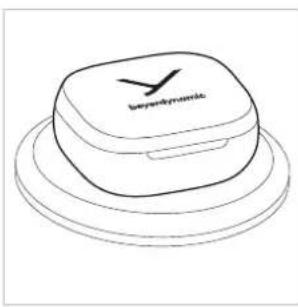
natural_image
Line drawing of a smart speaker with 'beyonddynamic' branding on top (no other text or symbols)natural_image
Hand holding a red object, possibly a finger or ear component (no text or symbols visible)Kopplung herstellen
text_image
Paplanos Xnatural_image
Hand-drawn sketch of a closed container with lid and internal compartments, no text or symbols presentEin-/Ausschalten
natural_image
Line drawing of a closed boxing glove with a logo, no text or symbols presentnatural_image
Illustration of a hand holding a red object, possibly an ear or earbell, with no visible text or symbols.Nächster Titel
natural_image
Illustration of a hand holding a red object, possibly an ear or earbell (no text or symbols present)Vorheriger Titel
natural_image
Hand holding a red circular object, possibly an ear or button (no text or symbols visible)natural_image
Illustration of a hand holding a red object, labeled 'L/R' in the top-left corner (no other text or symbols)natural_image
Illustration of a hand holding a red object, labeled 'L/R' in the top-left corner (no other text or symbols)natural_image
Hand holding a red object, possibly a finger or ear component (no text or symbols visible)natural_image
Hand holding a red object with a curved line, labeled 'L/R' in the top-left corner (no other text or symbols)text_image
dual-###ed FPeer Pairing
https://www.beyerdynamic.com/faq
https://www.beyerdynamic.com/media/downloads/headphones/manual/Licenses_amiron300.md
SOMMAIRE
CONSIGNES DE SÉCURITÉ....19
CONDITIONS DE GARANTIE....25
MARQUES....25
LOGICIEL D'AUTRES FOURNISSEURS.... 25
natural_image
Line drawing of wireless earbuds with USB connectors and a 5x product (no text or symbols)UTILISER ET ADAPTER DES EMBOUTS
Embouts version crème
Taille XS S M L XL


natural_image
Illustration of a hand holding a small red object with a small protrusion, no text or symbols presentnatural_image
Illustration of a human ear with an orange oval object and a red arrow indicating rotation (no text or symbols)natural_image
Illustration of a human ear with an orange circular object on the inner ear (no text or symbols)natural_image
Illustration of a hand inserting a red object into an open white electronic device (no text or symbols)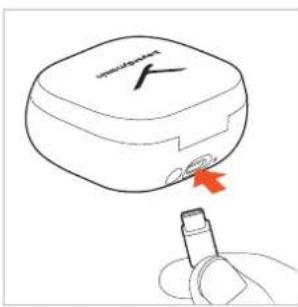
text_image
Diagram showing a device with a red arrow pointing to a plug inserted into it, indicating a medical or diagnostic step.natural_image
Line drawing of a 3D object resembling a battery or sensor device with a checkmark on top (no text or symbols)TÉLÉCHARGER L'APPLICATION BEYERDYNAMIC
natural_image
Illustration of a hand holding a red circular object with a curved line, no text or symbols presentÉtablir l'appairage
text_image
Smartwatch Ftext_image
Spineless Xnatural_image
Illustration of a hand holding a red circular object on an ear (no text or symbols)Titre précédent
natural_image
Illustration of a hand holding a red circular object with a pointer, no text or symbols presentnatural_image
Line drawing of a hand holding an ear with a red circular object on the ear (no text or symbols)text_image
airplane FDÉCLARATION DE CONFORMITÉ UE
CONDITIONS DE GARANTIE
https://www.beyerdynamic.com/media/downloads/headphones/manual/Licenses_amiron300.md
ÍNDICE
natural_image
Line drawing of a wireless earbuds with attached earplugs and a 5x zoom indicator (no text or symbols on the devices themselves)UTILIZAR Y AJUSTAR LAS ALMOHADILLAS
natural_image
Line drawing of a hand holding a red object with a small protrusion (no text or symbols)natural_image
Illustration of a human ear with an orange circular device and a red arrow indicating rotation (no text or symbols)natural_image
Illustration of a human ear with a red circular object on the inner ear (no text or symbols)natural_image
Illustration of a hand inserting a red object into an open white electronic device (no text or symbols)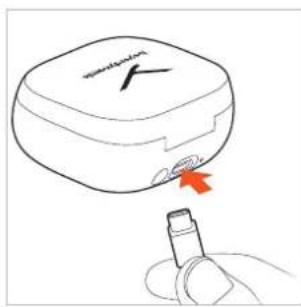
text_image
WATERMELK X Y Znatural_image
Line drawing of a layered electronic device with a square top and circular base (no text or symbols)natural_image
Illustration of a hand holding a red circular object with a curved line, no text or symbols presenttext_image
dyneu-coatednatural_image
Illustration of a hand holding a red circular object with a label 'R' (no text or symbols on the object itself)Título anterior
natural_image
Illustration of a hand holding a red circular object with a pointer, no text or symbols presentnatural_image
Illustration of a hand holding an ear with a red circular object inserted (no text or symbols)Bajar el volumen
https://www.beyerdynamic.com/media/downloads/headphones/manual/Licenses_amiron300.md
CONTENUTO
AVVERTENZE PER LA SICUREZZA 35
Uso previsto....35
GUIDA AL RICICLAGGIO....41
natural_image
Line drawing of a wireless earbuds with accessories and a 5x label (no text or symbols on the devices themselves)UTILIZZO E REGOLAZIONE DEGLI INSERTI
natural_image
Line drawing of a hand holding a red button on a small object (no text or symbols)natural_image
Illustration of a human ear with an orange circular device and red arrow indicating rotation (no text or symbols)natural_image
Illustration of a human ear with an orange circular object on the inner ear (no text or symbols)www.beyerdynamic.com/service/replacement-parts
MESSA IN CARICA DELLE BATTERIE
natural_image
Illustration of a hand inserting a red object into an open white electronic device (no text or symbols)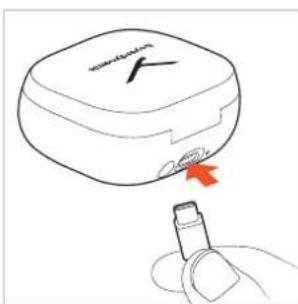
text_image
Diagram showing a device with a red arrow pointing to a small electronic component, likely illustrating a diagnostic or testing procedure.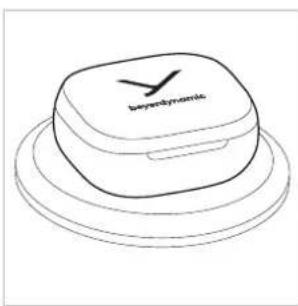
natural_image
Line drawing of a layered electronic device with 'beyonddynamic' branding on top (no other text or symbols)natural_image
Illustration of a hand holding a red circular object, possibly a button or knob (no text or symbols present)Associazione
text_image
dynamical Fnatural_image
Illustration of a hand holding a red circular object with a pointer, no text or symbols presentnatural_image
Illustration of a hand holding an ear with a red circular button (no text or symbols)Abbassare il volume
https://www.beyerdynamic.com/faq
natural_image
Line drawing of a wireless earbuds with USB connectors and a 5x zoom label (no text or symbols on the devices themselves)UTILIZAR E AJUSTAR OS ADAPTADORES AURICULARES
natural_image
Line drawing of a hand holding a red button (no text or symbols)natural_image
Illustration of a human ear with an orange button and red arrow indicating rotation (no text or symbols)natural_image
Illustration of a human ear with an orange circular object on the inner ear (no text or symbols)natural_image
Illustration of a hand inserting a red object into an open airbus (no text or symbols)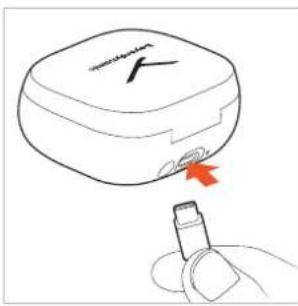
natural_image
Line drawing of a device with a red arrow pointing to a plug inserted into it (no text or symbols)natural_image
Line drawing of a layered electronic device with a square top and circular base (no text or symbols)natural_image
Illustration of a hand holding an ear with a red circular button (no text or symbols)Emparelhar
text_image
dyneu-coated Xnatural_image
Illustration of a hand holding a red circular object with a pointer, no text or symbols presentnatural_image
Illustration of a hand holding an ear with a red circular button (no text or symbols)Reduzir o volume
text_image
Battermost XPeer Pairing
https://www.beyerdynamic.com/faq
REGISTO DO PRODUTO
https://www.beyerdynamic.com/media/downloads/headphones/manual/Licenses_amiron300.md
INHOUDSOPGAVE
VEILIGHEIDSINSTRUCTIES....51
PROBLEEMOPLOSSING....56
HULP BIJ PROBLEMEN / FAQ....57
PRODUKTREGISTRATIE 57
VERWIJDERING....57
natural_image
Line drawing of a wireless earbuds with attached USB cable and two earbuds, labeled '5x' (no text or symbols on devices)OORPASSTUKKEN GEBRUIKEN EN AANPASSEN
natural_image
Line drawing of a hand holding a red button, no text or symbols presentnatural_image
Illustration of a red ear with a circular device and directional arrow indicating rotation (no text or symbols)natural_image
Simple line drawing of a human ear with an orange circular object inside (no text or symbols)natural_image
Illustration of a hand inserting a red object into an open air tube (no text or symbols)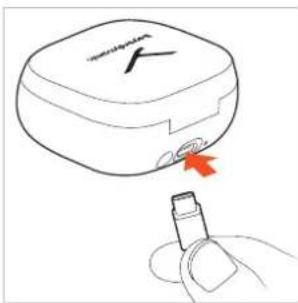
natural_image
Line drawing of a small electronic device with a red arrow pointing to its tip, connected to a finger (no text or symbols present)text_image
blue electric shockBEYERDYNAMIC-APP DOWNLOADEN
natural_image
Illustration of a hand holding a red circular object with a curved line, no text or symbols presentVerbinding tot stand brengen
text_image
1 Smartwatch F Atext_image
dualtated YIn-/uitschakelen
natural_image
Illustration of a closed device with a lid and internal components, no visible text or symbolstext_image
beydynamicnatural_image
Illustration of a hand holding a small orange object with a red circular area, no text or symbols presentVorig nummer
natural_image
Illustration of a hand holding a red circular object with a pointer, no text or symbols presentnatural_image
Illustration of a hand holding an ear with a red circular object inserted, no text or symbols presentVolume verlagen
https://www.beyerdynamic.com/faq
PRODUKTREGISTRATIE
https://www.beyerdynamic.com/service/warranty
HANDELSMERKEN
https://www.beyerdynamic.com/media/downloads/headphones/manual/Licenses_amiron300.md
INDHOLD
SIKKERHEDSVEJLEDNINGER 3
Brug i henhold til bestemmelserne ....3
GARANTIBESTEMMELSER....9
VAREMÆRKER....9
SOFTWARE FRA ANDRE UDBYDERE....9
Tak for, at du har valgt True Wireless Høretelefon AMIRON 300 fra beyerdynamic.
natural_image
Line drawing of a wireless earbuds with attached earplands and a 5x zoom indicator (no text or symbols on the devices themselves)BRUG OG TILPAS ∅REPASSTYKKERNE
natural_image
Illustration of a hand holding a red object with a small protrusion (no text or symbols)natural_image
Illustration of a human ear with an orange circular device and red arrow indicating rotation (no text or symbols)natural_image
Simple line drawing of a human ear with an orange circular object on the inner ear (no text or symbols)natural_image
Illustration of a hand inserting a red object into an open white electronic device (no text or symbols)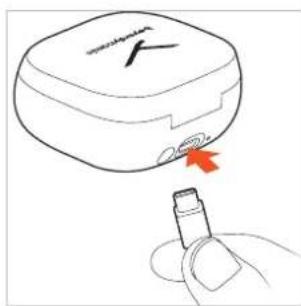
text_image
Diagram showing a device with a logo and a red arrow pointing to a plug, likely illustrating a medical or diagnostic procedure.natural_image
Line drawing of a smart speaker with a square head and circular base, no text or symbols presentDOWNLOAD BEYERDYNAMIC APPEN
natural_image
Line drawing of a hand holding a red circular object, possibly an ear or earbell (no text or symbols)Opret tilkobling
text_image
Smartwatch KTænd/Sluk
text_image
yumus-baked Xnatural_image
Illustration of a hand holding a red circular object with a pointer, no text or symbols presentTidligere titel
natural_image
Illustration of a hand holding a circular object with an orange-red shape, no text or symbols presentnatural_image
Illustration of a hand holding a red circular object with a curved line, labeled 'L/R' (no text or symbols on the object itself)Indstil lydstyrken
natural_image
Illustration of a hand holding a small orange object, possibly a medical or electronic device (no text or symbols present)Reducer lydstyrken
Venstre øresnegl (L): Hold brugerfladen nede (—), for at reducere lydstyrken.
Telefonering
text_image
peripetitive FPeer Pairing
https://www.beyerdynamic.com/faq
PRODUKTREGISTRERING
På Internettet under https://www.beyerdynamic.com/service kan du registrere din AMIRON 300 under angivelse af serienummeret.
BORTSKAFFELSE
natural_image
Line drawing of a wireless earbuds with attached earplands and a 5x zoom indicator (no text or symbols on the devices themselves)SOVITTEIDEN KÄYTTÄMINEN JA SOVITTAMINEN
natural_image
Illustration of a hand holding a red object with a small protrusion (no text or symbols)text_image
Diagram showing a red circular object with an arrow indicating clockwise motion or rotation around it, possibly representing a medical or therapeutic device.natural_image
Illustration of a human ear with a red circular object on the inner ear (no text or symbols)natural_image
Illustration of a hand placing a red object into an open white electronic device with cups and a small object inside (no text or symbols)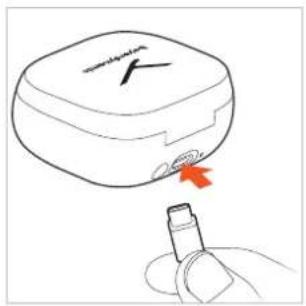
text_image
Diagram showing a device with a red arrow pointing to a plug inserted into it, indicating a step or action.natural_image
Line drawing of a layered electronic device with 'beyonddynamic' branding on top (no other text or symbols)natural_image
Illustration of a hand holding an ear with a red circular button (no text or symbols)Yhdistäminen
text_image
Smartwatch Fnatural_image
Line drawing of a closed boxing glove with a tray and buttons (no text or symbols)text_image
baserdynamicMedian toisto
natural_image
Illustration of a hand holding a red circular object with a pointer, no text or symbols presentnatural_image
Illustration of a hand holding a red circular object with a pointer, no text or symbols presenthttps://www.beyerdynamic.com/faq
TUOTTEEN REKISTERÖINTI
https://www.beyerdynamic.com/service.
HÄVITTÄMINEN
https://www.beyerdynamic.com/media/downloads/headphones/manual/Licenses_amiron300.md
INNHOLD
SIKKERHETSINFORMASJON....75
Tiltenkt bruk....75
Slik justerer du volumet....75
Endret lydopplevelse....75
Fare for svelging 75
natural_image
Line drawing of an wireless earbuds with USB connectors and a 5x zoom label (no text or symbols on the devices themselves)SLIK BRUKER OG TILPASSER DU HETTENE TIL ∅RETELEFONENE
natural_image
Illustration of a hand holding a small red object with a small protrusion, no text or symbols presentnatural_image
Illustration of a human ear with a red circular device and arrow indicating rotation (no text or symbols)natural_image
Illustration of a human ear with a red circular object on the inner ear (no text or symbols)natural_image
Illustration of a hand inserting a red object into an open white electronic device (no text or symbols)Du kan også legge ladeetuiet på en trädløs ladestasjon.
text_image
Diagram showing a device with a red arrow pointing to a plug inserted into it, labeled 'SARV' in the top-left corner.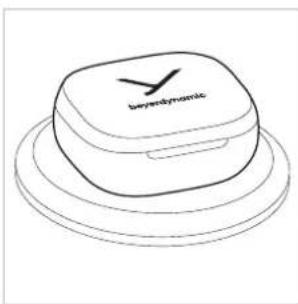
natural_image
Line drawing of a layered electronic device with 'beyonddynamic' branding on top (no other text or symbols)natural_image
Illustration of a hand holding a red circular object with a pointer, no text or symbols presenttext_image
BIPARANTIC A2 Velg «AMIRON 300» fra tilkoblingslisten på avspillingsenheten.
text_image
2 www.mn.com.cnMerk
natural_image
Line drawing of a closed boxing glove with a lid and buttons, no text or symbols presentnatural_image
Illustration of a hand holding a small earbell with a red circular button, no text or symbols presentForrige spor
natural_image
Illustration of a hand holding a red circular object with a pointer, no text or symbols presentnatural_image
Illustration of a hand holding an ear with a red circular object inserted (no text or symbols)Slik senker du volumet
Venstre øretelefon (L): Hold betjeningstasten inne (☐) for å senke volumet.
Telefonsamtaler
natural_image
Line drawing of a wireless earbuds with attached USB cable and earplugs, labeled '5x' (no text or symbols on the devices themselves)ANVÄNDA OCH ANPASSA HÖRLURSPROPPARNA
natural_image
Hand holding a red circular object with a small protrusion, no text or symbols visiblenatural_image
Illustration of a human ear with an orange circular device and arrow indicating rotation (no text or symbols)natural_image
Simple line drawing of a human ear with an orange circular object on the inner ear (no text or symbols)natural_image
Illustration of a hand placing a red object into an open airbus (no text or symbols)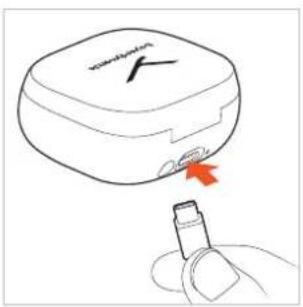
text_image
Diagram showing a device with a red arrow pointing to a small electronic component, likely indicating a detection or testing process.natural_image
Line drawing of a layered electronic device with 'beyonddynamic' branding on top (no other text or symbols)natural_image
Illustration of a hand holding a small orange button on an ear (no text or symbols)Upprätta koppling
text_image
Smartwatch Atext_image
symmetrical Xnatural_image
Illustration of a hand holding a red circular object with a number 1, no text or symbols presentnatural_image
Illustration of a hand holding a red circular object, possibly a button or knob (no text or symbols present)Sänka volymen
https://www.beyerdynamic.com/faq
PRODUKTREGISTRERING
https://www.beyerdynamic.com/media/downloads/headphones/manual/Licenses_amiron300.md
SISU
OHUTUSJUHISED 91
Üldised hooldusjuhised 91
SELLEST JUHENDIST....92
TARNEKOMPLEKT 92
KÖRVAKORKIDE KASUTAMINE JA KOHANDAMINE....92
Üldised hooldusjuhised
natural_image
Line drawing of a wireless earbuds with attached earplands and a 5x zoom indicator (no text or symbols on the devices themselves)KÖRVAKORKIDE KASUTAMINE JA KOHANDAMINE
natural_image
Line drawing of a hand holding a red device with a small component (no text or symbols)natural_image
Illustration of a human ear with an orange circular device and red arrow indicating rotation (no text or symbols)natural_image
Illustration of a human ear with an orange circular object on the inner ear (no text or symbols)natural_image
Illustration of a hand inserting a red object into an open white electronic device (no text or symbols)text_image
Diagram showing a blood glucose meter with a red arrow pointing to it, indicating blood glucose uptake.natural_image
Line drawing of a layered electronic device with a square top and circular base (no text or symbols)BEYERDYNAMICU ÄPI ALLALAADIMINE
natural_image
Line drawing of a hand holding a circular object with an orange circular patch, no text or symbols presentSidestuse loomine
text_image
air/air/air/air air2 Valige „AMIRON 300“ esitusseadme sidestusloendist.
text_image
Diagram showing a hand interacting with a smartphone displaying a login screen with Chinese text and a red button.Juhised
text_image
baserdynamicMeediumite esitamine
natural_image
Illustration of a hand holding a red circular object with a pointer, no text or symbols presentEelmine lugu
natural_image
Illustration of a hand holding a red circular object with a pointer, no text or symbols presentnatural_image
Illustration of a hand holding a red circular object with a pointer, resembling a stylized ear or earbell (no text or symbols present)text_image
Portable FPeer Pairing
https://www.beyerdynamic.com/faq
TOOTE REGISTREERIMINE
Internetis aadressil https://www.beyerdynamic.com/service saate oma AMIRON 300 seerianumbri abil registreerida.
JÄÄTMEKÄITLUS
https://www.beyerdynamic.com/cod
TEHNILISED ANDMED
Bluetooth®-sagedusvahemik 2,402 - 2,480 GHz
https://www.beyerdynamic.com.
GARANTIITINGIMUSED
https://www.beyerdynamic.com/service/warranty
KAUBAMÄRGID
https://www.beyerdynamic.com/media/downloads/headphones/manual/Licenses_amiron300.md
TURINYS
SAUGUMO NURODYMAI 99
natural_image
Line drawing of a wireless earbuds with USB connectors and a 5x zoom label (no text or symbols on devices)AUSŲ KIŠTUKŲ NAUDOJIMAS IR PRITAIKYMAS
natural_image
Line drawing of a hand holding a red button on a small object (no text or symbols)natural_image
Illustration of a red ear with a circular device and directional arrow indicating rotation (no text or symbols)natural_image
Simple line drawing of a human ear with an orange circular object on the inner ear (no text or symbols)www.beyerdynamic.com/service/replacement-parts
BATERIJU İKROVIMAS
natural_image
Illustration of a hand inserting a red object into an open airbus (no text or symbols)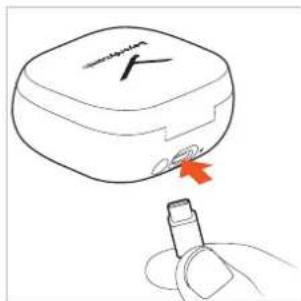
text_image
Diagram showing a device with a label 'X' and a red arrow pointing to a plug inserted into it, likely illustrating a medical or diagnostic concept.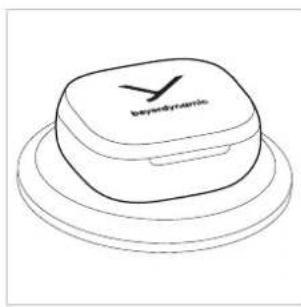
text_image
Hybridryonic„BEYERDYNAMIC“ PROGRAMÉLÈS ATSISIUNTIMAS
natural_image
Illustration of a hand holding a red circular object with a curved line, no text or symbols presentSusiejimas
text_image
1 HAPPLENT H H Htext_image
2 User Information: https://www.103.comNurodymai
text_image
blue smartwatch Fnatural_image
Illustration of a hand holding a red circular object with a pointer, no text or symbols presentAnkstesnis kürinys
natural_image
Illustration of a hand holding a red circular object with a pointer, no text or symbols presentnatural_image
Illustration of a hand holding a red circular object with a label, no text or symbols presentSumažinti garsumą
https://www.beyerdynamic.com/faq
GAMINIO REGISTRACIJA
natural_image
Line drawing of a wireless earbuds with USB connectors and a 5x zoom label (no text or symbols on the devices themselves)MAINĀMO AUSTIŅU SPILVENTIŅU LIETOŠANA UN PIELĀGOŠANA
natural_image
Line drawing of a hand holding a small red object with a small protrusion (no text or symbols)natural_image
Illustration of a human ear with an orange circular device and red arrow indicating rotation (no text or symbols)natural_image
Illustration of a human ear with an orange circular object on the inner ear (no text or symbols)www.beyerdynamic.com/service/replacement-parts
AKUMULATORU UZLÄDE
natural_image
Illustration of a hand inserting a red object into an open airbus (no text or symbols)
natural_image
Line drawing of a medical device with a red arrow pointing to its tip, no text or symbols presentnatural_image
Line drawing of a beige 3D object with a checkmark on top, placed on a circular base (no text or symbols)natural_image
Illustration of a hand holding a red circular object with a curved line, no text or symbols presentSavienojuma izveide
natural_image
Line drawing of a closed cosmetic device with a lid and internal components (no text or symbols)natural_image
Illustration of a hand holding a red circular object with a pointer, no text or symbols presentnatural_image
Illustration of a hand holding a red circular object with a pointer, no text or symbols presentnatural_image
Illustration of a hand holding an ear with a red circular object inserted (no text or symbols)text_image
Benedielle Y Y YTREŠAS PUSES PROGRAMMATURA
natural_image
Line drawing of wireless earbuds and charging devices with a 5x zoom label (no text or symbols on devices)UŻYWANIE I DOPASOWANIE WKŁADEK DOUSZNYCH
natural_image
Line drawing of a hand holding a small red object, possibly a device or tool, with no visible text or symbols.natural_image
Illustration of a human ear with a red circular device and arrow indicating rotation (no text or symbols)natural_image
Illustration of a human ear with an orange circular object inside, no text or symbols presentwww.beyerdynamic.com/service/replacement-parts
ŁADOWANIE BATERII
natural_image
Illustration of a hand placing a red object into an open white electronic device with cups and a small object inside (no text or symbols)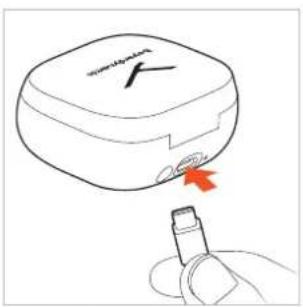
text_image
Diagram showing a device with a red arrow pointing to a plug inserted into it, indicating a blood glucose level.natural_image
Line drawing of a layered object with a circular top and curved base, no text or symbols present.natural_image
Illustration of a hand holding a red circular object, possibly a button or knob (no text or symbols present)Parowanie
text_image
BIPMORARY Anatural_image
Line drawing of a closed electronic device with a lid and internal components (no text or symbols)natural_image
Illustration of a hand holding a red circular object with a pointer, no text or symbols presentPoprzedni utwór
natural_image
Illustration of a hand holding a red circular object with a pointer, no text or symbols presenttext_image
BOPPOMO ADEKLARACJA ZGODNOŚCI WE
natural_image
Line drawing of a wireless earbuds with attached USB connectors and a 5x product label (no text or symbols on the devices themselves)シリコーン製イヤーピースの使用
natural_image
Line drawing of a hand holding a small red object, possibly a device or tool, with no visible text or symbols.イヤホンを耳に入れる
natural_image
Illustration of a human ear with an orange button and red arrow indicating rotation (no text or symbols)イヤーピースの使用と適合
natural_image
Illustration of a human ear with a red circular object on the inner ear (no text or symbols)www.beyerdynamic.com/service/replacement-parts
バッテリーの充電
natural_image
Illustration of a hand placing a red object into an open airbus (no text or symbols)text_image
Diagram showing a blood glucose meter with a red arrow indicating the catheter tip, labeled 'H' and 'V'.text_image
Beyndynamicnatural_image
Line drawing of a hand holding a red circular object, possibly a button or knob (no text or symbols)ペアリングの確立
text_image
buy any more than 100%注意事項
natural_image
Line drawing of a closed boxing glove with a lid and buttons, no text or symbols present▶ イヤホンを充電
ケースに入れてカバーを閉
めると、AMIRON 300の
電源は自動的に切れます。
text_image
beyerdynamic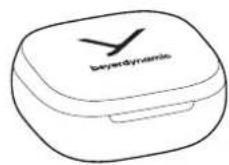
メディアの再生
再生のスタート/一時停止
再生を開始または
停止するには
コントロールサーフェスを
1回(●)タップします。
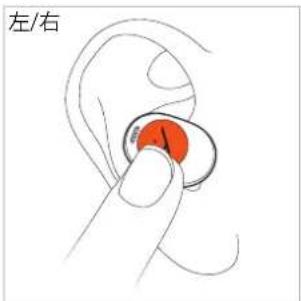
text_image
左/右次のタイトル
natural_image
Illustration of a hand holding a red circular object with a pointer, no text or symbols present前のタイトル
natural_image
Illustration of a hand holding a red circular object with a pointer, no text or symbols presentnatural_image
Illustration of a hand holding a red circular object with a curved handle, resembling a stylized ear or button (no text or symbols)音量を下げる
text_image
Joumuaian Fピアペアリング
https://www.beyerdynamic.com/faq
製品登録
https://www.beyerdynamic.com/media/downloads/headphones/manual/Licenses_amiron300.md
目录
安全注意事项 131
合规使用 131
音量调节 131
变化的声音感知程度....131
一般维护提示 131
误吞危险 131
电源线及连接线 131
电池使用 131
环境条件 131
关于本说明书 132
随机清单....132
佩戴和调节耳筒套....132
佩戴硅脂耳筒套 132
将耳机塞入耳内 132
为电池充电 132
锂电池使用寿命提示....133
下载拜雅应用程序....133
操作....133
进行配对 134
删除配对列表 134
开启/关闭 134
媒体播放 134
音量调节 135
通话....135
重置为出厂设置 135
操作功能概览 136
LED 指示灯概述 136
清洁....136
问题解决....136
难题/常见问题解答 137
产品注册....137
废弃处理....137
电池废弃处理 137
欧盟一致性声明....137
技术指标....137
质保条款....137
商标 137
第三方软件....137
natural_image
Line drawing of a wireless earbuds with attached earplugs and a 5x zoom indicator (no text or symbols on the devices themselves)佩戴和调节耳筒套
natural_image
Line drawing of a hand holding a small red object with a small circular component, no text or symbols present将耳机塞入耳内
将耳机沿顺时针方向拧入耳内并轻轻扭动。
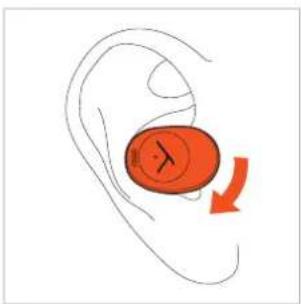
natural_image
Illustration of a human ear with a red oval object and a red arrow indicating rotation or movement (no text or symbols)▶ 确保耳机正确塞入如图所示的位置上。
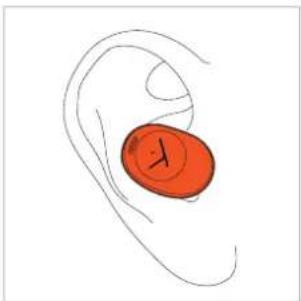
natural_image
Simple line drawing of a human ear with a red circular object on the inner ear (no text or symbols)www.beyerdynamic.com/service/replacement-parts
为电池充电
natural_image
Illustration of a hand inserting a red object into an open white electronic device (no text or symbols)natural_image
Line drawing of a wireless earbuds with a red arrow pointing to the ear (no text or symbols)或者,您可将充电盒放置在无线充电站上。
natural_image
Line drawing of a closed-branded electronic device with a circular top and base, no text or symbols present.下载拜雅应用程序
natural_image
Illustration of a hand holding a red circular object with a curved line, no text or symbols present进行配对
text_image
Benedo Y Y Ytext_image
Illustration of a smartphone screen displaying a red text placeholder with Chinese characters and a finger pointing to it.提示
text_image
dualsawaking X开启/关闭
text_image
Open mouthtext_image
beyardynamic媒体播放
播放/暂停播放
natural_image
Illustration of a hand holding a red circular object with a label 'R' (no text or symbols on the object itself)上一曲
natural_image
Illustration of a hand holding a circular object with a red circular mark, no text or symbols presentnatural_image
Line drawing of a hand holding a red circular object, possibly a button or earpiece (no text or symbols)降低音量
https://www.beyerdynamic.com/faq
产品注册
natural_image
Line drawing of a wireless earbuds with attached earphones and a 5x zoom indicator (no text or symbols on the devices themselves)佩戴和調節耳筒套
natural_image
Line drawing of a hand holding a small red object with a small circular component, no text or symbols present將耳機戴入耳內
將耳機沿順時針方向戴入耳內並輕輕轉動。
natural_image
Illustration of a human ear with a red oval object and a red arrow indicating rotation or movement (no text or symbols)請確保耳機如圖所示,完美貼合您的耳朵。
natural_image
Simple line drawing of a human ear with a red circular object on the inner ear (no text or symbols)www.beyerdynamic.com/service/replacement-parts
為電池充電
natural_image
Illustration of a hand inserting a red object into an open airbus (no text or symbols)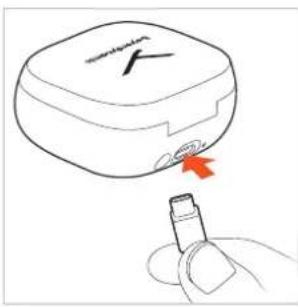
natural_image
Line drawing of a medical device with a red arrow pointing to it, no text or symbols present您也可以將充電盒放在無線充電站上。
natural_image
Line drawing of a beattyte case with a square lid and circular base (no text or symbols)鋰電池使用壽命說明
natural_image
Illustration of a hand holding a red circular object, possibly a button or knob (no text or symbols present)配對
text_image
dualsawaking X開啟/關閉
natural_image
Illustration of a hand holding a red circular object with a curved line, no text or symbols present上一曲
natural_image
Illustration of a hand holding a red circular object with a label 'L' (no text or symbols on the object itself)natural_image
Illustration of a hand holding a small ear with a red circular object, no text or symbols present降低音量
text_image
airout/airout AirPeer Pairing
https://www.beyerdynamic.com/faq
產品註冊
https://www.beyerdynamic.com/media/downloads/
headphones/manual/Licenses_amiron300.md
beyerdynamic GmbH & Co. KG
For further distributors worldwide, please go to www.beyerdynamic.com
Non-contractual illustrations. Subject to change without notice.