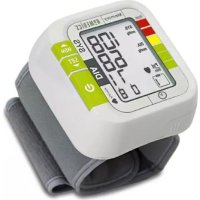
BPW1000EU - Sphygmomanometer HOMEDICS - Free user manual and instructions
Find the device manual for free BPW1000EU HOMEDICS in PDF.

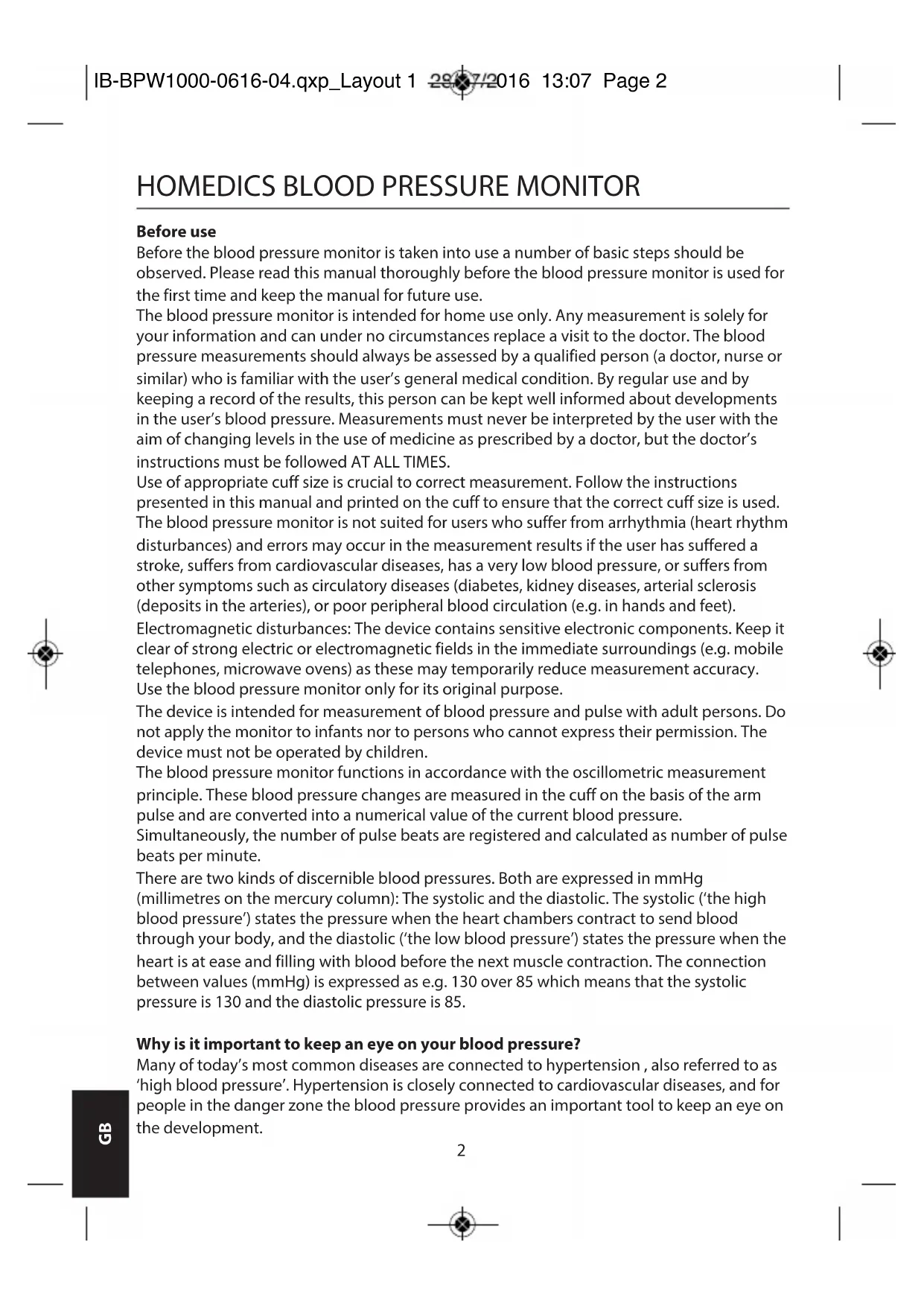


| Product type | Automatic wrist blood pressure monitor |
| Brand | HOMEDICS |
| Model | BPW1000EU |
| Measurement method | Oscillometric |
| Measurement range (pressure) | 40 - 230 mmHg |
| Measurement range (pulse) | 40 - 199 beats/min |
| Accuracy (pressure) | ± 3 mmHg |
| Accuracy (pulse) | ± 5 % |
| Power supply | 2 AAA batteries (3 V) |
| Display | LCD screen (31.5 × 44 mm) |
| Memory | 60 measurements with date and time |
| Arrhythmia detection | Yes (IHB symbol) |
| WHO classification | Blood pressure level indicator |
| Suitable cuff | Wrist, circumference 13.5 - 21.5 cm |
| Dimensions | 180 × 100 × 39 mm |
| Weight | 106 g (without batteries) |
| Operating conditions | 10 °C - 40 °C, humidity ≤ 85 % |
| Storage conditions | -20 °C - 60 °C, humidity 10 - 93 % |
| Maintenance and cleaning | Soft cloth moistened with a non-abrasive product |
| Safety | Applied part type BF, IP22, automatic shut-off at 300 mmHg |
| Included accessories | 2 AAA batteries, instruction manual, cuff |
Frequently Asked Questions - BPW1000EU HOMEDICS
User questions about BPW1000EU HOMEDICS
0 question about this device. Answer the ones you know or ask your own.
Ask a new question about this device
Download the instructions for your Sphygmomanometer in PDF format for free! Find your manual BPW1000EU - HOMEDICS and take your electronic device back in hand. On this page are published all the documents necessary for the use of your device. BPW1000EU by HOMEDICS.
USER MANUAL BPW1000EU HOMEDICS
Before the blood pressure monitor is taken into use a number of basic steps should be observed. Please read this manual thoroughly before the blood pressure monitor is used for the first time and keep the manual for future use.
The blood pressure monitor is intended for home use only. Any measurement is solely for your information and can under no circumstances replace a visit to the doctor. The blood pressure measurements should always be assessed by a qualified person (a doctor, nurse or similar) who is familiar with the user's general medical condition. By regular use and by keeping a record of the results, this person can be kept well informed about developments in the user's blood pressure. Measurements must never be interpreted by the user with the aim of changing levels in the use of medicine as prescribed by a doctor, but the doctor's instructions must be followed AT ALL TIMES.
Use of appropriate cuff size is crucial to correct measurement. Follow the instructions presented in this manual and printed on the cuff to ensure that the correct cuff size is used. The blood pressure monitor is not suited for users who suffer from arrhythmia (heart rhythm disturbances) and errors may occur in the measurement results if the user has suffered a stroke, suffers from cardiovascular diseases, has a very low blood pressure, or suffers from other symptoms such as circulatory diseases (diabetes, kidney diseases, arterial sclerosis (deposits in the arteries), or poor peripheral blood circulation (e.g. in hands and feet).
Electromagnetic disturbances: The device contains sensitive electronic components. Keep it clear of strong electric or electromagnetic fields in the immediate surroundings (e.g. mobile telephones, microwave ovens) as these may temporarily reduce measurement accuracy. Use the blood pressure monitor only for its original purpose.
The device is intended for measurement of blood pressure and pulse with adult persons. Do not apply the monitor to infants nor to persons who cannot express their permission. The device must not be operated by children.
The blood pressure monitor functions in accordance with the oscillometric measurement principle. These blood pressure changes are measured in the cuff on the basis of the arm pulse and are converted into a numerical value of the current blood pressure.
Simultaneously, the number of pulse beats are registered and calculated as number of pulse beats per minute.
There are two kinds of discernible blood pressures. Both are expressed in mmHg (millimetres on the mercury column): The systolic and the diastolic. The systolic ('the high blood pressure') states the pressure when the heart chambers contract to send blood through your body, and the diastolic ('the low blood pressure') states the pressure when the heart is at ease and filling with blood before the next muscle contraction. The connection between values (mmHg) is expressed as e.g. 130 over 85 which means that the systolic pressure is 130 and the diastolic pressure is 85.
Why is it important to keep an eye on your blood pressure?
Many of today's most common diseases are connected to hypertension, also referred to as 'high blood pressure'. Hypertension is closely connected to cardiovascular diseases, and for people in the danger zone the blood pressure provides an important tool to keep an eye on the development.
What are systolic pressure and diastolic pressure?
When ventricles contract and pump blood out of the heart, blood pressure reaches its maximum value, the highest pressure in the cycle is known as systolic pressure. When the heart relaxes between heartbeats, the lowest blood pressure is diastolic pressure.
What is the standard blood pressure classification?
Below illustrates the blood pressure classification mode by World Health Organization (WHO) and International Society of Hypertension(ISH) in 1999.
Systolic Diastolic
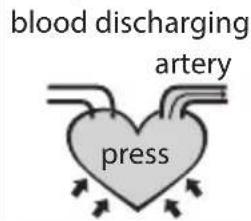
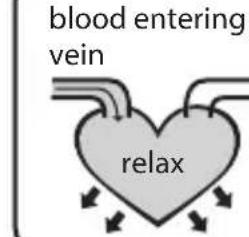
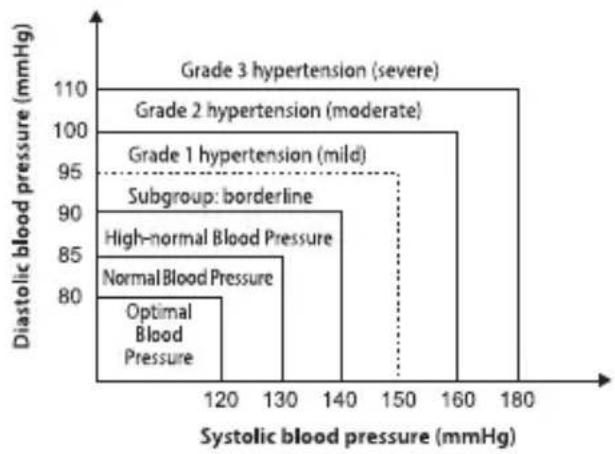
bar
| Hypertension Level | Systolic blood pressure (mmHg) | Diastolic blood pressure (mmHg) | | :--- | :--- | :--- | | Optimal Blood Pressure | 120 | 80 | | High-normal Blood Pressure | 130 | 85 | | Normal Blood Pressure | 130 | 85 | | Subgroup: borderline | 140 | 90 | | Grade 1 hypertension (mild) | 150 | 95 | | Grade 2 hypertension (moderate) | 160 | 100 | | Grade 3 hypertension (severe) | 180 | 110 |CAUTION Only a physician/GP can tell you your normal blood pressure range and the point at which you are at risk. Consult your physician to obtain these values. If the measurements taken with this product fall outside the range, consult your physician/GP.
| LevelBloodPressure(mmHg) | OptimalHypo Norm | Normal HigNorm. G1 G2 | normal Mild Moderate Severe | G3 | ||
| SYS <120 | 120~129 130~ | 139 140~159 | 160~179 >180 | - | ||
| DIA <80 | 80~84 85~89 90 | 90~99 100~109 | >110 | - |
Irregular Heartbeat Detector
An irregular heartbeat is detected when a heartbeat rhythm varies while the unit is measuring the systolic and diastolic blood pressure. During each measurement, this equipment records the heartbeat intervals and works out the standard deviation. If the calculated value is larger than or equal to 15, the irregular heartbeat symbol appears on the symbol when the measurement results are displayed.
CAUTION The appearance of the IHB icon indicates that a pulse irregularity consistent with an irregular heartbeat was detected during measurement. Usually this is NOT a cause for concern. However, if the symbol appears often, we recommend you seek medical advice. Please note that the device does not replace a cardiac examination, but serves to detect pulse irregularities at an early stage.
SAFETY INFORMATION
 | Caution: consult accompanying documents | [WTBG] | Manufacturer |
 | Serial number` Type BF applied parts |  | |
 | Caution: These notes must be observed to prevent any damage to the device |  | Symbol for “ENVIRONMENT PROTECTION - Electrical waste products should not be disposed of with household waste. Please recycle where facilities exist. Check with your local authority or retailer for recycling advice” |
| CE0120 | CE mark: conforms to essential requirements of the Medical Device Directive 93/42/EEC. | ||
 | Direct current Manufacture date |

CAUTION
- This device is intended for adult use only.
- This device is intended for non-invasive measuring and monitoring of arterial blood pressure. It is not intended for use on extremities other than the wrist or for functions other than obtaining a blood pressure measurement.
- Do not confuse self-monitoring with self-diagnosis. This unit allows you to monitor your blood pressure. Do not begin or end medical treatment based solely on the readings from this unit. Always consult your physician first.
- If you are taking medication, consult your physician to determine the most appropriate time to measure your blood pressure. Never change a prescribed medication without consulting your physician.
- This unit is not suitable for continuous monitoring during medical emergencies or operations. Otherwise, the patient's wrist and fingers will become numb, swollen and even purple due to a lack of blood.
- Please use the device under the environment which was provided in the user manual. Otherwise, the performance and lifetime of the device will be impacted and reduced.
- During use, the patient will be in contact with the cuff. The materials of the cuff have been tested and found to comply with requirements of ISO 10993-5:2009 and ISO 10993-10:2010. It will not cause any potential alergic reaction or contact injury.
- The device doesn't need to be calibrated within the two years of reliable service.
- Please dispose of ACCESSORIES, detachable parts, and the ME EQUIPMENT according to the local guidelines.
- When the device was used to measure patients who have common arrhythmias such as atrial or ventricular premature beats or atrial fibrillation, the best result may occur with deviation. Please consult your physician about the result.
- This device is contraindicated for any female subject who may be suspected of, or is pregnant. Besides providing inaccurate readings, the effects of this device on the fetus are unknown.
- If the wrist cuff pressure exceeds 40 kPa (300 mmHg), the unit will automatically deflate. Should the wrist cuff not deflate when pressures exceeds 40 kPa (300 mmHg), detach the wrist cuff from the wrist and press the "button to stop inflation.
• To avoid measurement errors, carefully read this manual before using the product. -
The equipment is not AP/APG equipment and not suitable for use in the presence of a flammable anesthetic mixture with air or with oxygen or nitrous oxide.
-
The operator shall not touch the battery and the patient simultaneously.
- Do not use the monitor under the conditions of strong electromagnetic field (e.g. medical RF equipment) that radiate interference signal or electrical fast transient / burst signal.
- The user must check that the equipment functions safely and see that it is in proper working condition before being used.
LCD display signal
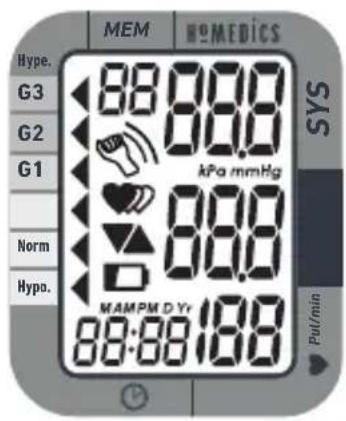
| Symbol Description Explanation | ||
| SYS | Systolic blood pressure High pressure result | |
| DIA | Diastolic blood pressure Low pressure result | |
| Pul/min | BPM | Pulse/minute; heartbeats/minute |
| Memory | If “M” shows, the displayed measurement values is from the memory. | |
| Movement error symbol Movement will result in inaccurate reading | ||
| ☐+Lo | Low battery | Batteries are low and need to be replaced |
| kPa | kPa | Measurement unit of the blood pressure (1kPa = 7.5mmHg) |
| mmHg | mmHg | Measurement unit the blood pressure (1mmHg = 0.133kPa) |
| Deflating CUFF is deflating | ||
| 88:88 | Time (hour:minute) Current time | |
| Grade | The grade of the blood pressure | |
| Arrhythmia | Irregular heartbeat | |
| Heartbeat | Heartbeat detection during the measurement | |
MONITOR COMPONENTS
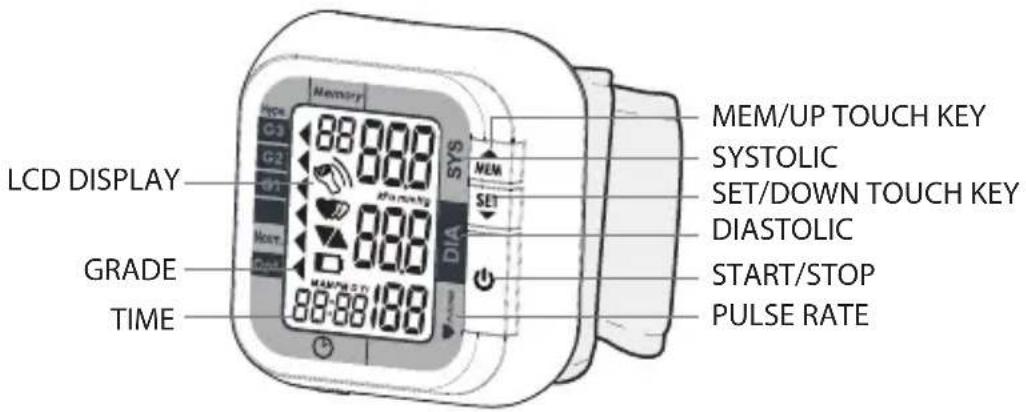
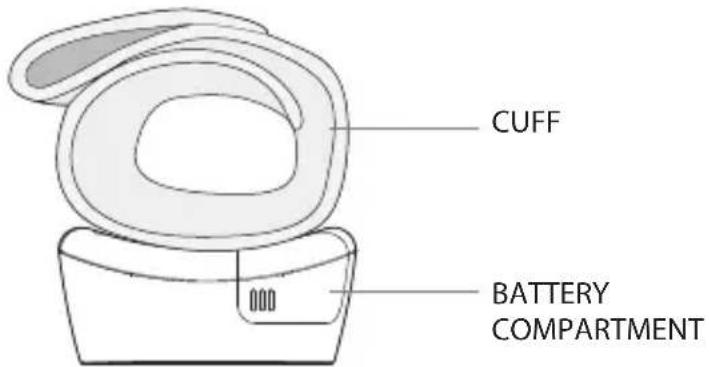
CAUTION
In order to get the best effect and protect your monitor, please use the right battery.
Inserting and Changing Batteries
- Slide off the battery cover.
- Install the batteries by matching the correct polarity, as shown. Always use the correct battery type.
- Replace the cover.
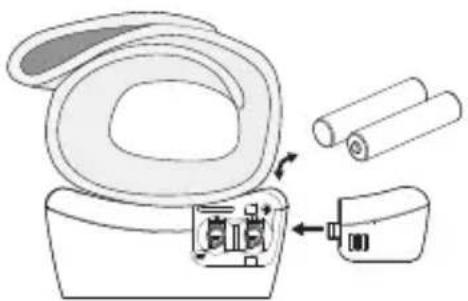
natural_image
Line drawing of a toilet with attached circuit breakers and rolled paper (no text or symbols)Replace the batteries whenever the below happens
• The shows
• The display dims
• The display does not light up
CAUTION
- Remove batteries if the device is not likely to be used for some time.
- The old battery is harmful to the environment, so please do not dispose of with other daily trash.
- Remove the old battery from the device and follow your local recycling guidelines.
- Do not dispose of batteries in fire. Batteries may explode or leak.
SETTING DATE, TIME AND MEASUREMENT UNIT
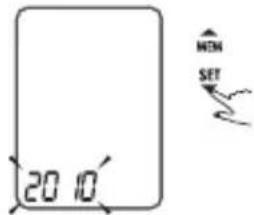
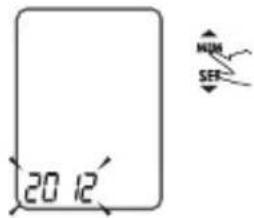
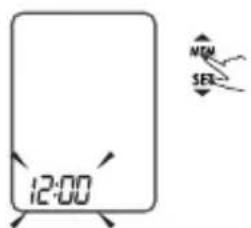
It is important to set the clock before using your blood pressure monitor, so that a time stamp can be assigned to each record that is stored in the memory. (year: 2010–2050, time: 24 H)
-
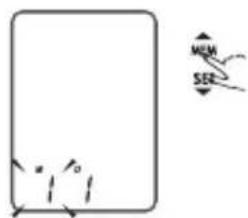
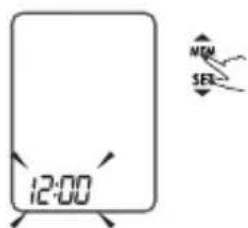
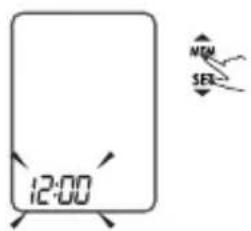
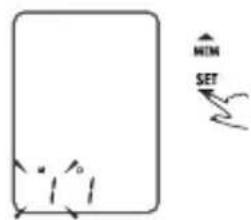
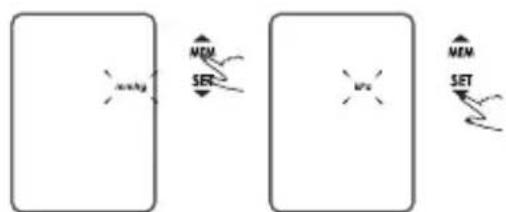
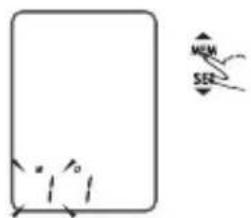
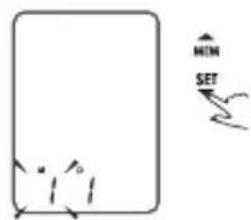
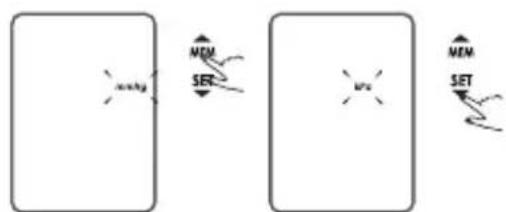
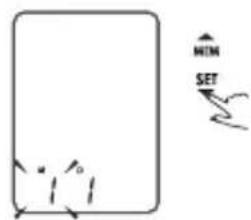
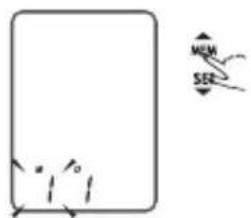
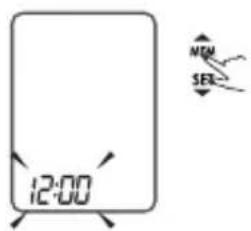
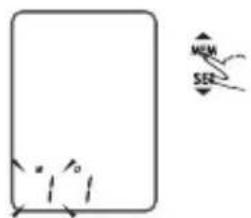
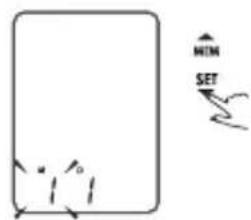
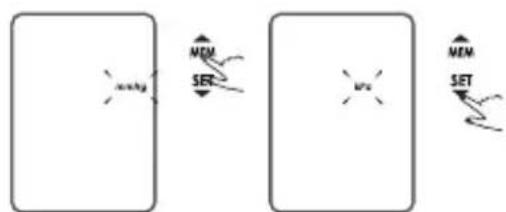
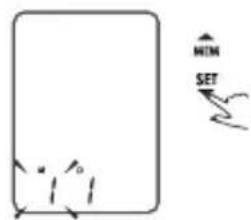
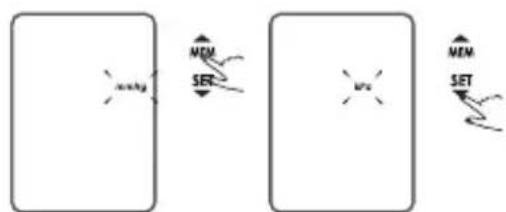
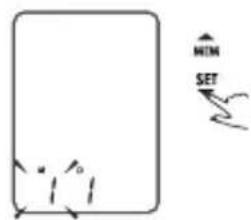
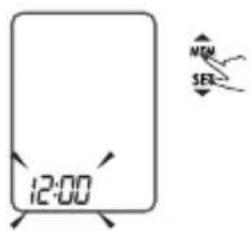
When the unit is off, press 'SET' the time will be displayed, then press and hold 'SET' for 3 seconds to enter the mode for changing the date, time and measurement unit.
-
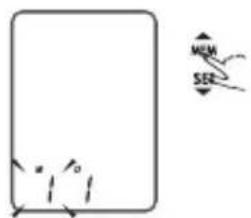
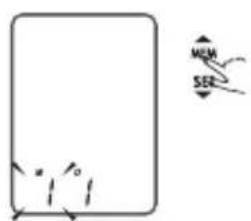
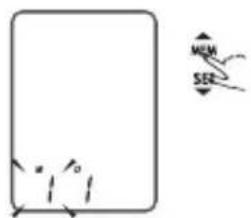
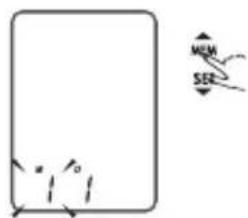
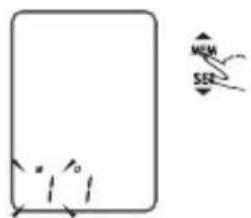
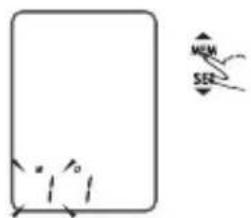
Press the "MEM" to change the [YEAR].
-
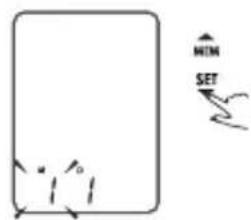
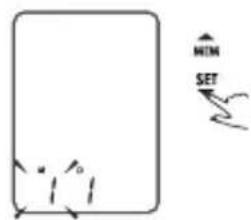
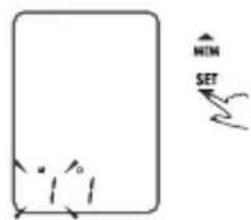
When you get the correct year, press "SET" and it will turn to the next step automatically.
-
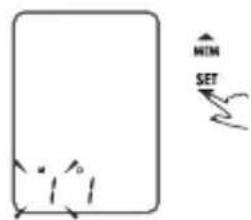
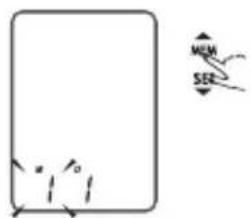
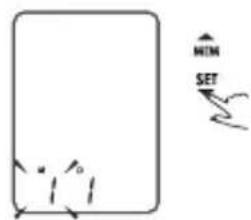
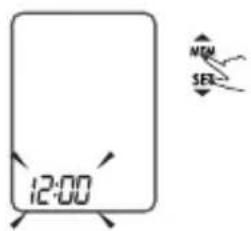
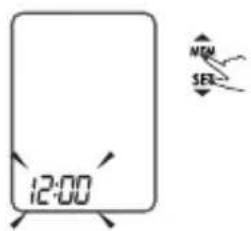
Repeat steps 2 and 3 to set the [MONTH] and [DAY].
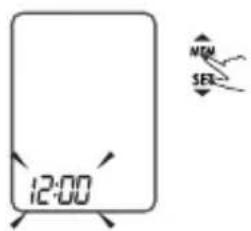
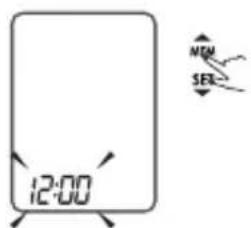
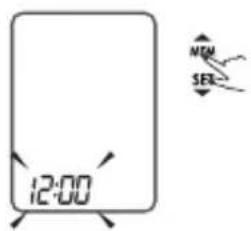
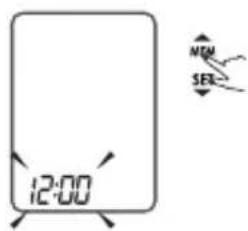
4a. Repeat steps 2 and 3 to set either 12h or 24h time display.
-
Repeat steps 2 and 3 to set the set the [HOUR] and [MINUTE].
-
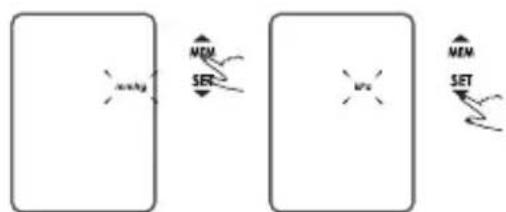
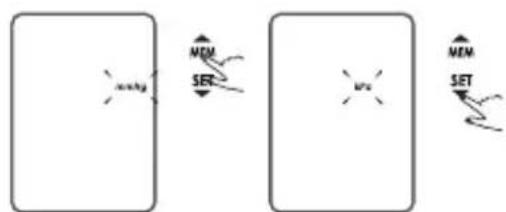
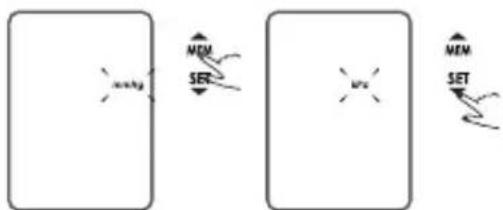
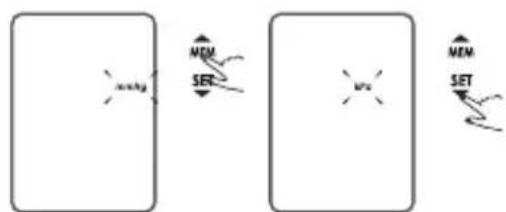
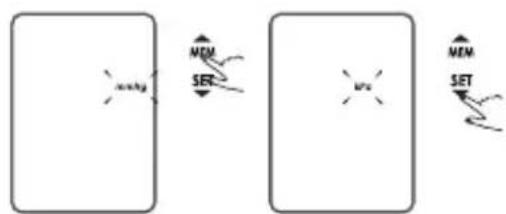
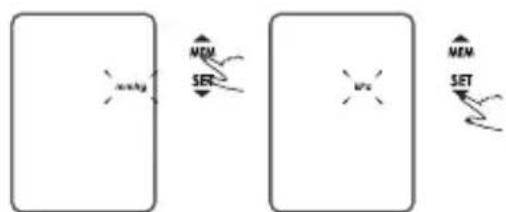
Repeat steps 2 and 3 to set the [UNIT].
flowchart
graph LR
    A["Memory"] --> B["SET"]
    B --> C["Memory"]
    C --> D["SET"]
    style A fill:#f9f,stroke:#333
    style B fill:#ccf,stroke:#333
    style C fill:#cfc,stroke:#333
    style D fill:#fcc,stroke:#333
- The "Year, Month, Date, Hour, Minute, Unit" will show once again and then turn off automatically.
HOW TO USE THE BLOOD PRESSURE DEVICE
Applying the cuff
-
Remove all watches, jewellery, etc. prior to attaching the wrist monitor. Clothing sleeves should be rolled up and the cuff should be wrapped on bare skin for correct measurements.
-
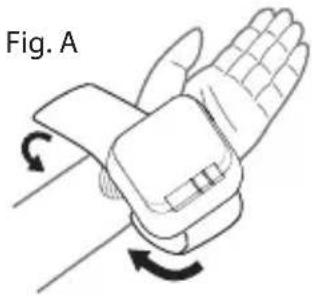
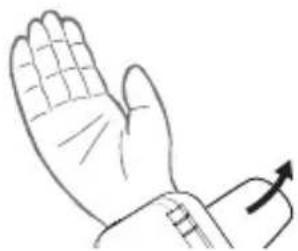
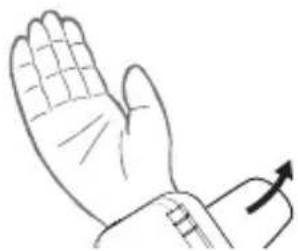
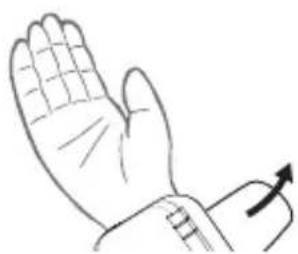
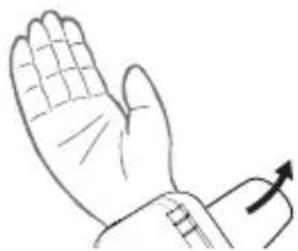
Apply cuff to left wrist with palm facing up see Fig. A.
-
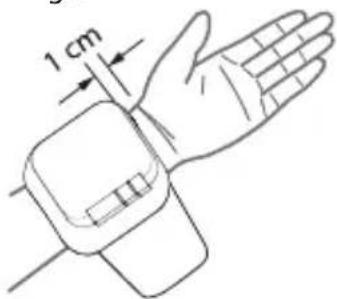
Make sure the edge of the cuff is about 1 cm from the palm see Fig. B.
-
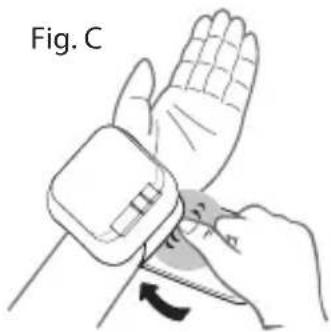
In order to ensure accurate measurements, fasten the velcro strap securely around your wrist so there is no extra space between the cuff and the wrist see Fig. C.
If the cuff is not wrapped tight enough, the measurement values may be false.
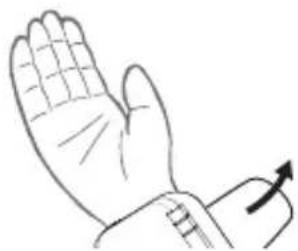
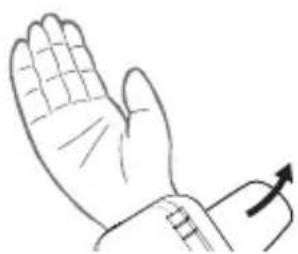
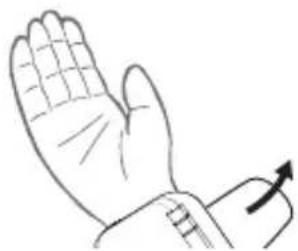
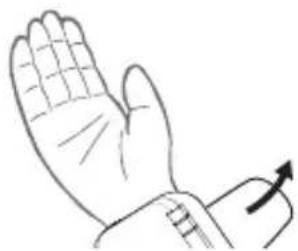
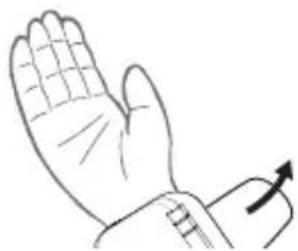
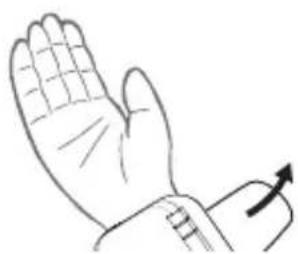
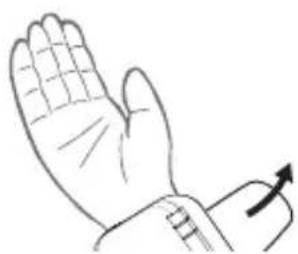
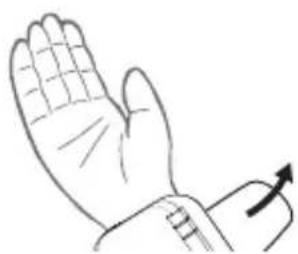
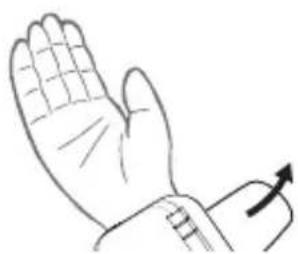
- If your doctor has diagnosed you with poor circulation on your left arm, carefully place the cuff around your right wrist see Fig. D.
natural_image
Diagram of a wristwatch with hand and wrist strap, showing rotational motion arrows (no text or symbols)Fig. B
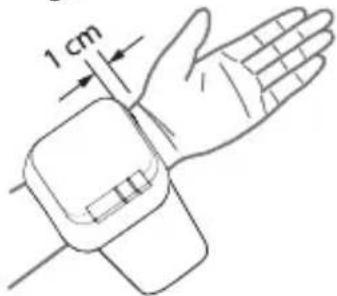
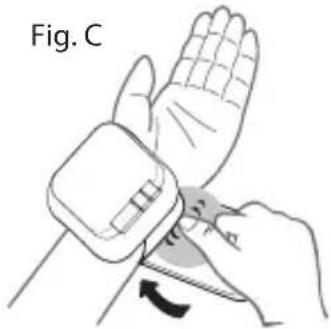
Fig. D
natural_image
Line drawing of a human hand with a wristpin and arm, showing motion direction (no text or symbols)Correct Measuring Posture
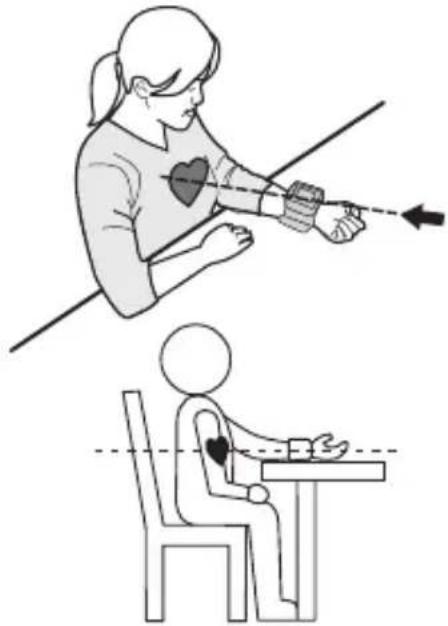
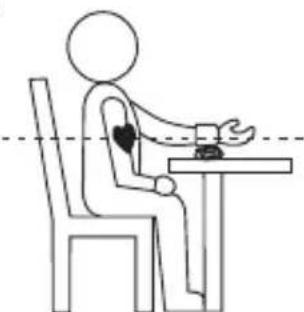
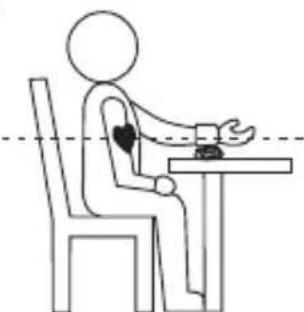
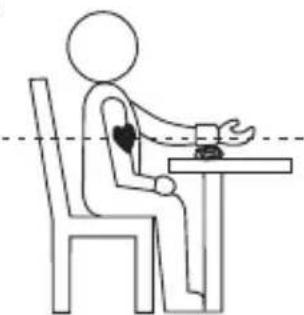
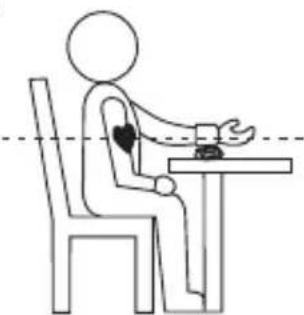
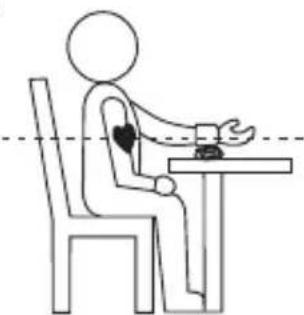
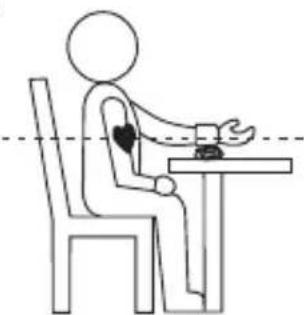
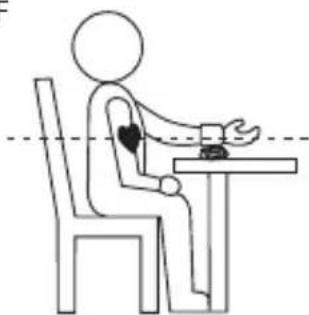
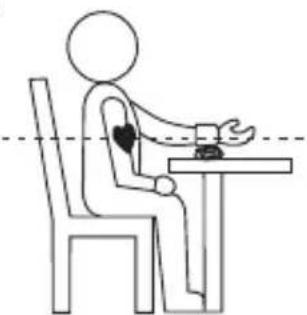
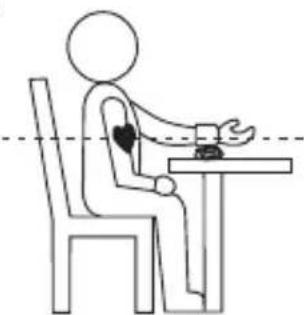
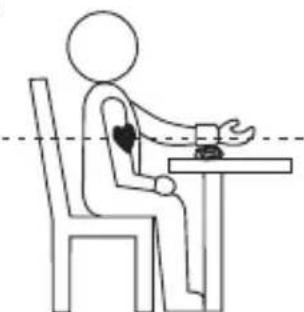
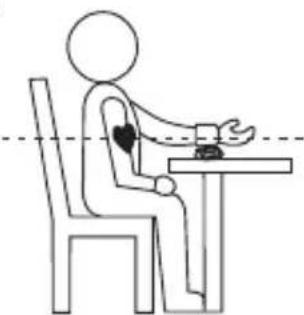
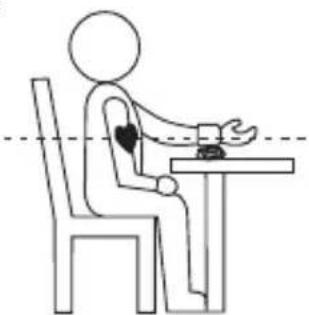
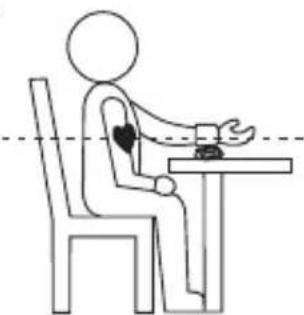
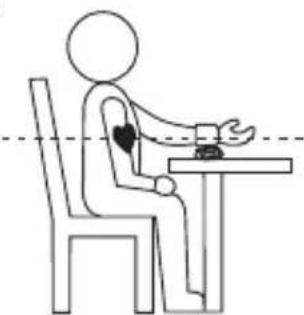
- Place your elbow on a table so that the cuff is at the same level as your heart see Fig. E.
NOTE: Your heart is located slightly below your armpit a bit to the left of the middle of your chest. Relax your entire body, especially the area between your elbow and fingers.
-
If the cuff is not at the same level as your heart or if you can not keep your arm completely still throughout the reading, use a soft object such as a folded towel to support your arm see Fig. F. Do not allow hard objects to come in contact with the wrist cuff.
-
Turn your palm upwards.
-
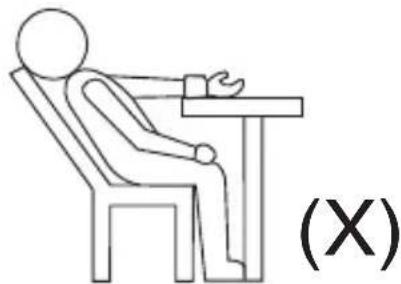
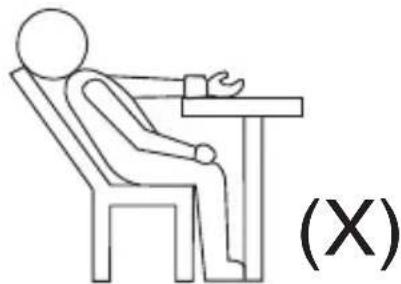
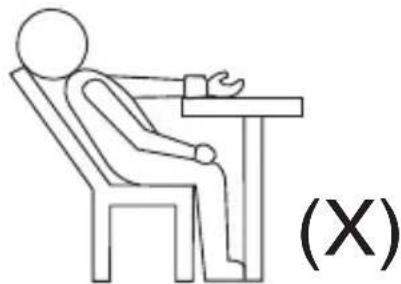
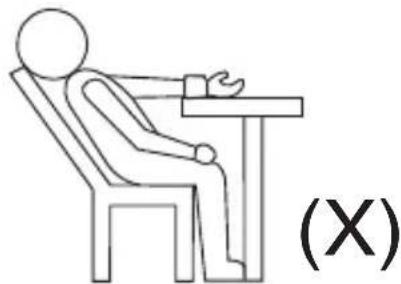
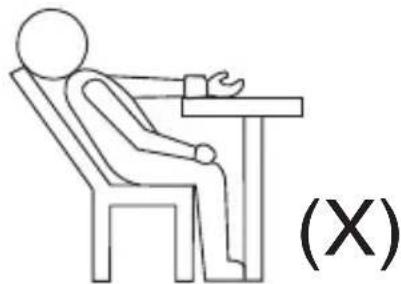
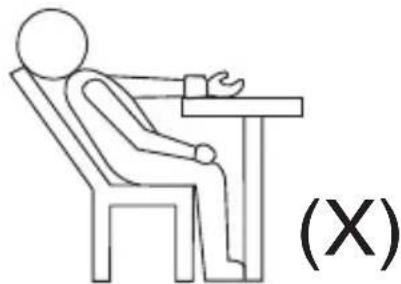
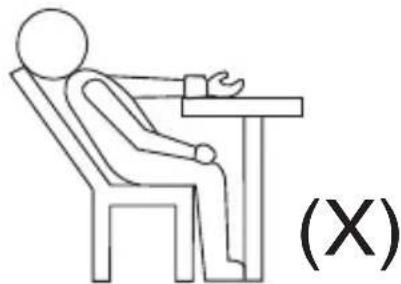
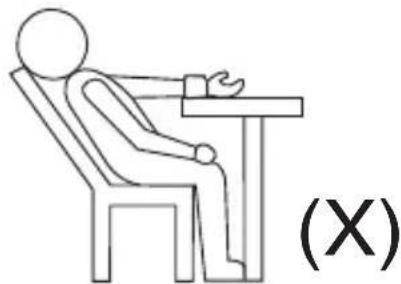
Sit upright in a chair, and take 5-6 deep breaths.
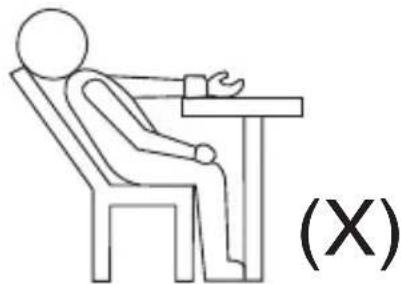
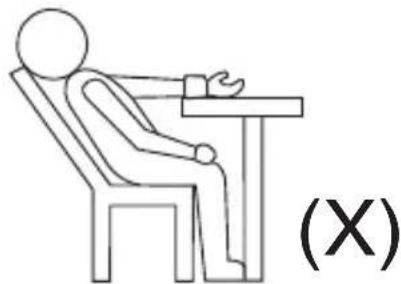
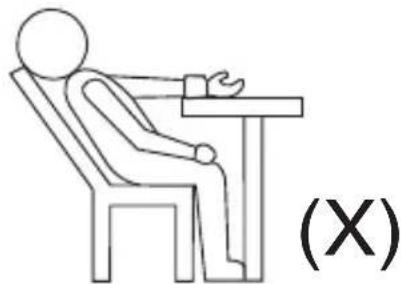
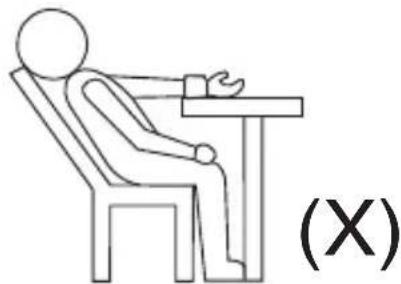
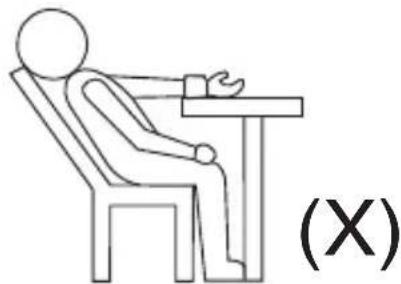
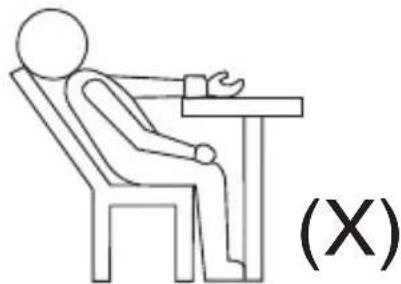
Avoid leaning back while the measurement is being taken see Fig. G.
Fig. E
natural_image
Illustration showing a person using a medical or physical device to interact with another person seated at a table (no text or symbols present)Fig. F
natural_image
Line drawing of a person sitting at a desk with hands placed on the table, no text or symbols presentFig. G
natural_image
Simple line drawing of a person sitting at a desk with a briefcase, labeled (X) (no text or symbols on the diagram itself)Important notes regarding your blood pressure measurement
• Take your reading in a comfortable environment as measurements can be affected by hot or cold temperatures. Take your blood pressure at normal body temperature.
- Do not move or talk during measurement as this can elevate readings.
- Do not move or cross legs during measurement. Keep feet flat on floor.
- Do not touch cuff or monitor during measurement procedure.
- It is suggested that you take your measurements at the same time each day and use the same arm for consistency.
- Users should wait a minimum of 5 minutes before taking additional measurements. More time may be necessary depending upon your physiology.
- The measurement results that users receive are for reference only. If users have any blood pressure concerns, please consult your doctor.
- Once inflation reaches 300 mmHg, the unit will deflate automatically for safety reasons.
- This product is not suitable for people with arrhythmias.
- This device may have difficulty determining the proper blood pressure for users with diabetes, poor circulation of blood, kidney problems, or for users who have suffered a stroke.
- Position the monitor at the same level as your heart during measurement to ensure accurate readings.
- Blood pressure changes with every heartbeat and is in constant fluctuation throughout the day.
- Blood pressure measurement can be affected by the position of the user, his or her physiologic condition and other factors. For greatest accuracy, wait 1 hour after exercising, bathing, eating, drinking beverages with alcohol or caffeine, or smoking to measure blood pressure.
- Before measurement, it is suggested that you sit quietly for 15 minutes as measurements taken during a relaxed state will have greater accuracy. You should not be physically tired or exhausted while taking a measurement.
- During the measurement, do not talk or move your arm or hand muscles.
How to measure blood pressure
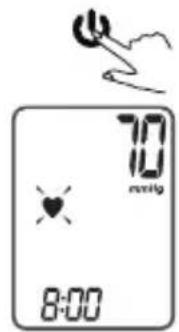
- Press the "to turn on the monitor."
When the monitor is turned on the monitor will adjust itself to zero, inflate and will take your measurement automatically.
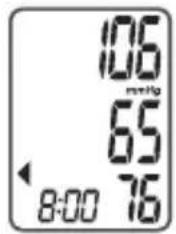
When the measurement is completed, systolic, diastolic and pulse will be shown simultaneously on the LCD screen. The measurement is then automatically stored into the pre-designated memory zone.
- When you have finished press "💡" to turn off, otherwise it will turn off automatically within 1 minute.
NOTE
This monitor automatically switches off approximately 1 minute after last key operation. To interrupt the measurement, simply press any key. The cuff will deflate immediately after a key is pressed.
Recalling the records
- Press the "MEM" to show the first record.
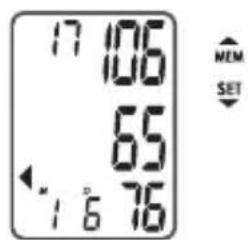
- Press the "MEM" or "SET" to get the record you want.
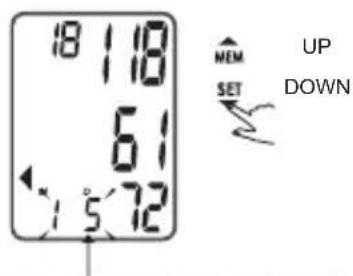
The date and time will be shown accordingly.

The corresponding date. 5 January is shown.
The corresponding time will show and alternate with date.

CAUTION
The most recent record (1) is shown first. Each new measurement is assigned to the first (1) record. All other records are pushed back one digit (e.g., 2 becomes 3, and so on), and the last record (60) is dropped from the list.
Deleting your records
If you did not get the correct measurement, you can delete all results by the following steps.
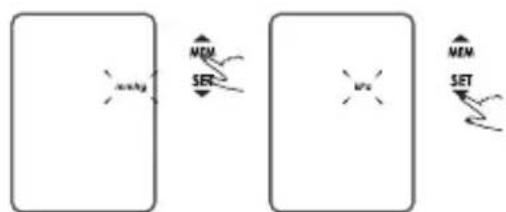
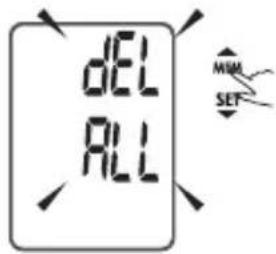
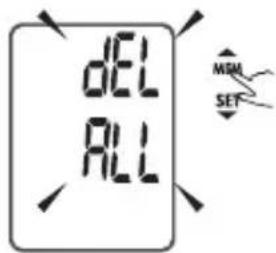
- When the unit is off, hold "MEM" for 3 seconds to enter the deleting menu. The flash display "dEL ALL" will show.
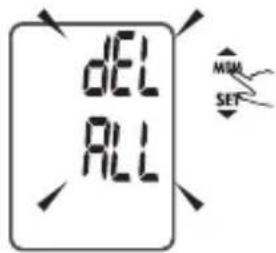
- Press "SET" to confirm deleting and the monitor will turn off automatically.
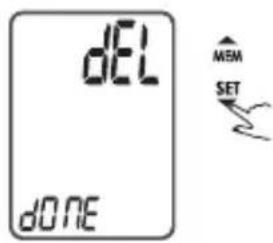
-
If you don't want to delete the records, press "to escape."
-
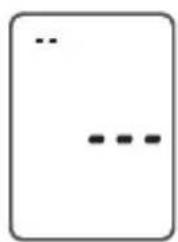
If there is no record, the right display will show.
natural_image
Simple diagram with three dots inside a rounded rectangle (no text or symbols)
CAUTION
- If you have any problems with this device, such as setting up, maintaining or using, please contact the SERVICE PERSONNEL of HoMedics. Don't open or repair the device by yourself.
- Please report to HoMedics if any unexpected operation or events occur.
Cleaning and maintenance
The blood pressure monitor and the cuff can be wiped with a soft cloth moistened with a mild detergent and wiped dry with a soft, dry cloth or paper towel. Never use strong, caustic detergents as these may cause damage to the synthetic parts. Also, never use diluents, alcohol or kerosene to clean the device.
Safety and electrical devices
- When the device is not used, store it in a safe place.
- Only use the device on the upper wrist, not on other body parts.
- When the device is not used for extended periods of time, it is recommended that you remove the batteries to avoid leakage which may cause damage to the device.
- If the device has been stored at very low temperatures near the freezing point, please allow it to obtain room temperature before using it again.
- Neither device nor cuff must be disassembled as this may cause serious damage to the device. If repair is necessary, the device must be returned to the store where it was purchased. Do not attempt to open the device or adjust the inner parts yourself.
- Do not submerge the device in water or other liquids as this will cause damage to the device.
- Do not expose the device nor the cuff to extreme temperatures, moisture or direct sunlight. Protect the device against dust.
- The cuff should not be folded up tightly. The device must not be activated if it is not appropriately fitted to the upper wrist.
- Avoid dropping the device and do not subject it to heavy pressure.
- The device must not be exposed to extreme shocks such as being dropped on the floor.
- The device is intended for use in private households only and is only suited for use with adults (over 18 years of age).
- If the highly unlikely incident should occur that the cuff continues to inflate and does not stop, immediately remove the cuff from the upper wrist.
Error search
This section includes a list of error messages and frequently asked questions for problems you may encounter with your blood pressure monitor. If irregularities occur during use, please check the following items.
| PROBLEM SYMPTOM CHECK THIS REMEDY | |||
| No power | Display is dim or will not light up. | Batteries are exhausted. Replace with new batteries | |
| Batteries are inserted incorrectly | Insert the batteries correctly | ||
| Low batteries | Show on the display | Batteries are low. Replace with new batteries | |
| Error Message | E 1 shows The wrist cuff is | not secure. | Refasten the wrist cuff and then measure again. |
| E 2 shows The wrist cuff is | very tight | Refasten the wrist cuff and then measure again. | |
| E 3 shows | The pressure of the cuff is excess. | Relax for a moment and then measure again | |
| E 10 or E 11 shows | The monitor detected motion while measuring | Movement can affect the measurement results. Relax for a moment and then measure again | |
| E 20 shows | The measurement process does not detect the pulse signal | Loosen the clothing on the wrist and then measure again | |
| E 21 shows Measure incorrectly | A calibration error occurred. | Relax for a moment and then measure again | |
| Exx, shows on the display. | Retake the measurement. If the problem persists, contact the retailer or our customer service department for further assistance. Refer to the warranty for contact information and return instructions. | ||
If the device still does not function, please contact the store where the device was purchased. Do not attempt to open the device or adjust any of the inner parts yourself.
Specifications
| Power supply | Battery powered mode:2*AAA batteries (3V DC) |
| Display mode Digital LCD V.A. 31.5×44mm | |
| Measurement mode Oscillographic testing mode | |
| Measurement range | Rated cuff pressure:0kPa-40kPa (0mmHg~300mmHg)Measurement pressure: 5.3kPa-30.7kPa(40mmHg-230mmHg)pulse value: (40-199) beat/minute |
| Accuracy | Pressure:5°C-40°C within ± 0.4kPa (3mmHg)pulse value: ±5% |
| Normal working condition | Temperature: 5°C to 40°C Relative humidity ≤85%Atmospheric pressure: 86kPa to 106kPa |
| Storage & transportation condition | Temperature: -20°C to 60°CRelative humidity: 10% to 93%Atmospheric pressure: 50kPa-106kPa |
| Measurement perimeter of the wrist About 13.5cm-21.5cm | |
| Weight Approx. 106g (Excluding the batteries) | |
| External dimensions Approx. 68x75x31mm | |
| Attachment 2*AAA batteries, user manual, | |
| Mode of operation Continuous operation | |
| Degree of protection Type BF applied part | |
| Protection against ingress of water IP22 | |
| Software version u1E | |
| Device classification Internally powered ME equipment | |
Warning: No modification of this equipment is allowed.
Battery Directive

This symbol indicates that batteries must not be disposed of in the domestic waste as they
contain substances which can be damaging to the environment and health. Please dispose of
batteries in designated collection points.
WEEE explanation

This marking indicates that this product should not be disposed with other household wastes
throughout the EU. To prevent possible harm to the environment or human health from
uncontrolled waste disposal, recycle it responsibly to promote the sustainable reuse of material
resources. To return your used device, please use the return and collection systems or contact the
retailer where the product was purchased. They can take this product for environmental safe recycling.
MONITEUR DE PRESSION ARTÉRIELLE HOMEDICS
natural_image
Diagram of a toilet with a lid and attached battery, showing mechanical components (no text or symbols)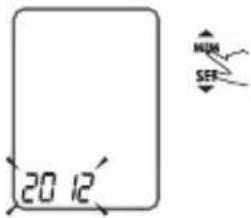
flowchart
graph LR
    A["Input"] --> B["MEM SET"]
    B --> C["Output"]
    style A fill:#f9f,stroke:#333
    style C fill:#bbf,stroke:#333
natural_image
Diagram of a wristwatch with hand and wrist strap, showing rotational motion arrows (no text or symbols)Fig. B
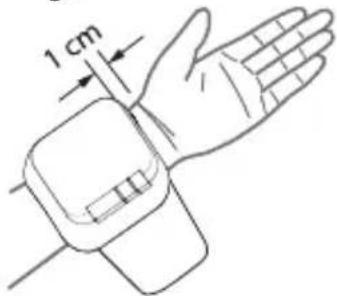
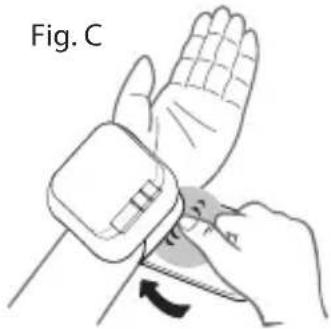
Fig. D
natural_image
Line drawing of a human hand with a wristpin and arm, showing motion direction (no text or symbols)

natural_image
Illustration showing a person using a medical or physical device to interact with another person seated at a table (no text or symbols present)Fig. F
natural_image
Line drawing of a person sitting at a desk with hands placed on the table, no text or symbols presentFig. G
natural_image
Simple line drawing of a person sitting at a desk with a briefcase, labeled (X) (no text or symbols on the diagram itself)natural_image
Simple diagram with three dots inside a rounded rectangle (no text or symbols)
ATTENTION
HOMEDICS BLUTDRUCKMESSGERÄT
Vor der Verwendung
natural_image
Diagram of a toilet with attached circuit board and battery, showing mechanical components (no text or symbols)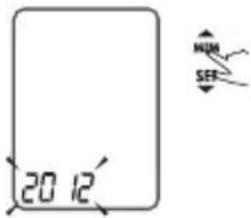
flowchart
graph LR
    A["Left Block"] --> B["SET"]
    B --> C["Right Block"]
    style A fill:#f9f,stroke:#333
    style C fill:#f9f,stroke:#333
    style B fill:#ccf,stroke:#333
    style D fill:#cfc,stroke:#333
    style E fill:#fcc,stroke:#333
natural_image
Diagram of a wristwatch with hand and wrist strap, showing rotational motion arrows (no text or symbols)Fig. B
natural_image
Illustration of a hand holding a device with a curved arrow indicating rotation (no text or symbols)Fig. D
natural_image
Line drawing of a human hand with a wristpin and arm, showing motion direction (no text or symbols)
natural_image
Illustration showing a person using a medical or physical device to interact with another person seated at a table (no text or symbols present)Fig. F
natural_image
Line drawing of a person sitting at a desk with hands placed on the table, no text or symbols presentFig. G
natural_image
Simple line drawing of a person sitting at a desk with a briefcase, labeled (X) (no text or symbols on the diagram itself)natural_image
Simple diagram with three dots inside a rounded rectangle (no text or symbols)natural_image
Line drawing of a portable toilet with attached circuit breakers and a paper roll (no text or symbols)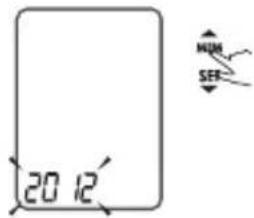
flowchart
graph LR
    A["Memory"] --> B["SET"]
    B --> C["Memory"]
    C --> D["SET"]
    style A fill:#f9f,stroke:#333
    style B fill:#ccf,stroke:#333
    style C fill:#cfc,stroke:#333
    style D fill:#fcc,stroke:#333
natural_image
Diagram of a wristwatch with hand and wrist strap, showing rotational motion arrows (no text or symbols)Fig. B
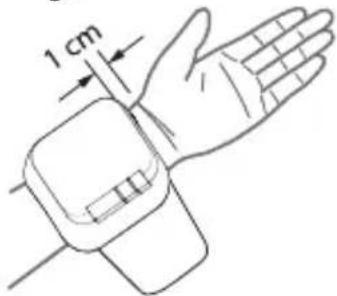
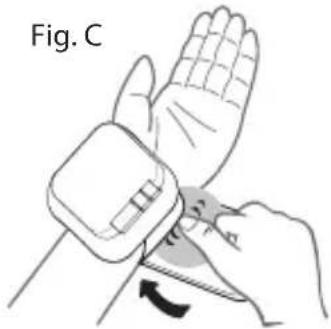
Fig. D
natural_image
Line drawing of a human hand with a wristpin and arm, showing motion direction (no text or symbols)natural_image
Illustration showing a person using a medical or physical device to interact with another person seated at a table (no text or symbols present)Fig. F
natural_image
Line drawing of a person sitting at a desk with hands placed on the table, no text or symbols presentFig. G
natural_image
Simple line drawing of a person sitting at a desk with a briefcase, labeled (X) (no text or symbols on the diagram itself)natural_image
Simple diagram with three dots inside a rounded rectangle (no text or symbols)
PRECAUCIÓN
natural_image
Diagram of a portable toilet with attached circuit board and paper roll, showing mechanical components (no text or symbols)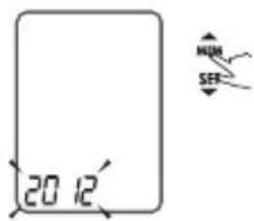
flowchart
graph LR
    A["Memory"] --> B["SET"]
    B --> C["Memory"]
    C --> D["SET"]
    style A fill:#f9f,stroke:#333
    style B fill:#ccf,stroke:#333
    style C fill:#cfc,stroke:#333
    style D fill:#fcc,stroke:#333
natural_image
Diagram of a wristwatch with hand and wrist strap, showing rotational motion arrows (no text or symbols)Fig. B
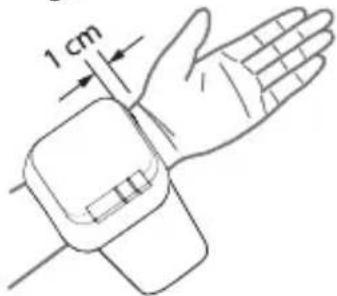
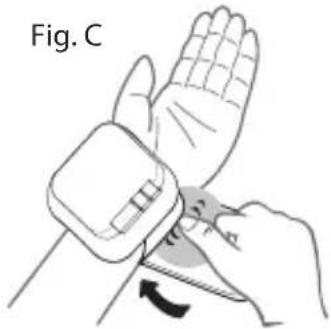
Fig. D
natural_image
Line drawing of a human hand with a wristpin and arm, showing motion direction (no text or symbols)

natural_image
Illustration showing a person using a medical or physical device to interact with another person seated at a table (no text or symbols present)Fig. F
natural_image
Line drawing of a person sitting at a table with hands placed on the arm, no text or symbols presentFig. G
natural_image
Simple line drawing of a person sitting at a desk with a briefcase, labeled (X) (no text or symbols on the diagram itself)natural_image
Simple diagram with three dots inside a rounded rectangle (no text or symbols)
ATTENZIONE
natural_image
Diagram of a toilet with a lid and internal components, showing a close-up of the lid and a close-up of the outlet (no text or symbols present)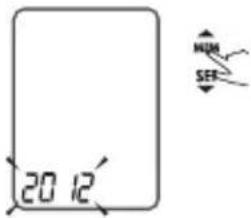
flowchart
graph TD
    A["Start"] --> B["SET"]
    B --> C["MEM"]
    C --> D["End"]
natural_image
Diagram of a wristwatch with hand and wrist strap, showing rotational motion arrows (no text or symbols)Fig. B
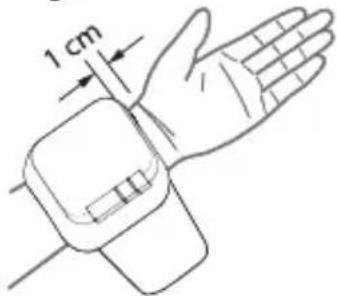
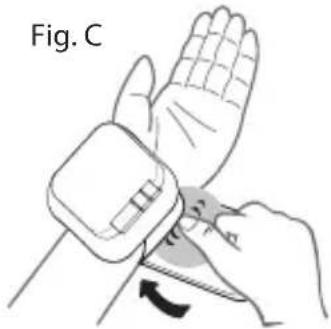
Fig. D
natural_image
Line drawing of a human hand with a wristpin and arm, showing motion direction (no text or symbols)NL
Juiste meethouding
natural_image
Illustration showing a person using a medical or physical device to interact with another person seated at a table (no text or symbols present)Fig. F
natural_image
Line drawing of a person sitting at a table with hands placed on the desk, no text or symbols presentFig. G
natural_image
Simple line drawing of a person sitting at a desk with a hand gesture, labeled (X) (no text or symbols on the figure itself)- When the unit is off, hold "MEM" for 3 seconds to enter the deleting menu. The flash display "dEL ALL" will show
natural_image
Simple diagram with three dots and two ellipsis symbols inside a rounded rectangle (no text or labels)
WAARSCHUWING
natural_image
Diagram of a toilet with attached components and a battery outlet (no text or symbols)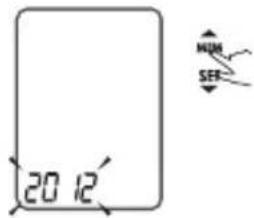
flowchart
graph LR
    A["Memory"] --> B["SET"]
    B --> C["Memory"]
    C --> D["SET"]
    style A fill:#f9f,stroke:#333
    style B fill:#ccf,stroke:#333
    style C fill:#cfc,stroke:#333
    style D fill:#fcc,stroke:#333
natural_image
Line drawing of a human hand with a wristpin and arm, showing motion direction (no text or symbols)Doğru Ölçüm Duruşu
natural_image
Illustration showing a person using a medical or physical device to interact with another person seated at a table (no text or symbols present)Şek. F
natural_image
Simple line drawing of a person sitting at a desk with hands placed on the table, no text or symbols present.Şek. G
natural_image
Simple line drawing of a person sitting at a desk with a briefcase, labeled (X) (no text or symbols on the diagram itself)- When the unit is off, hold "MEM" for 3 seconds to enter the deleting menu. The flash display "dEL ALL" will show
natural_image
Simple diagram with three horizontal lines and a vertical line above, no text or symbols present.natural_image
Diagram of a toilet with attached components and a close-up view of the lid (no text or symbols)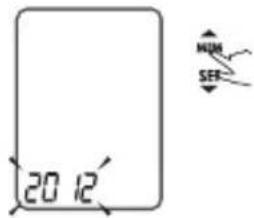
flowchart
graph LR
    A["Start"] --> B["Memory"]
    B --> C["Set"]
    C --> D["End"]
natural_image
Diagram of a hand wearing a wristwatch with directional arrows indicating movement (no text or symbols)Fig. B
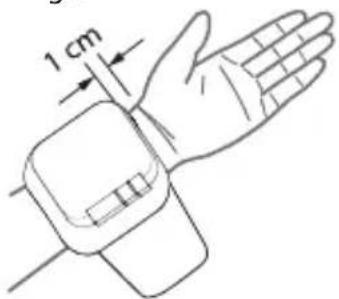
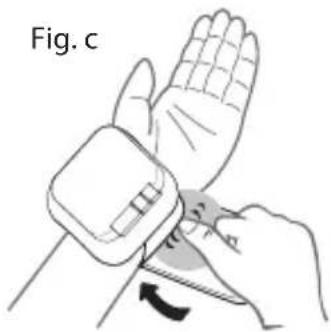
Fig. d
natural_image
Line drawing of a human hand with a wristpin and arm, showing motion direction (no text or symbols)natural_image
Illustration showing a person using a medical or physical device to interact with another person seated at a table (no text or symbols present)Fig. F
natural_image
Line drawing of a person sitting at a desk with a heart symbol on the arm, no text or symbols presentFig. G
natural_image
Simple line drawing of a person sitting at a desk with a hand gesture, labeled (X) (no text or symbols on the diagram itself)natural_image
Simple diagram with three dots and ellipsis, no text or symbols present
ВНИМАНИЕ!
natural_image
Diagram of a toilet with attached components and a close-up view showing internal parts (no text or symbols)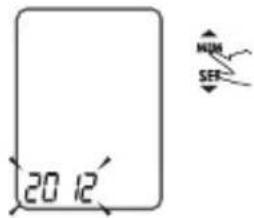
flowchart
graph LR
    A["Memory"] --> B["SET"]
    B --> C["Memory"]
    C --> D["SET"]
    style A fill:#f9f,stroke:#333
    style B fill:#ccf,stroke:#333
    style C fill:#cfc,stroke:#333
    style D fill:#fcc,stroke:#333
natural_image
Diagram of a wristwatch with hand and wrist strap, showing rotational motion arrows (no text or symbols)Fig. B
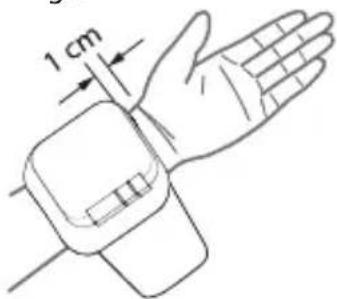
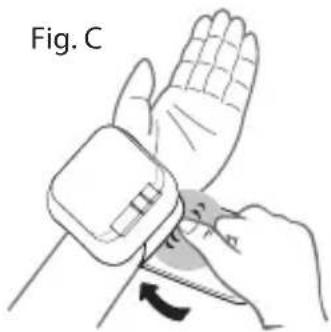
Fig. D
natural_image
Line drawing of a human hand with a wristpin and arm, showing motion direction (no text or symbols)natural_image
Illustration showing a person using a medical or physical device to interact with another person seated at a table (no text or symbols present)Fig. F
natural_image
Line drawing of a person sitting at a desk with hands placed on the table, no text or symbols presentFig. G
natural_image
Simple line drawing of a person sitting at a desk with a hand gesture, labeled (X) (no text or symbols on the diagram itself)natural_image
Simple diagram with three dots inside a rounded rectangle (no text or symbols)natural_image
Diagram of a toilet with a lid and internal components, showing assembly steps (no text or symbols)natural_image
Diagram of a wristwatch with hand and wrist strap, showing rotational motion arrows (no text or symbols)Fig. B
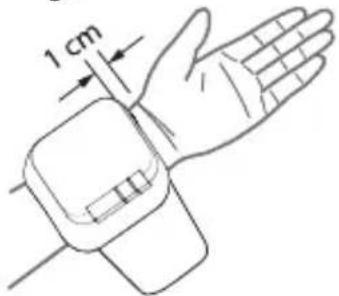
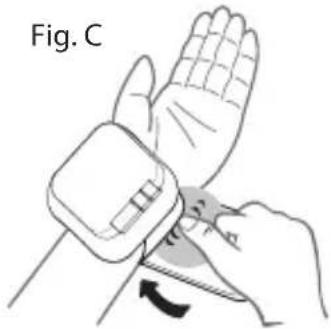
Fig. D
natural_image
Line drawing of a human hand with a wristpin and arm, showing motion direction (no text or symbols)

natural_image
Illustration showing a person using a medical or physical device to interact with another person seated at a table (no text or symbols present)Fig. F
natural_image
Line drawing of a person sitting at a desk with hands placed on the table, no text or symbols presentFig. G
natural_image
Simple line drawing of a person sitting at a desk with a briefcase, labeled (X) (no text or symbols on the diagram itself)natural_image
Simple diagram with three dots and ellipsis, no text or symbols present
WARNING
natural_image
Diagram of a toilet with attached circuit board and battery, showing mechanical components (no text or symbols)- Tag batterierne ud, hvis det er sandsynligt, at apparatet ikke skal bruges i nogen tid.
- The old battery is harmful to the environment, so please disposal with other daily trash.
- Remove the old battery from the device and follow your local recycling guidelines.
- Do not dispose of batteries in fire. Batteries may explode or leak.
INDSTILLING AF DATO, TID OG MÅLEENHED
natural_image
Diagram of a wrist-worn and hand with directional arrows indicating movement (no text or symbols)Fig. B
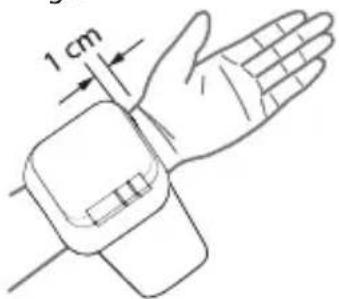
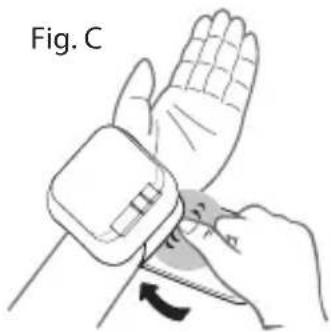
Fig. D
natural_image
Line drawing of a human hand with a wristpin and arm, showing motion direction (no text or symbols)natural_image
Illustration showing a person using a medical or physical device to interact with another person seated at a table (no text or symbols present)Fig. F
natural_image
Line drawing of a person sitting at a desk with hands placed on the table, no text or symbols presentFig. G
natural_image
Simple line drawing of a person sitting at a desk with a briefcase, labeled (X) (no text or symbols on the diagram itself)natural_image
Simple diagram with three dots inside a rounded rectangle (no text or symbols)natural_image
Line drawing of a toilet with attached circuit board and battery, showing mechanical components (no text or symbols)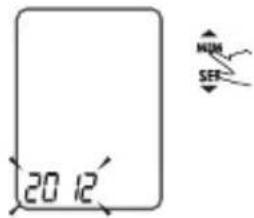
flowchart
graph LR
    A["Start"] --> B["MEM SET"]
    B --> C["SET"]
    C --> D["End"]
natural_image
Diagram of a hand wearing a wristwatch with directional arrows indicating movement (no text or symbols)Fig. B
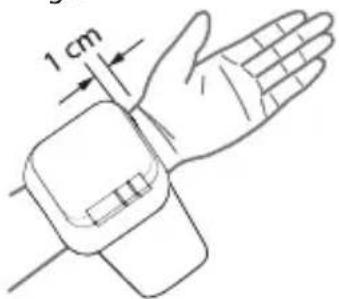
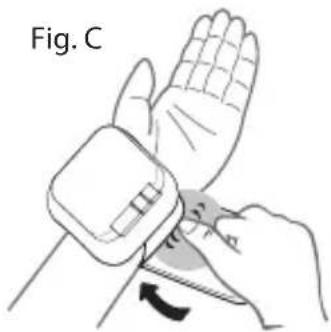
Fig. D
natural_image
Line drawing of a human hand with a wristpin and arm, showing motion direction (no text or symbols)Oikea mittausasento
natural_image
Illustration showing a person using a medical or physical device to interact with another person seated at a table (no text or symbols present)Fig. F
natural_image
Line drawing of a person sitting at a table with hands placed on the arm, no text or symbols presentFig. G
natural_image
Simple line drawing of a person sitting at a desk with a hand gesture, labeled (X) (no text or symbols on the diagram itself)natural_image
Simple diagram with three dots inside a rounded rectangle (no text or symbols)HUOMAUTUS
natural_image
Diagram of a toilet with attached components and a close-up view of the lid (no text or symbols)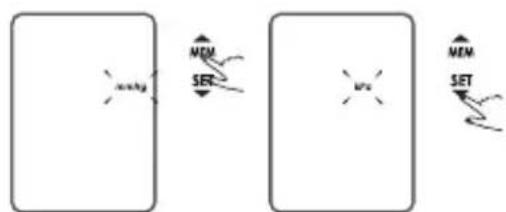
flowchart
graph LR
    A["Left Block"] --> B["SET"]
    B --> C["Right Block"]
    style A fill:#f9f,stroke:#333
    style C fill:#f9f,stroke:#333
    style B fill:#ccf,stroke:#333
    style D fill:#cfc,stroke:#333
    style E fill:#fcc,stroke:#333
natural_image
Diagram of a hand wearing a wristwatch with directional arrows indicating movement (no text or symbols)Fig. B
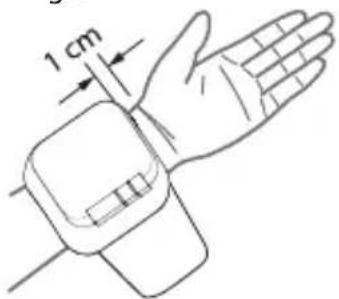
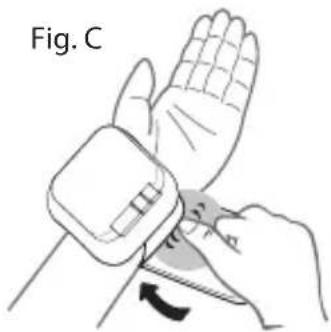
Fig. D
natural_image
Line drawing of a human hand with a wristpin and arm, showing motion direction (no text or symbols)natural_image
Illustration showing a person using a medical or physical device to interact with another person seated at a table (no text or symbols present)Fig. F
natural_image
Line drawing of a person sitting at a desk with hands placed on the table, no text or symbols presentFig. G
natural_image
Simple line drawing of a person sitting at a desk with a hand gesture, labeled (X) (no text or symbols on the diagram itself)natural_image
Simple diagram with three dots and two ellipsis symbols inside a rounded rectangle (no text or labels)natural_image
Diagram of a portable electronic device with attached components and a close-up view showing internal components (no text or symbols)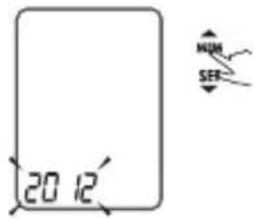
flowchart
graph LR
    A["Left Block"] --> B["SET"]
    B --> C["Right Block"]
    style A fill:#f9f,stroke:#333
    style C fill:#f9f,stroke:#333
    style B fill:#ccf,stroke:#333
    style D fill:#cfc,stroke:#333
    style E fill:#fcc,stroke:#333
- Znova sa zobrazí nastavenie „Year, Month, Date, Hour, Minute, Unit“ (rok, mesiac, dátum, hodina, minúta, jednotka) a potom sa zariadenie automaticky vypne.
POUŽÍVANIE ZARIADENIA NA MERANIE KRVNÉHO TLAKU
Aplikácia manžety
natural_image
Diagram of a wristwatch with hand and wrist strap, showing rotational motion arrows (no text or symbols)Fig. B
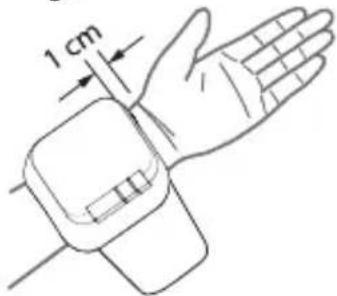
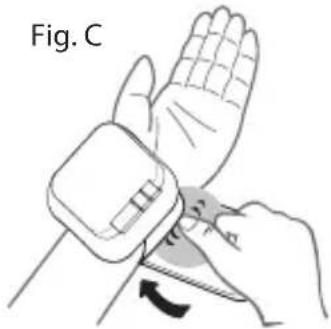
Fig. D
natural_image
Line drawing of a human hand with a wristpin and arm, showing motion direction (no text or symbols)natural_image
Illustration showing a person using a medical or physical device to interact with another person seated at a table (no text or symbols present)Fig. F
natural_image
Line drawing of a person sitting at a desk with hands placed on the table, no text or symbols presentFig. G
natural_image
Simple line drawing of a person sitting at a desk with a briefcase, labeled (X) (no text or symbols on the diagram itself)natural_image
Simple diagram with three dots inside a rounded rectangle (no text or symbols)
POZOR

- Why is it important to keep an eye on your blood pressure?
- What are systolic pressure and diastolic pressure?
- What is the standard blood pressure classification?
- Irregular Heartbeat Detector
- SAFETY INFORMATION
- CAUTION
- LCD display signal
- MONITOR COMPONENTS
- Inserting and Changing Batteries
- Replace the batteries whenever the below happens
- SETTING DATE, TIME AND MEASUREMENT UNIT
- HOW TO USE THE BLOOD PRESSURE DEVICE
- Applying the cuff
- Correct Measuring Posture
- Important notes regarding your blood pressure measurement
- How to measure blood pressure
- NOTE
- Recalling the records
- Deleting your records
- Cleaning and maintenance
- Safety and electrical devices
- Error search
- Battery Directive
- WEEE explanation
- MONITEUR DE PRESSION ARTÉRIELLE HOMEDICS
- ATTENTION
- HOMEDICS BLUTDRUCKMESSGERÄT
- Vor der Verwendung
- PRECAUCIÓN
- ATTENZIONE
- Juiste meethouding
- WAARSCHUWING
- Doğru Ölçüm Duruşu
- ВНИМАНИЕ!
- WARNING
- INDSTILLING AF DATO, TID OG MÅLEENHED
- Oikea mittausasento
- HUOMAUTUS
- POUŽÍVANIE ZARIADENIA NA MERANIE KRVNÉHO TLAKU
- Aplikácia manžety
- POZOR
Brand : HOMEDICS
Model : BPW1000EU
Category : Sphygmomanometer