BPA-050 - Blood pressure monitor HOMEDICS - Free user manual and instructions
Find the device manual for free BPA-050 HOMEDICS in PDF.


User questions about BPA-050 HOMEDICS
0 question about this device. Answer the ones you know or ask your own.
Ask a new question about this device
Download the instructions for your Blood pressure monitor in PDF format for free! Find your manual BPA-050 - HOMEDICS and take your electronic device back in hand. On this page are published all the documents necessary for the use of your device. BPA-050 by HOMEDICS.
USER MANUAL BPA-050 HOMEDICS
INTRODUCTORY INFORMATION:
Important Product Notices and Safety Instructions ....3
About Blood Pressure ....5 What is Blood Pressure? Why Measure Your Blood Pressure?
Blood Pressure Standard ....5
How This Blood Pressure Monitor Works .....7
USAGE INFORMATION:
Name/Function of Each Part .....8
Display Explanations .....9
Installing Batteries .....11
Using an AC Adapter (NOT INCLUDED) .....12
Date & Time Set Procedure .....13
Applying the Cuff .....14
Measurement Procedure .....18
Risk Category Indicator .....21
Recalling Values from Memory .....22
Clearing Values from Memory .....23
Important Notes Regarding Your Blood Pressure Measurement .....23
Recalibration Service ....25
Care, Maintenance & Cleaning .....26
Potential for Radio/Television Interference ..28
Troubleshooting .....29
Specifications ....30
Lifetime Limited Warranty ....31
HOMEDICS
THERA: P
IMPORTANT PRODUCT NOTICES AND SAFETY INSTRUCTIONS
When using your blood pressure monitor, basic precautions should always be followed. Please read and follow all instructions and warnings before using this product. Save these instructions for future reference.
- Please note that this is a home healthcare product only and it is not intended to serve as a substitute for the advice of a physician or medical professional.
- Do not use this device for diagnosis or treatment of any health problem or disease. Measurement results are for reference only. Consult a healthcare professional for interpretation of pressure measurements. Contact your physician if you have or suspect any medical problem. Do not change your medications without the advice of your physician or healthcare professional.
- Proper cuff size is critical for accurate measurements. If the index line on the cuff falls outside of the OK range when applied to the user's arm, contact HoMedics Consumer Relations regarding additional cuff sizes.
- This product is not suitable for people with arrhythmias. This device may have difficulty determining the proper blood pressure for individuals
with diabetes, poor circulation of blood, kidney problems or for users who have suffered from a stroke.
- The pulse display is not suitable for checking the frequency of heart pacemakers.
- Electromagnetic interference: The device contains sensitive electronic components. Avoid strong electrical or electromagnetic fields in the direct vicinity of the device (e.g. mobile telephones, microwave ovens). These may lead to temporary impairment of measurement accuracy.
- Use blood pressure monitor only for its intended use.
- Do not wrap the cuff around body parts other than your arm.
- This unit is intended for use in measuring the blood pressure and pulse rate of adults. Do not use this device on infants or those who cannot express their own consent. This unit should not be operated by children.
- Do not plug or unplug the adapter power cord with wet hands.
Blood pressure measurements determined with this device are equivalent to those obtained by a trained observer using the cuff/stethoscope ausculatory method, within the limits prescribed by the American National Standard, Manual, electronic, or automated sphygmomanometers.
ABOUT BLOOD PRESSURE
What is Blood Pressure?
Blood pressure is the pressure exerted on the artery walls while blood flows through the arteries. The pressure measured when the heart contracts and sends blood out of the heart is systolic (highest) blood pressure. The pressure measured when the heart dilates with blood flowing back into the heart is called diastolic (lowest) blood pressure.
Why Measure Your Blood Pressure?
Among today's various health problems, those associated with high blood pressure are very common. High blood pressure dangerously correlates with cardiovascular diseases. Therefore, blood pressure monitoring is important for identifying those at risk.
BLOOD PRESSURE STANDARD
The U.S. Department of Health and Human Services and the National Institutes of Health have developed a blood pressure standard, that identifies areas of low- and high-risk blood pressure.
This standard, however, is a general guideline as an individual's blood pressure varies among different people, age groups, etc.
Categories for Blood Pressure Levels in Adults
| Systolic (mmHg) | Diastolic (mmHg) | |
| Stage 2 Hypertension | >160 >100 | - |
| Stage 1 Hypertension | 1 4 0~159 | 90~99 |
| Prehypertension | 120~139 | 80~89 |
| Normal | <120 | <80 |
For adults 18 and older who are not on medicine for high blood pressure, are not having a short-term serious illness, and do not have other conditions, such as diabetes and kidney disease.
To determine category of risk when systolic and diastolic readings fall into two areas, use the higher of the two numbers for classification.
There is an exception to the above definition of high blood pressure for people with diabetes and chronic kidney disease. A blood pressure of 130/80 mmHg or higher is considered high blood pressure for those individuals.
This monitor comes equipped with a Risk Category Indicator to visually indicate the assumed risk level of each reading based upon these standards. See page 21 for more information on this feature.
It is important that you consult with your physician regularly. Your physician will tell you your normal blood pressure range as well as the point at which you will be considered at risk.
For reliable monitoring and reference of blood pressure, keeping long-term records is recommended.
HOW THIS BLOOD PRESSURE MONITOR WORKS
This monitor uses Smart Sense™ Technology to detect your blood pressure. With one touch of a button, the cuff will automatically inflate to block the blood flow through your artery. Next, the deflation process starts. Smart Sense™ Technology enables the monitor to automatically inflate and deflate to the appropriate level for each individual. Please note that any muscle movement during inflation or deflation will cause measurement error. When measurement is complete, the monitor will display your systolic pressure, diastolic pressure, and pulse readings.
Based upon your measurement results, the monitor's Risk Category Indicator will alert you if your reading falls into the pre-hypertension, stage 1 hypertension, or stage 2 hypertension categories. See page 21 for more information on the Risk Category Indicator.
NAME/FUNCTION OF EACH PART

text_image
Smart Fit™ Arm Cuff LCD Display Battery Cover (Located on back of unit) MEMBICS 6:15 120 80 72 DVA 50 40 30 20 10 0 Digital Display MEM START STOP User-Select Button Date/Time Set Buttons Memory Recall Button START/STOP ButtonOther Accessories Included : 4 "AA" size, 1.5V alkaline batteries
DISPLAY EXPLANATIONS
text_image
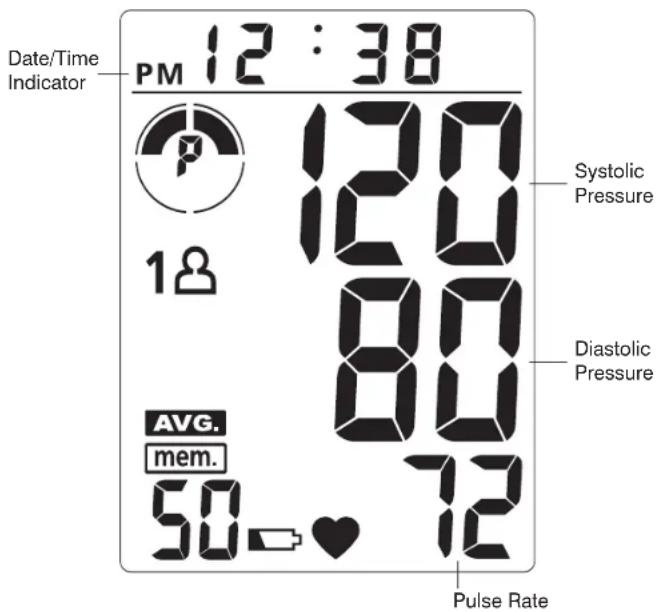
Date/Time Indicator PM 12 : 38 120 Systolic Pressure 1# 80 Diastolic Pressure AVG. mem. 50 - ♥ 72 Pulse RateDisplay Symbols:
| 1 | User 1: Appears when the monitor is operated by User 1. |
| 2 | User 2: Appears when the monitor is operated by User 2. |
| Weak Battery Symbol: Appears when batteries should be replaced. | |
| Pulse Symbol: Shows the pulse rate per minute. | |
| mem. | Memory Symbol: Shows the memory reading number. |
| AVG. | Memory Average: Displays average of last 3 readings. |
| Risk Category Indicator: Compares readings against blood pressure guidelines. See page 21 for more information. |
If any of the following letters and numbers appear in the area that diastolic pressure should be displayed, an error has occurred with your reading. See Troubleshooting section of this manual for more information.
| EE | Measurement Error: Measure again. Wrap the cuff correctly and keep arm steady during measurement. |
| Er | Measurement Error: Measurement result exceeds measurement range. Measure again. |
| EI | Air Circuit Abnormality: Check cuff connection. Measure again. |
| E2 | Pressure Exceeding 300 mmHg: Switch the unit off to clear, then measure again. |
| E3 | Data Error: Remove and reload the batteries. |
| CA | Recalibration Alert: Recalibration recommended. See page 25 for more information. |
INSTALLING BATTERIES
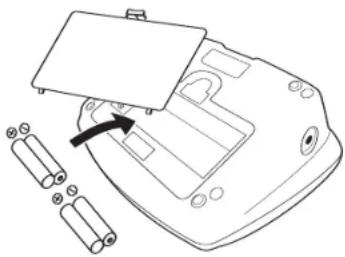
- Press down on latch and lift the battery cover towards you to open the battery compartment.
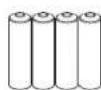
- Install or replace 4 "AA" sized batteries in the battery compartment according to the indications inside the compartment.
- Replace the battery cover by clicking in the bottom hooks first, then push in the top end of the battery door.
natural_image
Line drawing of a battery pack with an open lid and two batteries nearby (no text or symbols)Replace the batteries if:
- The weak battery symbol appears on the display.
- Nothing appears on the display when the power is switched on.
As the supplied batteries are for test only, they may be discharged earlier than batteries you buy in stores. Replace the batteries in pairs. Remove batteries when unit is not in use for extended periods of time.
Note: Batteries are hazardous waste. Do not dispose of them together with the household garbage.
USING AN AC ADAPTER (NOT INCLUDED)
This monitor is designed for operation with batteries or an optional AC adapter. Please use only a compatible, UL approved AC adapter with required voltage and current as indicated in this manual. Contact HoMedics Consumer Relations at 1-800-466-3342 to purchase a compatible AC adapter.
Note: • Please unload the batteries when operating with an AC adapter for an extended period of time. Leaving the batteries in the compartment for a long time may cause leakage, which may lead to damage of the unit.
- No batteries are needed when operating with an AC adapter.
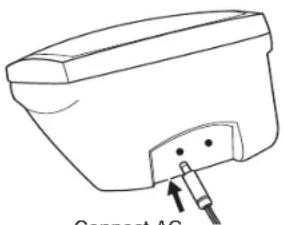
Connect the AC adapter with the AC adapter jack in the back of the unit as shown below.
text_image
Connect ACConnect AC adapter here

text_image
AC Adapter Input: 120V 60Hz Output: 12V DC 500mADATE & TIME SET PROCEDURE
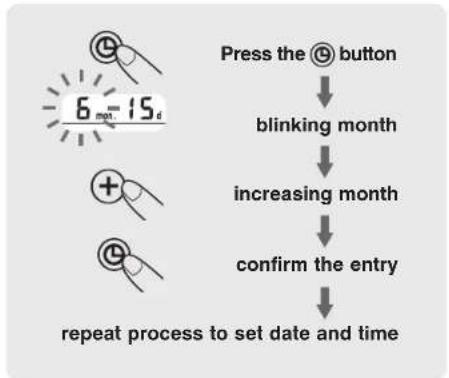
- To adjust the date/time, press the Set button located next to the LCD display. The unit will show a blinking number showing the month.
- Change the month by pressing the ⭕ button. Each press will increase the number by one in a cycling manner. Press the Set button Ⓤ again to confirm the entry, and the screen will show a blinking number representing the day of the month.
- Change the date and time as described in Step 2 above, using the + button to change the numbers and the Set button to confirm the entries.
- A "0" will reappear as the blood pressure monitor is ready for measurement again.
flowchart
graph TD
    A["Press the @ button"] --> B["blinking month"]
    B --> C["increasing month"]
    C --> D["confirm the entry"]
    D --> E["repeat process to set date and time"]
13
APPLYING THE CUFF
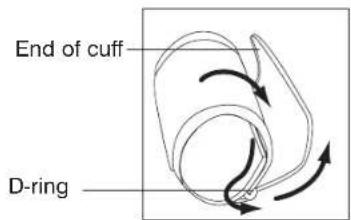
- If the cuff is not assembled, pass the end of the cuff furthest away from the tubing through the metal D-ring in order to form a loop.
text_image
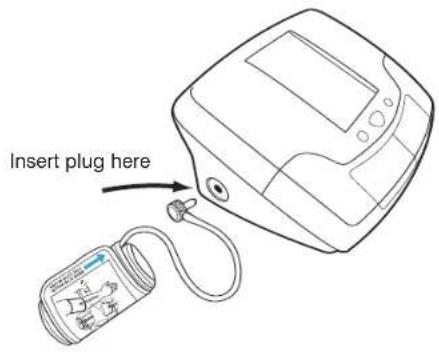
End of cuff D-ring- Plug the cuff tube into the left side of the unit.
text_image
Insert plug here14
- Remove tight fitting clothing from around your upper left arm.
- Position cuff edge 0.8-1.2 inches (2-3cm) above elbow.
- Center tube over middle of arm.
- Pull the end of the cuff so that it tightens evenly around your arm.
Press the hook and loop material together to secure.
Allow room for 2 fingers to fit between the cuff and your arm.


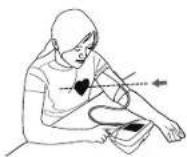
- Lay your arm on a table (palm upward) so the cuff is at the same height as your heart. Make sure the tube is not kinked.
15
Note:
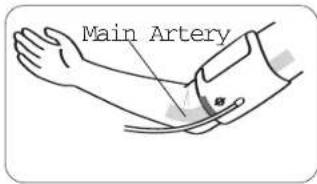
If it is not possible to fit the cuff to your left arm, it can also be placed on your right arm. However, all measurements should be made using the same arm. To use on the right arm, you must position the artery symbol "Φ" over the main artery. Locate the main artery by pressing with two fingers approximately 1"
(2 cm) above the bend of your elbow on the inside of your right arm. Identify where the pulse can be felt the strongest. This is your main artery.
text_image
Main Artery16
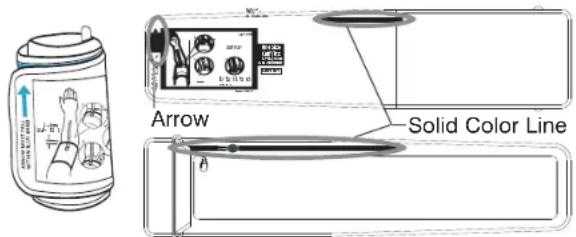
Very Important: Proper cuff size is critical to accurate measurement. This cuff is suitable for your use if the arrow falls within the solid color line as shown below. If the Arrow falls outside of the Solid Color Line, you will need a cuff with other circumferences. Contact HoMedics Consumer Relations regarding additional cuff sizes.
text_image
Arrow Solid Color LineMEASUREMENT PROCEDURE
Important Notes:
- Blood pressure changes with every heartbeat and is in constant fluctuation throughout the day.
- Blood pressure measurement can be affected by the position of the user, his or her physiologic condition and other factors. For greatest accuracy, wait 1 hour after exercising, bathing, eating, drinking beverages with alcohol or caffeine, or smoking to measure blood pressure.
- Before measurement, it is suggested that you sit quietly for 15 minutes as measurements taken during a relaxed state will have greater accuracy. You should not be physically tired or exhausted while taking a measurement.
-
During the measurement, do not talk or move your arm or hand muscles.
• See page 23 for additional notes regarding your blood pressure measurement. -
Press the User Select Button to choose User 1 or User 2.

flowchart
graph LR
    A["Input Image"] --> B["Group Assignment 1"]
    B --> C["OR"]
    C --> D["Group Assignment 2"]
After the user number is selected, press the START/STOP button to confirm the chosen user.
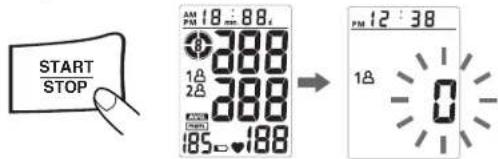
- With the cuff wrapped around your arm, press the START/STOP button. Do not inflate the cuff unless it is wrapped around your arm. All digits will light up to check the display functions. The checking procedure will be completed after about 2 seconds.
text_image
START STOP 18:88 PM 18 mm 280 1A 2A 280 185 188 12:38 PM 12 1A- After all symbols disappear, the display will show a blinking "0". The monitor is "Ready to Measure" and will automatically inflate the cuff to start measurement.

- Once your systolic pressure is determined, the monitor will begin deflating to measure your diastolic pressure.
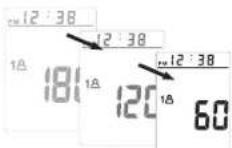
Note: This monitor will re-inflate automatically if the system detects that your body requires more pressure for measurement.
- When the measurement is completed, the cuff will deflate. Systolic pressure, diastolic pressure and pulse will be shown simultaneously on the LCD screen. The measurement is then automatically stored into memory.

Note: 1. This monitor automatically turns off approximately 1 minute after last operation. You may also press the START/STOP button to turn the unit off. 2. To interrupt the measurement, you may press the START/STOP (recommended), "MEM", User-Select or Date/Time Set @ buttons. The cuff will deflate immediately after a button is pressed.
RISK CATEGORY INDICATOR
The U.S. Department of Health and Human Services and The National Institutes of Health
have developed a blood pressure standard, classifying blood pressure ranges into 4 stages. This unit is equipped with an innovative blood pressure classification indicator, which visually indicates the assumed risk level (normal, prehypertension, stage 1 hypertension, or stage 2 hypertension) of each reading. Symbols are described below and classifications follow the guidelines as described earlier in this manual (page 5).

Stage 2 Hypertension

Pre-hypertension

Stage 1 Hypertension
Normal (No Symbol)
RECALLING VALUES FROM MEMORY
This monitor can be used by two individuals. Each user can store up to 50 measurements.
- Press the User-Select button.
- Choose User 1 or User 2.
- Press the "MEM" button to access the memory.
- The monitor will first display the calculated average applied to the last 3 memories.
- Every new press of the "MEM" button will recall a previous reading. The latest reading will be recalled first.


text_image
PM 12:3 P 18 6 25 72 PM 12:38 P 18 6 25 72CLEARING VALUES FROM MEMORY
-
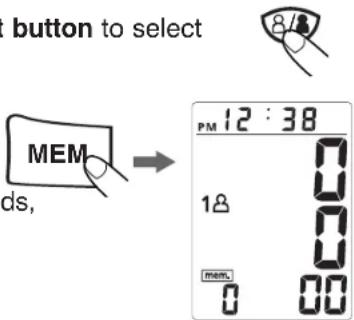
Press the User-Select button to select User 1 or User 2.
-
Continue to press the "MEM" button for approximately 5 seconds then the data for the selected user will be erased automatically.
text_image
button to select MEM ds, PM 12:38 18 0 0 0 mem. 0 00Note: The data stored in memory for both users may be erased if any of the batteries are removed. (Users should first record the data in a Blood Pressure log before replacing or removing batteries or power source.)
IMPORTANT NOTES REGARDING YOUR BLOOD PRESSURE MEASUREMENT
- Take your reading in a comfortable environment as measurements can be affected by hot or cold temperatures. Take your blood pressure at normal body temperature.
-
Do not move or talk during measurement as this can elevate readings.
-
Do not move or cross legs during measurement. Keep feet flat on floor.
- Do not touch cuff or monitor during measurement procedure.
- It is suggested that you take your measurements at the same time each day and use the same arm for consistency.
- Users should wait a minimum of 5 minutes before taking additional measurements. More time may be necessary depending upon your physiology.
- The measurement results that users receive are for reference only. If users have any blood pressure concerns, please consult a physician.
- Once inflation reaches 300 mmHg, the unit will deflate automatically for safety reasons.
- This product is not suitable for people with arrhythmias.
- This device may have difficulty determining the proper blood pressure for users with diabetes, poor circulation of blood, kidney problems, or for users who have suffered a stroke.
RECALIBRATION SERVICE
All digital blood pressure monitors require recalibration in order to ensure continued accuracy.
This monitor does not require recalibration for 2 years under normal usage conditions (approximately 3 times per day), at which time your monitor will display “CR”. The unit should also be recalibrated if the monitor sustains damage due to blunt force (such as dropping) or exposure to fluids or extreme hot or cold temperature changes.
Please fill in date of first use ____
(Recalibration is recommended after 2 years.)
To send monitor for recalibration, please ship to the address below with a check or money order in the amount of \$10 payable to HoMedics, Inc. for recalibration service and shipping & handling:
HoMedics Recalibration Service Center
P.O. Box 7050
Walled Lake, MI 48390
Allow up to 3 weeks for return of product. For additional information, contact HoMedics Consumer relations at 1-800-466-3342.
CARE, MAINTENANCE & CLEANING
- Clean the blood pressure monitor body and cuff carefully with a slightly damp, soft cloth. Do not press. Do not wash cuff or use chemical cleaner on it. Never use thinner, alcohol or petrol (gasoline) as cleaner.
- Leaky batteries can damage the unit. Remove the batteries when the unit will not be used for a long time.
- If the unit is stored near freezing, allow it to acclimate to room temperature before use.
- This blood pressure monitor is not field serviceable. You should not use any tool to open the device nor should you attempt to adjust anything inside the device. If you have any problems with this device, please contact HoMedics Consumer Relations (contact information can be found on the warranty page).
- Do not immerse the unit in water as this will result in damage to the unit.
- Do not subject the monitor and cuff to extreme temperatures, humidity, moisture, and direct sunlight. Protect from dust.
-
Do not fold the cuff and tubing tightly.
-
Do not disassemble the monitor or cuff. If in need of repair, refer to the warranty section of this manual.
- Do not subject the monitor to extreme shocks (do not drop on floor).
- Do not inflate the cuff unless wrapped around arm.
- Do not wrap the cuff around body parts other than your arm.
- Do not drop or insert any object into any opening or hose.
- This monitor may not meet its performance specifications if stored or used outside of these temperature and humidity ranges:
- Storage Environment • Operating Environment
Temperature: 14°F\~140°F (-10°C\~60°C)
Humidity: 10\~90% RH max.
Temperature: 50°F\~104°F (10°C \~40°C)
Humidity: 40\~85% RH max.
POTENTIAL FOR RADIO/TELEVISION INTERFERENCE
For USA only:
This product has been tested and found to comply with the limits for a Class B digital device, pursuant to part 15 of FCC rules. These limits are designed to provide reasonable protection against harmful interference in a residential installation. The product generates, uses, and can radiate radio frequency energy and, if not installed and used in accordance with the instructions, may cause harmful interference to radio communications. However, there is no guarantee that interference will not occur in a particular installation. If the product does cause harmful interference to radio or television reception, which can be determined by turning the product on and off, the user is encouraged to try to correct the interference by one or more of the following measures:
- Reorient or relocate the receiving antenna.
- Increase the separation between the product and the receiver.
- Connect the product into an outlet on a circuit different from that to which the receiver is connected.
- Consult the dealer or an experienced radio/TV technician for help.
For Canada only:
This digital apparatus does not exceed the Class B limits for radio noise emissions from digital apparatus as set out in the interference-causing equipment standard entitled “Digital Apparatus”, ICES-003 of the Canadian Department of Communications.
If any abnormality arises during use, please check the following points
| SYMPTOMS | POSSIBLE CAUSES | CORRECTION |
| Unit does not turn on when the START/STOP button is pushed. | Batteries have run down. | Replace them with four new AA alkaline batteries. |
| Battery polarities have been positioned incorrectly. | Re-insert the batteries in the correct positions. | |
| EE measurement error symbol shown on display or the blood pressure value is displayed excessively low (or high). | Cuff has been placed incorrectly. | Wrap the cuff properly so that it is positioned correctly. |
| Did you talk or move during measurement? | Measure again. Keep arm steady during measurement. | |
| Shaking of the arm with the cuff on. | ||
| E1 error symbol shown on display | Air circuit abnormality. Cuff tube may not be plugged into monitor correctly. | Check cuff connection. Measure again. |
| Er error symbol shown on display - measurement result exceeds measurement range. | Did you move during measurement? | Measure again. Do not move during measurement. |
| Shaking of the arm with the cuff on. | ||
| E2 error symbol shown on display | Inflation pressure exceeding 300 mmHg. | Switch the unit off, then measure again. |
| E3 error symbol shown on display | Data error. Remove and reload the batteries. | |
| CR appears on display | Recalibration alert. | Refer to page 25 for more information. |
Note: If the unit still does not work, contact HoMedics Consumer Relations. Under no circumstance should you disassemble or attempt to repair the unit by yourself. Contact information for HoMedics Consumer Relations Department can be found on the warranty page.
SPECIFICATIONS
| Power Source: | Four 1.5V DC (AA) batteries or optional 12V DC AC adapter (not included) |
| Measurement Method: | Oscillometric |
| Measurement Range: | Pressure: 40~250 millimeters mercury (mmHg)Pulse: 40~199 beats/minute |
| Accuracy: | Pressure: ±3 mmHgPulse: ±5% of reading |
| Pressure Sensor: | Semi-conductor |
| Inflation: | Pump driven |
| Deflation: | Automatic Pressure release valve |
| Memory Capacity: | 50 memories for each User (100 total) |
| Auto-shut-off: | 1 minute after last button operation |
| Operation Environment: | Temperature: 50°F~104°F (10°C ~40°C)Humidity: 40~85% RH max. |
| Storage Environment: | Temperature: 14°F~140°F (-10°C~60°C)Humidity: 10~90% RH max. |
| Weight: | 0.96 lbs (without batteries) |
| Arm Circumference: | 8.7"- 18.1" (22- 46cm) |
| Dimensions: | 6.10"(L) x 5.12"(W) x 3"(H)155mm(L) x 130mm(W) x 74mm(H) |
| Type BFDevice and cuff are designed to provide special protection against electrical shocks. |
Note: These specifications are subject to change without notice.

For service or
repair, do not
return this unit
to the retailer.
Contact Ho Medics
Consumer Relations
at:
Mail:
HoMedics, Inc.
Service Center
Dep t. 168
300 0 Pontiac Trail
Commerce Township,
MI 48390
Email:
cser vire@
hom edics.com
Phone:
1-800-466-3342
Business Hours :
8:30am-5pm ET
Monday - Friday
LIFETIME LIMITED WARRANTY
(Valid in USA only)
HoMedics sells its products with the intent that they are free of defects in manufacture and workmanship for the life of the original purchaser from the date of original purchase, except as noted below. HoMedics warrants that its products will be free of defects in material and workmanship under normal use and service. This warranty extends only to consumers and does not extend to Retailers.
To obtain warranty service on your HoMedics product, mail the product and your dated sales receipt (as proof of purchase), postpaid, to the following address:
HoMedics Consumer Relations
Service Center Dept. 168
3000 Pontiac Trail
Commerce Township, MI 48390
No COD's will be accepted
HoMedics does not authorize anyone, including, but not limited to, Retailers, the subsequent consumer purchaser of the product from a Retailer or remote purchasers, to obligate HoMedics in any way beyond the terms set forth herein.
This warranty does not cover damage caused by misuse or abuse; accident; the attachment of any unauthorized accessory; alteration to the product; improper installation; unauthorized repairs or modifications; improper use of electrical/power supply; loss of power; dropped product; malfunction or damage of an operating part from failure to provide manufacturer's recommended maintenance; transportation damage; theft: neglect; vandalism; or environmental conditions; loss of use during the period the product is at a repair facility or otherwise awaiting parts or repair; or any other conditions whatsoever that are beyond the control of HoMedics.
This warranty is effective only if the product is purchased and operated in the country in which the product is purchased. A product that requires modifications or adoption to enable it to operate in any other country than the country for which it was designed, manufactured, approved and/or authorized, or repair of products damaged by these modifications is not covered under this warranty.
THE WARRANTY PROVIDED HEREIN SHALL BE THE SOLE AND EXCLUSIVE WARRANTY. THERE SHALL BE NO OTHER WARRANTIES EXPRESS OR IMPLIED INCLUDING ANY IMPLIED WARRANTY OF MERCHANTABILITY OR FITNESS OR ANY OTHER OBLIGATION ON THE PART OF THE COMPANY WITH RESPECT TO PRODUCTS COVERED BY THIS WARRANTY. HOMEDICS SHALL HAVE NO LIABILITY FOR ANY INCIDENTAL, CONSEQUENTIAL OR SPECIAL DAMAGES. IN NO EVENT SHALL THIS WARRANTY REQUIRE MORE THAN THE REPAIR OR REPLACEMENT OF ANY PART OR PARTS WHICH ARE FOUND TO BE DEFECTIVE WITHIN THE EFFECTIVE PERIOD OF THE WARRANTY. NO REFUNDS WILL BE GIVEN. IF REPLACEMENT PARTS FOR DEFECTIVE MATERIALS ARE NOT AVAILABLE. HOMEDICS RESERVES THE RIGHT TO MAKE PRODUCT SUBSTITUTIONS IN LIEU OF REPAIR OR REPLACEMENT.
This warranty does not extend to the purchase of opened, used, repaired, repackaged and/or resealed products, including but not limited to sale of such products on Internet auction sites and/or sales of such products by surplus or bulk resellers. Any and all warranties or guarantees shall immediately cease and terminate as to any products or parts thereof which are repaired, replaced, altered, or modified, without the prior express and written consent of HoMedics.
This warranty provides you with specific legal rights. You may have additional rights which may vary from country to country. Because of individual country regulations, some of the above limitations and exclusions may not apply to you.
For more information regarding our product line in the USA, please visit: www.homedics.com
©2007 HoMedics, Inc. and its affiliated companies, all rights reserved.
Homedics is a registered trademark of Homedics, Inc. and its affiliated companies. TheB ^™ Smart Film and Smart Services ^™ are trademarks of
HofMedics Inc. and its affiliated companies. All rights reserved.
IB-BPA050B
lifetime limited warranty
lifetime limited warranty
HOMEDICS
THERAP
natural_image
Line drawing of a device rear panel with battery and battery cells, no text or symbols presentnatural_image
Simple line drawing of a device with a tool inserted into the base (no text or symbols)natural_image
Abstract diagram of curved arrows forming a loop (no text or symbols)natural_image
Two circular diagrams showing anatomical or structural changes with no visible text or symbols


49
Nota:
text_image
Arteria principal50
flowchart
graph LR
    A["Hand icon with badge"] --> B["1 user icon"]
    B --> C["OR"]
    C --> D["2 user icon"]
HoMedics Recalibration Service Center
P.O. Box 7050
Walled Lake, MI 48390
Correo: HoMedics, Inc. Service Center Dept. 168 3000 Pontiac Trail Commerce Township, MI 48390
HoMedics Consumer Relations
Service Center Dept. 168
3000 Pontiac Trail
Commerce Township, MI 48390