HearPlus 313ci - Phone DORO - Free user manual and instructions
Find the device manual for free HearPlus 313ci DORO in PDF.



| Product type | Analog landline telephone |
| Brand | Doro |
| Model | HearPlus 313ci |
| Dimensions | 175 mm x 175 mm x 60 mm |
| Weight | 750 g (with batteries) |
| Power supply | 9 V DC power adapter (included); 4 AA 1.5 V alkaline batteries (not included) for memory backup |
| Display type | Adjustable large character display (contrast 1-4) |
| Phonebook | Up to 30 entries (name + number) |
| Direct memory keys | 3 A/B/C keys for speed dial |
| Call log | Last 15 incoming and outgoing calls |
| Hands-free function | Yes (requires batteries or power adapter) |
| Volume amplification | +10 dB via dedicated key (LED indicator) |
| Handset tone adjustment | Bass/treble slider (active only with amplification) |
| Ring volume | Adjustable via side switch |
| Ring melody and tone | Sliders on the back of the phone |
| Missed call indicator | Flashing LED (enabled/disabled in settings) |
| Hearing aid compatibility | Yes (T-coil mode) |
| Wall mountable | Wall bracket included (83 mm spacing) |
| Maintenance | Clean with a soft dry cloth; avoid chemical products |
| Warranty | 2 years (France); batteries excluded |
| Certifications | R&TTE Directive 1999/5/EC and RoHS Directive 2002/95/EC |
Frequently Asked Questions - HearPlus 313ci DORO
User questions about HearPlus 313ci DORO
0 question about this device. Answer the ones you know or ask your own.
Ask a new question about this device
Download the instructions for your Phone in PDF format for free! Find your manual HearPlus 313ci - DORO and take your electronic device back in hand. On this page are published all the documents necessary for the use of your device. HearPlus 313ci by DORO.
USER MANUAL HearPlus 313ci DORO
- Telephone line socket
- Handset hook
- Keypad
- Handset cord socket
- Handset volume
- Recall
- Volume boost
- Call memory / OK
- Delete
- Mains adapter socket
-
Ring tone
-
Ring melody
- Ring volume
- Speed dial keys
- Phone book
- Handset tone
- Speaker volume
- Speakerphone
- UP/DOWN
- New call indicator
- Ringer indicator
Svenska
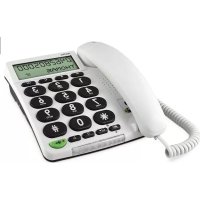
This product can be used as a desktop or wall-mounted telephone. Handset tone control, volume boost, enhanced ring volume and visual call indication make the telephone well suited for people with hearing difficulties.
The extra-large keypad and easy to read display with large characters make the telephone easy to use even with impaired eyesight.
The built-in phonebook can store up to 30 names and numbers. Three one touch memory keys can be programmed for frequently used numbers or emergency numbers. A call memory logs the 15 most recently incoming and outgoing calls.
A speakerphone function allows you to talk hands-free with the simple press of a button.
This device is intended for the analogue telephone network lines in AT, BE, BG, CH, CY, CZ, DE, DK, EE, ES, FI, FR, GB, GR, HU, IE, IS, IT, LV, LT, LU, MT, NL, NO, PL, PT, RO, SI, SK, SE.
Installation
Connection
- Connect the curly cord to the handset and to the socket marked 📋 on the telephone.
- Connect the telephone line cord to a network wall socket and to the 📞 socket on the back of the telephone.
- Connect the mains adapter to the mains power wall socket and to the DC 9V socket on the telephone.
- Lift the handset and listen for the dial tone.
Batteries
Four AA alkaline batteries are needed for the call memory and speakerphone in the event of a power cut. When BATT. LOW is displayed, replace all 4 batteries. Use only AA alkaline batteries of good quality (not included).
Note!
Before installing or changing the batteries, make sure that the telephone is not connected to the telephone network.
- Remove the battery cover and insert the batteries ensuring correct battery polarity is observed.
- Replace the battery cover and reconnect the telephone line cord.
Basic setup
Before using the telephone the first time, the following basic settings should be made.
After confirming a setting, the next setting is automatically displayed. To skip to the next setting, press ↗
The phone will return to standby mode after 30 seconds of inactivity or when pressing C/←
On first setup the display clock will show 00:00.
- Press and hold ✪ for about 5 seconds until the hour flashes.
- Use / to change the value and confirm with ↗
- Repeat steps 1–2 to set the minutes, day and month.
ENGLISH is displayed.
Use △ / ▽ to select the desired language, then confirm with ↗
-2- CONTRAST
Use / to set the display contrast setting (1-4), and confirm with
KEYT. ON
Use △ / ▽ to set key tone ON/OFF, and confirm with ↗
-100- FLASH
Use △ / ▽ to set the flash key time (100/300/600 ms) and confirm with ↗
The standard setting is 100 for most countries, 300 for France/Portugal, 600 for New Zealand.
LED OFF
Use △ / ▽ to enable/disable the LED indicator for new calls, and confirm with ↗
TONE
Use △ / ▽ to select either tone or pulse dialling mode, and confirm with ↗
Note!
If unsure of which mode to use, select TONE as this works in most locations.
Wall mounting
The telephone can be wall mounted by using the included wall mount bracket and two screws (not included).
Warning!
Make sure that no cables, water pipes or gas pipes are located inside the wall before drilling into it.
- Drill two holes in the wall, vertically 83 mm apart.
- Insert the screws, allowing them to project \~5 mm out from the wall.
- Unplug and remove the handset.
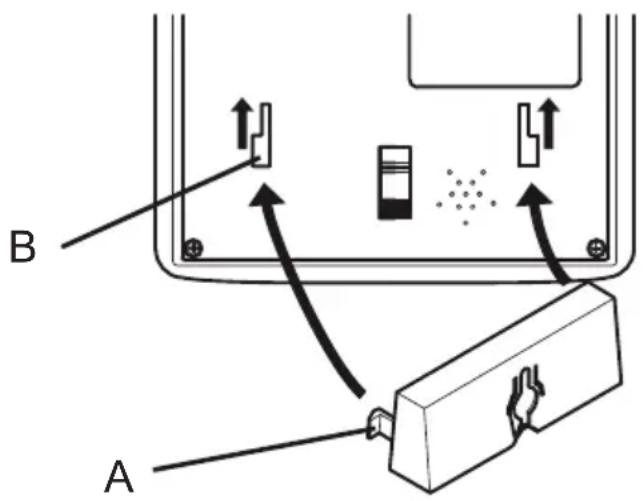
- Fit the guide tabs (A) on the bracket into the slots (B) on the back of the telephone, then slide the bracket upwards until it snaps into place.
text_image
B A- Position the telephone so that the screws on the wall fit into the slots in the bracket, then slide the telephone downwards until it is hanging on the screws.
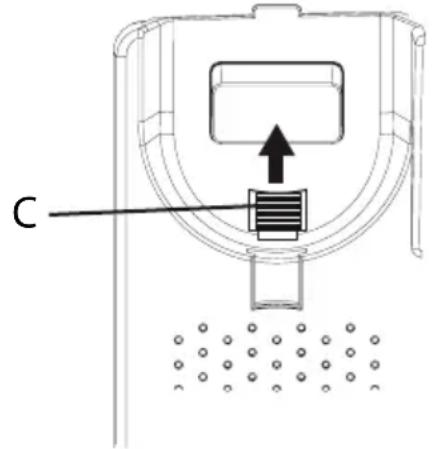
- Remove the handset hook (C) by pushing it upwards, and insert it in the reversed position so that the small tab (D) protrudes. The hook will now keep the handset in the cradle when the phone is wall mounted.
text_image
C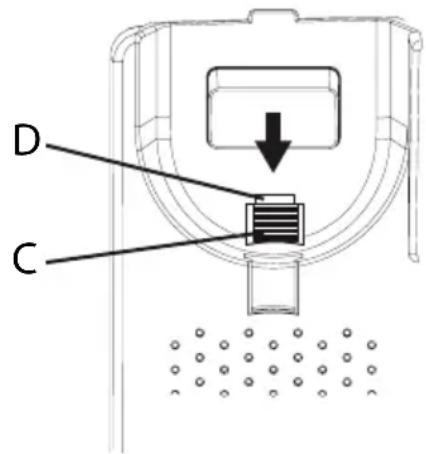
text_image
D C- Reconnect the handset and place it in the cradle.
Note!
If the phone is to be used as a desktop phone again, remember to reverse the position of the handset hook.
Operation
Making a call
Normal dialling
- Lift the handset.
- Dial the number. Hang up the handset to terminate the call.
Speakerphone
Note!
The speakerphone only works when batteries are installed or mains adapter is connected.
-
Press 🔍 to activate the speakerphone. The LED next to the key will light up.
-
Dial the number. Press ↔ again to terminate the call.
Lift the handset to switch from speaker to handset during a call.
Pre-dialling
-
Enter the number. Press Cto-delete the last entered digit.
-
Lift the handset or press ↩ to dial.
Quick redial
- Lift the handset or press ↩.
- Press to redial the last dialled number.
Dialling numbers in the call memory
- Press to display the most recent call.
- Use / to scroll through the last 15 incoming and outgoing calls.
$$ \begin{array}{l} \text { ≡ } = \text { Incoming call } \ \nearrow = \text { Outgoing call } \ \end{array} $$
- Lift the handset or press ↔ to dial the displayed number.
Speed dial (one-touch dialling)
- Press one of the speed dialling keys A/B/C. The stored telephone number is displayed.
- Lift the handset or press ↩ to dial.
Dialling numbers in the phone book
- Press 📄 to open the phone book.
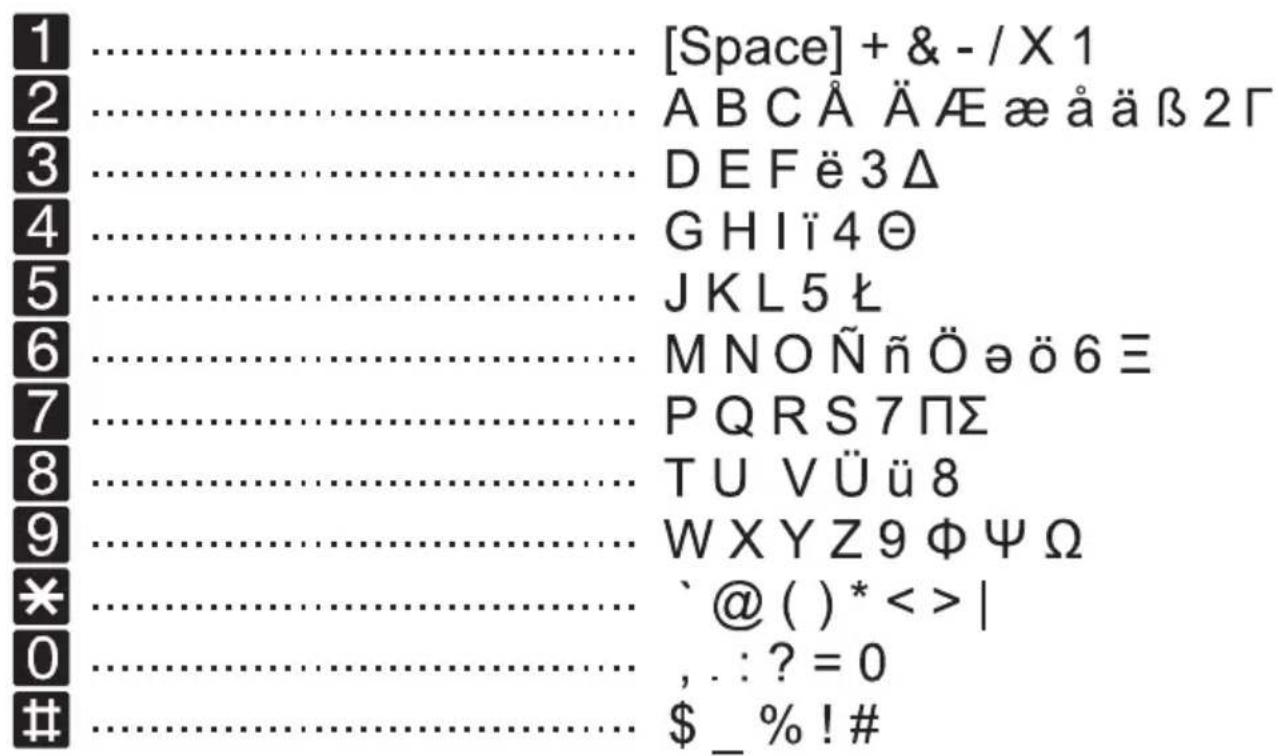
- Use △ / ▽ to browse through the phone book, or enter the first character in the name to quickly find an entry (see Keypad characters).
- Lift the handset or press ◀▶ to dial.
Answering
Lift the handset to answer an incoming call, or press 🔒 to answer using the speakerphone.
Ring signal
The ring melody and tone can be adjusted using the sliders on the bottom of the telephone.

text_image
Ring melody Ring toneThe ring volume is adjusted with the switch on the right side of the telephone.
Volume control
The speaker volume is adjusted with a slider on the right side of the telephone.
The handset volume control is located under the handset.
Keypad characters
text_image
[Space] + & - / X 1 A B C Å Ä A E æ å ä β 2 Γ D E F ë 3 Δ G H I ë 4 Θ J K L 5 ⌊ M N O Ñ ñ Ö ö ö 6 ≡ P Q R S 7 Π Σ T U V Ü ü 8 W X Y Z 9 Φ Ψ Ω `@ ( ) * < > | , . : ? = 0 $ _ % ! #Additional functions
Phone book
The phone book can store up to 30 entries. When the memory is full, ----100% is displayed.
Storing numbers in the phone book
- Press and hold 📁 until a blinking cursor is shown.
- Enter a telephone number (up to 22 digits). Use △/▽ to move the cursor and C to erase if needed. Use # to insert a pause in the number.
- Press to confirm. A blinking cursor will be shown on the second line on the display.
- Enter a name (up to 9 characters) for the number to be stored (see Keypad characters).
- Press to confirm. OK is now displayed.
- Repeat steps 1–5 to store another number, or press and hold C to exit.
Deleting numbers from the phone book
- Press 📄 to open the phone book.
- Use / to browse through the phone book, or enter the first character to quickly find an entry.
- Press and hold C to delete the entry
Editing numbers in the phone book
- Press 📄 to open the phone book.
- Use / to browse through the phone book, or enter the first character to quickly find an entry.
- Press and hold 📁 until the blinking cursor appears.
- Use / to move the cursor, and use C and the keypad to erase and enter new data.
- Press to confirm. The cursor will move to the second line.
- Repeat step 4 to edit the name/description.
- Press to confirm. OK is displayed.
Storing speed dial numbers
- Press and hold one of the speed dialling keys A/B/C until a blinking cursor is shown on the first line on the display.
-
Enter a telephone number (up to 22 digits) using the keypad. Use △/▽ to move the cursor and C/← to erase if needed.
Use # to insert a pause in the number. -
Press to confirm. A blinking cursor will be shown on the second line on the display.
-
Enter a name (up to 9 characters) for the number to be stored (see Keypad characters).
-
Press to confirm. OK is displayed.
-
Repeat steps 1–5 to store numbers for the other speed dialling keys.
Deleting speed dial numbers
Speed dial numbers can not be deleted, they can only be replaced by storing a new number.
Caller ID and call memory
Caller ID allows you to see who is calling before you answer and to see who has called in your absence.
Note!
The Caller ID function must be subscribed.
Please contact your network operator for more information.
The call memory will store the last 15 incoming and 15 outgoing calls. On the display, incoming (answered and unanswered) calls are indicated with and outgoing calls with
If the Call Indicator function is active, a blinking light indicates that an unanswered call has been received since the call memory was last checked.
Browsing the call memory
-
Press then △ / ▽ to scroll through the call memory. The number and time of each call will be displayed. For calls older than 24 hours, the date of the call is displayed instead of the time.
-
Press C to exit the call memory.
Deleting numbers from the call memory
-
Press then △ / ▽ to scroll through the call memory.
-
Press and hold Cto-delete the selected entry.
Copying call memory entries to the phone book
- Press then △ / ▽ to scroll through the call memory.
- Press and hold ✪ until OK is displayed. The selected number has now been saved to the phone book.
Call timer
The display shows the current time when in standby mode. During a call the display will show a call timer instead, indicating the duration of the call. The call duration is displayed for 5 seconds after the call is terminated.
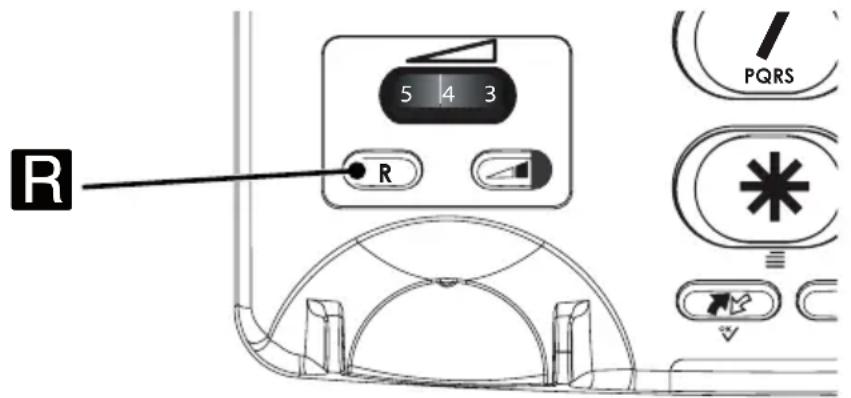
Recall key (R)
text_image
R 5 4 3 R PQRSPress the R key followed by the extension number to transfer a call when connected to a PBX system.
Additional network services may be accessible by using the R, ✱ and # keys. Please contact your network operator for more information about the available network services.
Hearing aid
This telephone is hearing aid compatible. Select the T mode on your hearing aid to enable this feature.
Volume Boost

The handset volume can be raised another 10 dB by pressing the Volume Boost key while talking. The LED indicator on the key will light up. Press the key again or terminate the call to turn off Volume Boost.
Warning!
The handset volume can be very loud with this setting. Volume boost should only be used by persons with impaired hearing.
Handset tone

The speech tone (bass/treble) can be adjusted for better clarity using the handset tone control on the right side of the phone. PLEASE NOTE! Only works when Boost is active.
Care and maintenance
Your unit is a technically advanced product and should be treated with the greatest care. Negligence may void the warranty.
- Protect the unit from moisture. Rain/snowfall, moisture and all types of liquid can contain substances that corrode the electronic circuits. If the unit gets wet, you should remove the battery and allow the unit to dry completely before you replace it.
- Do not use or keep the unit in dusty, dirty environments. The unit's moving parts and electronic components can be damaged.
- Do not keep the unit in warm places. High temperatures can reduce the lifespan for electronic equipment, damage batteries and distort or melt certain plastics.
- Do not keep the unit in cold places. When the unit warms up to normal temperature, condensation can form on the inside which can damage the electronic circuits.
- Do not try to open the unit in any other way than that which is indicated here.
- Do not drop the unit. Do not knock or shake it either. If it is treated roughly the circuits and precision mechanics can be broken.
- Do not use strong chemicals to clean the unit.
- The mains adapter is the disconnect device between the product and mains power. The mains socket outlet must be close to the equipment and easily accessible.
The advice above applies to the unit, battery, mains adapter and other accessories. If the telephone is not working as it should, please contact the place of purchase for service. Don't forget the receipt or a copy of the invoice.
Warranty and technical data
This product is guaranteed for a period of 24 months from the date of purchase. In the unlikely event of a fault occurring during this period, please contact the place of purchase. Proof of purchase is required for any service or support needed during the guarantee period.
This guarantee will not apply to a fault caused by an accident or a similar incident or damage, liquid ingress, negligence, abnormal usage, non-maintenance or any other circumstances on the user's part. Furthermore, this guarantee will not apply to any fault caused by a thunderstorm or any other voltage fluctuations. As a matter of precaution, we recommend disconnecting the device during a thunderstorm.
Batteries are consumables and are not included in any guarantee.
Use only AA Alkaline batteries of good quality.
NOTE! This guarantee does not affect your legal (statutory) rights under your applicable national laws relating to the sale of consumer products.
Specifications
Size: 175 mm x 175 mm x 60 mm
Weight: 750 g (including batteries)
Battery: 4 x 1.5 V AA Alkaline batteries
Declaration of Conformity
Doro hereby declares that Doro HearPlus 313ci conforms to the essential requirements and other relevant regulations contained in the Directives 1999/5/EC (R&TTE) and 2002/95/EC (RoHS).
A copy of the Declaration of Conformity is available at www.doro.com/dofc
UK
Technical support is available by email on tech@doro-uk.com
Premium rate telephone number: 0905 895 0854, calls cost 50 pence per minute (price correct at the time of publication).
You can also contact us in writing (regarding any Spares or Technical query):
Customer Services
Doro UK Ltd
1 High Street
Chalfont St Peter
Buckinghamshire
SL9 9QE
Further contact details are available on our website: www.doro-uk.com.
Beskrivning
Doro HearPlus 313ci
text_image
5 4 3 R PQRStext_image
5 4 3 R PQRSTrykk på R-tasten etterfulgt av et internnummer for å overføre en samtale hvis telefonen er koblet til et PBX-system.