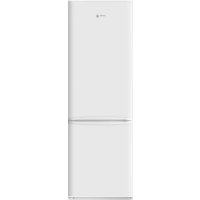
FL372 - Fridge FAGOR - Free user manual and instructions
Find the device manual for free FL372 FAGOR in PDF.



User questions about FL372 FAGOR
0 question about this device. Answer the ones you know or ask your own.
Ask a new question about this device
Download the instructions for your Fridge in PDF format for free! Find your manual FL372 - FAGOR and take your electronic device back in hand. On this page are published all the documents necessary for the use of your device. FL372 by FAGOR.
USER MANUAL FL372 FAGOR
MANUAL DE INSTRUCCIONES
MANUEL DUTUSATION
INSTRUMENTONMANUAL
MANUALI OF STRUZION
BEGIERNGBANLEITUN
NISTELKCAO5LGL
同
HNSCLAUUMU
[2]
ERANILERA-ESKULIBURA
MANUAL D'INSTRUCTIONS
MANUAL DE INSTRUCONS
MANUAL DE INSTRUMENTS
HHTP24
INSTRUCTHEHANDEEOING
1
Very important: Read this manual carefully before using your refrigerator.
This manual is designed with texts corresponding to drawings.

Identification

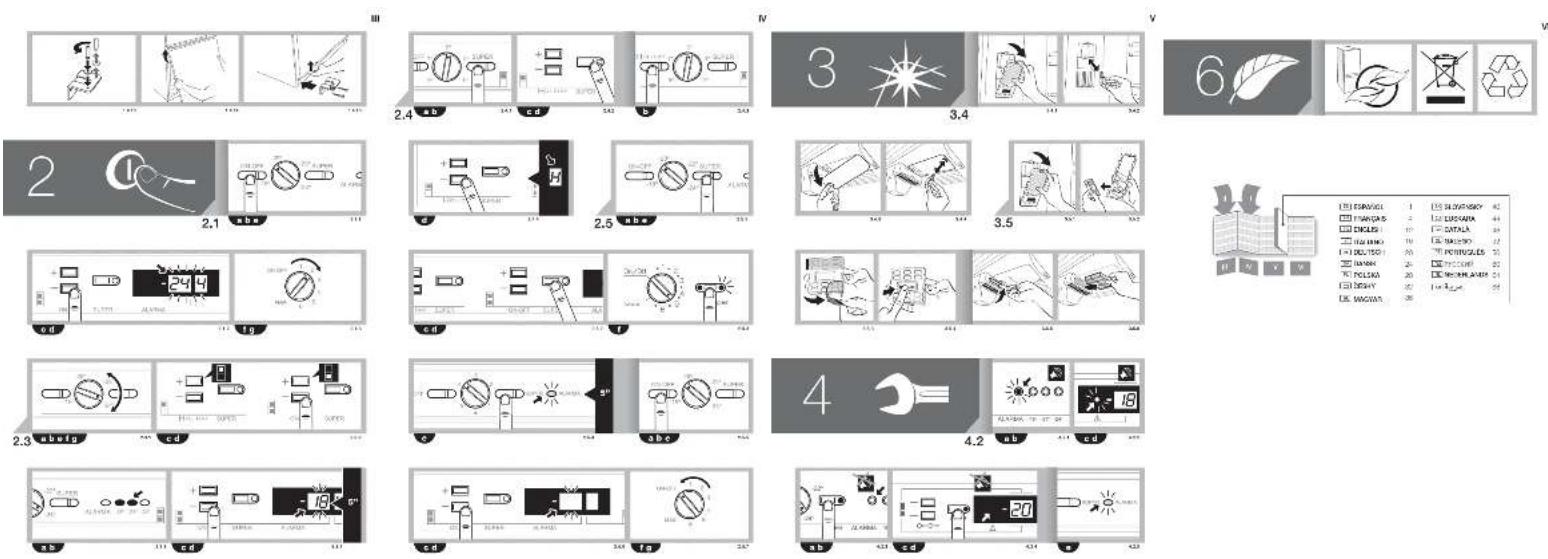
Identify the model of your refrigerator ("a", "b", "c", "d", "e", "f", "g") by comparing the control panel with the illustrations.
1
Installation
1.1 Unpacking. Remove all the protective packaging elements.
1.2 Location. Stand the refrigerator away from sources of heat and protect it from direct sunlight to reduce its consumption.
Do not install the refrigerator in the open air or exposed to rain.
The air must circulate around the rear of the refrigerator. Leave a space of 25mm between the back of the refrigerator and the wall. Do not block the space between the refrigerator and the floor or the ceiling.
Level the refrigerator to prevent vibration and noise. Bear in mind that if the refrigerator is placed against the wall or a kitchen unit, some noise may occur.
Also check the trays are placed correctly, and place containers separately to prevent vibration.
1.3 Mains connection. Leave the refrigerator to stand for at least 2 hours in vertical position before plugging it in. Check the data on the reference plate (220-240V with earth connection) (1.3.1, 1.3.2).
Do not use adapters or extension leads.
Ensure the cable is not touching the motor or trapped underneath it.
1.4 Changing the door opening direction.
Unplug the refrigerator from the mains and empty the contents of the inner door.
Remove the screws from the lower hinge and
remove the hinge, holding the freezer door in place to prevent it from falling onto the floor (1,4,1, 1,4,2). Remove the freezer door (1.4.3).
Use a screwdriver to remove the embellisher from the central hinge (1.4.4). Remove the screws from the central hinge and remove the hinge, holding the refrigerator door in place to prevent it from falling onto the floor (1,4,5,1,4,6). Remove the refrigerator door (1.4.7).
For models with door up to the ceiling only: Remove the control panel with the aid of a screwdriver. Make a small notch in the opposite side of the upper hinge support. Replace the control panel.
Remove the shaft from the upper hinge and place it in the same position on the opposite side (1.4.8).
Remove the locking devices from the doors and turn them around, placing the refrigerator lock on the freezer door and vice versa (1.4.9). Replace the embellishers on both doors.
Using a screwdriver, remove the embellishers from the middle and lower part of the refrigerator and place them on the opposite side (1.4.10).
Fit the refrigerator door in place, slotting it onto the upper hinge (1.4.11). Push the door upwards without releasing it and fit the central hinge (1.4.12).
Remove the lower hinge and change its position (1.4.13).
Fit the freezer door in place, slotting it onto the central hinge (1.4.14). Push the door upwards without releasing it and fit the lower hinge (1.4.15).

Operation
2.1 Switching on the refrigerator. Press ON-OFF (2.1.1). Press +, - until a digit

appears on the display (2.1.2), or turn the dial (2.1.3).
2.2 Selecting the compartment. On models abcd, the refrigerator compartment and the freezer compartment work separately. On models efg, the two compartments work together
2.3 Temperature selection. Turn the dial (2.3.1) or press the + - buttons of the freezer compartment , followed by those of the refrigerator compartment (2.3.2).
When you have selected the temperature, you can find out the real temperature in the compartment by observing the indicator lights (2.3.3), or by holding down the + or - buttons of the desired compartment for 5 seconds. The temperature in the compartment will flash on the display (2.3.4).
Recommendation: The recommended temperature for the refrigerator compartment is and for the freezer compartment it is -19 for already frozen food, and -if you wish to freeze food.
Remember that the temperature inside the appliance depends on the room temperature, where the refrigerator is located and how often you open the door.
2.4 Refrigerator functions.
Quick cool function: This function activates the refrigerator at a cooler temperature for 6 hours. It is recommended to activate it when you place a large amount of food in the refrigerator.
To enable and disable this function: Press SUPER (2.4.1, 2.4.2). Models not have this function.
Holiday function: The holiday function is very useful when you will not be using the refrigerator for a long period of time but you wish to keep food in the freezer. With this function, your refrigerator will consume very little power and bad smells will not be generated inside it. Models acefg do not have this function.
Warning: The refrigerator door must be kept closed when this function is in use.
To enable and disable this function: Press HOLIDAY(2.4.3), or the +, - buttons of
the refrigerator compartment until H appears on the display (2.4.4). To disable the function, repeat this operation.
2.5 Freezer functions.
Quick cool function: This function activates the freezer at a cooler temperature for 52 hours. It is recommended to activate it 24 hours before placing a large amount of food in the freezer. On model 1, it should be deactivated 24 hours later.
To enable and disable this function: Press SUPER (2.5.1, 2.5.2, 2.5.3). Model does not have this function.
Winter function: Models on, use this function if you notice that the freezer is becoming warmer. Hold down the SUPER button for 5 seconds until the orange pilot light begins to flash (2.5.4). The refrigerator light will remain on at half power so that the compressor functions for longer. When the freezer has reached the right temperature, switch off the winter function by holding down the button for 5 seconds again.
Switching the freezer on and off: Press the ON-OFF button of the freezer compartment (2.5.5). Press the + or - button until no temperature appears on the display (2.5.6), or turn the dial to ON-OFF (2.5.7). When the freezer is switched off the refrigerator compartment will also switch off.
2.6 Recommendations for use.
- Do not open the doors for any longer than necessary, and do not place hot food in the refrigerator. This will ensure a more effcient use of your refrigerator and will avoid excess power consumption.
If your refrigerator is NO FROST type, do not obstruct the ventilation grilles, and leave space between the food for the air to circulate. - Do not place bottles of fizzy drinks or glass bottles containing liquids in the freezer, as they may burst.
- Place food in sealed containers to prevent it from drying up.
- Do not consume ice cream or food that is very cold as this can cause burns.
3 Maintenance and cleaning

3.1 Cleaning the inside of the refrigerator. Use a sponge or a dish cloth soaked in water with bicarbonate of soda to clean the inside of the refrigerator, to prevent bad smells from forming.
Never use steam cleaning machines, solvents or abrasive detergents.
3.2 Cleaning the outside of the refrigerator. Do not use steam cleaning machines to clean the displays.
It is recommended to clean the rear grille with a vacuum cleaner once a year.
3.3 Cleaning the accessories. The accessories are not dishwasher-safe. Wash them by hand, using a sponge or a dish cloth.
3.4 Changing the light. If the light bulb blows: Unplug the refrigerator. Press the tab to remove the light cover (3.4.1, 3.4.3) and remove the blown bulb (3.4.2, 3.4.4). Replace it by another bulb with the same screw type, E14, 220-240V, 15/25W, or as indicated on the light fitting.
3.5 Changing the carbon filter. Your refrigerator may be equipped with a carbon filter to absorb the unpleasant smells generated by some foods and to retain the microorganisms (fungus and bacteria) in the circulating air.
The fi tter maintains its properties for a limited time of 6 months. When this time has elapsed, the fi tter should be changed and a new one fi tted. The fi tter location depends on the model.
To change the fi Iter: Press the tab and remove the cover (3.5.1, 3.5.5). Remove the used fi Iter (3.5.2, 3.5.6).
If the fi ler needs activating: Remove the seals (3.5.3) and press the BIOFILTER display until you hear a slight click (3.5.4). In a few seconds the duration scale will begin to change colour. Fit the fi ler in its original location.
Keep used fi Iters and spares out of reach of children; as swallowing large amounts of this substance can be dangerous.
Do not wet the fi iter as it will lose all its properties.

Diagnostics

4.1 Door open. If you leave the door open for longer than 2 minutes, an alarm will sound and the refrigerator light will switch off. The alarm will stop when you close the door.
4.2 The freezer is not cold enough
- If the freezer temperature is abnormally warm, an alarm light will come on (4.2.1, 4.2.2) and an intermittent beep will sound. Press SUPER (4.2.3, 4.2.4) to switch off the beeper manually.
- Model only. If the winter function is activated, the alarm light will flash. To deactivate it, see (2.5.4).
- When you switch on the appliance for the first time, the alarm light will be activated, although the alarm beeper will not sound.
4.3 Electricity cuts
Open the refrigerator doors as infrequently as possible. When the electricity returns, check whether the frozen food has thawed.
4.4 Normal refrigerator noise
Your refrigerator may make some noise on functioning. Do not worry about the following noises, as they are normal.
- The refrigerant gas may cause a bubbling noise as it circulates around the refrigerator circuits.
The compressor may make a buzzing noise or a slight tapping sound, particularly on start-up. - Expansion and contraction of the materials used may cause tapping or crackling noises.
The air moving the freezer fan may generate slight background noise.
Do not attempt to repair the refrigerator yourself. Call the technical assistance service.


Safety

- Keep the ventilation grilles free from any obstructions.
Take care not to damage the refrigeration circuit. - Do not use electrical appliances inside the refrigerator, unless they are of a type recommended by the manufacturer.
- Do not use mechanical devices or any other means to speed up the defrosting process, unless recommended by the manufacturer.
- This appliance is not designed for use by people (including children) whose physical, sensorial or mental capacities are impaired, or who lack sufficient experience or knowledge, unless they are supervised or have been instructed in the use of the appliance by a person responsible for their safety. Children must be supervised to ensure they do not play with the appliance.
- If the supply cable is damaged, it must be replaced by the manufacturer, the after-sales service or similar qualified staff to prevent hazard.

The environment

This refrigerator was designed with environmental conservation in mind.
The appliance operates with coolant R600A, which does not damage the environment.
Respect the environment. Use the recommended temperatures for each compartment. They will depend on the mode you need for effcient use of your refrigerator.
Disconnect the refrigerator or set it to holiday mode when you will not be using it for a prolonged period. You will reduce power consumption and save energy.
Avoid leaving the doors open more time than necessary. It causes an increase in power use.
Waste management of electrical and electronic appliances.
The symbol indicates that the appliance must not be disposed of in traditional bins for domestic waste.
Deliver your refrigerator to a special collection centre.
Recycling domestic appliances prevents negative impacts on health and the environment and helps save energy and resources.
For more information, contact your local authorities or the establishment where you purchased your refrigerator.
PekomeHnyetcOdHHpa3BroDnCTNbIeCOCOM 3aDHIOpeWETKy.
3.3 YnCTKa npHaIeXHoCTe. 3anpeaetc HCTNTb npHaIeXHOCTB NocyDOMOeHbIX MaunHax.PekOMeHdyeTc pyHna YnCTKa c nOMoUbry6KnITpRKn.
3.4 3aHaIaMnbl.EcInIaMna nepeCTana CBETb, HEO6XoIMMO BbIOJINHTCNEyUOme DeCTBn. OTKIOHHTb XONODINbHKNOT CETN.CHATb KpbIky, Haxab Ha "A3bYOK" (3.4.1, 3.4.3), IN3BNeHb Hepa6ToaHouYIO lamny (3.4.2, 3.4.4). 3aMeHtBe HOBIIaMNoI aHAnOrHoro TINOpa3Mepa (E14, 220-240 B, 15/25 BT) INB COOTBeTCTBn C yka3AHmNIOOCBEeHNO.
3.5 3a mena yrobnho qnnbtpa.B xoIOnnBnke
MOXETMMETCBaYrOJbHbIΦnIbTp,KOTOpBn NORIOUaET NOCTOPOHHe 3aNaXn,OBpa3yEmble HEKOTOpBMIN PPOdYkTaMn,INyNAbNBAeT MKNpOoPraHn3Mb(rpN6Kn bKaTepeu)n3 UnpKynIpuyoJero BO3dyxa.
CBOCTBaΦnIbTpacoXpaHHTcJIINb OnpedeneHHoeBpem,OKOIO6Mecae.ⅠNCTeEHNN3TOroBpeMeHNΦnIbTppeKOMEnHyETc3aMeHNTb.MectopacNooxKeHeΦnIbTpazABCNT OTMOJIEN.
PnopaK 3aMeHb HaxKaTb «RbIcOK» n ChrTa KpbIuKy (3.5.1, 3.5.5). N3BneYb N3HOWeHHbI pNt (3.5.2, 3.5.6).
Ecnn Tpe6yETCA BOCCTAHOBJIeHne fNtbpa. ChTb 3aunTHbIe nIeHKn (3.5.3) n HaxKaTb Ha BNsP BIOFILER Do IerKoro ueJka (3.5.4). YpeE3 HeckoBko cekyHd uKana dInTeJbHOCTn HaHTe OKpaWNaBcR.YCTAHOBt bfNtbpB HauaNbHoe nOLOXeHne.
H3nooehhbie HcMeHHbIe pbl Heo6xOdHMo XpaHHTb B HeIOCTyHOM dH JTeen Mecte. IopaaHne 3NaHTeJIbHbIX KOINueCTB MaTePnAla QInbTpa B OprAHN3M MOKET 6bITb ONaCHbIM.
He donyckaIte HamokaknIg KIbTpA, TaK KaK OH MOxET YtpaTbCBON CBOINCTBA.
4
ФункUM KOHTPONA COCTOAHM XOJODNJbHnKa

4.1 OTKpbitaDbepua.Ecnn DBepua octaeTc 0TKpbTOB 6oJIee 2 MNHT, XOIOINbHnK NOaET 3ByKOBO CNrHaI, aOCBEueHHe XOIOINbHoro OTdENeHn BbIKIOuAeTc. Nocne 3aKpbTu DBepui NoDAa CnIHana npekpaataCra.
4.2 HeoctatochbXoIOB MOpO3HbHom OTdeJeHH
- Ecni TemnepaTypa B Mopo3unbHom OTdeneHn HeHOpMaJIbHO BVICOka, NOdaTcBcETOBOn CnHa1 (4.2.1, 4.2.2) n, B CBOIO OepeIb, NpepbINCTbI 3ByKOBo CnHaI. IINrTOrTO6bl NpeKpaITb NdoAuy 3ByKOBOrCnHaIa BpyHyIO, HaxMInTe KhoNkY (4.2.4).
IMeTcTOnbKO B MoJeAe .Ecnn BKIOUeH peKIM "3IMA",CnHAn 6yTeT MraTb. IopJIOK erO OTKIOUeHn CM.B pa3dene 2.5.4. - Pn npBbOM BkIIOueHm npI6pa CBETOBO CnHaN BKIOUaETCA, OJHaKO 3ByKOBo CNrHaN He nOdaTcA.
4.3 OTKIIOUeHHe 3JKeKTPoNITaHn
OtkpbIbAte IBePcIbXoIOJINbHnKa KaK MoxHOpexe HEnpoDoJnxTEnbHe. Nocne TOrO KaK BceTN CHOBA IOBNTc HApPrKeHne, npOBepbTe, He pa3MOpO3NIMCb IIN IpOdyKTbl.
4.4 HopmaIbHbIe yMbI np pa6ote xoJIoNbHnka
BoBpempa6oTbXOOniNbHnK MoXeTn3daBaTb PdWyMOB,KOTOpBleAIBHOCTCHOPMaJIbHbIM AJIeHHeM,IN3-3a HIX He CTOUT 6ecNOKOTbcra.
-ПицИркУняихлада reHTo nO KoHTypaM MOKET BO3HnKaTb Wm 6ypJIeHn.
- Ppi pa6oTe KOMPecCopa MoKet 6bIb CbluHoo KyyKKaHne Wnnn IeKOE NoCTyKNaHne, Ooc6eHNO pni erO BkIIOUeHHN.
- Ppi paacunpeHHN cKaTm NcNoJIb3yeMbIX MaTePnAIOB MOrYt N3DaBaTbcra XpyCT INN NOTpeCKNBaHne.
ДВИЖЕНЕ BO3ДУХА 3a CHT pa6OTbI BEHTINIЯTOPa MOKeT DaBaTb He6OJIbшОI FOHOBOBIMU.

He nbitaTecb camoCToTeNbHO OTpeMOHTnPoBaTb np6Op. PnB O3HNIKHOBeHN HcNpABHOCTu opaTntecb B CJyXb By TexHueeCKO NoDepkKn.

Ppabina
TEXHNUKU
6e3oNaCHOCTN
He 3aIopaxnBaIe BENTINIAHNOHHypeWetKy.
- C6bIIOJaTe ocToPoxKHOCTb, YTO6bI He NOBpeINtB KOHTy OXnJaeHnIa.
He noJIb3yIteCb 3JIeKTPnueCKMn npIbOpamn BHyTpN XOIOJINbHnKa, ECIM TOJIbKO INCIOJIb3OBaHne OnpEdeJeHHOro npIbOpHa nepeKOMeHDoBaHo n3rTOBHTeEM.
He nCnoIb3yIte MexaHueckne yctpoCTBa n npOue CpeIcTBA dIy yckopeHn Ipocecca pa3MopaxNBAHn, 3a NCKIOUeHnEM peKOMEHIOBAAHBix NROTOBATEJEM.
-Данньnpi6bOp He npedha3NaeHdЯ3KcnnyatauINIIMN(B TOM YNCne DeTbMM)COrpAHueHHbIMNФИUECKIMN,CEHCOPHBIMN yMCTBeHHbIMNBO3MOXHOCTHM,a TAKKe IINaAMn,HE IMEHOUIMNDOCTaTOHORO ONbTA u 3HaHN.ПOB3OBaHNe np6bOpomTAKIM IINaMn pa3pe7aetcraToIbKO nOДnpICMOTPMINa,OTBETCTBEHHORO 3aTexHky Be3OnaCHOCTN,ININOCNE pnoBedeHnIM COOTBETCTByIOUero INHCTpyKTaxa
no 3KcIpyatauM. PnncMaTpuBaIte 3a JeTbMn, He donyckaa, YTO6bl OHN npranl npnbopom.
B cnyuae noBpejdeHn CTeBOrO shhpya er0 Heo6xoDMIO 3aMeHnTb.Bo n36eXaHne OAnChocTN 3To DOnJKeH DeNaTb N3rTOBnTeIb,ero CnyK6a NocInpOdaXHoT O6CnyKuBaHn Hn JImUo, MHeOuee COOTBeTCTByIOUyIO KBaINDpnKaUHO.

Okpykaiouaa cpeda

B KOHCTpykun 3TORO XOJIOUNbHnKa yUteHbl Tpe6oBaHHn H acNEKtbl, CBraHHbIe C 3aunTOI OKpykaIouei cpebl.
B npn6ope nncnoIb3yeTc xIaIaIeHT R600A, KOtOpbi ABnETC3KOJOnrMHeCKN 6e3BpeDhbIM.
3a6bTbcB 06 okpykaioe cpe. CobJIOaTe peKoMeHdaunno ypOBHIO TEMnepaTpybl B kaxdOM OTcKeB 3aBNCIMOCTN OT pexkma, Heo6XoDMORO dIg 3fpeKTMBHO 3KcIIyatauXOLOINbHKa.
Ecnn xOLOdNbHnK He 6yDet nCIOB3oBaTbcHa npOTAAJehn dIITeJIbHOrO nepIOda BpeMeHN, OTKIOUHTe eO OT cETn IIN BKNIOUHTe peXIM «OTnyck». BlaOaDapra 3Tomy Bbl COKpatNTe notpe6JIeHne 3NEKTPO3HePmN IOEocNeHTe ee 3KOHOMIO.
CTapaiTebc He DepeKtaB DBepuI OTKpbITbIMN DoJIbSe, YEM 3TO Heo6xOJIMO, NCKOJBKy 3TO pINBOiNT K NOBIIeHHomy paXOdy JNEKTPO3HePrrn.
06paueHHe c OTPa6oTAbuHmM MaTePnaJaAMn 3JeKTPnuecknx n 3JeKTPoHHbIx np6OpOB.
O6o3HaYeHnE yKa3bIBaet Ha To, YTO daHHbI np6Op HeJIb3a Bbl6paBcIbAtb B 06bHbIE KOHTeHepbl IIN6TOBbIX OTXODOB.
IIO nCTeueHn CPOKa 3KcNpyaTaun XOJIOINbHKn CneJeYET CdaTb B CneuaNaBHy IyHKT PnEema.
Nobtopnna nepepa60ka 6bITOBbIX 3JNEKTPoPn6OpOB nO3BOJRE NTpeDToBpATNTb He6NaIaropnAThBle nocneCTBnI DnI 3DOPOBBn I OKpyKaIoUe CpeDbI, a TaKKe c3KOHOMNTb 3HeprHIO n pecypcbI.
IINIOJUeHIN DNOJINHTeBHO INHOpMaUNO6paTITecb B COOTBETCTBYIOUne OpraHb CBOe CTpaHb/peRHOHa NIN TOpROBOE PpeDnPnATrN, B KOTOPOM BblpnoBpeHN XoNoDnBnHK.
Handleiding
aal al lal 100 40 jil gill jaiall gll
(2.4.1,1.4.1)
(3.4.1)
1.1 1
Jaiall jlll jll l 5dSUPER Jaiilalall Jaiy jay dill (4.5.2) Jaiall Jaiie, Jbiiaj adill jraa Jiai aill Jaii aill
a_b = 1
2.3
aaiiil jiljy iaiii 1
.
aill 0y aolal ygll 5waiy
ai + 1bi + 1 < aibi
alssall 3.3
Lai, aiey 11 allwll yj ne lai
aia 1 aia aai y
24.3
Jiaoljie:
jolglilbcbiwallycbllg jil, jill jie aill Jai
(4.4.3,2.4.3)Jb#dJz# (3.4.3,1.4.3)
jall jll jll jll jll jll jll
E14,220-240,15/25,
.
5.3
y 1
yjlll) jil
- 1. f( x)
a 1
aall 16
1
olal
(5.5.3,1.5.3)
.(6.5.3,2.5.3)
:Jaiill ciai oalai laiie
calall biinj(3.5.3) ciaiall jil
BIOFILTER
j 4.5.3
1 1
Jz
JJIJIJIJI
0 1
S OBC = S COD + S_ BOC
Ailwalis
4
cga 4.1
2 2
ailll all gailgii j
111 1
4.2
aaiy y aie 120all o o jsi loic
(2.2.4,1.2.4)
Ieial 1
(4.2.4,3.2.4)
()
1
.(4.5.2)
jglzli jro JgJiic Loaic
J 1
.
3.4
a
aaiia aiee ai gaii rsi
1
4.4 cglad aayll ady
gale gaiial aiuiial jall Jaii
jll Jiaaiy1 2x jao gJg
1
alalalai jai jaoelljagdll
jglal jaiu 2 gll algall cag y
juii jai jsi jia jia jia jia jia jia jia
aill 1
a1y51 8y2y1 C
4g