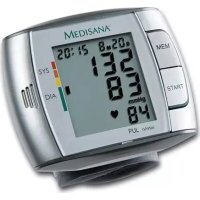
51237 - Blood pressure monitor MEDISANA - Free user manual and instructions
Find the device manual for free 51237 MEDISANA in PDF.



| Product type | Wrist blood pressure monitor, oscillometric |
| Brand | Medisana |
| Model | 51237 |
| Dimensions (L x W x H) | 83 x 72 x 30 mm |
| Weight (without batteries) | Approximately 130 g |
| Power supply | 3 V =, 2 AAA LR03 batteries (1.5 V) |
| Measurement method | Oscillometric |
| Blood pressure measurement range | 0 – 300 mmHg |
| Pulse measurement range | 30 – 180 beats/min |
| Static pressure accuracy | ± 3 mmHg |
| Pulse accuracy | ± 5 % of reading |
| Memory | 60 values with date and time |
| Display | Digital with WHO classification indicator |
| Inflation | Automatic by pump |
| Deflation | Automatic |
| Auto power-off | After approximately 1 minute |
| Language function | French, English, Spanish (voice announcement) |
| Cuff | 300 x 70 mm, circumference 14 – 19.5 cm |
| Care and cleaning | Soft cloth slightly damp (neutral soapy water); do not use alcohol or harsh products |
| Safety | Do not use on children; do not modify treatments; avoid strong electromagnetic fields; remove batteries if not used for long periods |
| Warranty | 3 years from date of purchase |
| Standards | CE 0297, EN 1060-1/1995, EN 1060-3/1997+A1:2005, directive 93/42/EEC |
| Classification | Class IIa medical device, type B |
| Operating conditions | +5 °C to +40 °C, humidity < 85 % |
| Storage conditions | -20 °C to +55 °C, humidity < 95 % |
Frequently Asked Questions - 51237 MEDISANA
User questions about 51237 MEDISANA
0 question about this device. Answer the ones you know or ask your own.
Ask a new question about this device
Download the instructions for your Blood pressure monitor in PDF format for free! Find your manual 51237 - MEDISANA and take your electronic device back in hand. On this page are published all the documents necessary for the use of your device. 51237 by MEDISANA.
USER MANUAL 51237 MEDISANA
Blood pressure measuring device HGC
Tensiometre HGC
Sfigomanometro HGC
Eşfigmomanómetro HGC
Please read carefully!
A litre attentivement s.v.p.!.
Please fold out this page and leave it folded out for quick reference.
1 Blood pressure monitor
Display
3 MEM button
4 START button
Wrist cuff
6 Battery compartment
7 Batteries low. Please replace batteries.
8 Deflate to measure symbol
9 Inflate to measure symbol
10 Pulse symbol
1 Blood pressure indicator
Date/time display
13 Display of systolic pressure
14 Display of diastolic pressure
15 Display of pulse rate
16 Memory location number
F
1.1 Thank you very much
Thank you for your confidence in us and congratulations on your purchase! You have acquired a quality product with your purchase of the Medisana HGC upper arm blood pressure monitor. To ensure the best results and long-term satisfaction with your MEDISANA HGC blood pressure monitor, we recommend that you read the following operating and maintenance instructions carefully.
1.2 Tips for your well being
WARNING
Do not take any therapeutic measures based on your own measurements! Never change the quantity of medication prescribed by your doctor!
- Irregularity of pulse or arrhythmia can lead to difficulties in recording a correct reading when measurements are taken using oscillometric blood pressure devices.
- If you should suffer from conditions such as arterial occlusive disease, please consult your doctor before using the unit.
- The unit may not be used to check the heart rate of patients with a pacemaker.
- Pregnant patients should take their own personal state of health into consideration and take all necessary precautions before using the unit. If in doubt, consult your doctor.
- Please take the following measures if anything untoward should happen such as pain in the wrist or other discomfort: Press the START button 4 to deflate the cuff immediately. Loosen the cuff and remove it from your wrist. Please contact either your dealer or MEDISANA directly.
- Patients with a weak pulse wave should raise their arm and open and close their hand around 10 times before taking a reading. This exercise optimizes the pulse wave and the measuring process.
1.3 Important considerations
- The unit is only to be used for the specific purpose described in these operating instructions.
- Any misuse will void the warranty.
- The unit is intended for domestic use only.
- On the rare occasion of a fault causing the cuff to remain fully inflated during measurement, open the cuff immediately.
- Do not use the unit near to equipment emitting a strong electric or magnetic field, such as radios. This may impair the correct functioning of the unit.
- Do not let children operate the unit. Medical products are not toys!
- If a fault occurs, do not try to repair the unit yourself. Attempts to do so will void the warranty. Refer all servicing to authorized service personnel.
1.4 Items supplied and packaging
- Protect the unit from moisture. Should moisture enter the unit, remove the batteries and stop using it immediately. In this case, please contact either your dealer or MEDISANA directly. You can find details of how to contact us on the address page.
- Please be sure to include this instruction manual if the unit is passed on to third parties.
Please ensure that the package contents are complete.
These are as follows:
1 MEDISANA Blood pressure monitor HGC
- 1 Storage box - 2 Batteries (AAA type, LR03) 1,5V
- 1 Operating instructions
The packaging can be reused or recycled. Please dispose properly of any packaging material no longer required. If you notice any transport damage during unpacking, please contact your dealer without delay.

WARNING
To avoid risk of suffocation, keep packaging film away from children!
2.1 What is blood pressure?
Blood pressure is the pressure created in the blood vessels by each heart beat. When the heart contracts (= systole) and pumps blood into the arteries, it brings about a rise in pressure. The highest value is known as the systolic pressure and is the first value to be measured.
When the cardiac muscle relaxes to take in fresh blood, the pressure in the arteries also falls. Once the arteries are relaxed, a second reading is taken – the diastolic pressure.
2.2 How is blood pressure measured?
The HGC is a blood pressure monitor intended for measuring blood pressure on the wrist. The measurement is carried out by a microprocessor, which, via a pressure sensor, measures fluctuations in pressure resulting from the inflation and deflation of the cuff over the artery.
2.3 Why should you take your blood pressure at home?
MEDISANA has had many years of experience in the field of blood pressure measurement. The high precision of MEDISANA devices has been confirmed by clinical tests, carried out according to international standards. One strong argument in favour of taking blood pressure at home is the fact that the readings are taken in familiar surroundings under relaxed conditions. The most important reading is the so-called "baseline value", the one taken before breakfast, directly after getting up in the morning. As far as it is possible, you should always try to take your blood pressure at the same time and under the same conditions each day.
This ensures comparable results and helps in detecting the first signs of high blood pressure. If high blood pressure remains undetected, it increases the risk of further cardiovascular diseases.
THEREFORE WE RECOMMEND:
Take a blood pressure reading daily and on a regular basis, even if you are experiencing no apparent complaints.
2.4
Blood pressure classification
The following table shows the classification of high and low blood pressure, without taking age into consideration. This blood pressure assessment scale corresponds to the guidelines of the World Health Organisation (WHO).
Low blood pressure Normal blood pressure
(green display area 11)
systolic below < 100 systolic 100-139
diastolic below < 60 diastolic 60-89
Types of high blood pressure
mild hypertension medium hypertension serious hypertension (yellow (orange (red
display area 1) display area
1) display area
11)
systolic 140 - 159 systolic 160 - 179 systolic
180
diastolic 90-99 diastolic 100-109 diastolic
410

WARNING
Blood pressure that is too low represents just as great a health risk as blood pressure that is too high! Fits of dizziness may lead to dangerous situations arising (e.g. on stairs or in traffic)!
2.5
Fluctuations in blood pressure
There are many factors that can influence blood pressure. Readings can be affected by stress, fear, heavy physical exertion or the time of day at which they are taken. Your personal blood pressure values are subject to considerable fluctuation during the course of the day and the year. These fluctuations are particularly pronounced in the case of patients suffering from hypertension. Blood pressure is usually at its highest during physical exertion and at its lowest at night when asleep.
2.6
Influencing and evaluating readings
- Measure your blood pressure several times, then record and compare the results. Do not draw any conclusions from a single reading.
- Your blood pressure readings should always be evaluated by a doctor who is also familiar with your personal medical history. When using the unit regularly and recording the values for your doctor, you should visit the doctor from time to time to keep him updated.
- When taking readings, remember that the daily values are influenced by several factors. Smoking, consumption of alcohol, drugs and physical exertion influence the measured values in various ways.
Measure your blood pressure before meals. - Before taking readings, allow yourself at least five minutes rest.
3.1 Inserting / removing batteries
- If the systolic and diastolic readings seem unusual (too high or too low) on several occasions, despite correct use of the unit, please inform your doctor. This also applies to the rare occasions when an irregular or very weak pulse prevents you from taking readings.
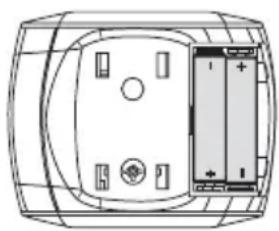
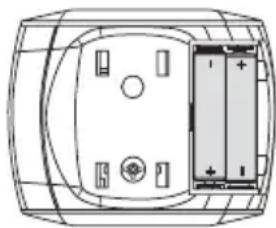
Insertion: Open the battery compartment 6 on the underside of the unit by exerting slight pressure whilst sliding it simultaneously in the direction of the arrow. Insert the two batteries (type AAA LR03) supplied. Remember to insert the batteries as indicated in the diagram in the battery compartment. Replace the lid, pressing it until it snaps into place.
Removal: When the battery symbol appears in the display, please replace the batteries with new ones.
The display showing the month will flash after inserting the batteries for the first time. Set the date and time as described in 3.2 Set Date and Time. Please note that the date and time will have to be reset each time new batteries are inserted. The previous measuring results are saved.
BATTERY SAFETY INFORMATION
- Keep away from children! - Do not recharge!
- Do not short-circuit! - Do not throw into fire!
- Do not dispose of old batteries with your household waste, but dispose of them at a battery collection station at a recycling site or in a shop!
3.2 Setting time and date
- The date and time can be set with the device switched off. Press the START button 4 and the MEM button 3 simultaneously. The month appears on the display (flashing). To change the month, press the MEM button 3 repeatedly until the required value is displayed. The value auto-repeats if the MEM button 3 is held down. Pressing the START button 4 again displays the values for month, day, hour and minute (flashing). Press the MEM button 3 to change the values.
- After the fifth press of the START button 4 the numbers in the display stop flashing. The time setting is now complete.
- The date and time must be reset if the batteries are replaced.
3.3 Adjusting the voice function
The voice function can be adjusted with the device switched off, i.e. with just the date and time displayed. Press and hold down the MEM button 3 until the selected language appears on the display (e.g. L1).
$$ L 1 = \text {E n g l i s h} $$
$$ L 3 = \text {S p a n i s h} $$
$$ L 5 = \text {F r e n c h} $$
$$ L 2 = \text {G e r m a n} $$
$$ L 4 = D u t c h $$
$$ L 6 = I t a l i a n $$
L0 = Language function switched off
The device speaks the language setting, and changes the display and the announcement to the next language if the MEM button 3 is held down. The selected language can be changed by releasing the MEM button 3 as soon as the language that you require is displayed or spoken. The selected volume, which is indicated by flashing bars, can be modified by pressing the MEM button 3 again and holding it down until the required volume is indicated - the higher the bar, the louder the volume. The bar stops flashing and the display switches back to the time display.
4.1
Fitting the cuff
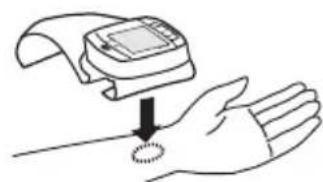
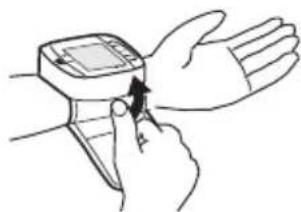
Attach the clean cuff to the left wrist which is free from clothing with the palm of the hand facing upwards.
There should be a gap of approx. 1 cm between the cuff and the palm of the hand.
Press the Velcro tape firmly around the wrist ensuring that it is not so tight that it could falsify the measured result.
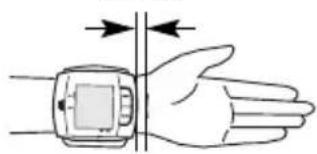
ca. 1 cm
4.2
Correct position for taking readings
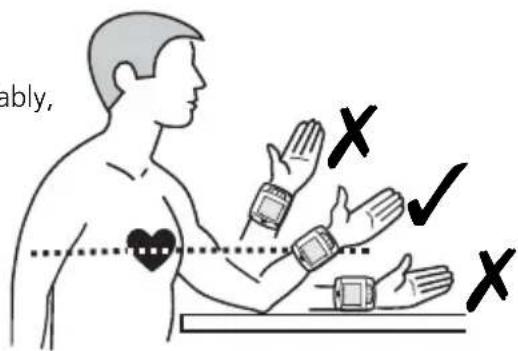
- Carry out the measurement whilst seated.
Relax your arm and place it comfortably, on a table for instance. - Lift the wrist so that the pressure cuff is at heart height.
- Keep still during the measurement: do not move and do not talk as this may alter the measurements.
4.3 Taking blood pressure readings
- Switch the unit on by pressing the START button 4
- If the START button 4 is pressed, a beep is heard and all display characters are shown (display test). This test can be used to check that the display is indicating properly and in full. The display shows the values from the previous measurement. Information will be given in the language set if the language function is switched on. If no measurement has been taken, zeroes will appear next to the date and time.
- The unit is ready for measurement, the number 0 is displayed, the start of measurement will be announced if the language function is switched on. It automatically inflates the cuff slowly in order to measure your blood pressure. The pressure on the display changes continuously during the time it continues to inflate.
- The unit inflates the cuff until sufficient pressure has built up for a measurement. Then the unit slowly releases air from the cuff and carries out the measurement.
- When the measurement is finished, the cuff is deflated completely. The systolic and diastolic blood pressure and the pulse value with the pulse symbol appear on the display 2. The blood pressure indicator 11 flashes next to the relevant coloured bar depending on the WHO blood pressure classification (see page 13). The measured results will be announced in the language set if the language function is switched on.
- The measured values are stored automatically. Up to 60 measured values with date and time may be stored in the memory.
4.4 Switching off the unit
The unit has an automatic switch-off function. The unit switches off automatically after a minute if no buttons are pressed.
The unit may also be switched off using the START button 4. The time and the date are constantly shown in the display.
5.1 Displaying stored results
The memory of your blood pressure monitor will hold up to 60 measurements (blood pressure and pulse with time and date). The measured values are stored automatically. Press the MEM button 3 to call up the saved measured values. The saved data will appear on the display. Initially the number of memory locations occupied will appear then the values of the most recently saved measurement including the flashing blood pressure indicator 11 will be displayed. If the voice function has been activated, the device speaks the memory location number, together with the saved blood pressure and pulse values and the blood pressure assessment as per the scale in the World Health Organisation guidelines (see pg. 13).
Repeatedly pressing the MEM button 3 displays the respective values measured previously. In memory recall mode, the unit will switch off automatically after approx. 120 seconds if the last entry has been reached and no button is pressed. Memory recall mode can be exited at any time by pressing the START button 4, which will also switch the unit off.
If all 60 memory locations in the memory are occupied, a new measured value is saved whilst the oldest value is deleted.
5.2 Deleting memory
If you are in memory recall mode, press and hold the MEM button 3 for approximately 8 seconds. All measured data stored will be deleted automatically after three beeps. Only noughts will be shown on the display instead of the measured values.
6.1 Troubleshooting
The battery change symbol appears in the display
- The batteries are too low or empty. Replace both batteries with new 1.5 V AAA LRO3 batteries.
Erratic measurements being displayed
- Cuff incorrectly fitted or not tight enough. Fit cuff correctly and tighten.
- You have changed position or the cuff has moved during the measurement. Keep still and do not move your arm or the cuff.
- You have an irregular heartbeat. Even if your heartbeat is only slightly irregular, repeat the measurement. The unit is not suitable for people with an extremely irregular heartbeat.
- You have spoken during the measurement, you are nervous or you are excited. Do not speak and breathe deeply two or three times in order to relax.
- You are not in the corrected seated position. Please assume the correct position when taking the measurement.
- A problem occurred during inflation or during the measurement. Repeat the measurement.
"EE" appears in the display
- The unit has not been inflated enough. Repeat the measurement
- A problem occurred during inflation or during the measurement. Repeat the measurement.
No display or display locked
- No batteries have been inserted, batteries wrongly inserted or batteries are completely empty. Insert batteries, check battery position or replace with new batteries.
- A malfunction or fault has occurred. Briefly remove the batteries and then replace them.
Please contact the service centre if the error message appears again when the measurement is repeated.
6.2 Care and maintenance
- Remove the batteries before cleaning the unit.
- Never use strong detergents or hard brushes.
- Clean the unit using a soft cloth lightly moistened with a mild soapy solution. Never use abrasive cleaning agents or alcohol.
- Do not allow any water to get into the unit. Do not use the unit again until it is completely dry.
- Remove the batteries from the unit if you do not wish to use it for an extended period of time, otherwise there is a risk of battery leakage.
- Do not expose the unit to direct sunlight, and protect it from dust and moisture.
- Only inflate the cuff when it is in position around the upper arm.
- The unit is best kept in the storage box included in your purchase and should preferably be stored in a clean dry place.
- Servicing and calibration (applies to commercial use): The unit has been calibrated by the manufacturer for a period of two years' use. In the case of commercial use, the unit must be serviced and recalibrated at least once every two years. This calibration will be charged for and can be carried out by an appropriate authority or an authorised service centre - in accordance with the regulations for users of medical equipment.
6.3 Disposal

This product must not be disposed together with the domestic waste.
All users are obliged to hand in all electrical or electronic devices, regardless of whether or not they contain toxic substances, at a municipal or commercial collection point so that they can be disposed of in an environmentally acceptable manner.
Please remove the batteries before disposing of the equipment. Do not dispose of old batteries with your household waste, but dispose of them at a battery collection station at a recycling site or in a shop.
Consult your municipal authority or your dealer for information about disposal.
6.4 Directives / Norms
This blood pressure monitor meets the requirements of the EU standard for non-invasive blood pressure monitors. It is certified in accordance with EC Guidelines and carries the CE symbol (conformity symbol) "CE 0297". The blood pressure monitor corresponds to European standards EN 1060-1/1995 and EN 1060-3/1997+A1:2005. The specifications of EU Guideline "93/42/EEC of the Council Directive dated 14 June 1993 concerning medical devices" are met and likewise those of EU Guideline 89/336/EEC.
Device classification: IIa, type B
Intended use:
This unit is suitable for non-invasive blood pressure measurement in adults (i.e., suitable for external use).
6.5
Specifications
Name and model : MEDISANA blood pressure monitor HGC
Display system : Digital display
Memory slots : 60
Measuring technique : Oscillometric
Power supply : 3 V= , 2 x 1,5 V Batteries AAA LRO3
Blood pressure measuring range
: 0 - 300 mmHg
Pulse measuring range : 30 – 180 beats / Min.
Maximum error tolerance for static pressure
:±3mmHg
Maximum error tolerance for pulse rate
: ± 5 % of the reading
Pressure generation : Automatic, using pump
Deflation : Automatic
Automatic switch-off: After approx. 1 minute
Operating conditions: +5^ to +40^
< 85% humidity
Storage conditions: -20^ to +55^
< 95 % humidity
Dimensions: 83mm× 72mm× 30mm
Cuff size : 300 x 70 mm
circumference 14 - 19,5 cm for adults
Weight : Approx. 130 g without batteries
Article number : 51230
EAN number : 4015588512308
C€ 0297
We reserve the right to make technical and design changes in the course of continuous product improvement.
7.1 Warranty and repair terms
Please contact your dealer or the service centre in case of a claim under the warranty. If you have to send in the unit, please enclose a copy of your receipt and state what the defect is.
The following warranty terms apply:
- The warranty period for MEDISANA products is three years from date of purchase. In case of a warranty claim, the date of purchase has to be proven by means of the sales receipt or invoice.
- Defects in material or workmanship will be removed free of charge within the warranty period.
- Repairs under warranty do not extend the warranty period either for the unit or for the replacement parts.
- The following is excluded under the warranty:
a. All damage which has arisen due to improper treatment, e.g. non-observation of the user instructions.
b. All damage which is due to repairs or tampering by the customer or unauthorised third parties.
c. Damage which has arisen during transport from the manufacturer to the consumer or during transport to the service centre.
d. Accessories which are subject to normal wear and tear.
- Liability for direct or indirect consequential losses caused by the unit are excluded even if the damage to the unit is accepted as a warranty claim.
MEDISANA AG
Itterpark 7-9
40724 Hilden
Tel.: +49 (0) 2103 / 2007-60
Fax: +49 (0) 2103 / 2007-626
The service centre address is shown on the last page.
1.1
Merci
INSTRUCTIONS DE SECURITE RELATIVES AUX PILES:
$$ L 2 = \text {a l l e m a n d} $$
$$ L 4 = \text {n e r l a n d a i s} $$
$$ L 6 = i t a l i e n $$
$$ L O = \text {f o n c t i o n} $$
6.4 Directives / Normes
3.1 Colocar / retiring as pilhas
$$ L 2 = s a k s a $$
$$ L 3 = e s p a n j a $$
$$ L 4 = h o l l a n t i $$
$$ L 5 = \text {r a n s k a} $$
$$ \mathbf {L 6} = \text {i t a l i a} $$
Xaunn iieon Duoioloyikniieon
(npaovoc topeac eV8eIeNs 1)
< 100 (204
δiaσtoλn<60 δiaσtoλn 60-89
Eiδn uψnλnc πεονc
City Business Centre 41 St.
Olav's Court Surrey Quays
London SE16 2XB
Tel.: +44/207-2378899
Fax: +44/207-2522299
eMail: info@medisana.co.uk
Internet: www.medisana.co.uk
F/NL/B/L
MEDISANA Benelux NV
Euregiopark 18
MEDISANA HEALTHCARE, S.L.