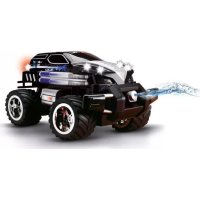
Agent Black Watergun - Toys CARRERA - Free user manual and instructions
Find the device manual for free Agent Black Watergun CARRERA in PDF.



| Brand | Carrera |
| Model | Agent Black Watergun |
| Category | Radio-controlled toys |
| Product type | RC vehicle with water gun (Watergun) |
| Vehicle power supply | Rechargeable lithium-ion battery (included) |
| Remote control power supply | 1 9V battery (not included) |
| Charging time | About 20 minutes cooling before full recharge |
| Maximum speed | 18 km/h |
| Main functions | Forward/backward drive, left/right steering, high-speed turbo, water gun, speed selector (fast/training), frequency selection (A/B/C) |
| Remote control range | Not specified (deployable antenna) |
| Water tank capacity | Not specified (filling via bottle) |
| Maintenance and cleaning | Clean after each run; do not use harsh solvents |
| Safety instructions | Do not drive on roads, under high-voltage lines, in rain/snow, on grass; max jump height 15 cm; do not carry people or animals; take a 20-minute break after 2 battery charges |
| Spare parts and repairability | Available at carrera-rc.com |
| Warranty | 24 months for material and manufacturing defects, under conditions |
| Recommended age | Not suitable for children under 36 months (contains small parts) |
| Minimum operating dimensions | Clear area of at least 2.5 x 2.5 meters |
| Number of channels | 3 (A, B, C) to avoid interference |
Frequently Asked Questions - Agent Black Watergun CARRERA
User questions about Agent Black Watergun CARRERA
0 question about this device. Answer the ones you know or ask your own.
Ask a new question about this device
Download the instructions for your Toys in PDF format for free! Find your manual Agent Black Watergun - CARRERA and take your electronic device back in hand. On this page are published all the documents necessary for the use of your device. Agent Black Watergun by CARRERA.
USER MANUAL Agent Black Watergun CARRERA
GB USA Assembly and operating instructions
natural_image
Black-and-white product photo showing a multi-rotor car, battery pack, and remote control device (no visible text or symbols)| Montage- und Betriebsanleitung 4Technische und designbedingte Änderungen vorbehalten | DGBUSA |
| Assembly and operating instructions 8Subject to technical or design-related modification | F |
| Instructions de montage et d’utilisation 12Sous réserve de modifications techniques et des véhicules | E |
| Instrucciones de montaje y de servicio 16Reservado el derecho a modificaciones técnicas o debidas al diseño | I |
| Istruzioni per il montaggio e l’uso 20Con riserva di modifiche tecniche e dovute al design | NL |
| Montage- en gebruiksaanwijzing 24Technische en door het design bepaalde wijziglingen voorbehouden | P |
| Instruções de montagem e modo de utilização 28Sujeito a alterações de design e técnicas | S |
| Monterings- och bruksanvisning 32Tekniska och designrelaterade ändringar förbehållna | FIN |
| Asennus- ja käyttöohje 36Oikeudet teknisiin ja muotoilumuutosten aiheuttamiin muutoksiin pidätetään | PL |
| Instrukcja montażu i obsługi 40Zastrzega się prawo do zmian technicznych oraz uwarunkowanych wzornictwem | H |
| Szerelési és használati utasítás 44A műszaki és formatervezésből eredő módosítások joga fenntartva | SLO |
| Navodila za montażo in uporabo 48Tehnično in oblikovno pogojene spremembe pridržane | CZ |
| Návod k montáži a obsluze 52Technické a designem podmíněné změny vyhrazeny | N |
| Montajse- og bruksanvisningDet tas forbehold om endringer i teknikk og design | 56 |
| Monterings- og driftsvejledningTekniske og designmæssige ændringer forbeholdes | DK |
| Οδηγίες συναρμολόγησης και λειτουργίαςΜε την επιφύλαξη τεχνικών και σχεδιαστικών αλλαγών | GR |
Sehr geehrter Kunde
natural_image
Black-and-white photo of a Lieferumfang robotic car with attached remote control and power cord (no text or symbols on main objects)natural_image
Electric battery with a terminal and a checkmark indicating disassembly (no text or symbols on the battery itself)natural_image
Illustration of a silver car with a small toy car and a warning sign (no text or symbols on the car itself)natural_image
Black-and-white illustration of a vehicle on grass with a warning sign (no readable text or symbols)natural_image
Black and white photo of a moving car on snowy terrain with a warning triangle (no text or symbols)natural_image
Illustration of a small toy car being adjusted with a hand (no text or symbols)natural_image
Close-up of a hand pressing down on a computer mouse (no text or symbols visible)natural_image
Diagram showing a wall-mounted power supply connected to a battery pack, with an inset close-up of its components (no text or symbols visible)natural_image
Illustration of a hand holding a tool interacting with a four-wheeled vehicle chassis (no text or symbols visible)natural_image
Top-down view of a small wheeled vehicle with visible wheels and a close-up inset showing mechanical components (no text or symbols)natural_image
Close-up of a hand using a screwdriver to apply material to a black electronic component (no text or symbols visible)natural_image
Mechanical component diagram showing a rotating shaft and wheel assembly (no text or symbols)natural_image
Illustration of a toy car with five wheels and a winding path (no text or symbols)natural_image
Close-up of a beige console with two buttons and a display screen (no visible text or symbols)Full Function
natural_image
Close-up of a Gaiaomi network interface with two USB flash units and a central hub (no text or symbols visible)natural_image
Close-up of a black handheld device with two circular ports and a separate black module, no visible text or symbols.natural_image
Close-up of a game controller with attached cable and connector, shown in a close-up inset (no text or symbols visible)natural_image
Top-down view of a black toy car with four wheels and a handle, no visible text or symbolsnatural_image
Diagram of a car's internal battery with a hand inserting a plug into the battery (no text or symbols visible)natural_image
Close-up of a hand holding a camera lens with a black tab (no text or symbols visible)Congratulations on purchasing a Carrera RC model car, manufactured in accordance with the latest technology. As it is our constant endeavour to develop and improve our products, we reserve the right to make modifications, either of a technical nature or with respect to features, materials, and design, at any time, and without prior notice. For this reason, no claims will be accepted for any slight deviations in your product from the data and illustrations contained in these instructions. These operating and assembly instructions are an integral part of the product. Non-observance of these operating instructions and the safety instructions they contain will render the guarantee null and void. These instructions are to be kept for future reference and in the event that the product is passed on to a third party.
Guarantee conditions
A Carrera product is built to high technical standards and is to be treated with care. Please ensure that you observe all the instructions contained in this guide. All components have been subjected to careful inspection (technical modifications and alterations to the model for the purpose of product improvement are reserved).
Should any faults nevertheless occur, guarantee is assumed within the scope of the following conditions:
The guarantee covers demonstrable material or manufacturing defects that existed at the time that the Carrera product was purchased. The guarantee period is 24 months beginning with the date of purchase. The guarantee does not extend to wearing parts, damage caused by improper treatment or use, or unauthorised intervention. Repair may only be performed by Stadlbauer Marketing + Vertrieb GmbH itself or by a company it has authorised to do so. Within the scope of this guarantee, either the product as a whole or only the defective components will be replaced or equivalent substitution performed, as deemed appropriate by Stadlbauer Marketing + Vertrieb GmbH. The guarantee does not cover transport, packaging or travel costs or any damage for which the buyer is responsible. These costs are to be covered by the buyer. Guarantee claims will only be accepted from the original purchaser of the Carrera product.
Guarantee claims can only be accepted when:
- The card has been filled in properly and sent in together with the defective Carrera product and the purchase receipt/invoice/cash-register receipt.
- No unauthorised alterations have been made by the buyer to the guarantee card.
- The toy has been treated in accordance with the operating instructions and subjected to its intended use.
- The damage/faulty operation is not due to acts of God or normal wear and tear.
Guarantee cards cannot be replaced.
Note for EU countries: Reference is hereby made to the seller's statutory guarantee obligation, to the extent that this guarantee obligation is not restricted by the product guarantee.
Declaration of conformity
Stadlbauer Marketing + Vertrieb GmbH hereby declares that this model including the controller conforms with the fundamental requirements of the following EC directives: EC Directives 2009/48 and 2004/108/EC regarding electromagnetic compatibility and the other relevant regulations of Directive 1999/5/EC (R&TTE).
The original declaration of conformity can be requested from carrera-rc.com.

Warning!

This toy contains small parts small parts which can be swallowed and is therefore not suitable for children under the age of 36 months. Caution danger of pinching during operation! Remove all packaging materials and
wire fastenings before handing the toy over to the child. Please retain the packaging and address for information and in the event of any questions.
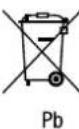
I his symbol, showing refuse bins with a cross through them, denotes that empty batteries, rechargeable batteries, button cells, rechargeable battery packs, equipment batteries, disused electrical equipment, etc. should not be
disposed of in domestic refuse, as they are harmful to the environment and health.
Please help to preserve environment and health and talk to your children about the correct disposal of used batteries and disused electrical equipment. Batteries and disused electrical equipment should be handed in to the usual collection points where they can be properly recycled. Do not mix dissimilar battery types or employ new and used batteries together. Empty batteries should be removed from the product. Do not attempt to recharge non-rechargeable batteries. Hechargeable batteries should only be charged under adult super vision. Exhausted batteries are to be removed from the toy. Rechargeable batteries should be removed from the product before charging. Supply terminal are not to be short-circuited. Only use the batteries recommended or equivalent types. If in regular use the charger must be examined for damage to the cord, plug, covers and all other parts. If any signs of damage are found the charger may only be used again after repair work has been completed.
Requirement for FCC Part 15
Warning: Changes or modifications not expressly approved by the party responsible for compliance could void the user's authority to operate the equipment.
Note: This equipment has been tested and found to comply with the limits for a Class B digital device, pursuant to Part 15 of the FCC Rules. These limits are designed to provide reasonable protection against harmful interference in a residential installation. This equipment generates, uses and can radiate radio frequency energy and, if not installed and used in accordance with the instructions, may cause harmful interference to radio communications.
However, there is no guarantee that interference will not occur in a particular installation. If this equipment does cause harmful interference to radio or tele vision reception which can be determined by turning the equipment off and on, the user is encouraged to try to correct the interference by one or more of the following measures:
• Reorient or relocate the receiving antenna.
- Increase the separation between the equipment and receiver,
- Connect the equipment into an outlet on a circuit different from that to which the receiver is connected.
- Consult the dealer or an experienced radio/TV technician for help.
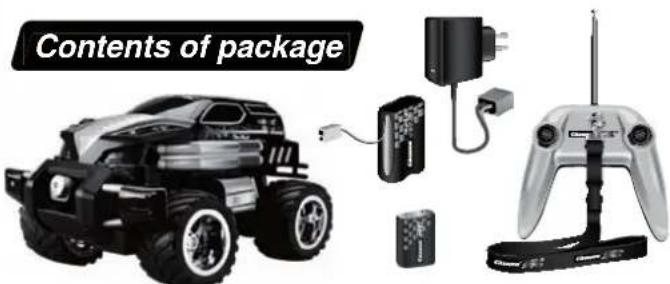
1x Agent Black Power Watergun
1x Controller
1x Lanyard
1x Battery Chargei
1x Rechargeable Battery
1x Antenna
1x 9 V Block Battery
(non-rechargeable
Safety instructions
natural_image
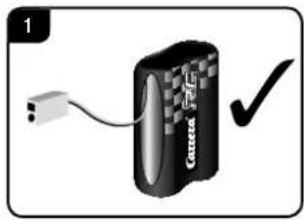
Electric battery with a terminal and a checkmark indicating disassembly (no text or symbols on the battery itself)A Carrera RC vehicle is a remote-controlled model car that uses special rechargeable batteries for this purpose. Only original Carrera RC Li-Ion rechargeable batteries may be used.
natural_image
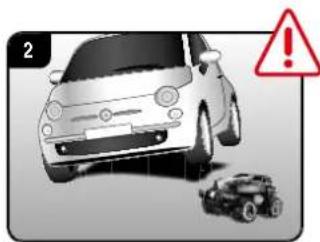
Illustration of a silver car front view with a small toy car and a warning sign (no text or symbols on the car itself)The Carrera RC vehicle is designed for hobby use only and may only be operated on tracks and in spaces especially intended for this purpose. CAUTION! Do not use the Carrera RC vehicle in road traffic.
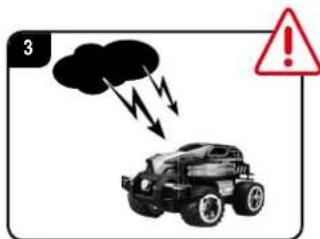
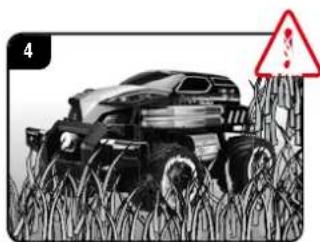
Do not operate the car beneath overhead high-voltage cables or broadcasting masts or during a storm! Atmospheric disturbances can affect the operation of the vehicle. When there a large temperature differences between your cars garage and the running track, please wait until the vehicle has had time to acclimatise. This will help prevent condensation forming and the possibility of malfunctions resulting Never operate the product on grass surfaces. There is the risk of grass hindering the movement of the axles, which can lead to the motor overheating. Do not use the Carrera RC vehicle for transporting goods, persons or animals.
natural_image
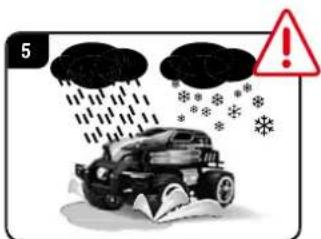
Black-and-white illustration of a vehicle on grass with a warning sign (no readable text or symbols)Never use the Carrera RC vehicle outdoors during rain or snowfall. The car must not be run through water, puddles and snow, and must always be kept stored in a dry place.
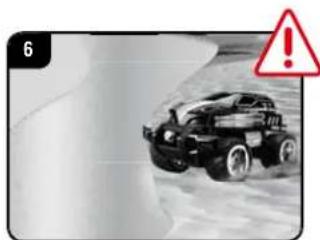
Never operate the vehicle near rivers, ponds or lakes, to avoid the risk of the Carrera RC car falling into the water. Avoid running on courses which are laid exclusively with sand.
natural_image
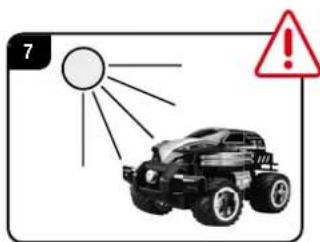
Black and white photo of a moving car on a snowy surface with a red warning triangle (no text or symbols)Do not expose the Carrera RC vehicle to direct sunlight. To avoid the electronics in the car overheating, when temperatures are above 35^ , regular short pauses in operation are essential.
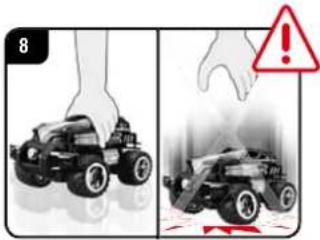
Always place the car on the floor by hand. Never throw the car on the floor from a standing position.
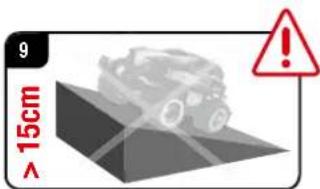
Avoid jumping from jumps or ramps higher than 15 cm (0.49 ft.).
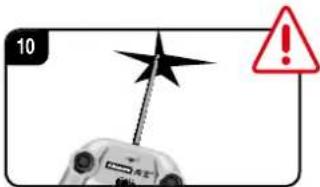
Handle the tip of the antenna with care. Danger of injury!
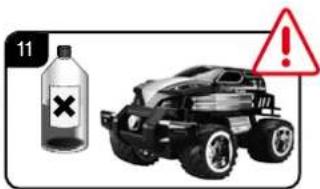
Never use strong solvents for cleaning the car.
To avoid malfunctions to the control system resulting in uncontrolled operation of the Carrera HC vehicle, check that the controller batteries and the rechargeable batteries in the vehicle have sufficient charge.
natural_image
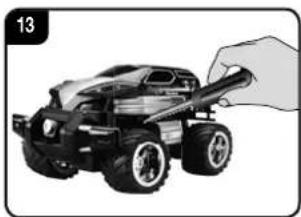
Illustration of a small toy car being adjusted with a hand (no text or symbols)The Carrera HC vehicle must be inspected before and after operation, each time it is used, to ensure that it has not become disassembled. Any screws or nuts that may have become loosened during operation must be tightened.
Mounting the antenna
natural_image
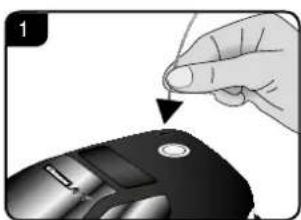
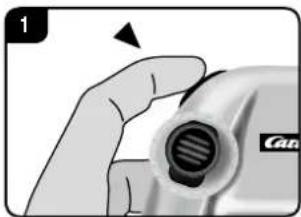
Close-up of a hand pressing down on a computer mouse with a knob (no text or symbols visible)Push the antenna cable through the antenna tube and then mount this to the Carrera RC vehicle. Secure the end of the antenna cable with a Carrera RC sticker from the logo sheet.

Charging the rechargeable battery
natural_image
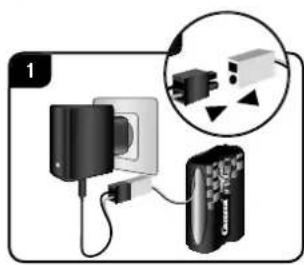
Diagram showing a wall-mounted power supply connected to a battery pack, with an inset close-up of its plug (no text or symbols visible)First connect the Carrera RC rechargeable battery to the battery charger supplied. The connection terminals between the battery and the charger are designed to prevent connection with the wrong polarity. Connect the charger to a power source.
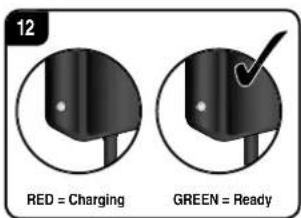
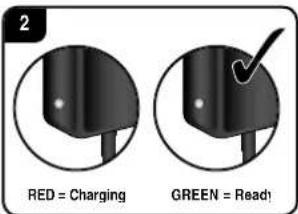
When the battery is properly connected and charging normally, the red LED is constantly lit. Once the battery is fully charged, the red LED switches to green.
The battery can now be disconnected and installed in the Carrera RC car.
The car is now ready for use.
After use, the battery must be allowed to cool down for at least 20 minutes before it can be fully recharged. Failure to observe this pause may damage the battery.
Installing the rechargeable battery
natural_image
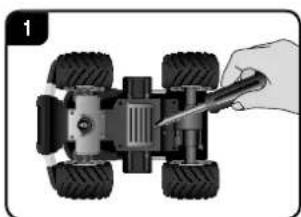
Top-down illustration of a small wheeled vehicle with four wheels and a hand holding a screwdriver (no text or symbols)Using a screwdriver, remove the cover of the battery compartment in the Carrera RC car.
natural_image
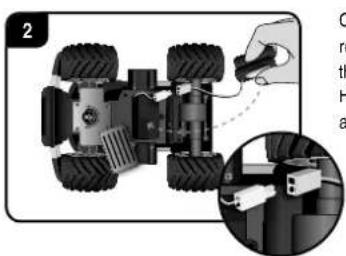
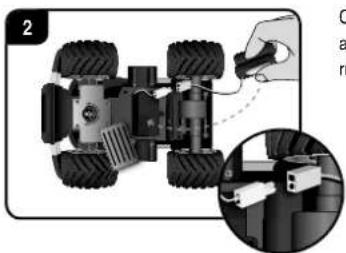
Top-down view of a small wheeled vehicle with visible tires and wheels, showing a close-up of the engine compartment (no text or symbols)Connect the end of the cable from the Carrera RC vehicle with the charged battery. Put the battery in place. Replace the compartment cover using a screwdriver.
Inserting the 9 V block battery
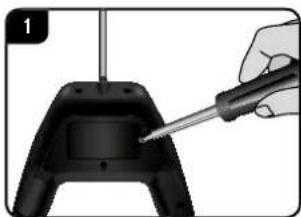
natural_image
Close-up of a hand using a screwdriver to adjust a black game controller (no text or symbols visible)Unscrew the cover of the battery compartment in the controller and insert the 9 V block battery.
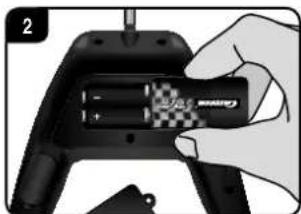
natural_image
Hand holding a black handheld device with a checkered button and a small battery (no visible text or symbols)When inserting the 9 V block battery, ensure that the polarity is correct. Replace the cover using a screwdriver.
an drive the car
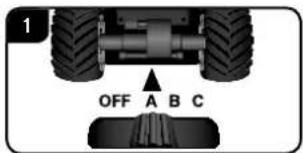
Make sure that nobody in your vicinity is using the same frequency.
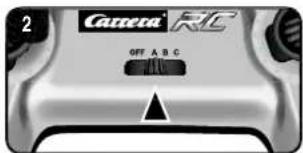
To avoid this and to ensure that your vehicle will receive the signal from your controller, make sure that both your car and the controller are set to the same frequency (A/B/C)
The use of different channels allows three vehicles to be operated at the same time.
Pull out the antenna of the controller to its full extent.
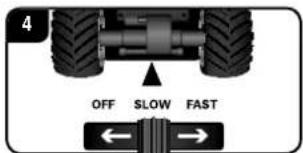
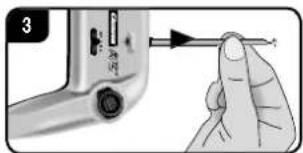
Switch on the Carrera RC car using the ON/OFF switch. Your Carrera RC car has two speeds.
The ON/OFF switch is also used to select the training or indoor mode.
natural_image
Mechanical component diagram showing a rotating shaft and wheel assembly with no visible text or symbolsAdjusting the steering
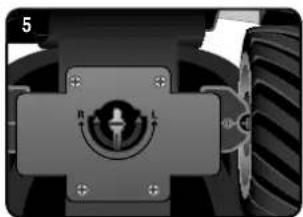
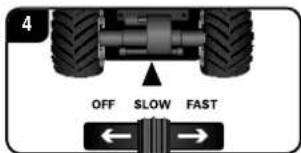
If the Carrera RC vehicle is found to pull towards the left or right while moving, use the adjuster control shown in the illustration to adjust the car's track precision
Let's practise!
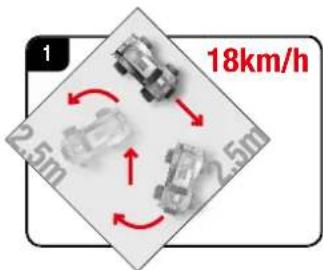
CAUTION! This vehicle reaches speeds up to 18 km/h (11 mph). Practice on an empty surface at least 2.5 metres (8.2') square. When first starting, be very careful when operating the gas pedal, as the car reacts very quickly. Practice running slowly for at least two to three full charges of the battery before you start practising faster manoeuvres.
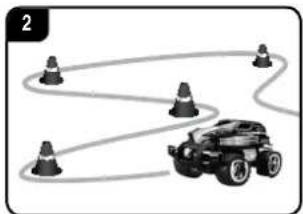
natural_image
Illustration of a toy car with five wheels and a winding path, no text or symbols presentNow it's time to practise! Set up a Carrera RC vehicle racing track in a large empty area, using comerposts, empty cans, or similar objects. The basic technique to adopt when operating a Carrera RC is to drive fast on the straight sections and to slow down in the curves.
- Never run more than 2 batteries down one after the other. After running down two
fully-charged batteries, a pause in running for at least 20 minutes is essential. - Avoid constant motor operation
-
If the car switches itself off several times one after another, the battery is de Please recharge the battery.
-
After 30 minutes inactivity, the controller and vehicle switch off automatically. To restart, switch the ON/OFF switch on the controller & the car to OFF and then back to ON.
- To switch off after use, follow the steps in the reverse order.
• After use, remove or disconnect the battery. - Clean the Carrera RC car after use.
Controller functions
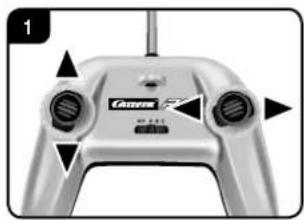
natural_image
Close-up of a silver-colored gaming controller with two black buttons and a 'Cassava' brand logo (no readable text beyond branding)Full Function
You can steer the car in any direction using the joysticks:
Joystick on left:
forwards/backwards
Joystick on right:
left/right
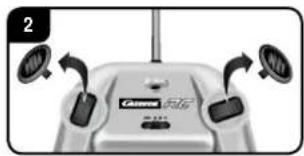
The joysticks are removable.
Alternatively, the vehicle can be controlled with a rocker.
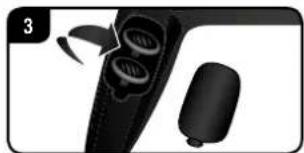
natural_image
Close-up of a black handheld device with two circular ports and a cylindrical base, no visible text or symbolsThe joysticks can be stored in the special compartment at the back of the controller.
natural_image
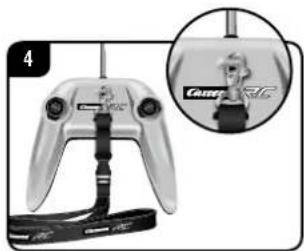
Close-up of a handheld gaming controller with attached cable and a small inset showing a close-up of the device (no visible text or symbols)Attach the lanyard to the eyelet on the controller and let the controller hang from your neck.
Troubleshooting
Putting the water gun into service
natural_image
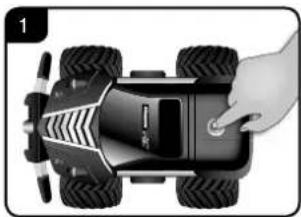
Top-down view of a black toy car with four wheels and a hand adjusting the side panel (no text or symbols visible)To fill the Agent Black water tanks, press the button on the roof of the car. Then the compartment with the filler nozzles will open.
natural_image
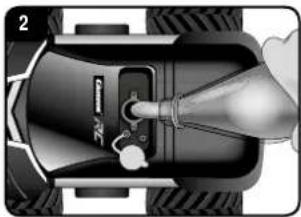
Diagram of a car engine plug with a valve and sensor, showing internal components without any text or symbols.Using a bottle, carefully fill the car up with water.
Caution: do not use any other liquid!
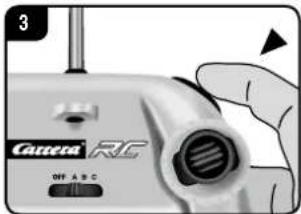
You activate the water gun by pressing the button on the right-hand-side of the controller.
High Speed Turbo Button
natural_image
Close-up of a hand holding a camera lens with a black screw and a 'Can' logo (no text or symbols on the lens itself)Press the button on the left-hand side of the controller to actuate the High Speed Turbo function.
| Problem Cause Solution | ||
| Car does not move | Either the switch on the controller or the car is set to OFF. Switch on. | |
| There is no rechargeable battery in the car or the battery is too weak. Insert charged battery. | ||
| The car has come to a stop at an obstacle. | The voltage surge protector has switched the car off.Turn the ON/OFF switch on the car to OFF, then back to ON, and place the car on a clear surface. | |
| The battery or rechargeable battery in the transmitter or model is too weak. | Insert new battery or recharged battery. | |
| Different channel set up for car and controls. Switch to same channel. | ||
| The transmitter has switched itself off after 30 minutes. | To restart, switch the ON/OFF switch on both controller & vehicle to OFF and then back to ON.. | |
| The vehicle is very warm. | Switch both car and controller off and allow the car to cool down for about 30 minutes. | |
| Car cannot be controlled | Vehicle starts moving unintentionally. First turn on the transmitter, only then the vehicle. | |
| Transmitter antenna is defective. Extend the antenna fully. | ||
| Another RC model is using the same frequency. Change the frequency in both vehicle and controller. | ||
Should you need spare parts, you will find a complete list of the available parts under carrera-rc.com in the service area.

Chère cliente ! Cher client !
natural_image
Product image of a Honda Fourniture electric vehicle with control panel and battery components (no text or symbols on main objects)1x Agent Black Power Watergun
1x Contröleur
1x Cordon tour de cou
1x Chargeur
1x Accu
1x Antenne
1x Batterie monobloc 9 Volts (non rechargeable)
natural_image
Electric battery with a terminal and a checkmark indicating inspection or certification (no text or symbols on the battery itself)natural_image
Illustration of a silver car front and a small toy car with a warning sign (no text or symbols on the car itself)natural_image
Black-and-white illustration of a vehicle on grass with a warning sign (no readable text or symbols)natural_image
Black and white photo of a vintage car on a snowy surface with a warning triangle (no text or symbols)natural_image
Illustration of a small toy car being adjusted with a wrench (no text or symbols)natural_image
Close-up of a hand pressing down on a computer mouse with a knob (no text or symbols visible)natural_image
Diagram showing a wall-mounted power supply connected to a device via a cable, with an inset close-up of its components (no text or symbols visible)natural_image
Top-down view of a four-wheeled vehicle with a hand using a power tool to adjust the body (no text or symbols visible)natural_image
Top-down view of a small wheeled vehicle with visible wheels and a close-up inset showing mechanical components (no text or symbols)natural_image
Close-up of a hand using a screwdriver to adjust a black electronic component (no text or symbols visible)natural_image
Hand holding a black handheld device with a checkered battery and screwdriver (no visible text or symbols)natural_image
Mechanical component diagram showing a rotating shaft with radius R and length L, mounted on a frame with a tire in the background (no text or symbols)natural_image
Illustration of a toy car with four wheels and a winding path, no text or symbols presentnatural_image
Close-up of a silver-colored handheld device with two circular buttons and a central display (no visible text or symbols)Pleine fonction
natural_image
Close-up of a beige Sony 800 camera with two circular sensors and directional arrows indicating sensor placement (no text or symbols)natural_image
Close-up of a black handheld device with two circular buttons and a separate rounded object (no visible text or symbols)natural_image
Close-up of a handheld gaming controller with attached cable, shown in a close-up inset (no visible text or symbols)natural_image
Top-down view of a black toy car with four wheels and a hand adjusting the side panel (no text or symbols visible)natural_image
Top-down diagram of a car's internal components, showing a nozzle and valve assembly (no text or symbols)natural_image
Close-up of a camera with visible lens and control buttons (no text or symbols on main subject)natural_image
Close-up of a hand holding a small electronic device with a black port and striped handle (no visible text or symbols)natural_image
Black and white photo of a small wheeled vehicle with a remote control, battery pack, and charging plug (no visible text or symbols)1x Agent Black Power Watergun
1x Controlador
1x Lanyarc
1x Cargador
1x Bateria recargable
1x Antena
1x Bloque de 9 V
(no recargable)
natural_image
Electric battery with a terminal and a checkmark indicating the right-hand rule (no text or symbols on the battery itself)natural_image
Illustration of a silver car front view with a small toy car and a warning sign (no text or symbols on the car itself)natural_image
Black-and-white illustration of a vehicle on grass with a warning sign (no readable text or symbols)natural_image
Black and white photo of a car driving on a snowy surface with a warning triangle (no text or symbols)natural_image
Illustration of a small toy car being adjusted with a hand (no text or symbols)natural_image
Close-up of a hand pressing down on a computer mouse with a knob (no text or symbols visible)natural_image
Diagram showing a wall-mounted power supply connected to a device, with an inset close-up of its components (no text or symbols visible)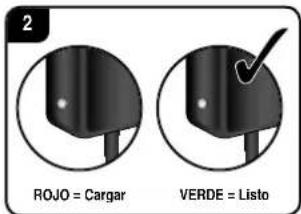
natural_image
Top-down view of a small wheeled vehicle with four wheels and a hand holding a screwdriver (no text or symbols visible)natural_image
Top-down view of a small wheeled vehicle with four wheels and a close-up inset showing mechanical components (no text or symbols visible)natural_image
Hand using a screwdriver to apply material to a black electronic component (no text or symbols visible)natural_image
Close-up of a hand holding a tool with a pen inserted into a device (no visible text or symbols)Extraiga completamente la antena del controlador.
natural_image
Mechanical component diagram showing a rotating shaft and housing with no visible text or symbolsnatural_image
Illustration of a toy car with five wheels and a winding path, no text or symbols presentnatural_image
Close-up of a silver electric motor control panel with two buttons and a display (no visible text or symbols)Plena funcionalidad
natural_image
Close-up of a beige electronic device with multiple ports and a central display (no visible text or symbols)natural_image
Close-up of a black handheld device with two circular buttons and a small cylindrical object, no visible text or symbols.natural_image
Close-up of a handheld gaming controller with attached cable and connector, shown in an inset close-up (no text or symbols visible)natural_image
Top-down view of a black toy car with four wheels and a hand adjusting the side wheel (no text or symbols visible)natural_image
Diagram of a car's electrical plug with a tool inserted, showing internal components and wiring (no text or symbols)natural_image
Close-up of a hand holding a small mechanical component with a black threaded part, no visible text or symbolsnatural_image
Electric battery with a terminal and a checkmark indicating inspection or certification (no text or symbols on the battery itself)natural_image
Illustration of a silver car with a warning sign and a small toy car (no text or symbols)natural_image
Black-and-white illustration of a vehicle on grass with a warning sign (no readable text or symbols)natural_image
Black and white photo of a car on a snowy surface with a warning triangle (no text or symbols)natural_image
Illustration of a small toy car being adjusted with a hand (no text or symbols)natural_image
Close-up of a hand pressing down on a computer mouse with a knob (no text or symbols visible)natural_image
Top-down view of a small wheeled vehicle with four wheels and a hand holding a screwdriver (no text or symbols visible)natural_image
Top-down view of a small wheeled vehicle with visible wheels and a close-up inset showing hands holding a tool (no text or symbols)natural_image
Close-up of a hand using a screwdriver to apply material to a black electronic component (no text or symbols visible)natural_image
Hand holding a black handheld device with a checkered pattern and a partially visible internal component (no text or symbols)natural_image
Mechanical component diagram showing a rotating knob with labeled radius R and length L, mounted on a vehicle wheel (no text or symbols beyond basic labels)natural_image
Illustration of a toy car with four wheels and a winding path, no text or symbols presentnatural_image
Close-up of a silver electric motor control panel with two buttons and a display (no visible text or symbols)Full Function
natural_image
Front view of a Gaiaomi router with two USB port indicators (no text or symbols visible)natural_image
Close-up of a black handheld device with two circular ports and a rounded base, no visible text or symbolsnatural_image
Close-up of a handheld gaming controller with attached cable, shown in a close-up inset (no text or symbols visible)natural_image
Top-down view of a black toy car with four wheels and a hand adjusting its side panel (no text or symbols visible)natural_image
Diagram of a mechanical device with a tool inserted into a housing, showing internal components and motion (no text or symbols)natural_image
Close-up of a beige Casera RC device with a handle and control buttons (no readable text or symbols)natural_image
Close-up of a hand holding a car tire with a black strap (no visible text or symbols)natural_image
Electric battery with a terminal and a checkmark indicating the right-hand rule (no text or symbols on the battery itself)natural_image
Illustration of a silver car front view with a small toy car and a warning sign (no text or symbols on the car itself)natural_image
Black-and-white illustration of a vehicle on grass next to a warning sign (no readable text or symbols)natural_image
Black and white photo of a car on a snowy surface with a warning triangle (no text or symbols)natural_image
Illustration of a small toy car being adjusted with a hand (no text or symbols)natural_image
Close-up of a hand pressing down on a computer mouse with a knob (no text or symbols visible)natural_image
Top-down view of a small wheeled vehicle with four wheels and a hand holding a screwdriver (no text or symbols visible)natural_image
Top-down view of a small wheeled vehicle with visible wheels and a close-up inset showing mechanical components (no text or symbols)natural_image
Close-up of a hand using a screwdriver to adjust a black mechanical component (no text or symbols visible)natural_image
Hand holding a black handheld device with a checkered button, no visible text or symbolsnatural_image
Mechanical component diagram showing a rotating knob with labeled radius R and length L, mounted on a vehicle wheel (no text or symbols beyond basic labels)natural_image
Illustration of a car with four wheels and a winding path, no text or symbols presentnatural_image
Close-up of a silver-colored gaming controller with two circular buttons and a central display (no visible text or symbols)Full Function
natural_image
Front view of a beige Sony 4.0C CPU with two USB drive spools and a speaker grille (no visible text or symbols)natural_image
Close-up of a black handheld device with two circular ports and a separate cylindrical component (no visible text or symbols)natural_image
Close-up of a handheld gaming controller with attached cable and connector, shown in two views (no text or symbols visible)natural_image
Top-down view of a black toy car with four wheels and a handle, no visible text or symbolsnatural_image
Top-down view of a car's internal battery pack with a hand inserting a plug into it (no text or symbols visible)natural_image
Close-up of a hand holding a camera lens with a black screwdriver (no text or symbols visible)natural_image
Exterior view of a black and silver Nintendo car with attached remote control and power charger (no visible text or symbols)1x Agent Black Power Watergun
1x Comando
1x Fita lanyard
1x Carregador
1x Bateria
1x Antena
1x Boclo de 9 V
(não recarregável)
natural_image
Electric battery with a terminal and a checkmark indicating the right-hand side (no text or symbols on the battery itself)natural_image
Illustration of a silver car with a warning sign and a small toy car (no text or symbols)natural_image
Black-and-white illustration of a vehicle on grass with a warning sign (no readable text or symbols)natural_image
Black and white photo of a moving car on a snowy surface with a red warning triangle (no text or symbols)natural_image
Illustration of a small toy car being adjusted with a wrench (no text or symbols)natural_image
Close-up of a hand pressing down on a computer mouse with a knob (no text or symbols visible)natural_image
Top-down view of a small wheeled vehicle with four wheels and a hand holding a screwdriver (no text or symbols visible)natural_image
Top-down view of a small wheeled vehicle with visible tires and wheels, showing a close-up of the engine (no text or symbols)natural_image
Close-up of a hand using a screwdriver to apply material to a black electronic component (no text or symbols visible)natural_image
Close-up of a hand holding a screwdriver inserted into a device (no visible text or symbols)natural_image
Mechanical component diagram showing a rotating shaft and housing with labeled radius R and length L (no text or symbols beyond labels)natural_image
Illustration of a toy car with five wheels and a connecting winding path (no text or symbols)natural_image
Close-up of a silver electric motor control panel with two buttons and a display (no visible text or symbols)Full Function
natural_image
Front view of a beige Sony 800 camera with two earphones and a speaker grille (no visible text or symbols)natural_image
Close-up of a black handheld device with two circular buttons and a separate rounded object (no visible text or symbols)natural_image
Close-up of a handheld gaming controller with attached cable and a small inset showing a close-up of the device (no visible text or symbols)natural_image
Top-down view of a black toy car with four wheels and a hand adjusting its side panel (no text or symbols visible)natural_image
Diagram of a car battery plug with a hand inserting a plug into the socket (no text or symbols visible)natural_image
Close-up of a hand holding a camera lens with a black triangular pointer (no text or symbols visible)natural_image
Product photo of a small electric vehicle with attached control panel and battery pack (no visible text or symbols)1x Agent Black Power Watergun
1x Fjärrkontrol
1x Bärrem
1x Laddare
1x Ackumulator
1x Antenn
1x 9 V-block
natural_image
Electric battery with a terminal and a checkmark indicating the right-hand side (no text or symbols on the battery itself)natural_image
Illustration of a silver car front view with a small toy car and a warning sign (no text or symbols on the car itself)natural_image
Black-and-white illustration of a vehicle on grass with a warning sign (no readable text or symbols)natural_image
Black and white photo of a vintage car driving on a snowy surface with a warning triangle (no text or symbols)natural_image
Illustration of a small toy car being adjusted with a hand (no text or symbols)natural_image
Close-up of a hand pressing down on a computer mouse with a knob (no text or symbols visible)natural_image
Top-down view of a small wheeled vehicle with four wheels and a hand holding a screwdriver (no text or symbols visible)natural_image
Top-down view of a small wheeled vehicle with visible wheels and a close-up inset showing mechanical components (no text or symbols)natural_image
Close-up of a hand using a screwdriver to adjust a black electronic component (no text or symbols visible)natural_image
Hand holding a handheld electronic device with a black handle and a checkered button (no visible text or symbols)natural_image
Mechanical component diagram showing a rotating shaft and wheel assembly (no text or symbols)natural_image
Illustration of a toy car with five wheels connected by curved lines, no text or symbols presentnatural_image
Close-up of a silver-colored gaming controller with two black buttons and a central display (no visible text or symbols)natural_image
Front view of a beige electronic device with multiple ports and a central display (no visible text or symbols)natural_image
Close-up of a black handheld device with two circular ports and a separate cylindrical component (no visible text or symbols)natural_image
Close-up of a handheld gaming controller with attached cable and a small inset showing a close-up of the device (no visible text or symbols)natural_image
Top-down view of a black toy car with four large tires and a handle, no visible text or symbolsnatural_image
Close-up of a mechanical device with a nozzle and sensor, no visible text or symbolsnatural_image
Close-up of a handheld electronic device labeled 'RG' with a handle and control buttons (no readable text beyond branding)natural_image
Close-up of a hand holding a camera lens with a black screw and a 'Can' label (no text or symbols on the lens itself)natural_image
Electric battery with a terminal and a checkmark indicating the battery is checked (no text or symbols present)natural_image
Illustration of a silver car front view with a small toy car and a warning sign (no text or symbols on the car itself)natural_image
Black-and-white illustration of a vehicle on grass with a warning sign (no readable text or symbols)natural_image
Black and white photo of a car moving on a snowy surface with a warning triangle (no text or symbols)natural_image
Illustration of a small toy car being adjusted with a hand (no text or symbols)natural_image
Close-up of a hand pressing down on a computer mouse with a knob (no text or symbols visible)natural_image
Diagram showing a wall-mounted power supply connected to a battery pack, with an inset close-up of its plug (no text or symbols visible)natural_image
Top-down view of a small wheeled vehicle with four wheels and a hand holding a screwdriver (no text or symbols visible)Carrera RC-auton akkukotelon kansi poistetaan ruuvimeisselilla.
natural_image
Top-down view of a small wheeled vehicle with visible wheels and a hand adjusting its cable (no text or symbols)natural_image
Hand using a screwdriver to adjust a black electronic component (no text or symbols visible)natural_image
Hand holding a black handheld device with a checkered button and a small battery (no visible text or symbols)natural_image
Mechanical component diagram showing a rotating shaft and wheel assembly (no text or symbols)Ohjauksen säätö
natural_image
Illustration of a toy car with five wheels connected by curved lines, no text or symbols presentnatural_image
Close-up of a silver-colored gaming controller with two circular buttons and directional arrows (no text or symbols visible)Täysi toiminto