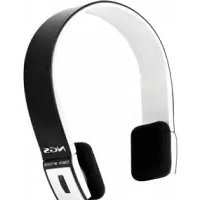
Black Artica - Earphones NGS - Free user manual and instructions
Find the device manual for free Black Artica NGS in PDF.



| Product type | Bluetooth stereo headset |
| Brand | NGS |
| Model | Black Artica |
| Dimensions | 162 × 153.5 × 32 mm |
| Weight | Approximately 103 g |
| Bluetooth version | Bluetooth V2.1+EDR |
| Supported Bluetooth profiles | HSP, HFP, A2DP, AVRCP |
| Effective range | Up to 10 meters |
| Music operating time | Up to 10 hours |
| Talk time | Up to 11 hours |
| Standby time | Up to 250 hours |
| Charging time | Approximately 3 hours |
| Power supply (input) | DC 5V / 130 mA |
| Battery | Rechargeable (do not throw into fire) |
| Main functions | Calls, music playback, volume control, voice command, redial, mute microphone, pause/play |
| Care and cleaning | Keep dry, avoid extreme temperatures, do not disassemble, use a soft cloth without chemicals |
| Safety | Do not expose to excessive pressure to prevent hearing loss |
| Spare parts and repairability | In case of problems, contact the store of purchase |
| General information | Retractable cord, LED indicator, compatibility with Bluetooth phones |
Frequently Asked Questions - Black Artica NGS
User questions about Black Artica NGS
0 question about this device. Answer the ones you know or ask your own.
Ask a new question about this device
Download the instructions for your Earphones in PDF format for free! Find your manual Black Artica - NGS and take your electronic device back in hand. On this page are published all the documents necessary for the use of your device. Black Artica by NGS.
USER MANUAL Black Artica NGS
NGS BLUETOOTH STEREO HEADPHONE
Welcome to use this Bluetooth stereo headset. Please read this user's manual carefully before using it.
BrleF InTrODUCTION
ARTICA NGS is a stereo Bluetooth headset. It supports the following Bluetooth profiles:
HSP: Headset Profile
HFP: Hands-free Profile
A2DP: Advanced Audio Distribution Profile
AVRCP: Audio/Video Remote Control Profile
BEForE using OVerVleW
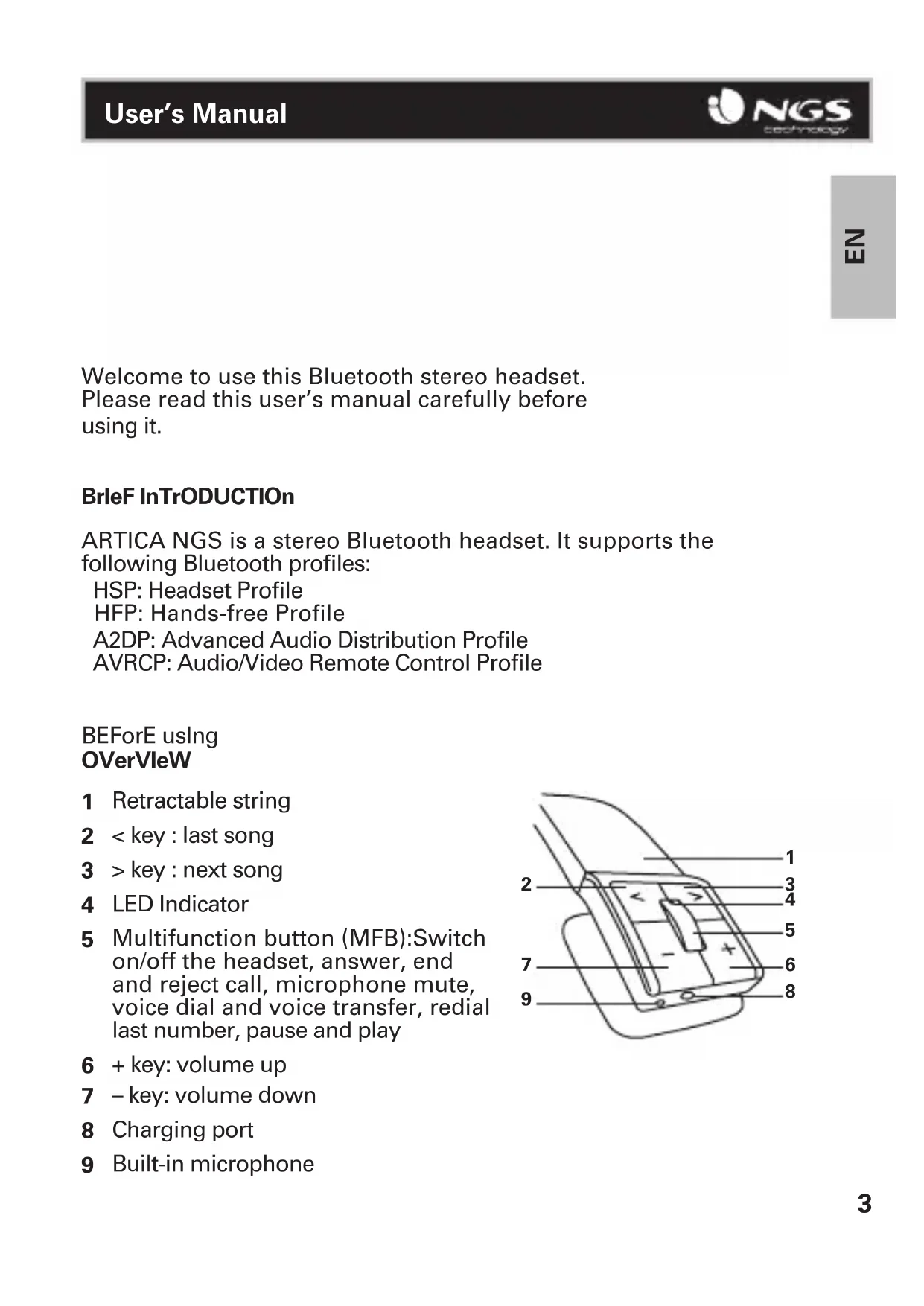
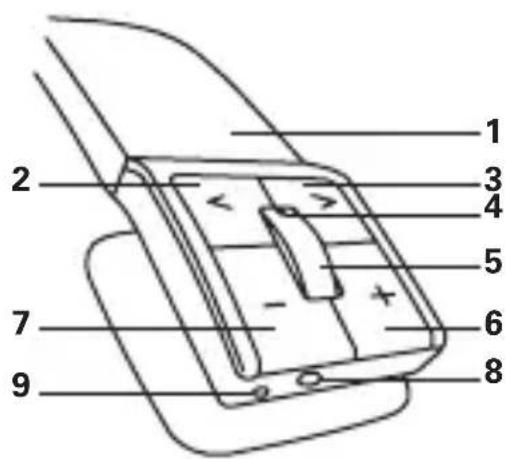
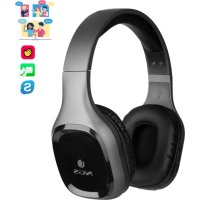
1 Retractable string
2
4 LED Indicator
5 Multifunction button (MFB):Switch on/off the headset, answer, end and reject call, microphone mute, voice dial and voice transfer, redial last number, pause and play
6 +key:volume up
7 -key: volume down
8 Charging port
9 Built-in microphone
CHarGInG THE HeaDseT
First time charging
Before you use this Bluetooth headset, please charge the battery of ARTICA NGS fully.
Next time
When you hear three warning tones of "DONG" every 20 seconds, at the same time, the red light blinks two times. It means the battery is low power and need to be charged. The battery can be charged as below:
CHarGInG THE BaTTerY WITH UsB CaBle
Step1: Insert USB charging cable into USB port of PC or into wall charger with USB port.
Step2: Connect charging cable with the charging port of headset.
When the red light is on, the headset is charging.
When the red light is off, the headset is charged fully.
It takes about 3 hours to charge the headset fully.

Warning:
The battery is recycled.
Do not dispose of the battery in fire, as it may cause explosion.
HOW TO Use
1 Switching on / off headset
| Function Operation | LED | indicator | Indication tone |
| Switch on Press the MFB button for 3-5 seconds, and release it till the blue LED is on | Blue LED is on for 1 second | A long “DI” tone | |
| Switch off Press the MFB button for 3-5 seconds, and release it till the red LED is on | Red LED is on for 1 second | A long “DI” tone |
Note: In order to save power, the headset will automatically switch off if no devices can be connected within 5 minutes after switching on.
2 Pairing the headset with Bluetooth devices How to enter pairing mode
| Function Operation | LED | indicator | Indication tone |
| Enter pairing mode | Make sure the headset is off. Press and hold MFB button for 7-9 seconds, and release it till the red and blue LEDs blink alternately | Red and blue LEDs blink alternately. | Two “DU” tones |
Note: The pairing mode will last 2 minutes, If the headset still can't pair with any Bluetooth devices after 2 minutes, it will switch into standby mode automatically.
Pairing the headset with Bluetooth mobile phone
Please make sure your mobile phone has Bluetooth function that can be used. Specific pairing procedures may vary with different mobile phone. Please refer to your mobile phone manual for further information. Steps as follows:
- Please keep the headset and mobile phone in the range of 1 meter when pairing.
- Make the headset enter into pairing mode (Please refer to "how to enter into pairing mode").
- Start the Bluetooth function of mobile phone and search the Bluetooth devices. After searched, select "ARTICA NGS" in the Bluetooth device list.
- According to indication, enter password or PIN No:"0000",and press the key of "Yes" or "confirm.
- After successful pairing, select "ARTICA NGS" in the Bluetooth device list, and press "connect".
- After successful connecting, the blue LED of the headset quickly blinks twice or three times every 4 seconds.
3 Making calls with the headset
| Function Status of headset Operation | ||
| Voice dial Standby | mode Press and ho | d > (next song) button for 2s, release it till hearing indication sound |
| Redial last number | Standby mode Short | press MFB twice quickly |
| Volume up Conversation mode | Short press or long press + key | |
| Volume down Conversation mode | Short press or long press - key | |
| Answer calling Ringing Short press MFB | ||
| Reject calling Ringing Press and hold | MFB for 2s, and release it till hearing indication sound | |
| Function Status of | headset Operation | |
| End calling Conversation mode | Short press MFB | |
| Call transfer Conversation mode | Press and hold MFB for 2s, and release it till hearing indication tone | |
| Microphone mute Conversation mode | Quickly press the MFB twice | |
| Cancel mute Conversation mode (mute) | Quickly press the MFB twice | |
| Micrófoneno en silencio | Modo conversación | Presione rápidamente el BMF dos veces |
Warning: Excessive pressure from headphones can cause hearing loss.
Notes:
- Not all the mobile phones support all the functions listed above. Please refer to the instruction of your mobile phone.
- Some functions and indication tones may vary with different mobile phones.
- When the volume is adjusted to max or min, you will hear a indication tone.
- For some mobile phones, when you press the key of accepting on the phone, the conversation will be sent to the mobile phone. At this time, you can switch the call to headset by using the conversation switch button or through operating on the mobile phone. Please refer to the instruction of your mobile phone for further information.
4 Playing music
When the headset connects with the mobile phone or Bluetooth transmitter which supports A2DP, you can enjoy music through headset wirelessly.
| Function Status of headset Operation | ||
| Volume up Playing | music Short or long | press + key |
| Volume down Playing | music Short or long | press - key |
| Pause Playing music | Short press MFB | |
| Play Pausing Short | press MFB | |
| Last song Playing | music Short press < key | |
| Next song Playing | music Short press> key | |
Notes:
-
For some of mobile phones, when they are playing music, the music will transmit to the speaker of mobile phone, you have to choose "transmit the sound through Bluetooth" in the "setting" of music play interface, and then choose "ARTICA NGS" in the device list, the music will be transmitted to the headset. Please refer to the instruction of your mobile phone for further information.
-
When the volume of headset is adjusted to max. or min, you will hear a indication tone.
-
Remote control the function of last song/next song/pause/revert, it needs your mobile phone or Bluetooth transmitter supports AVRCP. Please refer to the instruction of your mobile phone or Bluetooth transmitter for further information.
5 Restoring to factory defaults and resetting
Make sure the headset is off, press and hold MFB and + buttons simultaneously for about 8 seconds, release them when you hear two "DU" tones and see red LED is on, now the headset restores to factory defaults, and the pairing information will be deleted. Charge the headset to make it reset.
6 LED indicator
1 Charging
| LED indicator Status of the headset | |
| Red LED is on Charging | |
| Red LED is off Finish charging |
2 Pairing with the Bluetooth devices
| LED indicator Status of the headset | |
| Red and blue LEDs blink alternately | Pairing mode |
| Blue LED quickly blinks once every 2 seconds. | Not connected to a device |
| Blue LED quickly blinks twice every 4 seconds | Set up HFP or A2DP connection |
| Blue LED quickly blinks three times every 2 seconds | Set up HFP and A2DP connection |
| Blue LED gradually turns on and off | Conversation mode |
| Red LED blinks twice evey 20 seconds | Low power |
品
Care and MainTenanCe
Please read the following suggestions carefully, that will help you to fulfill any warranty obligations and to enjoy this product for many years.
- Keep dry and don't put it in the dump place, in case of effecting the interior circuit of product.
- Don't put the product under the sunlight or place hot areas. High temperature will short the life of electronic device, destroy the battery, or distort certain plastic.
- Don't expose the product in the cold areas. It may damage the internal circuit board.
- Don't try to take apart the product. It may damage the product if you are not professional.
- Don't fall off on the floor or knock the hard substance. It may damage interior circuit.
- Don't use intensify chemical or detergent to clean the product.
- Don't scrap the surface with sharp things.
- In case the product doesn't function properly, send it to the store you bought it. The staff will help you to solve the problem.
sPeCIFICaTIOns
| Bluetooth version | Bluetooth V2.1+EDR |
| Bluetooth profiles | Headset, Hands free, A2DP, AVRCP |
| Effective range | 10 meters |
| Working time | Music: Up to 10 hours Talk: Up to 11hours |
| Standby time | Up to 250 hours |
| Input | DC: 5V/130mA |
| Charging time | Approx 3 hours |
| Dimensions | 162×153.5×32 mm |
| Weight | Approx. 103 g |
HSP: Headset Profile
HFP: Hands-free Profile
A2DP: Advanced Audio Distribution Profile
AVRCP: Audio/Video Remote Control Profile
HSP: Profilo Headset
HSP: Headset Profile
HFP: Hands-free Profile (Profil "wolne rece")


- BrleF InTrODUCTION
- BEForE using OVerVleW
- CHarGInG THE HeaDseT
- First time charging
- Next time
- CHarGInG THE BaTTerY WITH UsB CaBle
- Warning:
- HOW TO Use
- Pairing the headset with Bluetooth devices How to enter pairing mode
- Pairing the headset with Bluetooth mobile phone
- Making calls with the headset
- Notes:
- Playing music
- Restoring to factory defaults and resetting
- LED indicator
- Care and MainTenanCe
Brand : NGS
Model : Black Artica
Category : Earphones