
Artica Runner - Earphones NGS - Free user manual and instructions
Find the device manual for free Artica Runner NGS in PDF.


| Product type | In-ear wireless earphones |
| Model | Artica Runner |
| Brand | NGS |
| Dimensions (earphone) | Approximately 2.5 × 1.5 × 1 cm |
| Weight (earphone) | Approximately 4 g each |
| Weight (charging case) | Approximately 30 g |
| Power supply | Built-in lithium-ion battery (earphones: 50 mAh each, case: 300 mAh) |
| Battery life | Approximately 4 hours (earphones) + 12 hours (with case) |
| Connectivity | Bluetooth 5.0 |
| Range | Up to 10 m |
| Main functions | Play/pause, volume control, answer calls, activate voice assistant |
| Water resistance | IPX4 (resistant to sweat and splashes) |
| Charging | USB-C (case), charging time approx. 1h30 |
| Materials | ABS plastic, silicone ear tips |
| Maintenance and cleaning | Clean with a soft dry cloth; do not immerse in water |
| Safety | Do not disassemble, avoid extreme temperatures, use the provided charger |
| Spare parts and repairability | Replacement ear tips available, battery not replaceable; repair possible by a professional |
| General information | Complete manual available at notice-facile.com |
Frequently Asked Questions - Artica Runner NGS
User questions about Artica Runner NGS
0 question about this device. Answer the ones you know or ask your own.
Ask a new question about this device
Download the instructions for your Earphones in PDF format for free! Find your manual Artica Runner - NGS and take your electronic device back in hand. On this page are published all the documents necessary for the use of your device. Artica Runner by NGS.
USER MANUAL Artica Runner NGS
for Tablets & Phones

NGS®
tablets & phones

natural_image
Line drawing of a pair of earbuds with attached earphones, no text or symbols presentARTICA RUNNER
USER'S MANUAL
ENGLISH | FRANÇAIS | ESPAÑOL | DEUTSCH | ITALIANO | PORTUGUÊS | POLSKI | EAAHNIKA
WWW.NGS.EU


USER'S MANUAL

NGS
rebecca & phones
INTRODUCTION
Bluetooth is a new short-distance wireless communication technology. Any devices with Bluetooth feature, such as mobile phones, PDA, PC, headsets, mouse, keypads, keyboards, printers and other mobile fittings, can work as wireless devices. Designed with global standards, Bluetooth technology applies to internationally certified ISM bandwidth. The frequency band ranging from 2.4 GHz to 2.48 GHz is divided up into 79 channels by way of frequency hopping up to 1600 times for data transmission with a distance of 10 meters.
PACKING LIST
Headphone USB charging cable


CD manual

The accessories are subject to change for improving product performance without prior notice. The real products prevail.
PRODUCT SPECIFICATION
Bluetooth specifications: Support V3.0 with HSP, HFP, A2DP and AVRCP profiles
Standby time: 240 hours
Music playing time: 6 hours
Effective distance: up to 10 meters
Certification: CE; FCC; ROHS; BQB
ABOUT ARTICA RUNNER
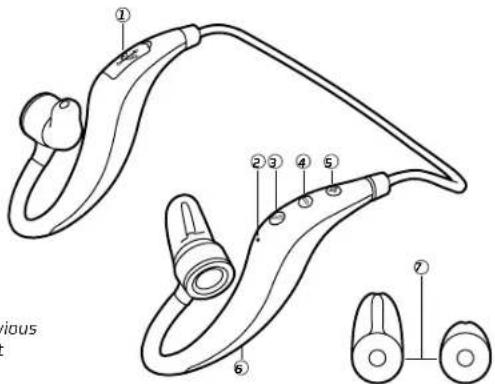
1 Charge Port
2 Microphone
3 Power/Play
4 Volume(-) / Previous
5 Volume(+) / Next
6 Indicator
7 Ear cap
EARPHONE CHARGING

natural_image
Line drawing of a medical or laboratory device with a bulb, connector, and cable (no text or symbols)- Built-in rechargeable Lithium battery.
- It must take 3 hours for the first time charging.
- Connect the charger cable to the charger connector. The Red indicator light is displayed during charging. Charging the battery fully may take about 2 hours.
- When the battery is fully charged, the Red indicator light will turn blue. Disconnect the charger from the headset and the outlet. The headset is ready to use.
WEARING

natural_image
Side profile line drawing of a human head and shoulders (no text or symbols)For the best sound performance and a secure, comfortable fit, be sure the ear buds is fixed properly, and suitable size selected.

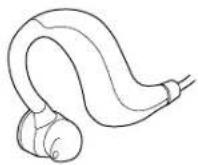
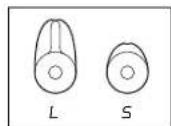
Wear the headset around the back of our neck and fine adjust the angle for the best fit.

natural_image
Side profile of a human head with earphones and surgical instruments, shown in profile view with an arrow indicating direction (no text or symbols)PAIR THE HEADSET
If your phone supports the A2DP Bluetooth profile and has a music player feature, you can use the phone to make and receive calls, and to play music with the headset.
- Ensure that your phone or music device is on and the headset is off.
- Press and hold the Power/Play button for about 5s, the indicator light will flashes red and blue intermittently, the device is now in pairing mode.
- Activate the Bluetooth feature on your phone or music player, and set it to search for Bluetooth devices.
- Select the headset NGS ARTICA RUNNER from the list of founded devices on your phone or music player.
- When the headset is connected to your device and is ready for use, the Blue indicator light will flash every 5 seconds.
MAKING PHONE CALLS
Receiving a call
Short press the Power/Play key to receive an incoming call.
Ending a call
Short press the Power/Play key to end a call.
Redialing the last number \*
To redial the number you last called (if your phone supports this feature with the headset), when no call is in progress, press the Power/Play key twice.
Rejecting a call \*
Press the Power/Play key for 2 seconds to reject a call.
Call waiting \*
Press the Power/Play key for 2 seconds when call is in progress for call waiting.
Volume control
Short press Volume(+) button to increase volume, press Volume(-) button to decrease volume.
Note:
The functions with * mark must be supported by your mobile phone.
LISTEN TO MUSIC
To listen to music, pair and connect the headset to a device that supports the A2DP Bluetooth profile. (See "Pair the headset"). To play music, use the playback controls on the connected device. If you answer or make a call while listening to the music, the music will pause until you end the call.
Function
Description
Play or Pause Short press the Power/Play key
Music volume Short press Volume(+) button to increase volume,
Short press Volume(−) button to decrease volume
Next Press Volume(+) / Next button for 2s
Previous Press Volume(-)/Previous button for 2s
TROUBLESHOOTING
Continuous cracking noise
- To obtain perfect sound quality, please don't take earphone away too much from mobilephone.
Unable to hear any sound
- Press the Volume+button on the headset to increase the volume.
- Ensure your headset is properly paired with the mobile phone.
- Ensure the headset is connected to the mobile phone. If the headset is not connected to the phone via the Bluetooth option, please follow the pairing process to connect them. For details, refer to the part "Pairing the Headset" in this manual.
Unable to connect
- The pairing settings between your headset and mobile phone may be deleted. Follow the part "Pairing the Headset" in this manual to pair them again.
Can this device apply to other Bluetooth devices?
- ARTICA RUNNER Bluetooth headset is designed to pair Bluetooth mobile phones. In addition, it is compatible with Bluetooth Version 1.1, Version 1.2 or 2.0 and supports operations upon other Bluetooth devices.
- Some functions, such as "Rejecting a call", "Redialing", or "Voice dialing", are only available while supported by your mobile phone. Please check the phone manual for further information.
MAINTAIN YOUR EARPHONE
- Store the device after it is power off. Keep it away from extreme temperature (45°C/113°F above, including direct sunlight or -10°C/ 14°F below) for storage. Otherwise it may shorten the service life of the battery and harm the operation.
- High temperature may also damage the product performance. If the device contacts water or other liquids, wipe away the water stains on the device.
PROTECT YOUR HEARING
The headset is able to provide extreme high volume and sharp tone. Exposure to such a sound may cause permanent hearing impairment. The volume level may differ due to your phone settings, the answering and volume settings, and the environmental factors. Before using this device, please read the safety guide below.
Safety guide
Perform the following steps before use:
- Minimize the volume before wearing the headset. Then, adjust the volume to a proper level slowly aftary you wear it.
- During operation, keep the volume as low as possible. Avoid using the device in noisy surroundings, as you may have to increase the volume. If you have to increase the volume, control the speed for volume adjusting.
Others
- If you feel uncomfortable or a drumming in your ears, stop using the headset and seek medical assistance immediately.
- Continuous exposure to high volume may have you adapted to the volume level. This may result in permanent hearing loss without causing discomfort
Note:
- It is dangerous and illegal (in some jurisdictions) to use the headset when you are driving a car, a motorcycle, ship, or a bike. Acquaint yourself with the local laws and regulations. If you have to use the headset while working on activities that require attention to be focused on, be careful. In this case, take off the headset ortum it off to avoid distraction, and thus the occurrence of accidents or hurts.
- Keeping the device out of the reach of small children:
The packing products and the plastic bags for the accessories are not toys. The bag itself and those small fittings inside may cause suffocation. Do not attempt to disassemble the device. No parts embedded can be replaced or repaired by users.
Only authorized dealers or maintenance centers can disassemble this product. For changes of any parts due to any reasons, including normal wear, break, or damages, contact your dealer.
- Keep the product away from raindrops or other liquids.
• Do not use your headset at areas with flammable gases. This may cause a fire.
WARRANTY
Limited warranty. NGS warrants that any hardware products accompanying this documentation shall be free from significant defects in material and workmanship for a period of two (2) years, three (3) years or five (5) years from the date of purchase. NGS's limited warranty is non-transferable and is limited to the original purchaser. This warranty gives you specific legal rights, and you may also have other rights, which vary under local laws.
Remedies. NGS's entire liability and the user's exclusive remedy for any breach of warranty shall be, at NGS's option, to: (a) repair or replace the hardware, or (b) refund the price paid, provided that the hardware is returned to the point of purchase or such other place as NGS may direct, with a copy of the sales receipt. Any replacement hardware will be warranted for the remainder of the original warranty period. These remedies are void if failure of the hardware has resulted from accident, abuse, misapplication, or any unauthorized repair, modification or disassembly. Besides, as it regards wireless devices, such remedies are void if the batteries used are different from those recommended by NGS. On request of NGS, the user shall provide a dated proof of original purchase or a dated summary invoice.
Disclaimer of warranty. The warranties expressly set forth in this agreement replace all other warranties. NGS and its suppliers expressly disclaim all other warranties, including, but not limited to, the implied warranties of merchantability and fitness for a particular purpose and noninfringement of third-party rights with respect to the hardware, software, documentation and any other materials provided by NGS or its suppliers, and any warranties of non-interference or accuracy of informational content. No NGS dealer, agent, or employee is authorized to make any modification, extension, or addition to this warranty. Some jurisdictions do not allow limitations on how long an implied warranty lasts, so the above limitation may not apply to you.
Limitation of liability. In no event will NGS or its suppliers be liable for any costs of procurement of substitute products or services, lost profits, loss of information or data, or any other special, indirect, consequential, or incidental damages arising in any way out of the sale of, use of, or inability to use any NGS product or service, even if NGS has been advised of the possibility of such damages. In no case shall NGS and its suppliers' total liability exceed the actual money paid for the NGS producer or service giving rise to the liability Some jurisdictions do not allow the exclusion or limitation of incidental or consequential damages, so the above limitation or exclusion may not apply to you. The above limitations will not apply in case of personal injury where and to the extent that applicable law requires such liability.
Returns Procedure. Any item to be returned or exchanged, other than those that are processed through the seller or dealer for services, please directly contact NGS. You will find NGS disclaimer's address and phone numbers on the provided documentation, and on NGS website www.ngs.eu.
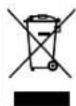
if at any time in the future you should need to dispose of this product please note that:
Waste electrical products should not be disposed of with household waste. Please recycle where facilities exist.
Check with your Local Authority or retailer for recycling advice.
(Waste Electrical and Electronic Equipment Directive)
HEREBY, LURBE GRUP S.A. DECLARES THAT THIS HEADPHONE IS IN COMPLIANCE WITH THE ESSENTIAL REQUIREMENTS AND OTHER RELEVANT PROVISIONS OF DIRECTIVE 1999/5/EC.

INTRODUCTION
CARACTÉRISTIQUES DU PRODUIT
Certificates: CE, FCC, ROHS, BQB
LES FONCTIONS DE ARTICA RUNNER

natural_image
Line drawing of a medical or laboratory device with a bulb, connector, and cable (no text or symbols)natural_image
Side profile sketch of a human head and shoulders (no text or symbols)natural_image
Side profile of a human head with an arrow indicating clockwise motion (no text or symbols)COUPLER LE CASQUE
natural_image
Line drawing of a medical or laboratory device with a bulb, connector, and cable (no text or symbols)natural_image
Side profile sketch of a human head and shoulders (no text or symbols)natural_image
Side profile illustration of a human head with earphones and surgical instruments, showing anatomical alignment (no text or symbols)natural_image
Line drawing of a medical or laboratory device with a bulb, connector, and USB cable (no text or symbols)natural_image
Side profile sketch of a human head and shoulders (no text or symbols)natural_image
Side profile illustration of a human head with earphones and surgical instruments, showing anatomical alignment (no text or symbols)DAS HEADSET KOPPELN

The Ground Truth image displays a single, solid horizontal line. According to Rule 2 (UNDERSCORE & LINE RULES), this is a stylistic or background line, not a placeholder underscore. Therefore, the OCR result must ignore it and output nothing or only meaningful text. The provided OCR content is "____", which consists of four underscores. This is an incorrect interpretation of the line as a placeholder, violating the rule that stylistic lines must be ignored. The OCR has hallucinated underscores where none should exist based on the GT's visual context. Hence, the OCR result is inconsistent with the Ground Truth.
natural_image
Line drawing of a handheld electric shock absorber with attached plug (no text or symbols)natural_image
Side profile sketch of a human head and shoulders (no text or symbols)natural_image
Side profile of a human head with an arrow indicating clockwise motion (no text or symbols)ACCOPPIARE LE CUFFIE
natural_image
Line drawing of a medical or laboratory device with a bulb, connector, and cable (no text or symbols)natural_image
Side profile sketch of a human head and shoulders (no text or symbols)natural_image
Side profile of a human head with earphones and surgical instruments, shown in line drawing without any text or symbols.EMPARELHAR OS AUSCULTADORES
natural_image
Line drawing of a medical or laboratory device with a bulb, connector, and plug (no text or symbols)natural_image
Side profile sketch of a human head and shoulders (no text or symbols)natural_image
Side profile of a human head with earphones and surgical clips, showing anatomical orientation (no text or symbols)DOSTRAJANIE SŁUCHAWKI
natural_image
Line drawing of a medical or laboratory device with tubing and connector (no text or symbols)natural_image
Side profile sketch of a human head and shoulders (no text or symbols)natural_image
Side profile of a human head with earphones and surgical instruments, shown in profile view with an arrow indicating direction (no text or symbols)
The Ground Truth image displays a single, solid horizontal line. According to Rule 2 (UNDERSCORE & LINE RULES), this is a stylistic or background line, not a placeholder underscore. Therefore, the OCR result must ignore it and output nothing or only meaningful text. The provided OCR content is "____", which consists of four underscores. This is an incorrect interpretation of the line as a placeholder, violating the rule that stylistic lines must be ignored. The OCR has hallucinated underscores where none should exist based on the GT's visual context. Hence, the OCR result is inconsistent with the Ground Truth.

- ARTICA RUNNER
- USER'S MANUAL
- INTRODUCTION
- PACKING LIST
- PRODUCT SPECIFICATION
- WEARING
- PAIR THE HEADSET
- MAKING PHONE CALLS
- Receiving a call
- Ending a call
- Redialing the last number \*
- Rejecting a call \*
- Call waiting \*
- Volume control
- Note:
- LISTEN TO MUSIC
- Function
- Description
- TROUBLESHOOTING
- Continuous cracking noise
- Unable to hear any sound
- Unable to connect
- Can this device apply to other Bluetooth devices?
- MAINTAIN YOUR EARPHONE
- PROTECT YOUR HEARING
- Safety guide
- Others
- WARRANTY
- CARACTÉRISTIQUES DU PRODUIT
- COUPLER LE CASQUE
- DAS HEADSET KOPPELN
- ACCOPPIARE LE CUFFIE
- EMPARELHAR OS AUSCULTADORES
- DOSTRAJANIE SŁUCHAWKI
Brand : NGS
Model : Artica Runner
Category : Earphones