
Artica Jelly - Earphones NGS - Free user manual and instructions
Find the device manual for free Artica Jelly NGS in PDF.


| Brand | NGS |
| Model | Artica Jelly |
| Product type | Wireless in-ear headphones |
| Dimensions (per earbud) | Approximately 2 x 2 x 2 cm |
| Weight (per earbud) | Approximately 5 g |
| Power | Rechargeable lithium-ion battery, charging via USB-C |
| Battery life | Up to 5 hours of continuous playback |
| Main functions | Audio playback, call control, voice assistant activation |
| Connectivity | Bluetooth 5.0 |
| Noise reduction | Passive thanks to silicone ear tips |
| Care and cleaning | Clean with a soft, dry cloth. Do not use liquids. |
| Safety | Do not expose to water or excessive humidity. Do not disassemble. |
| Spare parts and repairability | Replacement ear tips available. Battery not user-replaceable. |
| Box contents | Earbuds, charging case, USB cable, additional ear tips |
Frequently Asked Questions - Artica Jelly NGS
User questions about Artica Jelly NGS
0 question about this device. Answer the ones you know or ask your own.
Ask a new question about this device
Download the instructions for your Earphones in PDF format for free! Find your manual Artica Jelly - NGS and take your electronic device back in hand. On this page are published all the documents necessary for the use of your device. Artica Jelly by NGS.
USER MANUAL Artica Jelly NGS
USER'S MANUAL
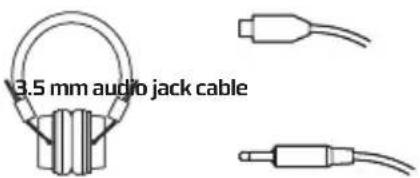
PACKING LIST ABOUT ARTICA JELLY
Headphone USB charging cable
PRODUCT SPECIFICATION
Bluetooth specifications: Support V2.1 with HSP, HFP, A2DP and AVRCP profiles
Standby time: 150 hours
Music playing time: 5 hours
Effective distance: up to 10 meters
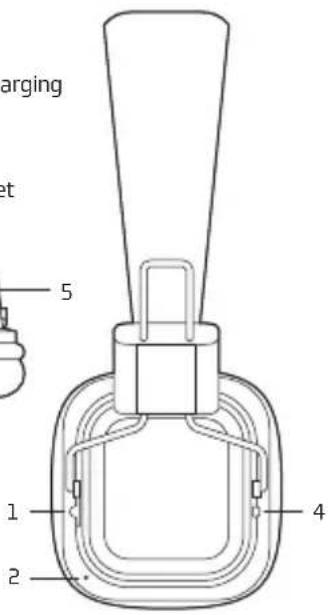
1 On/Off
2 Microphone
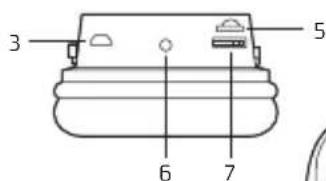
3 Connection point for charging via micro USB
4 LED
5 Micro SD card slot
6 3.5 mm audio jack socket
7 Multifunction Button
EARPHONE CHARGING

- Built-in rechargeable Lithium battery.
- It must take 3 hours for the first time charging.
- Connect the charger cable to the charger connector. The Red indicator light is displayed during charging. Charging the battery fully may take about 2 hours.
- When the battery is fully charged, the red indicator light becomes dimmer until it almost off. Disconnect the charger from the headset and the outlet. The headset is ready to use.
PAIR THE HEADSET
If your phone supports the A2DP Bluetooth profile and has a music player feature, you can use the phone to make and receive calls, and to play music with the headset.
- Ensure that your phone or music device is on and the headset is off.
- Switch the power switch to the ON position. The blue light will flash.
- Activate the Bluetooth feature on your phone or music player, and set it to search for Bluetooth devices.
- Select the headset NGS ARTICA RUNNER from the list of founded devices on your phone or music player.
- When the headset is connected to your device and is ready for use, the Blue indicator light will flash every 5 seconds.
USER'S MANUAL
To listen to music, pair and connect the headset to a device that supports the A2DP Bluetooth profile. (See "Pair the headset"). To play music, use the playback controls on the connected device. If you answer or make a call while listening to the music, the music will pause until you end the call.
Function Description
| Play or Pause | Short press the Play/Pause key |
| Music volume | Press and hold the Volume (+) button to increase the volume |
| Press and hold the Volume (-) button to decrease the volume |
Next Short press Volume(+)
Previous Short press Volume(−)
LISTEN TO MUSIC VIA MICRO SD CARD
- Insert a micro SD card with MP3 music in the slot using the correct position.
- The music on the card will begin playing automatically.
- To switch to Bluetooth mode (when you have a card connected) press the play/pause button for 2 seconds.
- To switch to card mode again, press the play/pause button for 2 seconds.
WARRANTY
Limited warranty. NGS warrants that any hardware products accompanying this documentation shall be free from significant defects in material and workmanship for a period of two (2) years, three (3) years or five (5) years from the date of purchase. NGS's limited warranty is non-transferable and is limited to the original purchaser. This warranty gives you specific legal rights, and you may also have other rights, which vary under local laws.
Battery warranty. The battery is a consumer product, and as such it is under warranty for 12 months.

If at any time in the future you should need to dispose of this product please note that:
Waste electrical products should not be disposed of with household waste. Please recycle where facilities exist.
Check with your Local Authority or retailer for recycling advice.
(Waste Electrical and Electronic Equipment Directive)
HEREBY, LURBE GRUP S.A, DECLARES THAT THIS HEADPHONE IS IN COMPLIANCE WITH THE ESSENTIAL REQUIREMENTS AND OTHER RELEVANT PROVISIONS OF DIRECTIVE 1999/5/EC.
CONTENU DE L'EMBALLAGE LES FONCTIONS DE ARTICA JELLY
CARACTÉRISTIQUES DU PRODUIT
AURICULARES CARGANDO


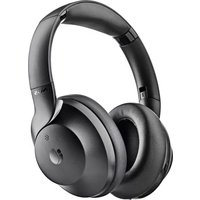
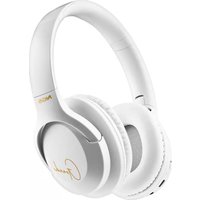
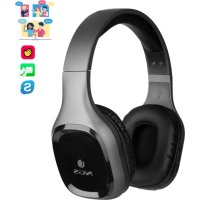
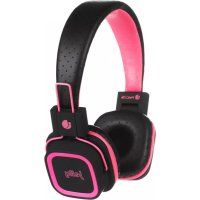
Brand : NGS
Model : Artica Jelly
Category : Earphones