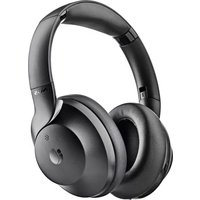
Artica Shake - Earphones NGS - Free user manual and instructions
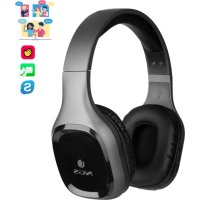
Find the device manual for free Artica Shake NGS in PDF.



| Product type | Bluetooth Noise-Cancelling Headphones |
| Brand | NGS |
| Model | Artica Shake |
| Speaker | ∅ 40 mm |
| Impedance | 32 Ohms |
| Power supply | USB-C, 5 V DC |
| Battery | Lithium polymer 400 mAh |
| Charging time | Approximately 3 hours |
| Active noise reduction | Digital hybrid, 15–20 dB |
| Microphones | 3 built-in microphones |
| Wireless technology | Bluetooth |
| Controls | Multifunction buttons (on/off, volume, track, ANC) |
| LED indicators | Charging (red), ANC (green), Bluetooth (blue/red) |
| Charging port | USB-C |
| Product warranty | 2 years |
| Battery warranty | 12 months |
| Low latency | Yes |
| Recycling | Comply with WEEE directive — do not dispose of with household waste |
Frequently Asked Questions - Artica Shake NGS
User questions about Artica Shake NGS
0 question about this device. Answer the ones you know or ask your own.
Ask a new question about this device
Download the instructions for your Earphones in PDF format for free! Find your manual Artica Shake - NGS and take your electronic device back in hand. On this page are published all the documents necessary for the use of your device. Artica Shake by NGS.
USER MANUAL Artica Shake NGS
ANC HEADPHONE COMPATIBLE WITH BLUETOOTH
ENGLISH I FRANÇAIS I ESPAÑOL I DEUTSCH I ITALIANO I PORTUGUÊS
POLSKI I NEDERLANDS I ČEŠTINA I SLOVENČINA I EΛΛΗΝΙΚΑ I MAGYAR
SLOVENŠČINA I SRPSKI I NORSK I SUOMI I SVENSKA I DANSK I LIETUVIŲ


www.ngs.eu
USER'S MANUAL

Welcome to use these Bluetooth headphone, Artica Shake. Please read this user's manual carefully before using it.
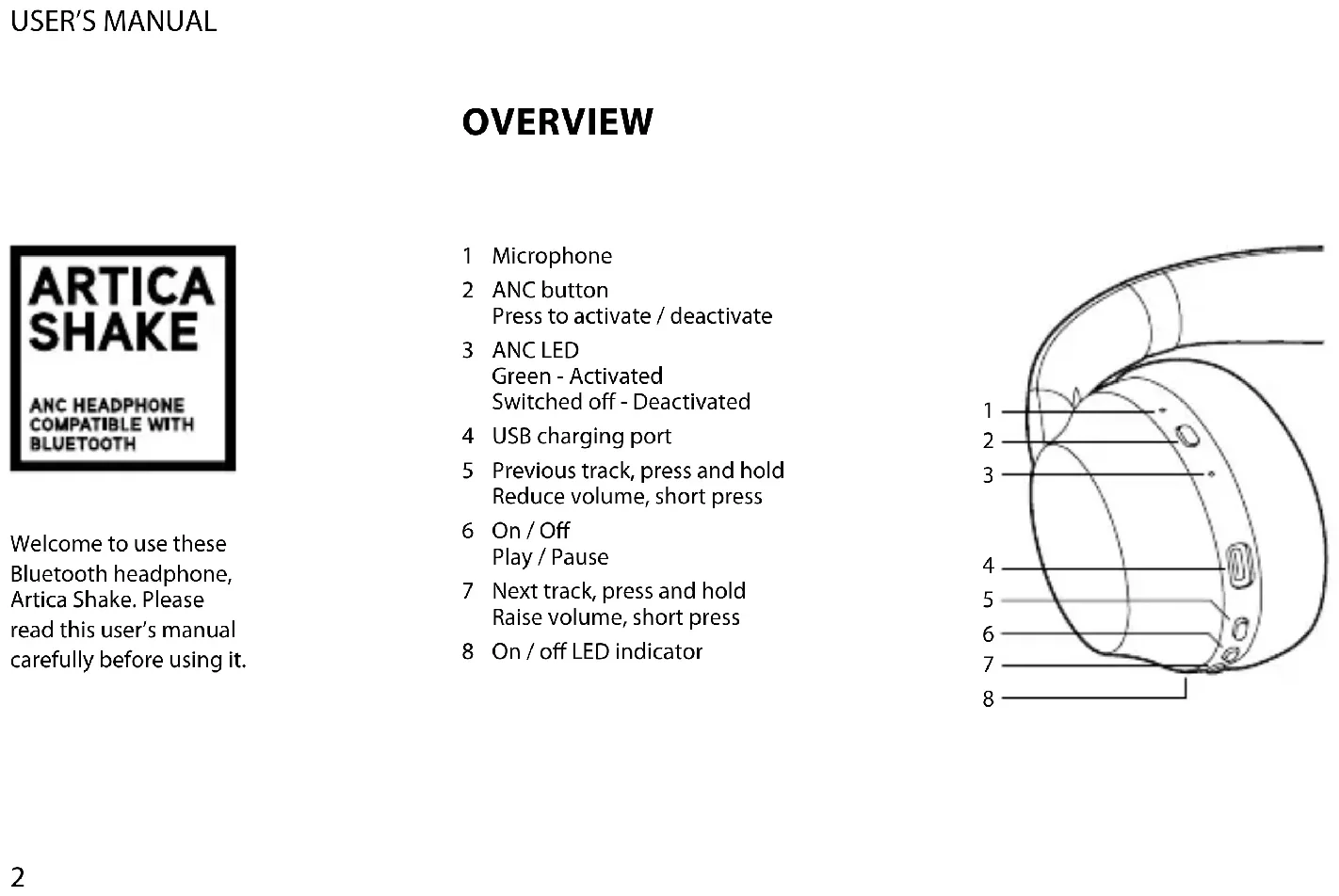
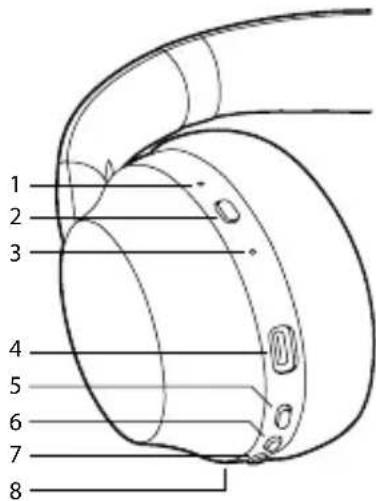
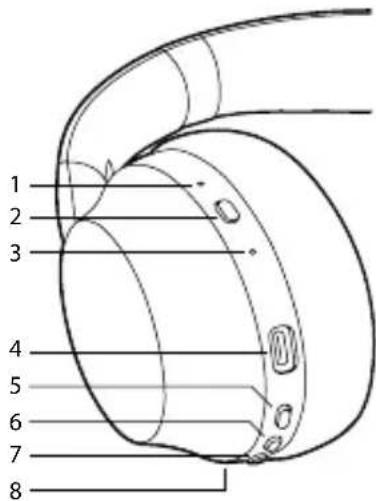
OVERVIEW
1 Microphone
2 ANC button
Press to activate / deactivate
3 ANC LED
Green - Activated
Switched off - Deactivated
4 USB charging port
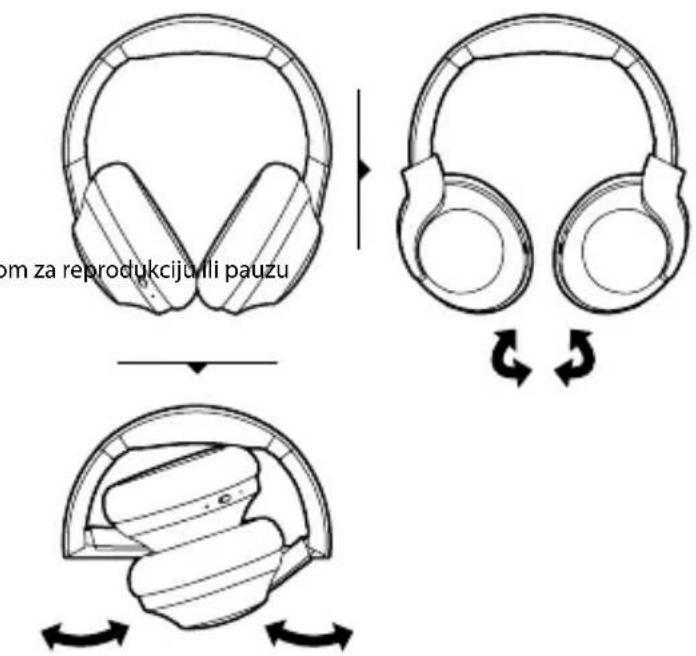
5 Previous track, press and hold Reduce volume, short press
6 On / Off
Play / Pause
7 Next track, press and hold Raise volume, short press
8 On / off LED indicator
ENGLISH
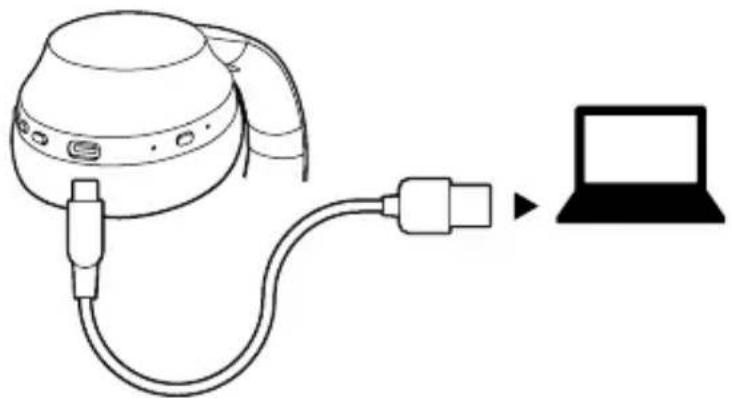
CHARGE STATUS
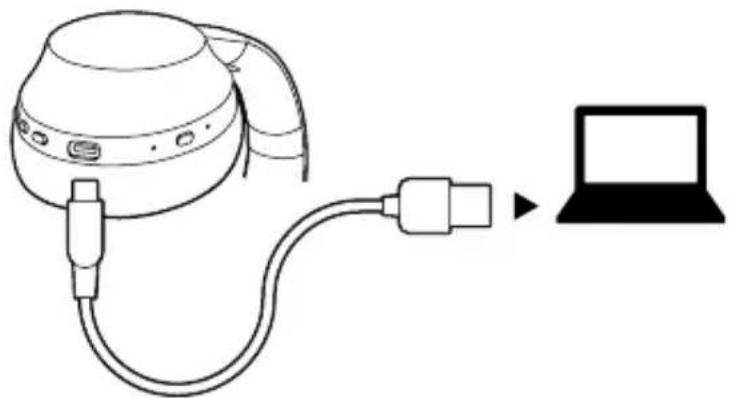
natural_image
Line drawing of a medical device connected to a laptop (no text or symbols present)First time charging
Before you use these Bluetooth headphone, please charge the battery fully.
Charging indicator light
Charging – LED for charging is a fixed red light Charged – Off

Warning:
- The battery is recyclable.
- Do not dispose of the battery in fire, as it may cause explosion.
USER'S MANUAL
PAIRING HEADPHONE WITH BLUETOOTH DEVICES
1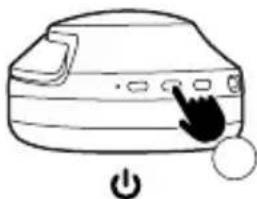 To switch on, press for 2 seconds To switch on, press for 2 seconds | 2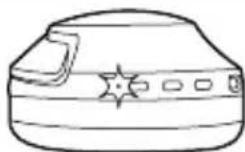 Blue RedThe blue and red LEDs flash simultaneously Blue RedThe blue and red LEDs flash simultaneously |
3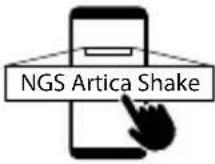 Press NGS Artica Shake on the mobile's Bluetooth options Press NGS Artica Shake on the mobile's Bluetooth options | 4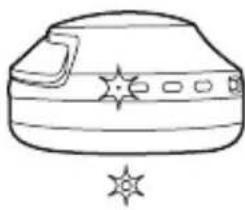 The blue LED flashes every 12 seconds to indicate that it is paired The blue LED flashes every 12 seconds to indicate that it is paired |
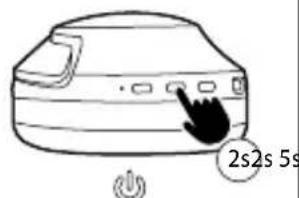
natural_image
Simple line drawing of a device with a cursor pointing at the button (no text or symbols)RESET
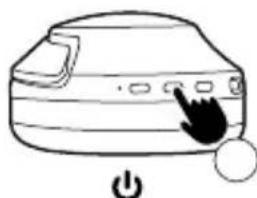
1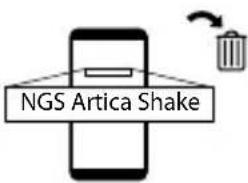 Delete the NGS Artica Shake device from the mobile Delete the NGS Artica Shake device from the mobile | 2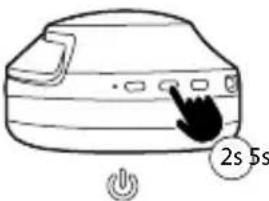 Press for 2 seconds to switch it off Press for 2 seconds to switch it off | 3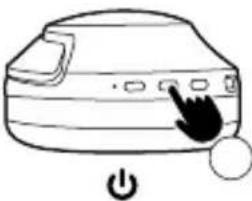 Press for 5 seconds to switch it on Press for 5 seconds to switch it on |
4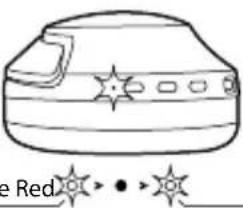 BlueThe blue and red LEDs flash simultaneously BlueThe blue and red LEDs flash simultaneously | 5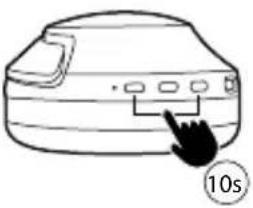 Keep the + and - buttons pressed down for 10 seconds Keep the + and - buttons pressed down for 10 seconds | 6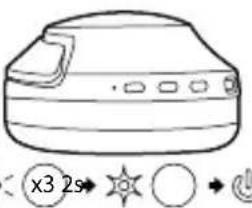 The LED will flash 3 times and will turn itself off after 2 seconds The LED will flash 3 times and will turn itself off after 2 seconds |
USER'S MANUAL
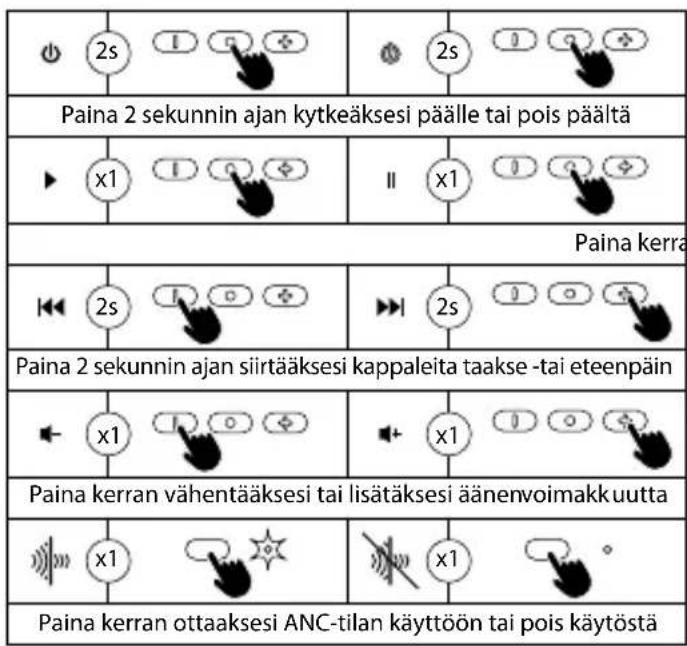
MULTIFUNCTION BUTTON CONTROLS
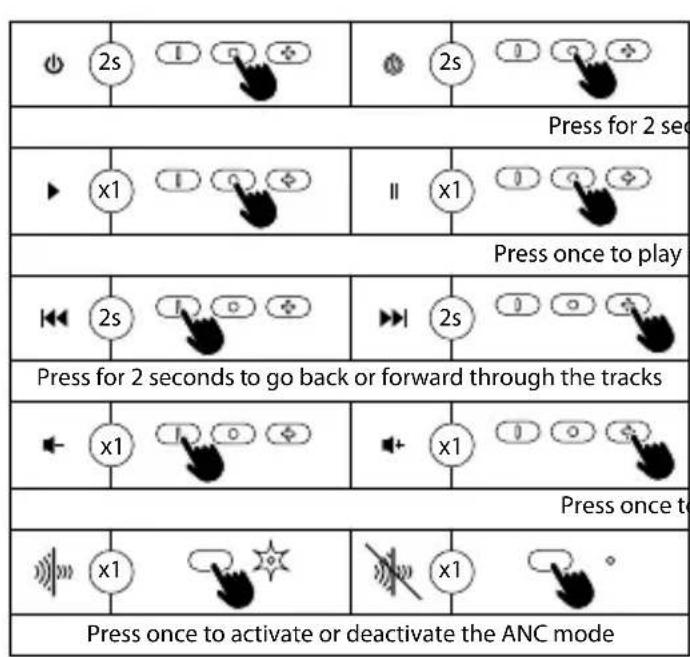
HOW TO USE
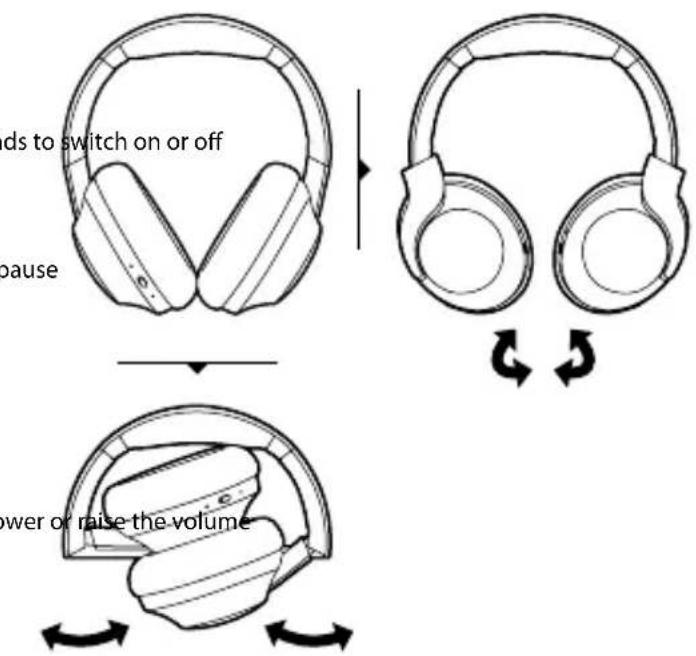
SPECIFICATIONS WARRANTY
Headphones
Speaker: ∅ 40mm
Impedance: 32 Ohm
Input power: DC 5V, USB-C
Battery: 400mAh lithium polymer
Charge time: 3 hours
True immersive noise cancellation
Digital hybrid noise cancelling 15-20dB
3-mic superior technology
Low latency
Limited warranty. NGS warrants that any hardware products accompanying this documentation shall be free from significant defects in material and workmanship for a period of two (2) years, three (3) years or five (5) years from the date of purchase. NGS's limited warranty is non-transferable and is limited to the original purchaser. This warranty gives you specific legal rights, and you may also have other rights, which vary under local laws.
Battery warranty. The battery is a consumer product, and as such it is under warranty for 12 months.
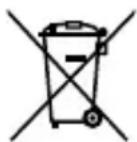
If at any time in the future you should need to dispose of this product please note that:
Waste electrical products should not be disposed of with household waste. Please recycle where facilities exist.
Check with your Local Authority or retailer for recycling advice.
(Waste Electrical and Electronic Equipment Directive)
MANUEL DE L'UTILISATEUR
APERÇU GENERAL

natural_image
Line drawing of a medical device connected to a laptop (no text or symbols present)natural_image
Simple line drawing of a device with a cursor pointing at the button (no text or symbols)RESET
natural_image
Line drawing of a medical device connected to a laptop via cable (no text or symbols)Primera carga
natural_image
Simple line drawing of a device with a cursor pointing at the button (no text or symbols)REINICIALIZAR
Charge time: 3 hours
True immersive noise cancellation
Digital hybrid noise cancelling 15-20dB
3-mic superior technology
Low latency
GARANTÍA
natural_image
Line drawing of a medical device connected to a laptop (no text or symbols present)Erstes Laden
SPEZIFIZIERUNG GARANTIE
Kopfhörer
natural_image
Line drawing of a medical device connected to a laptop (no text or symbols present)natural_image
Line drawing of a medical device connected to a laptop (no text or symbols present)natural_image
Simple line drawing of a device with a cursor pointing at the button (no text or symbols)REINICIAR
natural_image
Line drawing of a medical device connected to a laptop (no text or symbols present)Pierwsze ładowanie
SPECYFIKACJA GWARANCJA
Słuchawki
Głośnik: ∅ 40mm
Impedancja: 32 Ohm
natural_image
Line drawing of a medical device connected to a laptop (no text or symbols present)Eerste oplading
natural_image
Line drawing of a medical device connected to a laptop (no text or symbols present)První nabití
natural_image
Simple line drawing of a device with a cursor pointing at the button (no text or symbols)RESETOVAT
natural_image
Line drawing of a medical device connected to a laptop (no text or symbols present)Prvé nabíjanie
natural_image
Line drawing of a medical device connected to a laptop (no text or symbols present)Πρώτη φόρτιση
natural_image
Simple line drawing of a device with a cursor pointing at the button (no text or symbols)ΕΚ ΝΕΟΥ ΡΥΘΜΙΣΗ
natural_image
Line drawing of a medical device connected to a laptop (no text or symbols present)Első töltés
natural_image
Simple line drawing of a device with a cursor clicking and a button, no text or symbols present.VISSZAÁLLÍTÁS
SPECIFIKÁCIÓK GARANCIA
Fejhallgató
Hangszóró: ∅ 40 mm
Impedancia: 32 Ohm
natural_image
Line drawing of a device connected to a laptop via cable (no text or symbols)Prvo polnjenje
Preden uporabite te slušalke Bluetooth, popolnoma napolnite baterijo.
Dobro došli, korisnici ovih Bluetooth slušalica, Artica Shake. Pažljivo pročitajte ovo uputstvo za upotrebu pre nego što ih upotrebite.
1 Mikrofon
2 Dugme ANC
Pritisnite da biste aktivirali / deaktivirali
3 ANC LED
Zeleno - aktivirano
lsključeno - deaktivirano
4 USB ulaz za punjenje
5 Prethodni zapis, pritisnite i zadržite
Smanjenje jačine zvuka, kratko pritisnite
6 Uključeno/Isključeno Reprodukcija / pauza
7 Sledeća numera, pritisnite i zadržite Povećanje jačine zvuka, kratko pritisnite
8 LED indikator za uključeno/isključno
SRPSKI
STATUS PUNJENJA
natural_image
Line drawing of a medical device connected to a laptop (no text or symbols present)Prvo punjenjei
Pre nego što upotrebite ove Bluetooth slušalice, napunite bateriju do kraja.
Indikator punjenja
Punjenje – LED za punjenje je fiksno crveno svetlo Napunjeno – isključeno

Upozorenje:
-
Baterija se može reciklirati.
-
Ne bacajte bateriju u vatru, jer može da izazove eksploziju.
UPUTSTVO ZA UPOTREBU
UPARIVANJE SLUŠALICA SA BLUETOOTH UREĐAJIMA
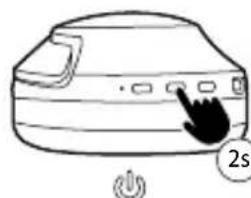
| 1Da biste uključili, pritisnite na 2 sekunde | 2Plava Crvena••Plava i crvena LED lampica trepere istovremeno |
| 3Pritisnite NGS Artica Shake na Bluetooth opcijama mobilnog telefona | 4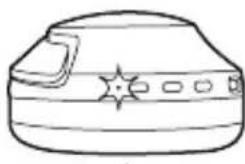 Plava LED lampica treperi svakih 12 sekundi kako bi označila da je uparena Plava LED lampica treperi svakih 12 sekundi kako bi označila da je uparena |
natural_image
Simple line drawing of a computer monitor with a cursor pointing at the button, next to a power button (no text or symbols)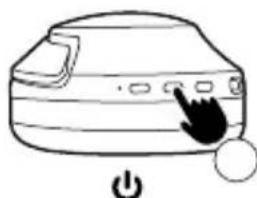
natural_image
Simple line drawing of a device with a cursor pointing at the button (no text or symbols)RESET
| 1Izbrišite NGS Artica Shake uredaj sa mobilnog telefona | 2Pritisnite na 2 sekunde da biste ga isključili | 3Pritisnite na 5 sekundi da biste ga uključili |
4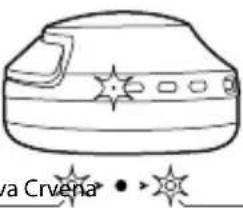 Pla1—Plava i crvena LED lampica trepere istovremeno Pla1—Plava i crvena LED lampica trepere istovremeno | 5Držite tastere + i - pritisnute 10 sekundi | 6LED lampica će treperiti 3 puta i sama će se isključiti nakon 2 sekunde |
UPUTSTVO ZA UPOTREBU
KOMANDE VIŠENAMENSKOG DUGMETA
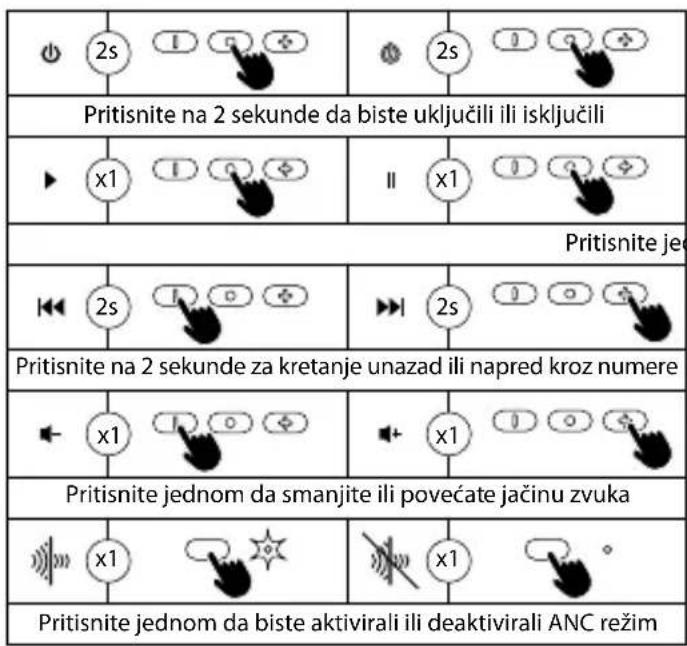
KAKO KORISTITI
natural_image
Line drawing of a medical device connected to a laptop (no text or symbols present)GÅ INN I PARINGSMODUS IGJEN
natural_image
Simple line drawing of a device with a cursor pointing at the button (no text or symbols)NULLSTILLE
natural_image
Line drawing of a medical device connected to a laptop (no text or symbols present)MONITOIMINPAINIKKEEN TOIMINNOT
natural_image
Line drawing of a medical device connected to a laptop (no text or symbols present)Första laddningen
natural_image
Simple line drawing of a device with a cursor pointing at the button (no text or symbols)ÅTERSTÄLLA
Digital hybrid brusreducing 15-20dB
natural_image
Line drawing of a medical device connected to a laptop (no text or symbols present)natural_image
Simple line drawing of a device with a cursor pointing at the button (no text or symbols)NULSTIL
natural_image
Line drawing of a medical device connected to a laptop (no text or symbols present)HAS BEEN TESTED AND FOUND IN CONFORMITY WITH THE FOLLOWING HARMONIZED EUROPEAN STANDARDS:
HA SIDO TESTADO EN CONFORMIDAD CON LAS SIGUIENTES NORMAS STANDARD EUROPEAS ARMONIZADAS:
EN 50663:2017 IEC 62321-4:2013
EN 62479:2010 IEC 62321-5:2013
EN IEC 62368-1:2020+A11:2020 IEC 62321-7-1:2015
ETSI EN 301 489-1 V2.2.3 (2019-11) IEC 62321-7-2:2017
ETSI EN 301 489-17 V3.2.5 (2022-08) IEC 62321-6:2015
AND THEREFORE COMPLY WITH THE ESSENTIAL REQUIREMENTS AND PROVISIONS OF THE FOLLOWING DIRECTIVES OF THE EUROPEAN PARLIAMENT AND EUROPEAN COUNCIL:
Y, POR LO TANTO, CUMPLE CON LOS REQUERIMIENTOS Y PROVISIONES DE LAS SIGUIENTES DIRECTIVAS DEL PARLAMENTO EUROPEO:
RADIO EQUIPMENT DIRECTIVE 2014/53/EU
ROHS DIRECTIVE 2011/65/EU & (EU) 2015/863
RAÚL MARTÍN
PRODUCT MANAGER
LURBE GRUP S.A, SAN SEBASTIÁN, ESPAGNE, SOUS SA RESPONSABILITÉ EXCLUSIVE, CERTIFIE LA CONFORMITÉ DU PRODUIT :
LURBE GRUP S.A, SAN SEBASTIÁN, ESPAÑA, DECLARA SOB A SUA EXCLUSIVA RESPONSABILIDADE A CONFORMIDADE DO PRODUTO:
NGS : ÉCOUTEURS TRUE WIRELESS NGS / MODELE : ARTICA SHAKE BLACK
NGS: AUSCULTADORES TRUE WIRELESS NGS / MODELO: ARTICA SHAKE BLACK
A ÉTÉ TESTÉ CONFORMÉMENT AUX NORMES STANDARD EUROPÉENNES HARMONISÉES SUIVANTES :
FOITESTADO EM CONFORMIDADE COM AS SEGUINTES NORMAS STANDARD EUROPEIAS HARMONIZADAS:
EN 50663:2017 IEC 62321-4:2013
EN 62479:2010 IEC 62321-5:2013
EN IEC 62368-1:2020+A11:2020 IEC 62321-7-1:2015
ETSI EN 301 489-1 V2.2.3 (2019-11) IEC 62321-7-2:2017
ETSI EN 301 489-17 V3.2.5 (2022-08) IEC 62321-6:2015
technical support: www.ngs.eu/support
www.ngs.eu
FR


- OVERVIEW
- CHARGE STATUS
- First time charging
- Charging indicator light
- Warning:
- PAIRING HEADPHONE WITH BLUETOOTH DEVICES
- RESET
- SPECIFICATIONS WARRANTY
- MANUEL DE L'UTILISATEUR
- APERÇU GENERAL
- Primera carga
- REINICIALIZAR
- GARANTÍA
- Erstes Laden
- SPEZIFIZIERUNG GARANTIE
- REINICIAR
- Pierwsze ładowanie
- SPECYFIKACJA GWARANCJA
- Eerste oplading
- První nabití
- RESETOVAT
- Prvé nabíjanie
- Πρώτη φόρτιση
- ΕΚ ΝΕΟΥ ΡΥΘΜΙΣΗ
- Első töltés
- VISSZAÁLLÍTÁS
- SPECIFIKÁCIÓK GARANCIA
- Prvo polnjenje
- STATUS PUNJENJA
- Prvo punjenjei
- Indikator punjenja
- Upozorenje:
- UPARIVANJE SLUŠALICA SA BLUETOOTH UREĐAJIMA
- KOMANDE VIŠENAMENSKOG DUGMETA
- GÅ INN I PARINGSMODUS IGJEN
- NULLSTILLE
- MONITOIMINPAINIKKEEN TOIMINNOT
- Första laddningen
- ÅTERSTÄLLA
- NULSTIL
- FR
Brand : NGS
Model : Artica Shake
Category : Earphones