
CBT3518EW - Built-in refrigerator CANDY - Free user manual and instructions
Find the device manual for free CBT3518EW CANDY in PDF.

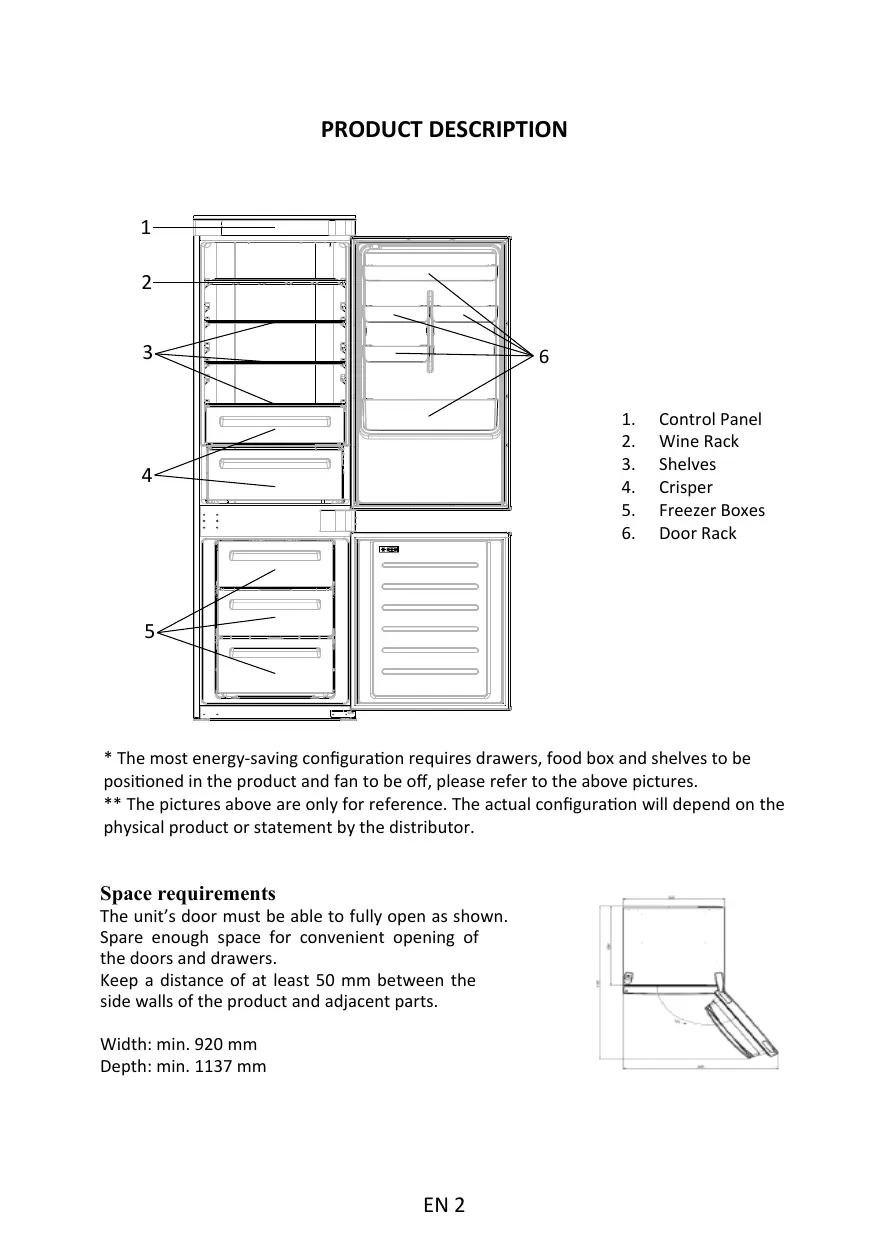


| Product type | Built-in refrigerator |
| Brand | Candy |
| Model | CBT3518EW |
| Minimum dimensions (width) | 920 mm |
| Minimum dimensions (depth) | 1137 mm |
| Control panel | Touch screen with On/Off, Wi-Fi, Mode, TEMP buttons |
| Defrost | Automatic (refrigerator and freezer) |
| Super cooling function | Yes, automatically activates at 2 °C for max 12 h |
| Super freezing function | Yes, automatically activates at -28 °C for max 50 h |
| Eco mode | Yes, sets to 4 °C / -18 °C |
| Holiday mode | Yes, reduces refrigerator consumption |
| Wi-Fi connectivity | Yes, via hOn app |
| Humidity adjustment for vegetable drawer | Slider: right = less humid, left = more humid |
| Door alarm | Yes, sounds after 3 minutes of opening |
| Demo mode | Yes, can be activated/deactivated via Wi-Fi + Mode buttons |
| Refrigerator temperature range | 2 °C to 8 °C (adjustable in 1 °C steps in the app) |
| Freezer temperature range | -16 °C to -24 °C (adjustable in 1 °C steps in the app) |
| Default temperature | Refrigerator: 4 °C, Freezer: -18 °C |
| Energy-saving configuration | Drawers, boxes and shelves in place, fan off |
Frequently Asked Questions - CBT3518EW CANDY
User questions about CBT3518EW CANDY
0 question about this device. Answer the ones you know or ask your own.
Ask a new question about this device
Download the instructions for your Built-in refrigerator in PDF format for free! Find your manual CBT3518EW - CANDY and take your electronic device back in hand. On this page are published all the documents necessary for the use of your device. CBT3518EW by CANDY.
USER MANUAL CBT3518EW CANDY
PRODUCT DESCRIPTION 2
USE. 3
Use 3
Customized temperature 4
Super Cool function 4
Super Freeze function 5
Eco mode. 5
Holiday function 6
Defrosting. 6
Demo mode. 6
WI-FI USE 7
In app pairing procedure. 7
Step 1 7
Step 2 7
Step 3 7
Wi-Fi Use 8
TROUBLESHOOTING
PRODUCT DESCRIPTION
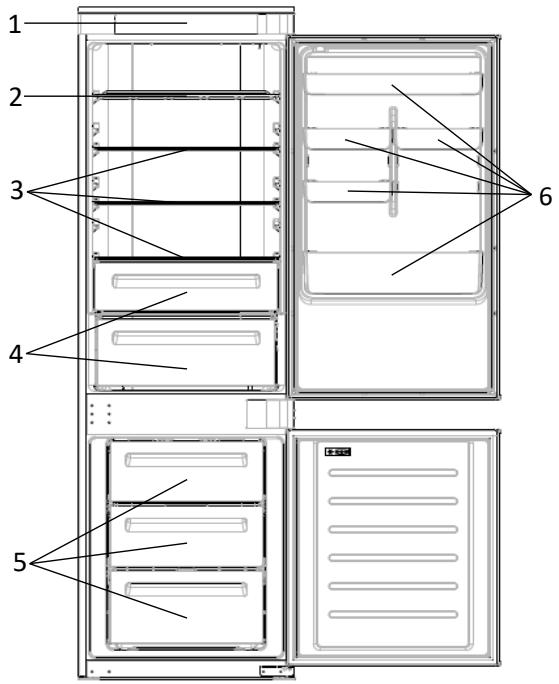
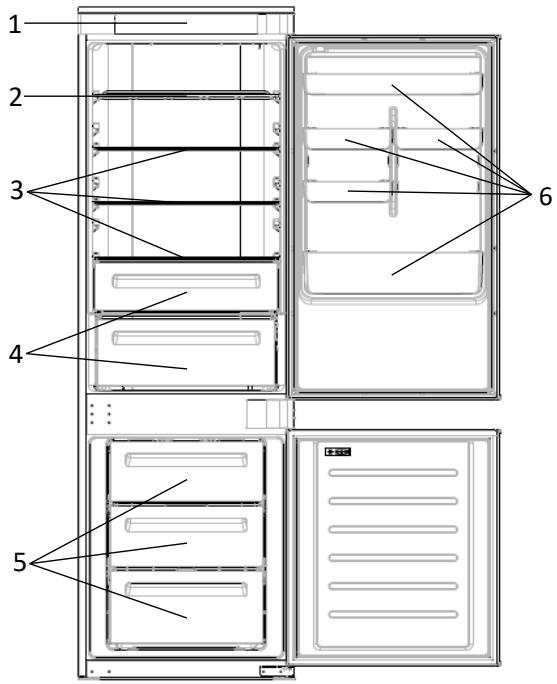
- Control Panel
- Wine Rack
- Shelves
- Crisper
- Freezer Boxes
-
Door Rack
-
The most energy-saving configuration requires drawers, food box and shelves to be positioned in the product and fan to be off, please refer to the above pictures.
** The pictures above are only for reference. The actual configuration will depend on the physical product or statement by the distributor.
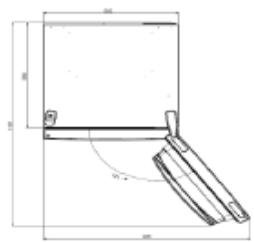
Space requirements
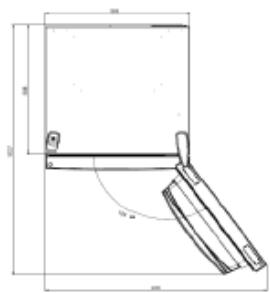
The unit's door must be able to fully open as shown.
Spare enough space for convenient opening of the doors and drawers.
Keep a distance of at least 50~mm between the side walls of the product and adjacent parts.
Width: min. 920 mm
Depth: min. 1137 mm
USE
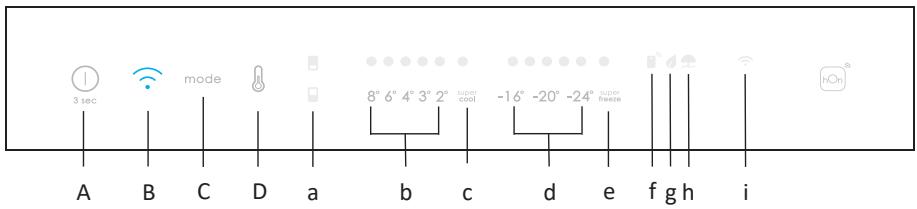
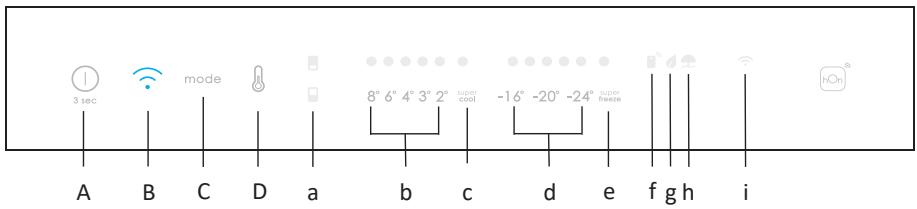
A. ON/OFF key, used to switch on/off the appliance
B. Wi-Fi key, used to switch on/off the Wi-Fi
C. Mode key, used to selected the special functions (Eco and holiday)
D. TEMP key, used to selected the fridge and freezer temperature
a. Fridge /freeze area icon, shows which compartment of the appliance is selected
b. Fridge temperature levels, show which is the selected temperature
c. Super Cool icon, shows if the Super Cool function is activated
d. Freezer temperature levels, show which is the selected temperature in the freezer
e. Super Freeze icon, shows if the Super Freeze function is activated
f. Customized temperature icon, show if the temperature has been selected by app
g. Eco mode icon, shows whether the eco mode is activated
h. Holiday function icon, show whether the holiday function is activated
i. Wi-Fi icon, shows whether the Wi-Fi is working and the appliance is connected
Use
- Plug on the appliance and it automatically turns on.
- The temperature will automatically set at 4^ C in the fridge and -18^ C in the freezer.
NOTE: wait at least 2/3 hours before putting food in the appliance, so as to ensure the temperature inside the fridge.
- To change the temperature, press the TEMP key for 5 seconds, an acoustic signal is made and the icon of the selected compartment (fridge or freezer) as well as all the temperature LEDs of the corresponding compartment turn on for 2s, after 2s the selection of the compartment is confirmed. With the selected compartment icon on, quick press the TEMP key to change the temperature. When the setting increases, the corresponding LED light will turn on. An acoustic signal is made every time the TEMP key is pressed and the temperature is changed, after 5 seconds the selection is confirmed. After 30s without operation the fridge/freezer icons and the LEDs of the selected temperatures turn off. When the TEMP key is touched again, the icon of the last are selected (Fridge or freezer) turns on.
In case of power loss, the last cooling level set will be restored.
To restore the default setting, keep pressed the door switch inside the
refrigerator and simultaneously press the ON/OFF key for 5 seconds.
- Under the normal operating condition (in spring and autumn), it is recommended to set the temperature at 4^ . In summer when the ambient temperature is high, it is recommended to set temperature at 6 8^ , so as to guarantee the fridge and freezer temperatures and reduce the refrigerator continuous running time; and in winter when the ambient temperature is low, it is recommended to set temperature at 3 4^ to avoid frequent start/stop of the refrigerator.
Customized temperature
From the app it is possible to customize the temperature for both fridge and freezer. The temperature can be set with 1^ sensitivity. It is possible to select a temperature from 2^ to 8^ in the fridge, and from -16^ to -24^ in the freezer.
When the temperature is selected by the app, the customized temperature icon turns on, while all the temperature LED lights of the affected compartment are turned off (i.e. if the refrigerator temperature is selected from the app, LEDs from 2^ to 8^ are turned off. If the freezer temperature is selected from the app, LEDs from -16^ to -24^ are turned off).
If only a single area (freezer or fridge) has the customized temperature, the temperature selection of the other area is not changed and the LED light of the selected temperature of that area remains on. An acoustic signal is made every time the temperature is changed.
Super Cool function
It is suggested to switch on the Super Cool function if a large quantity of food should be stored (for example after the purchase). The Super-Cool function accelerates the cooling of fresh food and protects the goods already stored from undesirable warming. When the function is activated, the temperature of the fridge is automatically set at 2^ .
How to use the Super Cool function:
- The function can be activated by long pressing TEMP key to select the fridge compartment, and then quick pressing the TEMP key until the Super Cool icon led is turned on, or it can be turned on from the app. When the function is activated, the Super Cool LED is always ON.
To exit the Super Cool function, press the TEMP key or turn it off from the app.
The Super Cool function automatically ends when the function has lasted for more than 12 hours. - When the Super Cool ends, the icon of the control panel is switched off and the previously set cooling level is restored.
Note: Super Cool and Super Freeze function cannot be activated simultaneously.
Super Freeze function
The super freezing function accelerates the freezing of fresh food and protects the goods already stored from undesirable warming. If a large amount of food has to be freeze, it is recommended to set the Super-Freeze function on 24h before the usage. When the function is activated, the temperature is automatically set at -28 °C.
How to use the Super Freeze function:
- The function can be launched by long pressing TEMP key to select the freezer compartment, and then quick pressing TEMP key until the Super Freeze icon led is turned on, or it can be turned on from the app. When the function is activated, the Super Freeze LED is always ON.
- To exit the Super Freeze function, press the TEMP key or turn it off from the app.
- The Super Freeze function automatically ends when the function has lasted for more than 50 hours.
- When the Super Freeze ends, the icon of the control panel is switched off and the previously set freezing level is restored.
Note: Super Cool and Super Freeze function cannot be activated simultaneously.
Eco mode
The Eco mode can be activated to optimize the performance of the appliance, whereas obtaining the best food storage. The Eco mode will automatically set the temperature at 4^ in fridge and at -18^ in the freezer.
How to use the Eco mode:
- The function can be activated from control panel by pressing the "mode" key until the Eco mode icon turns on (an acoustic signal confirms the selection), or by selecting the function from the app. When the function is activated, the Eco mode icon is always ON.
- To exit the Eco turn it off from the app or chose another function from the control panel.
- When the Eco Mode ends, the icon of the control panel is switched off and the previously set cooling levels are restored.
Holiday function
The Holiday function can be used to reduce the energy consumption of the appliance, when it is not used regularly. When the function is on, the LED lights will be off (even if the door is open) and the fridge will work on low power consumption mode, whereas the freezer will keep working normally.
How to use the Holiday function:
- The function can be activated from control panel by pressing the "mode" key until the Holiday icon turns on (an acoustic signal confirms the selection), or by selecting the function from the app. When the function is activated, the Holiday icon is always ON.
- To exit the Holiday function, turn it off from the app or chose another function from the control panel.
- When the Holiday function ends, the icon of the control panel is switched off and the previously set cooling levels are restored.
Defrosting
The defrosting of the refrigerator and freezer compartment are done automatically: no manual operation is needed.
Slider
Near the vegetable basket there is a slider that allows you to adjust the humidity inside it: moving it to the right decreases the humidity, moving it to the left increases the humidity.
Demo mode
To enter the demo mode, with the display unlocked, keep pressed the Wi-Fi key (B) and press the MODE key (C) 5 times within 5 seconds. To exit the demo mode, perform the same operation or power off the refrigerator.
Error Codes
Communication error
[-16^; - 18^; - 20^; - 22^; - 24^] Lights in the fridge turn on sequentially, it means there has been a communication error between the main control board and the display board. Please, contact the technical assistance to help solve the problem
Fan
[-16^; -20^; -22^; -24^] lights in the fridge flashing simultaneously if the fan is not working properly. Please, contact the technical assistance to help solve the problem
WI-FI USE
In app pairing procedure
Step 1
Download the hOn app on the stores


Step 2
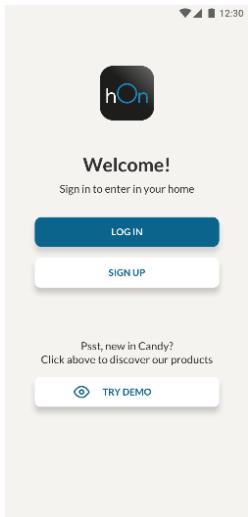
- Create your account on the hOn App or log in if you already have an account
Step 3
- Follow pairing instructions in the hOn App
Wi-Fi Use
To activate the Wi-Fi, long press the Wi-Fi key for 2 seconds, the Wi-Fi icon will turn on and an acoustic signal is made.
If the Wi-Fi has not been configured yet, when the refrigerator turns on, it will automatically enter the configuration mode and keep this status for 30 minutes. To use the configuration mode:
- Press the Wi-Fi key for 2s, the refrigerator enters the Wi-Fi configuration mode and an acoustic signal is made. The Wi-Fi icon starts blinking.
- Follow in app instructions to configure the Wi-Fi (see above).
- Once the Wi-Fi is configured and the connection established, the Wi-Fi icon is on and fixed.
- After 30 minutes without performing any operation, the Wi-Fi will automatically exit the configuration mode.
- If the Wi-Fi has already been configured, it will automatically reconnect according to the configuration information.
To reset the Wi-Fi, long press the Wi-Fi key and Mode for 2s, the Wi-Fi is reset and an acoustic signal is made. After this, the Wi-Fi will automatically enter the configuration state (Wi-Fi icon will start blinking again).
To turn off the Wi-Fi, press the Wi-Fi key for 3s.
Radio-module - Technical data
| Frequency rate (OFR) | 2400 MHz-2843.5 MHz |
| Channel frequencies | 2412...2472 MHz(step size 5 MHz) |
| Maximum power(EIRP) | 100 mW |
Radio equipment type is in compliance with Directive 2014/53/EU.
| The inside light bulb does not turn on. | • No electricity. | • The power cable is not properly plugged in. • Check if the appliance is switched off (see Temperature Adjustment). • Check the power socket is working correctly (e.g. with another electric device). |
| • Holiday Mode is activated. | • Deactivate Holiday mode. | |
| The internal temperature of the refrigerator and/or freezer is not cold enough. | • The doors are not closed. | • Check that the door and gaskets close properly. |
| • The doors are frequently opened. | • Avoid opening the doors unnecessarily for some time. | |
| • Incorrect temperature setting. | • Check the temperature setting and, if possible, set a lower temperature (see Temperature Adjustment). | |
| • The refrigerator and/or freezer are too full. | • Wait for the temperature of the refrigerator/ freezer to stabilise. • Avoid filling the refrigerator and freezer excessively. | |
| • The surrounding temperature is too low. | • Move the unit to a warmer place or heat the current room. | |
| • Warm items have been stored. | • Always allow items to cool before storing them. | |
| The food in the refrigerator freezes. | • Incorrect temperature setting. | • Check the temperature setting and, if possible, increase the temperature. |
| • Food in contact with the back wall. | • Keep the food away from the refrigerator's back wall. | |
| The bottom of the refrigerator compartment is wet or water droplets are present. | • The drain hose could be clogged. | • Clean the drain hose with a stick or similar item to allow the water to drain. |
| Presence of drops of water or frost on the rear wall of the refrigerator. | • Depending on the function, drops of water or frost form on the rear wall of the refrigerator during operation. | • It is not a defect. |
| • Warm items have been stored. | • Always allow items to cool before storing them. | |
| • There are open food containers or liquids. | • Always cover food and liquids. | |
| • The doors are not closed. | • Check that the door and gaskets close properly. | |
| • The doors are frequently opened. | • Avoid opening the doors unnecessarily for some time. | |
| Presence of water in the vegetable drawer. | • Lack of air circulation. | • Verify that your appliance is not too full. |
| • Vegetables and fruit with too much moisture. | • Wrap the fruit and vegetables in plastic materials, e.g. cling film, bags or containers. | |
| The motor runs continuously. | • The doors are not closed. | • Make sure the doors are closed and check the seals close properly. |
| • The doors are opened frequently. | • Avoid opening the doors unnecessarily for some time. | |
| • Ambient temperature is very high. | • Verify that the ambient temperature is in the range set out in the specifications on the appliance tag. • Set the display screen/thermostat to a warmer temperature. | |
| • The appliance has been off (no power) for some time. | • It normally takes the appliance 8-12h to cool completely. | |
| The frozen food is thawing. | • Surrounding temperature is too low. | • Move the unit to a warmer place or heat the current room. |
| • The freezer door is not closed. | • Make sure the door is closed and that the gasket is sealing properly. | |
| Fridge door alarm. | • Fridge door alarm (acoustic beep) activates whenever the door is left open for more than 3 minutes. | • Avoid leaving the door open when not needed. The beep ceases when the door is closed. |
| The appliance makes noises such as gurgling, buzzing, clicking, creating. | • No breakdowns. An engine is running, e.g. refrigeration unit, fan. The refrigerant flows into the pipes. Motor, switches and solenoid valves are switched on or off. | • No action needed. |
| • The appliance is not located on level ground. | • Adjust the feet to level the appliance. | |
| • The appliance touches an object around it. | • Remove objects around the appliance. | |
| The appliance does not cool, the temperature and lighting indicators are on. | • Demo mode is activated. | • Deactivate DEMO mode. |
| Strong ice and frost in the freezer compartment. | • The items were not adequately packaged. | • Always pack the items well. |
| • A door/drawer of the appliance is not tightly closed. | • Close the door/drawer. | |
| • The door/drawer has been opened too frequently or for too long. | • Do not open the door/drawer too frequently. | |
| • The door/drawer gasket is dirty, worn, cracked or mismatched. | • Clean the door/drawer gasket or replace it with a new one. | |
| • Something on the inside prevents the door/drawer from closing properly. | • Reposition the shelves, door racks or internal containers to allow the door/drawer to close. | |
| The sides of the appliance are warm. | • This is normal. |
Pe3Hcme
ОПИСАНЕ HA ПОДУКТА 10
YNOTPEBA 11
YnoTe6a 11
Персаннирана TeMпература 12
Функциа „Super Cool" 12
Функця „Super Freeze" 13
Pekim ,Eco" 13
Функциа „Holiday" 14
Pa3Mpa3BaHe 14
Демонстрацноен реким 14
YNOTPEBA HA WI-FI 15
PpoueDypa 3a cDBoyaHe C npInIOxKeHneTo 15
CTbPkca 1. 15
CTbPk2. 15
CTbPk3. 15
Ynotpe6a Ha Wi-Fi 16
OTCTPAHRAHE HA HEN3PABHOCTN
Описане на порожкта
- KoHTpOJIeH nAHeI
- PaΦT 3a BnHo
- PaoToBe
- YeKMeIgKe 3a no-DbJIroTpaiHa CBExKeCT
- KyTn 3a 3ampa3raBaHe
-
PaΦT 3a Bpata
-
Han-eHeprocneCTBaUaTa KOHfumpyaunr N3NCKBa YekMeJKeTaTa, KytTnTa 3a XpaHa n paTOBte Da 6bDaT pa3nOJooKeHN B npOdyKTA u BeHTnIaTOPbT da 6bDe N3KJIIOueH, MOJRA, BIXTe TOpHIne CHIMKN.
**I3o6paKeHnraTao-rope ca camo 3a cnpaBkA.ДeNCTBnTeHnHaTa KOHfupyaCnna Ⅲe 3aBnCn OTФи3uueckn npOdyKT nIn DeKnapaCnTa Ha dNcTp6bTyopa.
N3nCKBaHna 3a npocTpaHcTBO
BpaTaHa ypeDa Tp86Ba Da MoKe Da ce OTBapr DOKpaR, KaKTo e NOKa3aHo. OcTabeTe DoCTaTbUHO MRCTo 3a YDO6Ho OTBaprHe Ha BpaTIne N YekMeJKeTa.T.Cna3BaHrPe pa3CToHnE OT Hau-MaJIko 50 MM MeJky CTpaHUYHnTe CTeHN Ha npOdyKTa N CbCeDHNTe YacTn.
UInpuOnHa: MIn. 920 MM
Дьлбоунha: МИ. 1137 MM
YIOTPEBA
A. ByToH „ON/OFF“ 3a BkIIOUbaHe/ɪzKIIIOUbaHe Ha ypeDa
B.Бутон"Wi-Fi",иЗПОЛЗВан 3a ВКЛЮЧВаHe/ИЗКЛЮчВаHe Ha Wi-Fi
C. Бутон, Mode", Изпоган за Историческая сецualинец Функци (Eco и Holiday)
D. Бутон „TEMP“, Използов за Историяа на Хладионika и српизера
a. Икона та нахлдуннота/фрпзернота oblact noka3Ba koe otдение наурае e n3бразно
b. TemnepaTpHnTe HnBa Ha XnaIINHnKa NOKa3BaT KOa e 136paHaTa TemnepaTypa
c. IkoHaTa „Super Cool" noka3Ba dajnФункцяТа e aKTbBupaHa
d. Tempepatyphte HnBa Ha 0pn3epa Noka3BaT KO e n36paHaTa Tempepatypa
e. IkoHaTa „Super Freeze" noka3Ba daJIHФУнцЯТа e aKTHBnPaHa
f. IkoHaTa 3a nepcoHaJIn3npaHa TeMnepaTypa Noka3Ba daJIIN TeMnepaTypaTa e H36paHa OT pIINIOKeHHeTO
q. IkoHaTa ,Eco mode" noka3Ba daJIn eKo peXIMbTe aKTINBupaH
h. IkoHaTa HaФyHKUraTAp.Holiday" noka3Ba daJInФyHKUraTa e aKtINBIPAHa
i. IkoHaTa ,Wi-Fi" nokaBa daJIn Wi-Fi mpeXaTa pa6Otn upeDbTe cBbP3An
Ynotpe6a
- YpeIbT Ie TpbIrHe aBtOMaTnUHO, CJIeI KaTO rO BKJIIOuHTe B KOHTaKT.
- Temnepaotypata Ha xlaanlHnka ue ce 3aande aBtOMaTHUHO Ha 4^ , aHa n3epa Ha -18 ^ C .
3A6EJIEXK4: n3aKaIte noHe 2/3 Yaca, npeI Da nocTaBnTe XpaHaTAt B ypeIa, 3a da cTe cnYpHn, Ye TemnepaTypaTb A XnaDInHnKa e DoCTnHata.
3aДа npomehnte Temnepaypata, HATNCHEte 6yToHa ,TEMP" 3a 5 CEkyHdi, NODaBa Ce 3ByKOB CINHJI IN KOHATA Ha N36paHOTo OTDeJeHne (XnaDInNHIK INIΦpN3ep), KAKTO IN BCNUKIN TEMnepaTpyHn CBeTOnIOJn HA CbOTBeTHOTO OTDeJeHne Ce BKNIOUBat 3a 2 CEkyHdi, CNeE 2 CEkyHdi IN36opBT Ha OTDeJeHneTO Ce NOTBbPjZdaBA. PnB KBIQUHe NaKOHa Ha IN36paHO OTDeJeHne, HATNCHEte 6bp3O 6yToHa ,TEMP", 3a Da npomehnte TEMnepaTpyA. Korato HAcTPOiKaTce yBeJIuN, CbOTBeTHnA rCBETOnIOd Ce BKNIOUBA. Pn BcRAKO HATNCKaHe Ha 6yToHa ,TEMP" ce NODaBA 3ByKOB CINHJI IN TEMnepaTpyAte PnpomHe, CNeE 5 CEkyHdi IN36opBT Ce NOTBbPjZdaBA. Cpe30 CEkyHdi 6e3 paBoTa INKOHTe Ha XNaDInNHka/ΦpN3epa IN CBETOnIOJnTE Ha IN36paHHTe TEMnepaTpyn IN3racBat. Korato Ce HATNCHe OTHOBO 6yToHa ,TEMP", Ce BKNIOUBA INKOHATA Na NocJIeDHO IN36paHnra (XnaDInNHIK INIΦpN3ep).
B cnyaHa cnpaHe Ha ToKa, nocneHaTa HacTroKa Ha HNBOTo Ha
OXJaXaHe Ce Bb3cTaHOBraBa.
3aДа Вьзаговипс Насторькато NOпдраЗбига He,Здрьхte KИюча
На Враза ТьТре Вхладинда К И сногБрЕмEHн HATИСКайт经 6уToHa
"ON/OFF" 3a 5 cekyHdN.
- Ппенистен o epиHopмалн paobtнусюь (прз прелета И сеHTa)да 3ададeTe Tempepatypata Ha 4^ .Ппз плтOTO ИИн korato Tempepatypata Ha OKOLHATA cpeDA e BICOKA eпренирчтELHO DA 3ададeTe Tempepatypata Ha 6 8^ ,3a da ce rapaHTnpat Tempepatypite Ha XlaДИЛНИКИ n ФрИЗЕР a DA ce HAMANI npoДьЖИТELHOTO BpeMe Ha pa6ToHa XlaДИЛНИКИ.Ппз 3IMaTа KOrato Tempepatypata Ha OKOLHATA cpeDA e HINCKA eпренирчтELHO DA 3ададeTe Tempepatypata Ha 3 4^ ,3a da ce ИЗБERHe YecToTO BKПЮЧВаHE/N3KПЮЧВаHe Ha XlaДИЛНИКИ.
Download on the App Store

EXPLORE IT ON AppGallery
Bnua 2
Download on the App Store

EXPLORE IT ON AppGallery
Étape 2
Download on the App Store

EXPLORE IT ON AppGallery
2.korak
PRODUCTBESCHRIJVING 98
GEBRUIK 99
I app-paringsprosedyren
Trinn 1
Download on the App Store

EXPLORE IT ON AppGallery
Passo 2
Download on the App Store

EXPLORE IT ON AppGallery
Pasul 2
- Creati-va contul in aplicata hOn sau connectati-va dacavetidea un cont
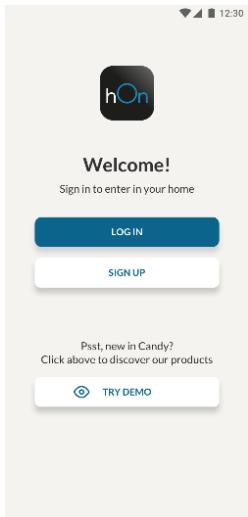
Pasul 3
- Urmati instructiunile de associere in aplicatica hOn
Utilizarea Wi-Fi
Pentru a activa Wi-Fi, apasaşi lung tasta Wi-Fi tamp de 2 secunde. Pictografia Wi-Fi se va activași se va emite un semnal sonor.
Yak BnKOpNCToBvBaTn 0yHkCiiHO Holiday:
- Φύнкцию можна akтувуbaTN 3 paheJI kepyBaHn, haTиСКаюн KhОнky "mode", pOKи He BBIMKHeTbcra NiKTORpama Фύнкци Holiday (Зыков сигнал пidТВердЖус ВИбip); abO можна вибpaTN Фύнкцив ДдотKY. KoNi Фύнкцию akтувобAo, NiKTORpama Holiday bye 3aBxJDN BBIMKHeHa.
- Κιοδ BυΜΚΗγτη φυήκιμι ὃνιλίσου ἀνερεύνεις ἀνεύνεις ἀνεύνεις ἀνεύνεις ἀνεύνεις ἀνεύνεις ἀνεύνεις ἀνεύνεις ἀνεύνεις ἀνεύνεις ἀνεύνεις ἀφυνόμας ἀνεύνεις ἀνεύνεις ἀφυνόμας ἀνεύνεις ἀφυνόμας ἀφυνόμας ἀφυνόμας ἀφυνόμας ἀφυνόμας ἀφυνόμας ἀφυνόμας ἀφυνόμας ἀφυνόμας ἀφυνόμας ἀφυνόμ αῦ πάπελη Κέργανβαῦŋ.
-Пись ВИМКHeHнЯ Функцii Holiday nikTorpama Ha naHeni KepyBaHnB BIMnKaeTbCra, i BiIDHOBnIOHTbCpaHije BCTaHOBJIeHi pIBHi OXONODKeHHN.
Po3MopoQyBaHHa
PozMopOxuBaHnXoJIoDInIbHOroTaMOpO3NlBHoroBiDcIKIB3iINCHIOeTbcA bTOMa-TtUHO:pyHeKepyBaHnHeNoTpip6He.
DemohctrauiHn pexnM
Uo6 ybiTn B DeMOHcTpauiHn peKm i3 He3a6JIOKOBaHM NInCnIeEM, UtpmyTe HATNCHYTOO KhoNky Wi-Fi (B) i HATNCHTb KhoNky MODE (C) 5 pa3iB npotarom 5 cekyHd. Uo6 BuNTu 3 DeMOHcTpauiHoro peKmMy, BIKoHaTe Ti cami di afo BMKNITb XOnOdiNbHnik.
KoAn NOMnJOK
- TomuIka oMiHy daHIMN
Cbitnoi iHdkatopn (-16°C; -18°C; -20°C; -22°C; -24°C) y xoJIoNbHomy BiDciky BMKAIObscI NOcIIIOBHO; ue O3NaHae, Ioo MIXK rOJIbHOIO IJaTOO ynpaBNIHH Ta IIpaTIO DInCIIpe BHNIKNa NOMINKa 0bMHy DaHIMN. 3BepHiTbcSdo Cnyk6n TexHicHoI DonOMOrn, 06OBOTpMaTn DoONOMORY y BvpiWeHHi npo6JeMn - BeHTnIaTOp
CbItIboi iHnkaTopn (-16°C; -20°C; -22°C; -24°C) y xoIOnIbHomy BiDcIKy 6IImaHOtB OndHocHo, kIIO BEHTnIaTOp He npaIoo HauJExKHM YHOM. 3BepHiTbcr Do cnYk6b TeXhIcHoI dONOMOrn, IIOb OTpIMaTI dONOMOy y BnpiUeHHI npo6JIemn
BVKOPNUCTAHN WI-FI
PpoeDypa noCdHaHHBdoTaKy
Kpok 1
3aBaHTaXTe DoaToK hOn


GET IT ON
Google Play

Download on the
App Store

EXPLORE IT ON
AppGallery
Kpok 2
CTbopiB oBniKOBn 3aInc ydoataKy hOn a6o yBiNdItb y cncTeMy, kUOy BAC BKe e oBniKOBn 3aInc
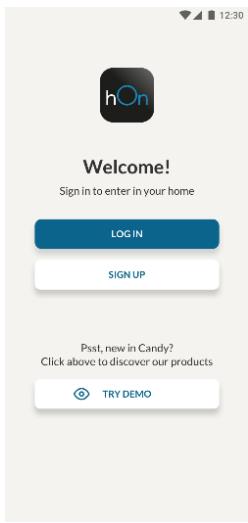
Kpok 3
-ДотримутесьВазibOKi3noεДнаннвДодаТу hOn
BukopncTaHnWi-Fi
Lio6 akTnByBatn cyHKciu Wi-Fi,HaTnchHt Ta yTpMnyTe KhONkY Wi-Fi npToTgrom 2 cekyHd, nicIyoro BBIMKHeTbca nikTorpama Wi-Fi i 6yde nOdaHo 3BykoBn CnHaJI.
JaKIO Wi-Fi ige He hanaTobAoH, nCnB BBIMKHeHH XoJOniNbHKn ABToMaTHHO BBIJe y pekm KOhphiIpyBaHH i 3aJIuINbCBy B cIbOMy cTaHi Ha 30 xBnInH. Ioo6 CKOpNCtATncr peKmOM KOhphiIpyBaHH:
HaTnCKaIe KhoNkY Wi-Fi npotrGM 2 cekyH; xoJIoNbHnK yBiJe BpeXIM HaJaSTyBaHHra Wi-Fi i BuDacTB 3ByKOBn CnHan. IiKTorpama Wi-Fi noUHe 6JImaTu.
-Дотримуитесь вказов у дадату, соб наштуbatи Wi-Fi (див. Виши).
- Пися налштуваньу Wi-Fi та востановленners 3'едання niktorpama Wi-Fi BBIMKHeTBСТа CBITINUMETbCS HepepeBHO.
- Yepe3 30 xBnHn H6e3iJaIbHocTi yHKciWi-Fi aBTOMaTnHo BnDe 3 pexIMy HaJaTuBaHHra.
- Ykso Wi-Fi Bxe HanaTObaHo, 3'6dHaHHa bTOMaTnHb BiHOBtbcB iDIOHNO Do daHnx KOHcIpyBaHHa.
Lio6 cknHyTu HaJauShTyBaHnry Wi-Fi, HataNcKaIte Ta yTpMnyTe KhoNky Wi-Fi -Mode npotraRom 2 cekynd; HanauSyBaHnry Wi-Fi 6yde cknHyTo, i npNJad BnuDactb 3ByKOBni CnHaJI. Picnla zboro fynKcuiy Wi-Fi abTomatNuHo nepeJe B cTaH KOhphiirpyBaHnry (niKTorpama Wi-Fi 3HOby noUHe 6JImaTu).
Lio6 BmKHyTn cyHKciIO Wi-Fi, HATNCiB kHONkY Wi-Fi npotraRom 3s.
Papiomodylb - TexhniHi daHi
a a a a a a a a a a a a a a a a a a a a a a a a a a a a
aai jie aiee ie eae ee eee
oJiaaiol 0jlll a jzj 1a 1i 1i 1i 1i 1i
"Super Cool Super Cool
aall 8o jlll l aol al 80
Super Freeze Super Freeze
ailll aalw yjll lal jy jn 111 111 111 111 111 111
y 1u 1u u u u u u u u u u u u u u u u u u u u u u u u u u u u u u u u u u
aai jjaiybjg 1o
Jia jie jie jai Wi-Fi 45615 la wu,Wi-Fi ja J
1
y
18 4 2 2 2
.
a a a a a a a a a a a a a a a a a a a a a a a a a a a a
1
y
aBbBbBbBbBbBbBbBbBbBbBbBbBbBbBbBbBbBbBbBbBbBbBbBbBbBbBbBbBb
Cie 1e b 100 W- Fi (B) cie 1e b 100 a 100 a 100 a 100 a 100 a 100 a 100 a 100 a 100 a 100 a 100 a 100 a 100 a 5 MODE (C)
J
boll jao
Juiyj 1
gullll clil [aiaiaiaiaiaiaiaiaiaiaiaiaiaiaiaiaiaiaiaiaiaiaiaiaiaiaiaiaiaiaiaiaiaiaiaiaiaiaiaiaiaiaiaiaiaiaiaiaiaiaiaiaiaiaiaiaiaiaiaiaiaiaiaiaiaiaiaiaiaiaiaiaiaiaiaiaiaiaiaiaiaiaiaia
Jusil, 1n J.
akwlll Jg oocwlall aylll oxo
a2 + a3 + a_4 = 6 ②
| Holidays | Day | Description |
| Holidays | Holiday | Holiday |
| 1. | Holidays | Holidays |
| 2. | Holidays | Holidays |
| 3. | Holidays | Holidays |
| 4. | Holidays | Holidays |
| 5. | Holidays | Holidays |
| 6. | Holidays | Holidays |
| 7. | Holidays | Holidays |
| 8. | Holidays | Holidays |
| 9. | Holidays | Holidays |
| 10. | Holidays | Holidays |
| 11. | Holidays | Holidays |
| 12. | Holidays | Holidays |
| 13. | Holidays | Holidays |
| 14. | Holidays | Holidays |
| 15. | Holidays | Holidays |
| 16. | Holidays | Holidays |
| 17. | Holidays | Holidays |
| 18. | Holidays | Holidays |
| 19. | Holidays | Holidays |
| 20. | Holidays | Holidays |
| 21. | Holidays | Holidays |
| 22. | Holidays | Holidays |
| 23. | Holidays | Holidays |
| 24. | Holidays | Holidays |
| 25. | Holidays | Holidays |
| 26. | Holidays | Holidays |
| 27. | Holidays | Holidays |
| 28. | Holidays | Holidays |
| 29. | Holidays | Holidays |
| 30. | Holidays | Holidays |
| 31. | Holidays | Holidays |
| 32. | Holidays | Holidays |
| 33. | Holidays | Holidays |
| 34. | Holidays | Holidays |
| 35. | Holidays | Holidays |
| 36. | Holidays | Holidays |
| 37. | Holidays | Holidays |
| 38. | Holidays | Holidays |
| 39. | Holidays | Holidays |
| 40. | Holidays | Holidays |
| 41. | Holidays | Holidays |
| 42. | Holidays | Holidays |
| 43. | Holidays | Holidays |
| 44. | Holidays | Holidays |
| 45. | Holidays | Holidays |
| 46. | Holidays | Holidays |
| 47. | Holidays | Holidays |
| 48. | Holidays | Holidays |
| 49. | Holidays | Holidays |
| 50. | Holidays | Holidays |
| 51. | Holidays | Holidays |
| 52. | Holidays | Holidays |
| 53. | Holidays | Holidays |
| 54. | Holidays | Holidays |
| 55. | Holidays | Holidays |
| 56. | Holidays | Holidays |
| 57. | Holidays | Holidays |
| 58. | Holidays | Holidays |
| 59. | Holidays | Holidays |
| 60. | Holidays | Holidays |
| 61. | Holidays | Holidays |
| 62. | Holidays | Holidays |
| 63. | Holidays | Holidays |
| 64. | Holidays | Holidays |
| 65. | Holidays | Holidays |
| 66. | Holidays | Holidays |
| 67. | Holidays | Holidays |
| 68. | Holidays | Holidays |
| 69. | Holidays | Holidays |
| 70. | Holidays | Holidays |
| 71. | Holidays | Holidays |
| 72. | Holidays | Holidays |
| 73. | Holidays | Holidays |
| 74. | Holidays | Holidays |
| 75. | Holidays | Holidays |
| 76. | Holidays | Holidays |
| 77. | Holidays | Holidays |
| 78. | Holidays | Holidays |
| 79. | Holidays | Holidays |
| 80. | Holidays | Holidays |
| 81. | Holidays | Holidays |
| 82. | Holidays | Holidays |
| 83. | Holidays | Holidays |
| 84. | Holidays | Holidays |
| 85. | Holidays | Holidays |
| 86. | Holidays | Holidays |
| 87. | Holidays | Holidays |
| 88. | Holidays | Holidays |
| 89. | Holidays | Holidays |
| 90. | Holidays | Holidays |
| 91. | Holidays | Holidays |
| 92. | Holidays | Holidays |
| 93. | Holidays | Holidays |
| 94. | Holidays | Holidays |
| 95. | Holidays | Holidays |
| 96. | Holidays | Holidays |
| 97. | Holidays | Holidays |
| 98. | Holidays | Holidays |

- PRODUCT DESCRIPTION 2
- 3
- PRODUCT DESCRIPTION
- Space requirements
- Use
- Customized temperature
- Super Cool function
- Super Freeze function
- Eco mode
- Holiday function
- Defrosting
- Slider
- Demo mode
- Error Codes
- WI-FI USE
- In app pairing procedure
- Step 1
- Step 2
- Step 3
- Radio-module - Technical data
- Pe3Hcme
- Описане на порожкта
- N3nCKBaHna 3a npocTpaHcTBO
- YIOTPEBA
- Ynotpe6a
- Bnua 2
- Étape 2
- 2.korak
- PRODUCTBESCHRIJVING 98
- GEBRUIK 99
- I app-paringsprosedyren
- Trinn 1
- Passo 2
- Pasul 2
- Pasul 3
- Utilizarea Wi-Fi
- Po3MopoQyBaHHa
- DemohctrauiHn pexnM
- KoAn NOMnJOK
- BVKOPNUCTAHN WI-FI
- PpoeDypa noCdHaHHBdoTaKy
- Kpok 1
- Kpok 2
- Kpok 3
- BukopncTaHnWi-Fi
- Papiomodylb - TexhniHi daHi
- 1
Brand : CANDY
Model : CBT3518EW
Category : Built-in refrigerator