USER MANUAL CBL3518E - CBL3518E/L CANDY
PRODUCT DESCRIPTION 2
USE 3
Use 3
Super Cool function 4
Super Freeze function. 4
Eco mode. 4
Holiday function 5
Defrosting. 5
Demo mode 5
Error Codes 5
In app pairing procedure 6
Step 1. 6
Step 2. 6
Step 3. 6
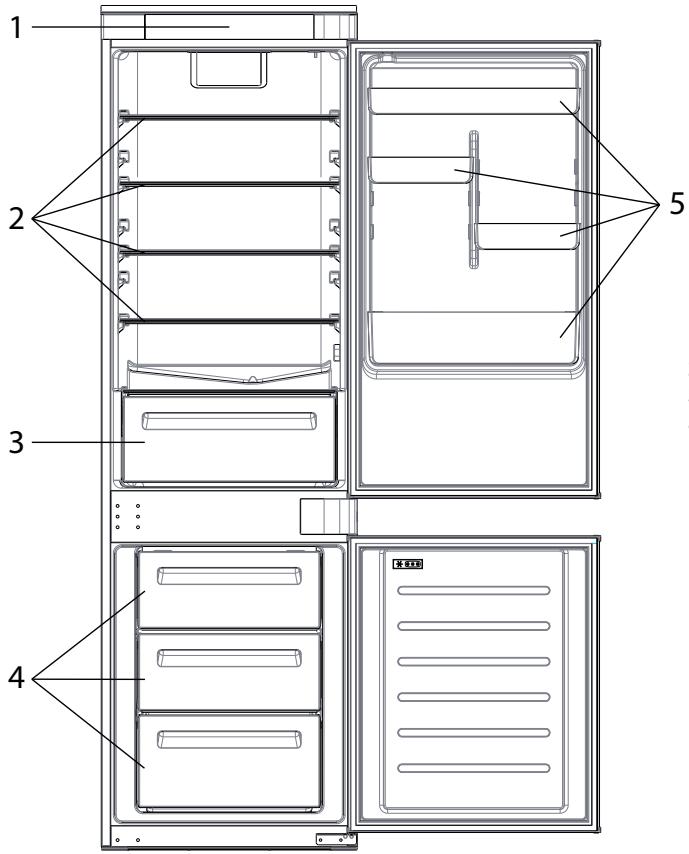
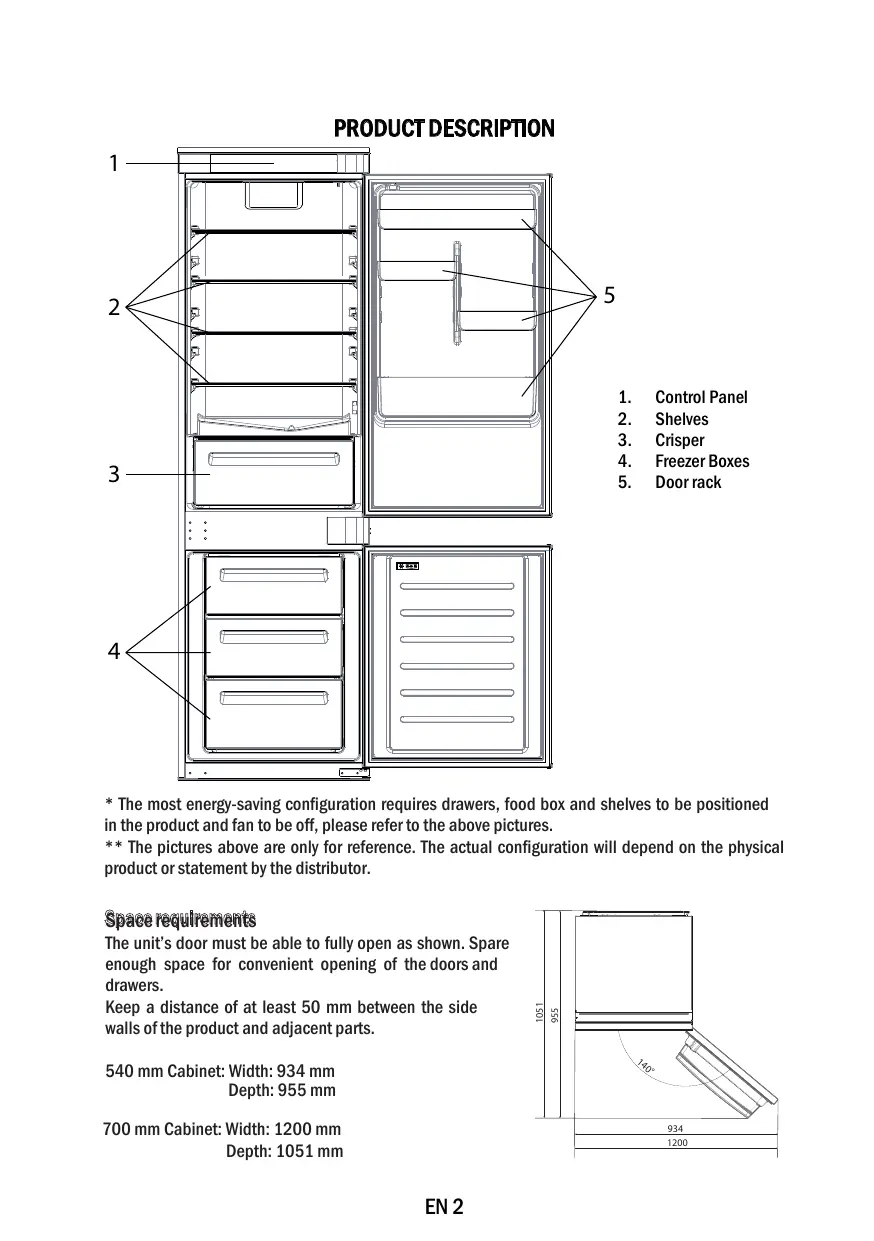
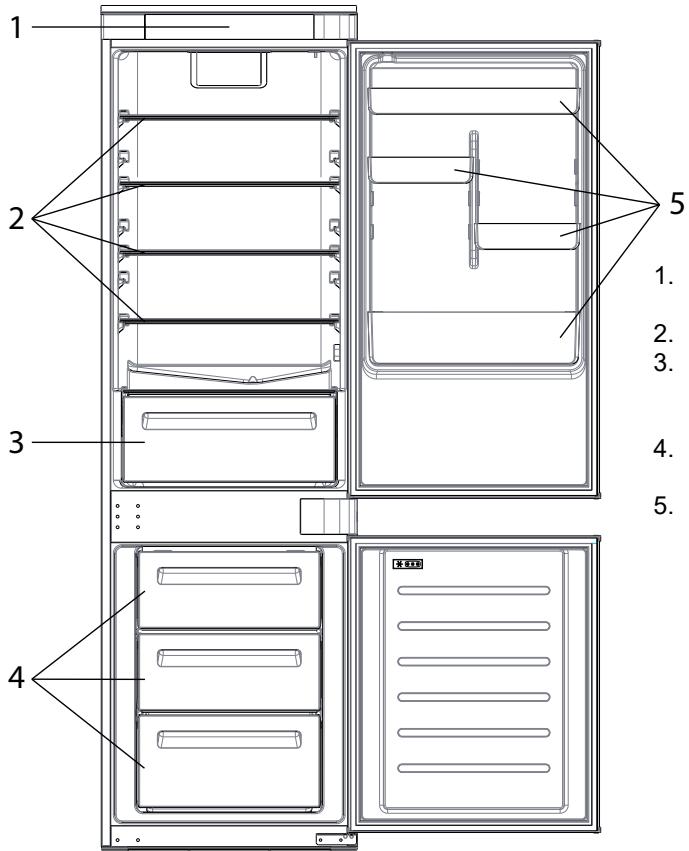
PRODUCT DESCRIPTION
- Control Panel
- Shelves
- Crisper
- Freezer Boxes
-
Door rack
-
The most energy-saving configuration requires drawers, food box and shelves to be positioned in the product and fan to be off, please refer to the above pictures.
** The pictures above are only for reference. The actual configuration will depend on the physical product or statement by the distributor.
Space requirements
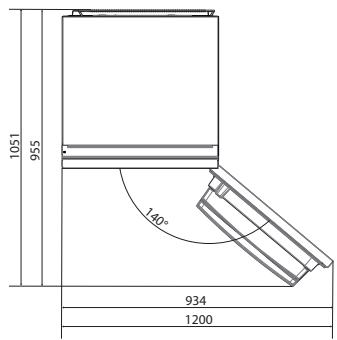
The unit's door must be able to fully open as shown. Spare enough space for convenient opening of the doors and drawers.
Keep a distance of at least 50 mm between the side walls of the product and adjacent parts.
540 mm Cabinet:Width:934 mm
Depth: 955 mm
700 mm Cabinet: Width: 1200 mm
Depth: 1051 mm
USE
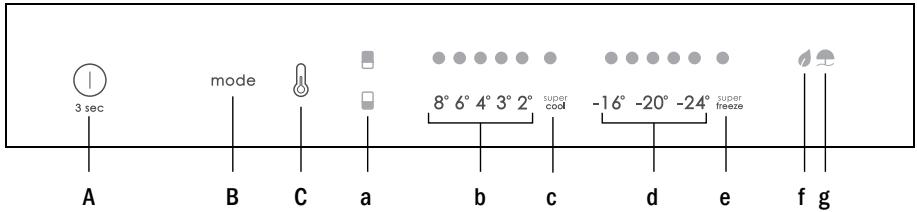
A. ON/OFF key, used to switch on/off the appliance
B. Mode key, used to selected the special functions (Eco and holiday)
C. TEMP key, used to selected the fridge and freezer temperature
a. Fridge /freezer area icon, shows which compartment of the appliance is selected
b. Fridge temperature levels, show which is the selected temperature
c. Super Cool icon, shows if the Super Cool function is activated
d. Freezer temperature levels, show which is the selected temperature in the freezer
e. Super Freeze icon, shows if the Super Freeze function is activated
f. Eco mode icon, shows whether the eco mode is activated
g. Holiday function icon, show whether the holiday function is activated
Use Plug on the appliance and it automatically turns on.
- The temperature can be set with 1°C sensitivity. It is possible to select a temperature from 2°C to 8°C in the fridge, and from -16°C to -24°C in the freezer.
- The temperature will automatically set at 4°C in the fridge and -18°C in the freezer. NOTE: wait at least 2/3 hours before putting food in the appliance, so as to ensure the temperature inside the fridge.
- To change the temperature, press the TEMP key for 5 seconds, an acoustic signal is made and the icon of the selected compartment (fridge or freezer) as well as all the temperature LEDs of the corresponding compartment turn on for 2s, after 2s the selection of the compartment is confirmed. With the selected compartment icon on, quick press the TEMP key to change the temperature. When the setting increases, the corresponding LED light will turn on. An acoustic signal is made every time the TEMP key is pressed and the temperature is changed, after 5 seconds the selection is confirmed. After 30s without operation the fridge/freezer icon area turns off, while the LEDs of the selected temperatures stay on. When the TEMP key is touched again, the icon of the last are selected (Fridge or freezer) turns on.
In case of power loss, the last cooling level set will be restored.
- To restore the default setting, at the screen lit, keep pressed the TEMP button, and then press ON/OFF button 5 times in 5 seconds.
- Under the normal operating condition (in spring and autumn), it is recommended to set the temperature at 4°C . In summer when the ambient temperature is high, it is recommended to set temperature at 6 8°C , so as to guarantee the fridge and freezer temperatures and reduce the refrigerator continuous running time; and in winter when the ambient temperature is low, it is recommended to set temperature at 3 4°C to avoid frequent start/stop of the refrigerator.
SuperCool function
It is suggested to switch on the Super Cool function if a large quantity of food should be stored (for example after the purchase). The Super-Cool function accelerates the cooling of fresh food and protects the goods already stored from undesirable warming. When the function is activated, the temperature of the fridge is automatically set at 2°C .
How to use the Super Cool function:
- The function can be activated by long pressing TEMP key to select the fridge compartment, and then quick pressing the TEMP key until the Super Cool icon led is turned on, or it can be turned on from the app. When the function is activated, the Super Cool LED is always ON.
- To exit the Super Cool function, press the TEMP key or turn it off from the app.
- The Super Cool function automatically ends when the function has lasted for more than 12 hours.
- When the Super Cool ends, the icon of the control panel is switched off and the previously set cooling level is restored.
Super Freeze function
The super freezing function accelerates the freezing of fresh food and protects the goods already stored from undesirable warming. If a large amount of food has to be freeze, it is recommended to set the Super-Freeze function on 24h before the usage. When the function is activated, the temperature is automatically set at -22 °C.
How to use the Super Freeze function:
- The function can be launched by long pressing TEMP key to select the freezer compartment, and then quick pressing TEMP key until the Super Freeze icon led is turned on, or it can be turned on from the app. When the function is activated, the Super Freeze LED is always ON.
- To exit the Super Freeze function, press the TEMP key or turn it off from the app.
- The Super Freeze function automatically ends when the function has lasted for more than 50 hours.
- When the Super Freeze ends, the icon of the control panel is switched off and the previously set freezing level is restored.
Eco mode
The Eco mode can be activated to optimize the performance of the appliance, whereas obtaining the best food storage. The Eco mode will automatically set the temperature at 4°C in fridge and at -18°C in the freezer.
How to use the Eco mode:
- The function can be activated from control panel by pressing the "mode" key until the Eco mode icon turns on (an acoustic signal confirms the selection), or by selecting the function from the app. When the function is activated, the Eco mode icon is always ON.
- To exit the Eco turn it off from the app or chose another function from the control panel.
- When the Eco Mode ends, the icon of the control panel is switched off and the previously set cooling levels are restored.
Holiday function
The Holiday function can be used to reduce the energy consumption of the appliance, when it is not used regularly. When the function is on, the LED lights will be off (even if the door is open) and the fridge will work on low power consumption mode, whereas the freezer will keep working normally.
How to use the Holiday function:
- The function can be activated from control panel by pressing the "mode" key until the Holiday icon turns on (an acoustic signal confirms the selection), or by selecting the function from the app. When the function is activated, the Holiday icon is always ON.
- To exit the Holiday function, turn it off from the app or chose another function from the control panel.
- When the Holiday function ends, the icon of the control panel is switched off and the previously set cooling levels are restored.
Defrosting
When the layer of frost present in the freezer compartment exceeds 3mm , it is recommended to proceed with the defrosting as it increases energy consumption.
- Switch off the appliance and disconnect the power cord.
- Remove the frozen food and temporarily place them in a cool place.
- Leave the freezer door open and collect the water on the bottom of the product.
- When defrosting is completed, dry the interior thoroughly.
- Reconnect the power cord and set the desired values.
Wait a moment and reintroduce the frozen foods.
Demo mode
To enter or exit the demo mode, with the door open, long press the ON/OFF key and simultaneously quick press the MODE key 5 times (within 5 seconds).
Error Codes
8° C - 6° C - 4° C - 3° C - 2° C LED lights turn on sequentially, it means there has been a communication error between the main control board and the display board. Please, contact the technical assistance to help solve the problem
APP CONNECTION (Content only)
IN APP PAIRING PROCEDURE
Step 1
Download the hOn app on the stores


GET IT ON
Google Play

Download on the
App Store

EXPLORE IT ON
AppGallery
Step 2
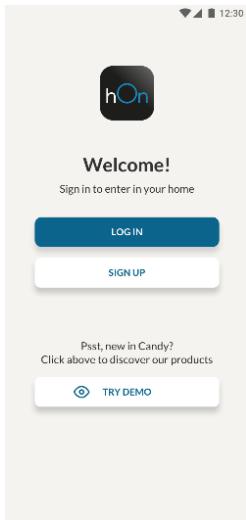
Create your account on the hOn App or log in if you already have an account
Step 3
- Follow pairing instructions in the hOn App
| The inside light bulb does not turn on. | • No electricity. | • The power cable is not properly plugged in.
• Check if the appliance is switched off (see Temperature Adjustment).
• Check the power socket is working correctly (e.g. with another electric device). |
| • Holiday Mode is activated. | • Deactivate Holiday mode. |
| The internal temperature of the refrigerator and/or freezer is not cold enough. | • The doors are not closed. | • Check that the door and gaskets close properly. |
| • The doors are frequently opened. | • Avoid opening the doors unnecessarily for some time. |
| • Incorrect temperature setting. | • Check the temperature setting and, if possible, set a lower temperature (see Temperature Adjustment). |
| • The refrigerator and/or freezer are too full. | • Wait for the temperature of the refrigerator/ freezer to stabilise.
• Avoid filling the refrigerator and freezer excessively. |
| • The surrounding temperature is too low. | • Move the unit to a warmer place or heat the current room. |
| • Warm items have been stored. | • Always allow items to cool before storing them. |
| The food in the refrigerator freezes. | • Incorrect temperature setting. | • Check the temperature setting and, if possible, increase the temperature. |
| • Food in contact with the back wall. | • Keep the food away from the refrigerator's back wall. |
| The bottom of the refrigerator compartment is wet or water droplets are present. | • The drain hose could be clogged. | • Clean the drain hose with a stick or similar item to allow the water to drain. |
| Presence of drops of water or frost on the rear wall of the refrigerator. | • Depending on the function, drops of water or frost form on the rear wall of the refrigerator during operation. | • It is not a defect. |
| • Warm items have been stored. | • Always allow items to cool before storing them. |
| • There are open food containers or liquids. | • Always cover food and liquids. |
| • The doors are not closed. | • Check that the door and gaskets close properly. |
| • The doors are frequently opened. | • Avoid opening the doors unnecessarily for some time. |
| Presence of water in the vegetable drawer. | • Lack of air circulation. | • Verify that your appliance is not too full. |
| • Vegetables and fruit with too much moisture. | • Wrap the fruit and vegetables in plastic materials, e.g. cling film, bags or containers. |
| The motor runs continuously. | • The doors are not closed. | • Make sure the doors are closed and check the seals close properly. |
| • The doors are opened frequently. | • Avoid opening the doors unnecessarily for some time. |
| • Ambient temperature is very high. | • Verify that the ambient temperature is in the range set out in the specifications on the appliance tag.
• Set the display screen/thermostat to a warmer temperature. |
| • The appliance has been off (no power) for some time. | • It normally takes the appliance 8-12h to cool completely. |
| The frozen food is thawing. | • Surrounding temperature is too low. | • Move the unit to a warmer place or heat the current room. |
| • The freezer door is not closed. | • Make sure the door is closed and that the gasket is sealing properly. |
| Fridge door alarm. | • Fridge door alarm (acoustic beep) activates whenever the door is left open for more than 3 minutes. | • Avoid leaving the door open when not needed. The beep ceases when the door is closed. |
| The appliance makes noises such as gurgling, buzzing, clicking, creating. | • No breakdowns. An engine is running, e.g. refrigeration unit, fan. The refrigerant flows into the pipes. Motor, switches and solenoid valves are switched on or off. | • No action needed. |
| • The appliance is not located on level ground. | • Adjust the feet to level the appliance. |
| • The appliance touches an object around it. | • Remove objects around the appliance. |
| The appliance does not cool, the temperature and lighting indicators are on. | • Demo mode is activated. | • Deactivate DEMO mode. |
| Strong ice and frost in the freezer compartment. | • The items were not adequately packaged. | • Always pack the items well. |
| • A door/drawer of the appliance is not tightly closed. | • Close the door/drawer. |
| • The door/drawer has been opened too frequently or for too long. | • Do not open the door/drawer too frequently. |
| • The door/drawer gasket is dirty, worn, cracked or mismatched. | • Clean the door/drawer gasket or replace it with a new one. |
| • Something on the inside prevents the door/drawer from closing properly. | • Reposition the shelves, door racks or internal containers to allow the door/drawer to close. |
| The sides of the appliance are warm. | • This is normal. | |
Pe3Hcme
ОпИСАнUE HA ПОДУКТА 8
YNOTPEBA 9
YnoTe6a 9
Функциа „Super Cool" 10
Функця „Super Freeze" 11
Pekim ,Eco" 11
Функция „Holiday" 12
Pa3Mpa3YBaHe 12
Демонстрацноен реким 12
KoIOBe 3a rpeuKn 12
PpoeDpya 3a cDBoBaHe c npIIOxKeHneTo 13
CTbIka 1 13
CTbIka 2 13
CTbIka 3 13
Описане НА ПОДукTA
*Haen-heeprocncctraBaaata KOHnpyaunu 3nCKBa YekMeJKeTaTa, KytTnTa 3a XpaHa n paTOBeTe Da 6bDaT pa3noJooKeHN B npOdyKTA u BeHTnlaTOPbT da 6bDe n3KnOueH, MoJIr, BnXte rOpHnte CHIMKN.
**I3o6paXeHnraTao no-rope ca cama 3a cnpaBka. JeiCTBnTeHnHaTa KOHfNpyaunie 3aBnCn OT fN3nueckn IpoDyKT NII DeKlnapaunrTa Ha dInctpn6byTopa.
N3nCKBaHnna 3a npocTpaHCTBO
BpaTaHa ypea Tpr6Ba Da MoKe Da ce OTbapra DOKpaia, KaKTo e Noka3aHo. OcTabeTe DOCTaTBuHO MRCTO 3a yDObHo OTbapraHe Ha BpaTInTe N YekMeJxKetata.Cna3BaIte pa3CToHnE OT Hau-MaNko 50 MM MeJdy CTpaHnUHnTe CTeHN Ha npOdyKTA n CbceDHNTE qactn.
Download on the App Store

EXPLORE IT ON AppGallery
Krok 2
FREMGANGSGMÄDEVEDPARRINGIAPP
Trin 1
Download on the App Store

EXPLORE IT ON AppGallery
Bnμα 2
Download on the App Store

EXPLORE IT ON AppGallery
Valihe 2
Download on the App Store

EXPLORE IT ON AppGallery
2. lépés
PRODUCTBESCHRIJVING 76
GEBRUIK 77
Download on the App Store

EXPLORE IT ON AppGallery
Passo 2
Co6JIOaIe paCCToHHe He MeHee 50 MM MExdy bokOBbIMn CTeHKaMn N3DeJIy IN pInJIeraHOUIMN DeTaJIaMn.
a a a a a a a a a a a a a a a a a a a a a a a a a a a a
1
y
g
| Holidays (in days) | Day | Description |
| Holiday (1st of January to 31st of January) | .Holiday | Jahra al-hajram al-hajram al-hajram al-hajram al-hajram al-hajram al-hajram al-hajram al-hajram al-hajram al-hajram al-hajram al-hajram al-hajram al-hajram al-hajram al-hajram al-hajram al-hajram al-hajram al-hajram al-hajram al-hajram al-hajram al-hajram al-hajham al-hajram al-hajram al-hajram al-hajram al-hajram al-hajram al-hajram al-hajram al-hajram al-hajram al-hajram al-hajram al-hajram al-hajram al-hajram al-hajram al-hajram al-hajram al-hajram al-hajram al-hajram al-hajram al-hajram al-hajram al-hajtram al-hajram al-hajram al-hajram al-hajram al-hajram al-hajram al-hajram al-hajram al-hajram al-hajram al-hajram al-hajram al-hajram al-hajram al-hajram al-hajram al-hajram al-hajram al-hajram al-hajram al-hajram al-hajram al-hajram al-hajram al-hajran al-hajram al-hajram al-hajram al-hajram al-hajram al-hajram al-hajram al-hajram al-hajram al-hajram al-hajram al-hajram al-hajram al-hajram al-hajram al-hajram al-hajram al-hajram al-hajram al-hajram al-hajram al-hajram al-hajram al-hajram al-hajrad al-hajram al-hajram al-hajram al-hajram al-hajram al-hajram al-hajram al-hajram al-hajram al-hajram al-hajram al-hajram al-hajram al-hajram al-hajram al-hajram al-hajram al-hajram al-hajram al-hajram al-hajram al-hajram al-hajram al-hajram al-hajream al-hajram al-hajram al-hajram al-hajram al-hajram al-hajram al-hajram al-hajram al-hajram al-hajram al-hajram al-hajram al-hajram al-hajram al-hajram al-hajram al-hajram al-hajram al-hajram al-hajram al-hajram al-hajram al-hajram al-hajram al-hajrm al-hajram al-hajram al-hajram al-hajram al-hajram al-hajram al-hajram al-hajram al-hajram al-hajram al-hajram al-hajram al-hajram al-hajram al-hajram al-hajram al-hajram al-hajram al-hajram al-hajram al-hajram al-hajram al-hajram al-hajram al-hajr al-hajram al-hajram al-hajram al-hajram al-hajram al-hajram al-hajram al-hajram al-hajram al-hajram al-hajram al-hajram al-hajram al-hajram al-hajram al-hajram al-hajram al-hajram al-hajram al-hajram al-hajram al-hajram al-hajram al-hajram al-hajrum al-hajram al-hajram al-hajram al-hajram al-hajram al-hajram al-hajram al-hajram al-hajram al-hajram al-hajram al-hajram al-hajram al-hajram al-hajram al-hajram al-hajram al-hajram al-hajram al-hajram al-hajram al-hajram al-hajram al-hajram al-hajraz al-hajram al-hajram al-hajram al-hajram al-hajram al-hajram al-hajram al-hajram al-hajram al-hajram al-hajram al-hajram al-hajram al-hajram al-hajram al-hajram al-hajram al-hajram al-hajram al-hajram al-hajram al-hajram al-hajram al-hajram al-hajrar al-hajram al-hajram al-hajram al-hajram al-hajram al-hajram al-hajram al-hajram al-hajram al-hajram al-hajram al-hajram al-hajram al-hajram al-hajram al-hajram al-hajram al-hajram al-hajram al-hajram al-hajram al-hajram al-hajram al-hajram al-hajramid al-hajram al-hajram al-hajram al-hajram al-hajram al-hajram al-hajram al-hajram al-hajram al-hajram al-hajram al-hajram al-hajram al-hajram al-hajram al-hajram al-hajram al-hajram al-hajram al-hajram al-hajram al-hajram al-hajram al-hajram al-hajrand al-hajram al-hajram al-hajram al-hajram al-hajram al-hajram al-hajram al-hajram al-hajram al-hajram al-hajram al-hajram al-hajram al-hajram al-hajram al-hajram al-hajram al-hajram al-hajram al-hajram al-hajram al-hajram al-hajram al-hajram al-haj ram al-hajram al-hajram al-hajram al-hajram al-hajram al-hajram al-hajram al-hajram al-hajram al-hajram al-hajram al-hajram al-hajram al-hajram al-hajram al-hajram al-hajram al-hajram al-hajram al-hajram al-hajram al-hajram al-hajram al-hajram al-hajrame al-hajram al-hajram al-hajram al-hajram al-hajram al-hajram al-hajram al-hajram al-hajram al-hajram al-hajram al-hajram al-hajram al-hajram al-hajram al-hajram al-hajram al-hajram al-hajram al-hajram al-hajram al-hajram al-hajram al-hajram al-haj Ram al-hajram al-hajram al-hajram al-hajram al-hajram al-hajram al-hajram al-hajram al-hajram al-hajram al-hajram al-hajram al-hajram al-hajram al-hajram al-hajram al-hajram al-hajram al-hajram al-hajram al-hajram al-hajram al-hajram al-hajram al-hajRam al-hajram al-hajram al-hajram al-hajram al-hajram al-hajram al-hajram al-hajram al-hajram al-hajram al-hajram al-hajram al-hajram al-hajram al-hajram al-hajram al-hajram al-hajram al-hajram al-hajram al-hajram al-hajram al-hajram al-hajram al-hajRAM al-hajram al-hajram al-hajram al-hajram al-hajram al-hajram al-hajram al-hajram al-hajram al-hajram al-hajram al-hajram al-hajram al-hajram al-hajram al-hajram al-hajram al-hajram al-hajram al-hajram al-hajram al-hajram al-hajram al-hajram al-haj |