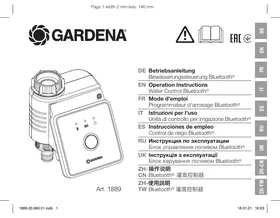
1889 - Irrigation timer GARDENA - Free user manual and instructions
Find the device manual for free 1889 GARDENA in PDF.



| Product type | Bluetooth® water timer |
| Brand | GARDENA |
| Model | 1889 |
| Power supply | 1 alkaline 9 V battery type IEC 6LR61 |
| Battery life | Approximately 1 year |
| Operating temperature | 5 °C to 50 °C |
| Operating pressure | 0.5 to 12 bar |
| Frequency band | 2.402 – 2.480 GHz |
| Maximum transmission power | 10 mW |
| Radio range in open field | Approximately 25 m |
| Carried fluid | Clean fresh water |
| Main functions | Programmed automatic watering, control via Bluetooth® app, manual watering, integration of moisture sensor |
| Maintenance | Regular cleaning of the filter, exterior cleaning with a soft damp cloth |
| Safety | Do not use with chemicals or flammable liquids, do not clean with pressurized water, keep out of reach of young children |
| Spare parts / Accessories | Adapter for G 3/4" thread, moisture sensor (ref. 1867), anti-theft security (ref. 1815-00.791.00) |
| Warranty | Manufacturer's warranty – conditions available at www.gardena.com/warranty |
| Service | GARDENA after-sales service center, Azur number 0 810 00 78 23 (France) |
Frequently Asked Questions - 1889 GARDENA
User questions about 1889 GARDENA
0 question about this device. Answer the ones you know or ask your own.
Ask a new question about this device
Download the instructions for your Irrigation timer in PDF format for free! Find your manual 1889 - GARDENA and take your electronic device back in hand. On this page are published all the documents necessary for the use of your device. 1889 by GARDENA.
USER MANUAL 1889 GARDENA
natural_image
Line drawing of a mechanical device with ports and control panel (no text or symbols)Art. 1889


EAC

EN Operation Instructions Water Control Bluetooth®
12
13
14
M1
DE
http://www.gardena.com/int/support/safety-regulations
Translation of the original instructions.

For safety reasons, children and young people under 16 as well as anyone who is not familiar with these operating instructions should not use
the product. Persons with reduced physical or mental abilities may use the product only if they are supervised or instructed by a responsible person. Children must be
supervised to ensure that they do not play with the product. Never operate the product when you are tired, ill or under the influence of alcohol, drugs or medicine.
Intended use:
The GARDENA Water Control is intended for private use in domestic and hobby gardens, exclusively for outdoor use, to control sprinklers and watering systems. The GARDENA
Water Control can be used for automatic watering during holidays.
The Water Control Bluetooth® Art. 1889 forms part of an irrigation system in conjunction with the Bluetooth® App.

DANGER! Risk of physical injury!
The GARDENA Water Control must not be used for industrial purposes or in conjunction with chemicals, foodstuffs, easily flammable and explosive materials.
1. SAFETY
IMPORTANT!
Read the operator's manual carefully before use and keep for future reference.
Battery:
To ensure the Water Control runs safely, only a 9 V alkaline manganese battery (alkaline) type IEC 6LR61 must be used!

CAUTION!
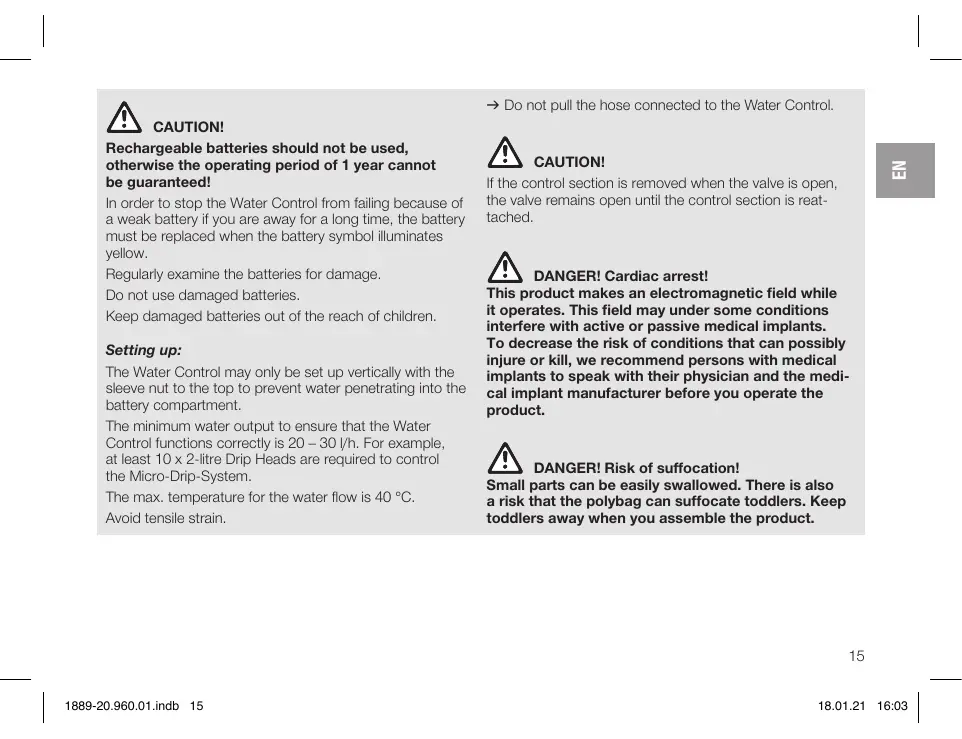
Rechargeable batteries should not be used, otherwise the operating period of 1 year cannot be guaranteed!
In order to stop the Water Control from failing because of a weak battery if you are away for a long time, the battery must be replaced when the battery symbol illuminates yellow.
Regularly examine the batteries for damage.
Do not use damaged batteries.
Keep damaged batteries out of the reach of children.
Setting up:
The Water Control may only be set up vertically with the sleeve nut to the top to prevent water penetrating into the battery compartment.
The minimum water output to ensure that the Water Control functions correctly is 20 – 30 l/h. For example, at least 10 x 2-litre Drip Heads are required to control the Micro-Drip-System.
The max. temperature for the water flow is 40^ C.
Avoid tensile strain.
→ Do not pull the hose connected to the Water Control.

CAUTION!
If the control section is removed when the valve is open, the valve remains open until the control section is reattached.

DANGER! Cardiac arrest!
This product makes an electromagnetic field while it operates. This field may under some conditions interfere with active or passive medical implants. To decrease the risk of conditions that can possibly injure or kill, we recommend persons with medical implants to speak with their physician and the medical implant manufacturer before you operate the product.

DANGER! Risk of suffocation!
Small parts can be easily swallowed. There is also a risk that the polybag can suffocate toddlers. Keep toddlers away when you assemble the product.
2. FUNCTION
Water Control:
The GARDENA Water Control Bluetooth® is configured automatically with the GARDENA Bluetooth® App.
The Water Control carries out watering automatically according to the set program and can therefore also be used during holidays.
Controls/Display [Fig. F1]:
① LED Connection display/Signal: Blue flashing for 3 min.: While connection Blue lightning for 10 sec: Successfully connected
② LED Battery display: Green lightning: Capacity up to 1 year
Yellow lightning: Red flashing: Red lightning:
Capacity min. 4 weeks Capacity max. 4 weeks Battery flat, valve no longer opens. A valve opened will also close again if the battery is flat.
The battery display is reset when the batteries are changed.
③ LED Active watering: Green lightning for 10 seconds.
④ Man. Button: A single push on the Man. Button activates the status request and the battery status is displayed for 10 sec. A second push activates manual watering.
To operate with the GARDENA Bluetooth® App:
You can use the free GARDENA Bluetooth® app to control the GARDENA Water Control Bluetooth® at any time. It can be downloaded from the Apple App Store or from the Google Play Store.
Settings of the Irrigation Valve:
- According to the timings in the Bluetooth® App: Watering start, duration, days
16
- As required in the Bluetooth® App: Start and finish
- As required on the Water Control: Start and stop
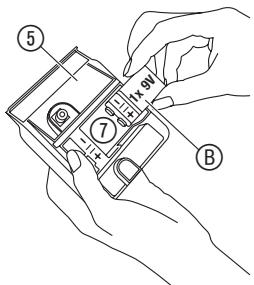
To Insert the battery [Fig. I1/I2]:
The battery is not included in the scope of delivery.
The operating period is approx. 1 year. The operating period can vary depending on ambient temperature and transmission frequency.
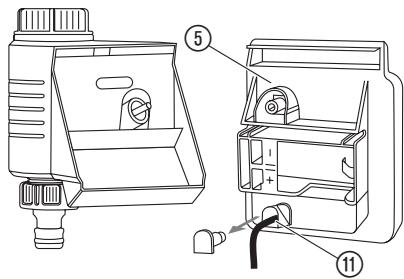
- Remove the control unit ⑤ from the valve unit ⑥.
- Place the battery Ⓑ in the battery compartment ⑦ (note the polarity +/-).
The connection LED is flashing. - Push the control unit ⑤ back onto the valve unit ⑥.
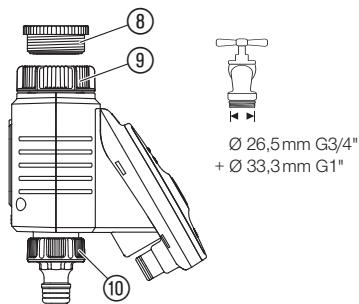
To connect the Water Control [Fig. I3]:
The Water Control is fitted with a sleeve nut ⑨ for taps with G 1" (33.3 mm) thread. The adaptor supplied ⑧ allows the Water Control to be connected to taps with a (G 3/4") thread (26.5 mm).
-
For a tap with a G 3/4" (26.5 mm) thread: Screw the adaptor ⑧ onto the tap manually (do not use pliers).
-
Screw the sleeve nut ⑨ of the Water Control onto the adaptor thread by hand (do not use pliers).
- Screw the tap connector ⑩ onto the Water Control.
To connect the Soil Moisture Sensor (optional) [Fig. 14]:
In addition to time-dependent control, it is also possible to include soil moisture.
If the soil moisture is sufficient, irrigation is stopped or skipped.
- Place the Soil Moisture Sensor in the area to be irrigated.
- Plug the connector ⑪ into the sensor socket of the Control Unit ⑤.
4. OPERATION
Manual operation by the Water Control [Fig. F1]:
The valve can be opened or closed manually at any time. Even a time-controlled open valve can be closed earlier without changing the schedules.
If the Water Control is in "Sleep Mode", push the Man. Button 2 times.
-
Push the Man. Button to open the valve manually (or to close an open valve).
The LED Active Watering ③ is lighting green for 10 sec. -
Push the Man. Button to close the valve early.
The watering duration is according to the parameter of the GARDENA Bluetooth® App.
If a time controlled watering has been stopped manually, this watering cannot start again.
If the valve has been opened manually and a programmed start of a watering period overlaps the manual opening period, the programmed starting time is suppressed.
Factory Reset [Fig. I1/F1]:
The Water Control Bluetooth ^® will be reset to the factory settings.
- Remove the battery Ⓑ.
-
Push and hold the Man. Button ④ and place the battery ⑧ in the battery compartment ⑦ (note the polarity +/-).
-
Push and hold the Man. Button ④ for another 10 seconds.
After approx. 10 seconds the factory setting is restored and the connection LED is flashing.
5. MAINTENANCE
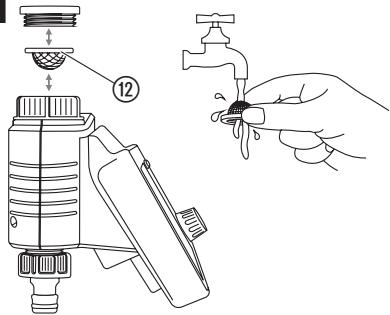
To clean the filter [Fig. M1]:
The filter ⑫ should be checked regularly and cleaned when necessary.
To clean the Water Control:

DANGER! Risk of physical injury! Risk of injury and risk of damage to the product.
→ Do not clean the product with water or with a water jet (in particular high-pressure water jet).
→ Do not clean with chemicals including petrol or solvents. Some can destroy critical plastic parts.
→ Clean the Water Control with a soft, damp cloth.
6. STORAGE
To put into storage:
The product must be stored away from children.
- Remove the battery to preserve it (see 3. Initial Operation).
- Store the Water Control in a dry, enclosed and frost-free place.
18
Disposal:
(in accordance with RL2012/19/EC)

The product must not be disposed of to normal household waste. It must be disposed of in line with local environmental regulations.
IMPORTANT!
→ Dispose of the product through or via your municipal recycling collection centre.
Disposal of the battery:
The battery may only be disposed of when discharged.
IMPORTANT!
→ Dispose of the battery through or via your municipal recycling collection centre.
7. TROUBLESHOOTING
In case of malfunctions you will find the FAQ at this address:
www.gardena.com/de/bluetooth/faq
| Problem | Possible Cause | Remedy |
| No LED-display appears | Battery is inserted incorrectly. | → Batteries inserted incorrectly. |
| Battery is completely empty. | → Replace the battery. | |
| Manual watering is not possible using the Man. Button | Water Control is in Sleep Mode | → Push theMan. Buttonagain. |
| Battery is empty (LED Battery display lights red). | → Replace the battery. | |
| Tap is closed. | → Open the tap. | |
| Schedule is not executed (no watering) | Valve was previously opened manually. | → Avoid possible overlaps. |
| Battery is empty (LED Battery display lights red). | → Replace the battery. | |
| Tap is closed. | → Open the tap. | |
| Water Control does not close | Minimum quantity of water drawn is less than 20 l/h. | → Connect more drip heads. |

NOTE: For any other malfunctions please contact the GARDENA service department. Repairs must only be done by GARDENA service departments or specialist dealers approved by GARDENA.
- TECHNICAL DATA
| Water Control Bluetooth® | Unit | Value (Art. 1889) |
| Operation temperature range (outdoors) | °C | 5 – 50 |
| SRD | ||
| Frequency range | GHz | 2,402 – 2,480 |
| Maximum power | mW | 10 |
| Free field radio range (approx.) | m | 25 |
| Min./max. operating pressure | bar | 0,5 / 12 |
| Flow medium | Clear fresh water | |
| Battery required | 1 x 9 V alkaline manganese Typ IEC 6LR61 | |
| Operating time of the battery (approx.) | a | 1 |
EC Declaration of Conformity
Hereby, GARDENA Manufacturing GmbH declares that the radio equipment type (Art. 1889) is in compliance with directive 2014/53/EU.
The full text of the EC declaration of conformity is available at the following internet address:
http://www.gardena.com/int/support/safety-regulations
9. ACCESSORIES
GARDENA Soil Moisture Sensor
GARDENA Anti-theft device
For irrigation depending on the soil moisture.
To prevent theft of the Water Control
Art. 1867
Art. 1815-00.791.00
(from GARDENA Service)
10. SERVICE/WARRANTY
Service:
Please contact the address on the back page.
Warranty statement:
The manufacturer's warranty can be viewed at:
www.gardena.com/warranty or
Phone number +49 731 490 3773
This manufacturer's warranty is limited to replacement and repair of products in accordance with the abovementioned conditions. The manufacturer's warranty does not constitute an entitlement to lodge other claims against us as a manufacturer, such as for damages. This manufacturer's warranty does not, of course, affect statutory and contractual warranty claims against the dealer/retailer.
The manufacturer's warranty is governed by the law of the Federal Republic of Germany.
Trademark Attribution Footnote
The Bluetooth® word mark and logos are registered trademarks owned by Bluetooth SIG, Inc. and any use of such
marks by GARDENA is under license. Other trademarks and trade names are those of their respective owners.
Product liability
In accordance with the German Product Liability Act, we hereby expressly declare that we accept no liability for damage incurred from our products where said products
have not been properly repaired by a GARDENA-approved service partner or where original GARDENA parts or parts authorised by GARDENA were not used.
http://www.gardena.com/int/support/safety-regulations
30
9. ACCESSOIRES
http://www.gardena.com/int/support/safety-regulations
40
9. ACCESSORI
natural_image
Interior view of a black plastic electronic device showing internal components and a white arrow pointing to a component (no text or symbols visible)natural_image
Abstract black-and-white graphic of a camera aperture with no text or symbolsGARDENA Bluetooth®

Download on the
App Store

ANDROID APP ON
Google Play
De GARDENA Bluetooth®-app gratis downloaden in de Apple App Store of in de Google Play Store.
Ladda ner GARDENA Bluetooth®-appen kostnadsfritt i Apple App Store eller i Google Play Store.
natural_image
Abstract black-and-white graphic of a camera aperture with no text or symbolsGARDENA Bluetooth®

Download on the
App Store

ANDROID APP ON
Google Play
Brezplačno prenesite aplikacijo GARDENA Bluetooth® v spletni trgovini Apple App Store ali Google Play Store.
Preuzmite besplatnu GARDENA Bluetooth® aplikaciju iz trgovine aplikacijama Apple Store odnosno Google Play.
Preuzmite besplatnu GARDENA Bluetooth® aplikaciju iz trgovine aplikacijama Apple Store odnosno Google Play.
natural_image
Line drawing of two mechanical devices on a smartphone screen, one with a sensor and the other with a pump (no text or symbols)88
natural_image
Line drawing of two mechanical devices on a smartphone screen, one with a sensor and the other with a pump (no text or symbols)https://www.gardena.com/int/support/safety-regulations
VIKTIG PRODUKTINFORMATION
https://www.gardena.com/int/support/safety-regulations
VIGTIGE PRODUKTINFORMATIONER
https://www.gardena.com/int/support/safety-regulations
https://www.gardena.com/int/support/safety-regulations
VIKTIG PRODUKTINFORMASJON
Les bruksanvisningen til produktene godt før du setter systemet i drift.
Du finner forklaringen for GARDENA-produktet på den tilhørende produktsiden på: www.gardena.com

https://www.gardena.com/int/support/safety-regulations

INDICAÇÕES IMPORTANTES SOBRE O PRODUTO
WAŻNE INFORMACJE O PRODUKCIE
https://www.gardena.com/int/support/safety-regulations
FONTOS TERMÉKUTASÍTÁSOK
https://www.gardena.com/int/support/safety-regulations
DŮLEŽITÉ POKYNY K PRODUKTU
https://www.gardena.com/int/support/safety-regulations
DÔLEŽITÉ UPOZORNENIE K VÝROBKU
https://www.gardena.com/int/support/safety-regulations
https://www.gardena.com/int/support/safety-regulations
POMEMBNA NAVODILA ZA IZDELEK
Pred zagonom sistema preberite navodila za uporabo ustreznih izdelkov.
Navodilo za izdelek GARDENA najdete na ustrezni strani izdelka na: www.gardena.com

https://www.gardena.com/int/support/safety-regulations
VAŽNE NAPOMENE O PROIZVODU
Pre prvog puštanja sistema u rad pročitajte odgovarajuće uputstvo za rukovanje.
Uputstvo za GARDENA proizvod možete pronaći na odgovarajućoj stranici sa opisom proizvoda na adresi: www.gardena.com

Informacije o odlaganju u otpad
https://www.gardena.com/int/support/safety-regulations
INDICATII IMPORTANTE DESPRE PRODUS
https://www.gardena.com/int/support/safety-regulations
https://www.gardena.com/int/support/safety-regulations
ВАЖНИ УКАЗАНИЯ ЗА ПРОДУКТА
https://www.gardena.com/int/support/safety-regulations
UDHËZIME TË RËNDËSISHME PËR PRODUKTIN
https://www.gardena.com/int/support/safety-regulations
OLULISED TOOTEJUHISED
https://www.gardena.com/int/support/safety-regulations
SVARBI GAMINIO INFORMACIJA
https://www.gardena.com/int/support/safety-regulations

SVARĪGI NORĀDĪJUMI PAR IZSTRĀDĀJUMU
https://www.gardena.com/int/support/safety-regulations

ROBERTO C. RUMBO S.R.L.
Predio Norlog
Lote 7
Benavidez. ZC: 1621
Buenos Aires
Husqvarna Australia Pty. Ltd.
Locked Bag 5
Central Coast BC
NSW 2252
Phone: (+ 61) (0) 2 4352 7400
customer.service@
husqvarna.com.au
Brampton, Ontario L6T 4X3
Phone: (+1) 905 792 93 30
info@gardenacanada.com
Chile
REPRESENTACIONES
JCE S.A.
No207, Song Hong Rd.,
Chang Ning District,
Shanghai, PRC. 200335
上海市长宁区淞虹路207号明
基广场B座3楼, 邮编: 200335
Colombia
Husqvarna Colombia S.A.
Calle 18 No. 68 D-31, zona
Industrial de Montevideo
Bogotá, Cundinamarca
Tel. 571 2922700 ext. 105
jairo.salazar@husqvarna.com.co
Costa Rica
Compania Exim
Euroiberoamericana S.A.
Los Colegios, Moravia,
Aycliffe Industrial Park
Newton Aycliffe
County Durham
DL5 6UP
info.gardena@husqvarna.co.uk
Greece
info@papadopoulos.com.gr
Hungary
Aycliffe Industrial Park
Newton Aycliffe
County Durham
DL5 6UP
info.gardena@husqvarna.co.uk
Italy
Husqvarna Italia S.p.A.
Via Santa Vecchia 15
23868 VALMADRERA (LC)
Phone: (+39) 0341.203.111
assistenza.italia@it.husqvarna.com
Japan
Husqvarna Zenoah Co., Ltd.
1-9 Minamidai
Kawagoe
350-1165 Saitama
gardena-jp@husqvarnagroup.com
Kazakhstan
LAMED Ltd.
155/1, Tazhibayevoi Str.
050060 Almaty
IP Schmidt
Abayavenue 3B
110 005 Kostanay
Korea
Kyung Jin Trading CO.,LTD.
107-4, SunDuk Bld.,
YangJae-dong,
Seocho-gu,
Seoul, (zipcode: 137-891)
Phone: (+82) (0)2 574-6300
Latvia
Husqvarna Latvija SIA
Ulbrokas 19A
LV-1021 Rīga
info@gardena.lv
Lithuania
UAB Husqvarna Lietuva
Ateities pl. 77C
LT-52104 Kaunas
info@gardena.lt
Luxembourg
Magasins Jules Neuberg
Zapopan, Jalisco, Mexico
Phone: (+52) 33 3818-3434
Husqvarna New Zealand Ltd.
PO Box 76-437
Manukau City 2241
Phone: (+64) (0) 9 9202410
support.nz@husqvarna.co.nz
Norway
Husqvarna Norge AS
Gardena Division
Trøskenveien 36
1708 Sarpsborg
info@gardena.no
Peru
Husqvarna Perú S.A.
Jr. Ramón Cárcamo 710
Lima 1
Tel: (+51) 1 3320400 ext. 416
juan.remuzgo@husqvarna.com
Poland
02-08 Tat Ann Building
Singapore 577185
Phone: (+65) 6253 2277
shiying@hyray.com.sg
Slovak Republic
South Africa (Pty) Ltd
Postnet Suite 250
Private Bag X6,
Cascades, 3202
South Africa
Phone: (+27) 33 846 9700
info@gardena.co.za
Spain
1889-20.960.01/0121
© GARDENA Manufacturing GmbH; D-89079 Ulm; http://www.gardena.com