USER MANUAL Master - 1892 GARDENA

1 Menu: Seasonal Run Time
2 Regular Run Time
3 Reduce Watering

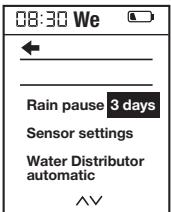
1 Menu: Rain pause
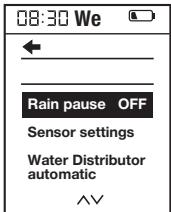

2 Pause / 3 days


1 Menu: Water Distributor automatic
2 Select amount of active water lines

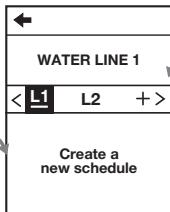
3 Create schedule 1–6

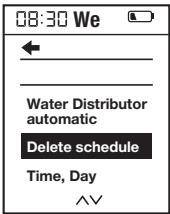
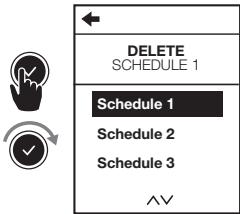
1 Menu: Delete schedule
2 Delete schedule 1


1 Menu: Soil Moisture Sensor
2 Sensor settings
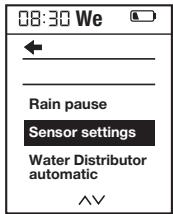

| ← |
| GO BACK
MAIN MENU |
| Sensor activated
Delete Sensor |

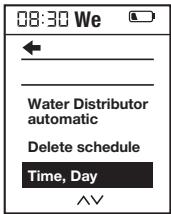
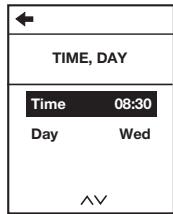
1 Menu: Time, Day
2 Set Time, Day



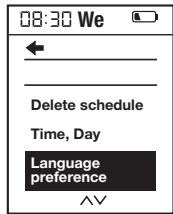
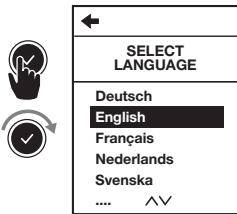
1 Menu: Language preference
2 Select Language
Translation of the original instructions.

For safety reasons, children and young people under 16 as well as anyone who is not familiar with these operating instructions should not use the product. Persons with reduced physical or mental abilities may use the product only if they are supervised or instructed by a responsible person. Children must be supervised to ensure that they do not play with the product. Never operate the product when you are tired, ill or under the influence of alcohol, drugs or medicine.
Intended use:
The GARDENA Water Control is intended for private use in domestic and hobby gardens, exclusively for outdoor use, to control sprinklers and watering systems. The Water Control can be used for automatic watering during holidays.
DANGER! The GARDENA Water Control must not be used for industrial purposes or in conjunction with chemicals, foodstuffs, easily flammable and explosive materials.
1. SAFETY
Important!
Read the operator's manual carefully before use and keep for future reference.
Battery:
To ensure the Water Control runs safely, only a 9V alkaline manganese battery (alkaline) type IEC 6LR61 must be used!
In order to stop the Water Control from failing because of a weak battery if you are away for a long time, the battery must be replaced when the battery symbol flashes.
Setting up:
The Water Control may only be set up vertically with the sleeve nut to the top to prevent water from penetrating into the battery compartment. The minimum water output to ensure that the Water Control functions correctly is 20–30 l/h. For example, at least 10 x 2-litre Drip Heads are required to control the Micro-Drip-System.
At high temperatures (over 70 °C at the display) the LCD display may go out. This does not affect the program in any way. When the computer cools down, the LCD display illuminates again.
The maximum temperature for the water flow is 40 °C.
Avoid tensile strain.
→ Do not pull the hose connected to the Water Control.

CAUTION! If the control section is removed when the valve is open, the valve remains open until the control section is reattached.

DANGER! Cardiac arrest!
This product makes an electromagnetic field while it operates. This field may under some conditions interfere with active or passive medical implants. To decrease the risk of conditions that can possibly injure or kill, we recommend persons with medical implants to speak with their physician and the medical implant manufacturer before you operate the product.

DANGER! Risk of suffocation!
Small parts can be easily swallowed. There is also a risk that the polybag can suffocate toddlers. Keep toddlers away when you assemble the product.
A video of the commissioning and setting processes is available here:

2. INITIAL OPERATION → (Fig. A–D)
3. FUNCTION → (Fig. F)
The Master Water Control offers two options for watering your garden automatically on a timer:
- Water 1 area of a garden with a water line, e.g. using a sprinkler, the GARDENA Micro-Drip-System or the GARDENA Sprinklersystem
Operate 2–6 water lines one after another using the GARDENA Automatic Water Distributor, Art. 1197, see Fig. O (optionally available). Each line can be activated up to once a day.
You can change the settings or move to the next setting by turning the knob. You can confirm the
respective input by pressing the rotary knob. Pressing the knob for longer than 3 seconds locks or unlocks the display. If no more changes are made to the settings, the LCD display switches off after 5 minutes to save energy. To reactivate the display, actuate the rotary knob. The default display appears.

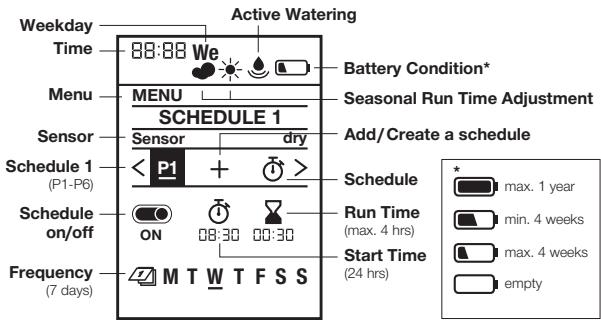
max. 1 year

max. 4 weeks

min. 4 weeks

empty
4. SETTINGS → (Fig. G-Q)
Initial settings → (Fig. G):
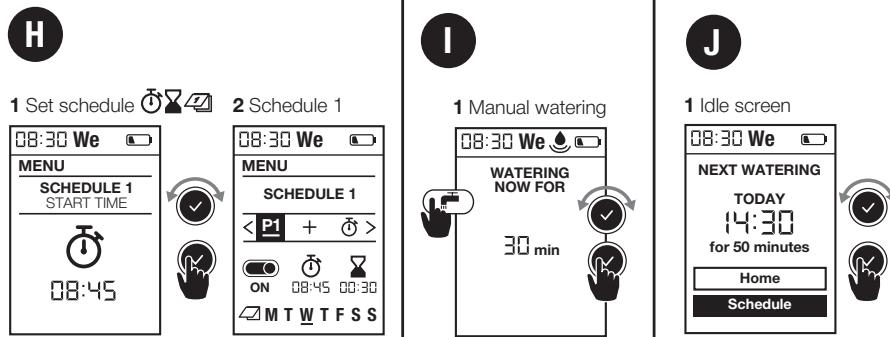
1 Set language | 2 Set weekday | 3 Set time (hrs, min.) | 4 Ready for schedule
Active (manual) watering → (Fig. I):
1 Manual watering
Setting schedules → (Fig. H):
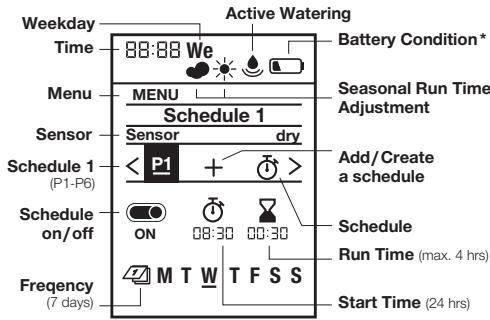
1 Set schedule | 2 Schedule 1
Configure and save up to 6 different watering schedules by setting the start time, duration and weekdays for each one. Schedules can be activated or deactivated by pressing on/off (see fig. H).
Default display → (Fig. J):
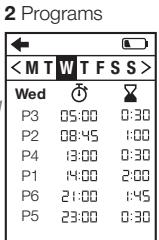
1 Idle screen | 2 Programs
Seasonal watering duration → (Fig. K):
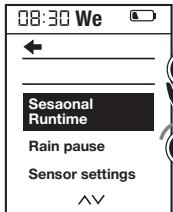
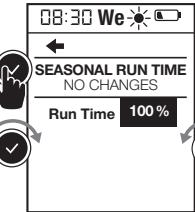
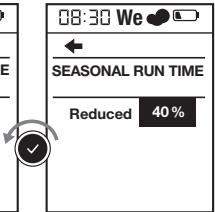
1 Menu: Seasonal Run Time | 2 Regular Run Time | 3 Reduce Watering
You can reduce the durations set for all schedules at once in 10% increments, from 100% down to 10%. This saves you having to change each of the 6 schedules individually.
Tip: Less watering is required in the spring and autumn than in the height of summer. Simply set the maximum watering duration for high summer as the default. Then reduce the watering duration for all schedules at once in convenient 10% increments when there is less need for watering.
Note: When you change the percentage, the duration is adjusted within the schedules and the
"cloud" symbol appears. If the duration is not altered (= 100%), the "sun" symbol is displayed.
Rain pause → (Fig. L):
1 Menu: Rain pause | 2 Pause / 3 days
Pauses all watering operations without changing the set schedules. You can select any number of days between 1 and 9. At the end of the pause, all schedules are reactivated.
Deleting a schedule → (Fig. M):
1 Menu: Delete schedule | 2 Delete schedule 1

Soil Moisture Sensor, Art. 1188 (optionally available) → (Fig. D and N):
1 Menu: Soil Moisture Sensor
Once the soil is sufficiently moist, a watering operation is interrupted or a schedule is disabled so that it cannot be activated. This does not affect active (manual) watering.
→ (Fig. D and N): 1 Connect soil moisture sensor. After a soil moisture sensor is connected, the “sensor activated/deactivated” display will appear – this can take up to 1 minute. Select an option to activate/deactivate the sensor response. Use the switching point controller on the soil moisture sensor to set the level of soil moisture that must be achieved before the sensor responds (see Operator’s Manual for GARDENA Soil moisture sensor).
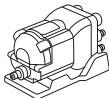
GARDENA Automatic Water Distributor, Art. 1197 (optionally available)
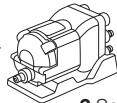
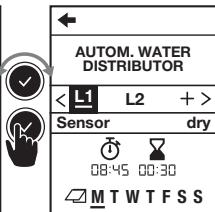
→ (Fig. O): 1 Menu: Water Distributor automatic
This menu allows you to control up to 6 water lines with the Automatic Water Distributor. This includes a necessary minimum pause of 5 minutes between the outlets and a minimum watering duration of 30 seconds (display: 1 min). This time ensures reliable switch-over to the next outlet and makes sure that the schedules and outlets are correctly linked (for details of the commissioning process, see the Operating Instructions for the Water Distributor).
2 Select amount of active water lines
You can select any number between 2 and 6. Seal any outlets on the Water Distributor that you do not need with end caps and move the setting lever to the “OFF” position.
3 Create schedules 1 – 6:
When prompted to do so, enter watering schedules L1 – L6 on the display. For this, use the standard method for entering schedules based on the start time, duration and frequency.
Note: Schedules are not allowed to overlap. If you enter a schedule that overlaps with the next one, the start time of the next watering operation will be postponed and a pause of 5 minutes will be inserted between the operations.
- Start times: Define the start times for the water lines in chronological order. This makes it easier to calculate and suggest the next possible start time.
- Duration: The total watering duration for all outlets – including the necessary pauses – must not exceed 24 hours.
- Frequency: Different weekdays can be selected. Note: To ensure correct switch-over and correct linking of the schedules and outlets, any outlets that are not scheduled to operate on a particular day will still be activated for a period of 30 seconds on the day concerned.
- Reduction in the number of outlets: If the number of outlets is reduced, the superfluous channels will be deleted. For example, if the number of outlets is reduced from 5 to 3, the settings for no. 4 and no. 5 will be deleted.
- Active (manual) watering: To activate a watering operation manually, press 📄. Please note that a minimum duration of 30 seconds and a pause of at least 5 minutes must be observed.
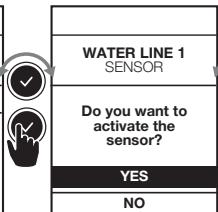
4 Sensor per line (optional)
- If a soil moisture sensor is connected, you have the option of activating/deactivating it for each individual outlet. If the sensor is deactivated for a particular schedule, watering will always take place based on the schedule.
If the sensor signals that the level of moisture is sufficient, any pending watering operation will be reduced to a duration of 30 seconds (display: 1 min).
5 Schedule L1
Time → (Fig. P):
1 Menu: Time, day | 2 Set time, day
Language → (Fig. Q):
1 Menu: Language preference | 2 Select language
5. MAINTENANCE → (Fig. E)
6. STORAGE

To put into storage:
→ The product must be stored away from children. → To preserve the battery, it should be removed (fig. B). → Store the controller and the valve unit in a dry, enclosed and frost-free place.

Disposal: (in accordance with RL2012/19/EC)
The product must not be disposed of to normal household waste. It must be disposed of in line with local environmental regulations.
IMPORTANT!
Dispose of the product through or via your municipal recycling collection centre.
Disposal of the battery:
→ Please return a flat battery to a GARDENA dealer or dispose of it properly at your nearest recycling centre.
Dispose of the battery only when discharged.
7. TROUBLESHOOTING
| Problem | Possible Cause | Remedy |
| No display appears | Sleep mode is activated 5 minutes after the last entry is made to save energy. | → To reactivate the display, press any function button. |
| Battery is inserted incorrectly. | → Check the polarity markings match (+/-). |
| Battery is flat. | → Insert a new (alkaline) battery. |
| Temperature on the display is higher than 70 °C. | → Display appears after the temperature has dropped. |
| Manual watering is not possible using the button | Low battery is continuously displayed. | → Insert a new (alkaline) battery. |
| Tap is turned off. | → Turn the tap on. |
| Controller is not connected. | → Mount the controller on housing. |
| Minimum pressure of 0.5 bar not available. | → Ensure a pressure of at least 0.5 bar and run the program again. |
| Watering program is not being undertaken (no watering) | Program entry/modification during or just before the start pulse. | → Make program entry/modification outside the programmed start times. |
| Valve was opened manually previously. | → Avoid possible program overlaps. |
| Tap is turned off. | → Turn the tap on. |
| Soil moisture or rain sensor registers damp. | → If dry, check the setting/location of the soil moisture/rain sensor. |
| Controller is not connected. | → Mount the controller on housing. |
| Watering program is not being undertaken (no watering) | Low battery is continuously displayed. | → Insert a new (alkaline) battery. |
| Minimum pressure of 0.5 bar not available. | → Ensure a pressure of at least 0.5 bar. |
| Water Control does not close | Minimum quantity of water drawn is less than 20 l/h. | → Connect more drip heads. |
| Valve soiled. | → Flush in the opposite direction to the normal flow direction. |

NOTE: For any other malfunctions please contact the GARDENA service department. Repairs must only be done by GARDENA service departments or specialist dealers approved by GARDENA.
8. TECHNICAL DATA
| Water Control | Value /Unit |
| Min./max. operating pressure | 0.5 bar/12 bar |
| Operating temperature range | 5 °C to 50 °C |
| Flow medium | Clear fresh water |
| Max. liquid temperature | 40 °C |
| Number of program-controlled watering cycles per day | 6 individual start times |
| Water Control | Value /Unit |
| Number of program-controlled watering cycles per week | 42 |
| Watering duration | 6 x 1 min. – 4 hrs |
| Battery required | 1 x 9V alkaline manganese Typ IEC 6LR61 |
| Operating time of the battery | approximately 1 year |
9. ACCESSORIES
GARDENA Soil Moisture Sensor
GARDENA Anti-theft device
Art. 1188
Art. 1815-00.791.00 from the GARDENA Service
10. SERVICE/WARRANTY
Service:
Please contact the address on the back page.
Warranty:
In the event of a warranty claim, no charge is levied to you for the services provided.
GARDENA Manufacturing GmbH offers a 2-year warranty for this product (from the date of purchase) if the product has been used exclusively for private purposes. This manufacturer's warranty does not apply to used products purchased from a secondary market. This warranty includes all significant defects of the product that can be proved to be material or manufacturing faults. This warranty is fulfilled by supplying a fully functional replacement product or by repairing the faulty product sent to us free of charge; we reserve the right to choose between these options. This service is subject to the following provisions:
- The product was used for its intended purpose as per the recommendations in the operating instructions.
- Neither the purchaser nor a third party has attempted to repair the product.
- Only original GARDENA spare and wear parts were used.
Normal wear and tear of parts and components, optical changes, as well as wear parts and consumables, are excluded from the warranty.
This manufacturer's warranty does not affect warranty entitlements against the dealer/retailer.
If problems arise with this product, please contact our Service department. In the event of a warranty claim, please send the defective product together with a copy of the purchase receipt and a description of the defect, sufficiently stamped, to the GARDENA service address on the back page.
Consumables:
Faults which occur as a result of incorrectly installed or leaking batteries are not covered by the guarantee.
Damage caused by frost is not covered by the warranty.
GARDENA Master watering programming
2. COMMISSIONING → (fig. A–D)
3. OPERATION → (fig. F)
2. INSTALLATION → (fig. A–D)
3. FUNCTION → (fig. F)
GARDENA Automatic
water distributor, art. 1197
2. START-UP → (fig. A–D)
GARDENA Automatic water distributor, art. 1197
2. START-UP → (fig. A–D)
(C1428ARP) Buenos Aires
Phone: (+54) 11 5194 5000
info.gardena@ar.husqvarna.com
Armenia
Garden Land Ltd.
61 Tigran Mets
0005 Yerevan
Australia
Husqvarna Australia Pty. Ltd.
Locked Bag 5
Central Coast BC
NSW 2252
Phone: (+61) (0) 2 4352 7400
customer.service@
husqvarna.com.au
Brampton, Ontario L6T 4X3
Phone: (+1) 905 792 93 30
info@gardenacanada.com
Chile
Maquinarias Agroforestales
Ltda. (Maga Ltda.)
Santiago, Chile
Avda. Chesterton
# 8355 comuna Las Condes
Phone: (+56) 2 202 4417
Dalton@maga.cl
Zipcode: 7560330
China
Husqvarna (Shanghai)
Management Co., Ltd.
Husqvarna (Shanghai) Management Co., Ltd.
3F, Benq Square B,
No207, Song Hong Rd.,
Chang Ning District,
Shanghai, PRC. 200335
3F, Benq Square B, No. 207 Song Hong Road, Changning District, Shanghai, PRC. 200335
3F, Benq Square B, No. 207 Song Hong Road, Changning District, Shanghai, PRC. 200335
Colombia
Husqvarna Colombia S.A.
Calle 18 No. 68 D-31, zona
Industrial de Montevideo
Bogotá, Cundinamarca
Tel. 571 2922700 ext. 105
jairo.salazar@husqvarna.com.co
Costa Rica
Compania Exim
Euroiberoamericana S.A.
Los Colegios, Moravia,
8/57 Beliashvili street
0159 Tbilisi, Georgia
Phone: (+995) 322 14 71 71
Great Britain
Husqvarna UK Ltd
Preston Road
Aycliffe Industrial Park
Newton Aycliffe
County Durham
DL5 6UP
info.gardena@husqvarna.co.uk
Greece
P. PAPADOPOULOS AEBE
Leof. Athinon 92
Athens
T.K. 104 42
Greece
Tel. (+30) 210 5193 100
info@papadopoulos.com.gr
Hungary
Aycliffe Industrial Park
Newton Aycliffe
County Durham
DL5 6UP
info.gardena@husqvarna.co.uk
Italy
Husqvarna Italia S.p.A.
Via Santa Vecchia 15
23868 VALMADRERA (LC)
Phone: (+39) 0341.203.111
assistenza.italia@it.husqvarna.com
Japan
KAKUICHI Co. Ltd.
Sumitomo Realty &
Development Kojimachi
BLDG., 8F
5 -1 Nibancho
Chiyoda-ku
Tokyo 102-0084
Phone: (+81) 33 264 4721
m_ishihara@kaku-ichi.co.jp
Kazakhstan
LAMED Ltd.
155/1, Tazhibayevoi Str.
050060 Almaty
IP Schmidt
Abayavenue 3B
110 005 Kostanay
Korea
Kyung Jin Trading CO.,LTD.
107-4, SunDuk Bld.,
YangJae-dong,
Seocho-gu,
Seoul, (zipcode: 137-891)
Phone: (+82) (0)2 574-6300
Kyrgyzstan
Alye Maki
av. Moladaya Guardir J 3
720014
Bishkek
Latvia
Husqvarna Latvija SIA
Ulbrokas 19A
LV-1021 Rīga
info@gardena.lv
Lithuania
UAB Husqvarna Lietuva
Ateities pl. 77C
LT-52104 Kaunas
info@gardena.lt
Luxembourg
Magasins Jules Neuberg
Zapopan, Jalisco, Mexico
Phone: (+52) 33 3818-3434
Husqvarna New Zealand Ltd.
PO Box 76-437
Manukau City 2241
Phone: (+64) (0) 9 9202410
support.nz@husqvarna.co.nz
Norway
Husqvarna Norge AS
Gardena Division
Trøskenveien 36
1708 Sarpsborg
info@gardena.no
Peru
Husqvarna Perú S.A.
Jr. Ramón Cárcamo 710
Lima 1
Tel: (+51) 1 3320400 ext. 416
juan.remuzgo@husqvarna.com
Poland
Husqvarna
02-08 Tat Ann Building
Singapore 577185
Phone: (+65) 6253 2277
shiying@hyray.com.sg
Slovak Republic
Husqvarna Cesko s.r.o.
Türkova 2319/5b
149 00 Praha 4 – Chodov
Toll-free hotline:
800 154 044
servis@sk.husqvarna.com
Slovenia
Husqvarna Austria GmbH
Industriezeile 36
4010 Linz
Tel.: (+43) 732 77 01 01-485
service.gardena@
husqvarnagroup.com
South Africa
Husqvarna
South Africa (Pty) Ltd
Postnet Suite 250
Private Bag X6,
Cascades, 3202
South Africa
Phone: (+27) 33 846 9700
info@gardena.co.za
Spain
Suriname – South America
Sweden
Husqvarna AB
Gardena Division
S-561 82 Huskvarna
gardenaorder@husqvarna.se
Switzerland / Schweiz
© GARDENA Manufacturing GmbH
D-89070 Ulm
http://www.gardena.com