
TONE-FPS - Headset LG - Free user manual and instructions
Find the device manual for free TONE-FPS LG in PDF.



| Product Type | Wireless Bluetooth Headset |
| Model | LG TONE Free (TONE-FP5) |
| Wireless Technology | Bluetooth 5.2 (A2DP, AVRCP, HFP, HSP) |
| Dimensions (Earbud) | 21.2 mm (W) x 28.3 mm (L) x 23.2 mm (H) |
| Dimensions (Case) | 54.5 mm (W) x 54.5 mm (L) x 30 mm (H) |
| Weight (Earbud) | 5.2 g (per earbud) |
| Weight (Case) | 35.4 g |
| Battery (Earbud) | Lithium-ion 3.7 V, 55 mAh |
| Battery (Case) | Lithium-ion 3.7 V, 390 mAh |
| Battery Life (ANC Off) | Up to 8 hours (earbuds) + 22 hours (case) |
| Battery Life (ANC On) | Up to 5 hours (earbuds) + 13 hours (case) |
| Charging Time | Earbuds: 1 hour; Case: 2 hours (wired charging) |
| Quick Charge | 5 minutes charge = up to 60 minutes playback |
| Water Resistance Rating | IPX4 (splash resistant, earbuds only) |
| Active Noise Cancellation (ANC) | Yes, with ANC and ambient sound (LAS) modes |
| Touch Control | Play/pause, volume, navigation, calls, ANC/LAS modes |
| Companion App | LG TONE Free (Android 7.0+, iOS 11+) |
| Maintenance | Clean regularly with a dry cloth; do not immerse |
| Warranty | 2 years (subject to limited warranty conditions) |
| Box Contents | Earbuds, charging case, 3 sizes of ear tips, USB-C cable, documentation |
Frequently Asked Questions - TONE-FPS LG
User questions about TONE-FPS LG
0 question about this device. Answer the ones you know or ask your own.
Ask a new question about this device
Download the instructions for your Headset in PDF format for free! Find your manual TONE-FPS - LG and take your electronic device back in hand. On this page are published all the documents necessary for the use of your device. TONE-FPS by LG.
USER MANUAL TONE-FPS LG
Using LG TONE FreeTM
LG Electronics Inc. Single point of contact (EU/UK):
Krijgsman 1, 1186 DM Amstelveen, The Netherlands

LG
Life's Good
Using LG TONE Free™
Copyright © 2021 - 2022 LG Electronics Inc. All Rights Reserved

NOTE: For the best performance and to prevent any damage to, or misuse of the headset, please read all of the information carefully prior to using the headset.
Any modifications or changes to this manual due to typographical errors or inaccuracies of stated information shall only be made by LG Electronics Inc.
The LG TONE Free (TONE-FP5) is a lightweight wireless headset that uses Bluetooth technology.
This product can be used as an audio accessory for devices supporting either the A2DP or Hands-Free Bluetooth Profile.
Safety Precautions
The following safety precautions are provided to prevent any unexpected accident or damage. Please familiarise yourself with the safety precautions.
The safety precautions are classified into "WARNING" and "CAUTION".

WARNING: Failing to comply with the instructions may result in serious injury or death.

CAUTION: Failing to comply with the instructions may result in minor injury or product damage.
Do not drop the product from a high place.
Make sure there is no water, alcohol, or benzene in contact with the product.
Do not store the product in a wet or dusty place.
Do not place heavy objects on the product.
This product is waterproof to the IPX4 level (daily life waterproof).
(The IPX4 waterproof rating applies to the earbud product only.)
Do not put the product under the water or use it in a humid location such as a bathroom.

CAUTION
Do not disassemble, adjust, or repair the product arbitrarily.
Do not place the product near excessive heat or flammable material.
The product may be damaged if an incompatible charger is used.
Make sure that an infant or child does not swallow a magnet or a small component of the product.
Make sure that foreign objects do not enter the charger's connectors (charging port and power plug). Failure to do so may result in fire or electric shock.
If you have a medical device implanted, contact your doctor before using this device.
This product has a built-in battery, and the battery cannot be removed or replaced arbitrarily.
For your safety, do not remove the battery incorporated in the product. If you arbitrarily replace the battery or don't replace it correctly, it may explode.
The lithium-ion battery is a hazardous component that can cause injury. Battery replacement by an unqualified professional can cause damage to your device.
Do not replace the battery by yourself. The battery can be damaged, which can cause overheat and injury. The battery must be replaced by an authorized service provider. The battery should be recycled or disposed separately from household wastes.
Do not discard the battery arbitrarily. Follow the local procedure for discarding batteries.
In order to prevent unnecessary energy consumption, disconnect the device when fully charged. Always use an easily accessible power outlet for charging your device.
Risk of fire or explosion if the battery is replaced by an incorrect type.
Do not store or transport at pressures lower than 11.6kPa and at above 15000m altitude.
Replacement of a battery with an incorrect type that can defeat a safeguard (for example, in the case of some lithium battery types).
Disposal of a battery into fire or a hot oven, or mechanically crushing or cutting of a battery, that can result in an explosion.
Leaving a battery in an extremely high temperature surrounding environment that can result in an explosion or the leakage of flammable liquid or gas.
A battery subjected to extremely low air pressure that may result in an explosion or the leakage of flammable liquid or gas.
Do not carelessly throw away old batteries. It can cause an explosion or fire. The disposal method may vary by country and region. Dispose of it in an appropriate manner.

NOTE
If the product is exposed to excessive sweat, clean the product.
Keep the earbuds clean.
Wearing earbuds for a long time may cause pain, and if humidity inside ears continues for a long time, it may cause skin trouble.
HD Speaker
If the communication network of the device you are connecting to supports HD Voice Calling, you can enjoy making voice calls and listening to music in high definition.
Product Components
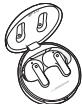
LG TONE FreeTM Earbuds (medium eargels installed) Charging Case

Extra Ear Gels (small & large)
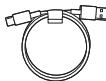
USB Type CTM Charging Cable
Reference guide
Simple Owner's Manual
WEEE Card (Europe Only)

NOTE: Actual product design may differ from images shown in manual.

CAUTION
Make sure authentic LG Electronics components are used. Using a non-authentic component may damage the product and thus void the warranty.
Use the USB Type C™ cable provided with the product.
Overview
Charging Case
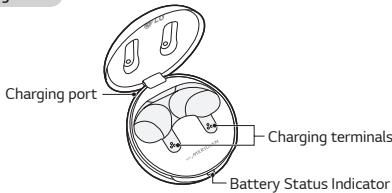
Earbuds
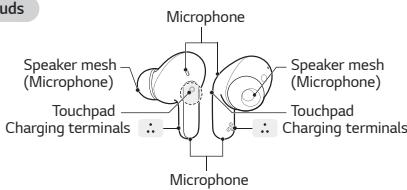
*Make sure that the charging terminal is not soiled with foreign substance.
*The appearance and specifications of the actual product may differ depending on the model.
Pairing and Connecting
Fast Pair
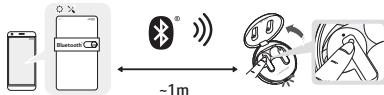
1 Turn on the Bluetooth function on the mobile phone or the device to be connected. 2 Open the cover of the charging case with the earbuds mounted on the case. Press and hold the touchpad of the left or right earbud for 3 to 5 seconds until the battery status indicator blinks in blue.
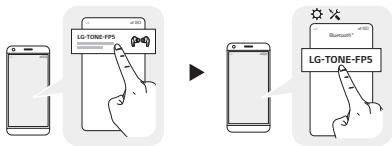
3 When the Fast Pair connection pop-up appears on the top area of the mobile phone screen, tap it to connect. (It only supports Android™ 6.0 or higher, and requires configuring Bluetooth and location information settings of the mobile device.) 4 If the pop-up does not appear, select [LG-TONE-FPS] from the Bluetooth menu on the mobile phone and connect it (for users of iOS or Android 5.0 or lower versions).

CAUTION: In the list of Bluetooth connected devices, LG-TONE-FP5_LE is not the correct model name for connection. Check the model name in use and connect with the model name without "LE".
If the earbud model name is abnormally displayed on the Android device, change the model name in the Bluetooth menu of Connected Device Settings.

NOTE: To connect with another device, perform the above procedure again.
Automatic Reconnection
The earbuds are connected automatically when you open the cover of the charging case. If you close the cover of the charging case with both earbuds mounted in the charging case, the earbuds are disconnected.
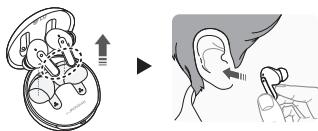
Wearing Earbuds
1 Separate the earbuds from the charging case and adjust them so that they fit comfortably in your ears.

NOTE: You can use ear gels that fit your ears to improve Active Noise Canceling (ANC) performance and enjoy rich music sound.
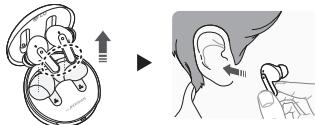
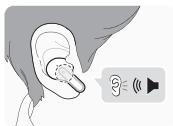
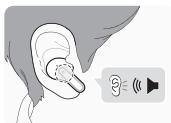
2 When you wear the earbuds, you will hear a wearing detection alarm.
Playing Music
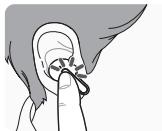
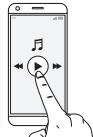
| Function | Description |
| Play / Pause | ● : Touch the left or right earbud once. |
| Adjusting the Volume | ● ● : Touch the left(Decrease volume) or right(Increase volume) earbud twice. |
| Play Next | ● ● ● : Touch the left or right earbud three times. |

NOTE: You can change the operation method of the function in the touchpad settings of the LG TONE Free app.
Mobile Calling Functions
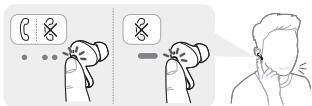
| Function | Status | Description |
| Answering Calls | Ringing | Touch the left or right earbud once. |
| Ending Calls | Talking | Touch the left or right earbud twice. |
| Making Calls | Idle | If you make a call using a mobile phone, the call is automatically connected to the headset. |
| Receiving Calls while on the Phone | Talking | If you touch the left or right earbud once, the current call will go on hold, and you will be able to answer an incoming call. If the previous call is on hold, you can finish the current call on the mobile phone. (It works differently depending on the mobile phone settings.) |
| Rejecting Calls | Ringing | Touch and hold the left or right earbud. |
Listen to the Ambient Sound (LAS) / Active Noise Cancellation (ANC)
Listen to the Ambient Sound (LAS)
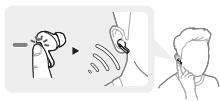
The Listen to the Ambient Sound (LAS) function allows you to listen to the ambient sound so that you can recognize the surrounding situation and any potential risks.
Active Noise Cancellation (ANC)
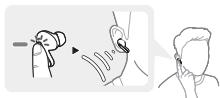
The Active Noise Cancellation (ANC) function blocks any ambient sound. So, you can use the function to listen to the music or watch a video without interference.
Touch and hold the left or right earbud to switch between the ANC mode and the LAS mode.
You can set the LAS and ANC functions in the LG TONE Free app.
You can configure the Listen to the Ambient Sound mode and Conversation mode using the LG TONE Free app.
If you use the LAS or ANC function, the battery consumes faster, reducing the time you can use the product.
You can use the LAS and ANC functions while being idle, listening to music, or being on the phone.
*ANC is an acronym for Active Noise Cancellation.

CAUTION: When the LAS mode is enabled, you may hear the ambient sound become loud suddenly.
When using the ANC function outdoors, pay attention to the surrounding environment for safety.
Charging
Wired Charging
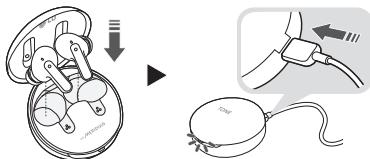
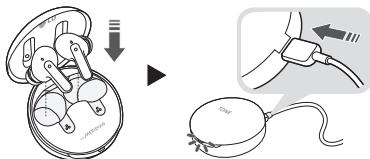
When the charging cable is connected, the charging status is displayed in the charging case.

NOTE: The earbuds and the charging case are charged at the same time. The charging port on the charging case cannot be used to supply power to mobile phones, etc.
Checking the Battery Status
If earbuds are mounted in the charging case, the earbuds' battery status is displayed. Otherwise, the charging case's battery status is displayed.
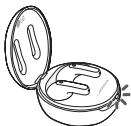
| Battery Status Indicator | Remaining Battery (charger not connected) | Charging State (charger connected) |
| Red | 20% or lower | Charging |
| Yellow | 20% - 80% | - |
| Green | 80% or higher | Fully charged |

NOTE: When the charging case lid is closed, charging case battery status is displayed. If the charging case has no remaining charge, there will be no display and it cannot function. We recommend you keep the charging case charged at all times as the earbuds are not able to be turned on and turned off independently.
Battery Status Indicator
| Status | Description |
| Bluetooth Search Mode | The battery status indicator flashes in blue. |
| Battery below 20% | The battery status indicator turns on and off in red. |
| Battery 20% - 80% | The battery status indicator turns on and off in yellow. |
| Battery 80% or more | The battery status indicator turns on and off in green. |
| When there is a problem while charging | The battery status indicator flashes in red. |
| Charging (charger connected) | The battery status indicator turns on in red. |
| Charging complete (charger connected) | The battery status indicator turns on in green. |
Out of Range
If the device connected to the product is out of effective communication range, the communication signal becomes weak and the communication is lost. The effective communication range may vary depending on surrounding and other conditions.
If the device comes back within effective communication range, the product automatically reconnects to the device. If the device is not automatically reconnected, touch the left or right earbud once to connect them.
LG TONE Free App
If you install the "LG TONE Free" app, you can use Check Earbud Battery, Voice Alert, Change Equalizer Mode, Check Last Connected Location Information, and Find My Earbuds functions. Check out the app for more details.
To install the "LG TONE Free" app, search LG TONE Free in the Google Play Store or App Store or scan the QR code below.
It supports Android 7.0 or higher and iOS 11 or higher.
Google Play
App Store
Troubleshooting
If you see any of the following symptoms while using the product, make sure to recheck it. It may not be a malfunction.
| Symptom | Cause and Solution |
| The power does not turn on | Check the battery level and charge it. |
| If unable to make a call with earbuds | If the mobile phone does not support headset and hands-free functions, you cannot use the calling features. Check the battery level and charge it. |
| If unable to register earbuds to mobile phone | Check whether earbuds are turned on. Check if the earbuds have entered the search mode. - While the earbuds are inserted in the charging case, press and hold the touch pad on the left or right earbud for 3 to 5 seconds to switch to the search mode. |
| If you replaced the earbuds or there is a problem with the operation (Factory reset) | While the earbuds are inserted in the charging case, press and hold the touch pad on the left or right earbud for 10 seconds or more. - The battery status indicator of the charging case flashes red and the initialization to the factory status is carried out. After initialization to the factory status, reconnect the earbuds. |
Specifications and Features
| Item | Comments |
| Bluetooth Specifications | V 5.2 (Headset/Hands-Free/A2DP/AVRCP) |
| Battery | Earbud: 3.7 V / 55 mAh, Lithium-ion Charging case: 3.7 V / 390 mAh, Lithium-ion |
| Music Play Time Earbuds & With Charging case | ANC Off: Up to 8 & Up to 22 hours* ANC On: Up to 5 & Up to 13 hours* |
| Charging Time | Earbud: within an hour / Charging case: within 2 hours Fast Charging: 5 min charge for up to 60 min playtime*※ When charging wired at room temperature |
| Rated Input Voltage | Earbud: 5 V —— 110 mA Charging case: 5 V —— 500 mA |
| Operating Temperature | 0 °C ~ +40 °C |
| Operating Humidity | 5 % ~ 60 % |
| Dimensions (mm) / Weight (g) | Earbud: 21.2 mm (W) X 28.3 mm (L) X 23.2 mm (H) / 5.2 g (One earbud) Charging case: 54.5 mm (W) X 54.5 mm (L) X 30 mm (H) / 35.4 g |
| Frequency range | Output Power (Max) |
| 2402 MHz to 2480 MHz | 11.5 dBm |
*Duration of use may vary depending on the connected mobile device, features being used, settings, signal strength, operating temperature, frequency band, and other methods of use.
Copyright © 2021 - 2022 LG Electronics Inc. All Rights Reserved


Please, do not insert the device into the charging port if it is not intended for this product.
Please, do not connect the device to the charging port (charging port and connector) if it is not intended for this product. Failure to do so may cause damage to the device or electric shock.
If you have an implanted medical device, consult your doctor before using this device.
This product is equipped with a rechargeable battery. The battery cannot be removed or replaced by the user.
For safety reasons, do not dispose of the battery in fire.
The battery must be replaced only by the manufacturer or an authorized service center. Otherwise, there is a risk of explosion.
The lithium-ion battery is a sensitive component that can cause damage.
Replacing the battery with an incorrect type can cause damage to your device.
Do not replace the battery yourself. The battery can be damaged, which can cause overheating or fire. The battery must be replaced by an authorized service center. The battery must be recycled separately according to local regulations.
Do not dispose of the battery in household waste. Follow local regulations for battery disposal.
To prevent unexpected battery consumption, disconnect the device when it is fully charged. Avoid prolonged contact with the charging port of your device.
If you use a non-original battery, there is a risk of fire or explosion.
Do not expose the device to temperatures above 11.6 degrees Celsius or 15000 meters altitude.
The battery and its contacts may cause damage if not handled properly (e.g., in case of short circuit or improper use of the battery).
The battery is designed for use in the device. It has been developed and approved in accordance with the requirements.
Leaving the battery in a hot environment or at a very high temperature may lead to an explosion or fire hazard.
The battery, placed in a tilted position or exposed to air, may lead to an explosion or fire hazard.
Do not short-circuit the battery. This may cause an explosion or fire. The short-circuit current may vary depending on the voltage and region. Short-circuit in an appropriate manner.

SAFETY
If the product is exposed to an excessive amount of moisture, dry the product.
Keep the earphones "Tone" clean.
Wearing the "Tone" earphones for a long period of time may cause discomfort, and if the volume is too high, it may cause hearing damage.
High volume
If the communication device to which it is connected supports high volume, you can enjoy the high volume and listen to music with high sound quality.
Product components
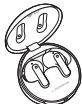
LG TONE FreeTM earphones (with additional ear tips for different sizes) Charging case

Charging case cable
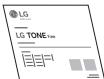
User guide
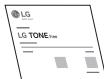
Quick start guide
WEEE (for Europe)

CAUTION: The images may differ from the actual product. Follow the instructions.

WARNING
Make sure to use genuine LG Electronics components. Using non-genuine components may damage the product and void the warranty.
Use the USB Type-C™ cable provided with the product.
Product overview
Charging case
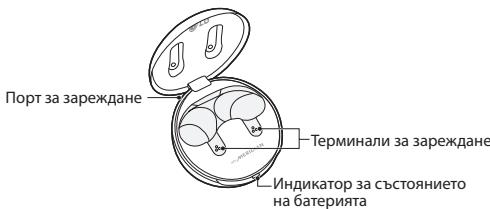
Earbuds "Tone" for ears
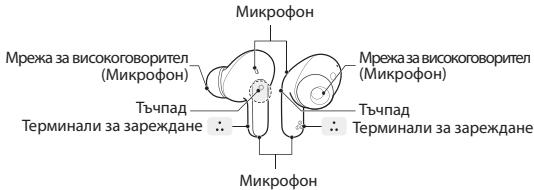
Make sure the charging terminal is not contaminated with foreign substances. The actual product specifications may differ depending on the model.
Pairing and connecting
Quick pairing
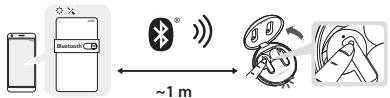
1 Turn on the Bluetooth function on the mobile device to be connected. 2 Open the charging case and place the earbuds "Tone" for ears in the case. Press and hold the pairing button on the case for about 3 to 5 seconds until the battery status indicators blink in blue.
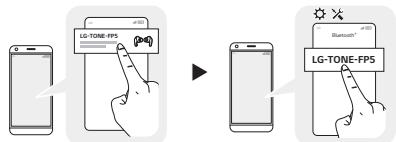
3 When the quick pairing connection guide appears on the mobile device, tap it to connect.
Tap to connect. (This supports only Android™ 6.0 or higher and requires Bluetooth and location information settings on the mobile device.)
4 If the quick pairing guide does not appear, search for [LG-TONE-FPS] in the Bluetooth menu of the mobile device and connect (for iOS or Android 5.0 or lower).

NOTE: The Bluetooth device name, LG-TONE-FP5_LE, is not the actual model name for pairing. Check the model name used and compare it with the model name without ".LE".
If the model name appears differently from the one listed for Android devices, change the model name in the Bluetooth settings and reconnect the device.

NOTE: To connect another device, perform the above procedure again.
Automatic reconnection
The earbuds connect automatically when you open the charging case. If you open the charging case with the two earbuds in "TANI" mode for ears, the connection with the earbuds in "TANI" mode for ears is maintained.
After using the "TANI" earbuds for ears
1 Place the earbuds in the charging case and adjust them so they fit securely in your ears.

NOTE: You can use the touch pads on the earbuds to control the active noise cancellation (ANC) and enjoy rich music sound.
2 When wearing the "TANI" earbuds, you will not hear an alarm for low battery.
Music playback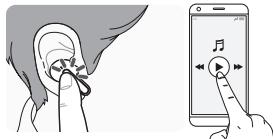
| Фуннцлиа | Описане |
| Възрочиеведа / Пayза | • :Дожochete Ведниж лявatable посячatable сизшалка тин "тани" за уш. |
| Perуширахе на симлata на 3ыка | • :Дожochete Два пьлова (Hамаялвахе на симлata на 3ыка) посячatable (Увениhabахе на симлata на 3ыка) сизшалка тин "тани" за уш. |
| Възрочиеведа н славдацш� фаль | • :Дожochete Три пьлова на посячatable сизшалka тин "тани" за уш. |

NOTE: You can change the music playback controls in the TONE Free app settings.
Call functions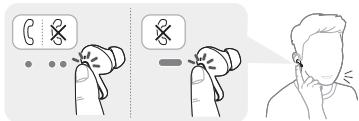
Using the ambient sound (LAS)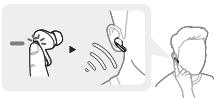
The ambient sound (LAS) function allows you to hear ambient sounds, so you can be aware of your surroundings while listening to music or during calls.
Active noise cancellation (ANC)
Function 3a AktiNBO shunOTICkeAN(ANC)БКОКИ ВСКАКИ OKOKHД 3BUYI.ТAKA ue МOTeJteДЯЗПОЛВATEФункLgTA, 3aДа CNYUATEМУЗКИ ИДА rHnDEDA BINOEDE 36 CMUSEOHNIA.
Дохс悔ETa3dрБгК PЯТа mIЯСТа CnUwAnka TnI "Tann" 3a yuH, 3aJa pReBkIOHHTe MEXJy peKIM ANC u peKIM LAS. Mochete da 3adaTe ФункIMLATE Ls ANC b prinloXeHnETo LG TONE FZE. Mochete da KOnfHyrpyratape peKIMa CnUwane Ha oKOpHnA 3ByK u peKIMa PAr3ObP o nOmoTaHa n prinloXeHnETo LG TONE Free.
Ako nI3N0BaTe yHKnUInTaLAS nn ANC,6aBepnraTe caInp3aOxOBaNo-6bP3o,KoToHamaJRA BPEMETo,pne3KoToMOKTe Da nI3N0N3BaTe pnpDyKa.
Mokete da hnoon3Bate yhnucnATE LAS IN ANC,doKato CTe B pekmHa rotobHOCT, Cnyuata MEyNkA nIe CT He TeteFOHa.
*ANCEc kpaenche 3a AktiBHO yumonotnKachenae

BHIMAHNE: Katoje pexmbtLAS e akntbipan, Moke da ueyte, oe OKONHNI 3BYK CTABA CIIENB 3E3ANHO.
Korato iinno3bate ynkhunata ANCA h o ktrpO, o6bphete BHHAMHNE h a3o6bkanuatape cpea d ocb6paekhena 3eGonachOCT.
3apexkanhe
3apekdahe cka6eI
Korato Kaeben3a 3a zepkJaHa e Cbpl3a, CbctoHnTo ha 3a zepkJaHa ce bIyanaJura Bkytna3a 3a zepkJaHa

3ABENEKKA: CnuJyankane TIN "TANH" 3a yuHn KUTNRA 3a zapekJeAae che 3apeXdat eHOBOPHEMNHO.
Pnptb3a 3aepkdahe na Kytrrta 3a 3aepkdahe He MOKeA de ca enno3na 3a 3aaephaonab Ha Mo6hIny TeneOpHn i dp.
HdkaTop 3a cbctoHaMeTo Ha 6aTePnTa
| Сатус | Они симп |
| Bluetooth реким на Тьрсенe | Индikatopbt 3a CBCTOHNHETO Ha Бастория пемпгва в СинцBT. |
| Бастория по 20% | Индikatopbt 3a CBCTOHNHETO Ha Бастория се BKЛIOчBA ИЗКЛIOчBA В червЕНцBT. |
| Бастория 20% - 80% | Индikatopbt 3a CBCTOHNHETO Ha Бастория се BKЛIOчBA ИЗКЛIOчBA В жытццBT. |
| Бастория 80% по поочe | Индikatopbt 3a CBCTOHNHETO Ha Бастория се BKЛIOчBA ИЗКЛIOчBA В заLEENцBT. |
| Когато мma пообlem по вреема на заразжданe | Индikatopbt 3a CBCTOHNHETO Ha Бастория пемпгва в червЕНцBT. |
| Зapожданe (заярдною устрийстvo e сььрзано) | Индikatopbt 3a CBCTOHNHETO Ha Бастория се BKЛIOчBA в червЕНцBT. |
| Зapожданeююююююююююююююююююююююююююююююююююююююююююююююююююююююююююююююююююююююююююююююююююююююююююююююююююююjoye | Индikatopbt 3a CBCTOHNHETO Ha Бастория пемпгва в червЕНцBT. |
N3BbH 06XBaT
AOK yctpOCTBOTO, Cb3pa3o C npDykta, e 13b8n eEeKtBNHIN O6BXAT h KOMNYHKAUNIg, KOMNYHKUQHOHNITC HNTnATCbTa Cn6b A KOMNYHKAUNIaTce by RvI. EeKtBNHIN TOMKYHKUQHOHN o6XBAT MOKe Z da Baprna 3Ba3ncIMOCT OK ONKHTNATc Peda n dpyrnu cYOBNI.
AOKy uctpOCTBOTe CBeBHe eBekTIVBnNbOBxBTaKo KMOYHKAIZAA, PNOyDCbT BtOMATMNUO cBcP3Ba OTHOBO CytXPOTBOTe.AKO UcYbTOCTBOTe HcBeCp6Be AOTMATUHO, KOJOCETBEHdBbJKYBAATA INIINCHATA CNUANKA TIN "TAN" 3a YUH, 3a da IN CBpKetEe.
Copyright © 2021 - 2022 LG Electronics Inc. All Rights Reserved

3ABAELEIUKA: 3a Hajj6pni nepoepmaHcN i 3a da cnpneHTe KAKBO 6nlo ouTeYBaBe nIn IyOynOTpeBa ha Cnyuankite, npOCHAJte rN BHMAETHe ONT HOpMaPcaI nped Da nKOPCmTcE CNYuankite. Cnte nImehi nn Ipomehi Na OOB npriapAHNK nopadn neeathn rpeKKn nn HetouHOCT na HabeDeHNte HOpMaPcaI Ke 6dATn hapanapeham cmo AD cTpaHa h LA EG Electronics Inc.
LG TONE Free (TONE-FPS) ce nechni 6e3kuyn CHnyuank KON KOPICTAT Bluetooth texhonorjja.
Oboj npro3b0d omo je da cokrihtn kao ayidm doatok 3yaqdoi knpo nndpckybaat n12A2Dpn,ni6obodn paage" (Hands-Free) Bluetooth npdoipn.
MepknHa npetna3nVBOCT
CnEHNHTe MEPKI Ha npETNIaJIbOCT ce daDEHn 3a da CE nPcpeHn KAKBa6IIO HeoekyBaHa hecpeKa IIN Wteta. PpOCHAJte Hm MepKITE Ha npETNAJIbOCT.
Mepkeite na neptaanlboce fo nogenen BO kateropnene "IPEDYNPEIYBAABeE"u, BHIMAHAE

PNEyPDEyBAHbE: HenouHTyBaHbTo Ha yNaTcTBaTa MOKe da
pe3yntnpa c0 cepno3Hn nobpeynm Cmpt.

BHUMAHNE: HenoHTyBaHbTo Ha yaTCTBaTa MOKe da pe3yNTnpa
CMAI NOBpea IIN OwTeYBaHBe Ha npOu3BOIoT.

PNEyPENEYBAHbE
He cnuytajte ro npou3bOdoT oD BnCOKo.
OcHryptete ce deka Hema BOa, ankoXoJI nn 6eH3e H BO KOHTAK co npOnB3oDT.
Do not use the product in damp or wet conditions.
Do not place heavy objects on the product.
This product is waterproof according to IPX4 (waterproof against splashing water from all directions). (The waterproofness is only guaranteed when the product is used - excluding exceptional cases.).
Do not place the product under water and do not use it in damp places, such as a bathroom.

WARNING
Do not disassemble, modify, or repair the product yourself.
Do not place the product near open flames or flammable materials.
The product may be damaged if used with incompatible accessories.
Do not use the product if the cable or plug is damaged.
Make sure the vents are not blocked by foreign objects (the vent for air intake is on the bottom of the device). If you do not keep them clear, it may lead to fire or electric shock.
If you are allergic to any of the materials, consult your doctor before using this product.
This product has a built-in battery and it cannot be removed or replaced by the user.
For safety reasons, do not remove the battery that is built into the product.
If you need to replace the battery, please replace it with the correct one, otherwise it may cause damage.
The lithium-ion battery is a dangerous component that can cause injury.
This device is intended for use in household and similar applications. It is recommended to use it properly.
Do not attempt to replace the battery yourself. The battery may be replaced only by a qualified service provider. The battery must be replaced with an identical type. The battery should be recycled and disposed of separately from household waste.
Copyright © 2021 - 2022 LG Electronics Inc. All Rights Reserved

NOTE: For best results and to avoid any damage or misuse, please read all information carefully before using the product.
Any modification or change to this manual due to typographical errors or inaccuracies in the mentioned information is made only by LG Electronics Inc.
The "LG TONE Free" (TONE-FP5) earphones are lightweight wireless earphones with Bluetooth technology.
This product is an audio accessory that supports the A2DP profile or the hands-free Bluetooth profile.
Reference Guide
Reference Guide
Reference Guide
Reference Guide
Reference Guide
Declaration of Conformity
DECLARATION OF CONFORMITY:
Hereby, LG Electronics declares that the radio equipment type this headset is in compliance with Directive 2014/53/EU. The full text of the EU declaration of conformity is available at the following internet address: http://www/lg.com/global/support/cedoc/cedoc#
Bluetooth® is a registered trademark of Bluetooth SIG, Inc. worldwide.
Android, Google Play, the Google Play logo, and other related marks and logos are trademarks of Google LLC.

Additional Information
1. Radio frequency exposure
This Bluetooth LG Stereo Headset is a radio transmitter and receiver. When in operation it communicates with a Bluetooth equipped mobile device by receiving and transmitting radio frequency (RF) electromagnetic fields (microwaves) in the frequency range 2402 to 2480 MHz. Your Bluetooth headset is designed to operate in compliance with the RF exposure guidelines and limits set by national authorities and international health agencies when used with any compatible LG Electronics mobile phone.
2. Bluetooth Connection Precautions
The following environments affect the range and reception of Bluetooth signals:
- When walls, metal, human bodies, or other obstacles exist between the Bluetooth device and the connected device
- When equipment that uses 2.4 GHz frequency signals (Wireless LANs, wireless phones, microwave ovens, etc.) is placed near the devices being used
- When using a Bluetooth device (TV, laptop, etc.) other than the mobile phone, the sound quality may be affected by the specifications and performance of the device
3. Potentially explosive atmosphere
Turn off your electronic device when in any area with a potentially explosive atmosphere. It is rare, but your electronic device could generate sparks. Sparks in such areas could cause an explosion or fire resulting in bodily injury or even death. Areas with a potentially explosive atmosphere are often, but not always, clearly marked.
4. Battery information
A rechargeable battery has a long service life if treated properly. A new battery or one that has not been used for a long period of time could have reduced capacity the first few times it is used. Do not expose the battery to extreme temperatures, never above +50° or below -10°. For maximum battery capacity, use the battery in room temperature. If the battery is used in low temperatures, the battery capacity will be reduced. The battery can only be charged in temperatures between 0° and +45°.
5. Recycling the battery in your Bluetooth Headset
The battery in your Bluetooth Headset must be disposed of properly and should never be placed in municipal waste.
6. Conditions
- The warranty is valid only if the original receipt issued to the original purchaser by the dealer, specifying the date of purchase and serial number, is presented with the product to be repaired or replaced. LG Electronics reserves the right to refuse warranty service if this information has been removed or changed after the original purchase of the product from the dealer.
- This Warranty does not cover any failure of the product due to normal wear and tear, or due to misuse, including but not limited to use in other than the normal and customary manner, in accordance with instructions for use and maintenance of the product. Nor does this warranty cover any failure of the product due to accident, modification or adjustment, acts of God or damage resulting from liquid.
- This warranty does not cover product failures due to improper repair installations, modifications or service performed by a non-LG Electronics authorised person. Tampering with any of the seals on the product will void the warranty.
Limited Warranty
SUBJECT TO THE CONDITIONS OF THIS LIMITED WARRANTY, LG ELECTRONICS WARRANTY THIS PRODUCT TO BE FREE FROM DEFECTS IN DESIGN, MATERIAL AND WORKMANSHIP AT THE TIME OF ITS ORIGINAL PURCHASE BY A CONSUMER, AND FOR A SUBSEQUENT PERIOD OF TWO (2) YEAR. SHOULD YOUR PRODUCT NEED WARRANTY SERVICE, PLEASE RETURN IT TO THE DEALER FROM WHOM IT WAS PURCHASED OR CONTACT YOUR LOCAL LG ELECTRONICS CONTACT CENTER TO GET FURTHER INFORMATION.
Important Safety Information
Avoiding hearing damage
Permanent hearing loss may occur if you use your Headset at a high volume. Set the volume to a safe level. You can adapt over time to a higher volume of sound that may sound normal but can be damaging to your hearing.
If you experience ringing in your ears or muffled speech, stop listening and have your hearing checked. The louder the volume, the less time is required before your hearing could be affected. Hearing experts suggest that to protect your hearing:
- Limit the amount of time you use Headset at high volume.
- Avoid turning up the volume to block out noisy surroundings.
- Turn the volume down if you can't hear people speaking near you.

Please refer to your handset user guide for more information on how to adjust listening levels on your handset.
Using headsets safely
Use of Headset to listen to music while operating a vehicle is not recommended and is illegal in some areas. Be careful and attentive while driving. Stop using this device if you find it disruptive or distracting while operating any type of vehicle or performing any other activity that requires your full attention.
Open Source Software Notice Information
To obtain the source code under GPL, LGPL, MPL, and other open source licenses that have the obligations to disclose source code, that is contained in this product, and to access all referred license terms, copyright notices and other relevant documents please visit https://opensource.ige.com.
LG Electronics will also provide open source code to you on CD-ROM for a charge covering the cost of performing such distribution (such as the cost of media, shipping, and handling) upon email request to opensource@lgc.com.
This offer is valid to anyone in receipt of this information for a period of three years after our last shipment of this product.
The output level shall automatically return to an output level not exceeding RS1 when the power is switched off.
Declaration of Conformity
DECLARATION OF CONFORMITY:
Disposal of your old appliance
1 This crossed-out wheeled bin symbol indicates that waste electrical and electronic products (WEEE) should be disposed of separately from the municipal waste stream. 2 Old electrical products can contain hazardous substances so correct disposal of your old appliance will help prevent potential negative consequences for the environment and human health. Your old appliance may contain reusable parts that could be used to repair other products, and other valuable materials that can be recycled to conserve limited resources. 3 You can take your appliance either to the shop where you purchased the product, or contact your local government waste office for details of your nearest authorised WEEE collection point. For the most up to date information for your country please see www/lg.com/global/recycling

Disposal of your old appliance
Disposal of your old appliance
1 Used electrical and electronic equipment (WEEE) must be disposed of separately from household waste. 2 Old electrical products may contain hazardous substances, and their proper disposal is essential to prevent negative consequences for the environment and human health. Your old appliance may contain parts that can be reused, which could be used for repairing other products, as well as other recyclable materials, helping to conserve limited resources. 3 You can return your old device to the store where you purchased it, or contact your local waste disposal office for information on the most environmentally friendly WEEE collection and disposal methods. For the most up-to-date information from your country, please visit: www.lg.com/global/recycling
CROATIAN

Disposal of your old appliance
1 This symbol of a crossed-out wheeled bin indicates that waste electrical and electronic products (WEEE) must be disposed of separately from municipal waste. 2 End-of-life electrical products may contain hazardous substances, so the correct disposal of your old appliance will help prevent potential negative consequences for the environment and human health. Your old appliance may contain parts that can be reused to repair other products and other valuable materials that can be recycled to conserve limited resources. 3 Depending on the level of damage or wear and the age of the item, old products can be repaired for a longer working life, which will help prevent and avoid waste. Products that are not suitable for reuse should be recycled to recover valuable resources and help reduce the global consumption of new raw materials. 4 You can take the appliance to the store where you purchased the product, or you can contact your local waste disposal office or municipal authority to get more information about the nearest authorized WEEE collection center. For the latest information from your country, please visit www.lg.com/global/recycling
ESTONIAN

Teie vana seadme havitamine
Disposal of waste batteries/accumulators
1 This symbol may be combined with chemical symbols for mercury (Hg), cadmium (Cd) or lead (Pb) if the battery contains more than 0.0005% of mercury, 0.002% of cadmium or 0.004% of lead. 2 All batteries/accumulators should be disposed separately from the municipal waste stream via designated collection facilities appointed by the government or the local authorities. 3 The correct disposal of your old batteries/accumulators will help to prevent potential negative consequences for the environment, animal and human health. 4 For more detailed information about disposal of your old batteries/accumulators, please contact your city office, waste disposal service or the shop where you purchased the product. (http://www.lg.com/global/sustainability/environment/take-back-recycling/global-network-europe)
Removal of waste batteries and accumulators
(Product with embedded battery ONLY)
-In case this product contains a battery incorporated within the product which cannot be readily removed by endusers, LG recommends that only qualified professionals remove the battery, either for replacement or for recycling at the end of this product's working life. To prevent damage to the product, and for their own safety, users should not
attempt to remove the battery and should contact LG Service Helpline, or other independent service providers for advice.
- Removal of the battery will involve dismantling of the product case, disconnection of the electrical cables/contacts, and careful extraction of the battery cell using specialized tools. If you need the instructions for qualified professionals on how to remove the battery safely, please visit http://www.lge.com/global/sustainability/environment/take-back-recycling.
CZECH

Disposal of used batteries/accumulators
(http://www.lg.com/global/sustainability/environment/take-back-recycling/global-network-europe)
Removal of batteries and accumulators
(ONLY for products with built-in battery)
- If this product has a battery that is built into the product so that the end user cannot easily remove it, LG recommends that battery removal for replacement or recycling purposes at the end of the product's life cycle be entrusted only to qualified specialists. To avoid damaging the product and to protect yourself, users should not attempt to remove the battery and should consult LG's service center or an independent service provider.
- To remove the product's battery, you must remove the product's casing, disconnect wires and contacts, and carefully remove the battery with special tools. If you need instructions for qualified specialists on safe battery removal, go to http://www.lge.com/global/sustainability/environment/take-back-recycling.


Disposal of used batteries/accumulators
1 This symbol may be used together with chemical symbols for mercury (Hg), cadmium (Cd) or lead (Pb) if the battery contains more than 0.0005% mercury, 0.002% cadmium or 0.004% lead. 2 All batteries/accumulators must be disposed of separately from household waste, through specialized collection points designated by government or local authorities. 3 Proper disposal of used batteries/accumulators will help prevent potential negative effects on the environment and human health. 4 For more detailed information on disposal of used batteries/accumulators, contact your local city office, waste disposal department, or the store where you purchased the items. (http://www.lg.com/global/sustainability/environment/take-back-recycling/global-network-europe)
Removal of used batteries and accumulators
(ONLY for products with built-in battery)
If the battery is built into the product, which the user cannot easily remove, LG recommends that the battery be replaced only by qualified service professionals. For replacement or disposal at the end of the product's service life, please contact LG. To prevent damage to the product and ensure the user's own safety, avoid removing the battery yourself and follow the service order or contact other authorized service providers for advice.
To remove the battery, use appropriate tools. Disconnect the electrical cables/connectors and carefully remove the battery element. For instructions on safe battery removal for qualified professionals, please visit http://www.lge.com/global/sustainability/environment/take-back-recycling.
KAZAKH

If the battery/accumulator is built into the product
1 If the battery/accumulator contains more than 0.0005 % mercury (Hg), 0.002 % cadmium (Cd) or 0.004 % lead (Pb), it is marked with the chemical symbols Hg, Cd or Pb. 2 The battery/accumulator must be disposed of separately from household waste. 3 If the battery/accumulator is built into the product, it must be removed by a qualified professional. 4 If the battery/accumulator is built into the product, it must be removed by a qualified professional or returned to a collection point. (http://www.lg.com/global/sustainability/environment/take-back-recycling/global-network-europe/)
If the battery/accumulator is not built into the product
(if the product has a removable battery)
For the safe removal of the battery, LG recommends that the battery be removed by a qualified professional or
the product be taken to a service center. If the battery cannot be removed safely, do not attempt to remove it yourself; contact LG Service Helpline or another authorized service provider for assistance.
For battery removal, use appropriate tools. The battery must be removed by qualified professionals or returned to a collection point. For more information on battery removal, please visit http://www.lge.com/global/sustainability/environment/take-back-recycling.
UKRAINIAN

Disposal of waste batteries/accumulators
1 The battery/accumulator may be marked with the chemical symbols Hg, Cd or Pb, which indicate that it contains more than 0.0005 % mercury, 0.002 % cadmium or 0.004 % lead. 2 All batteries/accumulators must be disposed of separately from household waste, either by taking them to special collection points or by returning them to the manufacturer.
3 Correctly dispose of the battery/accumulator, possible disposal of the battery/accumulator in accordance with the instructions, health and safety.
4 Detailed information about the disposal of old batteries/accumulators can be found in the service center, the store where you bought the product, or in the store where the product was purchased. (http://www.lg.com/global/sustainability/environment/take-back-recycling/global-network-europe)
Careful use of batteries and accumulators
Disposal of waste batteries and accumulators
(Only for products with built-in batteries)
If the battery is not properly disposed of, it may cause harm to the environment and human health. LG recommends that the battery be disposed of only by qualified professionals, if necessary.
Replacement of the battery or the product after the end of its life. To prevent damage to the product and personal injury, the user should not attempt to remove the battery themselves, but should contact the LG service center or other authorized service provider for assistance.
- Disposal of the battery and recycling of the product, excluding the electrical cables/contacts and careful handling of the battery with special attention. If you need instructions for qualified professionals on how to dispose of the battery without the product, visit http://www.lge.com/global/sustainability/environment/take-back-recycling.
Symbols
- ENGLISH
| ~ | Refers to alternating current (AC). |
| = | Refers to direct current (DC). |
| □ | Refers to class II equipment. |
| ◇ | Refers to stand-by. |
| | | Refers to "ON" (power). |
| ∑ | Refers to dangerous voltage. |
CESKY
- LG
- USING LG TONE FREE™
- COPYRIGHT © 2021 - 2022 LG ELECTRONICS INC. ALL RIGHTS RESERVED
- SAFETY PRECAUTIONS
- CAUTION
- NOTE
- HD SPEAKER
- PRODUCT COMPONENTS
- OVERVIEW
- PAIRING AND CONNECTING
- FAST PAIR
- AUTOMATIC RECONNECTION
- WEARING EARBUDS
- PLAYING MUSIC
- MOBILE CALLING FUNCTIONS
- LISTEN TO THE AMBIENT SOUND (LAS) / ACTIVE NOISE CANCELLATION (ANC)
- LISTEN TO THE AMBIENT SOUND (LAS)
- ACTIVE NOISE CANCELLATION (ANC)
- CHARGING
- WIRED CHARGING
- CHECKING THE BATTERY STATUS
- OUT OF RANGE
- LG TONE FREE APP
- TROUBLESHOOTING
- SAFETY
- HIGH VOLUME
- WARNING
- PRODUCT OVERVIEW
- EARBUDS "TONE" FOR EARS
- QUICK PAIRING
- AFTER USING THE "TANI" EARBUDS FOR EARS
- APEXKANHE
- APEKDAHE CKA6EI
- N3BBH 06XBAT
- MEPKNHA NPETNA3NVBOCT
- PNEYPENEYBAHBE
- DECLARATION OF CONFORMITY
- ADDITIONAL INFORMATION
- RADIO FREQUENCY EXPOSURE
- BLUETOOTH CONNECTION PRECAUTIONS
- POTENTIALLY EXPLOSIVE ATMOSPHERE
- BATTERY INFORMATION
- RECYCLING THE BATTERY IN YOUR BLUETOOTH HEADSET
- CONDITIONS
- LIMITED WARRANTY
- IMPORTANT SAFETY INFORMATION
- AVOIDING HEARING DAMAGE
- USING HEADSETS SAFELY
- OPEN SOURCE SOFTWARE NOTICE INFORMATION
- DISPOSAL OF YOUR OLD APPLIANCE
- CROATIAN
- ESTONIAN
- TEIE VANA SEADME HAVITAMINE
- DISPOSAL OF WASTE BATTERIES/ACCUMULATORS
- REMOVAL OF WASTE BATTERIES AND ACCUMULATORS
- CZECH
- DISPOSAL OF USED BATTERIES/ACCUMULATORS
- REMOVAL OF BATTERIES AND ACCUMULATORS
- REMOVAL OF USED BATTERIES AND ACCUMULATORS
- KAZAKH
- IF THE BATTERY/ACCUMULATOR IS BUILT INTO THE PRODUCT
- IF THE BATTERY/ACCUMULATOR IS NOT BUILT INTO THE PRODUCT
- UKRAINIAN
- CAREFUL USE OF BATTERIES AND ACCUMULATORS
- DISPOSAL OF WASTE BATTERIES AND ACCUMULATORS
- SYMBOLS
Brand : LG
Model : TONE-FPS
Category : Headset