YY5058 - Coffee maker KRUPS - Free user manual and instructions
Find the device manual for free YY5058 KRUPS in PDF.



User questions about YY5058 KRUPS
0 question about this device. Answer the ones you know or ask your own.
Ask a new question about this device
Download the instructions for your Coffee maker in PDF format for free! Find your manual YY5058 - KRUPS and take your electronic device back in hand. On this page are published all the documents necessary for the use of your device. YY5058 by KRUPS.
USER MANUAL YY5058 KRUPS
FR. P. 14-27
EN. P. 28-41
DE. P. 42-55
NL. P. 56-69
DA. P. 70-83
NO. P. 84-97
SV. P. 98-111
FI. 112-125
ES. P. 126-139
IT. P. 140-153
PT. 154-167
EL. P. 168-182
CS. 183-196
SK. P. 197-210
HU. P. 211-224
PL. 225-238
RU. P. 239-252
UK. P. 253-266
RO. P. 267-280
BG. P. 281-294
HR. P. 295-308
KRUPS
EA876/EA877 INTUITION EXPERIENCE
FR - 1ÈRE UTILISATION
NL - 1STE GEBRUIK
NO-FORSTE GANGS BRUK
FI - ENSIMMÄINEN KÄYTTÖKERTA
IT - PRIMO UTILIZZO
EL - ΠΡΟΤΗ XΡΗΣΗ
SK - PRVÉPOUZITIE
PL - PIERWSZE UZYCIE
UK - INPELISE BIVKOPINCTAHNRA
BG - IN3IPOJ3BAHE 3A 1BNIPTB
DE - ERSTMALIGE BENUTZUNG
DA - FØRSTEGANGSBRUG
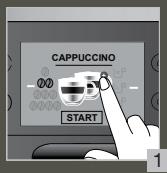
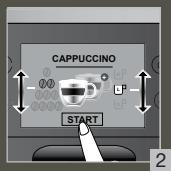
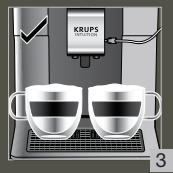
3 MAKE 2 CUPS OF A MILK RECIPE AT ONCE

FR - POUR 2 TASSES INSTANTANEEES D'UNECRECITTE AVEC DU LAIT
NL - MAAK ONMIDDELLIJK 2 KOPIES VAN EEN MELKRECEPT
NO- LAG 2 KOPPER MED EN MELKEOPPSKRIFT PA EN GANG
F1 - TEE 2 KUPILLISTA MAITOKAHVIA KERRALLA
IT - PREPARAZIONI D1 BEVANDE A BASE DI LATTE CONTEMPORANEAMENTE
ELI PAPAZKEYH 2 ΦAITZANION MIAZ ΣYNTATIH ΜE ΓΑA ΣTH ΣTIFMH PRIPRAVTE
SK - PRIPRAVTE NARAZ 2 SALKY MLIECNEHO RECEPTU
PL- PRZYGOTOWANIE 2 FILIZANEZANPOJU Z MLEKIAM N A RAZ
UK - TOTYUTE 2 CHAUKI HANOIOI 3 MOJOKOM 3A ODNIH PAST
BG-IMTbJIHRABAHE PALEPTTA C MIKRO 3A 2 HAAN HABEJHbX
DE-2 TASSEN EINES MILCHREZEPTES AUF EINMAL ZUBEREITEN
DA- OPSKRIFT TIL AT LAVE 2 KOPPER MÄLK PÄ SAMME TID
SV - TILLAGA 2 KOPPAR AV ETT MJÖLKRECEPT I TAGET
ES - HAGA 2 TAZAS DE UNA BEBIDA CON LECHE A LA Vez
PT - PREPARE 2 CHAVENAS DE UMA RECEITA DE LEITE NUMINSTANTE
CS - NAJEDNOU 2 SÁLKY MLEÇNÉ RECEPTURY
HU - EGYSZERRE 2 CSESZE TEJITALT KESZITSEN
RU-TOBOTBTE2UAHKI MOLOUHOI HANITKOA OJHOBPEMEHNO
RO - PREPARAREA SIMULTAN A 2 CESSI DE BÄUTURA CU LAPTE
HR-NAPRAPVITE2 SALICE NAPITKAS MLJEKOM ODJENNO
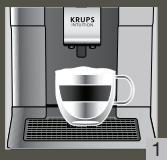
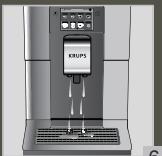
4 QUICK RINSING MILK AFTER A CAPPUCINO

FR - RINCAGE RAPIDE DU LAIT APRES UN CAPPUCICCIN
NL - SNELLE MELKSPOELING NA EEN CAPPUCCINO
NO- HURTIG MELKESKYLLING ETTER EN CAPPUCCINO
FI - NOPEA MAIDON HUHTELU CAPPUCINON JALKEEN
IT - RISCIAQUO RAPIDO DEL CIRCUito DEL LATTE DOPO UN CAPPUCCINO
EL-TPHTOPH EKIIAYZH TAAAKTO META ANO KANOYTOZIN
SK - RYCHLCE OPLACHOVANIE MLIEKA PO CAPPUCINE
PL-SZYBKE PLUKANIE SYSTEMU MLEKA PO CAPPUCCINO
UK- 5BUNIKE 3MBAHHA MONOLKA IICJNAIPTOTYBUHARA KANYUHO
BG-B5P3O IINIJIKAHE AH MJIKOTO CNEJ KANYUHIO
DE-SCHNELLE MILCHSPULUNG NACH EINEM CAPPUCCINO
DA-HURTIG MALKESKYLNING AFTER EN CAPPUCCINO
SV - SNABB MJOLSKÖLUNING AFTER EN CAPPUCINO
ES - ENJUAGUE RAPIDO DE LA LECHE DESPUES DE HACER UN CAPPUCCINO
PT - LAVagem RAPIDO DO LEITE APOs PREPARacao DE UM CAPPUCCINO
CS - RYCHELE OPLACHOVANI MLEKA PO CAPPUCCINU
HU - A TEJ GYORS KIMOSASA CAPPUCCINO KESZITE TUAN
RU-5bCTPRA IPOMBIIBKA MOLOCHHOI CNTTEMBI IIOCEI PIPNIGOTOBIEHIA KANYUHO
RO- CLATIREA RAPIDA A LAPTELUI DUPA UN CAPPUCCINO
HR - BRZO ISPIRANE MLJEKA NAKON CAPPUCINA
6
8


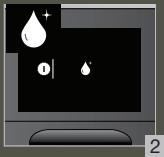
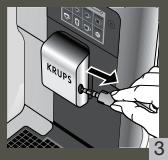
5 MANUAL DEEP CLEANING OF MILK SYSTEM - 5 MIN

FR - NETTOYAGE MANUEL APPROFONDI DU LAIT - 5 MIN
NL - HANDMATGE DIEPE REINIGING VAN HET MELKSYSYSTEME - 5M IN
NO - MANUELL ORDENTLIG RENGJORING AV MELKESYSTEMET - 5M IN
FI - MANUALINEN MAITOJAJRESTELMAN SVAPUHIDUSTUS - 5 MIN
IT - PULIZIA PROFONDA MANUALE DELCIRCUito DEL LATTE - 5 MIN
EL - XEIPOKINHTO\S BAOY\S KAAPIEMO TOY THMATOI TAIAKTO-5 AEITTA
SK - MANUALNE HLBKOVE CIStENIE MLIECNEHO SYSTEMU - 5MIN
PL-REÇEZNE SZCZEGÖLOWE CZYSZCZENIE SYSTEMU MLEKA-5 MIN
UK- TINIBOKE YURKE OUIHELEHHCIMCTEMMOJOLKA-5XB
BG-P2YHNOJBLBOKOIOPONUCTBAHEHCIMTEMATA3MJIRO
DE - MANUELLE TIEFENREINIGUNG DES MILCHSYSTEMS - 5 MIN.
DA - MANUEL HOVEDRENNSING AF
MELKESYSTEMET - 5 MIN.
SV - MANUELL DJUPRENGORING AV MJOLKSYSTEMET-5 MINUTER
ES - LIMPIZA PROFUNDA MANUAL DEL SISTEMA DE LECHE - 5 MINUTOS
PT - LIMPEZA MANUAL PROFUNDA DO SISTA DO LEITE - 5 MIN
CS - RUCNI HLOUBKOVE CISTENI MLEÇNEHO SYSTEMU-5 MIN
HU - A TEJRENDSZER MANUALIS MELYTJSZITITA - 5 PERC
RU-3AUYCKAEMAR BPYUHYO JIYBOKAA ONUCTKA MOLOUHOH CNTECTMbI-5 MMH.
RO - CLATIREA MANUAL IN PROFUNZIME A SISTEMULU DE LAPTE - 5 MIN
HR - RUCNO DUBINSKO CISCENJE SUSTAVA MLUJEKA - 5 MIN.

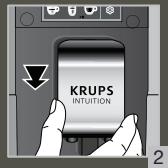
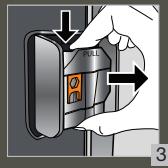
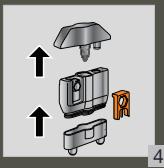
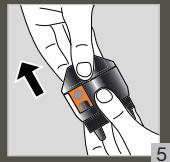
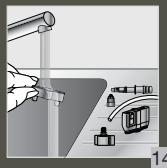
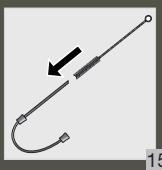
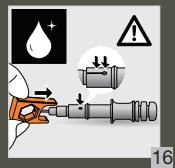
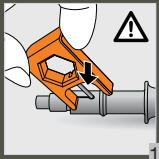
Chere cliente, cher client,
INFORMATIONS IMPORTANTES SUR LE PRODUIT
ACCESSIONS FOURNIS AVEC VOTRE MACHINE
m = 311
PREPARATION DES BOISSONS
LES BOISSONS PROPOSEES SUR CETTE MACHINE :
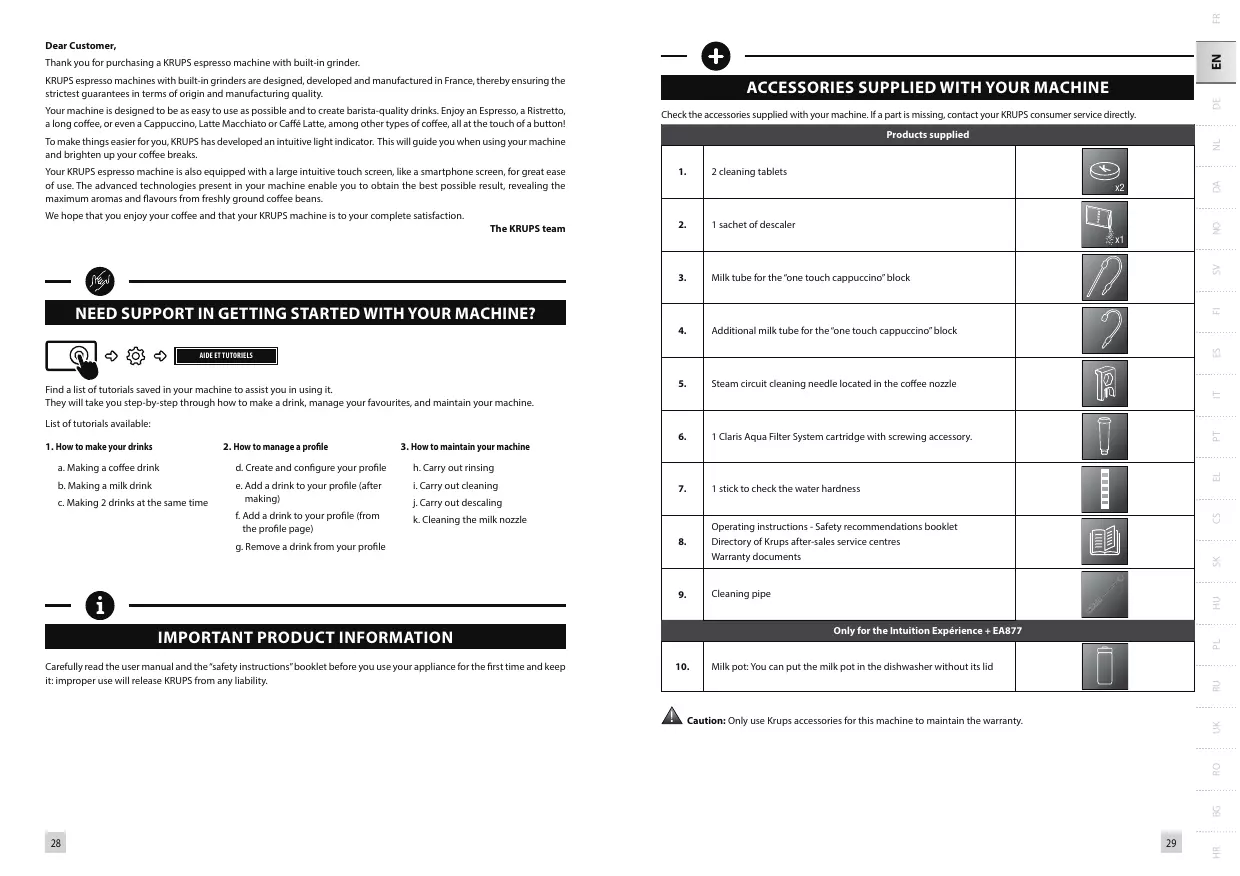
Thank you for purchasing a KRUPS espresso machine with built-in grinder.
KRUPSpresso machines with built-in graders are designed, developed and manufactured in France, thereby ensuring the strictest guarantees in terms of origin and manufacturing quality.
Your machine is designed to be as easy to use as possible and to create barista-quality drinks. Enjoy an Espresso, a Ristretto, a long coffee, or even a Cappuccino, Latte Macchiato or Caffè Latte, among other types of coffee, all at the touch of a button!
To make things easier for you, KRUPS has developed an intuitive light indicator. This will guide you when using your machine and brighten up your coffee breaks.
Your KRUPS espresso machine is also equipped with a large intuitive touch screen, like a smartphone screen, for great ease of use. The advanced technologies present in your machine enable you to obtain the best possible result, revealing the maximum aromas and flavours from freshly ground coffee beans.
We hope that you enjoy your coffee and that your KRUPS machine is to your complete satisfaction.
The KRUPS team

NEED SUPPORT IN GETTING STARTED WITH YOUR MACHINE?


AIDE ET TUTORIELS
Find a list of tutorials saved in your machine to assist you in using it.
They will take you step-by-step through how to make a drink, manage your favourites, and maintain your machine.
List of tutorials available:
1. How to make your drinks
a. Making a coffee drink
b. Making a milk drink
c. Making 2 drinks at the same time
2. How to manage a profile
d. Create and configure your profile
e. Add a drink to your profile (after making)
f. Add a drink to your profile (from the profile page)
g. Remove a drink from your profile
3. How to maintain your machine
h. Carry out rinsing
i. Carry out cleaning
j. Carry out descending
k. Cleaning the milk nozzle

IMPORTANT PRODUCT INFORMATION
Carefully read the user manual and the "safety instructions" booklet before you use your appliance for the first time and keep it: improper use will release KRUPS from any liability.

ACCESSORIES SUPPLIED WITH YOUR MACHINE
Check the accessories supplied with your machine. If a part is missing, contact your KRUPS consumer service directly.
| Products supplied | ||
| 1. | 2 cleaning tablets | x2 |
| 2. | 1 sachet of descaler | x1 |
| 3. | Milk tube for the "one touch cappuccino" block | |
| 4. | Additional milk tube for the "one touch cappuccino" block | |
| 5. | Steam circuit cleaning needle located in the coffee nozzle | |
| 6. | 1 Claris Aqua Filter System cartridge with screwing accessory. | |
| 7. | 1 stick to check the water hardness | |
| 8. | Operating instructions - Safety recommendations booklet Directory of Krups after-sales service centres Warranty documents | |
| 9. | Cleaning pipe | |
| Only for the Intuition Experience + EA877 | ||
| 10. | Milk pot: You can put the milk pot in the dishwasher without its lid | |

Caution: Only use Krups accessories for this machine to maintain the warranty.
TECHNICAL DATA
| Appliance | Automatic Espresso EA87 |
| Power supply | 220-240V~ / 50 Hz |
| Pump pressure | 15 bar |
| Coffee bean container | 250 g |
| Energy consumption | When operating: 1550 W |
| Water tank | 3 L |
| Getting started and storage | Inside, in a dry place (away from ice) |
| Dimensions (mm) H x L x D | 365 x 240 x 400 |
| Weight of EA87 (kg) | 8,9 |
Subject to technical modifications.

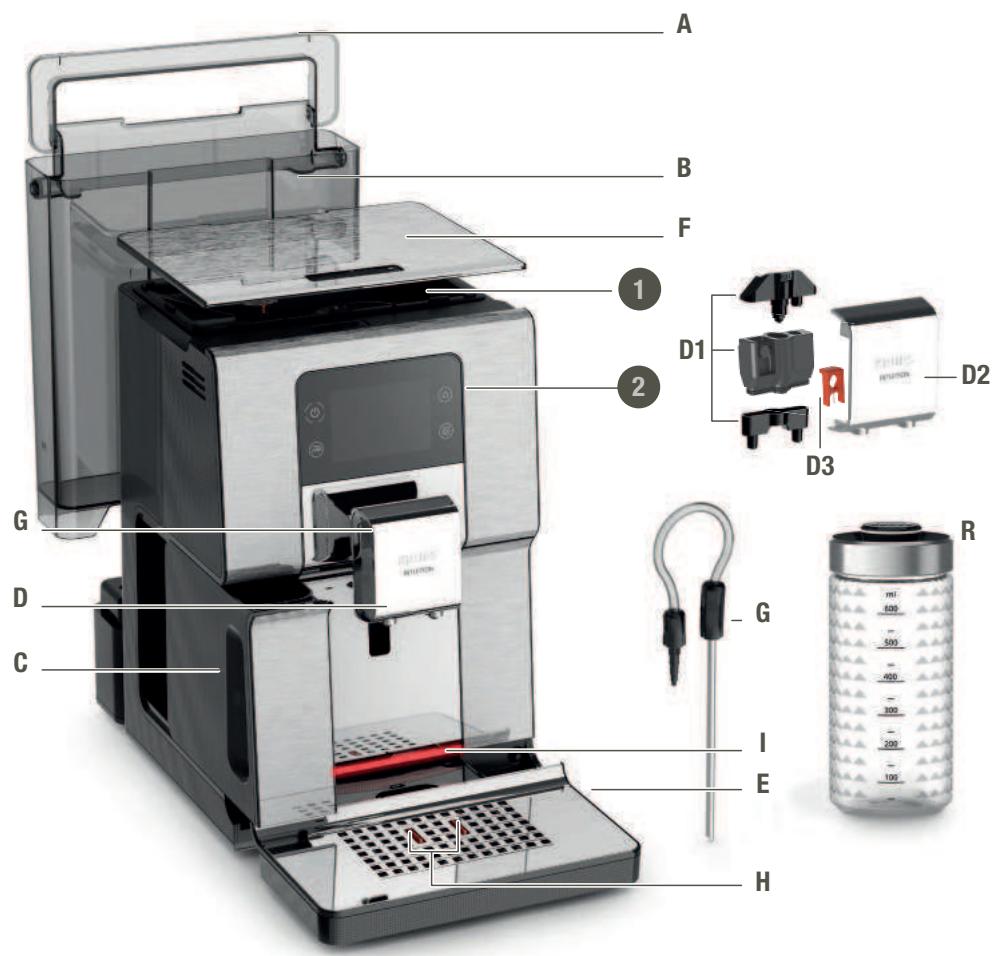
APPLIANCE DESCRIPTION
A. Water tank lid handle
B. Water tank
C. Coffee grounds collection tray
D. Height-adjustable coffee/milk nozzles with cup(s) lighting system
D1. "one touch cappuccino" block
D2. Removable door
D3. Cleaning needle
E. Removable grid and drip tray
F. Coffee bean container lid
G. Milk tube for the "one touch cappuccino" block and connector
H. Water level floats
1. Intuitive light indicator

GETTING STARTED & APPLIANCE INSTALLATION
INITIAL OPERATION
Place the machine on a stable, horizontal, clean and dry work surface.
When using the machine for the first time, you are asked to select various settings.
Priming the machine allows the water circuits to be filled, so that the machine can operate. Preheating and automatic rinsing will take place.
For more information, refer to the Quick Start Guide - 1st USE.
Follow the instructions that appear on the screen
Your appliance has been checked and tested before leaving the manufacturing facility. Despite all the attention paid to cleaning, it is nevertheless possible that you find coffee residues in the coffee grinder and/or coffee drops on the grid of the drip tray. When unpacking, you may also notice the presence of dust on the machine due to the protective material. We recommend that you thoroughly clean your machine before first use with a cloth.
We thank you for your understanding.
Never use a damaged appliance.
MACHINE STANDBY
Depending on the preparation, the machine performs automatic rinsing when it is put on standby. The cycle lasts only a few seconds and stops automatically.

HINTS AND TIPS
WATER
The quality of the water greatly influences the quality of the aromas. Limescale and chlorine may alter the taste of coffee. To preserve all the aromas of your coffee, we recommend that you use fresh water as well as a Claris Aqua Filter System cartridge, or bottled water with dry residue below 800mg / L (see label on bottle). See the chapter "FILTER AND WATER HARDNESS".
CUP
When preparing hot drinks we recommend using preheated cups (by passing them under hot water) the size of which is adapted to your desired quantity.
BEANS

Roasted coffee beans may lose their aroma if they are not protected. We advise you to use the amount of beans equivalent to your consumption over the next 2-3 days and to choose 250g bags.
The quality of coffee beans is variable and tastes are subjective. Arabica will give you fine, floral aromas unlike Robusta which is higher in caffeine, more bitter and full-bodied. It is common to mix the two types of coffee to achieve a more balanced coffee. Please do not hesitate to seek advice from your roaster.
We do not recommend the use of oily and caramelised beans as these can damage the machine.
The fineness of the ground beans influences the strength of the aromas and the quality of the reclamation. The more finely ground the beans, the smoother the reclamation. Grinding can also be adapted for the desired drink.

INTUITIVE LIGHT INDICATOR
Your Intuition machine has smart, bright technology to make your everyday life easier: the intuitive light indicator (I). This technology has a dual functionality:
- The machine automatically detects and controls the levels of coffee beans, water and coffee grounds. When you need to fill or empty your containers, as well as when maintenance is required, the red warning light comes on and you should follow the information on your screen.
- The intuitive indicator light also allows you to personalise your experience. You can assign a colour to each profile. When one of the profiles is selected, the indicator light takes on the colour of this profile to promote immediate understanding and ultra-fast and intuitive navigation.
See the chapter "MY PROFILE".
FILTER AND WATER HARDNESS
WHAT DOES THE WATER HARDNESS ADJUSTMENT DO?
To avoid scaling your machine and to optimise the quality of your coffee, we advise you to set the hardness of your water on your machine.
HOW TO INDICATE THE WATER HARDNESS OF YOUR MACHINE.


RÉGLAGES


- Fill a glass of water Dip the test stick that comes with the machine into your glass filled with water.
- Wait 1 minute. The squares on the test stick change colour.
- Count the number of coloured squares. This tells you how hard your water is, between 0 and 4.
- In the "Water hardness" menu, press the corresponding number between 0 and 4.
Press OK.
YOU NO LONGER HAVE A TEST STICK?
If you need to repeat this operation later, be sure to change the hardness of the water according to the place of use or the information provided by the water companies, using the table below:
| Degree of water hardness | Class 0 Very soft | Class 1 Soft | Class 2 Medium hard | Class 3 Hard | Class 4 Very hard |
| \( {}^{ \circ }\mathrm{{dH}} \) | \( < {3}^{ \circ } \) | \( > {4}^{ \circ } \) | \( > {7}^{ \circ } \) | \( > {14}^{ \circ } \) | \( > {21}^{ \circ } \) |
| \( {}^{ \circ }\mathrm{e} \) | \( < {3.75}^{ \circ } \) | \( > {5}^{ \circ } \) | \( > {8.75}^{ \circ } \) | \( > {17.5}^{ \circ } \) | \( > {26.25}^{ \circ } \) |
| \( {}^{ \circ }f \) | \( < {5.4}^{ \circ } \) | \( > {7.2}^{ \circ } \) | \( > {12.6}^{ \circ } \) | \( > {25.2}^{ \circ } \) | \( > {37.8}^{ \circ } \) |
| Appliance settings | 0 | 1 | 2 | 3 | 4 |
WHY INSTALL A FILTER CARTRIDGE?
The Claris Aqua Filter System cartridge helps to optimise the taste of your coffee, to limit the build-up of limescale and to reduce maintenance operations.
HOW TO INSTALL THE CLARIS AQUA FILTER SYSTEM CARTRIDGE


ENTRETIEN MACHINE

The cartridge is placed in the water tank.
- We advise that, when you install your cartridge, you turn the grey ring at the far end of the filter cartridge to show the date of installation + 2 months.
- Correctly position the cartridge in its location, with the numbered ring upwards.
- Use the black screw-in attachment, supplied with the cartridge, to correctly position and screw the cartridge in place.
WHEN SHOULD YOU CHANGE THE CLARIS AQUA FILTER SYSTEM CARTRIDGE?
- 2 months after installation or when the machine indicates this.

GRINDER: ADJUSTING THE GRINDING FINENESS
WHY ADJUST THE GRINDING FINENESS?
You can adjust the strength of your coffee by adjusting the grinding fineness of the coffee beans.
Varying the grinding fineness makes it possible to adapt to different types of bean:
- A heavily roasted and oily bean will require a coarse grind,
- A lighter roasted bean will be drier and will require a fine grind.
In addition, for the same coffee, the setting of your grind impacts the aroma in the cup: the finer the grind, the more powerful the aroma.
Torrefaction :
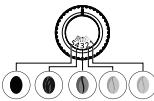
Very intense (Dark French)
Intense (French)
Mat (Light F
A )
Average (Amber)
Light (Blonde)
HOW TO ADJUST THE GRINDING FINENESS
Turn the setting button located in the coffee bean container to suit your bean type and the power of aroma desired. This adjustment must be performed during grinding and notch by notch. After 3 preparations you will notice a distinct difference in taste;


HOW DO YOU KNOW WHEN THERE ARE NO MORE BEANS IN THE CONTAINER?
Your Intuition machine is equipped with a sensor to predict the lack of coffee beans in the container. An on-screen message will appear and the Intuitive Indicator Light (I) will illuminate red.
WHAT IF THE ALERT APPEARS DURING THE MAKING?
Fill the container with coffee beans, press OK and the recipe will resume. So no wasted coffee!
HOW TO IF I WANT TO CHANGE COFFEE OR IF I HAVE NO MORE COFFEE?
If you press OK without having added coffee beans, the machine tries to restart and goes back to alert. If you press OK again, the machine performs the making using all the remaining coffee. The grinder is now empty.
If an alert message appears on your screen and the alert light turns red when there are enough beans:
- Press the OK button to start preheating.
- Disable the "no bean" alert to avoid detections when there is coffee left in the coffee bean container.


RÉGLAGES
PREPARING DRINKS
DRINKS AVAILABLE FROM THIS MACHINE:
Intuition Experience allows you to make a wide variety of coffee and milk-based recipes, hot or cold, to meet all your desires. The recipes are available in direct access from your control panel. The anchors, available at the bottom of your control panel (in slider view) are also a shortcut to access them. A description of each drink and associated preparation tips are available by tapping the (i) on your screen once your drink has been selected.
| Drinks | Approximate size | Possible volumes | Coffee strength | X2 | |
| Coffees | Ristretto Short espresso with body. | 25 ml | 20 - 40 ml | ✓ | ✓ |
| The full-bodied espresso with pronounced aromas is overlaid with a slightly bitter caramel coloured crema. | 40 ml | 40 - 70 ml | ✓ | ✓ | |
| Lungo Long espresso with a caramel crema. | 70 ml | 70 - 100 ml | ✓ | ✓ | |
| Café Long Double espresso with an amber crema. | 120 ml | 80 - 180 ml | ✓ | ✓ | |
| Doppio Higher in caffeine but lighter on the palate. Very popular in the morning. | 100 ml | 40 - 140 ml | ✓ | ||
| Americano Double long espresso combined with hot water. | 120 ml | 90 - 150 ml | ✓ | ||
| Café filtré A long infusion at a low temperature for a soft and light result. | 150 ml | 80 - 170 ml | ✓ | ||
| Carafe* 3 to 8 cups of long coffee for the whole family. | 375 ml | 375 - 1000 ml | ✓ | ||
| Milk Drinks | Espresso Macchiato Espresso with a thin layer of milk froth. | M = 60 ml L = 80 ml XL = 100 ml | ✓ | ✓ | |
| Cappuccino A balance between milk, foam and coffee. | M = 120 ml L = 180 ml XL = 240 ml | ✓ | ✓ | ||
| Cappuccino italien A mixed cappuccino. A foam with a subtle taste of coffee. | M = 120 ml L = 180 ml XL = 240 ml | ✓ | ✓ | ||
| Flat White Latte with milk froth. | M = 160 ml L = 200 ml XL = 240 ml | ✓ | |||
| Lait Moussé A large helping of milk with milk froth. | M = 120 ml L = 160 ml XL = 200 ml | ✓ | |||
| Caffe Latte Milk foam with a light coffee flavour. | M = 200 ml L = 280 ml XL = 350 ml | ✓ | ✓ | ||
| Latte Macchiato Une grande dose de lait, un Espresso gourmand avec sa mousse de lait | M = 190 ml L = 250 ml XL = 340 ml | ✓ | ✓ | ||
| Iced Drinks* | Frappé* A large helping of milk, a gourmet espresso with milk foam. | about 380 ml | ✓ | ||
| Nitro coffee* Iced coffee and milk with a creamy coffee-flavoured froth. | about 350 ml | ✓ | |||
| Chilled coffee* Iced coffee infused with fine oxygen bubbles. | about 350 ml | ||||
*Only for the Intuition Experience + EA877
| Teas | Thé vert Hot water at the ideal green tea temperature. | 200 ml | 20 - 300 ml | ||
| Thé noir Hot water at the ideal black tea temperature. | 200 ml | 20 - 300 ml | |||
| Thé infusion Hot water at the ideal temperature for an infusion. | 200 ml | 20 - 300 ml |
HOW TO ADJUST THE HEIGHT OF THE COFFEE NOZZLES
For all of the drinks offered you can lower and reassemble the coffee nozzles according to the size of your cup(s)
HOW TO START PREPARING MY DRINK
Refer to the tutorial saved in your machine "How to make your drinks?"


AIDE ET TUTORIELS
DEPENDING ON THE DRINK. DIFFERENT SETTINGS ARE POSSIBLE:
One or two cups: to launch the duplicate recipe, select the drink and press
- Coffee strength: to increase or decrease the strength of the coffee by changing the amount of ground coffee, select the drink and choose between 1 and 4 beans, 1 being the mildest and 4 the strongest.
Volume in cup: to increase or decrease the amount of water used for extraction.
For more information, refer to the table of drinks in the leaflet and to the Quick Start Guide - DRINK SETTINGS.
HOW TO STOP A DRINK WHILE MAKING
You can stop the preparation of your drink at any time by pressing the button 30hr . When a cycle is interrupted, the stop is not immediate. The machine will have a time of non-accessibility which will be indicated by a message on your screen
MILK DRINKS

ADVICE AND TIPS
To make frothy milk, you should opt for pasteurised UHT milk from the fridge (3 - 5^) . The use of special milks (micro-filtered, raw, fermented, enriched) or plant milks (almond, oat, soya, etc.) may give results that are less satisfactory in terms of the quality and quantity of froth.
HOW TO START PREPARING A MILKY DRINK
Refer to the beginning of the manual at 2 PREPARING A MILK RECIPE, or consult the tutorial saved in your machine "Making a milk drink".


AIDE ET TUTORIELS
ICED DRINKS (ONLY FOR THE INTUITION EXPERIENCE + EA877)
Intuition Experience + offers new exclusive cold drinks such as Frappe, Chilled Coffee or Nitro Coffee.
Making an iced drink requires one or more actions in advance on your part. To obtain an optimum result in the cup: Use a 400 - 450ml glass and standard size ice cubes (4× 2.5× 2.2cm) . Your machine will help you throughout the making. We recommend that you follow the preparatory stages of the recipes step-by-step on your screen. Preparation tips and tricks are also available in the information section, by tapping the 1 on your screen.
TEA AND INFUSIONS
For your teas and infusions, you have three recipes that offer the most suitable temperature for each type of tea. The temperature of green tea will be lower than that of black tea and infusions.
You can set between T1 and T3, with T1 being the most lukewarm temperature and T3 the hottest. If you decrease/ increase the temperature you will decrease/increase the temperature of each type of tea, however the temperature of green tea will always be lower than that of black tea and infusion.

PROFILES
WHAT IS THE PROFILES FUNCTION FOR?
The Profiles feature enables you to access a personalised space where you can store and save your favourite drinks. It is very easily accessible thanks to a direct button on the control panel of the machine. Faster and ideal for everyday use, the drinks saved in your profile are launched directly with one touch without any settings being required. You can record up to 7 recipes per profile.
The profile also allows greater personalisation of your interface and different settings:
| First name | It is possible to add a first name for greater personalisation. |
| Colour | It enables you to select the colour of the desired intuitive indicator light to identify its profile more easily. |
| Display | You can also set the type of display for your drinks on the Profile screen. They may appear in “slider” mode or in “mosaic” mode. |
| Programming | The “Profile” feature also enables you to define a time of day or a key word for each drink. This will allow you to find your drinks more easily at any time. |
| Brightness | This enables activation or deactivation of the light indicator. |
HOW TO CREATE A PROFILE?
Press the Profiles button and follow the on-screen prompts or view the tutorials saved in your profile.


AIDE ET TUTORIELS
HOW TO MANAGE YOUR FAVOURITE DRINKS WITHIN A PROFILE
You can add a drink to a profile in 2 ways:
After making a drink, a button

appears on the screen.
- Directly in the profile.
If I stop my favourite drink while it is pouring, this is the length that will be recorded.
HOW TO ORGANISE/ORDER/REMOVE FAVOURITE DRINKS
- Hold your finger down on a drink icon for a few seconds.
- A delete cross appears at the top right of the drink menu.
- Press again, hold your finger on the drink and drag to rearrange the drinks.
GENERAL MAINTENANCE
Carrying out proper maintenance will prolong the life of your machine and preserve the authentic taste of your coffee.
WHEN DO I EMPTY THE DRIP TRAY?
When the floats are in the upper position indicating that it is too full.
- The drip tray allows you to collect the water or the coffee that flows from the appliance during and after preparation.
It is important to always leave it in place and to empty it regularly. - For hygiene reasons, we recommend that you dismantle the drip tray to clean each element daily and let it air dry before replacing it in the machine.
- Refer to the Quick Start Guide - CLEANING THE DRIP TRAY, fig 1-2-3-4-5-6-7. You can put the drip tray in the dishwasher without its metal grid.
WHEN TO EMPPLY THE GRINDING CONTAINER
The coffee grounds container takes in the extracted ground coffee
- Empty the grounds container when the machine asks you to.
- You can empty it more regularly, but when the machine is lit up this is so that it can record that the container has indeed been emptied.

Failure to regularly empty your coffee grounds container as indicated above may damage your appliance.
MAINTAINING THE GRINDING TRAY
For hygiene reasons, we recommend that you clean the grounds container with hot soapy water every day and let it air dry before replacing it in the machine. Refer to the Quick Start Guide - CLEANING THE GRINDS TRAY, fig 1-2-3-4-5.
Do not put in the dishwasher.
MAINTAINING THE WATER TANK
To preserve the aromas of your coffee and for hygiene reasons, we recommend that you use fresh water, clean your water tank every day with hot water and a sponge and let it air dry. air before replacing it on the machine.
BEAN CONTAINER MAINTENANCE
Coffee beans can leave greasy residue on the walls of the bean container which can affect the quality of your coffee. For the preservation of the best flavour and for hygienic reasons we recommend you wipe it with a dry, soft cloth each time it needs to be refilled.

Important: Do not use water to clean the bean container, the presence of water in the bean container could damage your machine.
WHY AND HOW TO MAINTAIN THE MILK SYSTEM AFTER MAKING MILK DRINKS


AIDE ET TUTORIELS

Important: In order to obtain a quality of foam that is always identical, we advise you to carry out the following maintenance:
| Maintenance | When? | Explanation | Accessories required: |
| Milk rinsing 30 s - 20 ml | After each milk drink, when prompted by the machine. | Allows you to rinse the machine's milk circuit. You can start a milk system rinse at any time. | |
| Manual cleaning of the milk pot 30s | After each milk drink | We recommend that you clean the milk pot with hot water and with soap after each use. You can put the milk jug in the dishwasher without its lid. | Hot water + soap + sponge |
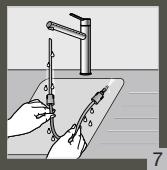
| Manual rinsing of the milk tube 30s | After each milk drink. | This rinsing consists of carefully manually cleaning the milk tube and its metal nozzle with hot water AFTER EACH USE. | Hot water + soap + pipe cleaner |
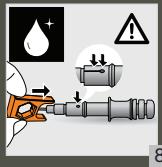
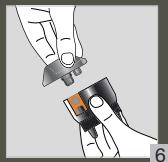
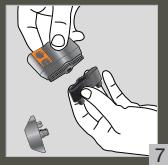
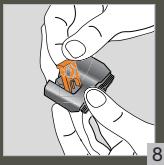
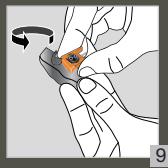
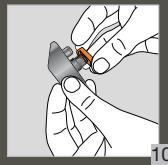
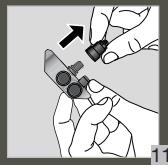
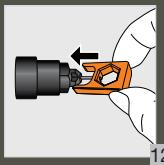
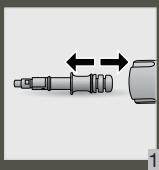
| Manual milk cleaning 5 min | When the machine asks you to or at any time. | This cleaning consists of dismantling and cleaning the removable "one touch cappuccino" block (D1). For optimum milk froth results, it is advisable to clean it regularly. Refer to chapter 5 of the Quick Start Guide - MANUAL, THOROUGH CLEANING OF THE MILK DISTRIBUTION SYSTEM - 5 MIN. | Cleaning needle (D3) |
| Maintenance | When? | Explanation | Accessories required: |
| Coffee flushing 45s - 30 ml | After 2 days of non-use or at any time. | Allows you to rinse the machine's coffee circuit. This process only uses hot water. It ensures the authentic taste of your coffee. | |
| Tea flushing 30 s - 20 ml | After making a tea drink. | Allows you to perform a hot water rinse to ensure the authentic taste of your tea or infusion. | |
| Cleaning 13 min - 600 ml | When the machine asks you to or at any time. | For reasons of hygiene and to preserve the quality of your coffee, we recommend that you clean and degrease the machine's coffee circuit. It guarantees you optimal preservation of the aromas of your drinks. | 1 KRUPS n°1 cleaning tablet |
| Descaling 20 min - 600 ml | When the machine asks you to or at any time. When the number of drinks is not enough for descaling to be required, the function is not active. | Descaling your machine ensures its proper functioning and eliminates any deposit of limescale or tartar. This step is very important to ensure the proper operation and durability of your appliance. | 1 KRUPS n°2 sachet of descaler |

Important: If your product is equipped with our Claris - Aqua filter System F088 cartridge please remove it before the descending procedure.

OTHER FUNCTIONS
HOW TO ACCESS YOUR MACHINE'S SETTINGS
Your KRUPS Intuition machine has many settings, do not hesitate to try them! This will allow you to personalise your experience even more.


RÉGLAGES
LIST OF SETTINGS:
| Language | Selection of the language of your choice from 21 languages. |
| Date and time | Setting the date is required, particularly if using an anti-limescale cartridge. Setting the time and 12 or 24 hour clock display |
| Screen brightness | To adjust the screen brightness. |
| Light | To activate or deactivate the intuitive indicator light. |
| Choice of 1stscreen | Choose the presentation of the first screen. |
| Auto stop | To choose the duration after which your appliance will stop automatically. This function allows you to consume less electricity. |
| Auto illumination | To turn on the machine and automatically start preheating the appliance at a chosen time. Do you always have your coffee at the same time each day? This feature is made for you! By setting the auto start, you can save time and only have to start your drink. |
| Volume unit | Selection of the unit of measurement: ml or oz. |
| Auto rinsing | You can choose to activate automatic rinsing of the coffee outlet or not when starting the machine. |
| Water hardness | To adjust the hardness of the water between 0 and 4. For more information, refer to the chapter "Measuring water hardness". |
| Coffee temperature | To set the temperature of your coffee between T1 and T3. |
| Tea temperature | To set the temperature of your tea between T1 and T3. |
| Type of coffee | Indicate the type of coffee added in the bean container. |

ANSWERS TO YOUR QUESTIONS
OPERATION
- The machine displays a fault, the software is frozen OR the machine is malfunctioning.
Turn off and unplug the machine, remove the filter cartridge, wait 1 minute and restart the machine. Press and hold the ON/OFF button for at least 3 seconds to start. - The appliance does not turn on after pressing the ON/OFF button (for at least 3 seconds).
Check the fuses and the power socket of your electrical installation. Check that the two power plugs are correctly inserted into the socket. -
A power failure has occurred during a cycle.
The appliance resets automatically when it turns back on. -
The grinder is running empty.
This is normal if it happens occasionally and if there are no coffee beans or only a small amount. It can run for up to 10 seconds off-load to know its consumption and ensure the correct operation of its function
Coffee beans remain in the container:
- The coffee may be too oily and is therefore not being correctly captured by the appliance. You could try helping the beans to go down and see if that gets it working again. However, it is advisable to change coffee (ref. type of beans function).
- This is my usual coffee that has worked well until now: contact your KRUPS consumer service.
USE
- The grinder makes an abnormal noise.
Foreign bodies are likely to be present in the grinder. Try to clean out with a vacuum cleaner, otherwise contact your KRUPS consumer service.
- There is water under the appliance.
Before removing the drip tray, wait 15 seconds after the flow of coffee so that the machine finishes its cycle correctly.
Check that the drip tray is well positioned on the machine. It must always be in place even when the machine is not in use.
Verify that the drip tray is not full.
-
The adjustment button for the grinding fineness is difficult to turn.
Turn the adjustment button of the grinding fineness only when the grinder is operating. -
The appliance has not delivered any coffee.
An incident has been detected during its making.
The appliance is reset automatically and is ready for a new cycle.
- You have used ground coffee instead of coffee beans.
Use your vacuum cleaner to collect the ground coffee from the bean container. - Water runs from the coffee nozzles when the machine stops.
This is normal. It is an automatic rinsing process to clean the coffee nozzles and ensure that they do not become blocked
STEAM AND MILK
-
The milk flow of your machine appears to be partially or completely blocked.
Refer to the beginning of the manual at 5. IN-DEPTH MANUAL CLEANING OF THE MILK DISTRIBUTION SYSTEM - 5 MIN, or see the tutorial saved in your machine "Cleaning the milk nozzle". -
No steam comes out.
a. When using a steam cycle for the first time, if no steam comes out correctly:
Check that the steam output is not blocked. See above: "The steam output of your machine appears to be partially or completely blocked".
Perform the following process once only:
Empty the water tank and temporarily remove the Claris Aqua Filter System cartridge. Fill the tank with mineral water high in calcium (>100mg / L) and make successive steam cycles (5 to 10 cycles) in a container until a continuous jet of steam is obtained. Return the cartridge to the reservoir.
b. The steam nozzle had already worked:
Check that the steam output is not blocked. See above: "The steam output of your machine appears to be partially or completely blocked".
If after completing the above steps it still does not work, please contact your KRUPS consumer service.
- Steam escapes from the grid of the drip tray.
Depending on the type of preparation, steam may escape from the grid of the drip tray. - Steam appears under the bean tray lid.
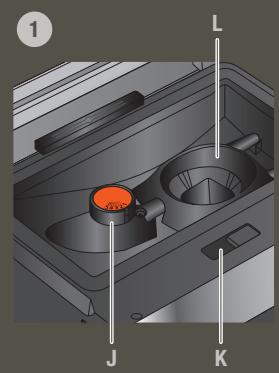
Check that the cleaning tablet hatch located under the lid (L) is properly closed.
MAINTENANCE
- The machine does not request descaling.
The descending cycle is requested from a large number of milky drink preparations or hot water. If you only consume coffee, descending will not be required often. - Some grounds are in the drip tray
A small amount of ground coffee can get into the drip tray. The machine is designed to evacuate any excess ground coffee so that the percolation zone remains clean. -
The intuitive indicator light is still on after you have emptied the coffee grounds tray.
Reinstall the coffee grounds tray. -
After filling the water tank, the intuitive indicator light stays on.
Check the correct positioning of the tank in the appliance.
The floats at the bottom of the tank must move freely. Check and unlock the floats if necessary.
DRINKS
- The coffee is pouring too slowly.
Turn the "fineness of grinding" button to the right to obtain a coarser ground coffee (this may depend on the type of coffee used).
Perform one or several rinsing cycles.
Change the Claris Aqua Filter System cartridge.
- The coffee is too light or not full-bodied enough.
Check that the bean container contains coffee and that it is moving down correctly.
Avoid the use of oily, caramelised or flavoured coffees which may not be captured properly.
Decrease the volume of the preparation and increase the strength of the preparation using the coffee strength function. Turn the "fineness of grinding" button to obtain a finer ground coffee. Make your drink in two cycles using the 2-cup function.
- The espresso or the coffee is not hot enough.
Increase the temperature of the coffee in the machine's settings. Heat the cup by rinsing with hot water before starting to prepare the drink.
Before making your coffee, carry out a rinse of the coffee circuit. A coffee rinsing function when switching on the appliance can be activated in settings / auto rinsing
- Clear water is running from the coffee nozzles before each coffee.
A pre-infusion takes place when you start a recipe, and this can lead to a small amount of water coming out of the coffee nozzles.
If one of the problems outlined above persists, contact KRUPS Consumer Service.
ÉLIMINATION

Some appliances contain a battery that is only accessible by a repairer for safety reasons. To replace the batteries, contact your nearest service centre.
Important: Your appliance contains many recoverable or recyclable materials.
Let's help protect the environment!
Leave it at a collection point for processing
WARRANTY
The guarantee does not apply in the following cases:
Presence of foreign bodies in the shredder,
Ground coffee has been poured into the bean container,
The Claris - Aqua Filter System filter cartridge is not used according to KRUPS instructions,
In the event of lack of descending, cleaning or regular maintenance.
Any work on the appliance must be carried out by an authorised KRUPS centre.
This Espresso Automatic coffee/espresso machine must only be used for the preparation of coffee, hot water or to froth milk.
Manufacturer: GSM - 1076 Rue Saint-Léonard 53100 Mayenne - France
BESCHRIJVING VAN HET APPARAAT
HOE BEREID IK MIJN DRANKJE VOOR?
D1. "one touch-cappuccinoblok"
D2. Aftagelig lage
D3. Rengøringsnal
HVORNAR SKAL JEG TOMME DRYPBAKKEN?
HAR DU IKKE EN TESTPINNE LENGTH?
VEDLIKEHOLDE DRYPPBRETTE
VEDLIKEHOLD AV SLIPEBRETET
Av hygienische arsaker abeiferal vi at du renjor grubthetainder med varmt sapevann hver dag og lar den luftstor fer du setter den in man kaskinen jse. Se Hurtigstartveiledingen - RENGJRE GRUTBRETTF, fig. 1-2-3-4-5
VEDLIKEHOLDE VANNBEHOLDEREN
Vi anbefaler at du bruser ferskt vann for abveare aromaene til kaffen og av hygieniske asaker. Rengjor vannbeholdener hver dag med varmt vann og en svamp, og la den luftfarke. Luft den fer du setter den tiltake i maskinen.
VEDLIKEHOLD AV BØNNEBEHOLDER
Kaffbeonner can etterlate fettrester va veggenie i bannebeholderen som kan paivire kaffkevalitten. For a bevece best mulig smak, og av hygienise grunner, anbefaler vi at du torker den med en torn, myk klut hverr hang den ma etfterylls.

VEDLIKEHOLD AV MELKESYSTEMET
HVORF OR OG HVORDAN DU VEDLIKEHOLDER MELKESYSTEMET ETTER AT DU HAR LAGET MELKEDRIKKER
TILLBEHOR SOM MEDFOLJER MASKINEN
D1. "one touch cappuccino"-del
D2.Avtagbar lucka
D3. Rengöringsnal
In addition, for the same coffee, the setting of your grind impacts the aroma in the cup: the finer the grind, the more powerful the aroma.
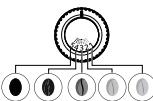
Torrefaction :
Erittain vahva
Vahva
Kehittynyt
Keskitaso
(Amber)
Kevyt
(Blonde)
JAUHATUSKARKEUDEN SÄTÄMINEN
ACCESSORI IN DOTAZIONE CON LA MACCHINA
NOTE IPENEI NA ADEIAZΩ TON ΔI2KO ANONEPQN;
Otaov 1nWtnpc piokovtai e avuwoevn thon kai unodekivouov oEeYeipoi nou.
SYNTHPHESH TOY DIKOY ANONEPQN
O DIOKOC anovepew enptenei Tn ouolny tou vepou n KAPe Tou diaopeyu anto Tn ouokeun kata Tn diapekeia n meta ano tvnpaaokuei.
Eivai onmuavtko va tov aqvetne naVTA oTn 0eon tou kai va tov aedeiae taktiká.
Tia loyou CYueiN, ouvouotouva anoaouuapaoyeite tov bioko anovepw yia va kohapcte Kote otoieko aonepiva kaai o apyefte vstoyoeae aepa pinyen toevatoanotthetaetope tntmynayek
AvatapéTe STov Odyjnypónc ekviyncn- KAOHIPZMOY TOZ IIAOKY AFIONEPQ, EK.1-2-3-4-5-6-7. Mnopète va totohερην τέν διοκία πούντηρο πίουτιν υμεις το μελλόκι κδημεγον.
NOTE INPENEI NA ADEIAZΩ TO AXEIO ANEHS
To doxio unolemuatwv aeouevou kaepdeltaetai tov aeouevo kaep
Adebiaote to doxeio unoalemuatuv aeouovou kaeotavntnthe ano tn nvn.
Mropeite va to aedieAeTIE mo taktikai, aAa otav n mnuXAVI eiva avauMeVn auto onuaivei otmupei va kattaypae iot EYIVE aeaouu taou xeiuei.
Eev d'ev aoei tactkio to doxieo unoolemuatw oaeouevou kaep, omuc ounoolekvuaetanapanauwo, evdcexta va npoknne 1zma ot ouakeun oac.
IaOyouu UUYHvE, Ouviatoue va KaBapIETE KaTHnepivto do Boxelyo UTOAeuiMauAejuEvou KaPcE kaTurope o aonovui kai va to apivte va TyeWooie ae aepa npiv to enataoOnetTeot stnmuav. AvatpTe OTov Odynpoc EKcivnok -KAOPAIIMOS TOY TEKOY AFIONEPON, EIK. 1-2-3-45.
Mv to baCte OTo nluvtnpio matw.
SYNTHPHESHOTOAOXEIYO NEPOY
Tia va diatnpoaete To apaqata Tou kaepac kai yia loyou uviivic, auviotouque va xnpaionoitee qeao vepo, va kaabipceto doxoei vepo kbnepivaeu kauvo poe kaoyayapki vai to aphive t o steywote Tov aepa, npiv to enavatanotetiete ot unjxavri.
SYNTHPHEH DOXEIOY KOKKQN
O KOKo Kape o npoei va apnoovunlmpa unolmuata otto toyoioukoo, ta onoia npoei va empeaoov nvoitnta tou kape oac. Ta hi diatnpan tnc kalotpc eyean, kai yia loyou, uyeivn, oc auviotoue ie to okounite e me eva stoyv, naakocavi kede fopa nvoiEctai va to cavaayeiote.

JnVauKo: Mny xpnHoiOeIE vepo yia va KabapoeTe to doxieo kokkw. To vepo oTo oxdoio kokkw u mopei va npokaiEoi Otn tni nXvov

SigmaVtko: Via a olauajbavet náva tvn iða noiota aapou, oac ouviotoume va kxtaeite tic napakatu epyaocie ouvtipnonc.
NIQKAIIATINASYNTHPEITE
PRISTUP K NASTAVENI ZARIZENI
Zaizeni KRUPS Intuition má mnho nastaveni, nevahejea a vykousseje je! To vam umozni prizpuzobit si priivravu napoju jeste vice.


NASTAVENI
HOGYAN ADHATOK MEG KEDVENC ITALT?
MIKOR KELL KIURITENI A CSEPPFOGO TALCAT?
WAZNE INFORMACJE O PRODUKCIE
SKAD WIADOMO, ZE W POJEMNIKU NIE MA JUZ ZIAREN?
TEXHMUECKNEXAPAKTEPNUCTUKN
He nCnoIb3yIte noBpeKdennHbn npn6Op.
PNUBOPBPEXKIMEOXNDAHNA
B 3A BHKINOCOTN OHTAPKNI KPNIOB BnIPOHNRET ATOBMTHECKYIO PNOMBIKBY B POKHMDEOJXIDAHNI. LNKI DNTRC BCETO HEKOJIbO KEcYNH I OCTAHONIBAETCA ABTOMTAEKNCH.

NODCKA3KNI COBETbl
KaeCTBO BODI OKa3bBAE CTbHbOE BnHnHHe h APOMAT HANNTOBA. HAnk H NxOP MOrT YNEMHTB BYCKoCf. IIN OCAHNHEP ANOMATA KOFe PekMOEHDYTC TcNIOBbTOBATE CBEYNOYtCA, A TAKGE KAPTNIDC HCTEBMIy FQTHAUPBOI INBOI CLARl IINyBtINPOBAHHY NOy Dc CYMNN OctatKAMN HN800 Mt/N (cm. 3TNIETKY 6bTyBN). CM.nrABy EINILbTP IN JXECTKOCb BOBd).
Pnirnpotrobohenrnpoohn HnntKOB pekOMEnHyetcH nCNOIbOaB npEbnapitbHOHarpTe (noD npraeB oDo) qauNk noNDQaHepo zpaMePA

Ecnlo64abekhennheKoekhBHe3eepaHe3aauuHb, OHOnMOrYTpTaTnTBcB0 apomat. PeKoMeHNyEM cNOnPb3OBaTb KOnJIeCTBO KoFeIbNx3eepa, paBHOe KOJIeCTBy, KOTopeB bMyOKeTe yOnTpBeB b Teyehne CnDeYoiUxMx 2-3dJe, n BbIbparn NakteB no 250 r
KaucheTbO KofoeHbNx 3epeH MoKet 6bIt bpa3HbM, a Bkyc - INHdUdAyalbHbM. ApaBnka daet ToHKme ubeToHbIe apOMaTb, aPoCbyc 3 Goene ble COKoM cOepekaHem Kofoe Hna HmeeT 60oe ropbKn i NacuHHe Bkyc. IIna nonyueHHa c6AnaHcnpBaOHnro Kofe OboMuHO CMeWbAOT d3 a3tNx BnDa. TOr6bI nOnyHT peKoMeHdaun, 6pntntecb K npom3BDoNTeTIIO KofoeHbNx 3epeH.
He peKOMeHcyETc HcNpIb3OaBt 3epHa, CodepKzauNe MHOrO MaCna I KAPaMeNIIpoBaAHnBe, TAK KAc OH NmOTy nOBpeHntk FOeMaehuY.
Ctenheb nomoma 3eepn Hnepeb npomata n Kaucebe Nekpn Kpem. CEm Tohneue nomoma 3eep, Tm 60nee HehnoB dyet nenka Kpema. Ponomo MOnHOK Take OtperynpoBAt B COOTBETBNH c HANTNOK.

YMHBI CBETOBOI INHANKATOP
KoefemaHaHInuTioN OcShaeeI INHOBAUHOHN YoTHONORIEe, KOPTORA ynpOaAeE ee HCNIOHBaOHnne: yMHbI cEBOTOBINHnKDAtOP (I). 3Ta TEOHONORA IMMeET deyHknni:
- KofemaunHHa 3AOTAMUChEeKoI OpeRyIepHeN KoFeiHbIX 3eepH, BODn I KOFeiHou rYiM. EcnI Heo6xoDMIO 3ANONHITb NII ONOPOKHHTb KOHTeHepB, a TAKCe eJIN Tpe6yETcTexHmueCKeOe 6OcJIYKBaHne, 3aQOPaERc KpAchNI INHdATOpK, CnHnAHI3NpyUoi O Heo6xoDMIOCT ChDoeBAt Yk3A3AHmN A k3Pae.
- Ymblc bctobor nihikatop TAKe KIOBONetepnoCHaHINiOPOBaTb 06CNYKMBAHme.MoKHO H3HaHTb 18ETI JAAKOIO npOPIIA. PnB IbOpe OIOHO INpOPIAeI 3aOpaTeC rBET 3TOr npOPIIAI Iy BcTpRoI y DIO6HO prnroTOBHeNIA IObMOHOr NAMITKa.Cm.naby MOI NPOOOIIb.

ФИЛТРИ XECTKOCTB BOДы
ДЯ YERO HUKHAPERYJINPOBKA JECTKOCTN BOДы?
Tc6bM 136ekatb CKONHn HAKINN B KOeMaAMHne N NOBcNTb KauCTBO KOe, DEKOMHeYdtc HAcTPOHTb YPOBEhB XECTOIN BOIDI.
YCTAHOBKA YPOBHA KECTKOCTN BOdbI KOFEMAUNHE.


HACTPOKNI


- Hanelte ctaahan body n porpy3nte b hero npnilaraemyo K npnbopy Tcctobyo noIocky.
Подождte 1MHHTy.KBaPaTbI HaTeTOBoi NOLOCKe N3MeHr TcBt.
IocncaetaKoJIeHcCTBOUeHTbXKBAdpaTob.3OroBOpIN6oYOBHeJxCtKOnB 80aD0Ito40
BMeHIOXKecTKOCTbBOdbHAXMMTECOOBETCTBYUoeuCNOOT0do4.
HAXMUTE OK
Y BAC HET TECTOBOI NOLOCKN?
EcnHbOeXHOIO NOBPTB3 TY ONEpAO NIO3e,OBtAEbTHNO IMEMHeY IOBpehJ XeKCTO BDOI NO MEOCT YKCNPIATAUMN INB COTBDTBNC IN CHOPMFAOHN,POCTOBANHEBOBNOPOBONDBHMIM KOMANHAMIAH,INOCYB3YR TaBNIUY HIXNE.
| Стениль的各种 BODы | Клacross 0 Очениль的各种 | Клacrass 1 Мякай | Клacrass 2 Срedingнй с Independents | Клacrass 3 Жichtукай | Клacrass 4 Очениль的各种 |
| a dH | <3° | >4° | >7° | >14° | >21° |
| e | <3,75° | >5° | >8,75° | >17,5° | >26,25° |
| f | <5,4° | >7,2° | >12,6° | >25,2° | >37,8° |
| Настоякамприбора | 0 | 1 | 2 | 3 | 4 |
3AчЕМУCTAHABЛNBATbФИЛьТРУОПКAPТРДЖ?
Kaprtjndk Cnctnemfni Bnntpaunu Bdoi Claris nomoraert ynuuHTB BKc kope,ymeHbuiHTb o6p3o8aHmIE HauHHN i cokpAITb paOxDHOH na 06CNUKBAHNE.
YCTAHOBKA KAPTPUIXKA CNTTEMbl ΦNlbyTPAUm BOdbi CLARIS


05CJYXUBAHNE

KaptpnIx yCTaHOBNeH Bpe3epByap IJN BObl.
- IpiyctahOBKekpeMnHcyTcRbOpEHByTcBepoeKoNtOHaDpyrOgKOnHeKaPrtnJaΦInlbTpA, T0b6yKya3bTAtdyCtAHOBKnB+2MeCra.
- PpabuNbHO paCNOJoxKe KapTpuX Ha MeCTe, npOHymepoBaHbIM KOJIbCuM BBepx.
IcnnoB3yue he npuyu 2aBnHuaB0oUyoc hNAcjky, noctablanmeyOc kaptprndkem, dny uCTahOBKn i npnkpyuBHHaBnKpkrtdJa
KOrDA CLEyET 3AMEHrTB KAPTPnX CKCTEMbl FOJIbTPALIN BOIbl CLARIS?

- Yepe3 2 Mecra Na Nocne yctaHOBKn IIN KOrda KoFemaHnHa Yka3bIbAe Ht OTo.
KOΦEMOЛКА: PERYЛИРОВКА CTENEHи ПOMOЛА
IPOYEMCIEyETPEGYUNPOBATbCTENEHbNOMOJA?
Moxho 3aabaBkpenoctb Kofoe, perynpya ctenehb nomona KofoeHbix 3epen.
Perynipobka ctenen noomona n03Bolraet npabunbno nepemonoTb pa3nHbte npnb 3epeh:
-ДясиьнообжареньхзерсболшимКошuctBOM Macna Tpe6yetc rpy6bim nomon;
Cna6o 06xapaenHbIe 3epHa 6OJIe cyXne n Tpe6yOT 6OJIe ToHKOro nomona.
Kpome toro, nOHO rTO rKe Kofoe CTeneHb NOMOA BnIaRrTaHa apOMaT HAnITka: Yem MeIbue NOMOI, TcM CInbHee apOMaT.
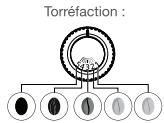
OueHb
dnttebna
Дмtenьнан
Tny6okaj
CpeHnra
NoCDBETka
(CBetna)
PERYUNPOBKA CTENEHN IOMOJA
NopbHnneIpe neepknOaTbp eeypNOBcK, paoNIOeONHHB K KOENTHepe IJRA 3eH, B COOTBCTBm C TINOM 3eH n Tpe6yEmoKKPENoCTbO apomTA. 37 TepyIPOBcKBy Heo6xoIMMo BblONHtB BO BpEmaPbOStM KoFemOnKn, denene H3 aeHNEMm. PnIPTOBONK OKeE Me HeMeE 3 pa3, bbl 3AmTePA3nnu BO BKcye.
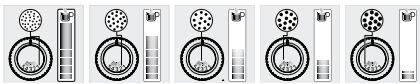
KAK y3HATb, YTO B KOHTENHEPE BOJIbIe HET KOEINHbIX 3EPEH?
KoKaemaunu Intuition oChauha DaTshKOM, Kotbot OnpEneJrE, YTO B KOHTeHepE He KOeHbIX 3eHep. Ha 3Kpahe NOBtIN Coo6BuHe, aYMHN bNDKAtOp (I) ZaorptICn KpAchm.
YTO DELATb, ECNI INPEUYINPEXJENHE NIOBJIETCBA BIPEMI PNIGOTOBJEHNA?
HanoJIHnIte KOHTIEHPK OeHbHM MM ZepHAMM, HAKMMTE 一 K O _ 一 , n pIHOrTOBJIHeH O3O6HOBNTC. He NOTepRETC HN OJHORO ZepHHkAI.
YTO DEJATb, ECNI XOUY 3AMEHHTb KOFEINHbIE 3EPHA, INN Y MEHRAKOHUNICK OΦE?
Ecnbl bHakmete OK , He noobabla KoepiHne 3epna, KoemaiHa nonpuaTcpeaayntb npouccs c HOBAs npdynpdtn B. Pnri nobtoporn H aKONKu OK KoemaiHa hblonHn prrnoTobHe nHaHTKa, nCnIb3y octabunk koe. Koemolnka nyctar.
EcnpaHIOTHOMKINCHTEBKOJIeHNb3epeHnHaKcPaeHOINBRAETCRpIeDyIpKdAooJIeee COoOJIeHne, 3arOpaERKT KPAChN INMkATOp, BbYNInOHNE CledyOJIeep DEiCBTNI.
Haxmnte KhoNky OKdna3anycka npedBaupntbHoro harpeba.
- OTKNUOHTe npedynpckdene He Het zepHe, TcObIaDatKHe cpaabTbIaN, NOBA KONTHepe eue ectb KoPeHne 3epa.


HACTPOIKN
PPIIROTOBJIeHHe HAnITKOB
HANITK,IOCTYNHbIE JIPLPNIOTOBHEHNC NOMOUBOPA
C nomoubio Intuition Experience moKHOToTOBtBnA p3aOo6Ba3HNe KooJIeNBo HAnHTKnu HAnHTKnU c MOnLOKm, TOpRnHe mN xOIOJbHbE B COOTBCTBcNn B CaIIMMn NOKeJIANrHIaH. HAnHTKnU dOCTynHbH HenOpCEdTBHO H Na HAmEn IypanBeJIbN. OIpHnTbB b HINKHe Yactt Na HeNl ynpabJIeNn (B VBe non3yHk), TaKHe RbJIOTc rPbIKAMn Jn DOctTyNa K HAM. OIncHAnae KaQdoHOra HAnITKa N COOTBCTByOuIe CoBcTeNo pPrIOTOBLeHHIO DoCTynHbN pRn HAKATNI H3aONc (I) Ha 3xApae neocse BfoBaHapNTKa.
1 PYK0BODCTBO NOIb3OBATEJIa

Baxho!IynoJyueHnOJHOHOHNeHbI peKOMeHcyTeC BInOJIHNHTcNeyUOe 06cnyxBaHne
O6CJYKUBAHNE CNTEMbI IODaU MOLOKA
KAK NOLYHTB DOCTYN K HACTPOHAM IPNBOPA
KoФemaunia KRUPs Intuition mIeet MNoXeCTBO NaCTPOeK, IcnoIbYyIte x! 3To no3BONIT uEe 60bnue npocAninipOBaT bIOInpOBAHae.


HACTPOKI
4.Pn6Op He npiroTOBNI Kofoe.
BoBpem npiroTOBnHn6bIa 06hApyKeHa npo6Jema.
Pnp6op aBtOMaTnueckn nepe3arpy3nIcN rTOB K HOBOMy nKkny.
5.BmctoKofoeHbix3epenNCIONb3OBaCMAJNObTBIKOfoe.
C nomoBIO nbIEcoca ydaIHTe moNtBIO KOFe I3 KOHTeHepa IJI RA KOeHbIX 3epeH.
6.Korpa np6op octaHabMaetca, n3 conla noctynaet Boda.
3To HopMaIbHo. 3To npOceC ABOTAMUeCKo nPOMBkN dJa OChTKn cOnla npeDtBpaueHn erO 3acOpHn
IAP M0JOKO
- Conno dny noa monoka n3 np60pa qactuho nn nonhoctbo nepekpbyto.
Ecnn conno 3acopeho,Ha 3kpahe noaBtca npedynpejdaoouee coooene. Ounchte 6nok «One Touch Cappuccino
CM. Nahyao POKOBCTBA w 43aenee 5. P'YHAAI YIbOkAR OHCYKTCA CImTcEMbl IPOAHI MOJOKA — S MHTyTn Hm CM. pykoBCTBO, coxPAHHeHO B nAMRTH pN6ObA, O'UChCTKa cONna I danyo MaOHIOKA.
- Nap He BvIXoNDT.
a. ECNI pRnB nepOB mCNOBtOBAHN uNKNa IIOOaH npA nap H bXbOoDHT oJokhblm Oba3OM, BblONHlte cneDyoUe MeICTBn. 86dntcB b TOM, CTO bXbOHOHoe OTBepTme He 3acOpnoCb. CM. BIIue: «BbXoDHOe OTBepTme JIAPA CTNUHO HiN NIOHOTcBIO 3acePOHe).
BbIOnHnTe CneJeHouuNe JeIeCTBnT OJbKO OINpA3.
Cneiye body u3epeyapra aB vEmeHHO hEBKNEKeKT KAPrTJDK CNTMeA fHJIbTaPIMo B0dI Claris. HanOpHTe p3eepayar MiHepANBHO BODaB CbSOKIM CdoEPEKAHNEM KafBILn (>100M /m) I BVOnIOHNO NocENoBtAnBO HECNkoB KOcIKOB npa (OT 5 do 10 cIKKnOB) BOKTHeHRepeTO dx nop, NOA beD yONuEH NenHPERpBbMn NOTOK npa. BEpHIna KATPrkIDR eP3eepayar.
- Hacka nna noaun npaa yke mnoh3oBaJac pahee.
⑥乙EmeBCTBOM,TOBbXbDIOHOETOBPCTNEHE3aOpINIOBc. CM.BHue: «BbXdoHOeOTbEPTEN DnIAPA cactInHO INI NNOHTbO 3aOpENEO.
Ecnn nocne BybnonHnemn yka3anbHx Bblue DeiBcTbn OHO no-npexHmemy He npabToaET,6oPbntteCb 2 cHTP o6cnyJbAHnA KInIeTNK RUPs.
3.ИЗ рewsETКI NOДОHA ДЯ KANEN BbIXOДT nap.
B 3aBcIMoCTN OT TnA nprirotOBJIeHn I3 peWetKn NODOHa dIy KANEb MOKET BixOHTb nap.
4.Пбд Кршкой КОТиЕнда Дг Кофсьх Зерп NOВЯЯETc nap.
Y6eDITcB, YTO OTBepCTne DnIyNCTraux TabletOK, paCNOJKeHHoe NOd KpbHKO (L), npaBmNbHO 3aKpbITo.
OBCJYKUBAHNE
1.KofoMaunHa He 3anpaunBaet OOHTKy OT HAKUN.
LcNkU OHCTKNT O HAKINI ANRAPSAHBAETCA NOCNE PnIROTBENHNI BOHIOO KONJIHECTBA HAIHTIKOB C MONOKOM NIM IOPHRN BODb. ECH BmBOTOTBE TNOB KO KOF, OCNCTKA OT HAKINI TpeGyETCBN HEACTAO.
2.BnoDIOHeIraKaneb HaxOHTcHemHOro MoIOToro Kofoe.
HeNoBleioe KONKTEBO MOIOTO KOPE MOKET NOCTBA B NOJDOH NAR KANEI. KoNCTpyKUIN KOPEMAAUNIb NOZOBNETY UDAJIITb IINIKHIKO MONOTO KOPFE, UTOB3OA 03NAI bTIPaTBAO OIO TABANABUC YICTOE.
- yMhblnHdkaTOp npoDJIkaet ropetb nocne onyctOweHn KOHTeHepa dI KOFeHOnr yu.
YCTAHOBNTeHaMeTcOKoTeHnEepdJaKOeHnOHruiu.
1.Kofo HanaBaeTcNIMKOM MeJnEHO.
NopereHnIe nepeKIOuHbETe CTENENI NHMOJI BnPABO, YTOBb BbOpBaT BoJee KpyHbI NOMON (B 3aBNCIMoTc NT HCNJb3yEMORI TUNa KOF).
BbINONHInTe OIN HIN HECKOJIbKO UIKIOB pOMbIKM.
3aMeHnTe KapTpIck CnCTeMbI fNJIbTpaun BODJI Claris.
2.KoFe CnIkwOM MArKm INH HeOCTaTOHc HAcBtueHHbI.
Y6eNTcB,TO KOHTeHep dIa KoFeHbIX 3epeh CoepKt KoFe n npabunbHO yCTAHOBnEh.
He nIohJIb3yIte XJHbIYe, KApAmeIMInIOBpAHIIHbI IIN apoAMTIAKPOBAHbIe COPTa KOFe, KOITOpBE IINOIOXPOXODT BHTPb KOFeauMAHI.
YbMnHtIbe 6ObEM yBENIHTBe XePONCTb HNNTCb NCMOIOB dyHNKIN KPNEOCT KOPE. BEPNHITe NEPEKIONATeB CTENENA NOMOA bNEBOI 070E ONTOKONOMA. PInrTOBHTe HNNToK 3aBa 2qkCNc NCMOIOB pYNHKTIOpTNBOEONETB 2uaKEE.
3.KoFe nnEcnpecco HeOCTaTOUHO ropuH.
YEnbHtpe TemeTpayko Befe HnctpoKax KoFemAmHHInb. IpeE nHaONAM pRrTOBHeNnHa nHTNKa HarpTeIe QauKy, ononocyHB ee B ropae Bode.
們 PnprrnoTobHEnEMok KbeBnHnOtnPnpMbEyKCHCTeMb.ФyHKuIO npMbBkNpRn BkLNHOHN pRn6OpA MOKH BKNHOH B H TACPOHAX/ AOTMATnuexckn PAoMBkBA
4.петд кадою поачeyкофи3 conna noctynaet chctara Boda.
PfI 34aYcKe peueTbBnOHNrEe TpReBaAPHTelHbOE CMAuBHnE,3TO MOKET PnIBECTN K BxIOyO He6oBoO KOINMCTBA BOyIb3 ONCaI.
Ecni KaKaJ-Ni6o N3 np6nem, onncanHbX BblHe, He yctpaheHa, 6paTntcB b cHTp o6CnyKBAHn KIneHToB KRUPS.
MCKJIIOUOHEHNE

Hekotophe pnpbOby OchauBneH bataepre, douty K to KOTB B cienx 6eONaCHoT MOKet NOynuHTb TOnbKO CnueAINCT. JIa3mehb bataepre oobatitcBb 6bnkuih sceBVCbN chENTp
Baxho!Pnp60 copoeepKHTeHHbIe MaTePnAbI, KOtOpBe MOrTy 6blb BOCCTaHOBHeHb IINN CNOJIb3OBAHbI NOBTOPOHO.
DabaBte no3a60TMc 6oOkpykaioe cpe!
IpepaTe erB nyHKT c6opa dna nepepa60k.
TAPAHTR
TapaTnHeJeIeCTByETBcIeDyUoXnCnyaax.
HaHnue NoCTOpOHnX qaTnB KoemOnke;
B KOHTeHepIgKoFeEHbIX3epeH HacbInaM MoJToi KoFe;
Kaptpnck Cntembl fnnbtpaun B0db Claris He nCnOJb3yeTcB COOTBeTCTBm C nHCTpykunm KRUPS;
Bcnyae HebblonHeHnOuNCTKn OHTaKmI, OUNTKn mI perynphoro o6cnykBaHn.
JIO6bpea60tbcnp6opomdoJIKNbI BbINONHtBCA B ATOPI3OBAHHom ceHTpe KRUPS.
3Ta aBOMaTnueckar KoΦeMaunHa npEtna3NaueHa TOnbKO nI npriTOBHeHr KoΦ, ropae BODb HnB3bNBAHnMoJoka.
Пожибдгель: GSM - 1076 Rue Saint-Léonard 53100 Mayenne - Фанця.
WahOBHm KIneHTe!
JaKyEMO 3a npu6aHn eCnpco-Maunn 3 KaBOMonkoI KRUPSI!
KOMHNIAR KUPROYEKT,poRPOJIe i BIVPOJIe CBOI eCNPcO-MaMHIN y OPhaII,rapANTyOHN pPITAMAHNI II KPIAHNI HSTADJNTA RAICTB BVIOPOHNUCTA.
LI npOCTa y BMOPNTAHNI MauHnae da 3MOY 6E3 aBIVb YCUBNb FOTBYATB HANOJI, IAE NocTcyNtAObTcBAKIO CTACOAPOTMIHTy KAB'ApenB. BamBnCTaHTb ODoHO DToNYI, IObAcoNdojkyBatmCb KABoO ecPecO, pictpTe Ou LyHro, a TAKoK KanuyHno, nate, nate-Makiato IINHMIM HAONAMM 3 MONOKOM!
TEXHIYHXAPAKTEPNUCTUKM
DToPmMyTeCnIHCTpyKui, Aki 3'ABNIObTa H eKpahi
Bau pniadn npoiow nepeipbky i tetycbaHnae neped biInpabneHnHm 3i BvO6hntBu. HeBaXaOHn H bci IcTpykuiy IuOo peteIbHO OHUeHNH Bm KOtege BcE Zh aHTN ZanMIK KABn Y KabOMOnu T/abo Kpnnl kaba H aPeuitJ ToNk da TcIAKHNA KpanEn. Pli cac pO3nAkyBAHH N Bu TAKOK OneBaOTn Mn Ha MaunH, Anki 3'ayBnTeBcY ueP3 BkOPKCTAHN 3axIHCHO ratepiian. PeKOMEnyEMO peteIbHO npoTePTM MaunHry raniipKoO neped nepiHMM BKOPKTAHMH.
ДякуЕМОЗ розуMinнг.
HikonHe BnKOpNCTOByTe NOwKOJKeHn npna.
PEKIM OUIKYBAHH
3aJbXHO bN iO npocye pOIOYbAHNAI pNOIAB aDTOMATTHIO BIKOHYE NPOIMBAHNN, KOJIIN b NepeBOIDMTE IORO B PEKHM OVIyBHAJI. LgEiKNI TnIBAE MIIe KILKa ECEYH, iPnIHINRECTbA oBAMTHTHO.

IOPAДN T A PEKOMEHДAUJI
Ha KIcHb HANO CYTTEBO NINBAIOBt XaKApTePCTNk BOi. Hakni I xNOp MxOky3 mIMOBATm cMAK KaBH. 06 3eSEPTrn CMAH ANKO, MM PekOMEHyEM BDOKIPONBUT BYM tCNY tNHY BOU, a TAKOK kaptPrDjck CTEMPEN BOJHOrHO fbltpra Claris 6o6 bYTNBOAHy BOU 3 pIBHEM CYXO3 aNTHUk (MIhepanzau) do 800 Mr/n (dNb. etENKETKa H nllu). DIn. POa1in dIFbTP I JXOPCTKtB IO BoU.
Pnuc nprrnoTbanyanr rapaHx noahB peKemnoyEMO bKOHPoRbTOBAYn iDpI piriTH aauKIN (dya oTO MOKH aNTOPMATNI xipnemcRAPaHO BDO),POMIP kXIN bIONoiABe BAKAHN HOpNJ nOpNJ hAnoo.

Camaekhei Kabozi eepha 63e cneiaihoIbnoIyNnakOBKIMOkyTBbTAPITNTCBI apOMAT. PeKOMEnyEMo BHKOPICTOBByATIN npocIO 3eep, iio bIDNOIBaE KIIbKOcTI KABN, IYK BV NpAHyETe CNOKHTN pOPIrGM HAcTyTNX2-3dHb, IBnBipATn nakETeep no 250 r.
KABOBI 39aepMOKYb 67n p13HHM 3a k1tIO; kPIM TOF, CMA K E c6yEKTHBM. ApaKiaH daac HAO BHTOHENY KBTKOHN APOMAT, aPOBCTA, KIA bIPDI3HETCB 61bIbHM BMCTOM KOeIHy, MAe rIPKBYAH I HACMHN PnCMAK. JLB DA THN KAB NACTC 3MIuYb0T, 5IO6 OTpMHI 61bJI 63aIbCOAHBN 6bIKET. NaopaoDZE3BPTAE TcEO CRBO npoDAJBAM CMAKEHO KABI
Mn He pekomehnyemo BUKOPNCTOBYBaTN MaCLHnCTI KAPAMEni3ObaHc 3epHa,60 BOHN MoKyTb NOWKOJNTMaunHy.

IHTYITNBHO 3P03YMJIIM CBITIOBNI IHDNKATOP
Bau iYiTHyBIO 3POzIMNI y BUKOPACTHNI pnpAAD CHUAEHNI INTENKETYANBOHO CIBITONBO TEXONORIO, cEO nonJWeyE doBIOI pO60TIO KOPCTBAHA 3 HMM - iYiTHyBIO 3POzIMNI CIBITONBI IHNATOP (I). Ia TEOxHONO BIKOHYE DBI yFHKII.
- Maunina ATOMATUHIO BINHAAuei I KOTPPOLOE KIIbIKbTb KABOBIX 3epeH, BODi MENEHOI KABI, RkOaBAM Tpe63 ZANOBHTN 6a cNoPOKHNIT KOHTENHEPI ABO kKIO MaUNINA NotpTe6y ObcIpyoBByAHN, 3a0rpeBc YpeBONH iNDnKATOP, kNIM CNOBIAE npo TnpTe6DotpMByBnCBA3IKOB hKaepHI.
- IHTYIMTBHO 3pOZMInH IHdKATOP TAKOXO 3D0BnE ATEBOHNTI IN HdbiUybnHbN HauaHTyBAHN. BMOKETe B6PAnTH KOpI KOKHO rnpOIO. PICNl BvBOp yOHorO 3 npOzIINbIHdKATOP CBTITbcr KObIpOM zBoIro npOzIO, uO6 bIoYbIP43y 3pOZMIno, a BOKOpCTAHN BOyH aNDuBHyKTMaT ToIHTYIMTBHN.
DnBirbcpo3inMIINPOΦIb.

ΦIbTPIXOPCTKICTbBODM
ДЯ YORO NOTPIBHE PEGYNIIOBAHHJX KOPCTKOCTI BOH?
IIOU YNHHY TUTBPOENH HAKINY B MAHIHN I 3a63e3yNTM ONTMAbHY RIKCT bKAN, M N PKOMEHyEMO HAIJAYB8A napAMETO XOPCTKOTI BODN IAMAHUN.
HAHAIATYBATNIKOPCTKICTBBOINIIMAHINH?


HAIATYBAHH


- HanobHItb cKnAHHky BOAn.
3aHpyTeBCTAKAHI3BOOIOCTIKDnApeBepKJKNIOCTAAeTBCAYKOMPNEKT3 MAUNHOK。
3auekaite 1 xBUNHy. KbaDpaTnKa Ha CTiKy 3MiHrtb KOIp.
IIpiaaynte KInbKte 3abapBneHn KbaDpatNkIB. BOHN CBiDyTb npO CTynHb JXKTOKCTo BOKI: BID O D 04 - Y MeHIO Water Hardness (KopctKicTB BODn) HATNCHTB BiINOBiHy UINΦpy BiD 0 Do 4.
- Hatncihb OK
Y BAC 3AKIHUYINICRA CTIKN DIA NEPEBIPK?
IaKbOe am 3BnHn aoc nTioPbIO NOOBtNIO pOpoUcYIO,06oBIOKBO MOIMHTo JooPcTKCTb BODINIOBIOHO do MIcua BOKOPKTANHbA oHIOpaMJI bID Komahn pNOApkdy OAOBa 3 TaNshnoEIO HNKe:
I0POBHTN,AKIO CNOBIUeHHRA3'ABLAEbCnIaC NpIroTByAHHKABN?
3aONbHbKoHTHePRAKOBHX3eH, HATNCHtB OK, i pRTOyBaHHa HAnO 3a peJENTOM npOdoKBCTc. XODHO 3MaHOBOHOrO 3epHa?
IIO POBHTN,RAIIO XOUY 3MIHNTKABY ABO BILBE HEMAE KABN?
JxIOO HATNCHTYN OK, He doabawin B KOENTIEHP KABOBIX 3e9H, Maunia aIINCHITB CNPO6Y nepeaTcKyU 3HOBY 3AIBTBcC nOBIuEHH. JxIOO HATNCHTYN OK 3e pa3, Maunia BVOKPCTAE pI nprirotryBaHH HAnIO BEc 3aIIIOK Kabi. KabOMONKA NOPOXKH.
Kyso cnoBueHHe 3'ABnTbC H a Ekapai iHdkaTOp 3aROpNTbC yepBOHM, KOJI 3epeH y MaunHIOCTaTHo:
- Hatncihb KNONky OK dny nowatky nonepehbooro HarpibaHna.
BIMKHiTcNoBiueHHAeHemc3epEH,06 He OTPmByaTNix,KoN B KOHTHePi dJa KaBOBx 3peH cKaBa.


HANAWTYBAHHY
PINTIOTYBAHNA HANOIB
HANOI, RIKMOXHA PUNOTYBATN 3A DONOMOROIO UBOFO PNCTPOIO.
Intuition Experience do3oBornae nprirotoyBatni pi3hi BnuDn KABOBnx i MONOHNx XonoDnHex Ta rapRyHx HanoiB Ha 6yb-akm CmaK. Do peucertb MoKxnepeNtB6eNocepRedhbo epez3 naneHbKeepyBaHn. Raopci BnKHH qactHNI naneHnl KepyBaHnB (nodaHnA «CnOcTb) TAKOXdoBnOraBtu bnuDkN doctyn Do peuertex. OInic KoxHoro Hanoo i BiJIOBdi NiKaakn zuo pnpriotayBaHnMoKxnepeNtBnuHn, tAtncHyBuHn (i) Na ekpaH niCn BvBOpby Hanoo.
| Hanoi | П्रз买车зни розмір | Можліпі о6'смі | Miціct't каві | X2 | |
| Coffees | RistrettoMiцін'd ecsperezo 3 мени'm розмірпороцьті ТАМін'd замікOM | 25 ml | 20 - 40 ml | ✓ | ✓ |
| EspressoФ�есео 3 мени'm замікOM i мени'mApomataWM, Востит\'и трашірі КрахКарIMeBLHNO ngнію. | 40 ml | 40 - 70 ml | ✓ | ✓ | |
| LungoВелейк's ecsperezo 3 karapamel'dиуоKABOBBO ngнію | 70 ml | 70 - 100 ml | ✓ | ✓ | |
| Café LongПогдійс'm ecsperezo 3 ngніюБушш'tибовуо кал'tур. | 120 ml | 80 - 180 ml | ✓ | ✓ | |
| DoppioПдійсін'd WMCT kordун, щ ale мени'Hасін'tьс'm cмік. Духіng polnylpініріpenpokovskii mas'di | 100 ml | 40 - 140 ml | ✓ | ||
| AmericalnoПогдійс'm ecsperezo 3 дадывимнірін'dун'dо. | 120 ml | 90 - 150 ml | ✓ | ||
| Café fîttreВелейka поці пту'veго ngнію за ngнію Tempeptaydri-- M'kykій l'dун'tькін'danl. | 150 ml | 80 - 170 ml | ✓ | ||
| Carafe''Bvd 3 do 8 чуок кавін дг NGek dny Bcki'd omT | 375 ml | 375 - 1000 ml | ✓ | ||
| Milk Drinks | Espresso MacchiatoФ�есео 3 тонікш'mшрorm monolyн'dун'dун'dун'dун'dун'dун'dун'dун'dун'dун'dун'dун'dун'dун'dун'dун'dун'dун'dун'dун'dун'dун'dун'dун'dун'dун'dун'dун'dун'dун'dун'dун'dун'dу. | M = 60 mlL = 80 mlXL = 100 ml | ✓ | ✓ | |
| CappuccinoЗбалпс\'obache no\'ed\'mchir monOLNY, ngнікТа KABVI | M = 120 mlL = 180 mlXL = 240 ml | ✓ | ✓ | ||
| 3 Cappuccino ItalienMiцін'd kátчунно. TINGA 3 ngнік'mprnncmakom KABVI | M = 120 mlL = 180 mlXL = 240 ml | ✓ | ✓ | ||
| Flat WhiteI late 3 monOuHNoO ngнію | M = 160 mlL = 200 mlXL = 240 ml | ✓ | |||
| Lait MousseBelenka no\rqu'm monOLNY 3 ngнію | M = 120 mlL = 160 mlXL = 200 ml | ✓ | |||
| Caffe LatteMonocha ngніka 3 ngнік'm kabOBIMnpnncmakOM | M = 200 mlL = 280 mlXL = 350 ml | ✓ | ✓ | ||
| Latte MacchiatoEbilne monOLNY: ecsperezo 3 monolyн'dун'dун'dун'dун'dу. ngнію dny rypmabih | M = 190 mlL = 250 mlXL = 340 ml | ✓ | ✓ | ||
| Iced Drinks" | Fragmente''Aiz-Kaba'Ta monOko 3 kremmon'diybnoOngno ngніюngno 3 kabOBIMnpnncmakOM | ~ 380 ml | ✓ | ||
| Nitro coffee''Aiz-Kaba 3 byyblsukh'monOBTPr | ~ 350 ml | ✓ | |||
| Chilled coffee''Погдійс'm qin'tyr-ku KaBOMmngmngmok | ~ 350 ml | ||||
*Tinbkn dna Intuition Experienc + EA877
| Teas | Thé vert Бернaja Boda ideaillnoi Tempepatrydram Зеленогу чao | 200 ml | 20 - 300 ml | ||
| Thé noir Бернaja Boda ideaillnoi Tempepatrydram Чебergу чao | 200 ml | 20 - 300 ml | |||
| Thé infusion Бернaja Boda ideaillnoi Tempepatrydram Трав'ягогу чao | 200 ml | 20 - 300 ml |
YK BIDPERGYIIOBATN BUCOTY COIIA NOJABAHH KABN?
Bmokete onycttna 60 niHnTn conla noabAHna Kabn biNobiDHO do po3mpy yawok Jny 6ykb-ko 3doctynnx hanoib.
AK NOYATN INPNIOTORYBAHHA HANOIO?
Ipeynitb do ypoky B nam'rti mawHHn «rk rotybTu Hanoi?'.


DONOMOTAHABVAJIbHI NOCISHIKI
MOXJIINBI PI3HI HAIJAWTYBAHH 3AJIEXHO BID HANOIO.
- Onda n Di aawk: 06 npiroybatn nodiiny npucu, Bn6epitb hani i hatnciht
MiHcKtcb KABU:063 bIbTHnM YI MHeuMIHNI MIcHcTb KABU 3a PazyHOK JIKbKOCT MEnHOI KABU, BInEepItb Haini I iKaJIbTb KInbKtcb 3epen BiJ 1 nA hAI NkIaKIOB KaO 4 dNan MIIHniKIOB KaO 9XIXW - O6'Em y uawu: 36inbwnTu nn 3MeHunTu KInbKicTB BOnn nI npnrOryBaHHA
OBCLNYROBYBAHHKOHTEHEPY DIA 3EPEH
Kaboi3 nepa Moxytb 3aIiUaTH JxHNI CJIaN H CTINKAX KOHTHEpy DnE zepen, IIO MOKE BnIbATn HA cMak Kabi. IINHkPaTcO OCMay i M3KPbYBaH bRirEHN MPApaIMo BpAMIO BuaIaTn CEH NaHIT CyXIO M'KIOO rAunipKO KOKHO p3ay, KONI Bn ZaONBOHeTe pepeByap.
Baxnbo! He mnte KOtheHep nla 3epeh y BODi, 6o BODa B KOtheHepi nla 3epeh MOKe NOxKOJNTM MaunHy.
KJ I YORO IPOBOUHTI TEXHUIHE OCSUYOBYBAHHN CNUCTEMNI IODAI MOLOKA IIICJIY PNIPOTVBAHHMOJOHYNHX HANOIB?


D0NON
A HABVAJIbHI NOCI6HNIK

Baxnbo. 063aBXnO tPmByaTm MONOuHny nHKy ODAHAKOBoi JKOcTi, paDnMo BnKoHyBaTm HabeEni D3 06CnryBovBaHH
06CJYROBYBAHHCNCTEMNIPODAUIMOLOKA
| Texignhe obcnytoobnna | KoIIη? | Погсенинla | Засб, сio ВИКОПСТБОВЛТСС |
| Погимьань сintemл поадi monoka 30 s - 20 ml | Псίя кοжного пгиротувань наноо 3 молokOM, кои 3'Яlbячы пдідakзка на ekрαι. | Цla рioоцуда рдозьоге рpoimити сintemу поадi monoka. Сintemу поадi молokа можна рpoimitt Бydь-кoly. | |
| Ручne очидан глочидд monoka 30 s | Псίя кοжного пгирotувань наноо 3 молokOM | Рекомендуемо мін'tи пгочьдд молokа в rapачи ВODД 3 мілOM ріськного ВИКОПСТАНHA. | Гарача вODД + MнлД + ryбka |
| Ручne мітTRA trp6kdi Дд monoka 30 s | Псίя кοжного пгирotувань наноо 3 молokOM | Пгочьдд молokа можна мін'tи в посудомини машин Бб криши. Цla рioоцduу рpoimьань мэлгяаг в очидан trp6kdi т срлддд молokа bpruchу rapачо вodдд одрау зпсIJя СОЖНО ВИКОПСТАНHA. | Гарача вODД + мнлД + засбдд чидану trp6kdi |
| Ручne очидан сintemл поадi monoka 5 min | Псίя оtrypIMANH сnobiшень дб кoly завroю. | Lс очидану nepedбдд ec рizchку знимног БОКУ «Калчунно оdnудотнOMK」. Радимо pergynarho чиститу яго дд foroprimань ontimiальоi monokTuho nikNs. Дд. рozdДД 5 koprOKTOgo nocisbNiKA koprictybura — PETEJIbHE OЧИSEHн RA CNTEMI ПОДABAHNH YA MONOKA BPYCHY (5 XB). | ТOLКД forчicTKN (D3) |
IHUIIPOUeDUPNOBCLYTOBVAHHRA
| Текиwo obcnlyotobuvaHЯ | Колп? | Поссени | Засби,Zip ВИКОПСТОБУЛТС: |
| Пробиманna kaBoVoI CTsTmE 45 s - 30 ml | Пслд дов див постюо машун аб b 6dь-як'm iиш чac. | Цla рpoцуда рад змогу рpoimити кавов счtemу машун,Ддя bToGO BVIKOPICSTOBYETCS Пиш rapma вoga. ВORA rapан'tус 3бержени Счрвхьычо мсakу Кавi. | |
| Пробиманna cStctemу podaqui чao 30 s - 20 ml | Пслд пriwoутobuva чao. | Да зз моу рpoimити счtemу rapячо BOДОДЯ Збержени Счрвхьычо мсakу чao чу Трав'янот Нало. | |
| Очшени 13 min - 600 ml | Пслд оtrIMamha снobiiшени abo Коли загдно. | 3 Мірkyвань riri'eши та задя збержени яковstі кав pekomeMuу моу оочати осушbatи счtemу podaqui Кави в Maшни. Легартуген Ненисту мсakу Ваши наhalов. | |
| Вidалени hakiny 20 min - 600 ml | Пслд оtrIMamha снobiiшени abo Коли zahr'dno. Коли не hyado 6arato hanoib 6byno пригOT罗ану по ще нemae netpoebiy Вidalameni hakiny, ця Фунckция e небухвону. | Очшени машини 3abezneechуь iI hopmalbie функiouslyanBuTHа ть Ддайпь bdy-biКi ВДКладени нakуну abo hab'toy. Ддя крok удя Вадлivenь дя ontmalmahhoiRobots ta dobrgoivichosti prinladiy. | 1 naketдя усченину hakimi KRUPS N° 2 |

Baxnbo! Raio Bao npiaad ochaen Hauim Kaptndjem Claris — Aqua filter System F088, BuTnHtB nope
NoaTkOM npoueDpyn OunueneHH BID HAKINy.
IHUIYHKU
IOCTyI DO HAJIaHTYBAHb IPINJADy
Baua IHTyIBHO 3OzmyIma MauHn KRUs MAe 6arato HanaityBaHb, cnpo6yIe! Ie DOBONHT zo6hIN BNOKOPCTAHN eIe 6bnI 3pUHNDMBAE.


HANJUHTYBAHH
| Мoba | Вибip одnié i 321 mobи. |
| Дата та чac | ПOTri6No BCTaHOBHTI DAty, oOc6bIb8OЯкso ВИБNKOPiCtOByeTe kaptrDjx npotn HAcHpy. HalaustYBaHnHЯчсTa виБip 12-RodinHOrO ab62-24-RodinHOrO foMpATy BiO6pAkeHnЯчу. |
| ЯКрвSiCtB dncпл徳 | HalaustYBaHnHЯСКРвОстi dncПл徳. |
| СвiTПи | АкТИБaцiЧУдзЕЗАТИБaцiIHyIbNO зрOZmIIno BOcIbIbOBOrI INdikatopa. |
| ВиБIP nepшоRо ekранa | Виберіть вигляд nepшоRо ekранa. |
| АВOMTuHnca 3у pinnkka | ВибIP рnomiKknyчасy,псliaяКоGOпнlaD АВOMTuHnO попнINHITb po6Oу. L儿Фунckiydo3OB0LnE cTOnKbBATM HeMuSe eNkToPoeHepri. |
| АВOMTuHnca nii dcbtka | ВуIMKHeHNeMaMHUHЯВOMTuHnO zanLycNonpeRedbOro nOIIgirpiBAnHЯрладу WbOparHnчac.ЗИКи NiTIK NAOJU B ODNIчac? L儿Фунckiycame dIaBcI HalaustYBaBauShI abTOzAmpcK, ВиAzOuJaNTeчac, дakxeNotri6HIO tlbky ZanIcyTnI prInOryTuBAHnHa hanoIO. |
| ОдиMuIci 06' empir | МоЖнa виБрathOдОнNiHICIи ВIMiPobHANH: miniIniterч YuHyCI. |
| АВOMTuHnce propo MmBaHnH | Ви Можete ВIMiKHTnI ab6O BMmKHTnI aBOMTuHnE noPOMBaHnN OTBpOIBi NODaIч KABn Iпсaz3aŋCZYKc KaBOMaSHInn. |
| ЖорstKlcTb Bodi | HalaustYBaHnHЯжrcTkOci T BoDi BdiAna3OHi BID 0do 4.ДetalbHiu7IhФжрмaizuO моЖнa 3aHInIbВPo3dJII «ВIMiPobHANHЯжrcTkOci T BoDi. |
| Temnepatypa kabW | УctahOBHTI TemnPepatypa kabW mix T1 i T3. |
| Temnepatypa chao | UCTahOBHTI TemnPepatypa chao mix T1 i T3. |
| Тин kabW | Укakiz'tb Тин kabW,Яka zacinanaВ кonteINHepдя Зерн. |

BIDNOBIIDI HA BASSI 3AINTAHH
EKCNIYATAU
1.ypo60ti MaunHn CTABc36i, nporpaHne 3a6e3neueHHraBNClo ABO MaunHa e HecnpabHOIO.
BIMKhtbMaMHN, BMTBHHTRnBHKNY 3PO3EKTN, BIMKHTpKTaHKnDfPbIaT, 3eKNeAOTdOyHxBNHInY nepe3aYCTtBuMHN. DnAnyCKTu MauHHN HATCHNTbIy I yTPMYrEhKONKY IYFCK/CTOIN pntoTARp onnHaHm3 c 3eKHyD.
2.Пилад He BMnKaTebCnICHnHaHTnCKaHHHa KONky PnyCK/CTOI (npotrorm npnHaMHHi 3 cekyHd).
們 豫BpTe 30a6HnKTHaT E aEeKTPnHy pO3TeKy.IpeKoHaHTecN, cQBa KaKTAn tIeTcENbHO BVINK HANekxHM YHOM BCTAHEnB pO3TeKy.
3.Пдчсвкогангpo6o70уонmaunHcTANOCEBIDKIOUeHHeNEKTPoeHeprii.
KoI JnBHeHn 6yde BiHOBHeO, npiCTpi 6yde ABToMaTHuHO nepe3aNyUeHO.
4.KabOMONka npaioe npooxhboIO.
Ue HOMAPNHE BNIUE, KIIOO CE TCTBcHNe DYKHe cTAAO, a BOHTHEMEI OBCIM HeMAc a6o MAno KAOBOXbHexePBO. BOH MaKe npaOBOATn DO 10ceynH 63 eepn, zoae pOa30mYI bWbIKCbK BVOKOPHTAHNEeH eepn I nepebpilr npabINbHy po60f
MaunHn.
Y KOHTHeHepi 3aIIuINmNc3 eHpA KaBn:
- 3epha KABH MOKYb HTN HADTO MAJIHCNIHTM, IOMY PnINAP INE IH xe 3AXNOIc. Cnp6ybe npnoTobXHTHN 3epha BCEpeHHNJNIOBNTNN, NIE CBZ 3pApoNAc. PnpoDAPO m3MHNTKABY (DMB, FPHQIOYN TIN13EPEN)
- Lé Baiba 378MHNA KABA, JAKA DOCI HE CNPIMHINAMA JOKDHHX PNO6NEM: 3EBEPHIcB do cIyKbN IIITPMMN KIIIEHTB KOMNAHII KRUPS.
BUKOPNUCTAHH
1.KabOMOJkaBndaeHe3BUNHmIyM.
YKABOMOJI,IMBOHIO,ETCPORHI pndmetn. Cnpboyte OHCTNTHI 3a 2doPOMTOO yINMOOCa 6bEeRHTbrcdAo cny6kB nipTMRNI KInIEITK ROMAHJI KRUPS.
2.Пд npnilaDOM 36npaetbCBAOda
PereH NIK HINHTNI PIIIOOH DIA KpanenJI, 3aekaiTe 15 cekynd nCJIe TcKAnHn KaBn, 0o6 MaunHn MOrna HAnEKHIMN YHOM 3aEBpUHNuIKI.
Iepekoahoe3c, 10nIOdON Ia kpanbEn y Maunin npabAIBNO BCTABENH. BIn 3abXJn MaE cytna HaneKHomy mCiU, HabTb KOni Mauhna HE NKOpCtOBYBcTcR.
PpebeipTe, Hn He 3anOBHeHn niDOn dI Kpanenb.
3.KhONky peryIIOBAHHaPi6HOCTi NOMEny BaxKo nobepTaTM.
NobepTaIe KhoNkpyerNIOBAAHnDpi6HOCTi nomEny nIe nIac po6OTKABOMONK.
4.Ппmaн He BndaKaBn
Пд Зас пиготувань 6ул NOBRAJIENO RAkybnpo6IeM.
Pnnilad ABtOMaTHNo nepe3anyKaTbc i 6yde roTOBNI DO HOBOrO zKJy.
5.Bu BnBukopucTaN MeJeHy KaBy 3aMictb KaBOx 3epeH.
Budanitb meEnHy Kaby 3 KOHTeHepa dIy KABOBx 3epeH 3a DOnOMrOIO NINOCoca.
6.ПсЯЗУПИНКМАИИNи3 CONEN NOДABAHAн KABN BNTIkaE BOda.
UOMHnBNO. BID6yBaTeCB ABOTMATNHe NPOMBAHH 3 MEOK OUYeHN H CONEN NODABHNN KAB T3aONOIGAHN XHMOYCA3MNHEHO
IAPA TA MOJOKO
1.Пдбавань MONOKA 3 Машинч actKOBO YN NOBHICTU 3a6JNOKOBaHO.
y pazi 3acmueHH conna Ha ekpaH i 3'ABnTBc BIDNOBIDhe CNOBIeHH. OunctTb 6JLOK «KanyuH ODHIM DOTIKOM
Ib. hctprky 1noukny puyuohncky 3a nptbXbnihn PETEJIbHE OHUcHNEH CNTEMEN NPOBADAHNR MOJOKA BPYHUY -5 XZ ab63epeKhenyn y amr'ATM MauHHN opOYOHIN cnonna gonabAHNR MONoka).
2.Погадааннnapи He BiD6yBaTebca.
a.ПдчасершоцклуnodayapnЯкpo napa nodaetbch Hnpabunbho:
IpekoHaiTeC, 10 npoabe cnoH He 3a6IOKOBaHe. DnB. BInSe: «Papoe CoNlO MaunHn UactKOBO U NOBHCTIO 3a6NOKOBaHe»
BnKoHaIte OINcAHy NHXype npOeDpy NIIwe oDN pa3.
CnpoaHb0 Hp3epBpyar pIra BDOI Ta TMMACOBO BIMHIKT KAPRTDJK CNTEMH BOHNOI OIOI Claris. 3anaOHbTpe3epByap mHeipAHO bOdo 3o BCOKMIM BCTMOCANIIO (noHAD 100 MR/n) i BHOKAITE KINBA (BID 5 do 10) noCIIOBNHX kCNKIB i napBO BPEyarpj, DOKI HE OTPMIAE 6e39epBHN cymIPN AB. CTBeTKe PrtkDIN KaadH ypeBAPAR.
b. NapoBe cOnnIO BKe BnKOpncTOByBaNoCA
OpekeohAteC, 10 napoe CONno He 3ab6nKOBaHE. INB. BIne: PAnoE conNo MaunHn NactKOBO H NOnbHCTIO 3ab6nKOBaHE.
KIO nicnBnKoHaHH Bnue3a3NaueHnx Kpokib nape BCE he nodaTbca, 3BepHiTbcAo cepBichoro uehtpy KRUPS.
- Napa Buxoindt b 3 pewiTkn nioHOy dna Kpanenb.
Pnuc npuroTbAHnEaKnx BnDIB HanoB napa Moke BxOoHn3 peWitkn NiDoHy dI Kpanenb.
- Napa 3'ABNIEbCn iKpNkoIO notKa dJa KABOBx 3epeH.
IpekeohaTecra, 0o fikcatop Ta6netkn dna uueneHn, 0o po3taWOBAHn nid KpUHKO (L), 3akpTNn HaleKHM NINHOm.
OBCLNYTOBYBAHH
1.MaunHa He Bmarae BndaenHnHa Kaunny.
PioeDpya BuaENAHNAH NAnKHTpNnCnI pRnTPOBAAHBN EINKOHN KIOKCTHOANbI 3MNOKOM ABO TAPHQHO BOQDO. RkBO HOTRYTE NnE KABY, MAUNHA NE BHMATRAME DIB BCAC BuaENAHNAH HKNKTAY TACHO.
2. y niDOnH DnKpanEnb notpanHa MeNeHa KaBa.
Y niDoh nIeKpAnE MOO nOHTnIN HEBNE KIKIbKTbe MEOH NcBAK. KOHTcPKUzMauHHN 3a63eNHYE BIDANHEA 3a80I MEHOHN KABI 4a363eHUYA HANEXHO YCHTCHOTN 3aOHfHbTAJI.
3. INTYITNBHIN IHINKATop 3aIINaTcBcBAIMKHeHm HabItnicnOPOXKeHHN JOTKa IJMaMeJeHOI KaBI.
YCTAHOBITb NOTOK DnA MEHeHOI KABH Ha MiCue.
4.ПсгЯнанOBHннpe3epByapyдя Bodi iHTyITBnH iHdkaTOp npOdBxye CBITnca.
IpebeipTe, n npabInbHo BCTaHOBJeHn pe3epByap dna BOH.
Pnonabui BnH3y pe3epByapa maHb 6e3nepeuKoHO pyxatnc. IpepeBipre nonnaBci i 3a noTpe6n po36kOkyte ix.
- Ha nepwomy etani ycneHHa HAKnny i3 cone He BntiKaBoda.
LcHOpMaIbHO,BOaBNTiKaTIme i3 CONeTIbKn Bpa3i CnIbHoro 3acMieHHA.
HANOI
1.Kaba nopaetbca hanto nobinbHO.
Iobephitb KhoNkPy dpi6Hocti nomeny npabopyu, 063pO6nTn Ioro rpy6iunm (ue 3aJeKntb BID Tny KabOBHX epeH).
BnKoHaIe OIN HN KINbKa ZIKNIB INPOMMBAHHA.
3amHItb KapTpndx CnCTeMn BOaHOrO fInbTa Claris.
2.KaBa e HnTo Cna6KOIO aO HeIOCTaTHbO MiHcHO.
IpekoHaTeCA, 0B KOHTeHepi dA 3epeH cKaBa Ta 0e3epHa HAnEHNM YINHom NpocyBaOTbCBAHn3.
HamaraiTEcH He BnKOpNCTOByBAtu MacJIHNCTi, KapaMeJI3ObaHi a6o apOMaTI3ObaHi 3epHa, Rki npIuaH De MoKe 3axONITM.
3MENHUTs 06EM HANO TO 36INHUTIg ITO MUICTb 3a DONOMOIO OYHKUII peryNIOABHRA MIHOCTc. IIOBEPHTb peryNtOp dIOHCTO mny,IO6 3pO6NTM MEneH Kaby dpioHIOWOk. fOTyHe HaniI y Da BzKlN, BIKOPNCOBYOnu OHkyKluio prrOryBaHHA 2 qauok.
3.KaBa Yn KaBa ecnpco E HeoctaTHbO rapauo.
36inbuitbtemnepaTykabB HanaWtBuHnnx npnady. HarpiTe aawky B rapuiy Boi, nepu Hix rotybaTn KabY.
©PeeH NIK NOVNIATN PIPOTYBAHNA KABH, NOPIMNEA KABOB CYCTEM. ΦYNIiKIO pONMBAAH NBOBAO CI CTETEM NID cA YBIMKHEN NIPCTPOO MOKH AKTBYBAA B HAIAYLTBAHNNB (ABOTMATNH PONMBAAH).
INFORMATIIMPORANTE DESPRE PRODUS
Citi ci: t aiei i s patali te: l: e: r o r r r r r r r r r r r r r r r r r r r r r r r r r r r r r r r r r r r r r r r r r r r r r r r r r r .
ACCESORII FURNIZATE IMPREUNA CU APARATUL
INDICATOR LUMINOS INTUITV
CUM STIU CAND NU MAI SUNT BOABE IN RECIPIENT?
Espritur Intuition est这点 botu un senor care indica lipa boabelo de cafe in recipient. Un mesaj se va afsa pe ecran si Inducitorul luminos intuitiv (I) va lumina in rosu
CE SE INTÁMPŁA DACÁ ALERTA APARTE IN TIMPUL PREPARÁRII?
Raman boabe de cafe in recipient:
BAXHA INHΦOPMAÇU 3A IPOODYKTA
PnoIeTHe BnHmATEHNO pBkoBDCTBOTo 3a Notpe6BtEn I KNIKkATA,InhCTpyKUns 3a 6ezonachocT",npDeIa dIinlON3BaTE ypeDa 3a TpBn IVnI 3aZaneTe: HINON3BAHETO Ha ypeDa B HeCb0TBETBNe C INHcTpyKUnITE cOB6OJkDaba KRUPS OTBCAKKAOTTOBOPHOCT.
AKCECOAPU,DOCTABEHNCBAWATA MAUNHA
PbOpeBerte hKcEsOpAriTe, dOCTaBeHn c Bauata MauHIna. Ako DaHaEcauch TnNcBa, ce CBypKeTe DnpeKTHO c OToIema 3a 6cbNyKBAHe H KaJIenentn hKA RUPs.
TbPBNCTbIKNIPNAPABOTA CMAUNHATA
IocTaBteMaunHata Bbpxy Cta6nHa, xopn3oHTaHa, uCt Ta cyxpa60THa NOBbpxHOCT.
Korato n3non3BaTe mauHHata 3a npbB nbT, ue 6bdeTe nokaehn da n36epe Ta3nHn HacToKn.
HambhabeHTO Ma Hauinamur NOBIOJIBA da ce 3aBtbnHcN CnCTemATA bDA, taKa Tce Ma Hauinamur DA moKe Ta pAOBTH. Ie ce 3bIpypnpdABPertHe NOZARBaHE aN BATOIMYH INNkAANBA.
3a noBueHnOopMaunHa npabTe cnpabKa c pbKOBoCTBOTo 3a 6b3 CTAPT (1-Ba YNOTPE6A)
CneBaIte HnCTpyKuNTe, KOITo Ce nOraBbAT Ha ekpaHa
Bauharit yede npobereh n Hmntnah, npedni da hanyche npo380cdtcbhen o6eK. Bvnpek ranoTO bHmAHInae, oteneHNO haonocHTbAHO, 3ce nak e b3MOnOaD a OTKpHcTe OTaQbE K aFbEmenaKaTHa uNINANKAn KaNk NaKe fo nepuetkata HA tabata 3 atouekdane. Pnir paoanokabe Moeke da 3a6eJeMeTne HnauHMeTne H naPx BbPxy MaunHAta, dblNaCa ce Ha zattnHMaTeepnai. InpopbUbame Bn da nouchite TcnapateHNO Baauata MaMHaHaPi nepnI pbPbaTAYnOTpe6a C kbpna. BnAoRaOpBIMn Bn 3a pa36bApHeAo.
Hnkora He n3non3BaIte noBpeDen ypeI.
PEKIM HA TOTOBHOCT HA MAUNHATA
B 3AUBNIOHOT OF IIOIOTOBKATA MAHINHAI IAIIBPUBA ABMATMOHNO H3N1NAKBAHE, DOKATO E B PEKHM HA TOBOTBOCT. LKMcIbT TPAO CAMKOJIKO CSEUYNI CNIPRA ABMATMOHNO.

CbBETN
KAeHTBOTo H BAqota 0Aka3Ba 3aHHTnHO Bb3deIeMbte BbPxy KCAeCTBOTo HA apoAMtite. KOTAEHNIT KAMKx I XnoBp JOMOKe DA pNOEMHT BkCa H KaKaTe. 3a Da 3aNa3aTe APOMATte HA BaTaTe KOHe, npOpbnHAtE dHa 3nON3BaTpe PRCNA BO, kAKTO cΦHnTBPA kChACA 3a CScTEMATA Claris AQUa INH BYTNIMAPA BO aCsb CbBpXKANHE h CA xyO BEueCTBO nOg 800 mg/l (BHXTE ETHKAs t b6YnTKa). BIXe Tnaletaa, DfNlPTb T B YPbDIOCT HAOBADOTA).
Korato nprrbTBE rroe pnnnHNTN, npenpOyBMAE n3aONBtpe BnepBaprtnHO aRgptn CHaH (kato IN 3nAkkHETe cRoepa BOHa), Chyo tao pameh e NOxdoHHz 3aKeHAnOT oBacNOHCTEO.

HANITKIN, INPEJNAFAHNO OT TA3N MAUNHA:
Intuition Experiencé Bn nooBbIa da nprrtoBte rnoMa paaHooBBeAOTe o peTnC t Kae n MmKTo, nMnnu nnCTyDnE, 3a da yOIOBtBPOBBr BCNKTBE CKeHNAA. MoKTe Da neNoO bIePekTe DocTbT dopeTne T BAIIINK OHTponet naHen. KOITBE, hAMPaBauCe b DOJNATA vacT ha BAIIIN KOHPTOnepan nen (b IaNRnE Ha Slider (TbIb3zH), npdecTBaNIRBAT cbTOk TaKa n PpRbTa 3a doctbn To xr. ToOniCAHNTe HbBCAHaNITc N cBb3aHInTc H e CNbETBn3 a nprrTOBHeMoKTe da NoynjTOBHe DCsTbn, Kato kDOKochete (i) E ka HApCn, CneD KaOTnHNTkata e iE6hpa.
B 3ABNCIMMOCT OT HANITKATA CA Bb3MOXHN PA3JIuH N HACTPOIKN:
- Eнда вды чаш: 3а дсторате дбона рецени, n3берете habитka и hatichete
CnHa Ka kato: 3a da ybnuHIneYn Hn HnAMAHIN CnIaH N KaKato, KTO pONMHEIAO KOJIYNCTBOTO MAnHIOKa Kafe, I3e6pebnt HnHTKATA nI3e6peMeJcky 1 a 4 bPnHa, Kato 1 e3a hau-NcAoT, 4 - hau-NcHToHOKe Koo000 - 06emвЧашета:зувелчаве Или hamаляваху KOЛичесТВОВд,ИЗПOL3BaHA зИЗВИЧА.
32 nahe Ivne Hopmaua napanabe Ta npaaka C napanitk B nictobka n PkKOBOCTBOTO 3A BbP3 CTAPT, HACTPOIKI HA HAFNTIK
KAK DA CNPETE HANITKA, DOKATO I PUNIOTBATE
Moxete da cipete npirotoBHeTo Ha Bauata HAnrTa No BCaKo BpeMe, kato HAtnCHete 6yToHa

Intuition Experience + npednara HOB ECKN3BHN CTyEn HAnTKN, KaTo 0pane, OxnaedeHO KaFe IIN HHTPO KaFe.
PrrnroTBAHETO HATcyDHeA HANITKA N3ICKBA EJNO HJN NOBNEpe NPDBARPTENH DEYCTBNO ATBaTHA cTPAHA. 3a da noNPyHTU OTMIMAHEN PESyNTAT B HAATA; IYNsONB3AITE CAHsa C O6ME 400 - 450 mI K yNBbETA neg Cc STADAPTREN pazEMP (4x2.5x2.2 cm). BAATA MaAunHa SiBe Bu NoPMORA n BnpHE A npriTOBAAHETO. IpnepOBuBE MBe A cIeDaeBne NOgDTBtBNHITE ETAMn H peueENTH CTbKaNo CTbKa Haa BaAHIN kEPAH. MoCte Da NoPNUTIE DOctBn DcBETN mTrPKOBe BB bPb3k cNoIOTOBKATA B in PA3DAE C INFOPMUAQ, KATO KOQCHOTE h EA KEPCA h
YAHN3ANAPKNI
3a Baunite ueohoe 3 anaparki imate TPHI eueHNTKIO WpEnpalat nH-nOdoJIqATA temeNpatypa 3a BcEKU BVd Ch. Temepatpyra 3a Zhenen yae 6Bde no-HNCaT oT3a 3epeh Yn 3 aanaparki
KAKDAPEYINPATETEMIEPATYPATAHABOIDATA


IMPOSTAZIONI
Mokete da 3aadaetete Ternepatypata MeKdy T1 n T3, kato T1 e hai-NHKATA, a T3 e hai-BVCOKATA Ternepatrypa. AKO HAMALITE/YBENWNTTE Ternepatypata, che HAMALITE/YBENWNTTE Ternepatypata 3a BCEKN BMD qau, HO Ternepatypata 3a ZelenH YBNAHIUE 6bJe NO-HNKCA O'Ta3i 3a cephen quah annapak..

PROFILES (NPOΦιΝΙ)
3A KAKBO CE N3N0JI3BA ΦYHKUJRA PROFILES (ΠΟΦιЛΙΝ)?
FHyKunHrA Profiles (Iprodn) BmOCHyRpaB OoCTbN DnopecoHAnMriPO AKBTOMeKOTBe Da cbXpArBaBte A 3ana3abatepneDIOUHTAHNTKn. Do hero Moje da ne CyoynOctbMoHro NMOHOeNocho GNaTOraepdHeu Hau pTeKbEh6y KaONTOHnHaan Hau MaahnHata. No-Bo3pn u IeAeHNHa 3e EeJedHEbNA yOtPrpe6a, HauNTKttte, 3ana3eBn BbB BuaaH pnpOJIi, c ce TnAPtup DcEKNTHC o eNDOkocBaHe, 6e3 da ce IeNCKBAT NHKAKBn HAcTPOKIn. MokTe Ta 3aanHwte 07 pecentn Ha npOJIi.
PpOΦnIbT cBIO Taka no3BOJBA no-roJMA nepcoHAn3aJna Ha BaJn INTepeEnc n pa3nUHnHe HAcTpOKn:
KORA TPRABBA DA CE U3NPA3BAM TABATA 3A OTUEXDAHE?
Korato nonnabbcnte ca b ropno noioxkeHne, Koeto yka3Ba, ye npekaneno nblHa.
IODPbXKA HATABATA 3A OTUEXDAHE
- Tabata 3a ouetzckdane Daba b3MOKHOCT 3a C6bipae H a BOATA mnn KaFETO, KOETIOHTMua OYpeDA NO BPEMa H a cIeN pIOTRBOHHe h AHNITKA.
Baxho e bHarn da a octaTe Ha mactoto n da n3npa3BaTe peoOBHO.
OT XIgMIENHH Cbo6AEKINH INepoBNBbAme D Da MOENTHPATe BA3 TaOcXeDAHe, 3a da NOCTBATE BCEKN EEMENT BCEKn IEN dHa o OCTABTe DA3cXbHe Na B3dxy, npEiDa a NoctabTe ObaTHo M BaMHsinu.
Hapanabe cnpa kcbpokobcTb0to 3a 6bp3 crapt -TOICHTBAE HA TABATA 3A OTLEKDAHE, fhr.1-2-3-4-5-6-7. Mokete da noctabte Tabata 3a OTLEKAH B cDmoumnaHATA MAUNHA 6e3 metanHata peueeta.
KORA DA U3NPA3HNTE KOHTENHEPA 3A MJRAHO KAΦE
KoHTeHepb3aMnHO KaFe CbDpbKa N3BneHcTO MnHO KaFe
- Ⅲπpa3HETe KOHTeHepa 3a MnHaO KaΦe, KOraTo MaunHata Bn noKaHN.
- MoKote da ro INp3a3ate NO-echo, HO KORATO MAshinHATA CBETI, TOBA O3hauaba, YE MOKE da ce 3aniue, YE KOhteHepbT HAnTHiHa e INp3a3neH.
OTXMHNHbcbpJHnBBAme Da nOCHCTBATE KOHTHEPA 3a MAnHO KaFE c ROpEa canyHeA BOga BCEKINa da ro octabte da n3cXhne Ha b3dvy, npde da ro nocTabe 6oPbTHo MauHHATA. Hanpabe cnpBaK a cpbKOBOCTBTO 3a 6bp3 cstap - PIOHCCTBAHE HA TABATA 3A MIIRHO KADE,fmr.1-2-3-4-5.
He noctabraye B cbdomnnaHaMaSHA.
IODAPbJXKA HA PE3EPBOAPA 3A BODA
3a da 3anae apomatne ha BaWteo kape I ne xHnHnHa c6bpaekhenu, Bn npenopBvame da iHnO3Bate npra Cha Boga, da noocHTBepeepoaba 3a BcEKN den C ropeua Boga n Tb6a n da ro octabare da HcBxHe Na b3yN, npedn da ro noctabene o6pTHo Ha maHInHata.
IODPbXKA HA KOHTEHEPA 3A 3bPHA
KaheeneHTBa 3pHaor MOrat DA octABT MaHNI OCTaBmI NO CTHeTIe HA KOHTHEPeA 3z bPbNA, KOITO MRo TAr NobnIHT Ra KaueCTBOr H BauTeo KaFe.3a Da 3aAn3ntHe NaeD6pn APOMAT HA KaFeO IOT XINMIENH CbOpaKeHNBA, BN pIepOpBcBAme DA ro 3hCpBaCeB cS cyA MeK A KpRa CECE NtB, KORATO TPh8A da CE haBnHIO OHTOB.

Bavho: He m3noIbAte BOda 3a noCHTBaHe NaKoTHeHepa 3a 3bPna, HAnuHneto Ha BOda B KOHTeHepa 3a 3bPna MoKe O na nopEdu BaUata MauHina.
3AIOI KAK DA IIOIDbPXATE CNTEMATA 3A MJIKO CNEI PPNIOTBRAH HA HANITKIC MJIKO


HOMO
HCHTJPKUN

Baxho:3a da nonyabate BnHaH enHaKBO KaueCTBO Ha nHaT, Bn cBeTBame da N3BbPwBaTe CneHaT noDpBxxka:
IODIPbXKA HA CNTTEMATA 3A MJIARKO
| Повдравka | Кora? | Оblastноа | Heобхони akcesоари: |
| Изллаквае на сбтtemата 3a мларко 30s - 20 ml | След BCЯк нанитка с мларko, при поддама от машината. | Посьолява Бда Иллакнete Веригата за мларко на машината. Можete д-stасторate Иллаквае на сбтtemата за мларко по BCЯк в蜱е. | |
| Рыно ноч�развае на сьда 3a мларко 30s | След BCЯк млесна нанитka | Преторьразва Бда поочьразte сьда за мларко с rapeшиа boDA и сьс canyн след BCЯк улотраб. | Торец boDA + canyн + рьб. |
| Рыно Изллаквае на trьбда 3a мларко 30s | След BCЯк млесна нанитka | Можete д постая канata за мларко в сьда машина Ббkanaka и Това Иллаква сьда сьюг OTВимателно рьчно почьразва на trьбда за мларко иmetалата и дюза с rapeшиа boDA слд BCЯк ИЗПОЛТBAHE. | Торец boDA + canyн + Истурумент за почьразва на trьб. |
| Рыно ночьразвае на мларто 5 min | Korotу машината Ви поддами и по BCЯк в蜱е. | Тoba поочьразва сьда сьюг OTВимателно и почьразв сд ДED dokocsbaine". 3a ontимално образувае на мларно пяnaе e порорьтуленидд я поочьразе рedingobno. НанраBERЕ справка с рь巴拉 5от рьковodztbroто за 6ьрз старт..Рыно OCHOBHIO ПОЧUCTBAHE HA CNTSTEMATA 3A мларko - 5 MINH". | ИгILA за почьразва (D3) |
Dpyu3AADAUY3A NOIDPbXKA
- ITOKbT OT MIAKO OT MAINHATA N3rIeXkDa e qAChuHO HnHnBnHO 6NOKpHa.
AkoIIO3aTe a 3anyuHema,Ha eKpaHa une Ce noBnI ppeynpeDInTeHNO cbo6ueHHe. POnHCTeTe bOka,KanyuHNo c EHOIOKoCBAE?
HANpabebe cnpBA k hauato H pKBOOCTBTO B 5.PbHO OCHOBPOIOCTHEBA HA CICTEMATA 3A M1RKO-5 MHN IHHI INTHCYPKUaIPOTCHAEBA H na03ta aMnKO, zan3haea bBaB Bauataa MauHIN.
2.He n3n3a npap.
a. Korato n3non3BaTe uKbI c npa 3a nbpBn nbT, aKO npaTa He n3n3a npabuHNo:
Pnpoepe t aai 130xobt 3a npa He n e 3anyuwen. Bnxtke no-rope;N3xOobt 3a npa H mauiinata nnaeIekja e qactHNO nn Harnbno 3anyueta."
U3BbPwTe CneDnna npOuec cmo BeHbK
U3npa3hepeepoaba 30 bOa nBpemnHO tOCPaHene dHPTPbNA KACETA 3c HcTeMaTAt Claris Aqua. HanblHepe ppoaba C mHnepaHa BODC aBcOKOC sbDpJHAne HA KaIiun ( >100mg / l ) and yHcHTeNoceNoBaoTEnuN kInuN c npaa (ot 5 do 10 kInbua) BnKAcBb csBd,doKATO NoCTHnne NOCTOHNA CTpyr o npaa. BbHerce Kacetata bpeepoaba.