
HADD9SS6B - HADD9SS6B - Fridge HAIER - Free user manual and instructions
Find the device manual for free HADD9SS6B - HADD9SS6B HAIER in PDF.



| Product type | Built-in extractor hood |
| Brand | HAIER |
| Model | HADD9SS6B |
| Main functions | 3 speeds, timer, LED lighting, slide control |
| Lighting | LED, 1 x 4 W, DC 12 V, 350 mm |
| Control type | Touch panel with slide |
| Number of speeds | 4 (low, medium, high, very high) |
| Timer | From 5 to 40 minutes in 5-minute increments |
| Grease filter type | Washable aluminum filter |
| Charcoal filter type | Activated charcoal filter (replaceable) |
| Minimum distance from cooking hob | 65 cm (electric), 75 cm (gas/charcoal) |
| Exhaust duct diameter | 150 mm |
| Exhaust mode | Extraction to outside (recyclable with charcoal filter) |
| Maintenance and cleaning | Clean grease filters every month; replace charcoal filter based on usage; clean surfaces with a soft cloth and neutral detergent |
| Spare parts and repairability | LED bulb replaceable by a professional; filters available from the manufacturer; standard screws |
| Safety | Automatic shut-off in case of overheating; disconnect before maintenance; do not use steam cleaner |
| Electrical supply | 230 V ~ 50 Hz (check rating plate) |
| General information | Domestic use; installation by a qualified electrician; do not flambé under the hood |
Frequently Asked Questions - HADD9SS6B - HADD9SS6B HAIER
User questions about HADD9SS6B - HADD9SS6B HAIER
0 question about this device. Answer the ones you know or ask your own.
Ask a new question about this device
Download the instructions for your Fridge in PDF format for free! Find your manual HADD9SS6B - HADD9SS6B - HAIER and take your electronic device back in hand. On this page are published all the documents necessary for the use of your device. HADD9SS6B - HADD9SS6B by HAIER.
USER MANUAL HADD9SS6B - HADD9SS6B HAIER
- __Safety instructions
2............Installation
3....Start using your cooker hood
4.Troubleshooting - Maintenance and cleaning
6.Environment protection
SAFETY INSTRUCTIONS
This manual explains the proper installation and use of your cooker hood, please read it carefully before using even if you are familiar with the product. The manual should be kept in a safe place for future reference.
Never to do:
- Do not try to use the cooker hood without the grease filters or if the filters are excessively greasy!
- Do not install above a cooker with a high level grill.
- Do not leave frying pans unattended during use because overheated fats or oils might catch fire.
- Never leave naked flames under the cooker hood.
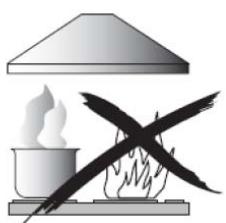
- If the cooker hood is damaged, do not attempt to use.
- Do not flambé under the cooker hood.
- CAUTION: Accessible parts may become hot when used with cooking appliances.
The minimum distance between the supporting surface for the cooking vessels on the hob and the lowest part of the cooker hood. (When the cooker hood is located above a gas appliance, this distance shall be at least 65~cm )
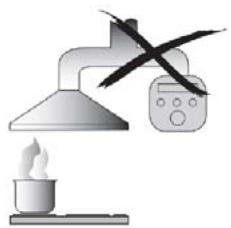
The air must not be discharged into a flue that is used for exhausting fumes from appliances burning gas or other fuels.
Always to do:
- Important! Always switch off the electricity supply at the mains during installation and maintenance such as light bulb replacement.
The cooker hood must be installed in accordance with the installation instructions and all measurements followed. - All installation work must be carried out by a competent person or qualified electrician.
- Please dispose of the packing material carefully. Children are vulnerable to it.
- Pay attention to the sharp edges inside the cooker hood especially during installation and cleaning.
- When the cooker hood is located above a gas appliance, the minimum distance between the supporting surface for the cooking vessels on the hob and the lowest part of the cooker hood that distance must be:
Gas cookers: 75 cm
Electric cookers: 65 cm
Coal or oil cookers: 75 cm
Make sure the ducting has no bends sharper than 90 degrees as this will reduce the efficiency of the cooker hood.
- Warning: Failure to install the screws or fixing device in accordance with these instructions may result in electrical hazards
- Warning: Before obtaining access to terminals, all supply circuits must be disconnected.
Always to do:
Always put lids on pots and pans when cooking on a gas cooker.
- When in extraction mode, air in the room is being removed by the cooker hood. Please make sure that proper ventilation measures are being observed. The cooker hood removes odours from room but not steam.
Cooker hood is for domestic use only.

- If the supply cord is damaged, it must be replaced by the manufacturer, its service agent or similarly qualified persons in order to avoid a hazard.
- This appliance can be used by children aged from 8 years and above and persons with reduced physical, sensory or mental capabilities or lack of experience and knowledge if they have been given supervision or instruction concerning use of the appliance in a safe way and understand the hazards involved. Children shall not play with the appliance. Cleaning and user maintenance shall not be made by children without supervision.

Always to do:
- Caution: The appliance and its accessible parts can become hot during operation. Be careful to avoid touching the heating elements. Children younger than 8 years old should stay away unless they are under permanent supervision.
- There shall be adequate ventilation of the room when the cooker hood is used at the same time as appliances burning gas or other fuels.
- There is a fire risk if cleaning is not carried out in accordance with the instructions
Regulations concerning the discharge of air have to be fulfilled.
Clean your appliance periodically by following the method given in the chapter MAINTENANCE. - For safety reason, please use only the same size of fixing or mounting screw which are recommended in this instruction manual.
- Regarding the details about the method and frequency of cleaning, please refer to maintenance and cleaning section in the instruction manual.
- Cleaning and user maintenance shall not be made by children without supervision.
- When the cooker hood and appliances supplied with energy other than electricity are simultaneously in operation, the negative pressure in the room must not exceed 4 Pa (4 x 10⁻⁵ bar).
- WARNING: Danger of fire: do not store items on the cooking surfaces.
A steam cleaner is not to be used. - NEVER try to extinguish a fire with water, but switch off the appliance and then cover flame e.g. with a lid or a fire blanket.
INSTALLATION (VENT OUTSIDE)
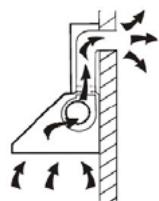
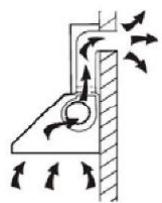
If you have an outlet to the outside, your cooker hood can be connected as below picture by means of an extraction duct (enamel, aluminum, flexible pipe or inflammable material with an interior diameter of 150mm )
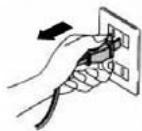
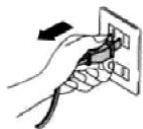
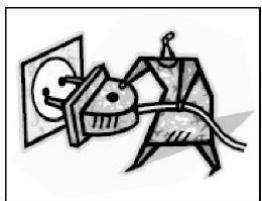
Before installation, turn the unit off and unplug it from the outlet.
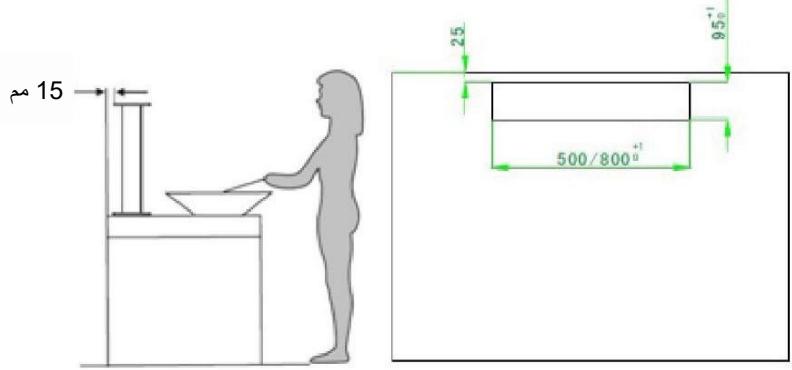
- The cooker hood should be placed at a distance of 15mm from the wall at least. (See Pic1)
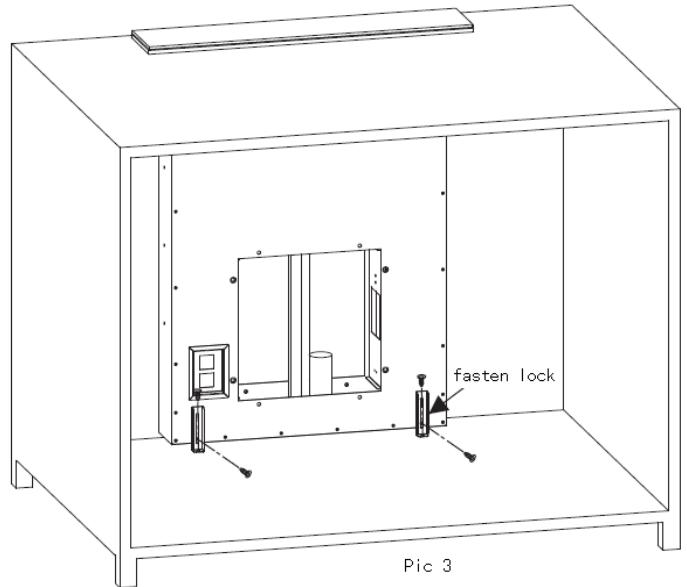
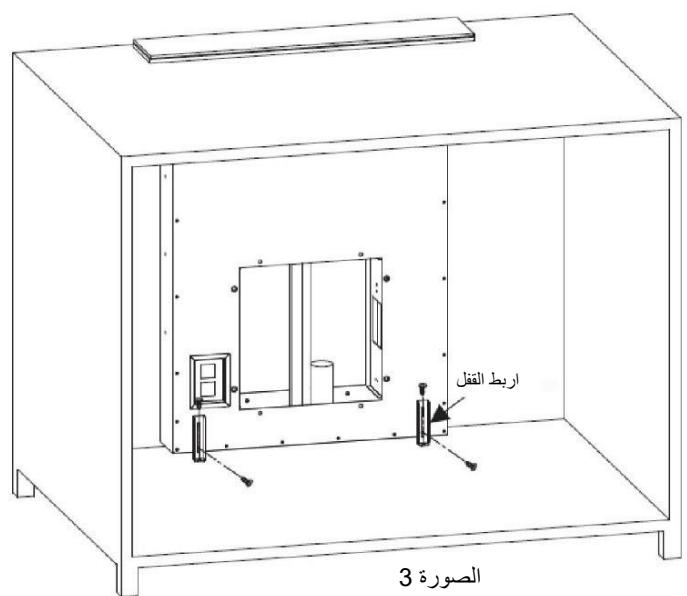
- Put the hood into the hole of the cabinet.(See pic 2) Use 4pcs screw ST48 & screw ST414 & fasten lock to fix the hood.(See pic 3)
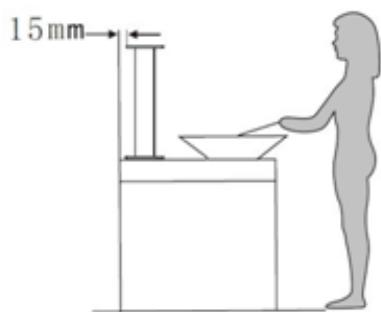
Pic 1
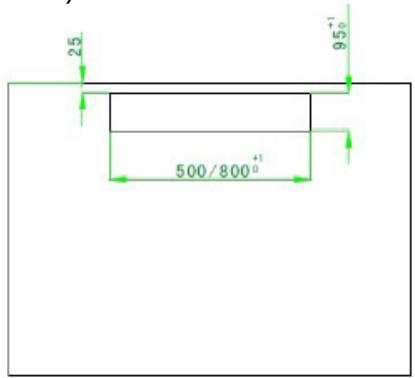
Pic. 2
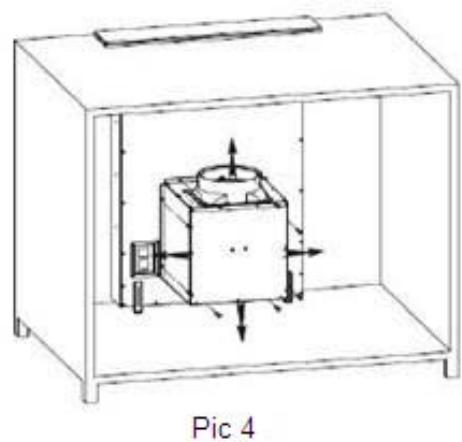
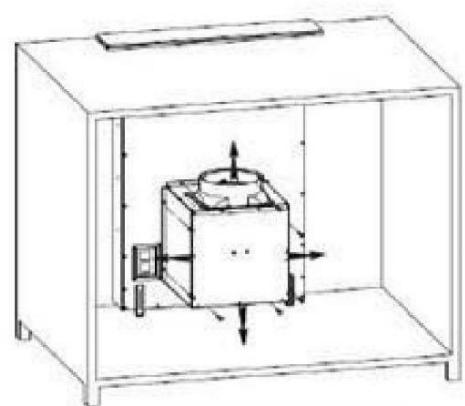
- Connect the casing & hood by 8pcs screw M10*10, the wind direction are up, down, left, right, the user can select according to the space of the cabinet.(See pic 4)
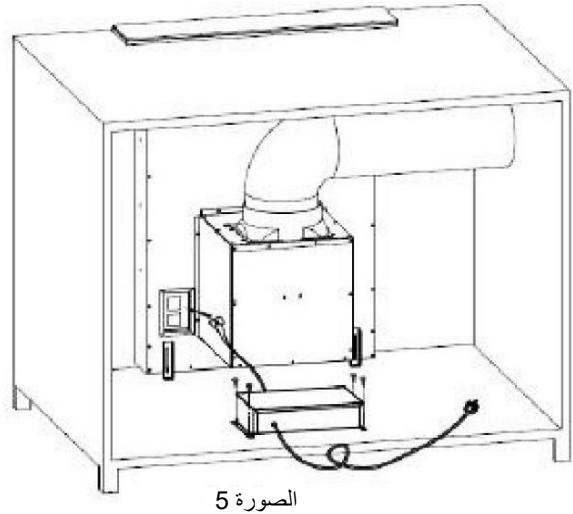
- Fix the pipe on the outlet, and use 4pcs screw ST4*14 to fix the PCB box, connect the power and finish the installation.(See pic 5)
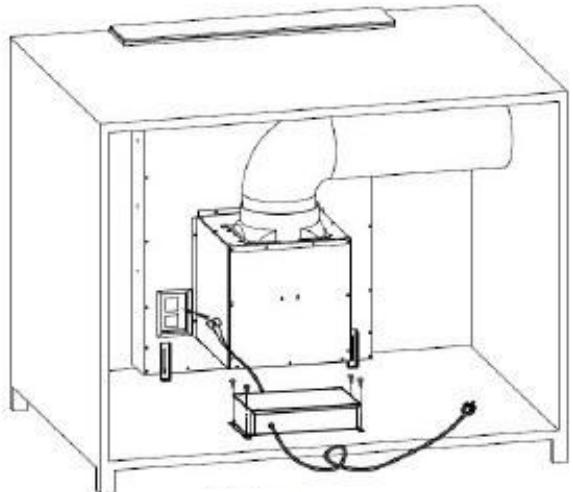
Pic 5
WARNING:

For safety reason, please use only the same size of fixing or mounting sc rew which are recommended in this instruction manual.
Failure to install the screws or fixing device in accordance with these instructions may result in electrical hazards.
Start Using Your Cooker Hood
Slide control
This control system consists of two parts, power panel and touch panel. Touch panel contains five function buttons (power, speed, light, timer, slide control)

Timer
Light
Slide control
Speed
Power
Functional Operation
1 Power on, the hood will standby with backlight, backlight will be extinguished after 5 seconds without any operation, for using the hood again, touch any key to wake up it's standby motion.
2 Touch the power button for 2 seconds, the hood will slide upwards, and works
at the first speed. Touch the power button for 2 seconds again, the hood will slide downwards, and stop working. If you stop the hood, without stopping the motor, when you open the hood again, the hood will work at the speed it works last time.
2.1 Press the power button , when the hood is coming upwards or going downwards, the hood will stop moving, with motor keeping running. Press the power button again, the hood will move again.
- Motor on/off and speed setting:
3.1 Touch the speed button , the motor will turn on; touch it again, it will turn off
3.2、How to set the speed? Touch this area, with your finger sliding on it. When your finger stops at the first or second point, the motor will run at the lowest speed; when your finger stops at the third or fourth point, the motor will run at the second speed; when your finger stops at the fifth or sixth point, the motor will run at the third speed; when your finger stops at the seventh or eighth point, the motor will run at the highest speed.
- Lighting:
4.1. After the hood slides up, the lights will turn on automatically in 8-10 seconds.
4.2 Touch the button of light "杂", lights will turn off. Touch the light button again, the lights will turn off.
4.3 When you touch the button of light "▲", the pilot light is flashing. Slide the button "▲" to control the light intensity when the pilot light is flashing. When enter into the controlling of light intensity, the silde button "■■" control the light intensity. There is 8 speeds of slide button when lighting, every speed means one light intensity. When touch slide button "■■" and slide to one light and it will be on, the light will be on in corresponding light intensity. It can also use the manual keys by touching the button "■■" to operate the hoods on one pilot light and it will be on in corresponding light intensity. The pilot light will stop flashing after 15s if no function adjustment.
- Timer button
5.1 Touch timer button "L" when light or motor is working; the hood will enter into timer working. When the pilot light of timer is flashing, slide button "■" to select the timer section. There are eight sections of timer button when timer is working, they are: 5-10-15-20-25-30-35-40, touch the timer button "O" to enter into timer working when confirm the timer section. Or, enter into timer working automatically 5s later. The motor and light are off automatically when finish the timer, the hood will enter into standby, the decorative cover will close automatically.
5.2 Use the timer function again when keep power on, touch the timer button but without time setting, the hood will keep the time which setted on last time. It will decrease by second after 5s. It will work as new time after new setting. Touch the speed button or control the light intensity when timer is working, the timer function will cancel automatically.
TROUBLESHOOTING
| Fault | Possible Cause | Solution |
| Light on, but motor does not work | Fan switch turned off | Select a fan switch position. |
| Fan switch failed | Contact service center. | |
| Motor failed | Contact service center. | |
| Light does not work, motor does not work | House fuses blown | Reset/Replace fuses. |
| Power cord loose or disconnected | Refit cord to power outlet. Switch power outlet on. | |
| Oil leakage | One way valve and the outlet are not tightly sealed | Take down the one way valve and seal with sealant. |
| Leakage from the connection of chimney and cover | Take chimney down and seal. | |
| Lights not working | Broken/Faulty globes | Replace globes as per this instruction. |
| Insufficient suction | The distance between the cooker hood and the gas top is too far | Refit the cooker hood to the correct distance. |
| The Cooker hood inclines | The fixing screw not tight enough | Tighten the hanging screw and make it horizontal. |

NOTE:
Any electrical repairs to this appliance must conform to your local, state and federal laws.Please contact the service centre if in any doubt before
undertaking any of the above. Always disconnect the unit from the power source when opening the unit.
MAINTENANCE AND CLEANING
Caution:
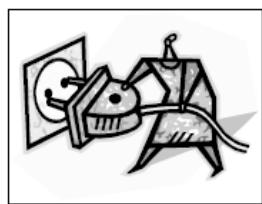
- Before maintenance or cleaning is carried out, the cooker hood should be disconnected from the main power supply. Ensure that the cooker hood is switched off at the wall socket and the plug removed.
- External surfaces are susceptible to scratches and abrasions, so please follow the cleaning instructions to ensure the best possible result is achieved without damage.
GENERAL
Cleaning and maintenance should be carried out with the appliance cold especially when cleaning. Avoid leaving alkaline or acid substances (lemon juice, vinegar etc.) on the surfaces.
STAINLESS STEEL
The stainless steel must be cleaned regularly (e.g.weekly) to ensure long life expectancy.Dry with a clean soft cloth. A specialized stainless steel cleaning fluid may be used.
NOTE:
Ensure that wiping is done along with the grain of the stainless steel to prevent any unsightly crisscross scratching patterns from appearing.
CONTROL PANEL SURFACE
The inlay control panel can be cleaned using warm soapy water. Ensure the cloth is clean and well wrung before cleaning. Use a dry soft cloth to remove any excess moisture left after cleaning.
Important
Using neutral detergents and avoid using harsh cleaning chemicals, strong household detergents or products containing abrasives, as this will affect the appliance appearance and potentially remove any printing of artwork on the control panel and will void manufactures guarantee.
GREASE MESH FILTERS
The mesh filters can be cleaned by hand.
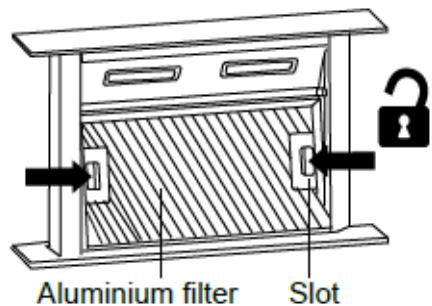
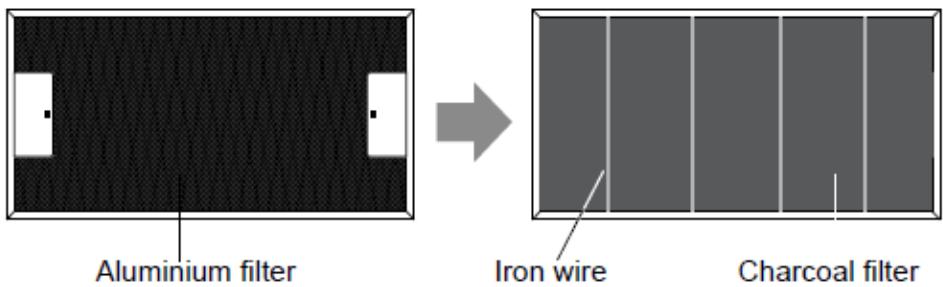
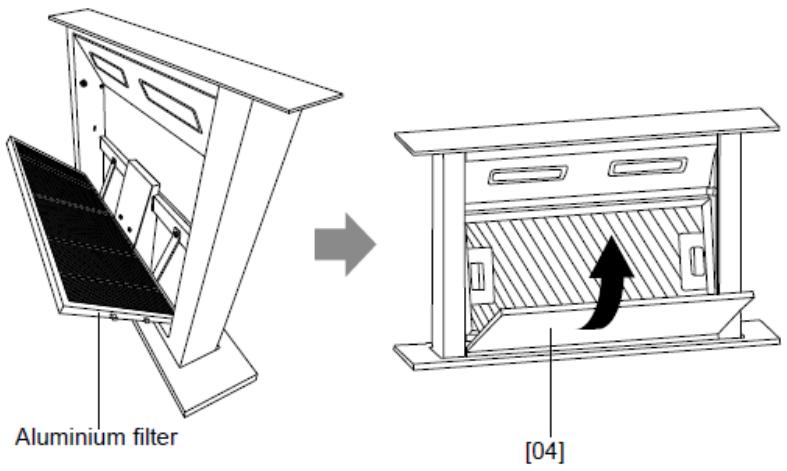
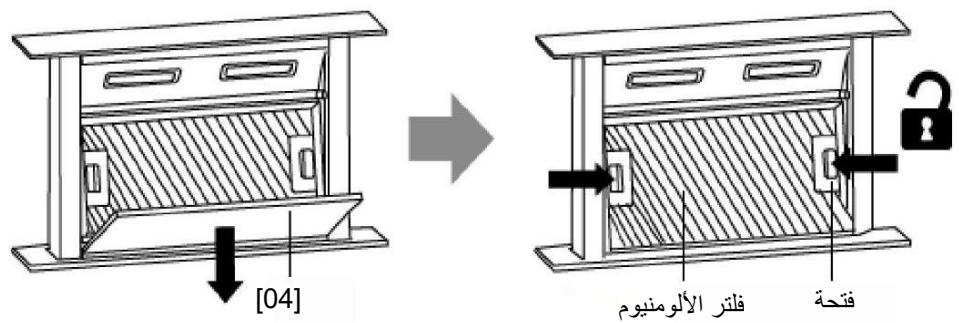
- Remove the decorative board [04] and wipe it clean with a damp cloth. Then, remove the aluminium filter by pressing and holding the 2 slots.
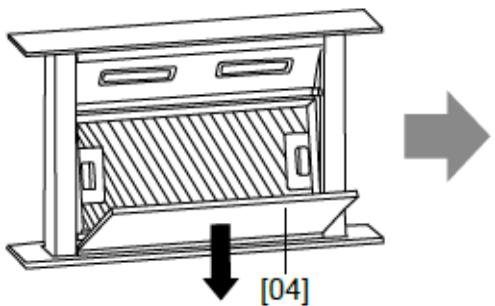
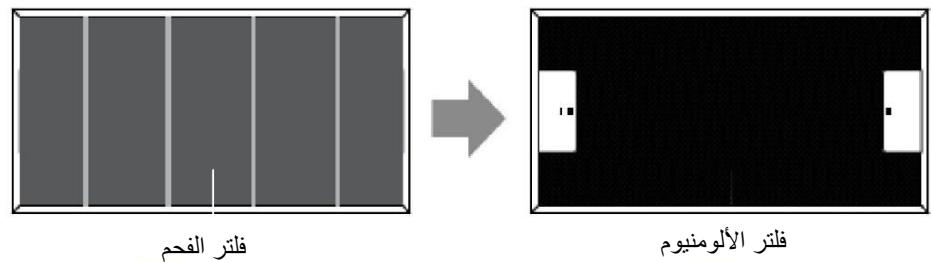
- Place the aluminium filter upside down. Then detach the charcoal filter.
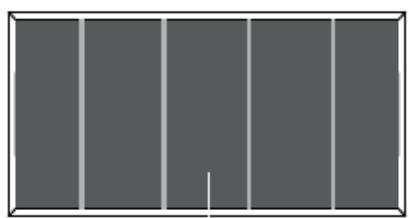
Charcoal filter

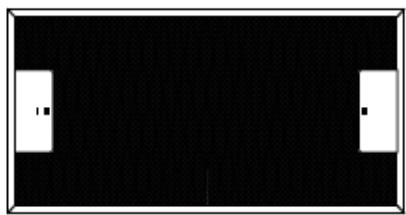
Aluminium filter
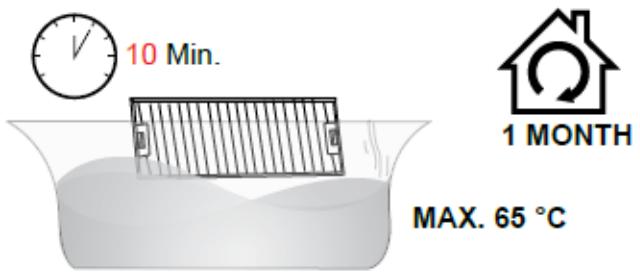
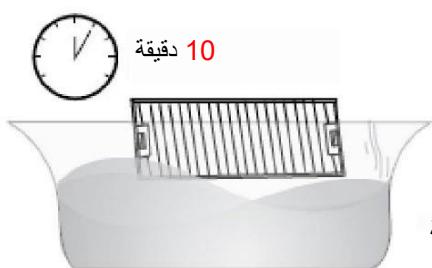
- Soak the aluminium filter into the solution of warm water and mild detergent for about 10 minutes.
- Clean with a soft cloth/brush. Rinse thoroughly and dry well.
- Clean the filter monthly. If the hood is used for more than 2 hours a day, we recommend that you increase the cleaning frequency.
- Depending on the hood use frequency, replace the filter in time! Always use genuine filters from the manufacturer.
Attaching filters
- After cleaning, attach the charcoal filter to the aluminium filter. Then secure with the 4 iron wires.
- Insert the aluminium filter into the cooker hood. Then insert the decorative board [04] and close it into place.
NOTE:
- Make sure the filter is securely locked. Otherwise, it would loosen and cause dangerous.
- When activated carbon filter attached, the suction power will be lowered.
BULB REPLACEMENT

Important :
The bulb must be replaced by the manufacturer, its service agent or similarly qualified persons.
Always switch of the electricity's upply before carrying out any operations on the appliance. When handling bulb, make sure it is completely cool down before any direct contact to hands.
When handling globes hold with a cloth or gloves to ensure perspiration does not come in contact with the globe as this can reduce the life of the globe.
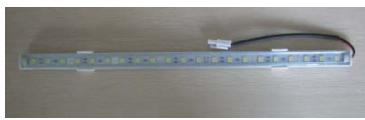
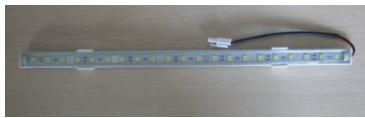
Change the LED light
- Switch off the appliance and unplug it.
- Unscrew the 4 screws on the outer glass frame panel by screwdriver
- Pull out the light wire, and take down the outer glass frame panel
- Unscrew the screws on the light bracket and replace the light
- Connect the light wire and assemble the outer glass frame panel by screw.
Note : Pls make sure power off and take out the cooker hood from wall for changing.Light replacement should carried out by qualified service personnel only.
- ILCOS D code for this lamp is: DSL-4-S-350
- LED modules -LED light strip
- Max wattage: 1 × 4 ~W
Voltage range: DC 12V - Dimensions: 350mm
ENVIRONMENTAL PROTECTION:
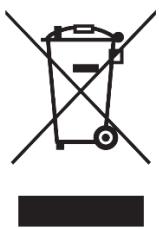
This appliance is labelled in accordance with European Directive 2012/19/EU on Waste Electrical and Electronic Equipment Regulations 2013 regarding electric and electronic appliances (WEEE). The WEEE contain both polluting substances (that can have a negative effect on the environment) and base elements (that can be reused). It is important that the WEEE undergo specific treatments to correctly remove and dispose of the pollutants and recover all the materials. Individuals can play an important role in ensuring that the WEEE do not become an environmental problem; it is essential to follow a few basic rules:
- the WEEE should not be treated as domestic waste;
- the WEEE should be taken to dedicated collection areas managed by the town council or a registered company.
In many countries, domestic collections may be available for large WEEEs. When you buy a new appliance, the old one can be returned to the vendor who must accept it free of charge as a one-off, as long as the appliance is of an equivalent type and has the same functions as the purchased appliance.
NOTE:
The following shows how to reduce total environmental impact (e.g. energy use) of the cooking process).
(1) Install the cooker hood in a proper place where there is efficient ventilation.
(2) Clean the cooker hood regularly so as not to block the airway.
(3) Remember to switch off the cooker hood light after cooking.
(4) Remember to switch off the cooker hood after cooking.
INFORMATION FOR DISMANTLING
Do not dismantle the appliance in a way which is not shown in the user manual. The appliance could not be dismantled by user. At the end of life, the appliance should not be disposed of with household waste. Check with you Local Authority or retainer for recycling advice.
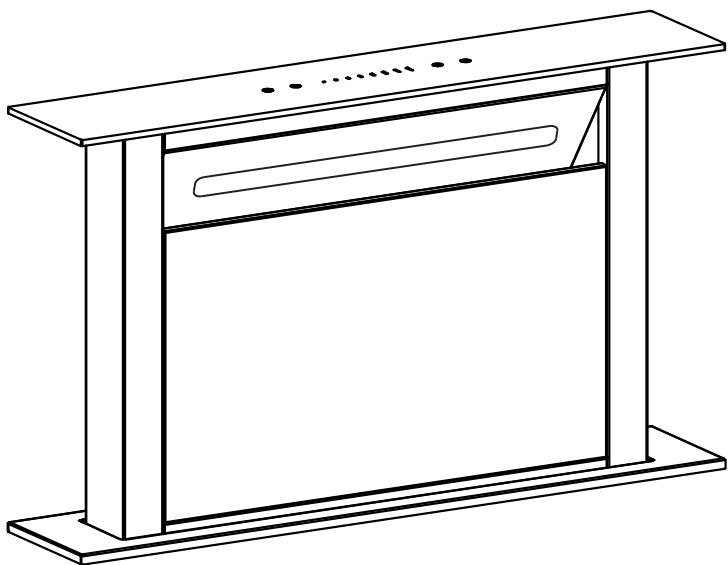
HADD9SS6B
Odsavač
Námod k použití
Obsah
- Make sure the filter is securely locked. Otherwise, it would loosen and cause dangerous.
- When activated carbon filter attached, the suction power will be lowered.
BULB REPLACEMENT

Important :
The bulb must be replaced by the manufacturer, its service agent or similarly qualified persons.
Always switch of the electricity's upply before carrying out any operations on the appliance. When handling bulb, make sure it is completely cool down before any direct contact to hands.
When handling globes hold with a cloth or gloves to ensure perspiration does not come in contact with the globe as this can reduce the life of the globe.
Change the LED light
- Switch off the appliance and unplug it.
- Unscrew the 4 screws on the outer glass frame panel by screwdriver
- Pull out the light wire, and take down the outer glass frame panel
- Unscrew the screws on the light bracket and replace the light
- Connect the light wire and assemble the outer glass frame panel by screw.
Note : Pls make sure power off and take out the cooker hood from wall for changing.Light replacement should carried out by qualified service personnel only.
- ILCOS D code for this lamp is: DSL-4-S-350
- LED modules -LED light strip
- Max wattage: 1 × 4 ~W
Voltage range: DC 12V - Dimensions: 350mm
ENVIRONMENTAL PROTECTION:
This appliance is labelled in accordance with European Directive 2012/19/EU on Waste Electrical and Electronic Equipment Regulations 2013 regarding electric and electronic appliances (WEEE). The WEEE contain both polluting substances (that can have a negative effect on the environment) and base elements (that can be reused). It is important that the WEEE undergo specific treatments to correctly remove and dispose of the pollutants and recover all the materials. Individuals can play an important role in ensuring that the WEEE do not become an environmental problem; it is essential to follow a few basic rules:
- the WEEE should not be treated as domestic waste;
- the WEEE should be taken to dedicated collection areas managed by the town council or a registered company.
In many countries, domestic collections may be available for large WEEEs. When you buy a new appliance, the old one can be returned to the vendor who must accept it free of charge as a one-off, as long as the appliance is of an equivalent type and has the same functions as the purchased appliance.
NOTA:
blai jii iic jll auiia ygi jgi
Joo
1
P 1
iill
1gall jjjj 1alglll jil
a
"iiilll"
aalaaalaaalaaalaaalaaalaaalaaalaaalaaalaaalaaalaaalaaalaaalaaalaaalaaalaaalaaalaaalaaalaaalaaalaaalaaalaaalaaalaaalaaalaaalaaalaaalaa
b0a12i1j1j1j1j1j
a
1
aJlgl 1y
i
Jai jg 1 g aal baa J
1
J 4 J 4
(山 5 - 10 × 4)
e 1j: j
b
.
g j 1 g 1 1 1 1 1 1 1 1 1
j 1
X
jolilj ylll jll lgl 1y jlll gall bai jn jn jn jn jn jn jn jn jn jn jn jn jn jn jn jn jn jn jn jn jn jn jn jn jn jn jn jn jn jn jn jn jn jn jn jn jn jn jn jn jn jn jn jn jn jn
( p 150
iJ 1
(1) (2015, 2016)
14*4 8*4 4 (2)
(3)
1
2
J 10*108aBbBbBbBbBbBbBbBbBbBbBbBbBbBbBbBbBbBbBbBbBbBbBbBb
(4)
4
14*4 4 4 4 4 4 4 4 4 4 4 4 4 4 4 4 4 4 4 4 4 4 4 4 4 4 4 4 4 4 4 4 4 4 4 4 4 4 4 4 4 4
J 1 J 1 J 1 J 1 J 1 J 1 J 1 J 1 J 1 J 1 J 1 J 1 J 1 J 1 J 1 J 1 J 1 J 1 J 1 J 1 J 1 J 1 J 1 J 1 J 1 J 1 J 1 J 1 J 1 J 1 J 1 J 1 J 1 J 1 J

sblalil gall baiy
a5rll jbcblal 00000000000000000000000000000000000000000000000000000000000000000000
1
3
3.1
3.2
aaii iie aie 1 1 1 1 1 1 1 1 1 1 1 1 1 1 1 1 1 1 1 1 1 1 1 1 1 1 1 1 1
4
10-8 15
4.2
2
4.3
y j 111 111 111 111 111 111 111 111 111 111 111 111 111 111 111 111 1
i 1
"■■" JJJI JIJI JIJI JIJI JIJI JIJI JIJI JIJI JIJI JIJI JIJI JIJI JIJI JIJI JIJI JIJI JIJI JIJI JIJI JIJI JIJI JIJI JIJI JIJI JIJI JIJI JIJI JIJI JIJI JIJI JIJI JIJI JIJI JIJI JIWI.
15 15
"O" 5
J 1 J 1 J 1 J 1 J 1 J 1 J 1 J 1 J 1 J 1 J 1 J 1 J 1 J 1 J 1 J 1 J 1 J 1 J 1 J 1 J 1 J 1 J 1 J 1 J 1 J 1 J 1 J 1 J 1 J 1 J 1 J 1 J 1 J 1 J

aaiill 1
4
ailll lcl 1 jrrll 1 1 1 1 1 1 1 1 1 1 1 1 1 1 1 1 1 1 1 1 1 1 1 1 1
J 1
ale 1
y
()
a 1
Iall glal l gally u aia iil jllw pliul jkai.
S OBC = S COD + S_ BOC
aaii i 1
A
paaa aagagag
i 1
i 1
aaii i jiai ciabioi g aiiaii aiglslilgaii iiaiaiaiaiaiaiaiaiaiaiaiaiaiaiaiaiaiaiaiaiaiaiaiaiaiaiaiaiaiaiaiaiaiaiaiaiaiaiaiaiaiaiaiaiaiaiaiaiaiaiaiaiaiaiaiaiaiaiaiaiaiaiaiaiaiaiaiaia
a 1
a
gaaa aee
.
04] jj
i
1
10 1

65
m = 311 ;
(WEE)yjyjyjyjyjyjyjyjyjyjyjyjyjyjyjyjyjyjyjyjyjyjyjyjyjyjyjyjyjyjyjyjyjyjyjyjyjyjyjyjyjy
Aji jilj jilj jilj jilj jilj jilj
J 1 J 1 J 1 J 1 J 1 J 1 J 1 J 1 J 1 J 1 J 1 J 1 J 1 J 1 J 1 J 1 J 1 J 1 J 1 J 1 J 1 J 1 J 1 J 1 J 1 J 1 J 1 J 1 J 1 J 1 J 1 J 1 J 1 J 1 J
- SAFETY INSTRUCTIONS
- Never to do:
- Always to do:
- INSTALLATION (VENT OUTSIDE)
- WARNING:
- Start Using Your Cooker Hood
- Slide control
- Functional Operation
- TROUBLESHOOTING
- NOTE:
- MAINTENANCE AND CLEANING
- Caution:
- GENERAL
- STAINLESS STEEL
- CONTROL PANEL SURFACE
- Important
- GREASE MESH FILTERS
- Attaching filters
- BULB REPLACEMENT
- Change the LED light
- ENVIRONMENTAL PROTECTION:
- INFORMATION FOR DISMANTLING
- HADD9SS6B
- Odsavač
- Námod k použití
- Obsah
- NOTA:
- aaiill 1
Brand : HAIER
Model : HADD9SS6B - HADD9SS6B
Category : Fridge