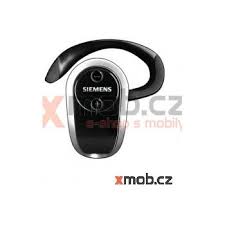
HHB-700 - Bluetooth headphones BENQ-SIEMENS - Free user manual and instructions
Find the device manual for free HHB-700 BENQ-SIEMENS in PDF.



User questions about HHB-700 BENQ-SIEMENS
0 question about this device. Answer the ones you know or ask your own.
Ask a new question about this device
Download the instructions for your Bluetooth headphones in PDF format for free! Find your manual HHB-700 - BENQ-SIEMENS and take your electronic device back in hand. On this page are published all the documents necessary for the use of your device. HHB-700 by BENQ-SIEMENS.
USER MANUAL HHB-700 BENQ-SIEMENS
Issued by BenQ Mobile GmbH & Co. OHG
Haidenaupplatz 1
81667 Munich
Germany
IOpHdHueckn aJpec H3rOToBHTeJIa:
"BeHKbIO Mo6aI I6Mx & Ko OXΓ"
XaJEnaayIJIaTI 1
81667 MIOHXeH
FepMaHna
© BenQ Mobile GmbH & Co. OHG 2006
All rights reserved. Subject to availability.
Right of modification reserved.
www.BenQ-Siemens.com
Ref. No.: A31008-H2601-A105-4-ZC19
(06/06)

Headset Bluetooth®
HHB-700/710
Headset PTT Bluetooth® (en) 2
Headset PTT Bluetooth® (de) 12
Headset PTT Bluetooth® (it)
(Cuffia Bluetooth®) 22
Headset PTT Bluetooth® (fr)
(Kit Piéton Bluetooth®) 32
Headset PTT Bluetooth® (nl) 43
Headset PTT Bluetooth® (sv) 53
Headset PTT Bluetooth® (es)
(Auricular Bluetooth®) 63
Headset PTT Bluetooth® (pt) 73
Headset PTT Bluetooth® (tr) 83
Headset PTT Bluetooth® (el)
(Φopntó αkouotikó Bluetooth®) 93
Headset PTT Bluetooth® (pl) 103
Headset PTT Bluetooth® (cs)
Headset PTT Bluetooth® (sl)
(Bluetooth® slusalka pritisni in govori) 153
Headset PTT Bluetooth® (ykp)
(Taphiura PTIi Bluetooth®) 163
Customer Care 173
European Directive 2002/96/EC 175
Federal Communication Commission (en) 182
FCC (Federal Communication Commission) (fr) 183
Safety precautions
Information for parents
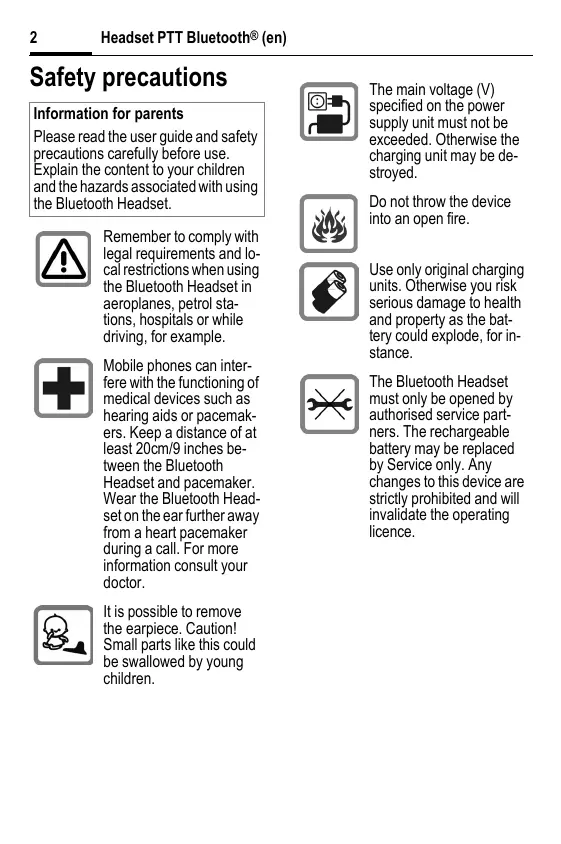
Please read the user guide and safety precautions carefully before use. Explain the content to your children and the hazards associated with using the Bluetooth Headset.

Remember to comply with legal requirements and local restrictions when using the Bluetooth Headset in aeroplanes, petrol stations, hospitals or while driving, for example.

Mobile phones can interfere with the functioning of medical devices such as hearing aids or pacemakers. Keep a distance of at least 20cm/9 inches between the Bluetooth Headset and pacemaker. Wear the Bluetooth Headset on the ear further away from a heart pacemaker during a call. For more information consult your doctor.

It is possible to remove the earpiece. Caution! Small parts like this could be swallowed by young children.

The main voltage (V) specified on the power supply unit must not be exceeded. Otherwise the charging unit may be destroyed.

Do not throw the device into an open fire.

Use only original charging units. Otherwise you risk serious damage to health and property as the battery could explode, for instance.

The Bluetooth Headset must only be opened by authorised service partners. The rechargeable battery may be replaced by Service only. Any changes to this device are strictly prohibited and will invalidate the operating licence.
Important:

Dispose of used batteries and Bluetooth Headsets according to the legal regulations.

The Bluetooth Headset can interfere with the operation of nearby TVs, radios or PCs.

Use only original accessories. In this way, you will avoid possible health risks and damage to the product, and ensure compliance with all relevant provisions.
Improper use will invalidate the guarantee!
Permanent hearing loss may occur if you use ear- or headphones at high volume. You can adapt over time to a higher volume, which may sound normal but can be damaging to your hearing. Set your volume to a safe level. If you experience ringing in your ears, reduce the volume or discontinue use of your system.
Note
In some countries there may be restrictions on the use of Bluetooth devices. Please check with the relevant authority.
Manufactured by BenQ Mobile GmbH & Co. OHG under trademark license of Siemens AG.
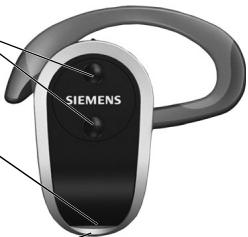
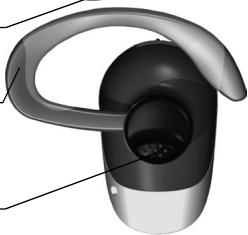
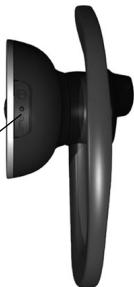
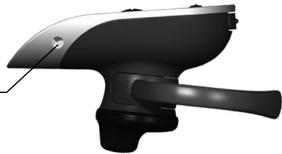
Overview of headset
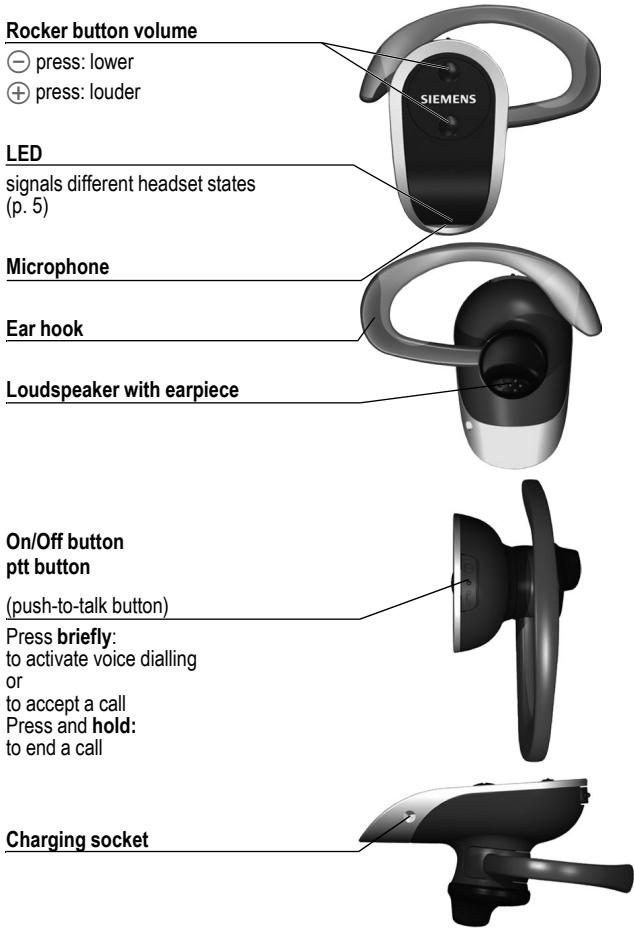
LED display explained
The LED (Light Emitting Diode) indicates the different states of the headset:
| Lights up steadily (when connected to a charger) | Headset charging. |
| Off (when connected to a charger) | Headset is fully charged. |
| Repeatedly flashes 4x slowly | Empty battery. |
| Lights up steadily | Registering. |
| Flashes 5x | Successfully registered. |
| Flashes slowly | Headset is ready for use. |
| Repeatedly flashes 2x rapidly | Incoming and outgoing call. |
| Repeatedly flashes 2x slowly | Call in progress. |
| Off | Headset is switched off. |
Adjusting the headset
The Headset comes with two ear hooks for different ear sizes. Select the right one for your ear. You can reverse the ear hook so that you can wear the headset on the left or right ear.
- Pull the ear hook backwards out of its holder.
- Turn the ear hook and carefully insert it on the other side:
for the left ear:
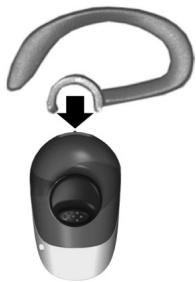
for the right ear:
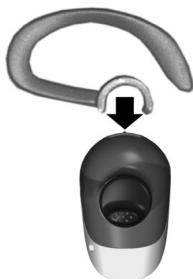
The earpiece can be rotated for a perfect fit.
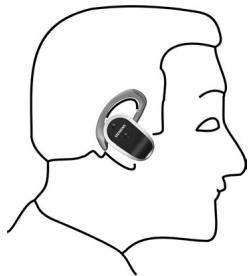
Wearing the headset correctly
Wear the Bluetooth® Headset as shown in the diagram. The microphone opening must always point towards your mouth.
Bend the ear hook carefully to adjust it to your ear.
Ensure that part of the projecting end of the rubber earpiece sticks into your ear canal.
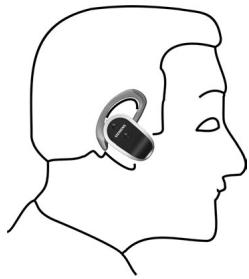
What is Bluetooth?
The Bluetooth® word mark and logos are owned by the Bluetooth® SIG, Inc. and any use of such marks by BenQ Corp. is under license.
Other trademarks and trade names are those of their respective owners.
Bluetooth is a short-range radio link. It enables wireless communication between various terminals equipped with Bluetooth.
The Bluetooth Headset will only work in conjunction with a Bluetooth-enabled mobile phone capable of supporting the headset profile. The handsfree profile is preferred for this purpose. Please read the notes on Bluetooth links in your mobile phone manual as the controls and display messages differ between phones.
Every Bluetooth device has a unique address and name. This ensures that it only communicates with the selected communication partners. The security concept uses a password which the devices exchange the first time they register (p. 8).
Setting up the headset
Before you can use your Bluetooth headset, you need to:
- charge the headset and
- register the headset with the mobile phone.
Charging the Bluetooth headset
The battery supplied has not been fully charged.
To charge the headset, you will need the charging unit included in the delivery. Please note that the mains power socket must be nearby and easily accessible.
You can also charge the Headset with a Travel Charger
ETC-500/510* or Car Charger
Plus ECC-600* using the
charging adapter ECA-500*.
*: These products are offered as original accessories.
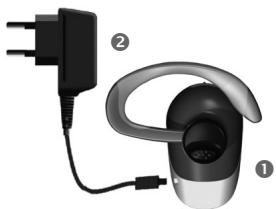
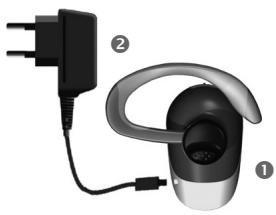
- Insert the charging unit connector ② into the headset ① as shown in the diagram.
- Plug the charging unit plug into the socket.
Charge time
A flat battery takes about two and a half hours to fully charge.
Display during charging
The LED is red during charging.
When the battery is fully charged, the LED turns off.
Only charge the battery at a temperature of 0^ to 45^ . Otherwise, it will wear out prematurely. Please note that batteries generally wear out over time.
Switching on the Bluetooth Headset
Press the ptt button for 3 seconds. The LED flashes rapidly for 1 second, then it flashes more slowly. A low and a high tone can be heard.
Switching off the Bluetooth Headset
Press the ptt button for 3 seconds. The LED lights up steadily for 1 second and then goes out. A high and a low tone can be heard.
Registering the headset with a mobile phone
The headset must be switched off.
- Press the ptt button for at least 6 seconds. The LED lights up steadily, and two high tones can be heard. Your mobile phone can now "look for" the Bluetooth Headset.
- Activate search mode on your mobile phone. Please read the notes in your mobile phone manual.
- If your mobile phone finds your headset, this is shown on the mobile telephone display beneath the device name HHB-700.
If your mobile phone does not find the headset within 3 minutes, activate search mode again (repeat step 1).
4. If requested, enter the password (PIN) for the headset into your mobile phone: 0000
The Bluetooth Headset is now registered to your mobile phone.
Making a phone call
You can only make calls with the headset if the headset is switched on (see on left) and if the headset is registered with a mobile phone (p. 8).
The procedure described below only applies to Siemens mobile phones. It may be different for other manufacturers' mobiles.
The following symbols are used to explain how to operate the headset:

This function varies from service provider to service provider. You may need to register separately for this service.
- You will know the call is about to drop if the signal quality is poor.
- If the mobile phone is not connected to the network, you will hear a recurring beep tone in the headset.
- If the Bluetooth connection to the mobile phone is interrupted for several seconds during a call, you can only continue the call with the mobile phone.
Voice dialling
You can dial a number by saying the name aloud. A voice recording of the name must be stored with the number in the Addressbook in the mobile phone. Please read the manual for your mobile phone.
This function is not offered by all mobile phones.
- Briefly press the ptt key.
- Say the name.
If the name is recognised, the mobile phone dials the telephone number.
If the name is not recognised, press the ptt button again and repeat the name.
Dialling using the mobile phone
- Dial as normal using the mobile phone.
- Briefly press the ptt button to make the call via the headset.
Ending a call
Press and hold the ptt button. The call is ended. The headset remains ready for use.
Setting the volume
The two keys and adjust the volume.
The volume setting on the headset does not affect the volume setting on the mobile phone.
Answering a call
Press the ptt button briefly.
Hold call
Briefly press the ptt button twice. To continue the call, briefly press the ptt button twice again.
Call waiting/toggling between calls

Call waiting
If someone calls you while you are already in a call, you will hear a 'call waiting tone'.
Briefly press the ptt button in order to accept the new call. The current call is put on hold.
You have the following options:
Toggling
Briefly press the ptt button twice in order to toggle the calls.
Rejecting the current call
Press and hold the ptt key. The active call is ended.
The second call is accepted.
Picking up a call
Press the ptt key briefly:
The active call is accepted by the Headset.
For additional information please consult your mobile phone's user guide.
Maintenance/ troubleshooting/ device data
Maintenance advice
- Clean the headset with a damp cloth or anti-static cloth. Do not use any chemicals.
- Protect the headset from moisture and knocks. Do not expose your headset to direct sunlight.
Conformity declaration
FCC:
see p. 182.
CE:
BenQ Mobile hereby declares that the phone described in this user guide is in compliance with the essential requirements and other relevant provisions of European Directive 1999/5/EC (R&TTE). The relevant declaration of conformity (DoC) has been signed. Please call the company hotline if you require a copy of the original:
www.BenQMobile.com/conformity
0984

FCC ID:QVZHHB700-3
Complies with IDA Standards DB01752
Headset technical data
Li-Ion battery 100 mAh
Charging approx. 2.5 hours time
Standby time up to 300 hours
Talk time up to 6 hours*
Range max. 10 metres, less in buildings
Weight approx. 15 grams
Weight approx. 60 grams charger
Protection IP20 class
Operating -20°C...55°C temperature
*: depending on the mobile phone used
Mains adapter technical data
Input 110 V or 230 V AC, 50/60 Hz
Output 5 V DC/0.4 A
Operating 0^ 55^ temperature

N626
Customer service
See Customer Care, p. 173.
Sicherheitshinweise
Hinweis für Eltern
Complies with IDA Standards DB01752
A Anything's up to the cuffing.
Telefonare
www.BenQMobile.com/conformity
€ 0984

FCC ID:QVZHHB700-3
Complies with IDA Standards DB01752
Dati tecnici
Batteria Li-Ion
100 mAh
Tempo di carica
circa 2,5 ore
Autonomia in stand-by
fino a 300 ore
(touche push-to-talk)
www.BenQMobile.com/conformity
CE 0984

FCC ID:QVZHHB700-3
Complies with
IDA Standards
DB01752
Service clients (Customer Care)
Complies with IDA Standards DB01752
Complies with IDA Standards DB01752
Tekniska data
Li-Ion-batteri 100 mAh
www.BenQMobile.com/conformity
€ 0984

FCC ID:QVZHHB700-3
Complies with IDA Standards DB01752
www.BenQMobile.com/conformity
€ 0984

FCC ID:QVZHHB700-3
Complies with IDA Standards
DB01752
CE - Declaration of conformity
BenQ Mobile hereby declares that the phone described in this user guide is in compliance with the essential requirements and other relevant provisions of European Directive 1999/5/EC (R&TTE). The declaration of conformity (DoC) concerned has been signed.
Microlink Communications Inc.
Address: 3F, No. 196, Xinhu 3rd., Neihu, Taipei 114, Taiwan, R.O.C.
Ithalatci Firma
BenQ Mobile Telekomunikasyon ve Iletisim Hizmetleri Ticaret Limited Sirketi Nida Kule Degirmen Sk. No 12 Kat 19 Kozyatagi/Istanbul Telefon:0216-4599898 www.BenQMobile.com
Uygunluk Degerlendirme Kurulusu
American Telecommunications
Certification Body
6731 Whittier Avenue, Suite C110
McLean, VA 22101
Telefon: +1 703-847-4700
Fax: +1 703-847-6888
e-mail: sales@atcb.com
Cihazin Kullanim Ömrü 7 yildir.

FCC ID:QVZHHB700-3
Complies with IDA Standards DB01752
(Πλήκτρο push-to-talk)
NATUvTc OTyia:
EvpyoToiniog qovwnikc kknons n atooxniuovoumiia
KpatowtaTtantmuEvo:
Tepuanouosuvouiias
YtdoxnΦoptians
ExTe Twpa TIG aKoAouOeS ETTIOyE:
Evaalayn
Tia evaalayi meaTuw duu suvouiuW, Tnote atyuaia to nAkpottduo foepc.
Atoppipn trpexouoas khanns
KpatnoTe patnuevo To nIrkpto pt. H Evepyounovouolia tepuariZeTai.
H euteepn ouvoiia xekiva.
MetaBiaon kHons
PANTATE TO TIAKTPo pTTyuaia H EVEpyn auvouiia eepetai oTO qopnto aouotiko.
Piepaepu uTOnBeEieG TaBpeite otic Ooynie XpnoTc Tou KInnTOO aC Tnaepwovu.
Uvtnpnon/ avTImuETwTion OpaalmuATWv/TeXVIkα XapakTnpiOTiKa
Xpnoiues ouuBouEs ouvtnpnons
Complies with IDA Standards DB01752
Texivka xapaktnpiotika
Mntatapia 100 mAh Iovtwv Aioiu
Xpovoc πεpiou 2,5 ωpecs φoption
Xpovoc Ewcs kai 300 wpecs avaovns
Xpovoc EwCkai6wpε* ouiiaos
Bapoc Tepitou 15 ypaumapia
Przycisk (push-to-talk)
Naciśnij krótko:
Complies with IDA Standards DB01752
(tlačitko push to talk)
www.BenQMobile.com/conformity
0984

FCC ID:QVZHHB700-3
Complies with IDA Standards DB01752
www.BenQMobile.com/conformity
€ 0984

FCC ID:QVZHHB700-3
Complies with IDA Standards DB01752
Tehnicke karakteristike naglavne slusalice
Litij-ionskabaterija
100 mAh
Vrijeme punjenja
oko 2,5 sati
Complies with IDA Standards DB01752
Toltes kozben lathato
www.BenQMobile.com/conformity
0984

FCC ID:QVZHHB700-3
Complies with IDA Standards DB01752
Complies with IDA Standards DB01752
He KndaTae npictpiy BIDKPTNI BOROHb.

Kopnicytteca tIbkn OPirHnblHMN 3apdHMnnpCTPOMR.IHaKJIe BV HApKaJAETEcB Ha PI3NK3aUKOHTIN 3DOpOB10 a60 BNAChOCT, OckIIbKM, HApRKnAD, akymyTAPOTMOKE BIVbXHyTN.

TapHITpy MOKytb po36BpaTNIuHE AOBTPM3OBAHc cepBICInapTHePn. AkymyIaTOpPiNlraRae 3AmHI niuie cneuiian3oBaHOIO cnYk6BO. BHeCSEHNbYdb-JaIKX 3MH Do npICrPoIO cybopo 3abOpOHEnIO pIN3BeDE Do BTPaTHuHHOCTi NiEHTII.
Baxjlnbo:

Ytwni3yIte BnKopnCTahi ayMynTApRoTa Ta raphITpyu Bluetooth bIDnoBIO du MucIEBO 0aKHOJDAcTBa.

「rapHITypa moKeB BnINBaTn haBOpOTy TeneBtOIpB, paIopOnPiMaivb a6o PIK, 1003HaOJTaBc no6m3y.

KopriCTyTecr TINbKn OPIRiHAIHBMI KACCEyapAM. TaKIM YIHOM BnYHKHTe MOKJINBOI IWKODn DnI 3DOPOB TA 3a6E3neuHtE BiNDOBIDHCtB yCIM NIOJOKEHRM.
BnKOpNCTaHNa He 3a npn3NaueHHa m npn3BeDe O BtpaTn rapaHTi!
PpocnyOBvBaHHa 3 HabyuHnKAMHa
BWCOKIYYHOCt MOKe Pnp3BECCTNo
HeBNpABHOI BpATn CNYX.3 YacOM BN
MOKETe 3BKNHYt DO BWCOKOIYHOCt,RAk
6yde 3DaBAtmCg HOpMaJIbHOO,ane Qe
MOKE 3auKoJNTB BauOMy CNYx.
YcTaHOBIT yHICITb Hb6zEChHOMy pBiH.
KaIO Bu YCyTe dzBIn b Byxax,3MeHNtse
yHICITb aBo pNINHITb BIKOPNCTAHn
CNCTEM.
PpMItka
B DeaKmX kpaIhax Moxytb IcybAtn o6MeXeHHa HbMOPcIstHna NpIcTpoIB Bluetooth. SybN nacka, D3iaHaeTnc npOye y BidnoiDHX opraHax MieCbeB IoBlaM.
Bnpo6JIeHNO BenQ Mobile GmbH & Co. OHG 3a liueheni e Siemens AG.
OrnraI raphiItypn
Khonka ryuhocti

HATNCHTb: TNXiJe

HATNCiTb:IyHiIe
Cbitioi
Ipo3naHOTb pi3Hpi peKIMn raphITypn (ctop. 166)
Mikpochond
UpymByaBnIyBxa
IyHOMOBeuei3 HabyuHnKOM
KhONka yBIMKHeHHra/BUMKHeHHra KhONka ptt
(push to talk, pěkǎn páuji)
HaTnCHiB Ta wBnKO BiDnCyTITb:
aKTHyBaTn rOIOcOBn HApip Homepa
a60
PnHrTN BKNIHK
HaTnchItb ta yTpmyIte:
3aBepWeHnPa03MOBN
HizdoIa3apxkennn

Iorchenha3naeHb IHdkatopib (cbitnoioiB)
Cbitnojioi no3haaHOb ti3Hi pexmnpaHItypn:
| Свитпься постийно (кожи підкіюецno зардійnos рісістій) | Гарнітypа В поочesci Зардійдан. Зардійдан Зардійдан Зардійдан Зардійдан Зардійдан Зардійдан Зардійдан Зардійдан Зардійдан Зардійдан Зардійдан Зардійдан Зардійдан Зардійдан Зардійдан Загійцу Загійцу Загійцу Загійцу Загійцу Загійцу Загійцу Загійцу Загійцу Загійцу Загійцу Загійцу Загійцу Загійцу Загійцу Zагійцу Zагійцу Zагійцу Zагійцу Zагійцу Zагійцу Zагійцу Zагійцу Zагійцу Zагійцу Zагійцу Zагійцу Zагійцу Zагійцу Zаг? Zаг? Zаг? Zаг? Zаг? Zаг? Zаг? Zаг? Zаг? Zаг? Zаг? Zаг? Zаг? Zаг? Zаг? Zаг? Zаг? Zаг? Zаг? Zаг? Zаг? Zаг? Zаг? Zаг? Zаг? Zаг? Zаг? Zаг? Zаг? Zаг? Zаг? Zаг? Zаг? Zаг? zag? Zag? Zag? Zag? Zag? Zag? Zag? Zag? Zag? Zag? Zag? Zag? Zag? Zag? Zag? Zag? Zag? Zag? Zag? Zag? Zag? Zag? Zag? Zag? Zag? Zag? Zag? Zag? Zag? Zag? Zag? Zag? Zag? Zag? Zаг? Zаг? Zаг? Zаг? Zаг? Zаг? Zаг? Zаг? Zаг? Zаг? Zаг? Zаг? Zаг? Zаг? Zаг? Zаг? Zаг? Zаг? Zаг? Zаг? Zаг? Zаг? Zаг? Zаг? Zаг? Zаг? Zаг? Zаг? Zаг? Zаг? Zаг? Zаг? Zаг? Zаг; Zаг? Zаг? Zаг? Zаг? Zаг? Zаг? Zаг? Zаг? Zаг? Zаг? Zаг? Zаг? Zаг? Zаг? Zаг? Zаг? Zаг? Zаг? Zаг? Zаг? Zаг? Zаг? Zаг? Zаг? Zаг? Zаг? Zаг? Zаг? Zаг? Zаг? Zаг? Zаг? Zаг? zag? Zаг? Zаг? Zаг? Zаг? Zаг? Zаг? Zаг? Zаг? Zаг? Zаг? Zаг? Zаг? Zаг? Zаг? Zаг? Zаг? Zаг? Zаг? Zаг? Zаг? Zаг? Zаг? Zаг? Zаг? Zаг? Zаг? Zаг? Zаг? Zаг? Zаг? Zаг? Zаг? Z Jag. Z Jag. Z Jag. Z Jag. Z Jag. Z Jag. Z Jag. Z Jag. Z Jag. Z Jag. Z Jag. Z Jag. Z Jag. Z Jag. Z Jag. Z Jag. Z Jag. Z Jag. Z Jag. Z Jag. Z Jag. Z Jag. Z Jag. Z Jag. Z Jag. Z Jag. Z Jag. Z Jag. Z Jag. Z Jag. Z Jag. Z Jag. Z Jag. Z Jag. z Jag. Z Jag. Z Jag Z Jag Z Jag Z Jag Z Jag Z Jag Z Jag Z Jag Z Jag Z Jag Z Jag Z Jag Z Jag Z Jag Z Jag Z Jag Z Jag Z Jag Z Jag Z Jag Z Jag Z Jag Z Jag Z Jag Z Jag Z Jag Z Jag Z Jag Z Jag Z Jag Z Jag Z Jag Z Jag Z Jag z Jag Z Jag Z Jag Z Jag Z Jag Z Jag Z Jag Z Jag Z Jag Z Jag Z Jag Z Jag Z Jag Z Jag Z Jag Z Jag Z Jag Z Jag Z Jag Z Jag Z Jag Z Jag Z Jag Z Jag Z Jag Z Jag Z Jag Z Jag Z Jag Z Jag Z Jag Z Jag Z Jag Z jag Z Jag Z Jag Z Jag Z Jag Z Jag Z Jag Z Jag Z Jag Z Jag Z Jag Z Jag Z Jag Z Jag Z Jag Z Jag Z Jag Z Jag Z Jag Z Jag Z Jag Z Jag Z Jag Z Jag Z Jag Z Jag Z Jag Z Jag Z Jag Z Jag Z Jag Z Jag Z Jag Z Jag |
Hanaawtybanna raphitypn
TarpHtypa noctaaybcty 3 DOBMA yTPMByaamn Dny Bya xip3HOro pO3my. BiBepItb Odn HBiNobIHO do pO3mpy CBOrB yBa.x. TaqOK yTPMByauchoMQxHa npInacvBaTu dIra HociHnHa na IibOMy a6o npabOMy Byci.
- BntarHtbrayok i3 HabyuHnka.
- IObepHbIy TpyMByaIooBepExHO BCTabe IyoHIO hUNIM 6OKOM:
-ДЯлIBOROByxa:

-Дяправoro Byxa:

HabyuNHMOxHaOebpTaTnDnDAOCaHTHeHHaHkPaUO3BvuaHH.
IpaBnblbHcnci6 HocinHrahpHtpyn
HadihTre raphiTypy Bluetooth®якуэзноHa cxemI.ПиIMaMau MikpoHа Мб戒TN NOBcKuaC cnPMAOBHn DO BaWOrO pota.
ObepeKHO npnacyTe ytpmBya HabyuHnka do CBOro Byxa.
IpekoHaTeC, 0BIOOBKeHNI KHeIb pe3nHOBOr HabyuHmka UJIbHO po3TaOBoHn y KaHani Byxa.
Lio take Bluetooth?
Bluetooth® ta noro Bluetooth® e
3apecSTROBAHMMTOBAPHMN3HaKaMn
Bluetooth® SIG, Inc. 5yNb-jaKe
BVOKPCTANHNAUxTOBAPHNX3HaKIB
BenQ Corp. 3axmueho liueh3i6o. Ihuhi
haBn KOMAHNI TA npOdykTIB, 100
3aDyTOBcB DAHOmy DOKyMeHTI, MOXytB
6ByTN TOBAPHMN3HaKaMn BiDNOBIHnx
BnAChNKIB.
Bluetooth - ue paio3B'3OK manoro
paioyc nn. Bih 3ab63neuye
6e3npoBOOboN 3B'3OK mIX p3HMMn
pncIcTPOMA, OchauEHHMn
TexHOJIrO Go Bluetooth.
RaphiType Bluetooth fynkuiohye
Tilbny B noDHaHHI 3 MOiBnHM
TelefoHOM, knni niTpmyb
TexHOnorIO Bluetooth i npocInb
rapHiTyPi. InpoifInb «BiNbi pykn»
NaibIoBu npdiatNHn dJa lciMeTn.
IpnouHTaTE BiDMOCTO sIoDo
Bluetooth y nociBnkykopNCtBuayda
dner BaWoTo rteFonoHy, ockInbky
enEMeHTn KepyBaHHa Ta ekpanHi
NoBIOMeHNHe b Pi3Hnx TepeOHOx
MOxyTb BiDiPIHrTmC
KoKeH npictpri Bluetooth ma yHKaJIbHyAnepeCy ta IM'a. Lc dae nepekoHa, zo npictpri noOdHyctbCra TInbKn 3 ObaHmM kOMyHkauiHmM npTHePamM. 3 MIPkyBaBbe3ekn pnpCTpOam NiJac npEoiPeecTpaui nOpi6Ho 0mbmiTncnnapOem (ctop.169).
AkyMnyTOp NoCTaayctbCz3 3apJxKeHm He NOBHiCTIO.
3nAza4JxHHeHHrnapHITpyn 3HaDooBtbc3aapHnPiNCTpii, BJKUOeHNyKOMPNeKT NocTAbKN. 3ayBaXte, 0o DkepeNo KMBneHnMae Po3taoOByBatncb No6bn3y TaB MeJax 6e3nepeWkoHDHO DOcRxHOCTi.
TakoJrnapHitypMoKHa3apJxKaTn 3aDopNOMoTO DOpOxHbOro 3apJHOrO pIncTPOE ETC-500/510* abo ABTomOboJIbHO rApJHOrO npCtPOE-600* 3aDopNOMoHO 3apJHOrO aAnTepa ECA-500*.
*: LяnpódykizipnpoONHYeTbCЯK opriHnblhia akcecyapn.
- BCTABTE 7teTepaHnHO pnpCTPOU 2BapHtypu 1 kq3o6peKHeNa cXemI.
2'3eHnate 3aapdHn npctpi 13 DkepenomXkBHeHHa
Yac3apdXeHHN
04p3aJxeknHnyMynTPONBOHCTHO 3apJaXactbCnPn6Bn3HNOPTOYROM DBOXIBI3POLOBINO
IIndikatopni nd uac 3apJxKeHHa
IHdkaTop nid Yac 3aprJxKaHHB CBITNtbcy cpeBOHMM. PnIcna NOBHO 3aprJXeHHnIHdkaTop BIMMKaETbCBA.
3apjkaite akymylantop tIbkn B
dian3a0hi TnepepatypBvd 0 ^ C do 45^ Ihakwe biN nepedyacho Nbiye 3 npdy.
3aHaHTe, uO acymylntopn 3 Yacom
PiidaioTcB 3HOswybaHIO.
YbIMKHeHHa rapHiTypn Bluetooth
HaTnCHTb KhONKy pt npotrrom 3 cekyHd. CbitnoiOio1 cekyHdy uBnDko 3abNMae, a notim noChE 6bnMaTu nobinBsiue. MoXha 6yde nOchTy Hn3bKm Ta BnCOKm 3ByKn.
BumKHeHnraRapHiTpyn Bluetooth
HaTnCHITb KhoNky ptt npToTROM 3 cekyH. CBTIoND CBITNTIMETbCn npToTROM cekyHd, a NOTIM norache. Moxha oynde noOchTu BnCOKm Ta Hn3bkn 3ByKn.
Peecctpaia raphitynp B MO6IbHomy TepeoHi.
TapHitypa Maé 6yTu BIMKHeHa.
- HATNCHTb KNONKY pt npOTAROM 6 cekyHd.CBtIIOJIO3acBtINTcBn NoCTiHNO, I npO3bYIOB DBA BUCOKX 3ByKu. Bau MObIbHn TepeoH Tepen Moke XUkyaTn raphitryp Bluetooth.
- Актульные реким поуку на тelenфои. Бдьл паска, озай мостся 3 посбнокор корпстува валого тelenфоу.
3.ЯкwoMoibHmTepefoh 3aHde raphitypy,npo ce 6ynde nobIDomHeHO Ha dncnnei TepefoHy nI Ha3BOIO npicStpoH. HHB-700.
JxuO MoBtbnIe TeneOpH He 3naIe IrapHtTypy BnPDOnOBK 3 XbUINH, YbIMKnHbN oNUK HOBY (NoBTOpiB npEiW npKpO).
- 3a Heo6xidnOCTi BVeIITb napoB (PIN)ДЯ rapHITypn Ha TeneΦoHoi: 0000
Tapihrypa Bluetooth tenep 3apeeCTpObaHa Ha BaIOMy TenefoHi.
TepeohyBaHHa
TepeohyBaTn 3 rapHrTpOo
MOKHa, MIIe JAKUO BOHA YBIMKHeHa
(DINB. NIBOPuy) Ta 3apeCtPOBaBA H TepeoH (CTOp. 169).
Ipoueypa, onncana HnKype, 3aCtOCOBHa nIeue dIra MoBilbHnx TePeOHiB Siemens.BoHa MoKe BIBdI3HATNCRA dItePeOHiB IHnIX BnPo6hNkIB.
Дяп NOЯСHEнHЯ ФУнКИОУВаннЯ rapHITypn BИКOPИСТОВYIOTбСТАТК 3HAKN:

LzФyHKZ3aIeXnltB VlOnepatopa noCnyr. MoKnHbO, zoNocnyr Tpe6a 3apecTpyBatn OkpEmo.
Bn dHaTeCb, 100 383ok 6yde po3'eHaHOpee3 Hm3bky RkCTb CInrHany.
JiKIO TeteFOH He NIDKIIHOE NO Mepexi, B RapHiTypI NyHATIME NOBTOPIOBAHNI 3bYkOBNI CmHAI.
-Якшо 3'седангь Bluetooth 3 МбиьнмТелефомпелерbaHA НдеклыКаCEkyД,ПробдЖNTИ ВИКЛINМOKHAЛИЗ 3 Мбиьнтелеф氧H.
Tolocobn Habip
Moxha Habpatni Homep, npomobuHn Ioro BRoLON. TOnocobn 3annc imehi Ma6 3beparntc3 HomepB aIpechii KNHKU M0biNbHO TenefoHy. Bydb NaCkA,O3HaOMTeC3 NocBHKOM KopCTyBaV aBaOro TenefoHy. Lz fYHKJIO DOCTynHa He nIe Bxci onepaTOB 3B' kry.
- Kopotko HatnchItb KHONky ptt.
2.ПROMOBTEIM'.
JIOmIPO3ni3HaHe,TepeOH 3JIiCHNtB BIKJINK 3a BiIDNoBIDHNM HOMePOM. JIOmI'HE PO3ni3HaHO, HATNCHTb KHONKy ptt 3HOBy Ta NOBTOPIb IM'.
Buknik 3 Mo6iNbHOro TeJefoHy
- Habepitb Homep k3BvauHnHa MoibHomy TepehHi.
- Kopotko HATINCHITb KHONKY ptt, 3dIChHTN BKNLIK 3a DOHOMORO raphHTYpn.
3aBepeHHpo3MOBn
HaTCHiBt i yTpHmYte KhONkIy pt. Ⅱ3BiHOK 3aKiHYeHO. RaPHiTy a3aIIiMaεTbCRA TOTOBO DO BBNOPCTAHN.
Hactroka ruchocti
Dbi Knaibii ta -perynIOtB ryHicTb.
HanaTuBaHa rHuOctI rapHiTyprn He BnInBaE Ha ryHicb TeNefoHy.
BidnoBIDb Ha 3BtHOK.
HaTnCHiB KhONKy ptt KopoTko.
UtpmHaHnIz3BiHka
KOKOTKO HATIMCHITb KHONKY ptt. dBi.iI. UO6 npOdoBxNtB VBNKIN, 3HOBy KOKOTKO DBIi HATINCHITb KHONKY ptt.
OuikyBaHHBnKnky/ nepeKlHoyeHHmIXk D3BiHKamN

OukyBaHnBnBnKnky
JaIIO xTOcB TepeOHyE BAM NiID Yac PO3MOBNI, BV NoUYeTe CnHrAДЗВИКа Н OсИУВАнH!
Kopotko HataChiB KhoNkpy ptt, 0o6 pinnHn HOBN BKNIJK. ITOOHN BKNIK bDe nepeBeDeHO Ha yTPDmYBaHHa.
Iicnla zboRb Bam cTahytb DoCTynHmM Taki onii:
IpeeknoueHnn
KOpToKo DBIiHATNCHiTb KHONKy ptt, UO6 nepeKJHOHTnCRA MIX BKNKNUAMKAM.
BixneneHH noToOHoro Bnklnky
HaTnChitbIyIpyMnye KHOJNY ptt. AKTUBHm D3BiHOK 3aKiHuHo.
Complies with IDA Standards DB01752
Texhiha iHopmaizio raphiTypn
JIitieBO-oHHN 100MAroD akyMnyTOp
Yac np6n.2,5 roDnH 3apJxKeHH
Pekim Do 300 roDnH ouKyBaHHa
Yacpo3MOBn Do6 roDIN*
We offer fast, individual advice! You have several options:
Our online support on the Internet:
www.BenQMobile.com/ customercare
We can be reached any time, any place. You are given 24 hour support on all aspects of our products. Here you will find an interactive fault-finding system, a compilation of the most frequently asked questions and answers, plus user guides and current software updates to download.
You will also find the most frequently asked questions and answers in this user guide.
You can also get personal advice about our range of products on our Premium Hotline:
Austria 09 00 30 08 08
(1,35 Euro/Minute)
France. 0899700185
(1,35 EuroTTC/
Qualified employees are waiting to offer you expert information about our products and installation.
In some countries repair and replace services are impossible where the products are not sold through our authorised dealers.
When calling customer service, please have ready your receipt and your car kit, and if available, your Service customer number.
If repair work is necessary, please contact one of our service centres:
Abu Dhabi 026423800
Argentina 08102226624
Australia. 1300665366
Austria. 05170517
Bahrain 40 42 34
Bangladesh 017527447
Belgium. 078152221
Bolivia 021214114
Bosnia Herzegovina. 033276649
Brunei 02430801
Bulgaria. 02739488
Cambodia 12800500
Canada 18887770211
Chile. 800530662
China 40 08 88 56 56
Colombia. 01 80 07 00 66 24
Croatia 016105381
Czech Republic. 233032727
Denmark 35 25 65 29
Dubai 043966433
Ecuador 1800101000
Egypt. 023334111
Estonia. 56 64 54 00
Finland. 0922943700
France. 0156384200
Germany. 01805333226
Greece 80 11 11 11 16
Hong Kong. 28 61 11 18
Hungary 06 14 71 24 44
Iceland 5203000
India 22 24 98 70 00 Extn: 70 40
Indonesia 02146826081
Ireland. 1850777277
Italy 0245279036
Ivory Coast. 05 02 02 59
Jordan 064398642
Kenya. 2723717
Kuwait 2454178
Latvia 7501118
Lebanon 01443043
Libya 0213502882
Lithuania 870070700
Luxembourg 4066615640
Macedonia 023131848
Malaysia. +60377124304
Malta. +35 32 14 94 06 32
Mauritius 2116213
Mexico 018007110003
Morocco 22669209
Netherlands 0900333100
New Zealand. 08 00 27 43 63
Nigeria 014500500
Norway. 22577746
Oman 79 10 12
Pakistan 02 15 66 22 00
Paraguay 800102004
Peru 080052400
Philippines 027571118
Poland. 08 01 30 00 30
Portugal 808201521
Qatar. 04322010
Romania 02 12 09 99 66
Russia. 88002001010
Saudi Arabia 022260043
Serbia 01 13 07 00 80
Singapore 62 27 11 18
Slovak Republic. 0259682266
Slovenia 014746336
South Africa 0860101157
Spain. 902115061
Sweden. 0857929049
Switzerland 0848840845
Taiwan 02 23 96 10 06
Thailand 029535000
Tunisia 71861902
Turkey. 02164599898
Ukraine 88005010000
United Arab Emirates. 043660386
United Kingdom 08705334411
Uruguay 00 04 05 46 62
USA 18887770211
Venezuela. 08001005666
Vietnam. 84 89 20 24 64
Zimbabwe 04369424
European Directive 2002/96/EC
All electrical and electronic products should be disposed of separately from the municipal waste stream via designated collection facilities appointed by the government or the local authorities.
This crossed-out wheeled bin symbol on the product means the product is covered by the European Directive 2002/96/EC.
The correct disposal and separate collection of your old appliance will help prevent potential negative consequences for the environment and human health. It is a precondition for reuse and recycling of used electrical and electronic equipment.
For more detailed information about disposal of your old appliance, please contact your city office, waste disposal service or the shop where you purchased the product.
Italiana

All electrical and electronic products should be disposed of separately from the municipal waste stream via designated collection facilities appointed by the government or the local authorities.
This crossed-out wheeled bin symbol on the product means the product is covered by the European Directive 2002/96/EC.
The correct disposal and separate collection of your old appliance will help prevent potential negative consequences for the environment and human health. It is a precondition for reuse and recycling of used electrical and electronic equipment.
For more detailed information about disposal of your old appliance, please contact your city office, waste disposal service or the shop where you purchased the product.
Federal Communication Commission
This device complies with Part 15 of the FCC Rules. Operation is subject to the following two conditions: (1) This device may not cause harmful interference, and (2) this device must accept any interference received, including interference that may cause undesired operation.
This equipment has been tested and found to comply with the limits for a Class B digital device, pursuant to Part 15 of the FCC Rules. These limits are designed to provide reasonable protection against harmful interference in a residential installation. This equipment generates, uses and can radiate radio frequency energy and, if not installed and used in accordance with the instructions, may cause harmful interference to radio communications. However, there is no guarantee that interference will not occur in a particular installation. If this equipment does cause harmful interference to radio or television reception, which can be determined by turning the equipment off and on, the user is encouraged to try to correct the interference by one of the following measures:
- Reorient or relocate the receiving antenna.
- Increase the separation between the equipment and receiver.
- Connect the equipment into an outlet on a circuit different from that to which the receiver is connected.
- Consult the dealer or an experienced radio/TV technician for help.
Any changes or modifications not expressly approved by the party responsible for compliance could void the user's authority to operate this equipment.
FCC Radiation Exposure Statement:
This equipment complies with FCC radiation exposure limits set forth for an uncontrolled environment.
IC Statement:
"The installer of this radio equipment must ensure that the antenna is located or pointed such that it does not emit RF field in excess of Health Canada limits for the general population; consult Safety Code 6, obtainable from Health Canada's website www.hc-sc.gc.ca/rpb"
CE Statement:
Hereby, the manufacture declares that this device is in compliance with the essential requirements and other relevant provisions of the R&TTE Directive 1999/5/EC.
This device will be sold in the following EEA countries: Austria, Italy, Belgium, Liechtenstein, Denmark, Luxembourg, Finland, Netherlands, France, Norway, Germany, Portugal, Greece, Spain, Iceland, Sweden, Ireland, United Kingdom, Cyprus, Czech Republic, Estonia, Hungary, Latvia, Lithuania, Malta, Slovakia, Poland, Slovenia.