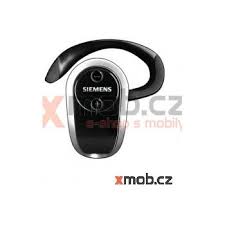
HHB-750 - Bluetooth headphones BENQ-SIEMENS - Free user manual and instructions
Find the device manual for free HHB-750 BENQ-SIEMENS in PDF.



User questions about HHB-750 BENQ-SIEMENS
0 question about this device. Answer the ones you know or ask your own.
Ask a new question about this device
Download the instructions for your Bluetooth headphones in PDF format for free! Find your manual HHB-750 - BENQ-SIEMENS and take your electronic device back in hand. On this page are published all the documents necessary for the use of your device. HHB-750 by BENQ-SIEMENS.
USER MANUAL HHB-750 BENQ-SIEMENS
© BenQ Mobile GmbH & Co. OHG 2006
All rights reserved. Subject to availability.
Right of modification reserved.
Ref. No.: A31008-H2601-A101-2-ZC19
(03/06)

Headset Bluetooth® Stereo
HHB-750
Headset Bluetooth® Stereo (en) 2
Headset Bluetooth® Stereo (de) 12
Headset Bluetooth® Stereo (it) 22
Headset Bluetooth® Stereo (fr)
(Kit piéton stéreo Bluetooth®) 32
Headset Bluetooth® Stereo (es)
Auricular Bluetooth® estéreo (es) 42
Headset Bluetooth® Stereo (pt) 52
Headset Bluetooth® Stereo (ru)
(TapHnTypa Headset Bluetooth® Stereo) 62
Headset Bluetooth® Stereo (pl)
(Zestaw szechawkowy Bluetooth® Stereo) 72
Headset Bluetooth® Stereo (nl) 82
Customer Care 92
European Directive 2002/96/EC 94
Federal Communication Commission (en) 101
FCC (Federal Communication Commission) (fr) 102
Headset Bluetooth® Stereo (en)
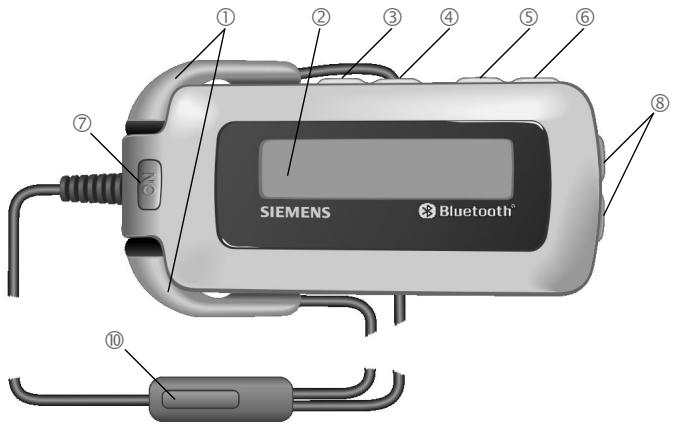
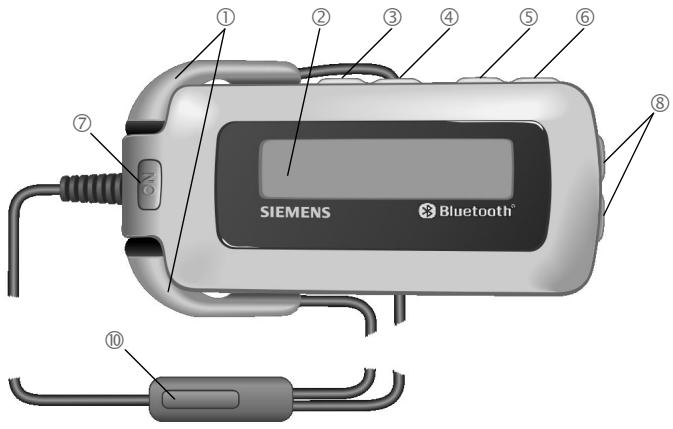
Contents/ Overview
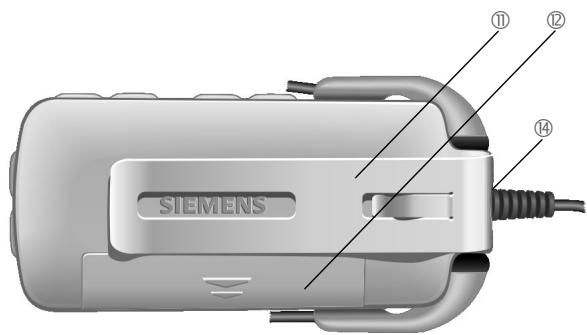
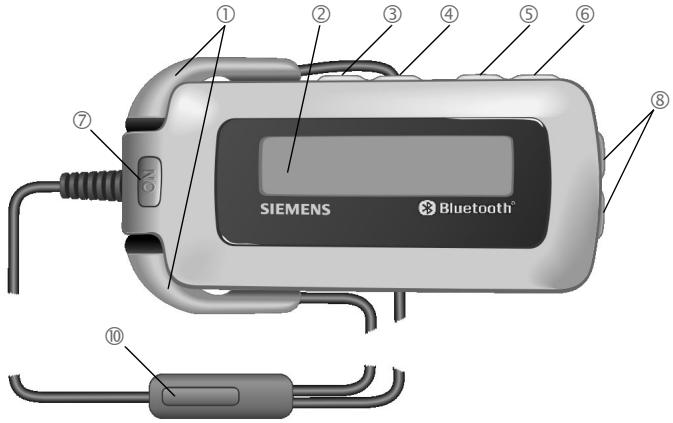
① Stereo earphones
② Display
③ Rewind key
Forward key
⑤ Stop key
⑥ Playback/pause key
⑦ ON On/Off key/key lock
Volume keys
Louder
Quieteter
⑨ Lanyard (not shown in picture)
Push to talk key (ptt key)
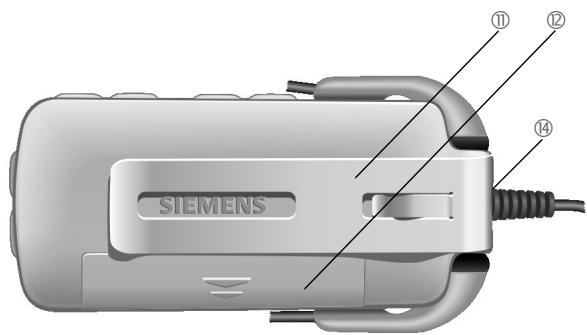
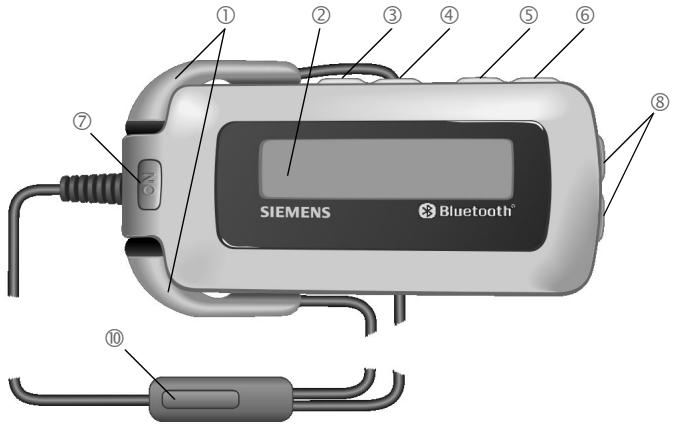
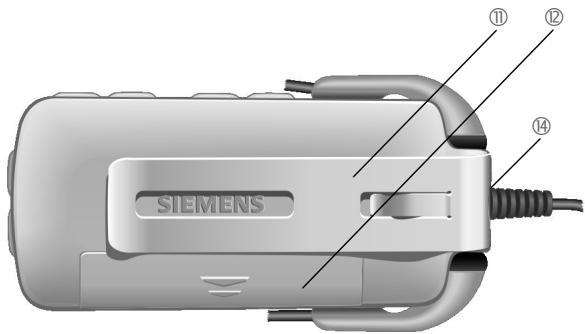
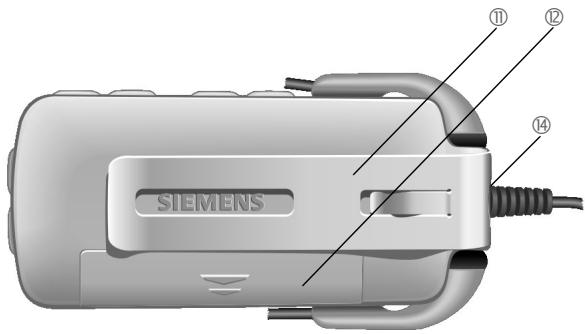
① BeltClip
Battery compartment
電 Battery (not shown in picture)
4 Connection socket for stereo earphones
Compatibility
The Headset Bluetooth® Stereo (hereafter referred to as "Head-set") is suitable for listening to music or making phone calls.
Listening to music
- Mobile phones with Media Player and Bluetooth profiles A2DP and AVRCP
- Other playback devices with the Bluetooth profiles A2DP and AVRCP (limited functionality only, p. ex. display symbols will not be shown)
Making phone calls
- Mobile phones with Bluetooth profile (handsfree profile)
Safety precautions
Please read the user guide and safety precautions carefully before use. Explain the content to your children and the hazards associated with using the Headset.

Remember to comply with legal requirements and local restrictions when using the device in aeroplanes, petrol stations, hospitals or while driving, for example.

Mobile phones can interfere with the functioning of medical devices such as hearing aids or pacemakers. Keep a distance of at least 20cm / 9 inches between the Headset and pacemaker. Wear the Headset on the ear farther away from a heart pacemaker during a call. For more information consult your doctor.

Caution! Small children might harm themselves. The device should therefore be kept out of reach of small children.

Do not throw the device into an open fire.

The Bluetooth Headset must only be opened by authorised service partners. Any changes to this device are strictly prohibited and will invalidate the operating licence.

Dispose of used devices and their accessories according to the legal regulations.

The device can interfere with the operation of nearby TVs, radios or PCs.

Use only original accessories. In this way, you will avoid possible health risks and damage to the product, and ensure compliance with all relevant provisions.
Improper use will invalidate the guarantee!
In some countries there may be restrictions on the use of Bluetooth devices. Please check with the relevant authority.
You may not hear music in stereo quality while driving because it is prohibited to use two earphones while driving. You may use one of the earphones for using the Headset for making phone calls.
For additional information please consult your mobile phone's user guide.
Manufactured by BenQ Mobile GmbH & Co. OHG under trademark license of Siemens AG.
Bluetooth® technology
The Bluetooth® word mark and logos are owned by the Bluetooth® SIG, Inc. and any use of such marks by BenQ Corp. is under license.
Other trademarks and trade names are those of their respective owners.
The Headset and mobile phone communicate using Bluetooth, a short-range radio connection.
To enable this communication, the Headset must be connected (Pairing) to the phone. For more information please read "Connecting to the phone for the first time (Pairing)", page 5.
Symbols
The following symbol explains the operation of the Headset:

This function varies from service provider to service provider. You may need to register separately for this service.
Getting started
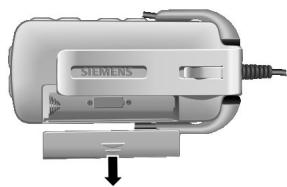
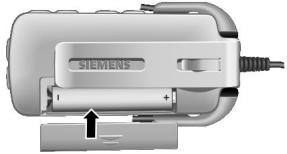
Insert the battery, see picture.
Connecting to the phone for the first time (Pairing)
For details on how to set up a Bluetooth connection, please consult your phone's user guide.
- Press the ON key and hold longer than 1 second (connection to a second phone: longer than 5 seconds). The display shows the registration mode (pairing).
-
Activate your phone's Bluetooth interface and start searching for Bluetooth-activated devices within the range of your mobile phone.
-
If your mobile phone finds your Headset, this is shown on the mobile phone display beneath the device name HHB-750.
If your mobile phone does not find the Headset within 3 minutes, activate search mode again (repeat first step).
- Enter the password (PIN) for the Headset into your mobile phone. This will be generated by the Headset and shown on the display.
The Headset is now ready for use. The Headset and the phone can communicate with one another and recognise each other in future.
Switching the Headset on and off/Key lock.
- Switching on:
ON
Press for about 2 seconds. The Headset is switched on and shows the device identification number on the display. If only one mobile phone is connected, this one will get automatically assigned.
- Switching off:
ON
Hold down. The Headset is switched off when the display is extinguished.
Key lock (in standby mode or during playback):
ON
Press briefly to activate and hold down to deactivate the key-lock.
Using a second mobile phone
The Headset can store the details of two phones, each of which can be selected for use.
When a third phone is connected, the entry details of the phone that has not been connected for the longer period of time are automatically deleted.
- Selecting a mobile phone:
ON
Press for about 2 seconds. The Headset is switched on and shows the two connected mobile phones on the display.


Select.

Confirm selection.
Listening to music
Prepare your mobile phone for playing music. For additional information please consult your mobile phone's user guide.
After connecting the mobile phone to the Headset you can play the title. Use the side keys on the Headset, see page 3.
Playback is interrupted by an incoming call. When the call is finished playback continues automatically.

Playback/Pause

Press briefly: Forward to next title, hold down: fast forward

Press briefly: Back to start of title, hold down: fast rewind

Stops playback. Pressing 1 starts playback again and plays the next track.

Louder.

Quieter.
The playback ends automatically when the playlist is terminated.
Making a phone call
The procedure described below only applies to Siemens mobile phones. It may be different for other manufacturers' mobiles.
- Switch the Headset on, see page 6.
Making a call

Press briefly: Accept a call.

Hold down: Reject or end a call.
Dialling using the mobile phone
Dial as normal using the mobile phone.

Press briefly: Make the call using the Headset.
Voice dialling
(if supported by the phone)

Press briefly: Call up voice dialling.
For additional information please consult your mobile phone's user guide.
During calls

Louder.

Quieter.

Press briefly: Hold call. Press briefly again: Continue the call.

Hold down: End call.
Second Call

Hold down: End current call.

Press briefly: Hold current call and accept call waiting.

Press briefly: Swap between 2 calls.

Press and hold 2x: End all calls.
Transferring a call

Press briefly: Accept the call with the Headset.
For additional information please consult your mobile phone's user guide.
Further settings
Reset to factory settings

Hold down: prepares the Headset.

Hold down the key for 5 seconds.
Attention!
This function deletes all stored data in the Headset, e.g. address books, call lists, etc.
Show software version

Hold down: prepares the Headset.


Press briefly at the same time: Show software version.
Display symbols
| Charge level of the battery | |
| Login mode (Pairing) | |
| Login mode (Pairing) not successful | |
| Phone is being connected | |
| Phone is connected | |
| No phone connection | |
| GSM service is available | |
| GSM service is not available | |
| Outgoing call | |
| Engaged | |
| Incoming call | |
| Current call | |
| Held call/call waiting | |
| Held call | |
| Active call/held call | |
| Connection error | |
| Key lock | |
| connected to playback devices |
| Playback/Pause | |
| Press briefly: Forward to next title, hold down: fast forward | |
| Press briefly: Back to start of title, hold down: fast re-wind | |
| This is shown if there is no information about the music title. | |
| Volume | |
| Action not possible | |
| Reset to factory settings | |
| Has been reset to factory settings | |
| Voice dialling active (if supported by the phone) | |
| SMS/MMS |
Troubleshooting
Headset does not work
- If the battery is empty, you will hear a warning tone and the display shows .
Insert new batteries.
Bluetooth connection problems
- The Bluetooth profile of your mobile phone and your Headset are not compatible, see page 3.
- No mobile phone connected, see page 5.
- You will know the call is about to drop if the audio quality is poor.
Reduce the distance between the Headset and the mobile phone.
If the Bluetooth connection to the mobile phone is interrupted for several seconds during a call, you can only continue the call with the mobile phone.
Technical data and approval
| Power supply | AAA cell, 1.5 volts or rechargeable AAA cell, 1.2 V, min. 600 mAh |
| Playback time/talk time | up to 8 hours (depending on battery type) |
| Standby time | up to 450 hours |
| Bluetooth range | max. 10 metres, less in buildings |
| Operating temperature | -20 °C to +55 °C |
| Headset output power | max. 8 mW (at least 16 Ohm) |
| Weight Headset (housing) | approx. 42 g |
| Weight Earphones (with cable) | approx. 18 g |
| Casing measure-ments (Headset) | approx. 80.88 x 36.1 x 18.7 mm (LxWxH) |
| Display | LED backlighting |
Declaration of conformity
FCC:
see page 101.
CE:
BenQ Mobile hereby declares that the phone described in this user guide is in compliance with the essential requirements and other relevant provisions of European Directive 1999/5/EC (R&TTE). The relevant declaration of conformity (DoC) has been signed. Please call the company hotline if you require a copy of the original:
www.BenQMobile.com/conformity
Within the EU this product is intended for use in Austria, Belgium, Denmark, Finland, France, Germany, Greece, Ireland, Italy, Luxembourg, The Netherlands, Portugal, Spain, Sweden, United
Kingdom and within EFTA in Iceland, Norway and Switzerland.
0682

Complies with IDA Standards DB01752
Care
Clean the Headset with a damp cloth or anti-static cloth. Do not use any chemicals.
Do not use cleaning solutions, colours or other chemical substances.
Protect the Headset from moisture and knocks. Do not expose your Headset to direct sunlight.
Accessories
Products may be obtained in specialist shops or visit our online shop at:

Original Accessories www.BenQMobile.com/ shop
Customer Care
See Customer Care, page 92.
Headset Bluetooth® Stereo (de)
Complies with IDA Standards DB01752
Pflege
Original Accessories www.BenQMobile.com/ shop
Kundenservice (Customer Care)
Complies with IDA Standards DB01752
Cura
Confirmer la selection.
Musique
www.BenQMobile.com/conformity
(€ 0682

Complies with IDA Standards DB01752
Entretien
www.BenQMobile.com/conformity
0682

Complies with
IDA Standards
DB01752
Original Accessories
www.BenQMobile.com/ shop
www.BenQMobile.com/conformity
(€ 0682

Complies with IDA Standards DB01752
Cuidados
Limpe o auricular com um pano humido ou antiestatico sem produits de limpeza químicos.
Acessórios originals www.BenQMobile.com/ shop
Servico de Apoio a Clientes (Customer Care)
veja a Customer Care, pág. 92.
Headset Bluetooth® Stereo (ru) (TapнTypea Headset Bluetooth® Stereo)
KOMJIeKT NOCTaBKn/ 063op
① CTepeo-rapHnIpya.
② Dicnnei.
③ KnaBnua yckopenHoro nepexoHaHaad.
④ KnaBnua yckopenHoro nepexoJa BnepeJ.
⑤ KnaBnuaOCTaHOBKM.
⑥ KnaBmua Bocpon3BeDnHn/Nay3bl.
ON KnaBnHa BKNIOHEN/HbIKIOHEn/6IOKINOBKn KNAIBNtYbI.
⑧ Knabinyi nperyu npOBK npOMKOCTM:

rPOMHe, TMUe.
⑨ Pemeshok JIINHOSEHNA 3aJIaCTbe (He n3o6paXeH Na pncyHKe).
10 KnaBnua "NaKMMn rOboPn" (KnaBnua ptt).
⑪ 3axmДЯкpeHnHa ha pemHe.
⑫БатAPEHbIOTcK.
⑬Батаря(He n3o6paqhen Ha pncyHke)
14 The3doIpaIPOKIIIOHcENIa CTepeoHauyHINKOB.
COBmectHMOCTb
RapnTypa Headset Bluetooth Stereo (ДалпeeнНазывема"rapnTypa)npedHaNauHena ДпяпocnsuWbHaNMy3bKIN paarrobopa no Tepehony.
IpocnyuBaanHe My3bIKI
Ha6ePHTe HOMe Ha Mo6BnHOM TeneFOHe KAK O6bHNo.

Haxmnte 6bIcStpo Otnyctte KNABnUy: paarOBop Ype3 raphNtypy.
Tolocobnha6op
(ecnnoepKnaeTcra Tepeohom)

Haxmnte Nbictpo OtnyctnE KNABUNU: BblO8 FyHKuIN roIocBOrHObopa TeneoHa.
DOnOJIHnTeIbHaN HnΦopMaζηa πPnBODINTCB INCHCTpyKlμn IIO 3KcΠyataζm MObIbHOrO TepeζoHa.
BoBpempa3robopa

Pompe.
Tnwe.

Haxmnte Nbictpo
otnyctne KnaBnUy:
nepeBOv Bbl3Oba Ha
yapeKahne.Eue pa3
haxmnte Nbictpo
otnyctne KnaBnUy:
npoJOnJxehne
paarObopa.

YdpeKbMaTe KnaBsiuH naKaToI:3aBePeJeHne paarOba.
BtOPOB BbI3OB


UyepxbaTte KJIaBIMuJ HaukaToT OBepeHne AKTHBORO CoeDInHeHn.

Hakmte Nbctpo OtnyCTHe KnaBnUy: nepeBOd AKTNBHO CoeINHEHnHa yepkAnHe n pIeM BTOPOBbIOBA.

Haxmnte 6bictpo Otyctte KnaBnUy: NepeklioueHne Mekdy DByMae CoedineHneAaMn.

Hakmnte uyepxmbaTe KnabuIshu HaxatOn Dba pa3a: 3aBepseHene Bcex coedinHeHn.
IpeeknoucheHe coeDInHeHn

HaxmTe n 6bICTpo
OTnyctte KnaBnUy:
nepeKnUoyHeHne
AKTBHO COeHHeHn
Ha raphHnTpy.
DOnOJIHnTeIbHaN HnHOpMaunrnpMbOJNTcB INHCTpyKuIN NO3KcPnyataunMoBnIbHorToTeJefoHa.
Другne HacTpOйКn
Bo3BpAT KCTaHdapTHbIM HactpoiKAM

YdepKbBaiTe KnaBnUy HnKaToI: RaHnTypa roTOBa K BbINOpHeHIno npOeYpbI.

UdepKbBaeTKe KlaBnUy HaxkToB TEuHHe 5cEynD.
BHHMaHHe!
PnBbIIOJIHEnHm3ToIyHKUIN ydAnJTOCTBCE COxPAHEHIIe B rApHNType daHbIe, HapNIpEe, aPeCHaA KHIRa, CNiCKN bI3OBOB I.T.D.
PpOcMoTp BepCn npOrpaMMHOro 0eBcepeHn

YdepKbBaeTKeKnabNShu HnKaToI: TaPnHTypa TOTOBA K BbINOpHEHnIO pNoeDybp.

&
OndobepemHo
HakMNTe N 6bIcTpo
otnyCTte KJIaBnIH:Ha
DnCINNe BbIBOITCNr
BercsN nPOrpamMHORo
ObeCneHeHH.
ДисплейнBLEcMBOЛbl
| CoctoHne 6aTapei. | |
| РекIM ретистрацIM (co3dANHe napbl). | |
| РекстрацIM (co3dANHe napbl) НЕ ВИПОЛHEА. | |
| ПоклочENe K TeLEФОну. | |
| ПоклочENe K TeLEФОну ВИПОЛHEО. | |
| НET NOДКЛочENHOrO TeLEФОнa. | |
| Сеть GSM доступna. | |
| Сеть GSM недоступna. | |
| ИсхODяш尼ВИЗ. | |
| ЗаняTO. | |
| ВХODЯШ尼 BИЗ. | |
| АктуНоE coeDIненHe. | |
| УderЖИВаEMOE соeDIнENHIne/BTOPOI BИЗ. | |
| УderЖИВаEMOE coeDIнENHIne. | |
| АктуНоE соeDIнENHIne/YderЖИВaEMOE соeDIнENHIne. | |
| Ош�Бka priN coeDIнENHm. | |
| БLOKINOBkA KIABnATypbl. | |
| СоeDIнENHIne c UCTPOnICTBOM ВОСПОИЗBEDEHINЯ MY3bIKN. |
| Bocnpo3bveHne/ny3a. | |
| Haxmnte Hbictpo otnyctte Klabinu: nepexod K cneyuoste KOMnO3u#n, ydepXnBaIe TKeLabinu hakatoi: bIcIptbI nepexod Bnepe#. | |
| Haxmnte Hbictpo otnyctte Klabinu: nepexod K npedbyduye KOMnO3u#n, ydepXnBaIe TKeLabinu hakatoi: bIcIptbI nepexod Ha3ad. | |
| 3Tn CImBOIbIy BbIOdAITcRA Na DincPle#, eCNI HET INHΦOPMa#NI O My3bIkaJIbHOJ KOMnO3u#n. | |
| ГрмКоCTb. | |
| BbIpONHeHne DeiCTBIA NebO3MOJXHO. | |
| Bo3Bpar K cTaHdapTHbIM HacTpO#kAM. | |
| BbIpONHe H Bo3Bpar K cTaHdapTHbIM HAcTpO#kAM. | |
| AkTIBen rOtolocOBoH na6Op (ecNI pOdepXnBaETcRA TeneΦoHOM). | |
| CoobSeHn SMS/MMS. |
YcTpaHHeH HeNCpPaBHOCTeI
TapHTypa He pa6oTaet
Ppnaepaepbe 8abepe3BvHHT pndynpdntelbHn CNTHaN n HaDINCNPE BBUDDNTCMMBOI:
→ YctaHOBHTe HObYIO 6aTapeio.
Поблелмь с coeINHeHnEM Bluetooth
-Пюpondи Bluetooth MobiHbHoro TetefoHa rapHTypbI HecOBMeCTNbIMc. cTp.63.
HeNoiKaIKnOHeM No6BnIbHbTneTeΦoH-CM. crp. 65.
BOSTMOXHOCTbPA3pbIbBA COEINHNEHMOKHO ONpeJeNITb IyUxDuHEnHQ KueCTBa 3BykA.
→YMEhblIHMeTpePACTONHE MEXKJY RAPHTyHPONMOBbHbIM TENEFOHOM.
Ecni coeHHeHne Bluteoth mExdy rapHNTpyn o TenefoHOM bIyo npBeAHO BO vBpeM aTaRbOPOHa nEckOJIbKO CekYND,TO pArGOB OMOKHO npDoJXnTb ToJIbKO C MObIbHO TeteFOHa.
TexHnueckne xapaKTepeNCTNKu N dOnyCK K 3KcPnPyTaUIN
CootBcTbne cTaHdaptam
FCC:
JaHHOe yCTPOIcTBO COOTBETCTBYET 3To yCTPOIcTBO yDIOJIeTBOPaT REbOABnIM TaChN 15 DpuKeKTNB FCC.YCIOBnA paBOtBu DaHHOr YcTOPIcTBa: (1)YcTOPIcTBo He CoaDAeT NOMex N (2)YCTPOIcTBO DoJNKHO paOToTaB B yCIOBnAX NOMEX, KBIOUaYAMOMEXH, KOTOpBe MOrYT Bbl3BaTb HENpAbINbHOe fHyHKUHOmPObAHne YcTOPIcTBa.
CE (COOTBETCTBNE CTaHapTaM)
HactoIaUMФIpMaBenQMobile 3aBJIeT,TOOINcAHHbI B30J INHTCPuIMNIOKcPnJaTuACM MOIBhBmTepeOH COOTBeTCTByET BCEM OCHOBONIPOAraUOMI Tpe6oBaHnAM I NOLOXeHnAM DnpeKTNBbl 1999/5/EC(R&TTE).PiOniCah COOTBeTCTByUOHN cepTnFkAT COOTBeTCTBnA (DoC):
0682

Complies with IDA Standards DB01752

ME69
yxoI
ПOTИРАЕ РAPНТУР BNAЖСОН TKAHBO NIN AHTNCTAчECКО CANФETКВБЗЧТС
He nCnoIb3yIte pactBOPHTeIN, KpaCKn I npTye XmMnueckne BeueceCTBa.
3aunuatae rapHnTpy O Tbarni u yapob. He noDBeprAte rapHnTpy BO3dEChTBnIO pIyMOrO COJIHeUHOro CBeta.
AkecccyapbI
BbMOKeTe pnpOBepcTn
aKcEccyapBbV
CneUaJIuN3IupOBaHbIX MaRa3INhax
nn 3aka3aTb Nx Ype3 INTEpHET.
CepBnchna cnyx6a
CM. Customer Care, ctp. 92.
Headset Bluetooth® Stereo (pl) (Zestaw sluchawkowy Bluetooth® Stereo)
Complies with IDA Standards DB01752
Konserwaca
www.BenQMobile.com/conformity
(€ 0682

Complies with IDA Standards DB01752
Verzorging
We offer fast, individual advice! You have several options:
Our online support on the Internet: www.BenQMobile.com/ customercare
We can be reached any time, any place. You are given 24 hour support on all aspects of our products. Here you will find an interactive fault-finding system, a compilation of the most frequently asked questions and answers, plus user guides and current software updates to download.
You will also find the most frequently asked questions and answers in this user guide.
You can also get personal advice about our range of products on our Premium Hotline:
Austria 09 00 30 08 08
(1,35 Euro/Minute)
Germany 09001745826
(1,24 Euro/Minute)
France. 0899700185
(1,35 EuroTTC/
Qualified employees are waiting to offer you expert information about our products and installation.
In some countries repair and replace services are impossible where the products are not sold through our authorised dealers.
When calling customer service, please have ready your receipt and your car kit, and if available, your Service customer number.
If repair work is necessary, please contact one of our service centres:
Abu Dhabi 026423800
Argentina 08102226624
Australia. 1300665366
Austria. 0517075004
Bahrain 40 42 34
Bangladesh. 017527447
Belgium. 078152221
Bolivia 021214114
Bosnia Herzegovina. 033276649
Brunei 02430801
Bulgaria. 02739488
Cambodia 12800500
Canada 18887770211
Chile. 800530662
China 40 08 88 56 56
Colombia. 01 80 07 00 66 24
Croatia 016105381
Czech Republic. 233032727
Denmark 35 25 65 29
Dubai 043966433
Ecuador 1800101000
Egypt. 023334111
Estonia 6304797
Finland 0922943700
France. 0156384200
Germany. 01805333226
Greece 80 11 11 11 16
Hong Kong. 28 61 11 18
Hungary. 06 14 71 24 44
Iceland 5203000
India 22 24 98 70 00 Extn: 70 40
Indonesia 02146826081
Ireland. 1850777277
Italy 02 24 36 44 00
Ivory Coast. 05 02 02 59
Jordan 064398642
Kenya. 2723717
Kuwait 2454178
Latvia 7501118
Lebanon 01443043
Libya 02 13 50 28 82
Lithuania 870070700
Luxembourg 43843399
Macedonia 023131848
Malaysia. +60377124304
Malta. +353214940632
Mauritius 2116213
Mexico 018007110003
Morocco 22669209
Netherlands 0900333100
New Zealand. 08 00 27 43 63
Nigeria 014500500
Norway. 22708400
Oman 79 10 12
Pakistan. 02 15 66 22 00
Paraguay 800102004
Peru. 080052400
Philippines 027571118
Poland. 08 01 30 00 30
Portugal 808201521
Qatar. 04322010
Romania 02 12 09 99 66
Russia. 88002001010
Saudi Arabia 022260043
Serbia 01 13 07 00 80
Singapore 62 27 11 18
Slovak Republic. 0259682266
Slovenia 014746336
South Africa 0860101157
Spain. 902115061
Sweden 087509911
Switzerland 0848212000
Taiwan 02 23 96 10 06
Thailand 027221118
Tunisia 71861902
Turkey. 02164599898
Ukraine 88005010000
United Arab Emirates. 043660386
United Kingdom 08705334411
Uruguay 00 04 05 46 62
USA 18887770211
Venezuela. 08001005666
Vietnam. 84 89 20 24 64
Zimbabwe 04369424
European Directive 2002/96/EC
All electrical and electronic products should be disposed of separately from the municipal waste stream via designated collection facilities appointed by the government or the local authorities.
This crossed-out wheeled bin symbol on the product means the product is covered by the European Directive 2002/96/EC.
The correct disposal and separate collection of your old appliance will help prevent potential negative consequences for the environment and human health. It is a precondition for reuse and recycling of used electrical and electronic equipment.
For more detailed information about disposal of your old appliance, please contact your city office, waste disposal service or the shop where you purchased the product.
Italiana

All electrical and electronic products should be disposed of separately from the municipal waste stream via designated collection facilities appointed by the government or the local authorities.
This crossed-out wheeled bin symbol on the product means the product is covered by the European Directive 2002/96/EC.
The correct disposal and separate collection of your old appliance will help prevent potential negative consequences for the environment and human health. It is a precondition for reuse and recycling of used electrical and electronic equipment.
For more detailed information about disposal of your old appliance, please contact your city office, waste disposal service or the shop where you purchased the product.
Federal Communication Commission
This device complies with Part 15 of the FCC Rules. Operation is subject to the following two conditions: (1) This device may not cause harmful interference, and (2) this device must accept any interference received, including interference that may cause undesired operation.
This equipment has been tested and found to comply with the limits for a Class B digital device, pursuant to Part 15 of the FCC Rules. These limits are designed to provide reasonable protection against harmful interference in a residential installation. This equipment generates, uses and can radiate radio frequency energy and, if not installed and used in accordance with the instructions, may cause harmful interference to radio communications. However, there is no guarantee that interference will not occur in a particular installation. If this equipment does cause harmful interference to radio or television reception, which can be determined by turning the equipment off and on, the user is encouraged to try to correct the interference by one of the following measures:
- Reorient or relocate the receiving antenna.
- Increase the separation between the equipment and receiver.
- Connect the equipment into an outlet on a circuit different from that to which the receiver is connected.
- Consult the dealer or an experienced radio/TV technician for help.
Any changes or modifications not expressly approved by the party responsible for compliance could void the user's authority to operate this equipment.
FCC Radiation Exposure Statement:
This equipment complies with FCC radiation exposure limits set forth for an uncontrolled environment. This equipment should be installed and operated with minimum distance 20cm between the radiator & your body.
This transmitter must not be co-located or operating in conjunction with any other antenna or transmitter.
IC Statement:
"The installer of this radio equipment must ensure that the antenna is located or pointed such that it does not emit RF field in excess of Health Canada limits for the general population; consult Safety Code 6, obtainable from Health Canada's website www.hc-sc.gc.ca/rpb"
CE Statement:
Hereby, the manufacture declares that this device is in compliance with the essential requirements and other relevant provisions of the R&TTE Directive 1999/5/EC.
This device will be sold in the following EEA countries: Austria, Italy, Belgium, Liechtenstein, Denmark, Luxembourg, Finland, Netherlands, France, Norway, Germany, Portugal, Greece, Spain, Iceland, Sweden, Ireland, United Kingdom, Cyprus, Czech Republic, Estonia, Hungary, Latvia, Lithuania, Malta, Slovakia, Poland, Slovenia.