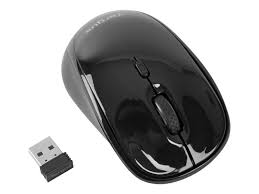
WIRELESS COMPACT LASER MOUSE - Wireless Mouse TARGUS - Free user manual and instructions
Find the device manual for free WIRELESS COMPACT LASER MOUSE TARGUS in PDF.



| Product Type | Compact wireless laser mouse |
| Brand | Targus |
| Model | Wireless Compact Laser Mouse |
| Interface | USB (micro USB receiver) |
| Connectivity | Wireless, 2.4 GHz (estimated) |
| Compatible Operating Systems | Windows 2000, XP, Vista, 7; Mac OS X 10.4 and later |
| Power Supply | 2 AA batteries |
| Battery Life | Varies by usage; automatic power saving mode |
| Battery Level Indicator | LED indicator: flashes every 3 seconds if less than 5% charge |
| Sensor Type | Laser (Class I) |
| Number of Buttons | 3 (left click, right click, scroll wheel) |
| Scroll Wheel | Yes |
| Dimensions (approx.) | 10 × 5 × 3 cm |
| Weight (with batteries) | Approximately 80 g |
| Box Contents | Mouse, micro USB receiver, 2 AA batteries, manual |
| Installation | Plug & Play, no driver |
| Power On/Off | Switch under the mouse |
| Power Saving Mode | Automatic after inactivity; reactivation by click or movement |
| Maintenance and Cleaning | Clean with a soft, dry cloth. Do not use abrasive products. |
| Safety | Class I laser. Do not look directly into the beam. Avoid eye exposure. |
| Spare Parts and Repairability | Not user repairable. No spare parts available. |
Frequently Asked Questions - WIRELESS COMPACT LASER MOUSE TARGUS
User questions about WIRELESS COMPACT LASER MOUSE TARGUS
0 question about this device. Answer the ones you know or ask your own.
Ask a new question about this device
Download the instructions for your Wireless Mouse in PDF format for free! Find your manual WIRELESS COMPACT LASER MOUSE - TARGUS and take your electronic device back in hand. On this page are published all the documents necessary for the use of your device. WIRELESS COMPACT LASER MOUSE by TARGUS.
USER MANUAL WIRELESS COMPACT LASER MOUSE TARGUS
©2010 Manufacture or imported by Targus Europe Ltd., Hounslow, Middlesex, TW4 5DZ, UK. All rights reserved. Targus is either a registered trademark or trademark of Targus Group International, Inc. in the United States and/or other countries. Features and specifications are subject to change without notice. All trademarks and registered trademarks are the property of their respective owners.

N2953


C
User Guide
Table of Contents
GB - English
Targus Wireless Compact Laser Mouse 6
BG-BbIrpckn (e3nk)
Be3KnUHa KOMNaKTHa Ia3epHa MUsKa Targus 14
CZ - Ceştna
Mouse Laser Wireless compatto Targus 102
LT-Lietuviskai
Belaide kompaktiška lazeriné pele „Targus" 110
LV-Latviešu
Targus kompakta bezvadu lazerpele 118
NL - Nederlands
Targusdraadloze compacte lasermuis 126
NO - Norsk
Targus tradløs kompakt lasermus 134
PL-Polski
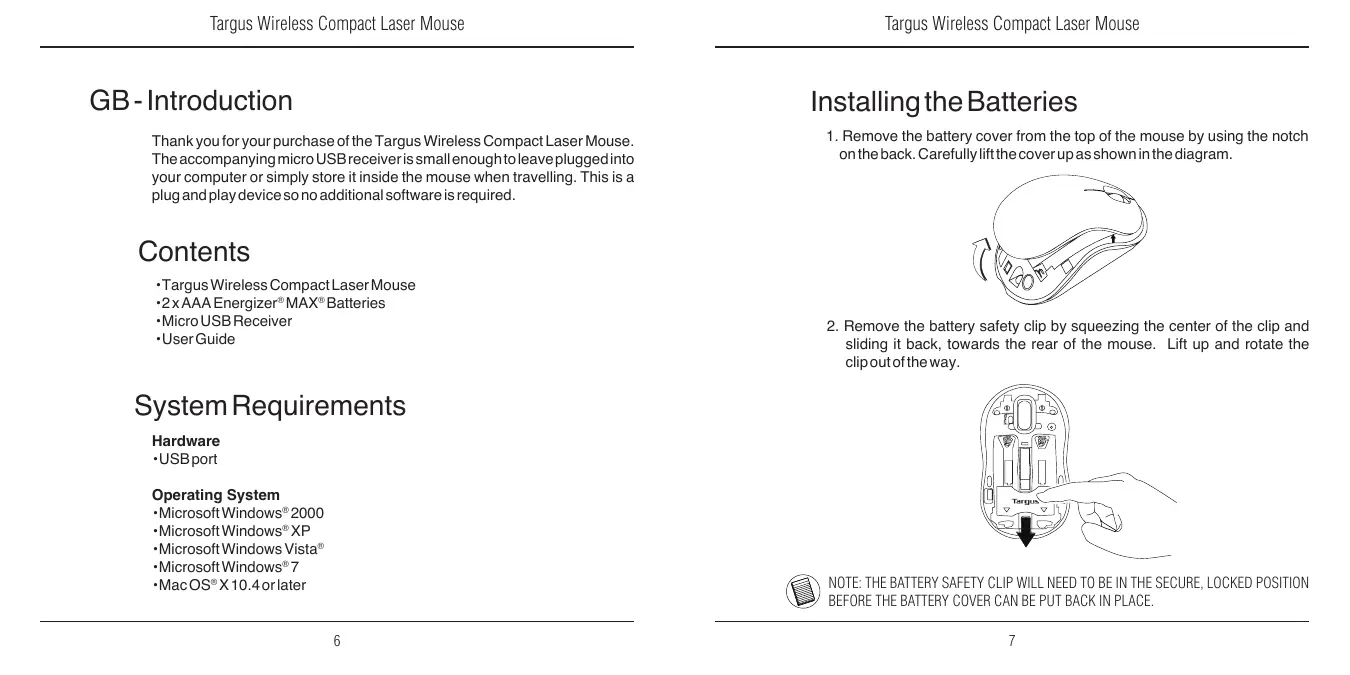
Thank you for your purchase of the Targus Wireless Compact Laser Mouse. The accompanying micro USB receiver is small enough to leave plugged into your computer or simply store it inside the mouse when travelling. This is a plug and play device so no additional software is required.
Contents
Targus Wireless Compact Laser Mouse
-2 x AAA Energizer® MAX® Batteries
- Micro USB Receiver
-User Guide
System Requirements
Hardware
-USB port
Operating System
Microsoft Windows® 2000
- Microsoft Windows® XP
- Microsoft Windows Vista®
- Microsoft Windows® 7
MacOSX10.4orlater
Installing the Batteries
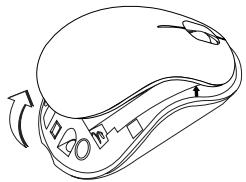
- Remove the battery cover from the top of the mouse by using the notch on the back. Carefully lift the cover up as shown in the diagram.
- Remove the battery safety clip by squeezing the center of the clip and sliding it back, towards the rear of the mouse. Lift up and rotate the clip out of the way.
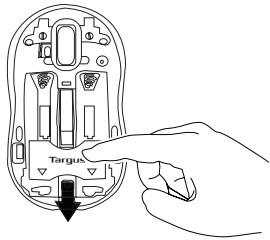

NOTE: THE BATTERY SAFETY CLIP WILL NEED TO BE IN THE SECURE, LOCKED POSITION BEFORE THE BATTERY COVER CAN BE PUT BACK IN PLACE.
- Remove the micro USB receiver stored inside the center compartment.
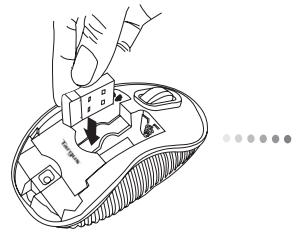
Micro USB receiver
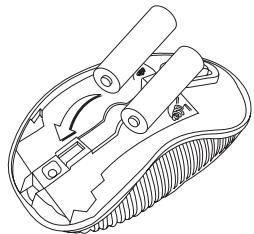
- Insert the two AAA batteries, making sure that the positive (+) and negative (-) ends of each battery match the polarity indicators inside the battery compartment.
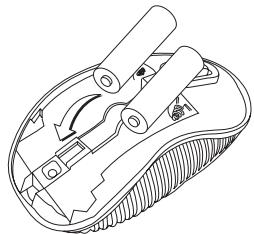
- Replace the battery safety clip by sliding it forward until it clicks into place and then replace the battery cover.
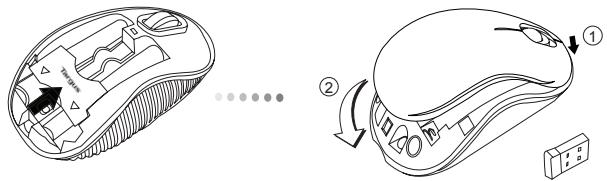

NOTE: THE FRONT OF THE LID SHOULD BE INSERTED FIRST BEFORE SNAPPING THE BACK OF THE LID DOWN.
Establishing the Connection
(A) Plug the USB receiver into an available USB port on your computer.
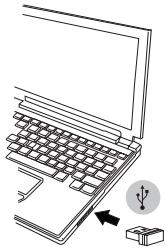
(B) Turn on the mouse by sliding the power switch to the ON position, located on the bottom of the mouse.
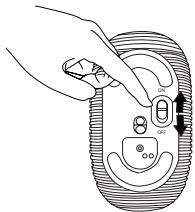
This mouse is a plug and play device. It will automatically operate when the USB receiver is connected to the computer.
Power On:
Slide the power switch to the ON position.
Power Off:
Slide the power switch to the OFF position.
Power Saving mode:
After an extended period of time, if the mouse is not used, it will automatically enter power saving mode to conserve power and increase battery life. Click on any mouse button or simply move the mouse to resume the normal operation. The mouse may take a few seconds to reconnect with your computer.
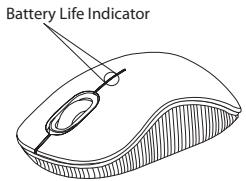
Battery Life Indicator
- When the mouse is turned on, the LED illuminates for 3 seconds and then fades out
The low power light will start flashing every 3 seconds when less than 5% of the battery power remains. Replace the batteries as soon as possible
Power Management
- To extend the life of your battery, turn off the mouse while travelling or when you're not using it.

CAUTION
LASER RADIATION. DO NOT STARE INTO THE BEAM OR VIEW DIRECTLY WITH OPTICAL INSTRUMENTS. CLASSILASER PRODUCT.
NEVER POINT A LASER BEAM INTO A PERSON'S EYES OR VIEW A LASER BEAM
DIRECTLY, AS PROLONGED EXPOSURE CAN BE HAZARDOUST TO THE EYES.
MOMENTARY EXPOSURE FROM A LASER POINTER, SUCH AS AN INADVERTENT
SWEEP OF THE LIGHT ACROSS A PERSON'S EYES, MAY CAUSE TEMPORARY
FLASH BLINDNESS SIMILAR TO THE EFFECT OF A CAMERA FLASH BULB.
ALTHOUGH THIS CONDITION IS TEMPORARY, IT CAN BECOME MORE
DANGEROUS IF THE EXPOSED PERSON IS ENGAGED IN A VISION-CRITICAL
ACTIVITY SUCHASDRIVING.
BG - Въевке.
BnaroDapm 3a nokyPkata Ha Be3xNkHa KOMpaKTHa Ia3epHa MInka Targus. PnpduKjBaunia MMKpo USB npneMnke EdoCTbHOn MInnaTIOpeH, 3a da ro octabTe BkIIOueH KbM KOMPiTObpa. MInkaTa eYcTPOIETO BVnda 'plug-n-play' n He ce HxJdae ot DonbJIHNITeH coΦTyep.
CbDbPkaHne
-БeЗкунаКOMпakтHa Лаэрна МИшka Targus
- BaTeepu 2 x AAA
- MInKpo USB npHemHnK
PbkoBOCTBOHa notpe6ntela
CnCTeMHN n3nCKBaHn
Xapnyebp
USB INTEppeic
Operating System
Microsoft Windows® 2000
- Microsoft Windows® XP
Microsoft Windows Vista®
- Microsoft Windows® 7
Mac OS® X 10.4 nJn no-HOBA
CLASS 1 LASER PRODUCT
UPOZORNÉNÍ
LASEROVÉ ZÁRENÍ. NEDIVEJE TSE DO PAPRSKU ANI SE NEDIVEJE TPE PRIMO POMOCÍ OPTICKYCH PRISTROJU. PRODUKT
LASEROVÉ TRÍDY 1.
LASEROVYM PAPRSKEM NIKDY NEMIRTE DO OCI JINE OSOBYANI SE NEDIVEJE T PRIMO DO PAPRSKU. DELSI KONTAKT MÜZE BYT OČIM NEBEZPEÇNY.
CHVILKOVY KONTAKT S LASEROVYM UKAZOVÁTKEM, JAKO JE NAPR. NAHODNÉ PREJETI OČI LASEREM, MÜZE ZPUSOBIT DOÇASné ZÁBLESKY PODOBNÉ BLESKU FOTOAPARÁTU. MÜZE BYT NEBEZPEÇNEJŠI, POKUD SE TATO OSOBA VENEUJE CINNOSTI NÁROCNÉ NA SLEDOVÁNÍ, NAPR. RIZENİ
DE - Einführung
CLASS 1 LASER PRODUCT
VORSICHT
LASERSTRAHLUNG. NICTIT MIT BLOSSEM AUGE ODER MIT OPTISCHEN INSTRUMENTEN DIREKT IN DEN STRAHL BLICKEN. KLASSE 1 LASERGERÄT.
RICHTEN SIE DEN LASERSTRAHL NIE AUF DIE AUGENEINER PERSON UND BLICKEN SIE NIE DIREKT INDEN LASERSTRAHL, DA DIES ZU FÜR DIE AUGENGEFÄHRLICH SEIN KANN.
CLASS 1 LASER PRODUCT
IPOZOxH
AKTINOBOIAAIEZEP.ANOOFYETENAKOITAETE STH E M H THSAKTINA NATHEITE ANEYEIA ME ONTIKA OPGANA.IPOIONAEIZEP KATHFOPIA I. NOTE MH STPEΦETETHN AKTINAAEIZEP TA MATIA KANOIOY KAI MHN TH BAEIENTEMYMNO MATI, FIATI H IAPATETAMENHEKGE ANOBEI ENIKINADYNH TIA THN OPA
CLASS 1 LASER PRODUCT
CAUTELA
EMISSIONI LASER. NON FISSARE IL RAGGIO NE' GUARDARLO DIRITTAMENTE CONSTRUMENTI OTTICI. PRODOTTO LASER CLASSE I. NON PUNTARE MAI UN RAGGIO LASER NEGLI OCCHI NE' GUARDARLO DIRITTAMENTE, L'ESPOSITIZIONE PROLUNGATA POTREBBBE DANNEGGIARE LA VISTA. L'ESPOSITIZIONE TEMPORANEAAUNPUNTATORELASER, AD ESEMPIO COLPENDO INAVVERTITAMENTE GLI OCCHI MUOVENDO IL RAGGIO LASER, PUO CAUSARE L'OFFUSCAMENTO DELLA VISTA TEMPORANEO, COME ACCADE GUARDANDO IL FLASH DI UNA FOTOCAMERA. SEBBENE SITRATTIDUNACONDIZIONETEMPORANEA, PUO PORTARE A CONSEGUENZE PIU GRAVI SE LA PERSONA ESPOSTA STA SVOLGENDO UN'ATTIVITA IN CUI LA VISTA E' FONDAMENTALE, AD ESEMPIO SI TROVA ALLA GUIDA DI UN VEICOLO.
LT - lvadas
CLASS 1 LASER PRODUCT
OSTRZEŽENIE
PROMIENIOWANIE LASEROWE. NIE PATRZEC BEZPOSREDNIO LUB PRZY POMOCY INSTRUMENTOW OPTYCZNYCH W PROMIEN LASERA. URZADZENIE LASEROWE KLASY 1.
NIGDY NIE KIEROWAĆ PROMIENIA LASERA W OCZY INNEJ OSOBY ANI NIE PATRZEC BEZPOŚREDNIO W PROMIEN LASERA, GDYZ DŁUGOTRWAŁE NARAŽENIE NA JEGO DZIAŁANIE MOZE BYC SZKODLIWE DLA WZROKU.
CHWILOWE SPOJRZENIE WE WSKAZNIK LASEROWY, NA PRZYKLAD W WYNIKU PRZYPADKOWEGO RUCHU WSKAZNIKA W CZASIE PREZENTACJI MOZE WYWOŁAÇ CHWILOWA SLEPOTE, PODOBNA DO REAKCJI NA BLYSK FLESZA. CHOCIAŽ JEST TO STAN CHWILOWY, TO MOZE BYĆ GROZNY, JESLIDANA OSOBAWWKONUJE DZIAŁANIA WYMAGAJACE UŽYWANIA WZROKU, NP. PROWADZI SAMOCHÖD.
PT - Introdução
A. jlll l 8jss A. jlll A. jlll C. jlll (-) clll
Juaa Jaae Jaae Jaae Jaae Jaae Jaae Jaae
USB
:
1
:
..
aai
g jilali jai jia jiu jia jiu jiu jiu jiu jiu jiu jiu jiu jiu jiu jiu jiu jiu jiu jiu jiu jiu jiu jiu jiu jiu jiu jiu jiu jiu jiu jiu jiu jiu jiu jiu jiu jiu jiu jiu jiu jiu jiu jiu jiu jiu jiu jiu jiu jiu jiu jiu jiu jiu jiu jyu jiuyu jiuyu jiuyu jiuyu jiuyu jiuyu jiuyu jiuyu jiuyu jiuyu jiuyu jiuyu jiuyu jiuyu jiuyu jiuyu jiuyu jiuyu jiuyu jiuyu jiuyu jiuyu jiuyu jiuyu jiuyu jiuyu jiuyu jiuyu jiuyu jiuyu jiuyu jiuyu jiuyu jiuyu
CLASS 1 LASER PRODUCT




- Table of Contents
- NL - Nederlands
- NO - Norsk
- PL-Polski
- Contents
- System Requirements
- Installing the Batteries
- Establishing the Connection
- Power On:
- Power Off:
- Power Saving mode:
- Battery Life Indicator
- Power Management
- CAUTION
- BG - Въевке.
- CbDbPkaHne
- CnCTeMHN n3nCKBaHn
- CLASS 1 LASER PRODUCT
- UPOZORNÉNÍ
- DE - Einführung
- VORSICHT
- IPOZOxH
- CAUTELA
- LT - lvadas
- OSTRZEŽENIE
- PT - Introdução
Brand : TARGUS
Model : WIRELESS COMPACT LASER MOUSE
Category : Wireless Mouse