GIGAVIEW 745 - Wireless HDMI Transmitter MARMITEK - Free user manual and instructions
Find the device manual for free GIGAVIEW 745 MARMITEK in PDF.


User questions about GIGAVIEW 745 MARMITEK
0 question about this device. Answer the ones you know or ask your own.
Ask a new question about this device
Download the instructions for your Wireless HDMI Transmitter in PDF format for free! Find your manual GIGAVIEW 745 - MARMITEK and take your electronic device back in hand. On this page are published all the documents necessary for the use of your device. GIGAVIEW 745 by MARMITEK.
USER MANUAL GIGAVIEW 745 MARMITEK
- To prevent short circuits, this product should only be used inside and only in dry spaces. Do not expose the components to rain or moisture. Do not use the product close to a bath, swimming pool etc.
- Do not expose the components of your systems to extremely high temperatures or bright light sources.
- In case of improper usage or if you have altered and repaired the product yourself, all guarantees expire. Marmitek does not accept responsibility in the case of improper usage of the product or when the product is used for purposes other than specified. Marmitek does not accept responsibility for additional damage other than covered by the legal product responsibility.
- This product is not a toy. Keep out of reach of children.
- Do not open the product: the device may contain live parts. The product should only be repaired or serviced by a qualified expert.
- Only connect the adapter to the mains after checking whether the mains voltage is the same as the values on the identification tags. Never connect an adapter or power cord when it is damaged. In that case, contact your supplier.
1 INTRODUCTION
Congratulations on purchasing the Marmitek GigaView745 with new WiVi Technology! It enables you to connect your A/V device and transmit the High Quality signal wireless to your TV or projector. Examples of A/V devices are: DVD player, Set top Box, Digital Video Recorder, etc. The built-in infrared extension feature enables you to operate the A/V device, with your own remote control, which is located elsewhere in your house!
Advantages of WiVi Technology
- Ensures a secured wireless signal without loss of original quality.
- Whole house coverage with advanced internal antenna technology to maximize performance and range.
- No more interference from other wireless devices using Dynamic Frequency Selection, which automatically selects an available frequency out of the 23 channels.
- The built-in infrared extension feature enables you to operate the AV device with your own remote control even through a wall or hidden in a closed cabinet!
- Plug & Play with most AV devices, no software or network settings needed.
- Energy efficient power adaption technique that transmits just sufficient power to ensure link quality.
The Marmitek products are manufactured with the utmost precision and are of high quality. Please read this manual first and follow the instructions so you can enjoy the possibilities of this product optimally.
2 SET CONTENTS
1x GigaView745 Sender
1x GigaView745 Receiver
2x GigaView Floor stand
1x User Guide
1x IR extender cable (with 1 LED)
2x RCA to RCA cable
2x Energy Saving Switched mode power supply
3 GIGAVIEW745 CONNECTIONS
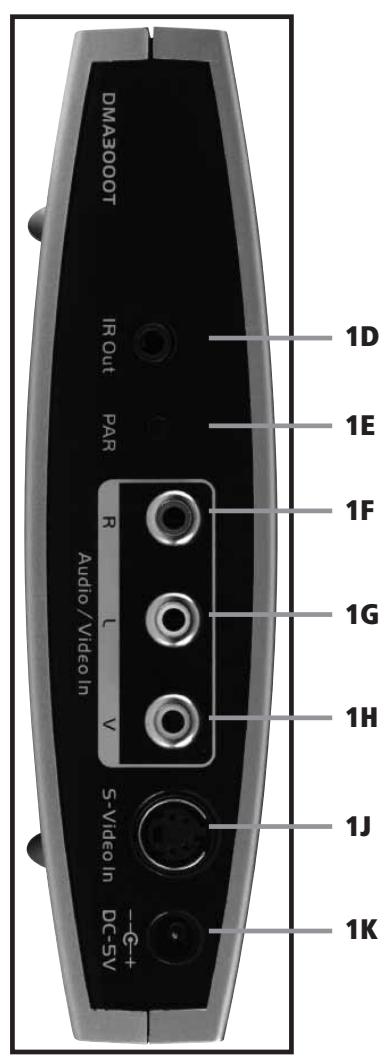
GigaView745 Transmitter
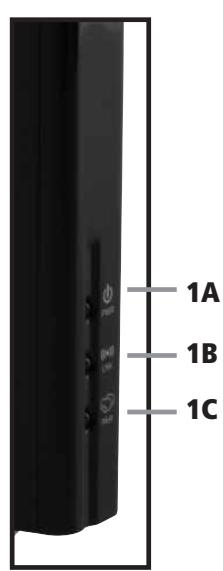
1A - Power ON LED
1B - Link LED
1C - Pairing LED
1D - IR output for IR Extender
1E - Pairing button
1F - Audio input (Right)
1G - Audio input (Left)
1H - Video input
1J - S-Video input
1K - DC IN (5V)
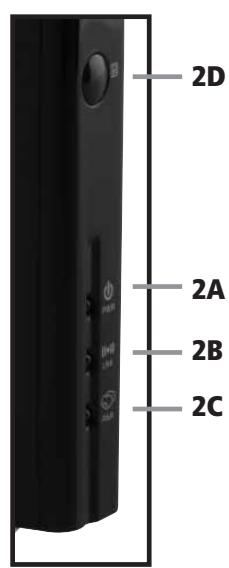
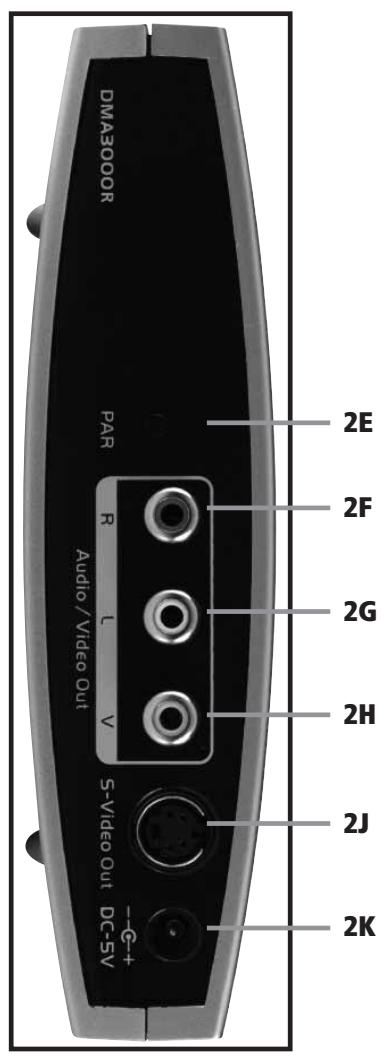
GigaView745 Receiver
2A - Power ON LED
2B - ink LED
2C - Paring LED
2D - IR remote control window
2E - Paring button
2F - Audio output (Right)
2G - Audio output (Left)
2H - Video output
2J - S-Video output
2K - DC IN (5V)
4 SETTING UP TRANSMITTER AND RECEIVER
The set consists of a transmitter and a receiver. You connect the transmitter to the AV output of your source (e.g. set top box). Then you connect the receiver to your (second) TV or projector. Now you can enjoy wirelessly your HQ AV source anywhere in your house.
What's more, you can keep operating the A/V source which is located elsewhere in your house by using your own remote control via the infrared extender.
4.1 Connect the GV745 Transmitter to your A/V source
- Connect the video signal of your AV source (e.g. set top box) via the yellow RCA cable (supplied) or S-Video cable (not supplied) to your GV745 Transmitter [1H or 1J].
- Connect the GV745 Transmitter's "Audio input" [1F, 1G] to the A/V source by a red and white coloured RCA cable.
- Connect the power adapter between the DC IN [1k] of the GV745 Transmitter and a power outlet.
- The Power ON LED [1A] is ON and the Link LED [1B] shall start blinking.
Note:
The video input is selected by automatic detection of a video signal in one of the inputs. If two inputs become active simultaneously, the order of precedence is: S-video, Composite video.
4.2 Connect the GV745 Receiver to your TV or Projector
- Connect the video output signal of the GV745 Receiver [2H or 2J] via the yellow RCA cable (supplied) or S-Video cable (not supplied) to your TV or Projector.
- Connect the GV745 Receiver's "Audio output" [2F, 2G] to your TV or Projector by a red and white coloured RCA cable.
- Connect the power adapter between the DC IN [2k] of the GV745 Receiver and a power outlet.
- The Power ON LED [2A] is ON and the Link LED [2B] shall start blinking.
- The Link LED [2B] shall stop blinking and stay solid ON in less than 5 minutes. This means the wireless link is successfully established.
4.3 Connect the infrared return signal
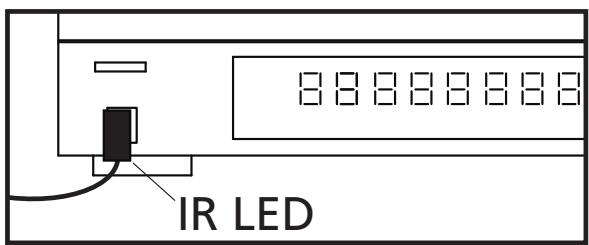
- Plug the IR extender cable (with 1 LED) into the IR OUT jack [1D] of the GV745 Transmitter.
- Place the IR LED with self-adhesive tape in front of the IR window sensor of your AV equipment.
Note:
First test the position and working of the IR LED before fixing it permanently to the IR window of your A/V equipment. IR blaster only supports 38kHz infrared remote protocols. Some devices may not be supported.
5 FREQUENTLY ASKED QUESTIONS
What if the Power ON LED [1A or 2A] is OFF?
- Check if the power adapter is placed in the power outlet.
- Unplug the power adapter from the DC IN [1K or 2K] and plug it back in.
What if the Link LED [1B or 2B] keeps blinking?
- This indicates there is no wireless link between the GigaView745 Transmitter and Receiver. Take following steps:
- Check if both are powered ON.
- Press and release the Paring button [1E] of the Transmitter and the Paring LED [1C] will switch ON.
- Press and release the Paring button [2E] of the Receiver and the Paring LED [2C] will switch ON.
- After the wireless link is established the Link LED [1B and 2B] will stop blinking and stay solid ON.
Note:
- Pairing LED [1C or 2C] will go OFF in 45 seconds if there is no wireless link between the Transmitter and Receiver.
If the Link LED [1B and 2B] continue blinking, you may have to move the Receiver closer to the Transmitter.
6. TECHNICAL DATA
Wireless
Operating range and
Operating frequency
Compression standard
Video data rates
System security
System latency
A/V Transmitter
Supported video standard
Video input
Audio input
IR extender output
Dimensions
Up to 100m free field, up to 30m through walls
5GHz (5.15 - 5.35 GHz & 5.47 - 5.725 GHz)
MPEG-2
Up to 15Mbps
128-bit Advance Encryption Standard (AES)
50 ms
Auto detection of NTSC and PAL
1x S-Video or 1x RCA (Composite)
Analog stereo (2x RCA)
3.5mm jack
151 × 143 × 38 ~mm
A/V Receiver
Video output
Audio output
Dimensions
1x S-Video or 1x RCA (Composite)
Analog stereo (2x RCA)
151 x 143 x 38 mm
Infrared extender
Supported IR frequency
IR latency
38kHz
100 ms
Power supply
Switch mode Power supply
100-240VAC 50/60Hz, 5VDC 2.5A
Specifications may be modified without prior notice.

Environmental Information for Customers in the European Union
European Directive 2002/96/EC requires that the equipment bearing this symbol on the product and/or its packaging must not be disposed of with unsorted municipal waste. The symbol indicates that this product should be disposed of separately from regular household waste streams. It is your responsibili-
ty to dispose of this and other electric and electronic equipment via designated collection facilities appointed by the government or local authorities. Correct disposal and recycling will help prevent potential negative consequences to the environment and human health. For more detailed information about the disposal of your old equipment, please contact your local authorities, waste disposal service, or the shop where you purchased the product.
SICHERHEITSHINWEISE
128-bit Advance Encryption Standard (AES)
50 ms
128-bit Advance Encryption Standard (AES)
50 ms
VEILIGHEIDSWAARSCHUWINGEN
128-bit Advance Encryption Standard (AES)
50ms
A/V zender
Ondersteunde video standard
Video ingang
Audio ingang
DECLARATION OF CONFORMITY
Hereby, Marmitek BV, declares that this GigaView745™ is in compliance with the essential requirements and other relevant provisions of the following Directives:
DIRECTIVE 2004/108/EC OF THE EUROPEAN PARLIAMENT AND OF THE COUNCIL of 15 December 2004 on the approximation of the laws of the Member States relating to electromagnetic compatibility
Directive 2006/95/EC of the European Parliament and of the Council of 12 December 2006 on the harmonisation of the laws of Member States relating to electrical equipment designed for use within certain voltage limits
Directive 2002/95/EC of the European Parliament and of the Council of 27 January 2003 on the restriction of the use of certain hazardous substances in electrical and electronic equipment