GIGAVIEW 820 - Wireless HDMI Transmitter MARMITEK - Free user manual and instructions
Find the device manual for free GIGAVIEW 820 MARMITEK in PDF.


User questions about GIGAVIEW 820 MARMITEK
0 question about this device. Answer the ones you know or ask your own.
Ask a new question about this device
Download the instructions for your Wireless HDMI Transmitter in PDF format for free! Find your manual GIGAVIEW 820 - MARMITEK and take your electronic device back in hand. On this page are published all the documents necessary for the use of your device. GIGAVIEW 820 by MARMITEK.
USER MANUAL GIGAVIEW 820 MARMITEK
- To prevent short circuits, this product should only be used inside and only in dry spaces. Do not expose the components to rain or moisture. Do not use the product close to a bath, swimming pool etc.
- Do not expose the components of your systems to extremely high temperatures or bright light sources.
- In case of improper usage or if you have altered and repaired the product yourself, all guarantees expire. Marmitek does not accept responsibility in the case of improper usage of the product or when the product is used for purposes other than specified. Marmitek does not accept responsibility for additional damage other than covered by the legal product responsibility.
This product is not a toy. Keep out of reach of children. - Do not open the product (battery panel excepted): the device may contain live parts. The product should only be repaired or serviced by a qualified expert.
- Keep batteries out of the reach of children. Dispose of batteries as chemical waste. Never use old and new batteries or different types of batteries together. Remove the batteries when you are not using the system for a longer period of time. Check the polarity (+/-) of the batteries when inserting them in the product. Wrong positioning can cause an explosion.
- Only connect the adapter to the mains after checking whether the mains voltage is the same as the values on the identification tags. Never connect an adapter or power cord when it is damaged. In that case, contact your supplier.
1. INTRODUCTION
Congratulations on purchasing a Marmitek GigaView820! This allows you to connect a maximum of 2 HD devices and send the HD signal wirelessly to your HDTV or HD projector.
Examples of HD devices include: HD DVD players, Blu-ray players, HD set-top boxes,
PlayStation3, Xbox 360, etc. The GigaView820 supports Full HD resolutions up to 1080p. The inbuilt loop-through function (HDMI out) on the transmitter means that you can watch the same content on the 1st as on the 2nd HDTV or the HD projector (via the receiver). The inbuilt infrared extender function allows you to operate HD equipment using your own remote control even if it is kept in a closed cabinet!
Marmitek products are manufactured with the utmost precision and are of top quality. Please read this manual carefully and follow the instructions in order to get the very best from this product.
2. SET CONTENTS
1x GigaView820 Transmitter
1x GigaView820 Receiver
1x GigaView820 Remote Control
1x Gold plated HDMI cable
1x IR Sensor Extender cable
1x IR LED Extender cable
2x Energy-saving switch mode Power Supply
2x Plugs + screws
1x Manual
3. INSTALLATION
3.1 GigaView820 Transmitter connections
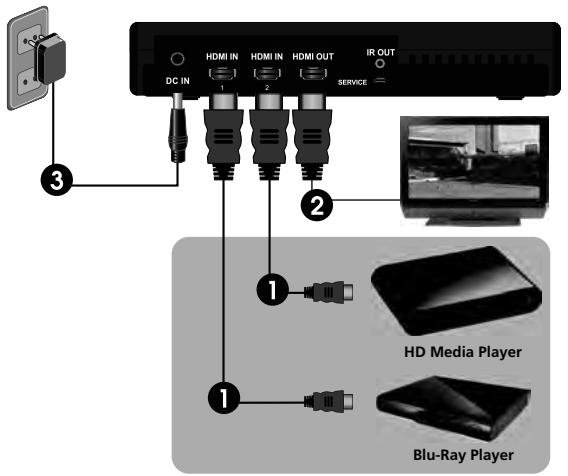
- Connect max. 2 HD devices (HDMI OUT) via an HDMI cable to your GV820 Transmitter (HDMI IN).
- Connect your HDTV or HD Projector (HDMI IN) via an HDMI cable to the GV820 Transmitter (HDMI OUT) in order to use the inbuilt loop-through function.
- Connect the Power Supply included in delivery to the DC IN on the GV820 Transmitter and to a socket.
3.2 GigaView820 Receiver connections
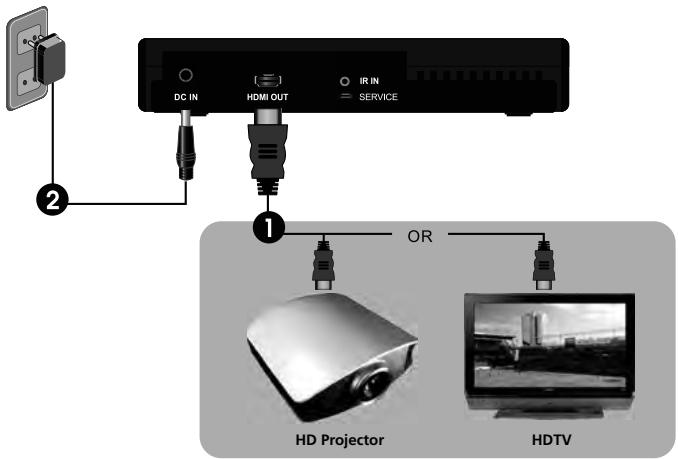
- Connect your HDTV or HD Projector (HDMI IN) via the HDMI cable supplied to the GV820 Receiver (HDMI OUT).
- Connect the Power Supply included in delivery to the DC IN on the GV820 Receiver and to a socket.
NB: Use the 2 plugs and 2 screws if you wish to attach the GV820 Receiver to the wall (e.g. behind your HDTV).
3.3 Connect infrared blaster & senosr (if necessary)

- Plug the IR Sensor Extender cable into the IR IN connector on the GV820 Receiver and place this in sight of the Remote Control.
- Plug the IR LED Extender cable into the IR OUT connector on the GV820 Transmitter. Attach the IR LEDs to the front of your HD devices. This will now send all received infrared commands via the IR Sensor Extender cable.
NB: The IR Sensor Extender cable supports 36kHz to 56kHz (NEC, RC5, RC6) infrared remote controls. Some devices may not be supported.
4. OPERATION
4.1 Using the GigaView820 set
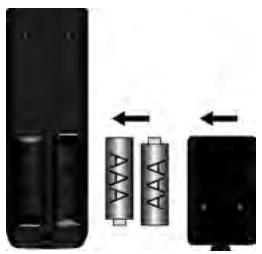
- Place two AAA batteries in the Remote Control.
- Once the Power Supply has been inserted into the socket, the GV820 will switch itself ON.
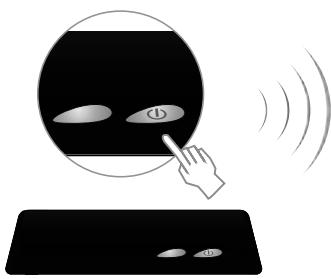
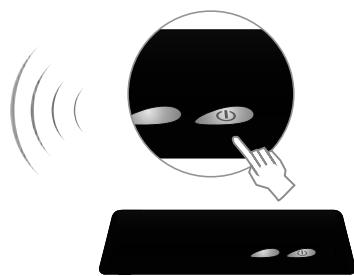
- If the GV820 set is in Standby mode (POWER LED is red), press the ON/OFF button on the GV820 Transmitter and Receiver to switch them on. It takes about 80 seconds for the system to start up.
While warming up, the Power LED will flash blue until the signal connection between the Transmitter and Receiver has been established.
NOTE: the Transmitter and Receiver must be at least 2 metres apart to have a good connection.
- Set the HDTV or HD projector (in HDMI mode) and the HD device that you wish to watch ON.
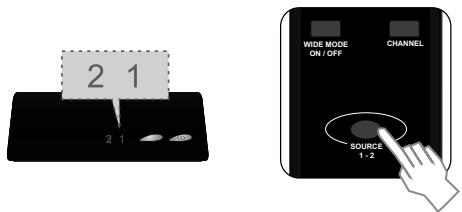
- Press the SOURCE button until you see the video images from your device. The time it takes to switch between sources may be about 15-20 seconds.
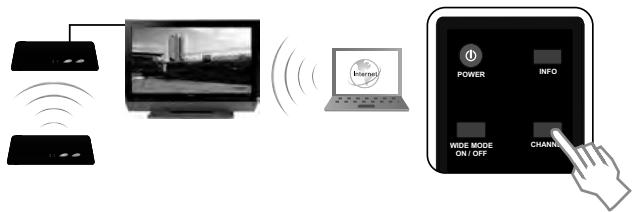
- If you have electrical equipment, such as wireless telephones or internet, that work on the 5GHz frequency it may impact upon the sound and picture quality of the GV820 set. Press the CHANNEL button on the Remote Control in order to select another channel (see 'Channel Frequency' appendix for an overview).
- If everything is working correctly, the POWER LED and SOURCE LED will be constantly blue (see table if this is not the case).
| Power LED | Source LED | Mode | Status description | OSD Display |
| Transmitter static purple / Receiver static red | Transmitter Static blue / Receiver Off | Loop-through | No connection between Transmitter and Receiver but Loop-through function at Transmitter is ON. | No OSD Display active |
| Static red | Off | Standby | Lowest power consumption function, all functions are off. | No OSD Display active |
| Flashes blue | Flashes | Starting up | System is starting up, wait at least 1 minute to establish a connection. | ‘Searching available channels’ followed by ‘Verifying’ |
| Static blue | Flashes 3x per second | Connection between Transmitter and Receiver | No input signal available from chosen source. | ‘No Signal’ |
| Flashes 1x per second | Video resolution is not supported | ‘Not Supported Format’ | ||
| Static blue | Video resolution is recognised and connection between transmitter and receiver is stable. |
4.2 Using the Remote Control
| Button | Function | Operating |
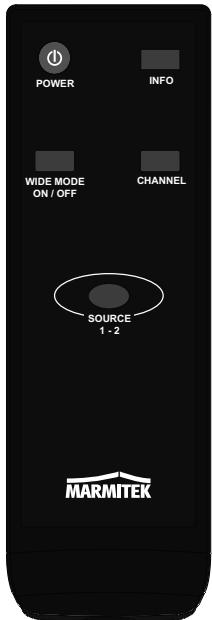
| POWER | Switches the GV820 Receiver/Transmitter on/off. | Point at the Receiver to switch on 'Standby' mode. Point at the Transmitter to switch on 'Loop-through' mode. |
| INFO | Shows information about 'Channel', the selected 'Source' and the 'Signal Quality' | Press once to show this information on the HDTV or Projector connected to the Receiver. |
| SOURCE | Switches between Source 1 and Source 2. | Press once to change Source. |
| CHANNEL | Manually choose another frequency if you have sound or picture problems. | Press once to give status. Press a second time within 5 seconds to choose another frequency. |
| WIDE | In 'Disable' position as standard, 'Enable' provides a greater range between Transmitter and Receiver. | Press once to switch between these two settings. Note that maximum resolution in 'Enable' setting is 1080i. |
5. TECHNICAL DATA
Resolutions
Supported video resolution (HDMI)
Supported audio formats (digital)
Supported standards
480p, 576p, 720p, 1080i, 1080p (24/30/50/60 Hz)
up to 6 Mbps AC-3 and DTS
HDCP 2.0, EDID/E-DCC1.1, CEC
Wireless
Operating frequency Operating range
5.1 ~ 5.6 GHz
Up to 30 meter LOS (line of sight), up to 15 meter non LOS
No latency (<1ms)
System Latency
Transmitter
HDMI input
HDMI output
IR extender LED
Dimensions
2x HDMI (19-pin female)
1x HDMI (19-pin female), built-in HDMI splitter
2.5mm jack
181 x 145 x 33mm
Receiver
HDMI output
IR extender sensor
Dimensions
1x HDMI (19-pin female)
2.5mm jack
181 x 145 x 33mm
Infrared
Supported IR frequency
36kHz ~ 56kHz
Power supply
Switch mode Power adaptor
100-240VAC @ 50-60Hz, 5VDC 3A

Specifications may be modified without prior notice.
Environmental Information for Customers in the European Union
European Directive 2002/96/EC requires that the equipment bearing this symbol on the product and/or its packaging must not be disposed of with unsorted municipal waste. The symbol indicates that this product should be disposed of separately from regular household waste streams. It is your responsibility to dispose of this and other electric and electronic equipment via designated collection facilities appointed by the government or local authorities. Correct disposal and recycling will help prevent potential negative consequences to the environment and human health. For more detailed information about the disposal of your old equipment, please contact your local authorities, waste disposal service, or the shop where you purchased the product.
SICHERHEITSHINWEISE
VEILIGHEIDSWAARSCHUWINGEN
| 20MHz Bandwidth Frequency [MHz] | Europe (DFS) | |||||
| Support Region | Channel | |||||
| 5160 | V | 1 | ||||
| 5180 | V | 2 | ||||
| 5200 | V | 3 | ||||
| 5220 | V | 4 | ||||
| 5240 | V | 5 | ||||
| 5260 | X | X | ||||
| 5280 | X | X | ||||
| 5300 | X | X | ||||
| 5320 | X | X | ||||
| 5340 | X | X | ||||
| 5500 | X | X | ||||
| 5520 | X | X | ||||
| 5540 | X | X | ||||
| 5560 | X | X | ||||
| 5580 | X | X | ||||
| 5600 | X | X | ||||
| 5620 | X | X | ||||
| 5640 | X | X | ||||
| 5660 | X | X | ||||
| 5680 | X | X | ||||
| 5700 | X | X | ||||
| 5745 | X | X | ||||
| 5765 | X | X | ||||
| 5785 | X | X | ||||
| 5805 | X | X | ||||
| 5825 | X | X | ||||
DECLARATION OF CONFORMITY
| Hereby, Marmitek BV, declares that this GigaView820 is in compliance with the essential requirements and other relevant provisions of the following Directives:Directive 1999/5/EC of the European Parliament and of the Council of 9 March 1999 on radio equipment and telecommunications terminal equipment and the mutual recognition of their conformityDIRECTIVE 2004/108/EC OF THE EUROPEAN PARLIAMENT AND OF THE COUNCIL of 15 December 2004 on the approximation of the laws of the Member States relating to electromagnetic compatibilityDirective 2006/95/EC of the European Parliament and of the Council of 12 December 2006 on the harmonisation of the laws of Member States relating to electrical equipment designed for use within certain voltage limitsDirective 2002/95/EC of the European Parliament and of the Council of 27 January 2003 on the restriction of the use of certain hazardous substances in electrical and electronic equipment |
| Hiermit erklart Marmitek BV die Übereinstimmung des Gerätes GigaView820 den grundlegenden Anforderungen und den anderen relevanten Festlegungen der Richtlinien: |
| Richtlinie 1999/5/EG des Europäischen Parmarments und des Rates vom 9. Marz 1999 über Funkanlagen und Telekommunikationsendeinrichtungen und die gegensitige Anerkennung ihrer Konformität |
| Richtlinie 2004/108/EG DES EUROPAISCHEN PARLIAMENTS UND DES RATES vom 15. Dezember 2004 zur Angleichung der Rechtsvorschriften der Mitgliedstaaten über die elektron magnetische Vertragslichkeit |
| Richtlinie 2006/95/EG des Europäischen Parmarments und des Rates vom 12. Dezember 2006 zur Angleichung der Rechtsvorschriften der Mitgliedstaaten betreffend elektrische Betriebsmittel zur Verwendung innerhalb bestimmt Spannungsgrenzen |
| Richtlinie 2002/95/EG des Europäischen Parmarments und des Rates vom 27. Januar 2003 zur Beschchränkung der Verwendung bestimmt gefährlicher Stoffe in Elektro- und Elektronikgraten |
| Par la première Marmitek BV déclare que l'apparil GigaView820 est conforme aux exigences essentielles et autres dispositions pertinentes de la directives: |
| Directive 1999/5/CE du Parlement européen et du Conseil, du 9 mars 1999, concernant les équipements hertziens et les équipements terminaux de télécommunications et la reconnaissance mutuelle de leur conformité |
| Directive 2004/108/CE DU PARLEMENT EUROPEEN ET DU CONSEIL du 15 décembre 2004 relative au rapprochement des législations des États membres concernant la compatibilité electromagnétique |
| Directive 2006/95/CE du Parlement européen et du Conseil du 12 décembre 2006 concernant le rapprochement des législations des États membres relatives au matériel électrique destiné à être employé dans certaines limites de tension |
| Directive 2002/95/CE du Parlement européen et du Conseil du 27 janvier 2003 relative à la limitation de l'utilisation de certaines substances dangereuses dans les équipements ELECTriques et Electroniques |
| Marmitek BV déclar que este GigaView820 compte con la exigencias esenciales y con las demas regas relevantes de la directriz: |
| Directiva 1999/5/CE del Parlement Europeo y del Consejo, de 9 de marzo de 1999, sobre Equipos radioélectricos y equipos terminales de telecomunicación y reconocimiento mutuo de su conformidad |
| Directiva 2004/108/CE DEL PARLEMENT EUROPEO Y DEL CONSEJO de 15 de novembre de 2004 relativa a laapproximación de las legislaciones de los Estados membres en materia de compatibiliadlemotricada |
| Directiva 2006/95/CE del Parlement Europeo y del Consejo de 12 de novembre de 2006 relativa a laapproximación de las legislaciones de los Estados membres sobre el material electrico destinado autilizarse con determinados limites de tension |
| Directiva 2002/95/CE del Parlement Europeo y del Consejo de 27 de enero de 2003 sobre restricciones a la utilizacion de determinadas sustancias peligrosas en aparatos electricos y electrónicos |
| Con cià, Marmitek BV, dichiar che il GigaView820 è conforme ai requisiti essentiali ed alter disposizioni relative alla Direttiva : |
| Direttiva 1999/5/CE del Parlement europeo e del Consiglio, del 9 mars 1999, riguardante le aprecariature radioeletricos y equipments terminales di telecomunicazione e il reciproco riconsoismo della loro conformità |
| Direttiva 2004/108/CE DEL PARLEMENT EUROPEO E DEL CONSIGLIO del 15 décembre 2004 concennte il ravincamento delle legislazioni degli Stati membrì relative alla compatibilitàelettromagnetica |
| Direttiva 2006/95/CE del Parlement europeo e del Consiglio del 12 décembre 2006 concennte il ravincamento delle legislazioni degli Stati membrì relative al materiale elettrico destinato ad essere adoperaimento ento taluri limiti di tensione |
| Direttiva 2002/95/CE del Parlement europeo e del Consiglio del 27 gennalo 2003 sulla restrizione dell'uso di determinate sostanzare pericolose nelle appreciablature eletriche ed elettroniche |
| Bij deze verkaart Marmitek BV, dat deze GigaView820 voldet aan de essentielle eisen en aan de overige relevante bepalingen van Richtlijnen: |
| Richtlijn 1999/5/EG van het Europees Parmarment en de Raad van 9 maart 1999 betreffende radioaparatur en telecomunicatie-eindapparatur en de wederzijdse erkening van hun conformiteit |
| Richtlinu 2004/108/EG VAN HET EUROPEES PARLEMENT EN DE RAAD van 15December 2004 betreffende de onderinge aanpassing van de wetgevingen van de lidstaten inaze elektronische compatibilititeit |
| Richtlijn 2006/95/EG van het Europees Parmarment en de Raad van 12December 2006 betreffende de onderinge aanpassing van de wettelijke voerschriften der lidstaten inaze elektrisch materiaialbestend voor gebruik binnen bepaalde spanningsgrenzen |
| Richtlijn 2002/95/EG van het Europees Parmarment en de Raad van 27januar 2003 betreffende beperking van het gebruik van bepaalde gevaarlijke stoffen in elektrische en elektronische apparatur |
| €0536MARMITEK BV - PO. BOX 4257 - 5604 EG EINDHOVEN - NETHERLANDS |
| Indoor use only: this product may be used in all EU countries (and other countries following the EU directive 1999/5/EC) without any limitation but is restricted for indoor use only.Exception for (the countries) below: |
| Denmark: In Denmark, the band 5150 - 5350 MHz is also allowed for outdoor usage. |
| Italy: For private use, a general authorisation is required if WAS/RLAN's are used outside own premises. For public use, a general authorisation is required. |
| Luxembourg: General authorisation required for network and service supply |
| Russian Federation: e.i.r.p 100 mW. Permitted to use Only for indoor applications, closed industrial and warehouse areas, and on board aircraft. |
| The requirements for any country may evolve. Marmitek recommends that you check with the local authorities for the latest status of their national regulations. |
Copyrights
Marmitek is a trademark of Pattiude B.V. - GigaView820 is a trademark of Marmitek B.V.
GigaView is a registered trademark of Marmitek B.V.
Blu-ray Disc is a trademark of the Blu-ray Disc Association.
HDMI, the HDMI logo and High-Definition Multimedia Interface are trademarks or registered trademarks of HDMI Licensing LLC.
DTS is a registered trademark & the DTS logos and Symbol are trademarks of DTS, Inc.
These trademarks are the property of their respective owners. All rights reserved.
Copyright and all other proprietary rights in the content (including but not limited to model numbers, software, audio, video, text and photographs) rests with Marmitek B.V. Any use of the Content, but without limitation, distribution, reproduction, modification, display or transmission without the prior written consent of Marmitek is strictly prohibited.
All copyright and other proprietary notices shall be retained on all reproductions.