CONNECT 225 - Audio/video switch MARMITEK - Free user manual and instructions
Find the device manual for free CONNECT 225 MARMITEK in PDF.


User questions about CONNECT 225 MARMITEK
0 question about this device. Answer the ones you know or ask your own.
Ask a new question about this device
Download the instructions for your Audio/video switch in PDF format for free! Find your manual CONNECT 225 - MARMITEK and take your electronic device back in hand. On this page are published all the documents necessary for the use of your device. CONNECT 225 by MARMITEK.
USER MANUAL CONNECT 225 MARMITEK
- To prevent short circuits, this product should only be used inside and only in dry spaces. Do not expose the components to rain or moisture. Do not use the product close to a bath, swimming pool etc.
- Do not expose the components of your systems to extremely high temperatures or bright light sources.
- In case of improper usage or if you have altered and repaired the product yourself, all guarantees expire. Marmitek does not accept responsibility in the case of improper usage of the product or when the product is used for purposes other than specified. Marmitek does not accept responsibility for additional damage other than covered by the legal product responsibility.
This product is not a toy. Keep out of reach of children. - Do not open the product (battery panel excepted): the device may contain live parts. The product should only be repaired or serviced by a qualified expert.
- Keep batteries out of the reach of children. Dispose of batteries as chemical waste. Never use old and new batteries or different types of batteries together. Remove the batteries when you are not using the system for a longer period of time. Check the polarity (+/-) of the batteries when inserting them in the product. Wrong positioning can cause an explosion.
- Only connect the adapter to the mains after checking whether the mains voltage is the same as the values on the identification tags. Never connect an adapter when it is damaged. In that case, contact your supplier.
INTRODUCTION
Thank you for buying this Marmitek Connect 225. Marmitek products are made with care and are of a high quality. Please read this user manual carefully and follow all the instructions.
ACCESSIONS
After unpacking the carton, make sure that all of the following accessories are supplied.
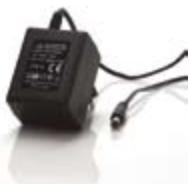
1x Power adapter
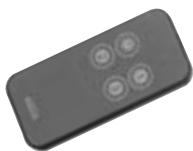
1x Remote control (Battery CR2025 included)

1x User manual English
FRONT VIEW AND BACK VIEW
The Connect 225 has a total of three Input Channels. Input 2 has a parallel AUX input which equals the Scart input.
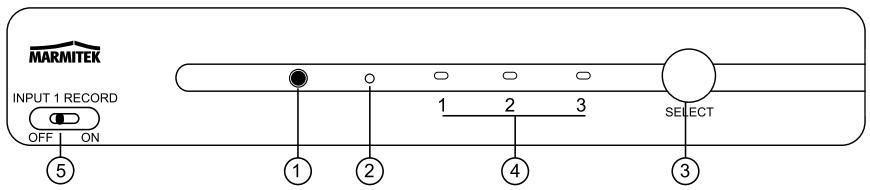
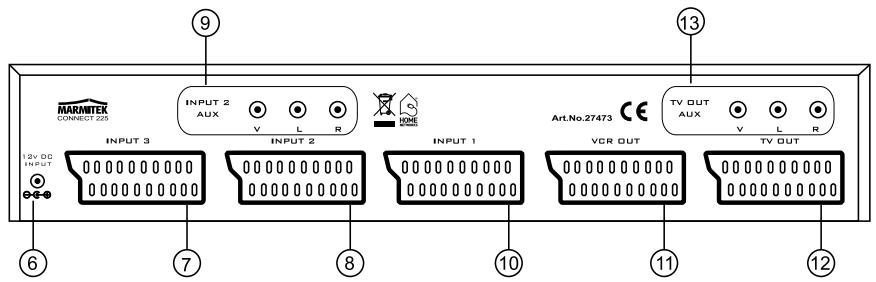
- Remote Control Sensor; This is the sensor for the wireless remote control signals;
- Standby ON LED
- Input SELECT button
- Selected Input Indicators or Standby.
- Input 1 REC button; Secured REC function on Input 1;
- 9-12V DC input; To connect the Power Supply unit to the unit.
- Scart Input 3 To connect the device's Scart jack to the unit;
- Scart Input 2 To connect the device's Scart jack to the unit;
- Cinch Input 2 To connect the device's Cinch jack to the unit, equals Scart Input 2;
- Scart Input 1 To connect the device's Scart jack to the unit;
-
VCR OUT To connect the record device's (VCR, DVR) Scart jack to the unit;
-
TV OUT
To connect the TV Scart jack to unit;
- TV OUT AUX
To connect the auxiliary device's (Audio System, Video sender, Modulator)
Cinch jacks to the unit;
REMOTE CONTROL FUNCTIONS
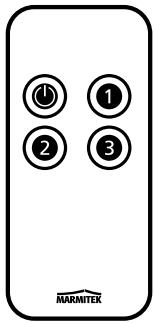
You can select each Input Channel by using the numerical button on the remote control unit.
The"按钮 is located on the Remote Control Unit, which allows the Connect 225 to be switched in STANDBY.
SETUP INSTRUCTIONS
Connecting the AC power supply unit
- Connect the AC Power Adaptor plug to the 12V DC INPUT located on the rear panel of the Connect 225 (6).
- Connect the AC Power Supply Unit into a suitable wall outlet.
IMPORTANT:
The power supply unit must be the correct type. Do not use a power supply unit other than the type indicated.
Battery installation
Please draw out the plastic from the remote control.
SYSTEM CONNECTIONS
Connecting through a Scart, Composite video and Audio
Make connections as the diagram shown below. When connecting the related devices, refer to the related instruction manual.
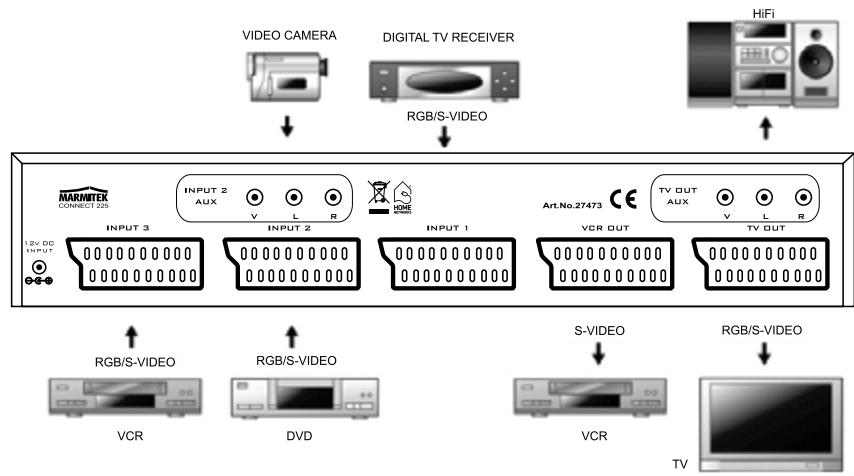
RECOMMENDED CONNECTIONS
Connecting directly to a TV
- Plug the Scart cable into the corresponding input on your TV.
- Plug the other end of Scart cable into the Connect 225 Scart TV OUT (12).
- Plug your DVD Player, VCR, Satellite Receiver or Game Console, etc. into any of 3 Scart inputs (7, 8, 10) on the back of the unit.
- Connect your audio/home theatre system to the junction TV OUT AUX (13)
- Connect a recording device (VCR, PVR, DVD Recorder etc) to the VCR OUT (11)
| OUTPUT | ||||
| COMPOSITE | S-VIDEO | COMPONENT/RGB | ||
| INPUT | COMPOSITE | YES | YES | NO |
| S-VIDEO | YES | YES | NO | |
| COMPONENT/RGB | YES | YES | YES (TV OUT only) | |
Note:
- To prevent any possible problems, always disconnect the power plug of the Connect 225 before connecting or disconnecting the cables.
- When connecting the cables, always insert the pin plugs correctly into the connecting jacks.
Insufficient insertion may result in no-sound problems or generation of noise.
Power standby
A small amount of the power is retained to support the memory and remote Control sensor function. This is known as the standby mode.
Note: The above devices connections are for reference only. Any suitable devices may be connected to the Input Channels.
QUICK STARTED
Selecting Devices:
Press the SELECT button (3).
Simply press the SELECT button again to the preferred input channel (sequence: Standby, 1, 2, 3, Standby etc). or press the preferred channel on your remote control.
Automatic Switching:
The Connect 225 can switch automatically to the input channel of an active device. The receiving TV connected to TV OUT (12) will also automatically switch to the correct image (4:3 or 16:9) if applicable on the TV connected.
- This function works only if all devices are directly connected by SCART cables.
- It is required that all concurrent connected A/V devices are switched off at the same time (non active).
- The audio signal will also be available if connected to TV OUT AUX (13).
- The LEDs on the front (4) will indicate the devices active.
- If the active device is turned off, the Connect 225 will switch to the Standby mode and the connected TV will show the usual broadcasted channel.
Record function
You can record any connected source by using the SELECT button. Just connect your recording device to VCR OUT (11) and follow the normal instructions of the user manual of your device.
Attention: if you like to record a program from your (digital) set top box or satellite receiver, these must be set on the channel you like to record.
You are also able to record the device connected to INPUT 1 (10) while watching another device at the same time. To do so:
- Switch to INPUT 1 and start the recording.
- Switch the INPUT 1 RECORD switch (5) on the front side to the ON position. This will lock the recording.
- You now can select any of the other two devices without disturbing the recording of INPUT 1.
FREQUENTLY ASKED QUESTIONS
No picture
- Check to verify that your Scart Cable is properly connected to your system and the Connect 225.
- Check to verify that your Scart Cable is properly plugged into your TV from the Connect 225 Output.
- Check to verify that you have selected the correct input channel.
- Check to verify your TV is on the appropriate video input.
- Check to verify that your TV and Connect 225 are turned on.
No sound
- Check the connecting cables.
- Check the volume setting of the TV.
- Check whether the audio signal is transmitted by the cable used (S-VIDEO cables or partially pinned Scart cables do not transmit audio).
- Check to verify that your TV and system are turned on.
The image is very grainy/there is background interference
- Switch off equipment which is not being used. Sometimes equipment gives off a very strong signal, which can cause interference.
- Check the quality of the cables used.
TECHNICAL DATA
General
Power requirements: 9V-12V 100mA
Power consumption: 1W
Dimensions (WxDxH): 310mm x 110mm x 52mm
Mass: 0,5Kg
Inputs/Outputs
Inputs: 3x Scart (RGB/S-VHS) (video, stereo audio).
1x cinch A/V parallel input for Video Camera (video, stereo audio).
Outputs: 1x VCR OUT Scart (S-VHS) (video, stereo audio).
1x TV OUT Scart (RGB/S-VHS) (video, stereo audio).
1x cinch A/V parallel output for Audio amplifier, Video Sender, modulator, etc (video, stereo audio).
Accessories: AC/DC Power supply unit
Supplied: Remote Control unit
Instruction Manual
Design and specifications are subject to change without notice
ALSO AVAILABLE
1. Wireless audio and video
You can connect a product from the Marmitek GigaVideo series to the OUTPUT or AUX connection of the Connect 225 to transmit the audio and video signal wirelessly throughout the entire house. This means you can also transmit the signal to a TV in another room and watch the signals from every device connected to the Connect 225.
The built-in infrared return channel of the GigaVideo series also means you can control the equipment and the Connect 225 remotely, even through walls and ceilings!

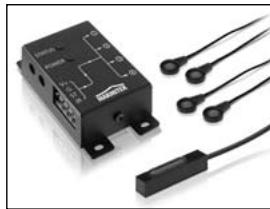
2. Control your Connect 225 and A/V equipment that is out of sight.
Marmitek offers a range of products to control your equipment in a closed cabinet or from a different room, both wired and wireless.
For these so called infrared extensions, more information can be found at: www.marmitek.com.
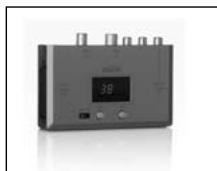
3. Audio and video via the coax
The Marmitek MegaVideo and MegaView products give you the possibility to add the OUTPUT or AUX signal of your Connect 225 as an extra channel to your coax cable. You can watch the signal of every device connected everywhere in the house where there is a coax connection. The built-in infrared return channel of f.e. model Megavideo55 and MegaView70 also means you can control the equipment and the Connect 225 remotely, even through walls and ceilings!
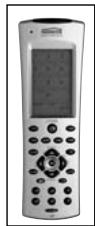
4. No extra remote control
When wanting to control your devices from multiple places or wanting to use only one remote control for all devices, you can use the Marmitek EasyControl 6, 8 or the Marmitek EasyTouch 35 to learn the commands of your Connect 225 remote control. These remote controls replace almost all the controls you now use.
5. S-video to composite video adapter
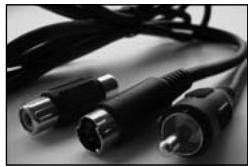
If the Out connections of devices connected (e.g. a laptop) do not correspond with the In connections of your Connect 225, in many cases the Marmitek S-video to Composite Video Adapter can be used.
For the SCART INPUT/OUTPUT connectors, many different SCART converters can be obtained.
More information can be found on our web site: www.marmitek.com

Environmental Information for Customers in the European Union
European Directive 2002/96/EC requires that the equipment bearing this symbol on the product and/or its packaging must not be disposed of with unsorted municipal waste. The symbol indicates that this product should be disposed of separately from regular household waste streams. It is your responsibility to dispose
of this and other electric and electronic equipment via designated collection facilities appointed by the government or local authorities. Correct disposal and recycling will help prevent potential negative consequences to the environment and human health. For more detailed information about the disposal of your old equipment, please contact your local authorities, waste disposal service, or the shop where you purchased the product.
SICHERHEITSHINWEISE
OPTIONS ADDITIONNELLES
1. Audio et video sans fil
VEILIGHEIDSWAARSCHUWINGEN
Voeding: 9-12V 100mA
Verbruik: 1W
Afmetingen (BxDxH): 310mm x 110mm x 52mm
Gewicht: 0,5Kg
Ingangen/Uitgangen
3x SCART (RGB/S-VHS) (video, stereo audio).
DECLARATION OF CONFORMITY
Hereby, Marmitek BV, declares that this Connect225 is in compliance with the essential requirements and other relevant provisions of the following Directives:
DIRECTIVE 2004/108/EC OF THE EUROPEAN PARLIAMENT AND OF THE COUNCIL of 15 December 2004 on the approximation of the laws of the Member States relating to electromagnetic compatibility
Council Directive 73/23/EEC of 19 February 1973 on the harmonization of the laws of Member States relating to electrical equipment designed for use within certain voltage limits
Hiermit erklart Marmitek BV die Übereinstimmung des Gerätes Connect225 den grundlegenden Anforderungen und den anderen relevanten Festlegungen der Richtlinien:
RICHTLINIE 2004/108/EG DES EUROPÄISCHEN PARLAMENTS UND DES RATES vom 15. Dezember 2004 zur Angleichung der Rechtsvorschriften der Mitgliedstatesen über die elektromagnetische Verträglichkeit
Richtlinie 73/23/EWGdesRates vom 19. Februar 1973zurAngleichung der RechtsvorschriftenderMitgliedstaaten betreffend elektrische Betriebsmittel zur Verwendung innerhalb bestimmer Spannungsgrenzen
Par la presente Marmitek BV déclare que l'appareil Connect225 est conforme aux exigences essentielles et aux autres dispositions pertinentes de la directives:
DIRECTIVE 2004/108/CE DU PARLEMENT EUROPEEN ET DU CONSEIL du 15 décembre 2004 relative au approchement des législations des États membres concernant la compatibilité electromagnétique
Directive 73/23/CEE du Conseil, du 19 février 1973, concernant le rapprochement des législations des États membres relatives au matériel électrique destiné à être employé dans certaines limites de tension
Copyrights
Marmitek is a trademark of Marmidenko B.V. CONNECT 225^TM is a trademark of Marmitek B.V. All rights reserved.
Copyright and all other proprietary rights in the content (including but not limited to model numbers, software, audio, video, text and photographs) rests with Marmitek B.V. Any use of the Content, but without limitation, distribution, reproduction, modification, display or transmission without the prior written consent of Marmitek is strictly prohibited. All copyright and other proprietary notices shall be retained on all reproductions.
Marmitek BV declara que este Connect225 cumple con las exigencias esenciales y con las cuales reglas relevantes de la directriz:
DIRECTIVA 2004/108/CE DEL PARLAMENTO EUROPEO Y DEL CONSEJO de 15 de días de 2004 relativa a la aproxima de las legislaciones de los Estados miembros en materia de compatibiliad electromagnética
Directiva 73/23/CEE del Consejo, de 19 de febrero de 1973, relativa a la aproximación de las legislaciones de los Estados Miembros sobre el material electrico destinado a utiliser con determinados limites de tension
Con ciò, Marmitek BV, dichiara che il Connect225 è conforme ai requisiti essenziali ed altre disposizioni relative alla Direttiva :
DIRITTIVA 2004/108/CE DEL PARLAMENTO EUROPEO E DEL CONSIGlio del 15 dicembre 2004 concennte il rav vicinamento delle legislazioni degli Stati membri relative alla compatibilità elettromagnetica
Direttiva 73/23/CEE del Consiglio, del 19 febbraio 1973, concernente il ravincamento delle legislazioni degli Stati Membrile relative al materiale elettrico destinato ad essere adoperato entro taluni limiti di tensione
Bij deze verklaart Marmitek BV, dat deze Connect225 voldoet aan de essentiele eisen en aan de overige relevante bepalingen van Richtlijnen:
RICHTLIJN 2004/108/EG VAN HET EUROPEES PARLEMENT EN DE RAAD van 15 decanber 2004 betreffende de onderlinge aanpassing van de wetgevingen van de lidstates inzake electromagnetische compatibiliteit
Richtlijn 73/23/EEG van de Raad van 19 februar 1973 betreffende de onderlinge aanpassing van de wettelijkke voorschriften der Lid-States inzake elektrisch materiaal bestemd voor gebruik binnen bepaalde spanningsgrenzen
MARMITEK BV - P.O. BOX 4257 - 5604 EG EINDHOVEN - NETHERLANDS
C