
bpa1120 - Washing machine BLAUPUNKT - Free user manual and instructions
Find the device manual for free bpa1120 BLAUPUNKT in PDF.
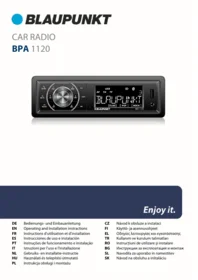


| Product type | Car radio with FM receiver, Bluetooth, USB and AUX |
| Brand / Model | BLAUPUNKT bpa1120 |
| Power supply | 10.5 - 14.4 V (operating voltage) |
| Fuse | 5 A (flat car fuse, orange) |
| Power consumption | Less than 5 A in operation, less than 6 mA when off |
| Speaker impedance | ≥ 4 ohms per channel |
| Pre-amplifier outputs | 2 channels (L/R) for external amplifier |
| Connections | DIN antenna, USB port (FAT/FAT32/exFAT), AUX-IN jack 3.5 mm input |
| Audio formats | APE, FLAC, MP3, WAV, WMA |
| FM band | 87.5 - 108 MHz |
| Station memory | 3 levels (FM1, FM2, FM3), 6 stations per level |
| Bluetooth | Audio streaming (A2DP/AVRCP) and hands-free function |
| Microphone | Built-in for hands-free calls |
| Sound settings | Bass, treble, preset equalizer, balance/fader |
| Radio functions | RDS, AF, TA, PTY, Travelstore |
| Clock | Built-in, manual and automatic adjustment |
| Display | LCD with multi-function display |
| Care and cleaning | Dry or slightly damp cloth, avoid solvents and abrasives |
| Installation | DIN mount, ISO connector, adapters required depending on vehicle |
| Safety | Installation by a specialist recommended, follow road safety instructions |
| Repairability | After-sales service via dealer or Blaupunkt repair center |
| Package contents | Car radio, user manual, adapter, mounting frame, removal tool |
| Certifications | CE marking, compliant with directive 2014/53/EU |
Frequently Asked Questions - bpa1120 BLAUPUNKT
User questions about bpa1120 BLAUPUNKT
0 question about this device. Answer the ones you know or ask your own.
Ask a new question about this device
Download the instructions for your Washing machine in PDF format for free! Find your manual bpa1120 - BLAUPUNKT and take your electronic device back in hand. On this page are published all the documents necessary for the use of your device. bpa1120 by BLAUPUNKT.
USER MANUAL bpa1120 BLAUPUNKT
EN Operating and Installation instructions
BAL (Balance) [R-7...L-7]
Balance des Audiosignals anpassen.
FAD (Fader) [F-7...R-7]
EQ (Equalizer) [OFF/CLASS/POP/ROCK]
LOUD (Loudness) [OFF/ON]
DX/LOC (Distant/Local)
AF (Alternative Frequency) [OFF/ON]
TA (Traffic Announcement) [OFF/ON]
CT (Clock Time) [SYNC/INDEP]
① - ⑥ Station push buttons:
Short press:
Calls up a station or an additional/special function shown, depending on the source selected
• PAU (Pause) Playback/Pause
- INT (Intro) A playback function
• RPT (Repeat) Repeat Function
• RDM (Random) Random playback
- DIR-/+ (Directory) Directory change during USB playback
Long press:
Stores the radio station currently tuned into
⑦ Rotary button/encoder:
Turn:
Adjusts the volume up/down
Switches between setting options in the menu/changes options
Short press:
Enters sound settings
(see 10. Settings | Menu)
Long press:
Enters advanced settings
(see 10. Settings | Menu)
⑧ - ⑨ Next / ◀ Back push buttons:
Short press:
FM search, USB/Bluetooth track change, etc. depending on the source
Long press:
Depending on the source:
FM: Manual search
USB: Fast forward/reverse
⑩ DISP (Display) Display push button:
Short press:
Switches between different pieces of information to be displayed depending on the source selected
Long press:
Clock setting
⑪ Hands-free microphone
⑫ LCD display
⑬ Reset button: Resets the unit
⑭ USB port:
USB memory port for media playback (FAT/FAT32/exFAT)
⑮ AUX-IN:
Interface port for an external analogue audio source, compatible with a 3.5 mm stereo jack
⑯ MODE button / rejects or ends call:
Audio source selection: toggles between available audio sources. During a call: Rejects an incoming call or ends the ongoing call
⑰ Power/MUTE push button:
Short press:
Turns on the car radio, mutes the car radio Long press
Turns off the car radio
⑱ BAND/taking calls:
Changes memory level, accepts incoming call, calls last number
Congratulations on your purchase
Congratulations on the purchase of your new Blaupunkt product.
Please read this User Manual carefully to enjoy it for a long time.
However, if unexpected problems arise, check this User Manual to see if you can solve the issues yourself.
Please read also Section 13. Troubleshooting at the end of this User Manual.
Your Blaupunkt dealer and Blaupunkt Service will be happy to help you if you cannot solve a problem yourself. Our contact details can be found at www.blaupunkt.com.
This User Manual may apply to different models with different features. Some features and options may not be available in your unit or may vary between specific models.
We reserve the right to make technical changes to improve the product, as a result of which deviations from the features specified in this User Manual are possible.
Table of Contents
- Precautionary statements
- General | Package contents
- Power On/Off | Adjusting Volume
- Radio operation: VHF (FM)
- Playback from external devices and media: USB
- Playback from external devices and media: Bluetooth®
- Playback from external devices and media: AUX
- Bluetooth® hands-free system
- Clock
- Settings | Menu
- Installation | Removal | Connections
- Useful information | Technical data
- Troubleshooting
1. Precautionary statements
Safety information
The car radio has been manufactured according to the current state of the art and specified safety guidelines. However, hazards may occur if the safety instructions in this User Manual are not followed.
Read this User Manual to learn the major features and operation of the unit.
- Read this User Manual carefully before using your car radio.
- Keep the User Manual in a place that is accessible to all users.
- When passing the car radio on to someone else, include this User Manual.
- Follow the manuals of the devices (if any) used together with the car radio.
- If a problem occurs, stop using the unit.
Symbols
The following symbols are used throughout this User Manual:

DANGER! Warns of injuries

CAUTION! Warning of the risk of damage to the DVD/CD drive or media in use

DANGER! High volume warning

The CE marking certifies conformity with EU directives

Hint
Details
Road traffic safety
Follow the road traffic safety guidelines provided below

Use the car radio in a way which never prevents you from operating your motor vehicle safely.
Using the car radio functions while driving can distract you from the situation on the road and lead to a serious accident!
Avoid all activities that distract you from the situation on the road or operating your vehicle. Use these features having parked your vehicle in a permitted location.

Always listen to the radio at moderate volume to protect your hearing and be able to hear sound warning signals (like police horns).
During muting intervals (e.g. when toggling through the sound sources), no change in volume adjustment can be heard. Do not increase the volume during these intervals.
General safety precautions
Do not attempt to modify or tamper with the car radio. There are no user-serviceable parts inside.
Intended use:
This car radio is intended for installation and operation in a motor vehicle with 12 V supply voltage and must be installed in a DIN slot. Observe the operating limits of your car radio. Have repairs and, if necessary, installation done by a professional.
2. General | Package contents
Declaration of Conformity
Blaupunkt Competence Center Car Multimedia Evo Sales GmbH hereby declares that the car radio complies with the essential requirements and other relevant provisions of Directive 2014/53/EU.
The Declaration of Conformity can be found on the Internet at www.blaupunkt.com. If it is not available on the website, please contact us.
Trademark notice
All other trademarks and their logos, brand names or company names referred to in this User Manual are used for identification only and are the property of their respective owners.
3. Power On/Off | Adjusting Volume
Switching on/off
A short press on the Power On/Off button turns on the car radio. To turn it off, press and hold the Power On/Off button for more than 2 seconds.
The car radio cannot be turned on with the vehicle's ignition turned off.
Power on/off using the vehicle ignition
If the ignition is turned off while the unit is turned on, it will automatically turn off and on again the next time the ignition is turned on. If the unit has been turned off using the Power On/Off button on the unit, it will stay off after cycling the ignition switch and can only be turned off by operating the Power On/Off button manually.
Cleaning
Solvents, cleaning and abrasive products, as well as car cockpit sprays, air fresheners and plastic care products can contain substances that will damage the surface of your car radio. Use only a cloth which is dry or slightly damp with water to clean the car radio.
Disposal

Do not dispose of the used device with the household waste! Use the available waste return and collection systems to dispose of your old device and its accessories.
Package contents
The package includes the following items:
- Car radio
- Operating instructions
- Adapter for connecting voltage and loudspeakers
- Mounting frame
- Disassembly tool
If this feature does not work as described, the car radio has not been properly connected.
Volume adjustment
The volume can be adjusted using the left rotary button/encoder from 0 (no sound) to 35 (full volume).
The unit displays the volume level set for a few seconds after a change.
Adjusting playback volume
During music playback, turn the rotary button/encoder to adjust the volume.
Adjusting the Bluetooth ® (telephone calls) volume
During a phone call, turn the rotary button/encoder to change the volume.
4. Radio operation: VHF (FM)
Analogue radio signal transmission bands, such as FM radio from 87.5-108 MHz, are the 'classic' broadcast frequencies, widely used throughout the world. Stations are broadcast in analogue (FM= frequency modulation). With weak or fluctuating signals, the stereo sound fades with VHF radios, stations are played in mono and the reception is noisy. Depending on the service region, FM stations can often be received on different frequencies, which the car radio can automatically tune into, depending on the quality of reception if the FM station transmits the necessary RDS data and the broadcast is of sufficient strength.
Playing VHF radio
Use the MODE button to select the most recently used analogue source (FM1, FM2 or FM3), then use the BAND button to change the memory level or frequency range (FM1, FM2, FM3).
- 6 memory slots are available for each memory level.
Muting your car radio (Mute)
Briefly press the Power On/Off button to mute the unit or unmute to the volume setting last used.

Always listen to the radio at moderate volume to protect your hearing and be able to hear sound warning signals (like police horns).
During muting intervals (e.g. when toggling through the sound sources), no change in volume adjustment can be heard. Do not increase the volume during these intervals.
Tuning into Stations
By briefly pressing ◀ or ▶ button, you can start searching for radio stations (forwards and backwards). The tune-in stops automatically at the first (or the next) received station with sufficient broadcast signal strength.
You can also tune into a radio frequency manually if the broadcast signal from the desired radio station is very weak and the search fails to stop at the expected frequency.
To do this, press and hold one of the ◀ or ▶ buttons until MANUAL appears on the display. The frequency will now change as long as the button is pressed and will only stop when the button is released. The frequency can be changed station by station by briefly pressing the ▶ or ◀ button.
If no button is pressed for approx. 5 seconds, the unit reverts to automatic tuning, and the display briefly reads AUTO.
Storing and selecting radio station presets
You can store your favourite radio stations with the preset buttons labelled from 1 to 6.
Each memory level (FM1, FM2, FM3) can store 6 stations:
Follow the procedure described in Tuning into
Stations to tune into your desired station.
Press and hold the selected preset memory button for approximately one second and release it.
You can tune into your station saved as a preset by briefly pressing the respective preset button.
On the right-hand side of the display, you can see the number of the assigned memory location when calling up or storing a station.
Automatic station storing (Travelstore)
Available radio stations can be preset using the automatic preset search feature (Travelstore): Press and hold the BAND button until the unit starts the Travelstore process. The display will
show the frequency and the number of the free preset mapped to the radio station found; once the process ends, all radio stations stored in the presets will be briefly played back.
Display change
Use the DISP button to toggle between different display information:
- Radio station name (or frequency if no name shown)
- Clock
■ The display function availability depends on the station and reception quality
If reception is poor, incorrect or old information from the previous station may be displayed.
Further features or options
See 10. Settings | Menu.
5. Playback from external devices and media: USB
The USB interface of the car radio can be used to connect storage media (USB thumbdrives/dongles/memory sticks) and play back the media stored on them, provided that the files and the file format of the storage are compatible with this unit.
Data media/media types used:
- USB storage media with FAT, FAT32, exFAT file system
- file formats: APE, FLAC, MP3, WAV, WMA
The trouble-free functioning of all media files, including those listed above, cannot be guaranteed due to the variety of software such files may be created with.
■ Direct connectivity with MP3 players or smartphones to play music is not supported.
The device's USB port is not suitable for charging external devices such as mobile phones!
Connecting USB storage media/Media playback from USB
Carefully plug the USB medium into the USB interface without forcing or bending the USB medium.
The radio will automatically switch to the USB playback mode. The data on the USB medium will be loaded and the playback will begin with the first media file recognised by the radio.
If the USB storage has been connected to this unit, switch to USB by pressing the MODE button; the data will be loaded and the playback will begin from the last file played back.
USB playback
You can scroll through the individual titles by briefly pressing the buttons ◀ and ▶.
You can scroll fast through the contents of the current track/file by pressing and holding ▶ and ▶ buttons.
Special features
The following special features can be used with the buttons 1-6, according to the symbol on each button:
• PAU (Pause): pauses or resumes playback
- INT (Intro): Activates the playback function.
Plays back the first 10 seconds of each track/file until the feature is turned off
- RPT (Repeat): Activates/deactivates the repeat function [ONE] track / [DIR] directory / [OFF] Off.
- RDM (Random): Activates/deactivates random track/file playback on the data medium
- DIR-/DIR+ (Directory):
Short press: Changes directory to previous/next directory on storage medium
Long press: Jumps 10 tracks/files back/forward.
Display change
Use the DISP button to toggle between different display information:
• Media file details (consecutive file, file folder name, ID3 data, track number)
- Clock
- The availability of display functions depends on the media files used.
Removing USB storage media
Never attempt to remove the storage media without first turning off the car radio, otherwise the data on the storage medium can be corrupted.

Higher risk of injury from connected USB storage!
In the event of a road accident, any part protruding from the car radio may cause injury. It is recommended to use the physically smallest USB storage media available.
6. Playback from external devices and media: Bluetooth®
The Bluetooth® feature allows you to pair smartphone and media players with your car radio.
If the connected Bluetooth ® device supports A2DP and AVRCP, you can play back music on the car radio and control the playback.
- At the time of marketing of this unit, extensive testing of Bluetooth® features was conducted with various smartphones and media players to ensure the highest possible compatibility. However, some features may be limited or not work at all, depending on the device in use. In case of such problems, please check if an update is available for your device or car radio.
The last connected device will be reconnected automatically when this car radio is restarted. Depending on the smartphone or media player with Bluetooth® connectivity, Bluetooth® must be re-enabled for previously connected external devices or the connection must be re-initiated using the Bluetooth® device list.
Before connecting another Bluetooth® device,
disconnect the already connected device.
It is not possible to stream from this car radio via Bluetooth® to another device (e.g. Bluetooth® speaker boxes, etc.), as this car radio only supports Bluetooth® music signal reception.
Bluetooth® connection
Turn on the radio, open the Bluetooth® settings on your Bluetooth® device, search for available devices, and follow the Bluetooth® device's instructions to pair the device and the car radio. After a successful pairing, the car radio displays CONNECTED with a small Bluetooth® icon.
■ Confirm any messages prompted on your smartphone immediately, otherwise some features may be limited, unavailable, or the pairing process may fail.
- The pairing process is required only once for each external device, after which the device will reconnect automatically.
If the device has already been connected previously (the Bluetooth® symbol on the display of the car radio must come on and the Bluetooth® device must also display the 'Connected' status), switch to the BT MUSIC source using the MODE button.
Bluetooth® playback
You can scroll through the individual titles by briefly pressing the buttons ◀ and ▶.
- Adjust the volume on the connected Bluetooth® device if the sound is too low or too high.
If playback does not start or is started by wrong application on the Bluetooth® device, start/select the appropriate audio player on the
connected Bluetooth ® device you want to use the streaming broadcast with.
Special features
The following special functions can be called up with the PAU station push button according to the sign on the push button:
• PAUSE: pauses or resumes playback.
Display change
Use the DISP button to toggle between different pieces of display information:
• Information about the next track
- Clock
- The availability of display readout features will vary with the media files or the connected external device/app.
7. Playback from external devices and media: AUX
The AUX interface allows a compatible cable to be used and input analogue audio from an external device, like portable CD players, cassette players, or MP3 players. The AUX interface requires a 3.5 mm jack cable for connection. For the most common applications, you will need a cable with a 3.5 mm jack plug to 3.5 mm stereo jack plug, which can be purchased from well-stocked audio or electronic stores.
The radio is provided with an AUX port:
- The AUX-IN interface on the unit's front panel (see Car radio controls)
Connect an external device using a suitable adaptor/cable and select the AUX IN audio source using the MODE button.
If necessary or possible to do so, adjust the
volume on the external device to a volume similar level to other audio sources of the car radio.
The volume can then be controlled using the car radio controls.
To prevent damage to the unit, use undamaged plugs and cables only.
If you use 3.5 mm (mono) 2-pin jacks, you will not receive a stereo audio output and one audio channel may be missing during playback.

Higher risk of injury from protruding audio jacks!
In the event of a road accident, any part protruding from the car radio may cause injury. For this reason, angular (90°) jacks are recommended.
8. Bluetooth® hands-free system
The Bluetooth® feature allows you to pair smartphone and media players with your car radio. When you pair your mobile phone with the car radio, you can make phone calls using the built-in hands-free function.
- At the time of marketing of this unit, extensive testing of Bluetooth® features was conducted with various smartphones and media players to ensure the highest possible compatibility. However, some features may be limited or not work at all, depending on the device in use. In case of such problems, please check if an update is available for your device or car radio.
- The last connected device will be reconnected automatically when this car radio is restarted. Depending on the smartphone or media player with Bluetooth® connectivity, Bluetooth® must be re-enabled for previously connected external devices or the connection must be re-initiated using the Bluetooth® device list.
Before connecting another Bluetooth® device, disconnect the already connected device.
Bluetooth® connection
Turn on the radio, open the Bluetooth ® settings on your Bluetooth ® device, search for available
9. Clock
The unit has an internal clock so you can view the time on the display by pressing the DISP push button until the desired information appears.
devices, and follow the Bluetooth® device's instructions to pair the device and the car radio. After a successful pairing, the car radio displays
CONNECTED with a small Bluetooth ® icon.
- Confirm any messages prompted on your smartphone immediately, otherwise some features may be limited, unavailable, or the pairing process may fail.
- The pairing process is required only once for each external device, after which the device will reconnect automatically.
Incoming calls
Incoming calls are indicated by a ringtone and a message on the car radio display.
You can accept or reject the call using the phone buttons.
Outgoing calls
Once the BT MUSIC source has been selected using the MODE button, the last phone number can be redialed using the Answer Call button.
An active call can be transferred from the car radio audio output to the phone or vice versa by briefly pressing the Answer Call button.
Manual clock setting
Press and hold the DISP push button until the clock hour starts flashing. Use the rotary button/encoder to set the hour. Press the dial to switch to the clock minutes and set the minutes. Confirm the setting by pressing the DISP button.
Automatic clock setting
See 10. Settings | Menu
10. Settings | Menu
Select the sound settings by briefly pressing the rotary button/encoder. Turn the rotary button/encoder to navigate through the settings or change a setting. To select an option or change a setting, select it by briefly pressing the rotary button/encoder. The ON option activates the setting. The OFF option deactivates the setting. The following settings can be defined and modified according to your preferences:
Sound settings
BAS (Bass) [-07...+07]
Boosts or reduces low frequency range.
■ Not available when the EQ option is active.
TRE (Treble) [-07...+07]
Boosts or reduces high frequency range.
■ Not available when the EQ option is active.
BAL (Balance) [R-7...L-7]
Adjusts the balance of the sound.
FAD (Fader) [F-7...R-7]
Adjusts the audio signal of the front/rear speakers.
EQ (Equalizer) [OFF/CLASS/POP/ROCK]
Enables preset tone styles.
If EQ is active, BAS and TRE are disabled from use.
LOUD (Loudness) [OFF/ON]
Bass boost on/off
DX/LOC (Distant/Local)
Sets the tuning sensitivity for analogue FM reception; DX also finds weak radio stations;
LOC only strong local radio stations.
STEREO/MONO
Toggles between stereo/mono setting for analogue reception.
Advanced settings of the unit
A longer press on the rotary button/encoder will call up the extended settings.
AF (Alternative Frequency) [OFF/ON]
If enabled (On), the car radio will always attempt to tune into the best-quality broadcast frequency (alternative frequency).
This feature must be supported by the radio station.
TA (Traffic Announcement) [OFF/ON]
Enables/disables the prioritisation of the VHF traffic announcements.
If enabled (On), the car radio automatically tunes from the current radio station to the traffic announcement issued, after which it tunes back to the last radio station tuned into. The TA icon comes on the display when the feature is active; during a traffic announcement TA flashes and TRAFFIC appears on the display.
SEL PTY
This function is used to search for a specific type of station/music genre.
This feature only works when the FM source is selected.
TA VOL [15...35]
Setting the volume of traffic announcements.
CT (Clock Time) [SYNC/INDEP]
Activates automatic clock settings via analogue radio data signal.
If the clock time is incorrect, it is usually because of a data error in the broadcast; you can remedy this by manually setting the clock, see 9. Clock.
BEEP [OFF/ON]
Switches the push button sound on/off
Installation guide

Install the unit only if you have experience installing car radios and are familiar with the vehicle's electrical system.
Follow the information specified at the car radio connections. The car radio may be connected using appropriate adapters only; ensure that all wires carry signals or voltages with the correct levels. Do not connect the vehicle-side harness plugs directly to the car radio.
The installation of the car radio must not interfere with or prevent deployment of airbags and other safety devices and/or vehicle controls. Before installing the car radio, disconnect the vehicle battery (its negative terminal / ground); otherwise malfunctions or damage to the car radio or onboard electronic systems may occur. Follow the vehicle manufacturer's safety instructions (for the airbags, alarm system, on-board computer, immobiliser unit, etc.).
Optional and dedicated connection adapters and/or installation accessories, such as mounting frames, covers, etc. may be required, depending on the car in which the car radio is to be installed.
Installation errors may result in damage to the car radio or on-board electronic systems.
The car radio housing gets hot during operation; make sure that no wiring touches the housing.
Installation in an environment with high humidity and/or airborne pollutant levels may result in malfunctions or failure of this unit.
If you need help installing the car radio, consult a car Hi-Fi audio system specialist.
Blaupunkt assumes no liability or grants no warranty for damage caused by incorrect and/or unprofessional installation, operation or servicing by the user and any consequences thereof.
The car radio can be removed by inserting the removal tools into the holes on the side (see Car radio controls) unit they click into place. Now, carefully pull out the car radio from the installation opening.
Make sure no wiring is damaged.

| A | B | ||
| 1 | NC/free | 1 | RR+ speaker(s) |
| 2 | NC/free | 2 | RR- speaker(s) |
| 3 | NC/free | 3 | RF+ speaker(s) |
| 4 | BATT/battery (Cl. 30) | 4 | RF- speaker(s) |
| 5 | ANTENNA/switching output | 5 | LF+ speaker(s) |
| 6 | NC/free | 6 | LF- speaker(s) |
| 7 | ACC/ignition + (Cl. 15) | 7 | LR+ speaker(s) |
| 8 | GND/ground (Cl. 31) | 8 | LR- speaker(s) |

Identification and explanation of connections
① ANT: DIN connector for analogue radio reception
② L (white), R (red): RCA preamp outputs for connecting an external amplifier
③ ISO terminal block with section A (power supply), section B (speakers) and a fuse (5 A orange, flat blade car fuse)
BATT/battery (Kl.30): Battery
ACC/ignition (Kl.15): Ignition positive switch GND/ground (Kl.31): Ground
ANTENNA/switching output: Power supply switching for active antennas or control voltage for external amplifiers/subwoofers (12 V, max. 150 mA)
This car radio does not support CD changers, interfaces or other components compatible with older Blaupunkt car radios.
■ Make sure that the ignition and continuous plus are connected correctly; otherwise, the car radio may increase the current consumption and/or fail to power off completely. This may result in battery drain and/or failure, failure of on-board electronic systems or other external elements!
12. Useful information | Technical data
Warranty
For current Warranty Terms & Conditions, please visit www.blaupunkt.com. Local regulations apply unless specified otherwise.
Service
Contact the Blaupunkt dealer from whom you have purchased this product if you need a repair service. For more information about service partners in your country, visit www.blaupunkt.com Service partners in your country.
Specification
Impedance of the speakers ≥ 4 Ohms/channel
Supply voltage
| Operating voltage: | 10.5–14.4 V |
| Current consumption | |
| Operation | < 5 A |
| Off (terminal 15/ACC off): | < 6 mA |
Inputs/outputs
| Antenna/amplifier | 12V, max. 150 mA |
| AUX connector | 3.5 mm jack plug |
13. Troubleshooting
Malfunctions and possible remedies are listed below. If you continue to experience problems with this car radio, contact your dealer or Blaupunkt Service. If you experience a problem, have the unit checked or installed by a professional.
Most problems occur due to incorrect connection and operation. Read the User Manual carefully and completely.
Some specifications and data may not apply to your model because the relevant feature or option is not available.
- When installed, the airbag indicator lights on the dashboard come on/speedometer stops working etc.
The car radio connections most likely have been wired incorrectly. Immediately disconnect the vehicle battery and remove the car radio. Have the installation performed/checked by a professional.
- The car radio does not turn on / the car radio displays 1 HOUR after turning on and turns off 1 hour afterwards
The ignition plus is not wired or is inactive. Check the connections.
- The display flickers at high sound volume / the car radio turns off completely
Check the cross section of the power supply cable.
Have the installation performed/checked by a professional.
- The car radio does not turn on / does not respond to ignition / always turns off automatically after a certain period of time / cannot be turned on without ignition
Is the ignition/fixed positive pole connected properly? The ignition positive must switch properly between 0 V/12 V, there must be no residual voltage on the ignition positive with the ignition off.
Check the car radio for correct connections; never attempt to connect the vehicle-side harness connectors directly to the car radio without first checking the PIN to PIN connections.
Have the installation performed/checked by a professional.
- Settings and/or preset stations are lost; the clock time is not displayed properly
The car radio does not save settings permanently without power. For proper operation, the car radio must be properly
connected to a continuous power source which should never be interrupted.
However, some settings are not stored until the car radio is turned off properly, so make sure you properly turn off your car radio. The features such as the clock time, last source selected, or last USB item played back etc. require a power supply which is hot all times.
- The car radio does not receive radio signal or reception is poor
Check the antenna for your reception area.
Check if a phantom power supply adapter is required.
Is the antenna installed correctly? Many antennas require connection to the ground (the car body). LED lights or other electrical components may interfere with radio reception, so look for these and remedy them.
When using the car radio for the first time, make sure the radio is set to the correct radio region (see 10. Settings | Menu).
- The radio suddenly displays the SEEK PI (SUCHE PI)/SEEK TA (SUCHE TA) message or changes stations during operation
Check your antenna and car radio settings. If necessary, deactivate the alternative frequency (AF) feature (see 10. Settings | Menu). Poor reception can cause the unit to change stations if the traffic announcement (TA) feature is enabled.
- The car radio displays station name in the radio mode incorrectly
Adjust the display as required with the DISP button. Check reception (check the antenna).
Note: Some radio stations broadcast additional data instead of the RDS station name; this is beyond the control of the radio unit.
- Storage media do not work
Check operation with another data carrier, format the data carrier in an acceptable format (FAT, FAT32, exFAT), write other compatible files on the data carrier (APE, FLAC, MP3, WAV, WMA).
- Mobile phone does not charge or charges slowly via the USB port
The device's USB port is not suitable for charging external devices such as mobile phones!
- Bluetooth ® issues (the phonebook is not displayed, the phone cannot be connected, or the caller cannot be heard)
Check for software updates for your mobile phone and/or car radio. Reset the car radio by pressing the RESET button. Remove the car radio from the Bluetooth device list on your phone and pair again. Confirm all authorisation requests on the phone with YES.
Try using a different phone.
• The caller does not hear me
Try using a different phone.
- The fault/malfunction I am experiencing is not specified here A car radio feature does not work as expected / the car radio does not respond as expected
Reset the car radio by pressing the RESET button.
Verify that the software of this unit is up to date. The latest software updates are available on the Blaupunkt website or can be ordered through Blaupunkt Service.
Note: Provide a precise description of the problem and the software version currently installed on the car radio when contacting the service (see 10. Settings | Menu) on how to display the software version).
BAL (Balance) [R-7...L-7]
Réglage de la balance du signal audio.
FAD (Fader) [F-7...R-7]
EQ (Equalizer) [OFF/CLASS/POP/ROCK]
LOUD (Loudness) [OFF/ON]
Activation/désactivation de l'amplification des basses
DX/LOC (Distant/Local)
AF (Alternative Frequency) [OFF/ON]
TA (Traffic Announcement) [OFF/ON]
CT (Clock Time) [SYNC/INDEP]
BAL (Balance) [R-7...L-7]
EQ (Equalizer) [OFF/CLASS/POP/ROCK]
LOUD (Loudness) [OFF/ON]
DX/LOC (Distant/Local)
AF (Alternative Frequency) [OFF/ON]
TA (Traffic Announcement) [OFF/ON]
CT (Clock Time) [SYNC/INDEP]
BAL (Balance) [R-7...L-7]
EQ (Equalizer) [OFF/CLASS/POP/ROCK]
LOUD (Loudness) [OFF/ON]
DX/LOC (Distant/Local)
AF (Alternative Frequency) [OFF/ON]
TA (Traffic Announcement) [OFF/ON]
CT (Clock Time) [SYNC/INDEP]
BAL (Balance) [R-7...L-7]
EQ (Equalizer) [OFF/CLASS/POP/ROCK]
LOUD (Loudness) [OFF/ON]
DX/LOC (Distant/Local)
AF (Alternative Frequency) [OFF/ON]
TA (Traffic Announcement) [OFF/ON]
CT (Clock Time) [SYNC/INDEP]
BAL (Balance) [R-7...L-7]
LOUD (Loudness) [OFF/ON]
Bass boost aan/uit
DX/LOC (Distant/Local)
AF (Alternative Frequency) [OFF/ON]
TA (Traffic Announcement) [OFF/ON]
CT (Clock Time) [SYNC/INDEP]
BAL (Balance) [R-7...L-7]
EQ (Equalizer) [OFF/CLASS/POP/ROCK]
LOUD (Loudness) [OFF/ON]
DX/LOC (Distant/Local)
AF (Alternative Frequency) [OFF/ON]
TA (Traffic Announcement) [OFF/ON].
CT (Clock Time) [SYNC/INDEP]
BAL (Balance) [R-7...L-7]
EQ (Equalizer) [OFF/CLASS/POP/ROCK]
LOUD (Loudness) [OFF/ON]
DX/LOC (Distant/Local)
AF (Alternative Frequency) [OFF/ON]
TA (Traffic Announcement) [OFF/ON]
CT (Clock Time) [SYNC/INDEP]
BAL (Balance) [R-7...L-7]
EQ (Equalizer) [OFF/CLASS/POP/ROCK]
LOUD (Loudness) [OFF/ON]
DX/LOC (Distant/Local)
AF (Alternative Frequency) [OFF/ON]
TA (Traffic Announcement) [OFF/ON]
CT (Clock Time) [SYNC/INDEP]
⑰ Virtapainike/MUTE:
Lyhyt painallus:
BAL (Balance) [R-7...L-7]
EQ (Equalizer) [OFF/CLASS/POP/ROCK]
LOUD (Loudness) [OFF/ON]
DX/LOC (Distant/Local)
AF (Alternative Frequency) [OFF/ON]
TA (Traffic Announcement) [OFF/ON]
CT (Clock Time) [SYNC/INDEP]
BAL (Balance) [R-7...L-7]
EQ (Equalizer) [OFF/CLASS/POP/ROCK]
LOUD (Loudness) [OFF/ON]
DX/LOC (Distant/Local)
AF (Alternative Frequency) [OFF/ON]
TA (Traffic Announcement) [OFF/ON]
CT (Clock Time) [SYNC/INDEP]
BAL (Balance) [R-7...L-7]
Ses sinyali denge ayarı.
FAD (Fader) [F-7...R-7]
EQ (Equalizer) [OFF/CLASS/POP/ROCK]
LOUD (Loudness) [OFF/ON]
DX/LOC (Distant/Local)
AF (Alternative Frequency) [OFF/ON]
TA (Traffic Announcement) [OFF/ON]
CT (Clock Time) [SYNC/INDEP]
BAL (Balance) [R-7...L-7]
EQ (Equalizer) [OFF/CLASS/POP/ROCK]
Activarea de modele de sunet presetate.
LOUD (Loudness) [OFF/ON]
DX/LOC (Distant/Local)
AF (Alternative Frequency) [OFF/ON]
TA (Traffic Announcement) [OFF/ON]
CT (Clock Time) [SYNC/INDEP]
BAL (Balance) [R-7...L-7]
LOUD (Loudness) [OFF/ON]
DX/LOC (Distant/Local)
AF (Alternative Frequency) [OFF/ON]
TA (Traffic Announcement) [OFF/ON]
CT (Clock Time) [SYNC/INDEP]
4. Uporaba radia: VHF (FM)
BAL (Balance) [R-7...L-7]
LOUD (Loudness) [OFF/ON]
DX/LOC (Distant/Local)
AF (Alternative Frequency) [OFF/ON]
TA (Traffic Announcement) [OFF/ON]
CT (Clock Time) [SYNC/INDEP]
BAL (Balance) [R-7...L-7]
EQ (Equalizer) [OFF/CLASS/POP/ROCK]
LOUD (Loudness) [OFF/ON]
DX/LOC (Distant/Local)
AF (Alternative Frequency) [OFF/ON]
TA (Traffic Announcement) [OFF/ON]
CT (Clock Time) [SYNC/INDEP]
① - ⑥ Stationstaster:
Kort tryk:
BAL (Balance) [R-7...L-7]
Justering af lydsignalets balance.
FAD (Fader) [F-7...R-7]
EQ (Equalizer) [OFF/CLASS/POP/ROCK]
LOUD (Loudness) [OFF/ON]
DX/LOC (Distant/Local)
AF (Alternative Frequency) [OFF/ON]
CT (Clock Time) [SYNC/INDEP]
BAS (bass) [-07...+07]
Forsterkning eller demping av de lave frekvensene.
BAL (Balance) [R-7...L-7]
Juster balansen i lydsignalet.
FAD (Fader) [F-7...R-7]
EQ (Equalizer) [OFF/CLASS/POP/ROCK]
LOUD (Loudness) [OFF/ON]
DX/LOC (Distant/Local)
CT (Clock Time) [SYNC/INDEP]
EQ (Equalizer) [OFF/CLASS/POP/ROCK]
LOUD (Loudness) [OFF/ON]
DX/LOC (Distant/Local)
CT (Clock Time) [SYNC/INDEP]
Subject to technical changes, errors and misprints.
This product has been manufactured and sold under the responsibility of Evo-Sales GmbH. Blaupunkt and the Blaupunkt logo are trademarks used under license by Evo Sales GmbH – further information at www.blaupunkt-brand.com. All other products, services, companies, trademarks, trade or product names and logos referenced herein are the property of their respective owners.
- CONGRATULATIONS ON YOUR PURCHASE
- TABLE OF CONTENTS
- PRECAUTIONARY STATEMENTS
- SAFETY INFORMATION
- SYMBOLS
- ROAD TRAFFIC SAFETY
- GENERAL SAFETY PRECAUTIONS
- GENERAL | PACKAGE CONTENTS
- DECLARATION OF CONFORMITY
- TRADEMARK NOTICE
- POWER ON/OFF | ADJUSTING VOLUME
- SWITCHING ON/OFF
- POWER ON/OFF USING THE VEHICLE IGNITION
- CLEANING
- DISPOSAL
- PACKAGE CONTENTS
- VOLUME ADJUSTMENT
- ADJUSTING PLAYBACK VOLUME
- ADJUSTING THE BLUETOOTH ® (TELEPHONE CALLS) VOLUME
- RADIO OPERATION: VHF (FM)
- PLAYING VHF RADIO
- MUTING YOUR CAR RADIO (MUTE)
- TUNING INTO STATIONS
- STORING AND SELECTING RADIO STATION PRESETS
- AUTOMATIC STATION STORING (TRAVELSTORE)
- DISPLAY CHANGE
- FURTHER FEATURES OR OPTIONS
- PLAYBACK FROM EXTERNAL DEVICES AND MEDIA: USB
- CONNECTING USB STORAGE MEDIA/MEDIA PLAYBACK FROM USB
- USB PLAYBACK
- SPECIAL FEATURES
- REMOVING USB STORAGE MEDIA
- HIGHER RISK OF INJURY FROM CONNECTED USB STORAGE
- PLAYBACK FROM EXTERNAL DEVICES AND MEDIA: BLUETOOTH®
- BLUETOOTH® CONNECTION
- BLUETOOTH® PLAYBACK
- PLAYBACK FROM EXTERNAL DEVICES AND MEDIA: AUX
- HIGHER RISK OF INJURY FROM PROTRUDING AUDIO JACKS
- BLUETOOTH® HANDS-FREE SYSTEM
- CLOCK
- CONNECTED WITH A SMALL BLUETOOTH ® ICON
- INCOMING CALLS
- OUTGOING CALLS
- MANUAL CLOCK SETTING
- AUTOMATIC CLOCK SETTING
- SETTINGS | MENU
- SOUND SETTINGS
- STEREO/MONO
- ADVANCED SETTINGS OF THE UNIT
- SEL PTY
- INSTALLATION GUIDE
- IDENTIFICATION AND EXPLANATION OF CONNECTIONS
- USEFUL INFORMATION | TECHNICAL DATA
- WARRANTY
- SERVICE
- SPECIFICATION
- TROUBLESHOOTING
- THE CAR RADIO DOES NOT RECEIVE RADIO SIGNAL OR RECEPTION IS POOR
- THE RADIO SUDDENLY DISPLAYS THE SEEK PI (SUCHE PI)/SEEK TA (SUCHE TA) MESSAGE OR CHANGES STATIONS DURING OPERATION
- THE CAR RADIO DISPLAYS STATION NAME IN THE RADIO MODE INCORRECTLY
- STORAGE MEDIA DO NOT WORK
- MOBILE PHONE DOES NOT CHARGE OR CHARGES SLOWLY VIA THE USB PORT
- BLUETOOTH ® ISSUES (THE PHONEBOOK IS NOT DISPLAYED, THE PHONE CANNOT BE CONNECTED, OR THE CALLER CANNOT BE HEARD)
- THE CALLER DOES NOT HEAR ME
- THE FAULT/MALFUNCTION I AM EXPERIENCING IS NOT SPECIFIED HERE A CAR RADIO FEATURE DOES NOT WORK AS EXPECTED / THE CAR RADIO DOES NOT RESPOND AS EXPECTED
- UPORABA RADIA: VHF (FM)
Brand : BLAUPUNKT
Model : bpa1120
Category : Washing machine