Toothcare Whiteteeth Premium - Interdental brush CECOTEC - Free user manual and instructions
Find the device manual for free Toothcare Whiteteeth Premium CECOTEC in PDF.


User questions about Toothcare Whiteteeth Premium CECOTEC
0 question about this device. Answer the ones you know or ask your own.
Ask a new question about this device
Download the instructions for your Interdental brush in PDF format for free! Find your manual Toothcare Whiteteeth Premium - CECOTEC and take your electronic device back in hand. On this page are published all the documents necessary for the use of your device. Toothcare Whiteteeth Premium by CECOTEC.
USER MANUAL Toothcare Whiteteeth Premium CECOTEC
Safety instructions 8
-
Parts and components 62
-
Before use 62
-
Operation 63
-
Cleaning and maintenance 67
-
Troubleshooting 68
-
Technical specifications 68
-
Recycling of electrical and electronic equipment 69
-
Technical support and warranty 69
-
Copyright 69
-
Simplified EU Declaration of Conformity 69
SOMMAIRE
EN • The coding in this manual is generic and applies to all code variants of the appliance.
Please read these instructions carefully before using the appliance. Keep this instruction manual for future reference or new users.
- This appliance can be used by children aged 8 years and above and people with reduced physical, sensory, or mental capabilities or lack of experience and knowledge if they have been given appropriate supervision or instruction concerning use of the appliance in a safe way and understand the hazards involved. Children must not play with the appliance. Cleaning and user maintenance must not be carried out by children without supervision.
- The appliance must be powered at a low safety voltage as stated on the marking.
- This device should only be used with water or specific solutions.
-
To avoid risk of burns, electric shock, fire, or injury:
-
Do not attempt to connect or disconnect the charger with wet hands. To disconnect it, pull on the adapter, not the cable.
- Ensure the mains voltage matches the voltage specified on the appliance's rating label and that the socket is properly earthed.
- Check the charging cable regularly for visible damage. If the cord or adapter is damaged, malfunctioning, or has been dropped, it must be repaired by Cecotec's official Technical Support Service to avoid any danger.
- Disconnect the charger from the mains when the product is charged.
- Keep the product and cord away from fire and other heat sources.
- Never leave a product unattended while plugged in.
- You must charge the product with the charger supplied by Cecotec. Do not use any other charger type.
- Use the appliance only for the purposes described in this manual.
- Only use tips or accessories recommended or marketed by Cecotec.
- Do not drop or insert any foreign object into any opening or hose.
- Do not use the appliance if you are wearing oral jewellery. Remove it before use.
- Do not use the device if you have an open wound on your tongue or your mouth. If you have been advised by your physician to receive antibiotic pre-medication prior to dental procedures, you should consult your dentist before using this device or any other oral-hygiene device.
-
This appliance is designed for domestic use only and is not intended for bars, restaurants, farmhouses, hotels, motels, and offices.
-
Store the appliance and its instruction manual in a safe and dry place when not in use.
- Do not use the device without assembling a brush head.
- Do not place the device in a hot or wet place, nor in places with direct sunlight.
- During cleaning or maintenance, make sure that the device is switched off and is not charging.
- Users suffering from periodontitis or those who have undergone oral surgery within the last 2 months should consult a physician before using this device.
- Do not try to open, disassemble, or repair the appliance by yourself. There are no serviceable parts inside the appliance.
- To avoid burns, do not fill the tank or attempt to clean your mouth with water above 40 °C.
- Do not use the device for any purpose other than oral hygiene.
Battery instructions
- This appliance contains an irreplaceable battery.
- This appliance includes a Li-ion battery. Do not incinerate or expose it to high temperatures, as it may explode.
- WARNING: to recharge the battery, use only the power cord supplied with the appliance.
-
Leaks from the battery or cells can occur under extreme conditions. Do not touch any liquid that leaks from the battery. If the liquid comes into contact with skin, wash immediately with soap and water. If the liquid gets into the eyes, wash them immediately with clean water for a minimum of 10 minutes and seek medical attention. Wear gloves to handle the battery and dispose of it immediately in accordance with local regulations.
-
Keep batteries out of the reach of children when there is a risk of ingestion.
- Battery ingestion can cause burns, soft tissue perforation and death. Severe burns may occur within two hours of ingestion.
- In case of battery ingestion, please seek medical help immediately.
- Do not expose batteries to heat or fire. Avoid storage in direct sunlight.
- Do not subject batteries to mechanical shock.
- Do not leave the battery charging for an extended period of time when not in use.
- After long periods of storage, it may be necessary to charge and discharge the batteries several times to obtain maximum performance.
- Dispose of the battery properly.
- The recommended room-temperature range during charging is between 4 °C and 40 °C.
- The recommended room temperature range for battery storage is between 0 to 50°C.
- The recommended room-temperature range during charging is between 5 and 50 °C.
INSTRUCTIONS DE SÉCURITÉ
The graphics in this manual are schematic representations and may not exactly match the product.
2. BEFORE USE
- This appliance comes in a packaging designed to protect it during transport. Remove the appliance from its box. You can keep the original box and other packaging materials in a safe place to prevent damage to the appliance if you need to transport it in the future. If you wish to dispose of the original packaging, make sure all items are recycled properly.
- Check that all parts and components are included and in good condition. If any of them are missing or damaged, please contact Cecotec's Official Technical Support Service immediately.
Box content:
- Electric toothbrush
- Brush head x2
- Charging base
- Instruction manual
- Do not remove the product's serial number in order to keep proper traceability if technical assistance is required.
3. OPERATION
Display
Brushing modes
| Mode | Description |
 | WHITE+/ Improves teeth appearance by removing surface stains |
 | FAST/ Fast morning cleaning |
 | DEEP/ Deep cleaning |
 | SOFT/ Gentle care for sensitive teeth |
Icons and description
| Icon | Description | |
 | Brush head warning | Indicates that the brush head is not positioned or installed correctly. |
 | Flight mode | Press and hold the mode button to activate the Flight mode. |
 | Low battery | The display shows a low battery alert and the bottom of the brush flashes orange. |
 | Charging | During charging, the display shows “Charging” and the bottom of the brush emits a purple light effect. |
 | Fully charged | At the end of the charging process, when the brush is lifted, the display shows a 100% battery. |
Brush head installation and replacement
Brush head installation
- Align the front part of the head with that of the toothbrush handle.
- Press firmly until snug, ensuring there is a small gap between them. Fig. 2
Note: this space is required for proper operation.
Disassembly and replacement
- Hold the handle firmly and gently pull upwards to remove the brush head.
- Then, install a new one following the installation procedure.
Tips:
Fig. 3
- Make sure the connecting rod is dry before installing the head.
- Be careful with the sharp tip of the metal rod in the handle to avoid injury when inserting or removing the head.
Power on/off and mode selection
Brush activation
- Press and hold the power button for more than 3 seconds to activate the toothbrush.
- The display will light up showing the current brushing mode.
Mode change
- To switch between brushing modes, briefly press the mode button.
Beginning of brushing
- Lift the brush and apply toothpaste.
- Briefly press the power button to start.
- To pause, press the power button again.
Intensity setting
- Briefly press the mode button to adjust the intensity during brushing.
- Three levels are available. Fig. 4
Completion of brushing
The display will indicate if the brushing time is insufficient or if there are areas that require additional attention.
Automatic shut-off
The brush will automatically turn off if no further actions are performed within 10 to 30 seconds after completing brushing.
Correct toothbrushing technique
Aesthetic enhancement mode
- It is recommended to use it with toothpaste containing commercially available oxygen active ingredients.
- It is advisable to brush without water for greater effectiveness.
- To achieve a better effect in the cleaning mode, it is recommended to perform a pressing motion on the surface of the tooth that needs to improve its appearance, allowing the active oxygen components to work more effectively.
- After each use, rinse the brush head thoroughly under running water to improve the effectiveness of the light energy.
Menus
- Place the brush bristles at a 45° angle over the teeth, apply gentle pressure and move the brush head back and forth slowly and gently between the teeth to allow the long bristles to clean the interdental spaces. Fig. 5.
- Replace the brushing area after the 30-second vibration reminder of this product.
Introduction to brushing modes
| Mode | Description |
| WHITE+ (Surface stain removal) | This mode integrates cleaning and aesthetic enhancement functionalities, suitable for users with specific needs. It allows you to select the frequency of use according to your personal objectives, with three intensities available.- Must be used with the specific brush head.- While the mode is active, the head is illuminated with a blue light until the end of the cycle.- The default duration is 3 minutes. |
| FAST (Fast) | Suitable for daily morning brushing. The default duration is 2 minutes, with three intensity settings to choose from. |
| DEEP (Deep) | Deep cleaning suitable for night-time or after meals. The default duration is 3 minutes, with three intensities to choose from. |
| SOFT (Sensitive) | Gentle cleaning suitable for users with sensitive teeth. The default duration is 2 minutes, with three intensities to choose from. |
More smart functions
-
Flight mode
-
In the wake-up state of the device, press and hold the Mode button to enter airplane mode.
- To deactivate the lock, press and hold the mode button for 3 seconds.
-
The display will indicate "Unlock" upon successful unlocking.
-
Intelligent activation
-
Lift the toothbrush at a certain angle to activate it.
-
The display on the handle will light up and show the currently recalled mode and level.
-
Duration reminder
- The display will emit a reminder if the brushing duration is insufficient.
-
Brushing area change reminder
-
In White+ mode, a reminder to brush another covered area is emitted every 10 seconds for the first 140 seconds. In other modes, a reminder to change areas is emitted every 30 seconds by intermittent vibration of the toothbrush.
-
Once the preset duration of any mode is reached, the brush automatically ceases operation.
-
Use reminder
- If the brush moves too fast in a parallel direction during brushing, an orange light on the bottom of the handle will remain illuminated as a reminder until you resume the correct brushing speed.
Charging instructions
- When using the electric toothbrush for the first time, after a period of inactivity exceeding 6 months, or if the battery is completely discharged (0%), the display or the light ring on the handle may not light up immediately when charging.
- It will return to normal operation after a few minutes of continuous charging. This product is powered by a rechargeable lithium-ion battery.
- Prolonged inactivity can affect its performance, so it is recommended to fully charge it at least once every six months.
Charging
- Place the brush on the charging base and connect it to the power supply.
- A purple light at the base of the handle will turn on, and the display will show the charging status.
- After 1 minute, the purple light will turn off.
- If you lift the brush during charging, the display will show the current battery level.
- When the battery is fully charged, a 100% battery icon will be displayed.
Low battery reminder
When the battery is low, the display will show a charging warning and the base of the handle will flash orange briefly.
4. CLEANING AND MAINTENANCE
- To ensure optimum performance, follow these cleaning and maintenance steps, especially before first use or after a long period of inactivity.
- Avoid immersing the electric toothbrush in water for long periods of time.
- If you are not going to use the brush for an extended period of time, charge it completely, clean it and store it in a cool, dry place away from direct sunlight.
Cleaning the brush head
- Rinse the head under running water after each use to maintain its performance. Caution:
Make sure that the head is securely attached to the handle during rinsing.
Do not remove it to rinse it directly, as this could allow water to enter the connector, reducing the life of the head.
Cleaning the handle
- Remove the head from the handle.
- Clean the head connection and handle surface with a damp cloth.
- Allow to air dry or use a dry cloth to clean the connector before reassembling the brush.
Instructions for removal of the integrated battery
This product is powered by a rechargeable lithium-ion battery. At the end of its useful life, the battery must be recycled according to the laws and regulations of the country or region where it is used. Before disposing of the product, remove the built-in rechargeable battery. If you are unable to remove the battery, please take the electric toothbrush to a designated recycling center or consult Cecotec's official customer service.
The disassembly method illustrated is intended solely for disposal of the product (any attempt to disassemble on your own may compromise the product's water resistance, which could cause functional failure).
- Make sure the product is turned off before attempting any disassembly.
- If you need to deplete the product's power, press the power button and hold the operation until the product stops.
- Follow the sequence shown in Figure 6 to disassemble the product and remove the battery.
- Do not short-circuit the battery during removal. Do not allow the “+” and “−” terminals of the removed battery to come into contact. Use tape to insulate and protect the terminals.
- Do not turn on the product after removing the battery.
5. TROUBLESHOOTING
| Problem | Causes | Solutions |
| The electric toothbrush does not work and the buttons do not respond when pressed. | Low or dead battery. | Charge for at least 30 minutes. |
| Circuit failure. | Contact Cecotec's Official Technical Support Service. | |
| The brush head does not work after pressing the power button. | The brush head is not correctly installed on the electric toothbrush handle. | Check if the brush head is correctly installed on the electric toothbrush. |
| No blue light. | White+ mode not selected correctly. | |
| Defective or damaged head. | Replace the head. | |
| The electric toothbrush does not respond to charging. | Incorrect loading position. | Place the product correctly on the charging base. |
| No power supply. | Check if the charging cable is correctly connected to the adapter. | |
| Circuit failure. | Contact Cecotec's Official Technical Support Service. |
6. TECHNICAL SPECIFICATIONS
Product: ToothCare WhiteTeeth Premium
Product reference: EU01_122537
Input: 5 V =, 1 A.
Battery: Li-ion 3.6 V, 3350 mAh, 12.06 Wh.
IPX7
Technical specifications may change without prior notice to improve product quality.
Made in China | Designed in Spain
7. RECYCLING OF ELECTRICAL AND ELECTRONIC EQUIPMENT

This symbol indicates that, according to the applicable regulations, the product and/or battery must be disposed of separately from household waste. When this product reaches the end of its shelf life, you should dispose of the batteries/accumulators and take them to a collection point designated by the local authorities.

Consumers must contact their local authorities or retailer for information concerning the correct disposal of old electrical and electronic appliances and/or their batteries.
Information regarding national packaging recycling systems and their marking can be found on our website.
Compliance with the above guidelines will help protect the environment.
8. TECHNICAL SUPPORT AND WARRANTY
Cecotec shall be liable to the end user or consumer for any lack of conformity that exists at the time of product delivery under the terms, conditions and deadlines established by applicable regulations.
Repairs should be carried out by qualified personnel.
If you detect any problem with the product or have any queries, please contact Cecotec's Official Technical Support Service at +34 96 321 07 28.
9. COPYRIGHT
The intellectual property rights over the texts in this manual belong to CECOTEC INNOVACIONES, S.L. All rights reserved. The content of this publication may not, either in part or in its entirety, be reproduced, stored in a retrieval system, transmitted or distributed by any means (electronic, mechanical, photocopying, recording or similar) without prior authorisation from CECOTEC INNOVACIONES, S.L.
10. SIMPLIFIED EU DECLARATION OF CONFORMITY
CE Cecotec Innovaciones hereby declares that this appliance complies with the essential requirements and other relevant provisions of the regulations applicable in the European Union. This appliance has been designed, manufactured and tested in compliance with required safety and quality standards. The full text of the EU Declaration of Conformity can be found on the following website: https://cecotec.es/es/information/declaration-of-conformity
1. PIÈCES ET COMPOSANTS
Image 1
- Écran intelligent
- Bouton marche
- Bouton des modes
- Anneau lumineux
- Tête de la brosse
- Station de charge
Note :

The Ground Truth image displays a single, solid horizontal line. According to Rule 2 (UNDERSCORE & LINE RULES), this is a stylistic or background line, not a placeholder underscore. Therefore, the OCR result must ignore it and output nothing or only meaningful text. The provided OCR content is "____", which consists of four underscores. This is an incorrect interpretation of the line as a placeholder, violating the rule that stylistic lines must be ignored. The OCR has hallucinated underscores where none should exist based on the GT's visual context. Hence, the OCR result is inconsistent with the Ground Truth.
6. TEKNIK ÖZELLIKLER
Ürün: ToothCare WhiteTeeth Premium
Fig./Img./Abb./Afb./Rys. 4

Fig./Img./Abb./Afb./ Rys. 5
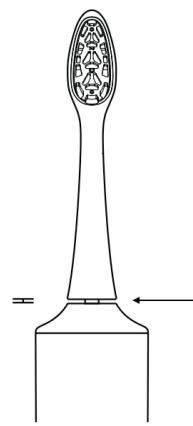
Fig./Img./Abb./Afb./Rys. 2

Fig./Img./Abb./Afb./Rys. 3

Fig./Img./Abb./Afb./Rys. 6
www.cecotec.es
- SOMMAIRE
- BATTERY INSTRUCTIONS
- INSTRUCTIONS DE SÉCURITÉ
- BEFORE USE
- BOX CONTENT
- OPERATION
- DISPLAY
- BRUSH HEAD INSTALLATION AND REPLACEMENT
- BRUSH HEAD INSTALLATION
- DISASSEMBLY AND REPLACEMENT
- TIPS
- FIG. 3
- POWER ON/OFF AND MODE SELECTION
- BRUSH ACTIVATION
- MODE CHANGE
- BEGINNING OF BRUSHING
- INTENSITY SETTING
- COMPLETION OF BRUSHING
- AUTOMATIC SHUT-OFF
- CORRECT TOOTHBRUSHING TECHNIQUE
- AESTHETIC ENHANCEMENT MODE
- MENUS
- MORE SMART FUNCTIONS
- CHARGING INSTRUCTIONS
- CHARGING
- CLEANING AND MAINTENANCE
- CLEANING THE BRUSH HEAD
- CLEANING THE HANDLE
- INSTRUCTIONS FOR REMOVAL OF THE INTEGRATED BATTERY
- TROUBLESHOOTING
- TECHNICAL SPECIFICATIONS
- RECYCLING OF ELECTRICAL AND ELECTRONIC EQUIPMENT
- TECHNICAL SUPPORT AND WARRANTY
- COPYRIGHT
- SIMPLIFIED EU DECLARATION OF CONFORMITY
- PIÈCES ET COMPOSANTS
- TEKNIK ÖZELLIKLER
Brand : CECOTEC
Model : Toothcare Whiteteeth Premium
Category : Interdental brush