Luz Bicicleta Smart Tail - Washing machine CECOTEC - Free user manual and instructions
Find the device manual for free Luz Bicicleta Smart Tail CECOTEC in PDF.


| Product type | Intelligent rear light for bicycle |
| Brand | Cecotec |
| Model | Luz Bicicleta Smart Tail |
| Power supply | Integrated rechargeable lithium-ion battery |
| Charging | Via USB cable (not included) |
| Battery life | Approximately 8 hours in continuous mode (estimated) |
| Charging time | Approximately 2 hours |
| Light source | High-intensity LED |
| Lighting modes | Steady light, fast flashing, slow flashing |
| Braking sensor | Detects decelerations and increases intensity |
| Attachment | Silicone bracket for seat post or saddle |
| Water resistance | Splash resistant (IPX4 rating) |
| Dimensions | 45 × 30 × 18 mm |
| Weight | 25 g |
| Materials | Aluminum, ABS plastic and silicone |
| Safety | Protection against overcharging, overheating and short circuits |
| Maintenance | Wipe with a soft, dry cloth; do not immerse in water |
| Recycling | Battery and equipment must be disposed of at an approved collection point |
| Warranty | Legal warranty and Cecotec after-sales service |
| Compliance | EU Declaration of Conformity included |
Frequently Asked Questions - Luz Bicicleta Smart Tail CECOTEC
User questions about Luz Bicicleta Smart Tail CECOTEC
0 question about this device. Answer the ones you know or ask your own.
Ask a new question about this device
Download the instructions for your Washing machine in PDF format for free! Find your manual Luz Bicicleta Smart Tail - CECOTEC and take your electronic device back in hand. On this page are published all the documents necessary for the use of your device. Luz Bicicleta Smart Tail by CECOTEC.
USER MANUAL Luz Bicicleta Smart Tail CECOTEC
- Parts and components 41
- Before use 41
- Installation 41
- Operation 42
- Troubleshooting 44
- Cleaning and maintenance 45
- Technical specifications 46
- Recycling of electrical and
electronic equipment 46 - Technical support and warranty 46
- Copyright 47
- Simplified EU Declaration of Conformity 47
SOMMAIRE
EN · The coding in this manual is generic and applies to all code variants of the appliance.
Please read these instructions carefully before using the appliance. Keep this instruction manual for future reference or new users.
- Failure to heed the following potential hazards may result in serious injury or death.
Battery warning
- This product uses a rechargeable lithium battery. Failure to follow these instructions may result in reduced battery life, risk of damage, fire, chemical burns, electrolyte leakage and injury.
- To avoid hazards, do not disassemble, modify, puncture, crush or destroy the battery.
- Do not expose the device or battery to flames, explosions or other hazards.
- Do not place the device in high-temperature environments such as a tumble dryer, in a car or under direct sunlight.
- Do not immerse the battery in water or other liquids.
- Do not overcharge the battery frequently.
- Do not charge the battery under extreme heat or near fire.
- Charge strictly according to the charging requirements to prevent hazards caused by excessive current.
- If the product is not used for an extended period, leave the battery fully charged to extend its service life.
Name and content of harmful substances in the product
| Part name | Toxic and hazardous substances or elements | |||||
| Lead (Pb) | Mercury (Hg) | Cadmium (Cd) | Cromo hexavalente (Cr(VI)) | Bifenilos polibromados (PBB) | Éteres de difenilo polibromados (PBDE) | |
| PCB assembly | X | 0 | 0 | 0 | 0 | 0 |
| Metal parts | X | 0 | 0 | 0 | 0 | 0 |
| Battery | 0 | 0 | 0 | 0 | 0 | 0 |
| Other | 0 | 0 | 0 | 0 | 0 | 0 |
This form is compiled in accordance with SJ/T 11346 provisions.

O: Indicates that the content of hazardous substances in all homogeneous materials of this component is below the limit requirement specified in GB/T 26572.
X: Indicates that the content of hazardous substance in at least one homogeneous material of the component exceeds the limit requirement specified in GB/T 26572.
INSTRUCTIONS DE SÉCURITÉ
- Power button
- USB charging port
Fig. 2 Fig. 3
Note:
The graphics in this manual are schematic representations and may not exactly match the product.
2. BEFORE USE
- This appliance comes in a packaging designed to protect it during transport. Remove the appliance from its box. You can keep the original box and other packaging materials in a safe place to prevent damage to the appliance if you need to transport it in the future. If you wish to dispose of the original packaging, make sure all items are recycled properly.
- Check that all parts and components are included and in good condition. If any of them are missing or damaged, please contact Cecotec's Official Technical Support Service immediately.
Box content:
Fig. 4
- Smart light
- Anti-loss device
- Mount
- Base
- Elastic securing strap
- Instruction manual
- Do not remove the product's serial number in order to keep proper traceability if technical assistance is required.
3. INSTALLATION
- Choose the appropriate base position according to your bike's saddle post size and place it on the rear of the mount. You may also place an anti-loss device between the base and mount to facilitate locating your bike.
Fig. 5
ENGLISH
- Attach the mount and base on the saddle post. Fig. 6.
- Secure with the elastic strap. Fig. 7
- Ensure the rear light button faces upwards, align the buckle on the rear with the slot in the mounting base and rotate clockwise until tight. At this point, the USB port should be at the bottom, which is the product's standard operating position. Fig. 8
4. OPERATION
Installing the Cecotec App
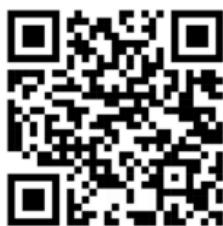
iOS: Compatible only with iPhone 4 and later versions. Update iOS to the latest version. Scan the QR code below to download the app or search for "Cecotec" in the Apple App Store, download it and update to the latest version.
Android: Compatible only with phones running Android 6.0 or higher, Magic UI 2.0 or EMUI 8.0 or higher. Scan the QR code below to download the app or search for "Cecotec" to download it and update to the latest version.
Fig. 9
Using the smart light device
Press and hold the power button to turn on.
- The rear position light will illuminate in the last pre-selected operating mode.
- The integrated acceleration sensor automatically activates the brake light and turn signals when braking or turning.
- The smart light device enters standby mode after a long period of inactivity. It automatically turns on when movement is detected.
Press the power button 5 times in a row, or press and hold to disconnect.
Note: Ensure the product has enough charge before use.
DIY rear light pattern
Multiple playback modes, extensive gallery selection and customisation.
Fig. 10
-
Single image mode
-
Click on single image mode to display a gallery of emoticons, letters and numbers. Select the desired rear light emoticon.
- Click OK to access the lighting effects interface. Click Done after adjusting.
- Click on the rear light display function to select eye protection mode or normal mode to preview the rear light pattern. Click Done after confirming.
The pattern will play in single image format.
-
Animation mode
-
Click on animation mode to display a gallery of emoticons, letters and numbers. You can select 10 patterns to create an animation.
-
Adjust playback speed, click on the rear light display function and select eye protection mode or normal mode to preview the pattern effect on the rear light. After confirming, click Finish. The pattern will play as an animation.
-
Carousel mode
-
Click on carousel mode and enter only 10 characters (including lowercase letters, numbers, spaces and commas).
-
Click on the rear light display function and select eye protection mode or normal mode to preview the pattern effect on the rear light. After confirming, click Finish. The pattern will play in a carousel vignette display.
-
Settings
- You can adjust the brake and turn sensor sensitivity, as well as programme the device's shutdown time.
Search function
Two different search methods:
- Short-range via Bluetooth, plays sound and illuminates the device.
-
Long-range via GPS, with one-click anti-loss and anti-theft features.
-
Find your smart light device with the Cecotec app
-
Open the Cecotec app and activate your Android or iOS phone's Bluetooth.
- Click the "+" sign in the top corner and select "Add device".
- A device search radar appears.
-
Press and hold the power button on the smart light device to turn it on so the app can find it; the device will appear on your phone screen within seconds.
-
Find your anti-loss device with Apple's "Find" app
-
Open the "Find" app.
- Click on "Items", then "Add item". The device will open and connect.
-
Once connected, you can locate it and navigate to it in the app to find the vehicle.
-
TROUBLESHOOTING
| Problem | Possible cause | Solution |
| The light does not turn on | - The battery is discharged. | - Fully charge the device using a Type-C charger. |
| - The power button is not being held down long enough. | - Press and hold the power button for several seconds. | |
| The light does not respond when braking | - The acceleration sensor is not working properly. | - Ensure the light is positioned in the standard operating direction (button facing up). |
| - The installation is incorrect or the light is loose. | - Verify the light is properly secured to the base and the base is correctly installed. | |
| The light does not enter standby mode | - Constant movement or vibrations prevent the sensor from activating the standby mode. | - Ensure the bike is completely stationary for an extended period of time. |
| Installation problems | - The base or mount is not properly adjusted. | - Check the installation and make sure the base is properly secured to the saddle post. |
| - The rear light buckle does not fit properly. | - Turn the light clockwise until it is properly secured. | |
| The charging port does not work | - There is dirt or debris blocking the USB Type-C port. | - Clean the port with a small dry brush. |
| - Faulty charging cable. | - Try another USB Type-C cable. | |
| The memory mode does not work | - The light was not turn off in the desired mode. | - Select the desired mode before turning it off. |
| - Memory system failure. | - Reset the device by removing it from the base and reinstalling it. |
6. CLEANING AND MAINTENANCE
To ensure proper operation and extend the life of your bike's rear light, follow these cleaning and maintenance recommendations:
Cleaning the device:
- Use a soft, slightly damp cloth to clean the rear light's surface. Avoid using harsh chemicals or solvents, as these could damage the materials.
- Ensure the USB Type-C port is clean and free from dust or debris.
Charging port maintenance:
- Before each charge, inspect the USB port to ensure there is no dirt that could interfere with the connection.
- Do not expose the charging port to water or moisture to prevent damage to internal components.
Strap and base care:
- Regularly check the securing straps for wear or damage. Replace if necessary.
- Clean the base and mount with a dry cloth to remove dust or debris that could affect device stability.
Weather protection:
- Although the device may be designed to withstand certain weather conditions, it is advisable to avoid prolonged exposure to heavy rain or extreme temperatures.
- If using the light in wet conditions, dry it thoroughly before storage.
Storage:
If not using the light for an extended period, fully charge it before storing and keep it in a cool, dry place.
Anti-loss device battery replacement
The Smart Finder has a replaceable battery that lasts up to one year. When depleted, you can replace it in just 3 steps.
- Use a flat-head screwdriver or small tool to open the battery cover space and turn once to open.
- Use a paper clip to remove the battery and replace with a new one, positive terminal facing up.
- Align the holes and close the battery cover.
Fig. 11
ENGLISH
Warning:
Keep batteries away from children and pets. The tag contains a button battery that can be hazardous if chewed or swallowed.
7. TECHNICAL SPECIFICATIONS
Model: EU01_106115
Size: 36x40x37.5 mm
Weight: 50 g
Battery: Built-in rechargeable lithium battery/800 mAh
Applicable voltage: DC 5 V
Wireless system: BLE 5.2
Waterproof rating: IP65
Charging method: Type C
Operating temperature range: -10°C\~50°C (14°F\~122°F)
Charging temperature range: 0°C\~45°C (32°F\~113°F)
Technical specifications may change without prior notice to improve product quality.
Made in China | Designed in Spain
8. RECYCLING OF ELECTRICAL AND ELECTRONIC EQUIPMENT
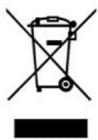
This symbol indicates that, according to the applicable regulations, the product and/or battery must be disposed of separately from household waste. When this product reaches the end of its lifetime, you should dispose of the batteries/accumulators and take them to a collection point designated by the local authorities.
For detailed information on how to properly dispose of electrical and electronic equipment and/or the corresponding batteries, consumers should contact their local authorities.
Compliance with the above guidelines will help protecting the environment.
9. TECHNICAL SUPPORT AND WARRANTY
Cecotec shall be liable to the end user or consumer for any lack of conformity that exists at the time of product delivery under the terms, conditions and deadlines established by applicable regulations.
Repairs should be carried out by qualified personnel.
If you detect any incident with the product or have any query, please contact Cecotec's Official Technical Support Service on +34 96 321 07 28.
10. COPYRIGHT
The intellectual property rights over the texts in this manual belong to CECOTEC INNOVACIONES, S.L. All rights reserved. The content of this publication may not, either in part or in its entirety, be reproduced, stored in a retrieval system, transmitted or distributed by any means (electronic, mechanical, photocopying, recording or similar) without prior authorisation from CECOTEC INNOVACIONES, S.L.
11. SIMPLIFIED EU DECLARATION OF CONFORMITY
CE Cecotec Innovaciones hereby declares that this appliance complies with the essential requirements and other relevant provisions of the regulations applicable in the European Union. This appliance has been designed, manufactured and tested in compliance with required safety and quality standards. The full text of the EU Declaration of Conformity can be found on the following website: https://cecotec.es/es/information/declaration-of-conformity
FRANÇAIS
1. PIÈCES ET COMPOSANTS
- Bouton marche
- Port de charge USB
Img. 2 Img. 3
Note :
Tension applicable : DC 5 V
https://cecotec.es/es/information/declaration-of-conformity
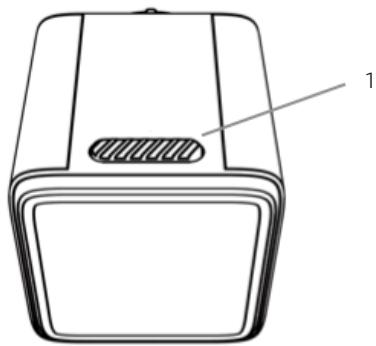
Fig./Img./Abb./Afb./Rys. 2

Fig./Img./Abb./Afb./Rys. 3


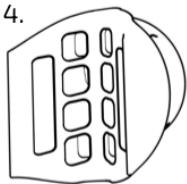

Fig./Img./Abb./Afb./Rys. 4

Fig./Img./Abb./Afb./Rys. 5

Fig./Img./Abb./Afb./Rys. 6

Fig./Img./Abb./Afb./Rys. 7

Fig./Img./Abb./Afb./Rys. 8
Android

iOS
Fig./Img./Abb./Afb./Rys. 9


Fig./Img./Abb./Afb./ Rys. 10

Fig./Img./Abb./Afb./Rys. 11
www.cecotec.es
- SOMMAIRE
- BATTERY WARNING
- NAME AND CONTENT OF HARMFUL SUBSTANCES IN THE PRODUCT
- INSTRUCTIONS DE SÉCURITÉ
- BEFORE USE
- BOX CONTENT
- INSTALLATION
- ENGLISH
- OPERATION
- INSTALLING THE CECOTEC APP
- USING THE SMART LIGHT DEVICE
- DIY REAR LIGHT PATTERN
- SEARCH FUNCTION
- CLEANING AND MAINTENANCE
- CLEANING THE DEVICE
- CHARGING PORT MAINTENANCE
- STRAP AND BASE CARE
- WEATHER PROTECTION
- STORAGE
- ANTI-LOSS DEVICE BATTERY REPLACEMENT
- TECHNICAL SPECIFICATIONS
- RECYCLING OF ELECTRICAL AND ELECTRONIC EQUIPMENT
- TECHNICAL SUPPORT AND WARRANTY
- COPYRIGHT
- SIMPLIFIED EU DECLARATION OF CONFORMITY
- FRANÇAIS
- PIÈCES ET COMPOSANTS
Brand : CECOTEC
Model : Luz Bicicleta Smart Tail
Category : Washing machine