
DAB-36 - Radio DENVER - Free user manual and instructions
Find the device manual for free DAB-36 DENVER in PDF.


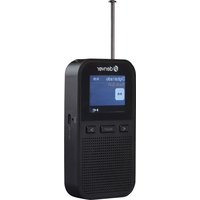
| Product type | Portable DAB+ / FM radio |
| Brand | Denver |
| Model | DAB-36 |
| Dimensions (W x H x D) | 180 x 120 x 70 mm |
| Weight | 0.5 kg |
| Power supply | 230 V mains via adapter (included) or 4 AA batteries (not supplied) |
| Reception | DAB+ (Band III) and FM (87.5-108 MHz) |
| Display | Backlit LCD display |
| Speaker | Built-in speaker, mono |
| Headphone jack | 3.5 mm jack socket |
| Auxiliary input | 3.5 mm AUX socket |
| Functions | Alarm, sleep timer, auto-off timer |
| Presets | 20 presets (DAB+ and FM) |
| Voice synthesis | No |
| Maintenance | Clean with a soft, dry cloth. Do not use chemicals. |
| Safety | Do not expose to moisture. Use only the supplied adapter. Do not open the device. |
| Spare parts | Not available separately. Device not user-repairable. |
| Package contents | Radio, mains adapter, user manual |
Frequently Asked Questions - DAB-36 DENVER
User questions about DAB-36 DENVER
0 question about this device. Answer the ones you know or ask your own.
Ask a new question about this device
Download the instructions for your Radio in PDF format for free! Find your manual DAB-36 - DENVER and take your electronic device back in hand. On this page are published all the documents necessary for the use of your device. DAB-36 by DENVER.
USER MANUAL DAB-36 DENVER
Instruction Manual Wooden Retro FM/DAB+ Radio with Bluetooth

denver

DAB-36
denver.eu

English

The lighting flash with arrowhead symbol, with an equilateral triangle is intended to alert the user of the presence of uninsulated dangerous voltage within the product's enclosure that may be of sufficient magnitude to constitute a risk of electric shock to persons.
CAUTION
RISK OF ELECTRIC SHOCK DO NOT OPEN
CAUTION: TO REDUCE THE RISK OFELECTRIC SHOCK, DO NOT REMOVE COVER (OR BACK). NO USER SERVICEABLE PARTS INSIDE. REFERSERVIC- ING TO QUALIFIED SERVICE. PERSONNEL.

The exclamation point within an equilateral triangle is intended to alert the user of presence of important operating and maintenance (servicing) instruction. In the literature accompanying the appliance.
CAUTION:
TO PREVENT ELECTRIC SHOCK, MATCH WIDE BLADE OF PLUG TO WIDE SLOT, FULLY INSERT.
Warning:
- Do not install this equipment in a confined or building-in space such as a book case or similar unit, and remain a well ventilation conditions at open site. The ventilation should not be impeded by covering the ventilation openings with items such as newspaper, table-cloths, curtains etc.
- WARNING: Only use attachments/accessories specified or provided by the manufacturer (such as the exclusive supply adapter, batteryetc).
- WARNING: To reduce the risk of fire or electric shock, do not expose this apparatus to rain or moisture. The apparatus shall not be exposed to dripping or splashing and that objects filled with liquids, such as vases, shall not be placed on apparatus.
- WARNING: The batteries (battery pack or batteries installed) shall not be exposed to excessive heat such as sunshine, fire or thelike.
- WARNING: The direct plug-in adapter is used as disconnect device, the disconnect device shall remain readily operable.

-
Correct Disposal of this product. This marking indicates that this product should not be disposed with other household wastes throughout the EU. To prevent possible harm to the environment or human health from uncontrolled waste disposal, recycle it responsibly to promote the sustainable reuse of material resources. To return your used device, please use the return and collection systems or contact the retailer where the product was purchased.
-
This equipment is a Class II or double insulated electrical appliance. It has been designed in such a way that it does not require a safety connection to electricalearth.
-
For applicable power supplies see userinstructions
Safety information
Please read the safety instructions carefully before using the product for the first time and keep the instructions for future reference.
- This product is not a toy. Keep it out of reach of children.
-
Keep product out of the reach of children and pets to avoid chewing and swallowing.
-
Product operating and storage temperature is from 0 degree Celsius to 40 degree Celsius. Under and over this temperature might affect the function.
-
Never open the product. Touching the inside electrics can cause electric shock. Repairs or service should only be performed by qualified personnel.
-
Do not expose to heat, water, moisture, direct sunlight!
-
Please protect your ears against load volume. Load volume can damage your ears and risk in hearing loss.
-
Bluetooth wireless technology operates within range of about 10 m (30 feet). The maximum communication distance may vary depending on the presence of obstacles (people, metal objects, walls, etc.) or the electromagnetic environment.
-
Microwaves emitting from a Bluetooth device may affect the operation of electronic medical devices.
-
The unit is not waterproof. Heater or foreign objects enter the unit, it may result in fire or electric shock. Heater or a foreign object enters the unit, stop use immediately.
-
Only charge with supplied Adaptor. The direct plug-in adapter is used as disconnect device, the disconnect device shall remain readily operable. So, make sure there is space around the power outlet for easy access.
-
Do not use non original accessories together with the product as this can make the product functionality abnormal.
LOCATION OF CONTROLS

Locations of Control:
- Volume knob
- Standby
- Scan
- Menu
- Info
- Alarm
- DAB/FM/AUX/BT
- Preset
- Preset 1
- Preset 2
- Preset 3
- Tune/Select knob
- LCD display
- Speakers
- Antenna
- Battery compartment
- AUX in jack
- DC jack
POWER SUPPLY
Insertone end atthe supplied power cord to the DC 5V INJack located at the rear of the unit and the otherend into the Wall outlet.
When the First time used the cord has to be firmly pushed into the socket if does not work on AC, to try again to be sure for a positive connection.
To play your unit on batteries, the AC power cord must be disconnected from the player.
Unplugthe AC power cord from the unit and insert 4size °C" batteries (not provided) in the compartment. Closethe battery compartment door.
Note: Check your batteries regularly. Old or discharged batteries should be replaced. If the unit is not to be used for some time or is being run exclusively on AC electrical current, remove batteries from the battery compartment to avoid leakage.
Warning: Before using the unit. Check that the local mains supply is compatible with the Unit Donot plug or unplug the power cable when your hands wet.
When planning not to use this unit for long periods of time (i.e. Vacation etc.) disconnect the plug from the wall outlet.
BATTERY SAFETY PRECAUTIONS:
Keep batteries away from children and pets.
Insert the batteries observing the proper polarity (+/-). Failure to properly align the battery polarity can cause personal injury and/or property damage.
Removeold or discharged batteries from the product. Remove the batteries when the product will not be used for extended periods of time to prevent damage due to rustedor corroded batteries.
Neverthrow batteries into alire, do not expose batteries to fire or other heat sources.
Battery Disposal: Old or discharged batteries must be properly disposed of and recycled in compliance with all applicable laws. Fordetailed information, contact your local solid waste authority.
Follow the battery manufacturer's safety, usage, and disposal instructions.
OPERATION
Press the Standby button to turn the unit.
IN DAB MODE
Autoselect: Pressthe SCAN button, "SCANNING" will show on the display, and the number of DAB stationwill show on the upper right corner, and it will automatically play the first station. Tune and press the TUNE/SELECT knob to choose the next or previous station.
Manualselect: Press and hold the INFO button and tune the "TUNE/SELECT" knob until the "MANUAL
TUNE" icon shown on the display, then tune the TUNE/SELECT knob to choose the station.
Note: you many have to wait for the unit to tune into the new channel.
DAB Radio stations presetting:
To receive the desired DABstation, press and hold the PRESET button, "Preset Store" "<1: (Empty)> will appear on the display,
Tunethe TUNE/SELECT knob to choose your desired program number(1-10) you want stored to. Then press TUNE/SELECT knob to store it.
Repeat the same procedures until all the desired radio stations were stored into the program list.
Recallthe memory, press PRESETbutton and tune the TUNE/SELECT knob to select the stored radio stationas desired. Press the TUNE/SELECT knob to confirm.
Please note: You may also recall the memory of Preset 1, Preset2 and Preset 3 stations by simply pressthe 1, 2, 3 knobon the unit.
IN FM MODE
Pressthe DAB/FM/AUX/BT button to select FM radio mode, press the SCAN button, when a radio is found, the frequency on display will stop running and start playback automatically.
If reception is no good, tune the TUNE/SELECT knob to fine tune. FM radio presetting issame as DAB radiopresetting
MENU Button
A. On DABmode, pressMENU button and tune "TUNE/SELECT" knob to see the available types, Press MENU again to returnback.
-
FullScan
Fullscan the DAB radio channels -
ManualScan
Scanthe DAB radiochannels manually
-
Dynamicrange compression(DRC) (Off/High/Low) This function reduces the difference between the loudest and quietest audio being broadcast. Effectively, this makes quiet sounds comparatively louder and loud sounds comparatively quieter. Note: DRC only works if it is enabled by the broadcaster for aspecific station.
-
StationOrder
The station order can be by alphanumeric or ensemble.
- Prune(Yes/No)
Yes- this removes all invalid stations.
No- Keep all stations.
- System
Time
- Set Time/Date
II. Auto Update
III. Set 12/24 hour format
IV. Set Date format
Backlight
- Timout
II. On level
III. Dimmer level
Languages
FactoryReset
Choose "YES" to clear all settings
SW version
B. On FM Mode. PressMENU button and tune "TUNE/SELECT" knob to see the available types, PressMENU again to return back.
- Scan Setting
To select the Strong stations or All stations.
- AudioSetting
To select Forced mono or Stereo allowed
- System
Time
- Set Time/Date
II. Auto Update
III. Set 12/24 hour format
IV. Set Date format
Backlight
- Timout
II. On level
III. Dimmer level
Languages
Factory Reset
Choose YES to clear all settings
SWversion
INFO Button
A. On DABMode, The UNIT has DAB information modes which are shown on the bottom line of the display. Press INFO button to see the available information.
- On FM Mode, The UNIT has FMinformation modes which are shown on the bottom line of the display. Press INFO button to see the available information.
ALARM SETTINGS
Alarms will only function when the unit is On (mains or battery power) or in Standby mode (Mains power only).
Alarmscan be switched on or off in standby mode (see below). however, the alarm parameters can only be set when the unit is on.
To set alarms
Tum the uniton.
To set or change alarm 1, press "ALARM" once, then press "TUNE/SELECT". To set or change alarm 2, press "ALARM" twice, then press "TUNE/SELECT". To exit alarm setting mode, press "ALARM" again.
The alarm setup prompts you for the following parameters. Select a value for each parameter. In turn turning the "TUNE/SELECT" knob and press "TUNE/SELECT" to confirm and move on to the next parameter.
Parameters
- On time—hours and minutes
- Duration - 15/30/45/60/90minutes
If the alarm is not cancelled the unit returns to standby after this time period.
- Source – Buzzer/DAB/FM
If DABor FM is chosen as the audio source you will also be prompted to select the Lastplayed station or one of the preset stations (ifset).
- Daily / Once/ Weekends/ Weekdays
Choose the days on which the alarm is active.
Note: if you choose 'Once', you are prompted to enter the required date.
- Alarm - Off/On
USING THE AUX INPUT
Connectthe AUX connectwire from the out jack of your Personal Player such as portable MP3 player to the AUX input Jack.
Press the DAB/FM/AUX/BT button to select AUX mode, "Auxiliary Input" will show on the LCD.
Turn on your Personal Player to begin playing, adjust the volume to desire listeninglevel.
IN Bluetooth MODE
Press the DAB/FM/AUX/BT button to select BLUETOOTH mode, LCD showing "Smart Device".
Topair the radio with your phone:
Tum on the Bluetooth function in the phone ortablet. For instructions, see your mobilephone user guide.
a. Place the phone within 20 cm (8 inches) of theradio.
b. Please make sure the radio is InBT mode. Choose "DAB-36" on your phone to connect the radioBluetooth. After connected, your radio will show "BTConnected".
c. Enjoy your music with the radionow!
Hereby, Denver A/S declares that the radio equipment type DAB-36 is in compliance with Directive 2014/53/EU. The full text of the EU declaration of conformity is available at the following Internet address: https://denver.eu/products/denver-dab-36/c-1024/p-2715
- Operating Frequency Range: FM 87.5-108.0MHz, DAB174-240MHz
- Max Output Power: 2x 2W
- Bluetooth frequency: 2.45 GHz.
| EN | |
| Manufacturer'sname or trade mark, commercial registration number and address | Blue Iron Holdings Limited SuiteQ, 18/F, International Industrial Centre, 2-8 Kwel Tel Street, Fotan, Shatin, NT. HongKong Commercial registration number: 68231699-000-09-19-5 |
| Modolidentifier | BI12T-050100-BdV |
| Input AC frequency | 100-240V |
| Input voltage | 50Hz |
| Output voltage | 5V |
| Output current | 1A |
| Output power | 5W |
| Average active efficiency | 73.78% |
| Efficiency at low load (10%) | 65.90% |
| No-load power consumption | 0.082W |
ALL RIGHTS RESERVED, COPYRIGHT DENVER A/S

Electric and electronic equipment contains materials, components and substances that can be hazardous to your health and the environment, if the waste material (discarded electric and electronic equipment) is not handled correctly.
Electric and electronic equipment is marked with the crossed out trash can symbol, seen above. This symbolsignifies that electric and electronic equipment should not be disposed of with other household waste, but should be disposed of separately.
ENG7
All cities have established collection points, where electric and electronic equipment can either be submitted free of charge at recycling stations and other collection sites, or be collected from the households. Additional information is available at the technical department of your city.
DENVERA/S
Omega5A, Soeften
8382 Hinnerup
Denmark
Denver.eu
www.facebook.com/denver.eu
German

- Bron-Zoemer/ DAB/FM
m = 311
ATTENZIONE: PER
RIDURRE IL RISCHIO
DI
SCOSSEELETTRICHE. NON RIMUOVEREIL COPERCHIO (OLA PARTEPOSTERIORE) NON CONTIENE COMPONENTI RIPARABILI DALL'UTENTE. PER L'ASSISTENZA, RIVOLGERSIA PERSONALEQUALIFI

(Push "1" for support)
For technical questions, please write to:
support.hq@denver.eu
For all other questions please write to:
contact.hq@denver.eu
Benelux
DENVER BENELUX B.V.
Barwoutswaarder 13C+D
3449 HE Woerden
The Netherlands
Phone: 0900-3437623
E-Mail: support.nl@denver.eu
Spain/Portugal
DENVER SPAIN S.A
Ronda Augustes y Louis Lumiere, n° 23 – nave 16
Parque Tecnológico
46980 PATERNA
Valencia (Spain)
Spain
Phone: +34 960 046 883
Mail: support.es@denver.eu
Portugal:
Phone: +35 1255 240 294
E-Mail: denver.service@satfiel.com
Germany
Denver Germany GmbH Service
Max-Emanuel-Str. 4
94036 Passau
Phone: +49 851 379 369 40
support.de@denver.eu
Fairfixx GmbH
Repair and service
(for TV, E-Mobility/Hoverboards/Balanceboards,
Smartphones & Tablets)
Tel.: +49 851 379 369 69
If your country is not listed above,
please write an email to
support@denver.eu


Brand : DENVER
Model : DAB-36
Category : Radio