
EXACONTROL 1 - Gas boiler SAUNIER DUVAL - Free user manual and instructions
Find the device manual for free EXACONTROL 1 SAUNIER DUVAL in PDF.



| Product type | Room thermostat with daily programming |
| Brand | SAUNIER DUVAL |
| Model | EXACONTROL 1 |
| Dimensions (W x H x D) | 120 x 85 x 32 mm |
| Operating voltage | 230 V~, 50 Hz |
| Backup power supply | 2 x 1.5 V batteries (type AA) |
| Power consumption | < 3 mA (230 V) / < 400 μA (batteries) |
| Max. contact load | 5 A / 250 V~ cos φ = 1 |
| Backup runtime (batteries) | 0.5 h |
| Day temperature range | 5 ... 30 °C |
| Setback temperature range | 5 ... 20 °C |
| Switching differential | ≤ 1 K |
| Protection type | IP 30 |
| Protection class | II (230 V) / III (batteries) |
| Operating temperature | +5 ... +50 °C |
| Permissible storage temperature | -20 ... +65 °C |
| Main functions | Daily programming, day/night mode, holiday mode, temporary temperature override, remote activation via telephone (via TEL input 230 V~) |
| Display | Digital screen with time, temperature, mode symbols, heating period bars, low battery indicator |
| Connection | Cable 3x0.75 mm², terminals for TEL input (telephone switch) |
| Installation | Reserved for qualified professional; cut power supply before intervention |
| Compatibility | All Saunier Duval heating appliances and other 230 V appliances |
| Maintenance | Check battery status (flashing = replace within 4 weeks); clean with a dry cloth |
| Factory settings | Heating period: 6:00 - 22:00, day temperature 20°C (estimated), setback 15°C (estimated) |
Frequently Asked Questions - EXACONTROL 1 SAUNIER DUVAL
User questions about EXACONTROL 1 SAUNIER DUVAL
0 question about this device. Answer the ones you know or ask your own.
Ask a new question about this device
Download the instructions for your Gas boiler in PDF format for free! Find your manual EXACONTROL 1 - SAUNIER DUVAL and take your electronic device back in hand. On this page are published all the documents necessary for the use of your device. EXACONTROL 1 by SAUNIER DUVAL.
USER MANUAL EXACONTROL 1 SAUNIER DUVAL
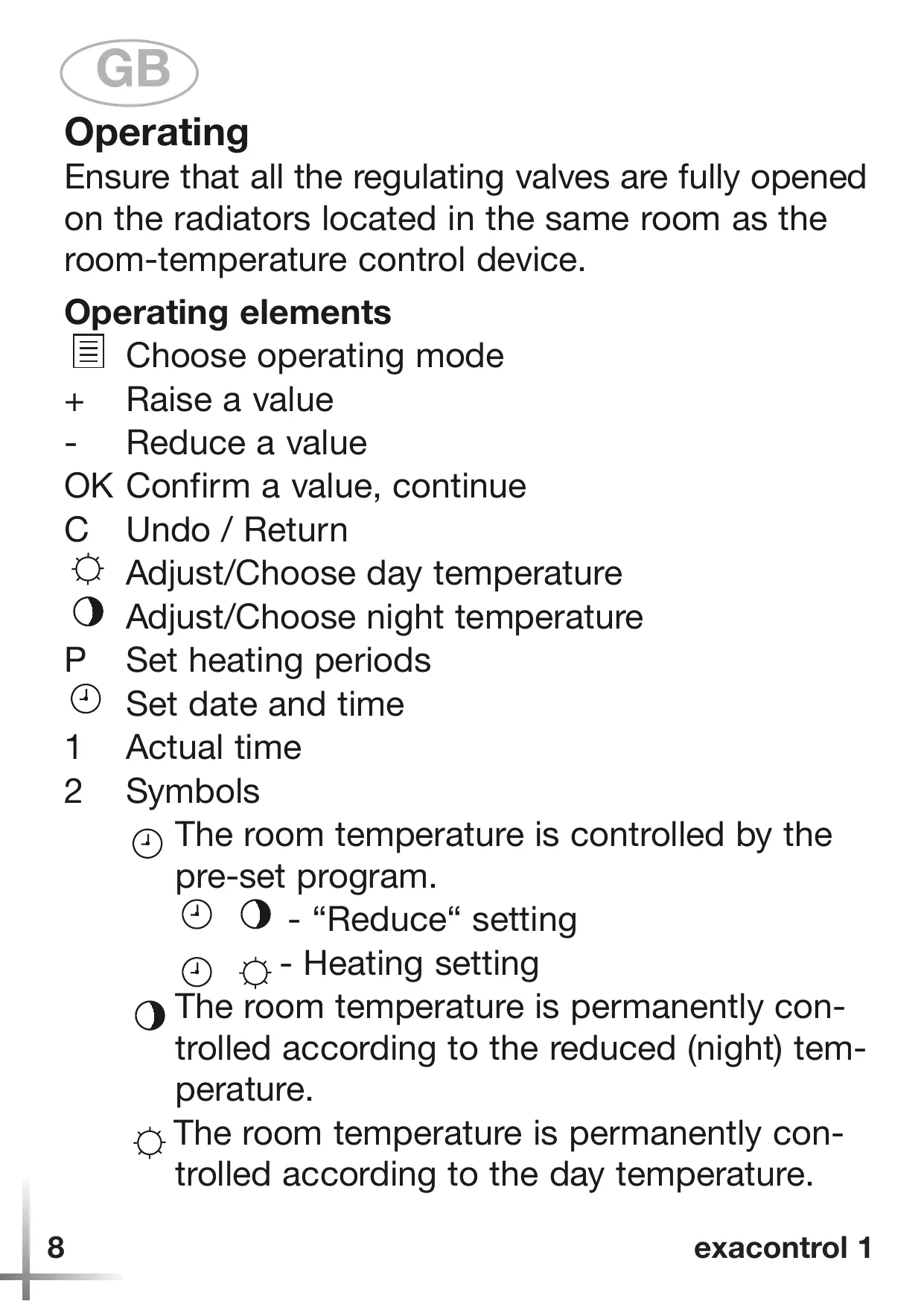
Ensure that all the regulating valves are fully opened on the radiators located in the same room as the room-temperature control device.
Operating elements
Choose operating mode
- Raise a value
- Reduce a value
OK Confirm a value, continue
C Undo / Return
Adjust/Choose day temperature
O Adjust/Choose night temperature
P Set heating periods
Set date and time
1 Actual time
2 Symbols
(1) The room temperature is controlled by the pre-set program.
- "Reduce" setting
- Heating setting
The room temperature is permanently controlled according to the reduced (night) temperature.
The room temperature is permanently controlled according to the day temperature.
Holiday program: during the holidays the room temperature is controlled according to the adjusted "reduced" temperature.
- Temporarily change of the temperatur
- Heating demand to the boiler
3 Actual temperature
4 Heating indicator (I = Heating period on)
5 Battery : flashing = change batteries, remaining time 4 weeks

There is a danger of overheating the room. If the batteries are running down the boiler operates with maximum advanced flow temperature (frost override).
Device description
exacontrol 1 is a programmable roomthermostat. They can be connected with all Saunier Duval boilers and outside boilers with 230 ~V thermostat input.
The thermostat already carries out a sensible heating programme:
Pre-set values
Heating period : 6.00 . . . 22.00
Choose the operating mode 64
Activate the holiday program 66
Temporary change of temperature setting . . . .68
Adjust the day/night temperature 70
Set the time 72
Set program 74
Connect with remote-control switch 76
Installation
This system MUST be fitted by a qualified and approved installation engineer, proceeding as shown on pages 78 to 81. The relevant safety guidelines should be followed at all times.

There is a danger of fatal injury from touching live components. Always shut off the power supply to the system (and ensure it cannot be reconnected) BEFORE carrying out installation or maintenance work.
Note that we will accept no liability whatsoever for injury or damage resulting from failure to observe these instructions. This condition applies especially to incorrect wiring and/or defective mechanical installation.
Connect a remote-control switch (TEL)
(not currently available in the UK)
The remote-control switch is connected on terminal TEL (see page 80-81).
Please note the installations instructions of the remote-control switch.
Technical specifications
| Device type | exacontrol 1 230V | Battery |
| Operating voltage | 230 V~ | 2x1,5V |
| Power consumption | < 3mA | <400μA |
| Max. contact load | 5 A/250 V~ cos φ =1 | |
| Power reserve | 0,5 h | |
| Day temperature range | 5 ... 30°C | |
| Night temperature range | 5 ... 20°C | |
| Switching difference | ≤ 1K | |
| Connection leads | 3x0,75 mm² | 3x0,75 mm² |
| Protection rating | IP 30 | IP 30 |
| Protection classification | II | III |
| Operating temperature | + 5 ... + 50 °C | |
| Permitted storage temp. | - 20 ... + 65 °C | |
| Dimensions | 120 x 85 x 32 mm | |
| input terminal TEL | active 230 V~ | |
Utilisation
3KcIIyaTaIaIaIaIaIaIaIaIaIaIaIaIaIaIaIaIaIaIaIaIaIaIaIaIaIaIaIaIaIaIaIaIaIaIaIaIaIaIaIaIaIaIaIaIaIaIaIaIaIaIaI
BПOMeIeHn,ГdE HaxOДNTcKOMHaTHbI TePMOCTaT,ДОЛЖНы 6bITb ПОЛHOCTbIO OTKpbITbI NJI IN CHЯТы BCE TepMOCTaTlUYeCKne BeHTNJIIN Ha OTOnIteJIbHbIX Prn6Opax.
KhoIIkn Ha IIaHeJIu yIpaBJIeHnA
BbI6Op peJkIma pa6Otby
- YBeJIInUeHnE 3HaUeHnIa
- YmehbIeHne 3HaueHnna
OK CoXpaHNTb daHHbIe, IpOJIInCTaTb MeHIO
C Bo3BpaT Ha3aД / OTka3 OT ИЗмeнеця
BbI6Op / yCTaHOBka dHeBHO TeMpepaTpybI IOMeIeHnIa
O BbI6Op / yCTaHOBka HOUHO' TeMIIepaTpybl IOMeIeHnIa
P 3aДанHe OTpe3KOB BpeMeHn ДЛЯ ПрогpaMMbI
YcTaHOBka BpeMeHn
ДИЕМЕТБI DИСПЛЯ
1 Tekyiüee BpeMЯ
2 CIMMBOJIbI
TeMpepaTpa IOMeIeHnI N3MeHЯETcI PO 3aHaHHoI pOgPamMe.
O -HouhoJ pejIM
-Дневноpeжим
OПocToHHoe IOdIeJkaHne 3aHaHHoH HOpHoTempePaTypbI
ПocToHHoe ПODдержанne 3aДaHHoJ dHeBHOI TeMIIepaTypbl
BkIIOueHne IpoIpaMMbI "OTIIyck" .66
KpaTKOBpeMeHHa IpeCTaHOBka TeMpepaTpyb68
YCTaHOBka dHeBHO TeMpepaTpybI 70
YCTaHOBka HOUHOI TeMIIepaTpybI . . . . . . . . . . . . . . . . . . . . . . . . . . . . . . . . . . . . . . . . . . . . . . . . . . . . . . . . . . . . . . . . . . . . . . .
YCTaHOBka BpeMeHn 72
3aIaHne IpoIpaMM 74
YIpaBJIeHnE Yepe3 TeJIeΦoHHbI KOHTaKTop 76
MOHTaJ
GB Choose the operating mode
GB Temporary change of temperature setting