SP200 - Receiver Citronic - Free user manual and instructions
Find the device manual for free SP200 Citronic in PDF.


User questions about SP200 Citronic
0 question about this device. Answer the ones you know or ask your own.
Ask a new question about this device
Download the instructions for your Receiver in PDF format for free! Find your manual SP200 - Citronic and take your electronic device back in hand. On this page are published all the documents necessary for the use of your device. SP200 by Citronic.
USER MANUAL SP200 Citronic
natural_image
Line drawing of a Jabra brand phone device with no text or symbols on the device itselfUser manual
USER MANUAL - LANGUAGES
ENGLISH - EUROPE (click here for manual) 4
ENGLISH - NORTH AMERICA (Click here for manual) 16
ENGLISH - ASIA PACIFIC (Click here for manual) 28
WHAT YoUr SPeaKerPPhone Can Do ....3
GettInG StarteD....3
CHarGInG YoUr SPeaKerPPhone 4
tUrnInG YoUr Jabra SP200 on anD oFF 5
PalrInG YoUr Jabra SP200 WItH YoUr MobilLe PPhone .....6
ConneCtInG WItH YoUr PPhone 7
PLaCInG tHe SPeaKerPPhone In YoUr VeHICLe....7
HoW to 8
WHAT tHe LIGHTS Mean 9
USInG YoUr Jabra SP200 WItH tWo MobilLe DeVICeS.....9
troUbLeSHootInG & FaQ 10
neeD More HeLP?......1 1
taKlnG Care oF YoUr SPeaKerPPhone 12
GLoSSarY 12
THANK YOU
Thank you for purchasing the Jabra SP200 Bluetooth® wireless technology speakerphone. We hope you enjoy it! This instruction manual will get you started and ready to make the most of your speakerphone.
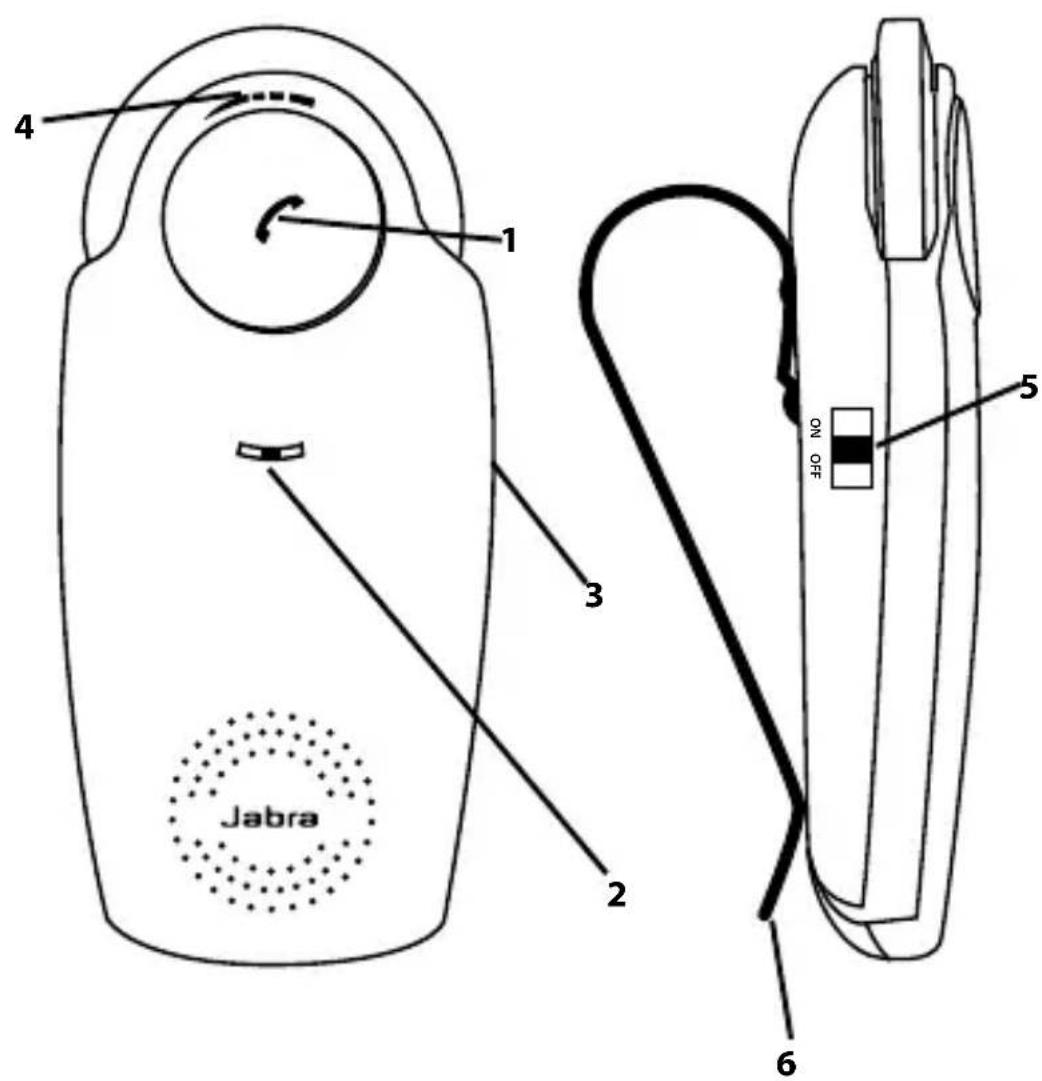
ABOUT YOUR JABRA SP200
1 Answer/end button
2 LED light
3 Charging socket
4 Volume wheel
5 On/off switch
6 Visor clip

text_image
Jabra 1 2 3 4 5 6 NON OFFWHAT YOUR SPEAKERPHONE CAN DO
Your Jabra SP200 lets you do all this:
- Answer calls
- End calls
- Reject calls*
- Voice dialing*
- Last number redial*
- Mute
- Transfer Calls
- Adjust volume
- MultiUse™ – connect two Bluetooth® devices at the same time
Specifications
- Talk time up to 10 hours / Standby time up to 550 hours (23 days)
- Rechargeable battery with charging option from car charger or via USB cable.
- Sleep mode automatically turns the speakerphone off after 15 minutes if not connected to your phone
- Noise reduction & Echo cancellation via DSP technology
- Size: L 124 mm x W 56 mm x H 16 mm
- Weight 84 grams
- Operating range up to 10 meters (approximately 33 feet)
- Supported Bluetooth® profiles: HFP, HSP
- Bluetooth® specification (see glossary) version 2.0
- e-SCO for enhanced audio quality
GETTING STARTED
You should follow three steps before using your speakerphone
1) Charge your speakerphone
2) Activate Bluetooth ^® on your mobile phone (refer to the manual for your Mobile phone)
3) Pair your speakerphone with your mobile phone
The Jabra SP200 is easy to operate. The answer/end button on the speakerphone performs different functions depending on how long you press it.
| Instruction Duration of press | |
| Tap Press briefly | |
| Double tap 2 quickly repeated taps | |
| Press Approximately 1 second | |
| Press and hold Approximately 5 seconds |
CHARGING YOUR SPEAKERPHONE
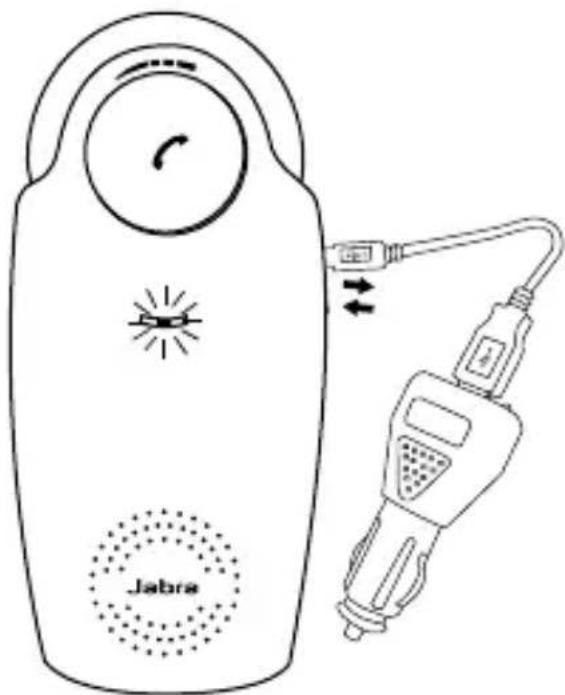
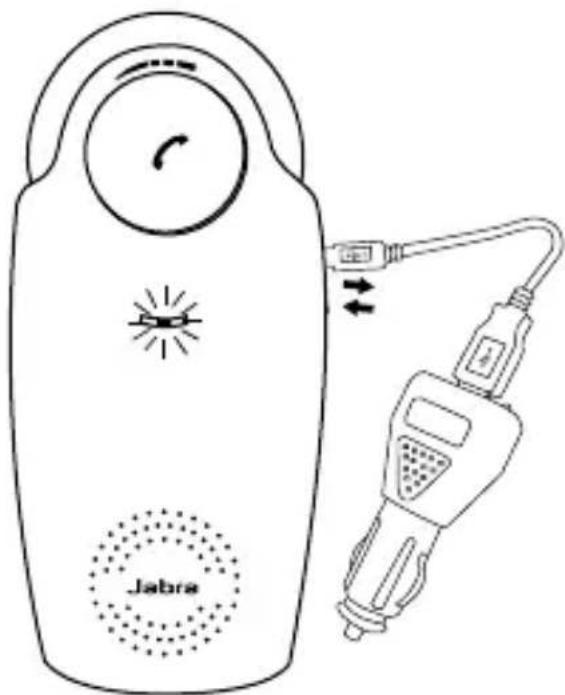
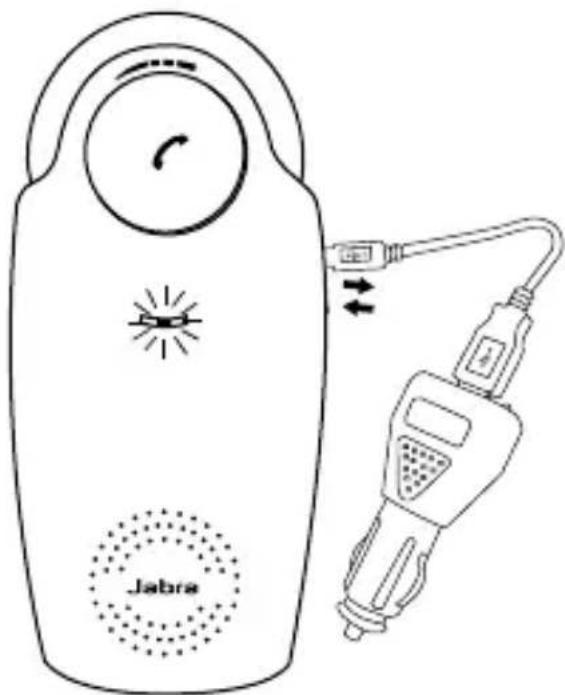
Make sure that your speakerphone is fully charged for two hours before you start using it. Use the car charger or the USB cable to charge. When the light indicator (LED) has a solid red light, your speakerphone is charging. When the light turns green, it is fully charged.
text_image
JabraUse only the charger provided in the box - do not use chargers from any other devices as this may damage your speakerphone.
Please note: The lifetime of the battery will be significantly reduced if your device is left uncharged for a long period. We therefore recommend that you recharge your device at least once a month.
TURNING YOUR JABRA SP200 ON AND OFF
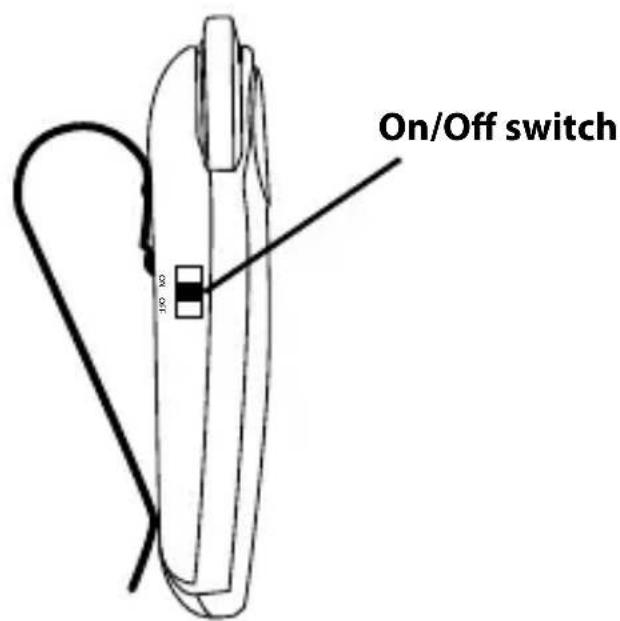
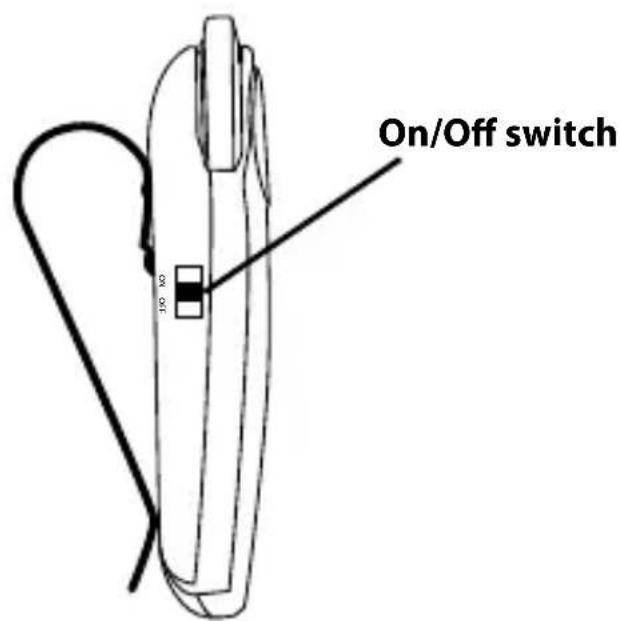
- Slide the on/off switch forward on the side of the speakerphone to turn on the speakerphone.
- Slide the on/off switch backward to turn off the speakerphone.
Sleep Mode
When not connected to a phone, the speakerphone turns off automatically after 15 minutes. Tap the answer/end button to turn the speakerphone on again.
text_image
On/Off switch 100 x2PAIRING YOUR JABRA SP200 WITH YOUR MOBILE PHONE
The Speakerphone can be connected to a mobile phone using a procedure called 'pairing'. By following a few simple steps, a phone can be paired with the speakerphone in a matter of minutes.
1 Put the speakerphone in pairing mode
- When you turn on your Jabra SP200 for the first time, the speakerphone will automatically start up in pairing mode – i.e. it can be detected by your phone. When the speakerphone is in pairing mode the blue LED will flash rapidly.
2 Set your Bluetooth ^® phone to 'search' for the Jabra SP200
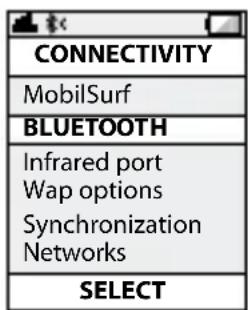
- Follow your phone's instruction guide. First make sure that Bluetooth ^ is activated on your mobile phone. Then set your phone to search for devices. This usually involves going to a 'setup,' 'connect' or 'Bluetooth ^ ' menu on your phone and selecting the option to 'search' or 'add' a Bluetooth ^ device.*
3 Your phone will find the Jabra SP200
- Your phone will find the speakerphone under the name "Jabra SP200". Your phone then asks if you want to pair with the Jabra SP200. Accept by pressing 'Yes' or 'OK' on the phone and confirm with the passkey or PIN = 0000 (4 zeros). Your phone will confirm when pairing is complete.

text_image
CONNECTIVITY MobilSurf BLUETOOTH Infrared port Wap options Synchronization Networks SELECT
text_image
DEVICES FOUND Jabra SP200 SELECT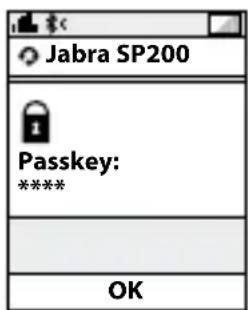
text_image
Jabra SP200 Passkey: **** OK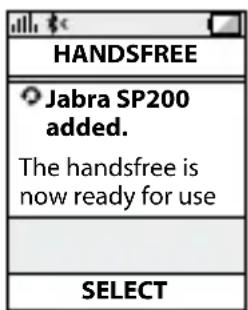
text_image
HANDSFREE Jabra SP200 added. The handsfree is now ready for use SELECTManual pairing mode
If you wish to use the speakerphone with a different phone, or if the pairing process was interrupted, you can manually set the speakerphone to pairing mode.
Turn the speakerphone on. Press and hold the answer/end button for approximately 5 seconds until the blue LED light stars blinking rapidly. Then repeat steps 2. and 3. in the above pairing guide.
CONNECTING WITH YOUR PHONE
Pairing is only needed the first time a speakerphone and phone are used together. When the speakerphone and phone have been paired once, they will automatically connect when the speakerphone is on and Bluetooth® is activated on the phone. The speakerphone can be used when it is “connected” to the phone. If the devices are paired, but do not immediately connect, tap the answer/end button.
PLACING THE SPEAKERPHONE IN YOUR VEHICLE
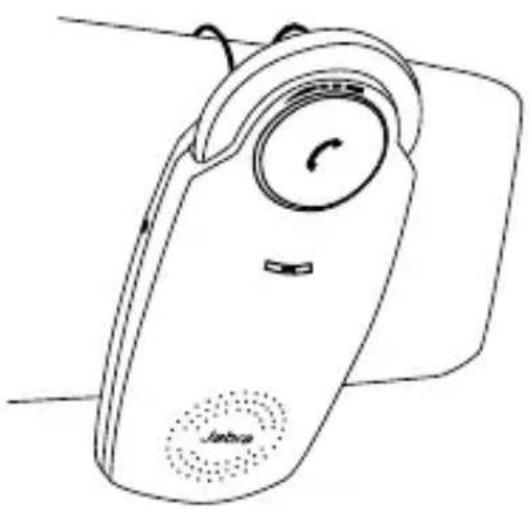
The Jabra SP200 sits discreetly and conveniently on the sun visor using the attached clip.

natural_image
Line drawing of a handheld device with a circular dial and speaker grille (no text or symbols)HOW TO
Answer a call
- Tap the answer/end button on your speakerphone to answer a call.
End a call
- Tap the answer/end button on your speakerphone to end an active call.
Make a call
- The call will automatically transfer to your speakerphone*. If not tap the answer/end button.
Reject a call\*
- Press the answer/end button.
Activate voice dialing\*
- Press the answer/end button. For best results, record the voice-dialing tag through your speakerphone.
Redial last number\*
- Double tap the answer/end button when the speakerphone is on and not in use.
Mute/un-mute
- Press and hold the answer/end button to mute an active call. A beep tone plays during the muted call.
- Press and hold the answer/end button to un-mute.
Transfer Calls
- Press the answer/end button to transfer a call from the speakerphone to the mobile phone.
- Press the answer/end button to transfer a call from the mobile phone to the speakerpone.
Adjust sound and volume\*
- Scroll the volume wheel to the left or right to adjust the volume.
WHAT THE LIGHTS MEAN
| What you see What it means | |
| Flashing blue light Speakerphone | is on but not connected |
| Solid blue Connected to phone | |
| Flashing blue light rapidly Pairing mode | |
| Flashing blue light Incoming call | |
| Solid green light Active call | |
| Flashing red light Running low on battery | |
| Solid green light when charging | Charging level between 70% and fully charged |
| Solid red light when charging Ch | charging level less than 70% |
USING YOUR JABRA SP200 WITH TWO MOBILE DEVICES
The Jabra SP200 is capable of having two mobile phones (or other Bluetooth ^® devices) connected to the speakerphone at the same time. This will give you the freedom of having only one speakerphone to operate both of your mobile phones. Please note that Last Number redial will dial the number from the last outgoing call independent of the mobile phone.
How to pair your Jabra SP200 with 2 Bluetooth ^® devices:
1 Pair device number 1 with your speakerphone using the pairing instruction above for re-pairing your speakerphone (if device 1 is paired to your speakerphone already go to step 2)
2 Press the Answer/End button for 4-5 seconds
3 Pair device number 2 with your speakerphone using the same pairing instruction again
4 Connect to device 1 again
Please note that it is important to connect to device 1 again after pairing device 2 to ensure connection to both devices.
TROUBLESHOOTING & FAQ
I hear crackling noises
- Bluetooth® is a radio technology, which means it is sensitive to objects between the speakerphone and the connected device. It is designed for the speakerphone and the connected device to be used within 33 feet (10 meters) of each other, with no major objects in the way (walls, etc.).
I cannot hear anything in my speakerphone
- Increase the volume in the speakerphone
- Ensure that the speakerphone is paired to a device that is playing
- Make sure your phone is connected to the speakerphone by tapping the Answer/End button.
I am having pairing problems
- You may have deleted your speakerphone pairing connection in your mobile phone. Follow the pairing instructions.
I want to reset the pairing list in my speakerphone
- It is possible to reset the pairing list in the speakerphone. First go into pairing mode. When you have released the Answer/End button and speakerphone is in pairing mode you press Answer/End button again for 5 sec. When pairing list is empty you hear a beep. The next time you power on, the speakerphone will automatically go into pairing mode.
Will the Jabra SP200 work with other Bluetooth® equipment?
- The Jabra SP200 is designed to work with Bluetooth® mobile phones. It can also work with other Bluetooth® devices that are compliant with Bluetooth® version 1.1 or higher and support a headset and/or hands-free profile.
I cannot use reject call, redial or voice dialling
- These features are dependent on the ability of your phone to support a hands-free profile. Even if the handsfree profile is implemented reject call, call hold and voice dialing are optional features which are not supported by all devices. Please consult your device manual for details.
NEED MORE HELP?
1. Web: www.jabra.com
(for the latest support info and online User Manuals)
2. E-mail:
Deutsch support.de@jabra.com
English support.uk@jabra.com
Español support.es@jabra.com
- Always store the Jabra SP200 with the power off and safely protected
- Avoid storage at extreme temperatures (above 45^ C/113°F – including direct sunlight – or below -10^ C/14°F). This can shorten battery life and may affect operation. High temperatures may also degrade performance.
- Do not expose the Jabra SP200 to rain or other liquids.
GLOSSARY
1 Bluetooth® is a radio technology that connects devices, such as mobile phones and headsets, without wires or cords over a short distance (approx. 10 meters/33 feet). Bluetooth® is safe to use. It is secure too, so once a connection has been made no-one can listen in and there is no interference from other Bluetooth® devices either. Get more information at www.bluetooth.com.
2 Bluetooth® profiles are the different ways that Bluetooth® devices communicate with other devices. Bluetooth® phones support the headset profile, the hands-free profile or both. In order to support a certain profile, a phone manufacturer must implement certain mandatory features within the phone's software.
3 Pairing creates a unique and encrypted link between two Bluetooth ^® devices and lets them communicate with each other. Bluetooth ^® devices will not work if the devices have not been paired.
4 Passkey or PIN is a code that you enter on your Bluetooth® enabled device (e.g. a mobile phone) to pair it with your Jabra SP200. This makes your device and the Jabra SP200 recognize each other and automatically work together.
5 Standby mode is when the Jabra SP200 is passively waiting for a call. When you 'end' a call on your mobile phone, the speaker-phone goes into standby mode.

Dispose of the product according to local standards and regulations.
www.jabra.com/weee
Contents
tHanK YoU....2
aboUt YoUr Jabra SP200 2
WHAT YoUr SPeaKerPPhone Can Do ....3
GettInG StarteD....3
CHarGInG YoUr SPeaKerPPhone 4
tUrnInG YoUr Jabra SP200 on anD oFF 5
PalrInG YoUr Jabra SP200 WItH YoUr MobilLe PPhone .....6
ConneCtInG WItH YoUr PPhone 7
PLaCInG tHe SPeaKerPPhone In YoUr VeHICLe....7
HoW to 8
WHAT tHe LIGHTS Mean 9
USInG YoUr Jabra SP200 WItH tWo MobilLe DeVICeS.....9
troUbLeSHootInG & FaQ 10
neeD More HeLP?......1 1
taKlnG Care of YoUr SPeaKerPPhone 11
GLoSSarY 11
THANK YOU
Thank you for purchasing the Jabra SP200 Bluetooth® wireless technology speakerphone. We hope you enjoy it! This instruction manual will get you started and ready to make the most of your speakerphone.
ABOUT YOUR JABRA SP200
1 Answer/end button
2 LED light
3 Charging socket
4 Volume wheel
5 On/off switch
6 Visor clip
text_image
Jabra 1 2 3 4 5 6 NON OFFWHAT YOUR SPEAKERPHONE CAN DO
Your Jabra SP200 lets you do all this:
- Answer calls
- End calls
- Reject calls*
- Voice dialing*
- Last number redial*
- Mute
- Transfer Calls
- Adjust volume
- MultiUse™ – connect two Bluetooth® devices at the same time
Specifications
- Talk time up to 10 hours / Standby time up to 550 hours (23 days)
- Rechargeable battery with charging option from car charger or via USB cable.
- Sleep mode automatically turns the speakerphone off after 15 minutes if not connected to your phone
- Noise reduction & Echo cancellation via DSP technology
- Size: L4.8in x W2.2in x D0.9in
- Weighs 3oz.
- Operating range up to 10 meters (approximately 33 feet)
- Supported Bluetooth® profiles: HFP, HSP
- Bluetooth® specification (see glossary) version 2.0
- e-SCO for enhanced audio quality
GETTING STARTED
You should follow three steps before using your speakerphone
1) Charge your speakerphone
2) Activate Bluetooth ^® on your mobile phone (refer to the manual for your Mobile phone)
3) Pair your speakerphone with your mobile phone
The Jabra SP200 is easy to operate. The answer/end button on the speakerphone performs different functions depending on how long you press it.
| Instruction Duration of press | |
| Tap Press briefly | |
| Double tap 2 quickly repeated taps | |
| Press Approximately 1 second | |
| Press and hold Approximately 5 seconds |
CHARGING YOUR SPEAKERPHONE
Make sure that your speakerphone is fully charged for two hours before you start using it. Use the car charger or the USB cable to charge. When the light indicator (LED) has a solid red light, your speakerphone is charging. When the light turns green, it is fully charged.
text_image
JabraUse only the charger provided in the box - do not use chargers from any other devices as this may damage your speakerphone.
Please note: The lifetime of the battery will be significantly reduced if your device is left uncharged for a long period. We therefore recommend that you recharge your device at least once a month.
TURNING YOUR JABRA SP200 ON AND OFF
- Slide the on/off switch forward on the side of the speakerphone to turn on the speakerphone.
- Slide the on/off switch backward to turn off the speakerphone.
Sleep Mode
When not connected to a phone, the speakerphone turns off automatically after 15 minutes. Tap the answer/end button to turn the speakerphone on again.

text_image
On/Off switch 100 x2PAIRING YOUR JABRA SP200 WITH YOUR MOBILE PHONE
The Speakerphone can be connected to a mobile phone using a procedure called 'pairing'. By following a few simple steps, a phone can be paired with the speakerphone in a matter of minutes.
1 Put the speakerphone in pairing mode
- When you turn on your Jabra SP200 for the first time, the speakerphone will automatically start up in pairing mode – i.e. it can be detected by your phone. When the speakerphone is in pairing mode the blue LED will flash rapidly.
2 Set your Bluetooth ^® phone to 'search' for the Jabra SP200
- Follow your phone's instruction guide. First make sure that Bluetooth ^ is activated on your mobile phone. Then set your phone to search for devices. This usually involves going to a 'setup,' 'connect' or 'Bluetooth ^ ' menu on your phone and selecting the option to 'search' or 'add' a Bluetooth ^ device.*
3 Your phone will find the Jabra SP200
- Your phone will find the speakerphone under the name "Jabra SP200". Your phone then asks if you want to pair with the Jabra SP200. Accept by pressing 'Yes' or 'OK' on the phone and confirm with the passkey or PIN = 0000 (4 zeros). Your phone will confirm when pairing is complete.
text_image
CONNECTIVITY MobilSurf BLUETOOTH Infrared port Wap options Synchronization Networks SELECT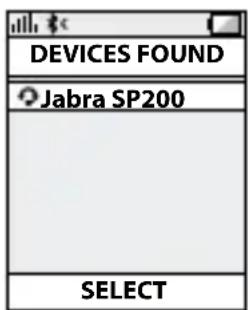
text_image
DEVICES FOUND Jabra SP200 SELECT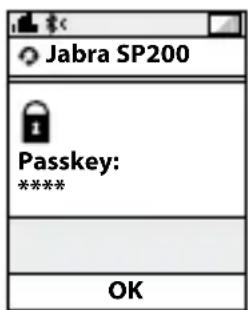
text_image
Jabra SP200 Passkey: **** OK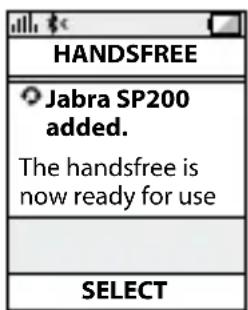
text_image
HANDSFREE Jabra SP200 added. The handsfree is now ready for use SELECTManual pairing mode
If you wish to use the speakerphone with a different phone, or if the pairing process was interrupted, you can manually set the speakerphone to pairing mode.
Turn the speakerphone on. Press and hold the answer/end button for approximately 5 seconds until the blue LED light stars blinking rapidly. Then repeat steps 2. and 3. in the above pairing guide.
CONNECTING WITH YOUR PHONE
Pairing is only needed the first time a speakerphone and phone are used together. When the speakerphone and phone have been paired once, they will automatically connect when the speakerphone is on and Bluetooth® is activated on the phone. The speakerphone can be used when it is “connected” to the phone. If the devices are paired, but do not immediately connect, tap the answer/end button.
PLACING THE SPEAKERPHONE IN YOUR VEHICLE
The Jabra SP200 sits discreetly and conveniently on the sun visor using the attached clip.
natural_image
Line drawing of a handheld device with a circular dial and speaker grille (no text or symbols)HOW TO
Answer a call
- Tap the answer/end button on your speakerphone to answer a call.
End a call
- Tap the answer/end button on your speakerphone to end an active call.
Make a call
- The call will automatically transfer to your speakerphone*. If not tap the answer/end button.
Reject a call\*
- Press the answer/end button.
Activate voice dialing\*
- Press the answer/end button. For best results, record the voice-dialing tag through your speakerphone.
Redial last number\*
- Double tap the answer/end button when the speakerphone is on and not in use.
Mute/un-mute
- Press and hold the answer/end button to mute an active call. A beep tone plays during the muted call.
- Press and hold the answer/end button to un-mute.
Transfer Calls
- Press the answer/end button to transfer a call from the speakerphone to the mobile phone.
- Press the answer/end button to transfer a call from the mobile phone to the speakerpone.
Adjust sound and volume\*
- Scroll the volume wheel to the left or right to adjust the volume.
WHAT THE LIGHTS MEAN
| What you see What it means | |
| Flashing blue light Speakerphone | is on but not connected |
| Solid blue Connected to phone | |
| Flashing blue light rapidly Pairing mode | |
| Flashing blue light Incoming call | |
| Solid green light Active call | |
| Flashing red light Running low on battery | |
| Solid green light when charging | Charging level between 70% and fully charged |
| Solid red light when charging Ch | charging level less than 70% |
USING YOUR JABRA SP200 WITH TWO MOBILE DEVICES
The Jabra SP200 is capable of having two mobile phones (or other Bluetooth ^® devices) connected to the speakerphone at the same time. This will give you the freedom of having only one speakerphone to operate both of your mobile phones. Please note that Last Number redial will dial the number from the last outgoing call independent of the mobile phone.
How to pair your Jabra SP200 with 2 Bluetooth ^® devices:
1 Pair device number 1 with your speakerphone using the pairing instruction above for re-pairing your speakerphone (if device 1 is paired to your speakerphone already go to step 2)
2 Press the Answer/End button for 4-5 seconds
3 Pair device number 2 with your speakerphone using the same pairing instruction again
4 Connect to device 1 again
Please note that it is important to connect to device 1 again after pairing device 2 to ensure connection to both devices.
TROUBLESHOOTING & FAQ
I hear crackling noises
- Bluetooth® is a radio technology, which means it is sensitive to objects between the speakerphone and the connected device. It is designed for the speakerphone and the connected device to be used within 33 feet (10 meters) of each other, with no major objects in the way (walls, etc.).
I cannot hear anything in my speakerphone
- Increase the volume in the speakerphone
- Ensure that the speakerphone is paired to a device that is playing
- Make sure your phone is connected to the speakerphone by tapping the Answer/End button.
I am having pairing problems
- You may have deleted your speakerphone pairing connection in your mobile phone. Follow the pairing instructions.
I want to reset the pairing list in my speakerphone
- It is possible to reset the pairing list in the speakerphone. First go into pairing mode. When you have released the Answer/End button and speakerphone is in pairing mode you press Answer/End button again for 5 sec. When pairing list is empty you hear a beep. The next time you power on, the speakerphone will automatically go into pairing mode.
Will the Jabra SP200 work with other Bluetooth® equipment?
- The Jabra SP200 is designed to work with Bluetooth® mobile phones. It can also work with other Bluetooth® devices that are compliant with Bluetooth® version 1.1 or higher and support a headset and/or hands-free profile.
I cannot use reject call, redial or voice dialling
- These features are dependent on the ability of your phone to support a hands-free profile. Even if the handsfree profile is implemented reject call, call hold and voice dialing are optional features which are not supported by all devices. Please consult your device manual for details.
NEED MORE HELP?
1 Web: www.jabra.com/nasupport (for the latest support info and online User Manuals)
2 Phone:
1 (800) 327-2230 (U.S)
1 (800) 489-4199 (Canada)
TAKING CARE OF YOUR SPEAKERPHONE
- Always store the Jabra SP200 with the power off and safely protected
- Avoid storage at extreme temperatures (above 45^ C/113°F – including direct sunlight – or below -10^ C/14°F). This can shorten battery life and may affect operation. High temperatures may also degrade performance.
- Do not expose the Jabra SP200 to rain or other liquids.
GLOSSARY
-
Bluetooth® is a radio technology that connects devices, such as mobile phones and headsets, without wires or cords over a short distance approx. 33 feet (10 meters). Get more information at www.bluetooth.com
-
Bluetooth® profiles are the different ways that Bluetooth® devices communicate with other devices. Bluetooth® phones support either the headset profile, the hands-free profile or both. In order to support a certain profile, a phone manufacturer must implement certain mandatory features within the phone's software.
-
Pairing creates a unique and encrypted link between two Bluetooth ^® devices and lets them communicate with each other. Bluetooth ^® devices will not work if the devices have not been paired.
- Passkey or PIN is a code that you enter on your mobile phone to pair it with your Jabra SP200. This makes your phone and the Jabra SP200 recognize each other and automatically work together.
- Standby mode is when the Jabra SP200 is passively waiting for a call. When you 'end' a call on your mobile phone, the speakerphone goes into standby mode.
Contents
tHanK YoU....2
aboUt YoUr Jabra SP200 2
WHAT YoUr SPeaKerPPhone Can Do ....3
GettInG StarteD....3
CHarGInG YoUr SPeaKerPPhone 4
tUrnInG YoUr Jabra SP200 on anD oFF 5
PalrInG YoUr Jabra SP200 WItH YoUr MobilLe PPhone .....6
ConneCtInG WItH YoUr PPhone 7
PLaCInG tHe SPeaKerPPhone In YoUr VeHICLe....7
HoW to 8
WHAT tHe LIGHTS Mean 9
USInG YoUr Jabra SP200 WItH tWo MobilLe DeVICeS.....9
troUbLeSHootInG & FaQ 10
neeD More HeLP?......1 1
taKlnG Care of YoUr SPeaKerPPhone 11
GLoSSarY 11
THANK YOU
Thank you for purchasing the Jabra SP200 Bluetooth® wireless technology speakerphone. We hope you enjoy it! This instruction manual will get you started and ready to make the most of your speakerphone.
ABOUT YOUR JABRA SP200
1 Answer/end button
2 LED light
3 Charging socket
4 Volume wheel
5 On/off switch
6 Visor clip

text_image
Jabra 1 2 3 4 5 6 NON OFFWHAT YOUR SPEAKERPHONE CAN DO
Your Jabra SP200 lets you do all this:
- Answer calls
- End calls
- Reject calls*
- Voice dialing*
- Last number redial*
- Mute
- Transfer Calls
- Adjust volume
- MultiUse™ – connect two Bluetooth® devices at the same time
Specifications
- Talk time up to 10 hours / Standby time up to 550 hours (23 days)
- Rechargeable battery with charging option from car charger or via USB cable.
- Sleep mode automatically turns the speakerphone off after 15 minutes if not connected to your phone
- Noise reduction & Echo cancellation via DSP technology
- Size: L 124 mm x W 56 mm x H 16 mm
- Weight 84 grams
- Operating range up to 10 meters (approximately 33 feet)
- Supported Bluetooth® profiles: HFP, HSP
- Bluetooth® specification (see glossary) version 2.0
- e-SCO for enhanced audio quality
GETTING STARTED
You should follow three steps before using your speakerphone
1) Charge your speakerphone
2) Activate Bluetooth ^® on your mobile phone (refer to the manual for your Mobile phone)
3) Pair your speakerphone with your mobile phone
The Jabra SP200 is easy to operate. The answer/end button on the speakerphone performs different functions depending on how long you press it.
| Instruction Duration of press | |
| Tap Press briefly | |
| Double tap 2 quickly repeated taps | |
| Press Approximately 1 second | |
| Press and hold Approximately 5 seconds |
CHARGING YOUR SPEAKERPHONE
Make sure that your speakerphone is fully charged for two hours before you start using it. Use the car charger or the USB cable to charge. When the light indicator (LED) has a solid red light, your speakerphone is charging. When the light turns green, it is fully charged.
text_image
JabraUse only the charger provided in the box - do not use chargers from any other devices as this may damage your speakerphone.
Please note: The lifetime of the battery will be significantly reduced if your device is left uncharged for a long period. We therefore recommend that you recharge your device at least once a month.
TURNING YOUR JABRA SP200 ON AND OFF
- Slide the on/off switch forward on the side of the speakerphone to turn on the speakerphone.
- Slide the on/off switch backward to turn off the speakerphone.
Sleep Mode
When not connected to a phone, the speakerphone turns off automatically after 15 minutes. Tap the answer/end button to turn the speakerphone on again.
text_image
On/Off switch 100 x2PAIRING YOUR JABRA SP200 WITH YOUR MOBILE PHONE
The Speakerphone can be connected to a mobile phone using a procedure called 'pairing'. By following a few simple steps, a phone can be paired with the speakerphone in a matter of minutes.
1 Put the speakerphone in pairing mode
- When you turn on your Jabra SP200 for the first time, the speakerphone will automatically start up in pairing mode – i.e. it can be detected by your phone. When the speakerphone is in pairing mode the blue LED will flash rapidly.
2 Set your Bluetooth ^® phone to 'search' for the Jabra SP200
- Follow your phone's instruction guide. First make sure that Bluetooth ^ is activated on your mobile phone. Then set your phone to search for devices. This usually involves going to a 'setup,' 'connect' or 'Bluetooth ^ ' menu on your phone and selecting the option to 'search' or 'add' a Bluetooth ^ device.*
3 Your phone will find the Jabra SP200
- Your phone will find the speakerphone under the name "Jabra SP200". Your phone then asks if you want to pair with the Jabra SP200. Accept by pressing 'Yes' or 'OK' on the phone and confirm with the passkey or PIN = 0000 (4 zeros). Your phone will confirm when pairing is complete.

text_image
CONNECTIVITY MobilSurf BLUETOOTH Infrared port Wap options Synchronization Networks SELECT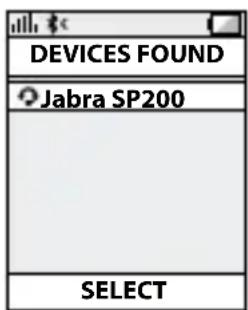
text_image
DEVICES FOUND Jabra SP200 SELECT
text_image
Jabra SP200 Passkey: **** OK
text_image
HANDSFREE Jabra SP200 added. The handsfree is now ready for use SELECTManual pairing mode
If you wish to use the speakerphone with a different phone, or if the pairing process was interrupted, you can manually set the speakerphone to pairing mode.
Turn the speakerphone on. Press and hold the answer/end button for approximately 5 seconds until the blue LED light stars blinking rapidly. Then repeat steps 2. and 3. in the above pairing guide.
CONNECTING WITH YOUR PHONE
Pairing is only needed the first time a speakerphone and phone are used together. When the speakerphone and phone have been paired once, they will automatically connect when the speakerphone is on and Bluetooth® is activated on the phone. The speakerphone can be used when it is “connected” to the phone. If the devices are paired, but do not immediately connect, tap the answer/end button.
PLACING THE SPEAKERPHONE IN YOUR VEHICLE
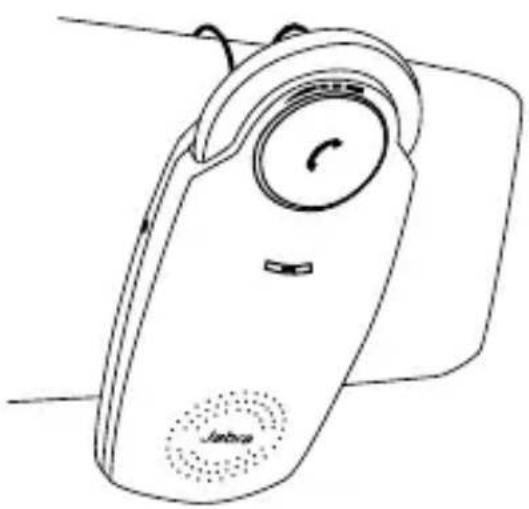
The Jabra SP200 sits discreetly and conveniently on the sun visor using the attached clip.
natural_image
Line drawing of a handheld device with a circular dial and speaker grille (no text or symbols)HOW TO
Answer a call
- Tap the answer/end button on your speakerphone to answer a call.
End a call
- Tap the answer/end button on your speakerphone to end an active call.
Make a call
- The call will automatically transfer to your speakerphone*. If not tap the answer/end button.
Reject a call\*
- Press the answer/end button.
Activate voice dialing\*
- Press the answer/end button. For best results, record the voice-dialing tag through your speakerphone.
Redial last number\*
- Double tap the answer/end button when the speakerphone is on and not in use.
Mute/un-mute
- Press and hold the answer/end button to mute an active call. A beep tone plays during the muted call.
- Press and hold the answer/end button to un-mute.
Transfer Calls
- Press the answer/end button to transfer a call from the speakerphone to the mobile phone.
- Press the answer/end button to transfer a call from the mobile phone to the speakerpone.
Adjust sound and volume\*
- Scroll the volume wheel to the left or right to adjust the volume.
WHAT THE LIGHTS MEAN
| What you see What it means | |
| Flashing blue light Speakerphone | is on but not connected |
| Solid blue Connected to phone | |
| Flashing blue light rapidly Pairing mode | |
| Flashing blue light Incoming call | |
| Solid green light Active call | |
| Flashing red light Running low on battery | |
| Solid green light when charging | Charging level between 70% and fully charged |
| Solid red light when charging Ch | charging level less than 70% |
USING YOUR JABRA SP200 WITH TWO MOBILE DEVICES
The Jabra SP200 is capable of having two mobile phones (or other Bluetooth ^® devices) connected to the speakerphone at the same time. This will give you the freedom of having only one speakerphone to operate both of your mobile phones. Please note that Last Number redial will dial the number from the last outgoing call independent of the mobile phone.
How to pair your Jabra SP200 with 2 Bluetooth ^® devices:
1 Pair device number 1 with your speakerphone using the pairing instruction above for re-pairing your speakerphone (if device 1 is paired to your speakerphone already go to step 2)
2 Press the Answer/End button for 4-5 seconds
3 Pair device number 2 with your speakerphone using the same pairing instruction again
4 Connect to device 1 again
Please note that it is important to connect to device 1 again after pairing device 2 to ensure connection to both devices.
TROUBLESHOOTING & FAQ
I hear crackling noises
- Bluetooth® is a radio technology, which means it is sensitive to objects between the speakerphone and the connected device. It is designed for the speakerphone and the connected device to be used within 33 feet (10 meters) of each other, with no major objects in the way (walls, etc.).
I cannot hear anything in my speakerphone
- Increase the volume in the speakerphone
- Ensure that the speakerphone is paired to a device that is playing
- Make sure your phone is connected to the speakerphone by tapping the Answer/End button.
I am having pairing problems
- You may have deleted your speakerphone pairing connection in your mobile phone. Follow the pairing instructions.
I want to reset the pairing list in my speakerphone
- It is possible to reset the pairing list in the speakerphone. First go into pairing mode. When you have released the Answer/End button and speakerphone is in pairing mode you press Answer/End button again for 5 sec. When pairing list is empty you hear a beep. The next time you power on, the speakerphone will automatically go into pairing mode.
Will the Jabra SP200 work with other Bluetooth® equipment?
- The Jabra SP200 is designed to work with Bluetooth® mobile phones. It can also work with other Bluetooth® devices that are compliant with Bluetooth® version 1.1 or higher and support a headset and/or hands-free profile.
I cannot use reject call, redial or voice dialling
- These features are dependent on the ability of your phone to support a hands-free profile. Even if the handsfree profile is implemented reject call, call hold and voice dialing are optional features which are not supported by all devices. Please consult your device manual for details.
NEED MORE HELP?
- Web: http://www.jabra.com (for the latest support info and online User Manuals)
2. E-mail:
Australia support.au@jabra.com
China support.cn@jabra.com
Japan support.jp@jabra.com
Singapore support.sg@jabra.com
Information: info@jabra.com
3. Phone:
Australia 1-800-738-521
China 800-858-0789
Japan 03-3242-8722
Singapore 800-101-2329
TAKING CARE OF YOUR SPEAKERPHONE
- Always store the Jabra SP200 with the power off and safely protected
- Avoid storage at extreme temperatures (above 45^ C/113°F – including direct sunlight – or below -10^ C/14°F). This can shorten battery life and may affect operation. High temperatures may also degrade performance.
- Do not expose the Jabra SP200 to rain or other liquids.
GLOSSARY
-
Bluetooth® is a radio technology that connects devices, such as mobile phones and headsets, without wires or cords over a short distance (approx. 10 meters/33 feet). Bluetooth® is safe to use. It is secure too, so once a connection has been made no-one can listen in and there is no interference from other Bluetooth® devices either. Get more information at www.bluetooth.com.
-
Bluetooth® profiles are the different ways that Bluetooth® devices communicate with other devices. Bluetooth® phones support the headset profile, the hands-free profile or both. In order to support a certain profile, a phone manufacturer must implement certain mandatory features within the phone's software.
- Pairing creates a unique and encrypted link between two Bluetooth ^® devices and lets them communicate with each other. Bluetooth ^® devices will not work if the devices have not been paired.
- Passkey or PIN is a code that you enter on your Bluetooth® enabled device (e.g. a mobile phone) to pair it with your Jabra SP200. This makes your device and the Jabra SP200 recognize each other and automatically work together.
- Standby mode is when the Jabra SP200 is passively waiting for a call. When you 'end' a call on your mobile phone, the speakerphone goes into standby mode.
indholdSfortegnelSe
taK 2
text_image
Jabra SP200 Passkey: **** OK
text_image
HANDSFREE Jabra SP200 added. The handsfree is now ready for use SELECTManuel parringstilstand
natural_image
Line drawing of a Jumbo phone with a circular dial and speaker grille (no text or symbols)SÅDAN G∅R DU
Besvar et opkald
text_image
Jabra SP200 Passkey: **** OK
text_image
HANDSFREE Jabra SP200 added. The handsfree is now ready for use SELECTnatural_image
Line drawing of a handheld device with a circular dial and speaker grille (no text or symbols)COMMENT...
Répondre à un appel
text_image
Jabra SP200 Passkey: **** OK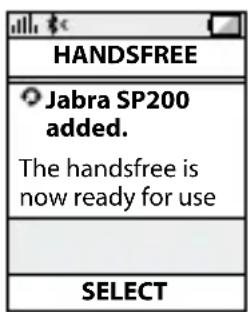
text_image
HANDSFREE Jabra SP200 added. The handsfree is now ready for use SELECTnatural_image
Line drawing of a Jumbo phone with a circular dial and speaker grille (no text or symbols)COMMENT...
Répondre à un appel
text_image
Jabra SP200 Passkey: **** OK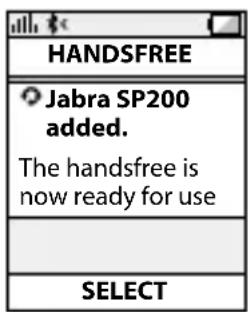
text_image
HANDSFREE Jabra SP200 added. The handsfree is now ready for use SELECTnatural_image
Line drawing of a handheld device with a circular dial and dotted button, no text or symbols presentGEWÜNSCHTE AKTION
text_image
Jabra SP200 Passkey: **** OK
text_image
HANDSFREE Jabra SP200 added. The handsfree is now ready for use SELECTnatural_image
Line drawing of a handheld device with a circular dial and dotted pattern (no text or symbols)РЕЖИМЫ И ОПЕРАЦИИ
text_image
Jabra SP200 Passkey: **** OK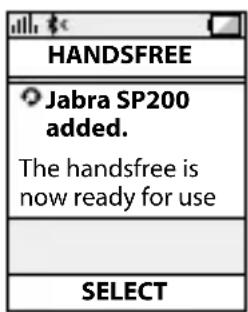
text_image
HANDSFREE Jabra SP200 added. The handsfree is now ready for use SELECTnatural_image
Line drawing of a Jumbo phone with a circular dial and speaker grille (no text or symbols)text_image
Jabra SP200 Passkey: **** OK
text_image
HANDSFREE Jabra SP200 added. The handsfree is now ready for use SELECTnatural_image
Line drawing of a Jumbo phone with a circular dial and speaker grille (no text or symbols)HOE MOET IK...
eSittelySSä Jabra SP200....2
KaiutiNPuHeliMeN oMiNaiSuuDet 3
aloittaMiNeN....3
KaiutiNPuHeliMeN IataaMiNeN 4
Jabra SP200 -KaiutiNPuHeliMeN KytKeMiNeN Päälle Ja PoiS .... 5
Jabra SP200 -KaiutiNPuHeliMeN Ja MatKaPuHeliMeN yHDiStäMiNeN laitePariKSi....6
yHDiStäMiNeN PuHeliMeeN 7
KaiutiNPuHeliMeN SiJoituSPaiKaN ValiNta autoSSa. . . . . . . 7
toiMiNtaoHJeet 8
MerKKiValoJeN MerKityS 9
text_image
Jabra SP200 Passkey: **** OK
text_image
HANDSFREE Jabra SP200 added. The handsfree is now ready for use SELECTnatural_image
Line drawing of a handheld device with a circular dial and speaker grille (no text or symbols)TOIMINTAOHJEET
MERKKIVALOJEN MERKITYS
hÖGTalarTeleFOnenS FUnKTIONer 3
KOMMa IGånG....3
ladda hÖGTalarTeleFOnen 4
Slå På OCh STÄnGa aV Jabra SP200 5
Para IhOP Jabra SP200 Med MObIITeleFOnen 6
anSIUTnInG TIII TeleFOnen 7
PlaCera hÖGTalarTeleFOnen I dITT FOrdOn. 7
SKÖTSel aV hÖGTalarTeleFOnen 12
OrdIISTa....12
TACK
text_image
Jabra SP200 Passkey: **** OK
text_image
HANDSFREE Jabra SP200 added. The handsfree is now ready for use SELECTManuell ihopparning
natural_image
Line drawing of a Jumbo phone with a circular dial and speaker grille (no text or symbols)SÅ HÄR GÖR DU FÖR ATT
Besvara ett samtal
text_image
Jabra SP200 Passkey: **** OK
text_image
HANDSFREE Jabra SP200 added. The handsfree is now ready for use SELECTnatural_image
Line drawing of a handheld device with a circular dial and speaker grille (no text or symbols)COME FARE PER...
text_image
Chave Liga/Desligatext_image
Jabra SP200 Passkey: **** OK
text_image
HANDSFREE Jabra SP200 added. The handsfree is now ready for use SELECTManual de modo de pareamento
natural_image
Line drawing of a handheld device with a circular dial and speaker grille (no text or symbols)COMO
Atender uma chamada
text_image
Jabra SP200 Passkey: **** OK
text_image
HANDSFREE Jabra SP200 added. The handsfree is now ready for use SELECTnatural_image
Line drawing of a handheld electronic device with a circular dial and speaker grille (no text or symbols)CÓMO...
text_image
Jabra SP200 Passkey: **** OK
text_image
HANDSFREE Jabra SP200 added. The handsfree is now ready for use SELECTnatural_image
Line drawing of a handheld device with a circular dial and dotted earbuds (no text or symbols)CÓMO
POPIS PRODUKTU JAbRA SP200....2
CO UMÍ hLASITY TELEFON 3
ZAČÍNÁME 3
NAbÍJENÍ hLASITéhO TELEFONU....4
ZAPNUTÍ A VYPNUTÍ PRODUKTU JAbRA SP200 ....5
SPÁROVÁNÍ PRODUKTU JAbRA SP200 S VAŠÍM MObILNÍM TELEFONEM 6
SPOJENÍ S TELEFONEM 7
text_image
Jabra SP200 Passkey: **** OK
text_image
HANDSFREE Jabra SP200 added. The handsfree is now ready for use SELECTnatural_image
Line drawing of a handheld device with a circular dial and speaker grille (no text or symbols)OVLÁDÁNÍ
Příjem hovoru
text_image
Jabra SP200 Passkey: **** OK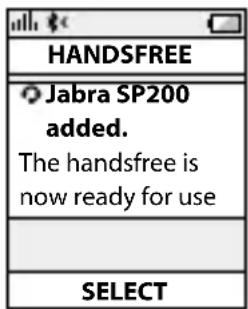
text_image
HANDSFREE Jabra SP200 added. The handsfree is now ready for use SELECTnatural_image
Line drawing of a Jumbo phone with a circular dial and speaker grille (no text or symbols)W JAKI SPOSÓB
Odebrać połączenie
text_image
Jabra SP200 Passkey: **** OK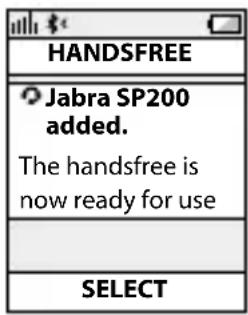
text_image
HANDSFREE Jabra SP200 added. The handsfree is now ready for use SELECTnatural_image
Line drawing of a mobile phone with a circular dial and speaker grille (no text or symbols)ΠΩΣ ΝΑ
Απάντηση κλήσης
text_image
Jabra SP200 Passkey: **** OK
text_image
HANDSFREE Jabra SP200 added. The handsfree is now ready for use SELECTnatural_image
Line drawing of a handheld device with a circular dial and speaker grille (no text or symbols)NASIL YAPILIR
text_image
Jabra SP200 Passkey: **** OK
text_image
HANDSFREE Jabra SP200 added. The handsfree is now ready for use SELECTnatural_image
Line drawing of a Jumbo phone with a circular dial and speaker grille (no text or symbols)ÚTMUTATÓ
Hívás fogadása
DESPRe Jabra SP200 2
CE POaTE FaCE DiFuZOruL DuMnEaVOaSTrÃ....3
POrnirE....3
ÎnCĂrCarEa DiFuZOruLui DuMnEaVOaSTrĂ....4
POrnirEa Şi OPrirEa DiFuZOruLui SP200....5
CuPLarEa DiFuZOruLui SP200 La TELEFOnuL DuMnEaVOaSTrÃ....6
COnECTarEa La TELEFOnuL DuMnEaVOaSTrà ....7
text_image
Jabra SP200 Passkey: **** OK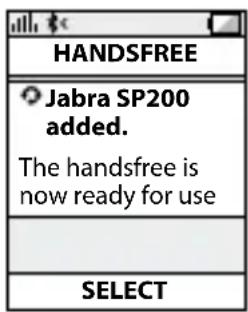
text_image
HANDSFREE Jabra SP200 added. The handsfree is now ready for use SELECTnatural_image
Line drawing of a Jirovo mobile phone with a circular dial and speaker grille (no text or symbols)CUM SĂ
-Discounting the thinking is called 1. Amtar (hwali ٣٣ قدم)
text_image
Jabra SP200 Passkey: **** OK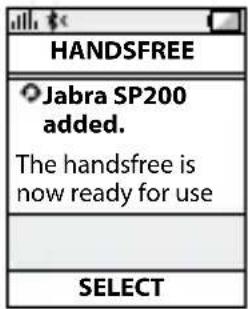
text_image
HANDSFREE Jabra SP200 added. The handsfree is now ready for use SELECTوضع المزاوجة اليدوي
natural_image
Line drawing of a Jahua mobile phone with a circular dial and speaker grille (no text or symbols)کیف تقوم ب-
الرد على مكالة
text_image
Jabra SP200 Passkey: **** OK
text_image
HANDSFREE Jabra SP200 added. The handsfree is now ready for use SELECTnatural_image
Line drawing of a handheld device with a circular dial and speaker grille (no text or symbols)چکونه اجام دهیم
پاسخ دادن به يک ماس
text_image
Jabra SP200 Passkey: **** OK
text_image
HANDSFREE Jabra SP200 added. The handsfree is now ready for use SELECT手动配对模式
natural_image
Line drawing of a handheld electronic device with a circular dial and speaker grille (no text or symbols)如何
接听来电
text_image
Jabra SP200 Passkey: **** OK
text_image
HANDSFREE Jabra SP200 added. The handsfree is now ready for use SELECT手動配對模式
natural_image
Line drawing of a handheld device with a circular dial and dotted pattern (no text or symbols)如何
接聽來電
text_image
Jabra SP200 Passkey: **** OK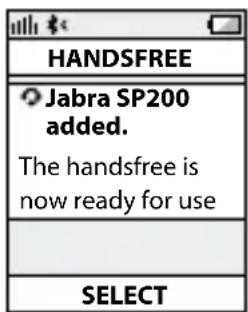
text_image
HANDSFREE Jabra SP200 added. The handsfree is now ready for use SELECT手動によるペアリングモード
natural_image
Line drawing of a handheld device with a circular dial and speaker grille (no text or symbols)使用方法
着信の応答
text_image
Jabra SP200 Passkey: **** OK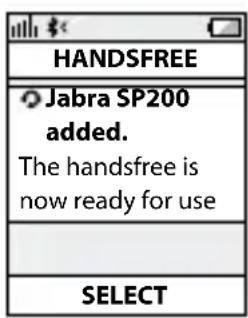
text_image
HANDSFREE Jabra SP200 added. The handsfree is now ready for use SELECT수동 페어링 모드
natural_image
Line drawing of a handheld electronic device with a circular dial and speaker grille (no text or symbols)사용 방법
전화 받기
MEngEnal Jabra SP200 anda....2
aPaKaH Yang bOLEH dILaKuKan OLEH PEMbESar Suara TELEFOn anda .... 3
bErMuLa 3
MEngEcaS PEMbESar Suara TELEFOn anda....4
MEngHIduPKan aTau MEMaTIKan Jabra SP200 anda ..... 5
JadIKan Jabra SP200 bErPaSangan dEngan TELEFOn MudaH aLIH anda 6
bErSaMbung dEngan TELEFOn anda 7
MELETaKKan PEMbESar Suara TELEFOn daLaM KEndEraan anda .... 7
bagalMana unTuK....8
aPa Yang dIMaKSudKan dEngan LaMPu 9
MEnggunaKan Jabra SP200 anda dEngan dua PEranTI MudaH aLIH 9
PEnYELESalan MaSaLaH & SOaLan LazIM 10
MaHuKan LEBIH banTuan?....1 1
MEnJaga PEMbESar Suara TELEFOn anda 12
gLOSarl 12
TERIMA KASIH
MENGHIDUPKAN ATAU MEMATIKAN JABRA SP200 ANDA
text_image
Jabra SP200 Passkey: **** OK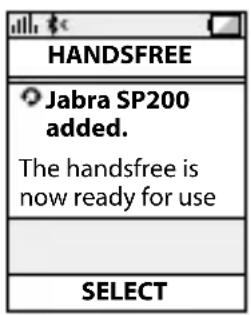
text_image
HANDSFREE Jabra SP200 added. The handsfree is now ready for use SELECTMod berpasangan manual
natural_image
Line drawing of a Jumbo phone with a circular dial and speaker grille (no text or symbols)BAGAIMANA UNTUK
Menjawab panggilan
text_image
Jabra SP200 Passkey: **** OK
text_image
HANDSFREE Jabra SP200 added. The handsfree is now ready for use SELECTโหมดจับดุ๋อง
natural_image
Line drawing of a handheld device with a circular dial and speaker grille (no text or symbols)วิธีการใช้งาน.
รับสาย
© 2009 GN Netcom US, Inc. All rights reserved. Jabra® is a registered trademark of GN Netcom A/S. All other trademarks included herein are the property of their respective owners. The Bluetooth® word mark and logos are owned by the Bluetooth SIG, Inc. and any use of such marks by GN Netcom A/S is under license. (Design and specifications subject to change without notice).
© 2009 GN Netcom A/S. All rights reserved. Jabra® is a registered trademark of GN Netcom A/S. All other trademarks included herein are the property of their respective owners. The Bluetooth® word mark and logos are owned by the Bluetooth SIG, Inc. and any use of such marks by GN Netcom A/S is under license. (Design and specifications subject to change without notice).
MADE IN KOREA
TYPE: SP200



Bluetooth