P44800 - Receiver Citronic - Free user manual and instructions
Find the device manual for free P44800 Citronic in PDF.


| Product Type | Stereo Receiver |
| Brand | Citronic |
| Model | P44800 |
| Dimensions (W x H x D) | 430 x 140 x 320 mm |
| Weight | 8.5 kg |
| Power Supply | AC 230V, 50Hz |
| Power Consumption | 350 W |
| Standby Power Consumption | < 0.5 W |
| Amplifier Output Power | 2 x 100 W (8 ohms) |
| Frequency Response | 20 Hz - 20 kHz |
| Total Harmonic Distortion (THD) | < 0.05% |
| Signal-to-Noise Ratio | > 90 dB |
| Input Sensitivity | 200 mV |
| Number of Audio Inputs | 5 (AUX, CD, Tuner, Tape, Phono) |
| Number of Audio Outputs | 2 (Speakers, Subwoofer pre-out) |
| Supported Audio Formats | MP3, WMA, AAC, FLAC via USB |
| FM Tuner | FM stereo with RDS, 30 presets |
| Remote Control | Yes (included) |
| Display | LCD with white backlight |
| USB Port | Front USB for playback |
| Headphone Output | 3.5mm jack, front |
| Safety Features | Overload, short-circuit, and overheat protection |
| Cleaning Instruction | Wipe with dry cloth; avoid liquids and abrasives |
| Spare Parts Availability | Contact Citronic service center for spare parts |
| Repairability | Refer to qualified technician; do not open casing |
Frequently Asked Questions - P44800 Citronic
User questions about P44800 Citronic
0 question about this device. Answer the ones you know or ask your own.
Ask a new question about this device
Download the instructions for your Receiver in PDF format for free! Find your manual P44800 - Citronic and take your electronic device back in hand. On this page are published all the documents necessary for the use of your device. P44800 by Citronic.
USER MANUAL P44800 Citronic
Thank you for choosing the Citronic P44800 3-way power amplifier as part of your sound reinforcement system. This high output amplifier is designed to offer high quality, dependable service for mobile and installed systems. Please read this manual fully and follow the instructions to achieve the best results with your new purchase and to avoid damage through misuse.
Warning
To prevent the risk of fire or electric shock, do not expose any of the components to rain or moisture.
If liquids are spilled on the casing, stop using immediately, allow unit to dry out and have checked by qualified personnel before further use. Avoid impact, extreme pressure or heavy vibration to the case
No user serviceable parts inside – Do not open the case – refer all servicing to qualified service personnel.
Safety
- Check for correct mains voltage and condition of IEC lead before connecting to power outlet
• Ensure speaker leads are good condition with no short connections or damaged plugs - Check impedance of speaker loads do not exceed the minimum stated load for the amplifier
• Do not allow any foreign objects to enter the case or through the ventilation grilles
Placement
- Keep out of direct sunlight and away from heat sources
- Keep away from damp or dusty environments
- When rack-mounting, ensure adequate support for the base of the amplifier and firm fixings for the front
- Ensure adequate air-flow and do not cover cooling vents at the front and rear of the amplifier
- Ensure adequate access to controls and connections
Cleaning
• Use a soft cloth with a neutral detergent to clean the casing as required
• Use a vacuum cleaner to clear ventilation grilles of any dust or debris build-ups
• Do not use strong solvents for cleaning the unit
Front Panel

text_image
citronic P4480C 1 2 3 4 5 6 7 8 1- Cooling vents
- Protect LED indicators
- Clip LED indicators
- Signal LED indicators
- Power switch and LED
- SUB level control
- CH1 level control
- CH2 level control
Rear Panel
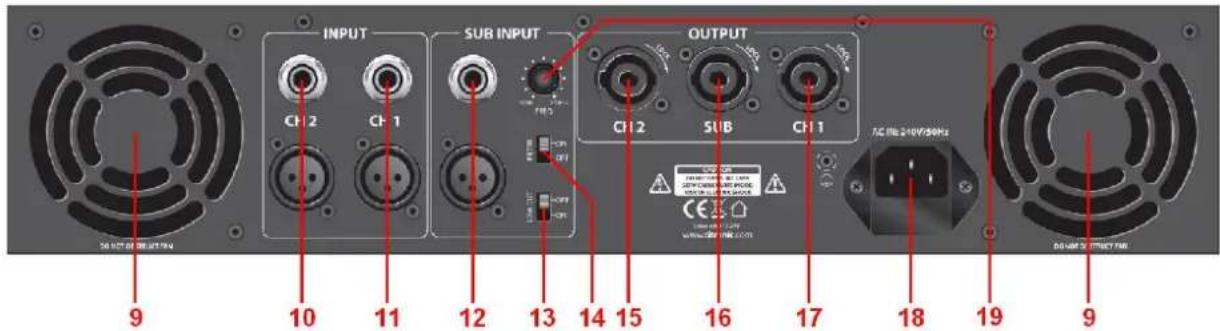
text_image
INPUT CH2 CH1 SUB INPUT OUTPUT CH2 SUB CH1 AC 16 240V/30Hz 9 10 11 12 13 14 15 16 17 18 19 9- Cooling fan vents
- CH2 jack and XLR parallel inputs
- CH1 jack and XLR parallel inputs
- SUB jack and XLR parallel inputs
- LOW CUT on/off switch
- FILTER on/off switch
- CH2 output (SPK)
- SUB output (SPK)
- CH1 output (SPK)
- IEC mains inlet and fuse
- SUB cutoff frequency control
Operation
The P44800 stereo outputs (CH1 and CH2) should be connected to mid-top or full range speaker cabinets. Minimum impedance for each stereo output should be no lower than 4 .
The SUB output is specifically designed to power a sub cabinet
Alternatively, 2 sub cabinets may be connected in parallel, provided that the total load is no lower than 4Ω
Connect speaker cabinets to channel outputs using good quality leads and ensure that the combined load on each channel is no lower than 4Ω
(for speaker loads connected in parallel, 8Ω + 8Ω = 4Ω)
Connect each signal input from mixer or other line level source via the XLR or jack connectors on the rear panel using good quality signal leads.
A LOW CUT switch is provided on the rear panel, which removes the very lowest frequencies which may be inefficient for speaker drivers to reproduce, wasting power on inaudible output
The SUB output has a filter facility, which can be switched on via the FILTER switch
This feature removes all of the signal above a cutoff frequency, allowing only low frequencies to be amplified. The cutoff frequency may be adjusted between 50Hz and 250Hz via the FREQ rotary control
A recommended start point is mid-way (approximately 150Hz) - this can be adjusted later as required
Jack and XLR inputs for each channel are wired in parallel, allowing the signal to be carried forward to further amplifiers if necessary (if the input is XLR, the jack may be used as a signal output and vice versa)
Connect the amplifier to the mains outlet, making sure that the IEC lead is earthed, in good condition and connected securely.
With channel gain controls turned fully down, switch on the power to the amplifier. This unit has a "soft-start" function which makes some checks before engaging power to the amplifiers, which may take a few seconds.
With mixer (or other signal source) levels turned down, gradually increase the amplifier's channel level controls to the required level (normally full) and then gradually increase the signal level from the mixer or sound source until sound can be heard through the speakers and then continue increasing up to the required level.
During use, green "SIGNAL" LEDs will illuminate to show when a signal is present and red LED "CLIP" LEDs illuminate if the output is reaching clip level. If the red CLIP LEDs illuminate more than very briefly, reduce the volume until they hardly light up at all.
If the internal protection circuitry detects a fault in the speakers or amp, the channel(s) will enter Protect Mode and red "PROTECT" LEDs will illuminate on the front panel to show this. Switch the amplifier off and check the entire system (including leads) before powering up again. If still in Protect Mode, seek advice from qualified service personnel.
Before powering down, turn the channel gain controls fully down to avoid loud noises when switching off.
Specifications
| Power supply | 240Vac 50Hz (IEC) |
| CH1 and CH2 power RMS @ 8Ω | 2 x 250W |
| SUB power RMS @ 8Ω | 500W |
| CH1 and CH2 power RMS @ 4Ω | 2 x 400W |
| SUB power RMS @ 4Ω | 800W |
| Input : Line | 3 x XLRF + 6.3mm jack |
| Input impedance | 20KΩ |
| SUB filter cutoff frequency | 50Hz - 250Hz |
| THD | 0.05% |
| Slew rate | 40V/usec |
| S/N ratio | 103dB |
| Controls | 3 x channel level, LOW CUT on/off, FILTER on/off, FREQ |
| Speaker outputs | CH1, CH2 and SUB SPK connectors |
| Circuit protection | Short-circuit, DC, overload, soft-start |
| Dimensions | 483 x 439 x 88mm |
| Weight | 22.5kg |
Troubleshooting
| No power light on front panel switch | Ensure IEC inlet is connected to mains and lead is in good condition |
| Ensure mains outlet is switched on | |
| Power light is on but no other LEDs and no output | Check input signal and connection leads |
| Ensure channel gain controls are not turned fully down | |
| Power light and Signal LEDs are lit but no output | Check speaker cabinets are in good working order |
| Check speaker leads are in good condition and connected properly | |
| "PM" (Protect Mode) LED is lit and there is no output | Switch off and disconnect from mains |
| Check speakers are in good working order and not shorted out (using a multi-tester) | |
| After checking all connected items, power up again | |
| If still in Protect Mode, switch off again and refer to qualified service personnel | |
| Ensure cooling vents are clear and amplifier is not overheated | |
| SUB output has "muffled" mid frequencies | Switch on FILTER and adjust FREQ control for subs that have no built-in crossovers |
| SUB output has quiet output with FILTER on | If FREQ is set too low, there may be quiet output, adjust the control to improve output |
| Switch off FILTER for better output to subs with built-in crossovers | |
| Output is very distorted and "CLIP" LEDs are lighting | Check the speaker impedance is not below 4 Ohms per channel |
| Turn down the input level from audio source | |
| Turn down channel gain controls | |
| Output is working but at very low level | Ensure input source is at line level |
| Increase input level from audio source | |
| Turn up channel gain controls |