
MX-1810U - Printer SHARP - Free user manual and instructions
Find the device manual for free MX-1810U SHARP in PDF.



| Product type | Desktop color laser multifunction printer |
| Brand | SHARP |
| Model | MX-1810U |
| Dimensions (with cover) | 583 mm (W) x 623 mm (D) x 717 mm (H) |
| Weight (with cover) | Approximately 65 kg |
| Power supply | Local voltage ±10%; max power consumption 1.84 kW (220-240 V) / 1.44 kW (100-127 V) |
| Main functions | Copy, print, scan, fax (optional) |
| Print resolution | 600 x 600 dpi, equivalent 9600 x 600 dpi |
| Copy speed (A4, B/W) | 18 copies/minute |
| Standard paper capacity | 500 sheets (tray) + 100 sheets (bypass tray) |
| Supported paper types | A3W to A5R, transparencies, envelopes, thick paper |
| Maintenance and cleaning | Regularly clean the exterior with a soft cloth; avoid flammable aerosols; do not touch the fusing unit during jam removal |
| Safety | Emergency stop if smoke or odor; do not disassemble the casing; Class 1 laser product (IEC 60825-1) |
| Spare parts and repairability | Toner cartridges, fusing unit, hard drive (160 GB); contact authorized service for any intervention |
| General information | Memory 1 GB; hard drive 160 GB; warm-up time ≤ 45 s; first copy B/W 8.8 s, color 10.2 s |
Frequently Asked Questions - MX-1810U SHARP
User questions about MX-1810U SHARP
0 question about this device. Answer the ones you know or ask your own.
Ask a new question about this device
Download the instructions for your Printer in PDF format for free! Find your manual MX-1810U - SHARP and take your electronic device back in hand. On this page are published all the documents necessary for the use of your device. MX-1810U by SHARP.
USER MANUAL MX-1810U SHARP
DIGITAL FULL COLOUR MULTIFUNCTIONAL SYSTEM
START GUIDE
English - START GUIDE
EN1-EN4
This guide explains important point to note for installation and usage. The Operation Guide for the machine is on the accompanying CD-ROM. View the Operation Guide when you use the machine after the initial setup is completed.
Keep this manual close at hand for reference whenever needed.
For complete electrical disconnection, pull out the main plug.
The socket-outlet shall be installed near the equipment and shall be easily accessible.
Shielded interface cables must be used with this equipment to maintain compliance with EMC regulations.
The equipment should be installed near an accessible socket outlet for easy disconnection.
Notice for users in the UK
MAINS PLUG WIRING INSTRUCTIONS
The mains lead of this equipment is already fitted with a mains plug which is either a non-rewireable (moulded) or a rewireable type. Should the fuse need to be replaced, a BSI or ASTA approved fuse to BS1362 marked or and of the same rating as the one removed from the plug must be used.
Always refit the fuse cover after replacing the fuse on the moulded plug. Never use the plug without the fuse cover fitted.
In the unlikely event of the socket outlet in your home not being compatible with the plug supplied either cut-off the moulded plug (if this type is fitted) or remove by undoing the screws if a rewireable plug is fitted and fit an appropriate type observing the wiring code below.
DANGER: The fuse should be removed from the cut-off plug and the plug destroyed immediately and disposed of in a safe manner. Under no circumstances should the cut-off plug be inserted elsewhere into a 13A socket outlet as a serious electric shock may occur.
To fit an appropriate plug to the mains lead, follow the instructions below:
IMPORTANT: The wires in this mains lead are coloured in accordance with the following code:
GREEN-AND-YELLOW: Earth
BLUE: Neutral
BROWN: Live
As the colours of the wires in this mains lead may not correspond with coloured markings identifying the terminals in your plug, proceed as follows:
The wire which is coloured GREEN-AND-YELLOW must be connected to the terminal in the plug which is marked with the letter E, or by the safety earth symbol , or coloured green or greenand-yellow.
The wire which is coloured BLUE must be connected to the terminal which is marked with the letter N or coloured black.
The wire which is coloured BROWN must be connected to the terminal which is marked with the letter L or coloured red.
If you have any doubt, consult a qualified electrician.
WARNING: THIS APPARATUS MUST BE EARTHED.
EMC (this machine and peripheral devices)
Warning:
This is a Class A product. In a domestic environment this product may cause radio interference in which case the user may be required to take adequate measures.
This warning does not apply to the products for South Africa.
Peripheral devices are described in the [PERIPHERAL DEVICE] in the Operation Guide. This machine contains the software having modules developed by Independent JPEG Group. This product includes Adobe® Flash® technology of Adobe Systems Incorporated.
Copyright © 1995-2007 Adobe Macromedia Software LLC. All rights reserved.
For the users of the fax function
FAX interface cable and Line cable:
These special accessories must be used with the device.
The declaration of conformity may be consulted at:
The SOFTWARE LICENCE will appear when you install the software from the CD-ROM. By using all or any portion of the software on the CD-ROM or in the machine, you are agreeing to be bound by the terms of the SOFTWARE LICENCE.
- The explanations in this manual assume that you have a working knowledge of your Windows or Macintosh computer.
- For information on your operating system, please refer to your operating system manual or the online Help function.
- The explanations of screens and procedures in this manual are primarily for Windows Vista® in Windows® environments. The screens may vary depending on the version of the operating system.
- This manual contains references to the fax function. However, please note that the fax function is not available in some countries and regions.
- This manual contains explanations of the PC-Fax driver and PPD driver. However, please note that the PC-Fax driver and PPD driver are not available and do not appear on the software for installation in some countries and regions. In this case, please install the English version if you want to use these drivers.
- Considerable care has been taken in preparing this manual. If you have any comments or concerns about the manual, please contact your dealer or nearest authorised service representative.
- This product has undergone strict quality control and inspection procedures. In the unlikely event that a defect or other problem is discovered, please contact your dealer or nearest authorised service representative.
- Aside from instances provided for by law, SHARP is not responsible for failures occurring during the use of the product or its options, or failures due to incorrect operation of the product and its options, or other failures, or for any damage that occurs due to use of the product.

Products that have earned the ENERGY STAR® are designed to protect the environment through superior energy efficiency.
The products that meet the ENERGY STAR® guidelines carry the logo shown above. The products without the logo may not meet the ENERGY STAR® guidelines.
Warranty
While every effort has been made to make this document as accurate and helpful as possible, SHARP Corporation makes no warranty of any kind with regard to its content. All information included herein is subject to change without notice. SHARP is not responsible for any loss or damages, direct or indirect, arising from or related to the use of this operation manual.
Copyright SHARP Corporation 2011. All rights reserved. Reproduction, adaptation or translation without prior written permission is prohibited, except as allowed under copyright laws.
MATERIAL SAFETY DATA SHEET
The MSDS (Material Safety Data Sheet) can be viewed at the following URL address: http://www.sharp-world.com/corporate/info/index.html
CAUTIONS
Symbols in this manual
To ensure safe use of the machine, this manual uses various safety symbols. The safety symbols are classified as explained below. Be sure you understand the meaning of the symbols when reading the manual.
WARNING
Indicates a risk of death or serious injury.
CAUTION
Indicates a risk of human injury or property damage.
Meaning of the symbols
CAUTION! HOT
PINCH POINT KEEP CLEAR
PROHIBITED ACTIONS

EMBLEM
MANDATORY ACTIONS
Power notes

WARNING

- Be sure to connect the power cord only to a power outlet that meets the specified voltage and current requirements. Also make certain the outlet is properly
grounded. Do not use an extension cord or adapter to connect other devices to the power outlet used by the machine.
Using an improper power supply may cause fire or electrical shock.
- For the power supply requirements, see the name plate in the lower left corner of the left side of the machine.

Do not damage or modify the power cord.
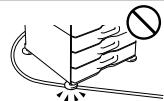
Placing heavy objects on the power cord, pulling it, or forcibly bending it will damage the cord, resulting in fire or electrical shock.

Do not insert or remove the power plug with wet hands.
This may cause electrical shock.

CAUTION

When removing the power plug from the outlet, do not pull on the cord.
Pulling on the cord may cause damage such as wire exposure and breakage, and may result in fire or electrical shock.

If you will not use the machine for a long time, be sure to remove the power plug from the outlet for safety.

When moving the machine, switch off the main power and remove the power plug from the outlet before moving.
The cord may be damaged, creating a risk of fire or electrical shock.
Installation notes

CAUTION

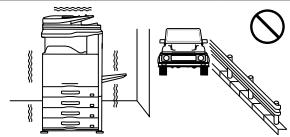
Do not install the machine on an unstable or slanted surface. Install the machine on a surface that can withstand the weight of the machine.
Risk of injury due to the machine falling or toppling.
If peripheral devices are to be installed, do not install on an uneven floor, slanted surface, or otherwise unstable surface. Danger of slippage, falling, and toppling. Install the product on a flat, stable surface that can withstand the weight of the product.

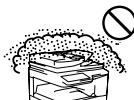
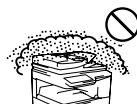
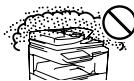
Do not install in a location with moisture or dust.
Risk of fire and electrical shock.
If dust enters the machine, dirty output and machine failure may result.

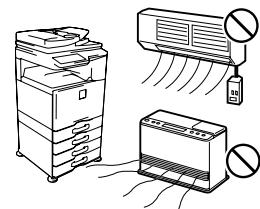
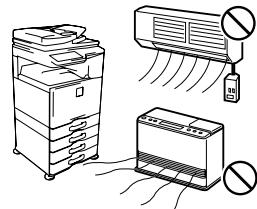
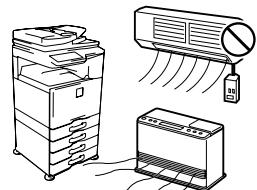
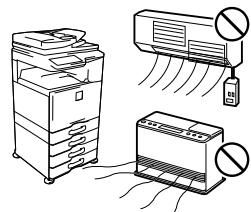
Locations that are excessively hot, cold, humid, or dry (near heaters, humidifiers, air conditioners, etc.)
The paper will become damp and condensation may form inside the machine, causing misfeeds and dirty output.
If the location has an ultrasonic humidifier, use pure water for humidifiers in the humidifier. If tap water is used, minerals and other impurities will be emitted, causing impurities to collect on the inside of the machine and create dirty output.

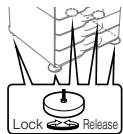
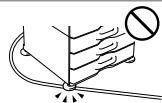
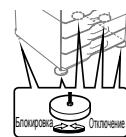
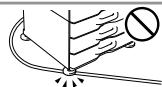
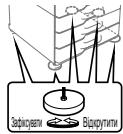
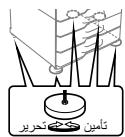
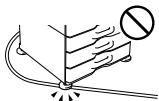
When the machine is installed, the adjusters (5) must be lowered to the floor to secure the machine (prevent it from moving).
Rotate the adjusters in the locking direction until they are in firm contact with the floor.
If you find it necessary to reposition the machine due to rearrangement of your office layout or other reason, retract the adjusters from the floor, turn off the power, and then move the machine.
(After moving the machine, lower the adjusters again to secure the machine.)

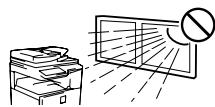
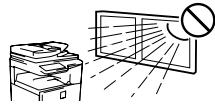
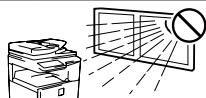
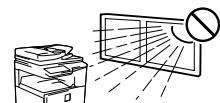
Locations exposed to direct sunlight
Plastic parts may become deformed and dirty output may result.

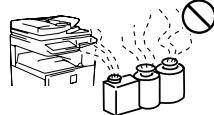
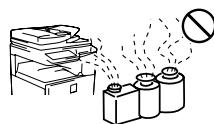
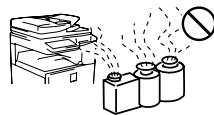
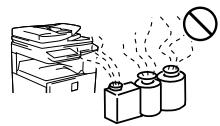
Locations with ammonia gas
Installing the machine next to a diazo copy machine may cause dirty output.

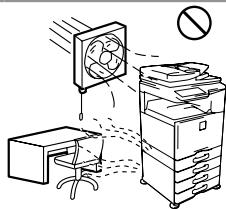
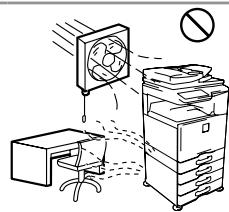
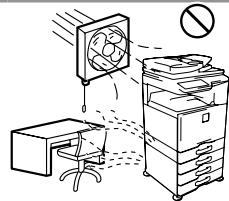
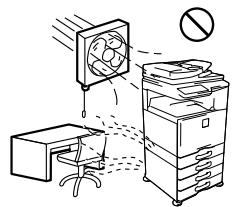
Do not install the machine in a location with poor air circulation.
A small amount of ozone is created inside the machine during printing. The amount of ozone created is not sufficient to be harmful; however, an unpleasant odor may be noticed during large copy runs, and thus the machine should be installed in a room with a ventilation fan or windows that provide sufficient air circulation. (The odor may occasionally cause headaches.)
- Install the machine so that people are not directly exposed to exhaust from the machine. If installed near a window, ensure that the machine is not exposed to direct sunlight.

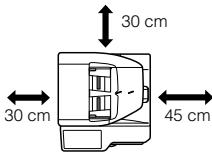
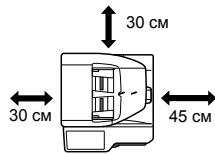
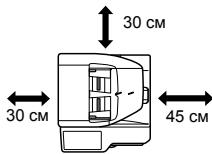
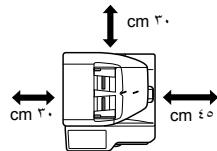
Near a wall
Be sure to allow the required space around the machine for servicing and proper ventilation. (The machine should be no closer than the distances indicated below from walls. The indicated distances are for the case when a saddle finisher and large capacity paper tray are not installed.)

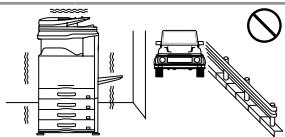
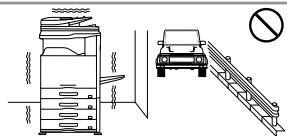
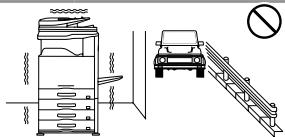
Locations subject to vibration.
Vibration may cause failure.

CAUTION
The machine includes a built-in hard drive. Do not subject the machine to shock or vibration. In particular, never move the machine while the power is on.
- The machine should be installed near an accessible power outlet for easy connection.
- Connect the machine to a power outlet which is not used for other electric appliances. If a lighting fixture is connected to the same outlet, the light may flicker.
About consumables

CAUTION

Do not throw a toner cartridge into a fire.
Toner may fly and cause burns.

Store a toner cartridge out of the reach of children.
Handling precautions

WARNING

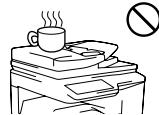
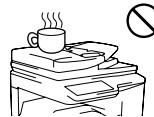
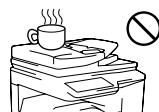
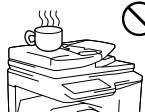
Do not place a container of water or other liquid, or a metal object that might fall inside, on the machine.
If the liquid spills or the object falls into the machine, fire or electrical shock may result.

Do not remove the machine casing.
High-voltage parts inside the machine may cause electrical shock.

Do not make any modifications to this machine.
Doing so may result in personal injury or damage to the machine.

Do not use a flammable spray to clean the machine.
If gas from the spray comes in contact with hot electrical components or the fusing unit inside the machine, fire or electrical shock may result.

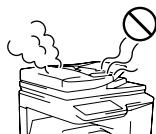
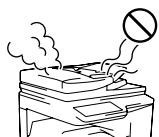
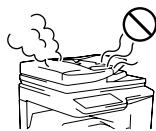
If you notice smoke, a strange odor, or other abnormality, do not use the machine.
If used in this condition, fire or electrical shock may result. Immediately switch off the main power and remove the power plug from the power outlet.
Contact your dealer or nearest authorised service representative.

If a thunder storm begins, switch off the main power and remove the power plug from the outlet to prevent electrical shock and fire due to lightning.

If a piece of metal or water enters the machine, switch off the main power and remove the power plug from the power outlet.
Contact your dealer or nearest authorised service representative. Using the machine in this condition may result in electrical shock or fire.

CAUTION

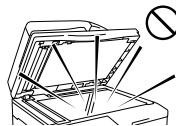
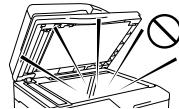
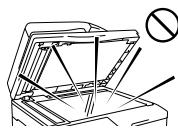
Do not look directly at the light source.
Doing so may damage your eyes.
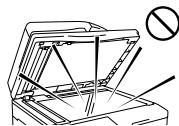

Do not block the ventilation ports on the machine. Do not install the machine in a location that will block the ventilation ports.
Blocking the ventilation ports will cause heat to build up in the machine, creating a risk of fire.

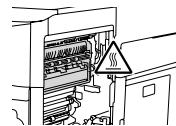
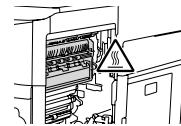
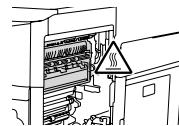
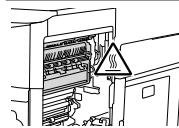
The fusing unit and paper exit area are hot. When removing a misfeed, do not touch the fusing unit and paper exit area. Take care not to burn yourself.

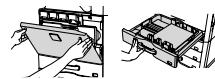
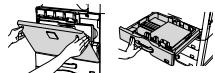
When loading paper, removing a misfeed, performing maintenance, closing the front and side covers, and inserting and removing trays, take care that your fingers are not pinched.
The machine includes the document filing function, which stores document image data on the machine's hard drive. Stored documents can be called up and printed or transmitted as needed. If a hard drive failure occurs, it will no longer be possible to call up the stored document data. To prevent the loss of important documents in the unlikely event of a hard drive failure, keep the originals of important documents or store the original data elsewhere. With the exception of instances provided for by law, Sharp Corporation bears no responsibility for any damages or loss due to the loss of stored document data.
Laser information
| Wave length | 790 nm ± 10 nm |
| Pulse times | Normal paper mode (P/S = 104 mm/s) = (5.15 μs ± 0.03 ns) / 7 mm Heavy paper mode (P/S = 70 mm/s) = (3.83 μs ± 0.03 ns) / 7 mm |
| Output power | Max 0.405 mW |
#
Use of controls or adjustments or performance of procedures other than those specified herein may result in hazardous radiation exposure.
This Digital Equipment is CLASS 1 LASER PRODUCT (IEC 60825-1 Edition 2-2007)
Each instruction also covers the optional units used with these products.
Noise emission values
Noise emission values as measured according to ISO7779 are listed to the right.
Sound power level Lwad
| Printing mode (continuous printing) | 7.0 B |
| Standby mode (Low power level mode) | - |
Sound pressure level LpA (actual measurement)
| Printing mode (continuous printing) | Bystander positions | 53 dB(A) |
| Standby mode | Bystander positions | - |
(-less than Background noise)
OPERATION MANUALS AND HOW TO USE THEM
The instructions for this manual are separated in the following three sections.
Before using the machine
Start Guide: this manual
This section explains precautions to ensure safe usage, part names and how to switch on/off the power. This section also includes important information for persons that are responsible for the maintenance of this machine.
Read this section before using the machine for the first time.
■ Printing and faxing from a computer
Software Setup Guide (PDF)
This section explains how to install the various drivers needed when using this machine as a printer, network scanner, or fax machine.
Read this section when using this machine from a computer. The Software Setup Guide is on the "Software CD-ROM".
Directions for use
Operation Guide (PDF)
Information on the copier, fax, and other various functions that this machine provides have been compiled into a PDF file called [Operation Guide].
Read the Operation Guide to learn how to use this machine, when you want to know more about its functions, or when you have trouble operating it.
The [Operation Guide] is on the "manual CD-ROM".
HOW TO USE THE OPERATION GUIDE (on the accessory CD-ROM)
The Operation Guide on the accessory CD-ROM provides detailed instructions for operating the machine. The Operation Guide is provided in PDF format.
Insert the supplied CD-ROM into your CD-ROM drive.
CD-ROM will run automatically.
If it does not start automatically, double-click the CD-ROM icon or display the contents of the CD-ROM and double-click "index.html".
To view the manual in PDF format, Acrobat Reader or Adobe Reader of Adobe Systems Incorporated is required. If neither program is installed on your computer, the programs can be downloaded from the following URL:
http://www.adobe.com/
Note:
- If you will be viewing the Operation Guide repeatedly, you may find it convenient to copy the Operation Guide file to your computer.
- The Operation Guide can be printed out using Acrobat Reader. SHARP recommends printing out the sections which you refer to regularly.
Refer to "Help" of Acrobat Reader for more details on how to use Acrobat Reader.
SPECIFICATIONS
Basic Specifications / Copier specifications
| Name | MX-1810U |
| Type | Desktop |
| Colour | Full colour |
| Copier system | Laser electrostatic copier |
| Scanning resolution | Scan (B/W): 600 × 600 dpi, 600 × 400 dpi, 600 × 300 dpi Scan (full colour): 600 × 600 dpi Print: 600 × 600 dpi, equivalent to 9,600 dpi × 600 dpi |
| Gradation | Scan: equivalent to 256 levels / Print: equivalent to 256 levels |
| Original paper sizes | Max. A3 (11"×17") / sheets, bound documents |
| Copy sizes | A3 wide (12" × 18") to A5R, 5-1/2" × 8-1/2"R, Transparency film, Heavy paper, EnvelopesTray 1-4: A3, B4, A4R, A5R, B5R, A5R, 11" × 17", 8-1/2" × 14", 8-1/2" × 13-1/2", 8-1/2" × 13-2/5", 8-1/2" × 13", 8-1/2" × 11", 8-1/2" × 11"R, 7-1/4 × 10-1/2"R, 5-1/2" × 8-1/2"RMulti-bypass tray: A3 wide (12" × 18") to A5R, 5-1/2" × 8-1/2"R, Transparency film, Heavy paper, EnvelopesLost margin (leading edge): 4 mm (11/64") ± 1 mm (± 3/64)Lost margin: (trailing edge): 2 mm (6/64") - 5 mm (- 13/64)Leading edge / trailing edge: total 8 mm (21/64") or lessNear edge / far edge: total 4 mm (11/64") ± 2 mm(± 6/64") or less |
| Warm-up time | 45 seconds or less● This may vary depending on the ambient conditions. |
| First-copy time | Full colour: 10.2 seconds BW: 8.8 seconds● This may vary depending on the state of the machine. |
| Continuous copying speeds*(when shifter is not in operation) | A4, 8-1/2" × 11" B5 18 copies/minA4R, 8-1/2" × 11"RB5R 14 copies/minB4, 8-1/2" × 14" 12 copies/minA3, 11" × 17" 10 copies/min* Continuous speed for same original source. Output may be temporarily interrupted to stabilize image quality. |
| Copy rations | Same size: 1:1 ± 0.8 % Enlarge: 115 %, 122 %,141 %, 200 %, 400 %Reduce: 25 %, 50 %, 70 %,81 %, 86 %Zoom range: 25 to 400 % (25 - 200 % using RSPF) in 1 % increments, total 376 increments. |
| Paper feed / capacity | 500 sheets in one tray plus 100-sheet multi-bypass tray● Using 80 g/m2(21 lbs.) weight paper |
| Max. paper feed / maxcapacity | 2,100 sheets in 4 trays (500 × 4) plus 100-sheet multi-bypass tray● Using 80 g/m2(21 lbs.) weight paper |
| Continuous copy | Max. 999 copies |
| Storage | HDD: 160 GB● 1 GB = One billion bytes when referring to hard drive capacity. Actual format capacity is less. |
| Ambient environment | 10 °C (54 °F) to 35 °C (91 °F) (20 % to 60 % RH)10 °C (54 °F) to 30 °C (86 °F) (85 % RH) |
| Required power supply | Local voltage ± 10 % (For the power supply requirements, see the name plate in the lower corner of the left side of the machine.)Power consumption Max. 1.84 kW (220-240 V) / 1.44 kW(100-127 V) (including options such as the desk) |
| Dimensions | Document cover:583 mm (W) × 623 mm (D) × 717 mm (H)22-61/64 (W) × 24-34/64 (D) × 28-7/32 (H)RSPF:583 mm (W) × 623 mm (D) × 834 mm (H)22-61/64 (W) × 24-34/64 (D) × 32-53/64 (H) |
| Weight | Document cover: 65.0 Kg (143 lbs.)RSPF: 71.8 Kg (158 lbs.) |
| Overall dimensions | 851 mm (W) × 623 mm (D) (33-32/64" (W) × 24-34/64" (D)) (With multi-bypass tray extended) |
- When the hard disk expansion kit (MX-HD11) is installed.
| Automatic document feeder | |
| Name | Reversing Single Pass Feeder (MX-RP12) |
| Document feeder types | Reversing Single Pass Feeder (RSPF) |
| Original paper sizes | A3 (11" × 17") to A5 (5-1/2" × 8-1/2") |
| Original paper types | Paper weight | Thin paper 35 g/m2(9 lbs.) to 49 g/m2(13 lbs.) |
| Two-sided | Plain paper 50 g/m2(13 lbs.) to 128 g/m2(32 lbs.) | |
| 50 g/m2(13 lbs.) to 105 g/m2(28 lbs.) | ||
| Paper storage capacity | 100 sheets (80 g/m2(21 lbs.)) (or maximum stack height of 13 mm (33/64")) | |
| Scan speed (copy) | B/W: 50 one-sided sheets/minute(A4 (8-1/2* × 11*) horizontal) (600 × 400 dpi)Colour: 36 one-sided sheets/minute(A4 (8-1/2* × 11*) horizontal) (600 × 600 dpi) | |
| Tray | |||
| Name | Tray 1 (MX-DE12) | Tray 2 (MX-DE13) | Tray 3 (MX-DE14) |
| Paper sizes | A3 (11" × 17") to A5R (5-1/2" × 8-1/2"R) | ||
| Useable paper | 60 g/m2(16 lbs.) to 209 g/m2(56 lbs.) | ||
| Paper capacity | 500 sheets | 1,000 (500 × 2) | 1,500 (500 × 3) |
| Dimensions | 583 mm (W) × 577 mm (D) × 382 mm (H) (22-61/64" (W) × 22-46/64" (D) × 15-1/64" (H)) | ||
| Weight | MX-DE12: Approx. 21 kg (46 lbs.) MX-DE13: Approx. 23 kg (51 lbs.) MX-DE14: Approx. 28 kg (61 lbs.) | ||
| Fax Specifications | |
| Name | Facsimile expansion kit (MX-FX11) |
| Useable lines | General phone lines (PSTN), automated branch exchange (PBX) |
| Scanning line density | Normal characters: 8 dot/mm × 3.85 chars/mm Small characters: 8 dot/mm × 7.7 line/mm Fine characters: 8 dot/mm × 15.4 line/mm High-definition: 16 dot/mm × 15.4 line/mm |
| Connection speed | Super G3: 33.6 kbps, G3: 14.4 kbps |
| Coding method | MH, MR, MMR, JBIG |
| Connection mode | Super G3 / G3 |
| Original paper sizes for transmission | A3 (11" × 17") to A5 (5-1/2" × 8-1/2") (Paper with a max. length of 1,000 mm* can be transmitted (one-sided and B/W only).) * Internet fax (optional) is up to 800 mm (at 600 x 600 dpi). |
| Registered paper size | A3 (11" × 17") to A5 (5-1/2" × 8-1/2") |
| Transmission time | Approx. 2 seconds * (A4 (8-1/2" × 11") Sharp standard paper, normal characters, Super G3 (JBIG)) |
| Memory | 1GB |
| Notes | Touch dial memory Max. 1,000 entries (Including group dialing for fax, scanner, and Internet fax) Group dial Max. of 500 entries Mass transmissions Max. of 500 recipients |
- Complies with the 33.6 kbps transmission method for Super G3 facsimiles standardized by the International Telecommunications Union (ITU-T). This is the speed for when sending an A4 (8-1/2" × 11") size piece of paper of around 700 characters at standard image quality (8 × 3.85 chars/mm) in Hi-speed mode (33.6 kbps). This is the transmission speed for image information only and does not include time for transmission control. The actual time needed for a transmission depends on the content of the text, type of receiving fax machine, and telephone line conditions.
INFORMATION ON DISPOSAL
Information on Disposal for Users (private households)

Attention: Your product is marked with this symbol. It means that used electrical and electronic products should not be mixed with general household waste. There is a separate collection system for these products.
In the European Union
Attention: If you want to dispose of this equipment, please do not use the ordinary dust bin! Used electrical and electronic equipment must be treated separately and in accordance with legislation that requires proper treatment, recovery and recycling of used electrical and electronic equipment. Following the implementation by member states, private households within the EU states may return their used electrical and electronic equipment to designated collection facilities free of charge. In some countries your local retailer may also take back your old product free of charge if you purchase a similar new one.
*) Please contact your local authority for further details. If your used electrical or electronic equipment has batteries or accumulators, please dispose of these separately beforehand according to local requirements. By disposing of this product correctly you will help ensure that the waste undergoes the necessary treatment, recovery and recycling and thus prevent potential negative effects on the environment and human health which could otherwise arise due to inappropriate waste handling.
In other Countries outside the EU
If you wish to discard this product, please contact your local authorities and ask for the correct method of disposal. For Switzerland: Used electrical or electronic equipment can be returned free of charge to the dealer, even if you don't purchase a new product. Further collection facilities are listed on the homepage of www.swico.ch or www.sens.ch
Information on Disposal for Business Users
In the European Union
If the product is used for business purposes and you want to discard it: Please contact your SHARP dealer who will inform you about the take-back of the product. You might be charged for the costs arising from take-back and recycling. Small products (and small amounts) might be taken back by your local collection facilities. For Spain: Please contact the established collection system or your local authority for take-back of your used products.
In other Countries outside the EU
If you wish to discard of this product, please contact your local authorities and ask for the correct method of disposal.
For the users of the fax function
Important safety instructions
- If any of your telephone equipment is not operating properly, you should immediately remove it from your telephone line, as it may cause harm to the telephone network.
- Never install telephone wiring during a lightning storm.
- Never install telephone jacks in wet locations unless the socket is specifically designed for wet locations.
- Never touch uninsulated telephone wires or terminals unless the telephone line has been disconnected at the network interface.
- Use caution when installing or modifying telephone lines.
- Avoid using a telephone (other than a cordless type) during an electrical storm. There may be a remote risk of electric shock from lightning.
- Do not use a telephone to report a gas leak in the vicinity of the leak.
- Do not install or use the machine near water, or when you are wet. Take care not to spill any liquids on the machine.
- Save these instructions.
Trademark acknowledgments
The following trademarks and registered trademarks are used in conjunction with the machine and its peripheral devices and accessories.
- Microsoft®, Windows®, Windows® 2000, Windows® XP, Windows Server® 2003, Windows Vista®, Windows Server® 2008, Windows® 7 and Internet Explorer® are registered trademarks or trademarks of Microsoft Corporation in the U.S.A. and other countries.
PostScript is a registered trademark of Adobe Systems Incorporated. - Adobe and Flash are registered trademarks or trademarks of Adobe Systems Incorporated in the United States and other countries.
- Adobe, the Adobe logo, Acrobat, the Adobe PDF logo, and Reader are registered trademarks or trademarks of Adobe Systems Incorporated in the United States and other countries.
- Macintosh, Mac OS, AppleTalk, EtherTalk and LaserWriter are trademarks of Apple Inc., registered in the U.S. and other countries.
- Netscape Navigator is a trademark of Netscape Communications Corporation.
- Mozilla® and Firefox® are registered trademarks or trademarks of the Mozilla Foundation in the U.S.A. and other countries.
- PCL is a registered trademark of the Hewlett-Packard Company.
- IBM, PC/AT, and PowerPC are trademarks of International Business Machines Corporation.
Sharpdesk is a trademark of Sharp Corporation.
Sharp OSA is a trademark of Sharp Corporation.
RealVNC is a trademark of RealVNC Limited. - All other trademarks and copyrights are the property of their respective owners.
Candid and Taffy are trademarks of Monotype Imaging, Inc. registered in the United States Patent and Trademark Office and may be registered in certain jurisdictions. CG Omega, CG Times, Garamond Antiqua, Garamond Halbfett, Garamond Kursiv, Garamond and Halbfett Kursiv are trademarks of Monotype Imaging, Inc. and may be registered in certain jurisdictions. Albertus, Arial, Coronet, Gill Sans, Joanna and Times New Roman are trademarks of The Monotype Corporation registered in the United States Patent and Trademark Office and may be registered in certain jurisdictions. Avant Garde, ITC Bookman, Lubalin Graph, Mona Lisa, Zapf Chancery and Zapf Dingbats are trademarks of International Typeface Corporation registered in the United States Patent and Trademark Office and may be registered in certain jurisdictions. Clarendon, Eurostile, Helvetica, Optima, Palatino, Stempel Garamond, Times and Univers are trademarks of Heidelberger Druckmaschinen AG, which may be registered in certain jurisdictions, exclusively licensed through Linotype Library GmbH, a wholly owned subsidiary of Heidelberger Druckmaschinen AG. Apple Chancery, Chicago, Geneva, Monaco and New York are trademarks of Apple Inc. and may be registered in certain jurisdictions. HGGothicB, HGMinchoL, HGPGothicB and HGPMinchoL are trademarks of Ricoh Company, Ltd. and may be registered in some jurisdictions. Wingdings is a registered trademark of Microsoft Corporation in the United States and other countries. Marigold and Oxford are trademarks of Arthur Baker and may be registered in some jurisdictions. Antique Olive is a trademark of Marcel Olive and may be registered in certain jurisdictions. Hoefler Text is a trademark of Johnathan Hoefler and may be registered in some jurisdictions. ITC is a trademark of International Typeface Corporation registered in the United States Patent and Trademark Office and may be registered in certain jurisdictions. Agfa is a trademark of the Agfa-Gevaert Group and may be registered in certain jurisdictions. Intellifont, MicroType and UFST are trademarks of Monotype Imaging, Inc. registered in the United States Patent and Trademark Office and may be registered in certain jurisdictions. Macintosh and TrueType are trademarks of Apple Inc. registered in the United States Patent and Trademark Office and other countries. PostScript is a trademark of Adobe Systems Incorporated and may be registered in some jurisdictions. HP, PCL, FontSmart and LaserJet are trademarks of Hewlett-Packard Company and may be registered in some jurisdictions. The Type 1 processor resident in Monotype Imaging's UFST product is under licence from Electronics For Imaging, Inc. All other trademarks are the property of their respective owners.
SHARPELECTRONICS (Europe)GmbH
TO THE ADMINISTRATOR OF THE MACHINE
System settings password
A password is necessary to change the machine's system settings using administrator authority. System settings can be changed from either the operation panel or using a computer web browser. After setting up the machine, refer to [SYSTEM SETTINGS] in the Operation Guide to set a new password.

The administrator password is interfaced between the operation panel and the website, so passwords changed on the operation panel will be effective when logging in on the website.
Password for logging in from this machine
The factory default password for the machine is "admin".
Password for logging in from a computer
There are two accounts that can log in from a web browser: "Administrator" and "User". The factory default passwords for each account are shown on the right side. Signing in as an "Administrator" will allow you to manage all the settings available via web browser
| Account | Password | |
| User | users | users |
| Administrator | admin | admin |

Please take care not to forget newly set administrator passwords.
Forwarding all transmitted and received data to the administrator (document administration function)
This function is used to forward all data transmitted and received by the machine to a specified destination (Scan to E-mail address, Scan to FTP destination, Scan to Network Folder destination, or Scan to Desktop destination).
This function can be used by the administrator of the machine to archive all transmitted and received data.
To configure the document administration settings, click [Application Settings] and then [Document Administration Function] in the Web page menu. (Administrator rights are required.)

- The format, exposure, and resolution settings of transmitted and received data remain in effect when the data is forwarded.
- When forwarding is enabled for data sent in fax mode,
- The [Direct TX] key does not appear in the touch panel.
- Quick online transmission and dialling using the speaker cannot be used.
Vorsicht!
Symbole in thisem Handbuch
INFORMATIONS SUR LA MISE AU REBUT
MEPBI INPEIOCTOPOXHOCTN
06o3HaueHnB daHHOM pyKOBoDCTBe
Дяобсесенябзоансогинсользовая appapataВданHom pykoBODCTBE nCnObl3yOTcra pazniuchIe CmBONbl6e3onachocTn.CmBONbl6e3onachoctn pa3bЯнгITcHнke.YtTaRpykoBODCTBO,y6eJntecb,YTO BlNoHIMaTe 3haueHne CmBONOB.
BHIMAHNE
YakbaBaat RA HNCK CMEPTN INI NIOYENHAR cepEBHO TPAmbly.
OCTOPOXHO
Yka3baeHa nPcck NOnyEnHn TeneCHORO nobpeXdennIIN npNChHeHHu yUe6bAmUYECTBy.
3haeHmCMBONOB
OCTOPOXHO! BbICOKA TEMTEPATYPA

TOUKA 3AUJEMJIENH COBJIOJDAITE OCTOPOXHOCTb
HE PA3BENPATb
OB3ATENbHbIE DcETBn
PpmeaHnO OTHocHTeNbHO NtAHN

BHMMAHNE

Y6eJntEcB TOM, YTO xapakTepeTnKc CTeN COOTBECTBYOT Tp6oBAHnM K yPbHO HApRjEHN M cIe TKe. Y6eJntEcB TOM, YTO cTeBaEa PO3eTKA 3a3eMaHEn. He IcNoN53yIte YdINHHTeNB IIN NPEXOCHNK dJIr NOkDIOUeHEN dApyrnx YcTPOCTB K pO3KeTbe 3NeKTPoNTAHNA, K KOtopo NIOCoDoHHEN annapat. IcNoB3oBAHne HecooTBETCTByIOero IcToOHNa INaTHNA MOKET CTaB pruNHY BOCPiAMeHEN IIIN NopAPeKHeN 3NeKTPrueCKHM TOKOM.
TpeBaohnK N KtOCHNky PmTHaNy Yka3AHbI Ha Ta6HnKe B HIXKHe NbeoM yrJy neBo 6koBoN naHen annapata.

He noBpeKdAaH He nepeDeIbIaBt WHyp nITaHn.
Pa3MeIeHne TReXeJIbIX PnpEIMTOB Ha IUnHype NITAHIN, ero TaTBeHHe IIN Upe3MepHOe Cn6aHme MOKeT NOBpEnItb IUnHyp INPbECTN K BOCIIaMaHEHIO IIN NopaxEHIO 3NeKTPrNECKIM TOKOM.

He BCTABNtB n He BbIHMaTb WTeNCeJIbHyIO BNky MOKpbIM pyKaAM.
3TO MOKET npBecTu K nopaxKeHIO 3NeKtpueeCKM TOKOM.

OCTOPOXHO

BbHIMaI WtencelbHyu Bnky H3 po3eTKn 3JIeKtpoNTaHnR, HN B Koem cJyae He TReYb 3a shyp.
HaTnRbAHne IhUpa IITaHnIM MoKet Bbl3aBt NOBpeXdHeNIA, TAKHe KAc ORoJIeHne H o6pbI npOboA,I M oKet CTaTb npuHnO Bo3ropaHnI INn nopaeKeHnI 3NeKTpHNECKM TOKOM.

Ecni Bbl He noIb3yetecb annapatom dIInTeIbHoe BPem, y6eIntecb, 40t WTeNCbHLBnKl OToCoDINHeHO t PO3ETKN 3JIeKTPoNITAHN DIA o6eCneHHN 6630nAchOCTn.

PnI nepeMeUHm annapata Heo6xOdMIO npEpaRHTeNHO BbIKNoHTB rAaBnB bblKlNoTeB nTaNHaN H bblHyTb stEnCeIbHyIO BNky N3 p03eTK 3NeKtponTaNHa.
UHyp nHTAHNA MOKET 6bITb NOBpeKJDeH, COZdABaR pCK BOCJIaMeHeHIN IINI nopaxeHIN 3JIeKTpUeCKIM TOKOM.
PpmeaHnO tHOCTeIbHo yCTaHOBKn

OCTOPOXHO

HeYCTAHABINBATbnnapat HAeHTOyHMBOH NnKHOHNOBPEXHOCTb. YCTAHABINBATbnnapat HA NOBEPXHOCTb, cNOcSOHB bIeDpXbIb erO BEc.
CyujectByePnCKNoyEnHrTaBbMbIpe3yNbTaTe naDEHnIINOpOKMbBaHnAnnapaTc. EcnI Heo6XoDMMA yCTAHOBKa nepNfepHmIbXyCTOPICBY, HEyTAHAEBiNBATb IVx HA HePOBOMnIy, HAKNOHNOI INJx HeCTabMlbHO NOBepxHOCTn. CyueCTByet OANACsOCTb COCKAIBMbBAHN, NaDEHnI INOPOKMbBAHN, YCTAHABNIbBAT b3deneHn I nnockOy, YCTOuHBO NOBepxHOCTn, CnOCoHbMOBbEApKbTaEROBC.

He npO3BODnIbY cTaNOBKY B cbIpOM HIN NblHOM NOMeUeHN.
CuyeCTBYET PnCK BOCNpAMEHENI NIN NOPaKENH N3EKTPNHECKM TOMOK.
Пи поадааннii hyntи BHTpy anappata BO3MOKhbl noBANNEB rPnA konNIX 和 noONMk anappata.

POMeUeHnIc BbICOKOHN HN3KOI TEmpeHATpyoN, h3bIoTHOHO BVaXhBHe IIN cyuXne MeCTA (pRdOM CnHarpeBteBbHbIMn pNbOpamN, yBbaxKnHTenJIAMN, KOHdNtioHepaMn N.T.)
BHytpn annapapata bymara moKet yBnaJxHbTcB, a TAOKE MOKET o6p3a08bIbATcBcKOHdEHCat, YTO npINBeTeK 3acTepeBaHNIOyMaN INoRBeNHeHIO rP3N H KOINIX.
EcnB N NOMeueHmN IcNoIb3yETcYnIbTa3BykOBoB yIbXaNHITEn, T HeO6xoDHaMo IcNoIb3ObATB HEM ToPbKO YChTcYbOy. PJIr NcIOIb3ObaHN BDOJOnBOHDHOBoDy Byet npONCXoNTb
BbIeHHeMnHEpaHbHxNIOPOHXuCACTNU,TO pINBBeTeK hONKJIeHNO IOTOPOHNXBuCECTB BHTpy Annapata N KIOPAHNIIO PRrHa H KOHNJ

Korda annapar yctahOBEN heo6xDMIO ONCYTb DO nona npncnocobeneHn dpeyIINPOBKN (5),TO6bI o63onacntb annapar (npedotBaueHene eropemoeHene)
NoboparivBaeI pynncOo6BeHNAI peryrnyoBkN NO caoobOB CTpeKNE OKA OHN BOyDT B NIOTHbKOHTAK C NOON
EcHbI NocHTaTe Heo6XoHMbIM NoCTaBtB annapat B dpyrOe MeTO noPnUHne NepeCTaHOBKn B WauEM OΦHcE HIN NO HbM INpNCHAM, BEPHTE oBpTHo B XcXoHoe nONooHE NpCnOCo6HeNAN DPER yEPUNIOBKN, OTKlIOHNTe 3NeKTponITAHNE, a 3aTEM nepeMeCTte annapaT.
(PepeMeTnB annapat, CHOba onyctHte pncocO6bnenHra I pyerpanpck, YTObIb 06Eo3anCt bnapat).

MecTa,doctynbIe IpnpMbIX conHeuNbIx Lyuei
Пл actMaccOBbIe DeTaNMOrT DeOpMnPoBaTbC, aHa KOnJnx MoKET NOBHTbC rP3b.

PomeuHn,doctynhble ammnaHbIM BbIeJeHnM
PazmeuHne Pdom C dna3OKOpOBaBHOYCTAHOBKO MOKET Bb3BaTb IPOBHeHne rpaNHa KONIX.

He yctaHabnBaIte annapat B mce T HeOCTaTOHNO UPKyIaIeM Bo3dyxa.
Bo Bpmeu Hb Kopnyce annapata BbIeienaTcB HeboJbwo KOJIueCTBO 03OHa. 3TO KOJIueCTBO HeDcSTatoHIO dI HAHeceHHB BPeDA 3DOPOBbIO, HO npRbIIpONHEHN BOJbUoY CnPaN KOJIIN MOKET 6bTb 3aMeTeH ENepNIHTBn 3aAeB.CBZrN C3TN ANPAPAT CnDEyUT YcTAHOBt B NOMeUeHHC B BEHTNIATOPM INKHMn, O6eCNEHBAIOUMM DOCTAOHYO UPKyIIMCuO3OxJa. (3Anax O3OHA MOKET INHOJa Bb3IbTaTOBHyO 6bI).
*YCTAHOBITAEANAPAT TAKIM 6B3OAM,TOb6IyIIO HeN ONDePABINCb PPRMOYM BO3dEETBNO BblDeENBEmbIX ANAPATOM rAOB. B CUYAe yCTAHOBIKr pRMD C OKHOM oC6eBcHte,TOb6I pyBmceONCHNEbIpyu HoBa3DfETBOaBN HA anAPAT.

PraOM co cTeHoi
OCTabTe Heo6xodImOe npoctpaHCTBO dIra cepBnCHOro cbxNyKBaHbIa N bEHTINJIaIcN. (MnHmAbJbHe paccToTHeN OATnpapA do CTEN yK3aHO HmKe. OHO OTHOCITCR K cIyuaR, KOJa da PinHsEep I nOTOK yBeiueHnHO OObema He yctaHOBneHi).

MecTa, noDbepxehHbIe Bn6paunm.
Bb6paizmaMQeT Bbl3BaTbIIOOMky annapata.

OCTOPOXHO
Даннь annihilat obopуданов BCTePoEHbIM XeCTKMM dNCKOM. He noDBeprAte annapat yapdHbIM harpy3kAM mN B6paunM. He donyckaTne nepemeueHnAnnapata npB KJIIOUHcHOM NITAHIN.
Annapat donjonek 6bItb yctahOBnIe prdOM cOCTynHOI cTeBOI PO3EKoI dInerKoCTN nOKnHIOUHNI.
- PodknIOUHTe annapat K INHINBHyaIbnbHOBPO3eTKe, HE cNcONb3yeMOnIy IPOKnIOUHeNpyrX 3JeKtPONpBOpOB. EcIn BMeCTe C KOHNpOM podknIOUeH OCEBTnJIbHbN pN6bp, MoryT hA6NoDtaCkOKeBaHmY bYOPOBE OCBeUeHn.
OpacxoHbIX MaTePnaJax

OCTOPOXHO

He 6pocaiTe KaptpnIX C TohePOM B OROHb.
PacaneHHbIe yactnUbToHepaMoryTpaJTeTbCBA03dyXeN Bbl3BaTbOkOrn.

XpaHnTe KapTpndC ToHepom B MeCTax, HeNoctynbIx dIa DeTei.
MepbI npedoctopoxhoctn npo obaeHH

BHIMAHNE

He CTABIte Ha annapat EMKCTN C BOdo IINI INHOJ XIKKOCTBIO IIN METAJIINueckne PnpEIMTe, KOTOpbIE MOrYT yNAcTByHTPB.
EcnnbHpyb annapata npoIbTea KxIOKcOb IINI nonAed KaOKI-NI6o pnpMeT,3TO MOKeT npBecTe N BO3ropAHNO IINI nopAeeHHN 3NEKTPNeCKM TOKOM.

He cHmMaTb Koxyx annapapa.
BbOcKOHe napRKeHHe BHYtPrn anappaT a MOKet ABytbcr pnpuHoi NopaeHnra 3eKnTpeckn TOKOM.

He nepeelenbIbAbaaHbI annapaT.
3TO MOKET npBecT K HecuactHOMy CnyaH IOIIOBpeKdeHIO aannapata.

He npimehniete dny ouhctkn annapata noxapoonacbte a3p03oJIn.
actiMbI a3pO30JI MORYT BCTYINITB BOHTAKT C HArpeBAIOUMIMC8 3NEKTPUeCKMMKOMIOHENTAMI Annapata INI yJNOM TepMO3AkpenIIeHnBHTPN Annapata, CO3dABAOANOCHOBTBOGOPAHNI INI NPOAKHENI 3EETKPIUeCKM TOKOM.

He nOJI3yTeTcB annapatOM,ecNI BbI 3aMeTnIM dbIM, HIOE OTKJOHHeHcOT HOpMbI NIN NOUYBCTBOAJIc CTpAHHH3anAX.
IcNpIb30BaHHe annapata B noDobbix yCIOBnIX MOKet npIBeCTN K BCOTnAmEHeHNO NIN NOPaKeHNO 3NEKTPNHECKIM TOKOM.
CneJET HEMEDNEHNO BbIKNHOHTB rAaBbY BbIKNUOATEb NITAHN IN BbHYT bTeNCeNBHyO BNKy N3 PO3EKTN 3NEKTPONTNIHAYA.
O6paTnTebcK CbOeMy dInepey nI M B 6bnKaunu yonHMOOHENHb cePBcHbY cHTp.

Ecni HauHnaTc rpo3a, Heo6xOJnMo BbIKIOuHTb rIaNbHbB bIKIOuATEb NITAHN I BbHyTB wTeNCeBHyU BnIKy n3 pO3ETKN 3NEKTPONITAHN dI pyedOTBpaueHHe npAepHHe 3NeKtpuecknK TMOK MBOCPlaMeHHeN O TMOHN.

B Cnyaee nonapannn BHytpb annapata metaanlneckoro npedmeta HIN BObl, BbIKHOHTe IaNBbIM bblKIOyateIb NITAHN aBbHbTe UTENCeIbHyU BNIky M3 pOsetKTH 3NEKTponTNAH.
6Obpatntecb K CBOEmy Dnepy HnB BnNkJHnn yNpOHMOeHHb cepBNCbI CEHTp. IcNoIb3oBaHne AnnapaT B NoD6hY xCIOB8x MOKET npBcTeK N pOpaKeHHo 3NeKTpeHECKM TOKOM INBNOBCNAPEHENHO.

OCTOPOXHO

He CMOTpIte Ha nCTOuHmK CBeta.
3TO MOKET HERATINBHO OTPa3NTbca Ha BaWem 3peHIM.

He nepekpbibatb BEHTHNIAUHOHbte OTBepctHa na anapate. He yctahabNtIBaht b anapat B MeCTe, KOtopoE 6yEt nepekpbibatb BEHTHNIAUHOHbte OTBepctHa
IpekepbBaHne BeHTnIaIOHbX OTBepCTn pINBOoNT K NOBbIeHIO TEMpepaTypb BHyTpAnnapata, Co3DaBaR pCK BOCnIaMeHEnH.

Cekmja TepmoaakpeIeHn I OHa BbIbOda 6yMaHn
MeHOT BbICOKYU TEmepaTyP. N3BNeKaa 3actpBwHn
JIcT, He npKacatbcy K cekmja TepmoaakpeIeHn I OHe BbIbOda 6yMaHn. BybTe octopoxhbl, YTObI He
06KeBcYb.

YpOBeH MoUHOCn3 3Byka LBA
IoproTOBka K3KcnJyataaun annapapa
PykoBoDCTBO no hauany paobToI: daHHOe pykoBoDCTBO
B daHnom pa3dene ooncblaBaOTc MEpbI npEOCTOPOXHOCTN, KOtOpbIE heo6xOIMO npHmAbT DnA obEcnueHEn 630anachO 3KcPnyaTaun annapata, nPBOADTCR hAmHeOBaHnA DeTaleN I pa3bChraTcK A K BkIOHaTb/BbIKIOuATb 3JNEKTPOINTAHne. DaHnb PAaDen TAKKe BkIOUaEt BaxHyO INΦopMaUO O LInzAox, OTBeCTBEHNbix 3a TexMHecKoe 6ObcLyKmbAHA DAHORO annapata.
Ipejde yem BnepBbte BocnoB3oBaTbca annapaTom, npouTne daHbni pa3eJ.
IeuaTb n HcnoB3OBAHne faKca c KOMnbIOTepa
PykoBoDCTBO no yctahOBKe nporpaMMHOrO obecneueHnra (PDF)
JaHHb pa3dpe pa3bJcHReT, KAc yCTaHOBnTb pa3mUHbIe dpAIBepa, Heo6xOdMbIe dIra
INcONb3OBAHnA annapara B KaueCTBe npHTepa, CETeBOr cKaHEpa IIN PhAKCa.
BHIMATENo npOHTe DaHHb pa3dE, npExJe cEm ynpABnTb daHHbIM annapatoM c KOMbTOpe. PyKOBODToNo yCTaHOBKe npOrpAMMHorO oecneHeHn HaxOITCR HaDCke "Software CD-ROM".
PykoBODCTBO no 3KcnJyatauH
PykoBODCTBO nO 3KcPnIyatauIN (PDF)
Paponb doctyna K cHCTeMHbIM HAcTpoiKaM
NapoIbeNo6OdMnIgN3MeHeneHcNCTeMHbIX HAcTpoEaNnapata, N0lb3ycb npabamn aDMNHcTatopora.CnCTeHMbIe HacTpoKN MOKHO 3MeHHTb NIO6C NOMOuBIO naHEny uynapBeHnI, Ni6o cNcPb3yra Web-6pay3ep Ha KOMbIoTepe. Iocne 3MeHeneHn HAcTpoEaNnapata, 06paNTteCB k NyKtBy [CnCTeHMbIe HACTPOIKN] PyKoBOdCTBa no 3KcPnlyataun nI dyCTAHOBKn HOBORo napoiJ.

Paponb admnnctpatopacornacyteMzky nahenbIy npnabNHeHny IBe6caTOM, TaKMM oBap30an papOni, NImeHNHeHbcI cyIyIaTa ynpabNHeHny, BdyTJeDCTBNTENbI pRNI BXOde Ha cAIT.
Paponl DnBxOda B CnCTeMy c DaHoro annapata
3abodckne napoI no ymoJauHnIO JIA kKaJDoY uTeHNo 3aInc npBBeHebl cnpaba.
3OHA 3AUEMJIENHH BUYBTE OBEPEXHI

3A6OPOHEHI II

3ABOPOBCTbCBA DEMOHTAK

OB'83KOB1 Dii
Ppabnla eIektpnuHoi 6e3neKn
!NONEPEIXEHH

O6OB'3KIOBO nIKNIOHauTe Ka6bEn JXMBNHEH NO pO3eTKU, 10o BINOBiAdac Heo6xIDHM NOKa3NHAM Hnpyr Ta cTpyM. PepeKHOaTEcR, 10o PO3eTKa HnaneHHM NHOM 3a3EMNHsE. He nIKNIOHauTe IHII npCtPOI 3a DonomoTOro noDobjxBaA o a dAnTePA do eNEkTPnHoi PO3eTKI, KBA NKOPICTOByctcB anapATom.
BUNOKPCTAHNHEKENTPHYHOHJXMBLEHN3 HEBIDNOBIDHMNH XAPAKeTpeCTHKNAMMMOCTEATNPCHIHOHO NOEXKI ABO ypaHKhenEHKPTPNHCM CTyPMOM.
*BMMORIdo xapaKTePnCTNk ENEKTPMnHOrO JxMBNeHnR DAHB.Na TabmUChi 3 HMOHaJIbHMIM DaHIM, IKA 3HAxoODITbc R HIXHbOMy NIBMY KytHa NIBMY 6oJi anapaty.

NoHIOKoOyKyTe Ka6BeI JxBJIeHNHa I He 3MIHOJte NOrO KOHCTpykUIO.
JaKIO CTABNI BAXKJI PEJI HA KAbeIIS XINBENHNR, TIRHYTN a60 HADMIPO 3rHnATI NOI, CE MOJE CTATN PnUHNO IOXekI a60 ypaXAKENH ENEKTPNHMM CTYPUMN.

3a6bopnoaTbcaPiKIOUaTH Ta BiKIOUaTH WTeNCeHbHy BnIky BOJOrmny pykam.
LcMoKe cTAtn npuHIO ypaXeHHaEneKtpuHm CtpyMOM.

3ACTEPEXEHH

PnB BIXKIOUeHHI wENTcENbHOI BIINK 3 MepexKi XIKBNEHNN He TIRHITb 3a Ka6beN.
KaIoo TAYTu 3a Ka6Bn, Ie MoXe PnIBECTu Do NpOoiKoJKeHnA a60 pO3pNBy Ka6BIO, B peZyIbTaI OTO moke CtATnCRA NOEka A60 ypaKeHH eNEkTpuHMM CTyPMOM.

Khao anapat he 6ybe BnKOPCOTBBYATCRDOBm lac DnIa36e3eueHHe 6BeNKeOb6o8rKaIOBO BILKnOHTB Wtncenbly BnNKy B1d MEpeXi XHBNeHNH.

Pn nepemiueHH anapaty nepeo noaTkom tpaHcnpTyBaHHB BmKHTb XNBHeHHa Ta BiKIOUHT WTeNCeBHy BNky BiMepexi XNBHeHH.
VeBHKOHHA DAHOPO rPABNIA MOXe PnRbECTI DO NIOKOKEXEHNA KEBIO, B peyunstati YORo MOXe CTATNC NOXEXKA A60 ypAXEHNA EENKTPUHNT CTHYPMON.
PpIMtKu 0do BCTaHOBHeHHA

3ACTEPEXEHH

3a60bopHcTbB cTbAHOBNbATn anapat Ha cteiKbIo a6o HerpO3HTaN bHIb nopebXh. PoTaTOwOByTe anapat Ha nobepXh, 5oo BtIPMae bary npncItpO.
JaIIO He IOTPMYBATNCAIHN BKA3IBOK, MOKJIINBE TpABMYBNNH Yepe3 naIIHHA 6oIepeKNDHNAnaparty.
Jaio ntoPi6o BCTAHOBHTn nepHpepiHi npncTpoI, He po3aWoByte Ix Ha nepiBHHIOxnnl afo hceTIkiN noBPexHi. HeBKOHNHa DANO npabINa MoKe npBeCTndo 3OcbvBAHHa, naHIIH afo nepeKHa 06bnDaHHa. Po3aWoByte anapat Ha pIBH CTIKNI NOBEXHi, lo MOpE BNTPMAtn Bary npCtPOo.

He BCTAHOBIJOUE anapat B MICUX 3 BVCOKM PIBHEM BONOROTCI a60 3aUNHOCTO.
HeDToPMAMHNA DAHORO IpaBUNa MOKe cTaN pIpyNUHO NOKEXJ ABO ypaXeHNHa ENEKTPNUHM CTyMOM. POnaADHn NUY BHyTPIuHNo CACTNu HApaTy MoKe npBeMeCTo No noripueHHa KOKCTi koni Ta 360iB Po60ti 6bnDaHnHn.

He bTaHOBnIOHe anapat B MicaX 13aHaT0
BbCOKOo a60 Hn3bKOo TEMepaTyPOo,
B hAmpIpo a6o HeOpCTaTHb BOIoTHx
MiCzX (6iJa o6irpiBaiv, 3BoOnoxyBaiv,
KOHnIOHePb ToTO)
Taki yMOBNI MOOyTb pNCHINHTN NOBY KOHDeHCATy B BYTHTIshNI CHaTIHI ANAPATy, NANIP CTAE BOIOTM, B pe3yNbTaTI CE MOJE pNBeCTNI DO npo6JIem B NODaHi nanepy Ta Do NORipWeHHNRAKOTKI ONII.
Kkuo B Mciu po3aaybaHn 3hAxoDttcB cyIbtpa3yboWn 3BOnOxyBaH,NotpIbHO BmKOpNCTOBYBATn NCTyBO Dn 3abe3neHenn HnofoBtN. Kkuo KoprCtYBATnC BODonPoiDIOHO BOIO,MIhepaIbHi peOvBuHN Ta iHsi DomiUkN, 0o 3hAoDttcB n B OIO,6yBtB BVdIyTnCSA Tc OicDaTHa HbYTpuiHx DetanX anapaty, npbODoD no tOriupeHHn kokcti Konii


KoINBCTAHOBIOCTe anapat,perynIOOci npntcSOyBaHn (5) npti6HO onycttno do niNOrn, 0o6 NadiHIO pO3aTyBaHTn apanat (Dn3 aNo6irAHnHe3annahOBaHOro nepMeiueHH).
KpyTbpeyriIOOJI pIeNCTOCBAAH B HANPMKY fikcai, NOKI BOHN HAIHIOHE BCTAOHBNPTcBA HC NOBEXPHNOH ZIANDor.
Kkuo Heo6xiho po3micHTn anapat B iHwomy micui y BNADKy nepeCTaHOBN KpIMiUeHNi a60 3 IHuNX npuHH, BTARHb peryIIOUoi pNtCocyBaHH TaKM YHOM, u6o He bOy KOtAry T 3NiDoroO, BMKhHtB XKNHeHH, nicJr OTO nepeMsiuyTe anapat.
(PiCna nepMIeHNHn APanaty Ha HOme MIOc 3HOy ONcyTbIte peryNIOHNPriCTOCHYBANH dI CTNIKORO BCTAHOBNENHa.)

He po3miuyte anapat nip nprrnM COH4HMM CBITNOM
HembkoHaHHa DaHOro npabina MoKe npBecTn do deOpmaIi pAnctKOBnx DeTaJIe Ta nOriipSeHHA kOcTi KOnII.

He p03iuzyte anapat y micaux, De npcsytni napni amiaky
BCTaHOBENHNA anapaty npor3 d.ia3oKoJIIOBaIbHM npICTPOcM MoKe npIBeCTn Do noripSeHHraKoCTi KOnII.

He pO3miUyye anapat Bmicx 3 HeoocstathbIOBENTHNUEICIO.
V npoceci EKcnnyatauB BCEpeiHNI konIObA hBO r anapara yTbpOcBcB HebeNIA KJIbKcTB O3OHy. BOHa hNoctaTHn, uo6 cTaHOBtI HBe63neKpy, npoTe iud VBaKoHAnHr KOnIOBAhBNx p06IT BENIKORO 06'EMy MoKe ZiDyBATnc HnepmEHHN 3anax. Upe3e z e Anapar CTd BCTAHOBnBAty nPmIIueHHI 3BEHTINlTopOM a60 BIXHAMn, kgi 3a63e3NeuyToB HanekHy uCkkyTALIO NOBITy. (Y deRnx IIOde 3anax MOpE BvNKInrA tRONOBH 6bn.)
BCTAHNOJIe anapar TAKM NHUMO, 0o6 BIDnpaObBaHNI rAIe H ne CPMPOBAYINc 663nocepDEhNHO IAhoJeu. Y nAnduKy po3auryuaBBHnAN APATy GII BIXHA, nepekoHaTecS, 0o HA o6bnadHann He naada prrne cOHnHcBttno.

He po3miuye anapat 6n3bko do ctiH
IpekoHaeTc, 10a HABKOAnapata DoCTaTHbO BInbHOro MIOcA for oCnryOBayBaHH i HaneKHOI BEHTNJIu. (TropioHO poSTAAByATn anapat TAKIM YINOM, 5IOB BIDCTaH do CTIn He byaMa MeHa, HIX3a3aHeHO h MaHONy, Yka3aHi BIDCTAH BiNDoIBaIOB BuNaDky, KOKN pKiINNEH FIiHsepy Ta BENNIK NOTOK for nanepy E BCTAHOBNei.)

He pozmiuye B mciux, de pncytnia biaepua.
BibpaJIO mOe npBecTe n Do 360Ib B pOboTn anapaty.

3ACTEPEXEHH
Anapat oBlaHaHO B6yOBAHm TBepIM DNCKOM. Ynkaite CTpyi anapaty Ta BnMy Bi6pauii. 3a6opohraCTbca TpaHCnoptyBatn anapat, KOIN yBIMKHyTO XMBHeHH.
- EneKtpnHa po3Eka Maé 3hAxoDHTncs no6m3y anapata i 6ytN IerKO doctynHOIO.
- PidKnIOHae anapat B enEkpTPhHy po3eTKy, IaKa He BnKOpNCTObYcBcraI pyIHnx eKeTpPhHx npHcTpoIB. KJko NiKJIIOvHTn do ticj x po3eTkn OcbITIObAblHn npnaD,TO cBtTNO MOke MEpExTITi.
Ppabnla 6e3neKn npn BVOKOpncTaHHI BnTpathnx MaTepiJIb

3ACTEPEXKEHHJ

He KndaTe KaptpnIXi 3 Tohepom y Borohb.
Tohep moKe po3HeCTnC i npuHHTn oniK.

36epiraTe Kaptpndxi 3 TOHepOM B Micqx, HeoocxHnX dIaTei.
IpaBnna 6e3neKn iD qac doTny 3a anapatom

NONEPEDXEHN

He p03iuyte ha anapati cMHOCTI 3 piDnHO O Ta MetaneBPeYi, kki MOKyTb NOTpanHTu BNYTpIshO cactHny.
JaIIO npONNTbrci pIDHnA bO ao CTOpOHnPipeDMET notpamTb y cepaENHnAnapatay, cE MoKE CTaN PnHNO KOJEXKb aOyapeKHeHN ENEKTPNHcN TcPOMY.

He 3HimaiTe 3axnche noKpnTT anapaty.
BHyptpiHNI Detani, 30 haoDorbTcPi ND BOCIO HANpyROO, MOKytb PNCHINHTyxpaeKeHN eNEkTPrNHM CTyPMON.

3a6opohcBcBnKoHyBaTb6yIb-ki 3mHn B KOHCTpykii anapaty.
NedToPIMAHNNaHORO npABnIaMOKe npBBeCTn DO TpABMByAHN a6o noiKOkHNENAnAPATy.

3a6opohctbcbnKOpncTobyBatn dIpyd0rny 3a anapatom BORHeNe6e3neHi cnpei.
Tg3a 3aGAnOHy 3i cnpEeM MOJEOTPANHTH naRaprHi eNEKTPNCHI detari abo MOnybl nnaBENHTo TOpA BCEpeDNI anapaty i CTATn npuHHIO NOxekxi a60 ypaXenHn ENEKTPUNHCMCTPOMM.

y p3a onoiB mDmy, mDhBO 3anaxy a6o iHmIx HexapakTePHNX Bnui, he KopHyTeTce anapatom.
Ekcnnyataiapa n aapara b xm ymbax MOxE ctaTn npnuHIO NOxekj A 00 ypaXeHHN EeKTPnuH N CTPyMOM. HeraHoB BVMKHTb XJbHEHnTa T BIXKIOHITb UTENCEbHy BNkY BiD MEpeK JXMBHeHH. 3B'JkbTc3 DnnepoA 00 3 pneCTabHNKOM haiBnKHO OphiIHO rceBICHO npdeCTabHNtBa.

Iiic vac rpo3u BMKHTb XMBNEHn Ta bIXKnIOUIt bTtenceBHy BNky B1d Mepexi XMBNHe, 06 zao 3o6irr Toxoxei afo ypaxeHHne EeKTPnuHM CTyPMU B pasi yapdy 6bnCKAIB.

PnntopnanlHHMI metaniYNHmpeMNTB a60 piDHH B cepeHNH anapaty BMKNHTb XJbHMnTHa T bIDKnOHTb WTncenbBy BNky Bi Bmeepx JXbHNBn
3B'JXtCBs 3 DnepoA 3 np3dctabHbKMO hai6NkHOrO oDiiHORo cepBcHOro np3dctabHnTBA. EKnpyataua anapara B uix yMoaBX MOKe CTaTN pnuHNOO noKejxO bApXeKHeNA EENETPKNuHCTM CPMyON.

3ACTEPEXEHHH

3a60pOHaTcBcDnBHTncBa63noCepeHbNo Ha dxepeo CbTna.
HNeDTPIMAHN DAHOLO npABINLA MOKE pRIBECTI NO yUHKOKENHEH3Opy.

3a60pnoHcTbCb 6KbYBATn BENTHnLIuNlIb NTOBpHa nApaPi. He pO3MIyUte anapat B MCIx, zo kAqPBAIoBt BENTHnLIuNlIb NTOBpH.
EbnokyaBHHA BENTNHJIAHNO OTOBIP MOXe pINBECTIO neepINIBAHN Detaanep anapaty i CTATNI pNNUHIO NOO KEXi.

Modynl nlabnHn Tohepa 1 30Ha npimMa aApkyuBn nanepy rapa. II lac vac BnaIaeNHe Apyu7a, 3o 3actpr, He TopkaiTeCra MdyI npabNeHHn Tohepa Ta 30Hn npimMa aApkyuBn nanepy. Bybte o6epeXhi, 106 he OTPmAtn OnIK.

KoN 3aBaHTaxycte nanip, BnDaIaIcTe apKyu, 10 3acTpaRn, BnKOHycte onepauii 3 o6CnyroBvBaHH, 3akPbAte IInceBy ta 6koBv KpnKu, BCTahOBIOe a60 3HimaTe Notkn, 6yNbTe o6peXHi - He pnIeMItb naIbci.
Anapat Maé ΦyHKUIO 3aONOBHENH DOKEMHTY, 3a DONOMOIO XIKOT 36epIRAOBTSCa Dahi 36abpaKHeHH DOKEMHTY Hb TEPDRMOI DCKY Anapata. RaJIO Heo6XIOHO, 36epEKeHIO DOKEMHTY MoKHs BIDHOBNIT, HApDKYBATN a60 nepeAdn. Y paai HeCnPAHOCTO TEPDRDO HcKcK, CKOPNCYBAUTnc 36epEKeHMMA DAHNMM DOKEMHTA 6yde HEMOXNIBO. IJaN 3a63eNEueHH HauHORO 36epEKeHNN BAXJIINH IODOKEMHTB, uO6 He BtPATAH iX y paasi 36oBIB p oboTI TEPDRDO NCKy (BIPORIHcTb NOKIOKHeHH TEPDRDO NDCK dyKce Mana), 36epIRAE OPOINH BANH BAXJIINH DOKEMHTB a60 36epIRAE TDAH UHX DOKEMHTB HA IHNUX HOCIX INFOPMAAII. Kpim BInnaKIB, npeDeBaehNY 3akoHOM, KopnpaUI SHarpe He Hece BIDNOIBaNbHOCTi 3a MOKNBI 36NTNK A60 BTAPty CEPE 36epEKeHNx DAHN DOKEMHTB.
3actepexhennaoJanaepa
Infopmaia ydo ytni3aii IpnBaTHnx KopnctybauiB

Ybara! Ha aalommy Bmpo6i npncytni ue CMMBON. BiH 03nauae, uO CTape eetektpnuhe Ta eetekpnoHE oIaHaHHe MEoKHa BmKDaTn paoM 3I BvHaNHH MIOyTOBIMM BIXDQAMN.
Jglll a jla plll cllc] gaiy Jgssal yaaas alldiy pllll clls! gaiy 488888888888888888888888888
aiee aee eae ee eae eae eae eae eae eae eae eae eae eae eae eae eae eae eae eae eae eae eae eae eae eae eae eae eae eae eae eae eae eae eae eae eae eae eae eae eae eae eae eae eae eae eae eae eae eae eae eae eae eae e ae

aai 1000
"Jusua" a dU gauall ao aiaai jai all aik
jgs jgs jgs jgs jgs jgs jgs jgs jgs jgs
aaii i aaii i aaiie aiey yiy, "pssu" 11jgaa: yiy gauiae i aagll jayall jayaln ayaiy dll
(1) 2008-05-01 2008-05-01
g j 11111111111111111111111111111111111111111111111111111
a a a a a a a a a a a a a a a a a a a a a a a a a a a a a a a a a a a a a a a a a a a a a a a a a a a a a a a a a a a a a a aaa

a a a a a a a a a a a a a a a a a a a a a a a a
WindowsXP,Windows2000,Windows,Microsoft
Windows 7, Windows Server 2008, Windows Vista, Windows Server 2003,
CgwsySAs 4s jd yjbjcLcX gJ alaaaay aiae Internet Explorer,
. (Microsoft Corporation)
Adobe Systems Incorporated PostScript
Adobe Systems 45
s Jd j 10000000000000000000000000000000000000000000000000000000000000000000000000000
CleLc oJl Cie Lc Reader,Adobe PDF Jw,Acrobat ,Adobe Jw,Adobe
Adobe Systems Incorporated
LaserWriter, EtherTalk, AppleTalk, Mac OS, Macintosh
Apple Inc.
Netscape Communications Corporation 45
(Mozilla Foundation) yjzgaaaiaaiyajnlae aie jiaagaaiaayaiyajnlae Firefoxand Mozilla
J 1
.Hewlett-Packard is a large company specializing in PCL
International Business Machines as a key to powerPC, PC/AT, IBM
Corporation
Sharp Corporation Sharpdesk
Sharp Corporation is a leading innovation sharp OSA
RealVNC Limited as Real VNC RealVNC
a
Monotype Imaging, Inc 45323333333333333333333333333333333333333333333333333333333333333333333333333333333. Monotype Imaging, Inc 451222222222222222222222222222222222222222222222222222222222222222222222222222222222222222222. Monotype Imaging, Inc 4510101010101010101010101010101010101010101010101010101010101010101010101010101010101010101010101010101. Halbfett Kursiv Garamond Garamond Kursiv Garamond Halbfett, Antiqua Gill Sans, Coronet, Arial, Albertus, idraeahy aalae aalae aalae aalae aalae aalae aalae aalae aalae aalae aalae aalae aalae aalae aalae aalae aalae aalae aalae aalae aalae aalae aalae aalae aalae aalae aalae aalae aalae aalae aalae aalae aalae aalae
.(MX-HD11)
| (MX-RP12) ∨ ∨ ∨ ∨ ∨ ∨ ∨ ∨ ∨ ∨ ∨ ∨ ∨ ∨ ∨ ∨ ∨ ∨ ∨ ∨ ∨ ∨ ∨ ∨ ∨ ∨ ∨ ∨ ∨ ∨ ∨ ∨ ∨ ∨ ∨ ∨ ∨ ∨ ∨ ∨ ∨ ∨ ∨ ∨ ∨ ∨ ∨ ∨ ∨ ∨ ∩ ∩ ∩ ∩ ∩ ∩ ∩ ∩ ∩ ∩ ∩ ∩ ∩ ∩ ∩ ∩ ∩ ∩ ∩ ∩ ∩ ∩ ∩ ∩ ∩ ∩ ∩ ∩ ∩ ∩ ∩ ∩ ∩ ∩ ∩ ∩ ∩ ∩ ∩ ∩ ∩ ∩ ∩ ∩ ∩ ∩ ∩ ∩ ∩ ∩ ∪ ∩ ∩ ∪ ∩ ∪ ∪ ∪ ∪ ∪ ∪ ∪ ∪ ∪ ∪ ∪ ∪ ∪ ∪ ∪ ∪ ∪ ∪ ∪ ∪ ∪ ∪ ∪ ∪ ∪ ∪ ∪ ∪ ∪ ∪ ∪ ∪ ∪ ∪ ∪ ∪ ∪ ∪ ∪ ∪ ∪ ∪ ∪ ∪ ∪ ∪ ∪ ∪ ∪ ∪ ∮ ∪ ∪ ∪ ∪ ∪ ∪ ∪ ∪ ∪ ∪ ∪ ∪ ∪ ∪ ∪ ∪ ∪ ∪ ∪ ∪ ∪ ∪ ∪ ∪ ∪ ∪ ∪ ∪ ∪ ∪ ∪ ∪ ∪ ∪ ∪ ∪ ∪ ∪ ∪ ∪ ∪ ∪ ∪ ∪ ∪ ∪ ∪ ∪ ∪ ∻ ∪ ∪ ∪ ∪ ∪ ∪ ∪ ∪ ∪ ∪ ∪ ∪ ∪ ∪ ∪ ∪ ∪ ∪ ∪ ∪ ∪ ∪ ∪ ∪ ∪ ∪ ∪ ∪ ∪ ∪ ∪ ∪ ∪ ∪ ∪ ∪ ∪ ∪ ∪ ∪ ∪ ∪ ∪ ∪ ∪ ∪ ∪ ∪ ∪ ∵ ∪ ∪ ∪ ∪ ∪ ∪ ∪ ∪ ∪ ∪ ∪ ∪ ∪ ∪ ∪ ∪ ∪ ∪ ∪ ∪ ∪ ∪ ∪ ∪ ∪ ∪ ∪ ∪ ∪ ∪ ∪ ∪ ∪ ∪ ∪ ∪ ∪ ∪ ∪ ∪ ∪ ∪ ∪ ∪ ∪ ∪ ∪ ∪ ∪ ∅ ∪ ∪ ∪ ∪ ∪ ∪ ∪ ∪ ∪ ∪ ∪ ∪ ∪ ∪ ∪ ∪ ∪ ∪ ∪ ∪ ∪ ∪ ∪ ∪ ∪ ∪ ∪ ∪ ∪ ∪ ∪ ∪ ∪ ∪ ∪ ∪ ∪ ∪ ∪ ∪ ∪ ∪ ∪ ∪ ∪ ∪ ∪ ∪ ∪ ∴ ∪ ∪ ∪ ∪ ∪ ∪ ∪ ∪ ∪ ∪ ∪ ∪ ∪ ∪ ∪ ∪ ∪ ∪ ∪ ∪ ∪ ∪ ∪ ∪ ∪ ∪ ∪ ∪ ∪ ∪ ∪ ∪ ∪ ∪ ∪ ∪ ∪ ∪ ∪ ∪ ∪ ∪ ∪ ∪ ∪ ∪ ∪ ∪ ∪ ∈ ∪ ∪ ∪ ∪ ∪ ∪ ∪ ∪ ∪ ∪ ∪ ∪ ∪ ∪ ∪ ∪ ∪ ∪ ∪ ∪ ∪ ∪ ∪ ∪ ∪ ∪ ∪ ∪ ∪ ∪ ∪ ∪ ∪ ∪ ∪ ∪ ∪ ∪ ∪ ∪ ∪ ∪ ∪ ∪ ∪ ∪ ∪ ∪ ∪ ∯ ∪ ∪ ∪ ∪ ∪ ∪ ∪ ∪ ∪ ∪ ∪ ∪ ∪ ∪ ∪ ∪ ∪ ∪ ∪ ∪ ∪ ∪ ∪ ∪ ∪ ∪ ∪ ∪ ∪ ∪ ∪ ∪ ∪ ∪ ∪ ∪ ∪ ∪ ∪ ∪ ∪ ∪ ∪ ∪ ∪ ∪ ∪ ∪ ∪ ∀ ∪ ∪ ∪ ∪ ∪ ∪ ∪ ∪ ∪ ∪ ∪ ∪ ∪ ∪ ∪ ∪ ∪ ∪ ∪ ∪ ∪ ∪ ∪ ∪ ∪ ∪ ∪ ∪ ∪ ∪ ∪ ∪ ∪ ∪ ∪ ∪ ∪ ∪ ∪ ∪ ∪ ∪ ∪ ∪ ∪ ∪ ∪ ∪ ∪ ∫ ∪ ∪ ∪ ∪ ∪ ∪ ∪ ∪ ∪ ∪ ∪ ∪ ∪ ∪ ∪ ∪ ∪ ∪ ∪ ∪ ∪ ∪ ∪ ∪ ∪ ∪ ∪ ∪ ∪ ∪ ∪ ∪ ∪ ∪ ∪ ∪ ∪ ∪ ∪ ∪ ∪ ∪ ∪ ∪ ∪ ∪ ∪ ∪ ∪ ∼ ∪ ∪ ∪ ∪ ∪ ∪ ∪ ∪ ∪ ∪ ∪ ∪ ∪ ∪ ∪ ∪ ∪ ∪ ∪ ∪ ∪ ∪ ∪ ∪ ∪ ∪ ∪ ∪ ∪ ∪ ∪ ∪ ∪ ∪ ∪ ∪ ∪ ∪ ∪ ∪ ∪ ∪ ∪ ∪ ∪ ∪ ∪ ∪ ∪ ∿ ∪ ∪ ∪ ∪ ∪ ∪ ∪ ∪ ∪ ∪ ∪ ∪ ∪ ∪ ∪ ∪ ∪ ∪ ∪ ∪ ∪ ∪ ∪ ∪ ∪ ∪ ∪ ∪ ∪ ∪ ∪ ∪ ∪ ∪ ∪ ∪ ∪ ∪ ∪ ∪ ∪ ∪ ∪ ∪ ∪ ∪ ∪ ∪ ∪ ∕ ∪ ∪ ∪ ∪ ∪ ∪ ∪ ∪ ∪ ∪ ∪ ∪ ∪ ∪ ∪ ∪ ∪ ∪ ∪ ∪ ∪ ∪ ∪ ∪ ∪ ∪ ∪ ∪ ∪ ∪ ∪ ∪ ∪ ∪ ∪ ∪ ∪ ∪ ∪ ∪ ∪ ∪ ∪ ∪ ∪ ∪ ∪ ∪ ∪ ∧ ∪ ∪ ∪ ∪ ∪ ∪ ∪ ∪ ∪ ∪ ∪ ∪ ∪ ∪ ∪ ∪ ∪ ∪ ∪ ∪ ∪ ∪ ∪ ∪ ∪ ∪ ∪ ∪ ∪ ∪ ∪ ∪ ∪ ∪ ∪ ∪ ∪ ∪ ∪ ∪ ∪ ∪ ∪ ∪ ∪ ∪ ∪ ∪ ∪ ∱ ∅ |
gaii i
Aailll Aotll plal 100
A
1 1
Ls. 1y
a 1000
1 1
jss jss sll lgl
(PDF)
a aas aas 100000000000000000000000000000000000000000000
a
"Jlll bIaI aI I" [Operation Guide]
Jaa aad CD-ROM aagal
CulIusl
J 100000000000000000000000000000000000000000000
CD-ROM CD-ROM
CD-ROM
CD-ROM CD-ROM CD-ROM
index.html
Adobe Reader, Acrobat Reader, PDF
Ae aee eae ee eae eae eae eae eae eae eae eae eae eae eae eae eae eae eae eae eae eae eae eae eae eae eae eae eae eae eae eae eae eae eae eae eae eae eae eae eae eae eae eae eae eae eae eae eae eae eae eae eae eae e ae
J
http://www.adobe.com/
4k > 3k
le Operation Guide Jgsslll lgl d 100000000000000000000000000000000000000000000
S OBC = S COD + S_ BOC
Aubat Reader 1y y
aalalalal alalal alalal alalal alalal alalal alalal alalal alalal alalal alalal alalal alalal alalal alalal alalal alalal alalal alalal
.Acrobat Reader
algal
| äswalld collalga / äswalld collalgall | ||
| MX-1810U | pss | |
| wckk | g | |
| aLalS: alal | jol | |
| jzjllby clal aegytsu wksl kssl kssl | aSwalld plal | |
| 7... aAsagll gyl alal 3... x 7... aAsagll gyl alal 7... x 7...:(aLal yln alal) jswal aAsagll gyl alal 7... x 7...:(aLal syl alal) jswal aAsagll gyl alal 7... x 7...:(aLal syl alal) jswal aAlal 7... x aAsagll gyl alal 9,7... J galsa aAsagll gyl alal 7... x 7...:(aLal bll aAsagll gyl | dssssssssssssssssssssssssssssssssssssssssssssssssssssssssssssssssssssssssssssssssssssssssssssssssssssssssssssssssssssssssssssssssssssssssssssssssssssssssssssssssssssssssssssssssssssssssssssssssssssssssSSSSSSSSSSSSSSSSSSSSSSSSSSSSSSSSSSSSSSSSSSSSSSSSSSSSSSSSSSSSSSSSSSSSSSSSSSSSSSSSSSSSSSSSSSSSSSSSSSSSSSSSSSSSSSSSSSSSSSSSSSSSSSSSSSSSSSSSSSSSSSSSSSSSSSSSSSSSSSSSSSSSSSSSSSSSSSSSSSSSSSSSSSSSSSSSSSSSSSSSSSSSSSSSSSSSSSSSSSSSSSSSSSSSSSSSSSSSSSSSSSSSSSSSSSSSSSSSSSSSSSSSSSSSSSSSSSSSSSSSSSSSSSSSSSSSSSSSSSSSSSSSSSSSSSSSSSSSSSSSSSSSSSSSSSSSSSSSSSSSSSSSSSSSSSSSSSSSSSSSSSSSSSSSSSSSSSSSSSSSSSSSSSSSSSSSSSSSSSS | |

eall jaaa (j) 3
diis

Aeggill tlln 2000
y
y. glll jn o jalil l .jililuwrjglljf 1aibin ynnill s
dai jia 21j

1 1
a a
Clllulll lccn jay 111111111111111111111111111
Clllllllllllllllllllllllllllllllllllllllllllllllllllllllllllllllllllllllllllllllllllllllllllllllllllllllllllllllll
a aallll lalai jai jai jai gaaal lal jali liiie aaglll iiaai
j 1
(Sharp Corporation)
Cduaall Caiy jia jie pao

aagaa aay aay aay aay aay aay aay aay aay aay aay aay aay aay aay aay aay aay aay aay aay aay aay aay aay aay aay aay aay aay aay aay aay aay aay aay aay aay aay aay aay aay aay aay aay aay aay aay aay aay a
aaii aiee iieae 0jai jaiy jaiy jaiy jaiy jaiy
.
4.5 kg m/s 1 gall

Jd
- 与
JjIgjjn 1y jy


J 1


gai jgi 1y jh 1y kai yj gai jai jai gai jai gai jai gai
j jy j 1111 1111 1111 1111

auiy
S OBC = S ABC + S_ BOC
A
A
y 1

Jy
m = 311
Aajy S a j y 1 1 1 1 1 1 1 1 1 1 1
aall jai 1al lal yjg jil g jy jll aal
Jaua Jaa Jaa Jaa Jaa Jaa Jaa Jaa
a a a a a a a a a a a a a a a a a a a a a a a a a a a a
a

a a a a a a a a a a a a a a a a a a a a a a a a
a a a a a a a a a a a a a a a a a a a a a a a a a a a a

.
aaiy aay yaae yaae yaae yaae yaae yaae
Caiy play yia jiyi yin (0) baiyai ci yu wuyu dyyiyiyiyiy (dyjui ni yuaie)
a a a a a a a a a a a a a a a a a a a a a
y 1
()
julalll jilai jilai jilai jilai
cljai jll jie jay laa ayjll aaj
Lgai jie jie jia jiu gill sll
xaii g jyjbln jxi xg xil jn yjbln yj
Ayyss
a a a a a a a a a a a a a a a a a a a a a a a a a a a a a a a a a a a a a
13 13 13 13 13 13 13 13 13 13 13 13 13 13 13 13 13 13 13 13 13 13 13 13 13 13 13 13
J
a aalaaal al aayy Jaaaiy aalaaal ae aae aal ylll lllllllllllllllllllllllllllllllllllllllllllllllllllllllllllllllllllllllllll
aalll
jlaa aalaaal
j1jbjj

a a a a a a a a a a a a a a a a a a a a a a a a a a a
- | x - 2| = | x - 4|

e 1 2

aaiy
C101

y

jzqj jin

slyxslj xiaolao cibdo

Aa aaa aaa aa aaa aaa aaa aaa aaa aaa aaa aaa aaa
Aaalal alaa aaiy
a 1
Jitl 1d j 4j j Jtll
AaJyAsaaa aas



Jlll 2. iill l ailll e jie
a 1
Aaalll aiey Ieilln n aeelln e g jni aai, aylae baiy paaiai ni ciis i
Jaa aal aan aalaae e g jy yaaa aalaaa
Aa aaa a a a a a a a a a a a a a a a
#

Aii j 1i k 1000
1
y j 1 1 1 1 1 1 1 1 1 1 1 1 1 1 1 1 1 1 1 1 1 1 1 1 1 1
z
()
:
a a
PERIPHERAL DEVICE]
.Independent JPEG Group aagaaa aagaaa aagaaa aagaaa aagaaa aagaaa aagaaa aagaaa aagaaa aagaaa aagaaa aagaaa aagaaa aagaaa aagaaa aagaaa aagaaa aagaaa aagaaa aagaaa aagaaa aagaaa aagaaa aagaaa aagaaa aagaa
. Adobe Systems Incorporated sJn Adobe®Flash®aiai jy
Adobe Macromedia Software LLC 1990
J
goljgl jn jy jy ydy cdylg.CD ay yy n goljll yy y y y y y y
a a a a a a a a a a a a a a a a a a a a a a a a a a a a
.
Windows 10 2008 2009 2010 2011 2012 2013 2014 2015 2016 2017 2018 Macintosh
cagaaa aagaaagaaagaaagaaagaaagaaagaaagaaagaaagaaagaaagaaagaaagaaagaaagaaagaaagaaagaaagaaagaaagaaagaaagaaagaaagaaagaaagaaagaaagaaagaaagaaagaaagaaagaaagaaagaaagaaagaaagaaagaaagaaagaaagaaagaa
Windows Vista
Jlaii 1
y j 1
3.3.1.11, 3.3.11
a. PPD JcJcJcJcJcJcJcJcJcJcJcJcJcJcJcJcJcJcJcJcJcJcJcJcJcJcJcJcJcJcJcJcJcJcJcJcJcJcJc
Caaa aee aee aee aee aee aee aee aee aee aee aee
jbliall jll
00 1
- DIGITAL FULL COLOUR MULTIFUNCTIONAL SYSTEM
- START GUIDE
- English - START GUIDE
- EN1-EN4
- Notice for users in the UK
- MAINS PLUG WIRING INSTRUCTIONS
- EMC (this machine and peripheral devices)
- Warning:
- For the users of the fax function
- FAX interface cable and Line cable:
- Warranty
- MATERIAL SAFETY DATA SHEET
- CAUTIONS
- Symbols in this manual
- WARNING
- CAUTION
- Power notes
- Installation notes
- Locations exposed to direct sunlight
- Locations with ammonia gas
- Do not install the machine in a location with poor air circulation.
- Near a wall
- Locations subject to vibration.
- About consumables
- Handling precautions
- Laser information
- #
- Noise emission values
- OPERATION MANUALS AND HOW TO USE THEM
- The instructions for this manual are separated in the following three sections.
- Before using the machine
- ■ Printing and faxing from a computer
- Directions for use
- HOW TO USE THE OPERATION GUIDE (on the accessory CD-ROM)
- Note:
- SPECIFICATIONS
- INFORMATION ON DISPOSAL
- Information on Disposal for Users (private households)
- In the European Union
- In other Countries outside the EU
- Information on Disposal for Business Users
- Important safety instructions
- Trademark acknowledgments
- SHARPELECTRONICS (Europe)GmbH
- TO THE ADMINISTRATOR OF THE MACHINE
- System settings password
- Password for logging in from this machine
- Password for logging in from a computer
- Forwarding all transmitted and received data to the administrator (document administration function)
- Vorsicht!
- Symbole in thisem Handbuch
- INFORMATIONS SUR LA MISE AU REBUT
- MEPBI INPEIOCTOPOXHOCTN
- 06o3HaueHnB daHHOM pyKOBoDCTBe
- BHIMAHNE
- OCTOPOXHO
- 3haeHmCMBONOB
- PpmeaHnO OTHocHTeNbHO NtAHN
- BHMMAHNE
- PpmeaHnO tHOCTeIbHo yCTaHOBKn
- MecTa,doctynbIe IpnpMbIX conHeuNbIx Lyuei
- PomeuHn,doctynhble ammnaHbIM BbIeJeHnM
- He yctaHabnBaIte annapat B mce T HeOCTaTOHNO UPKyIaIeM Bo3dyxa.
- PraOM co cTeHoi
- MecTa, noDbepxehHbIe Bn6paunm.
- OpacxoHbIX MaTePnaJax
- MepbI npedoctopoxhoctn npo obaeHH
- IoproTOBka K3KcnJyataaun annapapa
- IeuaTb n HcnoB3OBAHne faKca c KOMnbIOTepa
- PykoBODCTBO no 3KcnJyatauH
- Paponb doctyna K cHCTeMHbIM HAcTpoiKaM
- Paponl DnBxOda B CnCTeMy c DaHoro annapata
- Ppabnla eIektpnuHoi 6e3neKn
- !NONEPEIXEHH
- 3ACTEPEXEHH
- PpIMtKu 0do BCTaHOBHeHHA
- Ppabnla 6e3neKn npn BVOKOpncTaHHI BnTpathnx MaTepiJIb
- 3ACTEPEXKEHHJ
- IpaBnna 6e3neKn iD qac doTny 3a anapatom
- NONEPEDXEHN
- 3ACTEPEXEHHH
- 3actepexhennaoJanaepa
- Infopmaia ydo ytni3aii IpnBaTHnx KopnctybauiB
- aai 1000
- jgs jgs jgs jgs jgs jgs jgs jgs jgs jgs
- 2008-05-01 2008-05-01
- gaii i
- Jaa aad CD-ROM aagal
- CulIusl
- algal
- kg m/s 1 gall
- J 1
- slyxslj xiaolao cibdo
- ()
- J
Brand : SHARP
Model : MX-1810U
Category : Printer