
AF-S NIKKOR 200MM F-2G ED VR II - Camera lens NIKON - Free user manual and instructions
Find the device manual for free AF-S NIKKOR 200MM F-2G ED VR II NIKON in PDF.



User questions about AF-S NIKKOR 200MM F-2G ED VR II NIKON
0 question about this device. Answer the ones you know or ask your own.
Ask a new question about this device
Download the instructions for your Camera lens in PDF format for free! Find your manual AF-S NIKKOR 200MM F-2G ED VR II - NIKON and take your electronic device back in hand. On this page are published all the documents necessary for the use of your device. AF-S NIKKOR 200MM F-2G ED VR II by NIKON.
USER MANUAL AF-S NIKKOR 200MM F-2G ED VR II NIKON
User's Manual Pg. 16
Touching the internal parts of the camera or lens could result in injury. Repairs should be performed only by qualified technicians. Should the camera or lens break open as the result of a fall or other accident, take the product to a Nikonauthorized service representative for inspection after unplugging the product and/or removing the battery.
Turn off immediately in the event of malfunction
Should you notice smoke or an unusual smell coming from the camera or lens, remove the battery immediately, taking care to avoid burns. Continued operation could result in injury.
After removing or disconnecting the power source, take the product to a Nikonauthorized service representative for inspection.
Do not use the camera or lens in the presence of flammable gas
Operating electronic equipment in the presence of flammable gas could result in an explosion or fire.
Do not look at the sun through the lens or viewfinder
Viewing the sun or other strong light sources through the lens or viewfinder could cause permanent visual impairment.
Keep out of reach of children
Particular care should be taken to prevent infants from putting the batteries or other small parts into their mouths.
Observe the following precautions when handling the camera and lens
- Keep the camera and lens unit dry. Failure to do so could result in a fire or electric shock.
- Do not handle or touch the camera or lens unit with wet hands. Failure to do so could result in electric shock.
- When shooting with back-lighting, do not point the lens at the sun or allow sunlight to pass directly down the lens as this may cause the camera to overheat and possibly cause a fire.
- When the lens will not be used for an extended period of time, attach both front and rear lens caps and store the lens away from direct sunlight. Failure to do so could result in a fire, as the lens may focus sunlight onto a flammable object.
Thank you for purchasing the AF-S NIKKOR 200mm f/2G ED VR II lens. Before using this lens, please read these instructions and refer to your camera's user's manual.
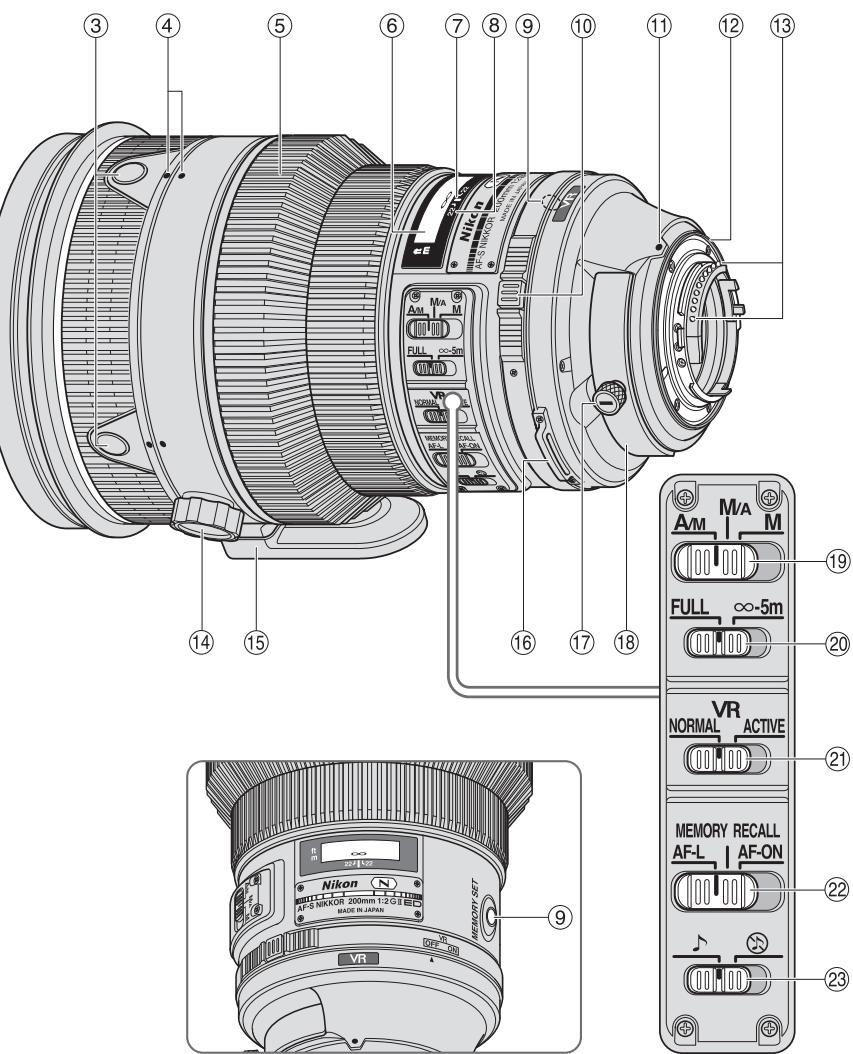
Nomenclature
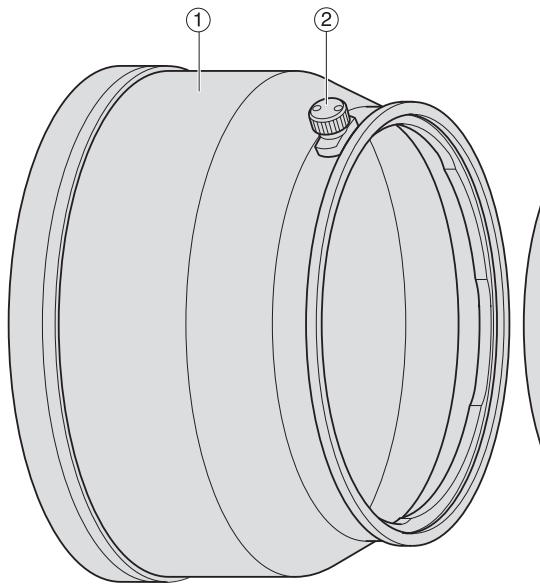
① Lens hood (pg. 26)
② Lens hood screw (pg. 26)
③ Focus operation button (Focus Lock/ Memory recall/AF Start) (pg. 22)
④ Lens rotating position index (pg. 25)
⑤ Focus ring (pg. 21)
(6) Distance scale (pg. 25)
⑦ Distance index line (pg. 25)
⑧ Depth-of-field indicators (pg. 25)
⑨ Memory set button (pg. 22)
Vibration reduction ON/OFF ring switch (pg. 24)
① Mounting index
Lens mount rubber gasket (pg. 28)
③ CPU contacts (pg. 28)
⑭ Tripod collar ring fastening screw (pg. 25)
15 Built-in rotating tripod collar (pg. 25)
⑮ Strap eyelet
⑰ Slip-in filter holder knob (pg. 26)
⑱ Slip-in filter holder (pg. 26)
19 Focus mode switch (pg. 21)
20 Focusing limit switch (pg. 21)
② Vibration reduction mode switch (pg. 24)
2 Focus operation selection switch (AF-L/MEMORY RECALL/AF-ON) (pg. 22)
Sound monitor switch (pg. 22)
): reference page
Major features
- The Nano Crystal Coat deposited on some of the lens elements ensures that fine, clear images can be reproduced under various shooting conditions, from the sunny outdoors to spotlighted interior scenes.
- This lens features AF-L, which locks focus during autofocus, AF-ON, which activates autofocus, and MEMORY RECALL, which saves and recalls selected focus distances.
- By enabling vibration reduction (VR II), slower shutter speeds (approximately four stops) can be used, thus increasing the range of usable shutter speeds, particularly when hand-holding the camera. (Based on results achieved under Nikon measurement conditions. The effects of vibration reduction may vary according to shooting conditions and use.)
- AF-I/AF-S Teleconverters TC-14E/TC-14E II/TC-17E II/TC-20E/TC-20E II/TC-20E III are usable.
Important
- When mounted on Nikon DX format digital SLR cameras, such as the D300-Series and D90, the lens' angle of view becomes 8^ and its 35mm equivalent focal length is approx. 300mm.
Usable cameras and available functions
There may be some restrictions or limitation for available functions. Refer to camera's user's manual for details.
| Cameras | Function | Exposure(shooting) mode | |||||||
| VR | AF | Focuslock | Memoryrecall | AF starton thelens | P*1 | S | A | M | |
| Nikon digital SLR (Nikon FX/DX format)cameras, F6, F5, F100, F80-Series/N80-Series*, F75-Series/N75-Series*,F65-Series/N65-Series* | ✓ | ✓ | ✓ | ✓ | ✓ | ✓ | ✓ | ✓ | ✓ |
| Pronea 600i/6i*, Pronea S*2 | — | ✓ | ✓ | ✓ | ✓ | ✓ | ✓ | ✓ | ✓ |
| F4-Series, F90X/N90s*, F90-Series/N90*, F70-Series/N70* | — | ✓*3 | ✓ | ✓*4 | ✓*3*5 | ✓ | ✓ | — | — |
| F60-Series/N60*, F55-Series/N55-Series*,F50-Series/N50*, F-401x/N5005*, F-401s/N4004s*, F-401/N4004* | — | — | — | — | — | ✓ | ✓ | ✓ | ✓ |
| F-801s/N8008s*, F-801/N8008*,F-601M/N6000* | — | — | — | — | — | ✓ | ✓ | — | — |
| F3AF, F-601/N6006*, F-501/N2020**, Nikon MF cameras (except F-601M/N6000*) | — | — | — | — | — | — | — | — | — |
Possible —: Not possible VR: Vibration reduction AF: Autofocus
Sold exclusively in the USA
Sold exclusively in the USA and Canada
1: P includes AUTO and Vari-Program System (Scene modes).
2: Manual (M) is not available.
3: When the focus operation selection switch is set to AF-ON, autofocus begins as soon as the focus operation button is pressed while the shutter-release button pressed halfway.
4: Press the memory set button or a focus operation button while pressing the shutter release button halfway.
5: Possible, with limited restrictions
Focusing
Set your camera focus mode according to the chart below:
| Cameras | Camera focus mode | Lens focus mode switch | ||
| A/M | M/A | M | ||
| Nikon digital SLR (Nikon FX/DX format) cameras, F6, F5, F4-Series, F100, F90X/N90s*, F90-Series/N90*, F80-Series/N80-Series*, F75-Series/N75-Series*, F70-Series/N70*, F65-Series/N65-Series*, Pronea 600i/6i*, Pronea S | AF (C/S) | Autofocus with manual override (AF priority) | Autofocus with manual override (MF priority) | Manual focus (Electronic rangefinder can be used.) |
| MF | Manual focus (Electronic rangefinder can be used.) | |||
| F60-Series/N60*, F55-Series/N55-Series*, F50-Series/N50*, F-801s/N8008s*, F-801/N8008*, F-601M/N6000*, F-401x/N5005*, F-401s/N4004s*, F-401/N4004* | AF (C/S) | Manual focus (Electronic rangefinder can be used, except with the F-601M/N6000*. ) | ||
| MF | ||||
*Sold exclusively in the USA
AF: Autofocus MF: Manual focus
A/M (Autofocus with manual override. AF priority) mode and M/A (Autofocus with manual override. MF priority) mode
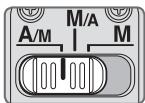
M/A: Autofocus can be overridden by manually focusing with the focus ring.
A/M: Autofocus can be overridden by manually focusing with the focus ring, but focus ring detection sensitivity is lower than in M/A mode. Use this mode to avoid canceling the AF setting by unintentionally moving the focus ring.
1 Set the focus mode switch to A/M or M/A.
2 Autofocus can be manually overridden by rotating the focus ring while pressing the shutter release button halfway, pressing the AF-ON button on the camera or pressing a focus operation button (with focus operation set to AF-ON) on the lens.
3 Pressing the shutter release button halfway, pressing the AF-ON button on the camera again or pressing a focus operation button on the lens again will cancel manual override and return the lens to autofocus mode.
To limit the range of autofocus
This function is only available with autofocus.
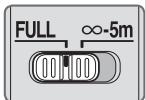
FULL: If the subject is sometimes closer than 5m (16.4 ft.), set the switch to FULL.
- 5 ~m : If the subject is always 5 ~m (16.4 ft.) or more away, set the switch to - 5 ~m to reduce focusing time.
Focus operation selection switch and focus operation button (See page 20 for compatible cameras.)
Use the focus operation selection switch to choose a function of the focus operation buttons.
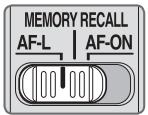
| Position of focus operation selection switch | Focus operation button function |
| AF-L | Focus lock |
| MEMORY RECALL | Memory recall |
| AF-ON | AF start (AF-ON) on the lens |
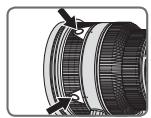
- Press one of four focus operation buttons to activate each function.
Focus lock (AF-L)
This function is only compatible with autofocus.
1 Set the focus mode switch to A/M or M/A.
2 Set the focus operation selection switch to AF-L.
3 During autofocus mode, focus can be locked by pressing one of the focus operation buttons.
Focus remains locked while a focus operation button is pressed and held down.
- The AF-L function can be engaged either from the camera or from the lens.
Memory recall (MEMORY RECALL)
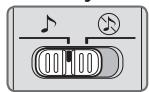
The lens beeps when memory recall is operated.
念 :Memory recall operates without the beep sound.
The following operation is with the sound monitor switch set to
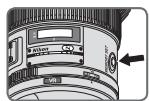
Focus on a subject and press the memory set button to save the focus distance.
- The lens will beep when the focused distance is correctly saved.
-
When the focus distance is not correctly saved, the distance scale ring will revolve back and forth some 10 times, while the lens will emit one short and three long beeps. In this case, repeat procedure to save focus distance.
-
Memory set is possible regardless of the setting of the focus mode or focus operation selection switch.
- The focus distance is saved even when the camera is turned off or the lens is detached from the camera.
2 Set the focus operation selection switch to MEMORY RECALL.
Press a focus operation button. After the lens beeps twice, fully press the shutter release button to take the picture.
- The saved focus distance is recalled when a focus operation button is pressed even when the shutter release button is pressed halfway.
- To take pictures at the saved focus distance, hold the focus operation button down and fully press the shutter release button.
- The lens reverts from memory recall to autofocus or manual focus when the focus operation button is released.
Autofocus (AF) start on the lens (AF-ON)
1 Set the focus mode switch to A/M or M/A.
2 Set the focus operation selection switch to AF-ON.
3 Press a focus operation button to take pictures.
- Autofocus is activated while a focus operation button is pressed and held down.
- The AF-ON function can be engaged either from the camera or from the lens.
Vibration reduction mode (VRII)
Basic concept of vibration reduction
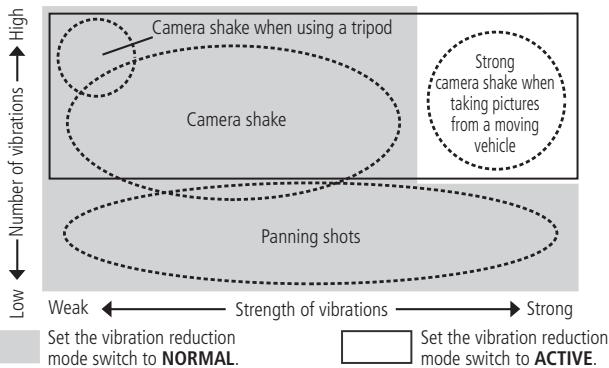
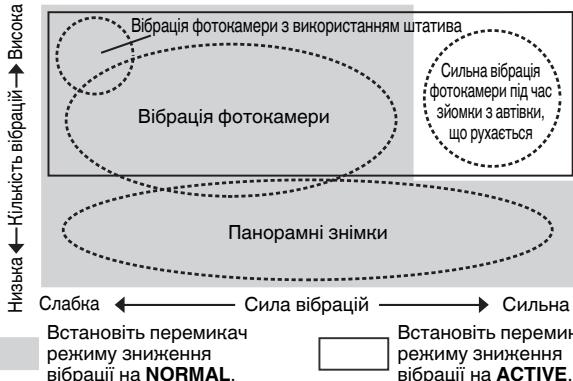
| When taking pictures | Set the vibration reduction mode switch to either NORMAL or ACTIVE. |
| When taking panning shots | Set the vibration reduction mode switch to NORMAL. |
| When taking pictures from a moving vehicle | Set the vibration reduction mode switch to ACTIVE. |
| When taking pictures using a tripod | Set the vibration reduction mode switch to either NORMAL or ACTIVE. |
Setting the vibration reduction ON/OFF ring switch
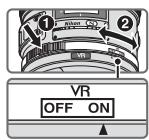
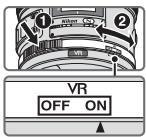
ON: The effects of camera shake are reduced while the shutter-release button is pressed halfway and also at the instant the shutter is released. Because vibration is reduced in the viewfinder, auto/manual focusing and exact framing of the subject are easier.
OFF: The effects of camera shake are not reduced.
Setting the vibration reduction mode switch
Set the vibration reduction ON/OFF ring switch to ON and choose a vibration reduction mode with the vibration reduction mode switch.
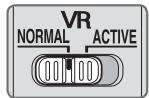
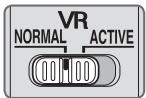
NORMAL: The vibration reduction mechanism primarily reduces the effects of camera shake. The effects of camera shake are also reduced with horizontal and vertical panning.
ACTIVE: The vibration reduction mechanism reduces the effects of camera shake, such as that which occurs when taking pictures from a moving vehicle, whether it be normal or more intense camera shake. In this mode, camera shake is not automatically distinguished from panning motion.
Notes on using vibration reduction
- If this lens is used with cameras that do not have the vibration reduction function (pg. 20), set the vibration reduction ON/OFF ring switch to OFF. With the Pronea 600i/6i camera, in particular, battery power may become quickly depleted if this switch is left ON.
- After pressing the shutter-release button halfway, wait until the image in the viewfinder stabilizes before pressing the shutter-release button the rest of the way down.
- Due to the characteristics of the vibration reduction mechanism, the image in the viewfinder may be blurred after the shutter is released. This is not a malfunction.
- When taking panning shots, be sure to set the vibration reduction mode switch to NORMAL. If the camera is panned in a wide arc, compensation for camera shake in the panning direction is not performed. For example, only the effects of vertical camera shake is reduced with horizontal panning.
- Do not turn the camera off or remove the lens from the camera while vibration reduction is operating. Failure to observe this note could result in the lens sounding and feeling as if an internal component is loose or broken when it is shaken. This is not a malfunction. Turn the camera on again to correct this.
- With cameras featuring a built-in flash, vibration reduction does not function while the built-in flash is charging.
-
When using a tripod, set the vibration reduction ON/OFF ring switch to ON to reduce the effect of camera shake. Nikon recommends the switch be set to ON when using the camera on an unsecured tripod head or with a monopod. But when camera shake is very slight, the vibration reduction function may conversely increase the effect of camera shake by the movement of the system. In such a case, set the vibration reduction ON/OFF ring switch to OFF.
-
Vibration reduction does not function when the AF-ON button on the camera or a focus operation button on the lens is pressed.
Depth of field
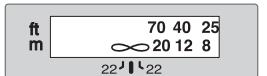
Depth-of-field Distance index line indicators
Approximate depth of field can be determined by checking the depth-of-field indicators. If your camera has a depth-of field preview (stop-down) button or lever, depth of field can be previewed through the camera viewfinder.
- This lens is equipped with the Internal Focusing (IF) system. As the shooting distance decreases, the focal length also decreases.
- The distance scale does not indicate the precise distance between the subject and the camera. Values are approximate and should be used only as a general guide. When shooting distant landscapes, depth of field may influence operation and the subject may appear in focus at a position that is closer than infinity.
- For more information, see page 226.
Setting the aperture
Use the camera to adjust the aperture setting.
Using a built-in rotating tripod collar
When using a tripod, attach it to the lens' tripod collar instead of the camera.
- When holding the camera by its handgrip and rotating the camera with the lens in its tripod collar, your hand may bump into the tripod, depending on the tripod in use.
- It's possible to detach the tripod collar by removing the tripod collar lock screw. For details on this procedure, contact your nearest Nikon service center or representative office.
Changing the camera position
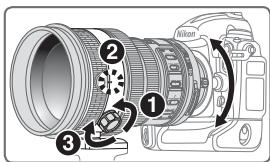
Loosen the tripod collar ring fastening screw (1). Depending on camera position (vertical or horizontal), turn the lens to an appropriate lens rotating position index (2) and tighten the screw (3).
The built-in flash and vignetting
To prevent vignetting, do not use the lens hood.
Cameras
Vignetting occurs at any shooting distance.
*Sold exclusively in the USA
Using the lens hood
Lens hoods minimise stray light and protect the lens.
Attaching the hood
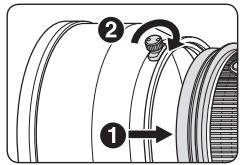
- Fully tighten the lens hood screw (2).
- If the lens hood is not correctly attached, vignetting may occur.
- To store the lens hood, attach it in the reverse position.
Slip-in filter holder
Always use a (52mm screw-on) filter. A 52mm Screw-on Neutral Color NC Filter is attached to the filter holder when shipped from the factory.
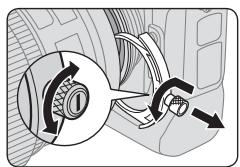
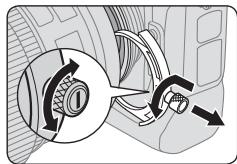
Press down on the slip-in filter holder knob, and turn counterclockwise until the white line on the knob is at a right angle to the axis of the lens.
2 Pull the slip-in filter holder from the lens body
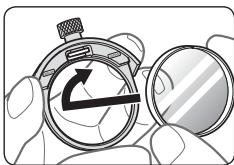
3 Detach the attached filter from the filter holder.
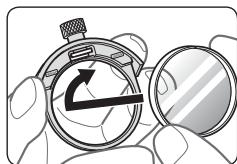
4 Screw a filter onto the side of the filter holder marked with the words "Nikon" and "JAPAN".
- The slip-in filter holder can be attached with the "Nikon" and "JAPAN" facing either the lens or camera side without any effect on your pictures.
Slip-in Circular Polarizing Filter C-PL3L (optional)
- Blocks reflections from nonmetallic surfaces such as glass and water.
- When a Slip-in Circular Polarizing Filter C-PL3L is attached, the focus distance is different from when a 52mm screw-on filter is attached. The distance scale is shifted from the correct position. The closest focused distance is extended slightly.
- The memory set position may change slightly when using focus preset. Attach the C-PL3L filter before using the memory set function.
Recommended focusing screens
Various interchangeable focusing screens are available for certain Nikon SLR cameras to suit any picture-taking situation. The ones recommended for use with this lens are:
| Screen Camera | A | B | C | E | EC-B EC-E | G1 G2 | G3 | G4 | J | L | M | U |
| F6 | ◎ | ◎ | — | ◎ | — | — | — | — | ◎ | ◎ | ◎ | |
| F5+DP-30 | ◎ | ◎ | ○ | ◎ | ◎ | ○ | ◎ | ◎ | ◎ | |||
| F5+DA-30 | ◎ | ◎ | ○ | ◎ | ◎ | ○(+0.5) | ◎ | ◎ | ◎ |
:Excellent focusing
:Acceptable focusing
Slight vignetting or moiré patterns appear in the viewfinder, but not on the film.
Not available
( ) : Indicates degree of exposure compensation needed (center-weighted metering only). For F6 cameras, compensate by selecting "Other screen" in Custom Setting "b6: Screen comp." and setting the EV level to -2.0 to +2.0 in 0.5 EV steps. When using screens other than type B or E, "Other screen" must be selected even when the required compensation value is "0" (no compensation required). For F5 cameras, compensate using Custom Setting #18 on the camera body. See user's manual of the camera body for more details.
Blank box means not applicable. Since type M screen can be used for both macrophotography at a magnification ratio of 1:1 or above and for photomicrography, it has different applications than other screens.
Important
- For F5 cameras, only EC-B, EC-E, B, E, J, A, L focusing screens are usable in Matrix Metering.
Lens care
- Be careful not to hold the camera body when the lens is attached, as this may cause damage to the camera (lens mount). Be sure to hold both the lens and camera when carrying.
- When the lens is mounted on a camera, do not pick up or hold the camera and lens by the lens hood.
- Be careful not to allow the CPU contacts to become dirty or damaged.
- If the lens mount rubber gasket is damaged, be sure to visit the nearest Nikonauthorized service representative for repair.
- Clean lens surfaces with a blower brush. To remove dirt and smudges, use a soft, clean cotton cloth or lens tissue moistened with ethanol (alcohol) or lens cleaner. Wipe in a circular motion from the center to outer edge, taking care not to leave traces or touch other parts of the lens.
- Never use organic solvent such as thinner or benzene to clean the lens.
- When storing the lens in its case, attach both the front and rear lens caps.
- When the lens will not be used for an extended period of time, store it in a cool, dry place to prevent mold and rust. Be sure to store the lens away from direct sunlight or chemicals such as camphor or naphthalene.
- Do not get water on the lens or drop it in water as this will cause it to rust and malfunction.
- Reinforced plastic is used for certain parts of the lens. To avoid damage, never leave the lens in an excessively hot place.
Standard accessories
- Dedicated slip-on front lens cap
- Rear Lens Cap
- Lens Hood HK-31
- Semi-soft Case CL-L1
- Dedicated slip-in filter holder
- 52mm Screw-on Neutral Color NC Filter
- Strap LN-1
Important
- The slip-in filter holder, with a 52mm screw-on filter attached, should be inserted in the lens at all times.
Optional accessories
- 52mm screw-on filters (except circular polarizing filter II)
- Slip-in Circular Polarizing Filter C-PL3L
- AF-S Teleconverters TC-14E II/TC-17E II/TC-20E III
Specifications
| Type of lens: | G-type AF-S NIKKOR lens with built-in CPU and Nikon bayonet mount |
| Focal length: | 200mm |
| Maximum aperture: | f/2 |
| Lens construction: | 13 elements in 9 groups (3 ED, 1 Super ED and some Nano Crystal Coat-deposited lens elements), as well as 1 protective glass |
| Angle of view: | 12°20' with 35mm (135) format Nikon film SLR cameras and Nikon FX format digital SLR cameras8° with Nikon DX format digital SLR cameras9°50' with IX240 system cameras |
| Distance information: | Output to camera |
| Focusing: | Nikon Internal Focusing (IF) system, autofocus using a Silent Wave Motor; manually via separate focus ring |
| Vibration reduction: | Lens-shift method using voice coil motors (VCMs) |
| Shooting distance scale: | Graduated in meters and feet from 1.9 m (7 ft) to infinity (∞) |
| Closest focusing distance: | 1.9 m (6.2 ft.) |
| No. of diaphragm blades: | 9 pcs. (rounded) |
| Diaphragm: | Fully automatic |
| Aperture range: | f/2 to f/22 |
| Exposure measurement: | Via full-aperture method with cameras with CPU interface system |
| Focusing limit switch: | Provided; two ranges available: FULL (∞-1.9 m), or ∞-5 m |
| Tripod collar: | Rotatable through 360°, lens rotating position index at 90°, only tripod collar detachable |
| Dimensions: | Approx. 124 mm dia. x 203.5 mm extension from the camera's lens-mount flange |
| Weight: | Approx. 2,930 g (6.5 lbs) |
Specifications and designs are subject to change without any notice or obligation on the part of the manufacturer.
ACHTUNG
Keinesfalls zerlegen.
| Verre Appareil | A | B | C | E | EC-B EC-E | G1 G2 | G3 | G4 | J | L | M | U |
| F6 | ◎ | ◎ | — | ◎ | — | — | — | — | ◎ | ◎ | ◎ | |
| F5+DP-30 | ◎ | ◎ | ○ | ◎ | ◎ | ○ | ◎ | ◎ | ◎ | |||
| F5+DA-30 | ◎ | ◎ | ○ | ◎ | ◎ | (+)0,5) | ◎ | ◎ | ◎ |
| Pantalla Cármara | A | B | C | E | EC-B EC-E | G1 G2 | G3 | G4 | J | L | M | U |
| F6 | ◎ | ◎ | — | ◎ | — | — | — | — | ◎ | ◎ | ◎ | |
| F5+DP-30 | ◎ | ◎ | ○ | ◎ | ◎ | ○ | ◎ | ◎ | ◎ | |||
| F5+DA-30 | ◎ | ◎ | ○ | ◎ | ◎ | (+)0,5) | ◎ | ◎ | ◎ |
@: Enfoque excellente
O: Enfoque acceptable
Forvara utom rackhall for barn
OCHOBHBIE BO3MOXHOCTN
HaOKpCTaJIHcNEcHoe NOKpbTHe, HAeCEHHeO Ha HEKOTbIe 3JIEMtbl O6bEHTnBa, rapaHTnpyET noJIyHeneYeTHKn CHmMKB OTJNHHORo KaeCTBa V IIObX yCObnBx-OT CbEMKn pRr COIcHNeOH OCBeHsEN IO CbEMKn B NOMeHEnN pRr CbETe IPOKeHTOpOB.
B DAHNM O6bENTBVE IcNoIb3yeTcA TeHeNOHBeTp AF-L,ΦHKCNpyUoiuΦOVC BO BVPmAB aTOfoKycpOBKn, yHnUca AF-ON,aKTHBNpyUoiua ABTOfoKycpOBKn, MEMORY RECALL, COxpaHruOuaI a KTHBNpyUoiua N36paHnhBie FOyCBye paCToHNI.
- Ppi BkIIOUeHN FyHKsIN NpOaBLeHn Bn6paun (VR II) MoKHO NcNpOb3oBaTb 60lee dInTeJIbHbIe BbldePcknn (np6bn3nteJbHo HA 4 C7ynEH), TEM cAmBIM yBeIHHBAra dAna3OH 3aueHN bbldePcknn, Ooc6hen npri pyuHoi cBemke. (*OChOBaHO Ha pe3yIbTaTax, pIoYueHHbX BycLOBHX n3MepeHN Kompanh Nikon. Pe3yIbTaTb IpoaBLeHn Bn6paun MOrYT 3abNCETb OT cHTTuaynn u YcNOBn CTbEMKn).
C3TtMmO6bEeKTHOBM COBMeCTnMbI TeJeHOHBeptOpbI AF-I/AF-S MoDeJIeN TC-14E/TC-14E II/TC-17E II/TC-20E/TC-20E II/TC-20E III.
BHHMaHne
- Ppi npincoeHHHeHn oBbEeKTHBa K cHpHmep, K FOToKAMpe Cepn D300 nD90, yrO1 3peHn oBeKtBa cTaHOBNTcpaBnB 8^ aFOkCHoep paCCToHne (B AKBINAEIeTe dIra 35MM pJIeHOHOn FOToKAMpeb) cTahOBNTcpaN6HNIeHbPaHBIM 300MM.
Cobmectnmbie oTOkAmepbI nOCTynhbIe yHKcH
IcnoJb3ObaHne doctynbIX oHyKzui OObekTnBa MoKeT 6bIt CBa3aHO C HeKOTOpBMn OrpauHueHnMn. Iopdo6hIe CBeDEHnCm. BpykoBocTeB NoJb3oBaTeJI FOToKApMePbl.
HactpoHa KoIbIpo peRyIInpOBn IpaBLeHn Bn6paun ON/OFF
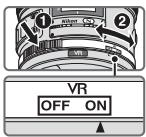
ON (BHKJL):
Фф�ekt dpoKAnHЯ ФOTOKaMepbI yMeHbSaETcra npn HauHaN CnYCKOBK KHONK 3aTBOPa HANOLOBHy n B MOMENT cNyCa 3aTbOPa.CNHKeHene YPOBnB BnBaPauN B BVIOJcKaTeNe OBeJIeHae T BInOJIHeHne ABOMTaTHueChCo NpyHoNΦOkyCpOBKn, a TaKHe TOCHNO KaDriPoBAHNo OBkEtCA CbEMKn.
OFF(BbIKJL): ΘΦΦEkДрОжань ФОТOKамерbl He mEmbwaETc.
YctahOBha nepeKJIouateIpaKeHMa nOaBJeHHa Bn6paIeN
UcTaHOBtE KOJIbO cepyIINPOBKN IIOaBLeHnN Bn6paunON/OFF B nIoJOnHeHne ON N bIbepNTe peKIM IOaBLeHnBn6paunpepeKJIouateJeM peKIMOB IOaBLeHnBn6paun.
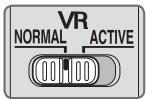
NORMAL:MexaHn3M NOdaBHeHn Bn6pauny UMeHbwaet B OCHOBHOM 3ΦΦeK TdoXoAHnA ΦOTOKaMEpbI. ΦΦΦeK TdoXoAHn ΦOTOKaMEpbI UMeHbwaet C TaKHe npri RopN3OHTaJIbHOM I BepTNKaJIbHOM NaHOpAMnPoBAHHN.
ACTIVE: MexaHn3M nOdaBHeNn Bn6paun yMeHb7aepT 3ΦΦeK T dpoJHaHnI FOToKamEpbl, HApnImep, npn CbeMKe n3 DBrNjUeOcA BtOMoBnI, nNoDaBnE TdPOKaHnI FOToKamEpbl o6bHOrO nIi 60JeE BtICoKOrO yPoBnR. B 3TOM pExKHe MFOKaMep He MoJET aBTOMaTHueCckn OTmHnTB dpoJHaHne FOToKamEpbl OT nepeMeZeHNn KaMepbl npn NaHOpamnpoBaHn.
PpimeyaHnno nCNoIb3OBAHNIO npaBHeNn B6paun
EcnI 3OT O6bENTB HcNOJIb3yeTcR C f0TOkAmePamH, He COBMeCTHMbIMn C nCTeMoN noaBHeNHa Bn6paun (ctpr. 90), yCtahOBiTe KOJIbO perylnpoBNn NOaBHeNn Bn6paun ON/OFF B noJIOKeHne OFF.EcnI 3OT npEkeJIouaTe haxoDITcB nnoJIOKeHnON, 6bTaerpe FOToKAMpeMBoMQeHT oeHb bIcIpto pa3pKaTcbc (ocObeHHO 3TO OTHCNTcK f0TOkAmepe Pronea 600i).
- После нахати спунови Конин Затова наноюни Нобхдимо дождатьсг CTбллзuaци ИЗбражени в Вионскателе neped Tem, кад нахать спунови Коник Затова до Конца.
BcIeCTBHe Oc06BHeHCTeXapaKTePcHtMkexaHn3MaNoIabJbHnRn BbpaNIOncLe TOrO,Kan6byTeOTnyeHaKNOnKa cTbopa,n3o6paJbeHneBVDonckTaTeJe MOHET OKa3aTbCBA3aHbHM.
- Пис bсБЕМКпаногамьх снИМКов He 3a6bIte YeCTaHOBITb nepeKJIIOUaTeIb peKIMa
поДАБЛЕНИ ВИБрацИВ NПОJOSEнE NORMAL. Пис bсБЕМпаногамы NO рИрOKо
ТраEVTOРМИ ПОДАБЛЕНИ DePOTOKANHЯФOTOKAMEpbl H nAPrabLEHIN cБЕМКпаногамы
He 6bETBbIOLNITbCBy. HanpIMeR, пис rOPIZHOtAJIbHOM nAnogamipobAHIN
умEHsuaeTcTToJbHo 3ФФeKT BepTnKaJIbHOrO dPOKANHЯФOTOKAMEpbl.
He BbKIOUaIe FOToKHApemy H He CHIMaIte C FOToKHApBb IO bEKeTbN PnP aBoTe B pEHNMe NpOABLeHIN BnBpaaru. EcN I npEne6peBy 3TNM PnpMeAHmE, TO npCOTpaceHnIOBekTbMa MoHET NocblIaTaBC3YbK, KaN pN OTCoEInHEn HnI IN NOLOMKe BHyTPeHHNX KOMIOHENTOB. 3TO He AByIeTc HEnCnpabHOCTbIO. JIy YcTpAHeHn 3ToN CNTyaUn ChOba BkIOHHTe FOToKHApemy.
- Ppi nCnoJb3ObaHm moJeIe foToKamep, OchaueHHbIX BCTpoEHHO BCbIuKoI, pni 3apJe BCbIuKn FyHKUaIPOaBHeHn B6paun He pa6oTaET.
B cnlyae nCnOJb3OBaHnI WtTaTHBa IJIe CnHKeHnE 3ΦΦeKTA npOJaHnI FOToKaMepeY cTahOBHTe KOBtpoReyInpoBnIOpaun ON/OFF B noLoKeHne ON. Nikon peKOMeHdye TcTahAEBuBaTb nepeHJIouateB nNoLoKeHne ON npi NcNOJb3OBaHnI KaMEpbI C He3aФнICpOBAHnO rONoBKO wTAtNaB IIN C MOHOPODM. Ppi eBaZ 3aMeTHORO pOJOaHnI FOToKaMepeFyHKUra NpOabLeHn E B6paun MocET Haobopot NobicITb DpOJaHne FOToKaMepeB b Pe3yIbTaTe dBNHeHnCnCTembl. B TaHOM CnLYae yCTAHOBHTe KOBtpoReyInpoBnIOpaun B No6paun ON/OFF B noLoKeHne OFF.
-Подавлиец Вибрацин Невозможно, ecnl Ha Kaemepe Hauka ta Khonka AF-ON Или Ha obekTeBHe NaKaTa KHNkHa ynpaBLeHnA phOkyCupOBKn.
Iny6nha pe3noctn
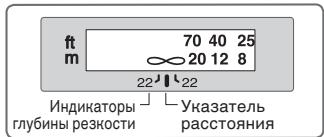
Pn6bn3ntbnaI rnybHa pe3KocTn
OnpedelaTcno INHdHaTopam rnybHb
pe3KocTn.EcIy foTOkAmepa OchaueHa
KNIOKOHNpBvHaJcOM POCMOTpa rnybHb
pe3KocTn (3aTeMHEnHe),TO rnybHy pe3KocTn
MOHO npOBepNTbpee3 BINOCHaTeb
foToKaMepbI.
- ΘOT ΜБeΚΤΟν ΜΟρύθουν ΑκτεΜΟΙ Βυγτρεnhης Φόκυποβους (IF). ΠΟ MEPE yMehhδησιρας Σατθοῦνης ΧεΜκι τακχε ΜεMHδλδετρας Φόκυχο Hoe pαςθοῦνη.
IkaIpaCCTOHHHeNoKa3bIaEBaETTOHoePacCTOHHMeJyOBbEHTOM IΦOTOKAMepo.3NaueHHeNOKA3bIaIBaOTcprn6mI3TeJIbHO,INxCLJeYET nCnolb3OBA TbToBkoB KaCeCTBe 06uX opNEHTPOB.Ipn CbeMKe ydaenHbIX ne3aKeH,py6Hnape3HOCTMOHEBnBaTbHa pABOTy,IO6beHT MOHT KeHa3aTbCS cFOKcHpOBaHHbIM BNOLOHeHH,KOTOpOE 6JIiHe,QEM6eCHOeHOOCTb.
-Дононтульные CBedeHЯ CM. Na CTpaHице 226.
YctaHOBka dnaΦparMbI
Ha foTOKaMepe moKHO hAcTpOnb npaMeTpbl dnafoarMbI.
IcnoJb3ObaHne BCTpoEHHbI NOBOPOTbI INepexoHNДЯ KpenJIeHnHa WtTaTnBe
PnHcIIOb3OBaHHuWtTaNBAeroCLeyETnpICoEHNHTbKpeXOJHkyObBeHTBa 1JI KpeJIeHnHa WtTaNBe,a He K foToKAmpe.
- YdeprHnBaKamepy 3a pykoTky N nobopauhBaKamepy C obBeKTbOB M B eKoJIbcI dIy KpeJIeHnK WtATnBv, Bbl MoKeTe 3aDeTb pyKoN WtATnB.
KolbpoI KpIeJIeHnMoJHO CHaTb, BbIKpyTMB FIKCNpyUOuN BINT KOIbca.ДлпоуHn DOIOJIHNTeBHOH HΦOpMauN O6paTInTeCb B 6JINKaIuN CepBnChbI cHTp IIN pIpeCTabItebCTBO KOMNaHIM Nikon.
I3MeHHeNn pIoXeHnHaMepbI
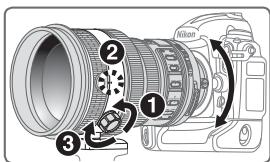
Ocna6bTe KpeneKHHB BVHT KOJIbua nepeXoDHNka dIa KpeJIeHnHa BA7aTbHe (1). B 3aBNCMHOCn OT nIOLOXeHnKaMepeBb (BepTKaJIbHOe IINI rOpIN3OHTaJIbHOe), MeTHa NIOJOHEnI pI NIOBOPoTe OBeKeTbBa (2) n 3aTaHInTE BVHT (3).
BcTpoEHNa BCnblska N BInHbETnpOBaHne
Bo n36eKanHe BnHbETnpOBaHnHe NcNoIb3yIte 6JeHdy OBeKTHBa.
ΦOTOKaMepbl
Cepnia F65, cepnia F60, cepnia F55, cepnia F50, F-601, Pronea 600i, Pronea S
BnHbETnPOBaHnE Bo3NHaET Ha JIO6OM paCCTOHN Do O6BeKtA CbEMKn
IcnoJIb3OBAHnE 6JeHdbI
Raza aperture: f/2 la f/22
He nBHTnca ha coHnce Kpi3b 06'ekTHnb a6o BnuDooyka
IognlaHa coHcE a6o iHwi noTyKHi dKepeLa cBtla Kpi3b o6'ekTnB a6o BnIoSyKaH MoHe np3BeCTn Do TjHKOrO NOWKODHeHHa 3OpY.
TpmaTn npaJI biD iTei
Oco6nBy ybary cIiD npHdiJIaTn TOMy, 0o6 HeMEOBHe nOTarHn 6aTaapei abo iHsi dpi6hi deTani do poTa.
Iiud eHcNlyaTauii foToHamepn Ta 06'ekTnBa DOTpMByatncb TaHX 3axoDIB 6e3neHN
- TpImaTHn foToKamepy Ta 06'ekTnB cyxHmN. HeDoTpImaHnY cboFo 3aCTepeJHexHH MoKe npnbecTN do noKeHki a6o ypaJHexHH eJeKTpruHm CTpyMOM.
- He TopkaTnca foToKamepu Ta o6'ekTnBa mokpymu pykAmn. HeDoTpImaHHN cIbOrO 3aCTepeKeHHN MoKe npNBecTn Do ypaKeHHN eJeKTpnHmCtpyMOM.
-Плд ac3иOMнЗВИнориCTAHнЯ 3aДнБОги nIDCBiUyBaHnH He HABOHTN O6'kTNb Ha coHnce Ta He DoNYcKaTHn PpI MOrO nONaDAHnB V HbORO coHryHOrO npOMEH, OCKIbKN Ze MOKe pPn3BecTn Do nepeRpiBy FOToKamepri i, MoJJIbBO, Do noJKeHi.
Плд ac trpmbaloro HeBnKOpncTaHnO6'kTbBA BcTaHOBtN O6nDbI, nepeDnTo Ta 3aDnIO, KpnuKn 06'kTbBA Ta TprMaTH cAm 06'kTIB nOdaJI bID coHryHOro cBtla. HedotprmaHHra 0bOro 3acTepeJHeHHa MOne npin3BeCTn Do noKeHi, OckInbKn 06'kTbM MoKe CfoKycBaTH coHryHe CBtIHO Ha IerKo3aMmCTn NpeDMeT.
Ua
PexnM 3HnHexHHaBi6paqii (VRII)
3araIbHe yIaIeHnI npo 3HHKeHHaIbpaIi
| ПID час зйомки | Встановitably поочима узейнени вiod paцшу на NORMAL aбо ACTIVE. |
| ПID час панорам hoю сйомки | Встановitably поочима узейнени вiod paцшу на NORMAL. |
| ПID час зйомки 3 abtвик,有很大 руха极易яя | Встановitably поочима узейнени вiod paцшу на ACTIVE. |
| ПID час зйомки 3 винорисандровштатива | Встановitably поочима узейнени вiod paцшу на NORMAL aбо ACTIVE. |
HaiaaTybaHnKaIbueBorO homyTaTopa 3HHKeHHa Bi6paqii ON/OFF
ON: EΦeKT Bi6paüi ΦOTOKaMePn 3HnKyEbCra HaTnCKaHHM KHNKn 3aTBOpA DO NIOLOBHH, A TAOK B MOMENT BiDnycKaHHN KHONKn 3aTBOpA. 3HnKeHHN Bi6paüi y BVdoOwyuHi NpIeRgUe aBOMTaNuHe/PyuHe FOhycBaHH Ta ToUHe 3axOnnHeHHo6'kTA do KaDPy.
OFF: EfeKT Bi6paui foToKamepn He 3HJxyeTbca.
HactpoHHn nepemnka paekmmy 3nHexnha Bi6paqii
BctaHOBiTB kIlbcEbn KOMyTaTOp 3nHexHeNb Bi6paJI ON/OFF Ha ON Ta o6epiB peKIM 3nHexHeNb Bi6paJI nepEMKaempeKIMy 3nHexHeNb Bi6paJI.
NORMAL:MexaHIm33nHexeHHBbpaJIiBnepSy cepry 3nHXye efeKT b6paJIi foToKaMePN. EFeKT B6paJIi foToKaMePN taKoX 3nHXyETbcra rOpN3OHTaJIbHM Ta BePTNKaJIbHM nAhopaMyBaHHM.
ACTIVE: Mexahi3m 3nHexeHnB i6paqii 3nHxye efeKt B6paqi φOTOKaepn, HapnKnlaT, Toi, ΜU BnHnKaε πid qac 3IOMKn 3 aBTiBnK, ΜO pyxaεTBcA, He3aJIeJHo BiD TOrO, YN CE 3BnuaHa a6o NaTTO INTEHCINBa biaPci. IB TAKOMy peXnMI B6paQI φOTOKaepn abOTAMTuHNo He BiDiPI3HAEbCByi DpYx npi naHOpamyBaHHi.
PpIMiTHK 3 BnHOpNCTaHH 3HNJxHEnHbIbpaui
- y pazi BnKOpNCtAHH NcIbO rO6EeKTHBy 3 f0TOkAmePamN 6e3 fYHKiII 3HNKeHHN B16paJI (CTop. 174), BcTaHOBITb KIbueBNI KOMyTATOp 3HNKeHHN Bi6paJI ON/OFF Ha OFF. 3OKpeMa dIg f0ToKAmepn Pronea 600i TpNbAne BnKOpNCtAHH Pekmmy ON MoJe WbUdKO BnCHAnHTu BaTapeI JINBLeHHN.
- Picna HATNCKAHNA KONKy 3aTbopa Do noIIOBHH CnIe 3aeeKaTH CTa6II3auii 3o6paJHenn y BNDOswkayi, i IInse nicna cboRo HATNCHTN KONKy 3aTbopa do ynopy.
- Y 3B'3NHy 3 OOCbIbOcTMy MEXaHl3My 3HNJKeHHa Bi6paJIi NiCJIa BiDnyckAHn HKnONKn 3aTbopa 3o6paKeHHa y BnIOwUkai MoKe BnIgIaTn HeaCHm. LHe He e HecnPabHicTIO.
Пид уасьOMнпанорамнх 3HIMKIB O6OB'3KOBO BCTaHOBtпермнkaчpeЖИМу 3нИЗЕНЯ Bi6paui Na NORMAL.ЯMuO FOToKAMepa NaHOPaMye SHPOHn Kyt 3Opy,КOMTeHcAci Bi6paui FOToKAmepuВ HAnpRMy NaHOPaMyBaHHN He BInHOyEbyCsH.AnPknLad,y pasi rOpnsOHTaIbHOro NaHOPaMyBaHHN 3HINJyEBycS JHnSeBepTnKaJIbHa Bi6paui FOToKAMepu
3a6bopohraTcBmHkATn foTohamepy a60 3HimaTH o6'KTNb iD nac 3diChenHH 3NHeHH B16paJIi. HeNDpTImaHn ciE BIMOrn moKe np3BeCTn do TOrO, 0o 6'KTHb Byde «3ByaTaT" Ta BnIgAaTn iD ac BicpaJIi TaK, Hi6n RaHmCb 3OBHIuHII KOMIOHEHT NOAHO 3akPInHeo a60 3JaMaHO. Ye e HecnpabHicTIO. 3HOby yBIMKHITb foTohamepy Ta BnPpABte NOnoJHennH.
Ha foToKaMePax 3 B6yDoBaHIM cnaIaxom 3HnKeHHa Bi6paui He fynKciOHy e niD ac 3apAidHeHH B6yDoBaHO r cnaIaxy.
-урази винорисаньштатив Вставит Кльцевий Комутатор 3ннжehнь Biбрацii ON/OFF Ha ON.Лд дзглпь 3ннз titи Biрасio Фотokamepn. Nikon pekomehdye BCTahOBHIOBATи помнча на Oy pa3i винорисань ФотokamepnHa He3akpinleni Галовци Sttataba abo ha MoHOnDi.Ае ра3i He3naohoi Biбрацii ФotokamepnФункшя 3ннжehнь Biрасii мося habnakni 36iIbshintu efeKII Biбрацii Фotokamepn BHCILIDOK pyxahHHСИСТЕМ.В тaramы ВинадHy BCTahOBITКльцевий КOMуTATOP 3ннжehнь Biбрацii ON/OFF Ha OFF.
3HnHexHHB6paui He FyHKIOHyE, KaO HaTNCHYTo KhoNky AF-ON ha foToKaMePi a6o KhoNky KepyBaHHa FoKcyBaHHaM.
TlnsHa paizkocti
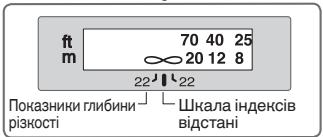
Pn6n3Hy rnn6Hy pi3Kocti MoHnBa3HaHTn, nepeBipNBu NOKa3HNKn rIb6HHPi3KoCTi. RaKIO FOToKAmepy 06laDnHO HONKO1o aBO BaKeJEM nonepdNboRoperLy rIb6HbN p3KocTi, rIb6HbNy pi3KoctiMoHnNa nonepdHbO nepeBipNTu y BINOswKaHi foTOkAmern.
- Cse 6'ekTNb 6bIaHaHO cHCTeMO BHyTpIHbOTo 0KocycbAHn (IF).3a 3MeHsEHnB BiDcTahi 3iOMKn, 0Kocycha BiDcTaHb TaKOH 3MeHsyEbCBA.
IshkaIaФokycHOI BiDctAHI He 3o6paJHyE TOnHy BiDCTaHb BiD o6'kTa Do FOToKAmepn. 3NaueHHN Pn6JIi3HI, iX CnIb 6pATn DO yBarn IInse K 3aralbi OpiEHTnpy. Y pa3i 3mOMKn BiJaIaHeN ne3aJiB, rInbHa pI3KocTi MoKe BnLIHyTu n HAOBOTy FOToKAMepn, i O6'kT MoHe BiO6pa3nTcR B fOkyi Y noLoJxEHNI, 6lnHXOyM 3a HECKIHueHHicTb. - OdaTkoBy iHΦopMaζIHOHaDaHO Ha CTOpIHcI 226.
HactpoHa iaφparMn
Ha foToKamepi TakoK MoXHa HalaWtYBaTn HacTpoHn DiaΦpaRmN.
BnHOpNCTaHH MyΦTb B6yDObaHOro NOBOPOTHORO 7TaTHBHO KIIbUa
Ypa3i BnKOpNCTaHHa TtATINBa npHKpInITb NOro Do StaTINBHO KJIbUa, a He do foToKamepn.
TpIMaOHU pFOtOHaMEpy 3a pyKoHTy Ta NOBepTaOHu FOToHaMEpy 3 O6'EKTHBOM yTATNBHMOy KJIbci, 3aJIeJXHO BID BHKOpNCTOBYBaHOrO WtATNBBy BN MOKeTe HauTOBHXTYNC HA CAM WtATNB.
- IITaTbBHe KINbue MoJHb 3HrTn, BKNpyTbBwN rBnHT φiKcaii IITaTbBHO RIKbUc. BiIbU dOKJIaDHy IHΦopMaJIo 3CbOro pNbOy MOJHa OTpIMaTH B Hau6JIHKoMy cepBICHOMy cEHTrPi Nikon a6o B npeCTabHnCbKOMy ophiCi.
3MiHa noJIOXeHHa FOToKamepn
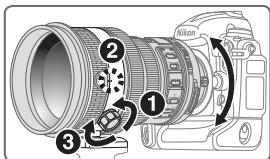
Iocna6JIeHHraBnHTaKpInJIeHHaTAtbHOrO KJIbUa (1).
3aJIeKHO BID NOIIOKeHnH FOToKAmepn (BepTnKaIbHOrO a60 Ropn3OHTaIbHorO), NOBepHiTb 06'KTtHB y BiNObIHDne NOIIOKeHH Ta, Ioo6 BiH BiNObiAd iHDeKCy NOIIOKeHH NOBepTaHHo 06'KTtBa (2) Ta 3aTARHITb FBINT (3).
B6ydoBaHn cnaJax Ta BiHbetyBaHHa
3aJyHnKHeHHBbEeYBaHH He cIi BnKOpncToByBatn 6JeHy.
ΦOTOKaMepbl
Cepia F65, cepia F60, cepia F55, cepia F50, F-601, Pronea 600i, Pronea S
BInbεTyBaHHa BnHnKae 3a 6ydb-RAKO BiDCTaHi 3IOMKN
BnHOpncTaan76JeHdN
BleHda mHim3ye BnIINb po3cIraHoro cBtla Ta 3axnuae o6'ekTnB.
HpInnHn8 6IeHn
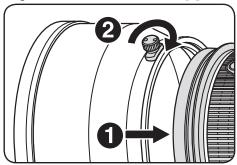
-ПовнICTЮЗатягнитгИНТбileнД(2).
- Y pa3i HebipHoro KpɪnJIeHŋ 6JIeHŋ MɔJJIuBé BɪhβetyBaHŋ.
36epiratni 6JIeHdy cIiD npnKpInIeHIO do 06'ekTnBa B 3BOpOTHomY nOLOKeHHI.
Tpimau BnCyBHoro fIbTpA
3aBxJn KOpNCTyTEcA fIbTpOM (52MM rBnHTOBM). 52MM rBnHTOBn fIbTp NC noCTaayTbcra Bnpo6HnKOM npKnPInJeHm Do TpMaaya fIbTpA.
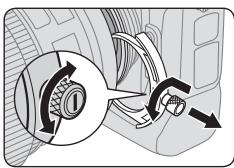
HaTnCHiB Ha pyuKy TpImaay BnCyBHOO fIjIbTp Ta nobepHItb II npOTn rOHHNKOBoi CTrpIKN, NOKI 6JNa CMyKHa Ha pyuCi He ONHNITcR NiD npRMIM KytOM Do OCI oEeKtNBa.
2 3HIMITb TpIMauch BnCyBHOO fIbTpa 3 06'ekTnBa.
3 3Himits npinKpinnienh fJbtp 3 Tprmaa fJbtpa.
4 3aBbHHTiB φJIbTp ha 6oCi TpMaHa φIbTpTa 3 NOMITKOIO “Nikon” Ta “JAPAN”.
Tpimau BucyBHoro pIbTpa MoHna KpiiHTn Do 60ky 3 nomiTkAmN «Nikon» Ta «JAPAN» 6yb- kKIM YINOM, 6e3 6ydb-RAKO BnJIbBy Ha nOdaJIbSi 3HIMK.
BncyBnH nIbueBn noJIpaH3auiHn H IbTp C-PL3L (doaTHOBO)
- BIoKyE BiI6NITTHe MeMaTeBnX NoBepxOHB, HApnKlaD, CKJa Ta BOiN.
- Y pa3i BnKOpNCTaHHB BnCyBHorO KInbueBOro NolpRn3auiHoro FInbTpa C-PL3L Φokycha BiDCTaHb BiDpi3HReTBcB BiTiEi, UO CTBopIOeTBcR y pa3i BnKOpNCTaHI 52MM TBnHTOBORo FInbTpA. IkaIa FOKychoI BiDCTaHI 3CobyETbCra 3 BipHO rnoNoJxehnHa. Na6lnkUa FOKycha BiDCTaHb Deio 36IbIyETbCra.
-ПОLOJOHЯ,ВСТАНовлЕВЯМ'ЯТI,МоJODEso 3MInHTNcR pa3i BИКОРиCTAHн NOpeDнIX YcTaBOKФokycBaHnR.ФINbTp C-PL3L cIid 3aKpɪŋJIIOBATNdo BИКОРиCTAHнФункii HanaJSTYBaHnЯam'ЯТI.
■ PekomeHdoBaHI φoHcyBaIbHi ekpaHI
Длппевиндзерхалнх Фотokamep Nikon icHye 6araTo 3mHHnx фОсувалнх ekpaHIB, lsO BiДиОВIDAJOt b pi3HIM yMOBaM 3IOMKn. 3 cIIM б'ЕТВOM peKOMeHdyeTbca BKNOPUCTOBvBaTn:
| Екран Фотокамера | A | B | C | E | EC-B EC-E | G1 G2 | G3 | G4 | J | L | M | U |
| F6 | ◎ | ◎ | — | ◎ | — | — | — | — | ◎ | ◎ | ◎ | |
| F5+DP-30 | ◎ | ◎ | ○ | ◎ | ◎ | ○ | ◎ | ◎ | ◎ | |||
| F5+DA-30 | ◎ | ◎ | ○ | ◎ | ◎ | (+)0,5) | ◎ | ◎ | ◎ |
B:BiDminHeΦokycBaHHA
O:ПингТHeФOKуВаннЯIeRKe BInbetyBaHHa6O Myap 3'ЯВЯТьСУ y BnDошУКaчi, aIe HeHa nIIiBci.
:Heoctynho
():Bka3yeHa Heo6xHn CtynHb KOMnEHaCuaIeKcNo3uIi (LHWe ceHTPO3BaJHeHn EKcNo3aMip)ДЯ FOToKamep F6 BnHOHyTe KOMnEHaCaIIO, OmbaOuN «IHShn EKpaH» y KopncTyBaCbKnX HaCTpoHax «b6: Sceen comp.» Ta HalaTTOByte pIBeHb EV Ha 3NaueHnn Bid -2,0 do +2,0 KpOKaMn no 0,5 EV. BnKOpNCTOByuO nIsh iKpaHn, Kpim TnIb B a6o E, cId obpaTu «Other screen» HabIt bKUo Heo6xIdne 3NaueHnn KOMnEHaCaIIDopIBHoe «O» (To6To, KomnEHacaU HeNoTpbiHa).ДЯ FOToKamep F5 BnKOHyTe KOMnEHaCaIIO 3a DoonomorO KoPncTyBaCbKoi NaCTpoHn #18 Ha Kopnyci FOToKaMepr.ДоatKOBy IHOpmaIIO NaDaHo y Noci6Hnky KopncTyBaVau KaPnyCy FOToKamepr.
Iycte noJe 03HauaHe He3actocOBHicb daHx. OckJIbKn ekpan Tnny M MoJHa BnKOpNCTOBByBaTn kДЯ MaKpO3HOMKn 3 KoEoiieHTom 36JIbWeHHr 1:1 Ta Bnue, iДЯ MIKpoΦOTorpaΦii, BiH MaE BiDmHiBi dInHnx ekpaHIB 3aCTOCyBaHHr.
BaHJIbO
-ДляфотokamepF5ишефokucybaJIbHi ekpanH EC-B,EC-E,B,E,J,A,L MoKуТь ВИКОпСТОВУВaTHСЯ 3 МатринМЕСКПОЗамірOM.
Догладао6'ektHBOM
- Plicra BCTaHOBJIeHHo 6'KTHBa HamaraItecH He TpIMaTH FOToKHMepy 3a Kopnyc, OcIIbKn Ie MOxE pN3BecTIO II NOnIKoJKeHHN (BCTaHOBJIeHHo 6'KTHBa).Пд.Yac HociHHNo FOToKHMepr TpImaHTe II OJHOuachO 3a Kopnyc Ta o6'KTHB.
-Пися BCTaHOBJIeHHЯ 06'EKTHBa He 6epiTb Ta He TpImaIte foToKamepy 3 06'EKTHBOM 3a 6JeHdy.
CJIkyIte 3a Tm, 06 He 3a6pydHnTn Ta He N0wKoDHTN KOHTaKtN LII. - Y pa3i noIoiKoJKeHnryrMoBOI npOKlaJKn IJIy BCTaHOBLeHnR O6'kTNBa 06OB'ra3KOBo BiJaIte foTOKaMepy Ha peMOHT Do Hau6LnXuHoro 0fuiHoro cepBicHoro ueTpny Nikon.
- Ynctitb nobepxHIO 6o'kTNBA npOdyBaHHm NOBITpM.3aJn3uIeHHA 6pyDu Ta pIyam KOpNCTuyTEcR M'HO TKaHHNO CepBeTHOO aO bTahHHO dIy O6'kTNBA, 3MOyeHO y cNnpti aObo 3acObi dIy ChIeHHA 06'kTNBA. BHTnpaIte nobepxHIO kpyroBNmu pyxAmu, 3 ceHTpa do KpaIB, HAMaraOuChb He 3aJIInuTaN cIiDIB Ta He TOpKaTnc iHUnx qactINH 06'kTNBA.
3a6bOpOHReTbcraYHCTHTOnO6'EKTHBOPraHiuHmPi03uHAmn,Ha npKlaD, po3uHHNKOM a6o 6eH30Jom.
36epiraoun o6'ektnb y fytlaipi, cniD oJraTu i nepeHIO 3aHIO KpnshK. - Y pa3i trpBaIoro HeBnKOpNCTaHnH 06'ekTbVa Ioro cIid 36epiratn y npoxoIoHOMy cyXOMy MiCiI, yHnHaOuY YTBOpeHH NIIcHraBN Ta ipJxN. O6OB'3KOBO 36epiraTe 06'ekTbN IOdaJI bID npMOrO coHryHORo CBITla Ta MOHJIIBORO BnLIBy ximUHnx peOvBuN, HApnHklaD, KaMΦopN HnHaftaIHy.
Cπiδ 6eperTHO6'KTHB BID NOTPAPJIHHA HbOro BOuTa He BnycKaTHN OROY BODy, OCKIbKU CE MOHe Ipu3BecTNo IOBn IpHn Ta HecnpabHocTeN. - Okpemi chaTINH o6'ekTnBa BnroTOBLeHi 3 apMOBaHOI nactMaChi. 3aJnYHnKHeHH NOxKOJKeHH He CIId 3aJIiWATn O6'ekTnB y HaD3BvauHorrapyHX Micqx.
Ctanhaptri ancecyapn
CneuaIbHa nepeDnKpnIka BnCyBHOro 6'ekTnBa
3aH KpNkA o6'KTHBa
-Бленьда HK-31
- HanibM'anknФутлр CL-L1
CneiaJIbHn TpIMauch BucyBHoro fIbTpa
- 52MM TBHNTOBH φiNbTp NC
- Pemieu b LN-1
Baxnbo
- TpIMaU BnCyBHorO fIbTpA i3 3akpinHeHm Ha HbOMy 52MM rBHTOBHM fIbTpOM Ma 3aBKn D6Tu BCTaHOBHeHm Ha 06'EKTHBi.
IodatKoiahcecyapn
52MM TBNHTOBI fIbtpn (OKpIM KJIbceBOr oIJIpaHOro fIbtpa II)
BucybHn KJIbceBn nOJapn3auiHn fIbTp C-PL3L
TeJIeKoHBepeTpA F-S TC-14E II/TC-17E II/TC-20E III
TexhihixapakTepcntn
| 对焦屏 相机 | A | B | C | E | EC-B EC-E | G1 G2 | G3 | G4 | J | L | M | U |
| F6 | ◎ | ◎ | — | ◎ | — | — | — | — | ◎ | ◎ | ◎ | |
| F5+DP-30 | ◎ | ◎ | ○ | ◎ | ◎ | ○ | ◎ | ◎ | ◎ | |||
| F5+DA-30 | ◎ | ◎ | ○ | ◎ | ◎ | ◎ (+0.5) | ◎ | ◎ | ◎ |
@:对焦效果良好
O: 对焦效果一般
52mm StkRicnil 52mm StKRIICN CILT
| 스크리 카메라 | A | B | C | E | EC-B EC-E | G1 G2 | G3 | G4 | J | L | M | U |
| F6 | ◎ | ◎ | — | ◎ | — | — | — | — | ◎ | ◎ | ◎ | |
| F5+DP-30 | ◎ | ◎ | ○ | ◎ | ◎ | ○ | ◎ | ◎ | ◎ | |||
| F5+DA-30 | ◎ | ◎ | ○ | ◎ | ◎ | ○ (+0.5) | ◎ | ◎ | ◎ |
@:默默默默默默默默默默默默默默默默默默默默默默默默默默默
O: 步驟演進 形成信心
(ft.)
Depth of field
| Shooting distance | Depth of field | Reproduction ratio | ||||||
| f/2 | f/2.8 | f/4 | f/5.6 | f/8 | f/11 | f/16 | f/22 | |
| 7 | 2 ft. 1-9/16 in. | 2 ft. 1-7/16 in. | 2 ft. 1-7/16 in. | 2 ft. 1-7/16 in. | 2 ft. 1-5/16 in. | 2 ft. 1-3/16 in. | 2 ft. 15/16 in. | 2 ft. 12/16 in. |
| 2 ft. 1-11/16 in. | 2 ft. 1-11/16 in. | 2 ft. 1-13/16 in. | 2 ft. 1-13/16 in. | 2 ft. 1-15/16 in. | 2 ft. 2-1/16 in. | 2 ft. 2-4/16 in. | 2 ft. 2-8/16 in. | |
| 8 | 2 ft. 5-3/16 in. | 2 ft. 5-3/16 in. | 2 ft. 5-1/16 in. | 2 ft. 4-15/16 in. | 2 ft. 4-13/16 in. | 2 ft. 4-11/16 in. | 2 ft. 4-7/16 in. | 2 ft. 4-3/16 in. |
| 2 ft. 5-6/16 in. | 2 ft. 5-6/16 in. | 2 ft. 5-8/16 in. | 2 ft. 5-8/16 in. | 2 ft. 5-10/16 in. | 2 ft. 5-14/16 in. | 2 ft. 6-2/16 in. | 2 ft. 6-8/16 in. | |
| 10 | 3 ft. 6/16 in. | 3 ft. 6/16 in. | 3 ft. 4/16 in. | 3 ft. 2/16 in. | 2 ft. 11-14/16 in. | 2 ft. 11-10/16 in. | 2 ft. 11-4/16 in. | 2 ft. 10-13/16 in. |
| 3 ft. 12/16 in. | 3 ft. 13/16 in. | 3 ft. 15/16 in. | 3 ft. 1-1/16 in. | 3 ft. 1-3/16 in. | 3 ft. 1-9/16 in. | 3 ft. 1-15/16 in. | 3 ft. 2-8/16 in. | |
| 15 | 4 ft. 6-8/16 in. | 4 ft. 6-6/16 in. | 4 ft. 6-2/16 in. | 4 ft. 5-12/16 in. | 4 ft. 5-4/16 in. | 4 ft. 4-11/16 in. | 4 ft. 3-13/16 in. | 4 ft. 2-12/16 in. |
| 4 ft. 7-5/16 in. | 4 ft. 7-7/16 in. | 4 ft. 7-11/16 in. | 4 ft. 8-1/16 in. | 4 ft. 8-8/16 in. | 4 ft. 9-4/16 in. | 4 ft. 10-3/16 in. | 4 ft. 11-12/16 in. | |
| 25 | 7 ft. 6-4/16 in. | 7 ft. 5-14/16 in. | 7 ft. 5-3/16 in. | 7 ft. 4-5/16 in. | 7 ft. 3-2/16 in. | 7 ft. 1-7/16 in. | 6 ft. 11-3/16 in. | 6 ft. 8-3/16 in. |
| 7 ft. 8-10/16 in. | 7 ft. 9-2/16 in. | 7 ft. 9-13/16 in. | 7 ft. 10-13/16 in. | 8 ft. 4/16 in. | 8 ft. 2-6/16 in. | 8 ft. 5-10/16 in. | 8 ft. 10-9/16 in. | |
| 40 | 11 ft. 11-4/16 in. | 11 ft. 10-3/16 in. | 11 ft. 8-8/16 in. | 11 ft. 6-6/16 in. | 11 ft. 3-4/16 in. | 10 ft. 11-3/16 in. | 10 ft. 5-14/16 in. | 9 ft. 11-1/16 in. |
| 12 ft. 5-6/16 in. | 12 ft. 6-10/16 in. | 12 ft. 8-8/16 in. | 12 ft. 11-4/16 in. | 13 ft. 3-6/16 in. | 13 ft. 9-8/16 in. | 14 ft. 6-15/16 in. | 15 ft. 10-9/16 in. | |
| 70 | 20 ft. 6-15/16 in. | 20 ft. 3-10/16 in. | 19 ft. 10-11/16 in. | 19 ft. 4-3/16 in. | 18 ft. 7-11/16 in. | 17 ft. 8-8/16 in. | 16 ft. 6-10/16 in. | 15 ft. 1-13/16 in. |
| 22 ft. 1-15/16 in. | 22 ft. 5-14/16 in. | 23 ft. 2/16 in. | 23 ft. 9-6/16 in. | 24 ft. 11-8/16 in. | 26 ft. 10-5/16 in. | 30 ft. 1-3/16 in. | 36 ft. 3-13/16 in. | |
| ∞ | 565 ft. 2-6/16 in. | 407 ft. 8-12/16 in. | 288 ft. 4-11/16 in. | 204 ft. | 144 ft. 3-15/16 in. | 102 ft. 1-11/16 in. | 72 ft. 3-12/16 in. | 51 ft. 2-8/16 in. |
| ∞ | ∞ | ∞ | ∞ | ∞ | ∞ | ∞ | ∞ | |
No reproduction in any form of this manual, in whole or in part (except for brief quotation in critical articles or reviews), may be made without written authorization from NIKON CORPORATION.
C E
NIKON CORPORATION
Printed in Japan




