
AF-S DX NIKKOR 55-300MM F-4.5-5.6G ED VR - Camera lens NIKON - Free user manual and instructions
Find the device manual for free AF-S DX NIKKOR 55-300MM F-4.5-5.6G ED VR NIKON in PDF.



| Product type | AF-S DX G-type lens with built-in microprocessor and Nikon F mount |
| Focal length | 55–300 mm |
| Maximum aperture | f/4.5–5.6 |
| Optical construction | 17 elements in 11 groups (including 2 ED elements and 1 HRI element) |
| Angle of view | 28°50′ – 5°20′ (DX format) |
| Focusing | Autofocus with Silent Wave Motor (SWM), manual focusing with electronic rangefinder |
| Vibration reduction | VR II (VCM shift), up to 4 stops reduction |
| Minimum focus distance | 1.4 m (at all focal lengths) |
| Diaphragm blades | 9 (rounded) |
| Aperture range | f/4.5–f/22 (55 mm) / f/5.6–f/29 (300 mm) |
| Filter size | 58 mm (pitch 0.75 mm) |
| Dimensions (diameter × length) | Approx. 76.5 × 123 mm |
| Weight | Approx. 530 g |
| Supplied accessories | Front lens cap LC-58, rear lens cap LF-4, lens hood HB-57, soft case CL-1020 |
| Mount compatibility | Nikon DX-format digital SLR cameras |
| Maintenance | Clean with blower, ethanol or lens cleaner; avoid organic solvents; store in dry place away from sunlight |
| Safety | Do not disassemble, do not look at the sun through the lens, keep out of reach of children, do not use in presence of flammable gases |
| Repairability | Repair only by authorized Nikon service center |
Frequently Asked Questions - AF-S DX NIKKOR 55-300MM F-4.5-5.6G ED VR NIKON
User questions about AF-S DX NIKKOR 55-300MM F-4.5-5.6G ED VR NIKON
0 question about this device. Answer the ones you know or ask your own.
Ask a new question about this device
Download the instructions for your Camera lens in PDF format for free! Find your manual AF-S DX NIKKOR 55-300MM F-4.5-5.6G ED VR - NIKON and take your electronic device back in hand. On this page are published all the documents necessary for the use of your device. AF-S DX NIKKOR 55-300MM F-4.5-5.6G ED VR by NIKON.
USER MANUAL AF-S DX NIKKOR 55-300MM F-4.5-5.6G ED VR NIKON
User's Manual Pg. 12
- Do not disassemble. Touching the internal parts of the camera or lens could result in injury. In the event of malfunction, the product should be repaired only by a qualified technician. Should the product break open as the result of a fall or other accident, remove the camera battery and/or disconnect the AC adapter and then take the product to a Nikon-authorized service center for inspection.
- Turn the camera off immediately in the event of malfunction. Should you notice smoke or an unusual smell coming from the equipment, immediately unplug the AC adapter and remove the camera battery, taking care to avoid burns. Continued operation could result in fire or injury. After removing the battery, take the equipment to a Nikon-authorized service center for inspection.
- Do not use in the presence of flammable gas. Operating electronic equipment in the presence of flammable gas could result in explosion or fire.
- Do not look at the sun through the lens or the camera viewfinder. Viewing the sun or other bright light source through the lens or viewfinder could cause permanent visual impairment.
- Keep out of reach of children. Failure to observe this precaution could result in injury.
-
Observe the following precautions when handling the lens and camera:
-
Keep the lens and camera dry. Failure to observe this precaution could result in fire or electric shock.
- Do not handle the lens or camera with wet hands. Failure to observe this precaution could result in electric shock.
- Keep the sun well out of the frame when shooting backlit subjects. Sunlight focused into the camera when the sun is in or close to the frame could cause a fire.
-
If the lens will not be used for an extended period, attach the front and rear lens caps and store the lens out of direct sunlight. If left in direct sunlight, the lens could focus the sun's rays onto flammable objects, causing fire.
-
Do not carry tripods with a lens or camera attached. You could trip or accidentally strike others, resulting in injury.
- Do not leave the lens where it will be exposed to extremely high temperatures, such as in an enclosed automobile or in direct sunlight. Failure to observe this precaution could adversely affect the lens' internal parts, causing fire.
Thank you for your purchase of an AF-S DX NIKKOR 55-300mm f/4.5-5.6G ED VR lens. Before using this product, please carefully read both these instructions and the camera manual.
Note: DX lenses are for use only with DX-format digital single-lens reflex cameras such as the D90 or D300 series. The angle of view of a lens on a DX-format camera is equivalent to that of a lens with a focal length about 1.5 × longer mounted on a 35 ~mm format camera.
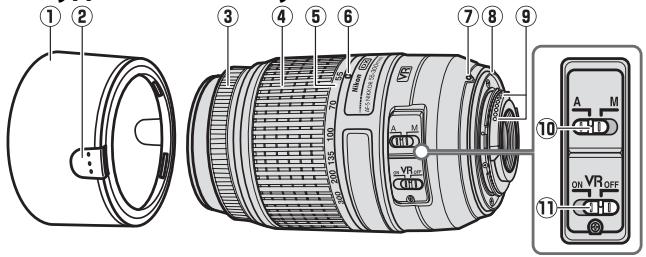
Parts of the Lens
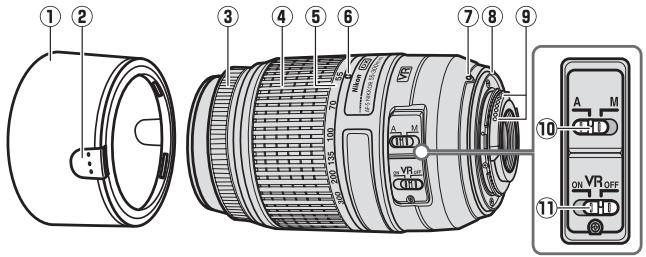
① Lens hood. 14
(2) Latch. 14
③ Focus ring. 15
④ Zoom ring. 15
⑤ Focal length scale.19
6 Focal length mark
⑦ Lens mounting mark. 14
Rubber lens-mount gasket...18
CPU contacts. 18
10 A-M mode switch. 15
Vibration reduction ON/OFF switch. 16
■ Attaching and Removing the Lens
Attaching the Lens
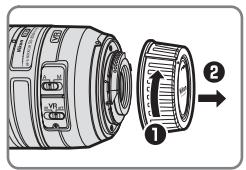
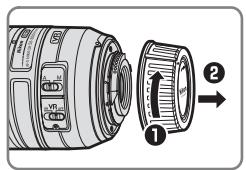
1 Turn the camera off and remove the camera body cap.
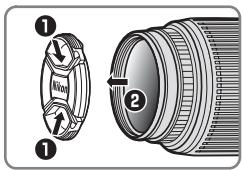
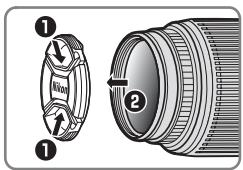
2 Remove the lens cap.
3 Attach the lens.
Keeping the lens mounting mark aligned with the mounting mark on the camera body, position the lens in the camera's bayonet mount and then rotate the lens counter-clockwise until it clicks into place with the lens mounting mark at the top.
Removing the Lens
Turn the camera off.
2 Remove the lens.
To remove the lens, press the lens release button while turning the lens clockwise.
The Lens Hood
The lens hood protects the lens and blocks stray light that would otherwise cause flare or ghosting.
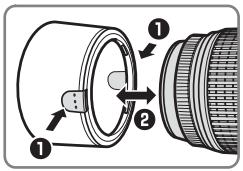
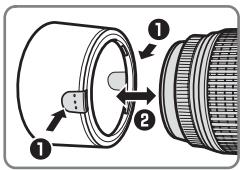
Attaching and Removing the Hood
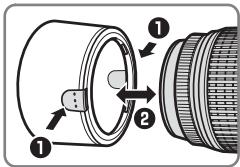
Press the latches (1) and attach or remove the hood (2). The hood can be reversed and mounted on the lens when not in use.
Zoom and Depth of Field
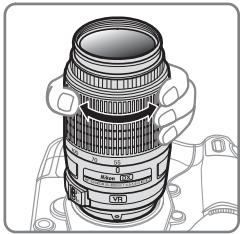
Before focusing, rotate the zoom ring to adjust the focal length and frame the photograph. If the camera offers depth-of-field preview (stop down), depth of field can be previewed in the viewfinder.
Note: The focal length of this lens decreases as the focus distance shortens.
Focus
Focus mode is determined by the camera focus mode and the position of the lens A-M mode switch. See the camera manual for information on camera focus mode selection.
| Camera focus mode | Lens focus mode | |
| A | M | |
| AF | Autofocus | Manual focus with electronic rangefinder |
| MF | — | |
Autofocus
1 Set the camera to AF (autofocus).
2 Slide the lens A-M mode switch to A.
3 Focus.
Press the shutter-release button halfway to focus. Be careful not to touch the focus ring while the camera focuses.
Manual Focus
1 Slide the lens A-M mode switch to M.
2 Focus.
Focus manually using the lens focus ring. Manual focus can be used regardless of the focus mode selected with the camera.
Vibration Reduction (VRII)
Vibration reduction (VRII) reduces blur caused by camera shake, allowing shutter speeds up to four stops slower than would otherwise be the case (Nikon measurements; effects vary with the photographer and shooting conditions). This increases the range of shutter speeds available and permits hand-held, tripod-free photography in a wide range of situations.
Using the Vibration Reduction ON/OFF Switch
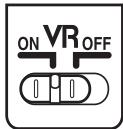
Select ON to enable vibration reduction. Vibration reduction is activated when the shutter-release button is pressed halfway, reducing the effects of camera shake for improved framing and focus.
Select OFF to turn vibration reduction off.
Using Vibration Reduction: Notes
- When using vibration reduction, press the shutter-release button halfway and wait for the image in the viewfinder to stabilize before pressing the shutter-release button the rest of the way down.
- When the camera is panned, vibration reduction applies only to motion that is not part of the pan (if the camera is panned horizontally, for example, vibration reduction will be applied only to vertical shake), making it much easier to pan the camera smoothly in a wide arc.
-
When vibration reduction is active, the image in the viewfinder may be blurred after the shutter is released. This does not indicate a malfunction.
-
Do not turn the camera off or remove the lens while vibration reduction is in effect. If power to the lens is cut while vibration reduction is on, the lens may rattle when shaken. This is not a malfunction, and can be corrected by reattaching the lens and turning the camera on.
- If the camera is equipped with a built-in flash, vibration reduction will be disabled while the flash charges.
- Turn vibration reduction off when the camera is securely mounted on a tripod, but leave it on if the tripod head is not secured or when using a monopod.
- If the camera is equipped with an AF-ON button, pressing the AF-ON button will not activate vibration reduction.
Aperture
Aperture is adjusted using camera controls.
Zoom and Maximum Aperture
Changes to zoom can alter the maximum aperture by up to 2/3 EV. The camera however automatically takes this into account when setting exposure, and no modifications to camera settings are required following adjustments to zoom.
Built-in Flash Units
When using the built-in flash on cameras equipped with a built-in flash unit, remove lens hoods to prevent vignetting (shadows created where the end of the lens obscures the built-in flash).
En
Lens Care
- Do not pick up or hold the lens or camera using only the lens hood.
- Keep the CPU contacts clean.
- Should the rubber lens-mount gasket be damaged, cease use immediately and take the lens to a Nikon-authorized service center for repair.
- Use a blower to remove dust and lint from the lens surfaces. To remove smudges and fingerprints, apply a small amount of ethanol or lens cleaner to a soft, clean cotton cloth or lens-cleaning tissue and clean from the center outwards using a circular motion, taking care not to leave smears or touch the glass with your fingers.
- Never use organic solvents such as paint thinner or benzene to clean the lens.
- The lens hood or NC filters can be used to protect the front lens element.
- Attach the front and rear caps before placing the lens in its flexible pouch.
- If the lens will not be used for an extended period, store it in a cool, dry location to prevent mold and rust. Do not store in direct sunlight or with naphtha or camphor moth balls.
- Keep the lens dry. Rusting of the internal mechanism can cause irreparable damage.
- Leaving the lens in extremely hot locations could damage or warp parts made from reinforced plastic.
Supplied Accessories
- 58 mm snap-on Front Lens Cap LC-58
Rear Lens Cap LF-4
Bayonet Hood HB-57 - Flexible Lens Pouch CL-1020
Compatible Accessories
58 mm screw-on filters
Specifications
| Type | Type G AF-S DX lens with built-in CPU and Nikon F mount |
| Focal length | 55–300 mm |
| Maximum aperture | f/4.5–5.6 |
| Lens construction | 17 elements in 11 groups (including 2 ED lens elements and one HRI lens element) |
| Angle of view | 28° 50′ –5° 20′ |
| Focal length scale | Graduated in millimeters (55, 70, 100, 135, 200, 300) |
| Distance information | Output to camera |
| Zoom | Manual zoom using independent zoom ring |
| Focusing | Autofocus controlled by Silent Wave Motor, manual focus |
| Vibration reduction | Lens shift using voice coil motors (VCMs) |
| Minimum focus distance | 1.4 m/4.59 ft. at all zoom positions |
| Diaphragm blades | 9 (rounded diaphragm opening) |
| Diaphragm | Fully automatic |
| Aperture range | ·55 mm focal length: f/4.5 to f/22 ·300 mm focal length: f/5.6 to f/29 |
| Metering | Full aperture |
| Filter-attachment size | 58 mm (P=0.75 mm) |
| Dimensions | Approx. 76.5 mm diameter × 123 mm (distance from camera lens-mount flange) |
| Weight | Approx. 530 g/18.7 oz. |
Nikon reserves the right to change the specifications of the hardware described in this manual at any time and without prior notice.
SICHERHEITSHINWEISE
Remarque: La这几个的个数是 1,2,3,4,5,6,7,8,9,10,11,12,13,14,15,16,17,18,19,20,21,22,23,24,25,26,27,28,29,30,31,32,33,34,35,36,37,38,39,40,41,42,43,44,45,46,47,48,49,50,51,52,53,54,55,56,57,58,59,60
Fr
■ Mise au point
IopablenHe Bn6paun (VRII)
IpaBne Bn6paun (VRII) ymeHbwaet Cma3bVaBHe, Bbl3BaHHOe
DPOXaHMeFOTOKAmepeB, PO3BOJRAcKpATINb BblDEPKyHa
YeTbpe CTynEni (N3mepEHHaNikon; pe3yNbTaTb 3aBncrT OT
FOTorpaA y nCIOBn cbEmKn).3TO yBvENNuBAe T dnaP30
DOCTYHNOB BblDEpKKn NIO3BOJAE McONb3OBaBt pyHyO
FOTOCbEMky 6e3 uTaTnBa B pa3nUhBX CNTuaynx.
IcnoJIb3OBAHnne nepeKlIOuTeTnI noaBHeNna Bn6paun BKJ./BblKJI.
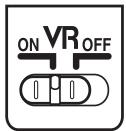
Bb6epHTe ON (BKJI.) qTO6bI BKIOUHTb IIOaBLeHne Bn6paun. IIOaBLeHne Bn6paun BKNIOUcaTe, KOrDa cNcKOBaJ KONka 3aTbopa Haxkata HAnIOLOBHy, UMeHbUaEt 3ofoekt dpojKaHHaOToKAMpebl, YTO yNuUytae KaApnpOBaHne n OOKycuPObKy.
BbI6epHTe OFF (BblKJI.) UTO6bI BblKIIIOuHTb IoAbVBeHne Bn6paun.
IcnoJIb3OaHue nodabLeHua 6u6paui: IpumueaHua
Bctpoehhble BCnbIwkn
Пи ИСПОЛБОВАИМВВСТЮЕННОВСВПБИШКИHAФOTOKAMEPAX,OBOPУДОВАньИХТAKОВСВПБИШКО,СЧИМпTe 6БЕнДу OBБЕKTINBA,чTOБы n36жаТВИнБeТИРОВАИМ(TeHeI,OBpa3YIOUIXxCЯТМ,rDEKpai OББЕKTINBA 3aTeMнгЕТ CBПБИШКИ)
yXoJ3aO6beKTHBOM
- He noДиMuTe n He dePKeTte oBbEKTnB nIu φOTOKaMepy TOnbKO 3a 6JIeHdY.
- Codepxnte KOHTaKtbl MmKpOnpoCeccopa B YnCTOTE.
- Ecn peinobar npoknaKa KpeJIeHnO oBeKTbA noBpeJcHa, HemeJeHNO pKePaTne IcNoJIb3OBaHne oBeKtBa n OTHeCITe ero B OphiuaJIbHbI cepBnCHbI ueHTp Nikon dIpeMOHTa.
Дя удаленя nbIи n BOPCnHOK c NOBepxHoctn OsbekTnBa nCNoIb3yIte rpyu.уTo6bl ydaIITnb pIaTHa n OTneAaTKn paIbceB,do6aBbTe He6oJIbwoe KOJIueCTBO 3tINIOBOrO CnIPTa IInOuCHNTeIЯ dIЯ OsbekTnBA Ha mRkyU, uCHTyU xIONKOBYU TkaHb IInN Ha caIeTKeI yIЯ OcHnKT N OsbekTnBA nHaHuHaNOT CEHTpa, OcHNTeEero KpyRObIMn DBVIXeHnMI, CTapAcb Pn ETOm HE OCTABJIrTB nIaTEH n He KaCaTaBn PaJIzamn CTeKna. - HinkoIgda He Icnpolb3yIte Ipy Ouynctkn ObekTnBa oprahuyeckne pactBopnteN, takne kak pa36abnteIb I py KpaCOKIIN 6eH3In.
- bIeHny nIIH mIbtpb NC MOxH0 uCnObl3OBaTb dIy 3aunTbI nepedHero 3JIemEnTa o6BeKtNaBa.
3aKpoItepeepHIOu 3aDHIIO KpbIiKn OBeKtNBapeE TeM, KaK PNOJXnTb OBeKtNB B MArkN YexOJ. - Ecnn 06bekTNB He 6ydtncnOJb30BaTcBcR B TeueHne npoJOnKHTeNBHO BRpeMHn, xpaHnTe ERO B pOxHaJHOM, cyXOM MeTe, yTO6bl npeOtBpATnB NOBLeHne N PteCeHN pKaABuHbI. H xpaHnTe ND Bo3dEChBmE nPraMbIX COJIneHcyHXyuee IIN BMeCTe C NaftaJIHNOBbIMn IIN KAMΦapHBmU aupKNaMn pOToN BMOI.
XpaHnTe o6bekTcB cyxM.PKaBJIeHne BHyTpEHHero MExaHn3Ma MoKeT pInBeCTN K HEnCpRaBMOMOy NOBpeXJDeHIO. - Ecnn octabntb 6bekTINB OueHb XapKOM MceTe, 3TO MOKeT npNBecTN K NOBpeXdEHHIO IIN DeΦOpMaun Yacte, CdeHaHHbIX N3 ycIneHHOro nlaCTnKa.
BxoJaunE B KOMnIeK T npHaIeJxHocTn
- 58 MM ПИСТЕТУВАЮДАССЕпЕРДНЯКрБИШа объektува LC-58
- 3aJHЯ 3aunTHa KpUka ObEeKtBa LF-4
-Блениса сбайонетын Кренинem HB-57
MärkkiyexonIrao6bektBaCL-1020
Cobmctnble npHnaJeXHoCTN
58MMnpnKpyuINBaEmbIeΦnIbTpbI
Cneunkaun
- He nepehoCbte 7tATnB, KOHN Ha HbOmy BCTaHOBHeo 06'KETNB a6o foTOkAmepy. B pazi nadiHHa 6o BNpAdKOBOrO ydapy ue MoKe Ipn3BcTeN Do TpaBMvBaHH.
He 3aJIHuaIe O6'ekTbY mICuX, De IyXe BvCOKa TEmnepaTypa, HAnpHklaD, B 3aKHTOMy ABOtMO6IaO hA OCBITHeHOMy PnarmH CoNHyHm npOMHHM MiCi. TaKi yMOBn MOyTb HeCnpRnTIbNO BpINHyTu H bHYTpIiHi KOMNoHErTu O6'ekTbBy i CTAu pInuHIOo NIOxeki.
Дякемо за тe, сикушил о6'ekтв AF-S DX NIKKOR 55-300 MM f/4,5-5,6G ED VR. Перед ВикорисанярпILAу уразно рочитai Teц iHCTpyкцio ta nociбник корстуваая дя photokamepn.
Ппмітka: O6'ктИВи ФормТу DX пизHAЧЕн ДЯ ВИКОпICTанн Tİльки 3дэркалынМи ФотOKамерMu 3 оДнIM O6'ктИВOM ФормТу DX, habрИКлад ФotOKамерMu cepi D90 a60 D300. Кут огл any O6'ктИВу ФotOKамери ФормТу DX dopIBHIOе КУТУ огл Any O6'ктИВу ФotOKамери ФормТу 35 MM 3 6ьшюю пиблИЗНВ 1,5\times рa7nФokycHOI BIDCTaHII.
Буюва 06'ЕКТИВY
Ua
① ① 102
(2) Diikcatop. 102
③ KInbueΦokycBaHHa 103
④ KInbueMacuTa6yBaHHa 103
5 Ⅱkana φokychoi BiCTaHI 107
⑥ Mtka kokychoi BiDctahi
⑦ Mitka BCTaHOBJIeHHN O6'KtINBa.102
8 rymoBa npoklaJaKa dЯ kprInneHnna 6'ekTnBa. 106
9 KOnTakTN Mikponpouececopa. 106
10Перемпakч ржимов A-M. 103
11 菲佩米凯安ON/OFF 3MeHueHHa b6pauii
Cymitb MItky BCTaHOBHeHn8o6'KtNbBa 3 MtKOIO BCTAHOBHeHnHa KOpNcI FOToKAMepn, BCTABTe o6'KTNB y 6aHoHeT, I o6ptAte o6'KtNB IpOTn rOuHHNKoBOi CtrpIKn, DOKn He KnaUHe, a MtTa BCTaHOBHeHn8o6'KtNbBa 3aMe BepxHc NonoKeHHeH.
Biǎ'ěnHaHHa 06'εKtNBy
1 BumkhHtB foTOKaMepy.
2 3HIMtB 06'KtNB.
Ioo6 Bi'εДнани 06'εKTnB, HaTnCHiB Ha KONkA po36bOkyBaHnHa 06'εKTnBa i 06epTaIte 06'εKTnB 3a rOdUnHHNKOBIO CTpINKO.
BneHda 06'KtNbBa
Бленьда зашица о6'ekтпв та 6лкуе розсяне сытlio, яке може cnрчинити поны Вдблncьт оpeонib.
PnueHaHH Ta BiD'eHaHHe 6JeHn
HaTncHb Ha iKcCatOpn (1) Ta npiEHaHne a6o Bi'EdHaNte 6JeHdy (2). KOni 6BeHDoIO He KopNCtYIOJBc, II MOxHa nepeBepHyTu Ta yCTaHOBNTu npOTnJIeXHO TO CTOPHOIO Ha o6'ekTNB.
3ymi rIln6nHa pi3Kocti
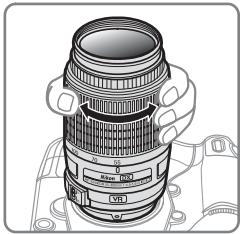
IpepefokycbaHHm o6eptaTe KInbue Macwta6ybaHHn, 106 BCTAHOBNTn fokcchy BiDCTaHb icKaapbyaTn 3o6paJehn. Akyo foToKamepa npOnOHy e nonpeedni nepeperI rnnBnHn pi3KoT (3meHneHn diaΦparm), rnnBnHy p3KoTt TaKox MoXHa 3a3dneriDb no6aHTN y BuDooykaui.
Pnmitka:Okycha BiDcTaHb o6'ekTmBy 3MeHsUyETbc3i CKOpOeHHM nCTaHcII fokycBaHHa.
ΦokycybaHHa
PexkM fokcyBaHnBn3HaayeTbcpe kymom fokCyBaHH
fokamepn i noJoxHeHnM nepeMnkaa peKmib A-M ha 6'ekTnBi.
InOpmaio npo Bn6ip pexmy fokcyBaHHn fokkAmepn nBiTbc
B noc6hNky KopncTyBaay.
YCTaHOBKn DiaiparMn 3MiHIOJBcR pI KepyBaHHm oTOkAmepn.
An antonym of the subject
Kenz to biliHre Hn nn Kieni Ht Hte Hs Hn Hn Hn Hn Hn Hn Hn Hn Hn Hn Hn Hn Hn Hn Hn Hn Hn Hn Hn Hn Hn Hn Hn Hn Hn Hn Hn Hn Hn Hn Hn Hn Hn Hn Hn Hn Hn Hn Hn Hn Hn Hn Hn Hn Hn Hn Hn Hn Hn Hn H n H n H n H n H n H n H n H n H n H n H n H n H n H n H n H n H n H n H n H n H n H n H n H n H n H n H n H n H n H n H n H n H n H n H n H n H n H n H n H n H n H n H n H n H n H n H n H n H n H n H.
■ 迪杰 卓三
RanZ HuaDn n RanZ to BaoHao and PaoReAonn HooN GoStn HxHAnu sto hao hao uor a on nn mian (stray light) 1
奉三本部制具
No reproduction in any form of this manual, in whole or in part (except for brief quotation in critical articles or reviews), may be made without written authorization from NIKON CORPORATION.




