
SC-MC07E - Bluetooth speaker PANASONIC - Free user manual and instructions
Find the device manual for free SC-MC07E PANASONIC in PDF.

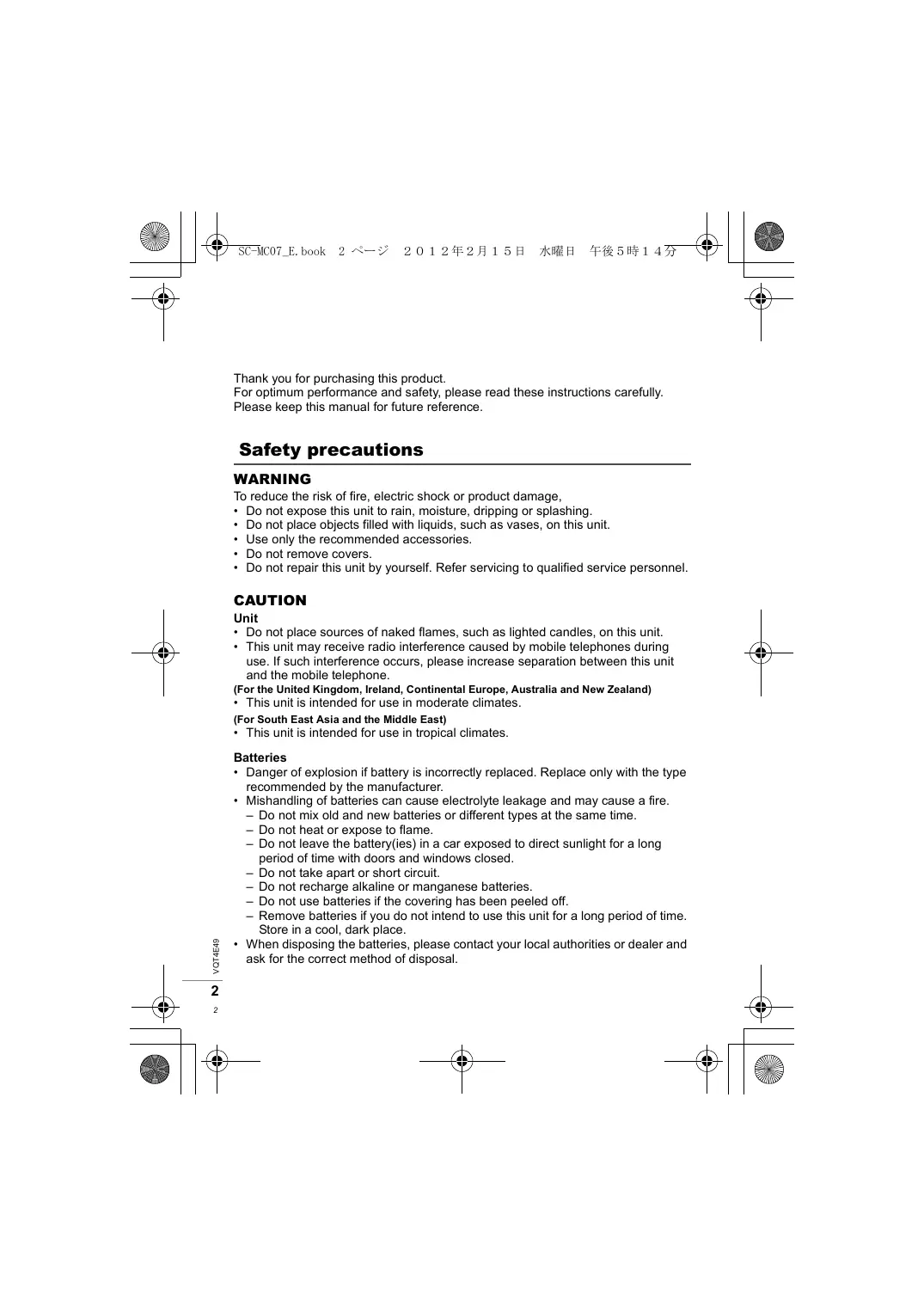


| Brand | Panasonic |
| Model | SC-MC07E |
| Product Type | Bluetooth Speaker |
| Dimensions (W x H x D) | 103 mm x 41.9 mm x 103 mm |
| Weight (with batteries) | 216 g |
| Power Supply | 2 x LR6 alkaline batteries (3 V DC) or USB (5 V DC) |
| Battery Life (alkaline batteries) | Approx. 4 hours |
| Bluetooth Version | 2.1 + EDR |
| Bluetooth Class | Class 2 (2.5 mW) |
| Supported Bluetooth Profiles | A2DP |
| Bluetooth Range | 10 m line of sight |
| Speaker | 2 x 36 mm |
| RMS Output Power | 2 W (1 kHz, 5% THD) |
| Transmission Modes | MODE 1 (stability), MODE 2 (sound quality) |
| Auto Power Off | After 10 minutes of inactivity |
| Care and Cleaning | Soft, dry cloth |
| Supplied Accessories | USB cable (RFE0242) |
| Batteries Provided | No |
| Status Indicator | Blue: power on/Bluetooth mode; Red: weak battery; Red/blue flashing: problem |
Frequently Asked Questions - SC-MC07E PANASONIC
User questions about SC-MC07E PANASONIC
0 question about this device. Answer the ones you know or ask your own.
Ask a new question about this device
Download the instructions for your Bluetooth speaker in PDF format for free! Find your manual SC-MC07E - PANASONIC and take your electronic device back in hand. On this page are published all the documents necessary for the use of your device. SC-MC07E by PANASONIC.
USER MANUAL SC-MC07E PANASONIC
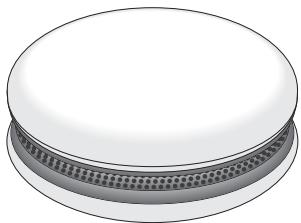
Compact Speaker System
Model No. SC-MC07
Operating Instructions
Bedienungsanleitung
Mode d'emploi
Thank you for purchasing this product.
For optimum performance and safety, please read these instructions carefully.
Please keep this manual for future reference.
Safety precautions
WARNING
To reduce the risk of fire, electric shock or product damage,
- Do not expose this unit to rain, moisture, dripping or splashing.
- Do not place objects filled with liquids, such as vases, on this unit.
- Use only the recommended accessories.
- Do not remove covers.
- Do not repair this unit by yourself. Refer servicing to qualified service personnel.
CAUTION
Unit
- Do not place sources of naked flames, such as lighted candles, on this unit.
- This unit may receive radio interference caused by mobile telephones during use. If such interference occurs, please increase separation between this unit and the mobile telephone.
(For the United Kingdom, Ireland, Continental Europe, Australia and New Zealand)
- This unit is intended for use in moderate climates.
(For South East Asia and the Middle East)
- This unit is intended for use in tropical climates.
Batteries
- Danger of explosion if battery is incorrectly replaced. Replace only with the type recommended by the manufacturer.
-
Mishandling of batteries can cause electrolyte leakage and may cause a fire.
-
Do not mix old and new batteries or different types at the same time.
- Do not heat or expose to flame.
- Do not leave the battery(ies) in a car exposed to direct sunlight for a long period of time with doors and windows closed.
- Do not take apart or short circuit.
- Do not recharge alkaline or manganese batteries.
- Do not use batteries if the covering has been peeled off.
-
Remove batteries if you do not intend to use this unit for a long period of time. Store in a cool, dark place.
-
When disposing the batteries, please contact your local authorities or dealer and ask for the correct method of disposal.
Accessories
Check the supplied accessories before using this unit.
1 USB cable (RFE0242)
- Product numbers provided in these Operating Instructions correct as of February 2012. These may be subject to change.
- Do not use any other USB cables except the supplied one.
Control Reference Guide
Front
- When you listen to the sound, face the front side of the unit. (The speaker is built into the front side.)
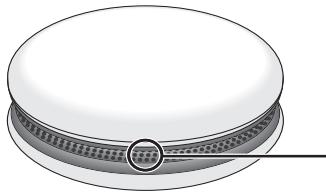
Status Indicator
- Blue: Power on and Bluetooth® mode
Red: Low battery
Rear

Power supply preparation
Please connect to a PC using the USB cable (supplied) or use batteries (not supplied).
Connecting the USB cable

USB cable (supplied)
- Do not use any other USB cables except the supplied one. (Operation is not guaranteed.)
- Do not connect two or more USB devices to a PC. (Operation is not guaranteed.)
Inserting the batteries
Insert so the poles (+ and -) match those in this unit.
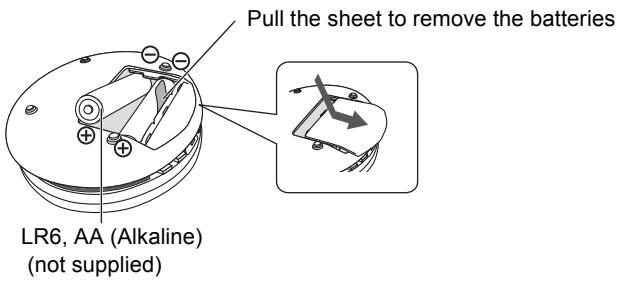
- Use alkaline batteries.
- If the battery is low, the indicator will change from blue to red.
Note
- Connection to a USB port of a PC provides the unit with the power supply only; communication with the PC or charging of the unit does not work.
- USB is higher priority than battery, when this unit is connected to a PC and the battery is inserted at the same time.
Listening to audio from a Bluetooth® device
By using the Bluetooth® connection, you can listen to the sound from the Bluetooth® audio device with this unit wirelessly.
Preparation
Switch on the Bluetooth® feature of the device and put the device near this unit. Read the operating instructions of Bluetooth® audio device for its operation.
Pair with another device and listen to audio
1 Press [ /] to turn this unit on.
If using this unit for the first time, please go to Step 3.
2 Press and hold [ ] for 2 seconds.
- The indicator will blink fast and the unit will enter pairing standby mode.
- When this unit is operated on batteries, it functions as a battery check indicator. (See page 3)
3 In the Bluetooth® pairing settings of the Bluetooth® device, select to pair with "SC-MC07".
- Depending on the device, connection may take place automatically when pairing is selected. In this case, go to Step 5.
If prompted for a passkey, input "0000".
4 In the Bluetooth® connecting settings of the Bluetooth® device, select to connect with "SC-MC07".
- When the connection is made, the indicator on the unit lights up.
5 Start playback on the Bluetooth® device.
- Adjust the volume using the [-VOL +] buttons on the unit. When the maximum or minimum volume is reached, you will be notified by a beep sound.
Disconnecting
- Switch off this unit or the device.
- Stop / disable the Bluetooth® transmission of the device.
Listening to audio from a paired device
When this unit is turned on, the indicator will blink slowly indicating that the unit is in connection standby mode. Please perform Steps 4 and 5.
- When the power is turned on, this unit is connected to the last-used Bluetooth® device. At this point, please perform Step 5.
Note
- This unit can only connect to one device at a time.
- You can pair up to 6 devices with this unit. If a 7th device is paired, the device with the oldest connection history will be replaced.
- Panasonic bears no responsibility for data and/or information that can possibly be compromised during a wireless transmission.
Switching transmission
You can change the transmission speed to prioritise transmission quality or sound quality.
1 Stop or disable the Bluetooth® transmission of the device.
2 Press [3].
MODE 1 MODE 2: The Beep sound twice
MODE 2 MODE 1: The Beep sound once
- MODE 1: For stable communication.
- MODE 2: For good audio quality.
Note
- The default setting is MODE1.
- To listen to audio from this unit, please reconnect using Bluetooth®.
Auto Power Off
This unit automatically switches off if there is no audio input and you do not use it for approximately 10 minutes.
Maintenance
To clean this unit, wipe with a soft, dry cloth.
Note
- Never use alcohol, paint thinner or benzine to clean this unit.
- Before using chemically treated cloth, read the instructions that came with the cloth carefully.
Troubleshooting
Before requesting service, make the following checks.
If you are in doubt about some of the check points, or if the solutions indicated in the following guide do not solve the problem, consult your dealer for instructions.
The device cannot be connected.
- The pairing of the device was unsuccessful. Read the instructions and try again.
- The pairing of the device has been replaced. Do pairing again.
- Delete the pairing information for this unit from the Bluetooth® device, then perform the pairing operation again.(See page 5)
- Make sure that this unit is not connected to a different device.
The device is connected but audio cannot be heard through this unit.
- For some built-in Bluetooth® devices, you have to set the audio output to "SC-MC07" manually. Read the operating instructions of the device for details.
Sound from the device is cut off.
- Sound may be disrupted if signals are blocked. When you hold this unit, do not fully cover this unit with your palm, etc.
- The device is out of the 10m communication range. Move the device nearer to this unit. (See page 9)
- Remove any obstacle between this unit and the device.
- Switch off any wireless LAN device.
- Select "MODE 1" for stable communication. (See page 6, Switching transmission)
- If the indicator lights up red, please replace the batteries. (See page 4)
When you turn on the unit, audio is not output and the indicator blinks alternately in red and blue.
- A problem has occurred. Disconnect the USB cable from the speaker and remove the batteries. After waiting for a few moments, reconnect the USB cable or reinsert the batteries and turn on the power. If the problem continues, contact the dealer.
When the following situations occur, refer to the instructions below to reset the memory:
- There is no response when buttons are pressed.
- You want to clear and reset the memory.
1 Press [O/I] to turn the power on.
2 Press and hold [ / l] for about 10 seconds until the indicator turns off.
- All the settings are set back to the factory preset.
- The pairing device information will have been deleted by the reset, so it will be necessary to perform pairing again. Delete the pairing information for this unit from the Bluetooth® device, then perform the pairing operation again. (See page 5)
Amplifier section
RMS output power:
2 W (8 Ω) 1 kHz, 5 % THD
L ch: 1 W (8 Ω) 1 kHz, 5 % THD
R ch: 1 W (8 Ω) 1 kHz, 5 % THD
Total harmonic distortion: 0.15% (1 kHz)
S/N ratio: 87 dB (1 kHz, 20 kHz LPF)
Speaker: 36mm(8)× 2
Bluetooth® section
Bluetooth® system specification:
Ver. 2.1 + EDR
Wireless equipment classification:
Class 2 (2.5 mW)
Supported profiles:
A2DP
Frequency band:
2402-2480MHz
(Adaptive Frequency Hopping)
Driving distance:
10 m Line of Sight
iPhone 4, at height 1 m, in "MODE 1"
General
Power supply:
Panasonic alkaline battery:
LR6× 2 DC3.0V
USB power supply:
DC 5.0 V
Operating temperature range:
0^ to +40^
Operating humidity range:
20% to 80% RH (no condensation)
Approx. 216g (with batteries)
Approx. 170g (without batteries)
Battery duration time:
Approx. 4 hours
(Panasonic alkaline battery LR6 Type)
Note
- Specifications are subject to change without notice. Mass and dimensions are approximate.
Total harmonic distortion is measured by the digital spectrum analyzer.
Product identification marking is located on the bottom of the unit.
Notes on Speakers
- These speakers do not have magnetic shielding. Do not put them near devices easily influenced by magnetism.
- When you play at high levels for a long period, it can cause damage to the unit and decrease the life of the unit.
- Decrease the volume when you play distorted sound to prevent damage.
About Bluetooth®
Frequency band used
This unit uses the 2.4 GHz frequency band, however other devices may use this frequency as well. To avoid interference with other wireless devices, please follow the cautions listed below.
Certification of this device
This unit conforms to frequency restrictions and has received certification based on frequency laws, so a wireless permit is not necessary.
However, the following action is punishable by law in some countries:
- Taking apart/modifying the unit.
Usage restrictions
- Wireless transmission and/or usage with all Bluetooth® equipped devices is not guaranteed.
- Compatible mobile phones capable of wireless transmission include and comply to standards set by the Bluetooth SIG, Inc. However, if the mobile phone is optimized to meet standard specifications, some functions may work. Even so, depending on the specifications and settings of the mobile phone, a connection may not be established, nor are the methods of operation, display, or operation guaranteed.
- This unit supports Bluetooth® security features, however depending on the operating environment and/or settings, this security may not be sufficient. Use caution when transmitting data wirelessly.
- Please be aware that Panasonic accepts no responsibility for data and/or information that may be compromised during a wireless transmission.
Range of use
Use this device within an unobstructed 10m range. The range of usage or perimeter may be shortened depending on any obstructions, devices causing interference, other people in the room, or the construction of the building. Please note that the range mentioned above is not guaranteed.
Effects from other devices
- It is possible that this unit may not operate correctly or you may experience other effects of instability such as "broken up" audio, etc. when other devices are placed within close proximity. Therefore, in order to prevent signal interference, we recommend separating this unit from the following devices during use:
Microwave oven/Wireless LAN/Electronic devices/Audio & Video devices/Office Assistant machines & devices/Digital cordless phones/Fax machines, etc.
- If you live in close proximity to a broadcasting studio and the signal is too strong, the unit may not operate correctly.
- When using a notebook PC with a wireless LAN transmitter, do not use this unit and the wireless LAN at the same time.
- If you are still experiencing noise even outside of the 5m range of a wireless LAN device, turn the power to the wireless LAN device off.
Intended usage limitations
This unit is intended for normal, general use. This unit is not developed or manufactured with the intention of use in "high safety" or hazardous occupations. Do not use this unit in these kinds of environments or occupations.
- The following examples require extreme caution, and can directly result in loss of life, or extreme bodily harm.
e.g.)
Nuclear Engineering, and control of a nuclear reaction/automated control of aircraft/air traffic control management/controlling movement of heavy freight systems/control of life support or extension systems/control of weapons systems and/or missile launch systems, etc.
The Bluetooth® word mark and logos are owned by the Bluetooth SIG, Inc. and any use of such marks by Panasonic Corporation is under license.
Other trademarks and trade names are those of their respective owners.
(For European Countries)
€0678
Declaration of Conformity (DoC)
Hereby, "Panasonic Corporation" declares that this product is in compliance with the essential requirements and other relevant provisions of Directive 1999/5/EC.
Customers can download a copy of the original DoC to our R&TTE products from our DoC server:
http://www.doc.panasonic.de
Contact to Authorised Representative: Panasonic Marketing Europe GmbH,
Panasonic Testing Centre, Winsberging 15, 22525 Hamburg, Germany
This product is intended to be used in the following countries.
GB, DE, AT, BE, DK, SE, FR, IT, ES, NL, FI, GR, PT, MT, CY, IE, LU, NO, CH, IS
This product is intended for general consumer. (Category 3)
Information on Disposal for Users of Waste Electrical & Electronic Equipment (private households)

This symbol on the products and/or accompanying documents means that used electrical and electronic products should not be mixed with general household waste.
For proper treatment, recovery and recycling, please take these products to designated collection points, where they will be accepted on a free of charge basis. Alternatively, in some countries you may be able to return your products to your local retailer upon the purchase of an equivalent new product.
Disposing of this product correctly will help to save valuable resources and prevent any potential negative effects on human health and the environment which could otherwise arise from inappropriate waste handling. Please contact your local authority for further details of your nearest designated collection point.
Penalties may be applicable for incorrect disposal of this waste, in accordance with national legislation.
For business users in the European Union
If you wish to discard electrical and electronic equipment, please contact your dealer or supplier for further information.
Information on Disposal in other Countries outside the European Union
This symbol is only valid in the European Union.
If you wish to discard this product, please contact your local authorities or dealer and ask for the correct method of disposal.
Panasonic Testing Centre, Winsbergring 15, 22525 Hamburg, Germany
Panasonic Testing Centre, Winsberging 15, 22525 Hamburg, Germany
2 W (8 Ω) 1 kHz, 5 % THD
I ch: 1 W (8 Ω) 1 kHz, 5 % THD
D ch: 1 W (8 Ω) 1 kHz, 5 % THD
20% a 80% RH (sin condensacion)
Dimensiones (An x Al x Prof):
103 mm x 41,9 mm x 103 mm
Masa:
Aprox. 216g (con bacterias)
Aprox. 170g (sin bacterias)
Shift at transmission
2 W (8 Ω) 1 kHz, 5 % THD
Lkan: 1W(8Ω)1kHz,5%THD
Rkan: 1W(8Ω)1kHz,5%THD
Total harmonisk forvraengning: 0,15% (1 kHz)
S/N-forhold: 87 dB (1 kHz, 20 kHz LPF)
Hjttaler: 36mm(8)× 2
Bluetooth®-DEL
Bluetooth® systemspecification:
Ver. 2.1 + EDR
(Adaptive Frequency Hopping)
2 W (8 Ω) 1 kHz, 5 % THD
L ch: 1 W (8 Ω) 1 kHz, 5 % THD
R ch: 1 W (8 Ω) 1 kHz, 5 % THD
Total overtonsdistortion: 0,15% (1 kHz)
S/N-variDe: 87 dB (1 kHz, 20 kHz LPF)
Högtalare: 36mm(8)× 2
Bluetooth®-avsnitt
Bluetooth® systemspecification:
Ver. 2.1 + EDR
Klassificering for tradl's utrusting:
Klass 2 (2,5 mW)
A2DP
Frekvensområde:
2402-2480MHz
2 W (8Ω) 1 kHz, 5% THD
V-kanava: 1 W (8Ω) 1 kHz, 5% THD
O-kanava: 1 W (8 Ω) 1 kHz, 5 % THD
87 dB (1 kHz, 20 kHz LPF)
Kaiutin:
36 ~mm(8 ) × 2
Bluetooth®-osasto
Bluetooth® -järkestelmän tekniset tiedot:
Versio 2.1 + EDR
Panasonic Testing Centre, Winsberging 15, 22525 Hamburg, Alemanha
L ch: 1 W (8 Ω) 1 kHz, 5 % THD
R ch: 1 W (8 Ω) 1 kHz, 5 % THD
p 21 + 1
Aa a a a a a a a a a a a a a a a a a a a a a a a a a a a a a a a a a a a a a a a a a
S OBC = S COD + S BOC - S BOC
LANJyLALANJyLAL
LAN jai tali bai jai jai sllu LAN jai 5 jai jai jai jai jui jui ciis i
0.24a11
1 *lll 11111111111111111111111111111
cillblll llllll 0000000000000000000000000000000000000
jaiy jie 1i y i jaiy jaiy jaiy jaiy jaiy jaiy jaiy jaiy jaiy jaiy jaiy jaiy jaiy jaiy jaiy jaiy jaiy jaiy jaiy jaiy jaiy jaiy jaiy jaiy jaiy jaiy jaiy jaiy
(1)
/1jlll jlll lal 45 jrrn /a jylll aal alal aal alal aal /clll jlll g ylll /g ylll jell lll
...alilal lalb! aabai j/ajalwai abai g kaill /gillj slal j jai aai ai
| :Panasonic 3.0× LR6 | THD % 5. √j x j ≤1 (8Ω) √j 2 |
| DC 3.0× LR6 | THD % 5. √j x j ≤1 (8Ω) √j 1 |
| DC 3.0× LR6 | THD % 5. √j x j ≤1 (8Ω) √j 1 |
| :USB 40000000000000000000000000000000000000000000000000000000000000000000000000000000000000000000000000000 | (√j x j ≤1) 0.15 √j x j ≤1 √j 20. √j x j ≤1 (8Ω) √j 1) √j x j ≤1 (8Ω) √j 1) √j x j ≤1 (8Ω) √j 1) √j x j ≤1 (8Ω) √j 1) √j x j ≤1 (8Ω) √j 1) √j x j ≤1 (8Ω) √j 1) √j x j ≤1 (8Ω) √j x j ≤1 (8Ω) √j 1) √j x j ≤1 (8Ω) √j 1) √j x j ≤1 (8Ω) √j 1) √j x j ≤1 (8Ω) √j 1) √j x j ≤1 (8Ω) √j 1) √j x j ≤1 (8Ω) √ |
| (√kx √kx) 80% x 20% x √kx √kx √kx √kx √kx √kx √kx √kx √kx √kx √kx √kx √kx √kx √kx √kx √kx √kx √kx √kx √kx √kx √kx √kx √kx √kX √kX √kX √kX √kX √kX √kX √kX √kX √kX √kX √kX √kX √kX √kX √kX √kX √kX √kX √kX √kX √kX √kX √kX √kX √k X √kX √kX √kX √kX √kX √kX √kX √kX √kX √kX √kX √kX √kX √kX √kX √kX √kX √kX √kX √kX √kX √kX √kX √kX √kx √kx √kx √kx √kx √kx √kx √kx √kx √kx √kx √kx √kx √kx √kx √kx √kx √kx √kx √kx √kx √kx √kx √kx √k x √k x √k x √k x √k x √k x √k x √k x √k x √k x √k x √k x √k x √k x √k x √k x √k x √k x √k x √k x √k x √k x √k x √k x √k x √kx √k x √k x √k x √k x √k x √k x √k x √k x √k x √k x √k x √k x √k x √k x √k x √k x √k x √k x √k x √k x √k x √k x √k x √kx √kx √k x √k x √k x √k x √k x √k x √k x √k x √k x √k x √k x √k x √k x √k x √k x √k x √k x √k x √k x √k x √k x √k x √kx √k x √kx √k x √k x √k x √k x √k x √k x √k x √k x √k x √k x √k x √k x √k x √k x √k x √k x √k x √k x √k x √k x √k x √k x √kx √kx √kx √k x √k x √k x √k x √k x √k x √k x √k x √k x √k x √k x √k x √k x √k x √k x √k x √k x √k x √k x √k x √k x √kx √k x √k x √kx √k x √k x √k x √k x √k x √k x √k x √k x √k x √k x √k x √k x √k x √k x √k x √k x √k x √k x √k x √k x √k x √kx √k x √kx √kx √k x √k x √k x √k x √k x √k x √k x √k x √k x √k x √k x √k x √k x √k x √k x √k x √k x √k x √k x √k x √k x √kx √kx √k x √kx √k x √k x √k x √k x √k x √k x √k x √k x √k x √k x √k x √k x √k x √k x √k x √k x √k x √k x √k x √k x √k x √kx √kx √kx √kx √k x √k x √k x √k x √k x √k x √k x √k x √k x √k x √k x √k x √k x √k x √k x √k x √k x √k x √k x √k x √kx √k x √k x √k x √kx √k x √k x √k x √k x √k x √k x √k x √k x √k x √k x √k x √k x √k x √k x √k x √k x √k x √k x √k x √k x √kx √k x √k x √kx √kx √k x √k x √k x √k x √k x √k x √k x √k x √k x √k x √k x √k x √k x √k x √k x √k x √k x √k x √k x √k x √kx √k x √kx √k x √kx √k x √k x √k x √k x √k x √k x √k x √k x √k x √k x √k x √k x √k x √k x √k x √k x √k x √k x √k x √k x √kx √k x √kx √kx √kx √k x √k x √k x √k x √k x √k x √k x √k x √k x √k x √k x √k x √k x √k x √k x √k x √k x √k x √k x √k x √kx √kx √k x √k x √kx √k x √k x √k x √k x √k x √k x √k x √k x √k x √k x √k x √k x √k x √k x √k x √k x √k x √k x √k x √k x √kx √kx √k x √kx √kx √k x √k x √k x √k x √k x √k x √k x √k x √k x √k x √k x √k x √k x √k x √k x √k x √k x √k x √k x √k x √kx √kx √kx √k x √kx √k x √k x √k x √k x √k x √k x √k x √k x √k x √k x √k x √k x √k x √k x √k x √k x √k x √k x √k x √k x √kx √kx √kx √kx √kx √k x √k x √k x √k x √k x √k x √k x √k x √k x √k x √k x √k x √k x √k x √k x √k x √k x √k x √k x √kx √k x √k x √k x √k x √kx √k x √k x √k x √k x √k x √k x √k x √k x √k x √k x √k x √k x √k x √k x √k x √k x √k x √k x √k x √kx √k x √k x √k x √kx √kx √k x √k x √k x √k x √k x √k x √k x √k x √k x √k x √k x √k x √k x √k x √k x √k x √k x √k x √k x √kx √k x √k x √kx √k x √kx √k x √k x √k x √k x √k x √k x √k x √k x √k x √k x √k x √k x √k x √k x √k x √k x √k x √k x √k x √kx √k x √k x √kx √kx √kx √k x √k x √k x √k x √k x √k x √k x √k x √k x √k x √k x √k x √k x √k x √k x √k x √k x √k x √k x √kx √k x √kx √k x √k x √kx √k x √k x √k x √k x √k x √k x √k x √k x √k x √k x √k x √k x √k x √k x √k x √k x √k x √k x √k x √kx √k x √kx √k x √kx √kx √k x √k x √k x √k x √k x √k x √k x √k x √k x √k x √k x √k x √k x √k x √k x √k x √k x √k x √k x √kx √k x √kx √kx √k x √kx √k x √k x √k x √k x √k x √k x √k x √k x √k x √k x √k x √k x √k x √k x √k x √k x √k x √k x √k x √kx √k x √kx √kx √kx √kx √k x √k x √k x √k x √k x √k x √k x √k x √k x √k x √k x √k x √k x √k x √k x √k x √k x √k x √k x √kx √kx √k x √k x √k x √kx √k x √k x √k x √k x √k x √k x √k x √k x √k x √k x √k x √k x √k x √k x √k x √k x √k x √k x √k x √kx √kx √k x √k x √kx √kx √k x √k x √k x √k x √k x √k x √k x √k x √k x √k x √k x √k x √k x √k x √k x √k x √k x √k x √k x √kx √kx √k x √kx √k x √kx √k x √k x √k x √k x √k x √k x √k x √k x √k x √k x √k x √k x √k x √k x √k x √k x √k x √k x √k x √kx √kx √k x √kx √kx √kx √kx √kx √kx √kx √kx √kx √kx √kx √kx √kx √kx √kx √kx √kx √kx √kx √kx √kx √kx √kx √kx √ke r y √ke r y √ke r y √ke r y √ke r y √ke r y √ke r y √ke r y √ke r y √ke r y √ke r y √ke r y √ke r y √ke r y √ke r y √ke r y √ke r y √ke r y √ke r y √ke r y √ke r r √ke r r √ke r r √ke r r √ke r r √ke r r √ke r r √ke r r √ke r r √ke r r √ke r r √ke r r √ke r r √ke r r √ke r r √ke r r √ke r r √ke r r √ke r r √ke r r √ke rr √ke r r √ke r r √ke r r √ke r r √ke r r √ke r r √ke r r √ke r r √ke r r √ke r r √ke r r √ke r r √ke r r √ke r r √ke r r √ke r r √ke r r √ke r r √ke r r √ke r rr √ke r r √ke r r √ke r r √ke r r √ke r r √ke r r √ke r r √ke r r √ke r r √ke r r √ke r r √ke r r √ke r r √ke r r √ke r r √ke r r √ke r r √ke r r √ke r r √ke rrr √ke r r √ke r r √ke r r √ke r r √ke r r √ke r r √ke r r √ke r r √ke r r √ke r r √ke r r √ke r r √ke r r √ke r r √ke r r √ke r r √ke r r √ke r r √ke r r √ke r re | |
| (4jLjLjlll) (5jLjLj) (6jLjLj) (7jLjLj) (8jLjLj) (9jLjLj) (10jLjLj) (11jLjLj) (12jLjLj) (13jLjLj) (14jLjLj) (15jLjLj) (16jLjLj) (17jLjLj) |
| ### |
| ### 4 |
| (LR6 jlr Panasonic m##) |
| ### |
| ### |
| ### |
| ### |
| ### |
| ### |
| ### |
| ### |
| ### |
| ### |
| ### |
| ### |
| ### |
| ### |
| ### |
| ### |
| ### |
| ### |
| ### |
| ### |
| ### |
| ### |
| ### |
| ### |
| ### |
| ### |
| Bluetooth® :Bluetooth® |
| a | 1.5 | 2.0 | 3.0 | 4.0 | 5.0 | 6.0 | 7.0 |
| (A) | 2.5) 2 | 4 | all |
| A2DP | |||
| 2480 - 2402 | |||
Cilewly ilia Cilblya
00 00 00 00 00 00 00 00 00 00
设 x_0
o000000000000000000000000000000000000000000
Aaiyie yaii aaii i jai ayiaa aaiaa aai
38jai 1 jaiy jaiy jaiy jaiy jaiy jaiy jaiy
Jiilai [3] 10
1 1
aJblll ljj jy jia Jaa JcJb Jgj 0s d gdo aJzdi
(3 iao jie)
3
."SC-MC07"
.5gablll jaii Aall o. g. gjyj yjfdic jiaib Juiyj yj 1
.0000" Jssu 1
iilllll llllll 1 1 1 1 1 1 1 1 1 1 1 1 1 1 1 1 1 1
la yblj olall bbls jyabll jnball jajai
bassgossallpsalp
Aa 与 B
Ailalall 1yJyIyIyIyIyIyIyIyIyIyIyIyIy
4
#
Jaiinall gailis aigSgol juaan o jglgeaia
j 1 1 1 1 1 1 1 1 1 1 1 1 1 1 1 1 1 1 1 1 1 1
Jusall aill sssll jnnl alldll asll
a a a a a a a a a a a a a a a a a a a a a a a a a a a a
aaioll
y
aJg aJg aJg aJg aJg aJg aJg aJg aJg aJg aJg aJg aJg aJg aJg aJg aJg aJg aJg aJg aJg aJg aJg aJg aJg aJg aJg aJg aJg aJg a
a
For the United Kingdom and Ireland customers
Sales and Support Information
Customer Communications Centre
For customers within the UK: 0844 844 3899
For customers within Ireland: 01 289 8333
For further support on your product, please visit our website: www.panasonic.co.uk
Direct Sales at Panasonic UK
- Order accessory and consumable items for your product with ease and confidence by phoning our Customer Communications Centre Monday-Thursday 9:00 a.m.-5:30 p.m., Friday 9:30 a.m.-5:30 p.m. (Excluding public holidays)
- Or go on line through our Internet Accessory ordering application at www.pas-europe.com.
- Most major credit and debit cards accepted.
- All enquiries transactions and distribution facilities are provided directly by Panasonic UK.
- It couldn't be simpler!
- Also available through our Internet is direct shopping for a wide range of finished products. Take a browse on our website for further details.
Panasonic Warranty
The product is warranted for 12 months from the date of purchase. Subject to the conditions of this warranty, the product is expected to be in good condition for at least one year from the date of purchase, and no parts or labour, if in the opinion of Panasonic, the product is found to be faulty within the warranty period.
2. This warranty only applies to Panasonic products purchased in Australia and sold by Panasonic Australia or its Authorised Distributors or Dealers and only where the products are used and serviced within Australia or it's territories. Warranty cover only applies to service carried out by a Panasonic Authorised Service Centre and only if valid proof of purchase is presented when warranty service is requested.
3. This warranty only applies if the product has been installed and used in accordance with the manufacturer's recommendations (as noted in the operating instructions) under normal use and reasonable care (in the opinion of Panasonic). The warranty covers normal domestic use only and does not cover damage, malfunction or failure resulting from use of incorrect voltages, incorrect installation, accident, misuse, neglect, build-up of dirt or dust, abuse, maladjustment of customer controls, mains supply problems, thunderstorm damage, loss of control system (e.g., motor min, tampering or repair by unauthorised persons (including unauthorised alterations), introduction of sand, humidity or liquids, commercial use such as hotel, office, restaurant, or other business or rental use of the product, exposure to abnormally corrosive conditions or any foreign object or matter having entered the product.
4. This warranty does not cover the following items unless the fault or defect existed at the time of purchase:
(a) Cabinet Part(s) (e) DVD, Blu-ray or Recordable Discs
(b) Video or Audio Tapes (f) Video / Audio Heads from wear and tear in normal use
(c) SD cards or USB devices (g) Information stored on Hard Disk Drive, USB stick or SD card
(d) User replaceable Batteries (h) DTV reception issues caused by TV Aerial / Cabling / Wall socket(s)
etc
- Some products may be supplied with Ethernet connection hardware. The warranty is limited on such products and will not cover
(a) Internet and or DLNA connection / setup related problems
(b) Access fees and or charges incurred for internet connection
(c) The use of incompatible software or software not specifically stipulated in the product operations manual; and
(d) Any indirect or consequential costs associated with the incorrect use or misuse of the hardware, its connection to the internet or any other device.
-
To claim warranty service, when required, you should:
-
Telephone Panasonic's Customer Care Centre on 132600 or visit our website referred to below and use the Service Centre Locator for the name/address of the nearest Authorised Service Centre.
- Send or take the product to a Panasonic Authorised Service Centre together with your proof of purchase and any other necessary information, including freight and insurance to and /or from your nearest Authorised Service Centre must be arranged by you.
Note that home or pick-up/delivery service is available for the following products in the major metropolitan areas of Australia or the normal operating areas of the nearest Authorised Service Centres:
Plasma/LCD televisions / displays (screen size greater than 103 cm)
- The warranties hereby conferred do not extend to, and exclude, any costs associated with the installation, de-installation or re-installation of a product, including costs related to the mounting, de-mounting or remounting of any screen, (and any other ancillary activities), delivery, handling, freightiing, transportation or insurance of the product or any part thereof or replacement of and do not extend to, and exclude, any damage or loss occurring by reason of, during, associated with, or related to such installation, de-installation, re-installation or transit.
Panasonic Authorised Service Centres are located in major metropolitan areas and most regional centres of Australia, however, coverage will vary dependant on product. For advice on exact Authorised Service Centre locations for your product, please telephone our Customer Care Centre on 132600 or visit our website and use the Service Centre Locator.
In addition to your rights under this warranty, Panasonic products come with consumer guarantees that cannot be excluded under the Australian Consumer Law. If there is a major failure with the product, you can reject the product and elect to have a refund or to have the product replaced or if you wish you may elect to keep the goods available for future use. The replacement of the product will not be considered as an additional service and will be replaced if the product fails to be of acceptable quality and the failure does not amount to a major failure.
If there is a major failure in regard to the product which cannot be remedied then you must notify us within a reasonable period by contacting the Panasonic Customer Care Centre. If the failure in the product is not a major failure then Panasonic may choose to repair or replace the product and will do so in a reasonable period of time from receiving notice from you.
THIS WARRANTY CARD AND THE PURCHASE DOCKET (OR SIMILAR PROOF OF PURCHASE) SHOULD BE RETAINED BY THE CUSTOMER AT ALL TIMES
If you require assistance regarding warranty conditions or any other enquiries, please visit the Panasonic Australia website www.panasonic.com.au or contact by phone on 132 600 If phoning in, please ensure you have your operating instructions available.
Panasonic Australia Pty. Limited
ACN 001 592 187 ABN 83 001 592 187
1 Innovation Road, Macquarie Park NSW 2113

Bluetooth
EU
Pursuant to at the directive 2004/108/EC, article 9(2)
Panasonic Testing Centre
Panasonic Marketing Europe GmbH
Winsberging 15, 22525 Hamburg, Germany