
SC-RB5E - Bluetooth speaker PANASONIC - Free user manual and instructions
Find the device manual for free SC-RB5E PANASONIC in PDF.



| Brand | Panasonic |
| Model | SC-RB5E |
| Product type | Bluetooth speaker |
| Dimensions (Diameter × Height) | 95.5 mm × 59 mm |
| Weight | Approx. 500 g |
| Power supply | DC IN 5 V 0.5 A via micro-USB; integrated Li-ion battery 3.7 V, 5.2 Wh (1400 mAh) |
| Battery life | Approx. 12 h (Boost off, Bluetooth connection) |
| Charging time | Approx. 6 h |
| Bluetooth version | Bluetooth 4.1, Class 2, A2DP profiles, SBC codec |
| Bluetooth range | Approx. 10 m (line of sight) |
| Output power (RMS) | 5 W (Boost mode, exclusive vibration speaker) |
| Main functions | Boost mode, synchronized sound lighting, AUX input (3.5 mm jack), AUDIO OUT output, daisy chain up to 3 speakers, IPX4 protection (splashes) |
| Care and cleaning | Wipe with a soft dry cloth; for stubborn dirt, use a well-wrung damp cloth then dry; do not use solvents |
| Safety | Do not expose to water (except IPX4 splashes), do not open, do not place on inclined surfaces, keep away from magnets |
| Spare parts and repairability | Battery not user-replaceable (contact customer service); USB cable included (ref. RWK201); no other detachable accessories |
| Included accessories | 1 USB cable (RWK201) |
| Operating temperature | 0 °C to +40 °C |
| Operating humidity | 20 % to 80 % RH (no condensation) |
| General information | CE certification, Bluetooth SIG; manufactured by Panasonic Corporation; manual available in multiple languages |
Frequently Asked Questions - SC-RB5E PANASONIC
User questions about SC-RB5E PANASONIC
0 question about this device. Answer the ones you know or ask your own.
Ask a new question about this device
Download the instructions for your Bluetooth speaker in PDF format for free! Find your manual SC-RB5E - PANASONIC and take your electronic device back in hand. On this page are published all the documents necessary for the use of your device. SC-RB5E by PANASONIC.
USER MANUAL SC-RB5E PANASONIC
Thank you for purchasing this product. Please read these instructions carefully before using this product, and save this manual for future use.
Table of contents
Precautions 2
About Bluetooth 4
Maintenance. 4
Accessories 4
About the Vibration speaker. 4
About removal of this unit. 5
(Important) About the splashproof....5
Control reference guide. 6
About the power of this unit. 7
Bluetooth® operations 8
Using Boost Mode 9
Using illumination 9
Using the AUX input. 9
Connecting multiple SC-RB5 units... 10
Auto Off function 10
To return to the factory preset state .... 10
Troubleshooting 11
Specifications 12
To remove the battery when disposing of this unit. 13
Precautions
WARNING
Unit
To reduce the risk of fire, electric shock or product damage,
- Do not let water or other liquids drip or splash inside the unit.
- Do not expose accessory to rain, moisture, dripping or splashing.
- Do not place objects filled with liquids, such as vases, on accessory.
- Use only the recommended accessory.
- Do not remove the cover except disassembling for discarding.
- Do not repair this unit by yourself. Refer servicing to qualified service personnel.
USB cable
The cable is the disconnecting device. Install this unit so that the cable can be unplugged from the USB terminal of PC immediately.
CAUTION
Unit
Product identification marking is located on the bottom of the unit.
- Do not throw.
- Do not hit this unit to anything. Do not apply strong pressure to this unit. External case may break when strong impact is applied, causing to damage or malfunction.
- Do not leave the unit in a car exposed to direct sunlight for a long period of time with doors and windows closed.
- This unit may receive radio interference caused by mobile telephones during use. If such interference occurs, please increase separation between this unit and the mobile telephone.
- Do not press the top panel of this unit with excessive force or place heavy objects on it. Doing so may cause malfunction.
- Do not use this unit while holding it directly against your ear or body.
- Powerful magnets are installed inside this unit. Keep this unit and other magnetized objects (magnetized cards, electronic devices, etc.) away from each other.
Placement
- Place this unit on an even surface.
- Use on a level surface. This unit may fall off if placed on an inclined or vertical surface.
- Do not place this unit on precision instruments or fragile objects.
- Do not place this unit on wet surfaces.
- The surface where the rubber pad is placed may discolour.
- Do not expose the rubber pad to strong impacts.
To reduce the risk of fire, electric shock or product damage, -
Do not install or place this unit in a bookcase, built-in cabinet or in another confined space. Ensure this unit is well ventilated.
-
Do not obstruct this unit's ventilation openings with newspapers, tablecloths, curtains, and similar items.
Do not expose this unit to direct sunlight, high temperatures, high humidity, and excessive vibration.
Battery pack (Lithium ion battery pack)
This unit has a built-in battery.
- In order to secure splashproof performance, battery replacement by the customer is not guaranteed. If you desire battery replacement, please contact our service department.
The following is the caution for removing the battery when disposing of this unit ( 13) . - Do not heat or expose to flame.
- Do not short circuit.
- Do not disassemble, crush.
- Do not re-use.
- Do not place in microwave ovens.
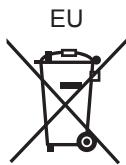
Disposal of Old Equipment and Batteries
Only for European Union and countries with recycling systems

These symbols on the products, packaging, and/or accompanying documents mean that used electrical and electronic products and batteries must not be mixed with general household waste. For proper treatment, recovery and recycling of old products and used batteries, please take them to applicable collection points in accordance with your national legislation. By disposing of them correctly, you will help to save valuable

resources and prevent any potential negative effects on human health and the environment. For more information about collection and recycling, please contact your local municipality.
Penalties may be applicable for incorrect disposal of this waste, in accordance with national legislation.
Note for the battery symbol (bottom symbol):
This symbol might be used in combination with a chemical symbol. In this case it complies with the requirement set by the Directive for the chemical involved.
C€0560
Declaration of Conformity (DoC)
Hereby, "Panasonic Corporation" declares that this product is in compliance with the essential requirements and other relevant provisions of Directive 1999/5/EC.
Customers can download a copy of the original DoC to our R&TTE products from our DoC server:
http://www.doc.panasonic.de
Contact to Authorised Representative:
Panasonic Marketing Europe GmbH, Panasonic Testing Centre, Winsberging 11, 22525 Hamburg, Germany
For Central America and the Caribbean
Operation is subject to the following two conditions:
(1) this device may not cause harmful interference, and (2) this device must accept any interference received, including interference that may cause undesired operation.
About Bluetooth®
Panasonic bears no responsibility for data and/or information that is compromised during a wireless transmission.
Frequency band used
This unit uses the 2.4 GHz frequency band.
Certification of this device
This unit conforms to frequency restrictions and has received certification based on frequency laws. Thus, a wireless permit is not necessary.
- The actions below are punishable by law in some countries:
- Taking apart/modifying the unit.
- Removing specification indications.
Restrictions of use
- Wireless transmission and/or usage with all Bluetooth® equipped devices is not guaranteed.
- All devices must conform to standards set by Bluetooth SIG, Inc.
Depending on the specifications and settings of a device, it can fail to connect or some operations can be different. - This system supports Bluetooth® security features. But depending on the operating environment and/or settings, this security is possibly not sufficient. Transmit data wirelessly to this system with caution.
- This system cannot transmit data to a Bluetooth® device.
Range of use
Use this device at a maximum range of 10m
The range can decrease depending on the environment, obstacles or interference.
Interference from other devices
- This unit may not function properly and troubles such as noise and sound jumps may arise due to radio wave interference if this unit is located too close to other Bluetooth® devices or the devices that use the 2.4 GHz band.
- This unit may not function properly if radio waves from a nearby broadcasting station, etc. is too strong.
Intended usage
- This unit is for normal, general use only.
- Do not use this system near an equipment or in an environment that is sensitive to radio frequency interference (example: airports, hospitals, laboratories, etc).
Maintenance
Turn off the power of this unit and wipe with dry soft cloth. Disconnect the USB cable when the USB cable is used.
- When it get very dirty, wipe off dirt with a cloth immersed in water and wrung strongly, and then wipe with dry soft cloth.
- Solvents such as benzine, thinner, alcohol, oil, detergents, etc., may cause the external case to be altered or the coating may come off, so do not use them.
- Before using chemically treated cloth, read the instructions that came with the cloth carefully.
Accessories
Check the supplied accessories before using this unit.
- The USB cable is dedicated for this unit, so do not use with other devices. Also, do not use the USB cable for other devices with this unit.
Note
Product numbers provided in these operating instructions correct as of February 2016. These may be subject to change.
About the Vibration speaker
Features of the vibration speaker
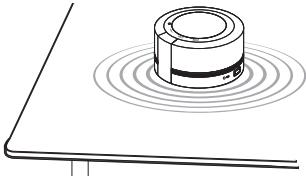
An object that is in contact with the bottom surface of this unit is vibrated to distribute sound over a wide area.
Depending on the material, surface finish, and shape of the object (desk, etc.) on which this unit is placed, not much sound may be produced. Choose an object that produces sound well.
PlACEMENT
Place this unit in a location as flat and stable as possible.
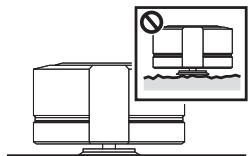
- Before use, remove dust and other particles on the rubber pad of the stand.
- Vibrations are transmitted to all objects on the surface where this unit is placed. Avoid placing unnecessary items on the surface and take care to prevent this unit and other items from falling.
About removal of this unit
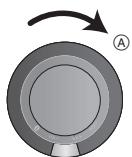
Depending on the material of the contact surface, this unit may stick too firmly to the surface, making its removal difficult. If it is difficult to remove this unit, rotate it in the direction of the arrow () to lift it. Do not rotate this unit in the opposite direction. This may cause the stand of this unit to come off.
(Important) About the splashproof
Splashproof performance*
Specifications for this unit are equivalent of IPX4 of IEC 60529.
About the IPX4 (liquid ingress protection level against splashing water)
This unit retains its functionality after being sprayed with water, provided that the following conditions are met:
- Room temperature tap water is sprayed.
Water is sprayed from a distance of approx. 20cm away from this unit.
Water is sprayed at all angles with multiple nozzles at a rate of 1.8 litres per minute for 10 minutes.
Supplied USB cable is not splashproof. - Splashproof is not guaranteed under all conditions.
Cautions for using around water
For the splashproof performance, read the information on IPX4 (above) and observe the following points. Improper use may result in a malfunction:
- Securely close the terminal cover.
- Do not open or close the terminal cover with wet hands or when water droplets are on this unit. Doing so may cause malfunction such as terminal rusting with the water droplets.
- Do not connect and use a USB cable or an audio cable (not supplied).
- Do not pour soap water or detergent, or immerse in water.
- Remove any hair, lint, sand, dust, etc., that may be attached to the rubber seal on the terminal cover before closing.
- Leaving the device with water droplets in a cold region may result in malfunction such as the covers stuck closed.
- When water enters inside this unit, stop using this unit, and contact the nearest Dealer or Service Center. Malfunction due to exposure to water by improper handling by the customer will not be covered by the warranty. Supplied accessories are not splashproof.
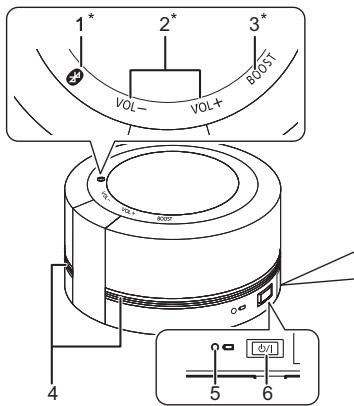
1 Bluetooth® switch and indicator (blue) [3] ( 8)^
2 Volume control switch and indicator [VOL-]/[VOL ^+ ] (blue)
- When the maximum or minimum level is reached, a beep will sound.
3 Boost switch and indicator [BOOST] (blue) ( 9)^*
4 Sound illumination bar ( 9)
5 Battery indicator (red) ( 7)
- Indicates the battery status.
6 Standby/on switch [J/I]
- Press to switch the unit from on to standby mode or vice versa. In standby mode, the unit is still consuming a small amount of power.
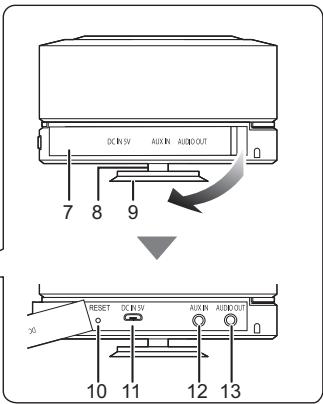
7 Terminal cover
- This unit is not splashproof when the cover is open. Always close the cover before use.
8 Stand
9 Rubber pad
- When the rubber pad becomes dirty, remove the dirt and wipe with a dry cloth.
10 RESET
- Use a paper clip, etc., to press the switch if this unit does not operate correctly, like when you cannot turn off/on the power.
11 DC IN terminal (= = DC IN 5 V 0.5A)( 7)
12 AUX IN terminal ( 9)
13 AUDIO OUT terminal ( 10)
- These switches work just by touching the marks.
About the power of this unit
This unit has a built-in battery. Please charge the battery before using this unit for the first time.
- If the battery level is low when this unit is turned on, the Battery indicator (red) ( 6) blinks slowly.
Charging the battery
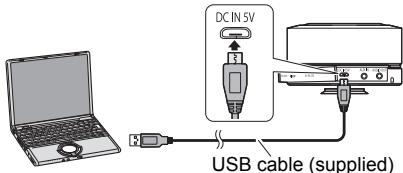
Connect this unit with the power turned off and the PC with the power turned on using the USB cable (supplied).
- If charging is necessary, the Battery indicator (red) lights. When charging is complete, the Battery indicator goes off.
Battery life in use/Battery charge time/Rechargeable times
| Battery life in use | Approx. 12 hours*1 |
| Battery Charge time | Approx. 6 hours*2 |
| Rechargeable times | Approx. 500 times |
1 Measured by the test method established by the company [while connecting with Bluetooth®, turning off Boost Mode (⇒ 9), using at the surrounding temperature of 25 °C]
2 When charging at the surrounding temperature of 25^ C after the battery is depleted.
Using and charging with connecting to a PC turned on
Press [O/I] for turning on this unit. The Bluetooth® indicator (blue) blinks or lights, and it is possible to operate this unit with the supplied power from a PC.
It takes longer to charge while this unit is turned on.
- The maximum level of the volume during connecting to a PC is set below the normal maximum level.
Note
- You may need to charge the battery before using this unit.
- Do not use any other USB cables except the supplied one. (Operation is not guaranteed.)
- When the battery indicator stays lit for a long time, there may be an error. Disconnect the USB cable first, and then charge this unit again. If the battery indicator still does not go off, a malfunction may have occurred. In this case, send this unit in for repair.
- When this unit is not used over a long period of time, charge the built-in battery at least once every six months to prevent it from deteriorating.
- Communication is not possible when this unit is connected to a PC with the USB cable.
- Charging may not start if the battery level is sufficiently high even if it is not full.
- It is recommended to charge the battery in the temperature of between 10^ and 35^ . The Battery indicator (red) may flash and charging may not be possible when it is out of recommended temperature range.
- The battery may not charge when the temperature surrounding the battery is high during the operation or right after the operation even when it is within the recommended temperature range. In such case, stop the usage and let it cool down.
- To ensure safety, in the case of an excessive input signal, the system may be automatically interrupted and power is turned off.
Bluetooth® operations
By using the Bluetooth® connection, you can listen to the sound of the Bluetooth® audio device wirelessly.
- Refer to the operating instructions of the Bluetooth® device for further instruction on how to connect a Bluetooth® device.
Bluetooth® pairing
While charging this unit or after charging this unit, turn on the Bluetooth® feature of the device and place the device near this unit.
1 Press [ / ] to turn this unit on.
- The Bluetooth® indicator (blue) blinks slowly.
- If this unit is being used for the first time (factory preset state): The Bluetooth® indicator (blue) blinks fast. → The unit will enter pairing standby. → Skip to step 3.
2 To enter pairing mode, touch and hold [ ] for at least 2 seconds.
- [3] will blink fast.
3 Select "SC-RB5" from the Bluetooth® device's menu.
- The MAC address "□□□□□□" ("□" stands for a character that is unique to each set.) may be displayed before "SC-RB5" is displayed.
- [8] lights up and the device is connected to this unit.
4 Start playback on the Bluetooth® device.
Connecting a paired Bluetooth device
1 Press [ / ] to turn this unit on.
- The Bluetooth® indicator (blue) blinks slowly.
- This unit may be connected to the last-used Bluetooth® device. At this point, please perform Step 3.
- If [ ] lights, a different Bluetooth® device is already connected with this unit. Disconnect it.
2 Select "SC-RB5" from the Bluetooth® device's menu.
3 Start playback on the Bluetooth® device.
Disconnecting a Bluetooth device
- Turn off this unit or the device.
- Stop / disable the Bluetooth® transmission of the device.
Note
If prompted for the passkey, input "0000".
- You can register up to 8 devices with this unit. If a 9th device is paired, the device that has not been used for the longest time will be replaced.
- This unit can only be connected to one device at a time.
- When enjoying video contents with this function, the video and audio output may not be synchronised.
Using Boost Mode
It will make the sound played back on this unit easier to hear by boosting the level of specific frequency band.
Touch [BOOST] of this unit to switch the effect on/off.
- The default setting is on.
- When the Boost Mode is on, the indicator (blue) lights up.
Note
- If sound is distorted during playback, switch off the "Boost Mode".
- When saving the power consumption, set "Boost Mode" to "off".
- Location of this unit may move due to vibration.
Using illumination
The sound illumination bars light in a way synchronized with the loudness of your audio content.
- The sound illumination bars do not produce much light at low volume levels.
Touch and hold [BOOST] for at least 2 seconds to switch the effect on/off.
The default setting is on.
Using the AUX input
You can listen to audio via the AUXIN terminal ( 6) when this unit is connected to a device with an audio cable (not supplied).
Note
- Depending on the track or the volume, the flashing pattern of the illumination bars differs.
- When using the AUX input, AUX input has priority than the Bluetooth® features.
- The setting of the Bluetooth® is not changed even if the audio cable (not supplied) is inserted into AUX IN terminal.
- When using the AUX input, the volume may seem low depending on the connected device. In that case, check if the volume limit can be changed on the device. For details, refer to the manual of the device.
- If an audio cable is inserted during audio playback with a Bluetooth® connection, noise may occur. In this case, stop the playback on the device connected via Bluetooth®.
Connecting multiple SC-RB5 units
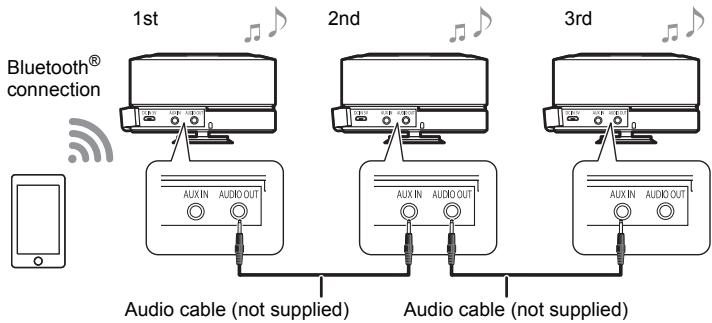
You can simultaneously output sound from multiple SC-RB5 units connected with audio cables (not supplied). Connect the first SC-RB5 unit (AUDIO OUT terminal) to the second unit (AUX IN terminal), and then connect the second unit (AUDIO OUT terminal) to the third unit (AUX IN terminal).
- The sound effect will be controlled separately by each unit. Make the same sound settings on the additional unit if necessary.
- Up to 3 units can be connected. Operation cannot be guaranteed if 4 or more units are connected.
Auto Off function
This unit automatically turns off if there is no audio input and no operation is performed for approximately 10 minutes.
Note
- This function will not operate when the AUX input is used while connected with the USB cable.
- This function may operate even when the music is being played back if the volume of the connected device is low.
- This function may not operate depending on the connected device.
To return to the factory preset state
Perform the following when you want to delete pairing device information, etc.
1 Press [ / I] to turn this unit on.
2 Touch and hold [ ] and [VOL +] until [VOL -] indicator turns off.
The pairing device information will be deleted by the reset, so it will be necessary to perform pairing again. Delete the pairing information for this unit from the Bluetooth® device, then perform the pairing operation again. (See "Bluetooth® pairing" 8)
Troubleshooting
Before requesting service, make the following checks. If you are in doubt about some of the check points, or if the solutions indicated in the following guide do not solve the problem, consult your dealer for instructions.
Sound from the device is cut off.
- This unit is a vibration speaker. Depending on the object that is in contact with this unit, the sound quality and volume vary. If sound is not output as desired, change the object on which this unit is placed.
- The device is out of the 10m communication range. Move the device nearer to this unit. (See "About Bluetooth®n 4)
- Remove any obstacle between this unit and the device.
- Switch off any wireless LAN device.
- Check the volume and settings of the connected device.
Depending on the connected device, the sound may break up or noise may be generated. In such cases, lower the volume on the connected device. - If the sound skips or is not output correctly in other ways, perform "To return to the factory preset state" ( 10) , and perform "Bluetooth® pairing" ( 8) again.
The device cannot be connected.
Refer to the operating instructions of the device, and perform the pairing operation again. (See "Bluetooth® operations" 8)
- Make sure that this unit is not connected to a different device.
The device is connected but audio cannot be heard from this unit.
- For some built-in Bluetooth® devices, you have to set the audio output to "SC-RB5" manually. Read the operating instructions of the device for details.
This unit is not operating correctly. For example, this unit turns off all of a sudden or all indicator blink.
- A problem has occurred. Turn off this unit, disconnect USB cable and press [RESET] ( 6) .
Volume is low when this unit is connected to a TV via Bluetooth®.
- Adjust the volume on the TV. The volume of headphone output may be coupled with the volume of the Bluetooth® output depending on the TV. In such case, adjust the volume of the headphone output on the TV.
Volume is low.
- The maximum level of the volume during connecting to a PC is set below the normal maximum level.
- The maximum level of the volume is set below the normal maximum level, when the battery level is low.
- The volume may be lowered automatically when the temperature of this unit rises above a certain level.
Specifications
Amplifier section
RMS Output Power
5 W (Exclusive vibration unit, Boost Mode)
Sound section
Vibration Unit
Impedance:
4Ω (1kHz)
Sound mode
Boost ON/OFF
Bluetooth® section
Bluetooth® system specification: Bluetooth® Ver. 4.1
Wireless equipment classification:
Class 2 (2.5 mW)
Supported profiles: A2DP
Supported code: SBC
Frequency band: 2.402 GHz to 2.480 GHz ISM band
Operating distance: Approx. 10 m Line of sight Prospective communication distance.
Measurement environment: Hight 1.0m
Terminals section
DC IN: USB Micro Type B
AUX input: Stereo 3.5 mm jack
Audio output: Stereo 3.5 mm jack
General
Power supply: DC IN 5 V 0.5 A Internal Battery 3.7 V 5.2 Wh (Li-ion 1,400 mAh)
Battery Life in Use: Approx. 12 h (Boost off, Bluetooth®)
Battery Charge Time: Approx. 6 h
Battery Life (Charge): 500 times
Dimensions ( × H) : 95.5mm× 59mm
Mass: Approx. 500g
Operating temperature range: 0^ to +40^
Battery Charge: +10^ to +35^
Operating humidity range: 20% to 80% RH (no condensation)
Splash Proof: IPX4 equivalent
Note
- Specifications are subject to change without notice.
Mass and dimensions are approximate.
Except for projection. - Total harmonic distortion is measured by a digital spectrum analyzer.
Licenses
- The Bluetooth® word mark and logos are registered trademarks owned by the Bluetooth SIG, Inc. and any use of such marks by Panasonic Corporation is under license. Other trademarks and trade names are those of their respective owners.
To remove the battery when disposing of this unit
The following instructions are not intended for repairing purposes but for the disposal of this unit. This unit is not restorable once disassembled.
When disposing of this unit, take out the battery installed in this unit and recycle it.
- Use up the battery before disassembling.
- Keep the screws out of reach of children to prevent swallowing.
- Do not disassemble the battery.
- Do not heat or expose to flame.
- Do not short circuit.
- Do not disassemble, crush.
- Do not re-use.
- Do not place in microwave ovens.
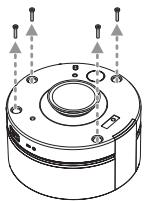
1 Remove all screws (4) in the image below.
- Use a cross-slot screwdriver. (commercially available).
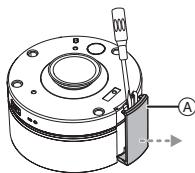
2 Remove the cover A.
- A double-sided adhesive strip is attached to the cover . Inserting a flat-head screwdriver or similar in the groove and prising the cover loose will allow easier removal.
3 Turn over this unit and remove the cover ⑧ , then grab the cable ⑨ and pull it out.

4 Grab the cable ① and pull it out.
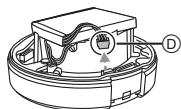
5 Take out the battery.
- A double-sided adhesive strip is attached to the battery.

Panasonic Testing Centre, Winsberging
Panasonic Testing Centre,
Winsbergring 11, 22525 Hamburg, Germania
Circa 12 h (Boost off, Bluetooth®)

m = 311 ;
6 Schakelaar stand-by/on [G/l]
Ongeveer 12 h (Boost off, Bluetooth®)
Laadtijd batterij:
Ongeveer 6 h
Levensduur batterij (Laden):
500keer
Afmetingen ( × H)
95,5mm× 59mm
Gewicht:
Ongeveer 500g

m = 311 ;
Impedance: 4 Ω (1 kHz)
Modo de sonido
20% a 80% RH (sin condensacion)
Protection contra salpicaduras:
Equivalenta IPX4
Nota
Customer Service Directory
Obtain products information and operative assistant; localize the closer distributor or Service Center; buy spare parts and accessories by our Web Site to Latin American:
| COUNTRY | WEB SITE | CONTACT CENTER |
| Panama | www.panasonic.com/pa/soporte/ | 800-7262 |
| Colombia | www.panasonic.com/co/soporte/ | 01-8000-947262 |
| Ecuador | www.panasonic.com/ec/soporte/ | 1-800-726276 |
| Costa Rica | www.panasonic.com/cr/soporte/ | 800-7262737 |
| El Salvador | www.panasonic.com/sv/soporte/ | 800-7262 |
| Guatemala | www.panasonic.com/gt/soporte/ | 1-801-811-7262 |
| Uruguay | www.panasonic.com/uy/soporte/ | 0-800-7262 |
| Paraguay | www.panasonic.com/uy/soporte/ | 0-800-11-7262 |
| Chile | www.panasonic.com/cl/soporte/ | 800-390-602 022-797-5000 |
| Peru | www.panasonic.com/pe/soporte/ | 0800-00726 |
| Venezuela | www.panasonic.com/ve/soporte/ | 800-7262-800 |
| Mexico | www.panasonic.com/mx/soporte/ | 01800-847-7262 55-5000-1200 |
| Argentina | www.panasonic.com/ar/soporte/ | 0800-333-7262 0810-321-7262 |
| Dominican Republic | www.panasonic.com/do/soporte/ | 809-200-8000 |
For the United Kingdom and Ireland customers
Sales and Support Information
Customer Communications Centre
For customers within the UK: 0344 844 3899
For customers within Ireland: 01 289 8333
- Monday-Friday 9:00 am - 5:00 pm (Excluding public holidays).
For further support on your product, please visit our website: www.panasonic.co.uk
Direct Sales at Panasonic UK
- Order accessory and consumable items for your product with ease and confidence by phoning our Customer Communications Centre Monday-Friday 9:00 am - 5:00 pm (Excluding public holidays).
- Or go on line through our Internet Accessory ordering application at www.pas-europe.com.
- Most major credit and debit cards accepted.
- All enquiries transactions and distribution facilities are provided directly by Panasonic UK.
- It couldn't be simpler!
- Also available through our Internet is direct shopping for a wide range of finished products. Take a browse on our website for further details.
Manufactured by:
Panasonic Corporation
Importer for Europe:
Kadoma, Osaka, Japan
Panasonic Marketing Europe GmbH
Panasonic Testing Centre
Winsbergring 11, 22525 Hamburg, Germany
Panasonic Corporation
Web Site: http://www.panasonic.com
EnGeFrIt DuSp
- Table of contents
- Precautions
- WARNING
- Unit
- USB cable
- CAUTION
- Placement
- Battery pack (Lithium ion battery pack)
- Disposal of Old Equipment and Batteries
- Only for European Union and countries with recycling systems
- Note for the battery symbol (bottom symbol):
- C€0560
- Declaration of Conformity (DoC)
- For Central America and the Caribbean
- About Bluetooth®
- Frequency band used
- Certification of this device
- Restrictions of use
- Range of use
- Interference from other devices
- Intended usage
- Maintenance
- Accessories
- Note
- About the Vibration speaker
- Features of the vibration speaker
- About removal of this unit
- (Important) About the splashproof
- Splashproof performance*
- About the IPX4 (liquid ingress protection level against splashing water)
- Cautions for using around water
- About the power of this unit
- Charging the battery
- Using and charging with connecting to a PC turned on
- Bluetooth® operations
- Bluetooth® pairing
- Press [ / I] to turn this unit on.
- To enter pairing mode, touch and hold [ ] for at least 2 seconds.
- Select "SC-RB5" from the Bluetooth® device's menu.
- Start playback on the Bluetooth® device.
- Connecting a paired Bluetooth device
- Select "SC-RB5" from the Bluetooth® device's menu.
- Start playback on the Bluetooth® device.
- Disconnecting a Bluetooth device
- Using Boost Mode
- Touch [BOOST] of this unit to switch the effect on/off.
- Using illumination
- Touch and hold [BOOST] for at least 2 seconds to switch the effect on/off.
- Using the AUX input
- Connecting multiple SC-RB5 units
- Auto Off function
- To return to the factory preset state
- Press [ / I] to turn this unit on.
- Touch and hold [ ] and [VOL +] until [VOL -] indicator turns off.
- Troubleshooting
- Sound from the device is cut off.
- The device cannot be connected.
- The device is connected but audio cannot be heard from this unit.
- This unit is not operating correctly. For example, this unit turns off all of a sudden or all indicator blink.
- Volume is low when this unit is connected to a TV via Bluetooth®.
- Volume is low.
- Specifications
- Amplifier section
- Sound section
- Bluetooth® section
- Terminals section
- General
- Licenses
- To remove the battery when disposing of this unit
- Modo de sonido
- Nota
- Customer Service Directory
- For the United Kingdom and Ireland customers
- Sales and Support Information
- Customer Communications Centre
- Direct Sales at Panasonic UK
Brand : PANASONIC
Model : SC-RB5E
Category : Bluetooth speaker