
SDM-S204E - Screen SONY - Free user manual and instructions
Find the device manual for free SDM-S204E SONY in PDF.


| Product Type | LCD Monitor |
| Brand | Sony |
| Model | SDM-S204E |
| Diagonal Size | 20 inches (50.8 cm) |
| Native Resolution | 1600 x 1200 (UXGA) |
| Aspect Ratio | 4:3 |
| Panel Technology | TN (Twisted Nematic) |
| Contrast Ratio | 1000:1 (typical) |
| Brightness | 300 cd/m² |
| Response Time | 5 ms (gray to gray) |
| Horizontal Viewing Angle | 160° (typical) |
| Vertical Viewing Angle | 160° (typical) |
| Connectivity | 1 x VGA (D-Sub 15-pin), 1 x DVI-D |
| Audio Input | No (monitor without speakers) |
| Power Supply | External (power adapter) |
| Power Consumption (On) | 45 W (typical) |
| Power Consumption (Standby) | < 1 W |
| Dimensions with Stand (W x H x D) | Approximately 470 x 460 x 240 mm |
| Weight with Stand | About 7.5 kg |
| Main Features | Automatic image adjustment, power management (Energy Star), VESA 100 x 100 mm compatible for wall mount |
| Care and Cleaning | Unplug before cleaning, use a soft dry cloth, avoid solvents |
| Safety | Do not open the casing, risk of electric shock. Use only the supplied adapter. |
| Spare Parts and Repairability | Spare parts are no longer available from the manufacturer. Consult an authorized repairer. |
| General Information | 20-inch professional LCD monitor with UXGA resolution. Designed for office and graphic applications. |
Frequently Asked Questions - SDM-S204E SONY
User questions about SDM-S204E SONY
0 question about this device. Answer the ones you know or ask your own.
Ask a new question about this device
Download the instructions for your Screen in PDF format for free! Find your manual SDM-S204E - SONY and take your electronic device back in hand. On this page are published all the documents necessary for the use of your device. SDM-S204E by SONY.
USER MANUAL SDM-S204E SONY
TFT LCD Color Computer Display
SDM-S204E
Owner's Record
The model and serial numbers are located at the rear of the unit. Record these numbers in the spaces provided below. Refer to them whenever you call upon your dealer regarding this product. Model No. ____ Serial No. ____
WARNING
To prevent fire or shock hazard, do not expose the unit to rain or moisture.
Dangerously high voltages are present inside the unit. Do not open the cabinet. Refer servicing to qualified personnel only.
FCC Notice
This equipment has been tested and found to comply with the limits for a Class B digital device, pursuant to Part 15 of the FCC Rules. These limits are designed to provide reasonable protection against harmful interference in a residential installation. This equipment generates, uses, and can radiate radio frequency energy and, if not installed and used in accordance with the instructions, may cause harmful interference to radio communications. However, there is no guarantee that interference will not occur in a particular installation. If this equipment does cause harmful interference to radio or television reception, which can be determined by turning the equipment off and on, the user is encouraged to try to correct the interference by one or more of the following measures:
– Reorient or relocate the receiving antenna. – Increase the separation between the equipment and receiver. - Connect the equipment into an outlet on a circuit different from that to which the receiver is connected. - Consult the dealer or an experienced radio/TV technician for help. You are cautioned that any changes or modifications not expressly approved in this manual could void your authority to operate this equipment.
IMPORTANTE
If you have any questions about this product, you may call; Sony Customer Information Services Center 1-800-222-7669 or http://www.sony.com/
Declaration of Conformity
Trade Name: SONY
Model: SDM-S204E
Responsible Party: Sony Electronics Inc.
Address: 16450 W. Bernardo Dr,
San Diego, CA 92127 U.S.A.
Telephone Number: 858-942-2230
This device complies with part 15 of the FCC rules. Operation is subject to the following two conditions: (1) This device may not cause harmful interference, and (2) this device must accept any interference received, including interference that may cause undesired operation.
NOTICE
This notice is applicable for USA/Canada only. If shipped to USA/Canada, install only a UL LISTED/CSA LABELLED power supply cord meeting the following specifications:
SPECIFICATIONS
Plug Type Nema-Plug 5-15p
Cord Type SVT or SJT, minimum 3 × 18 AWG
Length Maximum 15 feet
Rating Minimum 7 A, 125 V
NOTICE
As an ENERGY STAR Partner, Sony Corporation has determined that this product meets the ENERGY STAR guidelines for energy efficiency.

This monitor complies with the TCO'03 guidelines.
(for the gray model)
This monitor complies with the TCO'99 guidelines.
(for the black model)
Table of Contents
Precautions 4
Identifying parts and controls 5
Setup 6
Setup 1: Connect the video signal cables ..... 6
Setup 2: Connect the power cord ..... 7
Setup 3: Bundle the cords and cables 8
Setup 4: Turn on the monitor and computer ..... 8
Setup 5: Adjust the height and tilt ..... 9
Selecting the input signal (INPUT button) 10
Customizing Your Monitor....11
Navigating the menu 11
PICTURE ADJUST menu 12
A SCREEN menu (analog RGB signal only) ..... 13
COLOR menu 14
γ GAMMA menu 15
ZOOM menu 15
MENU POSITION menu 15
→ INPUT SENSING ON/OFF menu 15
LANGUAGE menu 16
→← RESET menu 16
ON MENU LOCK menu 16
Technical Features ....17
Power saving function 17
Reducing the power consumption (ECO mode) 17
Automatic picture quality adjustment function
(analog RGB signal only) 18
Troubleshooting ....19
On-screen messages 19
Trouble symptoms and remedies 20
Specifications 22
TCO'99 Eco-document (for the black model) .....i
TCO'03 Eco-document (for the gray model) ..... ii
Precautions
Warning on power connections
- Use the supplied power cord. If you use a different power cord, be sure that it is compatible with your local power supply.
For the customers in the U.S.A.
If you do not use the appropriate cord, this monitor will not conform to mandatory FCC standards.
For the customers in the UK
If you use the monitor in the UK, be sure to use the appropriate UK power cord.
Example of plug types

for 100 to 120 V AC for 200 to 240 V AC for 240 V AC only
The equipment should be installed near an easily accessible outlet.
Installation
Do not install or leave the monitor:
- In places subject to extreme temperatures, for example near a radiator, heating vent, or in direct sunlight. Subjecting the monitor to extreme temperatures, such as in an automobile parked in direct sunlight or near a heating vent, could cause deformations of the casing or malfunctions.
- In places subject to mechanical vibration or shock.
- Near any equipment that generates a strong magnetic field, such as a TV or various other household appliances.
- In places subject to inordinate amounts of dust, dirt, or sand, for example near an open window or an outdoor exit. If setting up temporarily in an outdoor environment, be sure to take adequate precautions against airborne dust and dirt. Otherwise irreparable malfunctions could occur.
Handling the LCD screen
- Do not leave the LCD screen facing the sun as it can damage the LCD screen. Take care when you place the monitor by a window.
- Do not push on or scratch the LCD screen. Do not place a heavy object on the LCD screen. This may cause the screen to lose uniformity or cause LCD panel malfunctions.
- If the monitor is used in a cold place, a residual image may appear on the screen. This is not a malfunction. The screen returns to normal as the temperature rises to a normal operating level.
- If a still picture is displayed for a long time, a residual image may appear for a while. The residual image will eventually disappear.
- The LCD panel becomes warm during operation. This is not a malfunction.
Note on the LCD (Liquid Crystal Display)
Please note that the LCD screen is made with high-precision technology. However, black points or bright points of light (red, blue, or green) may appear constantly on the LCD screen, and irregular colored stripes or brightness may appear on the LCD screen. This is not malfunction.
(Effective dots: more than 99.99%)
Maintenance
- Be sure to unplug the power cord from the power outlet before cleaning your monitor.
- Clean the LCD screen with a soft cloth. If you use a glass cleaning liquid, do not use any type of cleaner containing an anti-static solution or similar additive as this may scratch the LCD screen's coating.
- Clean the cabinet, panel, and controls with a soft cloth lightly moistened with a mild detergent solution. Do not use any type of abrasive pad, scouring powder, or solvent, such as alcohol or benzine.
- Do not rub, touch, or tap the surface of the screen with sharp or abrasive items such as a ballpoint pen or screwdriver. This type of contact may result in a scratched picture tube.
- Note that material deterioration or LCD screen coating degradation may occur if the monitor is exposed to volatile solvents such as insecticide, or if prolonged contact is maintained with rubber or vinyl materials.
Transportation
- Disconnect all cables from the monitor, and after fixing the LCD display at its highest point, grasp both sides of the LCD display firmly taking care not to scratch the screen when transporting. If you drop the monitor, you may be injured or the monitor may be damaged.
- When you transport this monitor for repair or shipment, use the original carton and packing materials.
Disposal of the monitor
- Do not dispose of this monitor with general household waste.
- The fluorescent tube used in this monitor contains mercury. Disposal of this monitor must be carried out in accordance with the regulations of your local sanitation authority.
Identifying parts and controls
See the pages in parentheses for further details.
Front of the LCD display
Side view of the LCD display
Rear of the display stand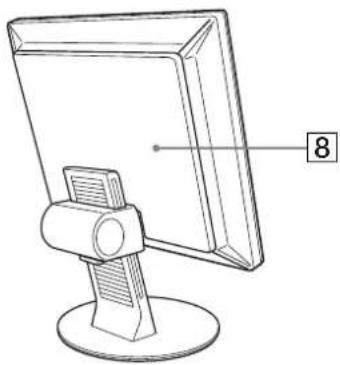
1 ⏻ (Power) switch and ⏻ (power) indicator (pages 8, 17)
This switch turns the monitor on when the ⏻ (power) indicator lights up in red. To turn the monitor off, press this switch again.
If the ⏻ (power) indicator does not light up, press the MAIN POWER switch (7).
②MENU button (page 11)
This button turns the menu screen on and off.
3 ↓/↑ buttons (page 11)
These buttons are used to select the menu items and make adjustments.
4 OK button (page 11)
This button activates the selected menu item and adjustments made using the ↓/↑ buttons (3).
5 INPUT button (page 10)
This button switches the video input signal between INPUT1, INPUT2 and INPUT3 when two computers are connected to the monitor.
6 ECO button (page 17)
This button is used to reduce the power consumption.
7 MAIN POWER switch (page 8)
This switch turns the monitor's main power on and off.
8 Back cover (page 6)
Remove this cover when you connect cables or cords.
Rear of the LCD display
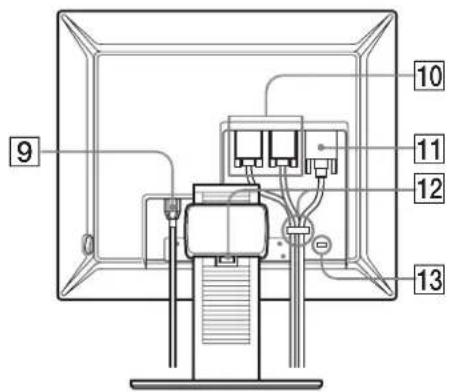
9 AC IN connector (page 7)
This connector connects the power cord (supplied).
10 HD15 input connector (analog RGB) (page 7)
This connector inputs analog RGB video signals (0.700 Vp-p, positive) and sync signals.
11 DVI-D input connector (digital RGB) (page 7)
This connector inputs digital RGB video signals that comply with DVI Rev.1.0.
12 Cable holder (page 8)
This part secures cables and cords to the monitor.
13 Security lock hole
The security lock hole should be used with the Kensington Micro Saver Security System.
Micro Saver Security System is a trademark of Kensington.
Setup
Before using your monitor, check that the following items are included in your carton:
- LCD display
- Power cord • HD15-HD15 video signal cable (analog RGB) • DVI-D video signal cable (digital RGB)
- CD-ROM (utility software for Windows/Macintosh, Operating Instructions, etc.)
- Warranty card
- Quick Setup Guide
Setup 1: Connect the video signal cables
- Turn off the monitor and computer before connecting them.
- When connecting the computer to the monitor's HD15 input connector (analog RGB), refer to "Connect a computer equipped with an HD15 output connector (analog RGB)."
Notes
- Do not touch the pins of the video signal cable connector as this might bend the pins.
- Check the alignment of the HD15 connector to prevent bending the pins of the video signal cable connector.
1 Slide up the back cover.
2 Tilt the display forward.

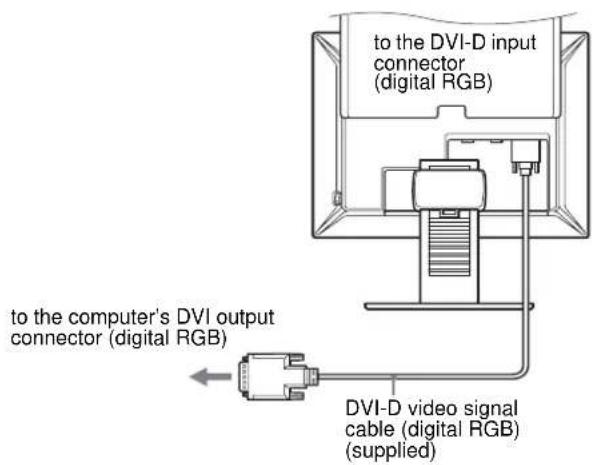
Connect a computer equipped with a DVI output connector (digital RGB).
Using the supplied DVI-D video signal cable (digital RGB), connect the computer to the monitor's DVI-D input connector (digital RGB).
Connect a computer equipped with an HD15 output connector (analog RGB).
Using the supplied HD15-HD15 video signal cable (analog RGB), connect the computer to the monitor's HD15 input connector (analog RGB).
Connect the computer according to the following illustrations.
■ Connecting to an IBM PC/AT or compatible computer

■ Connecting to a Macintosh
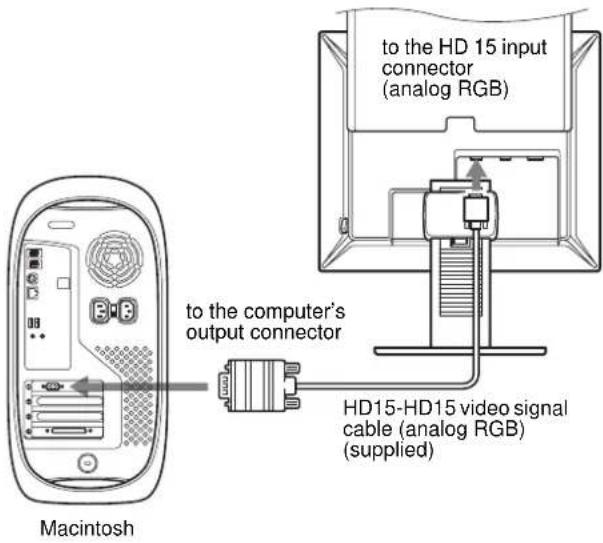
When connecting a Macintosh computer, use an adapter (not supplied), if necessary. Connect the adapter to the computer before connecting the video signal cable.
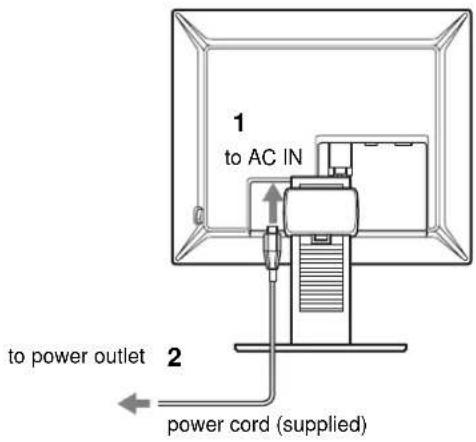
Setup 2: Connect the power cord
1 Connect the supplied power cord securely to the monitor's AC IN connector. 2 Connect the other end securely to a power outlet.
Setup 3: Bundle the cords and cables
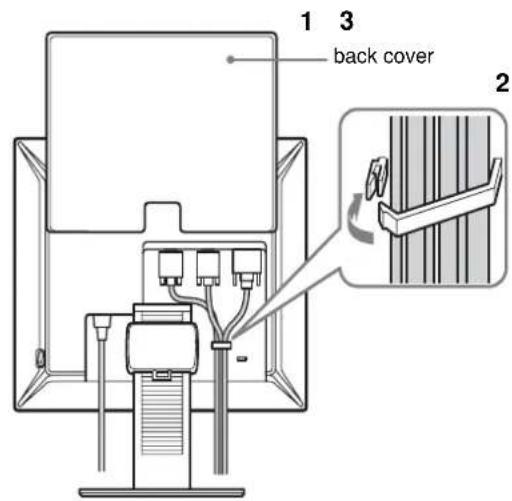
1 Slide up the back cover.
2 Secure the video signal cables using the cable holder on the cabinet.
3 Slide down the back cover.
4 Bundle all the cords and cables through the cable holder of the stand.

Note
If you cannot bundle all the cords and cables through the cable holder of the stand, leave them hanging down.
Setup 4: Turn on the monitor and computer
1 Press the MAIN POWER switch located on the right side of the monitor in the direction of the I (on), if it is not already pressed. Make sure the ⏻ (power) indicator is lit in red.
Note
The monitor is factory shipped with the MAIN POWER switch set to I (on).

2 Press the ⏻ (power) switch on the front right of the monitor.
The ⏻ (power) indicator lights up in green.

3 Turn on the computer.
4 Press the INPUT button to select the desired input signal.
The selected input's picture appears on the screen.
For more information, see "Selecting the input signal (INPUT button)" on page 10.

The installation of your monitor is complete. If necessary, use the monitor's controls to adjust the picture (page 11).
If no picture appears on your screen
- Check that the power cord and the video signal cable are properly connected.
- If "NO INPUT SIGNAL" appears on the screen:
- The computer is in the power saving mode. Try pressing any key on the keyboard or moving the mouse.
- Check that the input signal setting is correct by pressing the INPUT button (page 10).
- If "CABLE DISCONNECTED" appears on the screen:
- Check that the video signal cable is properly connected.
- Check that the input signal setting is correct by pressing the INPUT button (page 10).
- If "OUT OF RANGE" appears on the screen, reconnect the old monitor. Then adjust the computer's graphics board within the following ranges.
| Analog RGB Digital RGB | |
| Horizontal frequency | 28–92 kHz 28–75 kHz |
| Vertical frequency | 48–85 Hz 60 Hz |
| Resolution | 1600 × 1200 or less |
For more information about on-screen messages, see "Trouble symptoms and remedies" on page 20.
No need for specific drivers
The monitor complies with the "DDC" Plug & Play standard and automatically detects all the monitor's information. No specific driver needs to be installed on the computer.
The first time you turn on your computer after connecting the monitor, the setup Wizard may appear on the screen. In this case, follow the on-screen instructions. The Plug & Play monitor is automatically selected so that you can use this monitor.
The vertical frequency is set to 60 Hz.
Since flickers are unobtrusive on the monitor, you can use it as it is. You do not need to set the vertical frequency to any particular high value.
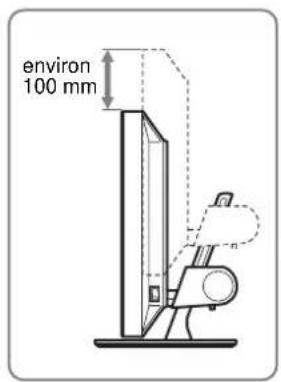
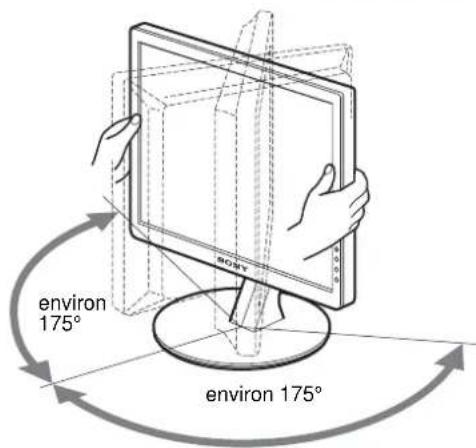
Setup 5: Adjust the height and tilt
This monitor can be adjusted within the angles shown below.
Grasp the sides of the LCD panel, then adjust screen angles.
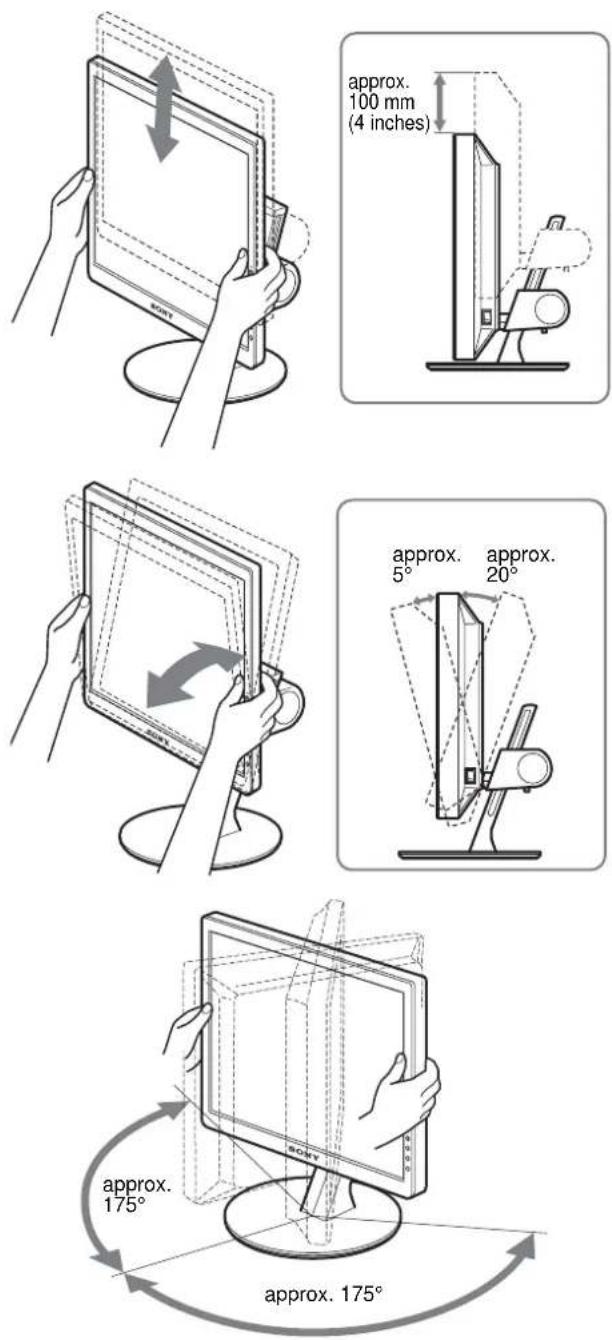
To use the monitor comfortably
Adjust the viewing angle of your monitor according to the height of your desk and chair, and so that light is not reflected from the screen to your eyes.
Note
When adjusting the screen tilt and height, proceed slowly and carefully, being sure not to hit the monitor against the desk.
Selecting the input signal
(INPUT button)
Press the INPUT button.
The input signal changes each time you press this button.
INPUT
| On-screen message (Appears about 5 seconds on the upper left corner.) | Input signal configuration |
| INPUT1 : HD15 HD15 input connector(analog RGB) for INPUT1 | |
| INPUT2 : HD15 HD15 input connector(analog RGB) for INPUT2 | |
| INPUT3 : DVI-D DVI-D input connector(digital RGB) for INPUT3 | |
Customizing Your Monitor
Before making adjustments
Connect the monitor and the computer, and turn them on. For the best results, wait for at least 30 minutes before making adjustments.
You can make numerous adjustments to your monitor using the on-screen menu.
Navigating the menu
1 Display the main menu.
Press the MENU button to display the main menu on your screen.

2 Select the menu.
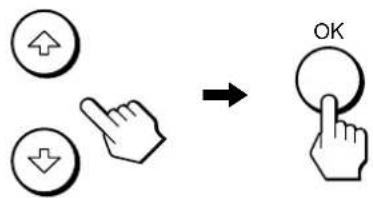
Press the ↓/↑ buttons to display the desired menu. Press the OK button to move to the first menu item.

3 Select the item you want to adjust.
Press the ↓/↑ buttons to select the item you want to adjust, then press the OK button.
If 1s one of the menu items.
When you select and press the OK button, the display returns to the previous menu.
4 Adjust the item.
Press the ↓/↑ buttons to make the adjustment, then press the OK button.
When you press the OK button, the setting is stored, then the display returns to the previous menu.

5 Close the menu.
Press the MENU button once to return to normal viewing. If no buttons are pressed, the menu closes automatically after about 45 seconds.

■ Resetting the adjustments to the default settings
You can reset the adjustments using the RESET menu. For more information about resetting the adjustments, see → (RESET) on page 16.
PICTURE ADJUST menu
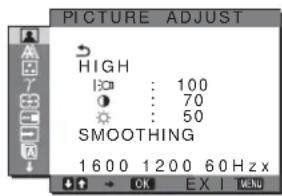
You can adjust the following items using the PICTURE ADJUST menu.
- MODE (ECO mode)
- BACKLIGHT | • CONTRAST ① • BRIGHTNESS
- SMOOTHING
Notes
- You can adjust the backlight, contrast, and brightness for each ECO mode.
- Settings in the PICTURE ADJUST menu can be made for the current input. You can also adjust settings for other inputs.
■ Selecting the MODE (ECO mode)
You can select the picture mode to reduce the power consumption.
Note
You can also select the picture mode with the ECO button (pages 5, 17) on the front of the monitor.
1 Press the MENU button.
The main menu appears on the screen.
2 Press the ↓/↑ buttons to select 📄 (PICTURE ADJUST) and press the OK button.
The PICTURE ADJUST menu appears on the screen.
3 Press the ↓/↑ buttons to select "HIGH" and press the OK button.
The "MODE" menu appears on the screen.
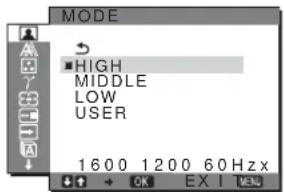
4 Press the ↓/↑ buttons to select the desired mode and press the OK button.
The screen brightness is changed as the mode turns to HIGH → MIDDLE → LOW, and the power consumption is reduced. When you select “USER,” the screen brightness turns to the level you adjusted with the ECO button on the front of the monitor. For more information, see “Reducing the power consumption (ECO mode)” on page 17.
■ Adjusting the BACKLIGHT
If the screen is too bright, adjust the backlight to make the screen easier to see.
1 Press the MENU button.
The main menu appears on the screen.
2 Press the ↓/↑ buttons to select 📄 (PICTURE ADJUST) and press the OK button.
The PICTURE ADJUST menu appears on the screen.
3 Press the ↓/↑ buttons to select “|:○□ BACKLIGHT” and press the OK button. The "BACKLIGHT" menu appears on the screen.
4 Press the ↓/↑ buttons to adjust the light level and press the OK button.
Adjusting the CONTRAST
Adjust the picture contrast.
1 Press the MENU button.
The main menu appears on the screen.
2 Press the ↓/↑ buttons to select 📄 (PICTURE ADJUST) and press the OK button.
The PICTURE ADJUST menu appears on the screen.
3 Press the ↓/↑ buttons to select "○ CONTRAST" and press the OK button.
The "CONTRAST" menu appears on the screen.
4 Press the ↓/↑ buttons to adjust the contrast and press the OK button.
Adjusting the BRIGHTNESS

Adjust the picture brightness (black level).
1 Press the MENU button.
The main menu appears on the screen.
2 Press the ↓/↑ buttons to select 📄 (PICTURE ADJUST) and press the OK button.
The PICTURE ADJUST menu appears on the screen.
3 Press the ↓/↑ buttons to select "BRIGHTNESS" and press the OK button.
The "BRIGHTNESS" menu appears on the screen.
4 Press the ↓/↑ buttons to adjust the brightness and press the OK button.
■ Adjusting the SMOOTHING
If the picture displayed at the FULL2 or FULL1 mode of ZOOM is not smooth, use the picture smoothing function.
1 Press the MENU button.
The main menu appears on the screen.
2 Press the ↓/↑ buttons to select 📄 (PICTURE ADJUST) and press the OK button.
The PICTURE ADJUST menu appears on the screen.
3 Press the ↓/↑ buttons to select "SMOOTHING" and press the OK button.
The SMOOTHING menu appears on the screen.
4 Press the ↓/↑ buttons to select the desired mode.
The smoothing effect becomes stronger in the order of TEXT→STANDARD→GRAPHICS.
- TEXT: To make the characters appear clear. (This mode is suited for text-based applications.)
- STANDARD (The default setting): Standard smoothing effect.
- GRAPHICS: To make the pictures appear clean. (This mode is suited for CD-ROM software such as photo images or illustrations.)
Notes
- When you set the (ZOOM) menu to REAL, the SMOOTHING menu is not available.
- 1600 × 1200 resolution signals are shown only in REAL mode and SMOOTHING is not possible.

SCREEN menu (analog RGB only)
You can adjust the following items using the SCREEN menu.
• AUTO • PHASE • PITCH • H CENTER • V CENTER

Note
When receiving digital RGB signals from the DVI-D input connector, adjustment is unnecessary.
■ Automatic picture quality adjustment function
When the monitor receives an input signal, it automatically adjusts the picture's position and sharpness (phase/pitch), and ensures that a clear picture appears on the screen (page 18).
Note
While the automatic picture quality adjustment function is activated, only the ⏻ (power) switch will operate.
If the automatic picture quality adjustment function of this monitor seems not to completely adjust the picture
You can make further automatic adjustment of the picture quality for the current input signal (See "AUTO" below).
If you still need to make further adjustments to the picture quality
You can manually adjust the picture's sharpness (phase/pitch) and position (horizontal/vertical position).
These adjustments are stored in memory and automatically recalled when the monitor receives a previously input and registered input signal.
■ Make further automatic adjustments to the picture quality for the current input signal (AUTO)
1 Press the MENU button.
The main menu appears on the screen.
2 Press the ↓/↑ buttons to select Ⓐ (SCREEN) and press the OK button.
The SCREEN menu appears on the screen.
3 Press the ↓/↑ buttons to select "AUTO" and press the OK button.
Make the appropriate adjustments of the screen's phase, pitch and horizontal/vertical position for the current input signal and store them.
- Adjust the picture's sharpness manually (Phase/Pitch)
You can adjust the picture's sharpness as follows. This adjustment is effective when the computer is connected to the monitor's HD15 input connector (analog RGB).
1 Set the resolution to 1600 × 1200 on the computer.
2 Load the CD-ROM.
3 Start the CD-ROM, select the area and model, and display the test pattern.
For Windows
Click [Utility] → [Windows]/[Win Utility.exe].
For Macintosh
Click [Utility] → [Mac]/[Mac Utility].
4 Press the MENU button.
The main menu appears on the screen.
5 Press the ↓/↑ buttons to select Ⓐ (SCREEN) and press the OK button.
The SCREEN menu appears on the screen.
6 Press the ↓/↑ buttons to select "PHASE" and press the OK button.
The "PHASE" adjustment menu appears on the screen.
7 Press the ↓/↑ buttons until the horizontal stripes are at a minimum.
Adjust so that the horizontal stripes are at a minimum.
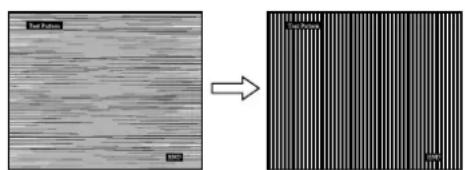
8 Press the OK button.
The main menu appears on the screen.
If vertical stripes are observed over the entire screen, adjust the pitch using the following procedures.
9 Press the ↓/↑ buttons to select "PITCH" and press the OK button.
The "PITCH" adjustment menu appears on the screen.
10 Press the ↓/↑ buttons until the vertical stripes disappear.
Adjust so that the vertical stripes disappear.
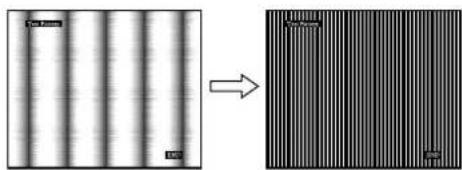
11 Click END on the screen to turn off the test pattern.
■ Adjust the picture's position manually (H CENTER /V CENTER)
If the picture is not in the center of the screen, adjust the picture's centering as follows.
1 Set the resolution to 1600 × 1200 on the computer.
2 Load the CD-ROM.
3 Start the CD-ROM, select the area and model, and display the test pattern.
For Windows
Click [Utility] → [Windows]/[Win Utility.exe].
For Macintosh
Click [Utility] → [Mac]/[Mac Utility].
4 Press the MENU button.
The main menu appears on the screen.
5 Press the ↓/↑ buttons to select ⚪ (SCREEN) and press the OK button.
The SCREEN menu appears on the screen.
6 Press the ↓/↑ buttons to select "H CENTER" or "V CENTER" and press the OK button.
The "H CENTER" adjustment menu or "V CENTER" adjustment menu appears on the screen.
7 Press the ↓/↑ buttons to center the test pattern on the screen.
8 Click END on the screen to turn off the test pattern.
COLOR menu
You can select the picture's color level for the white color field from the default color temperature settings.
Also, if necessary, you can fine tune the color temperature.
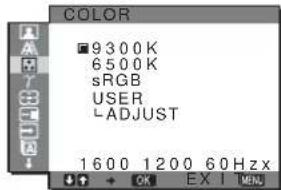
Note
You can adjust the color temperature for each ECO mode.
1 Press the MENU button.
The main menu appears on the screen.
2 Press the ↓/↑ buttons to select ☐ (COLOR) and press the OK button.
The COLOR menu appears on the screen.
3 Press the ↓/↑ buttons to select the desired color temperature and press the OK button.
Whites will change from a bluish hue to a reddish hue as the temperature is lowered from 9300K to 6500K.
When you select "sRGB," the colors adjust to the sRGB profile. (The sRGB color setting is an industry-standard color space protocol designed for computer products.) If you select "sRGB," the color settings of your computer must be set to the sRGB profile.
Notes
- If a connected computer or other equipment is not sRGB-compliant, color cannot be adjusted to the sRGB profile.
- If you select "sRGB," you cannot adjust the contrast and brightness in the PICTURE ADJUST menu. Also, you cannot adjust the GAMMA menu.
■ Fine tuning the color temperature
1 Press the MENU button.
The main menu appears on the screen.
2 Press the ↓/↑ buttons to select ☐ (COLOR) and press the OK button.
The COLOR menu appears on the screen.
3 Press the ↓/↑ buttons to select "ADJUST" and press the OK button.
The fine tuning menu for color temperature appears on the screen.
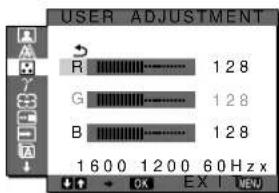
4 Press the ↓/↑ buttons to select R (Red) or B (Blue) and press the OK button. Then press the ↓/↑ buttons to adjust the color temperature and press the OK button.
Since this adjustment changes the color temperature by increasing or decreasing the R and B components with respect to G (green), the G component is fixed.
5 Press the ↓/↑ buttons to select ↻, then press the OK button.
The new color setting is stored in memory and automatically recalled whenever "USER" is selected.
The COLOR menu appears on the screen.
γ GAMMA menu
You can associate the picture's color shade on the screen with the picture's original color shade.
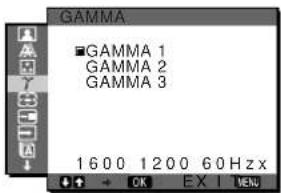
Note
You can adjust the GAMMA for each ECO mode.
1 Press the MENU button.
The main menu appears on the screen.
2 Press the ↓/↑ buttons to select γ (GAMMA) and press the OK button.
The GAMMA menu appears on the screen.
3 Press the ↓/↑ buttons to select the desired mode and press the OK button.
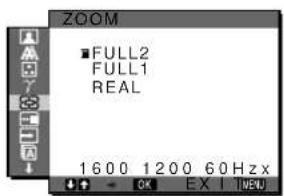
ZOOM menu
The monitor is set to display the picture on the screen in full, irrespective of the picture's mode or resolution in the default setting (FULL2).
You can also view the picture in its actual aspect ratio or resolution.
Note
Settings in the ZOOM menu can be made for the current input. You can also adjust settings for other inputs.
1 Press the MENU button.
The main menu appears on the screen.
2 Press the ↓/↑ buttons to select ☑ (ZOOM) and press the OK button.
The ZOOM menu appears on the screen.
3 Press the ↓/↑ buttons to select the desired mode.
- FULL2 (The default setting): The input signal is displayed on the screen in full, irrespective of the picture's mode or resolution.
- FULL1: The input signal is displayed on the screen at its actual aspect ratio. Therefore, black bands may appear at the top and bottom of the picture, depending on the signal.
- REAL: The input signal is displayed on the screen at its actual resolution. Sub-1600 × 1200 signals are displayed at the center of the screen surrounded by a black frame.
Note
When you use 1600 × 1200 resolution signals, the above mentioned settings are not available. The picture is displayed on the screen in full.
MENU POSITION menu
You can change the menu position if it is blocking an image on the screen.

1 Press the MENU button.
The main menu appears on the screen.
2 Press the ↓/↑ buttons to select ⏻ (MENU POSITION) and press the OK button.
The MENU POSITION menu appears on the screen.
3 Press the ↓/↑ buttons to select the desired position and press the OK button.
You can choose one of 9 positions where the menu will appear.
→ INPUT SENSING ON/OFF menu
When you select AUTO ON in the INPUT SENSING ON/OFF menu, the monitor automatically detects an input signal to an input terminal, and changes the input automatically before the monitor goes into the power saving mode.

1 Press the MENU button.
The main menu appears on the screen.
2 Press the ↓/↑ buttons to select → (INPUT SENSING ON/OFF) and press the OK button.
The INPUT SENSING menu appears on the screen.
3 Press the ↓/↑ buttons to select the desired mode and press the OK button.
- ON: When the selected input terminal has no input signal, or when you select an input terminal by the INPUT button on the monitor and the terminal has no input signal, the on-screen message appears (page 19) and the monitor checks the input signal to another input terminal automatically to change the input. When the input is changed, the selected input terminal is displayed on the left upper of the screen. When there is no input signal, the monitor goes into the power saving mode automatically.
- OFF: The input is not changed automatically. Press the INPUT button to change the input.

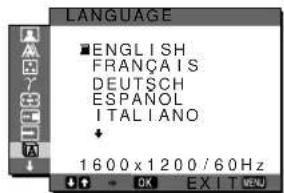
LANGUAGE menu
1 Press the MENU button.
The main menu appears on the screen.
2 Press the ↓/↑ buttons to select A (LANGUAGE) and press the OK button.
The LANGUAGE menu appears on the screen.
3 Press the ↓/↑ buttons to select a language and press the OK button.
- English
- Français: French
- Deutsch: German
- Español: Spanish
- Italiano: Italian • Nederlands: Dutch • Svenska: Swedish
• Русский: Russian • 日本語: Japanese • 中文: Chinese

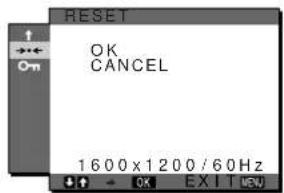
RESET menu
Reset the adjustments to the default settings.
1 Press the MENU button.
The main menu appears on the screen.
2 Press the ↓/↑ buttons to select ⋯ (RESET) and press the OK button.
The RESET menu appears on the screen.
3 Press the ↓/↑ buttons to select the desired mode and press the OK button.
- OK: To reset all of the adjustment data to the default settings. Note that the “LANGUAGE” setting is not reset by this method.
- CANCEL: To cancel resetting and return to the menu screen.

MENU LOCK menu
Lock the control of buttons to prevent accidental adjustments or resetting.

1 Press the MENU button.
The main menu appears on the screen.
2 Press the ↓/↑ buttons to select O π (MENU LOCK) and press the OK button.
The MENU LOCK menu appears on the screen.

Press the ↓/↑ buttons to select either "ON" or "OFF."
- ON: Only the ⏻ (power) switch and INPUT button will operate. If you attempt any other operation, the ON (MENU LOCK) icon appears on the screen.
- OFF: Set "ON MENU LOCK" to off. If "ON MENU LOCK" has been set to "ON," when you press the MENU button, "ON MENU LOCK" is automatically selected.
Technical Features
Power saving function
This monitor meets the power-saving guidelines set by VESA, ENERGY STAR, and NUTEK. If the monitor is connected to a computer or video graphics board that is DPM (Display Power Management) Standard compliant, the monitor will automatically reduce power consumption as shown below.
| Power mode | Power consumption | + (power) indicator |
| normal operation | 58 W (max.) green | |
| ECO mode green | ||
| active off* (deep sleep) | 2.7 W (max.)** orange | |
| ⏻ (power) off 2.7 W (max.) red | ||
| main power off 0 W off | ||
* When your computer enters the “active off” mode, the input signal is cut and “NO INPUT SIGNAL” appears on the screen. After 5 seconds, the monitor enters the power saving mode. “Deep sleep” is a power saving mode defined by the Environmental Protection Agency.
** The maximum power consumption is 2.0 W in 100-120 V AC areas.
Reducing the power consumption (ECO mode)
If you press the ECO button on the front of the monitor repeatedly, you can select the screen brightness.
![graph TD A["ECO"] --> B["ECO HIGH"] B --> C["ECO MIDDLE"] C --> D["ECO LOW"] D --> E["ECO USER 50"]](/content/2026/05/1047465/images/18a134f394d64dee1c10a13ad30578e058cfbe43d14b6d59c6fe2f4f5779beb2.jpg)
Each mode appears on the screen and the screen brightness is reduced according to the mode. The menu automatically disappears after about 5 seconds.
Screen brightness and power consumption are reduced as the mode changes from HIGH to MIDDLE to LOW.
The default setting of the screen brightness is set to "HIGH." If you select "USER," you can adjust the backlight level by pressing the ↓/↑ buttons as when you select BACKLIGHT using the menu.
Automatic picture quality adjustment function (analog RGB signal only)
When the monitor receives an input signal, it automatically adjusts the picture's position and sharpness (phase/pitch), and ensures that a clear picture appears on the screen.
The factory preset mode
When the monitor receives an input signal, it automatically matches the signal to one of the factory preset modes stored in the monitor's memory to provide a high quality picture at the center of the screen. If the input signal matches the factory preset mode, the picture appears on the screen automatically with the appropriate default adjustments.
If input signals do not match one of the factory preset modes
When the monitor receives an input signal that does not match one of the factory preset modes, the automatic picture quality adjustment function of this monitor is activated to ensure that a clear picture always appears on the screen (within the following monitor frequency ranges):
Horizontal frequency: 28–92 kHz (analog RGB)
28–75 kHz (digital RGB)
Vertical frequency: 48–85 Hz (analog RGB)
60 Hz (digital RGB)
Consequently, the first time the monitor receives input signals that do not match one of the factory preset modes, the monitor may take a longer time than normal to display the picture on the screen. This adjustment data is automatically stored in memory so that next time, the monitor will function in the same way as when the monitor receives the signals that match one of the factory preset modes.
If you adjust the phase, pitch, and picture position manually
For some input signals, the automatic picture quality adjustment function of this monitor may not completely adjust the picture position, phase, and pitch. In this case, you can set these adjustments manually (page 13). If you set these adjustments manually, they are stored in memory as user modes and automatically recalled whenever the monitor receives the same input signals.
Troubleshooting
Before contacting technical support, refer to this section.
On-screen messages
If there is something wrong with the input signal, one of the following messages appears on the screen. To solve the problem, see “Trouble symptoms and remedies” on page 20.
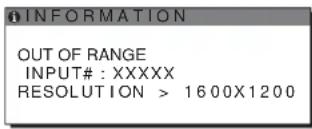
If "OUT OF RANGE" appears on the screen
This indicates that the input signal is not supported by the monitor's specifications. Check the following items. For more information about on-screen messages, see “Trouble symptoms and remedies” on page 20.
If "xxx.x kHz / xxx Hz" is displayed
This indicates that either the horizontal or vertical frequency is not supported by the monitor's specifications. The figures indicate the horizontal and vertical frequencies of the current input signal.

If "RESOLUTION > 1600 × 1200" is displayed
This indicates that the resolution is not supported by the monitor's specifications (1600 × 1200 or less).
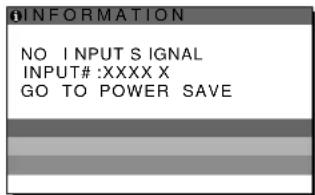
If "NO INPUT SIGNAL" appears on the screen
This indicates that no signal is being input via the currently selected connector.
When INPUT SENSING ON/OFF (page 15) is set to ON, the monitor finds another input signal and changes the input automatically.

GO TO POWER SAVE
The monitor will enter the power saving mode after about 5 seconds from the time the message is displayed.
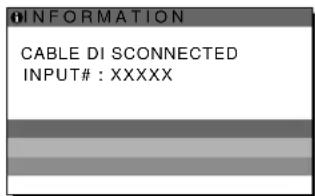
If "CABLE DISCONNECTED" appears on the screen
This indicates that the video signal cable has been disconnected from the currently selected connector. When INPUT SENSING ON/OFF (page 15) is set to ON, the monitor finds another input signal and changes the input automatically.
Trouble symptoms and remedies
If a problem occurs as a result of a connected computer or other equipment, refer to the connected computer/equipment's instruction manual.
For further information and troubleshooting assistance, please visit Sony support website at: http://www.sony.net/
| Symptom Check these items | |
| No picture | |
| If the ⏻ (power) indicator is not lit,or if the ⏻ (power) indicator will notlight up when the ⏻ (power) switchis pressed, | Check that the power cord is properly connected.Check that the monitor's MAIN POWER switch is on (page 8). |
| If the ⏻ (power) indicator turns onin red, | Check that the ⏻ (power) switch is on. |
| If “CABLE DISCONNECTED”appears on the screen, | Check that the video signal cable is properly connected and all plugs are firmly seated intheir sockets (page 6).Check that the video input connector's pins are not bent or pushed in.Check that the input select setting is correct (page 10).A non-supplied video signal cable is connected. If you connect a non-supplied videosignal cable, “CABLE DISCONNECTED” may appear on the screen. This is not amalfunction. |
| If “NO INPUT SIGNAL” appears onthe screen, or the ⏻ (power)indicator is either orange oralternating between green andorange, | Check that the video signal cable is properly connected and all plugs are firmly seated intheir sockets (page 6).Check that the video input connector's pins are not bent or pushed in.Check that the input select setting is correct (page 10).Problem caused by a connected computer or other equipment, and notcaused by the monitorThe computer is in the power saving mode. Try pressing any key on the keyboard ormoving the mouse.Check that your graphics board is installed properly.Check that the computer's power is on.Restart the computer. |
| If “OUT OF RANGE” appears onthe screen (page 19), | Problem caused by a connected computer or other equipment, and notcaused by the monitorCheck that the video frequency range is within that specified for the monitor. If youreplaced an old monitor with this monitor, reconnect the old monitor and adjust thecomputer's graphics board within the following ranges:Horizontal frequency: 28–92 kHz (analog RGB), 28–75 kHz (digital RGB)Vertical frequency: 48–85 Hz (analog RGB), 60 Hz (digital RGB)Resolution: 1600 × 1200 or less |
| If using Windows, • If you replaced an old monitor with this monitor, reconnect the old monitor and do thefollowing. Select “SONY” from the “Manufacturers” list and select “SDM-S204E” fromthe “Models” list in the Windows device selection screen. If “SDM-S204E” does notappear in the “Models” list, try “Plug & Play.” | |
| If using a Macintosh system, • When connecting a Macintosh computer, use an adapter (not supplied) if necessary.Connect the adapter to the computer before connecting the video signal cable. | |
| Picture flickers, bounces,oscillates, or is scrambled. | Adjust the pitch and phase (analog RGB signal only) (page 13).Try plugging the monitor into a different AC outlet, preferably on a different circuit.Change the orientation of the monitor.Problem caused by a connected computer or other equipment, and notcaused by the monitorCheck your graphics board manual for the proper monitor setting.Confirm that the graphics mode (VESA, Macintosh 19" Color, etc.) and the frequency ofthe input signal are supported by this monitor. Even if the frequency is within the properrange, some graphics boards may have a sync pulse that is too narrow for the monitor tosync with correctly.This monitor does not process interlace signals. Set for progressive signals.Adjust the computer’s refresh rate (vertical frequency) to obtain the best possible picture(60 Hz is recommended). |
| Picture is fuzzy. | Adjust the brightness and contrast (page 12).Adjust the pitch and phase (analog RGB signal only) (page 13).Adjust the smoothing (page 12).■Problem caused by a connected computer or other equipment, and not caused by the monitorSet the resolution to 1600 × 1200 on your computer. |
| Picture is ghosting. | Eliminate the use of video cable extensions and/or video switch boxes.Check that all plugs are firmly seated in their sockets. |
| Picture is not centered or sized properly (analog RGB signal only). | Adjust the pitch and phase (page 13).Adjust the picture position (page 14). Note that some video modes do not fill the screen to the edges. |
| Picture is too small. | Set the zoom setting to “FULL2” (page 15).■Problem caused by a connected computer or other equipment, and not caused by the monitorSet the resolution to 1600 × 1200 on your computer. |
| Picture is dark. • Adjust the brightness (page 12).Adjust the backlight (page 12).It takes a few minutes for the display to become bright after turning on the monitor.Adjust the gamma on the GAMMA menu (page 15).The screen might turn darker, depends on ECO mode you selected. | |
| Wavy or elliptical pattern (moire) is visible. | Adjust the pitch and phase (analog RGB signal only) (page 13). |
| Color is not uniform. | Adjust the pitch and phase (analog RGB signal only) (page 13). |
| White does not look white. | Adjust the color temperature (page 14). |
| Monitor buttons do not operate (appears on the screen). | If “MENU LOCK” is set to “ON,” set it to “OFF” (page 16). |
| Resolution displayed on the menu screen is incorrect. | Depending on the graphics board setting, the resolution displayed on the menu screen may not coincide with the one set on the computer. |
| After turning off the main power, the (power) indicator stays bright for a while. | When the main power is on but the (power) switch is not pressed, or when the monitor is in the power saving mode, if you turn the MAIN POWER switch off, the (power) indicator may not turn off right away. This is not a malfunction. |
Displaying this monitor's information
While the monitor is receiving a video signal, press and hold the MENU button for more than 5 seconds until the information box appears.
Press the MENU button again to make the box disappear.
Example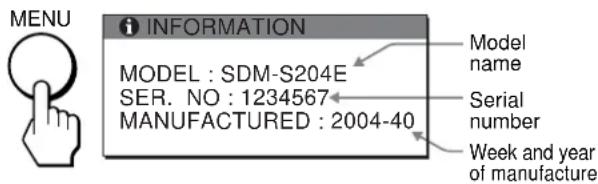
If any problem persists, call your authorized Sony dealer and give the following information:
• Model name: SDM-S204E - Serial number • Detailed description of the problem - Date of purchase - Name and specifications of your computer and graphics board - Type of input signals (analog RGB/digital RGB)
Specifications
LCD panel
Panel type: a-Si TFT Active Matrix
Picture size: 20.1 inch (51 cm)
Input signal format
RGB operating frequency*
Horizontal: 28–92 kHz (analog RGB)
28–75 kHz (digital RGB)
Vertical: 48–85 Hz (analog RGB)
60 Hz (digital RGB)
Resolution
Horizontal: Max. 1600 dots
Vertical: Max. 1200 lines
Input signal levels
Analog RGB video signal:
0.7 Vp-p, 75 Ω, positive
SYNC signal:
TTL level, 2.2 kΩ, positive or negative (Separate horizontal and vertical, or composite sync)
0.3 Vp-p, 75 Ω, negative (Sync on green)
Digital RGB (DVI) signal: TMDS (Single link)
Power requirements
100–240 V, 50–60 Hz, Max. 1.2 A
Power consumption
Max. 58 W
Operating temperature
Operating temperature
5-35°C
Dimensions
Display (upright):
With stand
Width: 440.5 mm (17 3/8 inches)
Height: 377.5 - 477.5 mm (14 7/8 - 18 7/8 inches)
Depth: 232.0 - 248.0 mm (9 1/4 - 9 7/8 inches)
Without stand
Width: 440.5 mm (17 3/8 inches)
Height: 354.5 mm (14 inches)
Depth: 72.5 mm (2 7/8 inches)
Mass
Approx. 8.2 kg (18 lb 1 1/4 oz) (with stand)
Approx. 6.2 kg (13 lb 11 oz) (without stand)
Plug & Play
DDC2B
Accessories
See page 6.
* Recommended horizontal and vertical timing condition
- Horizontal sync width duty should be more than 4.8% of total horizontal time or 0.8 μs, whichever is larger. • Horizontal blanking width should be more than 2.5 μs. • Vertical blanking width should be more than 450 μs.
Design and specifications are subject to change without notice.
TCO'99 Eco-document (for the black model)

■ Congratulations!
You have just purchased a TCO'99 approved and labelled product! Your choice has provided you with a product developed for professional use. Your purchase has also contributed to reducing the burden on the environment and also to the further development of environmentally adapted electronics products.
■ Why do we have environmentally labelled computers?
In many countries, environmental labelling has become an established method for encouraging the adaptation of goods and services to the environment. The main problem, as far as computers and other electronics equipment are concerned, is that environmentally harmful substances are used both in the products and during their manufacture. Since it is not so far possible to satisfactorily recycle the majority of electronics equipment, most of these potentially damaging substances sooner or later enter nature.
There are also other characteristics of a computer, such as energy consumption levels, that are important from the viewpoints of both the work (internal) and natural (external) environments. Since all methods of electricity generation have a negative effect on the environment (e.g. acidic and climate-influencing emissions, radioactive waste), it is vital to save energy. Electronics equipment in offices is often left running continuously and thereby consumes a lot of energy.
■ What does labelling involve?
This product meets the requirements for the TCO'99 scheme which provides for international and environmental labelling of personal computers. The labelling scheme was developed as a joint effort by the TCO (The Swedish Confederation of Professional Employees), Svenska Naturskyddsforeningen (The Swedish Society for Nature Conservation) and Statens Energimydighet (The Swedish National Energy Administration).
Approval requirements cover a wide range of issues: environment, ergonomics, usability, emission of electric and magnetic fields, energy consumption and electrical and fire safety.
The environmental demands impose restrictions on the presence and use of heavy metals, brominated and chlorinated flame retardants, CFCs (freons) and chlorinated solvents, among other things. The product must be prepared for recycling and the manufacturer is obliged to have an environmental policy which must be adhered to in each country where the company implements its operational policy.
The energy requirements include a demand that the computer and/or display, after a certain period of inactivity, shall reduce its power consumption to a lower level in one or more stages. The length of time to reactivate the computer shall be reasonable for the user.
Labelled products must meet strict environmental demands, for example, in respect of the reduction of electric and magnetic fields, physical and visual ergonomics and good usability.
Below you will find a brief summary of the environmental requirements met by this product. The complete environmental criteria document may be ordered from:
TCO Development
SE-114 94 Stockholm, Sweden
Fax: +46 8 782 92 07
Email (Internet): development@tco.se
Current information regarding TCO'99 approved and labelled
products may also be obtained via the Internet, using the address:
http://www.tco-info.com/
■ Environmental requirements
Flame retardants
Flame retardants are present in printed circuit boards, cables, wires, casings and housings. Their purpose is to prevent, or at least to delay the spread of fire. Up to 30% of the plastic in a computer casing can consist of flame retardant substances. Most flame retardants contain bromine or chloride, and those flame retardants are chemically related to another group of environmental toxins, PCBs. Both the flame retardants containing bromine or chloride and the PCBs are suspected of giving rise to severe health effects, including reproductive damage in fish-eating birds and mammals, due to the bio-accumulative* processes. Flame retardants have been found in human blood and researchers fear that disturbances in foetus development may occur.
The relevant TCO'99 demand requires that plastic components weighing more than 25 grams must not contain flame retardants with organically bound bromine or chlorine. Flame retardants are allowed in the printed circuit boards since no substitutes are available.
Cadmium**
Cadmium is present in rechargeable batteries and in the colour-generating layers of certain computer displays. Cadmium damages the nervous system and is toxic in high doses. The relevant TCO'99 requirement states that batteries, the colour-generating layers of display screens and the electrical or electronics components must not contain any cadmium.
Mercury**
Mercury is sometimes found in batteries, relays and switches. It damages the nervous system and is toxic in high doses. The relevant TCO'99 requirement states that batteries may not contain any mercury. It also demands that mercury is not present in any of the electrical or electronics components associated with the labelled unit.
CFCs (freons)
The relevant TCO'99 requirement states that neither CFCs nor HCFCs may be used during the manufacture and assembly of the product. CFCs (freons) are sometimes used for washing printed circuit boards. CFCs break down ozone and thereby damage the ozone layer in the stratosphere, causing increased reception on earth of ultraviolet light with e.g. increased risks of skin cancer (malignant melanoma) as a consequence.
Lead**
Lead can be found in picture tubes, display screens, solders and capacitors. Lead damages the nervous system and in higher doses, causes lead poisoning. The relevant TCO'99 requirement permits the inclusion of lead since no replacement has yet been developed.
* Bio-accumulative is defined as substances which accumulate within living organisms. ** Lead, Cadmium and Mercury are heavy metals which are Bio-accumulative.
TCO'03 Eco-document (for the gray model)

■ Congratulations!
The display you have just purchased carries the TCO'03 Displays label. This means that your display is designed, manufactured and tested according to some of the strictest quality and environmental requirements in the world. This makes for a high performance product, designed with the user in focus that also minimizes the impact on our natural environment.
■ Ergonomics
- Good visual ergonomics and image quality in order to improve the working environment for the user and to reduce sight and strain problems. Important parameters are luminance, contrast, resolution, reflectance, colour rendition and image stability.
■ Energy
- Energy-saving mode after a certain time – beneficial both for the user and the environment
- Electrical safety
■ Emissions
• Electromagnetic fields - Noise emissions
Ecology
- The product must be prepared for recycling and the manufacturer must have a certified environmental management system such as EMAS or ISO 14 001
- Restrictions on
- chlorinated and brominated flame retardants and polymers
- heavy metals such as cadmium, mercury and lead.
The requirements included in this label have been developed by TCO Development in co-operation with scientists, experts, users as well as manufacturers all over the world. Since the end of the 1980s TCO has been
involved in influencing the development of IT equipment in a more user-friendly direction. Our labelling system started with displays in 1992 and is now requested by users and IT-manufacturers all over the world.
For more information, please visit www.tcodevelopment.com
Recycling Information
■ Customer in Europe
The collection and recycling of this product has been planned according to your country's relevant legislation. To ensure that this product will be collected and recycled in way that minimizes the impact on the environment, please do the following:
- If you purchased this product for private use, contact your municipality or the waste collection system and bring the product to this collection point / have the product be picked up by the waste collection system. Alternatively, your retailer might take back this if you purchase new equivalent equipment; please check with your retailer whether he will take back this product before bringing it. For information on your country's recycling arrangements, please contact the Sony representation in your country (contact details at: www.sony-europe.com). Further details on specific recycling systems can be found at the following addresses:
- Belgium: www.recupel.be
- Netherlands: www.nvmp.nl (consumer electronics) www.ictmilieu.nl (IT equipment)
- Norway: www.elretur.no
- Sweden: www.el-kretsen.se
- Switzerland: www.swico.ch
- If you use this product professionally, check the product's delivery contract for take back / recycling arrangements and follow the procedures described therein. Alternatively, follow the procedures described under point 1.
■ Customer in USA
We Sony as a member of EIA recommends to visit URL below http://www.eiae.org/
■ Customer in Asia
http://www.sony.co.jp/SonyInfo/Environment/recycle/3R.html
TFT LCD Color Computer Display
SDM-S204E
Owner's Record
The model and serial numbers are located at the rear of the unit. Record these numbers in the spaces provided below. Refer to them whenever you call upon your dealer regarding this product. Model No. ____ Serial No. ____
WARNING
To prevent fire or shock hazard, do not expose the unit to rain or moisture.
Dangerously high voltages are present inside the unit. Do not open the cabinet. Refer servicing to qualified personnel only.
FCC Notice
This equipment has been tested and found to comply with the limits for a Class B digital device, pursuant to Part 15 of the FCC Rules. These limits are designed to provide reasonable protection against harmful interference in a residential installation. This equipment generates, uses, and can radiate radio frequency energy and, if not installed and used in accordance with the instructions, may cause harmful interference to radio communications. However, there is no guarantee that interference will not occur in a particular installation. If this equipment does cause harmful interference to radio or television reception, which can be determined by turning the equipment off and on, the user is encouraged to try to correct the interference by one or more of the following measures:
– Reorient or relocate the receiving antenna. – Increase the separation between the equipment and receiver. - Connect the equipment into an outlet on a circuit different from that to which the receiver is connected. - Consult the dealer or an experienced radio/TV technician for help. You are cautioned that any changes or modifications not expressly approved in this manual could void your authority to operate this equipment.
IMPORTANTE
If you have any questions about this product, you may call; Sony Customer Information Services Center 1-800-222-7669 or http://www.sony.com/
Declaration of Conformity
Trade Name: SONY
Model: SDM-S204E
Responsible Party: Sony Electronics Inc.
Address: 16450 W. Bernardo Dr,
San Diego, CA 92127 U.S.A.
Telephone Number: 858-942-2230
This device complies with part 15 of the FCC rules. Operation is subject to the following two conditions: (1) This device may not cause harmful interference, and (2) this device must accept any interference received, including interference that may cause undesired operation.
NOTICE
This notice is applicable for USA/Canada only. If shipped to USA/Canada, install only a UL LISTED/CSA LABELLED power supply cord meeting the following specifications:
SPECIFICATIONS
Plug Type Nema-Plug 5-15p
Cord Type SVT or SJT, minimum 3 × 18 AWG
Length Maximum 15 feet
Rating Minimum 7 A, 125 V
NOTICE
As an ENERGY STAR Partner, Sony Corporation has determined that this product meets the ENERGY STAR guidelines for energy efficiency.

This monitor complies with the TCO'03 guidelines.
(for the gray model)
This monitor complies with the TCO'99 guidelines.
(for the black model)
Table of Contents
Precautions....4
TCO'99 Eco-document (for the black model) .....i
TCO'03 Eco-document (for the gray model)....ii
Precautions
Note


5 Exit the menu.
Click [Utility] → [Windows]/[Win Utility.exe].
For Macintosh
Click [Utility] → [Mac]/[Mac Utility].
Note
TCO'99 Eco-document (for the black model)

■ Congratulations!
You have just purchased a TCO'99 approved and labelled product! Your choice has provided you with a product developed for professional use. Your purchase has also contributed to reducing the burden on the environment and also to the further development of environmentally adapted electronics products.
■ Why do we have environmentally labelled computers?
In many countries, environmental labelling has become an established method for encouraging the adaptation of goods and services to the environment. The main problem, as far as computers and other electronics equipment are concerned, is that environmentally harmful substances are used both in the products and during their manufacture. Since it is not so far possible to satisfactorily recycle the majority of electronics equipment, most of these potentially damaging substances sooner or later enter nature.
There are also other characteristics of a computer, such as energy consumption levels, that are important from the viewpoints of both the work (internal) and natural (external) environments. Since all methods of electricity generation have a negative effect on the environment (e.g. acidic and climate-influencing emissions, radioactive waste), it is vital to save energy. Electronics equipment in offices is often left running continuously and thereby consumes a lot of energy.
■ What does labelling involve?
This product meets the requirements for the TCO'99 scheme which provides for international and environmental labelling of personal computers. The labelling scheme was developed as a joint effort by the TCO (The Swedish Confederation of Professional Employees), Svenska Naturskyddsforeningen (The Swedish Society for Nature Conservation) and Statens Energimydighet (The Swedish National Energy Administration).
Approval requirements cover a wide range of issues: environment, ergonomics, usability, emission of electric and magnetic fields, energy consumption and electrical and fire safety.
The environmental demands impose restrictions on the presence and use of heavy metals, brominated and chlorinated flame retardants, CFCs (freons) and chlorinated solvents, among other things. The product must be prepared for recycling and the manufacturer is obliged to have an environmental policy which must be adhered to in each country where the company implements its operational policy.
The energy requirements include a demand that the computer and/or display, after a certain period of inactivity, shall reduce its power consumption to a lower level in one or more stages. The length of time to reactivate the computer shall be reasonable for the user.
Labelled products must meet strict environmental demands, for example, in respect of the reduction of electric and magnetic fields, physical and visual ergonomics and good usability.
Below you will find a brief summary of the environmental requirements met by this product. The complete environmental criteria document may be ordered from:
TCO Development
SE-114 94 Stockholm, Sweden
Fax: +46 8 782 92 07
Email (Internet): development@tco.se
Current information regarding TCO'99 approved and labelled
products may also be obtained via the Internet, using the address:
http://www.tco-info.com/
■ Environmental requirements
Flame retardants
Flame retardants are present in printed circuit boards, cables, wires, casings and housings. Their purpose is to prevent, or at least to delay the spread of fire. Up to 30% of the plastic in a computer casing can consist of flame retardant substances. Most flame retardants contain bromine or chloride, and those flame retardants are chemically related to another group of environmental toxins, PCBs. Both the flame retardants containing bromine or chloride and the PCBs are suspected of giving rise to severe health effects, including reproductive damage in fish-eating birds and mammals, due to the bio-accumulative* processes. Flame retardants have been found in human blood and researchers fear that disturbances in foetus development may occur.
The relevant TCO'99 demand requires that plastic components weighing more than 25 grams must not contain flame retardants with organically bound bromine or chlorine. Flame retardants are allowed in the printed circuit boards since no substitutes are available.
Cadmium**
Cadmium is present in rechargeable batteries and in the colour-generating layers of certain computer displays. Cadmium damages the nervous system and is toxic in high doses. The relevant TCO'99 requirement states that batteries, the colour-generating layers of display screens and the electrical or electronics components must not contain any cadmium.
Mercury**
Mercury is sometimes found in batteries, relays and switches. It damages the nervous system and is toxic in high doses. The relevant TCO'99 requirement states that batteries may not contain any mercury. It also demands that mercury is not present in any of the electrical or electronics components associated with the labelled unit.
CFCs (freons)
The relevant TCO'99 requirement states that neither CFCs nor HCFCs may be used during the manufacture and assembly of the product. CFCs (freons) are sometimes used for washing printed circuit boards. CFCs break down ozone and thereby damage the ozone layer in the stratosphere, causing increased reception on earth of ultraviolet light with e.g. increased risks of skin cancer (malignant melanoma) as a consequence.
Lead**
Lead can be found in picture tubes, display screens, solders and capacitors. Lead damages the nervous system and in higher doses, causes lead poisoning. The relevant TCO'99 requirement permits the inclusion of lead since no replacement has yet been developed.
* Bio-accumulative is defined as substances which accumulate within living organisms. ** Lead, Cadmium and Mercury are heavy metals which are Bio-accumulative.
TCO'03 Eco-document (for the gray model)

■ Congratulations!
The display you have just purchased carries the TCO'03 Displays label. This means that your display is designed, manufactured and tested according to some of the strictest quality and environmental requirements in the world. This makes for a high performance product, designed with the user in focus that also minimizes the impact on our natural environment.
■ Ergonomics
- Good visual ergonomics and image quality in order to improve the working environment for the user and to reduce sight and strain problems. Important parameters are luminance, contrast, resolution, reflectance, colour rendition and image stability.
■ Energy
- Energy-saving mode after a certain time – beneficial both for the user and the environment
- Electrical safety
■ Emissions
• Electromagnetic fields - Noise emissions
Ecology
- The product must be prepared for recycling and the manufacturer must have a certified environmental management system such as EMAS or ISO 14001.
- Restrictions on
- chlorinated and brominated flame retardants and polymers
- heavy metals such as cadmium, mercury and lead.
The requirements included in this label have been developed by TCO Development in co-operation with scientists, experts, users as well as manufacturers all over the world. Since the end of the 1980s TCO has been
involved in influencing the development of IT equipment in a more user-friendly direction. Our labelling system started with displays in 1992 and is now requested by users and IT-manufacturers all over the world.
For more information, please visit www.tcodevelopment.com
Recycling Information
■ Customer in Europe
The collection and recycling of this product has been planned according to your country's relevant legislation. To ensure that this product will be collected and recycled in a way that minimizes the impact on the environment, please do the following:
- If you purchased this product for private use, contact your municipality or the waste collection system and bring the product to this collection point / have the product be picked up by the waste collection system. Alternatively, your retailer might take back this if you purchase new equivalent equipment; please check with your retailer whether he will take back this product before bringing it. For information on your country's recycling arrangements, please contact the Sony representation in your country (contact details at: www.sony-europe.com). Further details on specific recycling systems can be found at the following addresses:
- Belgium: www.recupel.be
- Netherlands: www.nvmp.nl (consumer electronics) www.ictmilieu.nl (IT equipment)
- Norway: www.elretur.no
- Sweden: www.el-kretsen.se
- Switzerland: www.swico.ch
- If you use this product professionally, check the product's delivery contract for take back / recycling arrangements and follow the procedures described therein. Alternatively, follow the procedures described under point 1.
Customer in USA
We Sony as a member of EIA recommends to visit URL below http://www.eiae.org/
Customer in Asia
http://www.sony.co.jp/SonyInfo/Environment/recycle/3R.html
TFT LCD Color Computer Display
SDM-S204E
Owner's Record
The model and serial numbers are located at the rear of the unit. Record these numbers in the spaces provided below. Refer to them whenever you call upon your dealer regarding this product. Model No. ____ Serial No. ____
WARNING
To prevent fire or shock hazard, do not expose the unit to rain or moisture.
Dangerously high voltages are present inside the unit. Do not open the cabinet. Refer servicing to qualified personnel only.
FCC Notice
This equipment has been tested and found to comply with the limits for a Class B digital device, pursuant to Part 15 of the FCC Rules. These limits are designed to provide reasonable protection against harmful interference in a residential installation. This equipment generates, uses, and can radiate radio frequency energy and, if not installed and used in accordance with the instructions, may cause harmful interference to radio communications. However, there is no guarantee that interference will not occur in a particular installation. If this equipment does cause harmful interference to radio or television reception, which can be determined by turning the equipment off and on, the user is encouraged to try to correct the interference by one or more of the following measures:
– Reorient or relocate the receiving antenna. – Increase the separation between the equipment and receiver. – Connect the equipment into an outlet on a circuit different from that to which the receiver is connected. – Consult the dealer or an experienced radio/TV technician for help. You are cautioned that any changes or modifications not expressly approved in this manual could void your authority to operate this equipment.
IMPORTANTE
If you have any questions about this product, you may call; Sony Customer Information Services Center 1-800-222-7669 or http://www.sony.com/
Declaration of Conformity
Trade Name: SONY
Model: SDM-S204E
Responsible Party: Sony Electronics Inc.
Address: 16450 W. Bernardo Dr,
San Diego, CA 92127 U.S.A.
Telephone Number: 858-942-2230
This device complies with part 15 of the FCC rules. Operation is subject to the following two conditions: (1) This device may not cause harmful interference, and (2) this device must accept any interference received, including interference that may cause undesired operation.
NOTICE
This notice is applicable for USA/Canada only. If shipped to USA/Canada, install only a UL LISTED/CSA LABELLED power supply cord meeting the following specifications:
SPECIFICATIONS
Plug Type Nema-Plug 5-15p
Cord Type SVT or SJT, minimum 3 × 18 AWG
Length Maximum 15 feet
Rating Minimum 7 A, 125 V
NOTICE
As an ENERGY STAR Partner, Sony Corporation has determined that this product meets the ENERGY STAR guidelines for energy efficiency.

This monitor complies with the TCO'03 guidelines.
(for the gray model)
This monitor complies with the TCO'99 guidelines.
(for the black model)
Inhalt
TCO'99 Eco-document (for the black model) .....i
TCO'03 Eco-document (for the gray model)....ii
Note
Note
TCO'99 Eco-document (for the black model)

■ Congratulations!
You have just purchased a TCO'99 approved and labelled product! Your choice has provided you with a product developed for professional use. Your purchase has also contributed to reducing the burden on the environment and also to the further development of environmentally adapted electronics products.
■ Why do we have environmentally labelled computers?
In many countries, environmental labelling has become an established method for encouraging the adaptation of goods and services to the environment. The main problem, as far as computers and other electronics equipment are concerned, is that environmentally harmful substances are used both in the products and during their manufacture. Since it is not so far possible to satisfactorily recycle the majority of electronics equipment, most of these potentially damaging substances sooner or later enter nature.
There are also other characteristics of a computer, such as energy consumption levels, that are important from the viewpoints of both the work (internal) and natural (external) environments. Since all methods of electricity generation have a negative effect on the environment (e.g. acidic and climate-influencing emissions, radioactive waste), it is vital to save energy. Electronics equipment in offices is often left running continuously and thereby consumes a lot of energy.
■ What does labelling involve?
This product meets the requirements for the TCO'99 scheme which provides for international and environmental labelling of personal computers. The labelling scheme was developed as a joint effort by the TCO (The Swedish Confederation of Professional Employees), Svenska Naturskyddsforeningen (The Swedish Society for Nature Conservation) and Statens Energimydighet (The Swedish National Energy Administration).
Approval requirements cover a wide range of issues: environment, ergonomics, usability, emission of electric and magnetic fields, energy consumption and electrical and fire safety.
The environmental demands impose restrictions on the presence and use of heavy metals, brominated and chlorinated flame retardants, CFCs (freons) and chlorinated solvents, among other things. The product must be prepared for recycling and the manufacturer is obliged to have an environmental policy which must be adhered to in each country where the company implements its operational policy.
The energy requirements include a demand that the computer and/or display, after a certain period of inactivity, shall reduce its power consumption to a lower level in one or more stages. The length of time to reactivate the computer shall be reasonable for the user.
Labelled products must meet strict environmental demands, for example, in respect of the reduction of electric and magnetic fields, physical and visual ergonomics and good usability.
Below you will find a brief summary of the environmental requirements met by this product. The complete environmental criteria document may be ordered from:
TCO Development
SE-114 94 Stockholm, Sweden
Fax: +46 8 782 92 07
Email (Internet): development@tco.se
Current information regarding TCO'99 approved and labelled
products may also be obtained via the Internet, using the address:
http://www.tco-info.com/
■ Environmental requirements
Flame retardants
Flame retardants are present in printed circuit boards, cables, wires, casings and housings. Their purpose is to prevent, or at least to delay the spread of fire. Up to 30% of the plastic in a computer casing can consist of flame retardant substances. Most flame retardants contain bromine or chloride, and those flame retardants are chemically related to another group of environmental toxins, PCBs. Both the flame retardants containing bromine or chloride and the PCBs are suspected of giving rise to severe health effects, including reproductive damage in fish-eating birds and mammals, due to the bio-accumulative* processes. Flame retardants have been found in human blood and researchers fear that disturbances in foetus development may occur.
The relevant TCO'99 demand requires that plastic components weighing more than 25 grams must not contain flame retardants with organically bound bromine or chlorine. Flame retardants are allowed in the printed circuit boards since no substitutes are available.
Cadmium**
Cadmium is present in rechargeable batteries and in the colour-generating layers of certain computer displays. Cadmium damages the nervous system and is toxic in high doses. The relevant TCO'99 requirement states that batteries, the colour-generating layers of display screens and the electrical or electronics components must not contain any cadmium.
Mercury**
Mercury is sometimes found in batteries, relays and switches. It damages the nervous system and is toxic in high doses. The relevant TCO'99 requirement states that batteries may not contain any mercury. It also demands that mercury is not present in any of the electrical or electronics components associated with the labelled unit.
CFCs (freons)
The relevant TCO'99 requirement states that neither CFCs nor HCFCs may be used during the manufacture and assembly of the product. CFCs (freons) are sometimes used for washing printed circuit boards. CFCs break down ozone and thereby damage the ozone layer in the stratosphere, causing increased reception on earth of ultraviolet light with e.g. increased risks of skin cancer (malignant melanoma) as a consequence.
Lead**
Lead can be found in picture tubes, display screens, solders and capacitors. Lead damages the nervous system and in higher doses, causes lead poisoning. The relevant TCO'99 requirement permits the inclusion of lead since no replacement has yet been developed.
* Bio-accumulative is defined as substances which accumulate within living organisms. ** Lead, Cadmium and Mercury are heavy metals which are Bio-accumulative.
TCO'03 Eco-document (for the gray model)

■ Congratulations!
The display you have just purchased carries the TCO'03 Displays label. This means that your display is designed, manufactured and tested according to some of the strictest quality and environmental requirements in the world. This makes for a high performance product, designed with the user in focus that also minimizes the impact on our natural environment.
■ Ergonomics
- Good visual ergonomics and image quality in order to improve the working environment for the user and to reduce sight and strain problems. Important parameters are luminance, contrast, resolution, reflectance, colour rendition and image stability.
■ Energy
- Energy-saving mode after a certain time – beneficial both for the user and the environment
- Electrical safety
■ Emissions
• Electromagnetic fields - Noise emissions
Ecology
- The product must be prepared for recycling and the manufacturer must have a certified environmental management system such as EMAS or ISO 14001.
- Restrictions on
- chlorinated and brominated flame retardants and polymers
- heavy metals such as cadmium, mercury and lead.
The requirements included in this label have been developed by TCO Development in co-operation with scientists, experts, users as well as manufacturers all over the world. Since the end of the 1980s TCO has been
involved in influencing the development of IT equipment in a more user-friendly direction. Our labelling system started with displays in 1992 and is now requested by users and IT-manufacturers all over the world.
For more information, please visit www.tcodevelopment.com
Recycling Information
■ Customer in Europe
The collection and recycling of this product has been planned according to your country's relevant legislation. To ensure that this product will be collected and recycled in a way that minimizes the impact on the environment, please do the following:
- If you purchased this product for private use, contact your municipality or the waste collection system and bring the product to this collection point / have the product be picked up by the waste collection system. Alternatively, your retailer might take back this if you purchase new equivalent equipment; please check with your retailer whether he will take back this product before bringing it. For information on your country's recycling arrangements, please contact the Sony representation in your country (contact details at: www.sony-europe.com). Further details on specific recycling systems can be found at the following addresses:
- Belgium: www.recupel.be
- Netherlands: www.nvmp.nl (consumer electronics) www.ictmilieu.nl (IT equipment)
- Norway: www.elretur.no
- Sweden: www.el-kretsen.se
- Switzerland: www.swico.ch
- If you use this product professionally, check the product's delivery contract for take back / recycling arrangements and follow the procedures described therein. Alternatively, follow the procedures described under point 1.
■ Customer in USA
We Sony as a member of EIA recommends to visit URL below http://www.eiae.org/
■ Customer in Asia
http://www.sony.co.jp/SonyInfo/Environment/recycle/3R.html
TFT LCD Color Computer Display
SDM-S204E
Owner's Record
The model and serial numbers are located at the rear of the unit. Record these numbers in the spaces provided below. Refer to them whenever you call upon your dealer regarding this product. Model No. ____ Serial No. ____
WARNING
To prevent fire or shock hazard, do not expose the unit to rain or moisture.
Dangerously high voltages are present inside the unit. Do not open the cabinet. Refer servicing to qualified personnel only.
FCC Notice
This equipment has been tested and found to comply with the limits for a Class B digital device, pursuant to Part 15 of the FCC Rules. These limits are designed to provide reasonable protection against harmful interference in a residential installation. This equipment generates, uses, and can radiate radio frequency energy and, if not installed and used in accordance with the instructions, may cause harmful interference to radio communications. However, there is no guarantee that interference will not occur in a particular installation. If this equipment does cause harmful interference to radio or television reception, which can be determined by turning the equipment off and on, the user is encouraged to try to correct the interference by one or more of the following measures:
– Reorient or relocate the receiving antenna. – Increase the separation between the equipment and receiver. - Connect the equipment into an outlet on a circuit different from that to which the receiver is connected. - Consult the dealer or an experienced radio/TV technician for help. You are cautioned that any changes or modifications not expressly approved in this manual could void your authority to operate this equipment.
IMPORTANTE
If you have any questions about this product, you may call; Sony Customer Information Services Center 1-800-222-7669 or http://www.sony.com/
Declaration of Conformity
Trade Name: SONY
Model: SDM-S204E
Responsible Party: Sony Electronics Inc.
Address: 16450 W. Bernardo Dr,
San Diego, CA 92127 U.S.A.
Telephone Number: 858-942-2230
This device complies with part 15 of the FCC rules. Operation is subject to the following two conditions: (1) This device may not cause harmful interference, and (2) this device must accept any interference received, including interference that may cause undesired operation.
NOTICE
This notice is applicable for USA/Canada only. If shipped to USA/Canada, install only a UL LISTED/CSA LABELLED power supply cord meeting the following specifications:
SPECIFICATIONS
Plug Type: Nema-Plug 5-15p
Cord Type: SVT or SJT, minimum 3 × 18 AWG
Length: Maximum 15 feet
Rating: Minimum 7 A, 125 V
NOTICE
As an ENERGY STAR Partner, Sony Corporation has determined that this product meets the ENERGY STAR guidelines for energy efficiency.

This monitor complies with the TCO'03 guidelines.
(for the gray model)
This monitor complies with the TCO'99 guidelines.
(for the black model)
Table of contents
Precautions 4
TCO'99 Eco-document (for the black model) .....i
TCO'03 Eco-document (for the gray model)....ii
Precautions
Note
5 Close the menu.
Note
TCO'99 Eco-document (for the black model)

■ Congratulations!
You have just purchased a TCO'99 approved and labelled product! Your choice has provided you with a product developed for professional use. Your purchase has also contributed to reducing the burden on the environment and also to the further development of environmentally adapted electronics products.
■ Why do we have environmentally labelled computers?
In many countries, environmental labelling has become an established method for encouraging the adaptation of goods and services to the environment. The main problem, as far as computers and other electronics equipment are concerned, is that environmentally harmful substances are used both in the products and during their manufacture. Since it is not so far possible to satisfactorily recycle the majority of electronics equipment, most of these potentially damaging substances sooner or later enter nature.
There are also other characteristics of a computer, such as energy consumption levels, that are important from the viewpoints of both the work (internal) and natural (external) environments. Since all methods of electricity generation have a negative effect on the environment (e.g. acidic and climate-influencing emissions, radioactive waste), it is vital to save energy. Electronics equipment in offices is often left running continuously and thereby consumes a lot of energy.
■ What does labelling involve?
This product meets the requirements for the TCO'99 scheme which provides for international and environmental labelling of personal computers. The labelling scheme was developed as a joint effort by the TCO (The Swedish Confederation of Professional Employees), Svenska Naturskyddsforeningen (The Swedish Society for Nature Conservation) and Statens Energimydighet (The Swedish National Energy Administration).
Approval requirements cover a wide range of issues: environment, ergonomics, usability, emission of electric and magnetic fields, energy consumption and electrical and fire safety.
The environmental demands impose restrictions on the presence and use of heavy metals, brominated and chlorinated flame retardants, CFCs (freons) and chlorinated solvents, among other things. The product must be prepared for recycling and the manufacturer is obliged to have an environmental policy which must be adhered to in each country where the company implements its operational policy.
The energy requirements include a demand that the computer and/or display, after a certain period of inactivity, shall reduce its power consumption to a lower level in one or more stages. The length of time to reactivate the computer shall be reasonable for the user.
Labelled products must meet strict environmental demands, for example, in respect of the reduction of electric and magnetic fields, physical and visual ergonomics and good usability.
Below you will find a brief summary of the environmental requirements met by this product. The complete environmental criteria document may be ordered from:
TCO Development
SE-114 94 Stockholm, Sweden
Fax: +46 8 782 92 07
Email (Internet): development@tco.se
Current information regarding TCO'99 approved and labelled
products may also be obtained via the Internet, using the address:
http://www.tco-info.com/
■ Environmental requirements
Flame retardants
Flame retardants are present in printed circuit boards, cables, wires, casings and housings. Their purpose is to prevent, or at least to delay the spread of fire. Up to 30% of the plastic in a computer casing can consist of flame retardant substances. Most flame retardants contain bromine or chloride, and those flame retardants are chemically related to another group of environmental toxins, PCBs. Both the flame retardants containing bromine or chloride and the PCBs are suspected of giving rise to severe health effects, including reproductive damage in fish-eating birds and mammals, due to the bio-accumulative* processes. Flame retardants have been found in human blood and researchers fear that disturbances in foetus development may occur.
The relevant TCO'99 demand requires that plastic components weighing more than 25 grams must not contain flame retardants with organically bound bromine or chlorine. Flame retardants are allowed in the printed circuit boards since no substitutes are available.
Cadmium**
Cadmium is present in rechargeable batteries and in the colour-generating layers of certain computer displays. Cadmium damages the nervous system and is toxic in high doses. The relevant TCO'99 requirement states that batteries, the colour-generating layers of display screens and the electrical or electronics components must not contain any cadmium.
Mercury**
Mercury is sometimes found in batteries, relays and switches. It damages the nervous system and is toxic in high doses. The relevant TCO'99 requirement states that batteries may not contain any mercury. It also demands that mercury is not present in any of the electrical or electronics components associated with the labelled unit.
CFCs (freons)
The relevant TCO'99 requirement states that neither CFCs nor HCFCs may be used during the manufacture and assembly of the product. CFCs (freons) are sometimes used for washing printed circuit boards. CFCs break down ozone and thereby damage the ozone layer in the stratosphere, causing increased reception on earth of ultraviolet light with e.g. increased risks of skin cancer (malignant melanoma) as a consequence.
Lead**
Lead can be found in picture tubes, display screens, solders and capacitors. Lead damages the nervous system and in higher doses, causes lead poisoning. The relevant TCO'99 requirement permits the inclusion of lead since no replacement has yet been developed.
* Bio-accumulative is defined as substances which accumulate within living organisms. ** Lead, Cadmium and Mercury are heavy metals which are Bio-accumulative.
TCO'03 Eco-document (for the gray model)

■ Congratulations!
The display you have just purchased carries the TCO'03 Displays label. This means that your display is designed, manufactured and tested according to some of the strictest quality and environmental requirements in the world. This makes for a high performance product, designed with the user in focus that also minimizes the impact on our natural environment.
■ Ergonomics
- Good visual ergonomics and image quality in order to improve the working environment for the user and to reduce sight and strain problems. Important parameters are luminance, contrast, resolution, reflectance, colour rendition and image stability.
■ Energy
- Energy-saving mode after a certain time – beneficial both for the user and the environment
- Electrical safety
■ Emissions
• Electromagnetic fields - Noise emissions
Ecology
- The product must be prepared for recycling and the manufacturer must have a certified environmental management system such as EMAS or ISO 14 001
- Restrictions on
- chlorinated and brominated flame retardants and polymers
- heavy metals such as cadmium, mercury and lead.
The requirements included in this label have been developed by TCO Development in co-operation with scientists, experts, users as well as manufacturers all over the world. Since the end of the 1980s TCO has been
involved in influencing the development of IT equipment in a more user-friendly direction. Our labelling system started with displays in 1992 and is now requested by users and IT-manufacturers all over the world.
For more information, please visit www.tcodevelopment.com
Recycling Information
■ Customer in Europe
The collection and recycling of this product has been planned according to your country's relevant legislation. To ensure that this product will be collected and recycled in a way that minimizes the impact on the environment, please do the following:
- If you purchased this product for private use, contact your municipality or the waste collection system and bring the product to this collection point / have the product be picked up by the waste collection system. Alternatively, your retailer might take back this if you purchase new equivalent equipment; please check with your retailer whether he will take back this product before bringing it. For information on your country's recycling arrangements, please contact the Sony representation in your country (contact details at: www.sony-europe.com). Further details on specific recycling systems can be found at the following addresses:
- Belgium: www.recupel.be
- Netherlands: www.nvmp.nl (consumer electronics) www.ictmilieu.nl (IT equipment)
- Norway: www.elretur.no
- Sweden: www.el-kretsen.se
- Switzerland: www.swico.ch
- If you use this product professionally, check the product's delivery contract for take back / recycling arrangements and follow the procedures described therein. Alternatively, follow the procedures described under point 1.
■ Customer in USA
We Sony as a member of EIA recommends to visit URL below http://www.eiae.org/
Customer in Asia
http://www.sony.co.jp/SonyInfo/Environment/recycle/3R.html
TFT LCD Color Computer Display
SDM-S204E
Owner's Record
The model and serial numbers are located at the rear of the unit. Record these numbers in the spaces provided below. Refer to them whenever you call upon your dealer regarding this product. Model No. ____ Serial No. ____
WARNING
To prevent fire or shock hazard, do not expose the unit to rain or moisture.
Dangerously high voltages are present inside the unit. Do not open the cabinet. Refer servicing to qualified personnel only.
FCC Notice
This equipment has been tested and found to comply with the limits for a Class B digital device, pursuant to Part 15 of the FCC Rules. These limits are designed to provide reasonable protection against harmful interference in a residential installation. This equipment generates, uses, and can radiate radio frequency energy and, if not installed and used in accordance with the instructions, may cause harmful interference to radio communications. However, there is no guarantee that interference will not occur in a particular installation. If this equipment does cause harmful interference to radio or television reception, which can be determined by turning the equipment off and on, the user is encouraged to try to correct the interference by one or more of the following measures:
– Reorient or relocate the receiving antenna. – Increase the separation between the equipment and receiver. – Connect the equipment into an outlet on a circuit different from that to which the receiver is connected. – Consult the dealer or an experienced radio/TV technician for help. You are cautioned that any changes or modifications not expressly approved in this manual could void your authority to operate this equipment.
IMPORTANTE
If you have any questions about this product, you may call; Sony Customer Information Services Center 1-800-222-7669 or http://www.sony.com/
Declaration of Conformity
Trade Name: SONY
Model: SDM-S204E
Responsible Party: Sony Electronics Inc.
Address: 16450 W. Bernardo Dr,
San Diego, CA 92127 U.S.A.
Telephone Number: 858-942-2230
This device complies with part 15 of the FCC rules. Operation is subject to the following two conditions: (1) This device may not cause harmful interference, and (2) this device must accept any interference received, including interference that may cause undesired operation.
NOTICE
This notice is applicable for USA/Canada only. If shipped to USA/Canada, install only a UL LISTED/CSA LABELLED power supply cord meeting the following specifications:
SPECIFICATIONS
Plug Type Nema-Plug 5-15p
Cord Type SVT or SJT, minimum 3 × 18 AWG
Length Maximum 15 feet
Rating Minimum 7 A, 125 V
NOTICE
As an ENERGY STAR Partner, Sony Corporation has determined that this product meets the ENERGY STAR guidelines for energy efficiency.

This monitor complies with the TCO'03 guidelines.
(for the gray model)

This monitor complies with the TCO'99 guidelines.
(for the black model)
Index
Precautions 4
TCO'99 Eco-document (for the black model) .....i
TCO'03 Eco-document (for the gray model) ..... ii
Precautions
Note
5 Closing the menu.
TCO'99 Eco-document (for the black model)

■ Congratulations!
You have just purchased a TCO'99 approved and labelled product! Your choice has provided you with a product developed for professional use. Your purchase has also contributed to reducing the burden on the environment and also to the further development of environmentally adapted electronics products.
■ Why do we have environmentally labelled computers?
In many countries, environmental labelling has become an established method for encouraging the adaptation of goods and services to the environment. The main problem, as far as computers and other electronics equipment are concerned, is that environmentally harmful substances are used both in the products and during their manufacture. Since it is not so far possible to satisfactorily recycle the majority of electronics equipment, most of these potentially damaging substances sooner or later enter nature.
There are also other characteristics of a computer, such as energy consumption levels, that are important from the viewpoints of both the work (internal) and natural (external) environments. Since all methods of electricity generation have a negative effect on the environment (e.g. acidic and climate-influencing emissions, radioactive waste), it is vital to save energy. Electronics equipment in offices is often left running continuously and thereby consumes a lot of energy.
■ What does labelling involve?
This product meets the requirements for the TCO'99 scheme which provides for international and environmental labelling of personal computers. The labelling scheme was developed as a joint effort by the TCO (The Swedish Confederation of Professional Employees), Svenska Naturskyddsforeningen (The Swedish Society for Nature Conservation) and Statens Energimydighet (The Swedish National Energy Administration).
Approval requirements cover a wide range of issues: environment, ergonomics, usability, emission of electric and magnetic fields, energy consumption and electrical and fire safety.
The environmental demands impose restrictions on the presence and use of heavy metals, brominated and chlorinated flame retardants, CFCs (freons) and chlorinated solvents, among other things. The product must be prepared for recycling and the manufacturer is obliged to have an environmental policy which must be adhered to in each country where the company implements its operational policy.
The energy requirements include a demand that the computer and/or display, after a certain period of inactivity, shall reduce its power consumption to a lower level in one or more stages. The length of time to reactivate the computer shall be reasonable for the user.
Labelled products must meet strict environmental demands, for example, in respect of the reduction of electric and magnetic fields, physical and visual ergonomics and good usability.
Below you will find a brief summary of the environmental requirements met by this product. The complete environmental criteria document may be ordered from:
TCO Development
SE-114 94 Stockholm, Sweden
Fax: +46 8 782 92 07
Email (Internet): development@tco.se
Current information regarding TCO'99 approved and labelled
Products may also be obtained via the Internet, using the address:
http://www.tco-info.com/
■ Environmental requirements
Flame retardants
Flame retardants are present in printed circuit boards, cables, wires, casings and housings. Their purpose is to prevent, or at least to delay the spread of fire. Up to 30% of the plastic in a computer casing can consist of flame retardant substances. Most flame retardants contain bromine or chloride, and those flame retardants are chemically related to another group of environmental toxins, PCBs. Both the flame retardants containing bromine or chloride and the PCBs are suspected of giving rise to severe health effects, including reproductive damage in fish-eating birds and mammals, due to the bio-accumulative* processes. Flame retardants have been found in human blood and researchers fear that disturbances in foetus development may occur.
The relevant TCO'99 demand requires that plastic components weighing more than 25 grams must not contain flame retardants with organically bound bromine or chlorine. Flame retardants are allowed in the printed circuit boards since no substitutes are available.
Cadmium**
Cadmium is present in rechargeable batteries and in the colour-generating layers of certain computer displays. Cadmium damages the nervous system and is toxic in high doses. The relevant TCO'99 requirement states that batteries, the colour-generating layers of display screens and the electrical or electronics components must not contain any cadmium.
Mercury**
Mercury is sometimes found in batteries, relays and switches. It damages the nervous system and is toxic in high doses. The relevant TCO'99 requirement states that batteries may not contain any mercury. It also demands that mercury is not present in any of the electrical or electronics components associated with the labelled unit.
CFCs (freons)
The relevant TCO'99 requirement states that neither CFCs nor HCFCs may be used during the manufacture and assembly of the product. CFCs (freons) are sometimes used for washing printed circuit boards. CFCs break down ozone and thereby damage the ozone layer in the stratosphere, causing increased reception on earth of ultraviolet light with e.g. increased risks of skin cancer (malignant melanoma) as a consequence.
Lead**
Lead can be found in picture tubes, display screens, solders and capacitors. Lead damages the nervous system and in higher doses, causes lead poisoning. The relevant TCO'99 requirement permits the inclusion of lead since no replacement has yet been developed.
* Bio-accumulative is defined as substances which accumulate within living organisms. ** Lead, Cadmium and Mercury are heavy metals which are Bio-accumulative.
TCO'03 Eco-document (for the gray model)

■ Congratulations!
The display you have just purchased carries the TCO'03 Displays label. This means that your display is designed, manufactured and tested according to some of the strictest quality and environmental requirements in the world. This makes for a high performance product, designed with the user in focus that also minimizes the impact on our natural environment.
■ Ergonomics
- Good visual ergonomics and image quality in order to improve the working environment for the user and to reduce sight and strain problems. Important parameters are luminance, contrast, resolution, reflectance, colour rendition and image stability.
■ Energy
- Energy-saving mode after a certain time – beneficial both for the user and the environment
- Electrical safety
■ Emissions
• Electromagnetic fields - Noise emissions
Ecology
- The product must be prepared for recycling and the manufacturer must have a certified environmental management system such as EMAS or ISO 14 001
- Restrictions on
- chlorinated and brominated flame retardants and polymers
- heavy metals such as cadmium, mercury and lead.
The requirements included in this label have been developed by TCO Development in co-operation with scientists, experts, users as well as manufacturers all over the world. Since the end of the 1980s TCO has been
involved in influencing the development of IT equipment in a more user-friendly direction. Our labelling system started with displays in 1992 and is now requested by users and IT-manufacturers all over the world.
For more information, please visit www.tcodevelopment.com
Recycling Information
■ Customer in Europe
The collection and recycling of this product has been planned according to your country's relevant legislation. To ensure that this product will be collected and recycled in a way that minimizes the impact on the environment, please do the following:
- If you purchased this product for private use, contact your municipality or the waste collection system and bring the product to this collection point / have the product be picked up by the waste collection system. Alternatively, your retailer might take back this if you purchase new equivalent equipment; please check with your retailer whether he will take back this product before bringing it. For information on your country's recycling arrangements, please contact the Sony representation in your country (contact details at: www.sony-europe.com). Further details on specific recycling systems can be found at the following addresses:
- Belgium: www.recupel.be
- Netherlands: www.nvmp.nl (consumer electronics) www.ictmilieu.nl (IT equipment)
- Norway: www.elretur.no
- Sweden: www.el-kretsen.se
- Switzerland: www.swico.ch
- If you use this product professionally, check the product's delivery contract for take back / recycling arrangements and follow the procedures described therein. Alternatively, follow the procedures described under point 1.
■ Customer in USA
We Sony as a member of EIA recommends to visit URL below http://www.eiae.org/
■ Customer in Asia
http://www.sony.co.jp/SonyInfo/Environment/recycle/3R.html
TFT LCD Color Computer Display
SDM-S204E
Owner's Record
The model and serial numbers are located at the rear of the unit. Record these numbers in the spaces provided below. Refer to them whenever you call upon your dealer regarding this product. Model No. ____ Serial No. ____
WARNING
To prevent fire or shock hazard, do not expose the unit to rain or moisture.
Dangerously high voltages are present inside the unit. Do not open the cabinet. Refer servicing to qualified personnel only.
FCC Notice
This equipment has been tested and found to comply with the limits for a Class B digital device, pursuant to Part 15 of the FCC Rules. These limits are designed to provide reasonable protection against harmful interference in a residential installation. This equipment generates, uses, and can radiate radio frequency energy and, if not installed and used in accordance with the instructions, may cause harmful interference to radio communications. However, there is no guarantee that interference will not occur in a particular installation. If this equipment does cause harmful interference to radio or television reception, which can be determined by turning the equipment off and on, the user is encouraged to try to correct the interference by one or more of the following measures:
– Reorient or relocate the receiving antenna. – Increase the separation between the equipment and receiver. – Connect the equipment into an outlet on a circuit different from that to which the receiver is connected. – Consult the dealer or an experienced radio/TV technician for help. You are cautioned that any changes or modifications not expressly approved in this manual could void your authority to operate this equipment.
IMPORTANT
If you have any questions about this product, you may call; Sony Customer Information Services Center 1-800-222-7669 or http://www.sony.com/
Declaration of Conformity
Trade Name: SONY
Model: SDM-S204E
Responsible Party: Sony Electronics Inc.
Address: 16450 W. Bernardo Dr,
San Diego, CA 92127 U.S.A.
Telephone Number: 858-942-2230
This device complies with part 15 of the FCC rules. Operation is subject to the following two conditions: (1) This device may not cause harmful interference, and (2) this device must accept any interference received, including interference that may cause undesired operation.
NOTICE
This notice is applicable for USA/Canada only. If shipped to USA/Canada, install only a UL LISTED/CSA LABELLED power supply cord meeting the following specifications:
SPECIFICATIONS
Plug Type Nema-Plug 5-15p
Cord Type SVT or SJT, minimum 3 × 18 AWG
Length Maximum 15 feet
Rating Minimum 7 A, 125 V
NOTICE
As an ENERGY STAR Partner, Sony Corporation has determined that this product meets the ENERGY STAR guidelines for energy efficiency.

This monitor complies with the TCO'03 guidelines.
(for the gray model)
This monitor complies with the TCO'99 guidelines.
(for the black model)
Contents
TCO'99 Eco-document (for the black model) .....i
TCO'03 Eco-document (for the gray model) ..... ii
Note
5 Close the menu.
TCO'99 Eco-document (for the black model)

■ Congratulations!
You have just purchased a TCO'99 approved and labelled product! Your choice has provided you with a product developed for professional use. Your purchase has also contributed to reducing the burden on the environment and also to the further development of environmentally adapted electronics products.
■ Why do we have environmentally labelled computers?
In many countries, environmental labelling has become an established method for encouraging the adaptation of goods and services to the environment. The main problem, as far as computers and other electronics equipment are concerned, is that environmentally harmful substances are used both in the products and during their manufacture. Since it is not so far possible to satisfactorily recycle the majority of electronics equipment, most of these potentially damaging substances sooner or later enter nature.
There are also other characteristics of a computer, such as energy consumption levels, that are important from the viewpoints of both the work (internal) and natural (external) environments. Since all methods of electricity generation have a negative effect on the environment (e.g. acidic and climate-influencing emissions, radioactive waste), it is vital to save energy. Electronics equipment in offices is often left running continuously and thereby consumes a lot of energy.
■ What does labelling involve?
This product meets the requirements for the TCO'99 scheme which provides for international and environmental labelling of personal computers. The labelling scheme was developed as a joint effort by the TCO (The Swedish Confederation of Professional Employees), Svenska Naturskyddsforeningen (The Swedish Society for Nature Conservation) and Statens Energimydighet (The Swedish National Energy Administration).
Approval requirements cover a wide range of issues: environment, ergonomics, usability, emission of electric and magnetic fields, energy consumption and electrical and fire safety.
The environmental demands impose restrictions on the presence and use of heavy metals, brominated and chlorinated flame retardants, CFCs (freons) and chlorinated solvents, among other things. The product must be prepared for recycling and the manufacturer is obliged to have an environmental policy which must be adhered to in each country where the company implements its operational policy.
The energy requirements include a demand that the computer and/or display, after a certain period of inactivity, shall reduce its power consumption to a lower level in one or more stages. The length of time to reactivate the computer shall be reasonable for the user.
Labelled products must meet strict environmental demands, for example, in respect of the reduction of electric and magnetic fields, physical and visual ergonomics and good usability.
Below you will find a brief summary of the environmental requirements met by this product. The complete environmental criteria document may be ordered from:
TCO Development
SE-114 94 Stockholm, Sweden
Fax: +46 8 782 92 07
Email (Internet): development@tco.se
Current information regarding TCO'99 approved and labelled
products may also be obtained via the Internet, using the address:
http://www.tco-info.com/
■ Environmental requirements
Flame retardants
Flame retardants are present in printed circuit boards, cables, wires, casings and housings. Their purpose is to prevent, or at least to delay the spread of fire. Up to 30% of the plastic in a computer casing can consist of flame retardant substances. Most flame retardants contain bromine or chloride, and those flame retardants are chemically related to another group of environmental toxins, PCBs. Both the flame retardants containing bromine or chloride and the PCBs are suspected of giving rise to severe health effects, including reproductive damage in fish-eating birds and mammals, due to the bio-accumulative* processes. Flame retardants have been found in human blood and researchers fear that disturbances in foetus development may occur.
The relevant TCO'99 demand requires that plastic components weighing more than 25 grams must not contain flame retardants with organically bound bromine or chlorine. Flame retardants are allowed in the printed circuit boards since no substitutes are available.
Cadmium**
Cadmium is present in rechargeable batteries and in the colour-generating layers of certain computer displays. Cadmium damages the nervous system and is toxic in high doses. The relevant TCO'99 requirement states that batteries, the colour-generating layers of display screens and the electrical or electronics components must not contain any cadmium.
Mercury**
Mercury is sometimes found in batteries, relays and switches. It damages the nervous system and is toxic in high doses. The relevant TCO'99 requirement states that batteries may not contain any mercury. It also demands that mercury is not present in any of the electrical or electronics components associated with the labelled unit.
CFCs (freons)
The relevant TCO'99 requirement states that neither CFCs nor HCFCs may be used during the manufacture and assembly of the product. CFCs (freons) are sometimes used for washing printed circuit boards. CFCs break down ozone and thereby damage the ozone layer in the stratosphere, causing increased reception on earth of ultraviolet light with e.g. increased risks of skin cancer (malignant melanoma) as a consequence.
Lead**
Lead can be found in picture tubes, display screens, solders and capacitors. Lead damages the nervous system and in higher doses, causes lead poisoning. The relevant TCO'99 requirement permits the inclusion of lead since no replacement has yet been developed.
* Bio-accumulative is defined as substances which accumulate within living organisms. ** Lead, Cadmium and Mercury are heavy metals which are Bio-accumulative.
TCO'03 Eco-document (for the gray model)

■ Congratulations!
The display you have just purchased carries the TCO'03 Displays label. This means that your display is designed, manufactured and tested according to some of the strictest quality and environmental requirements in the world. This makes for a high performance product, designed with the user in focus that also minimizes the impact on our natural environment.
■ Ergonomics
- Good visual ergonomics and image quality in order to improve the working environment for the user and to reduce sight and strain problems. Important parameters are luminance, contrast, resolution, reflectance, colour rendition and image stability.
■ Energy
- Energy-saving mode after a certain time – beneficial both for the user and the environment
- Electrical safety
■ Emissions
• Electromagnetic fields - Noise emissions
Ecology
- The product must be prepared for recycling and the manufacturer must have a certified environmental management system such as EMAS or ISO 14001.
- Restrictions on
- chlorinated and brominated flame retardants and polymers
- heavy metals such as cadmium, mercury and lead.
The requirements included in this label have been developed by TCO Development in co-operation with scientists, experts, users as well as manufacturers all over the world. Since the end of the 1980s TCO has been
involved in influencing the development of IT equipment in a more user-friendly direction. Our labelling system started with displays in 1992 and is now requested by users and IT-manufacturers all over the world.
For more information, please visit www.tcodevelopment.com
Recycling Information
■ Customer in Europe
The collection and recycling of this product has been planned according to your country's relevant legislation. To ensure that this product will be collected and recycled in a way that minimizes the impact on the environment, please do the following:
- If you purchased this product for private use, contact your municipality or the waste collection system and bring the product to this collection point / have the product be picked up by the waste collection system. Alternatively, your retailer might take back this if you purchase new equivalent equipment; please check with your retailer whether he will take back this product before bringing it. For information on your country's recycling arrangements, please contact the Sony representation in your country (contact details at: www.sony-europe.com). Further details on specific recycling systems can be found at the following addresses:
- Belgium: www.recupel.be
- Netherlands: www.nvmp.nl (consumer electronics) www.ictmilieu.nl (IT equipment)
- Norway: www.elretur.no
- Sweden: www.el-kretsen.se
- Switzerland: www.swico.ch
- If you use this product professionally, check the product's delivery contract for take back / recycling arrangements and follow the procedures described therein. Alternatively, follow the procedures described under point 1.
■ Customer in USA
We Sony as a member of EIA recommends to visit URL below http://www.eiae.org/
■ Customer in Asia
http://www.sony.co.jp/SonyInfo/Environment/recycle/3R.html
TFT LCD Color Computer Display
SDM-S204E
Owner's Record
The model and serial numbers are located at the rear of the unit. Record these numbers in the spaces provided below. Refer to them whenever you call upon your dealer regarding this product. Model No. ____ Serial No. ____
WARNING
To prevent fire or shock hazard, do not expose the unit to rain or moisture.
Dangerously high voltages are present inside the unit. Do not open the cabinet. Refer servicing to qualified personnel only.
FCC Notice
This equipment has been tested and found to comply with the limits for a Class B digital device, pursuant to Part 15 of the FCC Rules. These limits are designed to provide reasonable protection against harmful interference in a residential installation. This equipment generates, uses, and can radiate radio frequency energy and, if not installed and used in accordance with the instructions, may cause harmful interference to radio communications. However, there is no guarantee that interference will not occur in a particular installation. If this equipment does cause harmful interference to radio or television reception, which can be determined by turning the equipment off and on, the user is encouraged to try to correct the interference by one or more of the following measures:
– Reorient or relocate the receiving antenna. – Increase the separation between the equipment and receiver. - Connect the equipment into an outlet on a circuit different from that to which the receiver is connected. - Consult the dealer or an experienced radio/TV technician for help. You are cautioned that any changes or modifications not expressly approved in this manual could void your authority to operate this equipment.
IMPORTANTE
If you have any questions about this product, you may call; Sony Customer Information Services Center 1-800-222-7669 or http://www.sony.com/
Declaration of Conformity
Trade Name: SONY
Model: SDM-S204E
Responsible Party: Sony Electronics Inc.
Address: 16450 W. Bernardo Dr,
San Diego, CA 92127 U.S.A.
Telephone Number: 858-942-2230
This device complies with part 15 of the FCC rules. Operation is subject to the following two conditions: (1) This device may not cause harmful interference, and (2) this device must accept any interference received, including interference that may cause undesired operation.
NOTICE
This notice is applicable for USA/Canada only. If shipped to USA/Canada, install only a UL LISTED/CSA LABELLED power supply cord meeting the following specifications:
SPECIFICATIONS
Plug Type Nema-Plug 5-15p
Cord Type SVT or SJT, minimum 3 × 18 AWG
Length Maximum 15 feet
Rating Minimum 7 A, 125 V
NOTICE
As an ENERGY STAR Partner, Sony Corporation has determined that this product meets the ENERGY STAR guidelines for energy efficiency.

This monitor complies with the TCO'03 guidelines.
(for the gray model)
This monitor complies with the TCO'99 guidelines.
(for the black model)
TCO'99 Eco-document (for the black model) .....i
TCO'03 Eco-document (for the gray model)....ii
Important
8 Rear panel (page 6)

Note!
5 Close the menu.
Note!
Digital RGB signal (DVI):
TMDS (Single link)
Power supply
100–240 V, 50–60 Hz, Max. 1.2 A
Power consumption
Max. 58 W
Operating temperature
5-35°C
Size
TCO'99 Eco-document (for the black model)

■ Congratulations!
You have just purchased a TCO'99 approved and labelled product! Your choice has provided you with a product developed for professional use. Your purchase has also contributed to reducing the burden on the environment and also to the further development of environmentally adapted electronics products.
■ Why do we have environmentally labelled computers?
In many countries, environmental labelling has become an established method for encouraging the adaptation of goods and services to the environment. The main problem, as far as computers and other electronics equipment are concerned, is that environmentally harmful substances are used both in the products and during their manufacture. Since it is not so far possible to satisfactorily recycle the majority of electronics equipment, most of these potentially damaging substances sooner or later enter nature.
There are also other characteristics of a computer, such as energy consumption levels, that are important from the viewpoints of both the work (internal) and natural (external) environments. Since all methods of electricity generation have a negative effect on the environment (e.g. acidic and climate-influencing emissions, radioactive waste), it is vital to save energy. Electronics equipment in offices is often left running continuously and thereby consumes a lot of energy.
■ What does labelling involve?
This product meets the requirements for the TCO'99 scheme which provides for international and environmental labelling of personal computers. The labelling scheme was developed as a joint effort by the TCO (The Swedish Confederation of Professional Employees), Svenska Naturskyddsforeningen (The Swedish Society for Nature Conservation) and Statens Energimydighet (The Swedish National Energy Administration).
Approval requirements cover a wide range of issues: environment, ergonomics, usability, emission of electric and magnetic fields, energy consumption and electrical and fire safety.
The environmental demands impose restrictions on the presence and use of heavy metals, brominated and chlorinated flame retardants, CFCs (freons) and chlorinated solvents, among other things. The product must be prepared for recycling and the manufacturer is obliged to have an environmental policy which must be adhered to in each country where the company implements its operational policy.
The energy requirements include a demand that the computer and/or display, after a certain period of inactivity, shall reduce its power consumption to a lower level in one or more stages. The length of time to reactivate the computer shall be reasonable for the user.
Labelled products must meet strict environmental demands, for example, in respect of the reduction of electric and magnetic fields, physical and visual ergonomics and good usability.
Below you will find a brief summary of the environmental requirements met by this product. The complete environmental criteria document may be ordered from:
TCO Development
SE-114 94 Stockholm, Sweden
Fax: +46 8 782 92 07
Email (Internet): development@tco.se
Current information regarding TCO'99 approved and labelled
products may also be obtained via the Internet, using the address:
http://www.tco-info.com/
■ Environmental requirements
Flame retardants
Flame retardants are present in printed circuit boards, cables, wires, casings and housings. Their purpose is to prevent, or at least to delay the spread of fire. Up to 30% of the plastic in a computer casing can consist of flame retardant substances. Most flame retardants contain bromine or chloride, and those flame retardants are chemically related to another group of environmental toxins, PCBs. Both the flame retardants containing bromine or chloride and the PCBs are suspected of giving rise to severe health effects, including reproductive damage in fish-eating birds and mammals, due to the bio-accumulative* processes. Flame retardants have been found in human blood and researchers fear that disturbances in foetus development may occur.
The relevant TCO'99 demand requires that plastic components weighing more than 25 grams must not contain flame retardants with organically bound bromine or chlorine. Flame retardants are allowed in the printed circuit boards since no substitutes are available.
Cadmium**
Cadmium is present in rechargeable batteries and in the colour-generating layers of certain computer displays. Cadmium damages the nervous system and is toxic in high doses. The relevant TCO'99 requirement states that batteries, the colour-generating layers of display screens and the electrical or electronics components must not contain any cadmium.
Mercury**
Mercury is sometimes found in batteries, relays and switches. It damages the nervous system and is toxic in high doses. The relevant TCO'99 requirement states that batteries may not contain any mercury. It also demands that mercury is not present in any of the electrical or electronics components associated with the labelled unit.
CFCs (freons)
The relevant TCO'99 requirement states that neither CFCs nor HCFCs may be used during the manufacture and assembly of the product. CFCs (freons) are sometimes used for washing printed circuit boards. CFCs break down ozone and thereby damage the ozone layer in the stratosphere, causing increased reception on earth of ultraviolet light with e.g. increased risks of skin cancer (malignant melanoma) as a consequence.
Lead**
Lead can be found in picture tubes, display screens, solders and capacitors. Lead damages the nervous system and in higher doses, causes lead poisoning. The relevant TCO'99 requirement permits the inclusion of lead since no replacement has yet been developed.
* Bio-accumulative is defined as substances which accumulate within living organisms. ** Lead, Cadmium and Mercury are heavy metals which are Bio-accumulative.
TCO'03 Eco-document (for the gray model)

■ Congratulations!
The display you have just purchased carries the TCO'03 Displays label. This means that your display is designed, manufactured and tested according to some of the strictest quality and environmental requirements in the world. This makes for a high performance product, designed with the user in focus that also minimizes the impact on our natural environment.
■ Ergonomics
- Good visual ergonomics and image quality in order to improve the working environment for the user and to reduce sight and strain problems. Important parameters are luminance, contrast, resolution, reflectance, colour rendition and image stability.
■ Energy
- Energy-saving mode after a certain time – beneficial both for the user and the environment
- Electrical safety
■ Emissions
• Electromagnetic fields - Noise emissions
Ecology
- The product must be prepared for recycling and the manufacturer must have a certified environmental management system such as EMAS or ISO 14001.
- Restrictions on
- chlorinated and brominated flame retardants and polymers
- heavy metals such as cadmium, mercury and lead.
The requirements included in this label have been developed by TCO Development in co-operation with scientists, experts, users as well as manufacturers all over the world. Since the end of the 1980s TCO has been
involved in influencing the development of IT equipment in a more user-friendly direction. Our labelling system started with displays in 1992 and is now requested by users and IT-manufacturers all over the world.
For more information, please visit www.tcodevelopment.com
Recycling Information
■ Customer in Europe
The collection and recycling of this product has been planned according to your country's relevant legislation. To ensure that this product will be collected and recycled in a way that minimizes the impact on the environment, please do the following:
- If you purchased this product for private use, contact your municipality or the waste collection system and bring the product to this collection point / have the product be picked up by the waste collection system. Alternatively, your retailer might take back this if you purchase new equivalent equipment; please check with your retailer whether he will take back this product before bringing it. For information on your country's recycling arrangements, please contact the Sony representation in your country (contact details at: www.sony-europe.com). Further details on specific recycling systems can be found at the following addresses:
- Belgium: www.recupel.be
- Netherlands: www.nvmp.nl (consumer electronics) www.ictmilieu.nl (IT equipment)
- Norway: www.elretur.no
- Sweden: www.el-kretsen.se
- Switzerland: www.swico.ch
- If you use this product professionally, check the product's delivery contract for take back / recycling arrangements and follow the procedures described therein. Alternatively, follow the procedures described under point 1.
■ Customer in USA
We Sony as a member of EIA recommends to visit URL below http://www.eiae.org/
■ Customer in Asia
http://www.sony.co.jp/SonyInfo/Environment/recycle/3R.html
TFT LCD Color Computer Display
SDM-S204E
Owner's Record
The model and serial numbers are located at the rear of the unit. Record these numbers in the spaces provided below. Refer to them whenever you call upon your dealer regarding this product. Model No. ____ Serial No. ____
WARNING
To prevent fire or shock hazard, do not expose the unit to rain or moisture.
Dangerously high voltages are present inside the unit. Do not open the cabinet. Refer servicing to qualified personnel only.
FCC Notice
This equipment has been tested and found to comply with the limits for a Class B digital device, pursuant to Part 15 of the FCC Rules. These limits are designed to provide reasonable protection against harmful interference in a residential installation. This equipment generates, uses, and can radiate radio frequency energy and, if not installed and used in accordance with the instructions, may cause harmful interference to radio communications. However, there is no guarantee that interference will not occur in a particular installation. If this equipment does cause harmful interference to radio or television reception, which can be determined by turning the equipment off and on, the user is encouraged to try to correct the interference by one or more of the following measures:
– Reorient or relocate the receiving antenna. – Increase the separation between the equipment and receiver. - Connect the equipment into an outlet on a circuit different from that to which the receiver is connected. - Consult the dealer or an experienced radio/TV technician for help. You are cautioned that any changes or modifications not expressly approved in this manual could void your authority to operate this equipment.
IMPORTANTE
If you have any questions about this product, you may call; Sony Customer Information Services Center 1-800-222-7669 or http://www.sony.com/
Declaration of Conformity
Trade Name: SONY
Model: SDM-S204E
Responsible Party: Sony Electronics Inc.
Address: 16450 W. Bernardo Dr,
San Diego, CA 92127 U.S.A.
Telephone Number: 858-942-2230
This device complies with part 15 of the FCC rules. Operation is subject to the following two conditions: (1) This device may not cause harmful interference, and (2) this device must accept any interference received, including interference that may cause undesired operation.
NOTICE
This notice is applicable for USA/Canada only. If shipped to USA/Canada, install only a UL LISTED/CSA LABELLED power supply cord meeting the following specifications:
SPECIFICATIONS
Plug Type Nema-Plug 5-15p
Cord Type SVT or SJT, minimum 3 × 18 AWG
Length Maximum 15 feet
Rating Minimum 7 A, 125 V
NOTICE
As an ENERGY STAR Partner, Sony Corporation has determined that this product meets the ENERGY STAR guidelines for energy efficiency.

This monitor complies with the TCO'03 guidelines.
(for the gray model)
This monitor complies with the TCO'99 guidelines.
(for the black model)
Table of Contents
TCO'99 Eco-document (for the black model) .....i
TCO'03 Eco-document (for the gray model)....ii
1 ⏻ (power) switch and ⏻ (power) indicator (pages 8, 17)
Note
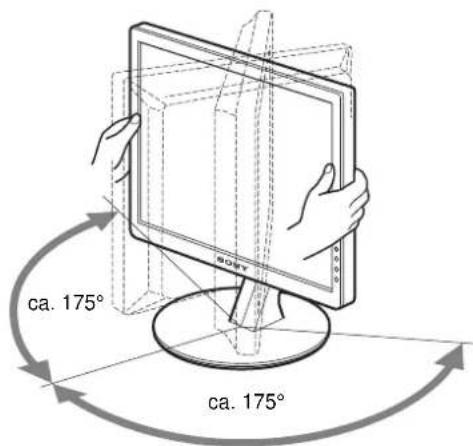
5 Close the menu.
Click [Utility] → [Windows]/[Win Utility.exe].
For Macintosh
Click [Utility] → [Mac]/[Mac Utility].
Click [Utility] → [Windows]/[Win Utility.exe]. For Macintosh
Click [Utility] → [Mac]/[Mac Utility].
Note
TCO'99 Eco-document (for the black model)

■ Congratulations!
You have just purchased a TCO'99 approved and labelled product! Your choice has provided you with a product developed for professional use. Your purchase has also contributed to reducing the burden on the environment and also to the further development of environmentally adapted electronics products.
■ Why do we have environmentally labelled computers?
In many countries, environmental labelling has become an established method for encouraging the adaptation of goods and services to the environment. The main problem, as far as computers and other electronics equipment are concerned, is that environmentally harmful substances are used both in the products and during their manufacture. Since it is not so far possible to satisfactorily recycle the majority of electronics equipment, most of these potentially damaging substances sooner or later enter nature.
There are also other characteristics of a computer, such as energy consumption levels, that are important from the viewpoints of both the work (internal) and natural (external) environments. Since all methods of electricity generation have a negative effect on the environment (e.g. acidic and climate-influencing emissions, radioactive waste), it is vital to save energy. Electronics equipment in offices is often left running continuously and thereby consumes a lot of energy.
■ What does labelling involve?
This product meets the requirements for the TCO'99 scheme which provides for international and environmental labelling of personal computers. The labelling scheme was developed as a joint effort by the TCO (The Swedish Confederation of Professional Employees), Svenska Naturskyddsforeningen (The Swedish Society for Nature Conservation) and Statens Energimydighet (The Swedish National Energy Administration).
Approval requirements cover a wide range of issues: environment, ergonomics, usability, emission of electric and magnetic fields, energy consumption and electrical and fire safety.
The environmental demands impose restrictions on the presence and use of heavy metals, brominated and chlorinated flame retardants, CFCs (freons) and chlorinated solvents, among other things. The product must be prepared for recycling and the manufacturer is obliged to have an environmental policy which must be adhered to in each country where the company implements its operational policy.
The energy requirements include a demand that the computer and/or display, after a certain period of inactivity, shall reduce its power consumption to a lower level in one or more stages. The length of time to reactivate the computer shall be reasonable for the user.
Labelled products must meet strict environmental demands, for example, in respect of the reduction of electric and magnetic fields, physical and visual ergonomics and good usability.
Below you will find a brief summary of the environmental requirements met by this product. The complete environmental criteria document may be ordered from:
TCO Development
SE-114 94 Stockholm, Sweden
Fax: +46 8 782 92 07
Email (Internet): development@tco.se
Current information regarding TCO'99 approved and labelled
products may also be obtained via the Internet, using the address:
http://www.tco-info.com/
■ Environmental requirements
Flame retardants
Flame retardants are present in printed circuit boards, cables, wires, casings and housings. Their purpose is to prevent, or at least to delay the spread of fire. Up to 30% of the plastic in a computer casing can consist of flame retardant substances. Most flame retardants contain bromine or chloride, and those flame retardants are chemically related to another group of environmental toxins, PCBs. Both the flame retardants containing bromine or chloride and the PCBs are suspected of giving rise to severe health effects, including reproductive damage in fish-eating birds and mammals, due to the bio-accumulative* processes. Flame retardants have been found in human blood and researchers fear that disturbances in foetus development may occur.
The relevant TCO'99 demand requires that plastic components weighing more than 25 grams must not contain flame retardants with organically bound bromine or chlorine. Flame retardants are allowed in the printed circuit boards since no substitutes are available.
Cadmium**
Cadmium is present in rechargeable batteries and in the colour-generating layers of certain computer displays. Cadmium damages the nervous system and is toxic in high doses. The relevant TCO'99 requirement states that batteries, the colour-generating layers of display screens and the electrical or electronics components must not contain any cadmium.
Mercury**
Mercury is sometimes found in batteries, relays and switches. It damages the nervous system and is toxic in high doses. The relevant TCO'99 requirement states that batteries may not contain any mercury. It also demands that mercury is not present in any of the electrical or electronics components associated with the labelled unit.
CFCs (freons)
The relevant TCO'99 requirement states that neither CFCs nor HCFCs may be used during the manufacture and assembly of the product. CFCs (freons) are sometimes used for washing printed circuit boards. CFCs break down ozone and thereby damage the ozone layer in the stratosphere, causing increased reception on earth of ultraviolet light with e.g. increased risks of skin cancer (malignant melanoma) as a consequence.
Lead**
Lead can be found in picture tubes, display screens, solders and capacitors. Lead damages the nervous system and in higher doses, causes lead poisoning. The relevant TCO'99 requirement permits the inclusion of lead since no replacement has yet been developed.
* Bio-accumulative is defined as substances which accumulate within living organisms. ** Lead, Cadmium and Mercury are heavy metals which are Bio-accumulative.
TCO'03 Eco-document (for the gray model)

■ Congratulations!
The display you have just purchased carries the TCO'03 Displays label. This means that your display is designed, manufactured and tested according to some of the strictest quality and environmental requirements in the world. This makes for a high performance product, designed with the user in focus that also minimizes the impact on our natural environment.
■ Ergonomics
- Good visual ergonomics and image quality in order to improve the working environment for the user and to reduce sight and strain problems. Important parameters are luminance, contrast, resolution, reflectance, colour rendition and image stability.
■ Energy
- Energy-saving mode after a certain time – beneficial both for the user and the environment
- Electrical safety
■ Emissions
• Electromagnetic fields - Noise emissions
Ecology
- The product must be prepared for recycling and the manufacturer must have a certified environmental management system such as EMAS or ISO 14 001
- Restrictions on
- chlorinated and brominated flame retardants and polymers
- heavy metals such as cadmium, mercury and lead.
The requirements included in this label have been developed by TCO Development in co-operation with scientists, experts, users as well as manufacturers all over the world. Since the end of the 1980s TCO has been
involved in influencing the development of IT equipment in a more user-friendly direction. Our labelling system started with displays in 1992 and is now requested by users and IT-manufacturers all over the world.
For more information, please visit www.tcodevelopment.com
Recycling Information
■ Customer in Europe
The collection and recycling of this product has been planned according to your country's relevant legislation. To ensure that this product will be collected and recycled in a way that minimizes the impact on the environment, please do the following:
- If you purchased this product for private use, contact your municipality or the waste collection system and bring the product to this collection point / have the product be picked up by the waste collection system. Alternatively, your retailer might take back this if you purchase new equivalent equipment; please check with your retailer whether he will take back this product before bringing it. For information on your country's recycling arrangements, please contact the Sony representation in your country (contact details at: www.sony-europe.com). Further details on specific recycling systems can be found at the following addresses:
- Belgium: www.recupel.be
- Netherlands: www.nvmp.nl (consumer electronics) www.ictmilieu.nl (IT equipment)
- Norway: www.elretur.no
- Sweden: www.el-kretsen.se
- Switzerland: www.swico.ch
- If you use this product professionally, check the product's delivery contract for take back / recycling arrangements and follow the procedures described therein. Alternatively, follow the procedures described under point 1.
■ Customer in USA
We, Sony, as a member of EIA, recommend that you visit the URL below: http://www.eiae.org/
■ Customer in Asia
http://www.sony.co.jp/SonyInfo/Environment/recycle/3R.html
TFT LCD Color Computer Display
SDM-S204E
Owner's Record
The model and serial numbers are located at the rear of the unit. Record these numbers in the spaces provided below. Refer to them whenever you call upon your dealer regarding this product. Model No. ____ Serial No. ____
WARNING
To prevent fire or shock hazard, do not expose the unit to rain or moisture.
Dangerously high voltages are present inside the unit. Do not open the cabinet. Refer servicing to qualified personnel only.
FCC Notice
This equipment has been tested and found to comply with the limits for a Class B digital device, pursuant to Part 15 of the FCC Rules. These limits are designed to provide reasonable protection against harmful interference in a residential installation. This equipment generates, uses, and can radiate radio frequency energy and, if not installed and used in accordance with the instructions, may cause harmful interference to radio communications. However, there is no guarantee that interference will not occur in a particular installation. If this equipment does cause harmful interference to radio or television reception, which can be determined by turning the equipment off and on, the user is encouraged to try to correct the interference by one or more of the following measures:
– Reorient or relocate the receiving antenna. – Increase the separation between the equipment and receiver. – Connect the equipment into an outlet on a circuit different from that to which the receiver is connected. – Consult the dealer or an experienced radio/TV technician for help. You are cautioned that any changes or modifications not expressly approved in this manual could void your authority to operate this equipment.
IMPORTANTE
If you have any questions about this product, you may call Sony Customer Information Services Center at 1-800-222-7669 or visit http://www.sony.com/
Declaration of Conformity
Trade Name: SONY
Model: SDM-S204E
Responsible Party: Sony Electronics Inc.
Address: 16450 W. Bernardo Dr,
San Diego, CA 92127 U.S.A.
Telephone Number: 858-942-2230
This device complies with part 15 of the FCC rules. Operation is subject to the following two conditions: (1) This device may not cause harmful interference, and (2) this device must accept any interference received, including interference that may cause undesired operation.
NOTICE
This notice is applicable for USA/Canada only. If shipped to USA/Canada, install only a UL LISTED/CSA LABELLED power supply cord meeting the following specifications:
SPECIFICATIONS
Plug Type Nema-Plug 5-15p
Cord Type SVT or SJT, minimum 3 × 18 AWG
Length Maximum 15 feet
Rating Minimum 7 A, 125 V
NOTICE
As an ENERGY STAR Partner, Sony Corporation has determined that this product meets the ENERGY STAR guidelines for energy efficiency.

This monitor complies with the TCO'03 guidelines.
(for the gray model)
This monitor complies with the TCO'99 guidelines.
(for the black model)
Contents
TCO'99 Eco-document (for the black model) .....i
TCO'03 Eco-document (for the gray model) ..... ii
Note
5 Close the menu.
Notes
TCO'99 Eco-document (for the black model)

■ Congratulations!
You have just purchased a TCO'99 approved and labelled product! Your choice has provided you with a product developed for professional use. Your purchase has also contributed to reducing the burden on the environment and also to the further development of environmentally adapted electronics products.
■ Why do we have environmentally labelled computers?
In many countries, environmental labelling has become an established method for encouraging the adaptation of goods and services to the environment. The main problem, as far as computers and other electronics equipment are concerned, is that environmentally harmful substances are used both in the products and during their manufacture. Since it is not so far possible to satisfactorily recycle the majority of electronics equipment, most of these potentially damaging substances sooner or later enter nature.
There are also other characteristics of a computer, such as energy consumption levels, that are important from the viewpoints of both the work (internal) and natural (external) environments. Since all methods of electricity generation have a negative effect on the environment (e.g. acidic and climate-influencing emissions, radioactive waste), it is vital to save energy. Electronics equipment in offices is often left running continuously and thereby consumes a lot of energy.
■ What does labelling involve?
This product meets the requirements for the TCO'99 scheme which provides for international and environmental labelling of personal computers. The labelling scheme was developed as a joint effort by the TCO (The Swedish Confederation of Professional Employees), Svenska Naturskyddsforeningen (The Swedish Society for Nature Conservation) and Statens Energimydighet (The Swedish National Energy Administration).
Approval requirements cover a wide range of issues: environment, ergonomics, usability, emission of electric and magnetic fields, energy consumption and electrical and fire safety.
The environmental demands impose restrictions on the presence and use of heavy metals, brominated and chlorinated flame retardants, CFCs (freons) and chlorinated solvents, among other things. The product must be prepared for recycling and the manufacturer is obliged to have an environmental policy which must be adhered to in each country where the company implements its operational policy.
The energy requirements include a demand that the computer and/or display, after a certain period of inactivity, shall reduce its power consumption to a lower level in one or more stages. The length of time to reactivate the computer shall be reasonable for the user.
Labelled products must meet strict environmental demands, for example, in respect of the reduction of electric and magnetic fields, physical and visual ergonomics and good usability.
Below you will find a brief summary of the environmental requirements met by this product. The complete environmental criteria document may be ordered from:
TCO Development
SE-114 94 Stockholm, Sweden
Fax: +46 8 782 92 07
Email (Internet): development@tco.se
Current information regarding TCO'99 approved and labelled
products may also be obtained via the Internet, using the address:
http://www.tco-info.com/
■ Environmental requirements
Flame retardants
Flame retardants are present in printed circuit boards, cables, wires, casings and housings. Their purpose is to prevent, or at least to delay the spread of fire. Up to 30% of the plastic in a computer casing can consist of flame retardant substances. Most flame retardants contain bromine or chloride, and those flame retardants are chemically related to another group of environmental toxins, PCBs. Both the flame retardants containing bromine or chloride and the PCBs are suspected of giving rise to severe health effects, including reproductive damage in fish-eating birds and mammals, due to the bio-accumulative* processes. Flame retardants have been found in human blood and researchers fear that disturbances in foetus development may occur.
The relevant TCO'99 demand requires that plastic components weighing more than 25 grams must not contain flame retardants with organically bound bromine or chlorine. Flame retardants are allowed in the printed circuit boards since no substitutes are available.
Cadmium**
Cadmium is present in rechargeable batteries and in the colour-generating layers of certain computer displays. Cadmium damages the nervous system and is toxic in high doses. The relevant TCO'99 requirement states that batteries, the colour-generating layers of display screens and the electrical or electronics components must not contain any cadmium.
Mercury**
Mercury is sometimes found in batteries, relays and switches. It damages the nervous system and is toxic in high doses. The relevant TCO'99 requirement states that batteries may not contain any mercury. It also demands that mercury is not present in any of the electrical or electronics components associated with the labelled unit.
CFCs (freons)
The relevant TCO'99 requirement states that neither CFCs nor HCFCs may be used during the manufacture and assembly of the product. CFCs (freons) are sometimes used for washing printed circuit boards. CFCs break down ozone and thereby damage the ozone layer in the stratosphere, causing increased reception on earth of ultraviolet light with e.g. increased risks of skin cancer (malignant melanoma) as a consequence.
Lead**
Lead can be found in picture tubes, display screens, solders and capacitors. Lead damages the nervous system and in higher doses, causes lead poisoning. The relevant TCO'99 requirement permits the inclusion of lead since no replacement has yet been developed.
* Bio-accumulative is defined as substances which accumulate within living organisms. ** Lead, Cadmium and Mercury are heavy metals which are Bio-accumulative.
TCO'03 Eco-document (for the gray model)

■ Congratulations!
The display you have just purchased carries the TCO'03 Displays label. This means that your display is designed, manufactured and tested according to some of the strictest quality and environmental requirements in the world. This makes for a high performance product, designed with the user in focus that also minimizes the impact on our natural environment.
■ Ergonomics
- Good visual ergonomics and image quality in order to improve the working environment for the user and to reduce sight and strain problems. Important parameters are luminance, contrast, resolution, reflectance, colour rendition and image stability.
■ Energy
- Energy-saving mode after a certain time – beneficial both for the user and the environment
- Electrical safety
■ Emissions
• Electromagnetic fields - Noise emissions
Ecology
- The product must be prepared for recycling and the manufacturer must have a certified environmental management system such as EMAS or ISO 14 001
- Restrictions on
- chlorinated and brominated flame retardants and polymers
- heavy metals such as cadmium, mercury and lead.
The requirements included in this label have been developed by TCO Development in co-operation with scientists, experts, users as well as manufacturers all over the world. Since the end of the 1980s TCO has been
involved in influencing the development of IT equipment in a more user-friendly direction. Our labelling system started with displays in 1992 and is now requested by users and IT-manufacturers all over the world.
For more information, please visit www.tcodevelopment.com
Recycling Information
■ Customer in Europe
The collection and recycling of this product has been planned according to your country's relevant legislation. To ensure that this product will be collected and recycled in a way that minimizes the impact on the environment, please do the following:
- If you purchased this product for private use, contact your municipality or the waste collection system and bring the product to this collection point / have the product be picked up by the waste collection system. Alternatively, your retailer might take back this if you purchase new equivalent equipment; please check with your retailer whether he will take back this product before bringing it. For information on your country's recycling arrangements, please contact the Sony representation in your country (contact details at: www.sony-europe.com). Further details on specific recycling systems can be found at the following addresses:
- Belgium: www.recupel.be
- Netherlands: www.nvmp.nl (consumer electronics) www.ictmilieu.nl (IT equipment)
- Norway: www.elretur.no
- Sweden: www.el-kretsen.se
- Switzerland: www.swico.ch
- If you use this product professionally, check the product's delivery contract for take back / recycling arrangements and follow the procedures described therein. Alternatively, follow the procedures described under point 1.
Customer in USA
We Sony as a member of EIA recommends to visit URL below http://www.eiae.org/
Customer in Asia
http://www.sony.co.jp/SonyInfo/Environment/recycle/3R.html
TFT LCD Color Computer Display
SDM-S204E
Owner's Record
The model and serial numbers are located at the rear of the unit. Record these numbers in the spaces provided below. Refer to them whenever you call upon your dealer regarding this product. Model No. ____ Serial No. ____
WARNING
To prevent fire or shock hazard, do not expose the unit to rain or moisture.
Dangerously high voltages are present inside the unit. Do not open the cabinet. Refer servicing to qualified personnel only.
FCC Notice
This equipment has been tested and found to comply with the limits for a Class B digital device, pursuant to Part 15 of the FCC Rules. These limits are designed to provide reasonable protection against harmful interference in a residential installation. This equipment generates, uses, and can radiate radio frequency energy and, if not installed and used in accordance with the instructions, may cause harmful interference to radio communications. However, there is no guarantee that interference will not occur in a particular installation. If this equipment does cause harmful interference to radio or television reception, which can be determined by turning the equipment off and on, the user is encouraged to try to correct the interference by one or more of the following measures:
- Reorient or relocate the receiving antenna. – Increase the separation between the equipment and receiver.
- Connect the equipment into an outlet on a circuit different from that to which the receiver is connected.
- Consult the dealer or an experienced radio/TV technician for help. You are cautioned that any changes or modifications not expressly approved in this manual could void your authority to operate this equipment.
IMPORTANTE
If you have any questions about this product, you may call; Sony Customer Information Services Center 1-800-222-7669 or http://www.sony.com/
Declaration of Conformity
Trade Name: SONY
Model: SDM-S204E
Responsible Party: Sony Electronics Inc.
Address: 16450 W. Bernardo Dr,
San Diego, CA 92127 U.S.A.
Telephone Number: 858-942-2230
This device complies with part 15 of the FCC rules. Operation is subject to the following two conditions: (1) This device may not cause harmful interference, and (2) this device must accept any interference received, including interference that may cause undesired operation.
NOTICE
This notice is applicable for USA/Canada only. If shipped to USA/Canada, install only a UL LISTED/CSA LABELLED power supply cord meeting the following specifications:
SPECIFICATIONS
Plug Type Nema-Plug 5-15p
Cord Type SVT or SJT, minimum 3 × 18 AWG
Length Maximum 15 feet
Rating Minimum 7 A, 125 V
NOTICE
As an ENERGY STAR Partner, Sony Corporation has determined that this product meets the ENERGY STAR guidelines for energy efficiency.

This monitor complies with the TCO'03 guidelines.
(for the gray model)

This monitor complies with the TCO'99 guidelines.
(for the black model)
Precautions 4
TCO'99 Eco-document (for the black model) .....i
TCO'03 Eco-document (for the gray model) ..... ii
Precautions
Note
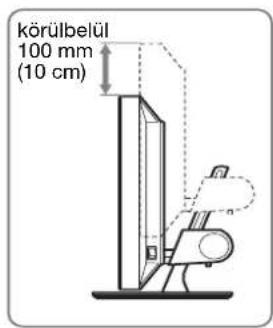

5 Exit the menu.
TCO'99 Eco-document (for the black model)

■ Congratulations!
You have just purchased a TCO'99 approved and labelled product! Your choice has provided you with a product developed for professional use. Your purchase has also contributed to reducing the burden on the environment and also to the further development of environmentally adapted electronics products.
■ Why do we have environmentally labelled computers?
In many countries, environmental labelling has become an established method for encouraging the adaptation of goods and services to the environment. The main problem, as far as computers and other electronics equipment are concerned, is that environmentally harmful substances are used both in the products and during their manufacture. Since it is not so far possible to satisfactorily recycle the majority of electronics equipment, most of these potentially damaging substances sooner or later enter nature.
There are also other characteristics of a computer, such as energy consumption levels, that are important from the viewpoints of both the work (internal) and natural (external) environments. Since all methods of electricity generation have a negative effect on the environment (e.g. acidic and climate-influencing emissions, radioactive waste), it is vital to save energy. Electronics equipment in offices is often left running continuously and thereby consumes a lot of energy.
■ What does labelling involve?
This product meets the requirements for the TCO'99 scheme which provides for international and environmental labelling of personal computers. The labelling scheme was developed as a joint effort by the TCO (The Swedish Confederation of Professional Employees), Svenska Naturskyddsforeningen (The Swedish Society for Nature Conservation) and Statens Energimyndighet (The Swedish National Energy Administration).
Approval requirements cover a wide range of issues: environment, ergonomics, usability, emission of electric and magnetic fields, energy consumption and electrical and fire safety.
The environmental demands impose restrictions on the presence and use of heavy metals, brominated and chlorinated flame retardants, CFCs (freons), and chlorinated solvents, among other things. The product must be prepared for recycling, and the manufacturer is obliged to have an environmental policy which must be adhered to in each country where the company implements its operational policy.
The energy requirements include a demand that the computer and/or display, after a certain period of inactivity, shall reduce its power consumption to a lower level in one or more stages. The length of time to reactivate the computer shall be reasonable for the user.
Labelled products must meet strict environmental demands, for example, in respect of the reduction of electric and magnetic fields, physical and visual ergonomics, and good usability.
Below you will find a brief summary of the environmental requirements met by this product. The complete environmental criteria document may be ordered from:
TCO Development
SE-114 94 Stockholm, Sweden
Fax: +46 8 782 92 07
Email (Internet): development@tco.se
Current information regarding TCO'99 approved and labelled
products may also be obtained via the Internet, using the address:
http://www.tco-info.com/
■ Environmental requirements
Flame retardants
Flame retardants are present in printed circuit boards, cables, wires, casings, and housings. Their purpose is to prevent, or at least to delay, the spread of fire. Up to 30% of the plastic in a computer casing can consist of flame retardant substances. Most flame retardants contain bromine or chloride, and those flame retardants are chemically related to another group of environmental toxins, PCBs. Both the flame retardants containing bromine or chloride and the PCBs are suspected of giving rise to severe health effects, including reproductive damage in fish-eating birds and mammals, due to the bio-accumulative* processes. Flame retardants have been found in human blood, and researchers fear that disturbances in foetus development may occur.
The relevant TCO'99 demand requires that plastic components weighing more than 25 grams must not contain flame retardants with organically bound bromine or chlorine. Flame retardants are allowed in the printed circuit boards since no substitutes are available.
Cadmium**
Cadmium is present in rechargeable batteries and in the colour-generating layers of certain computer displays. Cadmium damages the nervous system and is toxic in high doses. The relevant TCO'99 requirement states that batteries, the colour-generating layers of display screens and the electrical or electronics components must not contain any cadmium.
Mercury**
Mercury is sometimes found in batteries, relays and switches. It damages the nervous system and is toxic in high doses. The relevant TCO'99 requirement states that batteries may not contain any mercury. It also demands that mercury is not present in any of the electrical or electronics components associated with the labelled unit.
CFCs (freons)
The relevant TCO'99 requirement states that neither CFCs nor HCFCs may be used during the manufacture and assembly of the product. CFCs (freons) are sometimes used for washing printed circuit boards. CFCs break down ozone and thereby damage the ozone layer in the stratosphere, causing increased reception on earth of ultraviolet light with e.g. increased risks of skin cancer (malignant melanoma) as a consequence.
Lead**
Lead can be found in picture tubes, display screens, solders and capacitors. Lead damages the nervous system and in higher doses, causes lead poisoning. The relevant TCO'99 requirement permits the inclusion of lead since no replacement has yet been developed.
* Bio-accumulative is defined as substances which accumulate within living organisms.
** Lead, Cadmium and Mercury are heavy metals which are Bio-accumulative.
TCO'03 Eco-document (for the gray model)

■ Congratulations!
The display you have just purchased carries the TCO'03 Displays label. This means that your display is designed, manufactured and tested according to some of the strictest quality and environmental requirements in the world. This makes for a high performance product, designed with the user in focus that also minimizes the impact on our natural environment.
■ Ergonomics
- Good visual ergonomics and image quality in order to improve the working environment for the user and to reduce sight and strain problems. Important parameters are luminance, contrast, resolution, reflectance, colour rendition and image stability.
■ Energy
- Energy-saving mode after a certain time – beneficial both for the user and the environment
- Electrical safety
■ Emissions
• Electromagnetic fields - Noise emissions
Ecology
- The product must be prepared for recycling and the manufacturer must have a certified environmental management system such as EMAS or ISO 14 001
- Restrictions on
- chlorinated and brominated flame retardants and polymers
- heavy metals such as cadmium, mercury and lead.
The requirements included in this label have been developed by TCO Development in co-operation with scientists, experts, users as well as manufacturers all over the world. Since the end of the 1980s TCO has been
involved in influencing the development of IT equipment in a more user-friendly direction. Our labelling system started with displays in 1992 and is now requested by users and IT-manufacturers all over the world.
For more information, please visit www.tcodevelopment.com
Recycling Information
■ Customer in Europe
The collection and recycling of this product has been planned according to your country's relevant legislation. To ensure that this product will be collected and recycled in a way that minimizes the impact on the environment, please do the following:
- If you purchased this product for private use, contact your municipality or the waste collection system and bring the product to this collection point / have the product be picked up by the waste collection system. Alternatively, your retailer might take back this if you purchase new equivalent equipment; please check with your retailer whether he will take back this product before bringing it. For information on your country's recycling arrangements, please contact the Sony representation in your country (contact details at: www.sony-europe.com). Further details on specific recycling systems can be found at the following addresses:
- Belgium: www.recupel.be
- Netherlands: www.nvmp.nl (consumer electronics) www.ictmilieu.nl (IT equipment)
- Norway: www.elretur.no
- Sweden: www.el-kretsen.se
- Switzerland: www.swico.ch
- If you use this product professionally, check the product's delivery contract for take back / recycling arrangements and follow the procedures described therein. Alternatively, follow the procedures described under point 1.
■ Customer in USA
We Sony as a member of EIA recommends to visit URL below http://www.eiae.org/
■ Customer in Asia
http://www.sony.co.jp/SonyInfo/Environment/recycle/3R.html
TFT LCD Color Computer Display
SDM-S204E
Owner's Record
The model and serial numbers are located at the rear of the unit. Record these numbers in the spaces provided below. Refer to them whenever you call upon your dealer regarding this product. Model No. ____ Serial No. ____
WARNING
To prevent fire or shock hazard, do not expose the unit to rain or moisture.
Dangerously high voltages are present inside the unit. Do not open the cabinet. Refer servicing to qualified personnel only.
FCC Notice
This equipment has been tested and found to comply with the limits for a Class B digital device, pursuant to Part 15 of the FCC Rules. These limits are designed to provide reasonable protection against harmful interference in a residential installation. This equipment generates, uses, and can radiate radio frequency energy and, if not installed and used in accordance with the instructions, may cause harmful interference to radio communications. However, there is no guarantee that interference will not occur in a particular installation. If this equipment does cause harmful interference to radio or television reception, which can be determined by turning the equipment off and on, the user is encouraged to try to correct the interference by one or more of the following measures:
– Reorient or relocate the receiving antenna. – Increase the separation between the equipment and receiver. - Connect the equipment into an outlet on a circuit different from that to which the receiver is connected. - Consult the dealer or an experienced radio/TV technician for help. You are cautioned that any changes or modifications not expressly approved in this manual could void your authority to operate this equipment.
IMPORTANTE
If you have any questions about this product, you may call; Sony Customer Information Services Center 1-800-222-7669 or http://www.sony.com/
Declaration of Conformity
Trade Name: SONY
Model: SDM-S204E
Responsible Party: Sony Electronics Inc.
Address: 16450 W. Bernardo Dr,
San Diego, CA 92127 U.S.A.
Telephone Number: 858-942-2230
This device complies with part 15 of the FCC rules. Operation is subject to the following two conditions: (1) This device may not cause harmful interference, and (2) this device must accept any interference received, including interference that may cause undesired operation.
NOTICE
This notice is applicable for USA/Canada only. If shipped to USA/Canada, install only a UL LISTED/CSA LABELLED power supply cord meeting the following specifications:
SPECIFICATIONS
Plug Type Nema-Plug 5-15p
Cord Type SVT or SJT, minimum 3 × 18 AWG
Length Maximum 15 feet
Rating Minimum 7 A, 125 V
NOTICE
As an ENERGY STAR Partner, Sony Corporation has determined that this product meets the ENERGY STAR guidelines for energy efficiency.

This monitor complies with the TCO'03 guidelines.
(for the gray model)
This monitor complies with the TCO'99 guidelines.
(for the black model)
Table of Contents
TCO'99 Eco-document (for the black model) .....i
TCO'03 Eco-document (for the gray model) ..... ii
Safety Precautions
8 Rear cover (page 6)
Note


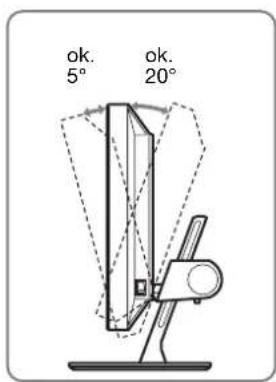
5 Closing the menu.
Notes
Note
100–240 V, 50–60 Hz, Max. 1.2 A
Power consumption
Max. 58 W
TCO'99 Eco-document (for the black model)

■ Congratulations!
You have just purchased a TCO'99 approved and labelled product! Your choice has provided you with a product developed for professional use. Your purchase has also contributed to reducing the burden on the environment and also to the further development of environmentally adapted electronics products.
■ Why do we have environmentally labelled computers?
In many countries, environmental labelling has become an established method for encouraging the adaptation of goods and services to the environment. The main problem, as far as computers and other electronics equipment are concerned, is that environmentally harmful substances are used both in the products and during their manufacture. Since it is not so far possible to satisfactorily recycle the majority of electronics equipment, most of these potentially damaging substances sooner or later enter nature.
There are also other characteristics of a computer, such as energy consumption levels, that are important from the viewpoints of both the work (internal) and natural (external) environments. Since all methods of electricity generation have a negative effect on the environment (e.g. acidic and climate-influencing emissions, radioactive waste), it is vital to save energy. Electronics equipment in offices is often left running continuously and thereby consumes a lot of energy.
■ What does labelling involve?
This product meets the requirements for the TCO'99 scheme which provides for international and environmental labelling of personal computers. The labelling scheme was developed as a joint effort by the TCO (The Swedish Confederation of Professional Employees), Svenska Naturskyddsforeningen (The Swedish Society for Nature Conservation) and Statens Energimydighet (The Swedish National Energy Administration).
Approval requirements cover a wide range of issues: environment, ergonomics, usability, emission of electric and magnetic fields, energy consumption and electrical and fire safety.
The environmental demands impose restrictions on the presence and use of heavy metals, brominated and chlorinated flame retardants, CFCs (freons) and chlorinated solvents, among other things. The product must be prepared for recycling and the manufacturer is obliged to have an environmental policy which must be adhered to in each country where the company implements its operational policy.
The energy requirements include a demand that the computer and/or display, after a certain period of inactivity, shall reduce its power consumption to a lower level in one or more stages. The length of time to reactivate the computer shall be reasonable for the user.
Labelled products must meet strict environmental demands, for example, in respect of the reduction of electric and magnetic fields, physical and visual ergonomics and good usability.
Below you will find a brief summary of the environmental requirements met by this product. The complete environmental criteria document may be ordered from:
TCO Development
SE-114 94 Stockholm, Sweden
Fax: +46 8 782 92 07
Email (Internet): development@tco.se
Current information regarding TCO'99 approved and labelled
products may also be obtained via the Internet, using the address: http://www.tco-info.com/
■ Environmental requirements
Flame retardants
Flame retardants are present in printed circuit boards, cables, wires, casings and housings. Their purpose is to prevent, or at least to delay the spread of fire. Up to 30% of the plastic in a computer casing can consist of flame retardant substances. Most flame retardants contain bromine or chloride, and those flame retardants are chemically related to another group of environmental toxins, PCBs. Both the flame retardants containing bromine or chloride and the PCBs are suspected of giving rise to severe health effects, including reproductive damage in fish-eating birds and mammals, due to the bio-accumulative * processes. Flame retardants have been found in human blood and researchers fear that disturbances in foetus development may occur.
The relevant TCO'99 demand requires that plastic components weighing more than 25 grams must not contain flame retardants with organically bound bromine or chlorine. Flame retardants are allowed in the printed circuit boards since no substitutes are available.
Cadmium**
Cadmium is present in rechargeable batteries and in the colour-generating layers of certain computer displays. Cadmium damages the nervous system and is toxic in high doses. The relevant TCO'99 requirement states that batteries, the colour-generating layers of display screens and the electrical or electronics components must not contain any cadmium.
Mercury**
Mercury is sometimes found in batteries, relays and switches. It damages the nervous system and is toxic in high doses. The relevant TCO'99 requirement states that batteries may not contain any mercury. It also demands that mercury is not present in any of the electrical or electronics components associated with the labelled unit.
CFCs (freons)
The relevant TCO'99 requirement states that neither CFCs nor HCFCs may be used during the manufacture and assembly of the product. CFCs (freons) are sometimes used for washing printed circuit boards. CFCs break down ozone and thereby damage the ozone layer in the stratosphere, causing increased reception on earth of ultraviolet light with e.g. increased risks of skin cancer (malignant melanoma) as a consequence.
Lead**
Lead can be found in picture tubes, display screens, solders and capacitors. Lead damages the nervous system and in higher doses, causes lead poisoning. The relevant TCO'99 requirement permits the inclusion of lead since no replacement has yet been developed.
* Bio-accumulative is defined as substances which accumulate within living organisms. ** Lead, Cadmium and Mercury are heavy metals which are Bio-accumulative.
TCO'03 Eco-document (for the gray model)

■ Congratulations!
The display you have just purchased carries the TCO'03 Displays label. This means that your display is designed, manufactured and tested according to some of the strictest quality and environmental requirements in the world. This makes for a high performance product, designed with the user in focus that also minimizes the impact on our natural environment.
■ Ergonomics
- Good visual ergonomics and image quality in order to improve the working environment for the user and to reduce sight and strain problems. Important parameters are luminance, contrast, resolution, reflectance, colour rendition and image stability.
■ Energy
- Energy-saving mode after a certain time – beneficial both for the user and the environment
- Electrical safety
■ Emissions
• Electromagnetic fields - Noise emissions
Ecology
- The product must be prepared for recycling and the manufacturer must have a certified environmental management system such as EMAS or ISO 14001.
- Restrictions on
- chlorinated and brominated flame retardants and polymers
- heavy metals such as cadmium, mercury and lead.
The requirements included in this label have been developed by TCO Development in co-operation with scientists, experts, users as well as manufacturers all over the world. Since the end of the 1980s TCO has been
involved in influencing the development of IT equipment in a more user-friendly direction. Our labelling system started with displays in 1992 and is now requested by users and IT-manufacturers all over the world.
For more information, please visit www.tcodevelopment.com
Recycling Information
■ Customer in Europe
The collection and recycling of this product has been planned according to your country's relevant legislation. To ensure that this product will be collected and recycled in a way that minimizes the impact on the environment, please do the following:
- If you purchased this product for private use, contact your municipality or the waste collection system and bring the product to this collection point / have the product be picked up by the waste collection system. Alternatively, your retailer might take back this if you purchase new equivalent equipment; please check with your retailer whether he will take back this product before bringing it. For information on your country's recycling arrangements, please contact the Sony representation in your country (contact details at: www.sony-europe.com). Further details on specific recycling systems can be found at the following addresses:
- Belgium: www.recupel.be
- Netherlands: www.nvmp.nl (consumer electronics) www.ictmilieu.nl (IT equipment)
- Norway: www.elretur.no
- Sweden: www.el-kretsen.se
- Switzerland: www.swico.ch
- If you use this product professionally, check the product's delivery contract for take back / recycling arrangements and follow the procedures described therein. Alternatively, follow the procedures described under point 1.
■ Customer in USA
We Sony as a member of EIA recommends to visit URL below http://www.eiae.org/
■ Customer in Asia
http://www.sony.co.jp/SonyInfo/Environment/recycle/3R.html
TFT LCD Color Computer Display
SDM-S204E
Owner's Record
The model and serial numbers are located at the rear of the unit. Record these numbers in the spaces provided below. Refer to them whenever you call upon your dealer regarding this product. Model No. ____ Serial No. ____
WARNING
To prevent fire or shock hazard, do not expose the unit to rain or moisture.
Dangerously high voltages are present inside the unit. Do not open the cabinet. Refer servicing to qualified personnel only.
FCC Notice
This equipment has been tested and found to comply with the limits for a Class B digital device, pursuant to Part 15 of the FCC Rules. These limits are designed to provide reasonable protection against harmful interference in a residential installation. This equipment generates, uses, and can radiate radio frequency energy and, if not installed and used in accordance with the instructions, may cause harmful interference to radio communications. However, there is no guarantee that interference will not occur in a particular installation. If this equipment does cause harmful interference to radio or television reception, which can be determined by turning the equipment off and on, the user is encouraged to try to correct the interference by one or more of the following measures:
- Reorient or relocate the receiving antenna. – Increase the separation between the equipment and receiver.
- Connect the equipment into an outlet on a circuit different from that to which the receiver is connected.
- Consult the dealer or an experienced radio/TV technician for help. You are cautioned that any changes or modifications not expressly approved in this manual could void your authority to operate this equipment.
IMPORTANT
If you have any questions about this product, you may call; Sony Customer Information Services Center 1-800-222-7669 or http://www.sony.com/
Declaration of Conformity
Trade Name: SONY
Model: SDM-S204E
Responsible Party: Sony Electronics Inc.
Address: 16450 W. Bernardo Dr,
San Diego, CA 92127 U.S.A.
Telephone Number: 858-942-2230
This device complies with part 15 of the FCC rules. Operation is subject to the following two conditions: (1) This device may not cause harmful interference, and (2) this device must accept any interference received, including interference that may cause undesired operation.
NOTICE
This notice is applicable for USA/Canada only. If shipped to USA/Canada, install only a UL LISTED/CSA LABELLED power supply cord meeting the following specifications:
SPECIFICATIONS
Plug Type Nema-Plug 5-15p
Cord Type SVT or SJT, minimum 3 × 18 AWG
Length Maximum 15 feet
Rating Minimum 7 A, 125 V
NOTICE
As an ENERGY STAR Partner, Sony Corporation has determined that this product meets the ENERGY STAR guidelines for energy efficiency.

This monitor complies with the TCO'03 guidelines.
(for the gray model)

This monitor complies with the TCO'99 guidelines.
(for the black model)
Caution
Monitor parts and adjustment elements 5
Setup 6
Setup 1: Connect the video signal cables ..... 6
→ INPUT SENSING ON/OFF menu 16
LANGUAGE menu 16
→← RESET menu....16
ON MENU LOCK menu 16
TCO'99 Eco-document (for the black model) .....i
TCO'03 Eco-document (for the gray model) ..... ii
Caution
Warning regarding power connections
- Use the supplied power cord. If you use another cord, make sure it is suitable for the local power supply.
For users in the USA
If you do not use the appropriate cable, this monitor will not comply with mandatory FCC standards.
for 100 to 120 V AC, for 200 to 240 V AC, only for 240 V AC
1 ⏻ Power switch and ⏻ power indicator (pages 8, 17) This switch turns on the monitor when the ⏻ power indicator lights red. To turn off the monitor, press the switch again. If the ⏻ power indicator does not light, press the MAIN POWER switch (7).
② MENU button (page 11)
Warning
3 Select the menu you want to adjust.
To select the item you want to adjust, press the ↓/↑ buttons, then press the OK button.

5 Close the menu.
Press the MENU button once to return to normal display. If you do not press the button, the menu closes automatically after approx. 45 seconds.

Click [Utility] → [Windows]/[Win Utility.exe].
For Macintosh
Click [Utility] → [Mac]/[Mac Utility].
4 Press the MENU button.
The main menu appears on the screen.
5 Press the ↓/↑ buttons to select ⚪ (SCREEN) and press the OK button.
The SCREEN menu appears on the screen.
8 Press the OK button
The main menu appears on the screen.
→ INPUT SENSING ON/OFF menu
TCO'99 Eco-document (for the black model)

■ Congratulations!
You have just purchased a TCO'99 approved and labelled product! Your choice has provided you with a product developed for professional use. Your purchase has also contributed to reducing the burden on the environment and also to the further development of environmentally adapted electronics products.
■ Why do we have environmentally labelled computers?
In many countries, environmental labelling has become an established method for encouraging the adaptation of goods and services to the environment. The main problem, as far as computers and other electronics equipment are concerned, is that environmentally harmful substances are used both in the products and during their manufacture. Since it is not so far possible to satisfactorily recycle the majority of electronics equipment, most of these potentially damaging substances sooner or later enter nature.
There are also other characteristics of a computer, such as energy consumption levels, that are important from the viewpoints of both the work (internal) and natural (external) environments. Since all methods of electricity generation have a negative effect on the environment (e.g. acidic and climate-influencing emissions, radioactive waste), it is vital to save energy. Electronics equipment in offices is often left running continuously and thereby consumes a lot of energy.
■ What does labelling involve?
This product meets the requirements for the TCO'99 scheme which provides for international and environmental labelling of personal computers. The labelling scheme was developed as a joint effort by the TCO (The Swedish Confederation of Professional Employees), Svenska Naturskyddsforeningen (The Swedish Society for Nature Conservation) and Statens Energimyndighet (The Swedish National Energy Administration).
Approval requirements cover a wide range of issues: environment, ergonomics, usability, emission of electric and magnetic fields, energy consumption and electrical and fire safety.
The environmental demands impose restrictions on the presence and use of heavy metals, brominated and chlorinated flame retardants. CFCs (freons) and chlorinated solvents, among other things. The product must be prepared for recycling and the manufacturer is obliged to have an environmental policy which must be adhered to in each country where the company implements its operational policy.
The energy requirements include a demand that the computer and/or display, after a certain period of inactivity, shall reduce its power consumption to a lower level in one or more stages. The length of time to reactivate the computer shall be reasonable for the user.
Labelled products must meet strict environmental demands, for example, in respect of the reduction of electric and magnetic fields, physical and visual ergonomics and good usability.
Below you will find a brief summary of the environmental requirements met by this product. The complete environmental criteria document may be ordered from:
TCO Development
SE-114 94 Stockholm, Sweden
Fax: +46 8 782 92 07
Email (Internet): development@tco.se
Current information regarding TCO'99 approved and labelled
products may also be obtained via the Internet, using the address:
http://www.tco-info.com/
■ Environmental requirements
Flame retardants
Flame retardants are present in printed circuit boards, cables, wires, casings and housings. Their purpose is to prevent, or at least to delay the spread of fire. Up to 30% of the plastic in a computer casing can consist of flame retardant substances. Most flame retardants contain bromine or chloride, and those flame retardants are chemically related to another group of environmental toxins, PCBs. Both the flame retardants containing bromine or chloride and the PCBs are suspected of giving rise to severe health effects, including reproductive damage in fish-eating birds and mammals, due to the bio-accumulative* processes. Flame retardants have been found in human blood and researchers fear that disturbances in foetus development may occur.
The relevant TCO'99 demand requires that plastic components weighing more than 25 grams must not contain flame retardants with organically bound bromine or chlorine. Flame retardants are allowed in the printed circuit boards since no substitutes are available.
Cadmium**
Cadmium is present in rechargeable batteries and in the colour-generating layers of certain computer displays. Cadmium damages the nervous system and is toxic in high doses. The relevant TCO'99 requirement states that batteries, the colour-generating layers of display screens and the electrical or electronics components must not contain any cadmium.
Mercury**
Mercury is sometimes found in batteries, relays and switches. It damages the nervous system and is toxic in high doses. The relevant TCO'99 requirement states that batteries may not contain any mercury. It also demands that mercury is not present in any of the electrical or electronics components associated with the labelled unit.
CFCs (freons)
The relevant TCO'99 requirement states that neither CFCs nor HCFCs may be used during the manufacture and assembly of the product. CFCs (freons) are sometimes used for washing printed circuit boards. CFCs break down ozone and thereby damage the ozone layer in the stratosphere, causing increased reception on earth of ultraviolet light with e.g. increased risks of skin cancer (malignant melanoma) as a consequence.
Lead**
Lead can be found in picture tubes, display screens, solders and capacitors. Lead damages the nervous system and in higher doses, causes lead poisoning. The relevant TCO'99 requirement permits the inclusion of lead since no replacement has yet been developed.
* Bio-accumulative is defined as substances which accumulate within living organisms.
** Lead, Cadmium and Mercury are heavy metals which are Bio-accumulative.
TCO'03 Eco-document (for the gray model)

■ Congratulations!
The display you have just purchased carries the TCO'03 Displays label. This means that your display is designed, manufactured and tested according to some of the strictest quality and environmental requirements in the world. This makes for a high performance product, designed with the user in focus that also minimizes the impact on our natural environment.
■ Ergonomics
- Good visual ergonomics and image quality in order to improve the working environment for the user and to reduce sight and strain problems. Important parameters are luminance, contrast, resolution, reflectance, colour rendition and image stability.
■ Energy
- Energy-saving mode after a certain time – beneficial both for the user and the environment
- Electrical safety
Emissions
• Electromagnetic fields - Noise emissions
Ecology
- The product must be prepared for recycling and the manufacturer must have a certified environmental management system such as EMAS or ISO 14001.
- Restrictions on
- chlorinated and brominated flame retardants and polymers
- heavy metals such as cadmium, mercury and lead.
The requirements included in this label have been developed by TCO Development in co-operation with scientists, experts, users as well as manufacturers all over the world. Since the end of the 1980s TCO has been involved in influencing the development of IT equipment in a more user-friendly direction. Our labelling system started with displays in 1992 and is now requested by users and IT-manufacturers all over the world.
involved in influencing the development of IT equipment in a more user-friendly direction. Our labelling system started with displays in 1992 and is now requested by users and IT-manufacturers all over the world.
For more information, please visit www.tcodevelopment.com
Customer in Europe
The collection and recycling of this product has been planned according to your country's relevant legislation. To ensure that this product will be collected and recycled in a way that minimizes the impact on the environment, please do the following:
The collection and recycling of this product has been planned according to your country's relevant legislation. To ensure that this product will be collected and recycled in a way that minimizes the impact on the environment, please do the following:
- If you purchased this product for private use, contact your municipality or the waste collection system and bring the product to this collection point / have the product be picked up by the waste collection system. Alternatively, your retailer might take back this if you purchase new equivalent equipment; please check with your retailer whether he will take back this product before bringing it. For information on your country's recycling arrangements, please contact the Sony representation in your country (contact details at: www.sony-europe.com). Further details on specific recycling systems can be found at the following addresses:
- Belgium: www.recupel.be
- Netherlands: www.nvmp.nl (consumer electronics) www.ictmilieu.nl (IT equipment)
- Norway: www.elretur.no
- Sweden: www.el-kretsen.se
- Switzerland: www.swico.ch
- If you use this product professionally, check the product's delivery contract for take back / recycling arrangements and follow the procedures described therein. Alternatively, follow the procedures described under point 1.
■ Customer in USA
We Sony as a member of EIA recommends to visit URL below http://www.eiae.org/
■ Customer in Asia
http://www.sony.co.jp/SonyInfo/Environment/recycle/3R.html
TFT LCD Color Computer Display
SDM-S204E
Owner's Record
The model and serial numbers are located at the rear of the unit. Record these numbers in the spaces provided below. Refer to them whenever you call upon your dealer regarding this product. Model No. ____ Serial No. ____
WARNING
To prevent fire or shock hazard, do not expose the unit to rain or moisture.
Dangerously high voltages are present inside the unit. Do not open the cabinet. Refer servicing to qualified personnel only.
FCC Notice
This equipment has been tested and found to comply with the limits for a Class B digital device, pursuant to Part 15 of the FCC Rules. These limits are designed to provide reasonable protection against harmful interference in a residential installation. This equipment generates, uses, and can radiate radio frequency energy and, if not installed and used in accordance with the instructions, may cause harmful interference to radio communications. However, there is no guarantee that interference will not occur in a particular installation. If this equipment does cause harmful interference to radio or television reception, which can be determined by turning the equipment off and on, the user is encouraged to try to correct the interference by one or more of the following measures:
- Reorient or relocate the receiving antenna. – Increase the separation between the equipment and receiver.
- Connect the equipment into an outlet on a circuit different from that to which the receiver is connected.
- Consult the dealer or an experienced radio/TV technician for help. You are cautioned that any changes or modifications not expressly approved in this manual could void your authority to operate this equipment.
IMPORTANT
If you have any questions about this product, you may call; Sony Customer Information Services Center 1-800-222-7669 or http://www.sony.com/
Declaration of Conformity
Trade Name: SONY
Model: SDM-S204E
Responsible Party: Sony Electronics Inc.
Address: 16450 W. Bernardo Dr.
San Diego, CA 92127 U.S.A.
Telephone Number: 858-942-2230
This device complies with part 15 of the FCC rules. Operation is subject to the following two conditions: (1) This device may not cause harmful interference, and (2) this device must accept any interference received, including interference that may cause undesired operation.
NOTICE
This notice is applicable for USA/Canada only.
If shipped to USA/Canada, install only a UL LISTED/CSA
LABELLED power supply cord meeting the following specifications:
SPECIFICATIONS
Plug Type Nema-Plug 5-15p
Cord Type SVT or SJT, minimum 3 · 18 AWG
Length Maximum 15 feet
Rating Minimum 7 A, 125 V
NOTICE
As an ENERGY STAR Partner, Sony Corporation has determined that this product meets the ENERGY STAR guidelines for energy efficiency.

This monitor complies with the TCO'03 guidelines.
(for the gray model)

This monitor complies with the TCO'99 guidelines.
(for the black model)
Contents
Warnings 4
TCO'99 Eco-document (for the black model) .....i
TCO'03 Eco-document (for the gray model) ..... ii
Warnings
Note
3 Turn on the computer.

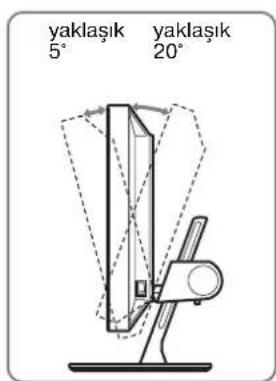
5 Close the menu.
Note
Note
100–240 V, 50–60 Hz, Max. 1.2 A
Energy consumption
Max. 58 W
Operating temperature
5–35 °C
Dimensions
TCO'99 Eco-document (for the black model)

■ Congratulations!
You have just purchased a TCO'99 approved and labelled product! Your choice has provided you with a product developed for professional use. Your purchase has also contributed to reducing the burden on the environment and also to the further development of environmentally adapted electronics products.
■ Why do we have environmentally labelled computers?
In many countries, environmental labelling has become an established method for encouraging the adaptation of goods and services to the environment. The main problem, as far as computers and other electronics equipment are concerned, is that environmentally harmful substances are used both in the products and during their manufacture. Since it is not so far possible to satisfactorily recycle the majority of electronics equipment, most of these potentially damaging substances sooner or later enter nature.
There are also other characteristics of a computer, such as energy consumption levels, that are important from the viewpoints of both the work (internal) and natural (external) environments. Since all methods of electricity generation have a negative effect on the environment (e.g. acidic and climate-influencing emissions, radioactive waste), it is vital to save energy. Electronics equipment in offices is often left running continuously and thereby consumes a lot of energy.
■ What does labelling involve?
This product meets the requirements for the TCO'99 scheme which provides for international and environmental labelling of personal computers. The labelling scheme was developed as a joint effort by the TCO (The Swedish Confederation of Professional Employees), Svenska Naturskyddsforeningen (The Swedish Society for Nature Conservation) and Statens Energimydighet (The Swedish National Energy Administration).
Approval requirements cover a wide range of issues: environment, ergonomics, usability, emission of electric and magnetic fields, energy consumption and electrical and fire safety.
The environmental demands impose restrictions on the presence and use of heavy metals, brominated and chlorinated flame retardants, CFCs (freons) and chlorinated solvents, among other things. The product must be prepared for recycling and the manufacturer is obliged to have an environmental policy which must be adhered to in each country where the company implements its operational policy.
The energy requirements include a demand that the computer and/or display, after a certain period of inactivity, shall reduce its power consumption to a lower level in one or more stages. The length of time to reactivate the computer shall be reasonable for the user.
Labelled products must meet strict environmental demands, for example, in respect of the reduction of electric and magnetic fields, physical and visual ergonomics and good usability.
Below you will find a brief summary of the environmental requirements met by this product. The complete environmental criteria document may be ordered from:
TCO Development
SE-114 94 Stockholm, Sweden
Fax: +46 8 782 92 07
Email (Internet): development@tco.se
Current information regarding TCO'99 approved and labelled products may also be obtained via the Internet, using the address: http://www.tco-info.com/
■ Environmental requirements
Flame retardants
Flame retardants are present in printed circuit boards, cables, wires, casings and housings. Their purpose is to prevent, or at least to delay the spread of fire. Up to 30% of the plastic in a computer casing can consist of flame retardant substances. Most flame retardants contain bromine or chloride, and those flame retardants are chemically related to another group of environmental toxins, PCBs. Both the flame retardants containing bromine or chloride and the PCBs are suspected of giving rise to severe health effects, including reproductive damage in fish-eating birds and mammals, due to the bio-accumulative* processes. Flame retardants have been found in human blood and researchers fear that disturbances in foetus development may occur.
The relevant TCO'99 demand requires that plastic components weighing more than 25 grams must not contain flame retardants with organically bound bromine or chlorine. Flame retardants are allowed in the printed circuit boards since no substitutes are available.
Cadmium**
Cadmium is present in rechargeable batteries and in the colour-generating layers of certain computer displays. Cadmium damages the nervous system and is toxic in high doses. The relevant TCO'99 requirement states that batteries, the colour-generating layers of display screens and the electrical or electronics components must not contain any cadmium.
Mercury**
Mercury is sometimes found in batteries, relays and switches. It damages the nervous system and is toxic in high doses. The relevant TCO'99 requirement states that batteries may not contain any mercury. It also demands that mercury is not present in any of the electrical or electronics components associated with the labelled unit.
CFCs (freons)
The relevant TCO'99 requirement states that neither CFCs nor HCFCs may be used during the manufacture and assembly of the product. CFCs (freons) are sometimes used for washing printed circuit boards. CFCs break down ozone and thereby damage the ozone layer in the stratosphere, causing increased reception on earth of ultraviolet light with e.g. increased risks of skin cancer (malignant melanoma) as a consequence.
Lead**
Lead can be found in picture tubes, display screens, solders and capacitors. Lead damages the nervous system and in higher doses, causes lead poisoning. The relevant TCO'99 requirement permits the inclusion of lead since no replacement has yet been developed.
* Bio-accumulative is defined as substances which accumulate within living organisms.
** Lead, Cadmium and Mercury are heavy metals which are Bio-accumulative.
TCO'03 Eco-document (for the gray model)

■ Congratulations!
The display you have just purchased carries the TCO'03 Displays label. This means that your display is designed, manufactured and tested according to some of the strictest quality and environmental requirements in the world. This makes for a high performance product, designed with the user in focus that also minimizes the impact on our natural environment.
■ Ergonomics
- Good visual ergonomics and image quality in order to improve the working environment for the user and to reduce sight and strain problems. Important parameters are luminance, contrast, resolution, reflectance, colour rendition and image stability.
■ Energy
- Energy-saving mode after a certain time – beneficial both for the user and the environment
- Electrical safety
■ Emissions
• Electromagnetic fields - Noise emissions
Ecology
- The product must be prepared for recycling and the manufacturer must have a certified environmental management system such as EMAS or ISO 14 001
- Restrictions on
- chlorinated and brominated flame retardants and polymers
- heavy metals such as cadmium, mercury and lead.
The requirements included in this label have been developed by TCO Development in co-operation with scientists, experts, users as well as manufacturers all over the world. Since the end of the 1980s TCO has been
involved in influencing the development of IT equipment in a more user-friendly direction. Our labelling system started with displays in 1992 and is now requested by users and IT-manufacturers all over the world.
For more information, please visit
www.tcodevelopment.com
Recycling Information
■ Customer in Europe
The collection and recycling of this product has been planned according to your country's relevant legislation. To ensure that this product will be collected and recycled in way that minimizes the impact on the environment, please do the following:
- If you purchased this product for private use, contact your municipality or the waste collection system and bring the product to this collection point / have the product be picked up by the waste collection system. Alternatively, your retailer might take back this if you purchase new equivalent equipment; please check with your retailer whether he will take back this product before bringing it. For information on your country's recycling arrangements, please contact the Sony representation in your country (contact details at: www.sony-europe.com). Further details on specific recycling systems can be found at the following addresses:
- Belgium: www.recupel.be
- Netherlands: www.nvmp.nl (consumer electronics) www.ictmilieu.nl (IT equipment)
- Norway: www.elretur.no
- Sweden: www.el-kretsen.se
- Switzerland: www.swico.ch
- If you use this product professionally, check the product's delivery contract for take back / recycling arrangements and follow the procedures described therein. Alternatively, follow the procedures described under point 1.
■ Customer in USA
We Sony as a member of EIA recommends to visit URL below http://www.eiae.org/
■ Customer in Asia
http://www.sony.co.jp/SonyInfo/Environment/recycle/3R.html

- TFT LCD COLOR COMPUTER DISPLAY
- OWNER'S RECORD
- WARNING
- FCC NOTICE
- IMPORTANTE
- DECLARATION OF CONFORMITY
- NOTICE
- TABLE OF CONTENTS
- SETUP
- CUSTOMIZING YOUR MONITOR
- TECHNICAL FEATURES
- TROUBLESHOOTING
- SPECIFICATIONS
- PRECAUTIONS
- WARNING ON POWER CONNECTIONS
- INSTALLATION
- HANDLING THE LCD SCREEN
- NOTE ON THE LCD (LIQUID CRYSTAL DISPLAY)
- MAINTENANCE
- TRANSPORTATION
- DISPOSAL OF THE MONITOR
- IDENTIFYING PARTS AND CONTROLS
- REAR OF THE LCD DISPLAY
- SETUP 1: CONNECT THE VIDEO SIGNAL CABLES
- NOTES
- CONNECT A COMPUTER EQUIPPED WITH A DVI OUTPUT CONNECTOR (DIGITAL RGB)
- CONNECT A COMPUTER EQUIPPED WITH AN HD15 OUTPUT CONNECTOR (ANALOG RGB)
- CONNECTING TO AN IBM PC/AT OR COMPATIBLE COMPUTER
- CONNECTING TO A MACINTOSH
- SETUP 2: CONNECT THE POWER CORD
- SETUP 3: BUNDLE THE CORDS AND CABLES
- NOTE
- SETUP 4: TURN ON THE MONITOR AND COMPUTER
- IF NO PICTURE APPEARS ON YOUR SCREEN
- NO NEED FOR SPECIFIC DRIVERS
- SETUP 5: ADJUST THE HEIGHT AND TILT
- TO USE THE MONITOR COMFORTABLY
- SELECTING THE INPUT SIGNAL
- (INPUT BUTTON)
- BEFORE MAKING ADJUSTMENTS
- NAVIGATING THE MENU
- DISPLAY THE MAIN MENU
- SELECT THE MENU
- SELECT THE ITEM YOU WANT TO ADJUST
- IF 1S ONE OF THE MENU ITEMS
- ADJUST THE ITEM
- CLOSE THE MENU
- RESETTING THE ADJUSTMENTS TO THE DEFAULT SETTINGS
- PICTURE ADJUST MENU
- SELECTING THE MODE (ECO MODE)
- PRESS THE MENU BUTTON
- PRESS THE ↓/↑ BUTTONS TO SELECT 📄 (PICTURE ADJUST) AND PRESS THE OK BUTTON
- PRESS THE ↓/↑ BUTTONS TO SELECT "HIGH" AND PRESS THE OK BUTTON
- PRESS THE ↓/↑ BUTTONS TO SELECT THE DESIRED MODE AND PRESS THE OK BUTTON
- ADJUSTING THE BACKLIGHT
- PRESS THE ↓/↑ BUTTONS TO ADJUST THE LIGHT LEVEL AND PRESS THE OK BUTTON
- ADJUSTING THE CONTRAST
- PRESS THE ↓/↑ BUTTONS TO SELECT "○ CONTRAST" AND PRESS THE OK BUTTON
- PRESS THE ↓/↑ BUTTONS TO ADJUST THE CONTRAST AND PRESS THE OK BUTTON
- ADJUSTING THE BRIGHTNESS
- PRESS THE ↓/↑ BUTTONS TO SELECT "BRIGHTNESS" AND PRESS THE OK BUTTON
- PRESS THE ↓/↑ BUTTONS TO ADJUST THE BRIGHTNESS AND PRESS THE OK BUTTON
- ADJUSTING THE SMOOTHING
- SCREEN MENU (ANALOG RGB ONLY)
- AUTOMATIC PICTURE QUALITY ADJUSTMENT FUNCTION
- IF THE AUTOMATIC PICTURE QUALITY ADJUSTMENT FUNCTION OF THIS MONITOR SEEMS NOT TO COMPLETELY ADJUST THE PICTURE
- IF YOU STILL NEED TO MAKE FURTHER ADJUSTMENTS TO THE PICTURE QUALITY
- MAKE FURTHER AUTOMATIC ADJUSTMENTS TO THE PICTURE QUALITY FOR THE CURRENT INPUT SIGNAL (AUTO)
- ADJUST THE PICTURE'S SHARPNESS MANUALLY (PHASE/PITCH)
- FOR WINDOWS
- FOR MACINTOSH
- PRESS THE OK BUTTON
- COLOR MENU
- Γ GAMMA MENU
- ZOOM MENU
- MENU POSITION MENU
- → INPUT SENSING ON/OFF MENU
- LANGUAGE MENU
- RESET MENU
- MENU LOCK MENU
- POWER SAVING FUNCTION
- REDUCING THE POWER CONSUMPTION (ECO MODE)
- AUTOMATIC PICTURE QUALITY ADJUSTMENT FUNCTION (ANALOG RGB SIGNAL ONLY)
- THE FACTORY PRESET MODE
- IF INPUT SIGNALS DO NOT MATCH ONE OF THE FACTORY PRESET MODES
- IF YOU ADJUST THE PHASE, PITCH, AND PICTURE POSITION MANUALLY
- ON-SCREEN MESSAGES
- IF "OUT OF RANGE" APPEARS ON THE SCREEN
- IF "XXX.X KHZ / XXX HZ" IS DISPLAYED
- IF "RESOLUTION > 1600 × 1200" IS DISPLAYED
- IF "NO INPUT SIGNAL" APPEARS ON THE SCREEN
- GO TO POWER SAVE
- IF "CABLE DISCONNECTED" APPEARS ON THE SCREEN
- TROUBLE SYMPTOMS AND REMEDIES
- DISPLAYING THIS MONITOR'S INFORMATION
- TCO'99 ECO-DOCUMENT (FOR THE BLACK MODEL)
- CONGRATULATIONS
- WHY DO WE HAVE ENVIRONMENTALLY LABELLED COMPUTERS
- WHAT DOES LABELLING INVOLVE
- TCO DEVELOPMENT
- ENVIRONMENTAL REQUIREMENTS
- FLAME RETARDANTS
- CADMIUM
- MERCURY
- CFCS (FREONS)
- LEAD
- TCO'03 ECO-DOCUMENT (FOR THE GRAY MODEL)
- ERGONOMICS
- ENERGY
- EMISSIONS
- ECOLOGY
- RECYCLING INFORMATION
- CUSTOMER IN EUROPE
- CUSTOMER IN USA
- CUSTOMER IN ASIA
- EXIT THE MENU
- INHALT
- INDEX
- CLOSING THE MENU
- IMPORTANT
- CONTENTS
- SAFETY PRECAUTIONS
- REAR COVER (PAGE 6)
- CAUTION
- WARNING REGARDING POWER CONNECTIONS
- FOR USERS IN THE USA
- SELECT THE MENU YOU WANT TO ADJUST
- THE COLLECTION AND RECYCLING OF THIS PRODUCT HAS BEEN PLANNED ACCORDING TO YOUR COUNTRY'S RELEVANT LEGISLATION. TO ENSURE THAT THIS PRODUCT WILL BE COLLECTED AND RECYCLED IN A WAY THAT MINIMIZES THE IMPACT ON THE ENVIRONMENT, PLEASE DO THE FOLLOWING
- WARNINGS
Brand : SONY
Model : SDM-S204E
Category : Screen