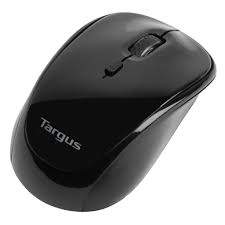
WIRELESS OPTICAL LAPTOP MOUSE - فأرة لاسلكية TARGUS - دليل المستخدم المجاني
ابحث عن دليل الجهاز مجاناً WIRELESS OPTICAL LAPTOP MOUSE TARGUS بصيغة PDF.



| العلامة التجارية | TARGUS |
| الموديل | WIRELESS OPTICAL LAPTOP MOUSE |
| نوع المنتج | ماوس بصري لاسلكي للابتوب |
| الواجهة | USB (مستقبل USB مصغر) |
| تقنية الكشف | بصري |
| مصدر الطاقة | 2 بطاريات AA (مرفقة) |
| عمر البطارية | عدة أشهر حسب الاستخدام؛ وضع توفير الطاقة التلقائي |
| المدى اللاسلكي | حوالي 10 أمتار (تقديري) |
| الأبعاد (الطول × العرض × الارتفاع) | حوالي 100 × 60 × 30 مم (تقديري) |
| الوزن (مع البطاريات) | حوالي 80 جم (تقديري) |
| أنظمة التشغيل المتوافقة | Windows 2000, XP, Vista, 7؛ Mac OS X 10.4 أو أحدث |
| التثبيت | توصيل وتشغيل، بدون حاجة إلى برنامج تشغيل |
| الأزرار | زر أيسر، أيمن، عجلة التمرير |
| المؤشر الضوئي | LED للحالة ومؤشر مستوى البطارية |
| مفتاح التشغيل/الإيقاف | نعم، في الجزء الخلفي من الماوس |
| تخزين المستقبل | حجرة مدمجة داخل الماوس |
| محتويات الصندوق | ماوس، مستقبل USB مصغر، 2 بطاريات AA، دليل المستخدم |
| الصيانة والتنظيف | تنظيف بقطعة قماش ناعمة وجافة؛ تجنب السوائل |
| احتياطات السلامة | لا تعرض للماء أو درجات الحرارة القصوى؛ أزل البطاريات في حالة عدم الاستخدام لفترة طويلة |
| قطع الغيار وقابلية الإصلاح | يوصى باستخدام بطاريات قابلة للشحن؛ لا توجد قطع قابلة للإصلاح من قبل المستخدم |
| الضمان | وفقًا للتشريعات السارية (عادةً سنتان) |
الأسئلة الشائعة - WIRELESS OPTICAL LAPTOP MOUSE TARGUS
أسئلة المستخدمين حول WIRELESS OPTICAL LAPTOP MOUSE TARGUS
0 سؤال حول هذا الجهاز. أجب على تلك التي تعرفها أو اطرح سؤالك.
اطرح سؤالاً جديداً حول هذا الجهاز
تنزيل التعليمات لجهازك فأرة لاسلكية بصيغة PDF مجاناً! ابحث عن دليلك WIRELESS OPTICAL LAPTOP MOUSE - TARGUS واستعد السيطرة على جهازك الإلكتروني. في هذه الصفحة منشورة جميع الوثائق اللازمة لاستخدام جهازك. WIRELESS OPTICAL LAPTOP MOUSE لعلامة TARGUS.
دليل المستخدم WIRELESS OPTICAL LAPTOP MOUSE TARGUS
Souris optique sans fil pour ordinateur portable de Targus 54
Aoumuo OTIKO Tovtik TcTargus yia ttpieiouu UToLoyiotc 60
HR-Hrvatski
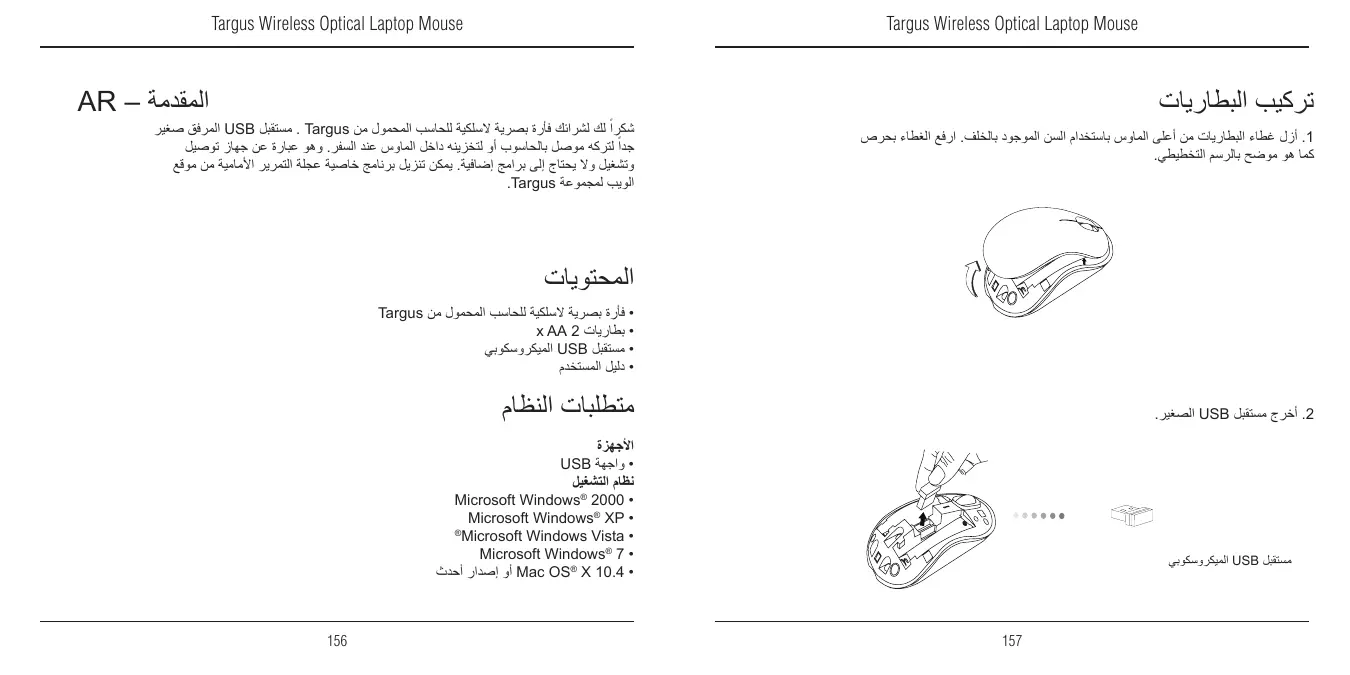
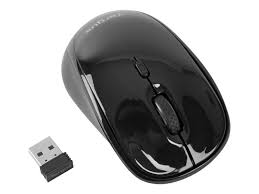
Nous vous remercions d'avoir acheté cette Souris optique sans fil pour ordinateur portable de Targus. Son récepteur micro USB est suffisamment petit pour rester constamment branché sur l'ordinateur ou pour être rangé dans la souris et ainsi ne pas le perdre lorsque vous vous déplacez. Cette souris est de type Plug & Play et ne requiert donc aucun pilote spécifique.
Contenu de la boîte
Souris optique sans fil pour ordinateur portable de Targus - 2x piles AA - Récepteur micro USB - Manuel d'utilisateur
Matériel
- Interface USB
Système d'exploitation
Microsoft Windows® 2000 - Microsoft Windows® XP - Microsoft Windows Vista® Microsoft Windows® 7 MacOSX10.4ou supérieure
Installation des piles
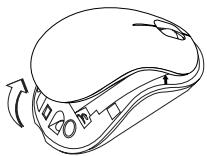
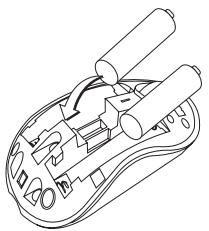
- Retirez le couvercle du compartiment de piles sur le dessus de la souris, à l'aide de l'encoche prévue à l'arrière. Soulevez délicatement le couvercle, comme indiqué sur la figure.
- Débranchez le minirécepteur USB.
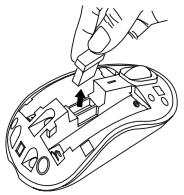
Récepteur micro USB
- Insérez la pile de type AA, en respectant le sens des polarités positive (+) et négative (-) indiquées à l'intérieur du compartiment de la pile.
- Remplacez le couvercle du compartiment de la pile.
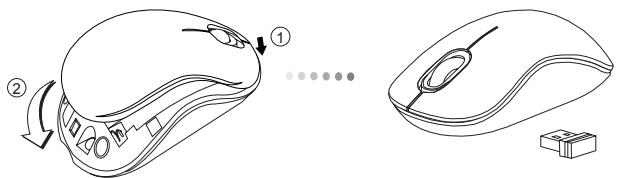

REMARQUE: INSÉREZ EN PREMIER LA PARTIE AVANT DU COUVERCLE, PUIS ENCLENCHÉZ LA PARTIE ARRIÈRE EN POSITION.
Établissement de la connexion
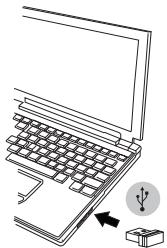
Connectez le récepteur USB sur l'un des ports USB disponibles de votre ordinateur.
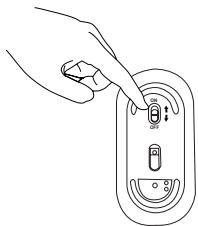
Mettez la souris en marche en faisant glisser l'interrupteur en position ON (MARCHE) situé à l'arrière de la souris.
Cette souris est de type plug & play (détection automatique). Elle est totalement fonctionnelle lors que son récepteur USB est connecté à votre ordinateur.
Mise en route :
Faites glisser l'interrupteur en position ON (MARCHE).
Mise hors tension :
Faisant glisser l'interrupteur en position OFF (ARRÊT).
Mode économique d'énergie:
La souris se place automatiquement en mode économique d'énergie lorsque vous ne l'utilisez pas pendant un certain temps, afin de ne pas gaspiller l'énergie des piles. Cliquez sur l'un quelconque des boutons de la souris ou simplement déplacez la souris pour la réactiver. La reconnexion à l'ordinateur peut prendre quelques secondes.
Indicateur de puissance des piles
Lorsque vous allumez la souris, son témoin LED s'allume pendant 3 secondes puis s'éteint progressivement.
- Si les piles sont trop déchargees (il reste moins de 5% de la puissance disponible), le témoin de marche vous le signale en clignotant toutes les 3 secondes. Remplacez alors les piles le plus vite possible.
Indicateur de puissance des piles
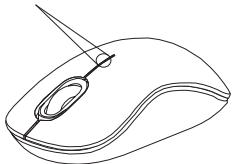
Économie d'énergie
- Éteignez votre souris lorsque vous vous déplacez ou ne l'utilisez pas. Les piles dureront ainsi plus longtemps.
Euxapiotoum e iouopa a t e To Aoupatoottikovtiki Targus viaetipattjouocuTLOAVOTc. OmuKpOeKTnsUSBTOuTOuvoSeuei eivaiapketaMkiopocwoteVAuTPOteitevaTOVapnoTeouvOeMevo OTUVTOAOIOTnacnATLWvTOUaEeTEmuOtroTVTIOTAV taqioeETe. PoKeiTAYouoKeunTOnTOBETnQKaAeONLeIToupyiac, EToMuVwSDevattaitaPooTeToLoyoiuiko.
Automato OTTIKO Toufki Targus yia etiipantieiouc UtoLooyiotes 2 μπταρίες AA MikpoδEktns USB Oxyoc xno
YAIKO - Étape USB
Aéroturbo ouptonma
- Microsoft Windows® 2000
- Microsoft Windows® XP
- Microsoft Windows Vista®
- Microsoft Windows® 7 Mac OSX 10.4 nettoyage écran

العلامة التجارية : TARGUS
الموديل : WIRELESS OPTICAL LAPTOP MOUSE
الفئة : فأرة لاسلكية