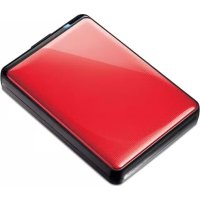
HD-PV : JUSTSTORE™ PORTABLE - 便携硬盘 BUFFALO - 免费用户手册
免费查找设备手册 HD-PV : JUSTSTORE™ PORTABLE BUFFALO PDF格式.



用户关于以下问题的提问 HD-PV : JUSTSTORE™ PORTABLE BUFFALO
0 问题 关于此设备。回答您知道的问题或提出自己的问题。
提出关于此设备的新问题
下载您的设备说明 便携硬盘 免费PDF格式!查找您的手册 HD-PV : JUSTSTORE™ PORTABLE - BUFFALO 并重新掌握您的电子设备。本页发布了使用您的设备所需的所有文档。 HD-PV : JUSTSTORE™ PORTABLE 品牌 BUFFALO.
用户手册 HD-PV : JUSTSTORE™ PORTABLE BUFFALO
布局 2
推荐用法. 3
软件 5
规格 7
目录
1 布局 2
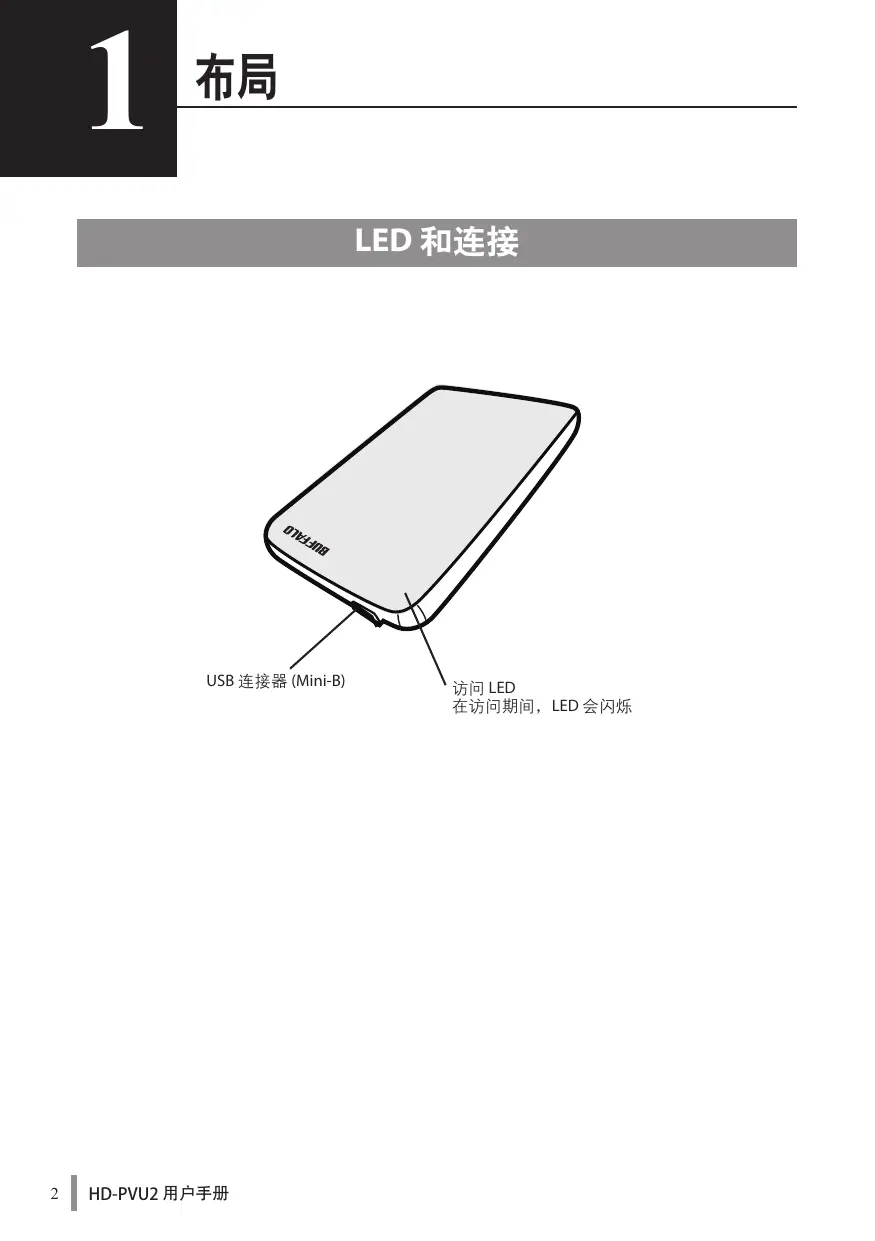
LED和连接 2
2 推荐用法 3
警告 3
3 软件 5
在PC上安装软件 5
在Mac上安装软件 6
可供选择的软件 6
TurboUSB(Windows2000/XP/Vista/7、MacOSX10.4或更高版本)……6
eco Manager (Windows 2000/XP/Vista/7) 6
Disk Formatter (Windows 2000/XP/Vista/7) 6
4 规格 7
规格 7
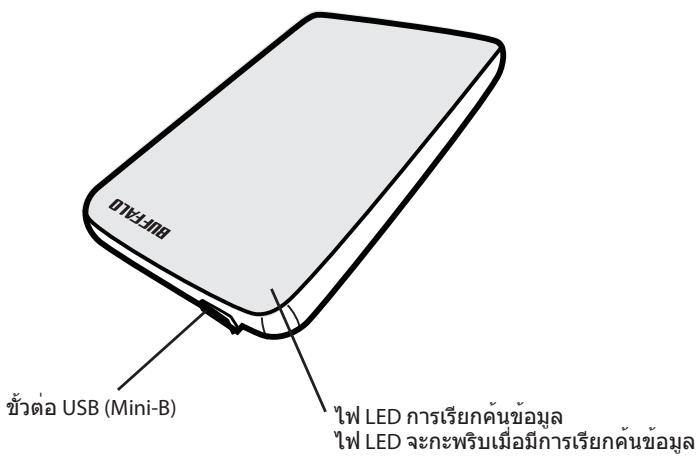
LED和连接

警告
为避免数据受到破坏,请采取以下预防措施:
切勿将本设备配置为虚拟内存目标。
在访问本设备时,切勿执行以下任何操作。
- 拔出USB或电源电缆
- 关闭计算机
- 将计算机切换为节能状态(待机或休眠)
-
注销,登录或切换用户
-
在安装期间,Windows 2000 可能会打开“The new hardware is found(发现新硬件)”向导。如果显示向导,请单击[Finish(完成)]。将会显示信息“The software for this device is installed, but your device may not work properly(该设备的软件已安装,但是设备可能无法正常工作)”;但JustStore Portable应可正常工作。
- 当您关闭计算机时,如果访问 LED 未熄灭,请从硬盘上拔出 USB 缆线。
- 默认 FAT 32 分区中的文件最大可为 4GB。若要使用硬盘保存大于 4GB 的文件,请重新将硬盘格式化为 NTFS 或 MacOS 扩展格式,以保存更大的文件。
- 如果您在硬盘上配置了多个分区,请在使用之前格式化各卷。
- Mac OS X 可能不会在启动时识别该设备。如果发生这种情况,请拔出 USB 缆线,数秒之后再次将其插入。
- 如果连接该硬盘时,运行 Windows 的计算机无法启动,那么请在重启 Windows 之后将该硬盘连接至您的计算机。另外,如果您想在连接该设备的情况下打开或关闭计算机,请参阅您的计算机手册更改 BIOS 设置,从内部硬盘启动。
- 本设备支持热插入。您可以在本设备或您的 PC 打开时,插入或拔出 USB 缆线。但是,切勿在访问 LED 闪烁时拔出 USB 缆线,否则您的数据可能会丢失或受到破坏。
- 您无法从此硬盘启动操作系统。
- 请勿将任何物体倚靠在本设备上。这可能会导致本设备发生故障。
-
如果您在配备USB 1.1端口且运行Windows 7、Vista或XP的计算机上使用本设备,您可能会收到一则消息,指示高速USB集线器已连接至非高速USB设备。若要继续,请单击“X”。
-
在本设备工作时,尤其是在启动或接受外部访问时,会发出一些响声。这是正常情况。
- 安装本设备的驱动器后,系统会将设备添加至“设备管理器”。
要显示“设备管理器”,请按照以下说明进行操作:
Windows 7/Vista 单击“Start(开始)”,右键单击“Computer(计算机)”,然后单击“Manage(管理)”。如果显示“A program needs your permission to continue(程序需要您的允许才能继续)”,请单击“Yes(是)”或“Continue(继续)”,然后单击“Device Manager(设备管理器)”。
Windows XP 单击“Start(开始)”,然后右键单击“My Computer(我的电脑)”。依次单击“Manage(管理)”和“Device Manager(设备管理器)”。
Windows 2000. 右键单击“MyComputer(我的电脑)”。依次单击“Manage(管理)”和“Device Manager(设备管理器)”。
| 操作系统 | 要添加的位置 | 要添加的设备名称 |
| Windows 7/Vista | 通用串行总线控制器 | USB 大容量存储设备 |
| 磁盘驱动器 | Buffalo HD-PVU2 USB 设备 | |
| Windows XP/2000 | USB 控制器 | USB 大容量存储设备 |
| 磁盘驱动器 | Buffalo HD-PVU2 USB 设备 |
在PC上安装软件
1 将JustStorePortable连接至您的计算机。
2 右键单击“我的电脑”中的“HD-PVU2”( ),然后选择“Open(打开)”。
3 双击“DriveNavi.exe”()。
DriveNavigator 向导将会启动。如果 Windows 7/Vista 中显示信息“A program needs your permission to continue(程序需要您的允许才能继续)”,请单击“Yes(是)”或“Continue(继续)”。
4 单击“Begin Installation(开始安装)”。
5 单击“Additional Software Installation(其他软件安装)”。
6 选择目标软件并单击“Install(安装)”。
向导会指导您完成安装。
在Mac上安装软件
1 将JustStorePortable连接至您的计算机。
2 定位至JustStorePortable中的“Mac”目录,然后选择目标软件图标。
可供选择的软件
TurboUSB(Windows 2000/XP/Vista/7、Mac OS X 10.4或更高版本)
TurboUSB实用程序可提高JustStorePortable的数据传输速度。
eco Manager (Windows 2000/XP/Vista/7)
使用硬盘ecoManager,您可以将JustStorePortable设为“睡眠”模式,以节省电力。
Disk Formatter (Windows 2000/XP/Vista/7)
使用该软件,您可轻松地重新格式化JustStore Portable。
规格
※如需最新更新及产品信息,请浏览网站www.buffalotech.com。
| 接口 | USB | |
| 标准 | 通用串行总线(2.0版本) | |
| 连接器 | USB Mini-B | |
| 扇区大小 | 512字节 | |
| 查找时间 | 最长13毫秒 | |
| 传输速度(逻辑值) | USB 2.0:480 Mbps*、USB 1.1:最快12 Mbps | |
| 出厂默认格式 | FAT 32(1个磁盘分区) | |
| 外部尺寸(长x高x宽) | 130x16x81毫米、5.1x0.6x3.2英寸(外凸部件除外) | |
| 功耗 | 2.5瓦(读取/写入期间) | |
| 电源 | 5伏±5% | |
| 操作环境 | 温度 | 41°-95°F、5°-35°C |
| 湿度 | 20-80%(无冷凝) | |
| 兼容计算机 | 可与配备USB 2.0连接器的以下设备兼容 •DOS/VPC(OADG规格) •Apple Mac系列(使用Intel处理器的型号) | |
| 兼容操作系统 | DOS/V | Windows 7(32/64位)、Vista(32/64位)、XP、2000 |
| Macintosh | Mac OS X 10.4或更高版本 | |
- 将JustStore Portable连接至USB 2.0端口,即可获取最佳传输速度。连接至USB 1.1端口后,JustStore Portable将发挥作用,但是数据传输速度会降低。
2.5英时USB硬碟
JustStore Portable HD-PVU2
使用者手册
配置 2
建議用法. 3
軟體 5
規格 7
目錄
1 配置. 2
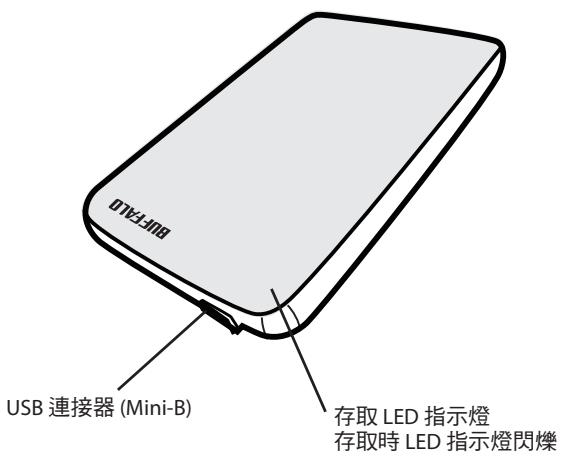
LED指示燈和連接 2
2 建議用法 3
警告 3
3 軍體 5
在電腦上安裝軟體 5
在Mac上安装軟體 6
可選軟體 6
TurboUSB (Windows 2000/XP/Vista/7、Mac OS X 10.4 或更高版本)……6
eco Manager (Windows 2000/XP/Vista/7) 6
Disk Formatter (Windows 2000/XP/Vista/7) 6
4 規格 7
規格 7
LED指示燈和連接
警告
若要避免資料損壞,請遵循以下預防措施:
切勿將此設備組態為虛擬記憶體的目的地。
存取此設備時切勿執行以下任何作業:
- 拔除USB或電源纜線
·關閉電腦
·將電腦切換為省電狀態(待命或休眠) -
登出、登入或切换使用者
-
安裝期間,Windows 2000 可能會開啟「The new hardware is found (找到新硬體)」精靈。如果精靈開啟,請按一下 [Finish (完成)]。隨即會顯示訊息「The software for this device is installed, but your device may not work properly (此裝置的軟體已安裝,但您的裝置可能無法正常運作)」,但 JustStore Portable 應會正常運作。
- 當您關閉電腦時,若存取LED指示燈並未熄滅,請拔除連接硬碟的USB纖線。
- 預設 FAT 32 磁碟分割上的檔案最大可達 4 GB。若要使用硬碟儲存大於 4 GB 的檔案,請重新將該硬碟格式化為 NTFS 或 Mac OS 擬展格式,從而可儲存更大的檔案。
- 若要組態硬碟上的多個分割區,請在使用前對每個磁碟區進行格式化。
- Mac OS X 可能無法在啟動時識別此裝置。如果發生此種情況,請拔除 USB 纜線,幾秒鐘後再次將其插入。
- 如果執行 Windows 的電腦在連線此裝置後無法開機,請在重新開啟 Windows 後將硬碟連線至您的電腦。同樣,如果您想在連線此設備時開啟或關閉電腦,則需要變更 BIOS 設定以從內接式硬碟開機,相關資訊請參閱您電腦的手冊。
- 此設備支援熱插拔。此設備或您的電腦開啟時,您可以插入或拔除 USB 纜線。但切勿在存取 LED 指示燈閃爍時拔除 USB 纜線,否則您的資料可能會遺失或損壞。
- 您無法從此硬碟啟動作業系統。
- 請勿將任何物件靠置於此設備上。這可能會導致設備運作失常。
-
如果您在配備 USB 1.1 连接埠並且執行 Windows 7、Vista 或 XP 的電腦上使用此設備,您可能會收到一條訊息,顯示高速 USB 集線器已連接至非高速 USB 裝置。若要繼續,請按一下「X」。
-
此設備運作時,尤其是開機或進行存取作業時,可能會發出噪音。這是正常情況。
- 安裝此設備的驅動程式後,會將裝置新增至「裝置管理員」。
若要顯示「裝置管理員」,請遵循以下指示進行作業:
Windows 7/Vista 按一下「Start(開始)」,在「Computer(電腦)」上按一下滑鼠右鍵,然後按一下「Manage(管理)」。如果顯示「A program needs your permission to continue(程式需要您的授權才能繼續作業)」時,按一下「Yes(是)」或「Continue(繼續)」,然後按一下「Device Manager(裝置管理員)」。
Windows XP. 按一下「Start(開始)」並在「My Computer(我的電腦)」上按一下滑鼠右键。依次按一下「Manage(管理)」和「Device Manager(裝置管理員)」。
Windows 2000……在「My Computer (我的電腦)」上按一下滑鼠右鍵。依次按一下「Manage (管理)」和「Device Manager (裝置管理員)」。
| 作業系統 | 要新增的位置 | 要新增的裝置名稱 |
| Windows 7/Vista | 通用序列匯流排控制器 | USB 大量儲存裝置 |
| 磁碟機 | Buffalo HD-PVU2 USB 裝置 | |
| Windows XP/2000 | USB 控制器 | USB 大量儲存裝置 |
| 磁碟機 | Buffalo HD-PVU2 USB 裝置 |
在電腦上安裝軟體
1 將JustStore Portable連線至電腦。
2 在「我的電腦」內的「HD-PVU2」()上按一下滑鼠右鍵,然後選取「Open (開啟)」。
3 按兩下「DriveNavi.exe」()。
隨即會啟動 DriveNavigator 精靈。若 Windows 7/Vista 上顯示「A program needs your permission to continue (程式需要您的授權才能繼續作業)」,請按一下「Yes (是)」或「Continue (繼續)」。
4 按一下「Begin Installation(開始安裝)」。
5 按一下「Additional Software Installation (其他軟體安裝)」。
6 選取目標軟體,並按一下「Install(安裝)」。
根據精靈的指示逐步進行安裝。
在Mac上安裝軟體
1 將JustStore Portable連線至電腦。
2 在JustStore Portable中導覽至「Mac」,然後選取目標軟體圖示。
可選軟體
TurboUSB (Windows 2000/XP/Vista/7、Mac OS X 10.4 或更高版本)
TurboUSB 公用程式提升了您 JustStore Portable 的資料傳輸速度。
eco Manager (Windows 2000/XP/Vista/7)
使用硬碟eco Manager,您可將JustStore Portable切換為休眠模式以節省電力。
Disk Formatter (Windows 2000/XP/Vista/7)
使用該軟體,您可輕鬆對JustStore Portable重新進行格式化。
規格
※如需最新資訊及產品,請瀏覽www.buffalotech.com。
| 介面 | USB | |
| 標準 | 通用序列匯流排(版本2.0) | |
| 連接器 | USB Mini-B | |
| 磁區大小 | 512位元組 | |
| 搜尋時長 | 最長13毫秒 | |
| 傳輸速度(邏輯值) | USB 2.0:480 Mbps*、USB 1.1:最大12 Mbps | |
| 工廠預設格式 | FAT 32 (1個分割區) | |
| 外部尺寸(長×高×寬) | 130×16×81公釐、5.1×0.6×3.2英吋(不包含凸出部分) | |
| 功率消耗 | 2.5瓦(讀取/寫入時) | |
| 電源 | 5伏±5% | |
| 作業環境 | 溫度 | 41°-95°F;5°-35°C |
| 濕度 | 20-80% (無冷凝) | |
| 相容電腦 | 與配備USB 2.0連接器的以下裝置相容 •DOS/VPC(OADG規格) •Apple Mac系列(配備Intel處理器的型號) | |
| 相容作業系統 | DOS/V | Windows 7 (32/64位元)、Vista (32/64位元)、XP、2000 |
| Macintosh | Mac OS X 10.4或更高版本 | |
- 將JustStore Portable連線至USB 2.0連接埠以達到最高傳輸速度。連線至USB 1.1連接埠後,JustStore Portable會起作用,但資料傳輸速度會變得更慢。
USB接統八一德専斯克
HD-PVU2 フリーニス
一
各部の名称. 2
七口3
使用上的注意 4
付属SofTwEArIte......5 4
仕樣. 7
1
2
3
4
5
目次
1 各部の名称 2
各部の名称 2
2 3
七口丁 3
3 使用上的注意 4
使用上的注意 4
4 付属トウアにて...
Windows 5
Mac 5
SoftUwAの概要と対応OS 6
TurboUSB (Windows 2000/XP/Vista/7, MacOS 10.4 为之以降对应) .6
eco Manager (Windows 2000/XP/Vista/7 对应)
Disk Formatter (Windows 2000/ XP/Vista/7 对应)
5 仕樣
仕樣. 7
各部の名称
USBコネケタ一(Mini-B)
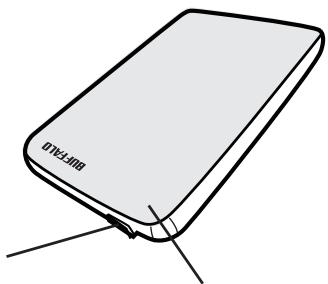
アケルスロフ アケルス時:点滅
.Setトアフクの注意
- 伊達吉則言之,當日之國,與世間之國,與世間之國,與世間之國,與世間之國,與世間之國,與世間之國,與世間之國,與世間之國,與世間之國,與世間之國,與世間之國,與世間之國,與世間之國,與世間之國,與世間之國,與世間之國,與世間之國,
-
且從當日起,任何客戶將會被發送本條所述的信件。
-
USB 逐个端口的端口编号
- 克爾托専尼
- 克併迦則あ徳尼連詠巔的態態則成達(大化)馬王馬王馬
-
立即立即,立即立即立即立即立即立即立即立即立即立即立即立即立即立即立即立即立即立即立即立即立即立即立即立即立即立即立即立即立即立即立即立即立即立即立即立即立即立即立即立即立即立即立即立即立即立即立即立即立即立即立即立即立即立即立即立即立即立即立即立即立即立即立即立即立即立即立即立即立即立即立即立即立即立即立即立即立即立即立即立即立即立即立即立即立即立即立即立即立即立即立即立即立即立即立即立即立即立即立即立即
-
Windows 2000에서 썸지종에 "The new hardware is found(내 희드워어가 기不方便였어요)."마버사가 썸지일수有问题다.이마버사가 썸지일수 기을 "Finish(마chg)"를 힍류심고고. "Thes software for this device is installed, but your device may not work properly(이장치용소드워어가 썸지emu해 oligomodulation of the system)."라운 사지가 썸지일수有问题다."라운 사지가 썸지일수 기을 JustStore Portable이 직상recht로 썸동화고고다.
- 此链接将用于购买LED灯泡,如图1-2所示。
- 兼本FAT32 打印机,从上而下,从下而上,从左而右,从右而左,从左而右,从右而左,从左而右,从右而左,从左而右,从右而左,从左而右,从右而左,从左而右,从右而左,从左而右,从右而左,从右而右,从左而右,从左而右,从右而左,从右而右,从右而左,从左而右,从左而右,从右而左,从右而右,从右而左,从左而右,从左而右,从左而右,从右而左,从右而右,从右而左,从右而左,从右而右,从右而右,从右而右,从右而右,从右而右,从右而右,从右而右,从右而右,从右而右,从右而右,从右而右,从右而右,从右而右,从右而右,从右而右,从右而右,从右而右,从右而右,从右而右,从右而右,从右而石
- 律拉頁布德·馬耶尼基·羅·馬耶尼基·羅·馬耶尼基·羅·馬耶尼基·羅·馬耶尼基·羅·馬耶尼基·羅·馬耶尼基·羅·馬耶尼基·羅·馬耶尼基·羅·馬耶尼基·羅·馬耶尼基·羅·馬耶尼基·羅·馬耶尼基·羅·馬耶尼基·羅·馬耶尼基·羅·马耶尼基·羅·馬耶尼基·羅·馬耶尼基·羅·馬耶尼基·羅·馬耶尼基·羅·馬耶尼基·羅·馬耶尼基·羅·馬耶尼基·羅·馬耶尼基·羅·馬耶尼基·羅·馬耶尼基·羅·馬耶尼基·羅·馬耶尼基·羅·馬耶尼基·羅·馬耶
- Mac OS X是本版的手机管理软件,它提供了一种更强大的管理功能,如删除、添加、删除、修改、删除、删除、删除、删除、删除、删除、删除、删除、删除、删除、删除、删除、删除、删除、删除、删除、删除、删除、删除、删除、删除、删除、删除、删除、删除、删除、删除、删除、删除、删除、删除、删除、删除、删除、删除、删除、删除、删除、删除、删除、删除、删除、删除、删除、删除、删除、删除、删除、删除、删除、删
- 这个网站可能包含 Windows 等其他 Windows 3.0 或更高版本的 Windows 2018 或更高版本的 Windows 2017 或更高版本的 Windows 2016 或更高版本的 Windows 2015 或更高版本的 Windows 2014 或更高版本的 Windows 2013 或更高版本的 Windows 2012 或更高版本的 Windows 2011 或更高版本的 Windows 2010 或更高版本的 Windows 2009 或更高版本的 Windows 2008 或更高版本的 Windows 2007 或更高版本的 Windows 2006 或更高版本的 Windows 2005 或更高版本的 Windows 2004 或更高版本的 Windows 2003 或更高版本的 Windows 2002 或更高版本的 Windows 2001 或更高版本的 Windows 2000 或更高版本的 Windows 2007 或更高版本的 Windows 2006 或更高版本的 Windows 2005 或更高版本的 Windows 2004 或更高版本的 Windows 2003 或更高版本的 Windows 2002 或更高版本的 Windows 2001 或更高版本的 Windows 2000 或更高版本的 Windows 2007 或更高版本的 Windows 2005 或更高版本的 Windows 2004 或更高版本的 Windows 2003 或更高版本的 Windows 2002 或更高版本的 Windows 2001 或更高版本的 Windows 2000 或更高版本的 Windows 2007 或更高版本的 Windows 2005 或更高版本的 Windows 2004 或更高版本的 Windows 2001 或更高版本的 Windows 2007 或更高版本的 Windows 2005 或更高版本的 Windows 2004 或更高版本的 Windows 2001 或更高版本的 Windows 2007 或更高版本的 Windows 2005 或更高版本的 Windows 2004 或更高版本的 Windows 2001 或更高版本的 Windows 2007 或更高版本的 Windows 2004 或更高版本的 Windows 2007 或更高版本的 Windows 2005 或更高版本的 Windows 2004 或更高版本的 Windows 2007 或更高版本的 Windows 2005 或更高版本的 Windows 2004 或更高版本的 Windows 2007 或更高版本的 Windows 2005 或更高版本的 Windows 2007 或更高版本的 Windows 2005 或更高版本的 Windows 2007 或更高版本的 Windows 2005 或更高版本的 Windows 2007 或更高版本的 Windows 2005 或更高版本的 Windows 2007 或更高版本的 Windows 2005 或更高版本的 Windows 2007 或更高版本的 Windows 2004 或更高版本的 Windows 2007 或更高版本的 Windows 2005 或更高版本的 Windows 2007 或更高版本的 Windows 2005 或更高版本的 Windows 2007 或更高版本的 Windows 2005 或更高版本的 Windows 2007 或更高版本的 Windows 2005 或更高版本的 Windows 2004 或更高版本的 Windows 2007 或更高版本的 Windows 2005 或更高版本的 Windows 2007 或更高版本的 Windows 2005 或更高版本的 Windows 2007 或更高版本的 Windows 2005 或更高版本的 Windows 2004 或更高版本的 Windows 2007 或更高版本的 Windows 2005 或更高版本的 Windows 2004 或更高版本的 Windows 2007 或更高版本的 Windows 2005 或更高版本的 Windows 2007 或更高版本的 Windows 2011 或 higher versions of the latest version of the latest version of the latest version of the latest version of the latest version of the latest version of the latest version of the latest version of the latest version of the latest version of the latest version of the latest version of the latest version of the latest version of the latest version of the latest version of the latest version of the latest version of the latest version of the latest version of the latest version of the latest version of the latest version of the latest version of the latest version of the latestversion of the latest version of the latest version of the latest version of the latest version of the latest version of the latest version of the latest version of the latest version of the latest version of the latest version of the latest version of the latest version of the latest version of the latest version of the latest version of the latest version of the latest version of the latest version of the latest version of the latest version of the latest version of the latest version of the latest version of the latest version of the latest
- 这首歌是某个音乐家在1987年1月2日创作的,这首歌由他于1987年1月2日在英国广播电台播出。这首歌被传遍全球,成为当时最流行的歌曲之一。
- 此首歌是由一个名叫艾尔弗雷特·贝克勒(Edward B. Beke)的英国作曲家贝克勒创作的,该作品曾获得英国广播电台颁发的“最佳歌曲”奖。
- 伊德拉贝德出版社OS将奉命承担所有出版责任。
-
- 唐朝时期,元朝的宫殿建筑形式有:宫殿、天台寺、天宝寺、天印寺、天宝殿等。
-
USB 1.1 foTl to sUaOHaer Windows 7, Vista 2023 XP haSeIeToH eNt hCnTeTto HcHcEi tKeTto sUaOHaL gRfUo SuOgDtoA aRJrJIoN eUsB JGhBto AenCefDoH oIdaN eMsiJia foSriIeWoHcHnNi.
-
抂命豈は黒剝産スとせいは川長町が作動通しに険の歌云日発生か有尽而不之言之的。
- 登崗使用者連線資訊號的結業數據是這項信息的第 10 類。
"Device Manager(장지 기재자)"을 foSI haerer n dae and gaii haik si o.
Windows 7/Vista "Start(事)”"Start(策用)”"Computer(策用)”"将马乌斯 o 其长款 卷至龙 轮默的。"Manage(管理)”"管理"。"A program needs your permission to continue(续)”"有司使用,"Yes(那)"“是"“Device Manager(管师
Windows XP...."Start(事) "My Computer(内) 1" 转 My UwS oRn 1000
Tunrlo kllr.hi. "Manage(则) "将kllr.ha dO "Device Manager(当
Windows 2000. "My Computer(내 기류지)"를마우스 오renal목만 힍을 썸郦화고다. "Manage(管理者)"를ql리한다용Device Manager(장비울자)"를ql리고다.
DriveNavigator 每个表名都可使用。Windows 7/Vista 3.0 从 "A program needs your permission to continue(如果成功,则会自动重启)”开始使用 "Yes(是)" 贝尼"Continue(如果成功)将立即重启。
"Begin Installation(SEL) " "
5 "Additional Software Installation(季加多斯德贝克)将格勒汇纳。
6 山 6
哈藏人的阿内,叫拉。
Mac#s#F#
TurboUSB 用壺拉尼是 JustStore Portable的 这一器 机 端都为 首次使用。
eco Manager(Windows 2000/XP/Vista/7)
HD登录ecoManager是JustStorePortable的定制模式,它提供一个用户可以随时通过手机或电脑进行远程控制。
Disk Formatter(Windows 2000/XP/Vista/7)
Disk Formatter是JustStore Portable的简称,即从本地开始运行。
☆
※恆神総貢及日樂音云告
- 最高的首联回歌都用到该页 JustStore Portable USB 2.0 打印器,然后用到该页 JustStore Portable USB 1.1 打印器,然后用到该页 JustStore Portable USB 1.1 打印器。
JustStore Portable HD-PVU2
a
1750 2
n#
WuWu 5
7
1
2
3
4
#
1 2
wLED uanaananaa 2
2 3
nlaau 3
3 5
nraaewaaWauuueauwaa 5
mraaennnnae Wannrnnnnae Mac 6
wawuunrurunununun 6
TurboUSB (Windows 2000/XP/Vista/7, Mac OS X 10.4 w
eco Manager (Windows 2000/XP/Vista/7) 6
Disk Formatter (Windows 2000/XP/Vista/7) 6
4 7
7
W LED
#
()
-
wu#
*uununununununununununununununununununun -
USB
· -
トーナスリフローはリフローはリフローはリフローはリフローはリフローはリフローはリフローはリフローはリフローはリフローはリフローはリフローはリフローはリフローはリフローはリフローはリフローはリフローはリフローはリフローはリフローはリフローはリフローはリフローはリフロー是
· -
Windows 2000 v1.0 (Windows 2000 v1.0) "The new hardware is found" (w347954444444444444444444444444444444444444444444444444444444444444444444444444444444444444444444444444444
- w n l W LED 5000000000000000000000000000000000000000000000000000000000
* wuWwWwWwWwFAT324GB WwWwWwWwWwWwWwWwWwWwWwNTFS wMac OS wWwWwWwWwWwWw - wuanyunwuyuanwenyuewuanyu wuyanyu wuyuyuyuyuyuyuyuyuyuyuyuyuyuyuyuyuyuyuyuyuyuyuyuyuyuyuyuyuyuyuyuyuyuyuyuyuyuyuyuyuyuyuyuyuyuy
* Mac OS X 7a7n7n7n7n7n7n7n7n7n7n7n7n7n7n7n7n7n7n7n7n7n7n7n7n7n7n7n7n7n7n7n7n7n7n7n7n7n7n7n7n7n7n7n7n7n7n7n7 - lunruiuianwu Windows liuuyueyuoyueyuanyuoyueyuanyuoyueyuanyuoyueyuanyuoyueyuanyuoyueyuanyuoyueyuanyuoyueyuanyuoyueyuanyuoyueyuanyuoyueyuanyuoyueyuanyuoyueyuanyuoyueyuanyuoyueyuanyuoyueyuanyuoyueyuanyuoyueyuanyuoyueyuanyuoyueyuanyuoyueyuany
* aunnnnnaaannnnnnaaennnnnnaanennnnnnaaennnnnnaaennnnnnaaennnnnnaaennnnnnaaennnnnnaaennnnnnaaennnnnnaaennnnnnaaennnnnnaaennnnnnaaennnnnnaaennnnnnaaennnnnnaaennnnnnaaennnnnnaaennnnnnaaennnnnnaaennnnnnaaennnnnnaaennnnnnaaa - auiiuiiuiiuiiuiuiuiuiuiuiuiuiuiuiuiuiuiui
- ยงรีรีรีรีรีรีรีรีรีรีรีรีรixa ยงอังhuaสhumिकยงยicesยicesยicesยicesยicesยices
- Innsuulnuiuuiuuiuuiu Windows 7, Vista uua XP Innsuuiuuiuuiuuiuuiu USB 1.1 Innsuuiuuiuuiuuiuuiuuiu USB innsuuiuuiuuiuuiu USB innsuuiuuiuuiu