
616 - Audio Equipment NAD - Free user manual and instructions
Find the device manual for free 616 NAD in PDF.



| Product Type | Double Cassette Stereo Cassette Deck |
| Power Supply | European models: AC 230 V, 50 Hz; US/Canadian models: AC 120 V, 60 Hz |
| Main Functions | Playback and recording on two decks (A and B); auto-reverse; normal and high-speed dubbing; recording on deck B only |
| Noise Reduction | Dolby B NR, Dolby C NR, HX Pro (musical escape extension, active in recording) |
| Playback Equalization | Play Trim: high frequency adjustment in playback |
| Controls | Play, Reverse Play, Stop, Fast Forward, Rewind, Record/Pause, Dolby NR, Reverse Mode, Dubbing, High Speed Dubbing, Record Level, Balance, Play Trim |
| Display | Indicators for functions, recording levels (peak), tape counter, Dolby NR, mode |
| Supported Tape Types | Normal (Type I), CrO2 (Type II), Metal (Type IV) – automatic detection |
| Connectors | Line In, Line Out, NAD Link In |
| Maintenance | Regular cleaning of heads and mechanism; periodic demagnetization; do not lubricate |
| Erasure Protection | Protection tabs on cassettes; recording impossible if tabs broken |
| Operating Temperature | Normal room temperature; avoid magnetic fields and heat sources |
Frequently Asked Questions - 616 NAD
User questions about 616 NAD
0 question about this device. Answer the ones you know or ask your own.
Ask a new question about this device
Download the instructions for your Audio Equipment in PDF format for free! Find your manual 616 - NAD and take your electronic device back in hand. On this page are published all the documents necessary for the use of your device. 616 by NAD.
USER MANUAL 616 NAD
WARNING: TO PREVENT FIRE OR ELECTRIC SHOCK, DO NOT EXPOSE THIS APPLIANCE TO RAIN OR MOISTURE
Note to CATV system installer: This reminder is provided to call the CATV installer's attention to Section 820-40 of the NEC, which provides guidelines for proper grounding and, in particular, specifies that the cable should be connected to the grounding system of the building, as close to the point of cable entry as practical.
THIS DIGITAL APPARATUS DOES NOT EXCEED THE CLASS B LIMITS FOR RADIO NOISE EMISSIONS FROM DIGITAL APPARATUS AS SET OUT IN THE RADIO INTERFERENCE REGULATIONS OF THE CANADIAN DEPARTMENT OF COMMUNICATIONS.
LE PRESENT APPAREIL NUMVERIQUE N'EMET PAS DE BRUITS RADIOELECTRIQUES DEPASSANT LES LIMITES APPLICABLES AUX APPAREILS NUMERIQUES DE LA CLASSE B PRESCRITES DANS LE REGLEMENT SUR LE BROUILLAGE RADIO ELECTRIQUE EDICTE PAR LE MINISTERE DES COMMUNICATIONS DU CANADA.
ATTENTION FOR EUROPEAN MODEL:
THIS APPARATUS COMPLIES WITH THE REQUIREMENTS OF EC DIRECTIVE 87/308/EEC.
WARNING : BEFORE PLUGGING IN THE UNIT FOR THE FIRST TIME, READ THE FOLLOWING SECTION CAREFULLY.
Some models are designed for use only with the power supply voltage of the region where they are sold.
European models: AC 230V, 50Hz
U.S.A. anmd Canadian models: AC 120V, 60Hz
CAUTION: TO PREVENT ELECTRIC SHOCK DO NOT USE THIS POLARISED PLUG WITH AN EXTENSION CORD RECEPTACLE OR OTHER OUTLET UNLESS THE BLADES CAN BE FULLY INSERTED TO PREVENT BLADE EXPOSURE.
ATTENTION: POUR PREVENIR LES CHOCS ELECTRIQUES NE PAS UTILISER CETTE FICHE POLARISEE AVEC UN PROLONGATEUR, UNE PRISE DE COURANT OU UNE AUTRE SORTIE DE COURANT, SAUF SI LES LAMES PEUVENT ETRE INSEREES A FOND SANS EN LAISSER AUCUNE PARTIE A DECOUVERT.

CAUTION
RISK OF ELECTRIC SHOCK DO NOT OPEN

CAUTION: TO REDUCE THE RISK OF ELECTRIC
SHOCK, DO NOT REMOVE COVER (OR BACK).
O USER SEVICEABLE PARTS INSIDI
REFER SERVICING TO QUALIFIED
SERVICE PERSONNEL
ATTENTION:
RISQUE DE CHOC ELECTRIQUE NE PAS OUVRIR
AFIN DEVITER UN CHOC
ELECTRIQUE, ET LES
CONSEQUENCES GRAVES
QUI POURRAIENT EN
RESULTER, TENTEZ PAS
D'OUVRIR L'APPAREIL ET
DE TOUCHER AUX
COMPOSANTS INTERNES
SANS LA PRESENCE D'UNE
SERVICE PERSONNEL
CAUTION : TO REDUCE THE RISK OF ELECTRIC SHOCK, DO NOT REMOVE COVER (OR BACK). NO USER-SERVICEABLE PARTS INSIDE, REFER SERVICING TO QUALIFIED SERVICE PERSONNEL.

The lightning flash with arrowhead, within an equilateral triangle is intended to alert the user of the presence of uninsulated "dangerous voltage" within the product's enclosure; that may be of sufficient magnitude to constitute a risk of electric shock to persons.

The exclamation point within an equilateral triangle is intended to alert the user of the presence of important operating and maintenance (servicing) instructions in the literature accompanying the appliance
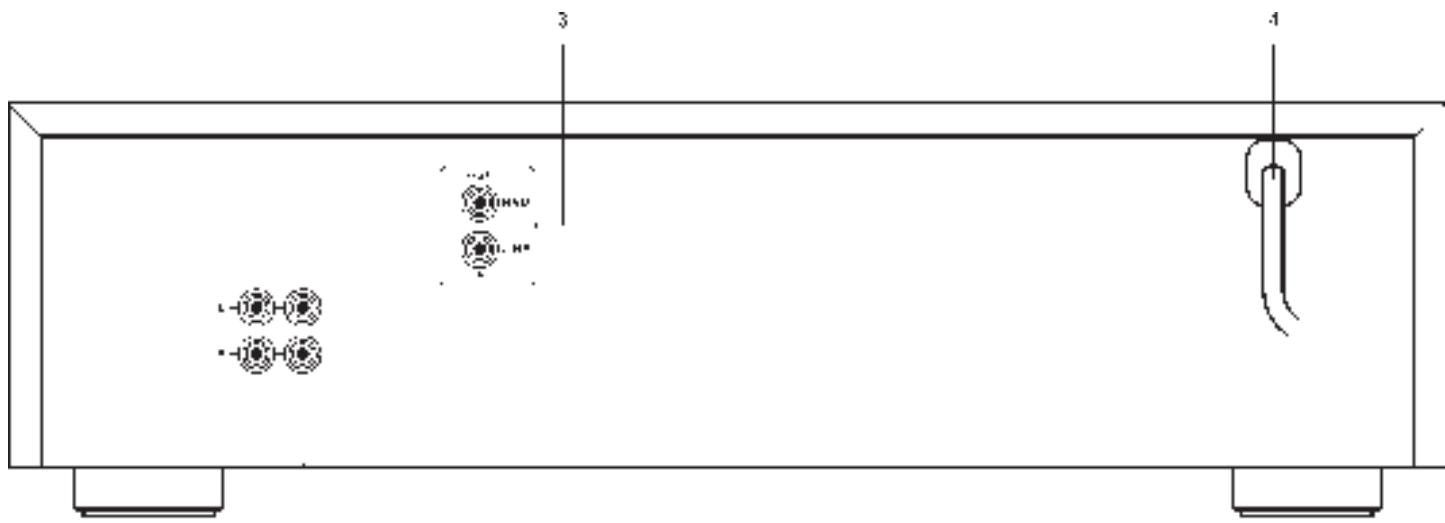
REAR PANEL CONNECTIONS
text_image
3 4 L-10H-10 -10H-10 10H-10 20H-10 30H-10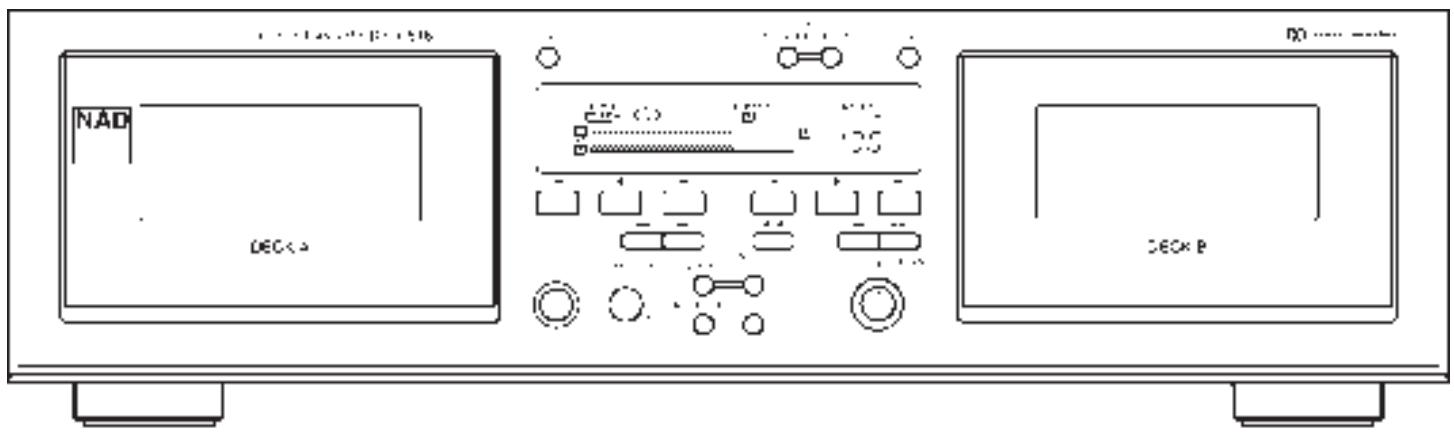
text_image
NAD DEC×2 NO ...... DEC×P© 1995. NAD ELECTRONICS LTD. 616.
Figure 1.

text_image
Scanned text image with fragmented and low-resolution Chinese characters, possibly from a document or form.Figure 2.
text_image
Technical diagram showing a mechanical or architectural component with labeled parts and directional arrows indicating motion or force.Figure 3.
natural_image
Pure technical diagram showing mechanical components without any text, numbers, or symbolsFigure 4.
natural_image
Technical line drawing of a mechanical assembly with levers and components (no text or symbols)INSTALLATION
The recorder may be installed on any stable surface that is not subjected to vibration or intense magnetic fields. It should not be placed directly on a loudspeaker, a television set, or a large power amplifier where it might pick up hum from the amplifier's power transformer. If you wish to install the recorder next to an amplifier on the same shelf, place the recorder on the right so that its cassette compartment will be located away from the amplifier.
Allow adequate ventilation. Do not place this product on a soft surface such as a carpet or in an enclosed position such as a book case or cabinet that may impede the airflow through the ventilation slots.
WARNING TO UK USERS. If this appartus is not fitted with a UK three-pin plug, do not attempt to insert the attached plug into a UK mains socket. Instead, cut the plug from the mains lead and attach a fused UK three-pin plug using the following safety advice on wiring.
IMPORTANT. The wires in this mains lead are coloured BLUE and BROWN;
BLUE: NEUTRAL BROWN: LIVE
The colours of these mains lead wires may not correspond with the coloured markings identifying the terminals in your plug. In this case the BROWN wire must be connected to the terminal which is marked L(ive) or coloured RED. The BLUE wire must be connected to the terminal marked N(eutral) or coloured BLACK. No connection should be made to the terminal marked E or coloured green or green and yellow
WARNING: BEFORE PLUGGING IN THE UNIT FOR THE FIRST TIME, READ THE FOLLOWING SECTION CAREFULLY.
Some models are designed for use only with the power supply voltage of the region where they are sold.
European and Australian models: AC 230V, 50Hz. U.S.A. and Canadian models: AC 120V, 60Hz.
PRECAUTIONS
To ensure that maximum performance of the NAD 616 cassette deck is maintained over time, please bear the following precautions in mind:
THE DECK
A. Make sure the heads and transport are cleaned regularly. Please refer to chapter "Maintenance".
B. Demagnetise heads and tape guidance of both tape transports from time to time. Please refer to chapter "Maintenance".
C. The bearings and other moving parts have been treated with special lubricants and are therefore maintenance-free. Additional lubrication can actually cause malfunctioning.
D. Do not position the deck near equipment with strong magnetic fields, such as loudspeakers or televisions, etc.
E. Place the deck on a solid, flat surface.
F. Avoid dirt, dust, sand, etc. from entering the deck.
G. Avoid placing near transmitters: they can generate high frequencies which may cause malfunctioning of the deck.
H. Ensure the cassette deck compartment lids are closed when the deck is not in use. Open the cassette compartments only for taking a cassette in or out, or for cleaning the heads and tape guides.
I. Do not place the deck directly on top of a (power) amplifier or receiver. The deck may pick up hum from the amplifier's power transformer. Some amplifiers can also generate a fair amount of heat, even when on stand-by.
THE CASSETTE TAPES
A. Store the cassette tapes in their jewel case, away from dust. Never store tapes in direct sunlight or very hot places.
B. Always use cassette tapes of a good quality. Besides mediocre results, poor quality tapes can cause excessive head wear.
C. Never touch the exposed tape itself or take it out of its cassette casing.
D. In most cases the cassette tape has a five to eight second leader tape at both the beginning and end of a cassette tape. As you cannot record on this leader tape, be sure to commence recording beyond this tape.
NOTE: C-120 tapes and endless tapes are not recommended because of their fragile nature.
REAR PANEL CONNECTIONS & CONTROLS
The numbers in the text refer to the connections in figure "REAR PANEL CONNECTIONS"
This cassette deck can be connected to almost all pre-amplifiers, integrated amplifiers or receivers. Ensure the plugs are fully inserted and the recording and playback cables are connected properly.
1. LINE IN.
Connect a cable from the deck's "LINE IN" jacks at the rear panel to the TAPE OUT or REC (OUT) jacks of your amplifier. Connect the left channel of the deck to the left channel of the amplifier and connect the right channel of the deck to the right channel of the amplifier. Normally, the red plug is used for the right channel, the black or white plug for the left channel. Please refer to figure 1.
2. LINE OUT.
Connect a cable from the deck's "LINE OUT" jacks at the rear panel to the TAPE IN, PLAY, or MONITOR jacks of your amplifier. Connect the left channel of the deck to the left channel of the amplifier and connect the right channel of the deck to the right channel of the amplifier. Normally, the red plug is used for the right channel, the black or white plug for the left channel. Please refer to figure 1.
3. NAD LINK.
The “NAD Link IN” connector allows the NAD 616 to be operated by external remote control signals passed from another NAD remote control component featuring NAD Link, e.g. AV 716 receiver. NAD Link works in a “daisy chain” fashion, connections going from one unit to the next one. Many NAD receivers and AV components come supplied as standard with a NAD system remote control which has buttons for most used tape transport functions (Play, Record, Fast Forward, Rewind, Stop, etc.). Connect a cable from the master unit Link Out (e.g. the AV 716) to the NAD Link IN jack on the 616.
4. POWER.
Connect the AC mains cable to a convenient wall socket or to an AC convenience outlet at the rear of your amplifier or receiver.
FRONT PANEL CONTROLS
The numbers in the text refer to the controls in figure "FRONT PANEL CONTROLS". Where buttons for deck A and B perform identical functions these have the same number with a suffix a or b, indicating which deck the button relates to.
1. POWER.
Press this button to switch on the power to the cassette deck. The display will light up and the Pause icon "I I" will flash for three seconds during which time the deck will not respond to any commands. To turn off the power, press again and release.
2 a+b. CASSETTE COMPARTMENTS.
The cassette tape must be inserted into one of these compartments. Use the "OPEN" button to open the compartment. With a gentle push, until a click is heard, the compartment can be closed. Both the A and B deck compartments allow for play back of a tape. Only deck B can make recordings, however. As both decks can play both sides of a tape we recommend you consistently insert a tape into the compartments with the first side facing forward. This way you avoid confusion over what is the reversed side of the tape and reversed play-back.
3 a+b. OPEN.
When this button is pressed, the door of the cassette compartment next to it swings open to allow a tape to be inserted or to be removed. During playback or recording the door cannot be opened.
4 a+b. REVERSE PLAY.
Both the A and B cassette transports can play back both sides of a tape by reversing the head and tape transport direction. As both decks can play both sides of a tape we recommend you consistently insert a tape into the compartments with the first side facing forward. This way you avoid confusion over what is the reversed side of the tape and reversed play-back. Press this button to start reverse play-back of a tape. The reverse Play icon ◀ for the corresponding transport will light up in the display. Refer to the chapter "How to get the best performance from your NAD 616 cassette deck", section "Playing back tapes" for more information.
5 a+b. STOP.
This button will stop all tape transport functions such as normal and reversed play, record, fast forward and rewind. It will also disengage the Record-pause and Play-pause mode.
6 a +b. PLAY.
To play-back a tape in the normal direction use this button. The Play icon ▶ for the corresponding transport will light up in the display. Refer to the chapter "How to get the best performance from your NAD 616 cassette deck", section "Playing back tapes" for more information.
7. DECK A/B (TAPE COUNTER SELECTOR).
This button toggles to show the tape count for the A or B deck. The “A” or “B” annunciator before the counter indicates which tape count is showing. Press the button to switch to the tape count for the other deck. Every time the cassette recorder is switched on the tape counter will default to deck A.
8. RESET.
Press this button to reset the tape counter to "0000" for the transport A or B, as indicated in the display. Before re-setting the counter, make sure the right transport has been selected. Refer to the section "Tape counter selector" above for more information. The counter can be re-set at any point while a tape is playing to mark a particular place on the tape. The counter is re-set to 0000 for both transports after power has been turned off as well.
9. RECORD LEVEL.
The recording level for both channels can be controlled with the inner rotary control. The two horizontal bars in the display give you an exact indication of the record level during recording. The bars also work during play-back. These recording level meters are equipped with an automatic “Peak hold” facility which will display the highest peak for one second, even if the peak itself lasted only a fraction of a second to facilitate accurate read-out. Refer to chapter “How to get the best performance from your NAD 616 cassette deck”, section “Making a recording” for more detailed information.
10. BALANCE.
The recording balance between left and right channel can be adjusted using the outer rotary control. Normally this control is set at the 12 o'clock (centre detent) position.
Refer to chapter “How to get the best performance from your NAD 616 cassette deck”, section “Making a recording” for more information.
11 a+b. FAST FORWARD ▶▶.
With the ▶▶ function you can wind the tape forward from left to right. Fast forward is stopped automatically once the end of a tape is reached. You can stop fast forward manually by using the STOP button for the same transport.
12 a+b. REWIND ◀◀.
With the ◀ function you can rewind the tape from right to left. Fast rewind is stopped automatically once the beginning of a tape is reached. You can stop rewind manually by using the STOP button for the same transport.
13. RECORD / PAUSE.
A recording can be made only with the B deck. This button will activate the recording circuits, together with the “Record” annunciator, the pause icon will light up in the display. By subsequently pressing PLAY (6b) or REVERSE PLAY (4b) of the B deck, recording will start. Now the “RECORD” annunciator together with the normal or reverse Play icon in the display will light up to indicate the recording status.
If you wish to interrupt recording for a moment, use the button again. By pressing PLAY or REVERSE PLAY (make sure you continue in the same direction), you can resume recording. In the display the icon for Pause "II PAUSE" will light up alongside "REC" to indicate the tape pause status. Also refer to the chapter "How to get the best performance from your NAD 616 cassette deck", section "Making a recording" for more information.
14. DOLBY NR.
The Dolby ^TM NR Noise Reduction systems have been devised to reduce tape hiss. The display indicates if Dolby ^TM NR has been selected and which type (B or C). The button allows you to scroll through the different settings: OFF > B > C > OFF > B, etc. (indicated in the display). For playback, select the same type of Dolby ^TM NR with which the tape was originally recorded. Select the Dolby NR position with which you wish to make a recording before starting a recording. Refer to chapter “How to get the best performance from your NAD 616 cassette deck”, section “Dolby B & C Noise Reduction systems” for more details. Dolby ^TM NR will default to OFF after the deck has been switched off.
15. REVERSE MODE.
With this button you can engage the “Auto Reverse”; Once the end of a tape is reached, the transport will automatically switch from Normal Play to Reverse Play or vice-versa. If a tape is present in both transports the deck will play one tape first until the end of Reverse Play has been reached and then switched to the other transport. This way you can automatically re-play a tape up to eight times, or both tapes four times. The Reverse Mode icon ⬇ will light up in the display when selected. Reverse Mode will default to ON after the deck has been switched off. Refer to the chapter “How to get the best performance from your NAD 616 cassette deck, sections “Playing back tapes” and “Making a recording” for more information
16. DUBBING.
Press this button to start dubbing at the normal speed. Both the play-back (A) and record transport (B) will start in the direction they were last used in (normal or reversed). The Dubbing and Record annunciator will light up in the display. The Record level and Record Balance controls are inoperative in dubbing mode. To stop dubbing, press STOP (5b), the Stop, Normal and Reverse Play buttons of the play back transport (A) are inoperative in dubbing mode. Although very close to the original, there will always be a discernible difference with the copy. Refer to the chapter “How to get the best performance from your NAD 616 cassette deck, section “Dubbing” for more information.
17. HI SPEED DUBBING.
Press this button to start High-Speed dubbing. Both the play-back (A) and record transport (B) will start in the direction they were last used in (normal or reversed). The Hi Speed Dubbing and Record annunciator will light up in the display. The Record level and Record Balance controls are inoperative in dubbing mode. To stop dubbing, press STOP (5b), the Stop, Normal and Reverse Play buttons of the play back transport (A) are inoperative in dubbing mode. Use Hi-Speed dubbing only when sound quality is considered less important, e.g. speech. Refer to the chapter "How to get the best performance from your NAD 616 cassette deck, section "Dubbing" for more information.
18. PLAY TRIM.
Play Trim is a special play-back equalisation circuit to restore accurate play-back response from pre-recorded, old and worn tapes, tapes recorded in another deck or tapes which weren't recorded properly (too much or too little bias). This control will allow you to adjust the deck's circuitry to ensure proper Dolby NR tracking for a correct high frequency response.
Refer to chapter “How to get the best performance from your NAD 616 cassette deck”, section “The Play Trim control” for more detailed information.
19. DISPLAY.
Various functions of the deck are displayed, Recording, Normal and Reverse Play, Normal and High speed dubbing, Pause, Dolby NROff/B/C, Record level, Tape Counter, etc.
HOW TO GET THE BEST
PERFORMANCE FROM YOUR NAD 616
CASSETTE DECK.
The numbers in the text refer to the controls in figure “FRONT PANEL CONTROLS” unless mentioned otherwise.
THE DOLBY B & C. NOISE REDUCTION SYSTEMS
The deck is equipped with two types of Dolby noise reduction. Dolby C NR provides the greatest quieting of tape hiss, important when taping “live” musical performances or recordings with a wide dynamic range (digital Compact Discs, for example).
Dolby B NR provides optimum compatibility with older tape recorders, portable and car stereo tape players. Dolby B NR should also be used when playing most pre-recorded music cassettes.
Each Dolby NR system is active both during recording and play-back. Thus if a tape is recorded with Dolby C NR, it must be played back with Dolby C NR in order for the benefits to be obtained. Similarly, if Dolby B NR has been used during recording, than it should be used in play-back as well.
To avoid confusion, it is recommended that you label each cassette Dolby B NR or Dolby C NR when it is recorded, to indicate the type of noise reduction used.
NOTE: After switching Power off, the Dolby NR circuits will default to off. Make sure you select the appropriate Dolby NR setting again after switching the deck on
Tape sensitivity is constantly changing as recordings are made due to the biasing effect of high frequency audio signals. Dolby HX Pro is a system that compensates for these undesirable fluctuations during recording. It does not operate during playback, so cassettes recorded with Dolby HX Pro can be played back on decks not equipped with the system.
NOTE: Dolby HX Pro operates independently of Dolby B NR and Dolby C NR, and only during recording..
PLAYING BACK CASSETTES
The NAD 616 can play back tapes from both transport A and B. Both transports have their own set of transport controls such as Normal and Reverse Play, Stop, Fast Forward and Rewind, located next to the cassette compartments. As these controls perform identical functions the numbering for these is the same, but with a suffix of a or b, relating to either transport a or b.
The transports can't play a tape simultaneously. If e.g. transport A is playing a tape and Normal Play or Reverse Play is engaged on transport B, transport A will stop and transport A will commence playback.
Both transports can play tapes in normal and reversed direction (Normal and Reverse Play), avoiding the need to take the tape out of the compartment and turning it around to play the other side. To avoid confusion, it is recommended that you always insert the cassette with the first side facing forwards.
- To load a cassette tape, remove it from its protective jewel case. Before inserting the cassette in either transport A or B, ensure the tape is straight and taut where it is exposed at the thick edge of the cassette.
N.B. If necessary, insert a pencil into either hub and manually wind the tape spool until any slack is taken up.
- Switch on the unit by pressing the POWER (1) switch. After use, the unit can be switched off by pressing the button again.
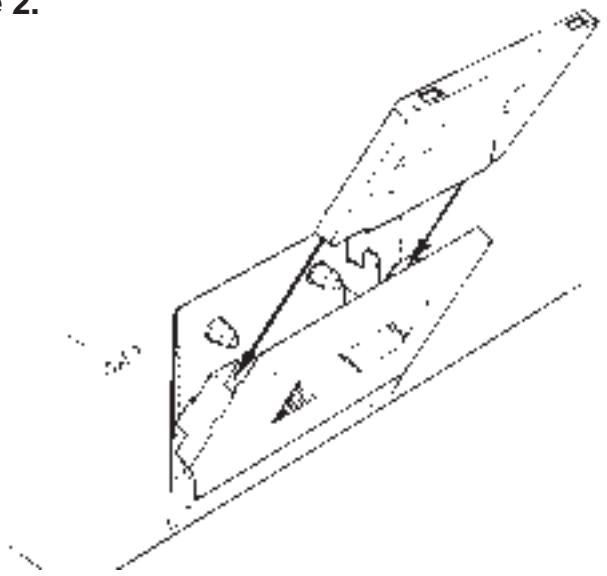
- Press the OPEN (3a or b) button to release the cassette compartment door and insert the tape with the thick edge - where the tape is exposed - downwards. The cassette tape is held in a carrier within the door assembly. Refer to figure 2.
- Press the cassette compartment door shut until a light "click" is heard. The tape is now in position.
- The tape can be removed by again using the OPEN (3a or b) button.
Please note the button doesn't work during tape travel.
- To re-set the tape counter (in the display) to "0000", make sure the tape count for the right transport is shown (indicated by a little A or B left of the counter) and change if necessary by pressing A/B (7). Then press the RESET (8) button.
- Select the appropriate DOLBY NR (14) position (Dolby NR Off, Dolby B NR or Dolby C NR, shown in display) to suit the particular tape you wish to play back. Refer to the section “Dolby B & C noise reduction systems” for more information.
- Press the transport's corresponding Normal Play (6a or b) or Reverse Play (4a or b) button to engage tape transport. The Play icon ▶ or Reverse Play icon
◀ in the display will light up to indicate the play status. - If the recording sounds dull, turn the PLAY TRIM control (18) up (clock-wise) to restore accurate highs. If the recording sounds edgy or sibilant, turn the Play-Trim down to obtain smoother treble. Refer to the section “The Play Trim Control” for further information.
- Press the appropriate STOP (5a or b) button if you wish to end play-back.
REVERSE MODE DURING PLAY-BACK:
Both transports sense when the end of one side of a tape is reached and, when Auto Reverse (15) has been engaged, will automatically play the other side of the tape. If in both transports a tape is present, the NAD 616 will first play one tape, and when finished switch to the other transport and commence playing of the other tape. Refer to the schedule overleaf for all auto-reverse and continuous play possibilities.
NOTE: Reverse Mode will default to ON after the deck has been switched off.
THE PLAY TRIM CONTROL.
Position the PLAY TRIM control in the "0" (centre detent) position for normal play-back.
Errors in high frequency response often occur in cassette recordings, especially in tapes that were recorded on one machine and are being played on another. These errors arise from tape saturation - particularly those tapes recorded on decks without HX Pro -, from biasing that didn't match the tape when the recording was made, and from differences in equalisation and head azimuth among recorders.
These errors cause mis-tracking of the Dolby NR
| With just one cassette in either transport A or B: | |||
| Reverse mode | Normal or Reverse Play direction | Playback sequence | Action |
 | Normal (▶) | side 1 | Press Normal Play (6a or b).Play-back will begin on side 1 of the cassette and finish at the end of side 1. |
 | Reverse (◀) | side 2 | Press Reverse Play (4a or b). Play-back will begin on side 2 of the cassette and finish at the end of side 2. |
 | Normal (▶) | side 1>side 2>side 1>side 2> etc.. | Press Normal Play (6a or b). After the end of side 1 is reached, playback will start on side 2. This sequence will repeat up to eight times. |
 | Reverse (◀) | side 2> side 1>side 2>side 1> etc... | Press Reverse Play (4a or b). After the end of side 2 is reached, play back will start on side 1. This sequence will repeat up to eight times. |
| With a cassette in both transport A and B: | |||
| Reverse mode | Normal or Reverse Play direction | Playback sequence | Notes |
 | Normal (▶) | side 1> side 2 side 1>side 2 side 1 > transport A> transport B> trans. A one cycle | Press Normal Play (6a or b).The transport which takes over always starts in Normal play. The cycle will be repeated up to four times. |
| Reverse (◀) | side 2 side 1> side 2 side 1> side 2 A > transport B >transport A>B | Press Reverse Play (4a or b). After having played just side 2, the current start in Normal Play. The cycle will be repeated up to four times. | |
circuits, which in turn cause the faults to be “magnified” by the circuits, often resulting in dull sound.
Play Trim is a special high-frequency play-back equalisation circuit, used to restore accurate play-back response before Dolby NR decoding takes place. Standard play-back equalisation, for correctly recorded tapes, is provided when the Play Trim control is set at the detent in the centre of its range.
When playing tapes, set the DOLBY NR selector to match the recorded tape. If the recording sounds dull, turn the Play-Trim up (clock-wise) to restore accurate highs. If the recording sounds edgy or sibilant, turn the Play-Trim down to obtain smoother treble.
NOTE: Play Trim has no effect during recording from an external source but will have during Dubbing and High Speed Dubbing.
MAKING A RECORDING.
Recording of copyrighted material for other than personal use is illegal without permission of the copyright holder.
Recordings can only be made in Transport B. As the transport can record both in Normal and
Reversed direction, a recording time in excess of 90 minutes is possible, with a brief interruption.
- Insert a tape as described in the section “Playing back cassettes” above.
- Set the DOLBY NR (14) selector to the desired type of noise reduction (no noise reduction; OFF, B or C, visible in display). Do not change the Dolby NR setting whilst the deck is recording. Refer to this chapter's section “The Dolby B & C noise reduction systems” for more detailed information.
- Press the RECORD/PAUSE (13) button; the red Record and Pause annunciator in the display will light up.
- Adjust the recording level using the rotary RECORD LEVEL (9) control and BALANCE (10) control.
Refer to this chapter's section "Recording level" for more information.
- If you wish to record on one side only of the cassette, make sure that Auto Reverse ≥ (15) has been disengaged as the deck will otherwise continue on the other side of the cassette.
- Start the recording by pressing the Normal (6b) or
Reversed PLAY (4b) button; depending on which side of the cassette you wish to record.
- If you wish to interrupt a recording whilst keeping the recording circuits and display active, press the RECORD/PAUSE (13) button again. When you are ready to resume recording press PLAY (4b or 6b). This technique is useful for omitting announcements or commercials when recording from radio or television. Make sure you press the right PLAY button. It is possible to change from Normal and Reverse direction during recording!
- To stop recording, press the STOP (5b) button.
NOTE: Play Trim has no effect during recording from an external source but will have during Dubbing and High Speed Dubbing.
RECORDING LEVEL.
The two horizontal segmented bars display the peak level of the source's signal in each channel. Adjust the record level control (9; the inner ring) by turning down (counter clock-wise) or turning up (clock-wise). There are various tape formulations - normal (I), CrO2 (II) and Metal (IV) available, each with its own specific characteristics such as saturation level. The NAD 616 senses automatically which tape type is used and adapts its settings accordingly. Too low a recording level will result in excessive tape hiss, whereas too high a recording level will result in distortion. The standard procedure is to set the recording level to accommodate the loudest part of the music, and then leave the controls alone. Set the control so that sustained sounds, e.g. a singing voice or full orchestral chord reaches the red segments (up to 4 dB). With music that spans a wide range of volume levels, this may mean that the quiet portions of the music will be recorded at a level of -20 dB or less (with no segments illuminated). This is normal.
The BALANCE control (10; the outer ring) will allow you to alter the left/right balance of a recording. When turned fully counter clock-wise, only the left channel will be recorded, whereas turned fully clock-wise only the right channel will be recorded. For normal use the control is set in the detent in the centre of its range, recording each channel with equal levels.
If you wish to erase a tape, without making a new recording, follow the procedure as described above, but turn the RECORD LEVEL (9) control fully counter clock-wise. No recording level segments will illuminate.
REVERSE MODE DURING RECORDING.
When Auto Reverse (15) mode hasn't been selected ( in the display) the recording will finish at the end of the cassette for both Normal and Reverse direction.
When Auto Reverse (15) has been selected ( in the display) the recording will stop once the end of the second side of the cassette has been reached (reverse direction). If the recording was already started in the reverse direction, than only that side of the cassette will be recorded.
NOTE: If you only wish to record side 1 of a cassette make sure that the Auto Reverse facility (15) hasn't been engaged ( in the display), as the deck will automatically reverse direction and go to the other side of the tape if the recording time is longer than the capacity of the cassette.
DUBBING
The NAD 616 is equipped with two modes of dubbing; normal and Hi-Speed. Both modes operate in the same way, but with Hi-Speed dubbing the time required is halved (the original and recording cassette run at double the normal speed). This dubbing mode is particularly suited where sound quality is of less importance, for example, with speech. If sound quality is an important consideration, than the normal dubbing mode is better suited.
During dubbing, the Dolby NR circuits don't play a role in making the copy. The copy will be encoded in the same way as the original, regardless of the Dolby NR setting. e.g. If the original was recorded with Dolby B NR, than the copy will be encoded with Dolby B NR, even though Dolby C NR or no Dolby NR was selected during dubbing. The appropriate Dolby NR can be used for listening whilst dubbing, though. Refer also to this chapter's section "Dolby B & C Noise Reduction Systems".
- Before the cassettes are inserted in the compartments, select the play (4a or 6a) and record (13 + 4b or 6b) direction (Normal or Reversed; being side 1 and side 2 of the cassettes). Check if the cassette on which you wish to copy has sufficient time capacity when compared to the source cassette.
- Select “Auto Reverse” (15; ➕ in the display) if you wish to copy both sides of the source cassette. Disengage “Auto reverse” (➤ in the display) if you wish to copy one side only of the source cassette or if you wish to record onto one side only of the recording cassette.
- Insert the original cassette in the transport A compartment as described in “Playing Tapes” and set the beginning of both the original and copying cassette.
- Leave the Play Trim (18) in the “0” position (central detent). However, if the source cassette’s sound benefited from use of the Play Trim control, set the Play Trim control to the position which gives best results, as the improvement will be copied to the other cassette. Also refer to this chapter’s “The Play Trim Control” for more information.
Using Play Trim control only has the desirable effect at the normal Dubbing Speed. When making copies in High speed Dubbing Mode set the Play Trim control to centre detent position.
- Press either DUBBING (17) or HI-SPEED (16). Both transports will start, the Dubbing and Record (and Hi-Speed if selected) annunciators will light up in the display.
- If you wish to interrupt dubbing whilst keeping the recording circuits and display active, press the RECORD/PAUSE (13) button again. When you are ready to resume recording press the proper PLAY (4b or 6b). It is possible to change from Normal and Reverse direction during recording!
- Dubbing will stop automatically once the end of either one of the cassettes is reached. By pressing STOP (5b) you can stop dubbing manually.
GB
NOTE: Turn down the amplifier or receiver when dubbing in Hi-Speed mode; as the tape speed is twice as fast there is much more high frequency energy than with normal speed and can potentially harm loudspeakers and headphones.
ACCIDENTAL ERASURE PREVENTION.
Whilst making a new recording any previous recordings already on the tape will automatically be erased. If you wish to protect a tape from being erased or re-recorded accidentally, you can remove the tape's protection tabs. This way the record function will not engage. Please note that most pre-recorded tapes commercially available already have the tabs removed. Using adhesive tape over the holes will enable the circuits to record again.
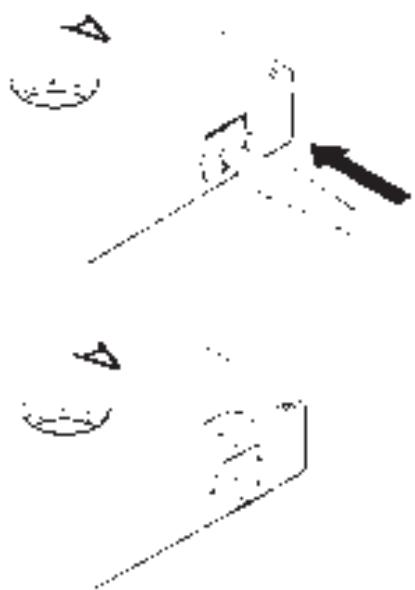
CrO2 (type II) and Metal (type IV) tapes have additional holes in the cassette housing, enabling the deck to “recognize” the various tape types. Make sure you do not cover these holes as well! Refer to figure 3.
MAINTENANCE
The bearings and other moving parts have been factory treated with special lubricants and do not need any special attention.
Dirt, dust and tape oxide can potentially damage the heads and tape guidance, besides degrading the sound quality both on play-back and recording. Parts in direct contact with the tape therefore need to be cleaned regularly.
NOTE: Make sure the receiver or amplifier is switched off before cleaning or demagnetising the heads.
CLEANING
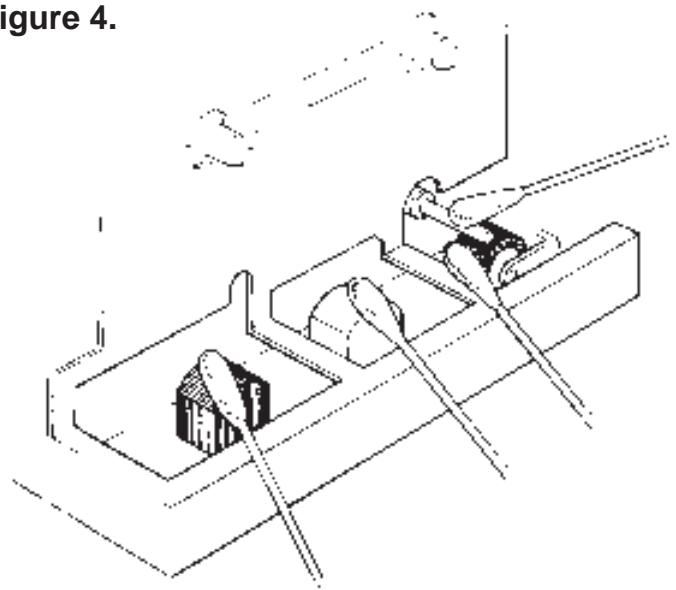
Open the cassette compartment door. At the bottom of the compartment you can see the heads and tape guidance (capstan and pinch-roller). Refer to figure 4.
Clean the heads (A & B) and the capstan (C) using cotton wool buds with pure alcohol or with a dedicated Tape Recorder Cleaner.
Clean the pinch-roller (D) using only distilled water. Never use alcohol on the roller, as the rubber will dry out. Alternatively, you can use a special cleaning cassette. Be sure to use a cassette that cleans all parts illustrated in figure 4.
DEMAGNETIZING
Parts in direct contact with the tape will become slightly magnetic over time. This magnetism will increase hiss, both during play-back and recording.
It is therefore advisable to demagnetise the heads, pinch roller and other metal tape guidance parts from time to time, using a demagnetiser or a demagnetising cassette. Follow the instructions of the demagnetiser or demagnetising cassette.
WARNING
Keep demagnetisers away from your tapes, they can accidentally erase the recordings.
Your dealer will be able to advise you and supply the proper accessories for both cleaning and demagnetising.
Dolby, HX Pro and the double-D symbol are registered trademarks of the Dolby Licensing Corporation.
PLAY TRIM was developed by NAD and Dolby Laboratories Inc.
Dolby is a registered trademark of Dolby Laboratories Ltd.
Dolby Noise reduction and HX Pro extension manufactured under license from Dolby Laboratories Licensing Corporation.
HX Pro originated by Bang and Olufsen.
INSTALLATION
1. LINE IN. (Insignal)
16. DUBBING.(bandkopiering)
16. DUBBING (CÓPIA).
| Speed Accuracy | ±1% |
| Wow and Flutter | <0.07% JIS wtd. RMS |
| <0.1% DIN wtd. peak | |
| Frequency response | 30Hz - 18kHz ±3dB |
| (Dolby NR off, Record/Playback) | |
| MPX filter reponse | Flat within 1dB to 15kHz |
| Harmonic distortion | Varies with recording level;typically <0.3% at -10dB |
| THD @ 0dB (Normal tape) | <1.0% |
| THD @ 0dB (CrO2, Metal tape) | <1.5% |
| Signal-to-Noise ratio | 58dB (Dolby NR off) |
| (Ref. 3% THD at 333Hz [biased tape] | 68dB (Dolby B NR) |
| CCIR/ARM weighting) | 78dB (Dolby C NR) |
| Channel separation | 40dB @ 1kHz |
| 35dB broadband | |
| Erase | >70dB @ 1kHz |
| Input sensitivity / impedance | 80mV/50k |
| Maximum input level | 25V |
| Output level @ 0dB | 500mV |
| Output impedance | 600 |
| PHYSICAL SPECIFICATIONS | |
| Dimensions (W x H x D) | 435 x 125 x 310 mm |
| Net weight | 5.8kg |
| Shipping weight | 7.4kg |
NAD reserves the right to change specifications without notice
"Dolby NR" and the double-D symbol are registered trademarks of the Dolby Licensing Corporation.
PLAY TRIM was developed by NAD and Dolby Laboratories Inc.
Dolby is a registered trademark of Dolby Laboratories Ltd.
NAD ELECTRONICS LTD
LONDON